Olivia ist eCommerce-Technikberaterin bei Knowband und unterstützt Händler dabei, das Beste aus Plattformen wie PrestaShop, Shopify, Magento, WooCommerce und OpenCart herauszuholen. Ihre Beiträge reichen von der Plugin-Einrichtung über die Shop-Anpassung bis hin zu Performance und Fehlerbehebung – immer mit dem Ziel, Shopbetreibern praktisches, direkt umsetzbares technisches Wissen zu vermitteln.
Bei Knowband sind wir Experten der eCommerce-Branche mit Schwerpunkt auf der Entwicklung von Plugins. Mit langjähriger Erfahrung bieten wir die besten Plugins für Plattformen wie Magento, PrestaShop, OpenCart und Shopify. Zudem entwickeln und passen wir Module individuell für Websites und Onlineshops an. Unser Team bleibt stets auf dem neuesten Stand der Branchentrends und liefert innovative Lösungen zur Verbesserung der Funktionalität von eCommerce-Websites. Mit einem kundenorientierten Ansatz ist Knowband ein vertrauenswürdiger Partner für eCommerce-Plugin-Lösungen.
The holiday season has come, and it’s the season of peak sales. Customers especially wait for the season, looking for deals, festive products, and a seamless online experience, making Christmas the perfect opportunity to boost sales and expand your customer base. However, standing out in the crowded online marketplace with competition can be challenging. This is where Knowband e-commerce plugins come in, offering a suite of tools to help your store maximise profits, engage customers, and create an unforgettable holiday shopping experience.
Whether your store is on prestashop, opencart, Magento, Shopify or WooCommerce, don’t worry. At Knowband, you get the solution for whichever platform you are on.
So let’s explore the plugins that will help your store make more conversions
1. Spin & Win: Wheel of Fortune Exit and Entry Popups Plugins
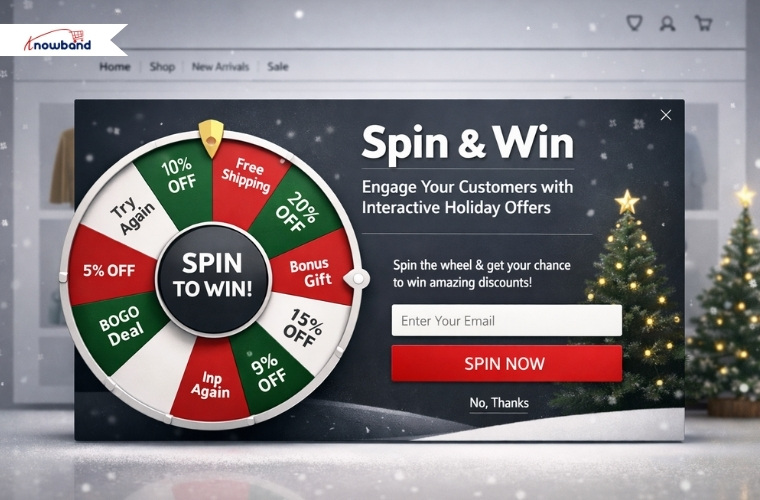
One of the most effective ways to grab customer attention during the holidays is through interactive games, which provide discount codes and offers. This Prestashop Spin & Win Addon allows you to set up a virtual “Wheel of Fortune” pop-up that appears when a customer visits your site (entry pop-up) or is about to leave (exit pop-up). Moreover, customers can spin the wheel to win discounts, free shipping, or other promotional offers. Not only does this gamified experience increase engagement, but it also encourages conversions by giving customers a fun incentive to make a purchase.
Knowband’s Presatshsop Spin & Win Module ALSO helps the customers to do email marketing as it provides email marketing tool integrations such as Klaviyo, Mailchimp, Sendinblue and many more.
During the festive season, a small discount or a holiday offer can make all the difference in turning a hesitant visitor into a paying customer.
2. Website Decorator: Make Your Store Christmas-Ready
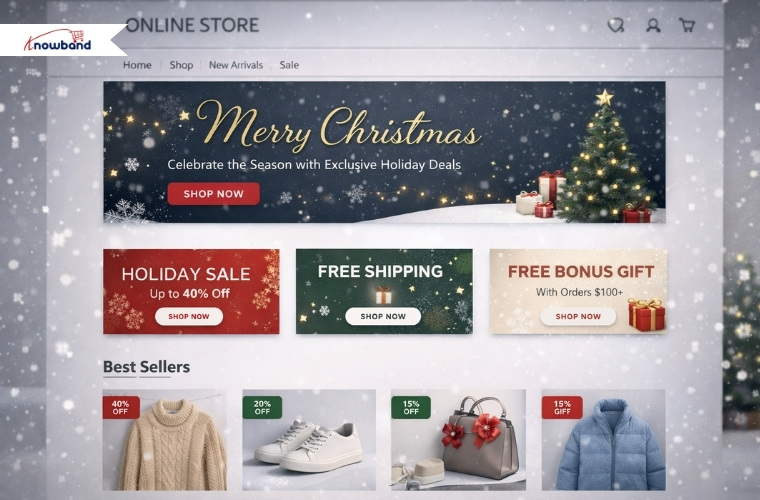
Creating a festive atmosphere on your online store is essential for drawing customers in and enhancing their shopping experience. The Prestashop Website Decorator module from Knowband allows you to transform your store into a holiday wonderland with Christmas theme decorations in the header, footer or random place. From snow effects and twinkling lights to festive banners highlighting sales, these visual enhancements make your store feel seasonal and inviting.
A well-decorated website not only captures attention but also encourages customers to spend longer browsing times and increases the chances of purchases. Customers are more likely to spend time exploring a store that feels alive with holiday cheer.
3. Gift Card Manager: Give Your Customers the Gift of Choice
On the Christmas occasion, sales of gift cards increase as customers want to gift the gift cards to their friends, family members and relatives. Thus, adding a gift card option will enhance the sale and overall purchase experience for the customers.
Knowband has developed this module especially for this purchase. This Prestashop Gift Card Manager also encourages repeat visits, as recipients are likely to return to your store to redeem their credit. By integrating this module, your store can cater to last-minute shoppers and increase overall sales while providing a convenient gifting option.
4. Product Stickers Plugin to Highlight Festive Deals
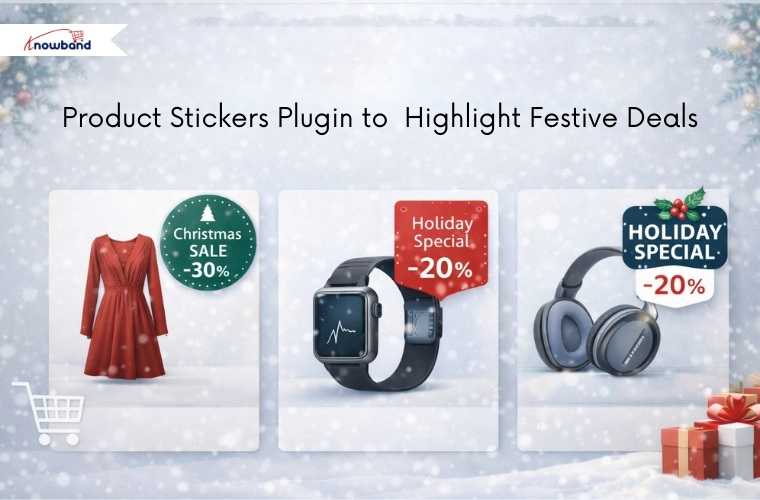
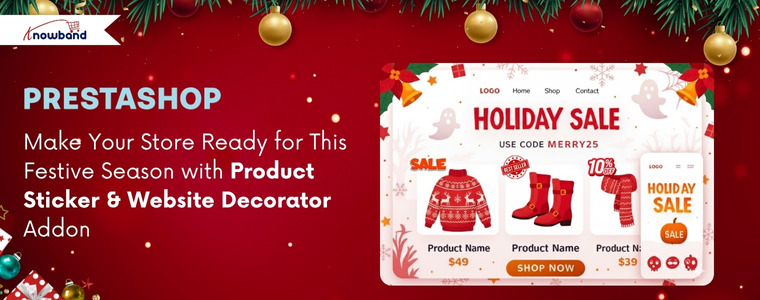
Standing out in a crowded online store is crucial, especially during high-traffic periods like Christmas. The Knowband’s Opencart Product Sticker and Label Extension helps you add eye-catching stickers on products, highlighting special offers, urgency discounts, or festive tags like “Christmas Sale” or “Holiday Special.” Moreover, these stickers make it easy for customers to identify the best deals at a glance, guiding their purchasing decisions and boosting sales. Even a small visual sign like a festive sticker can have a significant impact on customer behaviour, encouraging them toward products you want to promote during the holiday season.
5. Abandoned Cart: Remind your customers
Adding a reminder to the customer who left their items in the cart will be a game-changer. Before that, a store owner has to know the customer who abandoned their cart. No matter if your customer was an existing customer, a new customer or a visitor, with the setup cron in Prestashop Abandoned Cart, it shows the abandoned cart added in real time with statistics.
By automatically sending reminders and offering discounts to customers who leave items in their cart, you can encourage them to complete their purchase. During the holiday season, a timely reminder combined with an exclusive Christmas discount can make all the difference. Therefore, this Opencart Abandoned Cart Reminder Plugin ensures that you don’t miss out on valuable sales opportunities and helps maximise revenue during your busiest season.
Knowband for All Platforms
Knowband’s e-commerce solutions are designed to be versatile and compatible with major platforms like PrestaShop, OpenCart, Magento, Shopify and WooCommerce. This cross-platform compatibility ensures that no matter which saas platform you are using, you can implement these modules seamlessly and take advantage of their features. From small businesses to large online stores, Knowband’s plugins provide the flexibility and scalability needed to succeed during the holiday season
Final thoughts
Christmas is the perfect time to boost your online store’s revenue, but it requires the right strategies and plugins to make your store stand out. Hence, the plugins like Abandoned Cart, Gift Card Manager, and Website decorations not only give your store a professional vibe but also increase sales & conversions.
These modules not only enhance the shopping experience but also help you maximise profitability during the holiday season.
No matter the size of your catalogues or the platform you use, using knowband’s plugins, you can make this Christmas your most profitable yet. Transform your store into a holiday shopping destination and watch your sales skyrocket with these powerful, easy-to-use e-commerce solutions
Lebrun, a leading French supplier of high-quality kitchenware, drinkware, tableware, and professional equipment, has been a trusted partner for restaurants, hotels, and catering businesses across France. With a wide range of products from elegant glassware and cutlery to cooking necessities and essentials, Lebrun prides itself on providing durable, reliable, and professional-grade solutions tailored to the needs of the industry.
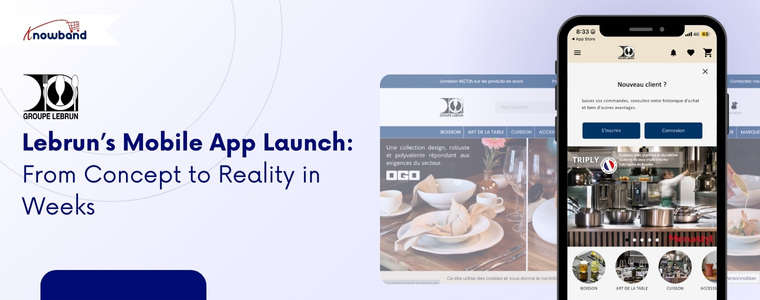
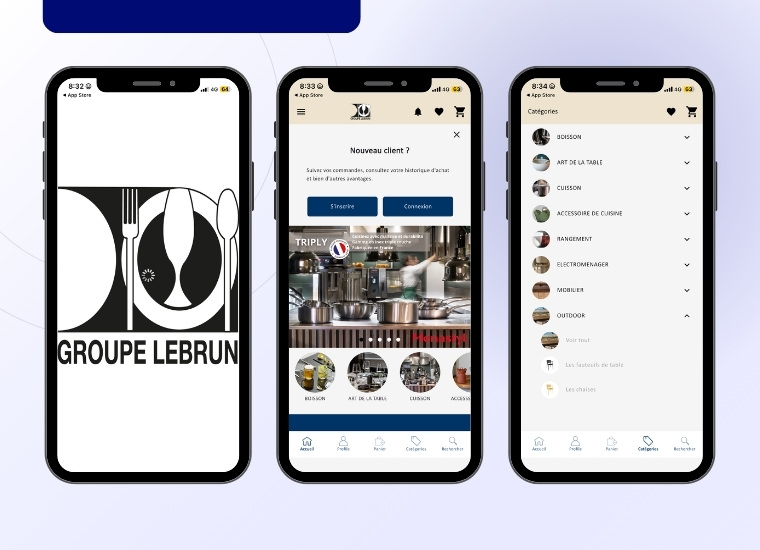
To meet the growing demand for easy accessibility and streamline the purchasing process for its clients, Lebrun partnered with Knowband to develop a mobile app using Prestashop Mobile App Builder. The mobile app makes it easy for customers to browse products, place orders, and manage inventory, with quick access to the catalogue, real-time stock updates, and a smooth ordering experience for customers.
This collaboration showcases how a mobile app builder helped Lebrun operate more efficiently
Initial Challenges that Lebrun Faced
Over time, Lebrun noticed a decline in customer interaction on its online store.
More users were accessing the website through smartphones and tablets. While the website was functional, it did not fully meet the expectations of professional users who required speed, simplicity, easy accessibility, and efficiency.
Key challenges:
A growing volume of mobile users with lower conversion rates compared to desktop users
The need for a faster and more intuitive purchasing experience for repeat orders
Limited ability to engage customers directly through mobile-first communication channels
Difficulty encouraging frequent reorders from professional clients
The wish to strengthen their brand presence and loyalty among existing customers
Most customers nowadays prefer to use a mobile app instead of a website.
Partnership with Knowband
To address these challenges, Lebrun partnered with Knowband to accelerate the launch of their mobile app. As a result, we offered the Prestashop Mobile App Builder, a solution designed to make m-commerce simple and efficient for Prestashop store owners.
The primary objective was to transform the existing Lebrun store into a fully functional, high-performance mobile application while, at the same time, maintaining seamless integration with the store.
To achieve this, the Prestashop Mobile App Builder Addon enabled Lebrun to launch a native mobile app by directly synchronising with their Prestashop backend. Consequently, this ensured real-time updates for products, pricing, stock availability, and customer accounts, seamlessly syncing data from the website to the mobile app.
In addition, the overall process of creating and launching the mobile app was extremely straightforward. First, Lebrun installed the Mobile App Creator module from the Prestashop backend. Immediately after installation, demo apps were available for testing purposes.
The Impact of KnowBand’s Mobile App on Lebrun Business
Native iOS and Android apps for Lebrun’s store, so customers can shop easily on any device.
Real-time sync with the existing store, keeping products, prices, and stock always updated.
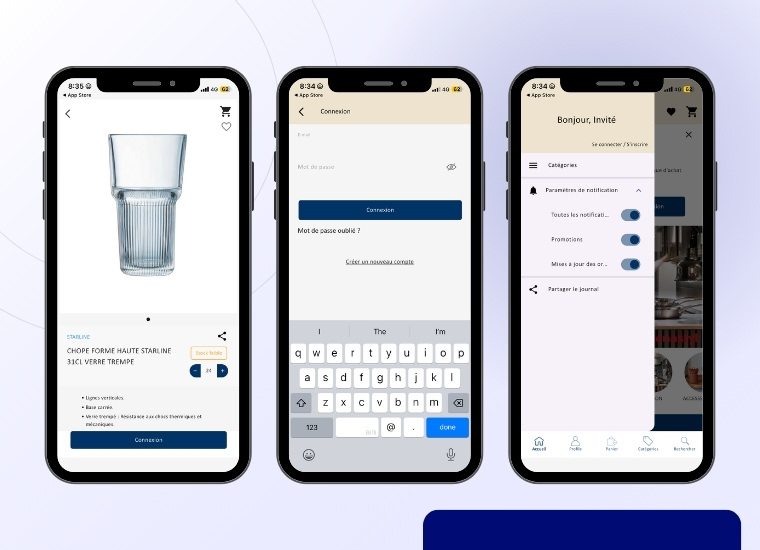
Secure login and account access for both B2B and B2C customers.
Fast product search and easy navigation, even with a large catalog of items.
Simplified and smooth checkout process, just like the website.
Automatic sync of all shipping and payment methods, so nothing gets missed.
Push notifications for order updates, promotions, and important announcements.
Branding and design matched Lebrun’s professional identity for a consistent look.
Easy and efficient implementation, allowing the app to go live quickly without major technical changes or extra development work.
Want to launch your mobile app?
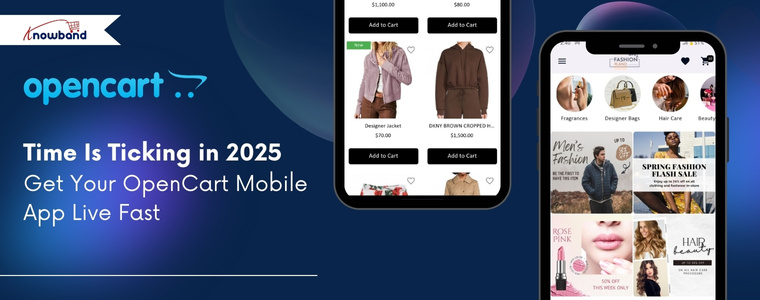
Discover the Opencart Mobile App Builder and get your app live in just one week!
Build, customise, and launch your mobile store effortlessly
The mobile app was designed to complement Lebrun’s existing store. So that customers could log in using their existing credentials, access personalised pricing, and place orders with minimal friction. With the help of Knowband’s Mobile App Creator, the mobile app’s performance-focused design significantly reduced loading times compared to the mobile web experience.
ush notifications were introduced as a new communication channel, enabling Lebrun to inform customers about order confirmations, delivery updates, special offers, and newly available products.
How KnowBand Delivered Real Business Impact
After the launch of the Android & iOS mobile apps, Lebrun experienced noticeable improvements across key performance areas:
Improved the mobile conversion rate for customers
Higher customer retention, especially among clients who place frequent repeat orders
Increased order frequency, as reordering became quicker and more convenient
Stronger customer engagement through timely push notifications
Last but not least, enhanced brand visibility, with Lebrun’s mobile app becoming a permanent application on their mobile.
Hence, the Prestashop Android & iOS mobile app became a key driver of conversions, seamlessly integrating with the existing web store and supporting Lebrun’s B2B growth goals
“With the PrestaShop Mobile App Builder, we can now offer a faster and more convenient mobile ordering experience. The mobile app fits perfectly into our store and strengthens our relationship with our clients,” said Lebrun Team.
Conclusion
By leveraging KnowBand’s PrestaShop Mobile App Builder Module, Lebrun successfully transformed its professional website into a powerful mobile app. The app not only enhanced overall performance but also strengthened customer loyalty and effectively addressed the evolving needs of B2B buyers.
If you’re running a business and want to extend your website with a mobile app, we’ve got you covered, whether your store is on OpenCart, PrestaShop, WooCommerce, or Magento 2.
The Knowband AI Content Generator and Translator is a next-generation plugin built to empower e-commerce merchants with smart, automated AI content creation and translations. Designed with cutting-edge AI capabilities, this content generator integrates seamlessly with Claude AI, ChatGPT AI, DeepSeek AI, and Gemini AI to deliver exceptional content quality across your entire online store.
Whether you need SEO-optimised product descriptions, engaging titles, category content, or precisely translated product details, this advanced AI Module ensures accuracy, creativity, and efficiency, making it an essential need for every PrestaShop merchant in 2026 and beyond.
It is interesting that this AI Content Generator and Translator is available for Prestashop, Opencart & WooCommerce. So no matter which platform you are using but this can be a perfect plugin for your module’s wardrobe.
Key Features of Prestashop AI Content Generator & Translator
By leveraging industry-leading AI engines, the PrestaShop Content Generator Addon creates high-quality, SEO-friendly content for catalogues. These catalogues include the products, categories as well as CMS pages.
Furthermore, the module generates the product descriptions, meta titles, meta descriptions and translates all the generated content as well as existing content, including product titles.
This ensures that every piece of content your store publishes maintains authenticity, structure, and SEO relevance, while significantly reducing manual writing time.
Advanced Multilingual Translation
If your store has more than one language, even 10 or 20. The Opencart AI Content Generator can now translate the content into all languages.
Moreover, you get to choose the language in which you want to translate the content.
Popular & Powerful AI Engines Combination
With seamless support for Claude, DeepSeek, Gemini, and ChatGPT AI models, it exhibits variety to select. Additionally, Store owners just need the APIs for each AI Model to enable the functionality of the WooCommerce AI Content Generator & Translator Plugin.
The Knowband Opencart AI Seo Powered Extension allows store owners to generate high-quality content almost instantly, boosting productivity and ensuring every product detail is clear to customers clearly and effectively.
Backed by smooth API integration with Claude AI API, Gemini AI API, DeepSeek API, and ChatGPT API, merchants enjoy an uninterrupted and hassle-free workflow.
Selection of Engines within an AI Model
Apart from these 4 AI Engines, we also give the option to select their sub-engines, in which merchants can choose from a collection of AI engines, including:
We have recently released the new update, which includes the CSV File content Generation, in which you can generate & translate the content for bulk. You just need to add the product ID and map the 1 and 0 to the prompt column in your CSV File. You can read our documentation of the AI Content Generator & Translator for more details.
Looking for an AI Assistant for your store? Then wait,
Meet the PrestaShop AI ChatBot Module, your store’s new 24/7 sales assistant!
This powerful chatbot instantly answers customer questions, guides shoppers to the right products, and increases conversions without any effort.
prompts on individual pages. So it can be a game-changer for the store owners who have unique products and want to generate content for individual.
What’s more is that Knowband also provide additional prompt options in the individual pages, in which store owners can add an extra or additional prompt for a product.
Customizable Prompts
We provide the separated prompt for each option, like Generate Product Description, Translate Category Meta titles and many more. So knowband provides a separate prompt for each option for Products, category and CMS Pages, which can be easily edited by the store owners.
The Artificial Content Generator provides multi-model AI support, seamless translation, bulk automation, and SEO-optimised content generation. Therefore, Knowband delivers a comprehensive AI strategy that boosts productivity, global reach, and overall store performance.
Whether you’re preparing for the demands of 2026 or aiming to scale your operations today, this AI-powered module equips your PrestaShop store with all the tools needed to stand out in a competitive digital marketplace.
Every e-commerce merchant dreams of reaching international customers, but the process of doing so can be complex. Dealing with listings, inventory synchronisations, and filling orders through various channels can become a nightmare. Hence, to connect with the huge customer base that eBay serves, Knowband provides a simple and trusted bridge, the PrestaShop eBay Marketplace Integration Module.
The eBay Prestashop API Integrator links your PrestaShop store to eBay, allowing you to list products, coordinate stock, and handle orders without having to leave your PrestaShop dashboard. Not only that, but this eBay integrator also automates and eliminates the manual work and enables you to sell without switching from your store.
[New Feature Alert] Keep Your Inventory Perfectly Synced with eBay with the Latest Version 2.2.1
We are excited to introduce a powerful new feature in the PrestaShop eBay Marketplace Connector Addon: Inventory Comparison & Rate Limits
The Inventory Comparison feature in the knowband PrestaShop eBay Marketplace Connector Addon is designed to keep your store’s stock perfectly in sync with your eBay listings. It helps you avoid overselling, reduces manual inventory checks, and ensures accurate product availability for your customers. This feature comes with two main functionalities, each powered by dedicated cron jobs
This cron job is responsible for fetching the most up-to-date inventory directly from your eBay store. By regularly fetching the current stock levels, it ensures that your store always has accurate and fresh data for comparison.
Furthermore, the Inventory Comparison feature provides a seamless and reliable way to monitor and manage your inventory across platforms, keeping your e-commerce operations smooth and efficient.
2. Rate Limit Monitoring of APIs
To ensure your eBay integration continues to run smoothly, the Rate Limit Monitoring feature tracks your API usage in real time. It displays the number of API calls made and alerts you when you are approaching the usage limits. This proactive monitoring helps you avoid sync issues, maintain seamless operations, and ensure that your PrestaShop store and eBay remain perfectly connected.
Why Upgrade?
These enhancements, including Inventory Comparison and Rate Limit Monitoring, give the store owners greater control over your inventory and integration, reduce manual work, and help you prevent costly errors. Upgrade to Knowband’s Prestashop eBay Marketplace Addon version 2.2.1 today to take full advantage of these improvements and streamline your PrestaShop-eBay operations like never before!
Benefits: A Smarter Way to Sell Globally
PrestaShop eBay Marketplace Integration Addon makes selling globally easier as it centralises control, speeds up the process, and provides accuracy.
Firstly, merchants save time. All the product listings and order updates occur automatically between the two platforms. There will be no duplicity of work or mismatch of data. Secondly, it minimises risk. Live synchronisation provides uniformity in pricing and stocking of the products in the two sites. Otherwise, there is a risk of overselling and unhappy clients. Lastly, the Prestashop eBay Integrator Addon expands reach. A linkage to eBay will allow the PrestaShop retailers access to millions of buyers worldwide with a few simple clicks.
Concisely, Knowband’s Prestashop eBay Integration Addon is a solution that simplifies the complicated task of managing cross-platforms by providing a single workflow that can be trusted.
Key Features of the PrestaShop eBay Marketplace Integration Module
Stress-Free Profile Management
Store owners can group the products by category, shipping rule, and pricing condition. This product profile determines the way products will look and act on eBay. Moreover, you can create multiple profiles and can easily manage them from the admin panel.
Automatic Attribute and Category Mapping
The module can match your PrestaShop categories and attributes to eBay so that all products will display correctly and to the right people. Hence, such mapping minimizes listing errors as well as enhances the visibility of your products.
Bulk Product Listing
Moreover, using the eBay Prestashop Connector, you can add hundreds of products at once, instead of adding them individually. Hence, it makes the process fast and efficient.
Seamless Order Synchronization
All of your orders made on eBay are automatically displayed on your PrestaShop dashboard. Hence, merchants can manage and update statuses directly from the admin panel without switching platforms.
Multi-Account Management
If you sell in multiple countries and have multiple eBay stores, the addon helps you to have multiple eBay accounts on one PrestaShop admin panel.
Activity Logs and Error Tracking
Moreover, all the synchronisations and updates are logged. In case of an error, like a listing rejection, the system highlights it, and you can fix the error easily and carry on.
Integrate an AI Chatbot on Your Store Today
Let AI handle your customer queries and turn your store into a professional hub with the Prestashop AI ChatBot Addon
First of all, you link your eBay account to your PrestaShop store. You can access the API credentials that are required to run the Prestashop eBay Marketplace Integration Addon from the eBay developer account. After the setup, you can choose the country by connecting eBay seller accounts & enabling tokens.
Step 2: Creation and configuration of the profile
Here, you create profiles based on categories for products you want to add. Next, you can also select a custom or eBay shipping profile and set price rules. As a result, this configuration ensures that items belonging to the same category are presented with the same settings on eBay.
Step3: Order Management & status
Here, in order management settings, admins can sync all the orders received on eBay. And in order status settings, you can map the default, paid, and shipped order statuses.
Step 4: Product Listing
You can see all the listed products with their status directly from eBay Prestashop Connector’s backend. Moreover, you can also disable the products, relist them, and revise them as well according to the needs.
Step 5: Automation and Synchronization
Once listed, the Prestashop eBay Marketplace Integration Module automatically controls the real-time information between platforms. Such as the stock level, prices, and the order details. When customers purchase on eBay, the inventory automatically updates in PrestaShop. Similarly, updates in PrestaShop change instantly on eBay as well. Additionally, in synchronisation settings, you can sync, relist, and update your store’s products, orders, and inventory with just one click.
Conclusion
In the e-commerce competitive environment, it is not a choice to sell on many platforms but rather a necessity. Knowband offers the PrestaShop eBay Marketplace Integration Module that allows merchants to control cross-platform selling in a non-technical way.
With automating listings, real-time stock synchronisation, multiple accounts, and activity tracking, the Prestashop eBay API Integration Module provides merchants with full control.
Besides the Prestashop eBay Integration Addon, Knowband also offers powerful marketplace integration with Google Shopping and Etsy, which allows merchants to increase their visibility even more. These modules help sync product feeds, optimise listings, manage inventory, and simplify order handling, which makes multi-channel selling a hassle-free and more profitable experience across leading international platforms.
For more information, check out the video tutorial
Check out our client success stories and see how Kriluma launched their app in just one week using Mobile App builder!
Connect with us on LinkedIn and watch your store grow
You may also like to read: Learn how this addon helps you connect your PrestaShop store with eBay to manage listings and orders more smoothly.Read More
This is a very common scenario that every store owner is used to. A customer will look around the store, add products to the cart, but will not make a purchase. This is usually the case in online shopping, and most of the time, it’s not because they don’t want to purchase the product. They just want to make purchases later or to compare with others and then make a choice.
Introducing the PrestaShop Save For Later Addon by Knowband, which provides customers with that very opportunity. Not only that, this interesting addon allows customers to save the products that they like and visit at any time they are willing to purchase the liked item. This minor detail has a significant impact on the store since it reduces the number of abandoned carts and makes the buyers feel that the store is closer to them.
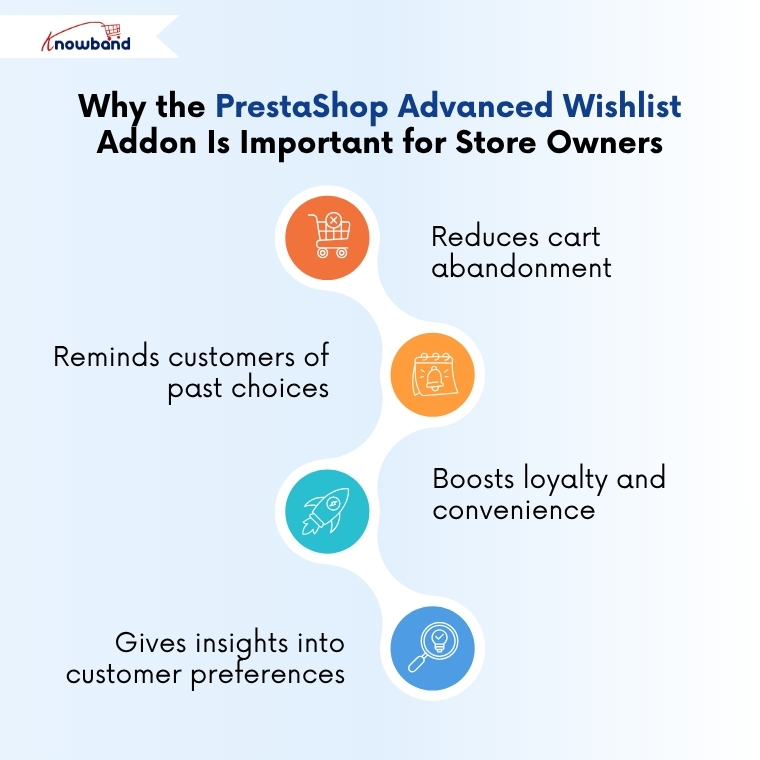
Why the PrestaShop Advanced Wishlist Addon Is Important for Store Owners
Timing is very critical in an online business. A lot of buyers take a long time to make purchases, and when they are unable to find the products again, they usually forget them forever. That is the way potential sales are lost.
The PrestaShop Advanced Wishlist Module ensures that this is not the case. With the option to save for later, your store will always be on the mind of the customers. The customers are able to see what they have saved anytime and purchase whenever they are ready.
This module not only enhances the user experience but also boosts sales and creates long-term loyalty.
The following is how it helps the store owners:
It minimises cart abandonment by keeping the shoppers engaged even after leaving the site.
Moreover, every time a customer visits the site, the module reminds them of their choices constantly.
It increases loyalty as it shows that customer convenience is important to your store.
Moreover, it also provides admins with an analysis of customer tastes and preferences.
Therefore, the PrestaShop Wishlist Addon by Knowband is not just a nice feature, but it is a strategy that will make you get closer to your customers.
Main Features of the PrestaShop Wishlist Module
The PrestaShop Save For Later Addon is an easy-to-use solution with multiple features that facilitate shopping and the management process.
The module works smoothly on all devices, like desktop, mobile & many more. So whether your customers are on mobile or desktop, or even tablet, this wishlist feature will work the same on all devices.
This Prestashop Advanced wishlist addon provides easy-to-use configurations that a store owner can use without having any extra knowledge. Furthermore, it provides the three features, including save for later, recently viewed, and recommended products. Not only that, but store admins have the authority to change their colour or fonts and many more.
Additionally, Store admins can now easily provide the social sharing option, where customers can share their saved products with friends via WhatsApp, Facebook, or Twitter.
Lastly, store owners can get useful analytics with this module. They can analyse which product is most saved, the interests of customers, and which product eventually turned into sales. Hence, this data helps in strategising marketing campaigns and ensuring better stock management.
And the best part? PrestaShop Favourite Product List Addon by Knowband is very simple to install and needs no technical skill or coding.
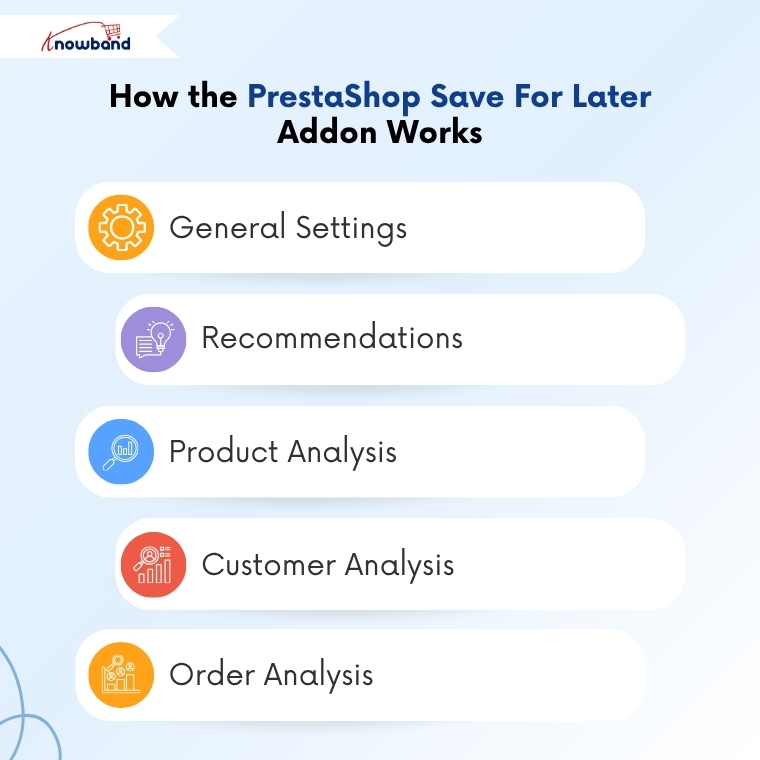
How the PrestaShop Save For Later Addon Works
General Settings
First, the admins can enable/disable the Prestashop save for later addon with one click. Then, they can enable/disable the compatibility with the PrestaShop GDPR toggle. Admins have the option to adjust the border shade, modify the buy button colour, change the bar’s background, and set the pagination limit. Moreover, admins can also customise the text and visibility of the save for later, recently viewed, and recommendations sections. Finally, in general settings, you can enable/disable social sharing for Facebook, WhatsApp, and Twitter.
Recommendations
Here, admins are able to choose what products to display in the recommendations in the frontend. The first one is that they can choose Banner, where they can add a banner, title, and a URL that will appear at the frontend. Then you can choose the Related Products to be displayed in the recommendation section.
Product Analysis
Here, admins can filter the products added to the save for later list by customers. They can check the number of products from which categories are being shortlisted in a tabular and graphical manner. Moreover, admins can download product listings in CSV format that they can easily manage and keep records.
Customer Analysis
Here, admins can examine the product data from the save for later list of customers. Admins can view the number of products that have been added by the customers, when they added them, and whether they made a purchase or not. Besides, they are also able to filter the customers and export their CSV file.
Order Analysis
Similarly, here in the order analysis section, admins can analyse the order status of the products shortlisted by the customers. Here as well, you can filter and export the CSV file of the data.
Hence, Knowband’s PrestaShop Advanced Wishlist Addon gives the store owners complete authority to know their customers better and improve their sales process.
The PrestaShop Save For Later Addon by Knowband is an easy-to-use but powerful solution that helps merchants keep customers interested even when they are not ready to purchase. It creates trust, enhances customer experience, and also provides store owners with valuable information about their customers ‘ likes and dislikes.
Every small improvement is important in the current competitive world of e-commerce. Through this module, shoppers can save items, revisit them, and make their purchases easily whenever they are ready. Hence, store owners make more conversions and enhance interactions.
Therefore, to minimise cart abandonments and ensure that your customers will visit your store again, Knowband’s PrestaShop Wishlist Addon is the right solution. It is simple, effective, and designed to expand your business smartly.
Browse more PrestaShop addons and take your store to the next level, if you need assistance, email us at support@knowband.com
The world is going mobile, and so are the shoppers. If your OpenCart store is not yet optimised for mobile shoppers, you are missing out on huge sales. The OpenCart Mobile App Builder by Knowband is a solution that allows you to bring your online shop directly to your customers’ phones, supporting both Android and iOS devices.
You do not have to write code or hire developers. With a few clicks, you will be able to start a professional, fast, and responsive OpenCart eCommerce Mobile App Builder, which will stay synchronized with your website in real-time.
Why Store Owners Need an OpenCart Mobile App Maker Addon
Shoppers love convenience. They make more frequent purchases when they can shop using a mobile application. The Android and iOS Mobile App Builder Addon for OpenCart allows you to give them that experience.
Your mobile app will keep your products in your customers’ pockets. You can share them with offers, their order, and abandoned cart details with push notifications. Moreover, the mobile app provides quick and easy checkout. Hence, with all this, you can build long-term relationships with your customers.
Data indicate that application shoppers spend three times more time shopping than web shoppers. Hence, stores with apps record more frequent re-orders. This is why the OpenCart Mobile App Maker Plugin by Knowband is one of the most intelligent additions to your online business.
Key Benefits of Using the OpenCart Android & iOS App Builder Extension
OpenCart Android App Builder Extension by Knowband is used by thousands of store owners because of its great benefits, as follows:
Boost Conversions: Apps convert better than websites.
Build Loyalty: An app keeps your customers connected as they feel comfortable using a mobile app instead of a website.
Increase Visibility: Reach Android and iOS users through app stores.
Save Time: Moreover, you can manage everything from your OpenCart dashboard. Hence, no need to change platforms.
AdMob Integration: You can add advertisements in various pages of your app with AdMob integration, which this module provides for some extra income.
Thus, whether you’re just starting or managing a big OpenCart store, Knowband’s Mobile App Builder Plugin for OpenCart is the simplest way to go mobile.
Features That Make the Mobile App Builder for OpenCart Powerful
The OpenCart Mobile App Creator by Knowband is full of features that enable you to manage your app with ease and efficiency:
No-Code Setup: You don’t need any technical expertise to install and configure the module.
Real-Time Store Sync: Products, categories, and stock are automatically synchronised between the website and the app, thanks to Knowband’s OpenCart Mobile App Builder Module, which provides real-time sync.
Multi-Device Compatibility: Moreover, the addon is compatible with all Android and iOS devices.
Push Notifications: You can use push notifications to share festival offers, new products, orders, and more.
Easy Checkout Integration: Moreover, the module provides a quick and easy checkout process.
Personalised Style: The store owner can easily customise the home page layout elements, like adding products, categories, banners, and many more, to fit their brand.
Multi-language and Multi-Currency Support: In addition, with the support of multiple languages and currencies, you can sell internationally with ease.
In short, it is not just a mobile app; Knowband’s No-code App Builder puts your whole store in the hands of your customers in days.
How the OpenCart Mobile App Builder Module Works
The setup process of the OpenCart No Code Mobile App Builder Plugin is extremely easy:
General Settings
After installation, you will first go to the configuration settings on the module, where you can turn the entire module on or off with just one click. Next, you can enable/disable the spin and win module integration, logo, fingerprint login, phone number registration, sign-in/login popup, and more. Here, you can also customise the font and colors of the buttons and page.
Push Notifications
Here, you will first add a JSON file to enable push notifications. After which, you can enable the notification setting and add a custom notification message and title for created orders, order status, and abandoned carts. Moreover, in push notification settings, you can see the notification history, and you can share an instant notification from there with a clickable image.
Payment Method
Here, you can add multiple payment methods that are added to your website. As a result, it will support all the payment methods that your default website supports. Not only that, you can add the payment option for the backend configuration, too.
Home Page Layout
Here, you can personalise the entire home page by just dragging and dropping multiple elements on the page, such as a square banner, a grid banner, a countdown banner, a login/signup popup, a recently accessed product, and more.
GDPR Settings
This OpenCart Mobile App builder includes features that support GDPR requirements, such as user data access, deletion requests, and consent management. Moreover, the plugin provides synchronisation between CMS pages, which helps the store owners to export any CMS data to the GDPR Page.
Advertisement Settings
Lastly, the No Code Mobile App Builder for Opencart allow the store owners to add advertisements on home, product, category, and CMS pages. This helps in increasing revenue and boosting sales.
Conclusion
In the modern world, having a website is nice, but having a mobile app is better. OpenCart Mobile App Builder by Knowband is a product that helps in developing Android and iOS apps in small duration of time, without any coding. The mobile app is automatically synchronized with the website, compatible with all devices, and it helps you to sell more.
Hence, if you want to boost sales, expand your market, and provide a more convenient shopping experience, it is time to upgrade your store.
As the holiday season and special occasions like Thanksgiving, Christmas approach, online store owners have a golden opportunity to grab customer attention and boost engagement through visually appealing website decoration like Christmas themes, New Year’s themes, etc. Just as physical stores decorate their stores for Christmas or Valentine’s Day, your digital store should reflect the festive spirit. As this strategy isn’t just about aesthetics, it’s a smart UI optimisation technique that makes your website feel dynamic, relevant, and occasion-ready, ultimately driving customer focus and a positive shopping experience.
How the Themed Website Decoration Effects
Website decoration transforms a standard user interface into an immersive shopping environment. By setting themes according to occasions like Christmas, New Year’s, or Valentine’s Day, you create a seasonal vibe that encourages customers to browse and buy. Moreover, visual effects increase dwell time and make the shopping experience more memorable. For PrestaShop store owners, the Knowband PrestaShop Website Decoration Effects module offers a comprehensive solution to implement these stunning visual changes effortlessly.
How The Sticker Helps in Enhancing the Store’s Look
Adding the stickers on your product can increase the emergency of purchasing the product. Just suppose if you have applied a sticker as a Christmas sale only, then people will know that this product is only available for the Christmas festive.
Therefore, Knowband has introduced this Prestashop Product Sticker & Label Module only for this festive season.
Key Features of the Advanced PrestaShop Website Decoration Effects Addon
The module provides a rich set of features, giving the store admin granular control over the decorative elements and their display.
1. Predefined Diverse Visual Effects: The module already offers the visual effect templates like snow effects, which contain two sub-templates. Let’s go through these templates
Snow Effect 1 (Traditional Flakes): The Prestashop Christmas Decoration Module allows the store owners to customise the colour, maximum flake size, number of flakes and speed range.
Snow Effect 2 (Shape Flurry): In this template, instead of standard snowflakes, store admins can display custom characters or shapes like hearts for Valentine’s Day or other thematic elements. Not only that, but you can also customise the height, frequency, speed, size, wind drift, and rotation of these falling elements.
2. Flexibility of Displaying Decorative Elements: Additionally, the Prestashop Website Decorator plugin offers four pre-defined headers and eight footer elements, with the crucial option to add new, customised elements. Additionally, random elements are perfect for light decorations, allowing for both static or moving effects, and complete control over their position.3. Smart Display & Timing Control. This feature allows you to fully customise when, where, and how seasonal or festive effects appear on your store. You can theme decorations for any occasion, choose specific pages for display, schedule start/end times, control how often visitors see the effects, and manage mobile visibility, all ensuring a visually engaging yet smooth shopping experience.4. Driving Sales with Discount Strips: The Prestashop Website Decorator Module, beyond pure decoration, the module integrates a sales strategy by offering a discount coupon strip.
Add Festive Stickers This Season to Boost Your Store’s Sales
Boost sales with festive stickers like Thanksgiving, Christmas, New Year & more! Give your store a festive vibe.
Key Features of the PrestaShop Product Sticker & Label Module
Easy Sticker & Label Creation: Using the Knowband Prestashop Product Sticker Module, you can create attractive product stickers such as New, Sale, Hot, Featured, Limited Stock, and more without any coding skills.
Pre-Designed & Customizable Templates: Knowband’s Prestashop Sale Stickers & Label already includes predefined stickers. Furthermore, store owners can easily choose from ready-made sticker designs or upload their own images to match their store’s branding.
Automatic Sticker Assignment: Most interestingly, store owners can set rules to automatically apply stickers to products based on conditions like price, stock, new arrivals, discounts, categories, and more.
Manual Assignment Option: If you want to add stickers to specific products manually, then do not worry. The Knowband’s Prestashop Product Sticker Addon allow the store owners to assign stickers to any product page whenever needed for special promotions.
Multiple Sticker Positions: Lastly, store owners can display stickers in various positions on product images, top-left, top-right, bottom-left, bottom-right, or custom coordinates, depending on your requirements.
Conclusion
By leveraging the PrestaShop Website Decoration Effects module along with the Prestashop Product Sticker & Label Add-on by Knowband, store owners can effortlessly enhance both the visual appeal and promotional impact of their site. Festive decorations create a captivating themed experience, while smart product stickers highlight key offers, new arrivals, and special deals, together boosting customer engagement, improving product visibility, and ultimately driving more sales.
For more information about features, benefits, and setup, visit https://www.prestamarketplace.com and explore how you can turn your Prestashop store into a professional store with Knowband Plugins.
In today’s fast-moving world of e-commerce, customers expect quick answers and smooth experiences from the store. Even for the smallest and simplest questions, people rely on intelligent systems that respond instantly and accurately. We wanted to develop something that incorporates advanced technologies, but you can use it without needing any Prior Knowledge. So, the PrestaShop AI-Powered ChatBot Module gives your store exactly that: a smart, always-available virtual AI assistant that can guide your customers at any time of the day.
Powered by advanced OpenAI technology, this chatbot delivers natural, human-like responses in real time. Moreover, PrestaShop Chatbot Using OpenAI ChatGPT helps customers find products, understand prices, check stock, and even get updates on their orders, all without needing human support.
With easy setup and powerful features, this PrestaShop AI Module is designed to improve the overall shopping journey and increase your store’s conversion rate.
This module brings the future of customer service directly into your Prestashop store, helping you serve visitors, customers faster, smarter, and more efficiently.
2. Key Features of Prestashop AI ChatBot Module
[New] Vector Search Integration
The integration of vector search with Qdrant enhances the PrestaShop chat plugin by enabling context-aware searches that go beyond exact keyword matching. By interpreting the intent behind user queries, the system delivers more accurate search results and personalised product suggestions, helping customers quickly find what they are truly looking for.
[New] Integration with Gemini, Claude, and Deepseek
The platform now supports seamless integration with Gemini, Claude, and Deepseek, expanding its AI capabilities and data retrieval options. This allows users to leverage advanced AI models for smarter search, improved recommendations, and more insightful interactions, ensuring a richer and more personalized experience across the system.
[New] Chat Logs for AI Chatbot Using Prestashop Live AI Chatbot Module
The Prestashop AI Chatbot Module by Knowband now maintains detailed chat logs of all user interactions. These logs help store owners analyze customer conversations, track behavior, and identify common queries. Access to chat history also improves AI response quality and overall customer support.
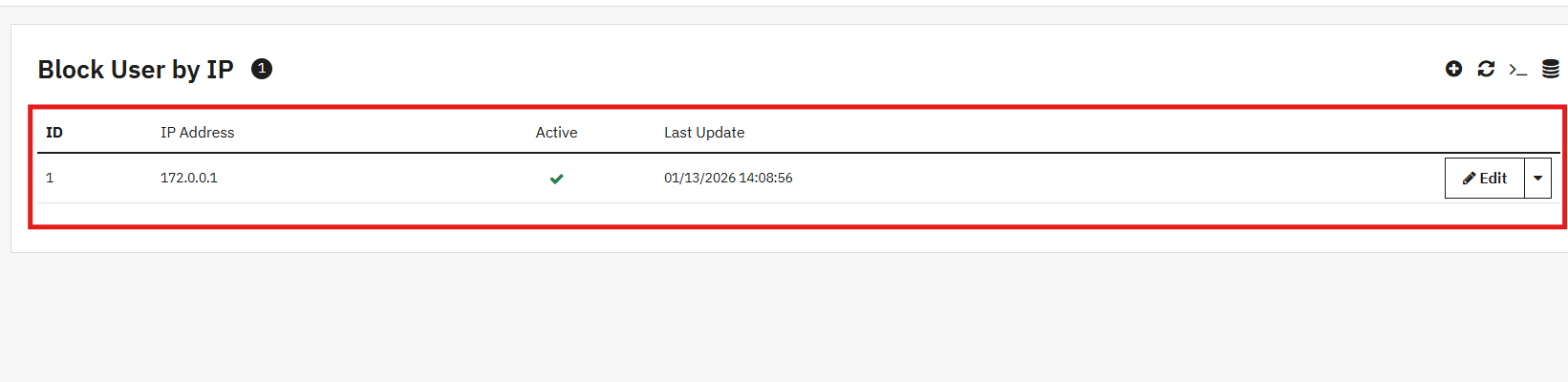
[New] IP-Based User Blocking
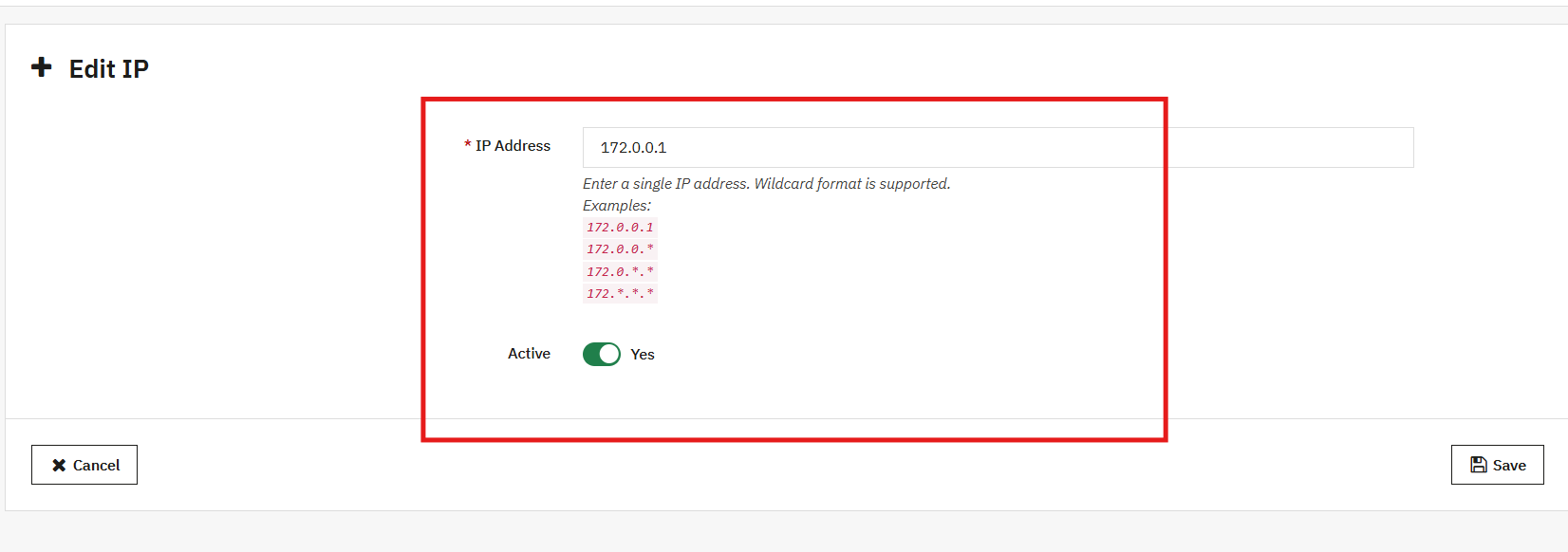
The AI Chatbot Addon allows IP-based user blocking to restrict access for specific users or IP addresses. This enhances security and prevents misuse of the Prestashop AI chatbot. It ensures a safe and controlled chat environment for genuine customers.
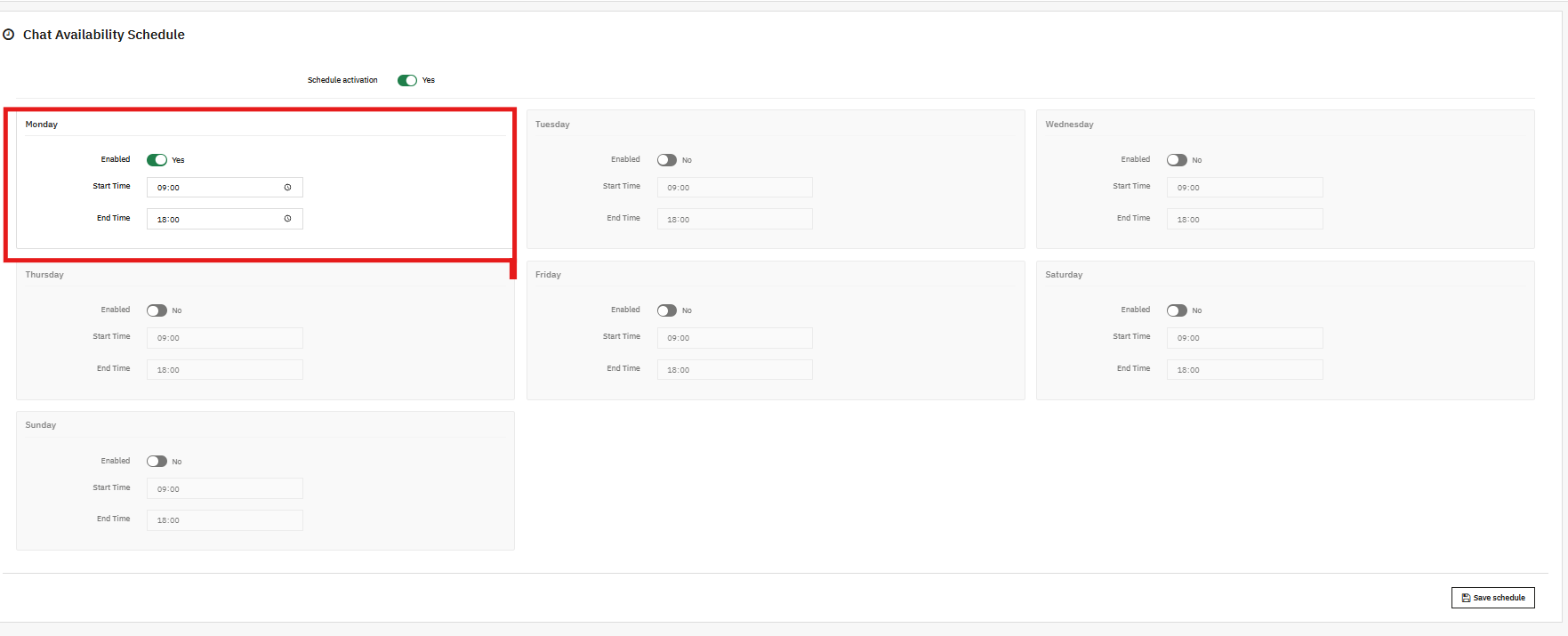
[New] Chat Availability Scheduling
Now, store owners can manage chat availability by setting specific days and hours for the AI chatbot. This helps in providing timely support and ensures the chatbot is accessible only during designated support hours.
1. Real-Time, Intelligent AI Responses
The chatbot instantly answers queries about product prices, stock availability, categories, product comparison using AI and more, pulling live data directly from your store.
2. Multi-Language and Multi-Currency Support
The Pretasop multilingual AI chatbot Addon automatically detects the language of your shop, no matter which languages & currencies you have added and responds in the same language and currency. Thus, this makes it ideal for stores selling internationally.
3. Powered by ChatGPT Technology
Using the latest GPT models from OpenAI, the chatbot delivers accurate, natural, and context-aware responses that feel like chatting with a human and are helpful. Additionally, the module also offers the option to choose the different ai engines within the ChatGPT Modules
4. Smart Product Search
Customers can easily search and explore products directly through the chatbot. This AI Chatbot for PrestaShop helps them browse categories, view options, and compare items efficiently.
5. Automatic Order Information Retrieval
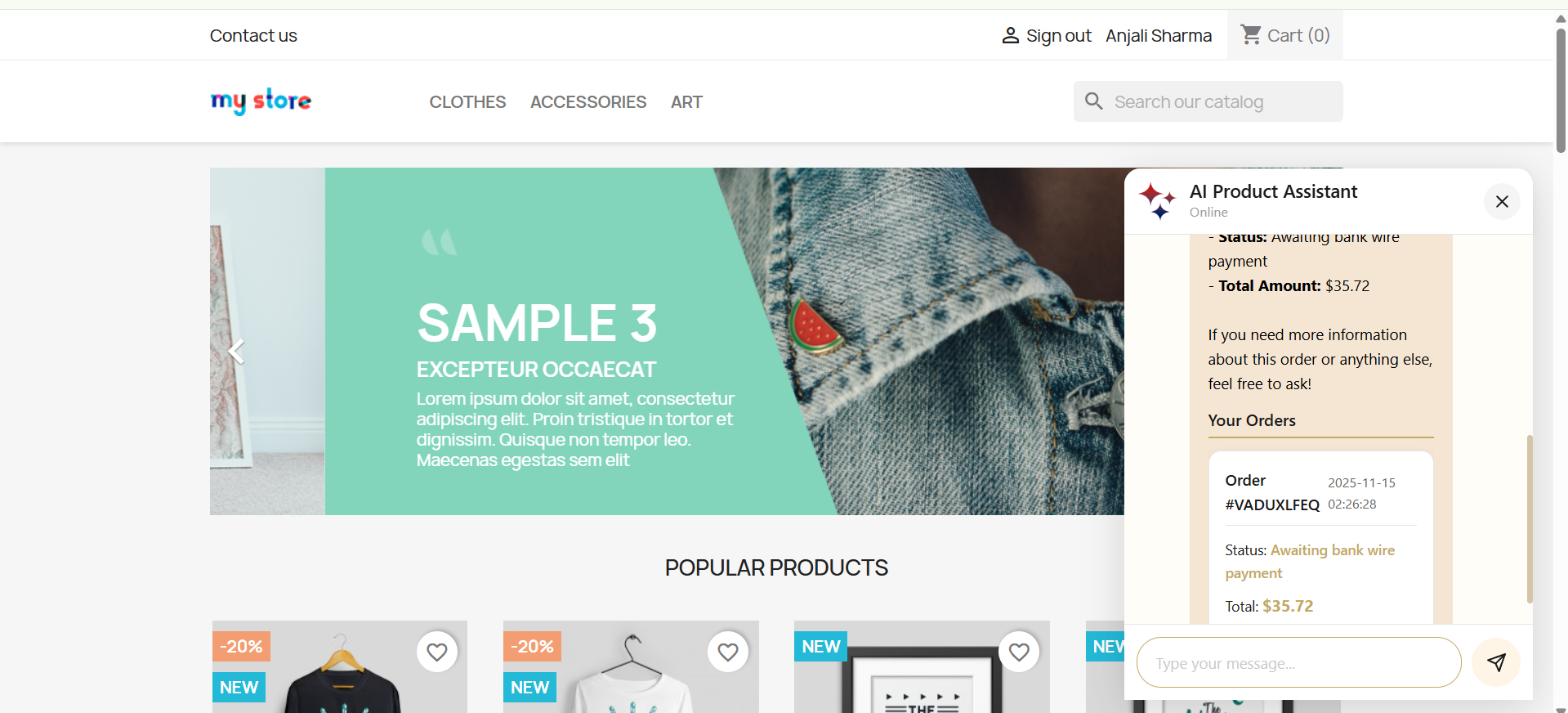
The Prestashop AI ChatGPT ChatBot instantly fetches and displays recent customer orders, including order ID, products, prices, status, and more, making order management effortless.
6. Real-Time Order Status & Tracking
With the Prestashop AI-Powered ChatBot Module, customers can check their order status or track shipments directly via the chatbot using their order ID quickly, easily, and conveniently
7. Fully Customizable UI
The chatbot interface is fully customizable, allowing store owners to adjust the background color, chatbot box color, customer chat color, icons, and button styles. This ensures the PrestaShop ChatBot Module matches any store design while delivering a modern, visually appealing, and user-friendly front-end experience.
8. Vector Search Integration
The integration of vector search with Qdrant enhances the PrestaShop chat plugin by enabling context-aware searches that go beyond exact keyword matching. By interpreting the intent behind user queries, the system delivers more accurate search results and personalised product suggestions, helping customers quickly find what they are truly looking for.
3.0.0 Installation Guide for PrestaShop AI-Powered ChatBot Addon
After the completion of the purchase, you’ll receive the chatbotsearch.zip file.
Step 2: Click on Module on your prestashop back office left menu, go to module manager, then you will see the click option. Click on the Upload.
Step 3: Upload and Install the ChatBot Module. After the complete installation, you have to click on the configuration, and then you will be directed to the configuration page.
Step 4: Now you are ready to configure the chatbot module.
4.0.0 Admin Interface of Prestashop Live AI ChatBot Assistant
The PrestaShop AI-Powered Chat Assistance Module is designed with simplicity and ease of use in mind. The module includes the configuration pages, like configuration and customisation.
4.0.1 General Configuration
Each option directly affects how the AI interacts with customers, processes queries, and displays results inside your PrestaShop store.
Let’s take a walkthrough of these fields for better hands-on understanding
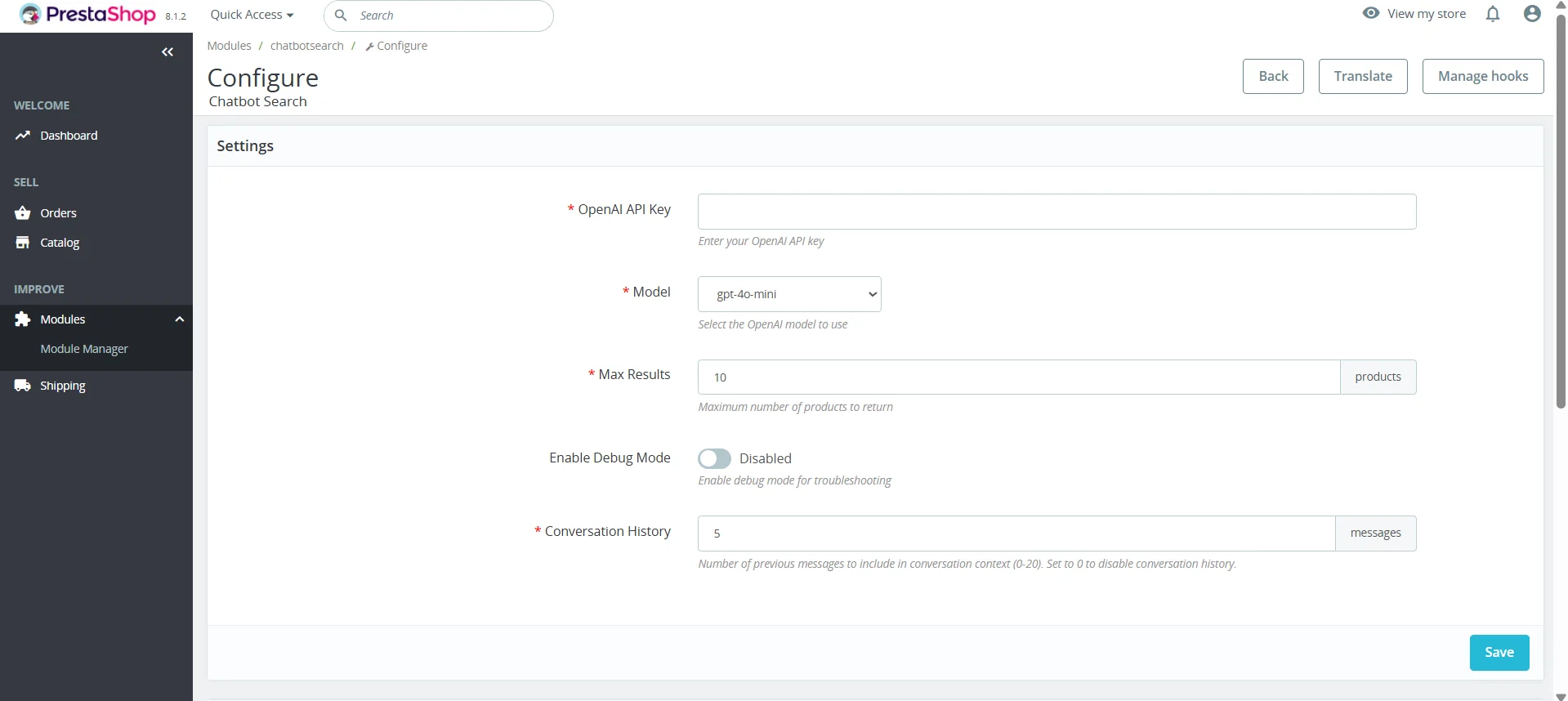
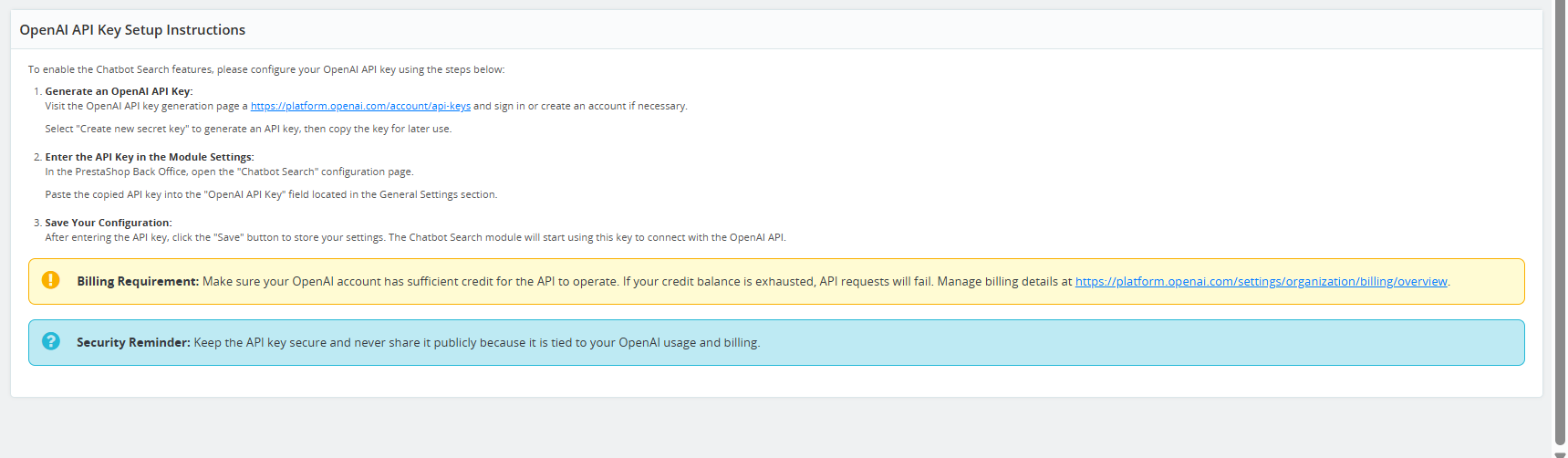
1. OpenAI API Key: This field allows you to enter your OpenAI API Key, which is required for the PrestaShop AI Chat Integration to connect to the OpenAI platform. Without this key, the chatbot cannot generate responses as the API Key is required for its functioning.
OpenAI API Key authorises your store to use GPT models.
Ensures secure communication between your PrestaShop store and OpenAI servers.
Kindly make sure to keep your API Key secure and not share publicly.
2. Model Selections:
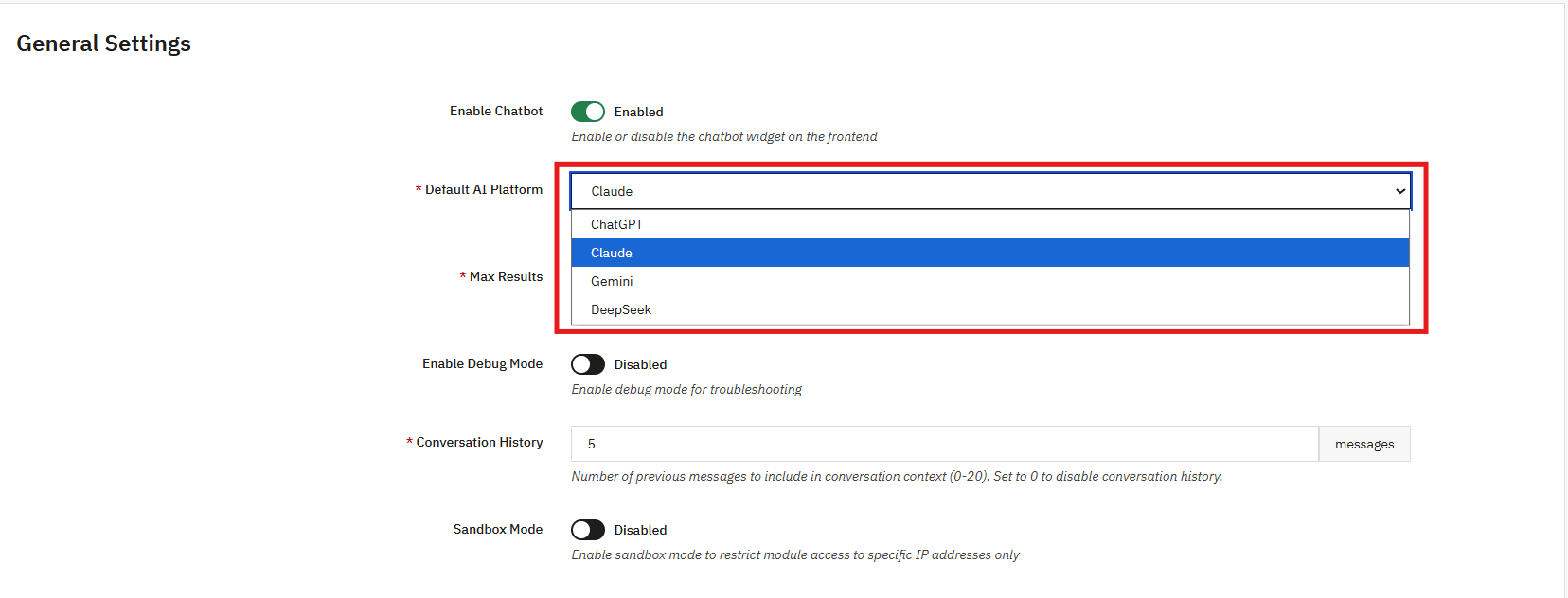
The PrestaShop AI Engine Module enables the store administrator to select the specific AI model that the chatbot will use. Each model offers varying capabilities in terms of speed, intelligence, and accuracy, allowing the admin to choose the most suitable option for their store.
Currently, the Prestashop AI Chatbot Addon by Knowbandsupports the following four AI models:
ChatGPT: A conversational AI model designed for natural language understanding and customer interactions. Ideal for answering questions, assisting with purchases, and providing guidance. Submodels: GPT-5 (latest high-performance model), GPT-5 Mini (lightweight, fast), GPT-4 Mini (compact, efficient), GPT-4o (enhanced reasoning), GPT-4 Turbo (optimized for speed), GPT-3.5 Turbo (classic high-speed conversational AI)
DeepSeek: Focused on advanced search and recommendation tasks. It is optimised for retrieving relevant products and content quickly. Submodels: DeepSeek Pro (accurate and feature-rich), DeepSeek Reasoner (advanced logic and reasoning capabilities)
Claude: A model specialised in summarisation, reasoning, and contextual understanding. Useful for generating product descriptions, summaries, and conversational insights. Submodels: Opus (balanced reasoning and language capabilities), Haiku (optimized for concise responses and summarization), Sonnet (advanced multi-turn conversation and contextual understanding)
Gemini: Focused on multimodal AI tasks, including text and image understanding. Ideal for product recommendations, visual searches, and content generation. Submodels: Gemini 2.5 Pro (high-performance, advanced capabilities), Gemini Flash (fast, lightweight), Gemini 2.0 (balanced, reliable performance)
3. Max Results: This option controls how many results the Knowband’s PrestaShop AI Chat Addon will show when a customer asks product-related queries.
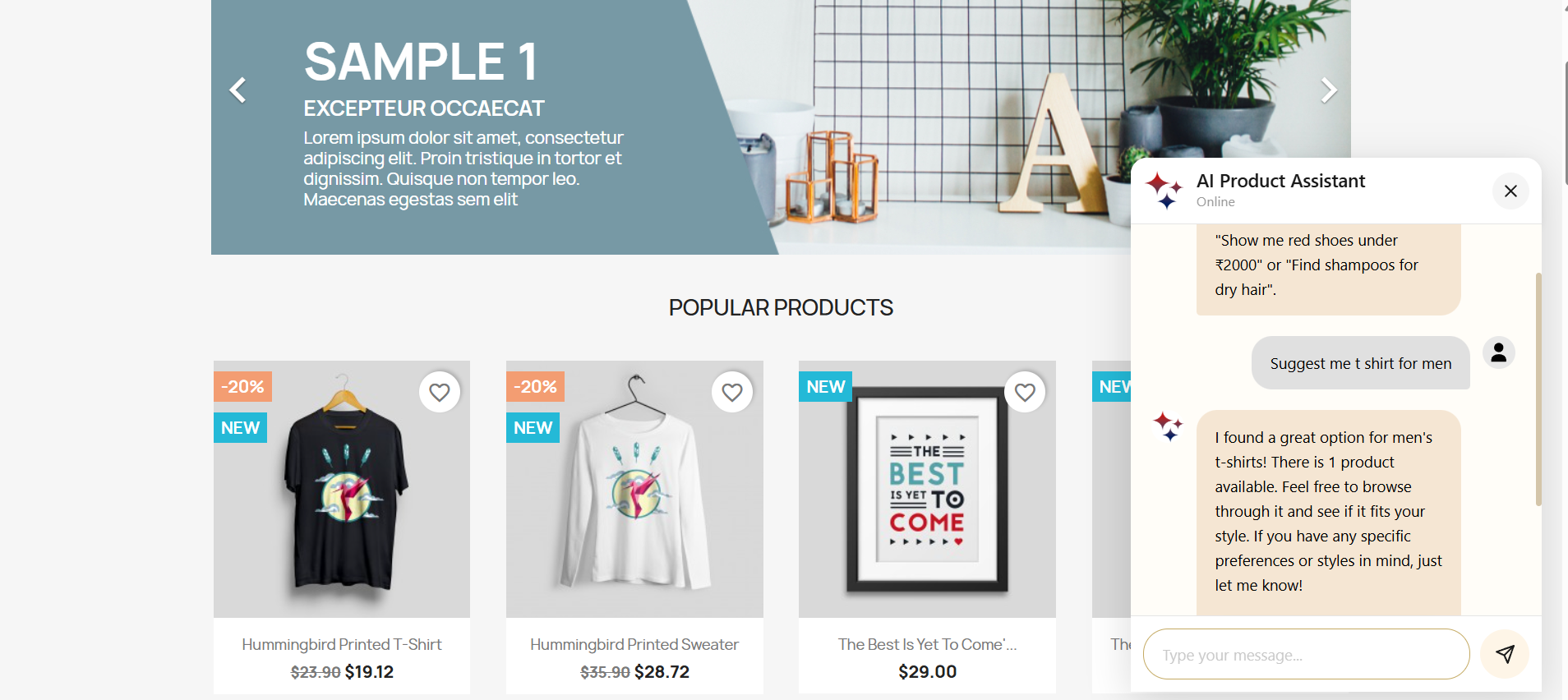
For example, if a customer asks:” show jeans under 30$ ”, the chatbot will display up to the number of results you set here.
These options help in controlling the readability inside the chat window in the ChatGPT PrestaShopChatBot Module, as well as prevent overwhelming customers with too many results.
4. Enable Debug Mode: This Knowband’s Best AI Assistant For PrestaShop allows the store admin to enable debug Mode, which helps you troubleshoot issues by showing internal logs and technical details while the chatbot operates. When the debug mode is enabled:
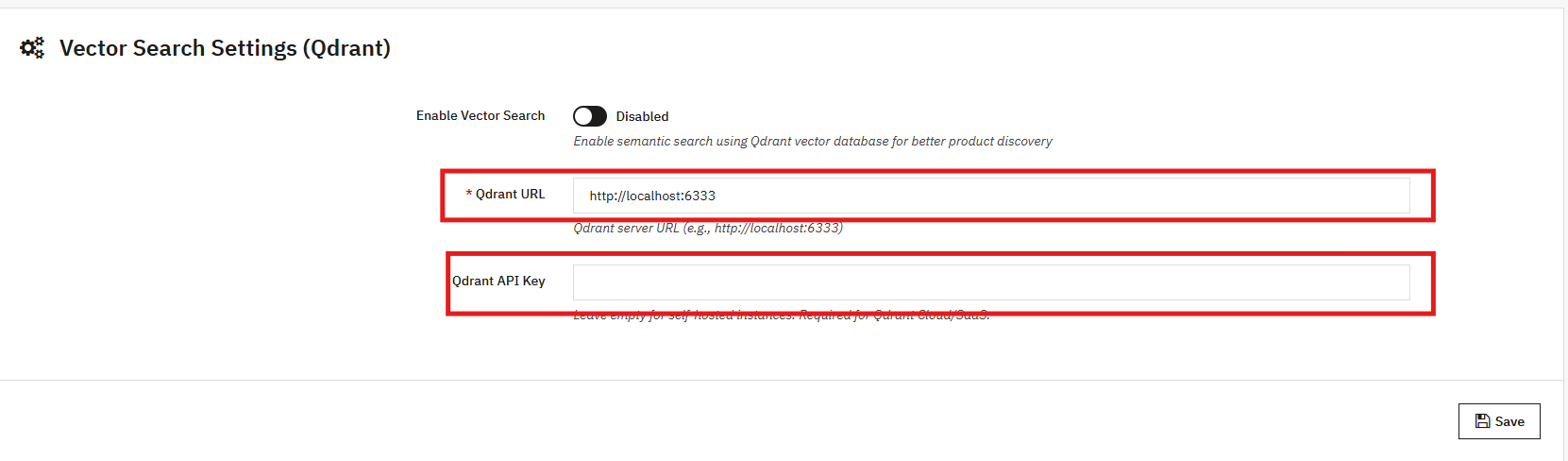
5. Enable Vector Search: Turn on semantic search to let the PrestaShop AI Chatbot better understand user intent and provide more relevant answers, going beyond simple keyword matching.
6. Qdrant URL: Enter the endpoint URL of your Qdrant vector database server. Furthermore, this database stores and fetches vector data used for semantic search. We have provided the steps in the user manual section 5.0.5
7. Qdrant API Key: Provide the API key to authenticate access to your Qdrant server. This ensures secure communication between the chatbot and the vector database.
4.0.2 Customisation Tab of Prestashop AI ChatBot Module
The PrestaShop AI ChatBot Module allows full customisation of the chatbot interface to match your store’s design and provide a seamless user experience.
Below is a guide for each customizable field:
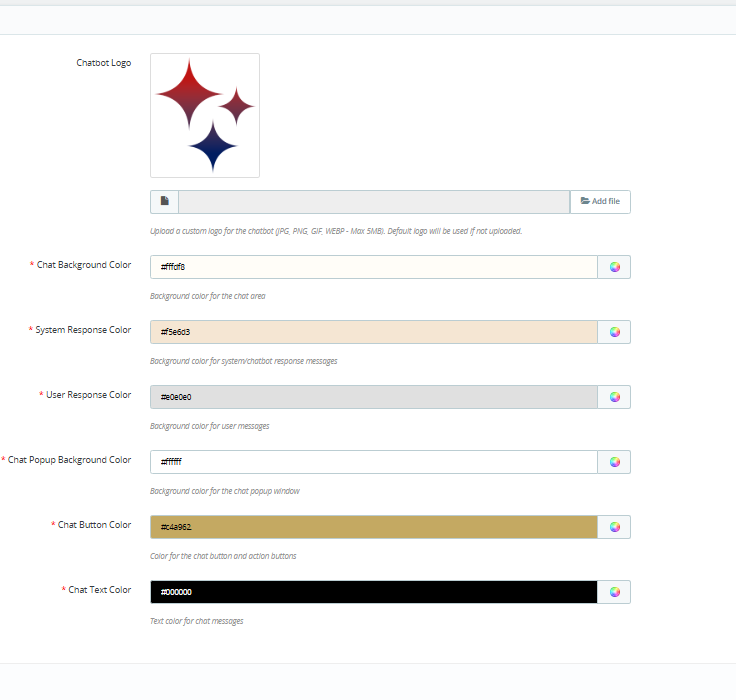
1. Chatbot Logo: Upload a custom logo for your chatbot to represent your brand. Moreover, it supports logo formats including JPG, PNG, GIF, and WEBP, with a maximum file size of 5MB. If no logo is uploaded, the default PrestaShop logo will be displayed. Ensure your logo is clear and visually compatible with the chat interface.
2. Chat Background Colour: Store admins can set the background colour of the chat area to match your store theme. Knowband recommends using a colour that provides good contrast with chat messages for readability.
3. System Response Colour: Furthermore, you can customise the background colour of the chatbot messages. Choose a colour that differentiates the chatbot responses from user messages for better visual clarity.
4. User Response Color: Additionally, store admin can set the background color for user messages in the chat window. This helps distinguish customer messages from the AI responses.
5. Chat Popup Background Colour: Change the background color of the chat popup window to complement your store’s. Ensure the pop-up remains visually appealing and integrates smoothly with your website.
6. Chat Button Colour: Store owner can easily customise the colour of the chat button and action buttons to match their store’s theme. A clear, contrasting button color can improve click rates and engagement.
7. Chat Text Color: Set the text color for all chat messages, including both system and user messages. Ensure the text colour provides good readability against the background colors selected.
4.0.3 Chat Logs for AI Chatbot
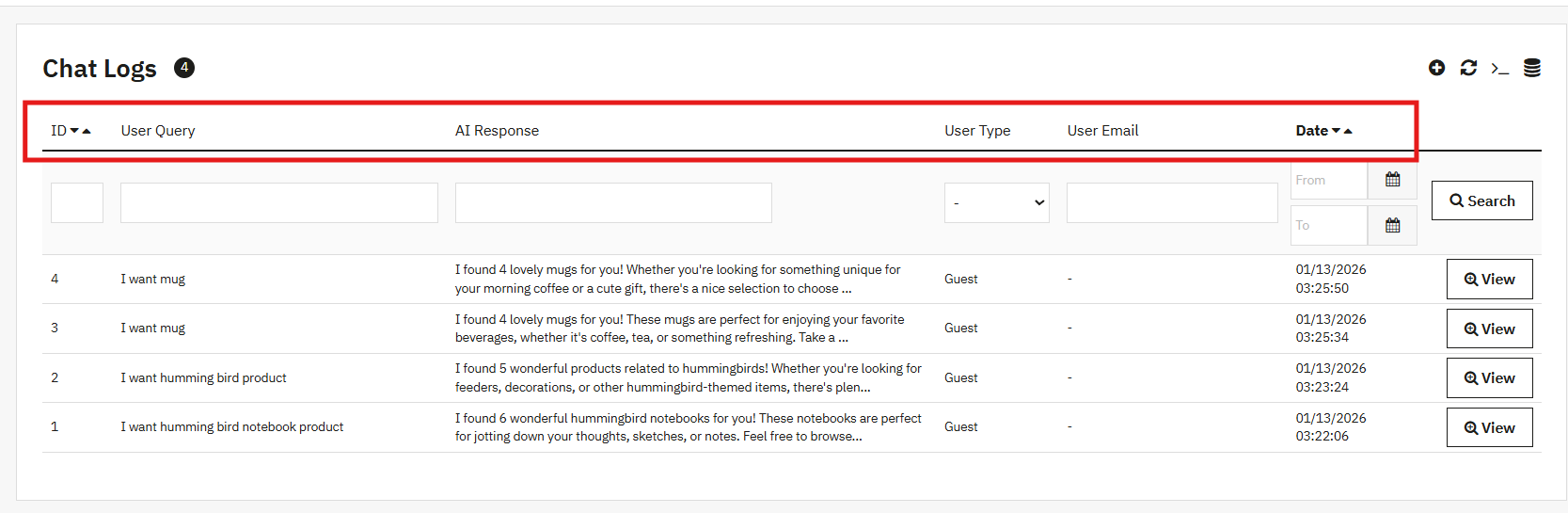
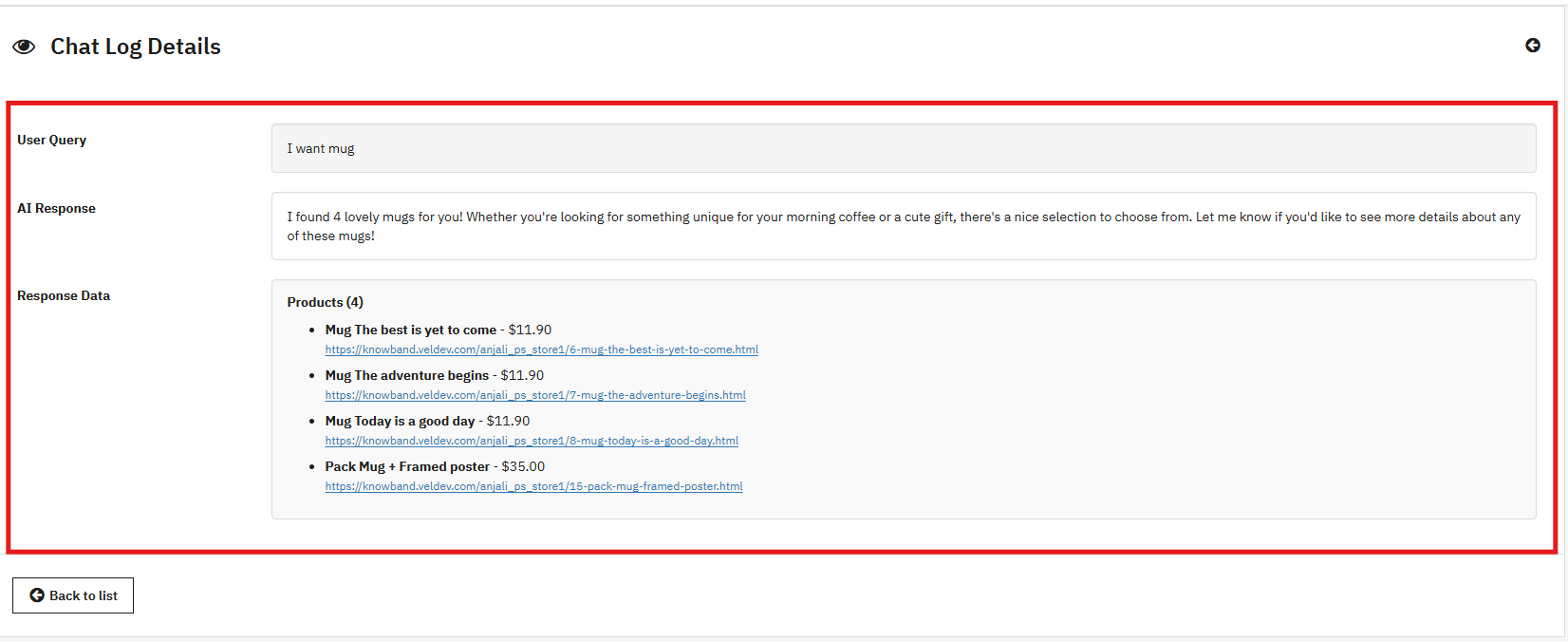
The Prestashop AI Chatbot Module by Knowband now maintains comprehensive chat logs of all user interactions. These logs allow store owners to review conversations, track customer behavior, and identify frequently asked questions. Access to this history also helps improve AI responses and enhances overall customer support.
With this feature, you can view details such as the user query, email, customer type (guest or registered), AI responses, response data ( the products that chatbot showed) and the date of interaction, providing full visibility into chatbot interactions.
4.0.4 IP-Based User Blocking
The AI Chatbot Addon now includes IP-based user blocking, allowing store owners to restrict access for specific users or IP addresses. This feature improves security, prevents misuse, and ensures a safe, controlled environment for genuine customers.
To use this feature, you can add IP addresses in the format ( X.X.X.X) separated by commas, and set the status for each IP as Enable or Disable.
4.0.5 Chat Availability Scheduling
Store owners can manage chat availability by specifying the days and times when the AI chatbot is active. This ensures that customers receive timely support and that the chatbot is accessible only during scheduled support hours, improving service efficiency.
You can select any day of the week (e.g., Monday) and define the start and end time for chatbot availability to align with your business hours.
5.0.0 Frontend View
The KnowBand PrestaShop AI ChatBot Module appears on your store as a smart, interactive chat widget that provides instant, AI-powered support to customers. It offers a seamless shopping experience by helping users search products, check stock, track orders, and get quick answers to common queries.
ChatBot Frontend Feature Implementation- Short Overview
Product Search
The chatbot allows customers to quickly search for products, browse categories, and compare items directly from the storefront
Order Details
Customers can view their order details, including order ID, products, prices, and order status, directly through the chatbot in real time.
In addition to product search and order details, the chatbot also provides:
Shipment Details: Track shipments and view delivery status instantly.
Order Information: Access complete order history and details.
Product Information: Get product descriptions, prices, availability, and other details quickly.
Go mobile with the PrestaShop Mobile App Builder
Convert your PrestaShop website into a fully functional mobile app to increase sales, improve user experience, and grow mobile conversions.
Click “Get API key,” accept the terms of service, create your key, and paste it into the module’s configuration settings.
7.0.4 Steps to Generate DeepSeek API
Access the Deepseek platform via this URL: https://platform.deepseek.com/api_keys to generate the API Key. Log in or sign up to generatean API Key
Click on Create API Key after adding the key name.
Copy or store the key to enable functioning of Prestashop DeepSeek AI Content Chatbot Module
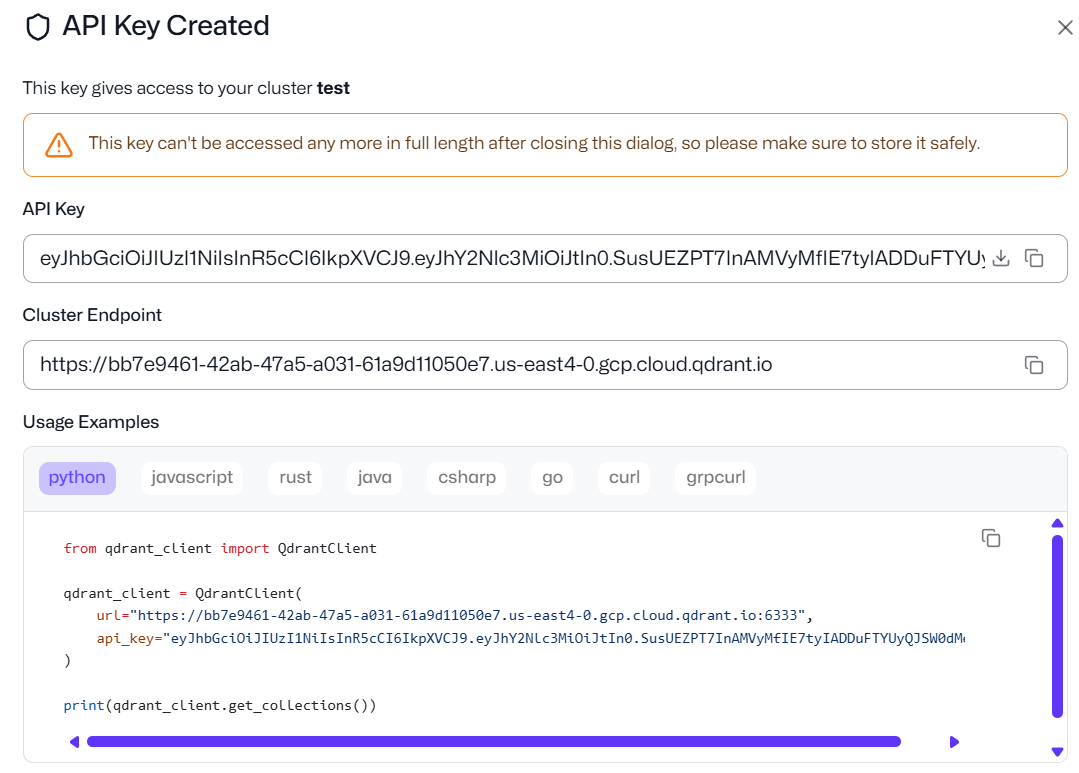
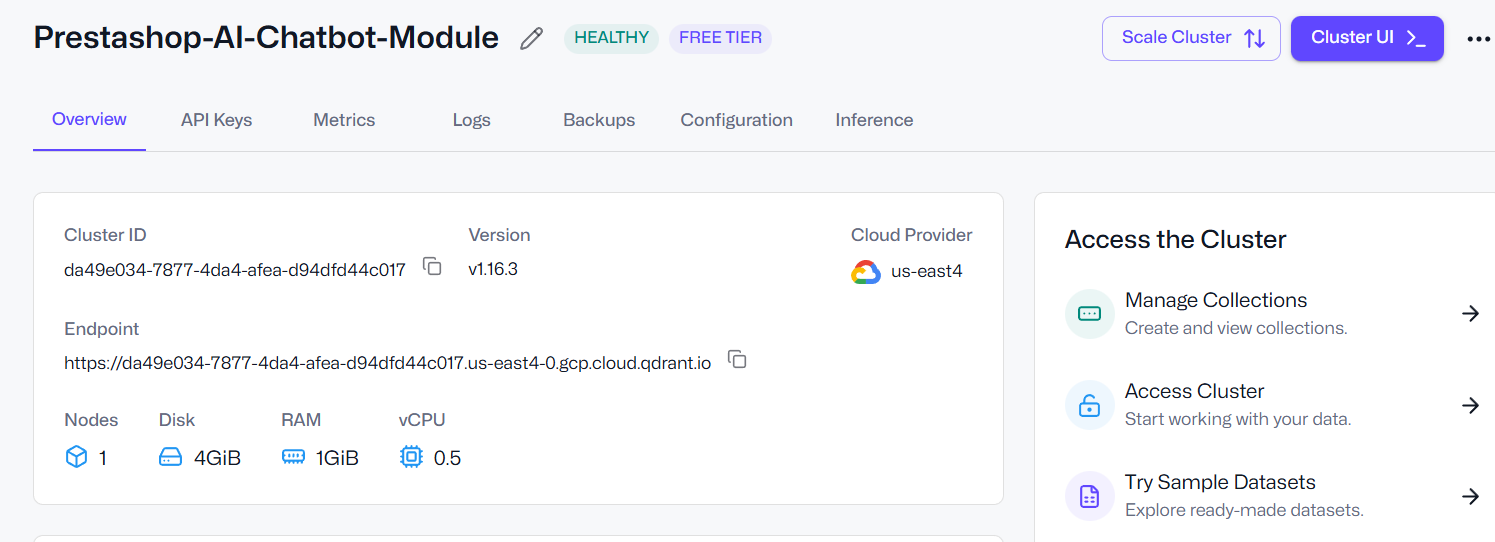
7.0.5 How to Generate Qdrant API Key and Endpoint URL for PrestaShop AI Chatbot
If you plan to use vector search with Qdrant for semantic queries in the PrestaShop AI Chatbot, follow these steps:
Step 1: Log in to Qdrant Access your Qdrant account, whether using the cloud service or a self-hosted instance.
Step 2: Create a Cluster and API Key Navigate to your clusters section, create a new cluster if needed, and generate an API Key for your chatbot integration.
Step 3: Copy the API Key and Endpoint URL The Endpoint URL points to your Qdrant server, while the API Key provides secure access to the vector database. Copy both values carefully.
Step 4: Enter the Details in PrestaShop In your PrestaShop admin panel, go to General Configuration → Qdrant URL and paste the Endpoint URL. Then, enter the API Key in the Qdrant
8.0.0 Benefits of Prestashop AI-Powered ChatBot Module
Increase Conversions Automatically: Customers receive quick answers to their queries without waiting, helping them make purchasing decisions faster and reducing hesitation at checkout.
Improve User Experience With Friendly Interactions: The PrestaShop Live AI Chat Module
can guide customers through products, store policies, order information, and more, making browsing easier and more enjoyable.
Increase Session Activity and Dwell Time: This PrestaShop AI Assistant Module keeps visitors and customers engaged with your store, increasing the session activity and dwell time.
Reduce Cart Abandonment: Instant support helps resolve common doubts that cause customers to leave before completing a purchase.
Strengthen Trust and Brand Image: The PrestaShop Chat Assistant Module really looks like it has a 24/7 intelligent assistant or real-time AI chat support on your site, enhancing your store’s professionalism and reliability, helping customers feel confident and supported.
Save Time and Boost Store Efficiency: The PrestaShop ChatGPT Bot handles repetitive questions, FAQs, product inquiries, and general support, allowing your team to focus on more important tasks.
Summary
To conclude, the PrestaShop Chat Module Free is a powerful AI ChatBot that transforms the way your store interacts with customers. By providing instant, intelligent, and personalised responses, Prestashop AI ChatBot Module enhances the shopping experience, improves engagement, and increases conversions. With features like real-time product information, multi-language and multi-currency support, and feedback collection, this module ensures your store delivers professional and reliable service 24/7.
Overall, implementing the AI ChatBot not only saves time and resources by automating repetitive tasks but also strengthens customer trust and boosts your store’s efficiency.
This AI Chatbot for PrestaShop can be the best chatbot for your store that can stay ahead in the competitive e-commerce market while delighting customers with faster, smarter, and more personalised interactions.
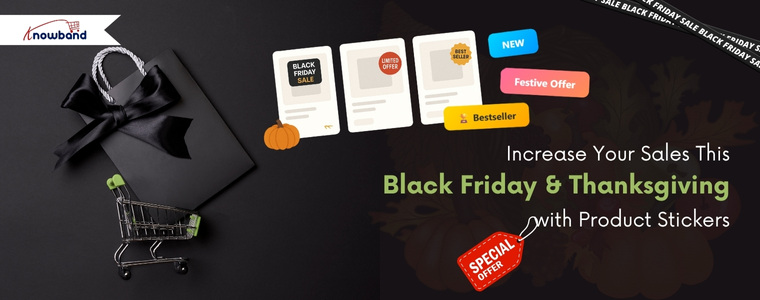
This festive season, make your store the top-selling store in your category. Running an online store requires strategies that grab attention and boost conversions. Consequently, Knowband’s PrestaShop Product Sticker Module allows you to showcase special offers, bestsellers, and new arrivals effectively. Furthermore, its intuitive interface and versatile options make it an essential plugin for any eCommerce strategy. So, whether you are on prestashop or opencart, we have got you covered.
Why Product Stickers Are Important in Online Stores
Stickers and labels attract customers and motivate them to make a purchase. A sticker on a product signals that it’s on sale, discounted, or part of a special seasonal promotion. To help store owners increase sales this festive season, Knowband has introduced the Prestashop Product Sticker & Label Module. This module allows store owners to add different types of stickers to products, whether it’s for Black Friday, Thanksgiving, or Christmas sales.
Key Features of Knowband’s PrestaShop Product Sticker Module
You can set the product sticker module up easily, design custom stickers, automate scheduled campaigns, and be creatively in charge.
Quick & Easy Setup
No coding skills are required! After purchasing the module from Knowband, store owners can install it and configure their products in just a few minutes. Even beginners will find it easy to use.
Customizable Stickers
You can adjust stickers to perfectly suit your promotions or brand identity. Whether you want to modify colors, text, or style, the module allows full customisation of predefined stickers.
Strategic Placement
Place stickers where they get the most attention—product pages, category listings, or homepage banners. This ensures your promotional messages reach customers at the most impactful touchpoints during their shopping journey.
Scheduled Promotions
Plan ahead by scheduling stickers to appear and disappear automatically. This feature makes holiday promotions stress-free, allowing you to set up your entire campaign in advance while the module handles the rest.
Advanced Control
Modify sticker size, position, and transparency, or add custom stickers that match your brand’s visual style. Moreover, this Prestashop Product Sticker Module gives you complete creative freedom to design stickers that resonate with your target audience.
Targeted Application
Apply stickers to specific products or entire categories, ensuring relevance and preventing clutter while maintaining a professional appearance.
Benefits of Using This Powerful Module
You can get attention, increase conversions and brand consistency with the Product Sticker Module.
Boost Product Visibility
Make important products stand out with attention-grabbing labels. Featured items will receive significantly more views and engagement from potential customers.
Increase Conversions
Urgency-driven labels like “Only a Few Left” encourage faster purchasing decisions. This creates a sense of urgency that motivates customers to buy immediately rather than postponing their purchase.
Save Time
During the festive season, you can schedule stickers in advance, freeing up time to focus on other aspects of your business, such as inventory management and customer service. Automation also reduces the risk of human error when updating promotional displays.
Maintain Brand Consistency
Full control over design and placement ensures that stickers always align with your store’s look and feel, keeping your brand identity strong and recognizable across all customer touchpoints.
Maximize Impact
Display stickers on high-visibility pages to attract maximum attention. This increases exposure for your most important products and promotions while guiding customers toward high-value purchases.
Conclusion
Knowband’s PrestaShop Product Sticker Module is a smart solution for store owners who want to highlight offers, boost sales, and improve the customer experience. With its ease of use, flexible customisation, and automation features, it’s a valuable addition to any online store.
Make your products stand out and drive more sales this holiday season. Try Knowband’s Product Sticker Module for PrestaShop today and watch your conversions soar during Black Friday and Thanksgiving. Investing in this powerful plugin will help you maximise revenue during the year’s most profitable shopping period.
Black Friday is the biggest shopping day of the year, and for e-commerce stores, it is a golden opportunity to sell more, attract customers, and establish long-term customer relationships. Time is essential when thousands of customers are searching the store to get the best deals on the internet.
In order to help the PrestaShop store owners take better advantage of this seasonal period, Knowband provides six powerful modules that, combined, can increase the number of conversions and improve the customer’s shopping experience. These are:
PrestaShop Mobile App Builder, Gift Cards Manager, Google Shopping Integration, PrestaShop One Page SuperCheckout, and VideoMate Module.
These modules are designed to resolve common problems that every e-commerce store faces: visibility, conversions, and customer engagement. Now, let’s see how you can combine and use all of them so that this black Friday can be the most successful of your life.
During Black Friday, the first goal of an online store is visibility. If we talk about visibility, then listing on Google Shopping is one of the best strategies. The PrestaShop Google Shopping Integration Module helps store owners list their products in Google Shopping, where customers visit the most.
Your products are updated, and the feed is synchronised automatically. No manual uploads, no errors. Hence, the Google Shopping Module makes it easy to control product categories, attributes, and pricing using a single dashboard.
Why You Need It:
You can reach millions of customers who are shopping on Google.
The module provides automatic synchronisation to reduce manual work.
Moreover, you can monitor the campaign performance through Google UTM parameters.
Hence, the Prestashop Google Shopping Module can be a game-changer during Black Friday when searches are at their highest. Also, it will ensure that your deals get more visibility and bring more people to your store.
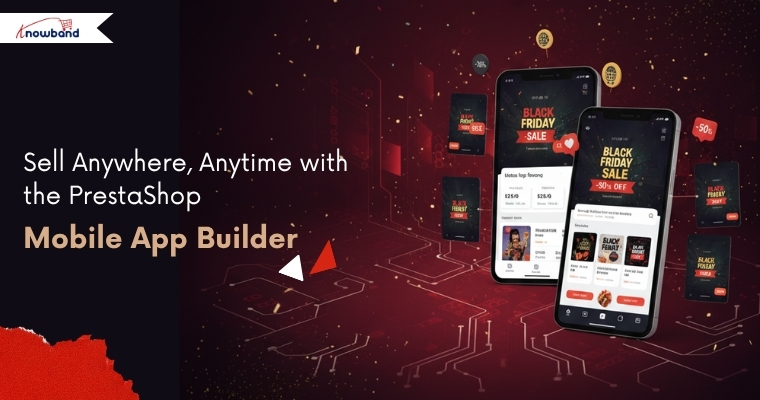
Over 70% of shoppers shop on their phones. The PrestaShop Mobile App Builder is the perfect way to create a mobile Android and iOS app for your store without code.
The mobile app will be connected to your store in real-time. Hence, products, prices, and offers will be updated automatically. Also, it has push notifications, which means you can notify customers about flash sales right away.
Why You Need It:
You can create the entire mobile app with just a few clicks and no code.
The module supports multiple languages and currencies. Hence, you can expand overseas as well.
Moreover, the module is compatible with all your store’s payment and shipping methods, making the checkout easier and smoother.
Hence, with a mobile app, you are guaranteed to have customers shopping from anywhere and at any time.
Every extra click is going to cost you a sale on Black Friday. PrestaShop Supercheckout Module simplifies the checkout process to allow easy one-page checkout.
Why You Need It:
Fast checkout enhances the conversion rate.
The module supports several payment and shipping methods.
Moreover, the browsing works smoothly on mobile devices, laptops, and tablets.
The module also provides social login functionalities like Google & Facebook
Hence, the Prestashop One-Page Super Checkout Module is the easiest yet most helpful method of boosting conversions during Black Friday.
One of the most popular products during Black Friday and the holiday season is gift cards. Knowband’s PrestaShop Gift Cards Manager Addon will help you to sell both online and physical gift cards in your shop.
Customers can use ready-made templates, customise messages, and send them right away to a friend or family member.
Why You Need It:
The module offers online gift cards, and your customer can instantly share them with his/her loved ones.
It is easy to personalise templates for special occasions like Black Friday.
Moreover, you can easily track all the orders made from the backend.
Therefore, the PrestaShop Gift Cards module is not only an addition to sales, but also a way of getting new customers in your store when they use their gift cards.
Lastly, the store can be made more interactive using the PrestaShop Video Manager Module. Videos are a great way to engage visitors, and the module makes it easy to add product videos, tutorials, and deal highlights to your product page.
Why You Need It:
Adding product demonstration videos will make your customers trust your store more.
You can easily add downloaded videos from social media like Instagram, Twitter, etc.
Moreover, you can easily customise the placement of videos.
Hence, when people can see your Black Friday offers in action, they will gain more trust in your store and will purchase confidently and quickly.
Final Thoughts
Speed, visibility, and engagement are the most important during a festive season like Black Friday. And with Knowband’s Google Shopping Integration, eBay Integration, Mobile App Builder, Supercheckout, Gift Cards Manager, and Videomate Modules, you can cover all these major areas.
Therefore, don’t wait until your customers have gone to your competitors. Modernise your PrestaShop store with these modules today and take advantage of our exclusive Black Friday sale to make this season a historical success!