Best Practices for Back-In-Stock Alert Emails

Online shoppers get disappointed when the product they are looking to purchase is out-of-stock. This is majorly seen during the launch of a smartphone when it gets out of stock even before the user has added it to his cart.

Then they just wait, wait, and wait unless there is another option. And there is a sense of excitement when that product is back in stock.

I can relate to this very well. I wanted to purchase a smartphone. When I looked for my desired smartphone on Amazon, it was unavailable, went out of stock from the smartphone brand’s website as well and wasn’t available anywhere else. So, I subscribed to get notified about it as soon as it returns to the store.

A few days later, I got the notification that the product is available to buy. Without wasting any further time, I quickly opened the email, clicked on the buy now option and purchased the phone.

This is where the role of back-in-stock alert emails becomes crucial. A single back in stock email can bring you huge revenue. A case study done by Marketing Sherpa revealed that back-in-stock alert emails have around a 22.45% conversion rate.

If you do not take the onus of informing your visitors when the product becomes available again, they will likely search a competitive product on other online shopping websites.

What is Back-in-stock Email?
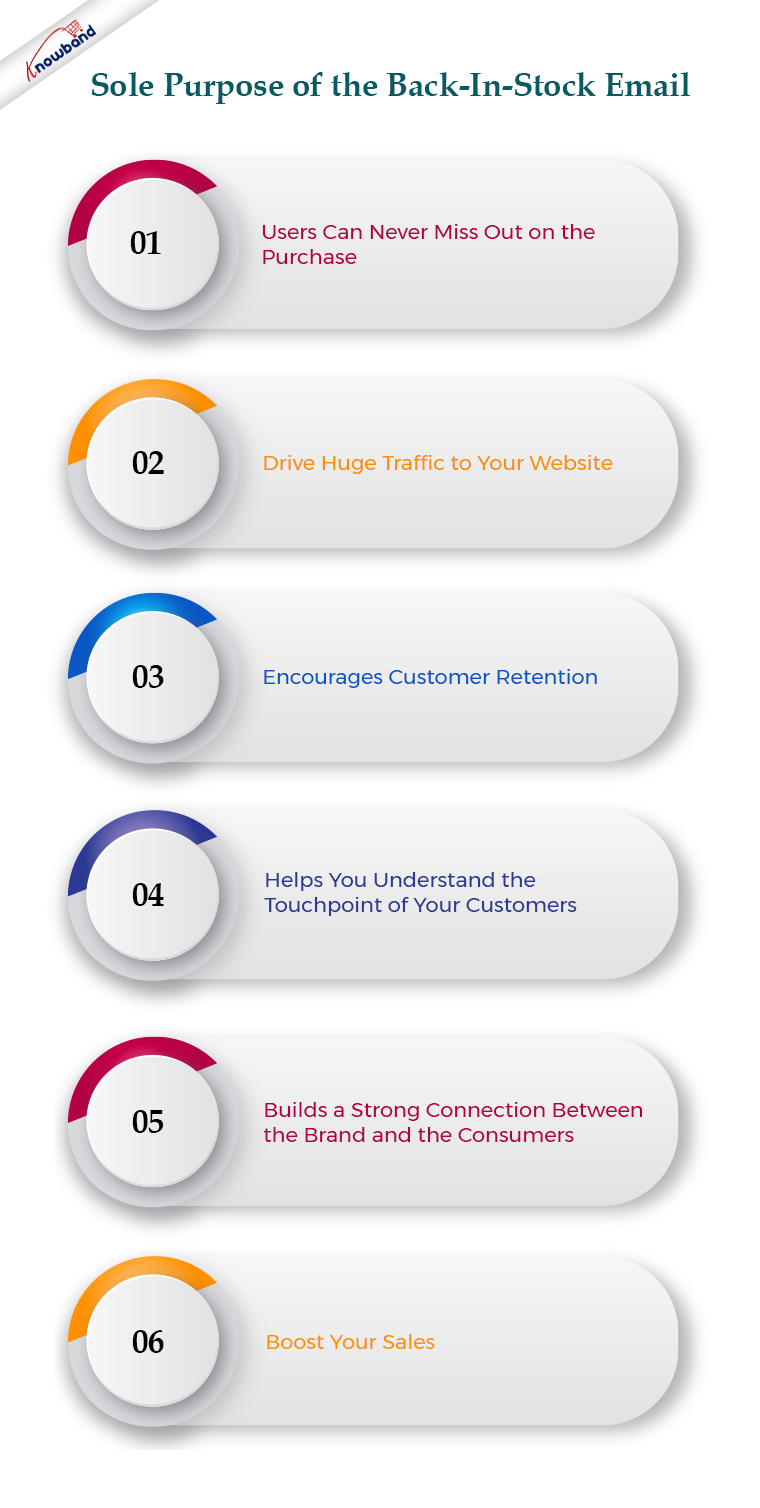
A back-in-stock email is an email that is sent to those users who have subscribed to receive updates regarding an out-of-stock product. When the product is back-in-stock, the shoppers are informed via email about its availability so that they can purchase it as soon as possible or before it goes out of stock again.

Many of the users can miss out on the purchase if they aren’t notified and this eventually leads to some lost revenue.

The sole purpose of the back-in-stock email is to boost your sales. Besides, it helps you drive huge traffic to your website, encourages customer retention, helps you understand the touchpoint of your customers, and builds a strong connection between the brand and the consumers.

Back-In-Stock Email Best Practices

We will start from scratch. For a back-in-stock alert email, keep the following points in mind.
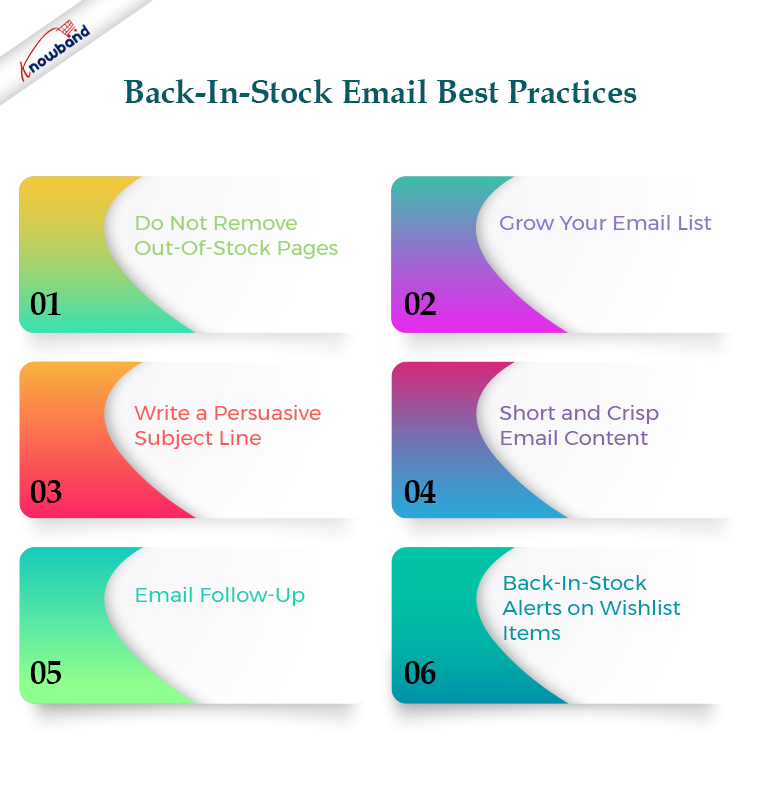
1. Do Not Remove Out-Of-Stock Pages

It is never a wise idea to hide the out-of-stock product pages from your website. How will consumers even know that the product is just out-of-stock? If they browse your website, search for and product, and find a 404 page, they will simply think that the product was never available in your store. Moreover, it will leave a negative user experience.

The concept of back-in-stock email would not even work if out-of-stock product pages are not visible.

So, simply include an out-of-stock tag on the product and place a “notify me” call to action, clicking on which users will be asked to specify the email address on which they want to get notified about the product availability once it is back in stock.

You can also take the help of Exit Popup, so when a user tries to exit your website after seeing that the product is out of stock, the popup appears asking them to get an alert over their email address once the product is back in stock.

2. Grow Your Email List

Many of your users might not have subscribed to your newsletters or promotional emails. So when someone clicks on the “notify me” option, having a newsletter checkbox along with the email address field can help you grow your email list further.

This will not only be beneficial to sending back-in-stock alerts but you can target those users in other email campaigns as well.

3. Write a Persuasive Subject Line

Users will be excited to know that the product they desired to purchase is back in stock. Increase the excitement by writing a compelling subject line.

Since the subject line has to be in limited words to make it visible, it must start with “Back in Stock,” followed by the product name. This will immediately make it clear to the visitor what the email is about.

After that, you can use the call to action like “Grab it ASAP”, “Limited Stock Available”, and “Hurry, selling fast”. These sorts of tags are highly effective in creating urgency.

4. Short and Crisp Email Content

Shoppers would want to grab the product as soon as it is available. Do not let them waste their time in reading the email content. Keep only the necessary information in the body.

What should you include in the email content?

Use the product image for sure. Visuals tend to make the purchase decision even stronger. Apart from this, write a short and persuasive text. Use large and bold font to highlight the main point. Use an alluring CTA like “Shop Now” or “Buy Now”. Also, it should be clearly visible.

5. Email Follow-Up

It is likely to happen that your subscribers miss out on your back-in-stock email due to some reason. Therefore, it is recommended to take a follow-up after a while if the product hasn’t gone out of stock.

This will push customers to purchase the product once they realize that they missed the opportunity to get the product in the previous email.

You can also inform the back-in-stock alert subscribers even when the product quantity is low or when the consumers have added the product to the cart but forgot to purchase, just to make them purchase the product before it goes out of stock again. This helps to reduce cart abandonment as well.

6. Back-In-Stock Alerts on Wishlist Items

Many online shoppers add the product to their Wishlist so that they do not have to search again for that product when they return to the store next time. Wishlist items also indicate that customers have the intent to purchase it.

So, if a Wishlist item goes out of stock, make sure to remind customers when it is back in stock. Tell them that the product they wished to buy is now available for purchase.

Back-In-Stock Notification Module by Knowband

If you are looking for a module that could help you set the back-in-stock alert for out-of-products, you can try out our Back-in-stock notification module.

This module adds a “notify me” tab on your out-of-stock product pages. Hence, users can enter their email addresses and get notified as soon as the product is back in store.

In fact with this module, you can set a low-stock alert as well which means if the available product quantity reaches the specified number, a low stock notification will be sent to the subscribers, triggering impulse buying. The module is available for the PrestaShop and Magento platforms.

PrestaShop Back in Stock Notification module

OpenCart Back in Stock Notification module

You can also check out the Web Push Notifications module which also provides similar functionality. In fact, the users do not even need to specify their email addresses. If a product is out-of-stock, the user can simply subscribe for web push notifications.

This module is available for PrestaShop, and Magento 2.

Final Thoughts

Back-in-stock alert emails are important to drive shoppers back to your store and encourage them to shop. They are far more impactful than any other type of email since customers have opted for it themselves and they have a strong desire to purchase that product.

I hope this article helped you understand the concept of back-in-stock alerts. If the product will take time to come back in stock, then you can recommend some related and similar products to the customers. Who knows if they change their mind from that product to buying the suggested one!

OpenCart Extensions to prepare your store for Father’s Day

With Father’s Day just around the corner, website owners would be looking to prepare their store accordingly to capture high sales on the occasion. If you have an eCommerce website on the OpenCart platform and are also looking to boost Father’s Day sales, you can consider using the below-mentioned 8 OpenCart extensions.

1. Spin and Win

OpenCart Spin and Win module displays a gamified popup to your visitors as soon as they enter your website. Coming with multiple occasional themes, it lets you personalize the popup for the Father’s Day occasion as well.

Users get to spin the wheel and earn some exciting rewards but they need to provide their name and email address before they could spin it. This helps you grow your email subscribers and boosts user engagement.

Besides, by offering rewards which are usually the discount code, customers can be encouraged to shop by using the coupon code on the checkout. This increases your conversion rate.

You can make certain customizations to the popup and adjust the display settings as per your requirements.

2. Gift Card Manager

OpenCart Gift Card Manager adds a gift card section on your website and offers multiple pre-existing gift card templates for various occasions like Halloween, Christmas, New Year, etc. Similarly, you can create gift cards for Father’s Day too and boost sales.

Many online shoppers who find shopping a tedious task would find it comfortable to quickly purchase a gift card rather than spending hours in deciding what to gift.

You can create gift cards of different price values so that customers can purchase a gift card according to their budget. The module offers various customization features and also lets you track gift card orders.

3. Countdown Sales Timer

OpenCart Countdown Sales Timer extension places a timer on the header of your website through which your store visitors are informed about the upcoming sale. You can make use of this module to highlight Father’s Day sale as well.

A countdown timer keeps reminding customers how much time is left before the sale begins and creates an urgency to purchase. The look and feel of the timer can be customized and you can display it on multiple web pages.

4. Abandoned Cart

OpenCart Abandoned Cart extension helps you track the abandoned carts on your store and recover lost sales. The module provides you with an opportunity to convert the abandoned cart users into customers.

With many customers coming to your store on Father’s Day sale, you will surely witness a few abandoned carts. Failing to convert them could result in a loss in sales.

Thanks to the Abandoned Cart extension using which you can create an abandoned cart alert (setting a duration after which the cart is automatically marked abandoned) and remind those users about the pending items in their cart and even persuade them to complete the purchase by offering a discount code inside the email.

5. Price Alert

Many online shoppers would be hoping to see a price drop on some products during Father’s Day sale. With OpenCart Price Alert extension, you can ask customers to subscribe to price alert so that they are immediately informed and do not miss out on the opportunity to grab the product whenever the product price drops below.

This module helps you drive those users to your website and boost sales. So if you are looking to bring down the product price a bit on this Father’s Day, this extension would be of great help.

6. One Page Checkout

Customers crave convenience, and convenience at the checkout page is vital else it may lead to cart abandonment. Consumers do not like websites that offer a troublesome checkout experience. This is why it would be ideal to change your default checkout process with One Page Checkout for the coming Father’s Day.

OpenCart One Page Checkout extension simplifies your checkout process by converting the multi-step checkout process into a single page checkout. It offers various features such as Guest Checkout, Social Login, Multiple Layouts, Multiple Payment methods and Shipping support. Besides, it provides you with certain customization options to make your checkout smooth and user-friendly.

7. Accelerated Mobile Pages

Most of the consumers prefer mobile devices to shop online and your store is no exception. You will witness a majority of the traffic coming from hand-held devices on this Father’s Day. If your website takes time to load on mobiles, it can severely affect your conversions. This is where AMP proves beneficial.

OpenCart Accelerated Mobile Pages (AMP) extension converts the normal mobile pages of your website into AMP pages. It offers faster loading of web pages and reduces bounce rate by a significant margin.

The module aims to enhance the browsing/shopping experience of your mobile users and can make an impact on your sales.

8. Preferred Delivery Time

OpenCart Preferred Delivery is a perfect extension for the users who want to receive the product on a specific day.

There will be many customers who would want to receive their order specifically on Father’s Day. For such customers, you can place a preferred delivery tab on the checkout page where they can specify the desired date and time slot on which they want their product to get delivered. This ensures customers that their product reaches them at the right time.

For any kind of query or assistance with the above-mentioned modules, you can contact us at support@knowband.com and our support team will try to resolve your concerns to the earliest.

7 Ways to Market and Boost Your Sales on this Father’s Day

Father’s Day is just around the corner and it’s the time when brands will be looking to promote related deals on their store.

Even though this occasion is not as profitable as the other major holidays, it does capture a significant amount of sales. As per a report by the National Retail Federation (NRF), Father’s Day spending in 2019 was estimated to hit the $16 billion mark.

The sales might dip a bit this year considering the COVID-19 pandemic but shoppers would surely lookout to grab some offers.

As the event approaches, you will see brands coming up with some amazing Father’s Day marketing ideas to boost their store sales. And if you are looking for the same, I got you covered.

In this write-up, I have put forward a mix of marketing strategies, tips, and design that would sky-rocket Father’s Day sales.

Father’s Day Marketing Ideas to Boost Sales

Below, I have shared seven simple yet effective ways to do it.

1. Start Early Promotion

To get the best results on your Father’s Day sales, you need to start promoting early so that online shoppers are very well aware and prepared when the sale commences.

It will do no good if you plan your strategies a week before the occasion. The outcome will be poor and eventually, you will have low sales. Planning early not only helps you avoid the last-minute adjustments but also provides you with enough time to get shoppers ready and excited and the opportunity to attract even those customers who do not visit your store frequently.

If you are well-prepared for the big day in advance, you will be able to make the most out of it. And this should be the focus behind every holiday sales, not just Father’s Day.

2. Offer a “Dad” Package

Check your store’s inventory and list out the items that would be perfectly suited to gift a father. Create a bundle and sell them at a discount (package price lower than the sum of the individual cost of items) or you can run deals like buy one get one free.

It’ a great way to promote cross-selling and at the same time allows each family member to contribute to a single purchase rather than purchasing separate gifts.

3. Run a contest on Social Media

Another marketing strategy to boost your Father’s Day sales would be to run a contest on different social media platforms, primarily Facebook, Instagram and Twitter.

You can create a hashtag and encourage your followers or the audience to share their “Dad moment” using that specific hashtag to count as their entry. You can ask them to share a “Dad joke” or express why they think their dad is the best in the world.

Set a reward or a giveaway for the top 3 best storytellers. This will bring you a lot of entries and boost engagement.

4. Gift Cards

If shoppers are confused about what to gift their dad, a gift card can prove handy in such a case. You can offer Father’s Day gift cards on your store of different price values so that shoppers can purchase one as per their budget.

This makes their job easy and also saves their time from searching for a perfect gift. There cannot be a better moment than this for a shopper to say to his father- “Buy whatever you want with this gift card (obviously within that price range).”

Do not have a gift card section on your website? Add it with the help of Gift Card Manager.

Related: Why Digital Gift Cards are Important to your eCommerce Business?

5. Target Moms

Not only teenagers or young adults but mothers would also be looking to put a smile on their father’s face this Fathers Day. Make sure to customize your messages and target moms accordingly.

You can ask them to share a picture with their dad or a childhood story. Segment your audience and reach out to them via email and social media ads.

6. Father’s Day exclusive coupon code

Online shoppers would be waiting to get a discount on Father’s Day sales. Create an exclusive coupon code that would be valid for a limited time to claim the discount. This will create urgency to shop and ultimately boost your sales as more and more users would be visiting your store to shop before the coupon code expires. Promote it everywhere to drive maximum traffic to your website.

7. Place a count-down timer on the homepage

One of the best ways to promote your Father’s Day sales is by placing a countdown sales timer on your website’s homepage or the header. This will work as a reminder regarding the days and time left for the sale every time a user visits your website.

Final Word

Father’s Day marketing strategies do not end up here. You will come across many points that could be helpful to boost your sales on Father’s Day.

While you put your major focus on marketing, don’t forget to optimize your eCommerce website. Make sure everything from the homepage to the checkout page, including the product page, is perfectly optimized so that shoppers do not feel any kind of trouble in their shopping journey. You can consider using One Page Checkout to provide a quick checkout experience to your visitors.

Start preparing for Father’s Day before it gets too late. I wish your sales reach higher than ever.

Increase in the eCommerce shift during COVID-19 crisis

Even though the eCommerce operations might not be running as smoothly as they would have if not for the COVID-19 pandemic, the lockdown has led to brick-and-mortar stores shifting to online retail.

The current crisis has made it difficult for most of the businesses to survive, primarily the offline businesses. Many businesses have been shut permanently while some have been temporarily closed. This was bound to happen as people have been asked to stay indoors.

Ultimately, this global pandemic has accelerated the growth in the eCommerce industry. E-commerce is now taking off rapidly.

You May Like: 7 Reasons Why Your Offline Business Must Have an Online Presence

COVID-19 has made a dramatic impact on consumer shopping habits as well and it is going to remain unchanged for a long term.

Studies suggest that ever since the Coronavirus turned into a global pandemic, the online purchase has witnessed an increase of nearly 25-80% among the consumers who purchase 50% or above products shopping online. And even if the pandemic gets over, every 6 in 10 consumers will likely continue buying online.

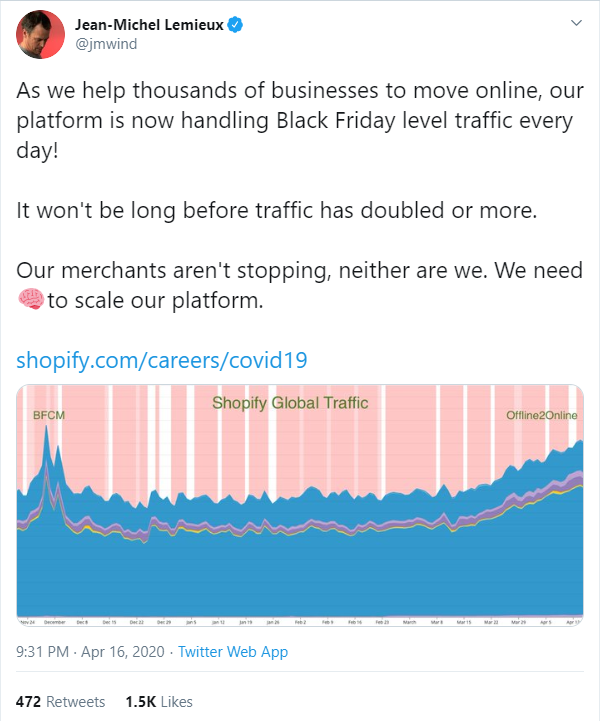
As the lockdown has eased a bit in many countries, the demand for non-essential items has touched the sky. Let’s take a look at the tweet from the Shopify CTO Jean-Michel Lemieux.

The number of merchants (new domains) Shopify gained on their platform in the first quarter of this year will take you by surprise. Nearly 70k new domains were registered on Shopify in the month of February and March which is more than the whole of 2018.

After a survey was done among consumers of the UK, France and Germany; three largest online retail markets in Europe, it was found that if retailers adopt the eCommerce model, they do have an excellent opportunity to bounce back from the current crisis once people get rid of the COVID-19 pandemic. The survey also indicated that around 80% of the consumers will likely return to do online shopping for non-essential commodities in the next half of the year.

Change in eCommerce Traffic

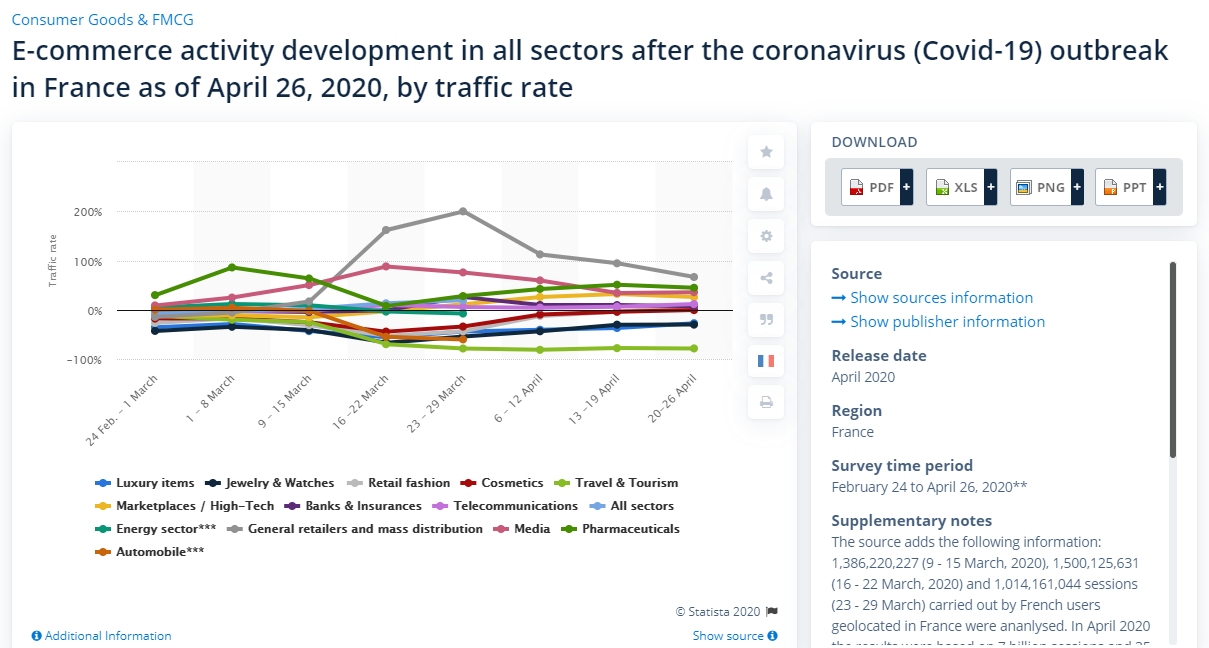
Statista shared a report of the traffic rate in all sectors of eCommerce after the Coronavirus outbreak in France. As of May 2016, the travel and tourism department showed the highest downfall followed by the automobile industry. Online pharmacies witness the highest rise in traffic.

You can also take a look at the transaction rate for the same period here.

SEMrush also released the detailed search traffic volume in which it was found that “Books and Literature” topped the search volume, followed by “Hobbies and Leisure”, “People and Society” and so on.

Among the goods, the search volume for toilet paper was at a peak. In eBay product categories, Gift card coupons had the highest search volume.

Also Read:

COVID-19 and Its Impact on eCommerce Businesses

How COVID-19 has affected Online Shopping Behaviour and eCommerce Sales?

5 Email Marketing Tips during the COVID-19 Pandemic

How to Retain Your Customers amid the Coronavirus Outbreak?

Ecommerce Shipping: Challenges and Solutions

A report by the Baymard Institute says that ‘High Shipping Cost’ is the topmost reason for shopping cart abandonment in the USA, nearly accounting for half of the total abandoned carts.

Ecommerce retailers, primarily mid-scale business owners, often encounter shipping challenges as popular brands like Amazon have already set the standard so high by offering free shipping or keeping the shipping price minimal.

In this write-up, I have listed a few shipping challenges faced by e-retailers and have also put forward the required solution. Let’s have a look.

1. Choosing the Shipping Provider

When starting out your online business, you may rely only on one or two shipping providers. Even while picking one, you may find yourself in a lot of confusion. As your business grows, you will have to come up with more choices for your customers.

FedEx and USPS are ideal to start with. With time, you will get a better understanding of what’s best for your business, like knowing about the best shipping providers which have a reasonable operation cost and take less transit time.

2. Free Shipping

Though free shipping is often seen as a marketing tactic to increase sales, it involves compromising with the profit margin.

If your online business is well set-up, you may adjust with the concept of free shipping, however, the same cannot be said for new businesses.

Start-ups cannot afford to offer free shipping easily as it will be difficult to include the overall shipping cost into the product. But it’s also a fact that free shipping is necessary to entice customers and encourage them to purchase.

Some of the effective ways to offer free shipping without affecting your profit margin much are-

1. Free shipping on a minimum order value

2. Limited-time free shipping

3. Free shipping on certain products

4. Free shipping in specific regions

5. Free shipping on a certain weight

Read more at Free Shipping Strategies: Why to Offer? How to Offer? When to Offer?

E-retailers slightly increase the product price to cover the shipping cost.

3. Damage during Transit

One of the major eCommerce shipping challenges e-retailers face is the safe transit of the product from the warehouse to the customer’s delivery address.

Many times, the customers complain that the product was not in a good state or damaged when it reached them. Though it is possible that it was already in a bad condition, it is very likely that it got damaged during the transit.

Fragile items need to be packed carefully else they can get damaged.

To overcome this, ensure that the packaging is rightly done. Get to know everything about the shipping provider before you tie-up with them.

4. Flat Rate Shipping

Another dilemma that eCommerce retailers find themselves in is whether to have a flat rate shipping pattern or not.

Flat shipping rate has its pros and cons. Setting up a flat shipping rate for every kind of product without understanding and comparing the product value of other items on your store can backfire as well.

For example, a flat shipping rate for a lesser value product may seem too high and the same shipping rate can eat your profit if its actual shipping cost is more than the flat shipping rate.

Offering the right shipping rate is crucial to avoid cart abandonment.

How can we play a role in your eCommerce shipping?

Knowband provides a variety of modules related to shipping that can be beneficial for your eCommerce website. The modules are-

Free Shipping Manager

This module is available only for the PrestaShop website owners. It allows the merchants to adjust the terms and condition from the back-end configurations in order to offer free shipping to the shoppers.

You can specify the factors that need to be matched to get free shipping.

One Page Checkout

This checkout module supports a majority of shipping methods such as Mondial Relay, So Colissimo, Ulozenka Delivery, Zasielkovn Delivery, LP Express 24 Delivery, Paczkomaty InPost, Zasilkovna, Poczta Polska (owppoczta), Webshipr, Paczka w Ruchu.

It is available for PrestaShop, OpenCart, Magento, and Magento 2.

Shipping Cost by Zipcode

Available for PrestaShop, this module allows you to adjust the shipping cost for different regions.

Product Availability Check by Zipcode

This module adds a zip code validator on your product pages, hence allowing shoppers to check whether the product is available for delivery at their location or not. It is available for PrestaShop, OpenCart and Magento.

For any kind of assistance, you can reach out to us at support@knowband.com

What’s New in Order Pages in PrestaShop 1.7.7.0?

One of the major changes in the latest PrestaShop version 1.7.7.0 (Beta) focuses on the order management page. New features have been introduced around the order process.

As per the PrestaShop team, the pages were becoming unpleasant because they looked old-fashioned and the same was the case with its hierarchy of information which led to inefficiency and misunderstanding for the merchants. This is why this page was put more stress in particular.

Let’s see the changes that have taken place in PrestaShop 1.7.7

Listing Orders Page

The new features in the listing order page help merchants save time and boost productivity.

1. Preview Order Details

A dropdown toggle is added right next to the serial number that opens a panel indicating the needful order information. Earlier, merchants had to open the order to check related information but now they can preview it by just clicking on the toggle.

The order preview displays the following information: Invoice address, Shipping address, Customer details, Carrier details, Tracking ID and the Products’ list.

The Products’ list displays only the first 10 products; the remaining can be seen by expanding the list. The product information displayed consists of product name, reference, stock location, quantity, tax price and total price (tax included or tax excluded).

There’s a new hook called displayOrderPreview on the bottom of the preview that allows adding new elements on the preview

2. Editable Order Status Labels

It allows merchants to update the order status directly from the listing, making it a time-saving process.

3. Order Status Color

Order status have been grouped into four different colors-

Dark Blue: Orders awaiting a customer action

Light Blue: Orders awaiting a merchant action

Green: No action required from the merchant, i.e. when the product gets shipped or delivered.

Red or Black: Payment error

This helps merchants identify the work to be done between the order placement and delivery.

4. Easy Access to Customer’s Profile

Earlier, merchants were required to open the order to access the customer page. It can now be accessed from the orders listing. Merchants just need to click on the customer’s name which will open the customer page in a new tab.

5. Redesigning of Bulk Action

It is now easy to take bulk action. Merchants can now process multiple orders in just three clicks. How?

  • Select orders for which you want to update the status at once
  • Choose the new order status from the drop-down list in the popup
  • Validate the new status update

The bulk action was redesigned to make it more visible and quicker to use.

6. Open Orders in New Tabs

Merchants can now open multiple orders at once on the new tabs. All they need to do is select the orders and click on new tabs under bulk action.

Order Details Page

A few features have been added in the PrestaShop version 1.7.7 focused on improving the readability and the position of the information.

1. Pagination in Products Listing

The products’ listing is now in the form of pagination, allowing merchants to navigate to different pages separately and hence putting an end to the endless and unreadable list of products in one place. Moreover, the products’ list has been moved to the top of the page which was earlier at the bottom and required merchants to continuously scroll to view the ordered products. Pagination works when there are more than 8 products.

2. Pack and Customized Products

For customized products, texts or files are displayed below the product. While the files are added to a new column on the same line, the texts are displayed below each other.

For a pack of products, a link below the product pack displays related products along with the order quantity and available product stock in a popup.

3. Message Interface

The message interface is now designed like messaging apps. The customer-merchant conversation pop-in displays the 4 latest messages and allows a merchant to see the entire conversation. At the 5th message, a link is displayed to open the pop-in which displays the complete conversation.

4. New Hooks Positions

The hooks have been relocated to more strategic positions to match the layout redesign and provide a better user experience.

The PrestaShop team has been continuously working over the last few months to deliver these new features and fix many bugs on these pages.

You should definitely switch your PrestaShop store to the new beta version 1.7.7.0

Welcoming the PrestaShop 1.7.7.0 Beta Version- What’s New?

The first Beta version for PrestaShop 1.7.7.0 is now ready for you to test! You can now download and install it and check if all your modules and themes are working properly.

As per the news shared by the PrestaShop team, it took them more than a year to build this version and it is even bigger than the previous one with 957 merged pull requests already (final release is yet to be out) compared to 748 for version 1.7.6.0.

More than 110 external contributors participated in the development of this version, fixed bugs, enhanced the existing features and even developed new features for the merchants.

What does PrestaShop 1.7.7.0 Beta Version cover?

This version covers topics such as-

  • Order Management
  • Redesigning and new features of order pages
  • More stability

Let’s try to understand in-depth what’s new in this release and what sort of issues have been fixed.

New Features and Improvements

1. The order pages have been redesigned and migrated to Symfony. Several new features have been added to improve efficiency and avoid going back and forth between orders.

2. PrestaShop version 1.7.7.0 comes with Fuzzy search, an improved search mechanism that has been added on the front office to improve conversions by taking misspellings and typos into account.

3. PrestaShop merchants can now add new official and non-official currencies to their store and customize their display in the desired language.

4. The field Manufacturer Part Number which is used to identify a specific product of a manufacturer is now available for Product management. It aims to improve the indexing and searching and also leaves a positive effect on SEO.

5. Under Shop Parameters>General, an option has been added to enable or disable suppliers in front-office. Previously, there was only one generic option.

6. The latest release presents an error page in the back-office. If you encounter an error in the back-office when running in production mode, you are displayed an error page instead of a blank page.

7. Merchants can now translate the email content by visiting Design>Email Theme.

8. New languages have been added.

9. Installer and localization packs have been updated to offer accurate international data for all businesses.

10. PrestaShop 1.7.7.0 brings support for emojis both on front-office and back-office. All database tables are now encoded in utf8bm4 by default, enabling the emojis support.

Improvement in Core modules

A few modules have been improved with bug fixes for increased robustness and new features for better productivity.

1. Theme customization is now available for product and category pages too apart from the homepage and they are easy to configure and customize.

2. Customer reassurance is now available on all web pages which was earlier restricted to product pages and the checkout page. It now allows you to customize the icon color and you can also add a description and a link.

Technical Improvements

1. PrestaShop 1.7.7.0 comes with updated PHP support. It has brought support for PHP 7.3 and has dropped support for PHP versions earlier than 7.1.3 for better stability.

2. jQuery has been updated to the latest version 3.4.1 in the back office and Classic & Core theme.

3. Another improvement that the latest version brings is the Automatic Form Rendering. Back-office forms are now much easy to render. You can now add form fields anywhere in the form without overriding the form template. (The feature is in the implementation phase, not all forms support it currently)

4. A new CQRS Debugger has been included in the Symfony debug war. This helps you identify which command and queries have been used to build the page you are viewing. You can make further customization by decorating or overriding it from a module.

5. There has been an improvement in tab management. You no longer require a fake legacy controller as the tab now support Symfony routes and automatic detection in modules. Moreover, it now supports the enable/disable functionality. The tab is hidden whenever a module is disabled and is gets visible again on enabling.

Bug Fixes

Over 160 bugs have been fixed for the PrestaShop version 1.7.7.0 so far that includes 11 highly unexpected bug fixes, 5 front-office and 5 back-office notable fixes.

It’s time to Switch

If you are still using the older PrestaShop version, it’s time for you to move to PrestaShop 1.7.7.0. PrestaShop community is already asking the merchants to test the latest version.

If you need any help to migrate your PrestaShop store to the latest version, you can contact us at support@knowband.com

Knowband, a leading name as an eCommerce development company provides PrestaShop plugin development services to enhance the functionality of your eCommerce store. We have hired experienced PrestaShop developers who are always dedicated to resolving your issues.

Win Customer Trust and Boost Sales with Social Proof

I shifted to a new place recently. A few days later, I thought of going for dinner with my family. Since I was new to the place, I did not have much idea about the nearby restaurants.

I asked someone and he guided me to a place where there are a few. I came across two restaurants- one was occupied while the other being in the same place was vacant.

And just like any other person would do, I did the same thing. I did not take the risk of going to an empty restaurant and went to the other one without even giving it a second thought.

This psychological thought process is what we call Social Proof.

What exactly is Social Proof?

Social proof is generally described as a psychological or social phenomenon where people are influenced by the action of the mass and follow the same approach thinking it to be correct simply because others find it too.

People like to stick with the majority. This is exactly what I did. I assumed the empty restaurant does not provide good services or quality food, which probably might be true else it would not have been unoccupied right? Since many people were in the other, I assumed it to better.

Social proof in eCommerce

Social proof plays a crucial role in the eCommerce world and can prove to be a powerful marketing tool. It refers to the reviews, testimonials, social shares, etc. which have a major influence on the buying decision of consumers.

Let’s understand this more clearly by an example. When you go shopping, you try out the product, feel the quality and then make the payment.

But this is not possible in case of online shopping. You do not have the product in hand. Shoppers rely on the opinions of others, what the majority has to say about it, and based on that, they make their decision.

How to leverage Social Proof for your Brand?

You can use social proof for your brand in many ways, some of which are-

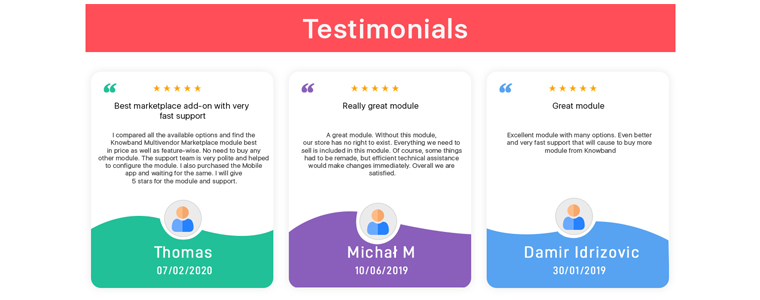
1. Testimonials


Testimonials are positive reviews left by your clients or customers for your brand, products or services and can work exceptionally as social proof.

Although reviews and testimonials are usually considered the same, there is a slight difference. The latter is collected and managed by the business while the former involves a third party.

You would have often come across websites that display testimonials on their home page. It’s a great way to leave a strong first impression of your brand in front of your visitors by showcasing them what your existing clients have to say about your brand.

Reach out to your loyal clients or customers and ask them to share their experience. If a client has recommended your brand by leaving a positive review on your social media pages, use that testimonial to encourage others to try out your services.

2. Customer Reviews


Before putting their trust in a Brand, the first thing that the consumers do is look for its online reviews.

Research done by BrightLocal says that 82% of consumers give importance to online reviews and suggests that an average consumer reads 10 online reviews and spends nearly 14 minutes before they make their decision to purchase from that business.

Online reviews are social proof for consumers. Try to maintain a good brand image. Collect reviews on different review websites related to your industry. If you are a local business, your primary focus should be getting positive reviews on Google.

3. Brand Endorsement

When a celebrity or an influencer becomes a spokesperson for your brand, it is called Brand Endorsement.

Brands that have a huge budget can reach out to celebrities but it’s not easy for small scale businesses to pay a huge amount of money for brand endorsement. This is where Influencer Marketing comes into play which has grown popular over the years.

Studies suggest that people trust the words of influencers more than the brand itself. An influencer can be anyone who has a great social following and is popular among your target audience.

So just analyze your right target audience and reach out to a relevant influencer who they like and trust. Plan out how you are going to make it work.

4. Customer Count

If your online business has progressed a lot over the years or even in recent times, it is always a good option to showcase it, be it on your website’s home page or your social media pages.

Numbers do develop psychological thought. Upon noticing that a business has served a huge number of customers, other consumers are attracted by it.

I have come across many businesses that use years of experience, total clients, popular clients, total projects, total users worldwide, etc. as social proof on their website.

What does it do? It is just a way to make your visitors feel the credibility of your brand along with the quality services that you have offered over the years and the number of satisfied customers or clients.

5. User-Generated Content

User-generated content is also another amazing marketing strategy to generate social proof. Many brands launched campaigns related to user-generated content where they ask users to share a word about their brand or products on social media sites using some specific hashtags.

You can also run such campaigns and offer rewards in return. Word-of-mouth from users can be a great social proof.

Knowband also offers a few modules that can help you build social proof, such as Facebook Share and Win Discount module through which you can ask customers to share your product on their Facebook profile and get rewarded for it.

Another module you can look for is Review Reminder and Incentives through which customers get rewarded for posting a successful review on your website about your products.

You can also try the Affiliate and Referral Program module which lets you run refer and earn kind of program on your website which will help in building social proof for your brand among users.

Conclusion

Through this article, we can conclude that social proof is helpful in many ways such as-

1. Social proof builds customer trust

2. It helps in acquiring new customers

3. Social proof boosts your conversions and sales

4. Social proof can help grow brand awareness

I hope this write-up helped you in identifying how you can make the best use of social proof in your online business.

6 Ecommerce Marketing Strategies to Grow your Business

Millions of searches are made on Google every day, and for every single search, there are tons of results.

The competition in the online/eCommerce market is extremely high. Starting an online business is not going to be a piece of cake when the Internet is already occupied with multiple businesses focused around a particular niche.

Well, setting up an eCommerce website is not a big deal, the challenge lies in growing your business. What you offer, many online businesses are probably leading in that niche.

When people type their search query, it is highly unlikely that you would appear on the top of the search results; not even close, let alone top.

To set yourself apart and go past your competitors, you need to focus on your eCommerce marketing strategies so that your brand becomes known to the netizens.

Ecommerce Marketing Strategies

From low-cost to high-cost, you will find various types of marketing strategies that would help you in boosting your business. However, in this write-up, I have put forward 6 best eCommerce marketing strategies.

1. Search Engine Optimization

SEO is an integral part of eCommerce marketing.

No matter how well-designed your website is, its existence does not even matter if it is not SEO optimized. How would the Internet users know that your brand exists unless it appears on the search results?

This is what SEO is for- to aware Google or other search engines about your business and its offerings so that when a user performs a search and the query relates to your business, the search engine displays your website under results.

Thus, the primary thing to perform when it comes to increasing the visibility of your brand is optimizing your website for SEO.

Do keyword research. List out the keywords that you want to rank for on the search engine and place them on your web pages. Avoid keyword stuffing; it can harm the performance of your website.

Keywords are to inform the search engine what your business is based on. When the bot crawls your website and identifies a few keywords that have been put more stress upon, it will suggest your website to the users for queries around those keywords.

2. Social Media

The second in my list of eCommerce marketing strategy is social media.

Today, nothing comes close to social media when we talk about marketing an eCommerce website. Social media networks like Facebook and Instagram, which were earlier meant for entertainment purpose only, have now turned into huge marketing platforms.

Why social media?

The primary reason why you should consider social media marketing is the audience base. Facebook and Instagram have nearly 2.6 billion and 1 billion active users worldwide, respectively. With such a huge user count, 90-95% of your target audience is likely to be present on these platforms.

Secondly, they are completely free. You can go and create your brand page right now, within a few minutes. Social media gives a wide organic reach to your brand and products, and you can acquire a lot of customers through the platform.

To boost your brand awareness, you can also spend a few bucks in paid promotion by taking the help of social media ads.

Just a suggestion- Do not use social media just for promotion. Use it to nurture the relationship with your followers. Build connection, answer their queries and engage with them.

Apart from Facebook and Instagram, LinkedIn and Twitter are also amongst the targeted platforms by Brands. It’s just up to you where you want to market your products and how much time you have to manage those accounts.

3. Reach out to Influencers

Adding to the eCommerce marketing strategy is Influencer Marketing.

Influencer marketing is the current trend. It is the form of marketing where you reach out to an influencer and ask him/her to promote your brand or products. You pay them a fee and they endorse your brand.

How much an influencer charge depends on their popularity. Someone popular among the netizens and with more followers will charge comparatively high than with those less popular.

As the term suggests, Influencer marketing influences the purchasing decision of the followers since they have a liking towards the influencer.

In other words, you can say Influencer marketing is like a small version of advertisements done on a larger scale such as Television advertisements.

4. Content Marketing and Guest Post

You simply cannot overlook Content Marketing when it comes to e-commerce marketing strategy.

Create a blog for your website and start writing. When you write, make sure you are providing some kind of value to your readers. It should not sound completely promotional.

I know you want to link your products but it should not be done in a way that disturbs the content flow. Identify topics around your niche, find out what people are searching and then write a blog post that revolves around it.

In this way, you will be able to promote your product besides helping your readers in getting the answers they were looking for.

Content marketing isn’t just about blogging. You can write a guide and provide an eBook to your users, and to promote that guide, you can make use of lead magnets.

For further marketing, you can reach out to other publications and do Guest posting, which not only gives you a backlink to your website but also provides you with the opportunity to present your brand in front of a new audience.

You can find many relevant Guest posting websites on the Internet. Contact them, follow their guidelines and submit your posts.

5. Testimonials

Nothing can match the happiness level of a brand when their clients or customers leave a positive remark about them, which we call as testimonials.

The purpose of any business is to provide quality products and services to their customers/clients. And when they feel satisfied with your brand, it’s a sign of loyalty and trust in your brand which is very crucial from a Brand’s point of view.

When a client gives positive feedback, highlight that testimonial on your website, primarily on the Home page. You can also promote the testimonials on social media platforms.

Testimonials are helpful to encourage new visitors to place trust in your brand and turn them into your loyal customers.

6. Referral Marketing

Referral Marketing is one of the popular eCommerce marketing strategies.

Whenever a brand is new in the market, marketers or business owners take the help of referral marketing to popularize it and acquire new customers.

No customers would be interested in a new brand. To evoke their interest, you can launch referral programs where you reward users with some incentives or commissions whenever they refer your brand/website to other people.

When people get benefits, one refers to another and a long chain is formed. This boosts your brand awareness.

Final Thoughts

I also wanted to include email marketing in this list of eCommerce marketing strategies. But it is a very basic one, and hence I avoided explaining it in brief.

The above-mentioned six strategies have proved to be extremely useful for many online businesses. Try them out and let me know how it worked out for you.

Also, feel free to comment if you have some more points to add.

Role of Voice Search in eCommerce

With the day to day advancements in technology, online shopping has become way too convenient. Voice search has come up as the next big thing in the industry.

With the popularity of voice software like Apple’s Siri, Google Assistant, Amazon Echo and Alexa, and Cortona, voice search has set a trend. People have adapted to voice search and become familiar with it. Brands have also taken up this opportunity to provide an effortless shopping experience to consumers.

Voice Search Stats

Comscore reports that by 2020, nearly 50% of the searches will be voice-based searches.

Google also stated that 2 out of every 10 searches are made through voice, and the number is expected to grow in the coming years.

Reports have also suggested that voice-shopping is estimated to make $40 Billion by 2022.

Impact of Voice Search in eCommerce

Voice search has encouraged quick search functionality, and this is why people are using voice commands very often to search on desktops, mobiles, and tablets. They just speak and the voice assistant helps them with their search query.

Isn’t it amazing? You do not need to open the website or the app, type the product name and then search. You can simply let the assistant know what you are looking for and it will present you with the desired search results.

Many eCommerce websites have enabled voice search option in their search bar as well, hence allowing shoppers to search for products or categories in the website by giving a voice command.

If you also want to add voice search option on your website, you can take a look at our Voice Search module that places a microphone in your search box, giving people the option to perform a voice-based search. The module is currently available for PrestaShop and will soon be available for Magento as well.

How to optimize your eCommerce website for Voice Search?

To make sure that your website’s search engine delivers relevant results on voice searches and consumers’ shopping experience is not hampered, consider the following key points.

1. Long-tail keywords

Voice search should not be optimized just for small keywords; it needs to consider the long-tail keywords as well.

Voice search is different than type search. When people use voice commands, they generally tend to use long-tail keywords to get accurate results. So, do keep this in mind to make it effective. But for that, it is important to understand consumer’s habits towards the way they search.

2. Questions

The most common use of voice search is for asking questions. People start their search query with why, what, where, which when using voice commands, which is not so common when they type it.

For example, if a user wants to search for smartphones under $200, he will simply search by typing “smartphones under $200,” whereas for the same search using voice commands, the user will ask- “Which are the best smartphones under $200?”

You see the difference in approach? It is there suggested to optimize your site for questions. These sorts of voice search queries have skyrocketed in recent times.

3. Natural Language

Your eCommerce website should be optimized to understand and process simple and plain English used by people. Add some common terms, product titles in natural language that people use during voice search so that the search engine can easily understand what the user meant.

4. Local Search

Voice searches are mostly made to find out nearby things, like best heart hospitals near me, best restaurants near me, best AC shops near me, etc. which we can also refer to as local searches.

Make sure that your business is listed on Google and optimized for voice search so that it can be displayed locally in the search results whenever a related search is made.

Final Thoughts

Voice search is the future of eCommerce. People are finding it more comforting to interact with search engines using their voice and not by typing. Artificial Intelligence has been so advanced that in the upcoming years, voice search’s accuracy level will be very high and it will dominate heavily over any other. It is completely going to change the way online shopping is done.

Apart from voice search, you should focus on image search as well. Add an image search option on your website so that if people do not the name of the product and want a similar item, they can find the related results, if any, by uploading the image.

This can be made possible through our Image search module which is available for PrestaShop and OpenCart. So if you are looking to add the image search functionality as well on your website, you can consider taking the help of this module.

For any assistance regarding the module, you can reach out to us at support@knowband.com