We are professionals in the eCommerce industry, specializing in plugin development. With years of experience, We provide the best plugins for platforms like - Magento, Prestashop, OpenCart and Shopify. We also offer custom module development and customization services for websites and modules. Our team remains at the forefront of industry trends, delivering cutting-edge solutions to enhance eCommerce website functionality. With a customer-centric approach, our company is trusted partner for eCommerce plugin solutions.
In the ever-evolving world of e-commerce, businesses must adapt to changing market trends and customer expectations to remain competitive. One crucial decision that online store owners may face is whether to migrate from their current platform to a new one. In recent years, PrestaShop to Shopify migration has gained popularity due to Shopify’s user-friendly interface and robust features. However, before making the leap, there are several essential factors to consider.
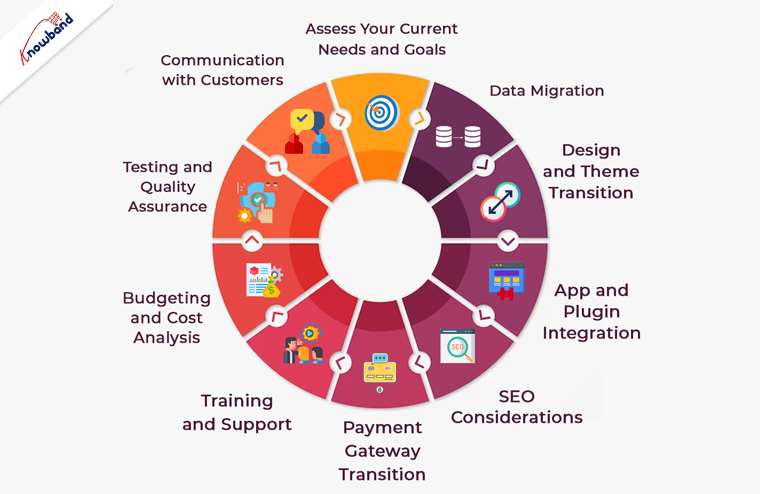
1. Assess Your Current Needs and Goals:
Before initiating a migration, it’s vital to understand your current e-commerce needs and long-term goals. Moreover, you should take a close look at your PrestaShop store and identify any shortcomings or limitations.
You can consider factors like scalability, customization options, and the ability to implement future changes. Furthermore, Shopify offers a wide range of features, but it’s essential to ensure they align with your specific business requirements.
2. Data Migration:
One of the most critical aspects of migrating from PrestaShop to Shopify is data transfer. This encompasses product listings, client details, past order records, and additional data. Therefore, ensure that your data is organized and cleaned before the migration process begins. Moreover, Shopify provides several tools and services to facilitate data migration, but a meticulous approach is necessary to avoid data loss or inaccuracies during the transition.
3. SEO Considerations:
Maintaining your website’s SEO ranking is crucial during a platform migration. Be prepared to update and redirect your URLs to prevent any loss in search engine visibility. Make a list of all your PrestaShop URLs and set up 301 redirects in your new Shopify store. Additionally, create an XML sitemap and submit it to search engines to help them index your new site quickly.
4. Design and Theme Transition:
The look and feel of your online store play a significant role in customer engagement. If you have a custom PrestaShop theme, you’ll need to recreate or find a similar one for Shopify.Shopify provides a diverse selection of themes, which include both free and premium choices.Thus, you can ensure that the selected theme aligns with your brand identity and provides an excellent user experience.
5. App and Plugin Integration:
Both PrestaShop and Shopify have their ecosystems of apps and plugins to extend functionality. Therefore, as an eCommerce shop admin you should always identify the essential Prestashop addons and integrations your business relies on and check if they are available on the Shopify platform. While Shopify has an extensive app store, some specific apps may not be available, which could impact your business operations.
6. Payment Gateway Transition:
The processing of payments is a vital element of every e-commerce establishment.Shopify supports various payment gateways, but the ones you were using on PrestaShop may not be the same. Research the available payment options on Shopify and ensure they meet your business needs. Additionally, plan for a seamless transition to minimize any disruption in your revenue stream.
7. Training and Support:
Shopify is known for its user-friendly interface, but it’s essential to invest time in learning the platform thoroughly. Take advantage of Shopify’s extensive documentation and support resources to familiarize yourself with its features and capabilities. Consider providing training to your staff if necessary to ensure a smooth transition.
8. Budgeting and Cost Analysis:
Migrating from PrestaShop to Shopify involves various costs, including subscription fees, theme purchases, app subscriptions, and potential design and development expenses. Thus, create a detailed budget to account for these costs and assess whether the benefits of moving to Shopify justify the investment.
9. Testing and Quality Assurance:
Before making your Shopify store live, thoroughly test all aspects of the website, including functionality, design, and data accuracy. Test the checkout process, navigation, and user accounts to ensure a seamless customer experience. Address any issues or glitches promptly to avoid customer dissatisfaction.
10. Communication with Customers:
Keep your customers informed throughout the migration process. Notify them in advance of any planned downtime or temporary disruptions to your online store’s services. Provide clear instructions on how they can access your new Shopify-based website. Effective communication can help maintain customer trust and loyalty during the transition.
In the End!
In conclusion, migrating from PrestaShop to Shopify can be a beneficial move for your e-commerce business if done thoughtfully and strategically. Furthermore, careful planning, attention to detail, and thorough testing are essential to ensure a successful transition. By considering these key factors, you can make the migration process as smooth as possible and position your online store for growth and success in the competitive e-commerce landscape. At Knowband with 13+ years of technical expertise in Web and App development, we also offer custom development and platform migration services. In case you have any queries, you can also find us at our official email address support@knowband.com.
Are you an ambitious OpenCart store owner seeking a cutting-edge solution to boost your sales and customer satisfaction? Look no further! Presenting the Knowband Opencart product Pre-Order Extension, the ultimate tool to revolutionize the way you manage pre-orders, backorders, and advance bookings for your products.
The Opencart Product Backorder Extension is a powerful, feature-rich module designed exclusively for OpenCart merchants. It offers a seamless and hassle-free way to enable pre-order functionality on your store. Empowering your customers to book upcoming products in advance. Furthermore, the OpenCart product Advance Booking Plugin comes packed with robust features to cater to a variety of pre-order scenarios, making it the ultimate choice for any e-commerce business.
1.1. Key Features Offered by OpenCart Product Preorder Plugin:
Pre-Order Functionality:
With our extension, you can effortlessly offer pre-order options for upcoming or out-of-stock products. Ensuring your customers never miss the chance to secure their desired items in advance.
Advance Booking Made Easy:
Now, you can streamline the booking process for upcoming products. Customers can reserve their favorite products in advance and eagerly await their release, driving excitement and anticipation.
Real-time Status Updates:
Keep your customers informed at all times! The OpenCart Sell Out-of-Stock Products plugin provides real-time notifications on pre-order, backorder, and advance booking status, ensuring transparency and building trust.
Customizable Pre-Order Button:
Tailor the pre-order button to match your store’s theme, attracting attention and encouraging customers to reserve their products effortlessly.
Inventory Management:
Knowband’s OpenCart Preorder Module ensures efficient inventory management by allowing you to set pre-order limits and automatically disabling pre-orders when stock is available.
Seamless Integration:
Opencart Pre-Order Extension seamlessly integrates into your existing OpenCart store, requiring no complex coding or technical expertise.
Boost Sales & Revenue:
By offering pre-order options, you can drive product demand, increase sales, and maximize revenue potential like never before.
Pre-Order Pricing Options:
Offer flexible pricing for pre-order items. You can set special prices for pre-orders, giving your loyal customers exclusive discounts and incentives.
Partial Payments for Pre-Orders:
Allow customers to make partial payments for their pre-ordered products. Making it easier for them to secure their desired items without breaking the bank.
Pre-Order Stock Notifications:
With the help of the OpenCart Product Advance Booking Plugin, the store admin can enable the customers to receive email notifications when pre-ordered products are back in stock, ensuring they never miss the chance to complete their purchase.
SEO-Friendly:
The extension is designed with SEO best practices in mind. Furthermore, it ensures that pre-order products can be indexed by search engines, boosting your store’s visibility and driving organic traffic.
Cart Rules for Pre-Orders:
The Opencart store admin can set specific cart rules and restrictions for pre-ordered items. Such as minimum order quantities or eligibility for certain promotions, to optimize your pre-order management.
Guest Pre-Order:
Allow guest customers to place pre-orders without requiring them to create an account, reducing barriers to purchase and enhancing the overall shopping experience.
Multilingual and Multi-store Support:
Reach a global audience and cater to diverse markets with multilingual support, while managing pre-orders efficiently across multiple stores from a single admin panel.
1.3. Benefits to the Customers:
Knowband’s OpenCart Product Pre-Order Plugin offers several benefits to customers, enhancing their shopping experience and providing added convenience. Some of the key benefits for customers include:
Early Access to Desired Products:
Customers can pre-order products that are not yet available for regular purchase. This allows them to get early access to highly anticipated or newly launched items, ensuring they don’t miss out on popular products.
Guarantee Product Availability:
Pre-ordering with Knowband’s OpenCart backorder module ensures that customers secure their desired items before they run out of stock. This feature is especially useful for limited edition products or items with high demand.
No Missed Opportunities:
Customers won’t miss out on their favorite products even if they are out of stock at the moment. They can place an order in advance and receive the item as soon as it becomes available. The following functionality helps the Opencart Product Pre-order plugin stand out from the rest.
Convenience and Time-saving:
Pre-ordering eliminates the need for customers to constantly check the website for product availability. They can place their orders in advance and relax, knowing the product will be delivered once it is back in stock.
Flexibility in Payment:
The OpenCart Pre-order plugin allows the customers to make a partial payment or reserve the item without paying the full amount upfront. This flexibility is appreciated by customers who might not have the entire amount available at the time of pre-ordering.
Notification Alerts:
Customers can receive notifications when their pre-ordered products are back in stock or when the release date arrives. Furthermore, it helps the customers to keep them updated about the status of their orders.
Exclusive Offers:
Retailers can offer special discounts, promotions, or exclusive deals to customers who pre-order products with the OpenCart product advance booking plugin. Not only it incentivizes them to use the pre-order feature but also helps to build a healthy business-customer relationship.
Planned Purchases:
Pre-ordering allows customers to plan their purchases in advance, especially for upcoming events or special occasions. Ensuring they have the desired products in hand when needed.
Early Bird Access:
In cases where products are in limited supply or high demand, pre-ordering allows customers to be among the first to get their hands on the product, giving them a sense of exclusivity.
2.0 Installation Guide
To install the OpenCart Product Pre-Order Plugin, please follow the following steps:
Purchase the OpenCart Preorder Extension from the Knowband store. You’ll get the following files:
Zipped File containing the source code of the OpenCart backorder plugin.
User Manual of OpenCart Product advance booking plugin.
Follow the steps below to install the OpenCart Product Advance Booking Extension in the OpenCart store:
Unzip the zipped. You’ll get the folders as shown in the image below:
Copy all the files and folders of the zip file in the Root Directory of OpenCart setup via FTP manager.
The OpenCart Pre-order is now installed and is ready to use. Go to Admin -> Main Menu -> Extensions as shown in the image below:
Select Pre-Order from the list of modules and click on the Edit button as shown in the image below:
The OpenCart product pre-order plugin provides an easy to customizable admin panel for pre-order management. The store admin can find easy configuration options at their convenience.
3.1. General Setting:
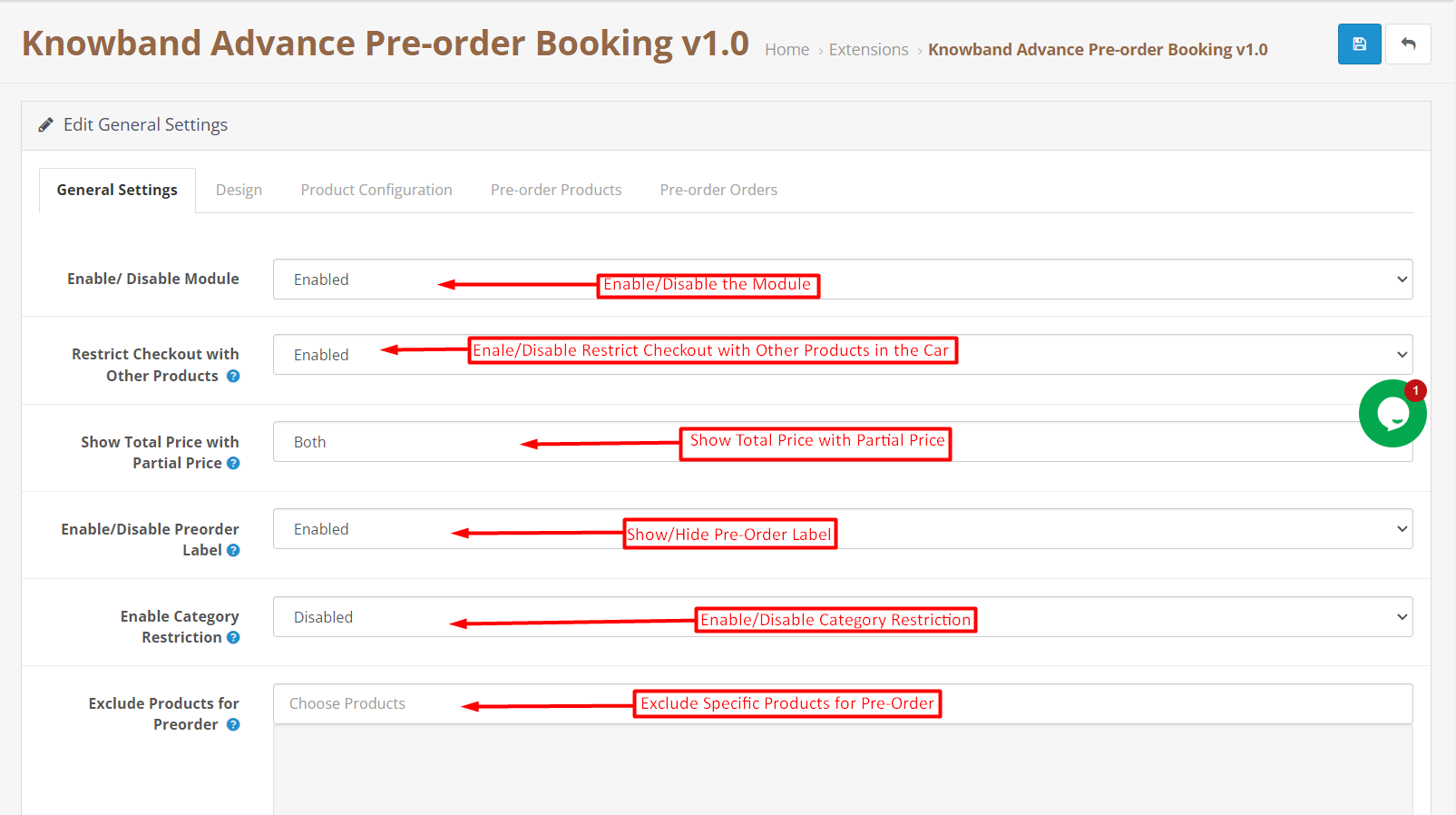
The OpenCart store administrator can find module all the general configurations in the following tab.
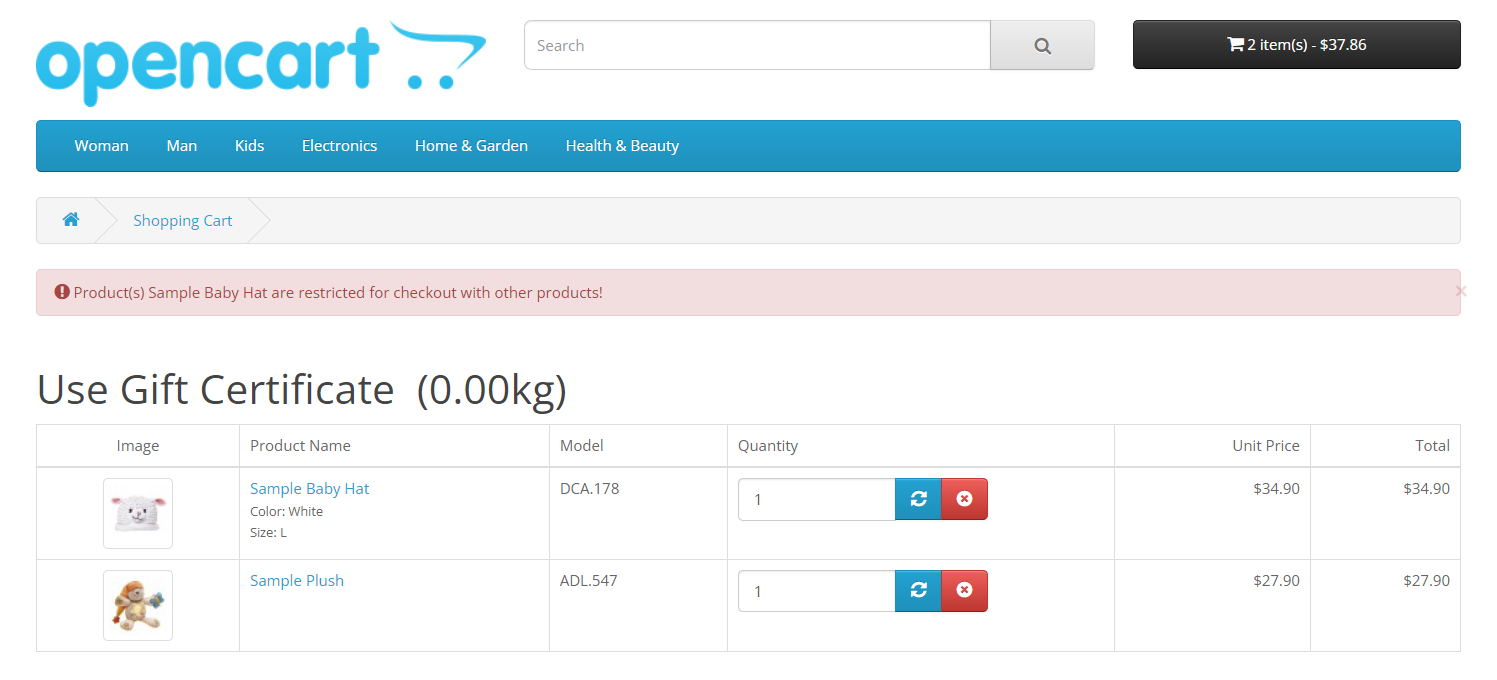
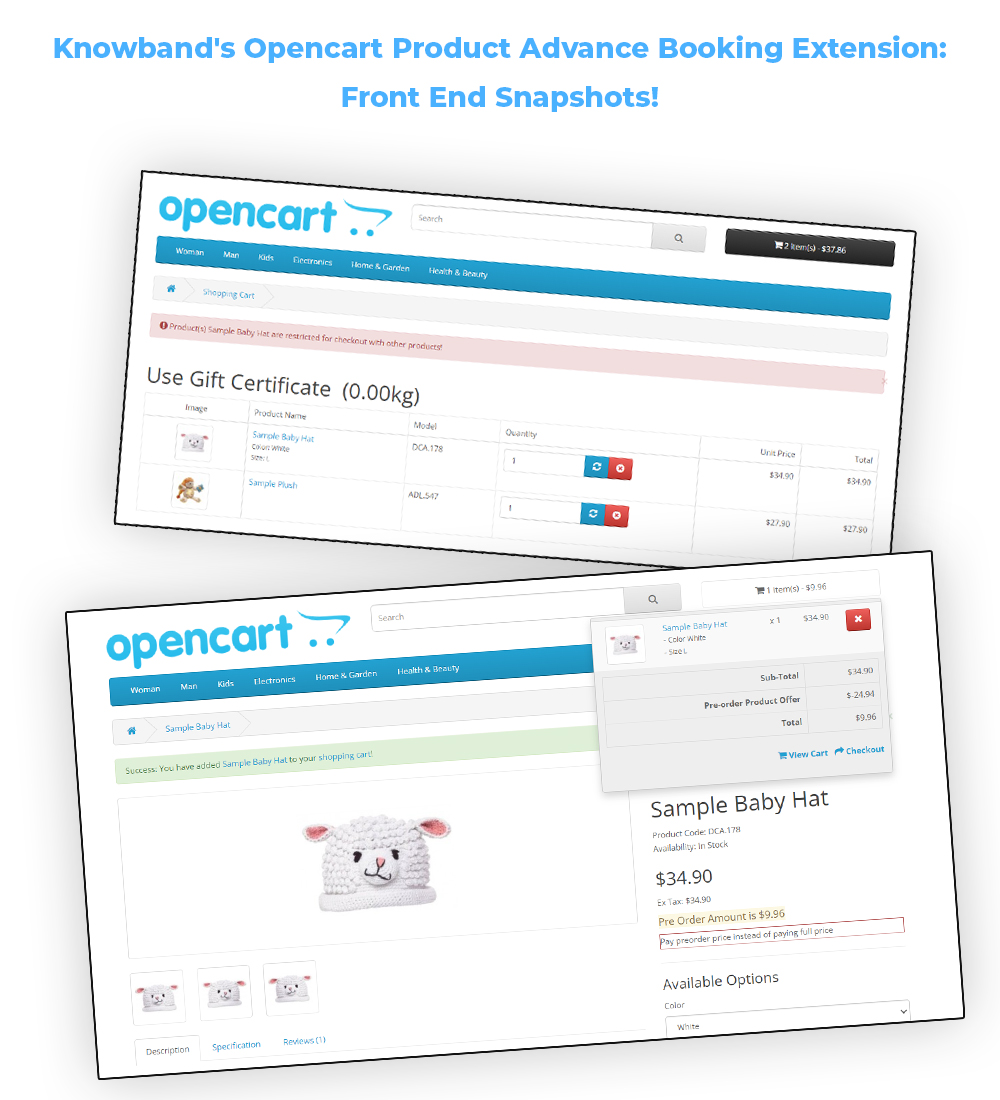
Restrict Checkout with Other Products: If the following button is enabled, the customers will not be able to complete checkout of pre-order products with other products. Only one pre-order product in the cart will be allowed for checkout.
Show Total Price with Partial Price: The admin can show/hide the total price with partial price using the following button. The admin can choose whether they want to display both the prices or any one of them. This is applicable only on the product page.
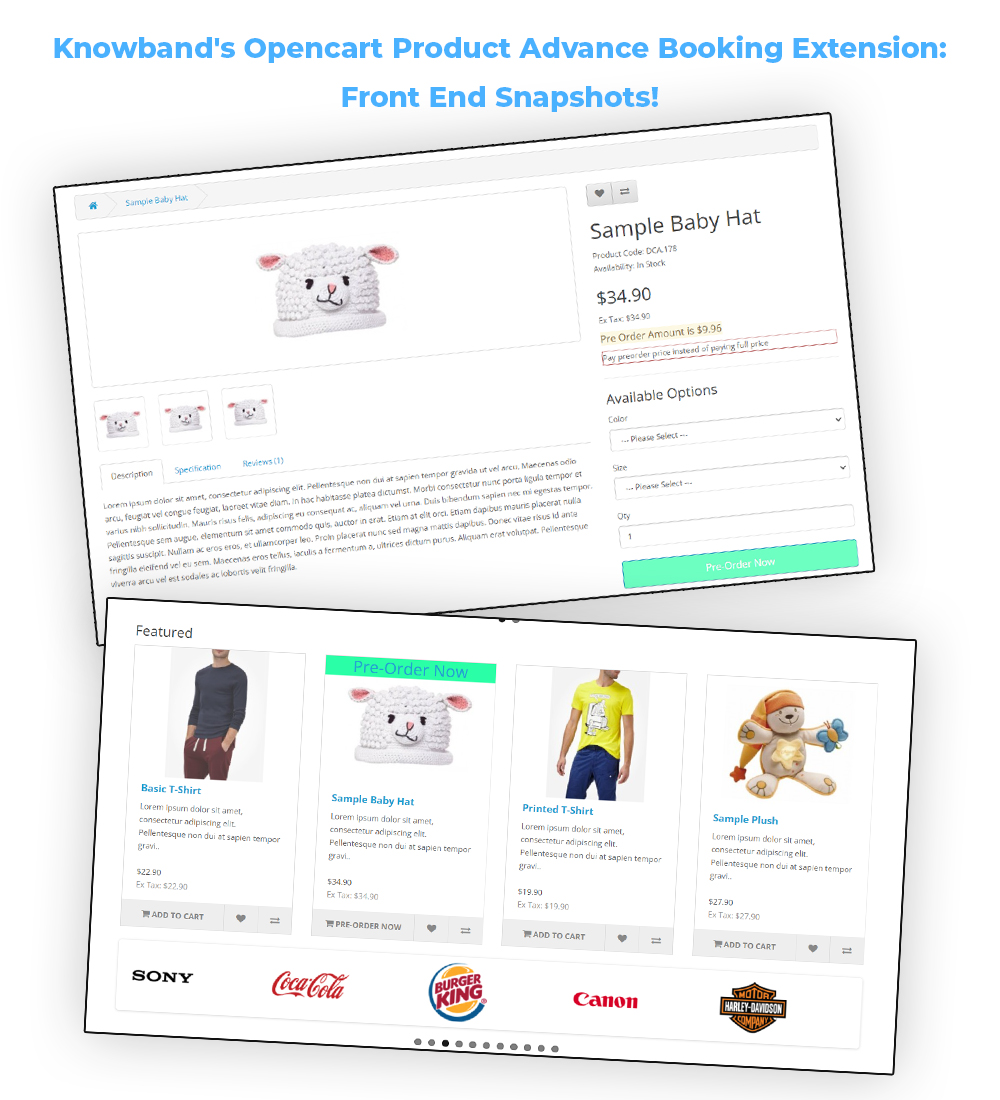
Enable/Disable Pre-Order Label: The admin can show/hide pre-order labels from the products with this button. The pre-order label will only appear on the product listing pages such as the home page, category listing page, search result page, etc. This label can be modified also in the Design Tab.
Enable/Disable Category Restriction: The store retailers can enable/disable category restriction for Preorder products from here.
Exclude Products for Preorder: In case you want to exclude any specific products for advance booking, you can enter the same in the shown text field in the above image.
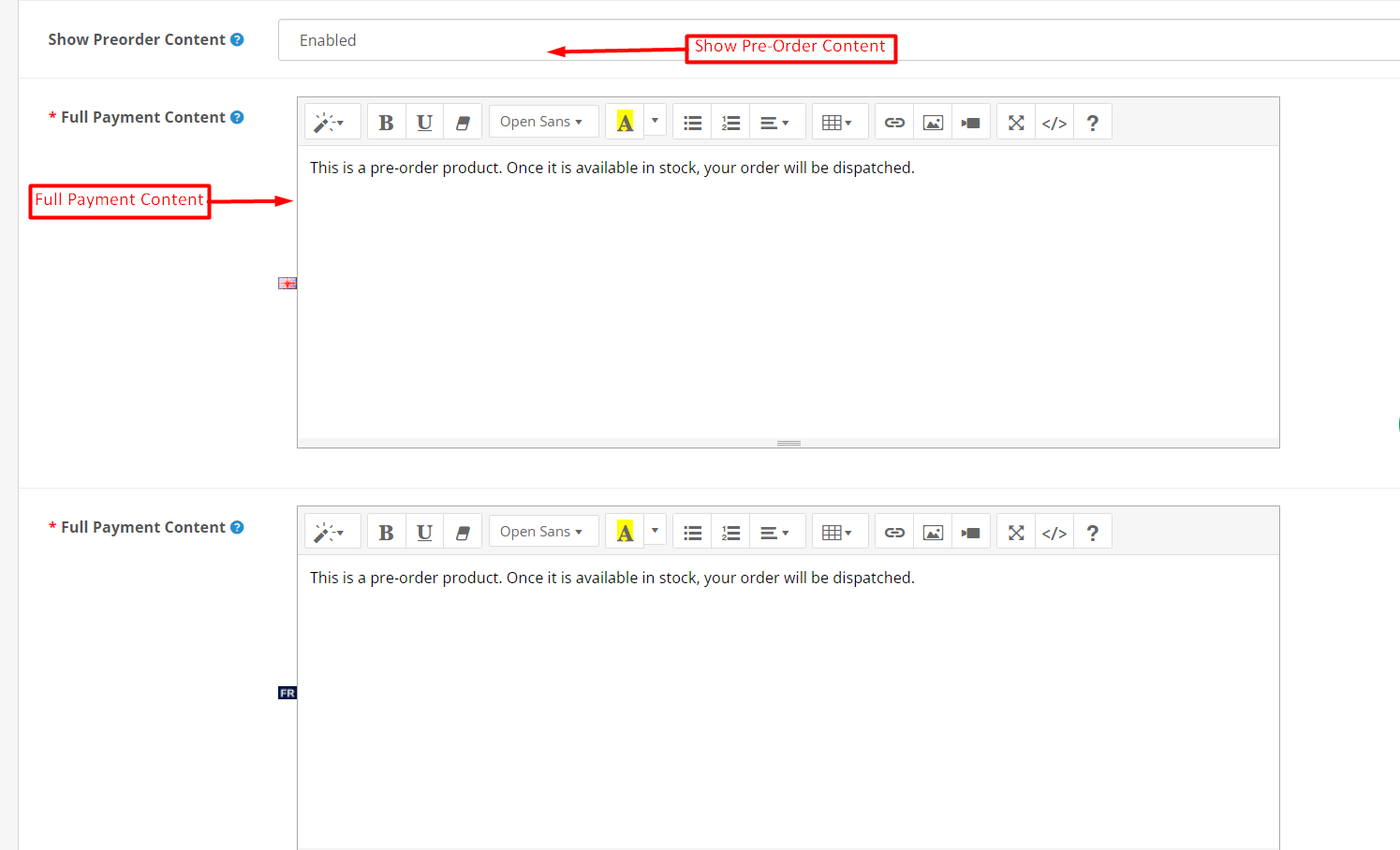
Show Preorder Content: The admin can show/hide pre-order content using the following button. This content is displayed only on the product description page.
Full Payment Content: The following content will appear in case the full payment option is selected for the preorder products.
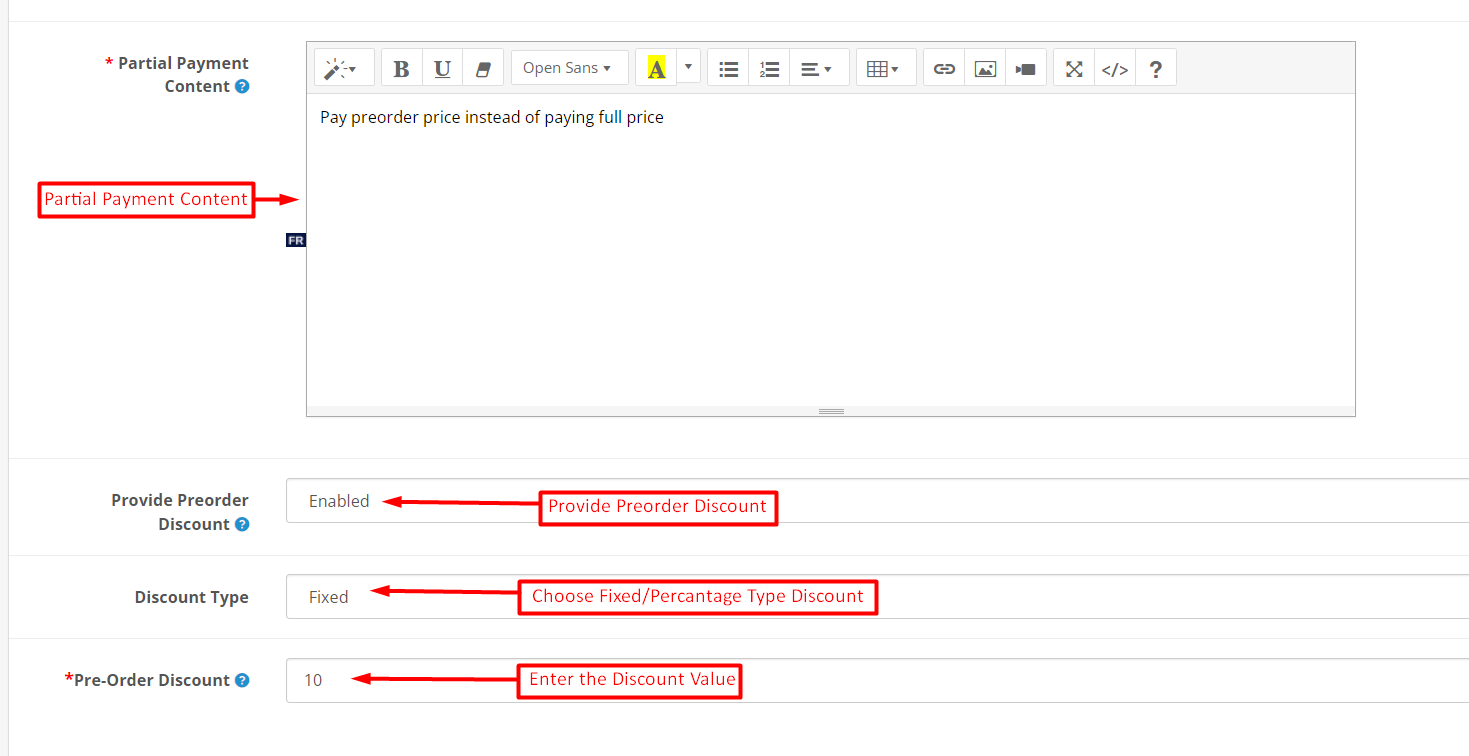
Partial Payment Content: The content entered in the following text field will appear in case the partial payment option is selected.
Provide Preorder Discount: Enable the following option if you are willing to provide the preorder discount to your customers.
Discount Type: The store admin can choose the discount type as a fixed amount or percentage based on the order total from here.
Pre-Order Discount: The following text field is provided for entering the exact amount for the discount on the pre-order products.
3.2. Design:
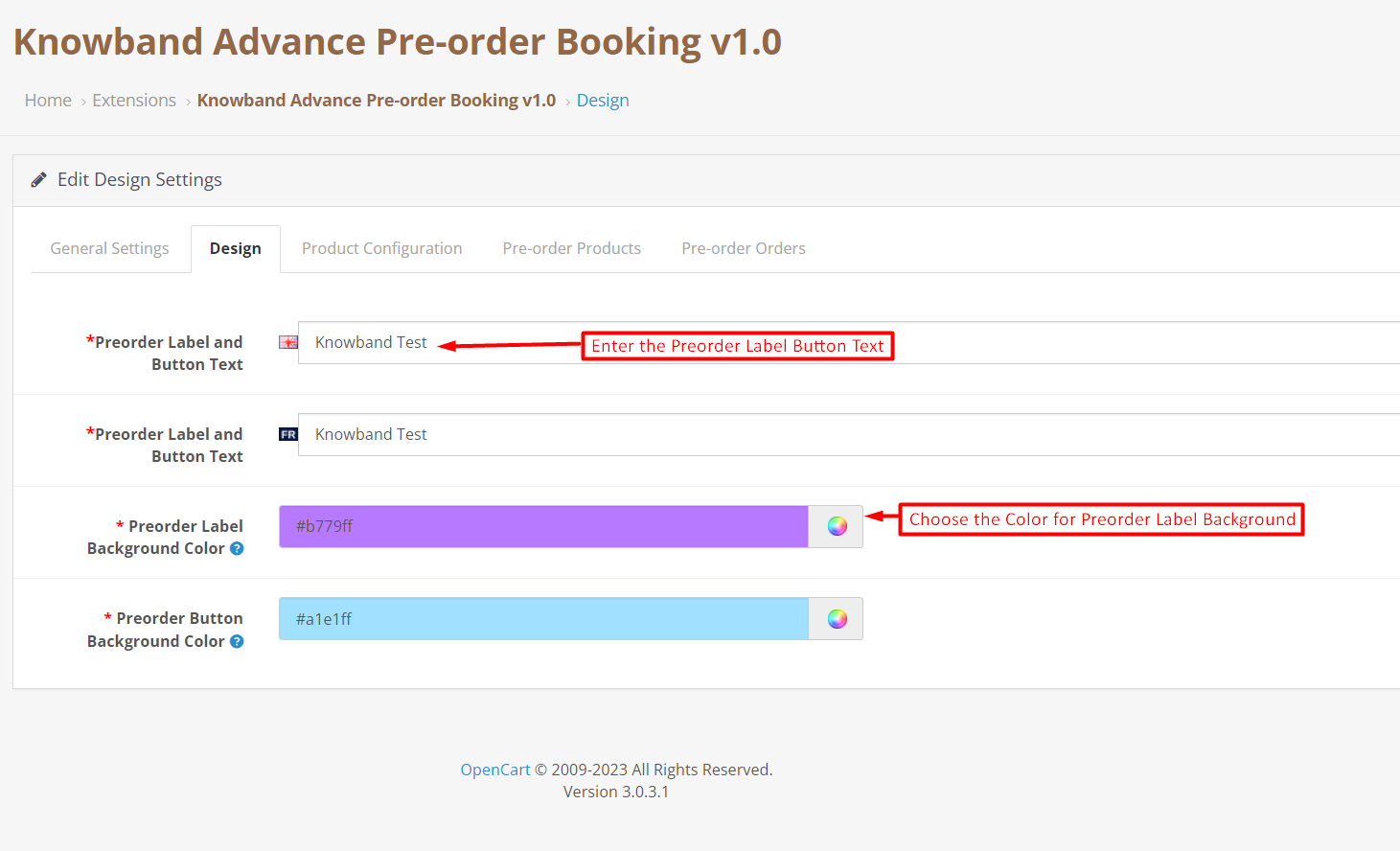
The store admin can modify the look and feel of the preorder label and button that appears on the product images on product listing pages.
Preorder Label and Button Text: The text entered in the following text field will appear on top of the preorder product images. As this extension is multilingual, you can add the Label And Button text according to the languages enabled on your store.
Preorder Label Background Color: The store admin can choose the background color for the pre-order product label from here.
3.3. Product Configuration:
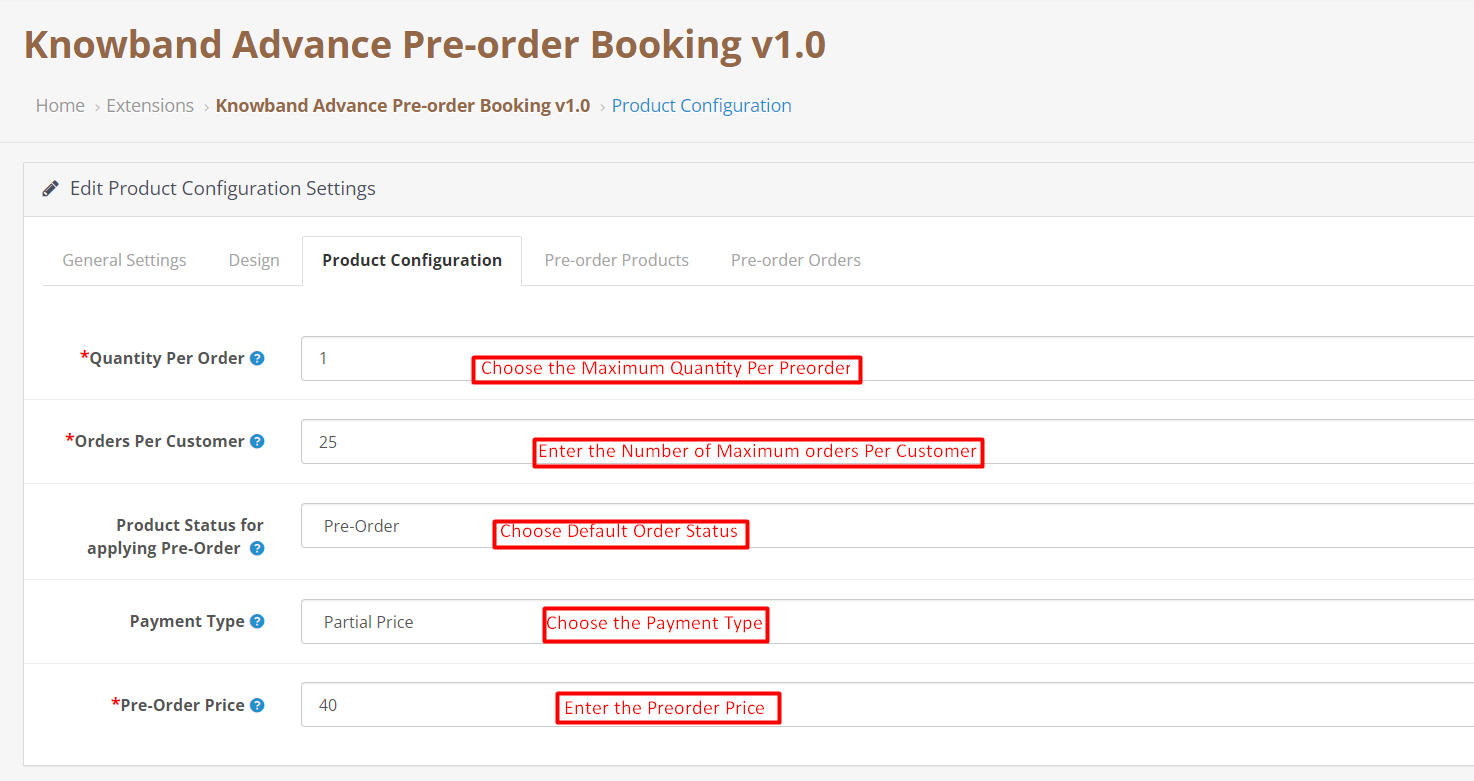
The product configuration tab allows the store admin to set all the product configurations for the pre-order products.
Quantity Per Order: The Opencart store admin can add the maximum quantity per order he wants to allow the customers to purchase.
Orders Per Customer: Here, the admin can enter the maximum number of pending Pre-orders he wants to allow the customer to make.
Product Status for Applying Pre-Order: Choose the default status of the product for applying pre-order using the following button.
Payment Type: The Opencart product pre-order plugin allows the store admin to allow the customers to complete product advance booking by just paying a partial or full amount.
The admin can enable/disable partial price using the following button.
Pre-Order Price: This particular text field is provided for selecting the percentage for the partial price that the customer is going to pay for product advance booking.
3.4. Pre-Order Products:
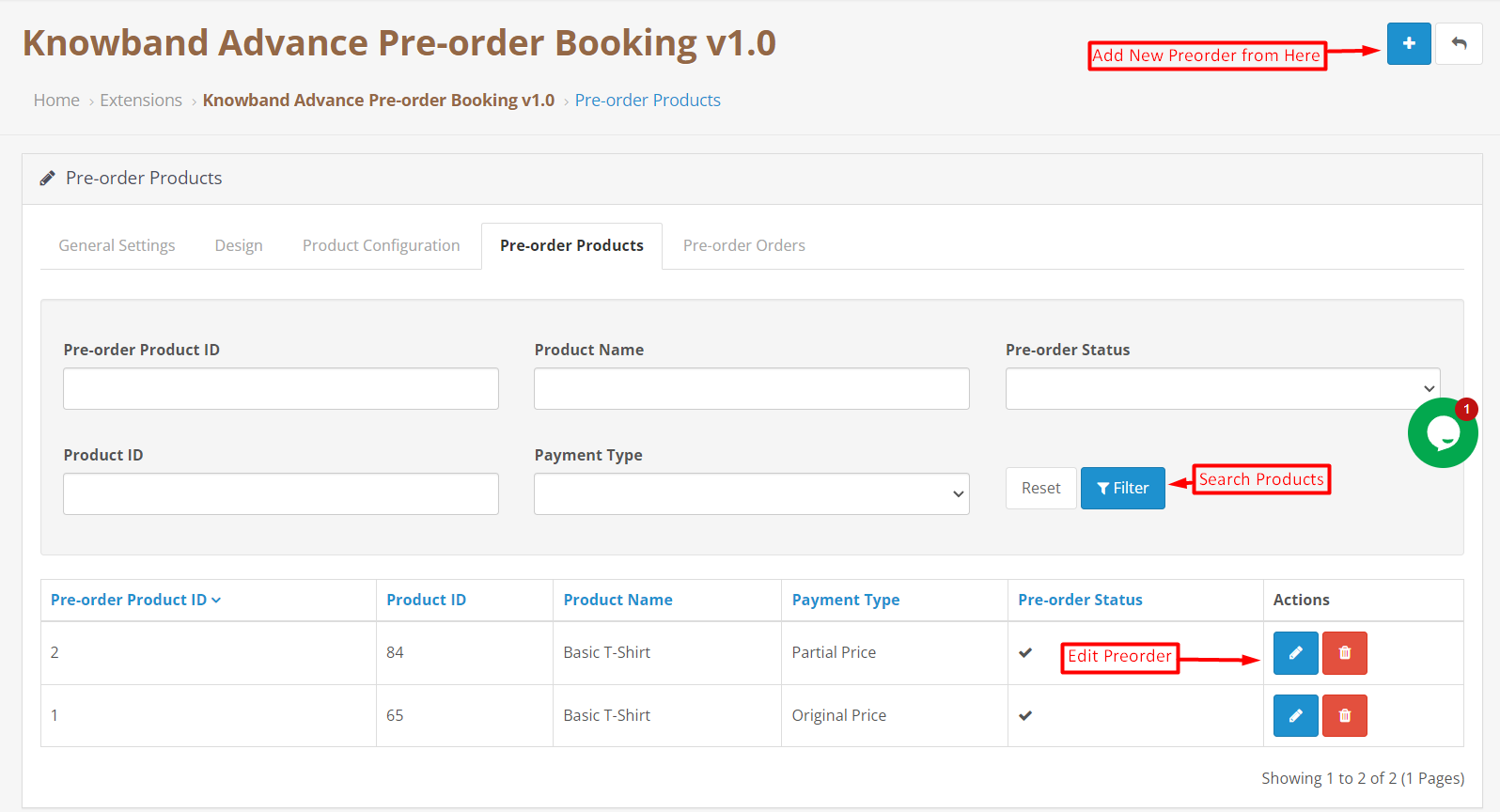
The Opencart Product Advance Booking Extension allows the store admin to set different rules for specific products. Here, Admin can create different price rules for different products. If the product is not listed here, then the price rules will be applied from the values set in Product Configuration.
Add New Preorder Product:
The store admin can add new price rules for specific preorder products just by clicking on the add new button shown in the above image. Furthermore, the admin just needs to select some basic details such as product name, product price, product discount, etc, and your new price rule for the selected pre-order product is all set to dive into your eCommerce store.
Search Pre-Order Product: The OpenCart Product Backorder extension allows the admin to search the pre-order products just by adding product ID, payment type, product name, etc.
3.5. Pre-Order Orders:
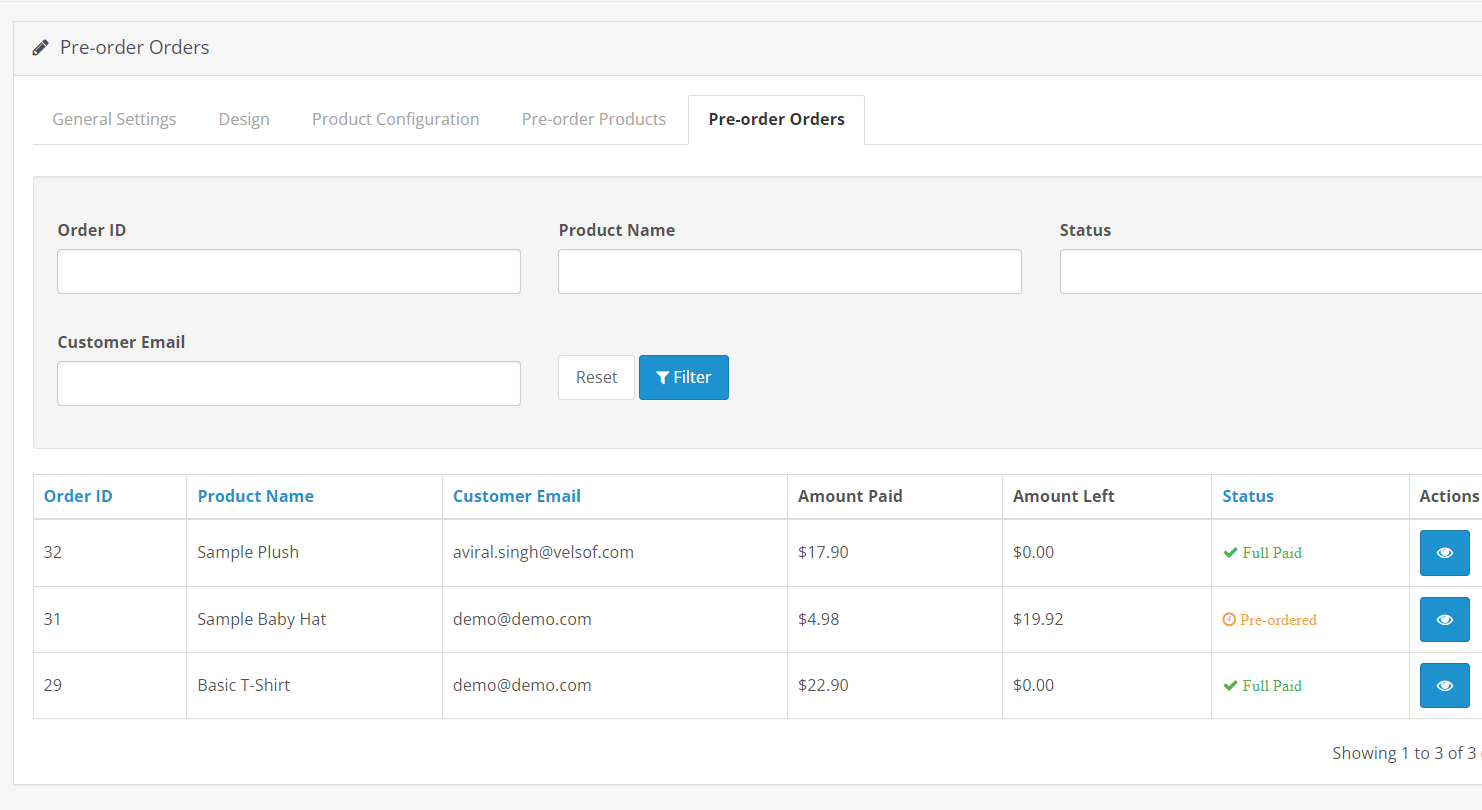
We have provided a separate tab for tracking all the booking orders. In the following tab, the store retailers can track all the pre-orders in a single place and further make the changes at their convenience.
4.0. Front End Preview: Opencart Pre-Order Extension:
Till now, we have discussed the various configuration options and their use in modifying the pre-order plugin as per your business needs. Furthermore, the Opencart product preorder plugin does take zero coding and technical skills to make your eCommerce shop preorder ready for various occasions.
Here are some of the front-end snapshots mentioned below for providing a better understanding of the pre-order flow for the customers.
Pre-Order History:
The customers can find the history of all the placed pre-orders in the following tab. Along with the pre-orders, the customers can also check the order balance (paid amount and remaining amount), order status, and order status.
Front End Snapshots:
Furthermore, in case you are having queries/suggestions regarding our Product Pre-Order Plugin, you can also reach out to our technical support staff at knowband.com/helpdesk.
The Opencart product sticker plugin allows retailers to display responsive stickers and product labels on the storefront. Making customers aware of discounts and deals. Additionally, the module comes with 50+ pre-loaded stickers. On top of that the Opencart admins can also upload custom stickers with clicks. Even if the size of the uploaded image is not well enough. We have also provided the option to manage and resize the sticker. Furthermore, managing the positions and sizes of product labels on the storefront does not require any knowledge of HTML, CSS, or any other styling language.
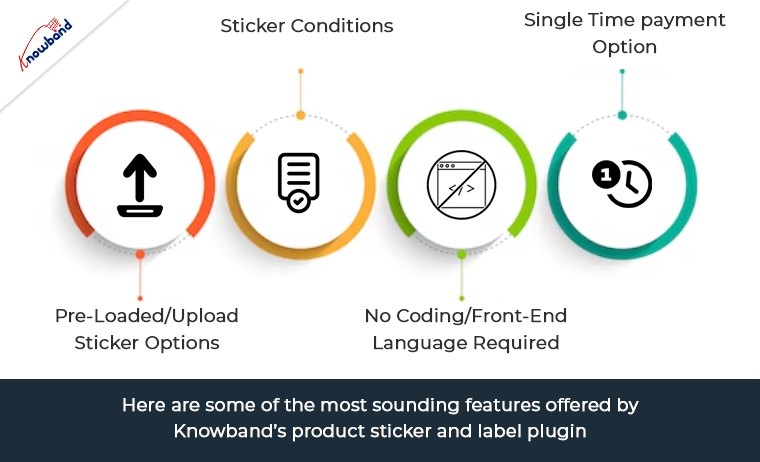
Here are some of the most sounding features offered by Knowband’s product sticker and label plugin.
Pre-Loaded/Upload Sticker Options:
OpenCart Product label extension comes with 20+ pre-available stickers and labels. You can choose from a wide variety of stickers and can go with the most suitable one.Likewise, if you are willing to add stickers as per your choice, we have also provided an option for the same. For uploading a sticker, all you need to do is click on add a sticker, Upload, choose a sticker, and that’s all.
Moreover, you will not have to worry about the sticker dimensions and size. In the sticker setting tab, the admins can resize any stickers and can even manage the opacity for the same. The following flagship feature not only makes the Opencart sticker module a complete plugin in itself but also increases the usability for the OpenCart retailers.
OpenCart Product Sticker Conditions:
When it comes to the sticker conditions, OpenCart product sticker extension provide complete peace of mind to store administrators. Not only the admins can modify the sticker appearance in every single meaning. But, can also show hide stickers based on stocks. Coming in details, the admins can configure any modified sticker appearance by selecting product stock status. Including/excluding special categories and products, and much more. Moreover, the admins can manage the pages where they want to show/hide stickers on their shop’s front end.
No Coding/Front-End Language Required:
OpenCart product label and Stickers extension come with an extremely easy-to-understand structure for the admins. While configuring the module, you will find every step and feature tailored appropriately. You will not have to require any coding or technical skills while setting up the stickers for your storefront.
Single Time payment option:
On top of that the plugin comes with single-time payment options. This means you will not have to pay any annual subscription charges for managing your stickers. Moreover, along with the module purchase, eCommerce sellers get 3 months of free technical support. In case you find yourself stuck somewhere, our tech team has got your back with all the expertise and experience.
Wrapping Up!
The images of your products are a crucial aspect of your online store. As they are often the first thing that catches the attention of visitors. With Opencart’s Product Label and Stickers modules, you can customize your product images by adding stickers on top of them. By doing so, you can inform your customers about any special features or offers on your products, such as discounts or free shipping.
These stickers will be prominently displayed on product images throughout your site. The possibilities for using the Product Label and Stickers Module are endless if you have a creative mindset. Additionally, you can create and add labels to the product page, with multiple customization options available in the backend. Admins have complete control over how each sticker or label looks and can edit them in any way they desire.
PrestaShop, one of the most popular open-source e-commerce platforms, is known for its robustness, flexibility, and extensive range of modules. With the release of PrestaShop 8.0, there are several technical changes that can significantly enhance both the functionality of modules and the overall website experience. In this article, we will explore some of these changes and their potential impact on PrestaShop users.
Improved Module Management System:
PrestaShop 8.0 introduces an upgraded module management system that offers better control and customization options. It includes a revamped module dashboard, allowing merchants to manage and configure modules more efficiently. The new system also provides enhanced compatibility and improved security measures, ensuring a seamless experience while installing, updating, and removing modules.
Responsive Web Design:
In the era of mobile devices, responsive web design has become crucial for any successful e-commerce website. PrestaShop 8.0 focuses on delivering an exceptional user experience across different screen sizes and resolutions. The platform now offers responsive templates out of the box, ensuring that your website looks and functions flawlessly on desktops, tablets, and smartphones. This technical enhancement can lead to higher customer engagement and increased conversion rates.
Accelerated Mobile Pages (AMP) Support:
Continuing with the mobile optimization theme, PrestaShop 8.0 introduces support for Accelerated Mobile Pages (AMP). AMP is an open-source initiative that allows web pages to load almost instantaneously on mobile devices. By implementing AMP in PrestaShop 8.0, merchants can offer lightning-fast browsing experiences, reducing bounce rates and improving search engine rankings.
Advanced Search and Filtering Capabilities:
Searching and filtering products effectively is crucial for an e-commerce website’s success. PrestaShop 8.0 comes with advanced search and filtering capabilities, enabling customers to quickly find the products they are looking for. The updated search system offers improved relevance, autocomplete suggestions, and the ability to search across multiple product attributes. These enhancements empower customers to navigate the website effortlessly and make informed purchase decisions.
Integration with Progressive Web Apps (PWA):
Progressive Web Apps have gained significant traction in recent years due to their ability to deliver an app-like experience within a web browser. PrestaShop 8.0 introduces seamless integration with PWAs, allowing merchants to leverage the benefits of both web and native mobile apps. PWAs offer features such as offline browsing, push notifications, and home screen shortcuts, enhancing customer engagement and retention.
Performance Optimization:
The performance of a website is essential in ensuring user satisfaction and driving conversion rates.. PrestaShop 8.0 focuses on performance optimization, leveraging the latest technologies and best practices. With improved caching mechanisms, code optimization, and database optimizations, the platform aims to deliver faster page load times and a smoother user experience. These technical changes can lead to improved search engine rankings, higher customer retention, and ultimately, increased sales.
Enhanced Security Measures in Prestashop 8.0:
In an increasingly digital world, ensuring the security of an e-commerce website is paramount. PrestaShop 8.0 includes enhanced security measures to protect both the platform and its users. This includes improved encryption algorithms, stricter validation checks, and proactive vulnerability management. By implementing these security enhancements, PrestaShop aims to provide a secure and trustworthy environment for online businesses and their customers.
In the end:
Prestashop 8.0 brings a host of technical changes that can significantly enhance the functionality and user experience of PrestaShop-powered websites.
From improved module management and responsive web design to advanced search capabilities and performance optimizations, these changes aim to empower merchants and provide a seamless shopping experience for customers. By staying up-to-date with the latest version of PrestaShop and leveraging these technical enhancements, businesses can stay competitive in the ever-evolving world of e-commerce.
Furthermore, at Knowband we provide Prestashop web and app development services at very reasonable prices. Not only you can check out a wide range of Prestashop v8.0 compatible addons but also we offer custom module development to our Prestashop eCommerce merchants. Thus, in case you are having queries or suggestions regarding any of our plugins, feel free to find us at support@knowband.com.