How easy is it to send Push Notifications on PrestaShop Mobile Apps?

Keeping the customers always interested & engaged is what every online eCommerce business wishes for. Having a native mobile app (Android/iOS) is gonna ease the online shopping for users. User engagement has always been a prime requirement and to fulfill the same mobile apps have come up with the Push Notification tool.

Push notifications are directly received by the app users on their mobile devices. The only condition is that the app must be installed on the device. Push Notifications have been noted to perform way better in terms of engaging app users and retaining them when compared to email reminders/ newsletters & campaigns.

Push Notifications with PrestaShop Mobile App Builder

KnowBand offers personalized push notifications feature in PrestaShop Mobile App Builder. The module aims to launch Android and iOS apps for running PrestaShop store without any coding knowledge. This write-up will introduce you to the backend settings to configure and send Push Notifications on the user’s devices.

While keeping your app in sync with the website, this app maker module provides a wide array of front-end & back-end features. The ones for Push Notifications are stated below. Follow this article to know how you can create, automate & send these notifications with utter ease.

On the backend of your PrestaShop website, where you have the Mobile App Builder installed, hit ‘configure’. Now, from the backend of this module, navigate to the Push Notification Settings Tab from the side menu.

Push Notification Settings:
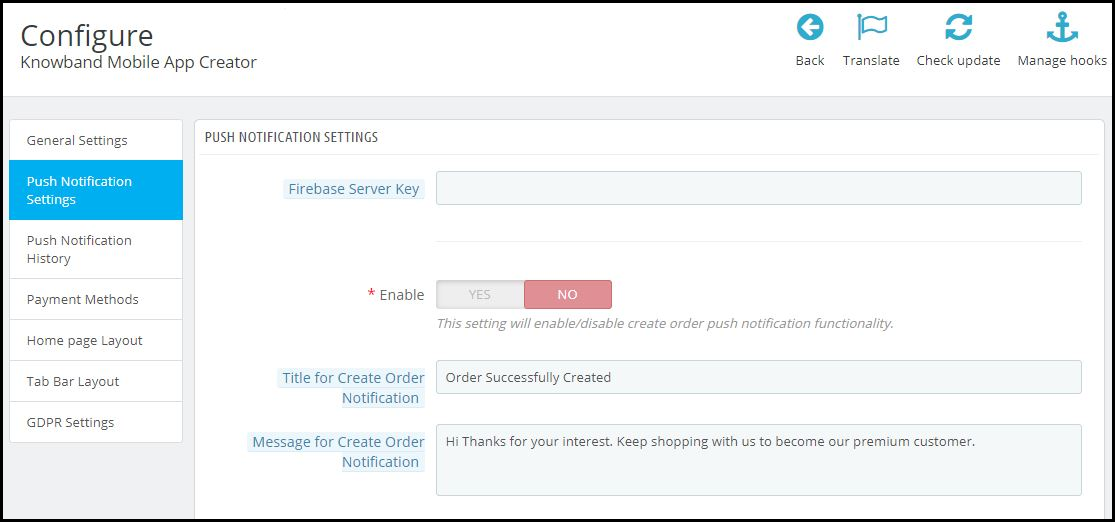
From the backend, you only need to enter your Firebase Server key (which will be provided along with apps), the rest is set for you to proceed. The PrestaShop Mobile App Builder by KnowBand provides an unlimited number of push notifications that e-merchants & admins can send to their app users.

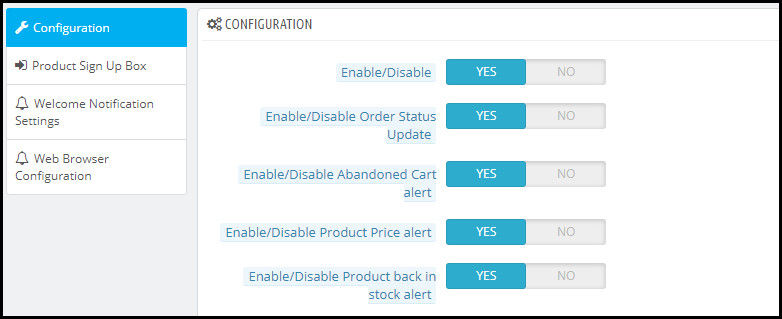
Some of the automated Push Notifications are already provided by default for your convenience. These notifications can even be disabled/ enabled with just a toggle switch. Apart from those, you can create any other kind of Push Notification from this backend as well. Here is how you can configure them.

A) Successful Order Notification:

Using this notification setting, the store owner or the admin can set the title & message for successful orders. Each time an app user successfully places an order on the app, he/she will be greeted with this notification.

B) Order Status Push Notification:

This informs your customers about any status update on their active orders. Some examples of these are ‘order packed’, ‘order shipped’, ‘on the way’, ‘delivered’, ‘canceled’, etc.

Use the variable ‘{{STATUS}}’ anywhere in the message body to form your order status push notification.

C) Abandoned Cart Push Notification:

Automate the abandoned cart notification by setting the timer provided in this push notification setting. Every time an app user leaves his/her cart abandoned, then automatically this push notification is sent to him/her after the specified time.

Custom Push Notifications:
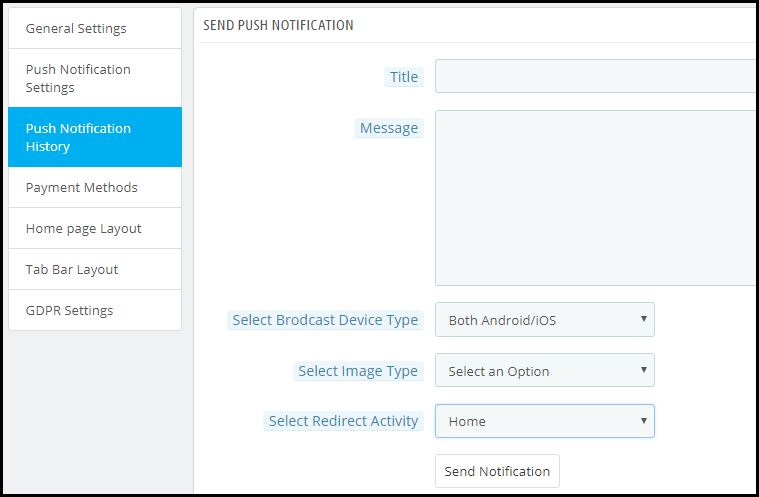
Apart from the above three pre-defined notifications elaborated above, admins can create any kind of self-designed Push Notification from this setting. From the side menu of this app maker module, select ‘Push Notification History’. Then using the ‘Send Notifications’ button on the top right of the page, create a new notification according to your needs.

You can even choose to selectively send these notifications to any of android/ iOS devices. Use attractive images to get more customer engagement using these notifications. Choose the redirecting activity to be any of the categories/ subcategories/ products or even the homepage of the app. These notifications get sent to all the app users once you hit send.

Push Notification History:


Keep a record of your previously sent notifications & their configurations by accessing the ‘Push Notification History’. You can even filter out the ones you want to view from the advanced search bar as shown in the screenshot above.

Conclusion:

Mobile push notifications are a major feature that makes an app stand out from the website. When used properly, these can lead to an exponential increase in customer retention & engagement rate. They help store owners to effortlessly boost their sales.

To make it even more convenient & effortless for the app admins, this PrestaShop Mobile App Maker module, by KnowBand, has most of the settings automated. Hence, the store owners don’t need to make even the slightest effort to yield great results.

For any further queries related to this module, reach out to the experts at KnowBand by emailing us at support@knowband.com. We would be delighted to assist you.

Also Read:

How easy is it to design Home-Page of PrestaShop Mobile App?

Web Push Notifications: 5 Best Practices to Boost eCommerce Conversions

Web Push Notification is a widely adopted method used by eCommerce merchants to reach out to the prospects and drive more conversions. It creates a communication channel between the brand and the customers to deliver important or useful information to the latter. Through this article, we will try to understand the tactics behind using Web Push Notifications and how marketers are using this channel to boost eCommerce conversions.

What are Web Push Notifications?

Web Push Notifications, also known as the Browser Notifications or Web Browser Push Notifications are messages that appear on a subscriber’s device even if he or she is not present at your website. Web Push Notification is a smart marketing strategy to engage with your audience(subscribers) and increase conversions without being an annoyance.

Browsers that currently support Web Push Notifications are Chrome, Firefox, Opera and Safari. These notifications can be sent across mobiles and desktops.

How Do Web Push Notifications work?

For Website Push Notifications to work, your visitors/users need to subscribe to your notifications. When they land on your website, a popup appears asking users to allow/approve or deny receiving updates from your end, and only if they click on the latter, you would be able to send them notifications. Web Push Notifications do not require users to provide their email address.

Web Push Notifications- Best Practices to Increase Conversions

Having an eCommerce website? Here are the 5 best practices for marketers to increase conversions and scale-up their revenue using Browser Push Notifications.

1. Announcing a Limited-time Sale

Online shoppers do get a bit excited when they hear about a flash sale, especially from a store from where they shop regularly. You can use this to your advantage and announce a limited-time sale as soon as the sale goes live.

You can create urgency to purchase by mentioning how long will the sale last, in your notifications. It increases the open rate and maximizes the chances of conversion. You can also try adding the coupon code too in the same if there’s any.

2. Announcing New Arrivals

Another one in the best practices for web push notifications would be making your subscribed audience aware of your newly introduced products. Not only it provides free marketing but also generates curiosity in the online shoppers to check out what’s new in the store.

For example, if you deal with electronics or mobile gadgets, you can send web push notifications regarding the arrival of new smartphones on your store.

3. Let Customers know when a product is Back in Stock

Loyal customers wait patiently for the product to be available again in the store. And nothing gives them more happiness than seeing the product which was out of stock earlier, back in stock. Though there is a sense of excitement to see the “Buy Now” option, there is also the fear of missing out on the purchase. You never know when a product goes out of stock again.

Website push notifications make sure that your customers are not missing out on the product that they wished to buy, and they are informed as soon as it is back in stock. This pushes the customer to make a quick purchase, enhancing your conversion rate.

4. Recover Abandoned Carts

Adding to the list of best practices for web push notifications is sending out alerts to the abandoned cart users. Many times, a user just adds an item to the cart but does not buy. This leads to cart abandonment. Though there can be multiple reasons for cart abandonment, you can take a follow-up by asking the abandoned cart users to complete the purchase by sending out notifications regarding the pending items in the cart.

Abandoned Cart Web Push Notifications make a great way to recover the lost sales and increase conversions.

Related: 12 Ways to Reduce Shopping Cart Abandonment

5. Inform buyers when there is a price drop

Customers have an option to negotiate the product price in a brick-and-mortar store. Unfortunately, such an option is not available for an online store. This is why customers rejoice when they witness a price drop while shopping online. Through browser push notifications, you can let the prospects know as soon as the price drops below than what it was during their last visit.

These types of notifications are very effective to trigger impulse buying, encouraging customers to buy their desired product at a price lower than the original price. It leads to more conversions and creates higher sales.

The Bottom Line

Web Push Notifications create higher engagement and this is the reason why they are also known as engaging push notifications. They are effective and provide you with excellent opportunities to make the best use of it to increase conversions in your eCommerce website.

Looking to add the Web Push Notifications functionality on your website? Check out Knowband’s Web Push Notification module that will cover almost all your major requirements. The Web Push Notification lets you send-

Flash Sale Notifications

Product Price Alert Notifications

Product Back in Stock Alert Notifications

Abandoned Cart Reminder Notifications

Order Status Update Notifications

Apart from this, you can create multiple web push notification templates of your own choice. You also get the option to send a notification immediately or at a fixed time.

KnowBand currently offers this module to Prestashop, Magento, and Magento 2 platforms. Check out to know their complete features and benefits:

PrestaShop Web Push Notification

Magento Web Push Notification extension

Web Push Notification for Magento 2

Hope you liked knowing about the “Web Push Notifications Best Practices to Increase Conversions” and got an idea of different types of web push notifications you can use for your website.

Also Read:

7 Major Benefits of Using Web Push Notifications in eCommerce

11 Checkout Page Optimization Practices to Increase Conversions

How are Push Notifications beneficial in driving more eCommerce sales?

Online shopping is growing at an unprecedented rate and retaining app users isn’t easy for an e-merchant nowadays. Push notifications are the best-suited option for product marketing as they target almost every app user and motivates them for more purchases. Push notifications are actually real-time messages which go directly from online website to the user’s device. Even if the users aren’t browsing your store, the notifications will make their way to them if the app is installed in their device.

The traditional marketing channels like E-mails, messages were also good but they weren’t enough engaging if we compare them with push notifications. The personalized notification is what makes more influence on the audience. Now, when it is quite clear that the push notifications can easily aware the users, do you really think that the job is that easy? Well, no! Let’s find out how and why?

E-mail Marketing VS Push Notifications

A few times back the major marketing approach was through e-mails in the eCommerce industry. No doubt it was worth then but with the evolution of the mobile app industry, push notification became more convenient way of targeting audience. If we look at the statistical records today, average user spends approx five hours on the smartphone and that to 92% of the time in mobile apps. It clearly tells that the preference of mobile apps is way high than website browsing. An old saying” Early bird gets the worm” suits best to eCommerce marketing i.e. the faster you reach to the user, the more you stand to gain.

As it’s pretty obvious that mobile apps are the present and future of the eCommerce industry. So, why not adopt a way of targeting users before lagging behind in the race. That’s how push notification comes into the picture. How crucial they can be for your app’s success could be understood by fact that they boost app engagement by 88% on an average.

Push notifications aren’t similar to the traditional messages. Many e-merchants don’t realize the fact that this method requires proper strategy. Just sending notifications to users without getting any proper idea even annoys them as per the following report. Let’s figure out in this article how can we make the most of the effective push notifications marketing and keep yourself stay ahead of the pack.

1. The magic of power words in Push Notifications!

Words are merely a group of simple alphabets, yet carry immense power. Right words can be quite influential in the case of push notifications. You can find the list of some effective power words from here. However, the usage of the words should be justified else it could simply ruin the whole purpose.

There are even various non-power words which work quite well in attracting users. If they are used properly can easily convince the audience to open the app. So, whether the words have power or no power, they are the key to user persuasion. Thus, learning what to say and what not to say in a push notification is a must. You can surely find the foolproof power words with following steps:

Step 1: Deduce your desired action behind the push notification.

Step 2: Determine the right emotion to drive the required action.

Step 3: Choose your game of words wisely to trigger the right emotion.

2. Personalization of push notifications can create the right spark!

Segmentation is mainly used in the push notifications to make sure that the message is delivered to the right audience. No one can deny the fact that personalization has always been fruitful for online marketing. It also works pretty well for the push notifications. As per a report, in the year 2015, personalization increased push notifications conversions by 300%.

Segmented notification is based on dividing the users into different groups on the basis of their behavior, purchase decisions, likes, dislikes etc. Now, it makes the audience targeting quite simple in segments. Along with segmentation, there are few other factors like geo-targeting etc. which could help in making the notifications more effective. Personalization is very powerful and if used in the right spot, could be the key to gain huge sales.

3. Right content could deliver the right message!

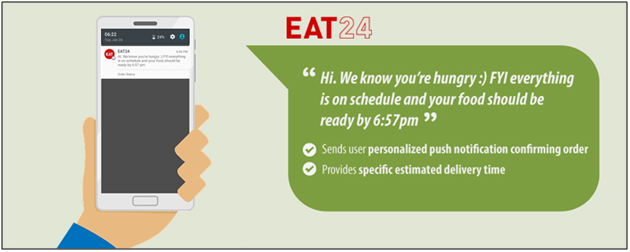
The core motive behind sending push notifications is to deliver your message to users. Well crafted content is a must to make your notification more precise to the audience. Well, often the marketers think that the right content is just text but it’s not so. Clear push content should have any catchy phrase or joke in order to make notifications more engaging.

The name of the users, their last actions on the app can also be used for marketing. If the users were interested in any product, just notify them of any progress related to them. This approach will surely develop a sense of trust between the customer and your brand.

4. Timing is the key to success with push notifications!

Timing and relevance are the two key factors of making the push notification influential. Push notifications should always be targeted at the right time. Even though it is creative and informative, no one likes being woken up at midnight or early morning.

The best time to send push notifications is in the happy hours between 10 AM and 1 PM for effective results. A study by Localytics found that sending push notification in this time can simply improve open rates by 66%. In this study, Fridays to Thursdays are said to be the best days for getting maximum conversions and leads.

Also, when there is a requirement of too many push notifications, it’s better to prioritize them before sending to users. It will even help you with the segmented push strategy. The push notifications can be on basis of what’s happening around. Any festive based or seasonal push notification should be made a priority as they can easily connect with the audience.

5. Well-timed and personalized notifications will highlight your brand!

Earlier, over 50% of all consumers considered bulk push messages as an annoying distraction. This bounded the marketers to send fewer notifications in the fear of losing potential users. But, if we look at the current stats, the number of push messages has grown by 64% per app since 2015. Now with the increased reliance on the apps, users are getting used to bulk notifications.

So, timely and personalized notifications should be sent in an appropriate number else there might be a big chance of getting drowned in the surrounding competition.

6. Creativity works in every line of work, so is to push notifications!

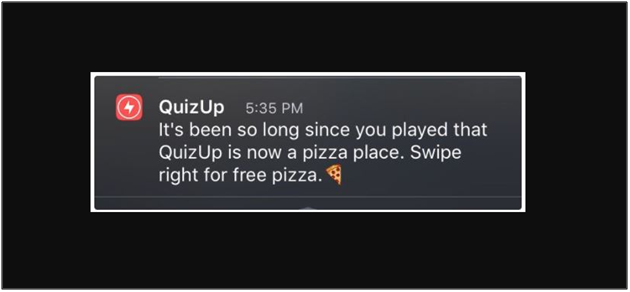
Just take a look on the above notification. Isn’t it is the best approach to target users? Before trying your hands on push notification, hire a creative team for the job. Entertaining and creative messages have the very high chance to grab the user’s attention. Instead of writing lengthy texts just focus on your brand and make notification a bit interactive. A buzz should be created in notifications then whether it comes from rhyme or any catchy joke.

7. A/B notification testing will eschew any upcoming mistake!

It wouldn’t be a smart play to make assumptions about how your notification will land on various devices. However, a simple one-time test will make the picture more clear. What if there is a way to test your push notification before making final for the delivery. That’s where A/B testing comes.

A/B testing is the comparison of one or more versions of a push notification to see which one performs better. The tests are sent to small random groups and the winning version is obtained with the process.

Over to you

When it comes to the mobile world, the change is paced and ineluctably foreordained. Thus the fastest and easiest marketing trend we can rely on is push notifications. Push notifications are one of the essential reasons why e-merchants are investing in mobile applications. These 7 tips discussed above will help you in sending effective push notifications to your users and ultimately should maximize the number of sales you’re making. On the safe side, make sure you have incorporated push notifications feature while creating a stunning mobile application for your business.