PrestaShop 9.2 Ask AI vs AI Admin Assistant: Which Is Better for Store Management?

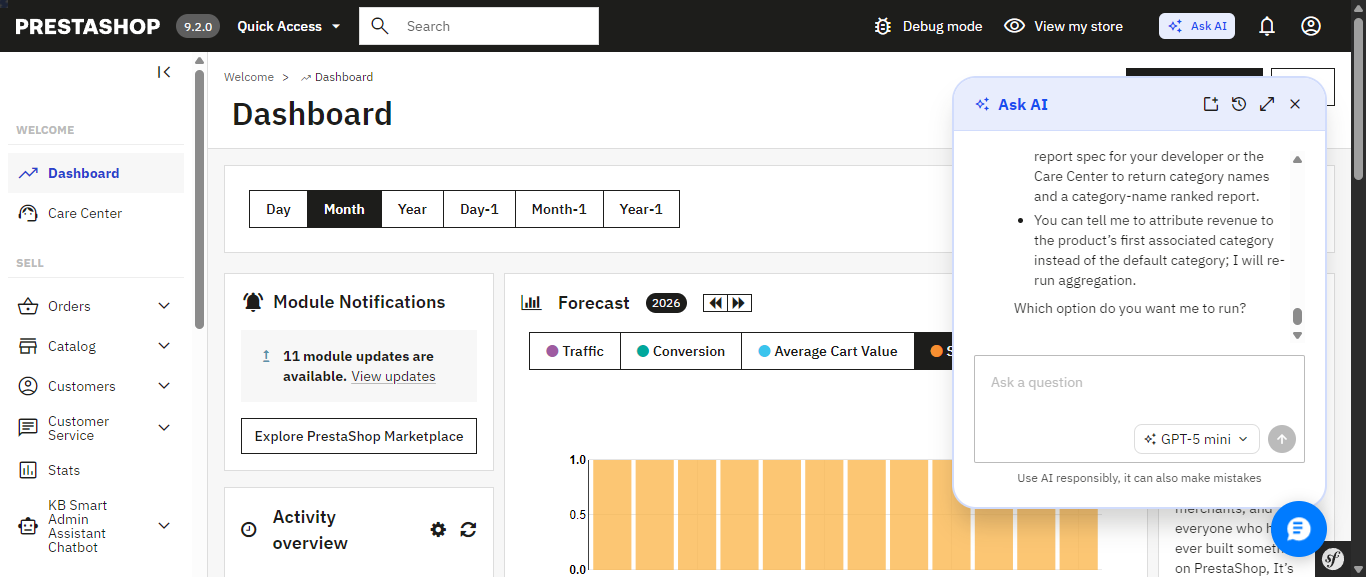
PrestaShop’s new Ask AI, introduced with PrestaShop 9.2, is a promising sign of where the platform is headed a native assistant built right into the back office that lets you query your store in plain language. It’s tied to PrestaShop 9.2 specifically, and it relies on two companion modules, the PrestaShop MCP Server and MCP Tools, being installed and configured alongside it before it can see any of your store’s data.

In practice, opening Ask AI drops a chat panel into the corner of whichever admin page you’re on, and it remembers your previous conversation the next time you reopen it. Ask something like “Which products are out of stock right now?” and it doesn’t just answer quietly in the background it shows its work: the specific MCP tool it’s about to call, a “Tool approved” confirmation step, a stated goal, and its reasoning before handing back the answer as a formatted list. That’s a genuinely nice trust signal, though the trade-off is no visible SQL you see the tool call and the goal, not the underlying query.

PrestaShop’s native Ask AI panel, opened from the top admin bar it remembers the previous conversation across sessions.

Ask AI shows its work: the MCP tool it calls, a tool-approval step, and its stated reasoning before answering.

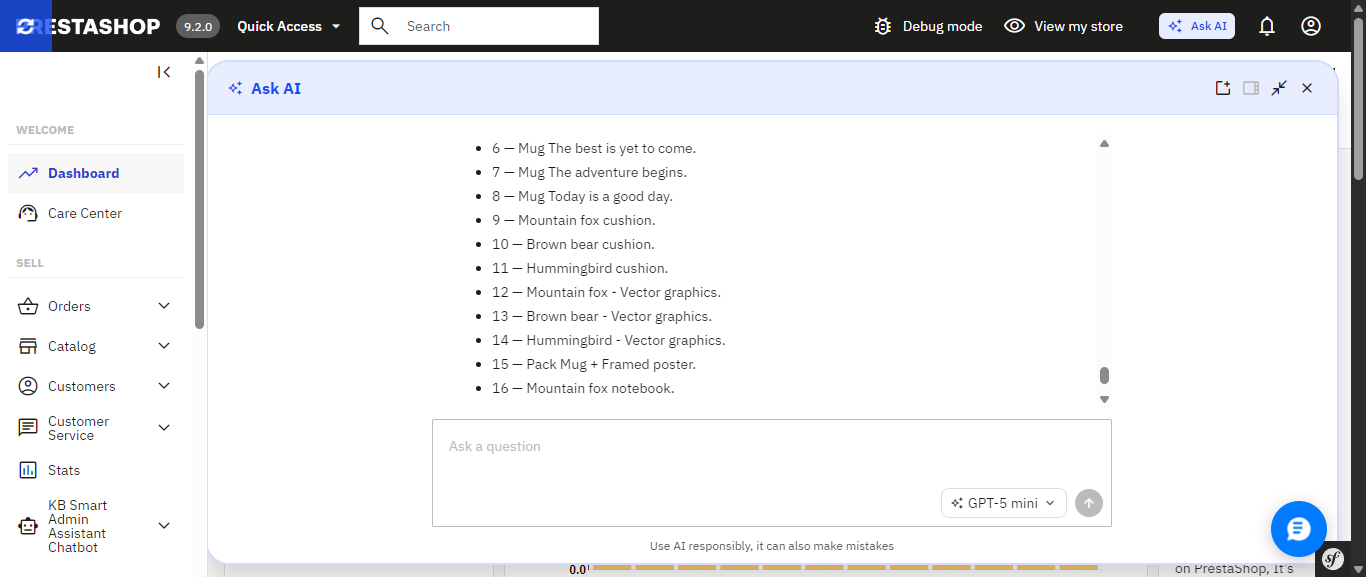
The finished answer, expanded to full width a plain list of out-of-stock products with a follow-up question box ready.

If you’d rather skip that setup, or you’re running an earlier PrestaShop version where Ask AI isn’t an option at all, there’s a module you can install today that already delivers a natural-language AI assistant and builds a good deal more around it, much of which Ask AI simply doesn’t include yet. It’s called Smart AI Admin Assistant.
 

PrestaShop Ask AI vs Knowband Smart AI Admin Assistant

Feature PrestaShop Ask AI Knowband Smart AI Admin Assistant
PrestaShop version support 9.2 1.7.x to 9.x.x
Setup requirements Requires the separate PrestaShop MCP Server and MCP Tools modules Install the module, add your API key, and start asking questions
How it accesses your data Through the PrestaShop MCP Server using defined tool calls Natural-language-to-SQL against curated, read-only database views
Taking action on your store Can execute actions with explicit confirmation required Read-only; blocks DELETE, DROP, UPDATE, INSERT and TRUNCATE
Query transparency MCP tool calls; SQL is not directly visible ✓ View, edit and re-run the generated SQL
Built-in analytics dashboard Not Available ✓ 44 widgets covering revenue, orders, stock, best sellers and more
Data export Not Available ✓ Excel and CSV exports, including full-dataset exports
Voice input Not Available ✓ Browser-based speech recognition
Quick-access shortcuts Context-aware suggestions on Product, Order and Customer pages ✓ Editable quick-query chips for common questions
Employee access control Not Available ✓ Role-based, per-employee configuration
Audit logging 30-day conversation history per user; no SQL or action-level log ✓ Timestamped query and audit log, including executed SQL

Ask AI’s confirmation-before-action design and its native integration into PrestaShop’s core are real strengths, and worth keeping an eye on. But most of what makes Smart AI Admin Assistant a complete toolkit the dashboard, the exports, the access control, the audit trail, the voice input is territory Ask AI hasn’t entered yet.

The Problem that AI Assistant

Every PrestaShop store owner knows this routine: check yesterday’s revenue, scroll through orders looking for anything stuck, check which products are running low, maybe export something to send to a partner. None of it is hard. All of it is repetitive, and all of it eats into the hours you’d rather spend on the parts of the business that actually need your judgment.

Smart AI Admin Assistant replaces that routine with a conversation. You type or speak a question the way you’d ask a colleague, and you get a precise, live answer straight from your store’s database. No dashboards to navigate. No report builder. No SQL. Just a question and an answer, in seconds.

Ask Anything, Get a Real Answer

And this is what the entire module is based upon: an engine that will help analyze the language in the question regarding orders, customers, products, sales, inventory, and coupons without requiring any technical background whatsoever. There’s no need to fill in forms or make choices from a drop-down menu; all one has to do is:

  • “How many orders were placed today?”
  • “Show me low stock products.”
  • “Which customers spent the most this month?”
  • “What’s my revenue this week compared to last week?”
  • “Which products are missing descriptions or images?”
  • “What are my top 10 best-selling products this quarter?”

Both Ask AI and Smart AI Admin Assistant let you ask this kind of question in plain language that part isn’t unique to either one. The difference shows up in everything built around it, starting with how each one actually reaches your data.

Choose the AI Model That Fits the Question. Ask AI Doesn’t Offer This Level of Control

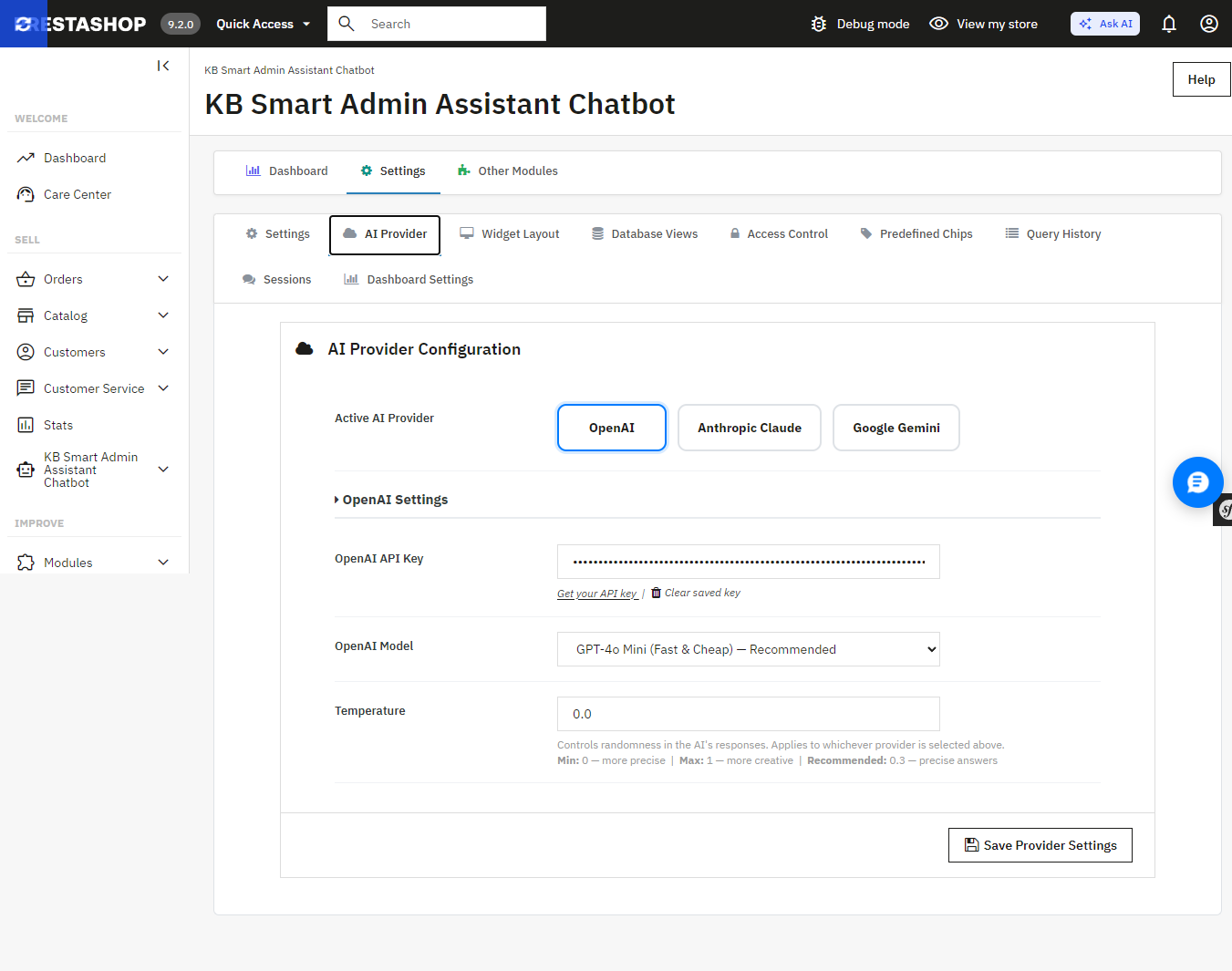
Smart AI Admin Assistant provides a true choice between the providers and the tier models without changing the code, using one settings panel:

  • OpenAI GPT-4o Mini, GPT-4o, or GPT-5.5
  • Anthropic Claude Haiku 4.5, Sonnet 4.6, or Opus 4.7
  • Google Gemini 3.5 Flash or 3.1 Flash-Lite

Want fast, low-cost answers for quick daily checks? Point it at a lighter model. Want the deepest possible breakdown of a slow sales month? Switch to a flagship tier for that one query. Ask AI, by contrast, connects to whichever single provider key you’ve configured it doesn’t offer this kind of tier-by-tier switching from within the assistant itself.
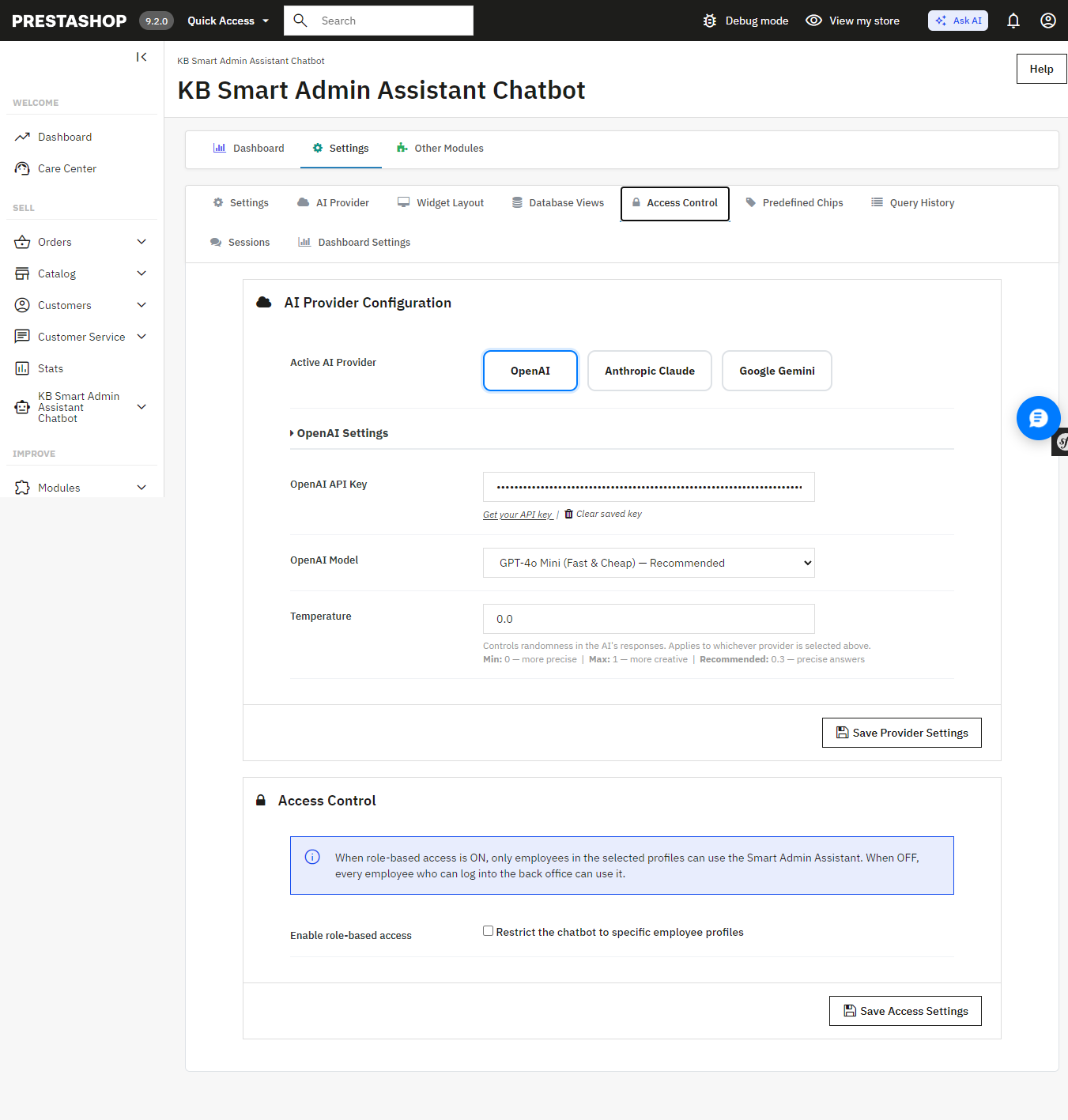
 

Smart AI Admin Assistant’s AI Provider settings switch between OpenAI, Anthropic Claude, and Google Gemini, and pick a model tier for each.

An Answer, Not Just a Table of Numbers
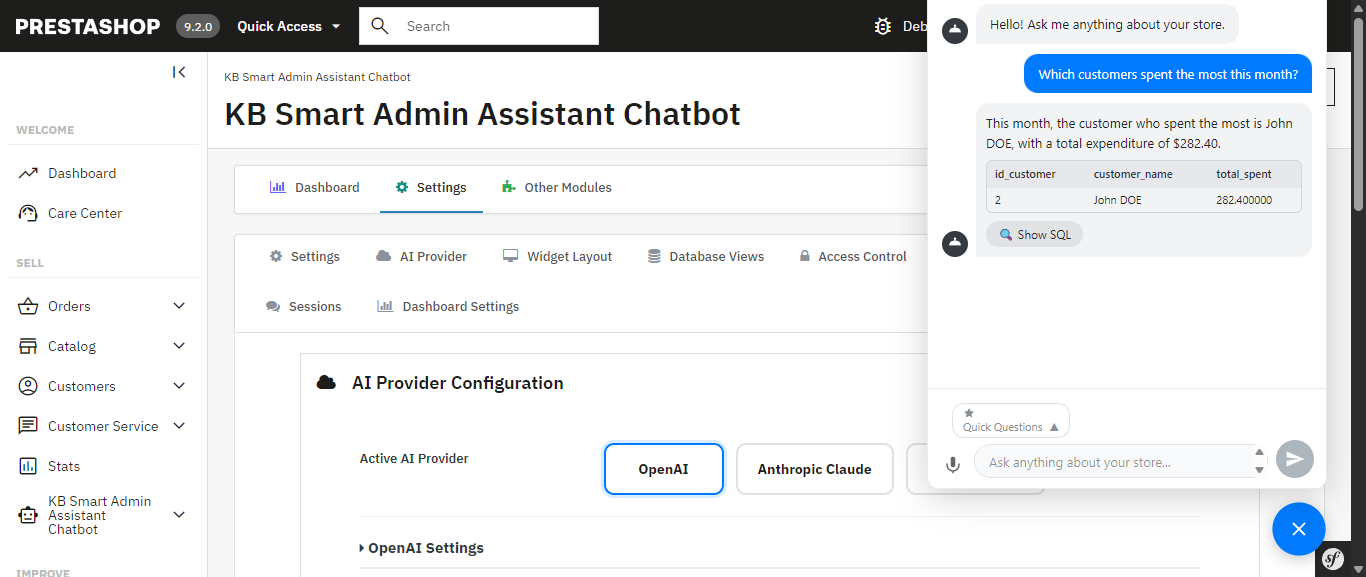
 

Every query comes back with more than raw data the assistant generates a plain-language summary alongside it, calling out the trend or number that actually matters. Ask about your inventory and you don’t just get a table; you get told which products are about to become a problem.

Smart AI Admin Assistant for Prestashop answering “Which customers spent the most this month?” with a plain-language summary and the underlying data.

A Full Analytics Dashboard Comes Built In Something Ask AI Doesn’t Have
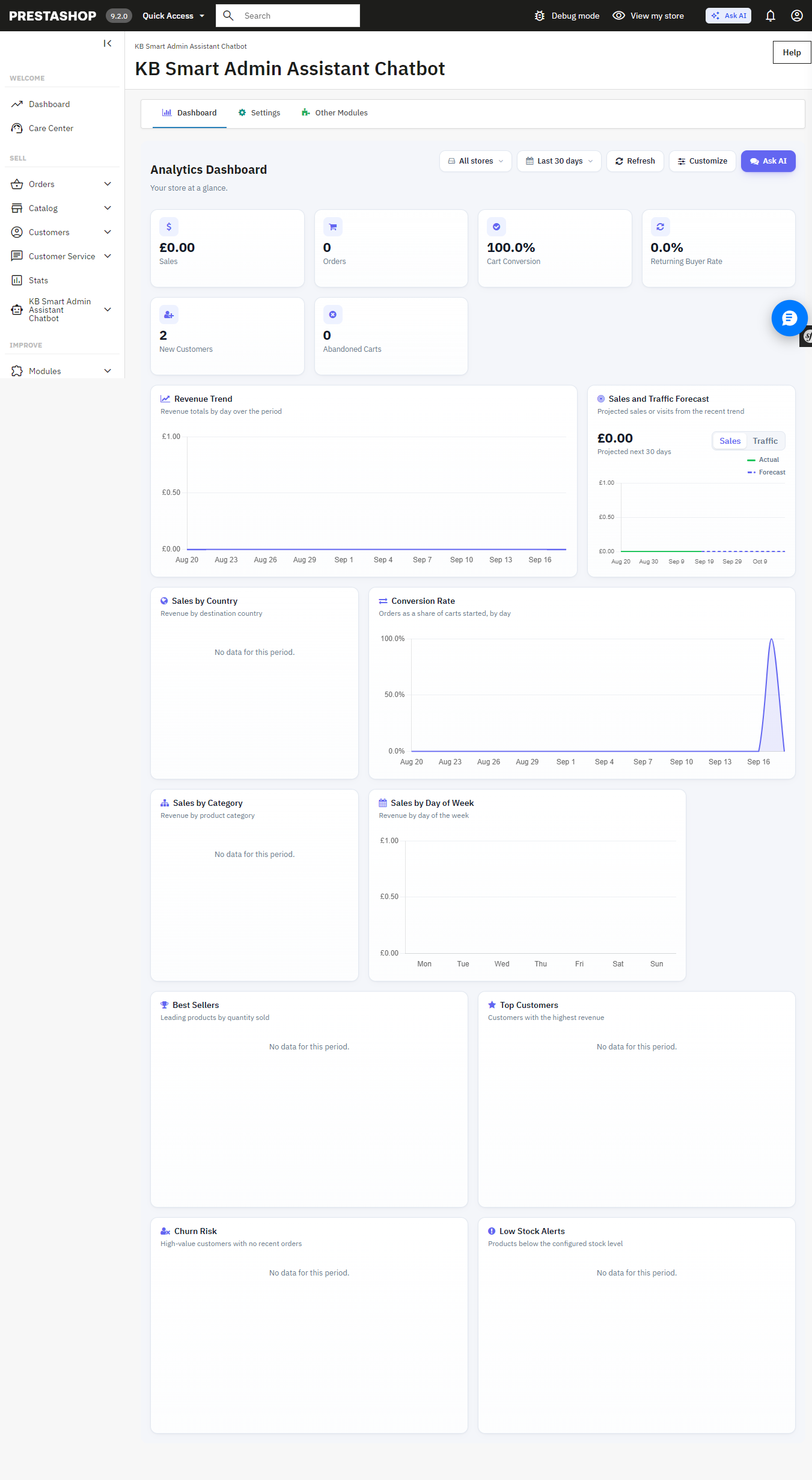
Beneath the chat interface is the full back office analytics dashboard with 34 widgets such as revenue analytics, order quantity, cart conversion rates, customer retention rates, inventory alerts at product level, best sellers, churn rate analytics, sales by countries, categories, payment methods, time slots, etc. Each of these widgets is easily toggleable and reorderable to create your perfect dashboard view. It can also be used as the PrestaShop back office home page.

The built-in Analytics Dashboard revenue, orders, cart conversion, and more, all on one page.

Answers You Can Export, Share, and Verify Not Available in Ask AI
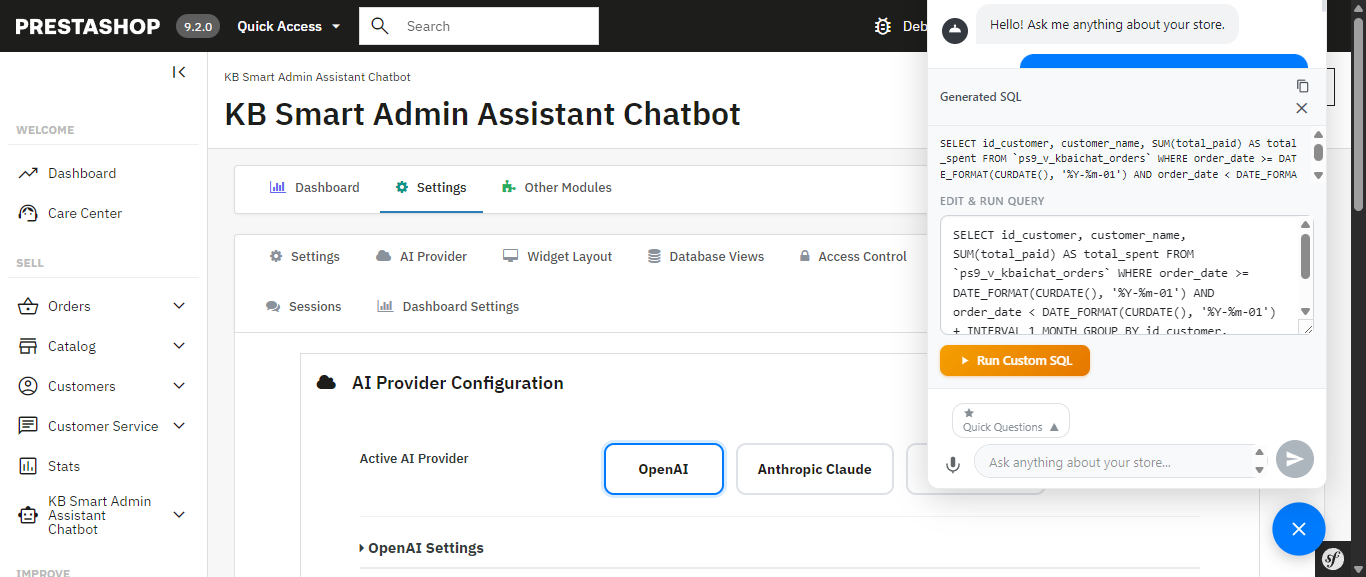
The exact generated SQL is visible, editable, and re-runnable nothing is a black box.
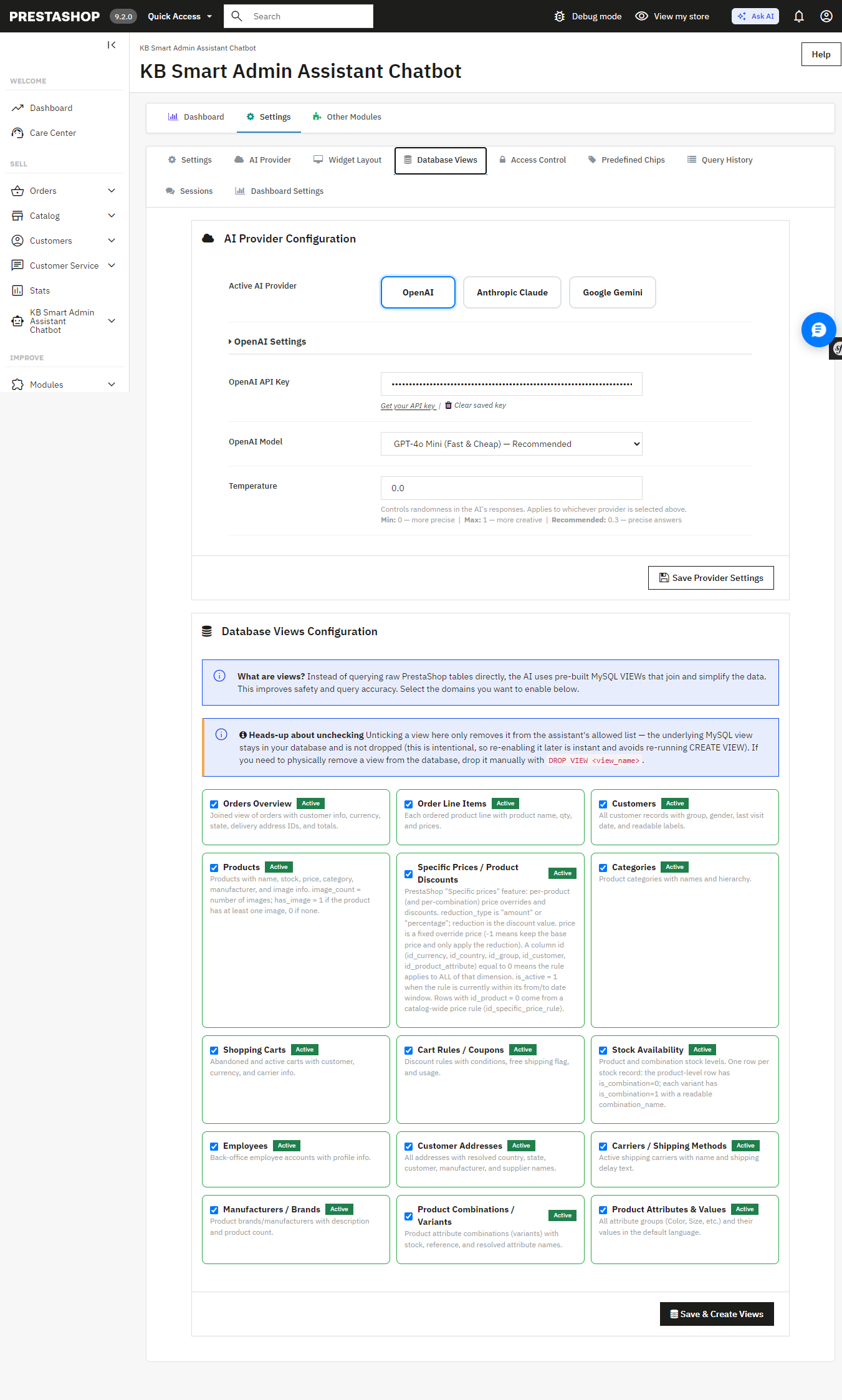
Database Views configuration the AI queries curated, read-only MySQL views instead of raw tables I

Get a result you need to hand off? Export it instantly to Excel or CSV full datasets, not just the rows visible on screen. Ask AI has no export functionality; any data it surfaces stays inside the chat conversation.

Allowing the assistant access to your database must be carefully considered, and the module has been designed with this in mind: strict restrictions on DELETE, DROP, UPDATE, INSERT, and TRUNCATE ensure that the assistant can only access your information, not write to it.. Multi-statement execution is blocked and SQL-injection patterns are screened automatically and unlike Ask AI, which works through MCP tool calls with nothing to inspect, you can view, edit, and re-run the exact SQL Smart AI Admin Assistant generated yourself. Nothing runs as a black box.

The exact generated SQL is visible, editable, and re-runnable nothing is a black box.

Database Views configuration the AI queries curated, read-only MySQL views instead of raw tables.

Built for Teams, Not Just Solo Store Owners Ask AI Has No Equivalent

If you have a shop with several admins or you manage this on behalf of your clients as an agency, the module comes with role-based employee access controls, and you get to determine precisely which employees have access to the assistant and what they are permitted to ask. All queries will be timestamped and recorded to provide you with a full audit trail. The Ask AI platform provides 30 days of chat history for each individual; however, it does not provide user permissions and an audit trail per query.

Access Control restricts the assistant to specific employee profiles.

Query History a full, timestamped audit log of every question asked, including the generated SQL.

Speak Instead of Type Ask AI Doesn’t Support Voice Input

Voice input, built on the browser’s native speech recognition, lets you ask your question out loud instead of typing it useful on a warehouse floor, during a busy order-processing morning, or anytime your hands are full. Ask AI is text-only.

Quick-Access Shortcuts for the Questions You Ask Every Day More Flexible Than Ask AI’s Suggestions

The Prestashop AI Admin Assistant ships with ready-to-use “quick query chips”: Total Orders Today, Revenue This Month, Low Stock Products, Abandoned Carts (Last 30 Days), Top Customers by Revenue, and more that you can fully edit and customize. Ask AI offers contextual suggestions on Product, Order, and Customer pages, but they aren’t something you can edit or add to.

Get Started

If you’re ready to stop digging through admin screens and start just asking your store what you need to know, Smart AI Admin Assistant is available, with live admin and front-end demos and a full user manual so you can see exactly what you’re getting before you buy:

Get PrestaShop Smart AI Admin Assistant

PrestaShop Security in the AI Era: What Are Your Concerns?

Running a PrestaShop store means protecting more than a website. Your store holds customer accounts, order histories, addresses, admin credentials plus whatever payment, shipping, marketing, and analytics services you’ve plugged in. So PrestaShop security isn’t really a technical checkbox. It’s a business risk, full stop.

AI hasn’t changed security threats so much as it’s sped them up. Phishing emails don’t have the broken grammar and weird phrasing they used to; they read like something a colleague would actually send. Scanning a store for outdated, vulnerable modules used to take a person real time and effort. Now it’s automated and near instant. Same with credential stuffing: what used to require manual grinding can now run at a scale one attacker alone could never have managed a few years ago.

Whether AI is “good” or “bad” for security is kind of the wrong debate anyway. The question that actually matters for a store owner is simpler: is your current setup built to handle attacks that move faster and hit harder than what you were dealing with two or three years ago?

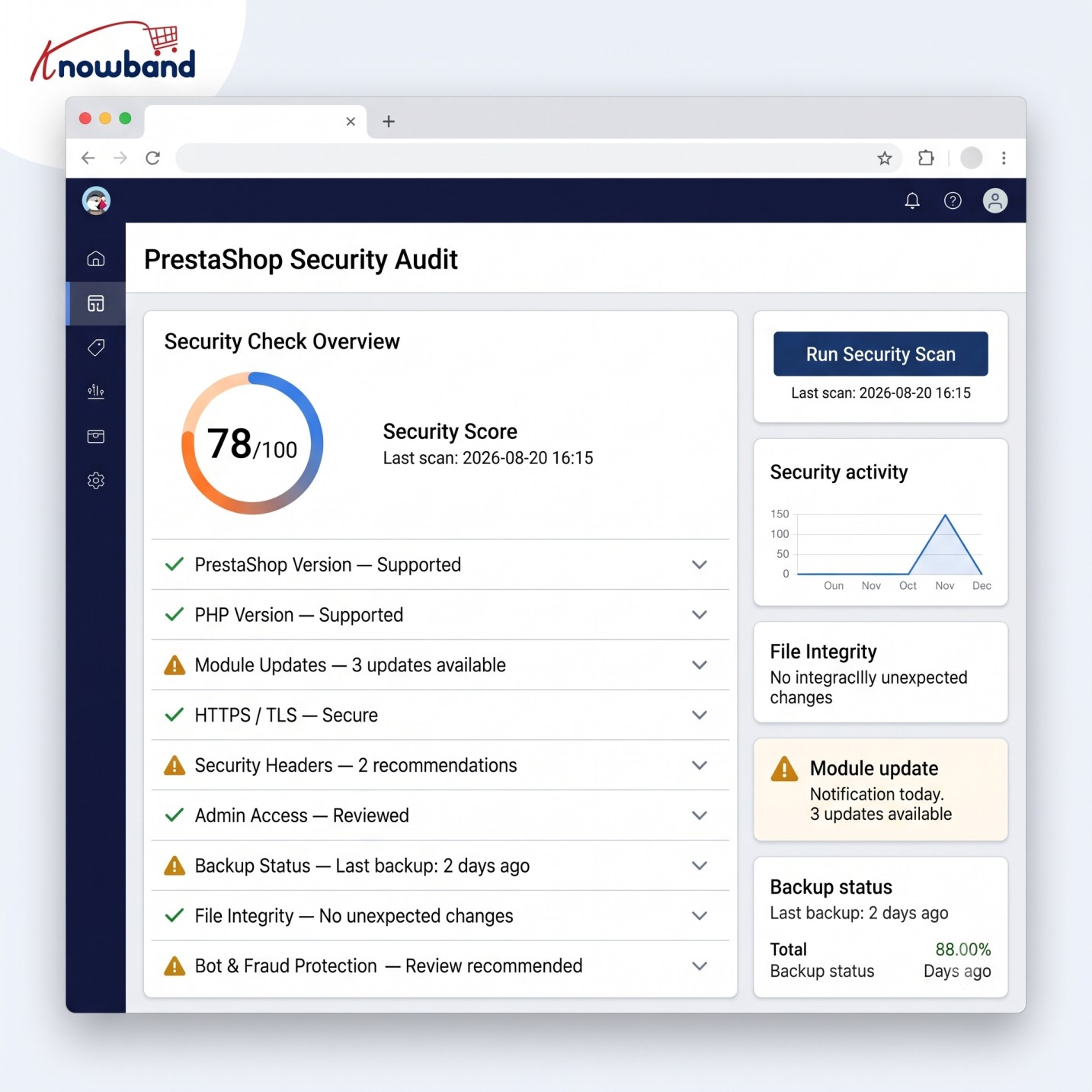
That comes down to the basics, done properly. An out-of-date PrestaShop core version and module version is still the most common source of store compromise. Control access to administrator accounts and their privileges. Authenticate properly and not just using password. Watch for unusual activity instead of assuming silence means safety. Run malware scans regularly. Vet third-party integrations before installing them. And have an actual recovery plan, tested, not just assumed, because eventually something will get through, AI-assisted or not.

1.0 Why PrestaShop Security Concerns Are Changing

Security problems haven’t suddenly become entirely new because of AI. SQL injection, XSS, stolen passwords, malware, vulnerable modules, malicious file changes, and payment-page attacks have existed for years.

The difference lies in how rapidly and in what numbers these vulnerabilities can be found by the attackers.

With the help of AI, they can automate their reconnaissance activities, produce credible phishing material, detect vulnerabilities, and multiply the number of credential attacks.

For a web store, this means that an otherwise unobserved vulnerability may be discovered much sooner.

A typical PrestaShop store may include:

  • PrestaShop core
  • Payment modules
  • Shipping integrations
  • Analytics and advertising scripts
  • Custom modules
  • Third-party themes
  • Server software
  • CDN or WAF services
  • APIs and webhooks
  • Administrator accounts
  • Customer accounts

Every additional module/scripts creates another dependency that needs to be maintained. 

That doesn’t mean you should avoid integrations. It means you need visibility into what is installed, what has access to your store, and what happens when one component becomes vulnerable.

2.0 The Biggest PrestaShop Security Concerns for Store Owners

1. Outdated PrestaShop Core and Modules

One of the most basic security controls is still one of the easiest to neglect: keeping software updated.

PrestaShop maintains a security advisory process, and its current security policy states that security updates are typically applied to the latest release.

This becomes particularly important when a vulnerability affects an older version or a third-party component.

Patching a vulnerability and cleaning a compromised website are two different jobs.

If you discover suspicious PHP files, unexpected JavaScript, modified templates, unfamiliar administrator accounts, or unexplained redirects, don’t assume that upgrading PrestaShop alone has removed the attacker.

Investigate the store first.

2. Administrator Accounts Are High-Value Targets

Your PrestaShop back office deserves the same level of protection as your storefront. A compromised administrator account can give an attacker access to sensitive settings, customer data, modules, and store content. With sufficient permissions, they could even make changes that introduce malicious code or redirect parts of the shopping experience.

That’s why password-only authentication is increasingly difficult to justify for privileged accounts.

Use MFA/2FA for administrators wherever possible. Also review which employees actually need administrative access and remove dormant accounts.

The principle is simple: give each person only the permissions required to perform their job.

Additional controls can help too. Depending on your environment, you might restrict back-office access through trusted IP addresses, VPN access, firewall rules, or additional authentication layers.

Hiding an administrator URL can reduce exposure to some automated scanning, but it shouldn’t be treated as a replacement for authentication, authorisation, or patching.

3. Credential Stuffing and Automated Login Attacks

Credential stuffing is particularly relevant to e-commerce.

Password guessing is not always needed for attackers; they can use stolen username/password pairs from completely different breaches and try them against other sites.

In case the client reused the password, the attacker might use your store as the next victim.

It is also a case with admin accounts, and the situation is much worse in that case.

Rate limiting, brute-force prevention, strong passwords, MFA, suspicious login detection, and proper account controls should be used in conjunction.

AI and automation make this more relevant because attackers can operate at high volume. AI-related cybersecurity guidance also identifies credential stuffing and password attacks as areas where automation can increase the threat.

4. Malware and Unexpected File Changes

A compromised PrestaShop store doesn’t always look broken.

The storefront may continue to load normally while malicious code sits inside a theme, module, PHP file, JavaScript file, or another part of the application.

That is why malware scanning and file-change monitoring matter.

A particularly serious scenario is payment-page manipulation. PrestaShop issued a security alert in February 2026 describing a digital skimmer that could replace legitimate payment buttons with fraudulent ones. The malicious script was loaded through a modified theme file.

For a merchant, this is a useful reminder that “the website is working” doesn’t mean “the website is secure.”

Regular scanning should be combined with investigation of unexpected changes. If a critical file changes unexpectedly, you need to know:

  1. What changed?
  2. When did it change?
  3. Who or what changed it?
  4. Was the change legitimate?
  5. What other files or accounts should be investigated?

5. Third-Party Modules and Custom Code

PrestaShop’s extensibility is one of its strengths, but every module and customization expands the attack surface.

Security testing should therefore consider more than the PrestaShop core.

A security audit can examine the core application, themes, add-ons, custom code, integrations, authentication controls, and server configuration. Astra’s PrestaShop audit guidance similarly emphasizes examining the broader application rather than treating the core platform as the entire security boundary.

This matters especially for stores that have existed for several years.

A module installed five years ago may still be active even though nobody remembers why it was installed. A custom override may remain after the original developer has left. An abandoned integration may still have API credentials.

A useful maintenance exercise is to create an inventory of:

  • Installed modules
  • Active themes
  • Custom overrides
  • External APIs
  • Webhooks
  • Cron jobs
  • Administrator accounts
  • Server services
  • DNS/CDN/security services

Remove what you no longer need.

3.0 What Does AI Actually Change for PrestaShop Security?

AI isn’t a substitute for a secure PrestaShop installation. Think of AI as an accelerator on both sides.

3.1 Attackers can automate more

The bigger concern for an online store is speed. An attacker no longer needs to perform every step manually. Automated and AI-assisted tools can help with target research, phishing, stolen-credential testing, and large-scale bot activity. For e-commerce businesses, that can translate into more attempts at account takeover, payment fraud, credential stuffing, and scraping,

3.2 Defenders can analyse more

The same basic capability can help defenders.

Security systems can analyse login activity, request patterns, IP reputation, API activity, traffic anomalies, and other events much faster than a person manually reviewing raw logs.

For instance, a manager usually logs into the system from a usual country during office hours. Then, many login failures occur, followed by a successful login from an unusual location. If the system can perform behavioral analysis, then such an event can be detected much quicker than analysing the access logs from yesterday.

AI can also help prioritize alerts. That’s useful because a store generating thousands of requests per minute cannot realistically have a person inspect every event.

4.0 PrestaShop Security Best Practices: A Practical Layered Approach

Security works better as layers than as one “security plugin.”

A practical setup for a PrestaShop store should include several levels.

Layer 1: Keep the application current

Maintain supported versions of:

  • PrestaShop
  • PHP
  • Server software
  • Themes
  • Modules
  • Libraries

Test updates in a staging environment where the store has substantial customizations.

Don’t postpone security updates indefinitely because a normal feature upgrade is inconvenient.

Layer 2: Protect privileged access

For administrator accounts:

  • Enable MFA/2FA.
  • Use unique passwords.
  • Remove unused employees.
  • Apply least-privilege permissions.
  • Consider IP/VPN restrictions for sensitive environments.
  • Monitor successful and failed logins.

Layer 3: Protect the application

A WAF can help filter malicious HTTP requests before they reach the application. Security headers can add browser-level protections. CAPTCHA or bot controls can reduce automated abuse of public forms.

These controls don’t eliminate vulnerabilities in the application itself, rather they add a defensive layer.

Layer 4: Monitor the filesystem

Regular malware scan and file change monitoring can help in detecting the compromises that aren’t visible from the storefront.

Pay particular attention to:

  • Theme files
  • PHP files
  • JavaScript
  • Configuration files
  • Upload directories
  • Module directories

Unexpected modifications deserve investigation.

Layer 5: Monitor the infrastructure

The PrestaShop application isn’t the only thing that needs protection.

Review:

  • SSH access
  • Firewall rules
  • Database exposure
  • Server users
  • File permissions
  • Cron jobs
  • SSL/TLS configuration
  • Backup access
  • Cloud credentials
  • CDN/WAF configuration

A secure application on an exposed or poorly maintained server is still vulnerable.

5.0 Where a PrestaShop Security Manager Can Fit

Store owners often end up assembling security controls from several independent tools. That can create its own maintenance problem: different settings, update schedules, logs, compatibility issues, and configuration interfaces.

The Knowband Prestashop Advanced Security Manager is one option worth evaluating as part of a layered PrestaShop security setup. Its current product documentation lists controls including 2FA, brute-force protection, administrator IP restrictions, a WAF, security headers, CAPTCHA, login monitoring, and scheduled malware scanning. It supports PrestaShop 1.7, 8, and 9 according to the vendor’s current documentation.

The important point is not to treat a security module as a complete security strategy.

A module can strengthen application-level defenses, but it doesn’t replace:

  • Secure server configuration
  • Timely patching
  • Safe development practices
  • Backups
  • Incident response
  • Vulnerability assessment
  • Secure third-party integrations

6.0 Don’t Forget Backups and Recovery in Prestashop

Store owners need to have a reliable recovery plan when something goes wrong.

A backup is useful when it’s available, protected, and can be restored. Ideally, keep backups separate from the production environment and test restoration periodically.

You should have reliable backups of:

  • Database 
  • Product images and other store files 
  • Customer and order data 
  • Configuration 
  • Themes 
  • Custom modules 
  • Critical server files 

In case of store owners looking to automate the whole process, one of best backup module which is Prestashop Backup & Restore Module can be taken into consideration. This software enables users to take scheduled backups of their databases and files, provides offsite storage, encryption, retention, and restoration facility.

7.0 When Should You Consider a Security Audit?

Automated scanning is useful, but it isn’t the same as a security audit or penetration test.

Vulnerability scanning finds known bugs on the surface & inform what is broken, but can’t tell you how deep a hacker can go.

Penetration testing simulates a real attack. It chains small flaws together to break deep into your systems and tests the business logic.

For a mature or high-revenue store, consider periodic security assessments, particularly after:

  • A major PrestaShop upgrade
  • A large custom development project
  • A new payment integration
  • A major module installation
  • A server migration
  • A security incident
  • Significant infrastructure changes

A proper assessment should cover the application and the surrounding environment rather than focusing exclusively on the storefront.

8.0 A Store Owner’s Security Checklist

Before considering your PrestaShop website secure, check the basics:

  • PrestaShop is running a supported/current release appropriate to your environment.
  • Modules and themes are maintained and updated.
  • Unused modules and accounts have been removed.
  • Administrator accounts use MFA/2FA.
  • Administrator privileges follow least privilege.
  • Failed and successful admin logins are monitored.
  • Brute-force protection is enabled.
  • A WAF or equivalent application-layer protection is configured where appropriate.
  • Security headers are configured correctly.
  • Public forms have appropriate bot/spam protection.
  • Malware scanning is performed regularly.
  • Unexpected file changes can be detected.
  • Server access is restricted and monitored.
  • Backups are isolated from production and restoration has been tested.
  • Payment and third-party integrations are reviewed.
  • There is a documented incident-response procedure.
  • A security audit or penetration test is performed when the store’s risk justifies it.

9.0 The Real Concern: Speed of Attack Versus Speed of Response

The biggest change brought by AI isn’t that every PrestaShop store suddenly faces an entirely new category of vulnerability.

It’s that the gap between a weakness becoming available and someone exploiting it can become smaller.

That changes how store owners should think about security.

Waiting for a customer to report a strange checkout page isn’t monitoring. Discovering a compromised administrator account after fraudulent orders have been placed isn’t detection. Installing a security tool but never reviewing its alerts isn’t a security process.

A secure PrestaShop store needs layers that work before, during, and after an attack: patching to reduce vulnerabilities, authentication to protect accounts, application controls to filter malicious traffic, monitoring to detect abnormal activity, malware/file scanning to identify compromise, and tested backups to support recovery.

AI can make defensive systems faster and more capable, but the foundation remains the same: reduce the attack surface, control access, monitor what changes, and be prepared to recover.

For store owners looking to strengthen application-level protection, a solution such as Knowband Prestashop Advanced Security Manager can be considered as one component of that layered approach. The right choice depends on your PrestaShop version, hosting environment, existing security stack, and operational requirements.

The best time to discover a security weakness is before an attacker does.

How Frikomics Scaled their Comic Store with Prestashop Mobile App Builder

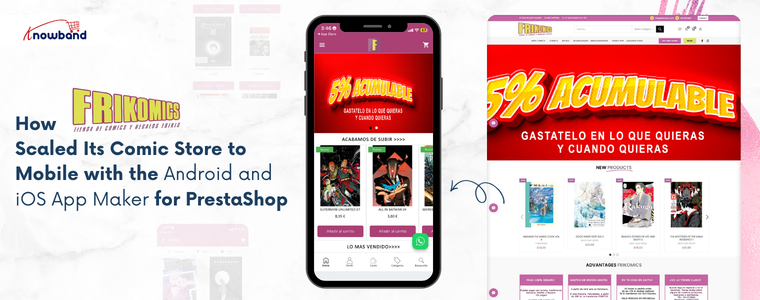
Frikomics is a comic brand built for readers who are serious about their hobby. The store stocks comics, graphic novels, and fan merchandise for readers of all ages. Over the years, the brand earned real loyalty from its community by focusing on what matters most: good products and a reliable shopping experience. But as the catalogue grew, so did the traffic coming in from mobile devices. The Frikomics team noticed that most customers are browsing on their phones. However, a browser-based mobile experience was not giving them what a dedicated app could. Frikomics saw the gap clearly and decided it was time to act and that’s where the Android and iOS App Maker for PrestaShop by Knowband came in.

Why a Mobile App Became the Next Step

Comics thrive on discovery. Customers browse often, shortlist titles, and return when something new drops. Therefore, re-engagement methods like push notifications and wishlist functionality are not just extra features; they are central to how the business grows.

Without a dedicated app, Frikomics struggled to connect with its customers between visits. Furthermore, the browser checkout on mobile added friction right where the buying decision was most fragile. As a result, the team recognised that a proper mobile app was the next necessary step.

The challenge was doing it without a long and costly development process.

Choosing the Android and iOS App Maker for PrestaShop

To solve this, Frikomics partnered with Knowband and integrated the Android and iOS App Maker for PrestaShop.The PrestaShop Android and iOS Mobile App Creator Module connected directly with the existing store and pulled in all products, categories, inventory levels, and payment methods automatically. Hence, nothing needed to be rebuilt or duplicated. Additionally, the addon delivered a Flutter-based mobile app solution covering both Android and iOS, so one decision handled both platforms at once.

🤖 AI-Powered

Automate Store Conversations with a Prestashop AI Chatbot using OpenAI

Answer customer questions 24/7, reduce cart abandonment, and free up your support team, all with one smart AI Chatbot for Prestashop.

Try the demo for Free Now →

Furthermore, the PrestaShop Android App Builder Module managed branding, home screen layout design, and final app delivery. Frikomics shared their specifications, and the app was ready within the standard turnaround window.

How the Prestashop Mobile App Builder Improved Frikomics’ Operations

Once live, Knowband’s PrestaShop Android and iOS Mobile App Creator Addon gave Frikomics a branded presence on the Google Play Store and the Apple App Store. Customers could browse the comic catalogue in list or grid view, save titles to a wishlist, and complete purchases through a checkout screen built specifically for mobile use.

Moreover, the PrestaShop Mobile App Creator Module brought push notifications into the marketing mix for the very first time. The team could now send direct alerts to customers’ phones, keeping them informed about new releases, current deals, and reminders of abandoned carts. This change replaced the need to rely on email open rates with a more immediate way of communicating.

Social login through Google, PayPal, and Facebook reduced sign-up steps for new users. Additionally, OTP-based phone number login gave returning customers a faster way back into their accounts.

The addon also handled multi-language and multi-currency support, opening the store to a broader audience without extra configuration. The PrestaShop eCommerce Mobile App kept product data and inventory synced between the website and the app at all times. Since everything updated automatically, the team did not have to manually adjust stock levels or recheck listings across two separate systems.

Results After Implementing the Mobile App

After the app went live, Frikomics noticed real changes in how customers interacted with the store:

  • Mobile browsing became faster and more comfortable, and customers spent more time in the app.
  • Push notifications brought back readers who had not visited in a while, especially around new comic releases.
  • The touch-optimised checkout reduced the drop-off that typically happens on mobile.
  • Day-to-day operational tasks took noticeably less time, thanks to automatic syncing.

As a result, the team had more room to focus on what the brand is actually built around, sourcing great comics and staying connected with the community.

Supporting Frikomics‘ Growth Journey

Frikomics came in with a clear problem: customers were on mobile, but the store was not truly built for it. After choosing the Android and iOS App Maker for PrestaShop by Knowband, that gap closed quickly. The brand now has a proper mobile presence, branded, functional, and built to grow alongside the business.

The PrestaShop Mobile App Creator by Knowband provided Frikomics with direct access to its audience, a reach that email marketing couldn’t quite match. Frikomics has since broadened its mobile presence, regularly utilising push notifications to keep its community informed about new releases.

This demonstrates that establishing a mobile presence doesn’t require a complete redesign. With the right solution, a PrestaShop store can cultivate a robust mobile presence efficiently and without added complications.

Regardless of whether you’re operating a small shop or have a vast inventory, Knowband’s PrestaShop eCommerce Mobile App Module presents a straightforward and dependable route to mobile expansion, designed to integrate seamlessly with your existing store operations.


Implementing Lazy Loading for Product Images in OpenCart

In today’s internet-driven world, users expect websites to load instantly. Customers want pages to load quickly when they visit your OpenCart website. Customers may become irritated, and your business may lose revenue if your product pages take too long to load, especially on mobile devices where internet rates may be slower.

Large or numerous graphics are frequently the primary cause of slow page loading. Product photos might be big files, but they are an essential component of any e-commerce website. Lazy loading can help with it.

The Performance Challenge in eCommerce Sites

Moment’s eCommerce spots are veritably visual. A standard order runner can have

  • 20-50 pictures of the product
  • Banners
  • Thumbnails and icons
  • Sections on related products

The browser will need to load each image before the page is completely interactive if all of these are loaded at once. This leads to:

  • First Contentful Paint (FCP) at a slower pace
  • Increased Interactive Time 
  • Poor performance on mobile devices
  • A higher server load
  • Increased rates of bounce

The user experience will be significantly impacted by this, particularly on slower networks.

What Is Lazy Loading?

The technique known as “lazy loading” delays the loading of images (or other content) until they are truly required, which is typically when a user is ready to view them by scrolling into view. Lazy loading waits until the user is ready to view the image before loading it, as opposed to loading all the images at once.

Lazy loading has the following advantages:

  • Bandwidth conservation
  • Better performance on mobile devices
  • Improved SEO and essential web elements
  • Quick loading of the first page

When many of the images may load simultaneously on product pages, lazy loading is especially helpful.

Why Lazy Loading Matters

Imagine looking through an item catalogue. Even if the product images are far below the fold, your browser will try to load them all at once when using traditional loading. Only the images that are in or near the viewable portion of the screen will load initially when using lazy loading. The remaining images will gradually load as the viewer scrolls.

Both your clients and search engines like Google, which like websites that load quickly, will benefit from a quicker and more seamless experience.

Real-World Example: Category Page Without Lazy Loading

Consider this example:

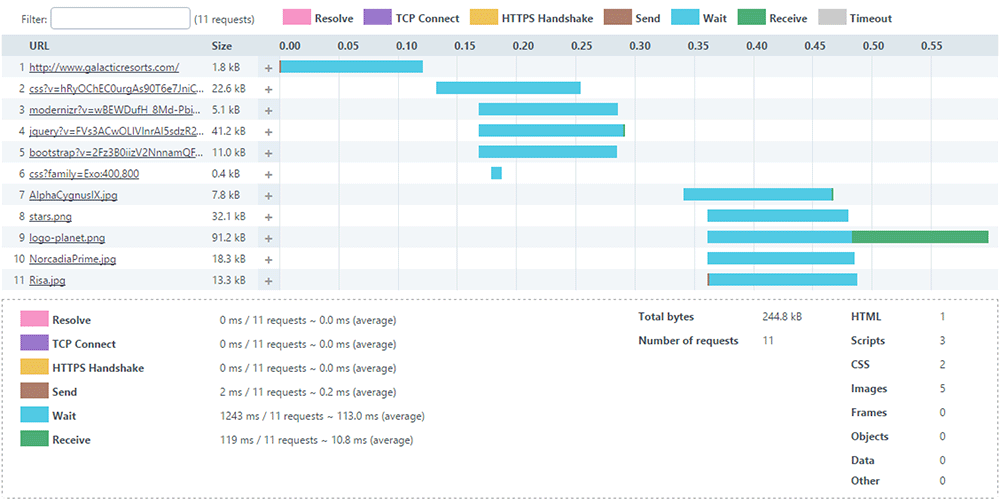
24 products on a category page, Each thumbnail = 150 KB, Total image weight = 3.6 MB

Before even loading banners, CSS, and JavaScript, the browser has to download close to 4 MB of images.

Now consider that the visitor only scrolled halfway through the page. Half the images were never viewed – but downloaded anyway. Therefore, this is wasted bandwidth and 0This is where lazy loading comes in.

Lazy Loading and Core Web Vitals

Web Vitals. The following are directly impacted by large images:

  • Paint with the Largest Content (LCP)
  • Shift in Cumulative Layout (CLS)
  • Next Paint Interaction (INP)

Correctly loading images slowly will enhance performance metrics, particularly on product and category listing pages.

Still, there’s one important thing to keep in mind

 Images above the pack, like the primary product image on a product detail runner, should n’t be lazy loaded.

When to Apply Lazy Loading?

Lazy loading is best suited for:

  • Product listing pages
  • Category pages
  • Blog listing pages
  • Manufacturer pages
  • Upsell sections

It might not be the best fit for:

  • Hero banners above the fold
  • Main product image on the product page
  • Critical branding visuals

How to Implement Lazy Loading in OpenCart

Method 1: Lazy loading in native browsers

Modern browsers use the loading=”lazy” property to provide built-in lazy loading

Example:

<img src=”image.jpg” loading=”lazy” alt=”Product Image”>

OpenCart Steps:

  • Open your theme file:
Version File Path
OpenCart 2.x catalog/view/theme/your_theme/template/product/category.tpl
OpenCart 3.x catalog/view/theme/your_theme/template/product/category.twig
OpenCart 4.x catalog/view/template/product/category.twig
  • Locate the product image <img> tag.
  • Change it as follows:

Before:

<img src="{{ product.thumb }} alt="{{ product.name }}"  width="300"  height="300"

     title="{{ product.name }}">

After:
<img src="{{ product.thumb }}"loading="lazy"  alt="{{ product.name }}"  width="300"  height="300"     title="{{ product.name }}">

That’s all. JavaScript is not necessary. Furthermore, this is the most easy and cleanest way.

Method 2: Using lazysizes (Best for Older Browser Support)

Steps:

  1. Add the lazysizes script:
    <script src="https://cdnjs.cloudflare.com/ajax/libs/lazysizes/5.3.2/lazysizes.min.js" async></script>
  2. Open your theme file based on the OpenCart version mentioned in Method 1 and update the image markup:
  • Before:
    <img src="{{ product.thumb }}" class="lazyload" width="300" height="300" alt="{{ product.name }}">
  • After:
    <img data-src="{{ product.thumb }}" class="lazyload" width="300" height="300" alt="{{ product.name }}">

Method 3: Using Intersection Observer API (Advanced Control)

Modern JavaScript API for better control.

Example:

const images = document.querySelectorAll(“img[data-src]”);

const observer = new IntersectionObserver((entries, observer) => {

  entries.forEach(entry => {

if (entry.isIntersecting) {

   const img = entry.target;

   img.src = img.dataset.src;

      observer.unobserve(img);

}

  });

});


images.forEach(img => observer.observe(img));

This method gives full control over loading behaviour.

Important: AJAX-Based Product Filtering

When products are loaded dynamically via AJAX:

Native loading=”lazy” works automatically.

However, ifyou are using lazysizes, Intersection Observer then You must re-trigger lazy loading after AJAX content loads.

Example:

document.addEventListener('ajaxComplete', function() {

    lazySizes.autoSizer.checkElems();

});

Otherwise, newly injected images may not load correctly.

The Best Methods for Lazy Loading in OpenCart

✔ Avoid loading the images above the fold.

✔ Make sure your images are the right size; avoid using thumbnails that are too big.

✔ Always use PageSpeed Insights to test; optimiseoptimize images to WebP format.

✔ Always test with PageSpeed Insights

✔ After making changes to the template, clear the OpenCart cache.

Measuring Performance Before and After Implementation

To evaluate the impact of lazy loading, follow these steps:

Before Implementation

Test your category page and record the following metrics:

  • Page size
  • Page load time
  • Core Web Vitals scores

After Implementation

Run the same tests again and compare the results. You should observe:

  • Reduced initial load time
  • Lower Total Blocking Time (TBT)
  • Improved Lighthouse performance score

The implementation options outlined in this guide, from native HTML attributes to lazysizes and the Intersection Observer API, offer solutions for every level of technical complexity. Whether you are maintaining a small boutique store or managing a high-traffic multi-category catalogue, there is an approach that fits your needs. Start with Method 1 for instant results, and build up to more advanced methods as your requirements grow.

Performance optimisation is not a one-time task as it is an ongoing commitment. Pair lazy loading with image compression, WebP conversion, and proper caching to unlock the full potential of your OpenCart store’s speed.

About Knowband

Knowband is a trusted eCommerce plugin and extension provider with years of experience helping online merchants build faster, smarter, and more feature-rich stores. Whether you run your store on PrestaShop, OpenCart, Shopify, WooCommerce, Magento, or any other major platform, Knowband offers a wide range of ready-to-use plugins and extensions that help you enhance functionality, improve performance, and deliver a better shopping experience, without needing to build from scratch.

Beyond plugins, Knowband also offers comprehensive website development and mobile app development services. Whether you need a fully custom eCommerce storefront built from the ground up, a tailored mobile shopping app for iOS and Android, or a bespoke integration with your existing systems, Knowband’s team of developers has the expertise to bring your vision to life.

If you are looking to optimize further your OpenCart store, or any other eCommerce platform, explore Knowband’s plugin marketplace or get in touch with our team to discuss a custom solution tailored to your business goals.

Contact us at support@knowband.com for custom plugin development, website development, and mobile app development services.

WooCommerce vs PrestaShop vs OpenCart vs Magento vs Shopify

Choosing the right platform is one of the most important decisions when you are starting an online store. With so many options available, it can become tiring to decide which platform best fits your business needs.  If you are looking best platform to start an online store, then you are at right place. Each platform offers different benefits and flaws in terms of usability, scalability, cost, and features. We at Knowband already manage these stores as we provide the service for these platforms. This will help you in choosing the right platform for your store.

This article provides a practical comparison of five popular e-commerce platforms, WooCommerce, PrestaShop, OpenCart, Magento, and Shopify, based on key factors such as ease of use, performance, customisation, scalability, and overall cost. You will also learn the e-commerce platform pros and cons. 

Additionally, understanding these helps your business select open source ecommerce platforms that aligns with your business goals.

Key Factors to Consider When Choosing an E-Commerce Platform

Before comparing platforms, as a store owner, you need to understand the core factors that will play a crucial role.:

  • Ease of Use: If you are technical or non-technical, you first need it to be simple to set up and manage products, your entire catalogue and orders.
  • Customisation & Flexibility: Platform should have the ability to modify design and functionality according to your business needs.
  • Performance & Speed: Additionally, there is a major factor that is how well the platform handles traffic and large catalogues
  • Scalability: Also, scalability is the factor your platform can grow with the business
  • Cost: Cost is one of the most important factors as it should be affordable not too expensive.
WooCommerce: Ideal for WordPress-Based Stores

WooCommerce is one of the most used e-commerce platforms and works as a plugin for WordPress. Furthermore, its popularity makes it unique due to its simplicity and flexibility, especially for businesses already familiar with WordPress.

Key Feature  of the WooCommerce

  • Easy to use, especially for WordPress users
  • Massive plugins 
  • Strong SEO capabilities
  • Highly recommended for content-driven stores and blogs

Limitations of WooCommerce

  • Performance can be reduced with large catalogues without optimization
  • Requires paid plugins for advanced features like wishlist 
  • Heavily dependent on hosting quality
Knowband recommends it as the best e-commerce platform for small businesses, medium-sized businesses, bloggers, and entrepreneurs looking for an easy way into online selling.

PrestaShop: Feature-Rich and International-Friendly

PrestaShop is an open-source platform designed specifically for e-commerce. This is the best e-commerce platform for startups. Moreover, it is particularly popular in Europe and offers strong built-in functionality. Furthermore, unlike wordpress it offers the basic functionalities, wishlist, abandoned cart, designs and many more.

Key Highlights of Prestashop

  • Support for multiple currencies and languages
  • Support many advanced taxes and shipping options
  • Strong back-office dashboard
  • Handles large catalogues efficiently

Limitations of the Prestashop

  • Requires moderate technical knowledge
  • Paid modules can increase costs
  • Smaller extension marketplace than WooCommerce

We recommend it to international sellers and businesses that need advanced e-commerce features without heavy reliance on plugins.

Prestashop Plugins

Explore all the plugins that will make your prestashop store more professional


Install Now

OpenCart: Lightweight and Performance-Focused

OpenCart is known for its simplicity and speed.  Additionally, it provides essential e-commerce features without unnecessary complexity. This OpenCart platform also supports built-in tools for coupons, discounts, and special prices like prestashop

Strengths of the Opencart

  • Lightweight and fast
  • Simple admin interface
  • Built-in multi-store functionality
  • Low hosting requirements

Drawback of the Opencart Platform

  • Smaller extension ecosystem
  • Limited advanced features
  • Smaller community compared to competitors

Knowband recommends it to small businesses with straightforward needs and limited budgets that prioritize performance.

Opencart Extension

Give the advanced features to your Opencart store Using Popular Extensions


Install Now

Magento: Enterprise-Level Power

Magento is what the big players use when they need a serious, robust, enterprise-grade solution. Here, Big player refers to the major enterprises and retailers that have a large volume of products through their stores. This Magento Platform is best ecommerce platform for large businesses.

Key Highlights of Magento:

  • Magento scales to handle millions of products and transactions
  • Inventory and customer management tools 
  • Customisation is easy in Magento
  • Built to handle large product catalogues 

The Downsides of Magento are:

  • Learning Magento is a bit difficult for store owners
  • Professional developers are required
  • Hosting and keeping it running will cost you high money

Magento Plugins

Let Knowband Manage Your Magento Plugins, while you only work on selling.


Contact Us Now

Shopify: Everything is handled by them

Shopify takes a totally different approach than other platforms. They handles everything for you unlike others. It’s fully hosted, which means they deal with the technical things while you focus on selling

Key Features of the Shopify

  • You can easily have a store there
  • Shopify handles the hosting, security, and performance. The store owner only focuses on selling.
  • Customer support is highly active
  • A variety of plugins on the app store when you need extra features
  • Perfect for dropshipping or selling across multiple channels (social media, in-person, etc.)

The Downsides:

  • Monthly fees that add up over time
  • Transaction fees on certain plans (unless you use Shopify Payments)
  • Less control over the backend compared to platforms you host yourself

Shopify Custom Development

Let Knowband handle your Shopify store seamlessly, so you can concentrate on scaling your store and brand.
Contact Us Now

Pricing Plans of all the Platforms: WooCommerce, Prestashop, Opencart, Magento and Shopify

Platform Initial Cost Hosting Cost Theme & Extension Cost Development & Maintenance Overall Cost Suitability
WooCommerce Free (WordPress plugin) $5–$30/month (shared to managed hosting) Free to $200+ (plugins & themes) Low to medium, increases with customization Best for small to medium businesses
PrestaShop Free (open-source) $10–$40/month $50–$500 (modules & themes) Medium, often requires developer support Suitable for growing businesses
OpenCart Free (open-source) $5–$25/month $20–$300 (extensions & themes) Low to medium, limited for complex needs Ideal for small businesses
Magento Open Source Free (software only) $50–$200+/month (cloud or dedicated hosting) $100–$1,000+ (extensions & themes) High due to complexity Best for large or fast-growing stores
Magento Commerce (Adobe) Paid license Included or enterprise-level hosting Often custom-built Very high (enterprise development) Enterprise-level businesses
Shopify Monthly subscription Included $0–$350 (themes) + paid apps Low, fully managed platform Best for beginners & fast launches


The conclusion is that there’s no magic “best platform” that works for everyone. It really comes down to what you need for your specific situation.

WooCommerce is fine when you want flexibility, and you’re already comfortable with WordPress. PrestaShop has built-in features that international sellers actually need. OpenCart keeps things simple and fast. Magento gives enterprise-level businesses the scalability they require. And Shopify just makes everything easy if you want a managed solution.

Your decision should come down factors about cost, your technical skill and your business size. Moreover, you can also switch platforms eventually as your business evolves. 

About Knowband

Knowband is a sub-company of Velocity Software Solutions Pvt. Ltd., a leading technology company specialising in e-commerce development and digital solutions. Knowband provides a wide range of ready-to-use plugins, extensions, and custom development services for popular eCommerce platforms like prestashop, WooCommerce, Opencart, Shopify and Magento.

With a strong focus on innovation and performance, Knowband helps online businesses enhance functionality, improve user experience, and increase conversions.

Zrali: Redefining Online Fashion Shopping With Knowband’s Mobile App Builder

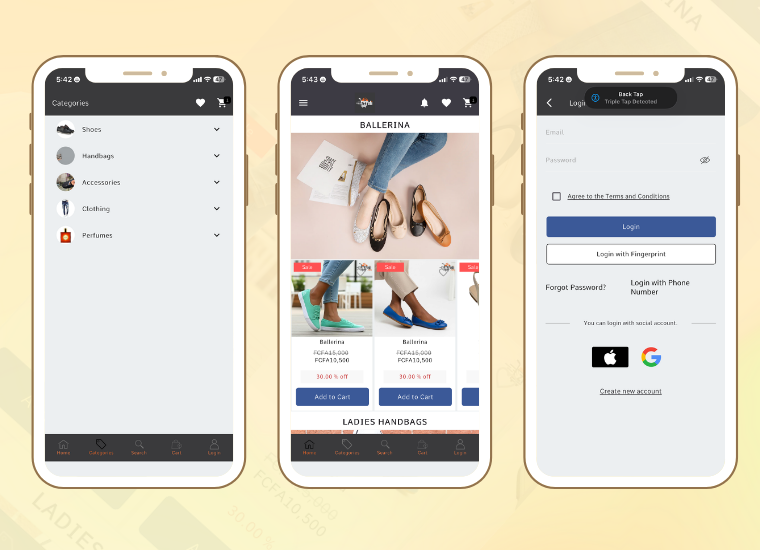
Zrali, the emerging fashion-tech brand, brings stylish and affordable global fashion to African and international shoppers. Selling shoes, handbags, clothing, and accessories, Zrali attracts thousands of online visitors each month.

Zrali was created with a simple idea in mind: fashion should be stylish, affordable, and connected with technology. Starting with fashionable shoes to fine handbags and other things people need in their day-to-day life, Zrali had a vision of introducing global-style shopping to the African customers while also expanding business worldwide.

The site showcased a stunning range of products and supported multiple languages (English, French, and German) as well as various currencies (XAF, EUR, USD, GBP). However, Zrali recognised that modern customers increasingly prefer shopping through mobile applications rather than traditional websites.

Zrali wanted a mobile app that would help them reflect their store identity, connect with people instantly, and give them a user-friendly app experience without incurring high development costs.

And that’s where the PrestaShop Mobile App Builder by Knowband came in.

Why Modern Customers Need More Than a Website

Although Zrali’s website was professional and well-designed, customers increasingly sought faster, more personalised experiences. The Zrali Team identified several key challenges:

  • Mobile users found it hard to browse the website, especially while travelling or during short breaks.
  • Many users wanted a dedicated app to browse products easily on their phones.
  • Important features like push notifications were missing, making it harder to keep customers engaged.
  • To stand out in the competitive fashion market, Zrali needed a more interactive experience than a regular website.
  • The goal was to reduce bounce rates, increase time spent on the site, boost sales, and build customer loyalty.

A mobile app was the next step, but Zrali wanted to avoid hiring developers and spending months building it from scratch.

How Zrali Gained a Mobile Advantage

Zrali partnered with Knowband to create a customised mobile app using the PrestaShop Mobile App Builder.

This ready-to-use solution allowed the team to launch the app quickly, and it is now available on the Google Play Store and App Store.

The mobile app reflects Zrali’s fashion identity, sleek, modern, and visually appealing. Importantly, it is fully synchronised with the PrestaShop website, ensuring that inventory, prices, orders, and products are updated in real time.

How the App Elevated Zrali’s Shopping Experience

Smooth Syncing: The mobile app automatically displays all the product updates, prices, and stock changes on the Zrali site.

Multi-Language and Multi-Currency: Cameroonian, European, and other shoppers can shop in their own language and own currency.

Push Notifications: Zrali can also provide customised messages to the customers, like deals, abandoned carts, etc. Hence, they re-engage the customers.

Quicker Checkout: Moreover, with the help of social login, fingerprint login, multiple shipping and payment methods, Zrali provides easy and fast checkout as well.

Modern UI/UX: Zrali also provides customers with trendy designs in a grid format, banners, and sliders, keeping the customers busy.

Social Login: Customers can create their accounts through Facebook and Google. Hence, they do not abandon at the last moment as they find it easy.

Ads Integration and GDPR Compliance: Trust and revenue are guaranteed for Zrali with GDPR compliance and AdMob integration.

Results After Launching the Mobile App

Within just a few weeks of launching the Zrali Mobile App, the impact was clear:

  • Browsing Time Doubled: Customers spent twice as long exploring collections because the app was faster, more interactive, and easier to use than the website.
  • Conversions Nearly Doubled: Faster navigation, a simplified checkout process, and increased trust led to significantly higher sales.
  • More Repeat Buyers: Push notifications helped re-engage customers, boosting repeat purchases.
  • Higher Customer Satisfaction and Loyalty: App reviews showed increased satisfaction as users enjoyed a more personal and interactive shopping experience.
  • Instant Access to Exclusive Features: Shoppers could access curated collections, special offers, real-time stock updates, and enjoy multilingual and multi-currency support.

Overall, the mobile app made shopping smoother, faster, and more convenient, exactly what Zrali aimed to provide for their customers.

Celebrating Zrali: From a Website to a Mobile Fashion Brand

By partnering with Knowband, Zrali has transformed from a promising fashion website into a mobile-first brand that truly connects with its customers.

The mobile app enables Zrali to reach shoppers anytime, anywhere, offering a smooth, personalised, and convenient shopping experience. With a scalable mobile solution, the brand continues to enhance engagement, boost sales, and strengthen customer loyalty.

We also want to commend Zrali’s vision and forward-thinking approach. Their dedication to delivering the best for their customers and embracing innovative technology has made this mobile transformation possible.

Knowband’s PrestaShop Mobile App Builder helped Zrali reduce development costs, shorten time-to-market, and bring their vision to life quickly and efficiently. This collaboration demonstrates how the right technology partner can turn ideas into real-world results.

With this mobile-first approach, Zrali is not just keeping pace with modern customers; it is setting new standards in fashion-tech retail. Their commitment to quality, style, and customer satisfaction makes Zrali a true leader in the industry

Explore their Mobile App Now.

Should You Move from PrestaShop 8.1 to 9.0? A Complete Feature Comparison

With the release of PrestaShop 9.0, the platform is moving toward a more modern, performance-oriented, and developer-friendly future. However, as with any major update, merchants and developers are left with an important question: Is now the right time to migrate from PrestaShop 8.1?

In this blog, we’ll explore the key differences between PrestaShop 8.1 and 9.0. From performance upgrades to developer tools, we’ll cover everything you need to know to make an informed decision about your store’s future.

Symfony Framework Upgrade: From 4.4 to 6.4

To begin with, one of the most significant changes in PrestaShop 9.0 is the upgrade of the Symfony framework from version 4.4 to Symfony 6.4, the latest long-term support (LTS) release. This transition ensures better stability, security, and access to modern development tools.

Symfony 6.4 will be maintained with bug fixes through November 2026 and security patches until November 2027, ensuring long-term stability for evolving projects. By comparison, Symfony 4.4—used in PrestaShop 8.1—has already reached the end of its support life. Therefore, PrestaShop 9.0 becomes the smarter choice for long-term projects.

PHP Compatibility and Performance Enhancements

In addition, PrestaShop 9.0 introduces support for PHP 8.1, 8.2, and 8.3. This allows merchants to benefit from improved performance, better memory handling, and modern PHP features.

Unlike PrestaShop 8.1, which stopped at PHP 8.1, the new version embraces the latest PHP releases, representing a major step forward. As a result, PrestaShop 9.0 is better aligned with modern PHP standards and development practices. However, keep in mind that older hosting environments and custom code may require updates to ensure compatibility.

Modern API Platform for Headless Commerce

Furthermore, PrestaShop 9.0 brings a brand-new API system based on API Platform v3, dramatically improving how it interacts with external applications.

This makes it ideal for headless commerce architectures, mobile app integrations, and third-party services. In contrast, PrestaShop 8.1 relied on a legacy API, which lacked the flexibility and scalability modern developers expect. As a result, the new API system opens up a world of opportunities for automation and integration.

PrestaShop 9 debuts a completely reimagined Admin API, built using API Platform—a cutting-edge PHP framework known for its flexibility and power. This innovation marks a significant leap toward creating a more open, extensible, and developer-focused PrestaShop environment.

Here’s what the new Admin API offers:

  • Simplified integration with external platforms such as ERPs, CRMs, and marketing tools.
  • Automation-ready architecture that helps reduce manual store management and boosts operational efficiency.
  • RESTful structure with JSON formatting, ensuring ease of use for developers accustomed to modern API standards.
  • Future-ready modularity, allowing the system to grow and adapt with community and business demands.

It’s worth noting that the Admin API is still evolving. While the core framework is already in place, additional features and endpoints are being actively developed.

Key Hook Updates in PrestaShop 9

 PrestaShop 9 retains most of the widely used hooks from version 8 to ensure module and theme compatibility. Common front-office hooks like displayHeader, displayFooter, displayHome, and displayProductButtons remain supported. In the back office, important hooks such as displayBackOfficeHeader, displayAdminOrderMain, and displayAdminProductsExtra are still available for extending core functionality.

Alongside these, PrestaShop 9 introduces modern Symfony-based hooks like actionSymfonyResponse, actionAfterCartSave, and actionProductFormBuilderModifier. These offer a cleaner, event-driven approach to customisation and are part of the platform’s move toward a more modular, scalable structure.

Redesigned Back Office Using Symfony and Twig

Another significant improvement is the full revamp of the back office, now built with Symfony and Twig for a more modern and maintainable structure. This results in a more intuitive, mobile-friendly, and user-centred admin experience.

For store owners, the redesigned layout means easier navigation and improved productivity. For developers, the shift supports cleaner templating and reduces legacy code dependencies. On the other hand, PrestaShop 8.1 retains a more traditional interface, which may now feel outdated in comparison.

Developer-Focused Improvements

Additionally, PrestaShop 9.0 has replaced several outdated libraries used in previous versions. For example:

  • Guzzle HTTP Client → Symfony HTTP Client 
  • SwiftMailer → Symfony Mailer 

These updates result in a more secure, efficient, and future-proof module and email handling.

Moreover, the login system has been modernised. Legacy hooks have been removed, and a new actionBackOfficeLoginForm hook has been introduced, offering cleaner and more customizable authentication flows.

Transition Toward Twig Templates

Importantly, PrestaShop 9.0 also makes a bold move toward full Twig integration, gradually replacing the legacy Smarty engine. Twig is now widely used in both front and back offices, offering more readable, modular, and reusable templates.

For theme developers, this is a significant improvement. In contrast, PrestaShop 8.1’s reliance on Smarty limits flexibility and long-term maintainability.

Should You Upgrade to PrestaShop 9.0?

PrestaShop 9.0 brings major improvements—but before upgrading, make sure your store is ready to handle the change. If your themes, modules, and hosting environment are compatible—or can be easily updated—then migrating can bring notable performance and UX benefits.

Alternatively, if your current store depends heavily on legacy plugins or complex custom code, it might be wiser to wait until broader module support becomes available. Testing in a staging environment is highly recommended before committing to a full upgrade.

Migration Tips for Store Owners

Before making the switch, follow these best practices:

  • Backup your entire store, including the database and any custom files.
  • Test the upgrade in a staging environment first to avoid disrupting your live store.
  • Verify compatibility for all third-party themes and modules.
  • Monitor community feedback for bug reports and migration issues.
  • Conduct thorough testing, especially checkout, payment, and product display areas. 

Final Thoughts

PrestaShop 9.0 marks a major leap toward a modern, secure, and scalable e-commerce platform. From faster performance and updated frameworks to a cleaner developer experience, it brings meaningful benefits for merchants and developers alike.

In conclusion, while migration requires effort and planning, the long-term gains make it a worthwhile investment. Whether you’re a seasoned PrestaShop user or planning your first store, now is an excellent time to explore what version 9.0 can do for your business.

If you’re looking for a reliable solution to ensure a smooth upgrade, KnowBand offers custom module development and PrestaShop 9.0-ready extensions that can accelerate your transition. Their expert support and robust library of PrestaShop modules make them a valuable partner during major upgrades.

The Impact of Mobile Shopping Apps on Consumer Behavior!

In an age dominated by smartphones, the retail landscape has undergone a significant transformation. Mobile shopping apps have emerged as a powerful tool for reshaping consumer behavior and preferences. Moreover, the convenience, speed, and personalized experience these apps provide have not only influenced how consumers shop. But, also raised their expectations from retailers. This shift is particularly noteworthy as businesses adapt to m-commerce strategies.


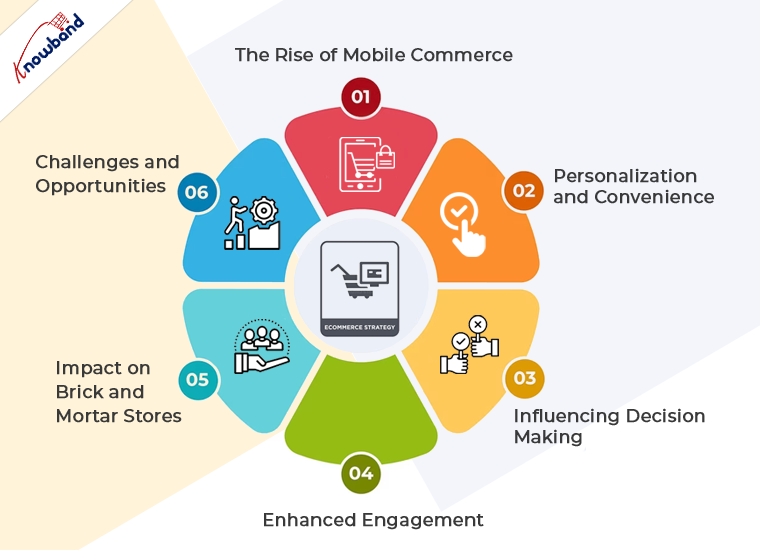
The Rise of Mobile Commerce:

Mobile commerce has seen explosive growth over the past few years. Consumers are increasingly turning to their smartphones for everything from browsing products to making purchases. Furthermore, the other reason that encourages customers to make purchases via mobile apps is the native and secure checkout process.
Therefore, this trend is not just a shift in platform but also a transformation in shopping habits and consumer expectations. The convenience of shopping from anywhere at any time has made mobile apps a go-to solution for busy consumers.

Personalization and Convenience:

One of the most significant impacts of mobile shopping apps is the level of personalization they offer. Moreover, these apps can analyze user data to provide tailored recommendations, offers, and content. Consumers now expect this level of personalization as standard, with suggestions that fit their style and needs.
For businesses using Prestashop as an eCommerce base platform, we provide a seamless solution Prestashop Mobile App Builder. The module allows the store admin to deliver a customized experience to their users, boosting satisfaction and loyalty.

Influencing Decision Making:

Mobile apps also play a crucial role in influencing consumer decisions. With features like instant reviews, price comparisons, and in-app offers, consumers are making more informed and immediate decisions.
Moreover, the barrier between seeing a product and purchasing it has never been thinner, as impulse buys become more common due to the convenience of mobile apps.

Enhanced Engagement:

The immersive experience offered by mobile apps results in enhanced engagement. Push notifications, for example, allow businesses to keep consumers informed about new products, sales, and other updates, bringing them back to the app. Furthermore, push notifications are not only a powerful marketing method for the apps but also allow the store admin to interact directly with the customers.

Impact on Brick-and-Mortar Stores:

While some might argue that the rise of mobile shopping apps threatens physical stores, many retailers have found innovative ways to integrate mobile commerce into their physical experience. Apps now often include features like in-store navigation, item locators, and the ability to check if a product is in stock at a nearby store. This synergy between online and offline provides a holistic experience for consumers, enhancing brand loyalty and satisfaction.

Challenges and Opportunities:

Despite the clear benefits, the shift to mobile also presents challenges. Retailers must ensure their apps are user-friendly, secure, and continually updated with new features to meet consumer expectations. This is where Knowband’s Prestashop Mobile App Builder comes into play, offering a way for businesses to easily create and manage their mobile presence, stay competitive, and meet the high standards of today’s mobile-savvy consumers.

Conclusion!

The impact of mobile shopping apps on consumer behavior is profound and far-reaching. They have not only changed how people shop but also raised expectations for what a shopping experience should be. As consumers continue to embrace the convenience, personalization, and speed of mobile commerce, retailers must adapt to stay relevant.
Thus, investing in robust mobile app solutions, like the Prestashop Mobile App Builder, is no longer just an option but a necessity for businesses aiming to thrive in this dynamic, mobile-first market.


The Psychology of eCommerce: How to Influence Customer Behavior!

In the vast world of eCommerce, understanding the psychology behind customer behavior is crucial for achieving success. With millions of online stores competing for attention, knowing how to influence and guide your customers can make all the difference. Thus, in this article, we’ll delve into the fascinating world of consumer psychology and provide actionable strategies to help you boost conversions and sales.

The Power of Perception:

Visual Appeal: 

The first impression matters, and it’s often visual. Ensure your website design is clean, aesthetically pleasing, and aligned with your brand. Furthermore, the Colors, fonts, and imagery also play a significant role in shaping the perception of your brand.

Thus, always make navigation and information retrieval effortless. Customers should quickly find what they’re looking for without confusion. Simplify the purchasing process to reduce friction.
Moreover, to provide your customers with relevancy in exploring your website, you should always include a sitemap.  


The Influence of Social Proof:

Reviews and Testimonials: 

Positive reviews and testimonials are potent social proof. Thus, you can encourage satisfied customers to leave feedback and prominently display these on your product pages. Honest opinions from real people build trust. And guess what, people are well aware of what’s fake and what’s real.

Scarcity and Urgency: 

Create a sense of urgency by showcasing limited-time offers or low stock levels. When customers feel like they might miss out, they’re more likely to make a purchase.

The Principle of Reciprocity:

As an eCommerce store admin, you should always provide valuable content, such as informative blog posts, tutorials, or free resources. Because, when customers receive something valuable without an immediate expectation of return, they are more likely to reciprocate by making a purchase.

The Role of Cognitive Biases:

Anchoring: 

Use anchor prices to influence perception. Display the original price alongside a discounted price to make the discount seem more significant.

Furthermore, you can also highlight what customers might lose by not making a purchase. For instance, “Don’t miss out on this exclusive offer!” triggers loss aversion.

Personalization and the Power of Connection!

Personalized Recommendations: 

Analyze customer behavior and use it to suggest products they might like. Personalization creates a sense of connection and enhances the shopping experience.

You can also share your brand’s story and values. Create an emotional connection with customers by showcasing how your products can improve their lives.

Building Trust and Reducing Risk!

Security and privacy are the two most important components of a process. The following thumb rule also applies while shopping online. Thus, as an eCommerce store owner, you can invest in robust security measures to protect customer data.

Also, a flexible return policy reduces the perceived risk of making a purchase. Make the return process hassle-free to build trust.

The Power of Incentives!

Loyalty Programs: 

Reward loyal customers with exclusive discounts or early access to sales. Loyalty programs foster a feeling of belongingness while also stimulating recurring purchases. Furthermore, if you are a Prestashop or Opencart store owner, you can also check Knowband’s Prestashop Loyalty points addon to incentivize your customers with lucrative offerings and the User manual of the Prestashop Loyalty points system.

Furthermore, set a minimum purchase amount for free shipping. Customers are more likely to add items to their cart to reach that threshold.

The FOMO Effect:


Flash Sales and Limited Offers: 

Announce flash sales or limited-time offers through email and social media. These create a sense of urgency and fear of missing out (FOMO).

Abandoned Cart Recovery: 

Implement abandoned cart recovery emails to remind customers of the products they left behind. Offer an incentive to encourage them to complete the purchase.

Conclusion!

Understanding the psychology of eCommerce is a powerful tool for influencing customer behavior. By leveraging principles such as perception, social proof, reciprocity, cognitive biases, personalization, trust-building, incentives, and FOMO, you can create a shopping experience that resonates with your customers and drives conversions. Keep in mind that these strategies should align with your brand and values, providing genuine value to your customers and building lasting relationships. 

Furthermore, you can also reach out to our support staff at support@knowband.com for more amazing eCommerce tips.


Handling Type Errors with PHP 8.2.6’s Improved Type System!

Type errors have been a long-standing challenge for PHP developers, often leading to unexpected bugs and runtime issues. However, with the release of PHP 8.2.6, the language’s type system has been significantly improved. Which is now providing developers with powerful tools to handle type errors more effectively. Furthermore, there are a lot of enhanced features introduced with the latest PHP update.

In this blog post, we will explore the key features of PHP 8.2.6’s improved type system and how it empowers developers to write more reliable and robust code.


Scalar Type Declarations:

PHP 8.2.6 introduces stricter scalar-type declarations for function arguments and return values. Developers can now specify the expected data types, such as int, float, string, and bool when defining functions. This enhancement helps catch type errors early during development and ensures that functions only accept and return the intended data types. Not only it improves the code readability but also shortens the work for the web developers.

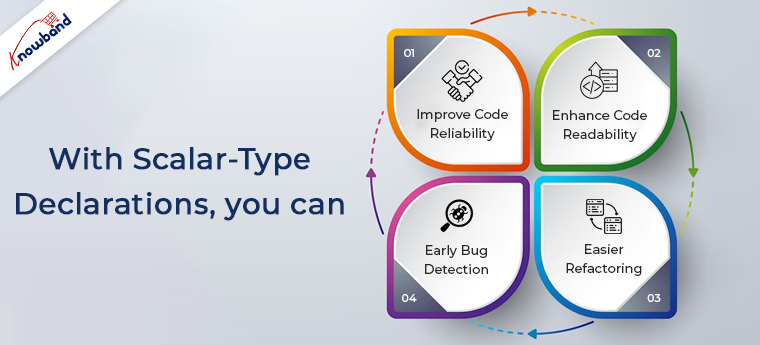
With scalar-type declarations, you can:

  1. Improve Code Reliability: By explicitly stating the expected data types, you minimize the risk of passing incorrect values to functions. Or getting unexpected return types, resulting in more reliable code.
  2. Enhance Code Readability: Type declarations make the function signatures more self-explanatory. Further, making it easier for other developers to understand the purpose and usage of the functions.
  3. Early Bug Detection: Scalar type declarations enable PHP to detect type errors at compile time. Allowing you to catch and fix issues before they cause problems in your application.
  4. Easier Refactoring: When refactoring code, the presence of scalar-type declarations aids in identifying potential issues.

Coercive Mode:

Coercive Mode is a new feature in PHP 8.2.6 that offers more flexibility in handling type errors. In Coercive Mode, PHP attempts to convert function arguments to the specified type whenever possible, even if a strict match is not found.

With Coercive Mode:

  1. Looser Type Handling: Coercive Mode allows PHP to automatically convert data to the specified type. Which can be useful when dealing with loosely typed data.
  2. Potential Data Loss: While Coercive Mode can be helpful in some scenarios, it may lead to unintended data conversions. Potentially causing data loss or unexpected behavior.
  3. Balancing Flexibility and Type Safety: Developers need to carefully consider when to use Coercive Mode to maintain the right balance between flexibility and type safety.


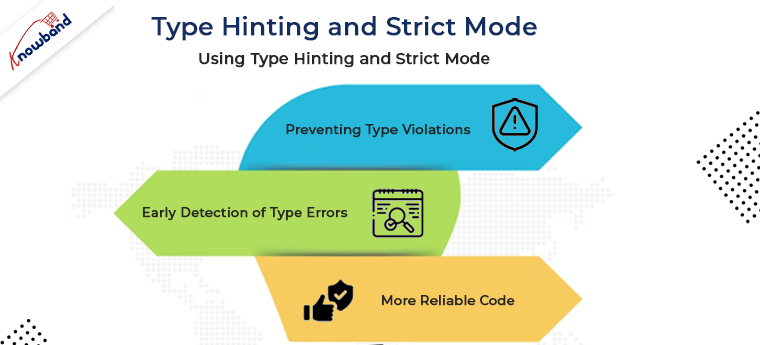
Type Hinting and Strict Mode:

Type hinting allows developers to specify the expected data types for class properties, method parameters, and return values. With PHP 8.2.6, you can further strengthen your code’s type safety by using strict mode. Which enforces strict type-checking throughout your application.

Using Type Hinting and Strict Mode:

  1. Preventing Type Violations: Type hinting ensures that functions and methods receive the correct data types, reducing the risk of type-related errors during runtime.
  2. Early Detection of Type Errors: By enabling strict mode, you can detect and fix type-related issues during development rather than facing unexpected runtime errors.
  3. More Reliable Code: Strict type checking helps in building more reliable and maintainable code, as it prevents unintentional type conversions.

Enhanced Error Handling:

PHP 8.2.6 provides improved error messages when dealing with type errors. When a type mismatch occurs, the new error messages offer more clarity. Moreover, it helps the developers quickly identify the source of the problem.

With Enhanced Error Handling:

  1. Clearer Diagnostics: The enhanced error messages offer specific details about the type mismatch, enabling developers to locate and resolve issues more efficiently.
  2. Efficient Troubleshooting: Better error messages speed up the debugging process.

Type Safety in Real-World Scenarios:

To solidify the concepts covered, we’ll walk through real-world examples, illustrating how PHP 8.2.6’s improved type system helps handle type errors in practical scenarios.

Conclusion:

PHP 8.2.6’s improved type system empowers developers to tackle type errors head-on and enforce type safety in their projects. By leveraging scalar type declarations, Coercive Mode, type hinting, and strict mode, developers can write more robust, maintainable, and bug-free code. The enhanced error handling further streamlines the debugging process, leading to faster resolution of type mismatches.
At Knowband, with 13+ years of incredible experience in web and mobile app development, we also provide PHP development services at very reasonable prices. In case you are having any queries or suggestions, please feel free to drop us a mail at support@knowband.com.

Related Article: https://www.knowband.com/blog/ecommerce-blog/auto-loading-in-php/