New Enhancements Alert: Prestashop eBay Marketplace Connector v2.2.1 Release
Prestashop merchants, the time to act is now! Knowband has released the new version of Prestashop eBay Integration Addon introduces new must have features designed to save time, prevent errors, and boost your sales.
With Rate Limit API Monitoring, you can now track your API usage to avoid disruptions, ensuring continuous synchronization between Prestashop and eBay. Meanwhile, the Inventory Comparison feature helps you spot stock mismatches instantly, avoiding overselling and keeping your customers satisfied.
Every delay in upgrading could lead to missed opportunities, lost sales, or customer dissatisfaction. Don’t wait, install v2.2.1 immediately and enjoy optimised eBay store management like never before.
For those operating an e-commerce company, small challenges emerge every single day.
To make it worse, if you want your organization to succeed, there are bigger, looming risks that you will need to counteract immediately.
These existential challenges may come from goods, clients, applications, and even from your overall sales strategy. Luckily, if you have a challenge, we have a solution to handle it.
There is various marketplace integration software available that automate product listing and helps you manage orders on major eCommerce platforms like eBay, Etsy, Walmart, etc.
What is Marketplace Integration?

Integrating a marketplace is the integration of a popular, well-developed online store that already exists. These marketplaces help to introduce the eCommerce brand to a broader audience since they are already widely focused on consumers.
Multi-channeling is one of the easiest ways for a large spectrum of online shoppers to reach out. One such platform that can help online sellers extend their reach is the online marketplace. With emerging technology and changing consumer behavior, selling their goods through these common channels is important for all sellers.
Marketplace integration provides sellers with the following benefits:
- Effortless product listing process with the functionality of bulk uploading
- Mapping the attributes and categories of the store with the respective attributes and categories of the marketplace
- The effective management of the inventory of products
- Effective management of orders in the marketplace and more…
KnowBand Offers eBay Marketplace Integration for PrestaShop, OpenCart, and Magento Platforms:
Already selling on your eCommerce store?
If yes, then why not expand!
If you want to expand and start selling on the eBay marketplace, managing orders and listing products on two different platforms will be tedious and this might make you think twice before starting.
Marketplace Integrators are the lifesavers!
The eBay marketplace integration module developed by KnowBand is one best solution which is available for popular eCommerce platforms Prestashop, Opencart, Magento, and Shopify.
This smart integration can help sellers to start selling on eBay Marketplace in a short period.
Facilities Offered by KnowBand’s eBay Marketplace Connector
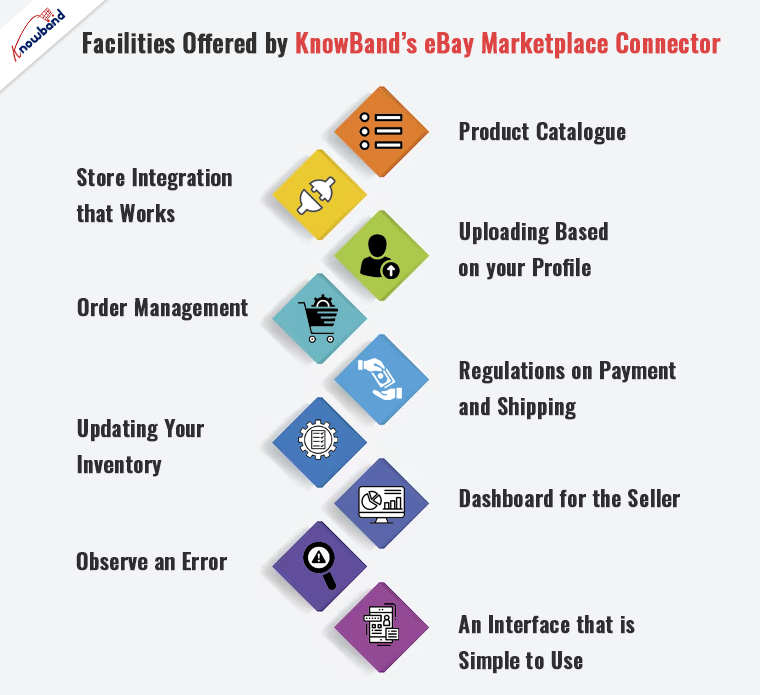
The eBay Marketplace Integration Module allows the store admin to manage product listings and inventory on eBay Marketplace directly from their website(PrestaShop, OpenCart, Magento). This plugin is a smart way to save time and manage PrestaShop and eBay products from your online store.
Product Catalogue
Easy and quick product listing will save you time and effort.
Store Integration that Works
Integrate your store regardless of the country or region in which it operates.
Uploading based on your profile
Synchronization of product features and categories in the marketplace in real-time.
Order Management
Keep track of and manage order details with ease.
Regulations on Payment and Shipping
Handle the order’s payment and shipping with care.
Updating Your Inventory
With just a few mouse clicks, you can keep an eye on the product inventories.
Dashboard for the Seller
From the backend, you can manage your profile, inventory, and orders.
Observe an error
Check for any issues that happened throughout the product listing process.
An interface that is simple to use
A user-friendly interface for smooth internet trading.
How Sellers Benefited by eBay Marketplace Integration:
- In just a few clicks, you can create a bulk product listing.
- To list the products on eBay Marketplace, you’ll need an automated solution.
- It allows you to manage your eBay Marketplace inventory from within your PrestaShop store.
- It allows you to process eBay orders from your PrestaShop store.
- Manage the eBay Marketplace prices effectively.
- You can easily list your stuff on several eBay storefronts.
How to Sell PrestaShop Products on eBay Marketplace?

Being a PrestaShop store owner you must be listing all your products and managing your orders on the store once. Now at that same time, you can list those products on eBay as well.
The PrestaShop eBay Marketplace Integration Module automates the product listing process. From your PrestaShop store, you can track and manage the orders with minimum hassle. It is easy to regulate your profile, inventory, and orders with its user-friendly interface.
From your profile, real-time synchronization of the product attribute and categories in the marketplace is possible. It doesn’t matter where you live, you can operate and integrate your store anytime from anywhere.
OpenCart- ebay Marketplace integration to sell OpenCart Products on eBay

It is now easy to sell directly on eBay from your OpenCart eCommerce store. The OpenCart eBay Marketplace Integration Module integrates your OpenCart store with an eBay marketplace profile.
From one place you can manage all your inventories, product listings, and orders on both platforms. It reduces all your efforts. All the data like product attributes, categories, payment and shipping methods, orders, etc. will get synced in real-time.
How Clients are reacting to its features and Knowband’s services


How to sell Magento Products on eBay Marketplace?

For the Magento platform, you can synchronize and integrate your Magento store with eBay Marketplace using the Magento eBay Marketplace Integration Module.
This module allows you to manage both profiles from the Magento store. You can easily manage inventories; handle orders, product listings, and all other functionalities that can be handled from the Magento store itself and will be automatically reflected on your eBay Marketplace profile.
Conclusion
Now sell on various eCommerce Marketplaces effortlessly and take your company to different heights. Knowband has developed several modules and extensions for all the major eCommerce platforms. KnowBand provides the best price for this integration plugin and in addition to this, free service for 3 months.
eBay Marketplace Integrator, eBay Prestashop Marketplace Integrator, Opencart eBay Marketplace Integrator, and Shopify eBay Marketplace Integrator are available at KnowBand store. Choose the appropriate integrator module for your store.
Support: Write to us at support@knowband.com
Recommended Reads: