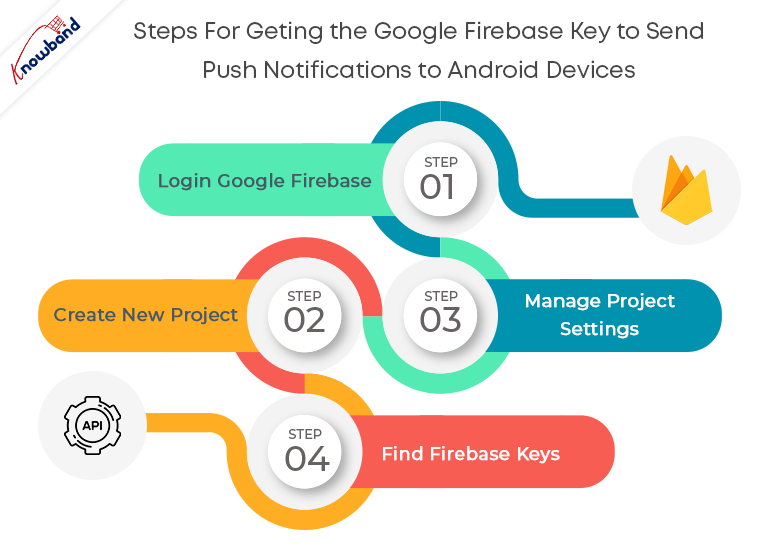
Google provides this free service to let the users reliably deliver messages at no cost. Comparing with earlier Google’s GCM, FCM is way more developer-friendly. In the year 2016, Google announced major improvements in its Firebase platform. And that’s how FCM – Firebase Cloud Messaging came into the picture. Push notifications are one of the most important tools for seamless marketing. One should make sure to incorporate this feature while creating a mobile application. In this tutorial, you will know how to get the Google Firebase key to send push notifications to Android devices. So, let’s begin.
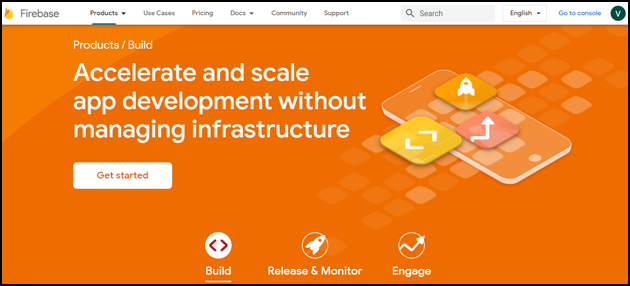
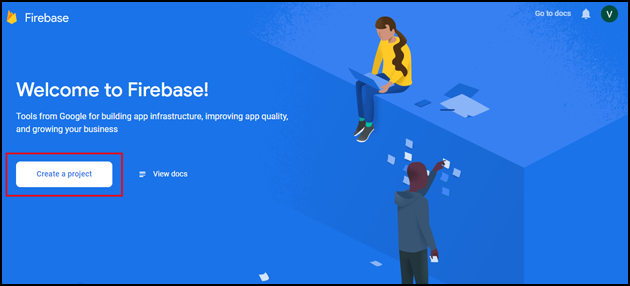
As you click on Create Project, you will have to go through a 3-step process:
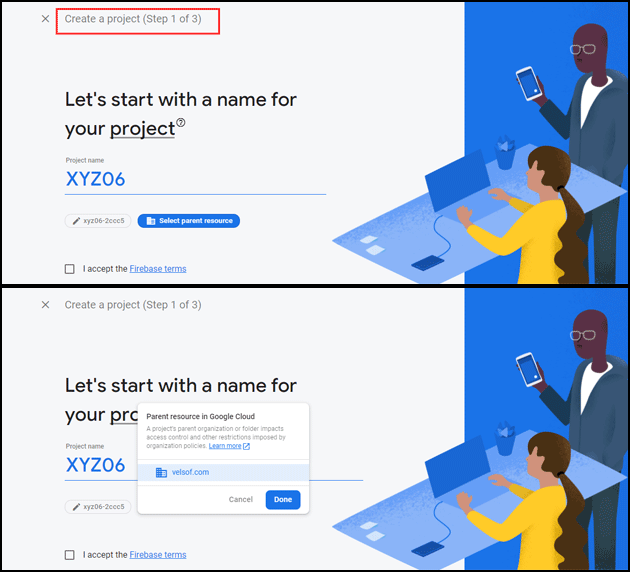
Create a project (Step 1 of 3)
Provide your Project name and select the parent resource.
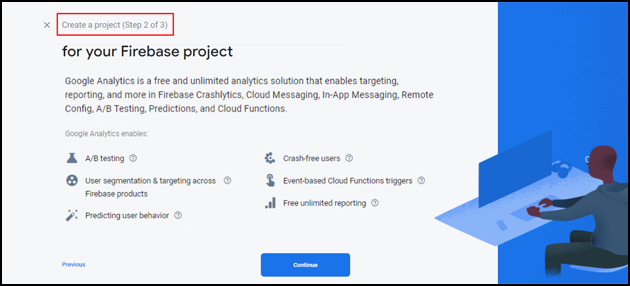
Create a project (Step 2 of 3)
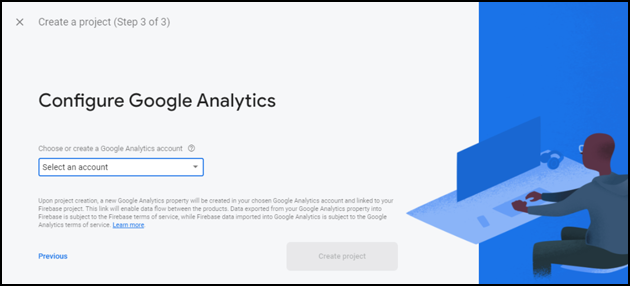
Create a project (Step 3 of 3)
Choose your Google analytics account in step 3 of ‘Create a project’.
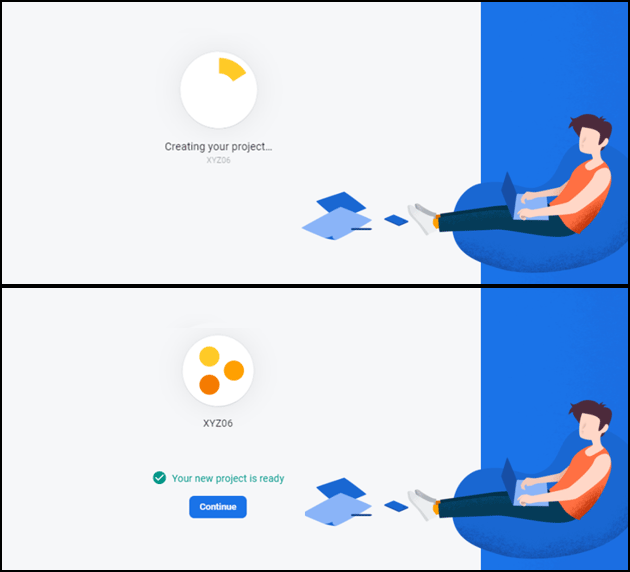
It will take a few seconds to create the project. Once the project is ready, click continue.
Step 3: Manage Project Settings
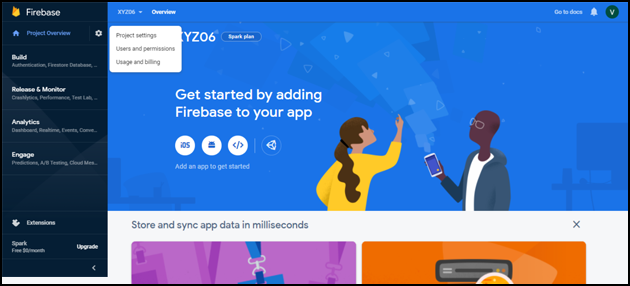
Once the project is created, click on Project settings.
Step 4: Find Firebase Keys
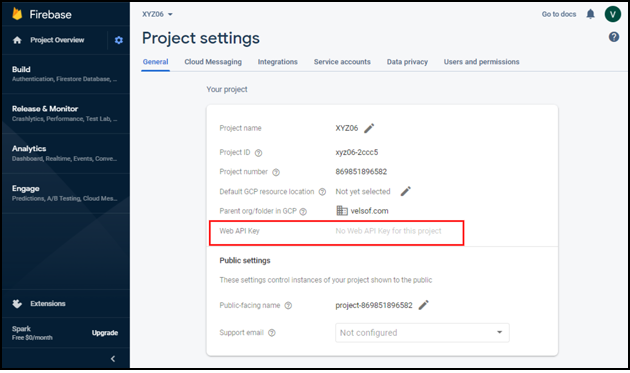
In the project settings, click on General settings. From here, you can directly get the web API key.
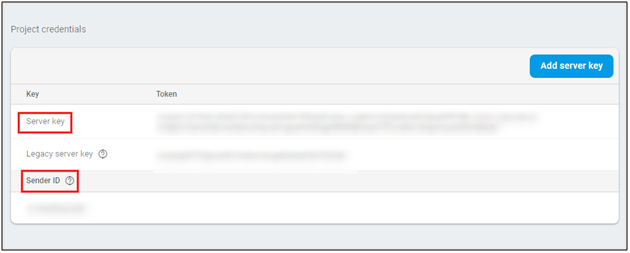
Now, click on cloud messaging settings for Server key and FCM sender ID as shown in the below snapshot:
Conclusion
And it’s done. Creating Google Firebase keys isn’t tricky in any way. If each of the above-mentioned steps is followed properly, it’s just a matter of few clicks and entries.
If you face any issues, please feel free to reach us at support@knowband.com.
Knowband provides extensions for Prestashop, Opencart, Magento, Magento 2, and WooCommerce. Check out our popular PWA module available for Prestashop, Opencart, Magento 2 and Woocommerce. Know more:
Modern applications do rely on social media platforms for login as well as sharing purposes. Allowing Facebook login option while creating an eCommerce mobile app would not only save the users from having lengthy and time taking form fillings but will also provide a secure and convenient site access. To enable Facebook authentication, first, we need to create the Facebook app. Let’s see the step by step process of how to create Facebook App:
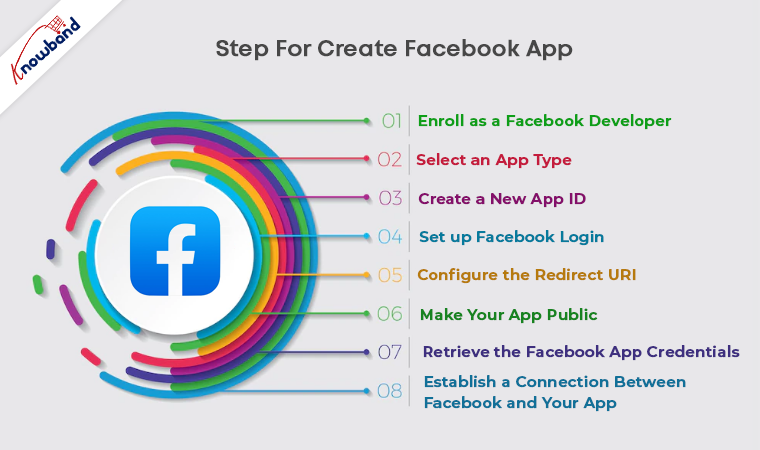
Step 1: Enroll as a Facebook Developer
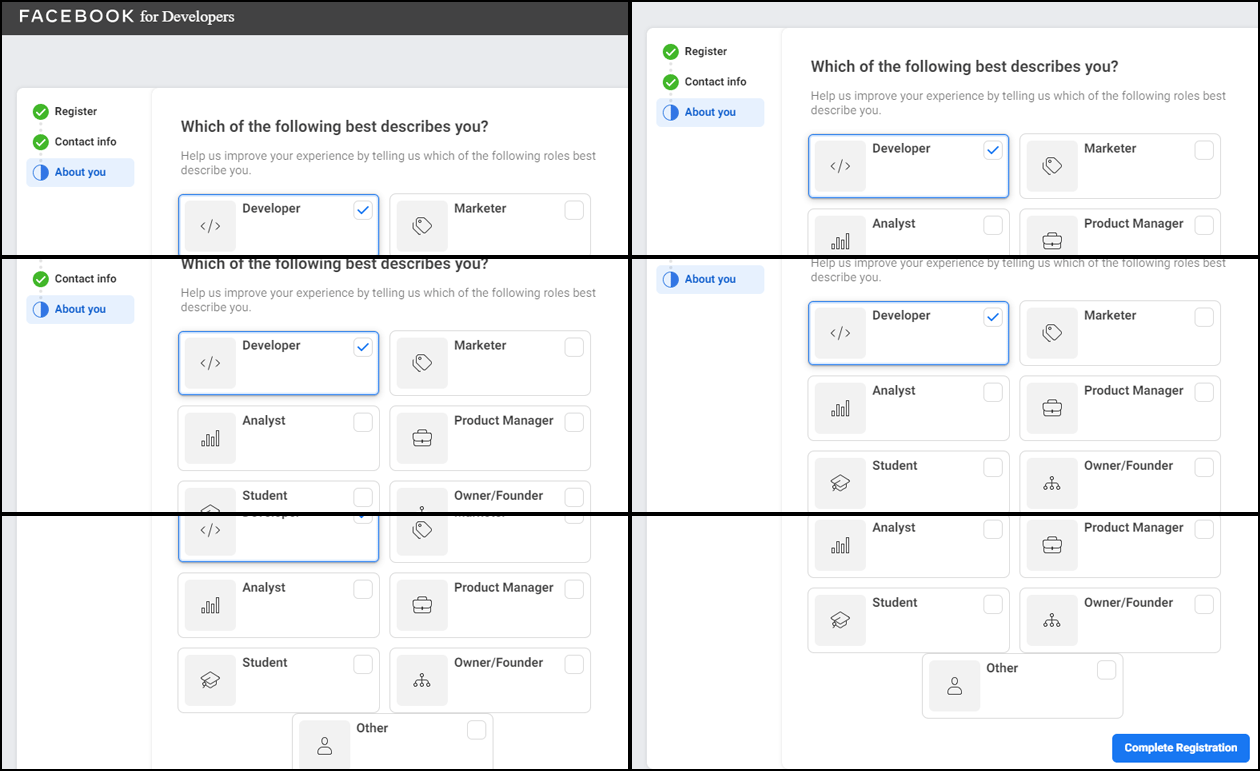
In order to create a Facebook app, open Facebook Developer and login to your account. Follow simple steps of the registration process and you will be required to add your contact info along with your role.
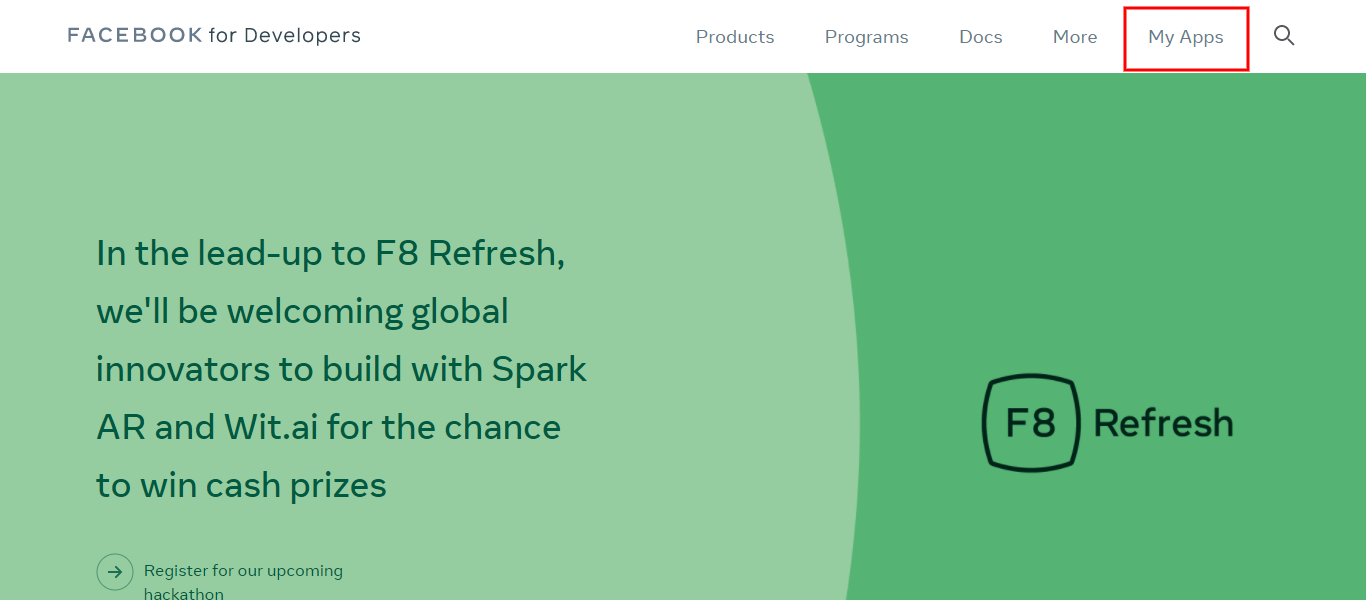
If you are not already enrolled, create a new account. After log-in, select My Apps option from the menu in the upper right corner.
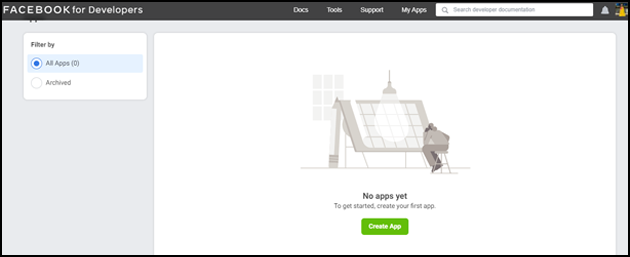
You will be redirected to a new page where you need to select Create App option.
Step 2: Select an App Type
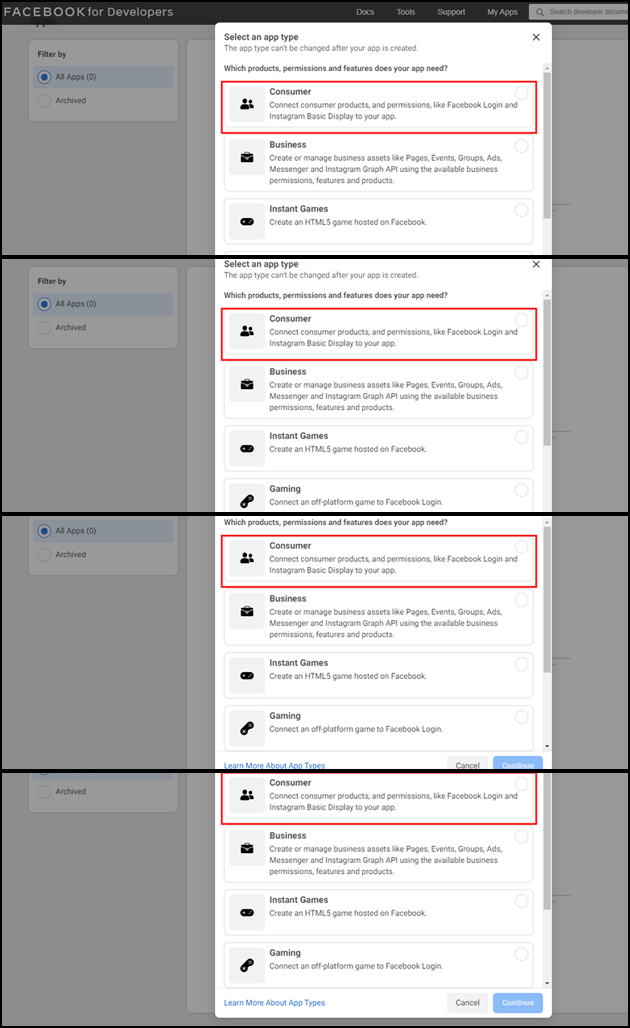
Once you click on the Create App option, you will have to select the App type from the options provided in the apperared pop-up.
Step 3: Create a new App ID
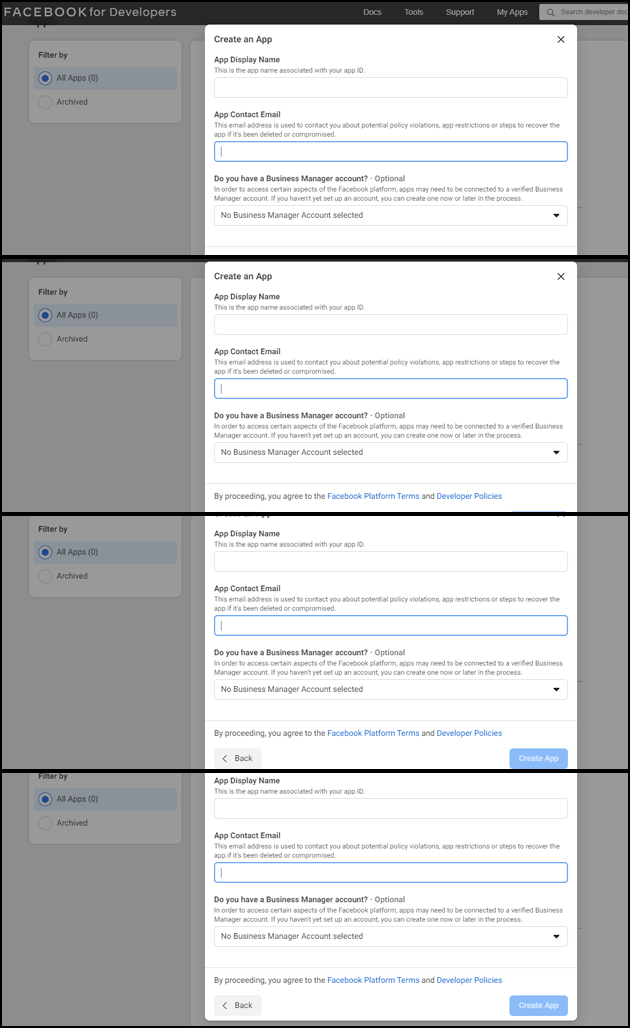
After selecting the App Type option, a pop window will appear requiring App Display Name and Contact e-mail details. Enter the details and create App ID.
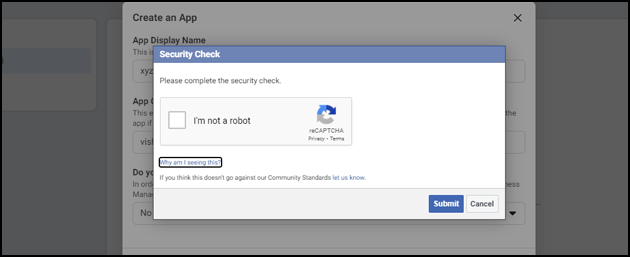
As you click on Create App ID, Facebook will ask for a security check as shown in the snapshot below:
Step 4: Set up Facebook Login
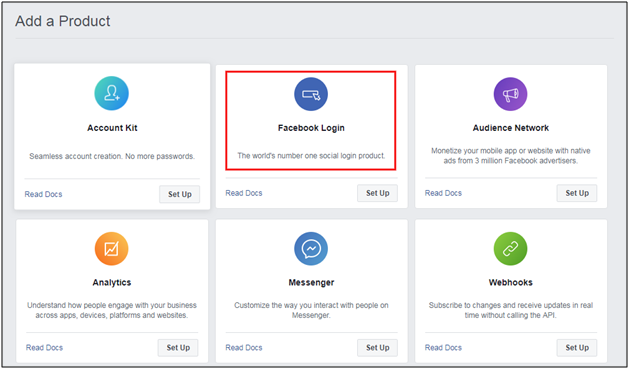
Now it’s time to set up Facebook login after completing the security check. This is the landing page for the Facebook application to which we will add a Facebook login product. The Facebook Login is just one of the many products that can be added to your Facebook app.
Once the App ID is created, Add a Product webpage opens. Click set up option under Facebook login.
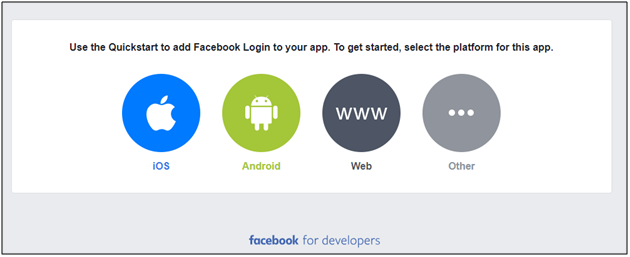
Now, it’s time to choose the type of your application. Select the platform of your application.
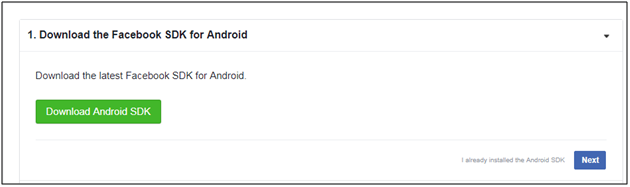
Once you have chosen the platform, download the latest Facebook SDK file if you haven’t already installed it.
Step 5: Configure the Redirect URI
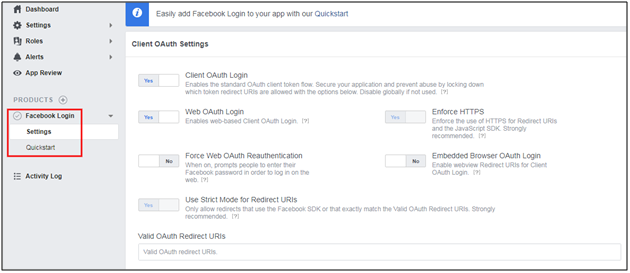
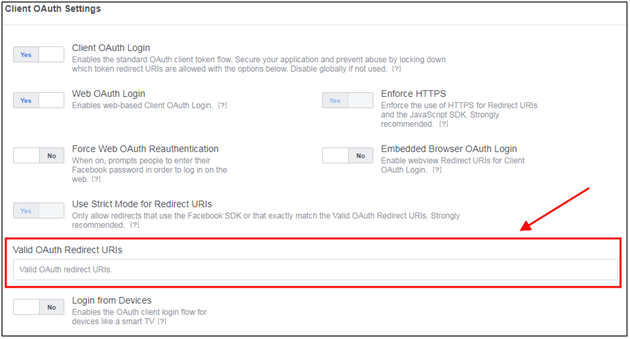
You’ll find Settings option appearing on the left side of the screen under Facebook Login. Select this option.
Note: If your domain name is not displayed above, log in to the dashboard to find your tenant name in the top right corner. It is the domain name.
Step 6: Make your App public
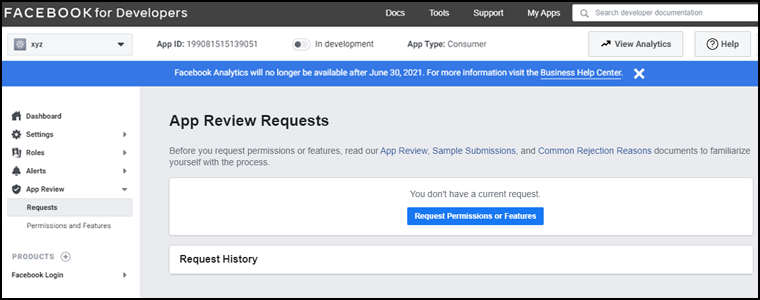
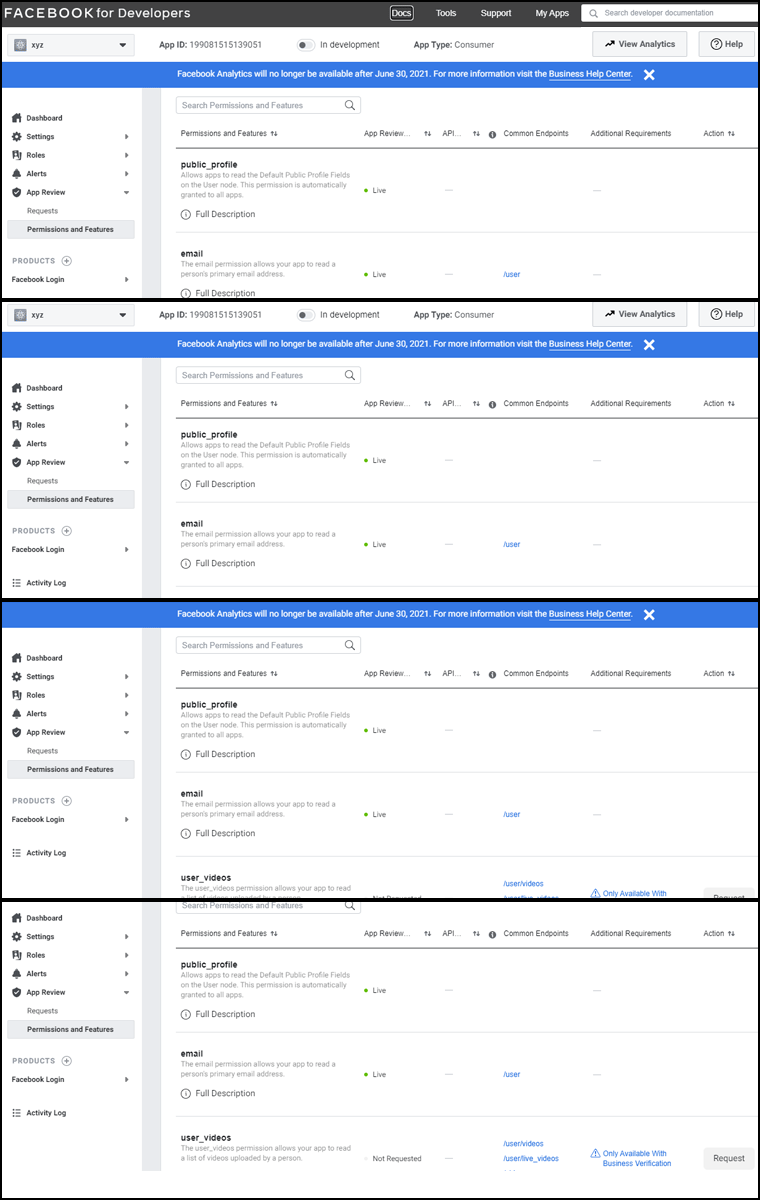
Now, from the left navigation bar, click the App review option. After this, on the top of the page,’ Make (Your App Name) App public?’ will appear. Toggle the button to enable it.
Step 7: Retrieve the Facebook App Credentials
Open basicsettings from the left navigation bar. On this web page, you can retrieve your App ID and App Secret. Click show to reveal the App Secret (you may be asked to re-enter your Facebook password).
All right! Now is the time for the final step.
Step 8: Establish a connection between Facebook and your app
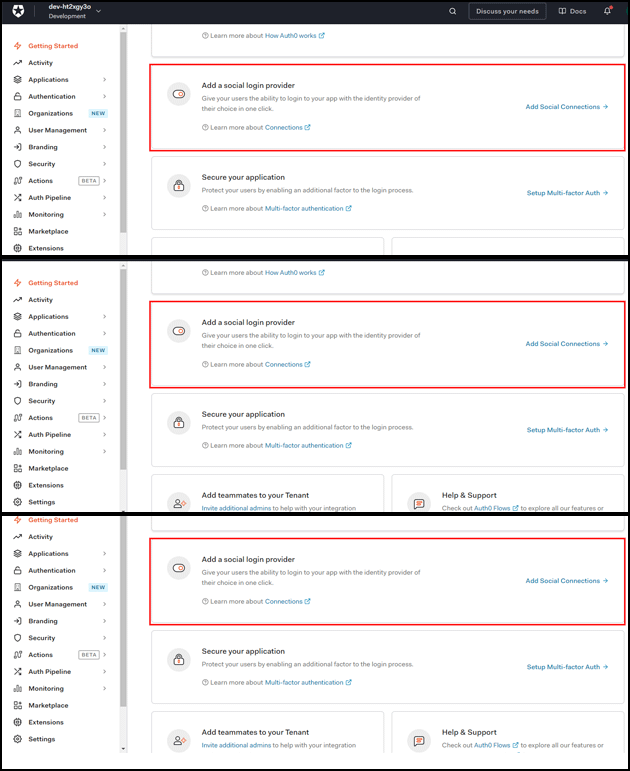
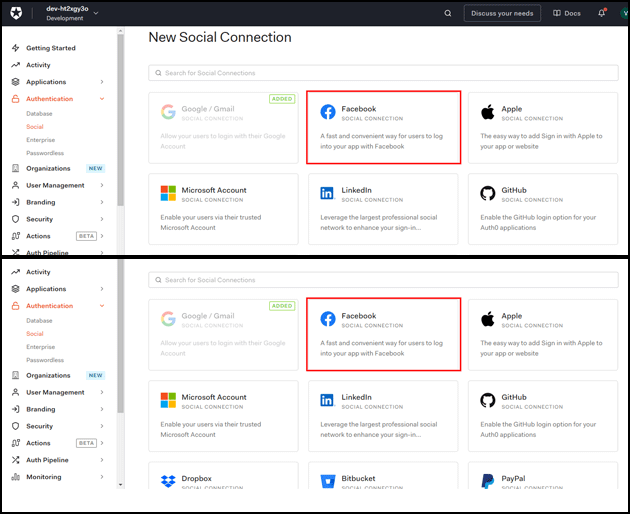
In a separate tab or window, go to the Connections > Social and choose Add a Social Login Provider option.
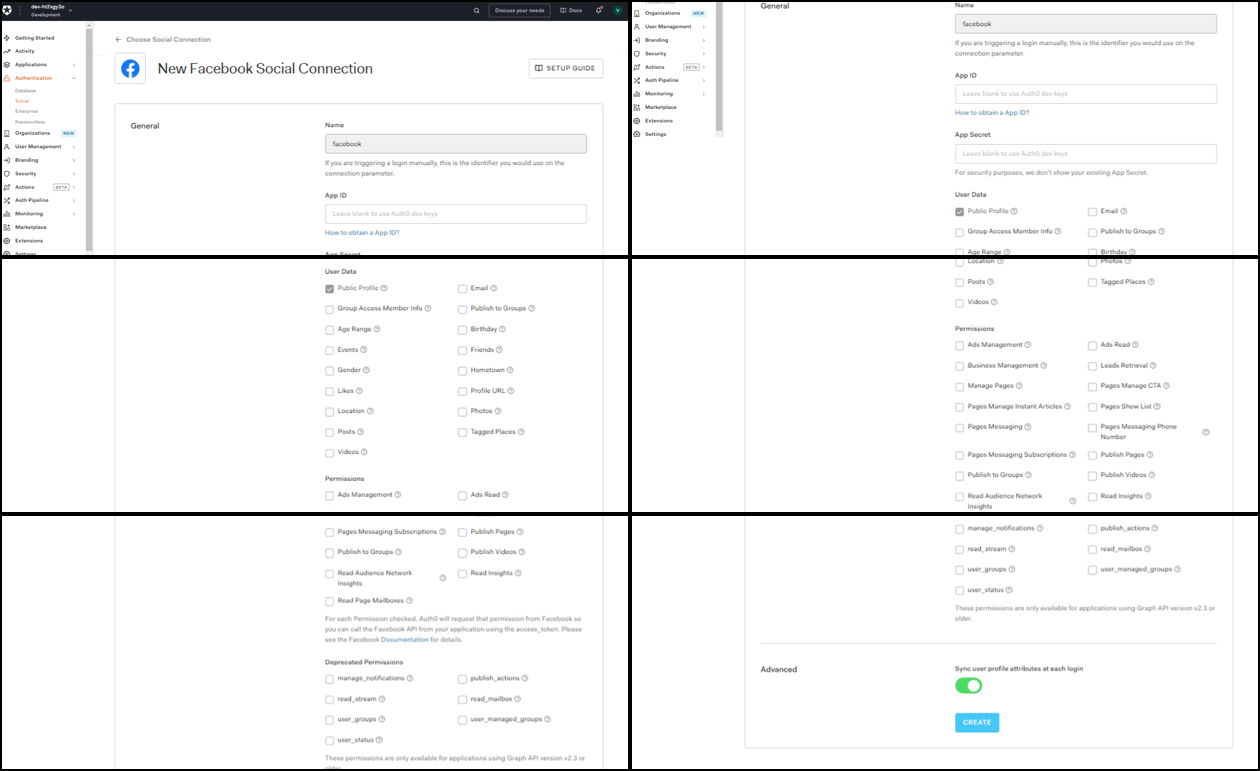
and click on the box with the Facebook logo. This will bring up the Facebook connection settings. Copy the App ID and App Secret from the Settings of your app on Facebook:
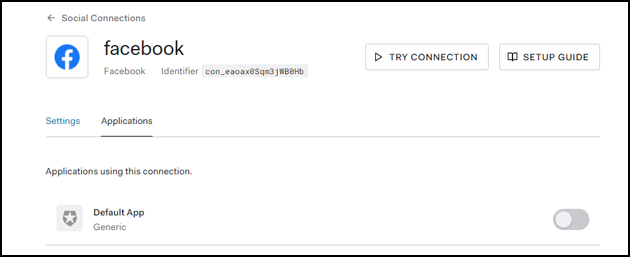
Select all the attributes and permissions to enable them. Now, click the Applications tab and select the applications you wish to enable for this connection, and save them.
You are ready to go!
Wrap up
I hope this write-up had made the process of creating a Facebook App for the authentication process pretty clear. You can even find more details from here.
If you face any issues, please feel free to reach us at support@knowband.com for any queries. We also provide Facebook Store module for major CMS platforms like Prestashop and Magento. Know more here:
Be it an eCommerce website or a brand, catching up with the competition is becoming exceedingly difficult. As per studies, the attention span of the online shoppers has decreased to 8 seconds. Thus, grabbing the attention of the target audience base in this short span is definitely not a cake-walk. While the attention span of the internet users is decreasing on the shopping site, their surfing duration is increasing on the social networking site. This is the reason why social media marketing is becoming an important aspect of digital marketing. Companies and brands are trying to find out more ways to connect with their prospective customers across the various social media platforms.
Over 91% marketers claimed that by spending only a few hours per week, social marketing greatly impacted their brand visibility. So, how do you decide the platform when it comes to social media marketing? Well, you see the number of users of the social media platform and then you choose the one that has the maximum users.
Is that enough?
Not really!
The process isn’t as simple as it seems!
Making wild guesses about the preference of the customers might end you up in a pitfall, resulting in missed opportunities. Thus, instead of going by the conventions, go for smart research. Now, the question arises, how to do that.
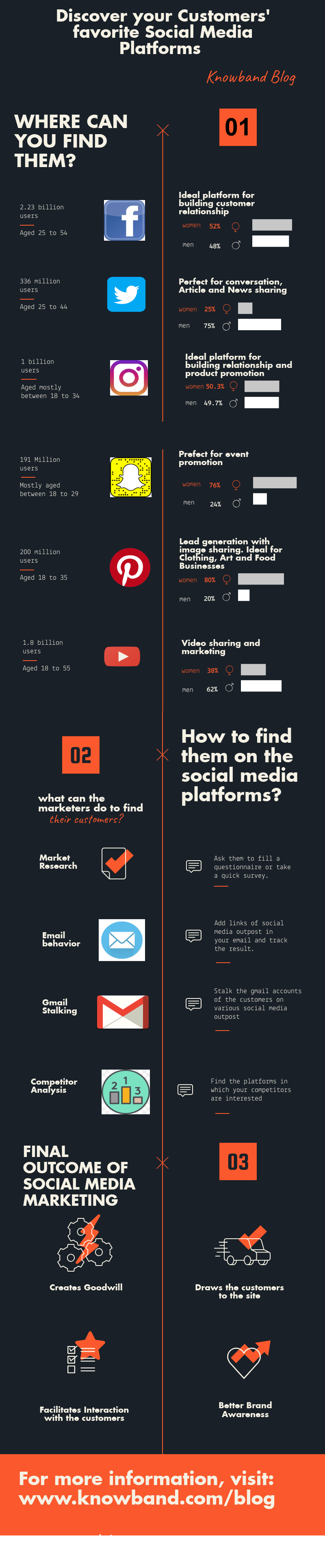
How can you find out the social media platforms that are popular among your prospective customers?
Here are some of the ways to get an insight of the customer’s behavior.
Ask them
The best way to find out where your target audience hangs out is to ask them. Create a questionnaire and ask your customers base to fill out the form. Asking them to fill up the form via email is the simplest way to connect with them. Try and reach out to the active members of your community. Ask them about their preference when it comes to connecting with the family and friends online. Additionally, you can even setup a survey and gather the relevant data. The survey should be based on the answer you are looking for. Do not annoy the users with unnecessary questions. Keep it to-the-point and as precise as possible.
Email tracking
If you are doing email marketing for your site, then, adding links of the social outposts in your emails is recommended. Offering an option to the email recipients for sharing the content on Twitter, Facebook, Instagram and elsewhere will even boost your engagement on these platforms. Moreover, you can easily track the user behavior and see if your target audience shared the content on Facebook, Twitter or any other given option.
Social media stalking
Twitter, Facebook and other such social media sites offer you an option to see whether the Gmail ID has been used to create the social media accounts or not. You can use this integration for your business.
Follow the steps mentioned below:
Export the list of your customers’ email addresses
Create a new account on gmail.com.
Upload the .csv file containing your customers’ details to your Gmail account.
Now, create a Twitter and Facebook account with this Gmail ID. Go to “Find Your Friends” of the Twitter sign-up process, select Gmail.
Twitter automatically reads all of the email addresses of your customers stored in Gmail. This allows you to track them on Twitter.
Similarly, for Facebook go to “Find Friends” of the Facebook sign-up process and specify that you have a Gmail account.
That’s it! Your customers will be presented to you and you can start following your target audience.
Analyze your competitors
Another method to find your audience base is to do a little competitor analysis. You are more likely to find your customer base on the platforms where your sites similar to yours are. List out 5 to 10 sites that are serving the same demographics that you are trying to reach. Do a quick online search and check their referral sites.Doing the market survey and analysing the result efficiently, takes already miles ahead of other companies in your field. However, there are dozens of social media platforms where you can promote your brand/company. In order to help you prioritize the various platforms, we’ve broken down the statistical figures of some of the most popular social media platforms where you are more likely to find your target audiences. Read on to know.
Facebook
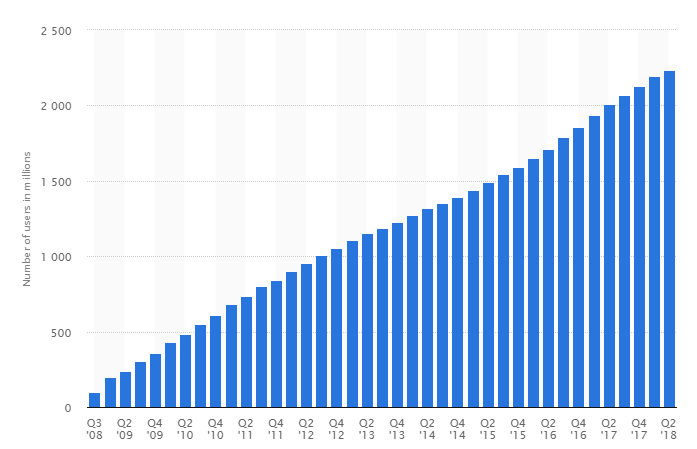
The social networking sites have been coming in and going out, ever since the prominence of internet connectivity has increased. However, Facebook is one platform that has shown exponential growth over the years despite the ups and downs. As of the second quarter of 2018, Facebook had 2.23 billion monthly active users. 50% of 18-24 year-olds go on Facebook when they wake up. Hence, Facebook should and more likely will make up a marginal part of your marketing strategies, regardless of your business model, goals, website traffic and the demographics that you are targeting. In addition to this, the connectivity statistics of Facebook is absolutely enticing for the budding social media marketers.
1. Facebook users consider, on average, 28% of their Facebook friends to be genuine or close friends, which is definitely not a bad number when it comes to spreading the word-of-mouth.
2. 83% of parents with a teen between the ages of 13 and 17 are friends with their child on Facebook.
3. 39% of users say they are connected to people on FB they have never met in person.
For targeting men and women within an age bracket of 25-54, Facebook is inevitable. Facebook is perfect for the companies that target a slightly older market since 44% of users check Facebook several times per day.
YouTube
Till date, YouTube is the only social media platform that gives FB a run for it’s market reach. The broad demographics that it caters is definitely a topping over the cake. 62% of YouTube users are Males. 35+ and 55+ age groups are the fastest growing YouTube demographics. Despite, these exceptionally attractive statistical figures, only 9% of small businesses are on YouTube. Thus, there is for sure room and opportunities for more. Millennials prefer YouTube two to one over traditional television and 37% of the coveted 18 – 34 demographic are binge-watching. So, right from the teenagers and millennials to the adults, if you are searching for your customer base, then, this is one-stop-destination for you.
Twitter
Twitter, to this date, remains the best platform for most B2B businesses model. Despite the character limit, the social networking site can help you reach out to comparatively larger demographics if you are industries like News and Information, eCommerce, Health and Wellness, Travel and Hospitality, Telecom, Finance, Sports and others. Here are some of the stats that will lay some light on the potential that this platform has.
36% of Twitter users are aged under 18 – 29.
23% of them are aged 30 – 49 years.
In addition to this, 21% of people aged 50 – 64 year-olds use Twitter.
It is quite evident that if you are trying to reach out to the customer base that comes under a bigger age bracket, then, this is your destination. Moreover, the ratio of men and women using Twitter is approximately the same.
With over 500 million users and 59% of the users checking the app every single day, Instagram has great reach. It is particularly an ideal for the companies dealing in Fashion and Lifestyle. Instagram’s most popular demographics include the following:
Women users make up to 38% of total Insta users.
59% of the users are under the age bracket of 18-29 years.
The urban-located users are 39%.
Pinterest
Social sharing sites like Pinetest are popular among women. In a survey, a substantial 42% of women said that they use Pinterest. On the contrary, the social networking site is popular among only 16% of men. The companies that find their customer base amongst the moms will be interested to know that Pinterest attracts more mature audience than the other social media platforms. Moreover, 60% of the users have children aged 5 years and under.
Nowadays, Social Media has become an important tool for improving brand popularity and product awareness. Social networking sites are one of the most prominent platforms eCommerce marketing and promotions. The Magento store admin can now use the social media network for improving the product and brand popularity and for the targeted audience on the social platforms as well. Knowband Order Share Buttons for Magento allows the customers to share the order summary after purchasing the product. The customers can share the order summary on Facebook, Twitter and Google plus. The store admin in Magento social promotion module has right to show all the available social media options or selected options.
1.1 Features of Magento order social share buttons plugin
The Magento order social share buttons plugin provides an option to the online buyers to share their order summary with their friends, family members and relatives on the various social media platforms.
There are multiple social media platforms like Facebook, Twitter and Google+. The customers can share the order summary just by clicking on the social media buttons in Order Share Buttons for Magento.
The admin can show all the social media options or selected options easily just by deactivating the other options from the admin interface.
The store owner can set the look and feel of the social media button block. The admin can set the text and background color of it.
The Magento social promotions module provides a color-picker tool on the admin interface for selecting the appropriate color of social sharing block accordingly.
The admin can also add custom CSS and JS code for advanced settings.
The Magento social media buttons extension offers an eye-catchy and user-friendly interface.
1.2 Admin benefits
It is very easy to install, configure and use this Magento social media buttons extension.
The admin can display an attractive order sharing button block on the website front-end.
No technical help is required for implementation of Magento social promotions module.
The admin can boost the conversion rate of the website with the help of Magento social promotions module.
In Magento order social share buttons plugin the admin can improve sales on the website by this indirect promotion technique.
The admin in Order Share Buttons for Magento can improve product/brand awareness.
This Magento social media buttons extension provides an easiest and effective way to improve product popularity and relevant traffic.
2.0 Installation Steps
The online store owner can install the Magento order social sharing extension by following these steps:
1. Download the extension package from the Knowband store.
2. The admin will get a zipped file. Now the store owner can unzip the package on the root folder of Magento setup via FTP manager (like Filezilla or WinSCP – download here: https://filezilla-project.org/). You’ll find the files and folders as shown in the image below:
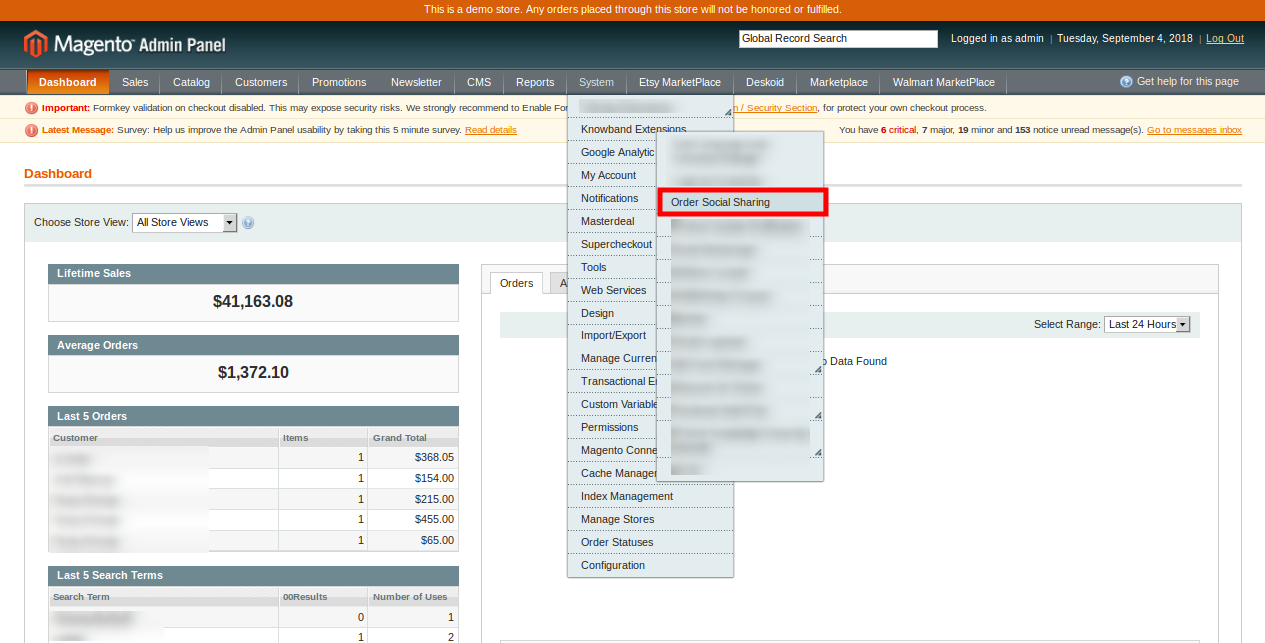
3. The Magento social media buttons extension is now installed and ready for use. In the Admin Panel, go to “System > Knowband Extensions >Order Social Sharing”.
Now the store admin can now use and configure the Magento social promotion module.
3.0 Admin Interface
After installing the Order Share Buttons for Magento, you can configure this Magento order social sharing extension by applying the setting as described. There will be two configuration options:
General Settings
Look and Feel
3.1 General Settings
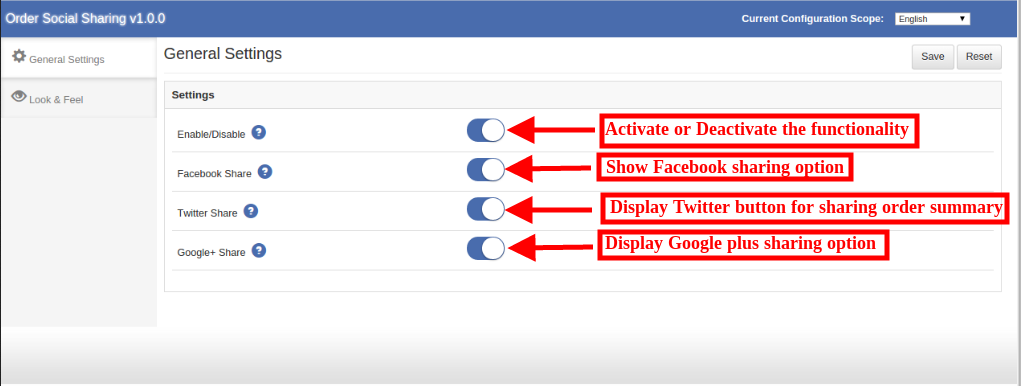
In general settings, the eCommerce store admin in Magento order social sharing module can view these customization options:
1. Enable/Disable this module: The eCommerce store owner can activate or deactivate the functionality by toggling this button.
2.Facebook Share: The admin can activate or deactivate “Facebook share” option for displaying or hiding the Facebook sharing button.
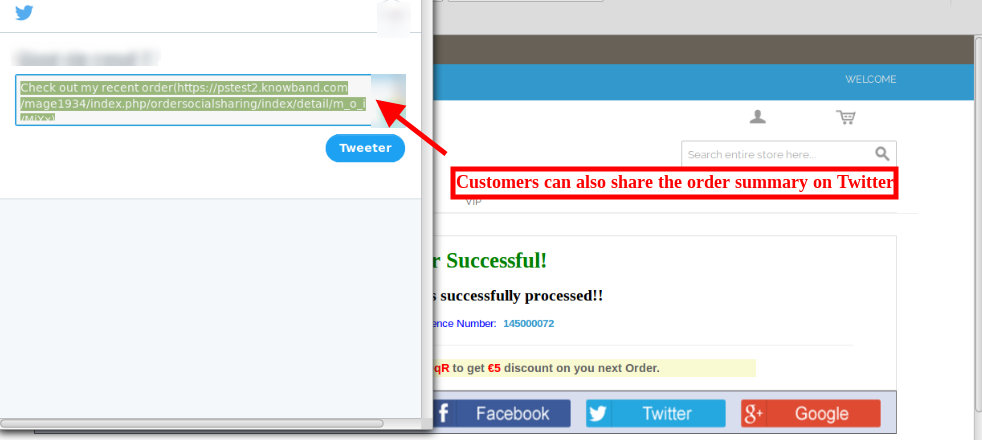
3. Twitter Share: The store owner in Magento order social sharing module can enable this option for showing the twitter button on the website front-end. The customers can click on this option and a pop-up window will open for sharing the order summary.
4. Google+ Share: The store admin can enable or disable the Google plus sharing option for showing or hiding the Google plus button from the Social media sharing block.
3.2 Look and Feel
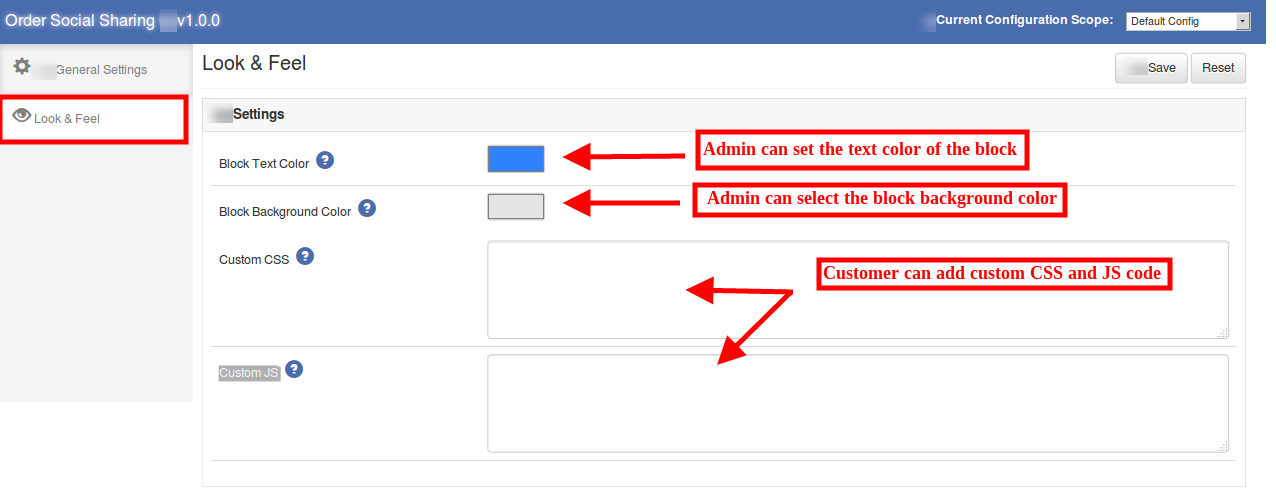
The admin can manage the look and feel of the order social sharing buttons by configuring the Magento order social sharing extension accordingly.
1. Block Text Color: The store admin can set the text color of the order sharing block. A color picker tool is available on the admin interface for easy and codes less color selection.
2. Block Background Color: The Magento social promotion module allows the admin to set the block background color according to the website theme.
3. Custom CSS: Advanced users in Magento social promotion module can add custom CSS code for the look and feel customization.
4. Custom JS: Admin can also enter custom JS code.
4.0 Front-end Interface
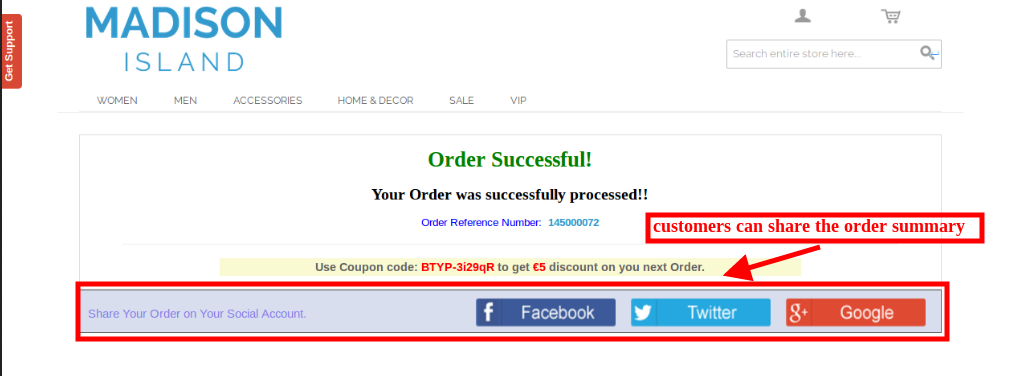
The online store visitors and customers can view the social sharing option after placing the product order. The customers can view Facebook, Twitter and Google plus button for sharing the order summary.
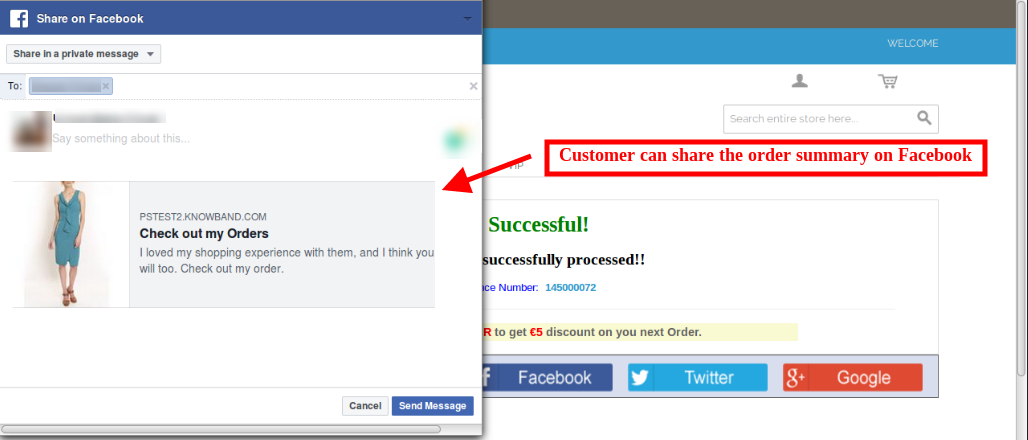
Customers can click on the Facebook sharing option for sharing the order summary on Facebook as shown below:
The online store customers can also share the order summary on Twitter by selecting the second option:
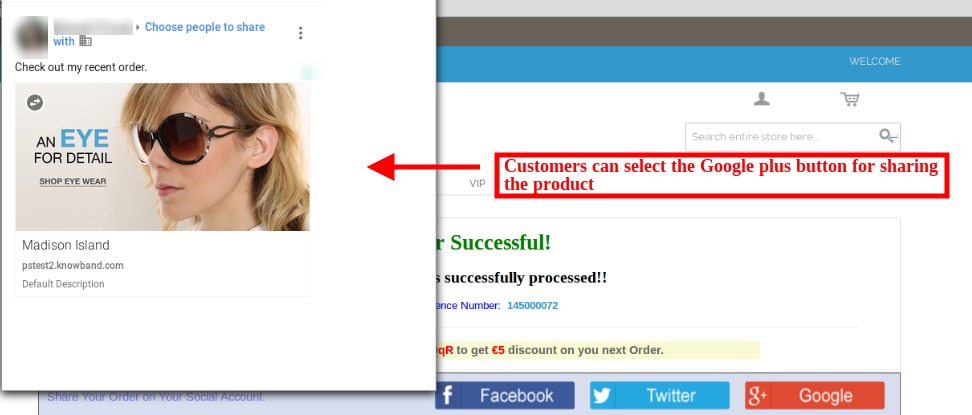
The customers can select Google plus option for sharing the product on Google plus account. The below-mentioned image will be displayed if the customer selects this option:
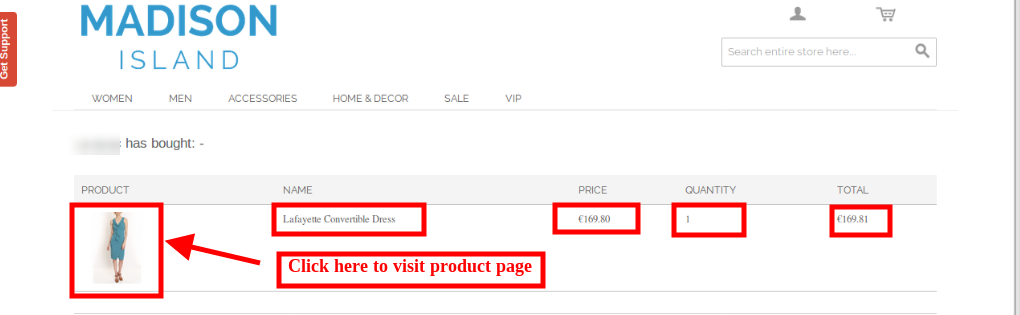
If anybody opens the link shared by the customer, he can view the order summary in a fresh page. If that person clicks on the image, that product page will be opened.
Thus the store admin using Magento order social sharing module can promote the products and brands. The online customers can share their order summary and spread the word-of-mouth of the site on the various social media platforms. This helps you boost the traffic of your site which ultimately increases the chances of conversions. This Magento order social share buttons plugin also helps the store admin to improve SEO by creating numerous valuable back-links. The admin can get high-quality referrals to the website effortlessly by Magento order social sharing extension.
There was a time when being ‘a trillion dollar company’ seemed quite sizably voluminous milestone to reach, but current tech biggies are making their way to it as if it is nothing. The technology industry hasn’t optically discerned such high market capital in the last 242 years and now it’s just a time span of 33 days and we have two Trillion dollar organizations.
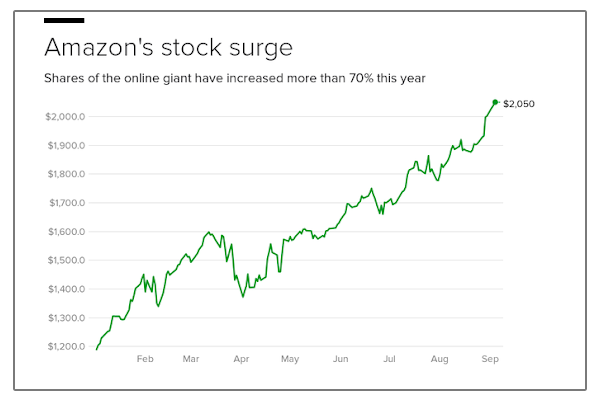
On Tuesday, Sept 4, 2018, Amazon officially achieved the denomination of Trillion dollar organization and marked itself second to this list. Four weeks ago, Apple became the first Trillion dollar company. If we take a look at Amazon’s background, it went from selling books and CDs online to morphing itself into a potent organization. Cleary, the plethora of business units are proving its ascendance in the retail market.
Apple technically took 38 years to become worthy of $1 trillion while Amazon got there in just a sprint of 21 years. The company’s stocks doubled in the last year as it grew rapidly in the retail and cloud computing services. It has surely revolutionized the rules of retails in the past couple of decades.
Well, we can’t gainsay that this success is a historic one for its founder Jeff Bezos, who commenced it in 1994 in the Seattle Garage. At that time Amazon was nothing but a mundane bookselling company. Now, Jeff Bezos is leading the list of Billionaires on top. The company hasn’t got such magnification in its capital overnight. It took investors a while to plenarily appreciate Bezos’ long-term strategies.
Bezos, in the year 2011, told a magazine that, “If everything you do needs to work on a three-year time horizon, then you’re competing against a lot of people.But if you’re willing to invest on a seven-year time horizon, you’re now competing against a fraction of those people, because very few companies are willing to do that.” Well, surely such knockout orchestrating seem to work pretty well for the company.
Apple or Amazon: Who did it better?
The two business giants may have achieved market capital of $1 trillion, but both of their voyages have been quite different from each other. While Apple has ever relied on the computer hardware services, Amazon, on the other hand, targeted capitalistic infrastructure.
Well, it is pellucid that Amazon has been a value rocket ship in reaching $1trillion. We weren’t witnessing this landmark achievement of Amazon if it weren’t for the cloud computing services of the company. They played their role with retail side by side in making the organization a voluminous success.
Though we can’t ignore the fact that other organizations are also following them in this trillion dollar race. Currently, Google’s Alphabet is having a market value of $852Biliion. So, don’t be surprised if one day you will find it joining the club with Amazon and Apple.
Apple, the tech giant never fails to justify its motto – Think Different and why not to have an extraordinary approach? Look where this approach has brought them, a trillion dollar worth company. This time they came up with the new announcement regarding privacy policies. The iPhone maker is asking all the developers to link the applications and their updates on the Apple App Store with the Privacy Policies. These new privacy rules will be under effect by October 3rd, 2018.
Which apps are required to be linked with the policies?
Well, till now you must have thought that the iOS apps are already equipped with the Privacy Policies. Then what’s the motive of enforcing them?
Actually, till now the privacy policies were linked with only subscription-based apps on the iOS store. But, now it is mandatory for all the applications and even their updates to comply with the concerned policies. As per the official announcement, the iPhone maker is even mandating the privacy policies even to the offline applications that do not require internet for operation. The offline app developers have been asked to host a website with concerned privacy policy page.
How will it benefit the iPhone users?
Apple has made itself clear that it won’t pull out the apps which are already there in the store, but it even asked their developers to link the policies whenever any future update is shipped. With this move, Apple is trying to bound the app developers to actually explain to users the ways in which they can delete their personal stored information on the applications. In order to bring it into effect, the tech giant even requires all the developers to comply apps with the GDPR rights at some level. After this, the customers will just tap associated privacy policy and read it in Safari.
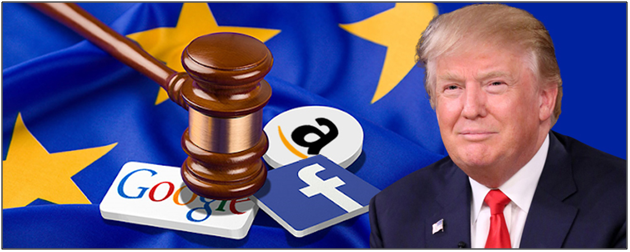
On Thursday, 30 August 2018 Donald Trump in an interview lashed out at current technology companies of being in a very Antitrust situation. While talking to Bloomberg, the American President pointed out that these organizations are misusing their power and influence, but didn’t comment on whether they should be broken up or not.
Donald Trump’s war of words
“I won’t comment on the breaking up, of whether it’s Google or Amazon or Facebook,” Trump’s reply on breaking the companies by the US government. This anger was quite foreseen as on Tuesday when the President alleged Google of rigging its search results for suppressing positive coverage about him. Google said that this wasn’t true, pointing out that it had promoted his address, and buzz feed News.
Companies’ take on the comment
After Trump’s attack this week, the company said its search function is not used to set a political agenda and isn’t biased against any ideology. Amazon and Facebook representatives didn’t respond yet on the warning.
Antitrust allegations have never left our tech giants
Whenever it comes to Antitrust allegations, tech companies are alleged now and then. In July 2018, European Union slapped Google with $5B for Android abuse. Apple, the trillion dollar company wasn’t even able to bypass the Antitrust threats and accused of one with Yahoo’s Game Plus platform. Now, let’s see where these how far will these accusations will go and how they will affect the organizations.
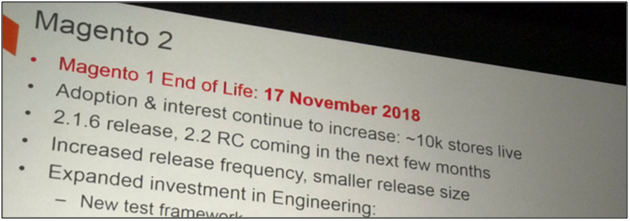
Lately, we all have been listening to the news that Magento 1 is going to end this November 2018. Well, it appears to be a fuss to me as there is no reputable source available to confirm the authenticity of the news.
Why the rumor spread in the first place?
Actually, the rumor came out when Magento announced that they are stopping the support and updates for Magento 1 in the Meet Magento Prague in the year 2017.
I just had a call with the technical team — so support for 1.x will be till June 2020. This may be pushed out in the course of the year- but will not be any time before that.
No reasons to worry
Hence, we needn’t worry about the end of Magento 1.x anymore till there isn’t any public announcement by the officials. Owners should continue to work forward with their store. You might be planning to migrate to Magento 2 platform but that doesn’t mean that you will be deprived of the services and support of Magento 1.x.
The Magento store owner can now protect their eCommerce store from spams and bots. The Magento block user/bot by IP, country or user agent extension by Knowband allows the store owner to block the user/bot by restricting IP addresses, Country or User-agent. This way the eCommerce store admin can restrict or ban suspicious and unnecessary store users. The admin can show a customized message on the website for providing banishment notification.
Magento Block User by IP plugin provides an option to restrict the access of the users by IP, Country, and User-agent. The banishment can be enabled or disabled anytime from the admin interface. The online customers can also send a request to unblock them. They can send a message from the front-end, the admin can review the requests from the admin interface and take further decision to unblock the banned customers or deny the request.
1.1 Features of Magento block user by IP, country or user agent extension
The eCommerce store owner has multiple options to block the bot by blocking IP address, country code and user agent.
Admin can enter any particular IP for blocking the customer or a range of IP addresses.
The Magento Block User Extension allows the admin to enable or disable the ban anytime.
The store admin can display a custom message on the website for the banned customers.
The e-merchant can show or hide header and footer to the blocked customers.
The blocked customers can also send a request to unblock them.
There is no need to change codes from the admin interface.
It is very easy to configure this Magento Block bot by country extension.
The Magento Block User/bot by IP plugin is multi-lingual compatible.
Magento block user by IP, country or user agent extension can be installed and configured easily.
The store owner can easily activate or deactivate this Magento block bot by IP, country or user agent extension just by a button toggle.
1.2 Admin benefits
With this Magento Block User module, the store admin can take initiatives to protect the website from spammers and bots by blocking the suspicious customers and activities.
The Magento Block User module helps the store admin to remove the irrelevant website.
The admin can protect the store from malicious attacks by blocking the spammers and bots.
This Magento Block bot by country extension is highly customizable and hassle-free.
Multiple Blocking options are available to make sure that the genuine customer will not suffer.
The customers can request to unblock them from the front-end interface.
No technical help required for implementation.
2.0 Installation Steps
The store admin can follow these simple steps for installing the Magento Block User Extension:
1. First of all download the extension package from the Knowband store.
2. You will get a zipped file. Unzip the package on the root folder of your Magento setup via FTP manager (like Filezilla or WinSCP – download here: https://filezilla-project.org/). You’ll find the files and folders as shown in the image below:
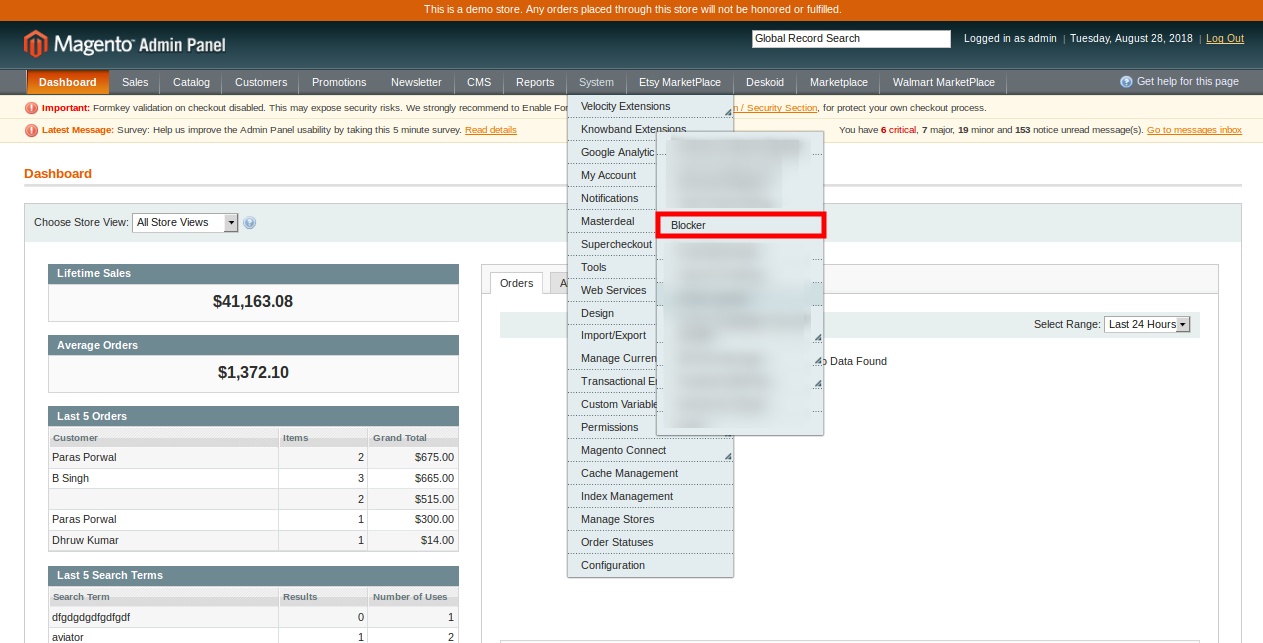
3. The extension is now installed and ready for use. In the Admin Panel, go to “System > Knowband Extensions >Magento Blocker ”.
Now the store admin can now use and configure the Magento Block User Extension.
3.0 Admin interface
After successful installation, the store admin can configure the settings from the admin interface. The admin panel has five tabs as shown below:
General Settings
Block User by IP Address
Block User by Country
Block User by User Agent
Blocked Customer Request
The admin can customize the Magento Block User/bot by country extension as per the requirement
3.1 General Settings
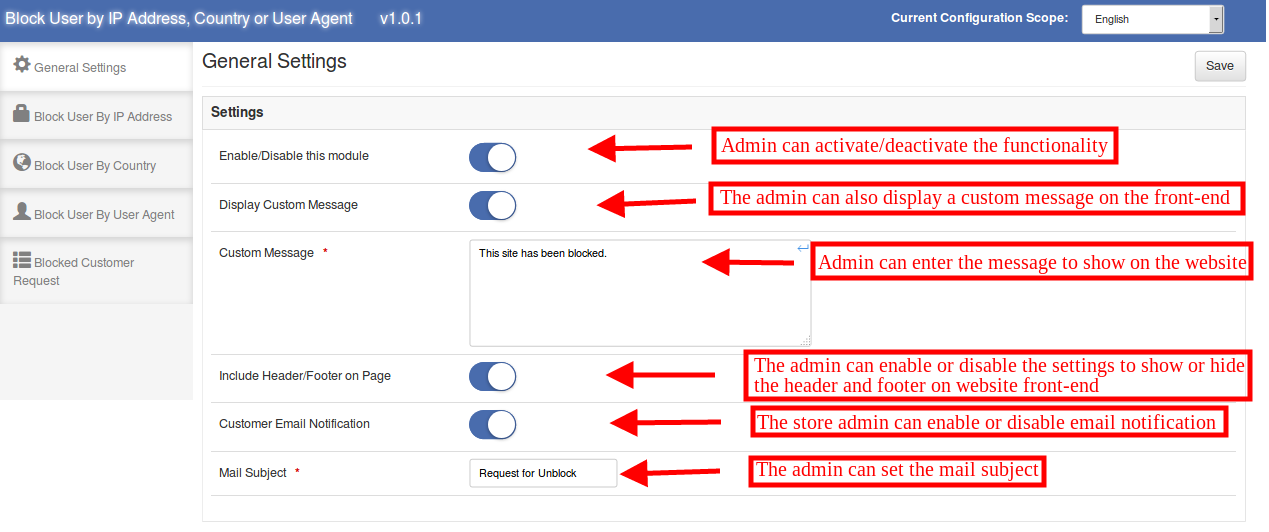
In general settings the admin can view below-mentioned customization options:
1. Enable/Disable this module: The store admin can activate or deactivate the functionality by toggling this button.
2. Display Custom Message: The online store admin can enable or disable this option for showing or hiding a custom message. This message will be displayed to the blocked customers.
3. Custom Message: The store admin can enter the custom message here. The admin can enter a ban notification to the customers in order to inform them about banishment.
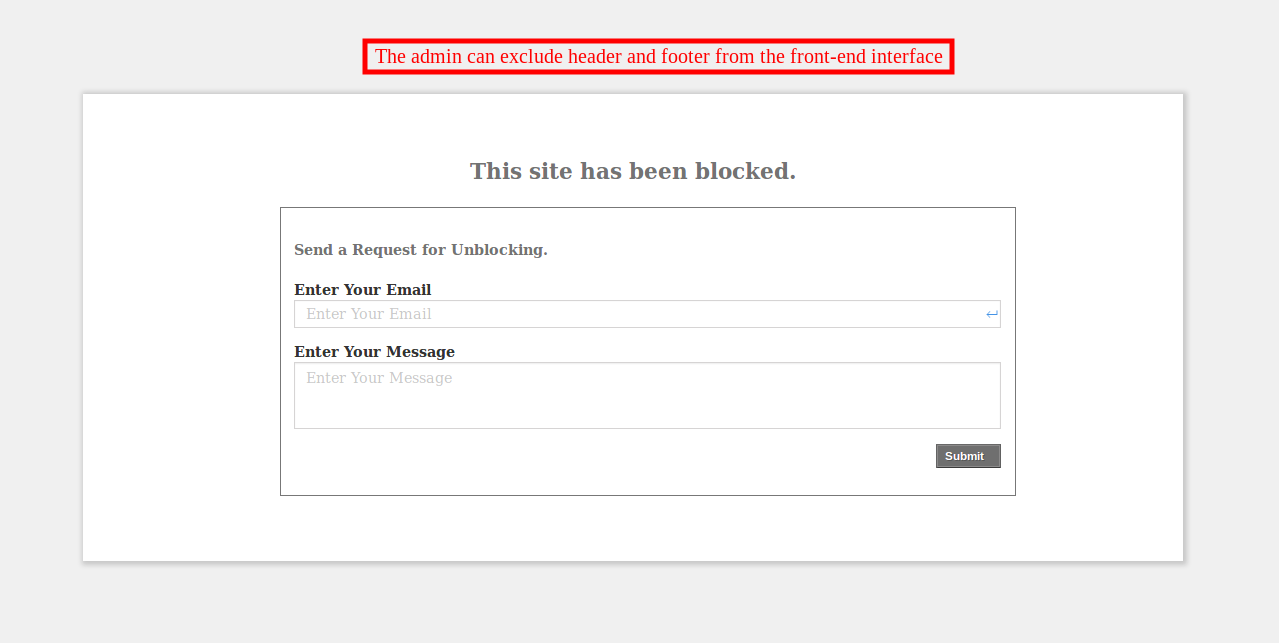
4. Include Header/Footer on Page: If this option is enabled, then, the header and footer will be shown in the webpage that displays the ban message, otherwise, the visitors will only be able to view the block notification message.
5. Customer Email Notification: The admin can enable or disable the custom email notification option. The customers can request the admin to unblock them.
6. Mail Subject: The store admin can set the Mail subject form the admin interface that is to be send with the mail.
3.2 Block User by IP Address
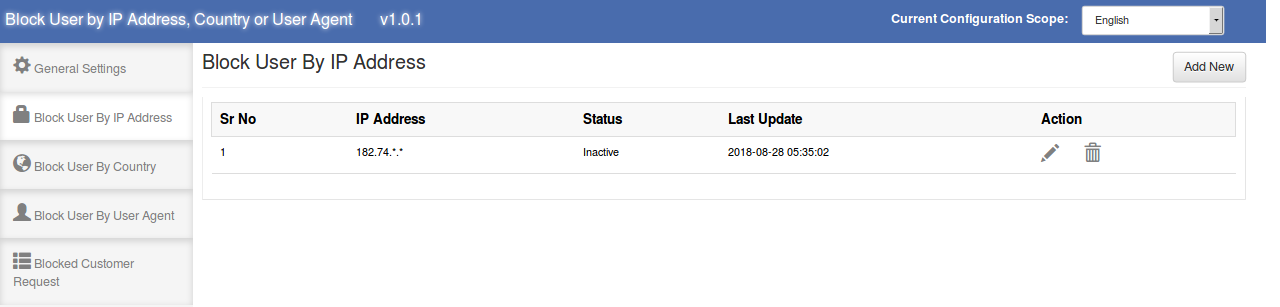
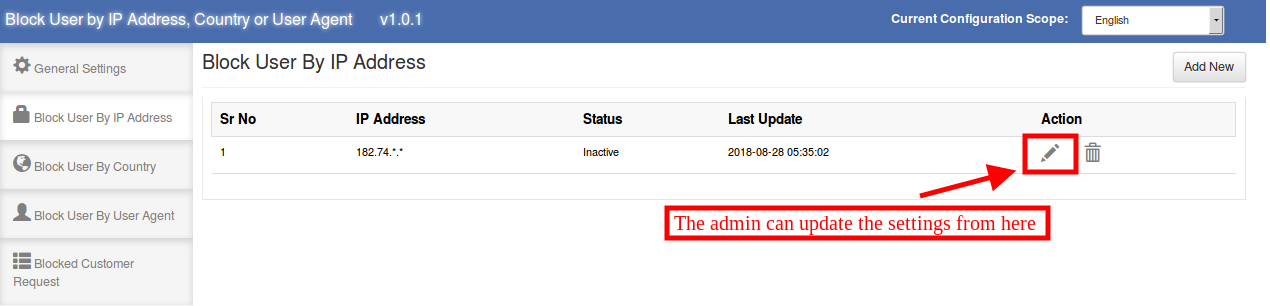
Here the store admin can view the list of blocked IP addresses of the customers. Admin can delete, edit and add new IP address to block the users. The admin can enter particular IP address or a range of IP addresses.
3.2.1 How to block a user by IP address?
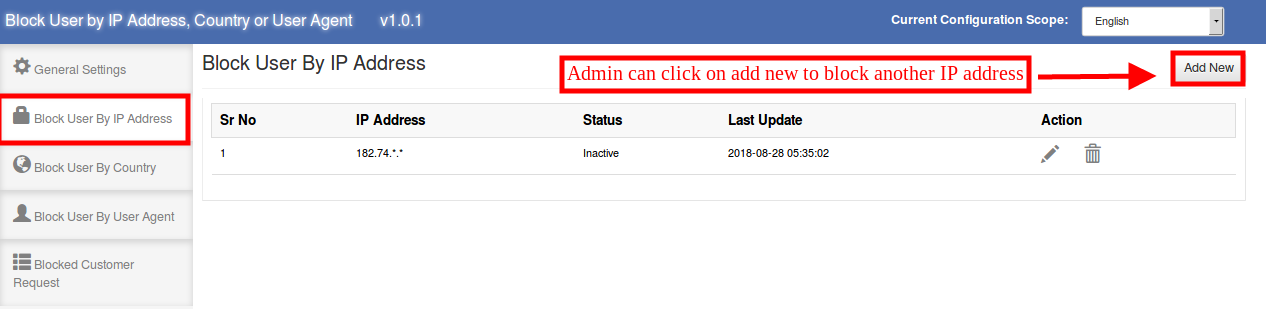
The store admin can click on the “Add New” option in order to stop a customer from accessing the site by restricting his/her IP address.
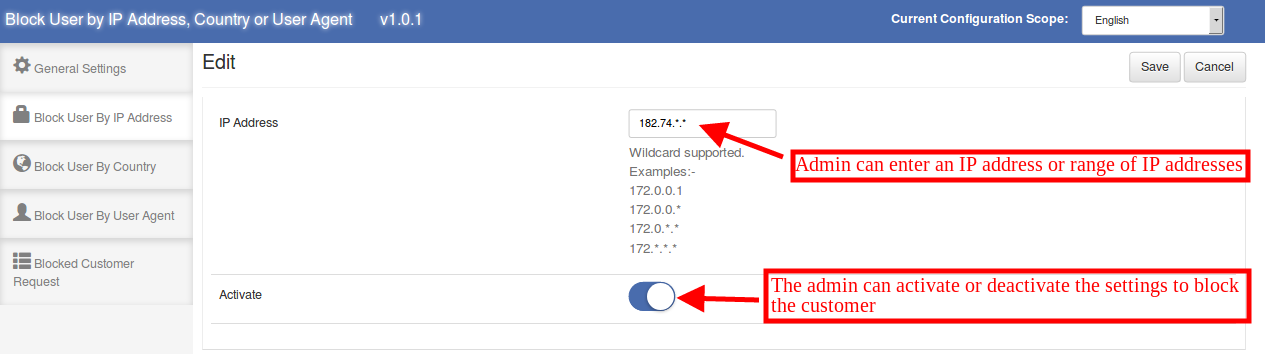
After clicking on the “Add New Option”, the admin can view the below-mentioned options:
IP Address: The store admin can enter the IP address of the customers in order to restrict them. The admin can enter a range of IP addresses like 182.*.*.* if required.
Activate: The store admin can activate or deactivate the settings to block or unblock the customers by IP address.
3.2.2 How to Edit “block user by IP address” settings?
The admin can click on the below-mentioned icon in order to edit the previously applied settings.
3.2.3 How to delete “block user by IP address” settings?
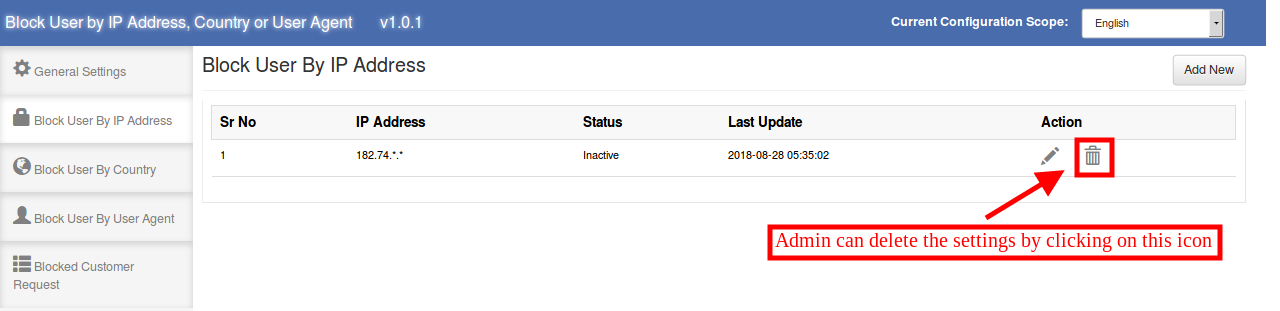
The admin can delete the settings by clicking on the below-mentioned icon. After that, the customers can access the website easily.
3.3 Block User by Country
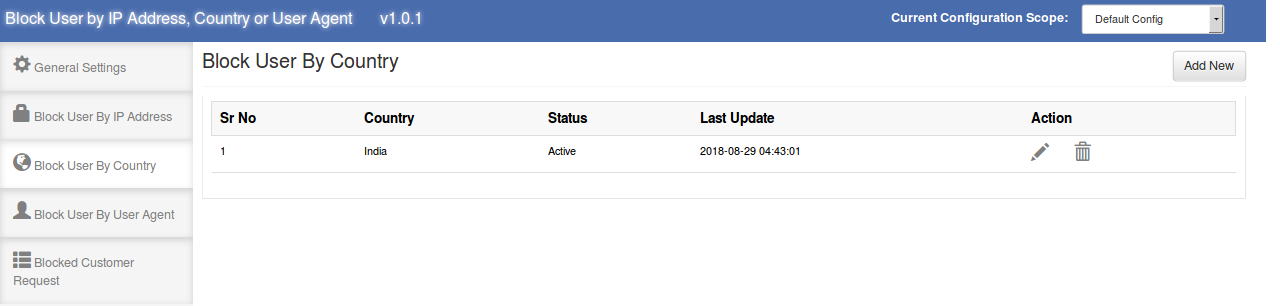
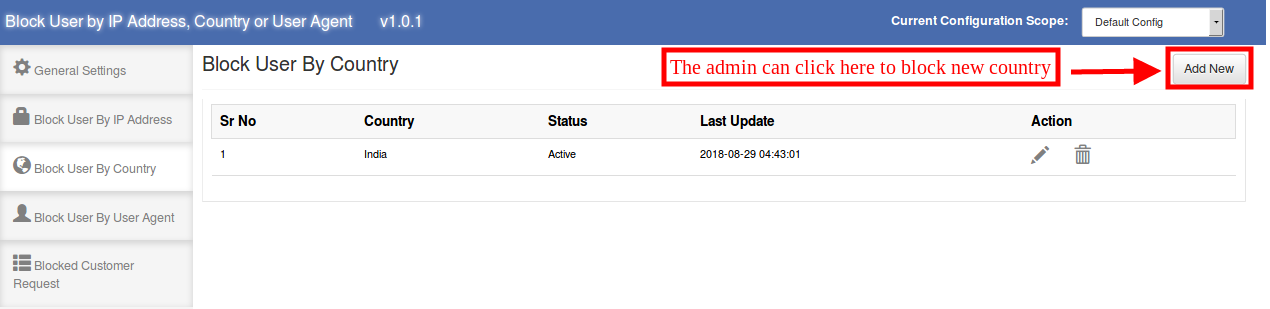
Here the eCommerce store owner can view the list of blocked countries. The store admin can add, delete or modify the country.
3.3.1 How to block a user by Country
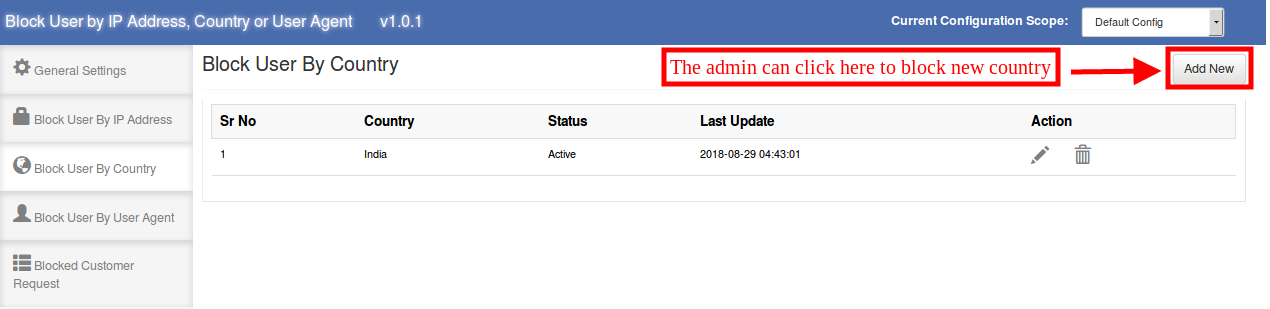
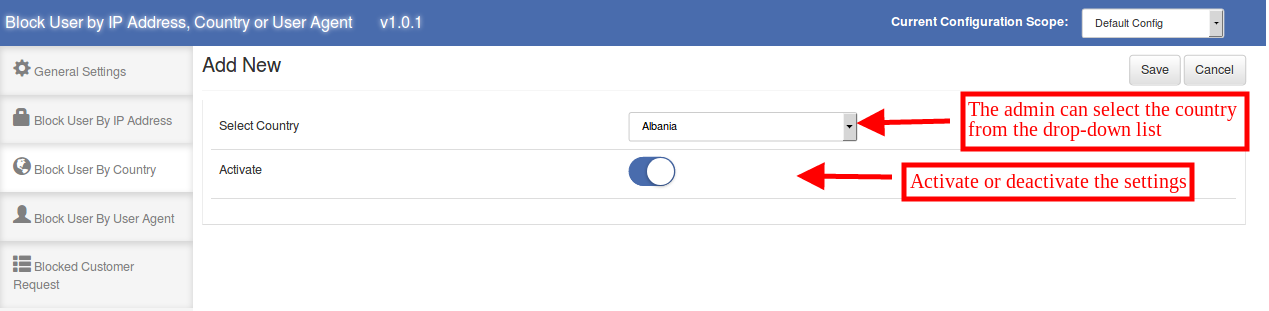
The store admin can block the users of any specific country. The admin can select the country from the drop-down list and block the customers of that country.
After clicking on the “Add New” option the admin can view the below-mentioned options:
Select Country: The admin can select the country from the available drop-down list.
Activate: The admin can activate or deactivate the banishment from the admin interface.
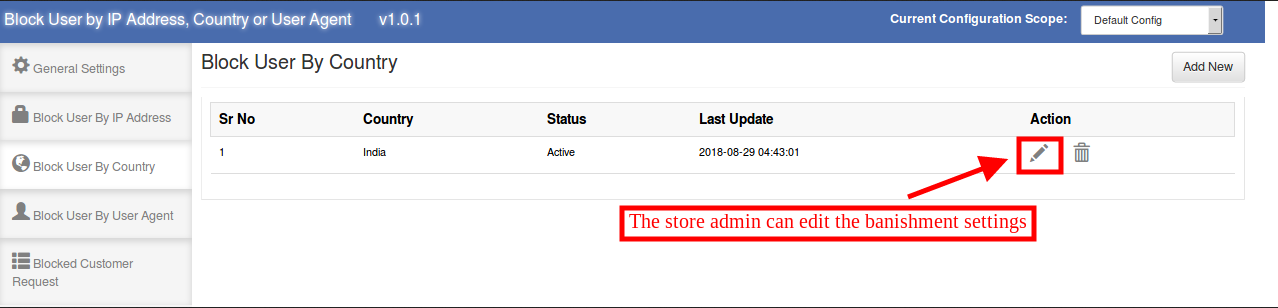
3.3.2 How to Edit “block user by Country” settings?
The admin can also edit the previous settings just by clicking on the “Edit Icon”.
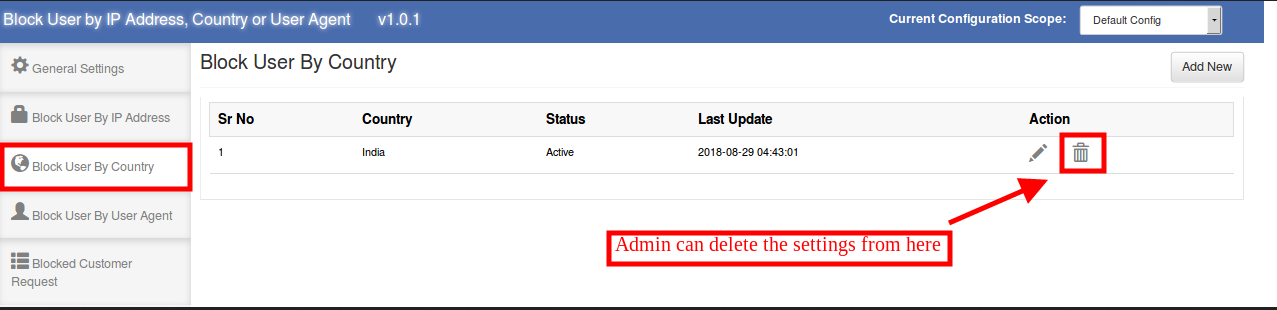
3.3.3 How to delete “block user by Country” settings?
The store admin can also delete the settings by clicking on the below-mentioned icon:
3.4 Block User by User Agent
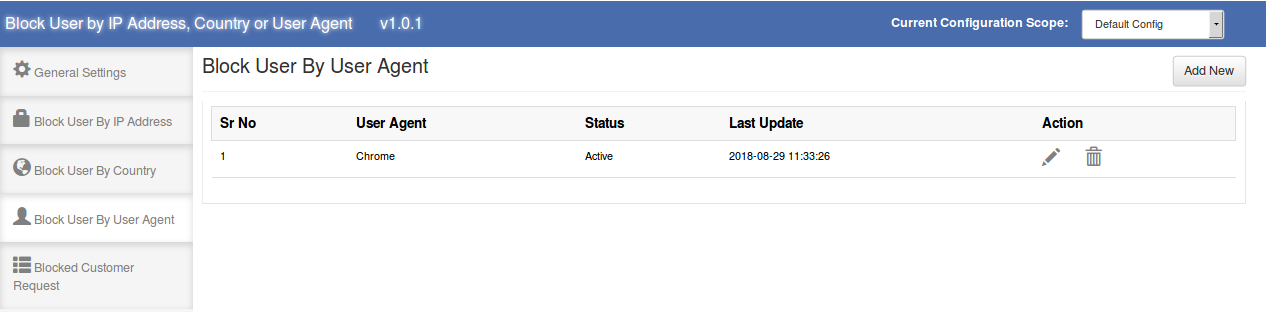
The Magento Block User Extension allows the eCommerce store admin to block the user by user agent. Here the admin can view the list of blocked user agents as shown below:
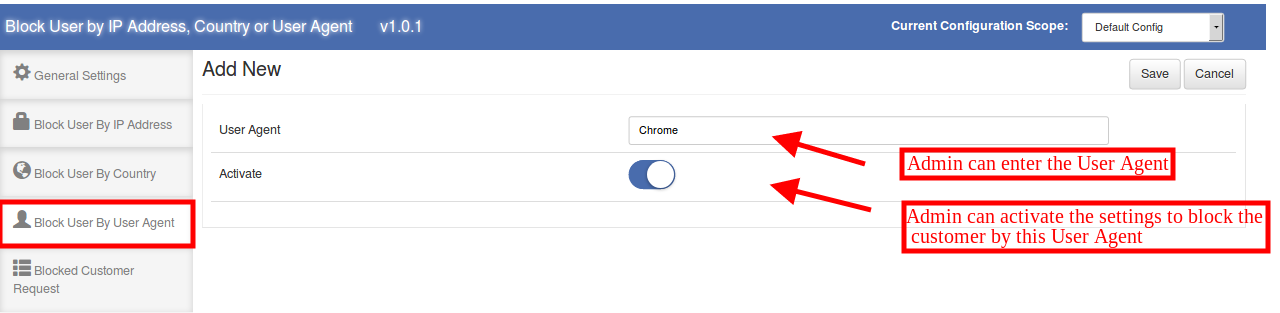
3.4.1 How to block a user by User Agent
In order to block the customer by user agent, the admin can enter the user agent name and block the customers by user agent.
The admin can view below-mentioned information:
User Agent: The e-merchant can enter the user agent name here.
Activate: The admin can enable or disable blocking by activating and deactivating the option.
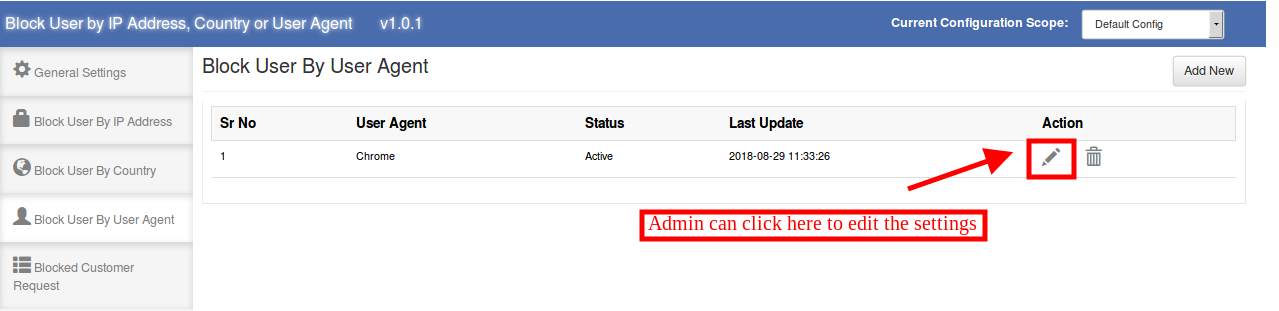
3.4.2 How to Edit “block user by User Agent” settings?
The eCommerce store admin can edit the previous settings by clicking on the “Edit Icon”. The store admin can click on this icon for editing the settings:
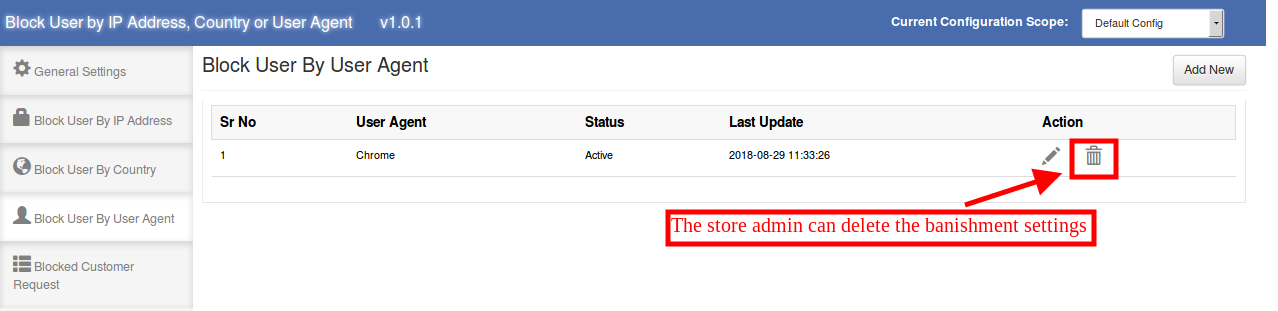
3.4.3 How to delete “block user by User Agent” settings?
The admin can delete the previous settings by clicking on the below-mentioned icon:
3.5 Blocked Customer Request
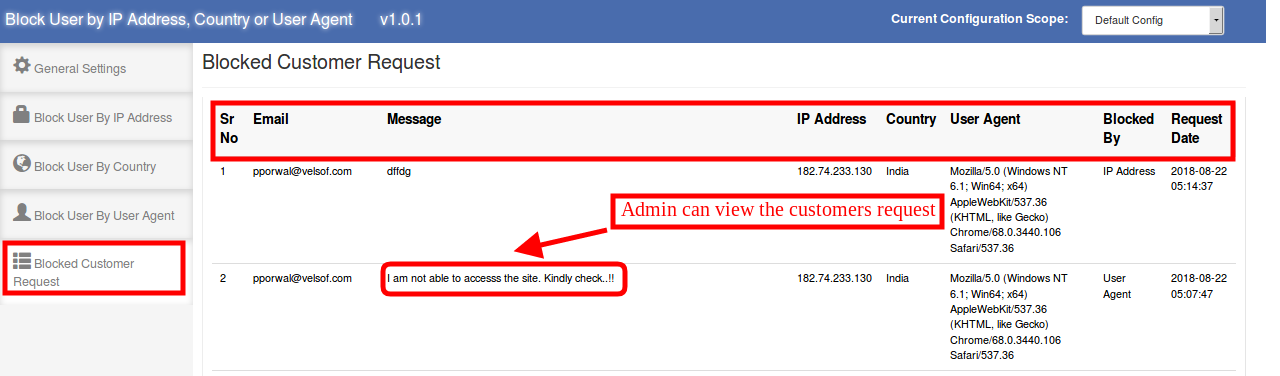
The online store users can send a request to unblock them from the admin interface. The admin can view these requests from the admin interface. Here in this “Blocked Customer Request” section, the admin can view the email id of the customers, message send by the blocked customers, IP address and user agent details. The admin can also view the details on which bases the customer has been blocked. The admin can view the request date from the admin interface.
The e-merchant can view the message and take appropriate actions.
4.0 Front-end Interface
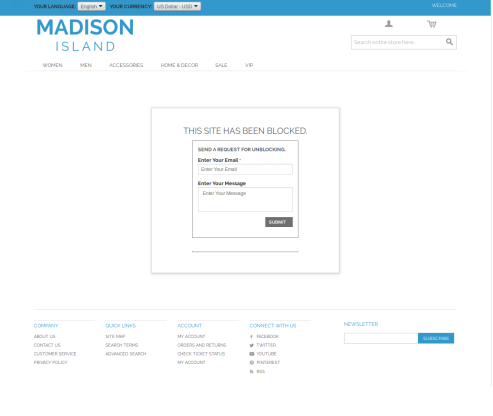
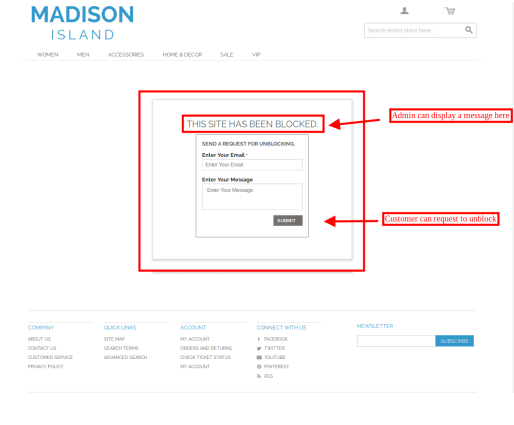
If the admin blocks the customer, then the customers won’t be able to explore the website. The message will be displayed on the website as shown below:
If the store admin disables the settings to show header and footer, then the front-end interface will display as shown below:
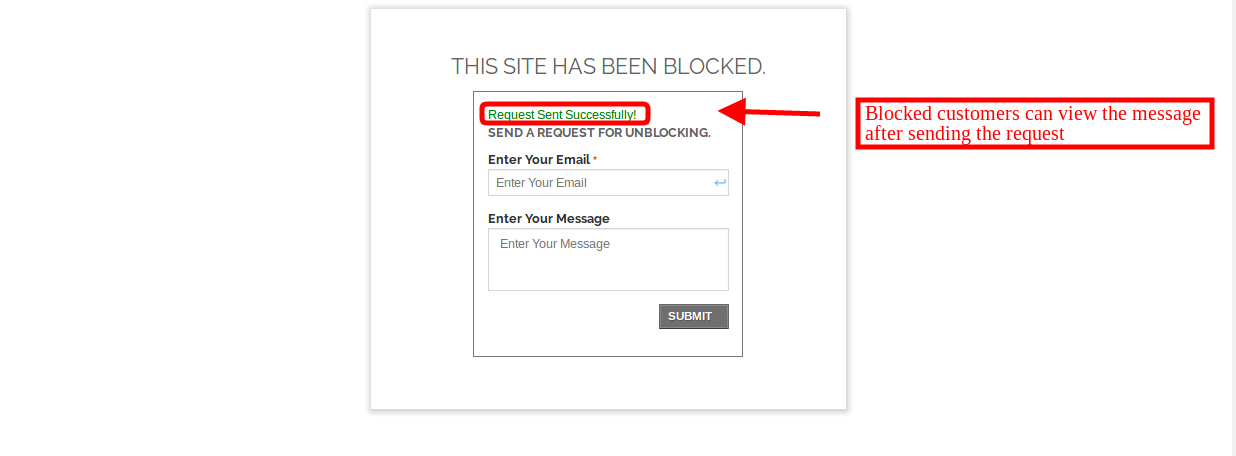
The customers can send a request to the store admin in order to unblock them and allow accessing the website. The users can enter their email id and message. After submitting the message they will see a success message on the same page.
The store admin can view the request from the admin interface and decide to unblock the customer or deny the request.
1.0 Introduction of Magento Auto Switch Language and Currency Extension:
Knowband Magento Auto Switch Language and Currency Module automatically change the language and currency of the eCommerce site according to the visitor’s country or region. The admin in Magento auto switch currency can offer a better store experience to the store visitors by providing them the relevant information in their preferred language. This is one of the must-have extensions to improve the user experience and the customer base globally.
1.1 Features of the Magento Auto change language and currency:
1. Magento language and currency autoswitcher automatically convert the language of the online store based on the location of users by detecting their IP address.
2. Magento Language and Currency switch Extension can be easily implemented on the store.
3. Knowband’s Magento Automatic language and currency converter tracks the IP address of the user and finds out their country or region of the user.
4. Magento Auto Switch Language and Currency Module convert the default language and currency according to the customer’s geolocation.
5. This Magento Auto Change Language Module is supported in multiple languages.
6. The Magento auto switch currency are SSL compatible also.
7. The Magento language and currency auto switcher by Knowband is multi-store compatible.
8. With the help of this Knowband Magento Automatic Switch Language and Currency Extension, the store admin can offer a better user experience to the customers by showing the content in their preferred language and currency.
9. The Magento auto switch currency back-end interface is extremely easy to use.
2.0 Installation
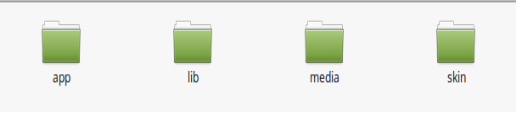
1. The folder structure of the Auto Switch Language and Currency folder.
2. Copy all the folders into Magento root directory and clear the cache (if enabled).
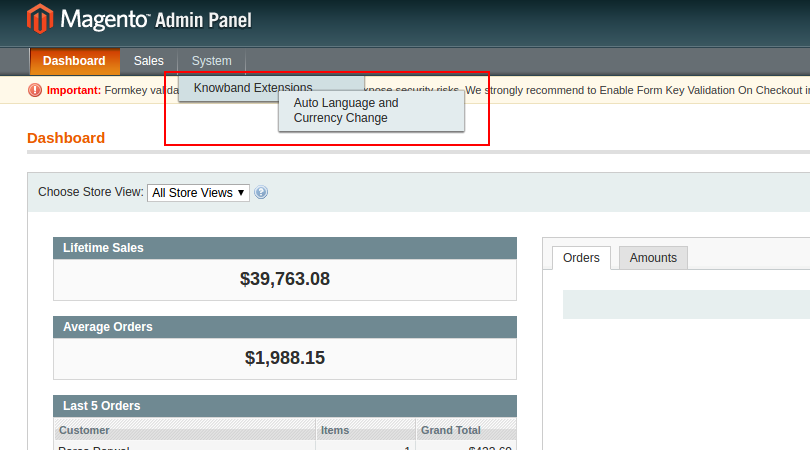
3. You will be able to find the “Auto Switch Language and Currency” option inside the “System > Knowband Extensions > Auto Switch Language and Currency”.
4. You can now configure the Magento language and currency autoswitcher as per your requirements and check its working in the front end at following URL:
3.0 Admin Panel
After installing Magento Language and Currency Switcher Module in the Magento store. The admin interface of the Magento language and currency switcher offers two tabs. They are mentioned below:
1. General Settings
2. Country List
Let us discuss the various customization options of Magento Automatic language and currency converter:
3.1 General Settings
The various fields of the tab of Magento Auto Change Language and Currency Extension are listed below:
1.Language Switching
2.Currency Switching
1. Language Switching: In this section of Magento Auto Switch Language Module, the admin can enable/disable the auto switch language option. After enabling this feature, it will automatically change the website language whenever customers will visit the website.
2. Currency Switching: This Knowband Magento Auto Switch Currency Extension allows the admin to enable the auto switch currency option. If this button is enabled, then, the Magento Auto Currency Switch plugin will automatically change the currency being used in the front-end.
3.2 Country List
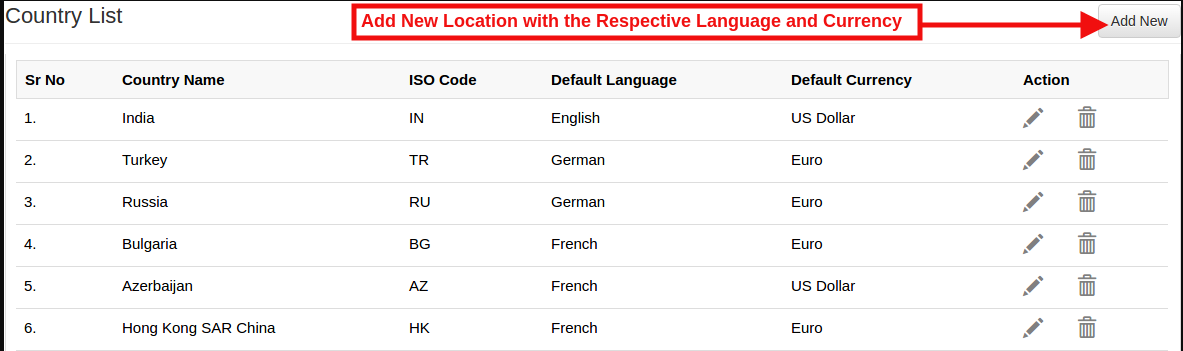
The Automatic Language and Currency Converter for Magento offers an option to the online retailer to add the Countries with preferred language and currency. For all the countries listed here with default language and currency will be different for the language.(As per the option selected by the admin)
3.2.1 How to Add New location/Country with the respective language and currency?
As per the requirement of the store the admin can add the countries here.
For adding the country the Store admin needs to Click on the ‘Add New’ button.
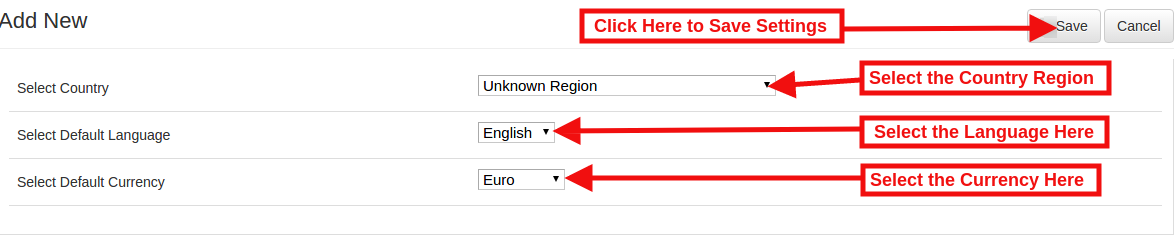
By clicking on the Add New button, the store admin will be redirected to the below-mentioned page:
Select Country: In this field of Magento Auto change currency and language, the online merchant can select the country from the drop-down list.
Select Default Language: This contains the list of languages. The admin in Magento Auto Switch Currency Module can select the language used in that particular country.
Select Default Currency: By Select default currency option of the Magento Auto change currency the Magento store admin can select the currency for the selected country.
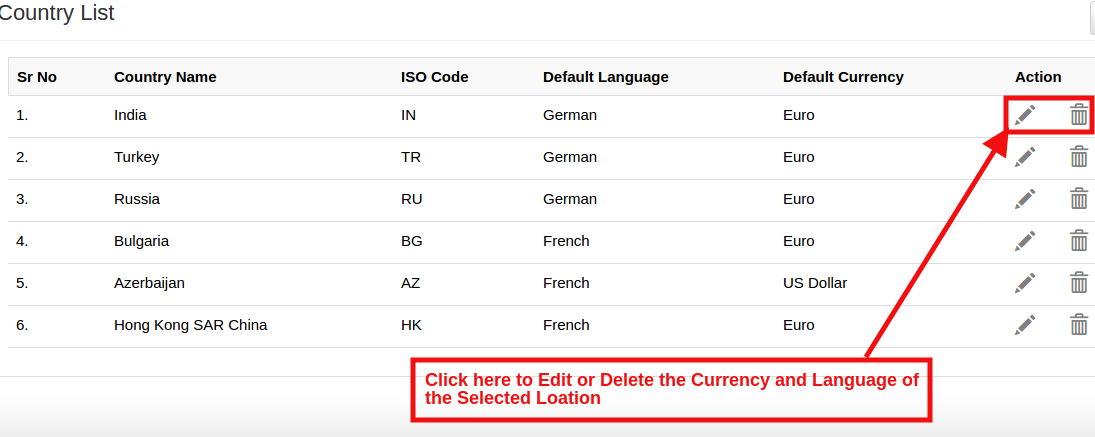
In case of admin need to update the Currency and Language for any particular Country then the admin can update the information by click on the ‘Edit’ button in Magento language and currency switcher.
Please refer the below screenshot for edit the details:
They can delete the specific country by clicking on the Delete button.
4.0 Front End
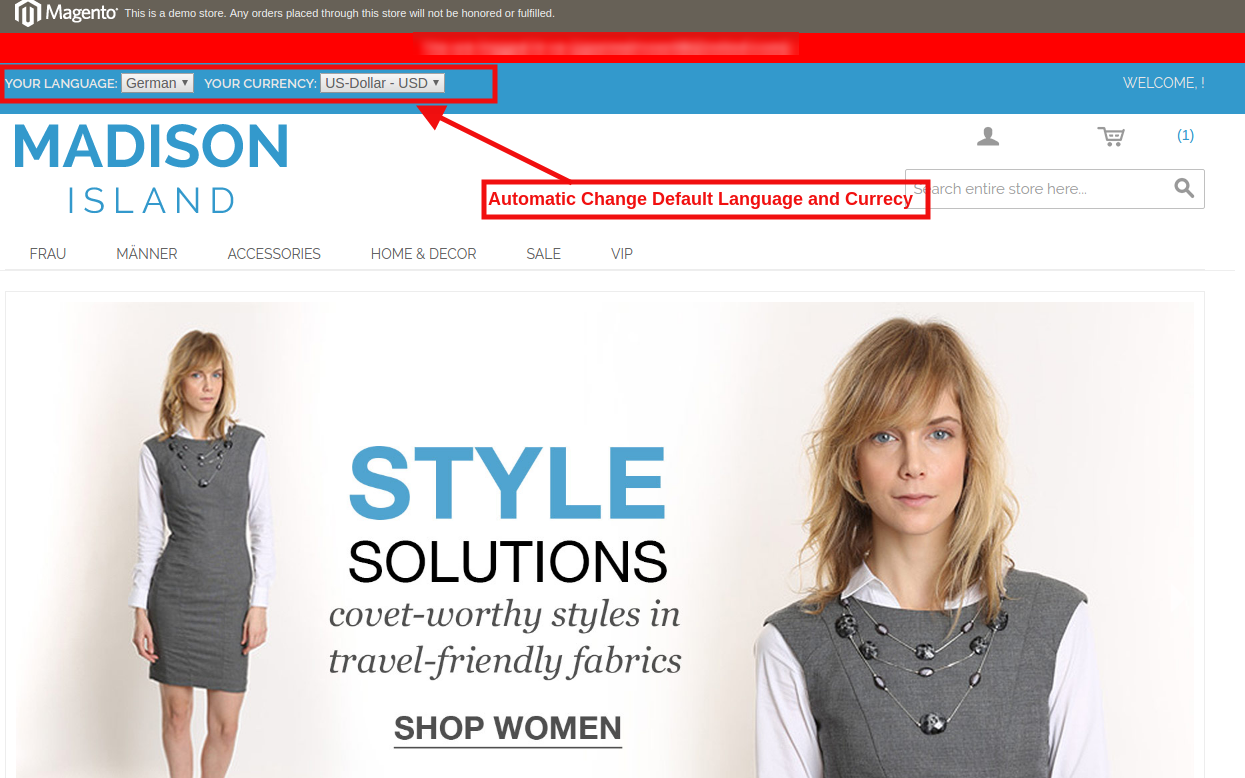
In the Front End, the Language and Currency will automatically switch according to admin configuration in Back-Office of
Magento language and currency switcher.
With Magento Auto change currency and language, the IP of the user will be detected and the default language and currency is changed automatically as shown in the image above. The changes will be based on the configuration of done in the back-end of the Magento Auto Switch Language and Currency Extension.