

Namespace in PHP
Read the blog to learn how to use the same name of the class in PHP using namespace.
Objective: To learn how we can use same name of the class in PHP using namespace.
Generally we cannot use two or more class with the same name. It will give an error: “Cannot redeclare class” as shown below-
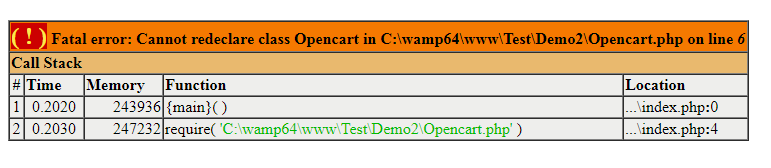
To handle this, we can use the namespace as shown in the example given below:
1. Defining the namespace Demo1 with Student class in the Demo1/Student.php
<?php
namespace Demo1;
class Student {
//All code will be here for this class
var $a = 10;
}
?>
2. Defining the namespace Demo2 with Student class (class with same name) in the Demo2/Student.php
<?php
namespace Demo2;
class Student {
//All code will be here for this class
var $a = 20;
}
?>
3. Now in the sample file index.php, we are able to use the both class without any error:
<?php
// including both of Student classes
require "Demo1/Student.php";
require "Demo2/Student.php";

//making an instance of Demo1\Student()
$ Student1 = new Demo1\Student();
//using the first class functionality
echo $Student1->a.'<br>';

//making another instance of Demo2\Student()
$Student2 = new Demo2\Student();
//using the second class functionality
echo $Student2->a;
Output Screen:
10
20
Both classes will have different functionality and we will be able to use both classes in a single file easily.
Note: We can make the code more easy by using the PHP use() function:
use Demo1\Student as Student1;
$Student1= new Student1();
echo $Student1->a.'<br>';

use Demo2\Student as Student2;
$Student2 = new Student2();
echo $Student2->a;
File Structure:
index.php
Demo1/Student.php
Demo2/Student.php
Related Article: Auto Loading in PHP
- Best PrestaShop SEO Module: 10 Must-Have Features to Improve Rankings
- Three Recovery Emails Recover 37% More Carts Than One: Building the Right PrestaShop Abandoned Cart Sequence
- How to Create an SEO-Friendly Blog in PrestaShop: A Practical Guide to Content, SEO & AI Search
- How to Turn Your OpenCart Blog Into a Revenue-Generating Content Strategy
- Integrating a Custom Payment Gateway in PrestaShop: Technical Requirements, API Flow, and Real-World OPC Challenges