What are the different settings available in Prestashop One Page Checkout?

This comes as no secret that the Prestashop One Page Checkout is highly popular. In fact, the One Page Checkout Prestashop by Knowband is celebrated for more than 10K installations. Isn’t that an achievement?

What does the Prestashop One Page checkout do?

The Prestashop One Step Checkout Addon by Knowband helps the admin optimize the checkout page. Moreover, the idea of using one page checkout is to ensure a quick and easy way to complete the purchase. Therefore, that’s exactly what the One Step Checkout Prestashop Module does. Furthermore, the admin can add or delete custom fields as per the need to make sure the customer does not feel bothered in completing the purchase. Hence, results in increased sales and revenues for the store.

In this blog, we will take a look at the different settings available in the Responsive one page checkout Prestashop. Let’s go check them out.

Various Settings of the Prestashop responsive one step checkout addon
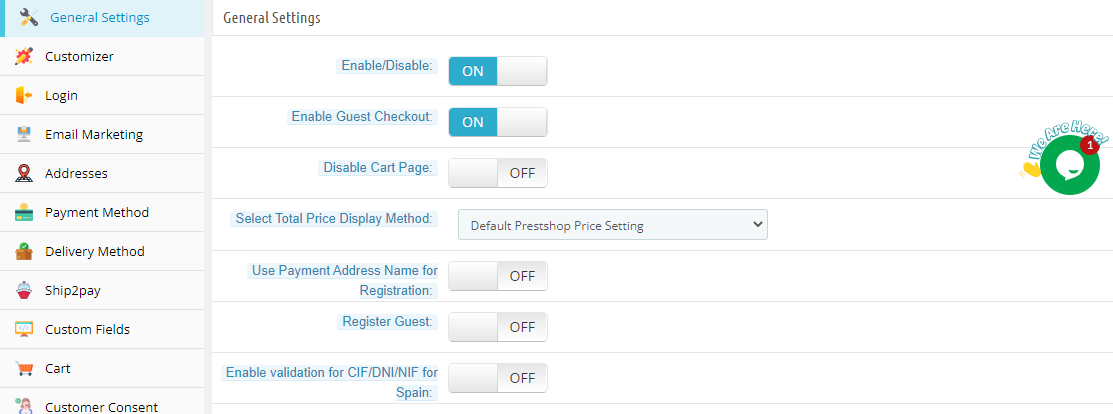
General Settings

Under the General Settings tab, you will be able to find the most basic settings of the Prestashop addon. For instance, enabling/disabling the plugin, guest checkout, minimum amount for showing free shipping banner, and more. Using these settings, you can set the basic tone of the module.

Customizer

The Customizer tab has all the customization settings of the checkout page. In fact, the different colors of the buttons available on the checkout page. For instance, the admin can customize the logout button color, ‘my account’ button color, product name color, and so many others. This way, the admin will be able to customize the entire look & feel as per his need using the Single Page checkout. Furthermore, he can also add Custom CSS and Custom JS if need be.

Login

We already know how important login and registration on a website are. Therefore, the Login tab of the Prestashop One Page Checkout is very crucial. Here, you will be able to find settings related to login functionality. Further, you can configure the Facebook login, Google login, and PayPal login. In fact, customers can easily click on any of these social login options and come aboard. Moreover, you also have the option to add more social login options as well.

Email Marketing

In the Email Marketing tab of One Page Checkout Prestashop, the admin can enable the integrators. Further, Prestashop One Page Supercheckout features 3 email marketing integrators. They are MailChimp, SendInBlue, and Klaviyo. The admin can simply enable the integrators to catch all the email addresses that come to the checkout page. Moreover, use them for email marketing in the future.

Addresses

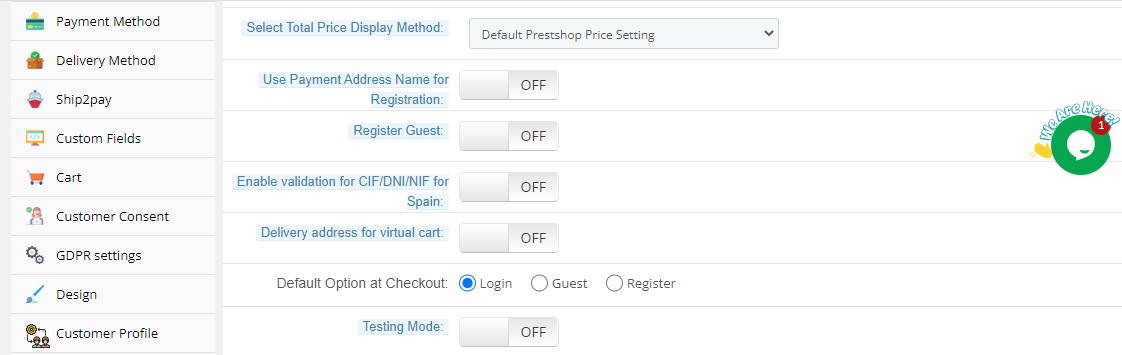
Under this tab of Prestashop One Page Checkout by Knowband, the admin will be able to customize the different checkboxes. The admin can enable inline validation, enable save address, Auto Detect Country, Enable Google Auto Address Fill, and more. In addition, the tab looks like the image below. It will help you with a better understanding.
Payment Method

The Prestashop one page checkout supports multiple payment methods. In fact, under this setting, the admin can set a default payment method. 

Delivery Method

The Responsive one page checkout Prestashop supports multiple shipping methods. In fact, under this setting, the admin can set a default shipping method.

Ship2pay

The manager can prohibit payment systems depending on the shipping method selected by the consumer using this feature of the Prestashop module. That is, the administrator can associate certain payment types with specific shipping alternatives in the shop.

Custom Fields

The Prestashop responsive one step checkout addon features a Custom Fields tab. Further, the admin can easily add, edit, and delete the custom fields as per the need. Moreover, add the title, type, position, and other settings as per the need.

Cart

Under this tab of the addon, the admin can choose to show or hide the cart on the checkout page. Furthermore, customize the order total settings and confirm settings for both guests and logged-in customers.

GDPR Settings

The Single Page checkout is GDPR compliant. Furthermore, add, edit, or delete the GDPR settings under various options. For instance, the policy label, and other options.

Design

The Prestashop One Page Checkout by Knowband features 3 layout options. 1-section, 2-sections, and 3-section layouts. Furthermore, the admin can choose the layout that best suits your website. The first section is where all the custom fields are laid out in one column. Secondly, the 2-sections option is where the fields are divided into two columns in a pleasing way. Likewise, the last one has 3 columns. However, all the custom fields are still on the single page and the customer can fill in the details without any obstruction.

Customer Profile

This is one of the latest features of the Prestashop One Page Supercheckout. Further, the admin can create as many customer profiles as he wants to. Moreover, he can configure the settings or checkboxes under the settings like Invoice Address, Delivery Address, and Custom Fields.

Let us Wind up!

The Prestashop One Page Checkout is one of the best options. In fact, it is certainly feature-loaded. You can easily check them out on the Knowband store. Moreover, you will be able to check the User Manual and the Demo version(Admin demo and Front demo). With them, you can get your hands on the settings of the plugin. In case you want to know more about the addon, let us know at support@knowband.com.

Understand the Prestashop eBay Integration Addon Better here by Knowband

With its large consumer base, eBay Marketplace is one of the most popular online marketplaces worldwide. It may be tough for an online retailer to run both its eBay and Prestashop stores at the same time. The eBay Marketplace requires a significant amount of time and effort to monitor and manage stocks and orders. Knowband has released a fantastic solution for Prestashop business owners to address these challenges. Store owners may effortlessly combine their Prestashop shops with eBay stores using the Prestashop eBay Integration Addon. The Prestashop eBay Integration Module provides a single interface for managing both your Prestashop and eBay stores.

On top of that, the Prestashop eBay Integration Addon is designed not just for efficiency but also to enhance the user experience. It simplifies complex processes such as product listings and inventory management. These amazing features allow merchants to focus more on customer engagement and less on backend operations. This focus on user experience is a key driver behind the addon’s popularity among Prestashop merchants.

Do you want to link your Prestashop store to eBay Marketplace?

Knowband’s Prestashop eBay Integration Plugin is available on the website. Buy it!! Store owners only need to add the module to their Prestashop store’s backend. The business owners may quickly customize the module when the setup procedure is completed. The eBay Prestashop Integrator allows store owners to offer items on eBay. Additionally, modify the eBay order status from the Prestashop store’s backend.

Features of the Knowband’s Prestashop eBay Integration Addon

  • Business owners may quickly sync stock levels on eBay using the inventory sync tab in the dashboard of their Prestashop store.
  • Product status reports from the eBay Marketplace may be readily imported from eBay. In reality, the administrator can simply accomplish this.
  • Prestashop store owners may select the item nation from the admin dashboard when building eBay profiles.
  • The eBay Prestashop Connector is simple to install and set up. In reality, installing and configuring the eBay integrator requires no technological expertise.
  • In the backend of eBay Prestashop API Integrator, items can synchronize locally.
  • The module’s automated method permits the merchant to list and update items and their data on eBay.
  • The progress information of the products from eBay is imported effortlessly. In fact, the admin can easily do it.
  • From the backend, the store owner can quickly adjust product inventories.
  • The admin of the Prestashop eBay Integrator may establish several shipping accounts from the admin panel.
  • A standout feature of the Prestashop eBay Integration Addon is its real-time update capability. This feature ensures that any changes made in the Prestashop store—be it price adjustments, stock updates, or product modifications—are immediately reflected on eBay. This synchronization helps maintain consistency across platforms, reducing the likelihood of customer complaints related to outdated information.
  • Orders from the eBay Marketplace simply sync in real-time. The Prestashop eBay Connector add-ons ensure real-time order synchronization between eBay and Prestashop.
  • The store’s admin panel may change the order status and sync it with the store. Furthermore, utilizing the cron job, in the eBay shop.

Prestashop eBay API Integration Module Benefits

  • The Prestashop eBay Integration Module allows shop owners to connect their Prestashop store to eBay Marketplace with only a few keystrokes.
  • The setup and configuration steps are easy and rapid. As a result, the Prestashop Addon helps store administrators save time.
  • The admin of the Prestashop eBay Integration Module can create several profiles from the backend.
  • The profile-based product listing feature of the Prestashop eBay Integration Plugin helps company owners save time and money when manually listing items.
  • Marketers may easily supervise and manage inventory with the help of these accounts embedded into the backend of eBay Prestashop Integrator.
  • The plugin allows the store owners to swiftly upload product characteristics and classifications to eBay
  • Prestashop eBay API Integration Module attributes and categories.
  • With the eBay Prestashop Connector, sellers may easily add, delete, alter, or relist items on eBay.
  • Order management is a breeze with the Prestashop module.
  • Purchases made on their eBay store can seamlessly transfer to their Prestashop site.
  • From the Prestashop shop’s backend, business owners may easily manage synchronized eBay orders.
  • The backend of the Prestashop Module is available to track down the problem that arises when listing the items.

For merchants, how hopeful is the eBay Prestashop API Integrator?

The Prestashop eBay API Integration Module promises to provide the administrator with exceptional benefits. Furthermore, the plugin allows the administrator to link their Prestashop store to eBay with a few clicks. In reality, it saves him time during the setup and establishment process. How? The User Manual guides you through the stages of installing and configuring the Prestashop eBay Integrator.

Merchants may surely create numerous profiles with the aid of the Prestashop addon. Furthermore, the backend of the module. Furthermore, the profile-based product listing saves time and effort compared to the manual listing. In fact, the profiles established might aid owners with inventory control and management.

Merchants may attach product credits and categories to the eBay Marketplace in a matter of seconds. Furthermore, using Knowband’s Prestashop module. Merchants may quickly add, delete, edit, or relist items on their eBay store with the Prestashop eBay Integration Addon. Similarly, the Prestashop plugin makes order administration a snap.

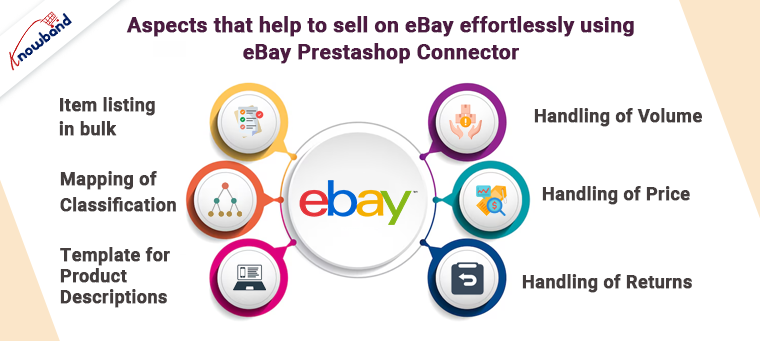
Aspects that help to sell on eBay effortlessly using eBay Prestashop Connector

Item listing in bulk

The eBay Prestashop Integration plugin considers bulk product listing. In addition, the administrator can map the Prestashop shop category to the eBay Marketplace category. In reality, all goods in the Prestashop shop class are guaranteed to be available on eBay Marketplace. Furthermore, within the chosen eBay category. The administrator can link many Prestashop classes to a single eBay category.

Mapping of classification

For all Prestashop store goods, the administrator should arrange the store categorization to the most logical eBay store class. In addition, for eBay class preparation. The eBay Prestashop Connector serves as a simple interface. In addition, the store administrator is responsible for category mapping.

Template for product descriptions

The Prestashop shop administrator can add the HTML layout to the representation. HTML layouts are supported by the eBay Prestashop API Integrator. Additionally, allow shop administrators to easily monitor product descriptions on eBay. There are also placeholders for sending the Prestashop store representation to the eBay store.

Handling of volume

The shop administrator can sync precise product quantities to get around eBay’s selling constraints. Finally, there’s the eBay Marketplace. The quantity control feature of the Prestashop eBay Integrator makes it easier for store managers to comply with eBay’s product listing requirements.

Handling of Price

The marketer can use the eBay Prestashop Integration plugin. Furthermore, in comparison to the Prestashop store, to sell items from the store on the eBay marketplace at an unexpected cost. Because of a fixed or rate-based cost, the administrator can establish a lower or higher assessment for the items. It allows you to offer low prices with little resistance.

Handling of returns

The admin may change the profit option with the Prestashop eBay API Integration Module. The module allows the shop administrator to customize the Return Description, Return Duration, Return Type, and whether or not the return is refunded to the shipping company.

Please check out the demo here:

Back Office Demo

In the End

With eBay marketplace connector’s robust capabilities and continuous updates, the addon is well-positioned to support merchants as they navigate the complexities of multi-platform selling. Furthermore, it’s an investment that promises to keep paying dividends in the form of increased sales and customer satisfaction.

Therefore this is what the Prestashop eBay Integration Addon by Knowband is all about. It is a very functional and beneficial option for selling on the platform. What do you think of the plugin? In case you have any queries or doubts, let us know at support@knowband.com.

The Prestashop Google Shopping Integrator by Knowband

As an e-merchant, your basic aim is to attract shoppers and sell your products to them keeping the cost. You might have already integrated your business into the various online marketplaces and started to see the difference in your revenues.

Then came Google Shopping.

Before understanding how to sell on Google, you should understand what Google Shopping is, and then you can decide whether you want to be a part of the online marketplace or not.

What is Google Shopping?

Google Shopping is a shopping search engine that faithfully provides you options that you input in the search box by Google. Highly useful for the shoppers as they can effortlessly compare the products offered by multiple vendors across the globe.

Moreover, you would also find image results of the products you searched for from the various websites selling the same.

You can find the Shopping tab next to Images below the search bar or you can even go to https://www.google.com/shopping to find the products. Once you click on any of the products that are in front of you, you’d go straight to the vendor whose product it was.

How to sell on Google Shopping?

The very first step to start selling Google Shopping, you should sign up for Google’s Merchant Center. Once you sign up here, you’d be able to manage your product listings as well as upload your products manually to be specific about what to sell.

To confirm yourself as a seller, you’ll have to enter a few details including the URL of your website store name and where your business is based. After completion, Google will ask you to upload a file to your server to verify site ownership. Now, you can log into the Google Merchant Center.

After logging in, you may edit your listings, change your shipping information, and do anything else necessary to begin selling. The Merchant Center’s listings are categorized as “Feeds.” A store may have many feeds, such as one for normal items, one for seasonal products, another for things offered in foreign countries, and so on.

To add a feed:

  1. Click on Products
  2. Click on Feeds
  3. Register a new feed
  4. Name your feed and select the country

Enter product data

To sell products effectively, you should be spending some quality time entering product information into the Google system. Follow the guidelines provided by the search engine if you want to have better results. For example, fashion apparel would require you to input the sizes, color, fabric, and more whereas; the same does not apply to electronic items or home decor. A tedious task for sure, but it gives weight to your products.

Incorporate high-quality photos

When Google talks about using good-quality images on its websites, why would it not apply the same to its shopping store? Make sure that the product descriptions and the image correlate with each other. When you want the visitors to get attracted to the product, you have to invest in getting good quality images up on Google Shopping.

Divert the traffic

What makes an eCommerce business successful? When a customer can locate the product and buy it from your store. When you sell on Google Shopping, the opportunities for your sale increase. Google Shopping uses your product data, images, and AdWords campaigns to bring more traffic to your online store as well as generate higher revenues.

Now, you can also install and configure the Prestashop Google Shopping Integrator by Knowband to successfully sell on the platform. Further, the Prestashop Google Shopping Integration helps merchants in numerous ways. In fact, the plugin eases the whole setup and selling procedure. Following are the stunning features of the Prestashop Google Shopping Integration Addon. Furthermore, we will also see the benefits that the merchants have from using the Prestashop Google Shopping Integration Module.

Features of the Prestashop Google Shopping Integrator

  • The Prestashop module connects your Prestashop store to the Google Merchant Center. In fact, the process completes in no time and is painless too. Moreover, you don’t even need any coding or special knowledge for the same.
  • Admins can choose from a variety of languages when using Prestashop Google Shopping Connector. Moreover, the Prestashop plugin supports multiple stores.
  • In case the admin wants to rectify and adjust the picture size of the products on the platform he can do it. Further, he can easily do that from the backend of the Prestashop Google Shopping Feed Integration.
  • The Prestashop Google Shopping API Integration allows administrators to exclude certain goods from Google Shopping listings.
  • Out-of-stock items, products with a lower price than the defined price, and products without the set EAN13/JAN or UPC numbers can all be excluded by the administrator.
  • Prestashop Google Shopping API Integration allows you to create many profiles. Google Merchant Center classifications and characteristics are linkable to store classifications and features.
  • The mass upload of items to Google Merchant Center is possible via category and attribute mapping.
  • The store administrator can set up a feed management plan. Further, depending on which goods from the store are automatically published to Google Shopping.
  • The Google Shopping product is viewable by the administrator. In fact, the admin can edit, delete or renew the listed products.
  • The store’s products immediately synchronize with Knowband’s Prestashop Google Shopping.
  • The Google Shopping Prestashop Integration provides the product status from Google Shopping to the shop after syncing.
  • Cron execution and any errors encountered are trackable in the Audit log of the Prestashop Google Shopping Integration Addon.

Benefits of the Prestashop Google Shopping Integration Module

The ease of handling the plugin. In fact, using the user manual by Knowband comes in really helpful. In addition, the expertise that customer support provides makes everything easier.

The Prestashop Google Shopping Integration helps the admin handle everything from the backend of the store. Additionally, the admin does not have to juggle between the store and the platform.

The synchronization between the store and Google Shopping happens in real-time. Therefore, the admin needs not manually do it time and again. It simply happens without trying too hard.

Talking about the benefits, the features that we put forth in the blog serve as benefits as well. What do you think? They are helpful and beneficial for the administrator at the same time.

You can try the demo yourself:

Back Office Demo.

In the End

The Prestashop Google Shopping Integrator by Knowband is a must for merchants planning to sell on the platform. In fact, if they want to do it effortlessly, this is the right way to do it. What do you think of the Prestashop addon? If you have any requirements or queries, you can get in touch with us at support@knowband.com.

What does the Profile Management tab of Prestashop Google Shopping Integrator look like?

The Prestashop Google Shopping Integrator by Knowband is a must-have. Further, for merchants wanting to sell on the platform. In fact, the Prestashop Google Shopping Integration Addon helps them sell their wares efficiently. Using the plugin, the marketers can connect their stores with the Google Merchant Center in no time. Moreover, list their products and help them rank on Google. Going further, the customers can easily locate the items when they search for them.

The Prestashop Google Shopping Integration Module features a gamut of settings out of which Profiles Management is the first one. In fact, it is one of the most crucial ones as well. In this blog, we will take a look at the different settings under the Profile Management tab of the Prestashop Google Shopping Integration Plugin.

The different settings of the Profile Management tab of Prestashop Google Shopping Integrator

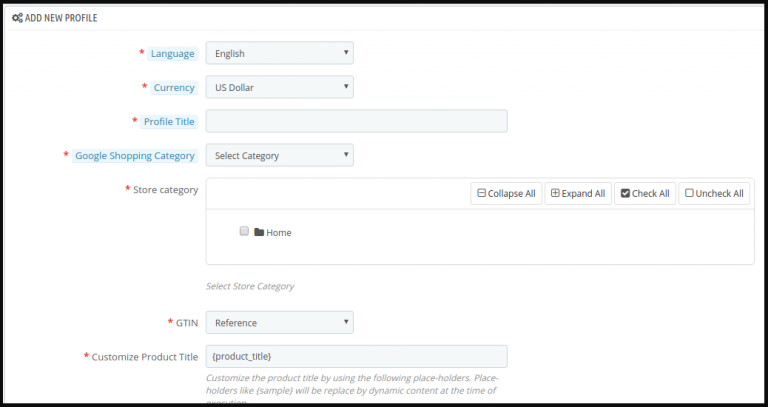
Add New Profile

Displayed as a ‘+’ icon, the merchant can add one or more profiles from this button. We will take a look at the different settings once you click the icon to add a new profile on Google.

Country

In the latest version of the Prestashop Google Shopping Connector by Knowband, the merchant can choose the country. Further, there are three options available – the United States, the United Kingdom, and France. Once you choose the country, a few settings automatically change. They include Language and Currency.

Profile title

Under this tab, you can add a title for your profile. For instance, US accessories or France clothing, and more. Likewise, you can create numerous profiles with different titles as per the need. In fact, the marketer can do it using the Prestashop Google Shopping Feed Integration.

Google Shopping Category

Here, the merchant can select from the several options available in the drop-down menu. For instance, electronics, fashion, food supplies, software, media, and so many others. In fact, choose the category that is applicable to your products in that respective profile.

GTIN

Under this tab, the merchant has to add his Global Trade Item Number or GTIN. Furthermore, it is the unique and internationally recognized identifier for a product. The setting is a drop-down menu with Reference, UPC, and EAN13 as options. Therefore, you can choose the one that is applicable to you from the Google Shopping Prestashop Integration.

Under the setting, you also find a note. Kindly select the proper GTIN. GTIN should be of 0, 8, 12, or 14 digits (UPC, EAN, JAN, or ISBN). For more information, you can contact Google Support as well.

Customize the product title

Under this setting of the Prestashop Google Shopping API Integration, the merchant can easily add place-holders to their products. Moreover, customize the same as well. In fact, the setting has an image that helps you understand the different place-holders they can use.

Material

In this setting, the marketer can add the material of the product under this profile. Moreover, choose from the options available in the menu. They are Composition, Paper type, Color, Size, and Frame size. Therefore choose the one that fits your category.

Pattern

Under this alternative, the merchant can add the pattern of the product under this profile. Moreover, choose from the options available in the menu. They are Composition, Paper type, Color, Size, and Frame size. Therefore choose the one that fits your category.

Gender

Here, the merchant can choose the gender. The options in the Prestashop Google Shopping Integration Addon include Male, Female, and Unisex.

Age Group

Under this tab, the admin can add the age group from the drop-down menu. The options available include Newborn, Infant, Toddler, Kids, and Adult.

Adult Content

In case you are selling products that are for adults or 18+ only, you have to click ‘yes’. Likewise, if the products are for all, then click ‘no’ from the Prestashop Google Shopping Integrator.

Color

Select the color from the drop-down menu of the Prestashop Google Shopping Connector.

Size

Choose the size from the drop-down menu of the Prestashop Google Shopping Feed Integration by Knowband.

Size type

Determine the type of size from the menu. The options include Regular, Petite, Big& Tall, Plus, and Maternity.

Size system

Here, the merchant can choose from the various size systems available in the list. For instance, AU, BR, CN, DU, and so many others.

Product Shipping

This is practically the last setting under the Profile Management tab of Prestashop Google Shopping API Integration. Furthermore, he can select the shipping in this setting.

Going further, the tab of the Prestashop Google Shopping Integration Addon has a section for Google Adsense. This has different custom fields for the merchants.

You may check out the demo here:

Back Office Demo.

Let us Wind Up!

Therefore, here we are with the profile management tab of the Prestashop Google Shopping Integrator. There are several other settings that we will cover in the same space. In case you want to try your hand at the settings, you can check out the demo version on the product page. Moreover, get in touch with us at support@knowband.com will your queries.

Want to know about the Prestashop One Page Checkout? Click here

One Page Checkout’s value is well known among eCommerce retailers. Furthermore, every eCommerce merchant recognizes the necessity for the same for their business. It’s also one of the few options they have for lowering their shop’s bounce rate and cart abandonment rate. Customers who wish to complete their transactions fast will appreciate Knowband’s Prestashop One Page Checkout.

The One Page Checkout Prestashop allows you to customize your checkout screen. The plugin helps the admin ramp up the checkout process by simplifying the checkout page.

The aspects of the Prestashop One Page Checkout that make it popular:

Checkout as visitors

Without registering with the site, new customers may use the guest checkout tools to complete their purchases. Furthermore, this is a good strategy for providing clients with a faster manner to purchase. In truth, they do not require to register on the site.

Use social media to login

Clients will surely find it smoother to log in or register using the third component, social login. On the eCommerce site, buyers may simply log in or create an account. Clients can also complete their transactions without creating an account by just buying the items in their basket. Using a social login option such as Google or Facebook.

Several popular payments are available

The Prestashop One Page Supercheckout can meet the demands of your consumers, whether they wish to pay using PayPal or another method. Further, the consumer will not exit the store without completing the transaction.

There are multiple shipping resources accessible

Prestashop One Step Checkout Addon features multiple delivery methods. Only a few examples are Ulozenka Delivery, Zasielkovn Delivery, LP Express 24 Delivery, and others.

With Inline Validation, you can identify errors right away

Assume that clients make a mistake on the checkout page when entering their information. Furthermore, the Prestashop One Step Checkout Addon still gives users the choice to change it.

Elements in the checkout process are customizable

Any eCommerce company administrator can drag and drop portions of the checkout page up and down relying on the necessity for anything similar. The administrator may do the same thing using the One Step Checkout Prestashop Module’s backend.

Changes to the number of products available

Customers may swiftly modify the number of goods on the checkout page using this functionality of Responsive one page checkout Prestashop. Changing the number of goods on the product page boosts performance.

Filling out Google’s form for auto-address

When a consumer starts typing his address, Google Auto-address fill pops up with address possibilities. It gains distinct traits and yields major outcomes. When you select the recommended address, the zip code and city section appear.

The checkout page comes in three alternative designs

The Prestashop responsive one step checkout addon from Knowband offers three design options. Furthermore, the business administrator may quickly choose the one that best complements the eCommerce site’s theme.

There are integrations with MailChimp, SendinBlue, and Klaviyo

When customers use the Prestashop One Page Checkout, you can quickly import their information into MailChimp, SendinBlue, or Klaviyo.

GDPR adherence

The Prestashop addon complies with GDPR rules.

Checkouts Stats

The Prestashop One Page Checkout now contains a very handy tool that allows store owners to track a variety of data. At the checkout, conversion rates, such as the proportion of aborted checkouts, missed revenue, and so on. The representations indicated above may be viewed for a certain day, week, month, or year by the company owner.

Front Demo.

Admin Demo.

Conclusion

Prestashop One Page Checkout by Knowband is an excellent option for improving sales and profits. The module also enhances the customer’s purchase experience. It’s a win-win situation for both administrators and clients because there are so many solutions available. Please email us at support@knowband.com if you have any issues with the Prestashop One Page Checkout.

👉Explore the Module with Our Video Guide

The best reasons to choose Prestashop Etsy Marketplace Integration Addon

PrestaShop Etsy Integrator 4.0.1: New Features You Will Need

We are excited to announce the release of version 4.0.1 of PrestaShop Etsy  Marketplace Integrator! This update comes with new enhancements designed to make managing your Etsy store easier, more efficient, and completely seamless.

1. OpenAPI Authentication Updates

Etsy has updated its authentication system, and Knowband’s Etsy Marketplace module now fully supports the new OpenAPI standards. All API requests from your PrestaShop store automatically include the correct authentication headers, ensuring that your integration continues to function smoothly without any interruptions. It’s important to upgrade to version 4.0.1 before 18 January, as connections may be disrupted if the update isn’t applied by then. This update keeps your store fully compliant with Etsy’s latest API requirements and prevents any potential downtime.

2. Better Return Policy Management

Handling return policies just got simpler with this new version. With this update, admins can create , sync and manage multiple return policies and assign them to specific profiles. Any categories linked to these profiles are automatically updated on Etsy with the assigned return policy. This ensures your listings remain accurate, consistent, and aligned with your store policies, saving time and reducing manual effort.

These updates are part of our ongoing effort to provide a reliable, efficient, and hassle-free integration between PrestaShop and Etsy. By upgrading now, you ensure your store continues to run smoothly while taking advantage of these new features.

Etsy is a marketplace that sells its items through various sites joins well defined for different countries. For instance, shop for handmade, classic, custom, and noteworthy presents for everyone, or shop for fragile antiques collected, one-of-a-kind, custom, and remarkable options, and so forth. In 2021, Etsy witnessed 7.5 million sellers sell their goods. In fact, there were 96 million active Etsy buyers last year.

Now, you know why selling on Etsy is a core option for your eCommerce business.

Knowband, an internet-based business expert community association, has developed a point of interaction for the Prestashop storekeepers. Furthermore, it assists them with starting selling on the Etsy marketplace. Prestashop Etsy Marketplace Integration Addon saves a great deal of time for the merchants. How? By decreasing the time connected with the manual transferring measure. Moreover, this Prestashop Etsy Integration Addon offers them the element of dealing with the stock and requests. Further, for the Etsy shop orders from the Prestashop administrator board.

Advantages of the Prestashop Etsy Marketplace Integration Module by Knowband

  • Etsy Prestashop Integration Addon gives a mass listing of the items inside a couple of snaps.
  • Give a robotized answer for listing the products to eBay Marketplace.
  • Prestashop Etsy API Integrator permits dealing with the stock at Etsy Marketplace from the Prestashop store.
  • Permission handling the Etsy store orders from the Prestashop store.
  • Costs are customizable productively on the Etsy Marketplace.
  • Products are recordable on different Etsy stores without any problem.

Reasons to choose the Prestashop Etsy Marketplace Integration Addon

Managing the profiles is smooth with Etsy Prestashop Connector

Profile management allows the store administrator to pick the principal settings to list the items. Besides, the profile management tab offers fundamental settings to list the item. For example – Etsy Store (country-wise), Currency, Language, and Shipping Profile. Thus, the store administrator can choose the fundamental setting.

Prestashop Etsy Connector allows listing the products in Bulk

The Prestashop Etsy Synchronization Addon allows the mass listing of the products. In addition, the Prestashop store classification to the Etsy Marketplace classification is mappable by the store administrator. Subsequently, every one of the items recorded under the Prestashop store class will get learned to the eBay Marketplace under the chosen Etsy classification. Utilizing this Etsy Prestashop Synchronization Addon, the store administrator can transfer products in mass utilizing profile-based item transferring.

Mapping of the Categories

To list the products on Etsy Marketplace, the Prestashop store administrator necessities to map the Prestashop store class to the most important Etsy Store classification. Subsequently, all the Prestashop store items get mapped to the Etsy classification.

Price Management is easy with Prestashop Etsy Marketplace Integration Addon

The Prestashop Etsy Integrator permits the Prestashop store administrator to list their store products to the Etsy. Furthermore, at an unexpected cost in comparison to the Prestashop store cost. The administrator can increment or abate the cost range on Etsy Store utilizing Etsy Prestashop Integrator. The administrator has the choice to list the products at a lower or more exorbitant cost because fixed or rate wise.

Easy ongoing synchronization

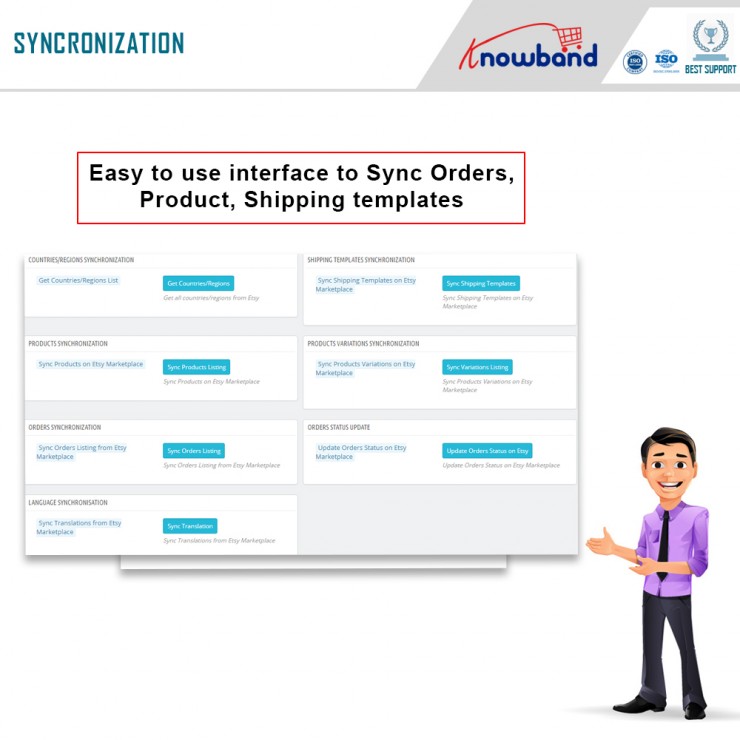
The Synchronization tab offers the cron settings. Further, used to motorize all the CRON settings. In fact, using this Synchronization tab administrator can without a doubt coordinate a lot of things. For instance, items status, request status, language sync, request declaration, and so forth.

Shipping format the executives

The director can make the conveyance profiles from this component. Also, the shipping layouts mapped to the different profiles made under the Profiles Management.

Item listing

Once over thing cron will list the items from the Prestashop Etsy Integration Module to the Etsy Marketplace close by the assortments, stock, and, thing depiction. Consequently, this component helps with posting the items.

Local Sync

Prestashop Etsy Integration Addon offers a nearby sync include. This component synchronizes the Prestashop store thing to the Etsy Prestashop Integration Addon. Besides, with the help of neighborhood sync, the administrator can synchronize their thing from the Prestashop store to the Prestashop Etsy API Integrator. Further, this tab is available under the synchronization tab of the Prestashop Etsy Marketplace Integration Addon.

Admin Demo

In the end

What do you think of these reasons? You can also call them the key features of the Prestashop Etsy Marketplace Integration Addon. The plugin by Knowband is a stunning option that can help elevate your sales and revenues. In case you are interested and have any questions, let us know at support@knowband.com.
The must-have features of the Prestashop One Page Checkout

Lessen the possibility of cart abandonment and bounce rate of your Prestashop store with this Prestashop One Page Checkout by Knowband. Which replaces the default checkout usefulness of your Prestashop store and offers the online store owners to put every one of the steps on a single page.

This gives a lot less difficult checkout process to the clients and gives them a better shopping experience too.

The Prestashop One Page Checkout by Knowband is one of the most famous modules. It has been sold more than multiple times on Knowband and the Addon Store. Along these lines, there’s even more requirement for the Prestashop One Step Checkout Addon to your store.

Now, let us investigate the features of the Responsive one page checkout Prestashop by Knowband.

Must-have features of the Prestashop One Page Checkout by Knowband

Complete the buy as a visitor

One of the best components that make Single Page checkout an absolute requirement is the Guest Checkout choice. Utilizing the visitor checkout highlights, new customers might complete their buys without enlisting in the business.

Utilize your informal communication record to sign in

Clients may effectively sign in or register thanks to the accompanying capacities. They might sign in or register involving social login choices in Prestashop’s One Page Checkout. Take, for instance, a Google, Facebook, or another social account.

Prestashop offers an assortment of installment choices

Assuming your clients like to pay through a specific strategy, he/she can do that. The choices accessible are PayPal, PayU, or Braintree, for example. You ought to have the option to oblige them. In actuality, Prestashop offers a wide scope of installment techniques.

There are many shipping choices accessible

The One-Page Responsive Checkout Prestashop offers a few conveyance choices. Mondial Relay, So Colissimo, Ulozenka Delivery, Zasielkovn Delivery, LP Express 24 Delivery, and others are a couple of models.

One will see the issues quickly with Inline Validation

Suppose a client commits an error while finishing up the data on the checkout page. The ongoing capacities of the Prestashop One Page Checkout feature the issue at a similar second. Subsequently, clients will want to cure it.

The pieces of the checkout procedure streamline

The store administrator can rapidly move the subtleties of the checkout page all over because of their need. Moreover, the Single Page Checkout administrator can without much of a stretch achieve a similar errand from the backend.

Item amount refreshes

Customers can without much of a stretch change the rundown of components on the checkout page by using the Prestashop One Page Checkout choice. Therefore, Prestashop’s One Page Checkout permits you to change something very similar on the checkout page.

Finishing out the Google auto-address structure

At the point when a client starts entering his area data, Google Auto-address fill gives address proposals. The postal district and city segment are naturally delivered when you pick the proposed address.

Various layout formats

Three different layout formats are accessible in Knowband’s Prestashop One Page Supercheckout. Besides, the store chairman might pick the one that best suits the subject of the eCommerce firm.

MailChimp, SendinBlue, and Klaviyo integrators

Clients’ exact subtleties go straightforwardly into your various records. For example, MailChimp, SendinBlue, or Klaviyo accounts. Further, when they utilize the Prestashop One Step Checkout Addon.

Information on abandoned checkouts is accessible

The One Page Responsive Checkout Prestashop likewise offers an extremely valuable capacity to the entrepreneur. They can likewise screen transformation rates at the checkout. Besides that, there are abandoned checkouts, abandoned incomes, the number of orders put in, and the money acquired from such exchanges.

Checkout Behavior Report

The administrator will right now need to know the number of fields their clients are finishing up. It provides the overseer with a decent comprehension of which checkout stage the clients skipped and abandoned their shopping baskets.

The finished marker with the expectation of complimentary shipping

A free shipping progress bar is accessible in the most recent variant of the Prestashop One Page Checkout. Clients may likewise perceive the amount they need to add to their shopping to fit the bill ‘with the expectation of complimentary conveyance.’

Making a new customer profiles

Besides the abilities recorded over, the new version currently permits you to make unmistakable client profiles. The director can characterize custom profile type fields on the checkout page utilizing this ability.

Front Demo.

Back Office Demo.

In the End

Thusly, with this multitude of elements, the Prestashop One Page Checkout by Knowband is an unquestionable requirement. In addition, there are various advantages of introducing the plugin in your store. What do you think of the addon? Do you have any queries related to the module? Do let us know at support@knowband.com.
👉Explore the Module with Our Video Guide


Why choose OpenCart Etsy Integration Extension for selling on Etsy?

Looking for a viable point of interaction to deal with the product listing, inventory, and orders? OpenCart Etsy Integration Extension presented by Knowband is the right tool. The OpenCart Etsy Integration deals with the exercises on the stage. For example, product listing, inventory, and orders. As a matter of fact, the administrator can do this from the administrator board of the OpenCart Etsy Marketplace Integration.

In this blog, we will investigate the justifications for why you should pick the OpenCart Etsy Integration Extension by Knowband. Will we go forward and look at them?

Why use OpenCart Etsy Integration Plugin to sell on the Etsy marketplace?

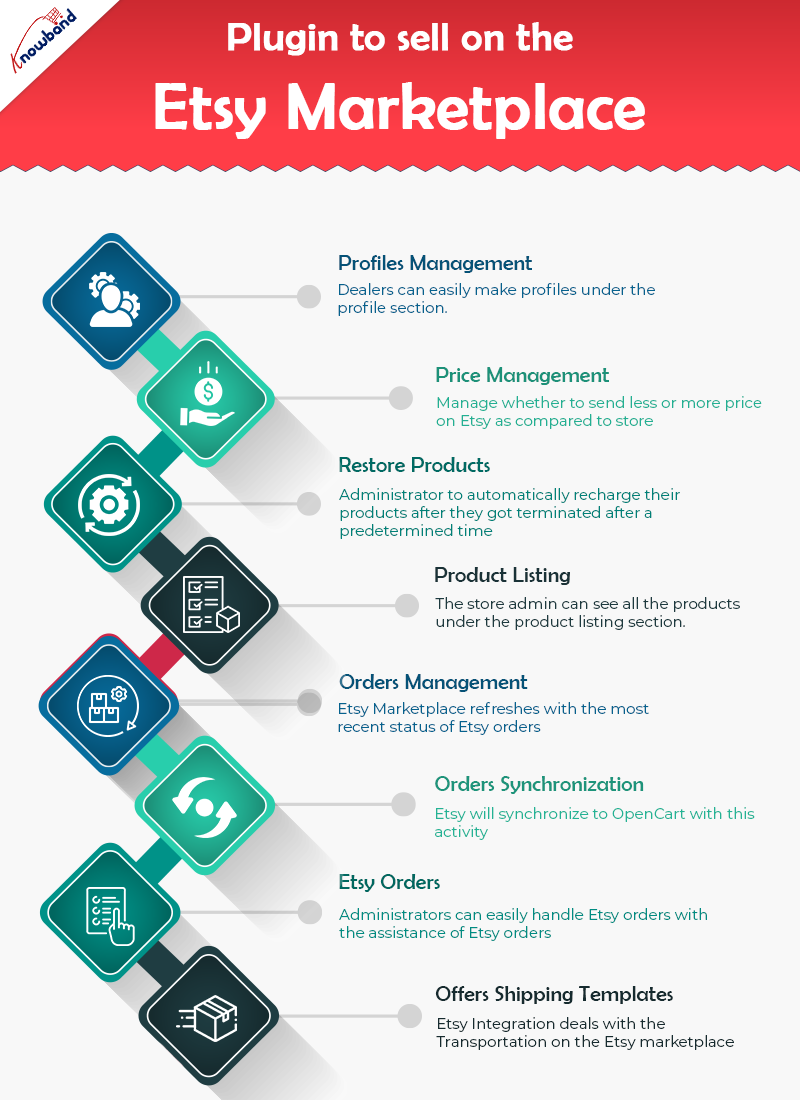
OpenCart Etsy Connector oversees profiles easily

The profile component of the module helps dealers in making profiles. In addition, select the essential settings to list the product. Moreover, the necessary strides to make a profile are – the Select Shop Section, Auto-Renew Option, and a couple of different fields. Further, to plan the OpenCart store class to the Etsy Marketplace classification.

Price Management is a highlight in the Etsy OpenCart Connector

The OpenCart Etsy Integrator permits administrators to put their products on the Etsy marketplace. Further, at an unexpected cost in comparison to the one in their OpenCart store. The Etsy OpenCart Integration incorporates the capacity to list products in light of a fixed or rate-based sequential cost.

Automatically restore products

The OpenCart Etsy API integration gives an auto-recharge highlight. Further, that allows the administrator to automatically recharge their products after they got terminated after a predetermined time. Also, you will track down this element under the Profiles tab of Etsy OpenCart API integration.

Product Listing

Administrators can see every one of the products including those which should be listed on the Etsy marketplace. Further, it is under the product listing tab of the OpenCart to Etsy Synchronization. Besides, products that are right now distributed on Etsy can likewise be seen under the product listing tab. The administrator can see the product picture and that’s just the beginning, in fact. For instance, Etsy Listing Id, Name, Profile to which the product coordinates, Listing Status, and Date Added. By tapping on the product name on the Etsy store page, administrators can see their listed product.

Orders Management

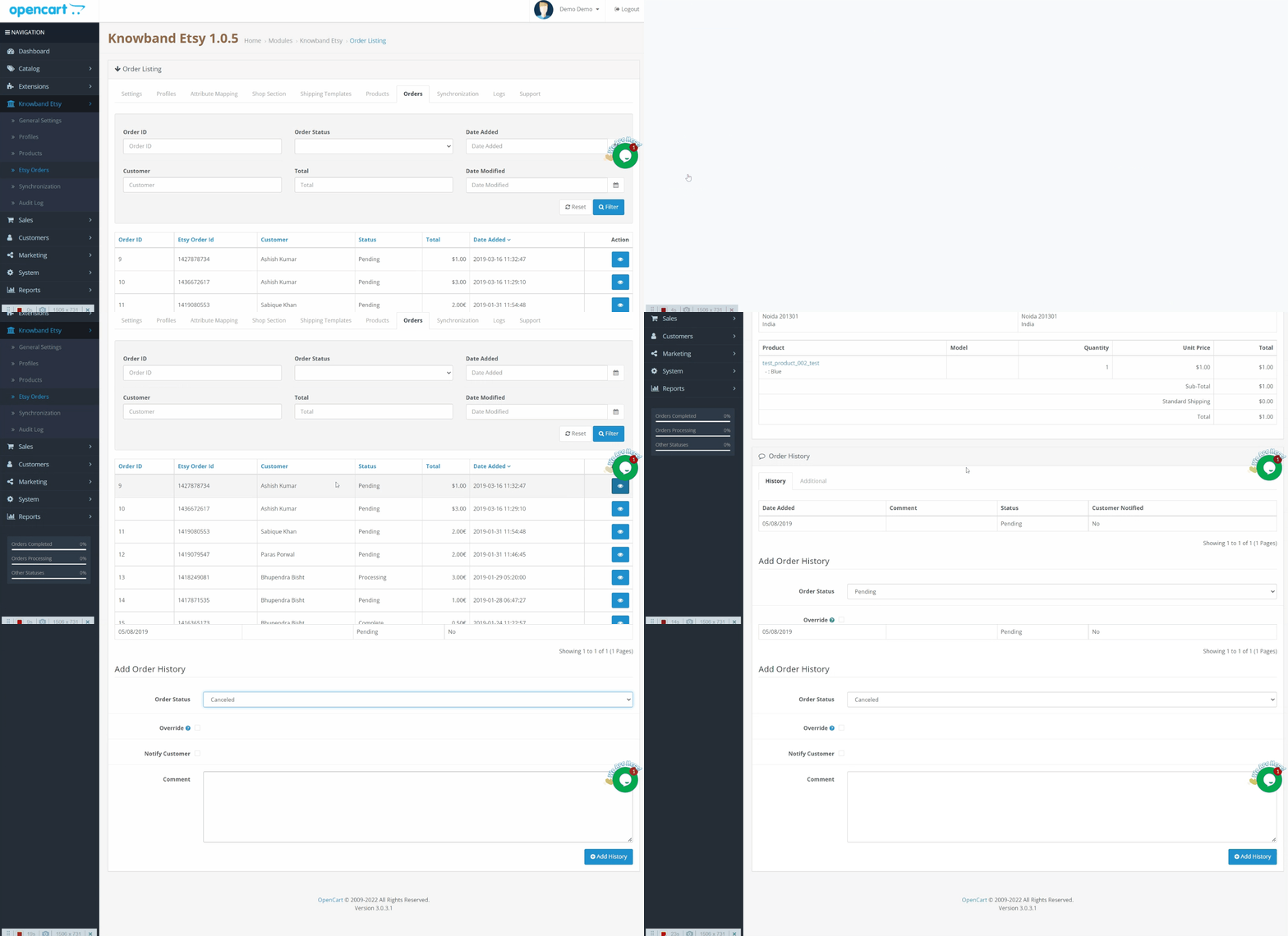
The order executives component of OpenCart Etsy Integration Extension assists vendors with synchronizing the Etsy store orders to the Opencart store. The element even cycles the orders from the Opencart store itself. Further, the Etsy Marketplace refreshes with the most recent status of Etsy orders.

OpenCart Etsy Integration gives Orders Synchronization

The orders from Etsy will synchronize to OpenCart with this activity. To import orders from Etsy to Opencart, click the ‘Orders Synchronization’ button. This element is available under the OpenCart Etsy Marketplace Integration’s Synchronization tab.

Etsy Orders

Etsy orders make it more straightforward for the store administrator to oversee orders from inside the OpenCart stage. This capacity is advantageous in saving time and exertion. Store administrators can easily handle Etsy orders with the assistance of Etsy orders.

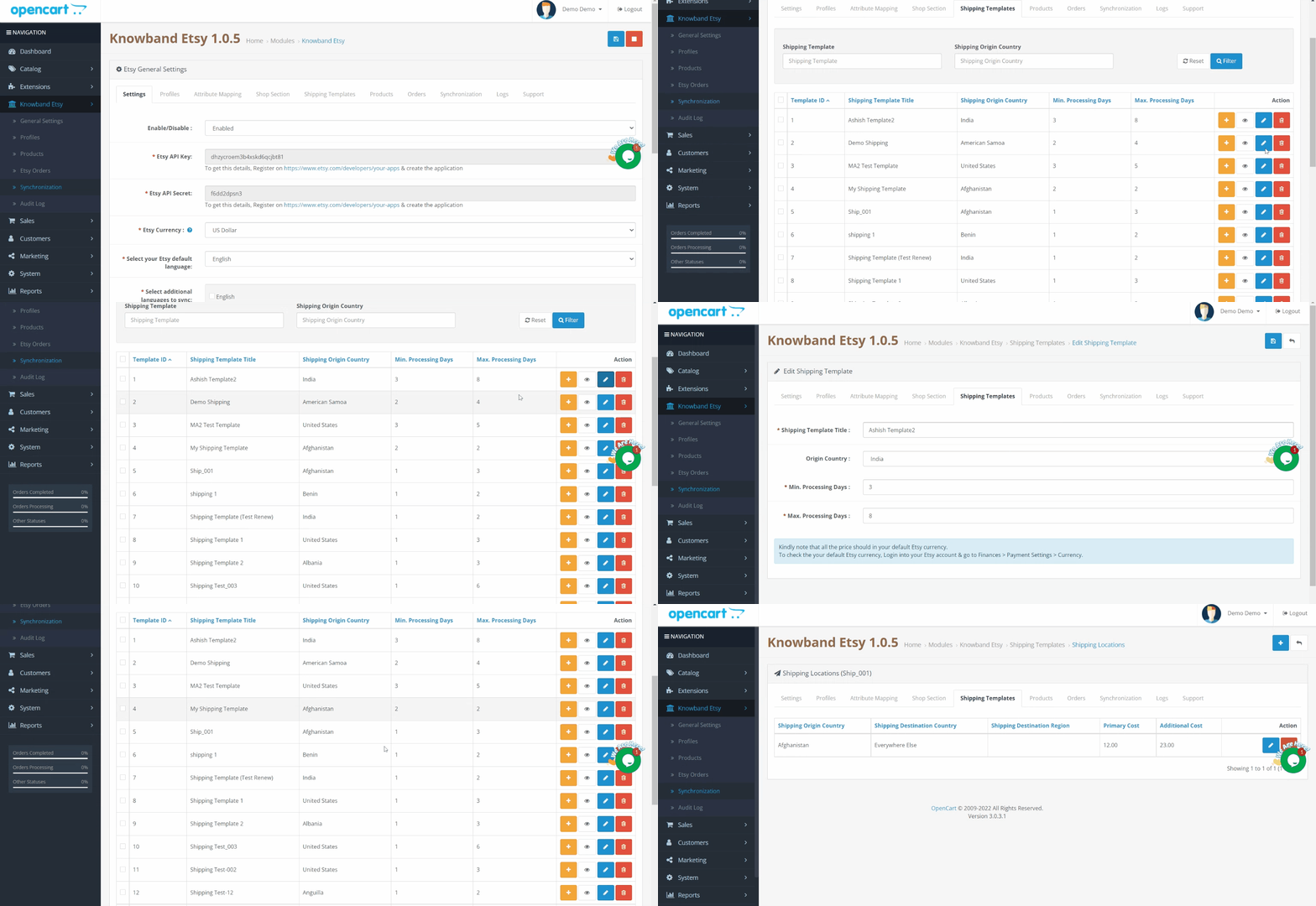
OpenCart Etsy Integration Extension offers Shipping Templates

The delivery formats element of Opencart Etsy Integration deals with the transportation on the Etsy marketplace. The Etsy OpenCart Connector permits the OpenCart shop administrator to configure delivering formats. Further, that will synchronize to Etsy, very much like the Etsy Marketplace.

Finally!!

Therefore, now you know why the OpenCart Etsy Integration Extension by Knowband is a must. If you have any kind of queries related to the OpenCart extension, let us know at support@knowband.com.

Tell-tale signs that you need these 3 Prestashop modules

It is only at the point when you really think something is missing, that you understand what will actually make a difference. In fact, that’s something true with all genres and fields – eCommerce is no different. When you have a Prestashop store, you certainly include different addons with time you think, it’s time to make some changes.

In this blog, we will look at 3 Prestashop modules that make a vast difference for any eCommerce business that they have associated with. Further, we will talk about what these 3 Prestashop modules do. Later, we’ll lay down the signs that you really need to install these 3 Prestashop modules in your eCommerce store for better results.

Let’s get down to the 3 Prestashop modules below.

Prestashop module One Page Supercheckout Addon

The Prestashop One Page Supercheckout addon is one of the maximum beneficial modules in your business. The Prestashop One Page Checkout Addon is supposed to lessen the variety of superfluous fields on the checkout page. By simplifying the page, you may easily reduce your store’s departure rate as well as the abandoned cart rate. Furthermore, you can boost your store’s conversions, sales, and income. It is feature-rich and guarantees positive outcomes.

You’re in for a successful conversion with features like social login, guest checkout, custom field prioritization, and more.

Signs that you need the Responsive one page checkout Prestashop

Increased abandoned cart rate – customers exiting on the checkout page

Decreased sales and revenues

Prestashop module Abandoned Cart Module

Knowband’s Prestashop Abandoned Cart plugin is a great way to minimize your store’s abandoned cart rate. You can easily send reminder emails to your customers with the Prestashop abandoned cart email follow up plugin.

Furthermore, those who abandoned their shopping carts. It is entirely up to you whether or not to include the promo code in the mail. The discount code works as a motivator for buyers to complete their transactions.

The following are some of the features that make the Prestashop abandoned cart reminder plugin a must-have. For example, you may recover lost purchases, issue reminder popups, and send web push alerts, among other things.

Signs that you need the Prestashop Abandoned cart recovery email addon

Increased abandoned cart rate

Customers are not willing to complete the purchase even when online.

Prestashop module eBay Marketplace Integration Module

Knowband’s eBay PrestaShop Integration Module lets the admin promote his commodities on eBay. How? It simply connects your shop to eBay. Furthermore, it enables you to map your items on the marketplace and begin selling.

However, that is only the first impression. In fact, having the eBay Marketplace Connector module has a slew of other advantages.

Bulk product listing, pricing control, order management, and other capabilities are among the highlights.

Signs that you need the Prestashop eBay API Integration Module

You want to expand your business

You see the potential of growing your customer base

When you’re willing to increase the sales and revenues.

In the End

Hence, these were the 3 Prestashop modules by Knowband that you really should invest in. Further, when you see these tell-tale secrets for sure. Get in touch with us at support@knowband.com for any information about these 3 Prestashop modules or any eCommerce solutions.

Further reading for the most useful Prestashop addons available for you:

BEST PRESTASHOP MODULES FOR THE ADMIN

POPULAR PRESTASHOP ADDONS FOR THE E-COMMERCE STORES

6 PRESTASHOP ADDONS FOR CUSTOMER ENGAGEMENT

Why is the Prestashop One Page Checkout an integral choice?

Knowband’s Prestashop One Page Checkout is an astonishing option for your eCommerce business. Truly, a superb apparatus can help your eCommerce organization in an assortment of circumstances. In this article, we will investigate why the Single Page checkout is an absolute requirement. Above all, how about we examine how Responsive one page checkout Prestashop functions.

Presently, how about we look at the reasons you want to purchase the Prestashop One Step Checkout Addon.

Why is Prestashop One Page Checkout by Knowband popular?

The motive of the Prestashop responsive one step checkout addon

Knowband’s One Step Checkout Prestashop Module assists you with smoothing out the checkout page. Besides, it helps the owner in diminishing cart relinquishment and expanding incomes. It further develops purchaser fulfillment. Besides, the administrator can add or erase custom fields from the checkout page. Therefore, to ensure that clients do not worry while finishing the information. Besides, finish the buying system effortlessly. Since checkout is a crucial point in time when most carts abandon.

The Prestashop one page checkout is a consistent arrangement

Knowband guarantees that the Prestashop module is a simple choice for you. In fact, beginning from the establishment to its working, everything occurs easily. Moreover, update the boundaries from the administrator connection point to guarantee that it runs well. Therefore, you can rapidly help your organization’s development.

The Prestashop One Page Supercheckout incorporates a visitor checkout choice

Visitor checkout is a fabulous other option. A checkout technique ought to likewise contain. Truth be told, this capacity permits clients to shop without first enrolling on the site. Besides, people can undoubtedly complete their exchanges in the store without giving an excessive number of subtleties. Thus, the Prestashop One Page Checkout sparkles with the visitor checkout.

There is a social login highlight

The meaning of social login usefulness is not generally hidden. Besides, customers can easily join or sign in utilizing social login. Truth be told, Facebook and Google are two of the most famous potential outcomes. The Prestashop One Page Checkout Addon from Knowband, then again, gives buyers two other options.

Additional features of Knowband Prestashop One Page Supercheckout 

  • Prestashop One Page Supercheckout acknowledges an assortment of installment and conveyance techniques.
  • The in-line validation system guarantees that no mistakes happen. As a general rule, if the buyer commits a blunder while finishing up the structure, the strategy will fall flat.
  • The administrator can lay out many profiles for clients utilizing the client profile’s usefulness. For instance, businesses, individuals, etc. Accordingly, when the customer chooses the profile, every one of the information under that profile will be accessible. For instance, the location, contact data, etc.
  • Integrators for MailChimp, Klaviyo, and SendinBlue are accessible in the module. You can catch a shopper’s information in your MailChimp, SendinBlue, or Klaviyo account when they enter their data.
  • There is a back-end choice where the custom CSS and JSS might be acquainted with the checkout page. The store executive might use this part of the Prestashop One Page Checkout to roll out important improvements without changing the code of the Prestashop one page checkout module.
  • This element of the Prestashop One Page Checkout addon permits the store administrator to concentrate on the way of behaving of customers. Further, who forsakes the bin while on the checkout page. The module shows a rate worth of the data. Moreover, given by online clients who abandoned their bins. This permits the overseer to discard superfluous areas. That of the checkout cycle and abatement cart surrender.
  • The Prestashop module permits the store head to effectively modify delivering/installment strategies and that’s just the beginning. Further, the name, or the thumbnail picture without changing the code.
  • The Prestashop addon incorporates a setting that permits store chairmen to make any field discretionary or compulsory.
  • The store administrator can likewise sort out some way to orchestrate all area fields utilizing the Prestashop module’s worked-on component.

Advantages of Prestashop One Page Checkout 

The checkout cycle becomes straightforward

The module consolidates the entire checkout process onto a single page. This way simplifies it for clients to fill in their data.

Customers’ time is saved

Clients don’t need to finish out such a large number of fields or burden a few pages to buy with Knowband’s Prestashop responsive one step checkout addon. They can finish up the structure quickly and easily, and their exchange will finish in a matter of moments.

There will be lesser abandoned carts

It requires a great deal of work to draw in clients to the checkout page, and assuming he passes on the site without completing the exchange because of solid and tedious checkouts, he feels upset. The Responsive one page checkout Prestashop takes out this obstruction by making the checkout page perfect and simple. Further, permitting clients to rapidly complete their shopping.

The conversion rate increases

The Prestashop One Page Checkout from Knowband further develops your customers’ checkout experience. Moreover, assists you with expanding your web-based company’s change rate.

Mobile-friendly

Customers can likewise finish orders utilizing their smartphones on account of the addon’s versatile checkout interface.

Conclusion

There is a long way to go about the One Step Checkout Prestashop Module. For sure, these are the reasons that make Knowband’s Prestashop one page checkout an unquestionable requirement. What is your take? If it’s not too much trouble, reach us at support@knowband.com assuming that you have any inquiries. You could look at additional insights concerning the module on the Knowband store.

Further sources for most useful Prestashop addons:

BEST PRESTASHOP MODULES FOR THE ADMIN

POPULAR PRESTASHOP ADDONS FOR THE E-COMMERCE STORES

6 PRESTASHOP ADDONS FOR CUSTOMER ENGAGEMENT