When we go through OpenCart forum, we come across many such questions where merchants put forward their requirements which we feel can be fulfilled by the extensions which aren’t popular or which they are not aware of.
Popular extensions are always on demand while other extensions get unnoticed. In this write-up, I will be covering those useful but highly underrated extensions that can be fruitful for the OpenCart merchants.
1. Preferred Delivery Time
OpenCart Preferred Delivery Time extension allows customers to pick a desired date and time slot for their order delivery. Many times, it happens that customers want to receive the product on a fixed date and time slot; majorly when they want to gift someone or when they do not want to miss on the product due to their unavailability. With this module, you can encourage users to choose the preferred delivery date and time as per their convenience and availability.
From the back-end configurations, you can adjust the time-slots, specify the non-delivery days and also allow consumers to update the delivery date and time even after they have placed the order.
2. Advanced One Page Checkout
If you do not want your customers to go through a multi-step checkout process and want to offer a short and seamless checkout experience, OpenCart Advanced One Page Checkout is the extension you need.
The extension adds a responsive one page checkout popup on your website and allows customers to switch between the checkout fields without requiring to load multiple pages or getting the URL changed. It offers guest checkout, social login, option to customize checkout fields, etc. and encourages a quick checkout.
3. Store Locator and Pickup
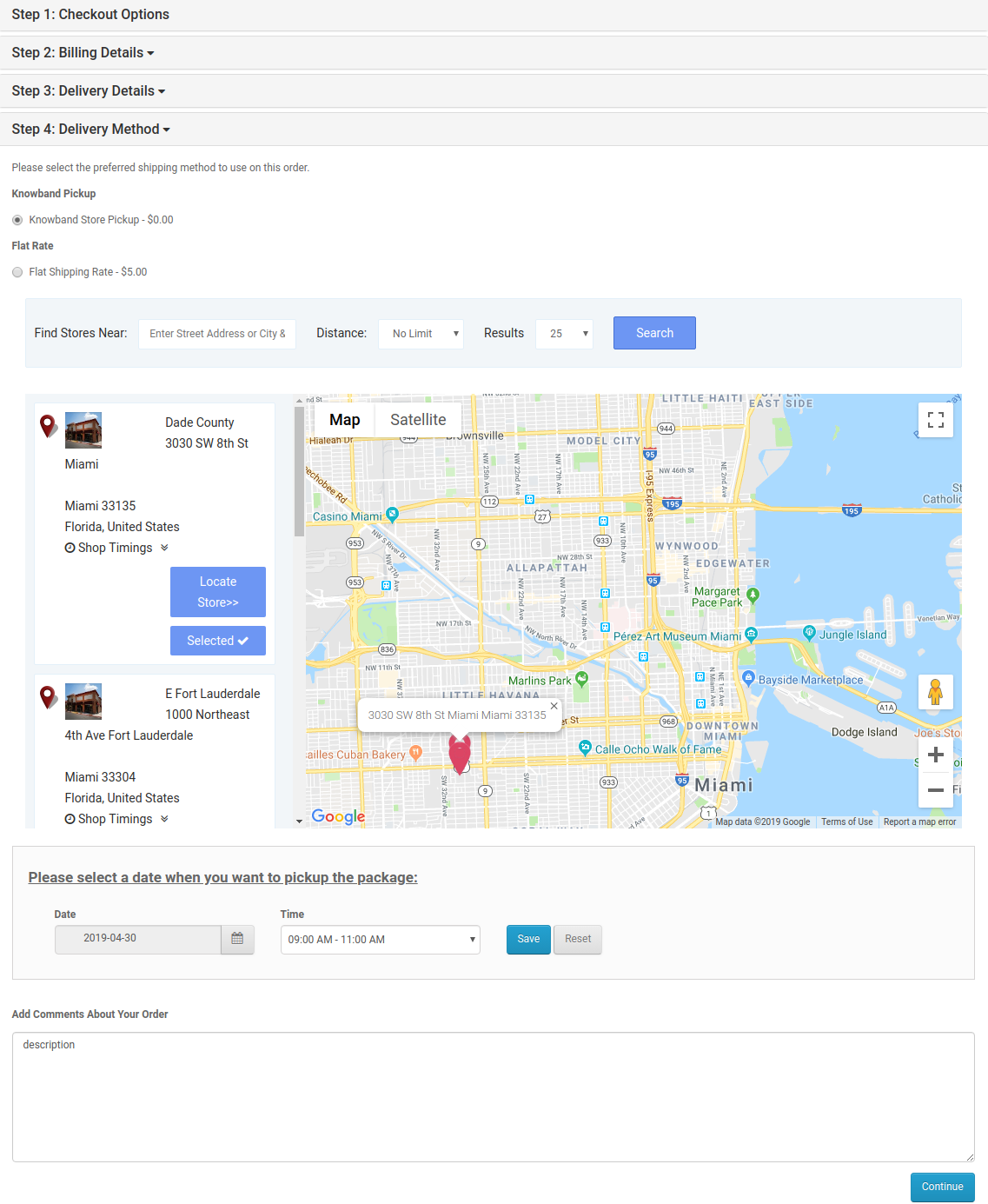
OpenCart Store Locator and Pickup extension encourages the in-store pickup facility and allows your customers to self-pickup the items from your stores at their desired date and time slot. They can locate the nearby stores and choose the pickup date and time accordingly.
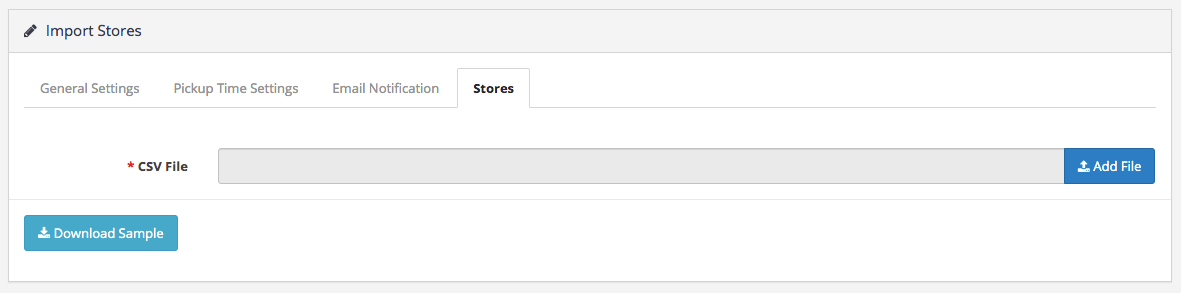
You can add (manually or through CSV upload) multiple stores, adjust the pick-up timings and perform various other tasks from the back-end.
4. Spam Blocker
On the forum, many OpenCart merchants complain about receiving spam traffic on their website. This can be avoided by OpenCart Spam Blocker.
OpenCart Blocker lets you restrict bots coming to your website from various IP addresses. You can specify those IP addresses and block them. Similarly, you can prevent spammers from different countries or User agents (Mozilla, Chrome, etc).
In case if you block a genuine customer, they can raise an unblock request which you can check from the back-end. The extension helps you keep your website safe and secure with real users.
5. Free Shipping Manager
Consumers crave free shipping. They get delighted if they do not have to pay the shipping price but offering free shipping isn’t easy especially for small and mid-scale companies.
With OpenCart Free Shipping Manager, you can create certain free shipping rules, such as Free shipping on a certain amount and certain weight. You can specify the amount and weight of the order which needs to be matched for a customer to get free shipping on his/her order. You can also specify countries which will be restricted from the free shipping rules.
The extension helps in increasing the average order value on your store.
6. Private Shop
OpenCart Private Shop extension allows merchants to make their shop or store private. They can restrict access to their store and let only selected customers or wholesale members explore it.
You can privatize the entire store or restrict access to some specific pages only. Users are required to sign-up initially and only after the admin’s approval from the back-end, they will be able to access the store.
7. Product Availability Check by Zipcode
OpenCart Zipcode Validator extension adds a “Check Availability” tab on your product pages, using which shoppers can check whether the product is available for delivery at their location or not by specifying their area zip code.
This saves a customer’s time as they do not need to head to the checkout page, put their address and then confirm whether it is eligible for delivery or not at your location. A customer cannot proceed to the checkout page without checking the product availability.
8. PDF Invoice
OpenCart PDF Invoice extension allows merchants to send customers their order’s invoice in the PDF format in the order confirmation email. They can also download it from their order history.
The extension comes with multiple options to customize the invoice.
9. Cash on Delivery with Fee
OpenCart Cash on Delivery with Fee extension lets you charge some additional fee to your customers on their COD order. It is helpful for those shoppers who do not want to share their card details with the website and are ready to pay some additional amount for cash-on-delivery mode. You can charge customers with a fixed or percentage-based fee.
For any queries or assistance regarding these OpenCart extensions, kindly contact us at support@knowband.com
But sometimes, when we go through PrestaShop forum, we stumble across many questions where merchants put forward their requirements which we can be fulfilled by the modules which aren’t popular or which they are not aware of.
In this write-up, I will be covering those useful but highly underrated modules that can be fruitful for the PrestaShop merchants.
1. Preferred Delivery Time
We get queries where merchants want such a module through which their customers can get the product delivered on the desired date. PrestaShop Preferred Delivery Time module is the one you need.
With the help of this module, you can allow customers to pick a desired date and time slot for their order delivery. So, if they want to gift someone something on a specific date or want to receive the order for themselves at a specific date and time, this module will help them do so.
From the back-end, you can adjust the time-slots, specify the non-delivery days and also allow customers to update the delivery date and time even after placing the order.
2. Advanced One Page Checkout
If you do not want your customers to go through multiple steps/pages before they complete their checkout, PrestaShop Advanced One Page Checkout is the module you should consider.
It makes your checkout process static which means shoppers do not need to load multiple pages. A responsive checkout popup is added to your website and customers can switch between fields without the URL getting changed.
You should definitely give it a try once.
3. Quick Login Popup
PrestaShop Quick Login Popup enhances the login/sign-up experience of your site visitors. When a visitor lands on your website, he/she does not need to go to the registration page separately in order to log in or create their account.
Clicking on the “Sign in” button will open a registration popup without the URL getting changed. The popup can also be closed immediately; users do not need to hit the back button. You can customize the popup display and also highlight your deals or specify the benefits indicating why a visitor should register on your website.
4. Store Locator and Pickup
PrestaShop Store Locator and Pickup module encourages the in-store pickup facility and allows your customers to self-pickup the items from your stores at a specific date and time slot. They can search the nearby stores and choose accordingly. Due to COVID-19 pandemic, many merchants have initiated the pick-up facility on their website.
From the back-end, you can add your stores, adjust the pick-up timings, notify stores via email as soon as a customer places the order and perform various other tasks.
5. Additional Order Forms/Field Manager
With the help of PrestaShop Additional Order Forms module, you can add additional fields on the checkout page without making any code changes. You can add a text field allowing customers to add a note related to the order, place a checkbox, and many other custom fields.
6. Custom Registration Fields
PrestaShop Custom Registration Fields module lets you customize or add additional fields to your registration page. You can enable validation on custom fields to display an error if the input is wrong and perform many other customizations.
7. Birthday Coupon
One of the best ways to call your customers back to your store to shop is by offering them a coupon code and there cannot be a better day to call them than their birthday.
With PrestaShop Birthday Coupon module, you can make your customers’ birthday special by providing them with an exclusive coupon code to shop. This not only helps you retain that customer but also improves customer loyalty.
Various customizations can be made from the back-end.
8. Page Maker
PrestaShop Page Maker module allows website owners to create and customize N number of web pages on their site without making any changes in the code file. You can display multiple blocks like Best Sellers, New Arrivals, Featured Products on the same page. It provides an SEO-friendly URL to the newly created web pages.
9. Advance Product Attribute
With the help of PrestaShop Advance Product Attribute module, website owners can add additional fields on the product page. You can place a checkbox option, comment box, warranty option and much more.
This allows you to improve the purchase experience of shoppers and also makes your product page user-friendly.
10. Login as Customer
PrestaShop Login as Customer module allows store admins to log in to the customer’s account without requiring a password to get insights if a customer reports any kind of problem. This helps you resolve customer issues in a matter of moment.
For any queries or assistance regarding the modules, kindly contact us at support@knowband.com
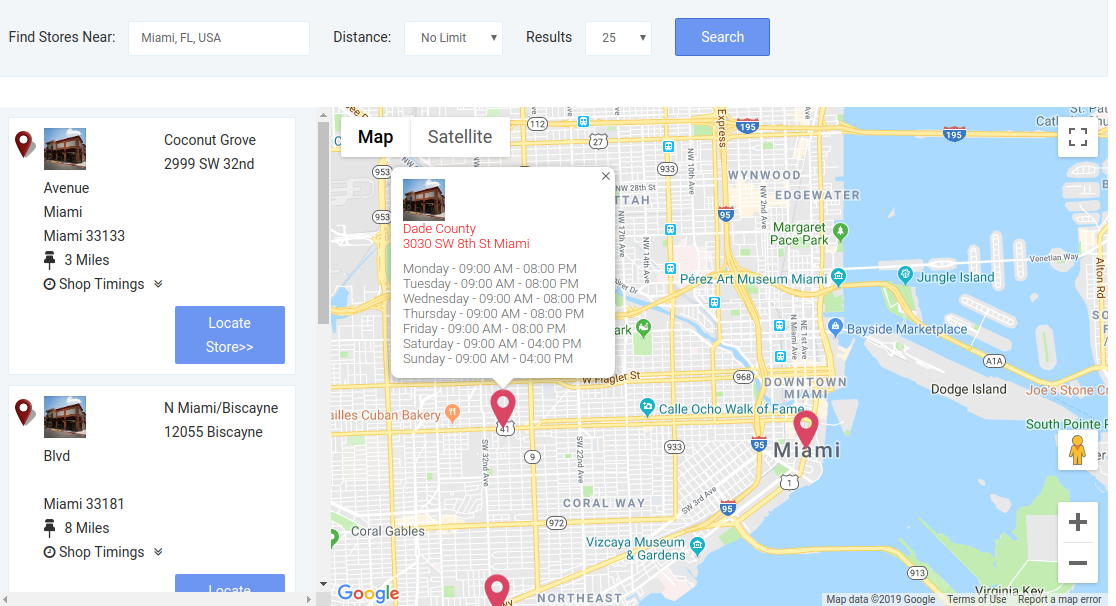
OpenCart Store Locator and Pickup extension by Knowband allows the store admin to show physical stores locations on the website front-end using Google map. With the OpenCart in-store pickup module, the store visitors can find the closest store that has the products of their choice. The admin can display a store locator on the website with some additional details like distance, contact number, name, and timing. They can check the nearest store and select the one from where they want to pick up the product.
This OpenCart store locator and pickup plugin offer a user-friendly interface and the admin can easily configure it without any help. The admin can select multiple stores that are to be shown in the store locator. The OpenCart store locator and pickup plugin allow the admin to set the minimum and the maximum number of days within which the product pickup will be initiated. The customers can easily check the nearest store and view the details also. They can pick up the product if they wish to. Thus they can get the product with greater and minimal time.
1.1 Striking Features of Store Locator Extension for OpenCart:
The OpenCart Store Locator Extension provides you with multiple features which are fully customizable and easy to configure from the back-end interface without requiring any coding knowledge. The various striking features of the OpenCart Store Locator Extension have been listed below:
The store owner can activate the store locator and pickup functionality just by a button toggle.
The e-merchant can set an image as a Google map marker and the zoom level of the map.
The OpenCart plugin allows the store admin to show contact numbers also.
The Customer can search the store by providing the distance in km or miles.
Customers can also search the store by entering their locations.
The store admin can add multiple stores and show them on the Google map. The admin can also select the default store.
OpenCart in-store pickup plugin allows the e-merchant to set the maximum pickup days.
The Opencart store locator and pickup module allow the store admin to show the store locator in the header menu.
The online store owner can set the date and time format.
The e-merchant can enable the settings to display the pick-up time slot.
The admin can set the minimum hours for which the customer has to wait for the pickup of the ordered product.
Store admin can enable e-mail notification settings. Enabling this setting will automatically send an e-mail to the store owner about the received order.
The OpenCart store locator and pickup module have a ready-made email template for sending an email notification to the pick-up stores about the order.
The OpenCart Google Maps Store Locator plugin allows the admin to upload store details in bulk using a CSV file. Store admin can also download a sample CSV file.
The store admin can also set store working days and hours at the time of listing.
The OpenCart store locator and pickup module are Multi-lingual compatible.
It is very easy to install, configure and activate this OpenCart store locator and pickup plugin.
The product will be delivered to the selected store. The customer can pick up the product from the store.
The address of delivery will be the selected store’s address.
1.2 Technology for Development
Language: PHP
Framework: OpenCart (2.0.x. to 3.0.x)
2.0 Installation Guide
To install this OpenCart Store Locator Module, please follow the following steps:
Purchase the OpenCart Store Locator Extension from the Knowband store. You’ll get the following files:
Zipped File containing the source code of the OpenCart Store Locator module.
User Manual of OpenCart Store Locator plugin.
Follow the steps below to install the OpenCart Store Locator Extension in the OpenCart store:
1. Unzip the zipped. You’ll get the folders as shown in the image below:
2. Upload all the files and folders of the zip file in the Root Directory of OpenCart setup via FTP manager.
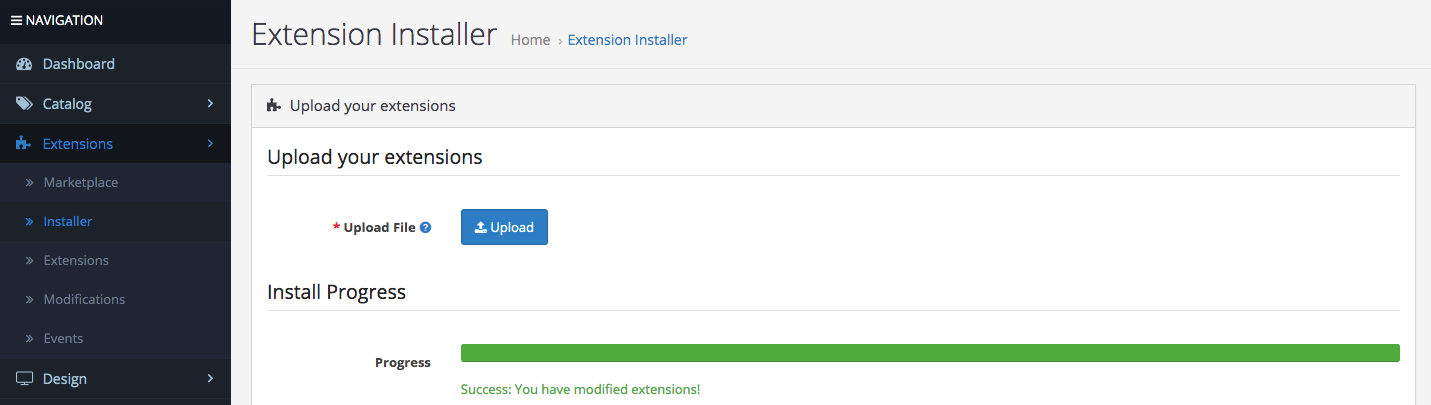
3. Install the OCMOD file from the Opencart Admin Side.
4. Refresh the OCMOD cache from the Extensions -> Modification.
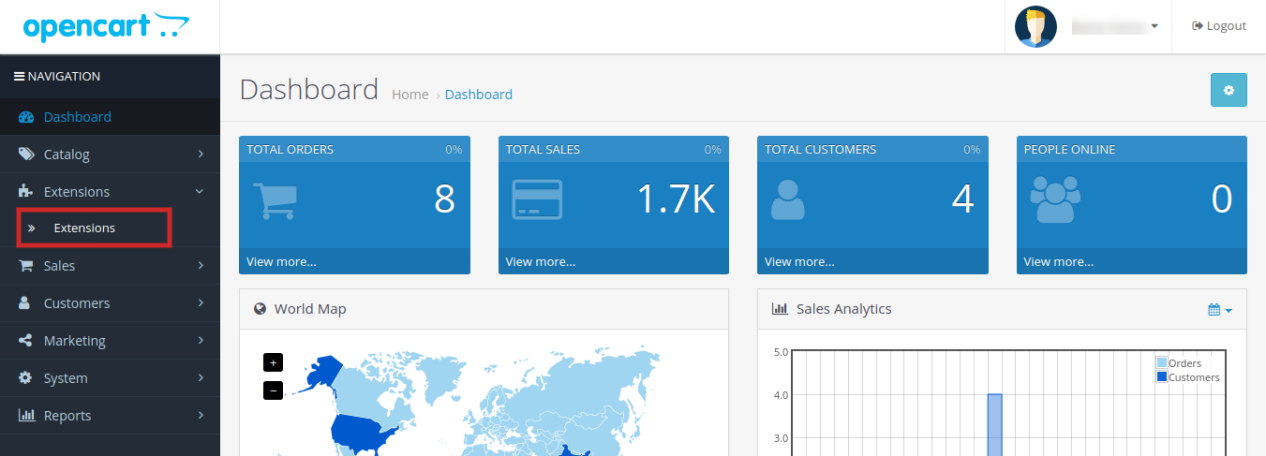
5. Login via FTP OR Control panel & make the folder i.e. image/kbstore_locator writable. Once done, Go to Extensions ->Extensions ->Modules & Install the module.
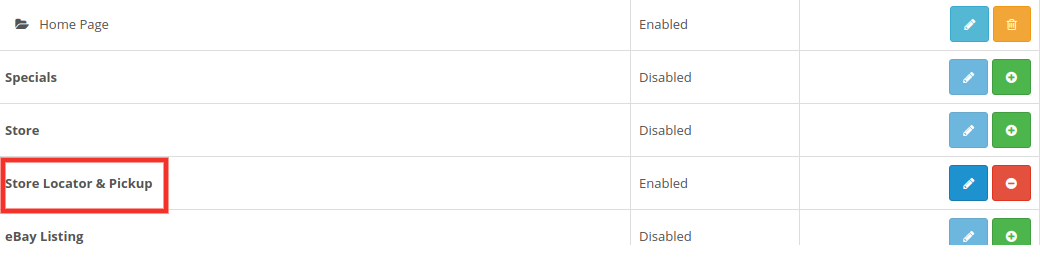
6. The OpenCart Store Locator module is now installed and is ready to use as shown in the image below:
3.0 Admin Interface of OpenCart Store Locator Extension
OpenCart Store Locator extension offers an easy customization option to the store admin. The various configuration options are discussed in detail below:
3.1 General Settings:
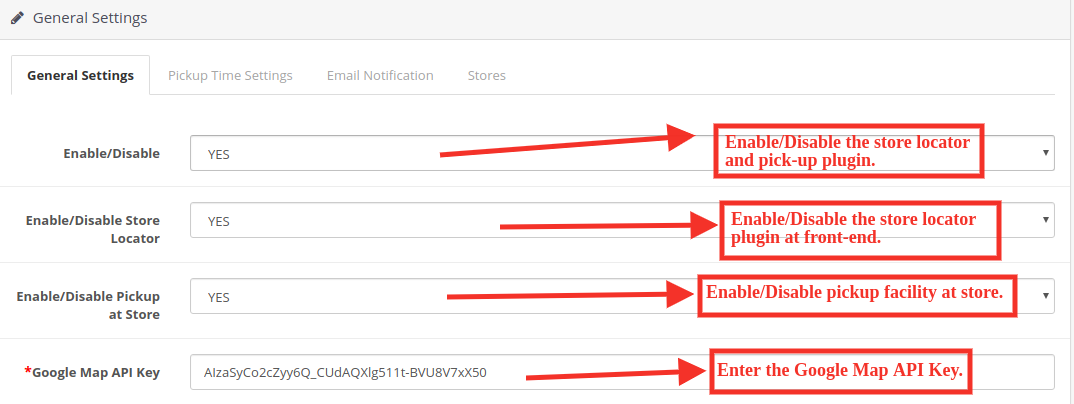
This General Settings page offer various configuration options as shown below:
Enable/Disable: The eCommerce store admin can activate or deactivate the store locator and pick-up plugin anytime just by toggling this button.
Enable/Disable Store Locator: The OpenCart Store Locator extension allows the admin to enable or disable the store locator in the front-end. By default, it will be enabled.
Enable/Disable the Pickup at Store: The admin can activate the pickup from the store just by toggling this button.
Google Map API Key: Enter the Google map API key in this section. A link is provided for generating an API key.
3.1.1 How to generate the Google Map API Key? General Settings:
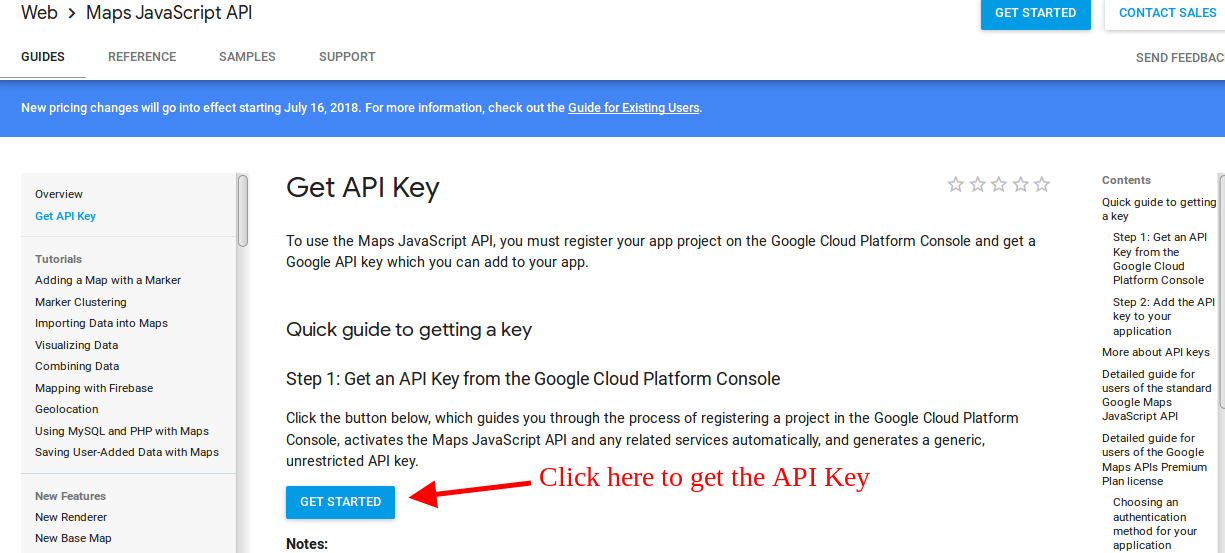
The eCommerce store admin can generate the Google API key by following these steps:
Click on the “Get Started” button: The admin can click on this button to get the Google map API key.
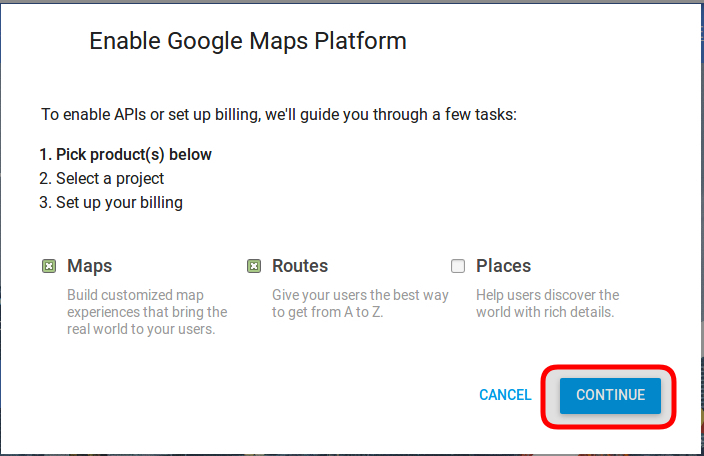
Pickup the products: When the admin will click the “Get Started” button this pop-up will be displayed.
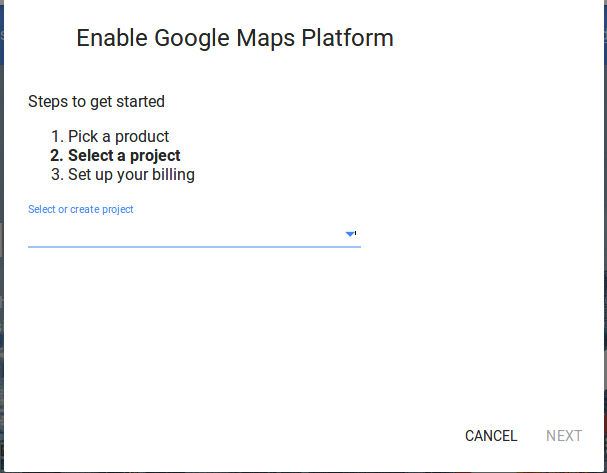
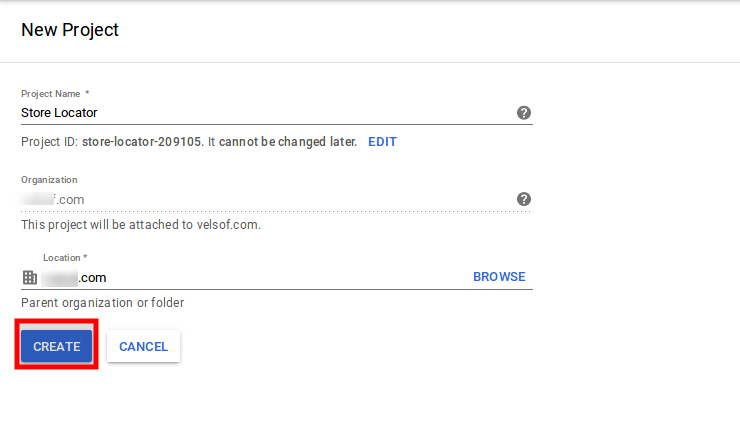
Project selection: The eCommerce store admin can select or create a project.
1. Select a project:
2. Create a new project:
Setup the billing: The eCommerce store admin can now set up the billing.
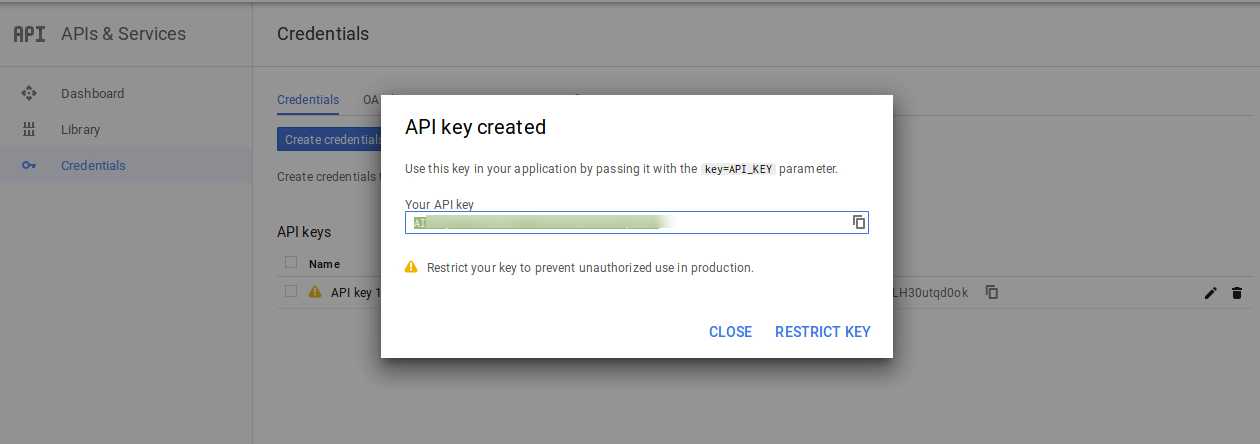
After billing the store admin can get their Google map API key.
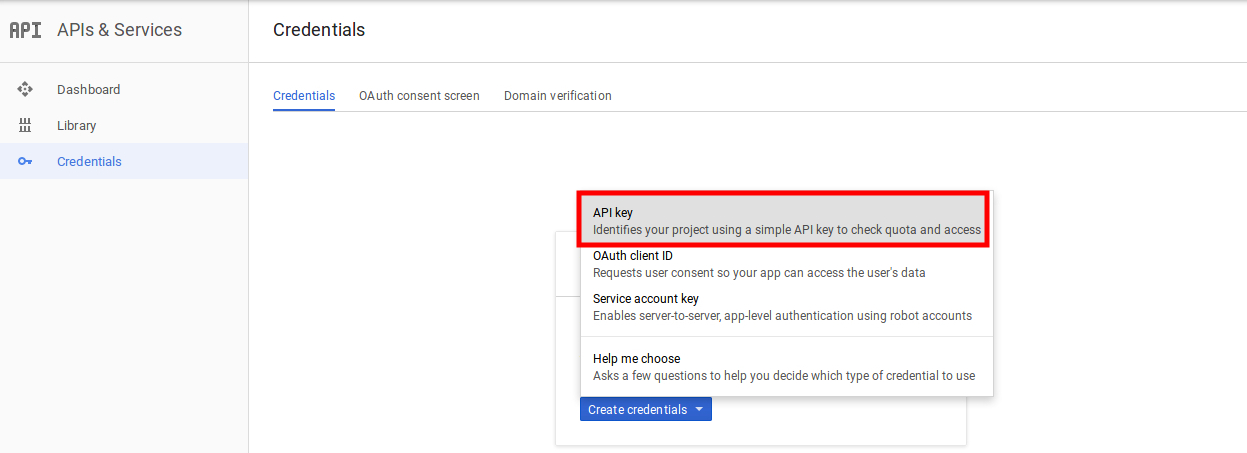
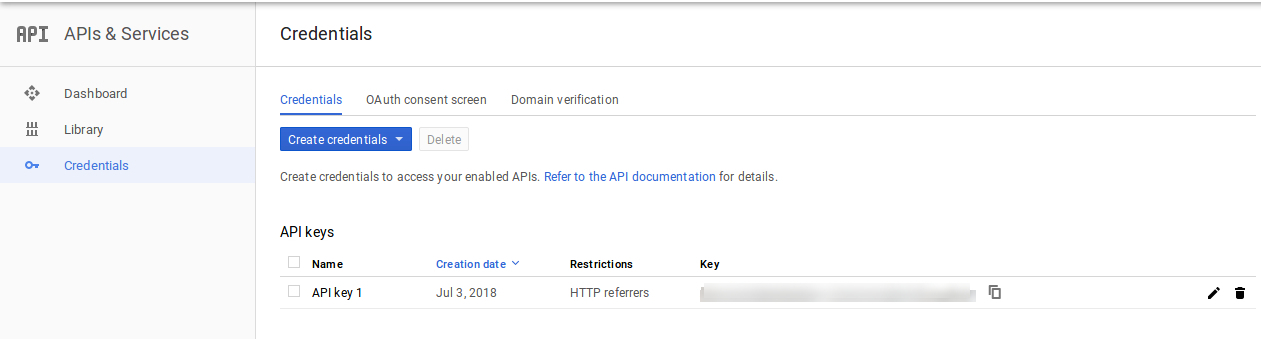
On the Credentials page, get an API key, store admin can select the API key option:
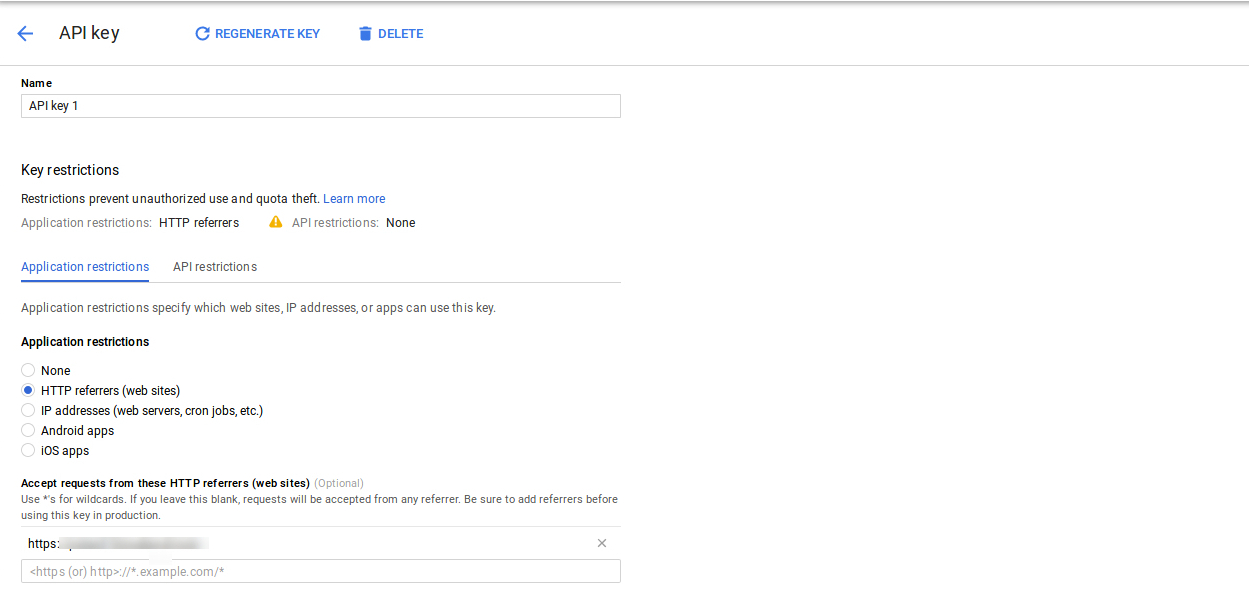
The admin can select the restrict key option from the dialog box to set a browser restriction on the API key.
In the Key restriction section, the store admin can select HTTP referrers (web sites), then follow the on-screen instructions to set referrers.
This way the admin can set the Google map API key.
Enable Libraries:
To use Google map API, You need to enable the following libraries in the Google Developer Project.
1. Maps Javascript API 2. Place API 3. Geolocation API
Steps to enable the libraries:
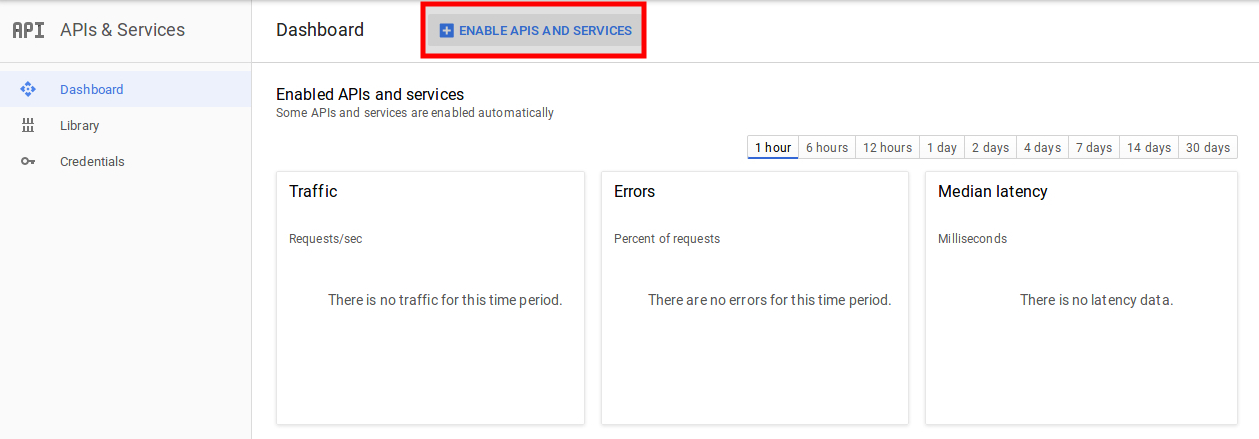
1. Click on the “Enable API & Services” button as shown in the image below:
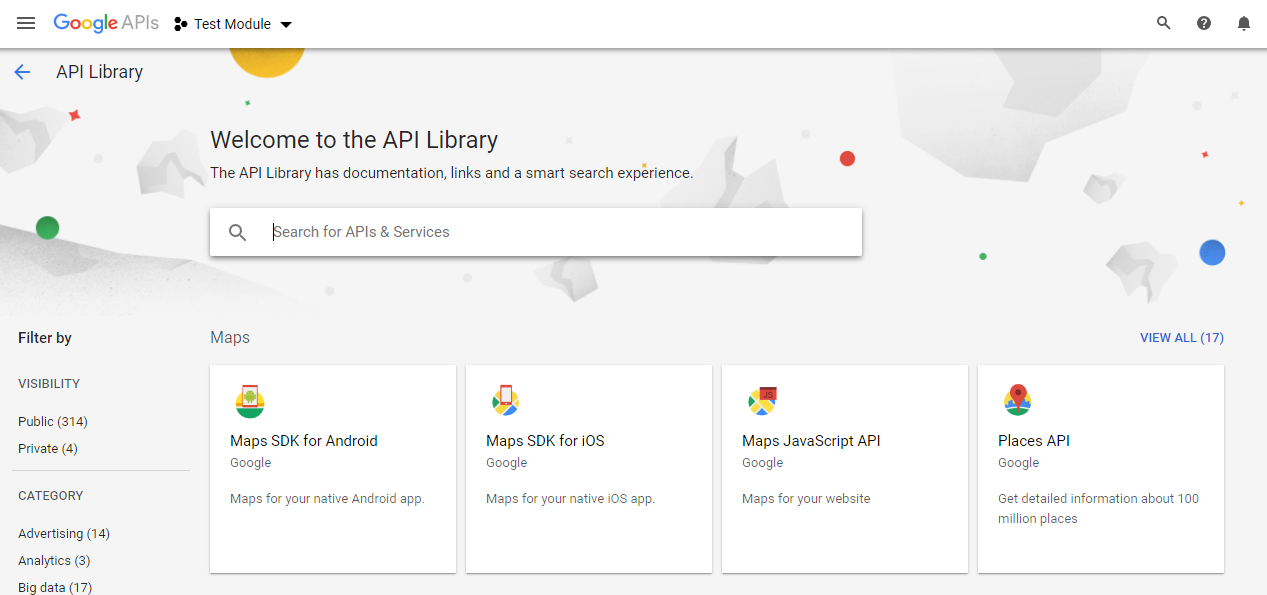
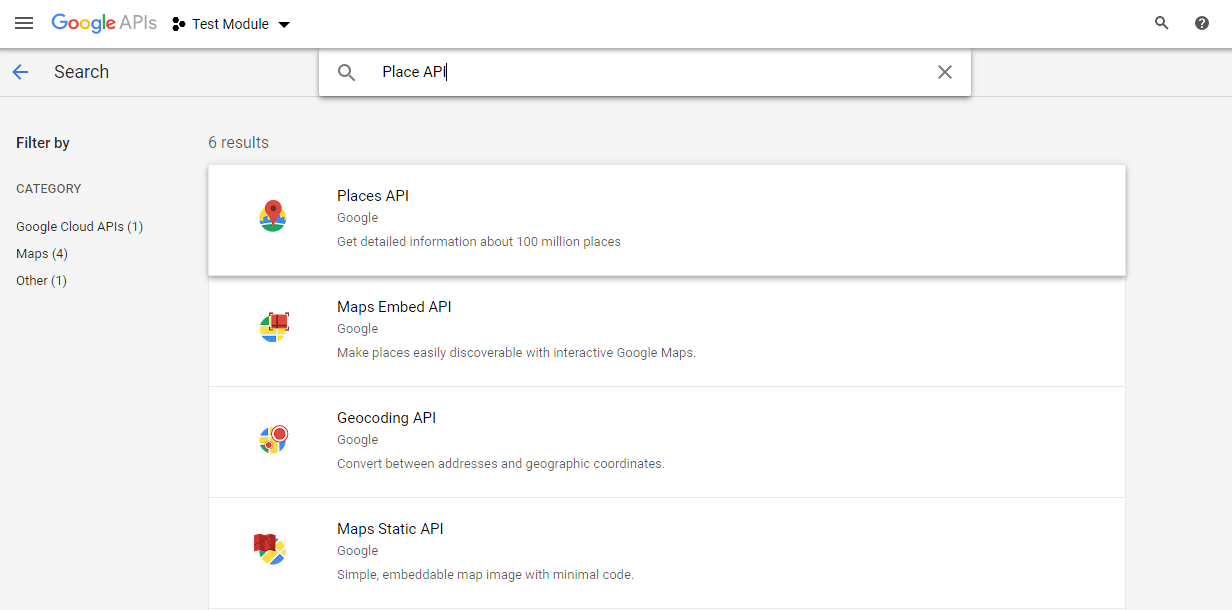
2. After clicking on the “Enable API & Services” the following screen will appear:
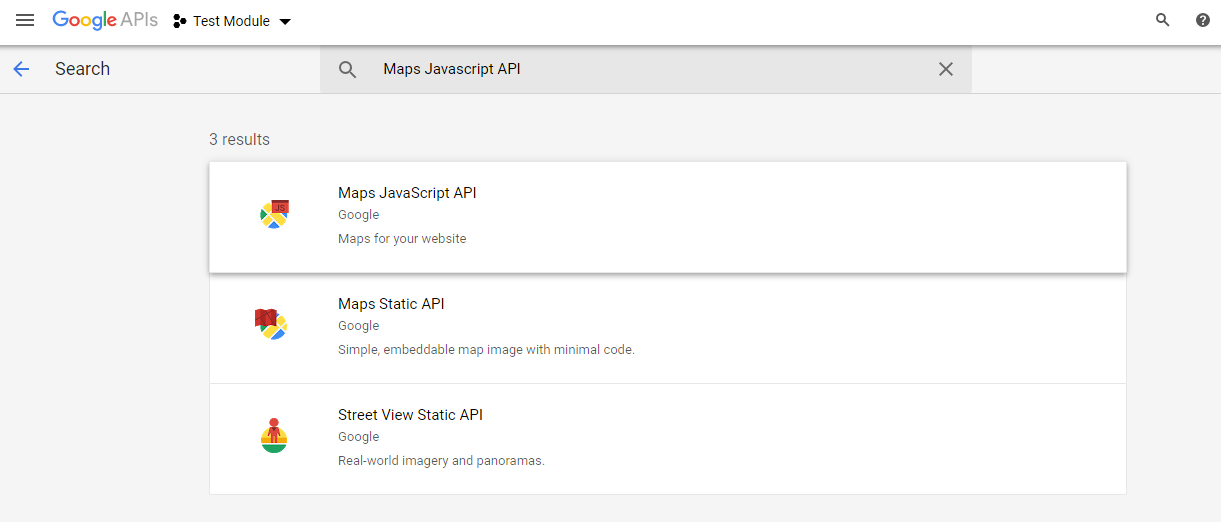
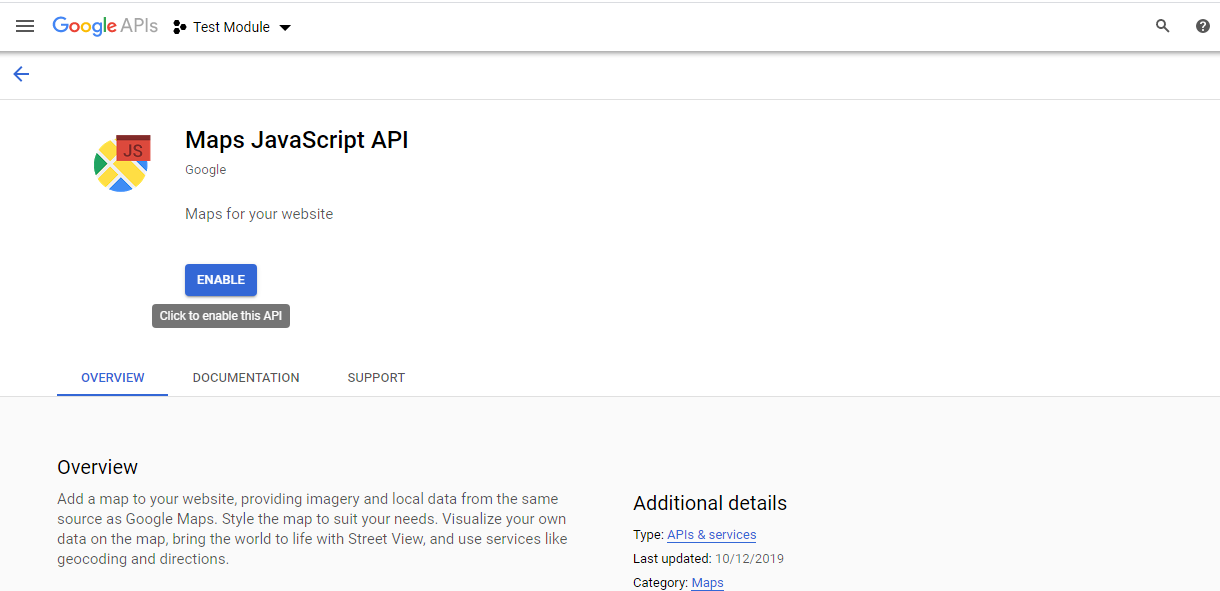
3. Search “Maps Javascript API” & Click on the “Maps Javascript API” from the suggested list.
4. Click on the “Enable” button as shown in the below image:
5. Repeat the same process to enable the Places API & Geo Location API.
Continued General Settings…
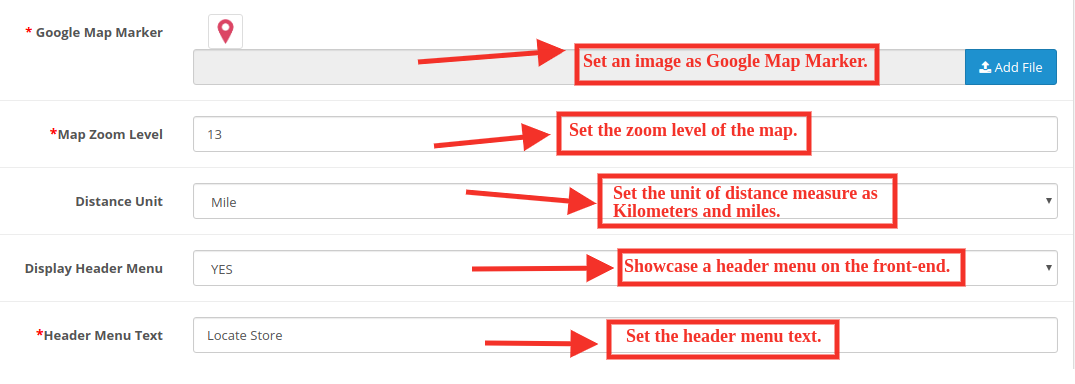
Google Map Marker: The OpenCart Google Map Store Locator plugin allows the admin to set an image as a Google map marker.
Map Zoom Level: The eCommerce store admin can set the zoom level of the map.
Distance Unit: The OpenCart Google Maps Store Locator plugin allows the admin to set the unit of distance measure as kilometers and miles.
Display header menu: The store admin can display the store locator in the header menu of the site.
Header Menu Text: The store admin can set the header menu text.
3.2 Pickup Time Settings
The various fields of this interface are discussed below:
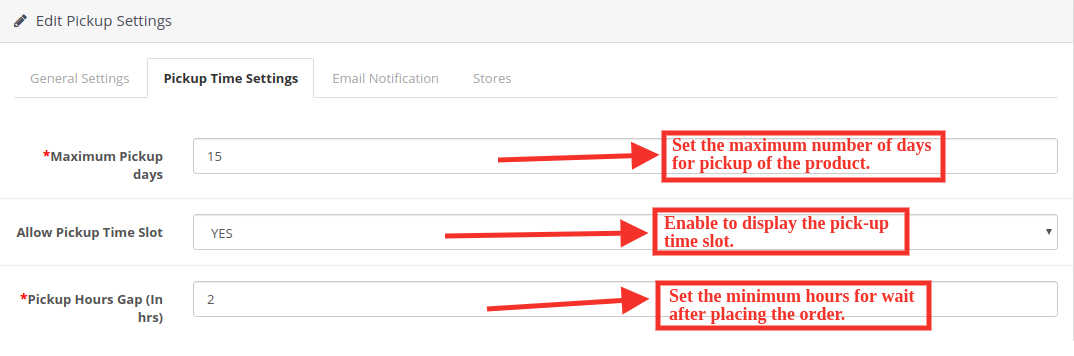
Maximum pickup days: In this option, the admin can set the Maximum days within which customer has to pick up their package from the store.
Allow Pickup Time Slot: Enable to display the pick-up time slot.
Pickup Hours Gap: The admin can set the minimum hours for wait after placing the order. This time will be the last time for which the customers need to wait after placing their order. After the provided time they can pick up their package.
3.3 Email Notification Settings:
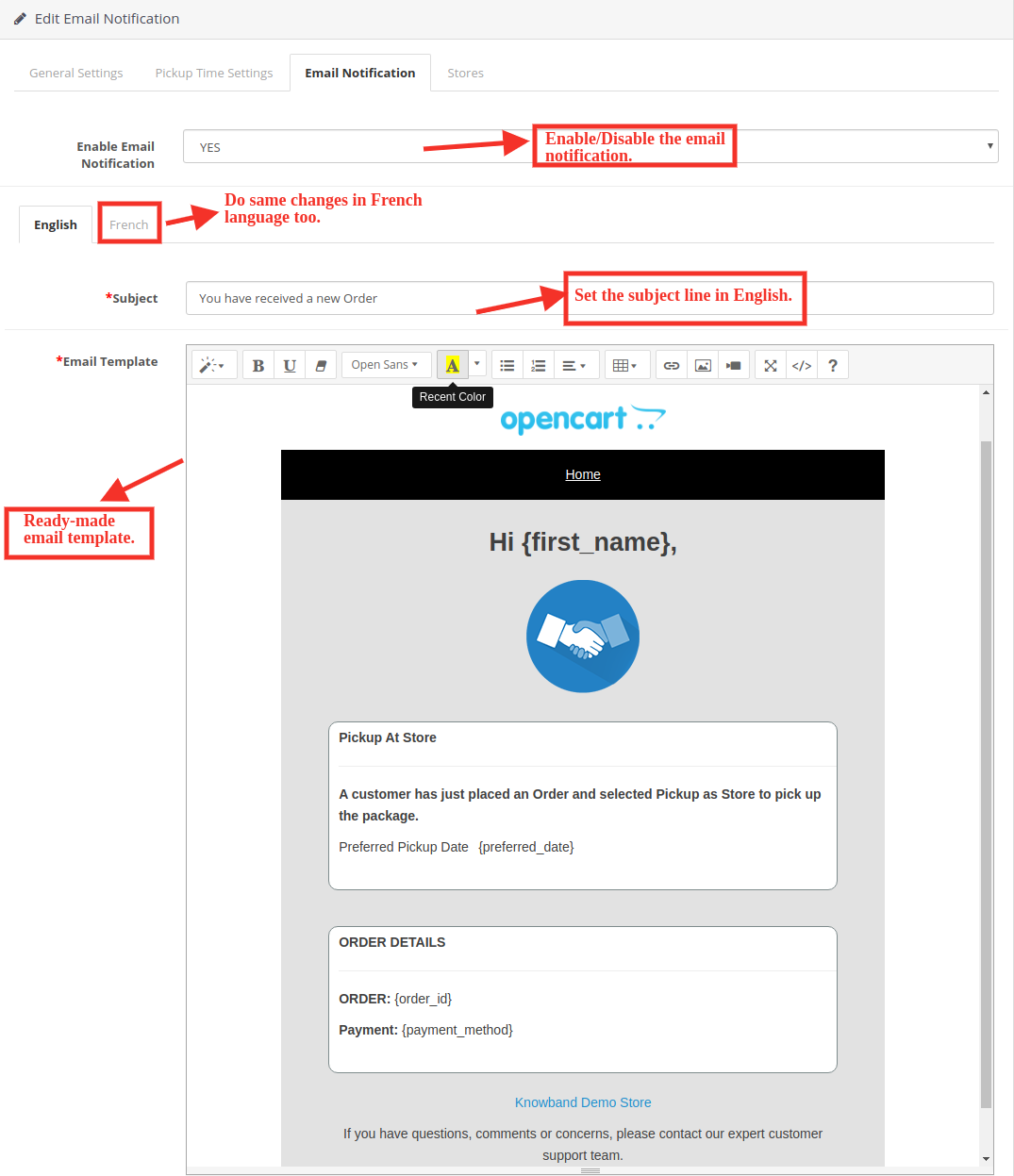
The store admin can send an email to notify the pickup store of the orders. Ready to send email templates to make this easy for the store admin to inform the pickup stores about the order.
Enable Email Notification: The eCommerce store admin can enable this option for sending e-mail notifications to notify the pick-up store about the order. The admin can set the subject line both in English and French language. Customizable email templates are available for sending the email to the stores. The ready-made email template automates the process.
Subject: The store admin can set the subject line of the email.
Email template: The store admin can also modify the email template if required.
3.4 Store Settings
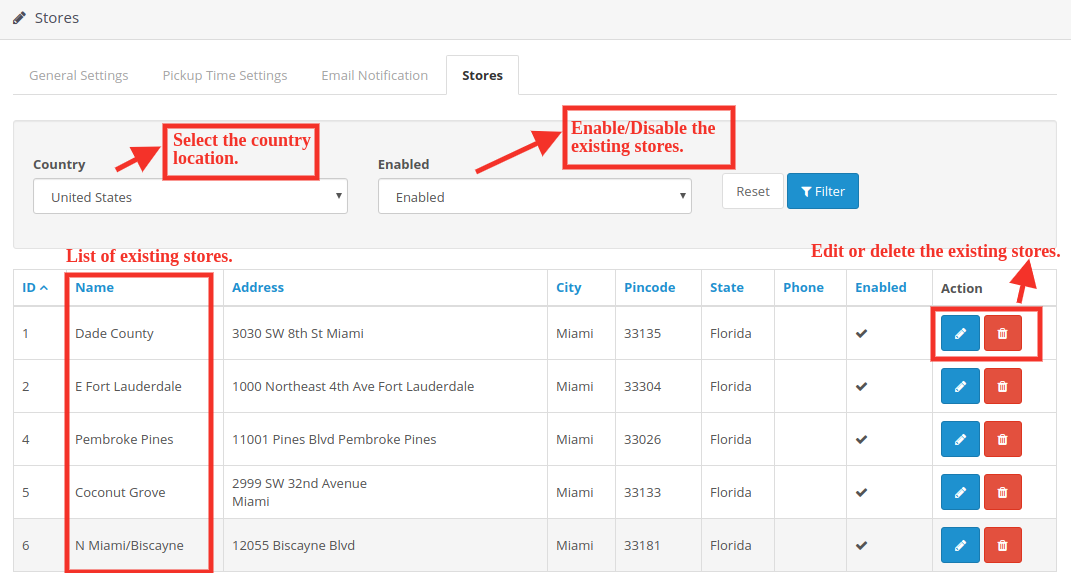
Under this tab, you will see the list of stores added by the admin. You can enable or disable existing stores.
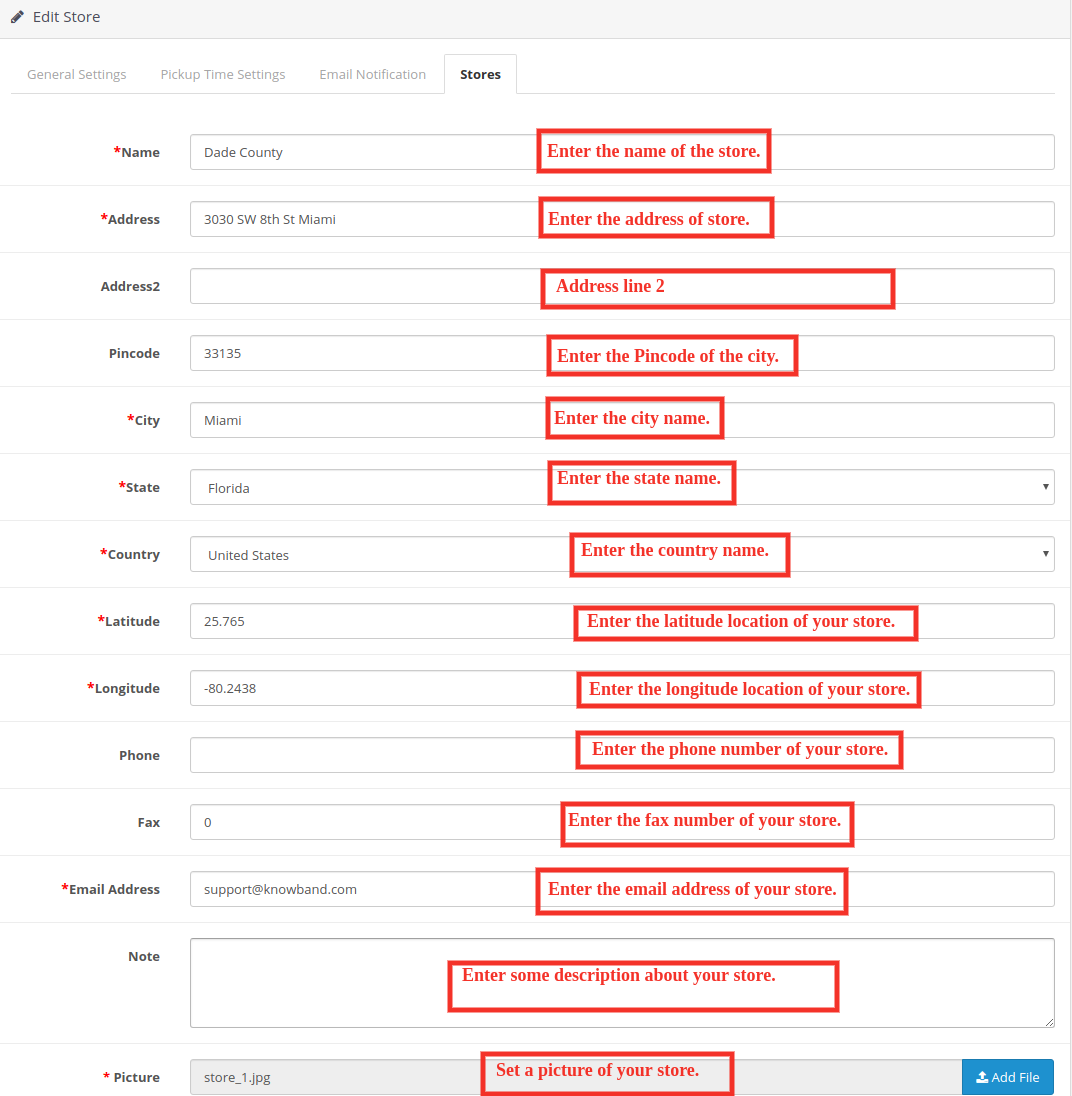
The store admin can easily add a store from the admin panel. After clicking on the “add” button, a screen will be shown like below:
The store admin can easily add store name, full address of the store, and contact details also. The OpenCart pick-up module allows the admin to set the picture, status, and timing also.
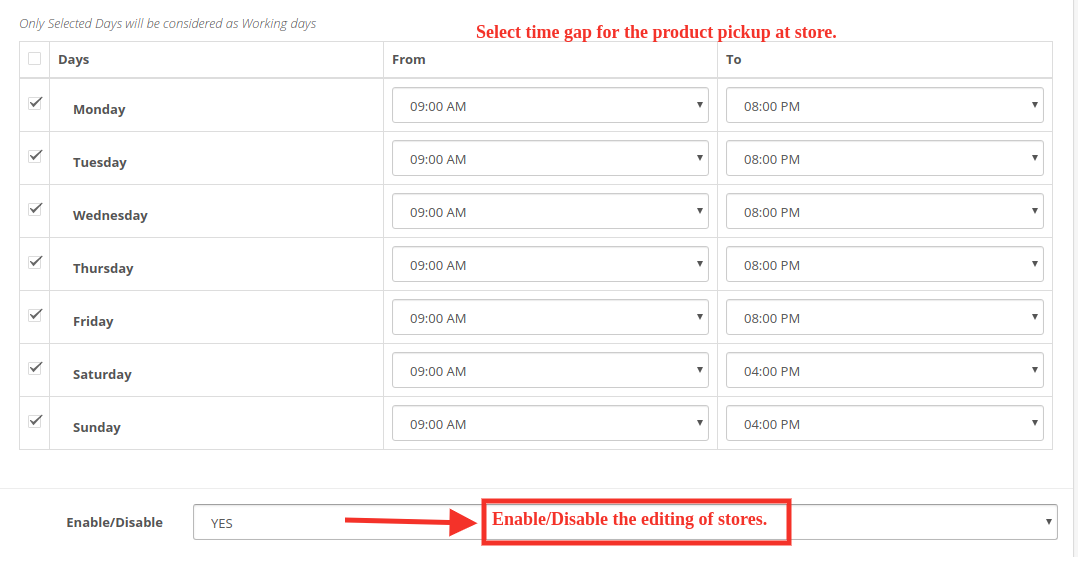
The admin can easily insert the working days and hours of the store.
3.4.1 Import Store’s Contact:
By clicking on the “Import” button the store admin can upload store details in bulk. The store owner can download the sample file and insert all the details in this file. The admin can upload this file to import the store details.
4.0 Front End of the website:
The customers can easily view the nearest store and pick up the product. They can view the contact details, name, distance, and timings also. The customers can get the product faster and without paying the shipping charges
1. They can select the Pickup option:
After clicking the Pickup at store option the customers can view the store locator.
The customers can place their pickup orders easily. The customers can select the date and time to pick up the ordered product.
2. See the timings of the store for product pickup.
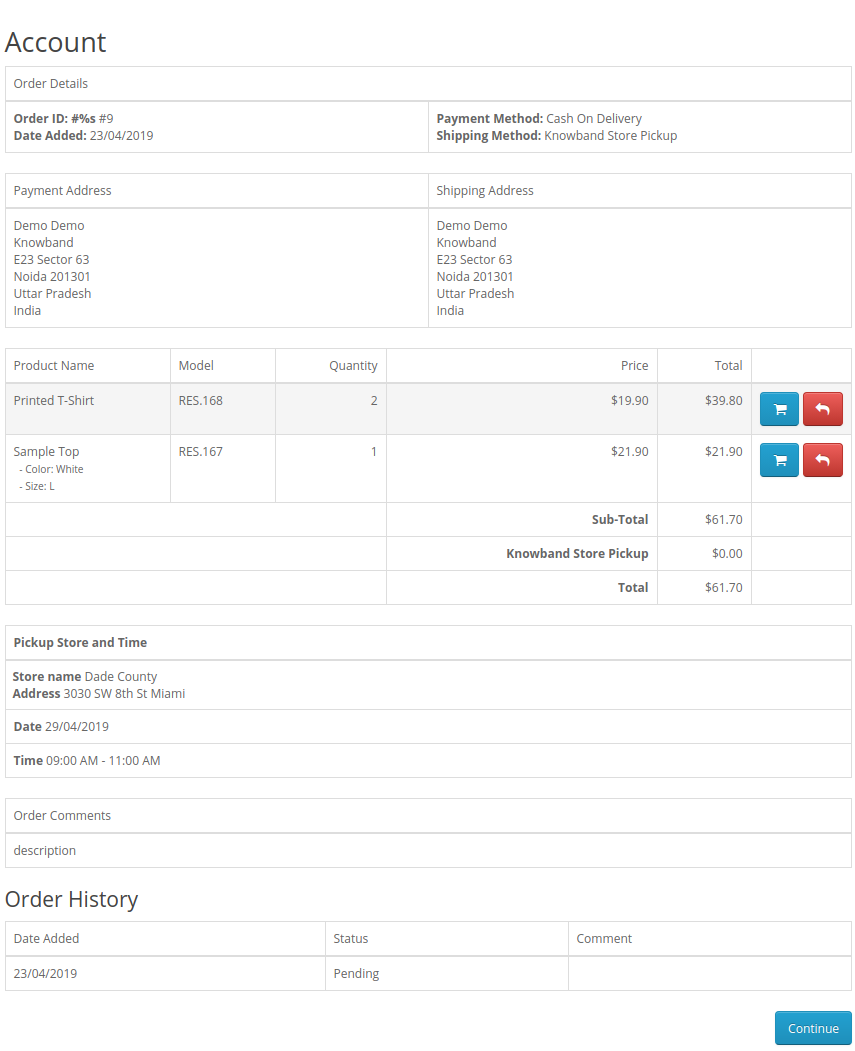
2. Order History of customers.
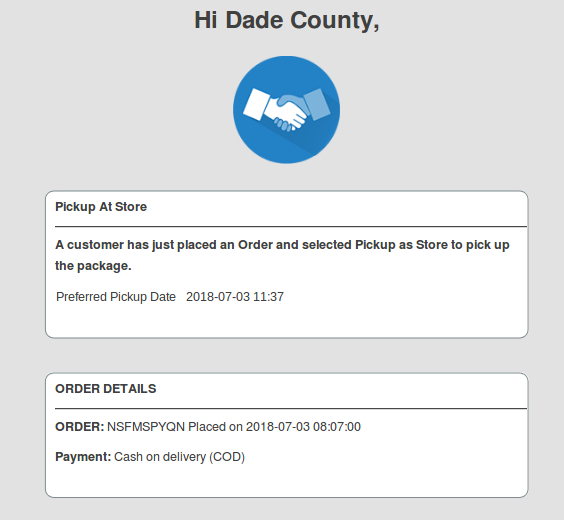
3. An email would be sent to the store owner stating the details of online purchase, date, and timings of the product pickup at the store by the customer.
This way, the online store admin can show multiple physical stores on the website using Google Maps. The Opencart Google Maps Store Locator extension makes the overall process very simple for the store admin. The Opencart store locator module is highly customizable and allows sharing maximum store details with the customers. Opencart Google Maps Store Locator extension also provides an option to set the pickup time, date, and delay from the admin interface. The online merchant can also send an email to the physical store end for notifying them about the in-store pickup order. Online users can easily pick up the ordered product from the selected stores.
Online users can easily place in-store pickup-based orders and grab the benefits of online deals and store discounts. Apart from that, they can place in-store pickup-based orders by which they can save delivery charges also. The Opencart store locator extension is highly effective and makes the overall process much easier.
Knowband is one of the most reputed names in the field of plugin development. We provide the best plugins for platforms like – Magento,Prestashop, OpenCart, and Shopify.