Prestashop Walmart Integration – User Manual

1.0 Introduction

Prestashop Walmart Integrator by Knowband gives you a handy mechanism to list the product on Walmart and manage the order in a few simple steps directly from the Prestashop store.

Walmart is one of the largest retail companies and has made a prominent presence in the eCommerce industry over the years. The marketplace is famous for Electronic goods and even deals with other products including home and furniture, home improvement, clothing, footwear, jewelry, toys, health and beauty, grocery, etc. The Prestashop store owners can now sync their store and sell the products on Walmart.com.

Walmart Prestashop Integration module by Knowband allows the store owners to integrate the store with Walmart.com. The Prestashop Walmart API Integrator automates the entire process of store synchronization, product and inventory management as well as order processing.

1.1 Features offered by Prestashop Walmart Integrator are listed below:

  • The Prestashop Walmart Integration Module connects the Prestashop store with Walmart.com in a few button clicks.
  • Real-time product listing from the back-end of the Prestashop Walmart integration plugin makes it easier for the sellers to display their products to the customers of the marketplace.
  • The easy inventory management and product synchronization of the Prestashop Walmart Integration extension allows the vendors to manage the products with minimal hassle.
  • The profile-based listing of the Prestashop Walmart Integration Module allows the admin to upload the products in bulk. The admin can update the prices and inventory by executing the cron from the admin interface of the Prestashop Walmart integrator.
  • The admin can even change the price of the product on the marketplace without changing their cost at their site.
  • Prestashop Walmart Integration addon offers easy order management that makes it easier for the store admin to keep a track of the orders received from the marketplace and manage the same from a single interface.
  • With easy shipping and product management from the back-end of the Prestashop Walmart Marketplace integration plugin, the store owners can effortlessly boost the overall revenue of their company.
  • The Prestashop Walmart API integration addon allows the admin to manage the shipping carrier and shipping methods with ease.
  • The admin gets an option to get the buy box report just by executing cron in the back-end of the Prestashop Walmart integration addon.
  • Based on the performance of the products, the admin can reprice the products and sync the same with the marketplace at a button click with the help of Walmart Prestashop integration addon.
  • Walmart Prestashop connector makes it easier for the admin to provide the tax code of Walmart Categories.
  • Admin can view the overall sales report along with the sales report of individual products from the admin interface of the Prestashop Walmart integrator.
  • The sellers can easily manage the lag time of the products from the back-end of the Walmart Prestashop connector.

1.2 Merchant Benefits of the Prestashop Walmart integration addon:

  • Walmart Prestashop Integration plugin automates the entire process of store integration.
  • With the help of Walmart Prestashop API integrator, the store admin can list the products and the corresponding details in the marketplace and manage the inventory without any manual synchronization.
  • Not just the inventory, even the orders received can be synced in the store by executing cron in the back-end of the Walmart integration module.
  • The orders can, then, be processed from the store and the status of the orders can be updated to Walmart.com at a button click.
  • The store admin can map the category of their store with that of the category of the marketplace with the help of the Prestashop Walmart integration extension.
  • Even the attributes of the products can be mapped with the attribute of the marketplace with the help of this Prestashop Walmart Marketplace Integration extension.
  • The Walmart Prestashop integration module is easy is to understand and use.
  • The Walmart Prestashop integration extension comes with free support of 3 months.
  • Along with version compatibility, the Prestashop Walmart Integration plugin doesn’t conflict with other modules of the store.

1.3 Project Objectives

Listed below are the project objectives of Walmart Prestashop Connector:

  1. The installation process of the Prestashop Walmart integrator.
  2. The process of seller account set-up in Walmart.com
  3. Profile creation and synchronization in the marketplace.
  4. Product listing and status update of the products on Walmart.
  5. Order synchronization from Walmart and status updates.

2.0 Installation

Once the Prestashop Walmart Integration module is purchased from the store, you will get the zipped file (containing the source code of the Prestashop Walmart marketplace integration addon) along with the user manual. Please follow the below steps to install it:

Step 1: Go to Module listing page and “Add New Module” button.
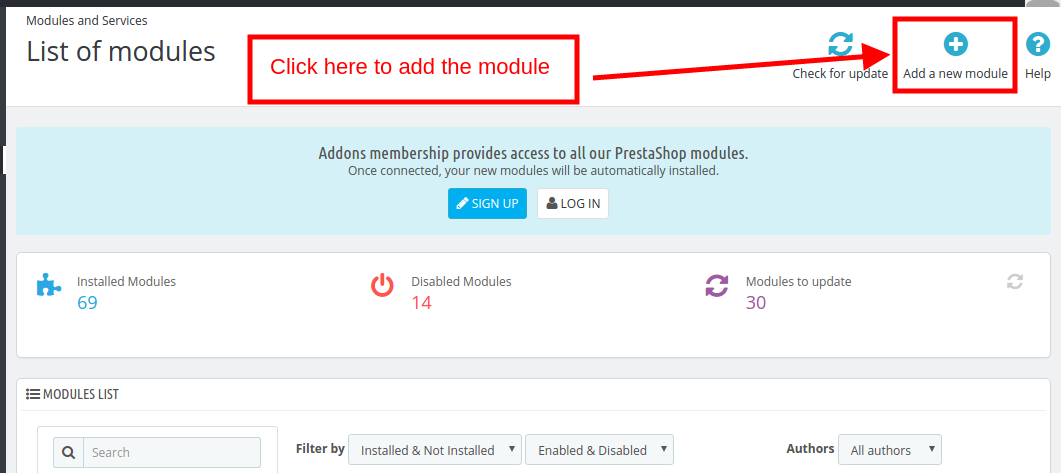
Add Prestashop module

Step 2: Upload the downloaded zipped file.

Step 3: Once this is done, the Prestashop Walmart Marketplace Integration extension will be listed on the module listing page as shown in below screen:

Step 4: Click on the install button. The module will be installed in your Prestashop store.

Note: Please set the read/to write permission on the module folder before installing the module into the system.

3.0 How to configure Walmart Magento Integrator Extension?

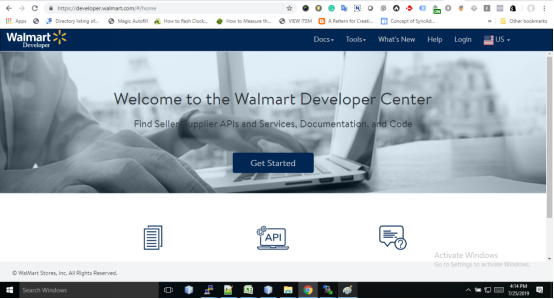
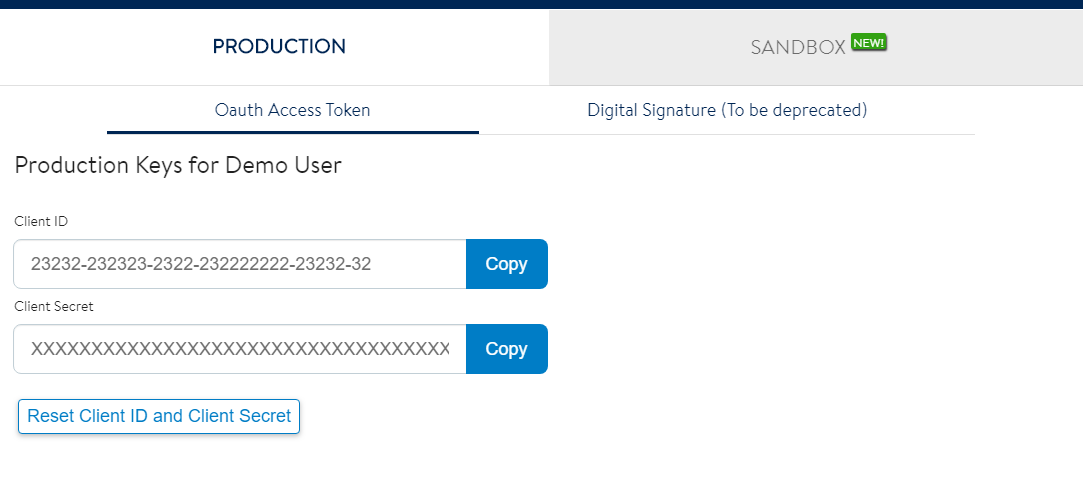
To configure the Walmart Marketplace Integrator, store admin needs to get the Client ID and Client Secret. In order to obtain Walmart Client ID, and Client Secret, follow the process given below:

1. Go to https://developer.walmart.com/
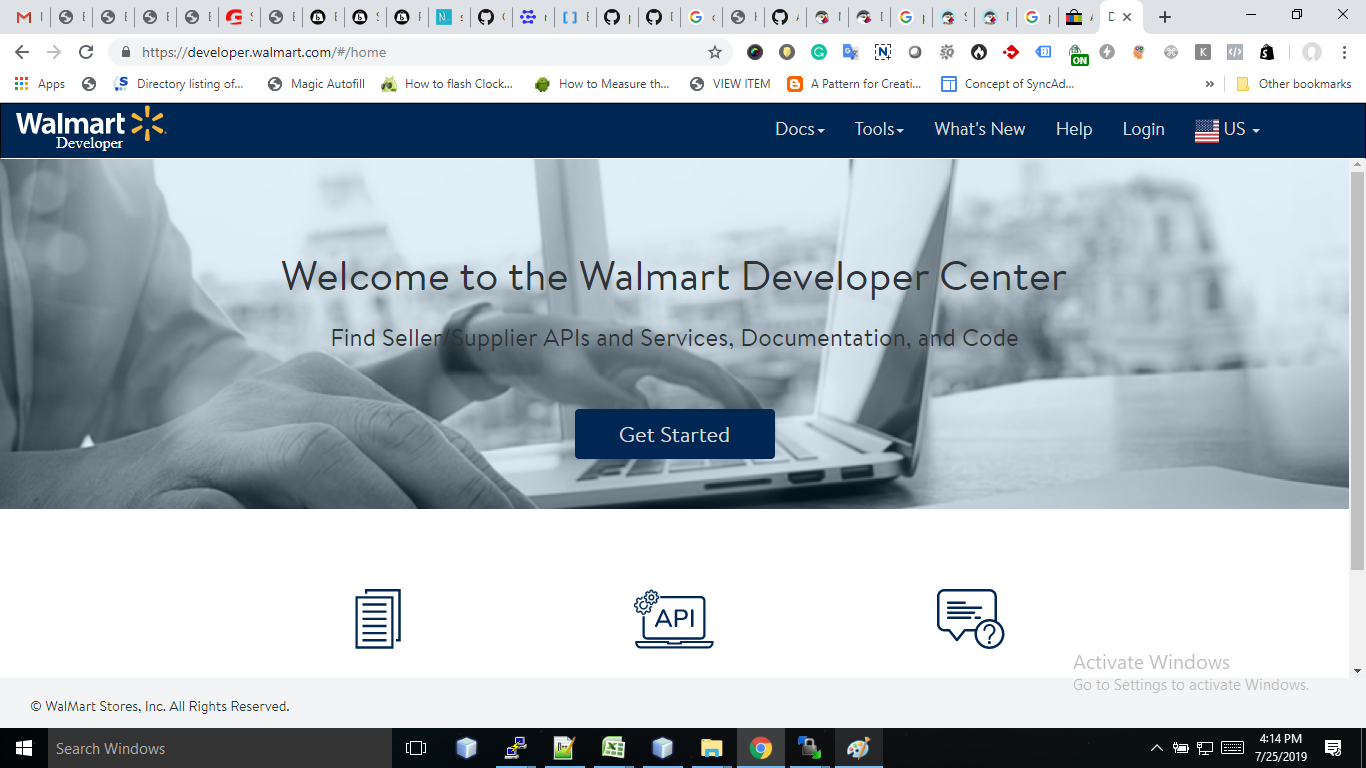
2. Select the Login type.
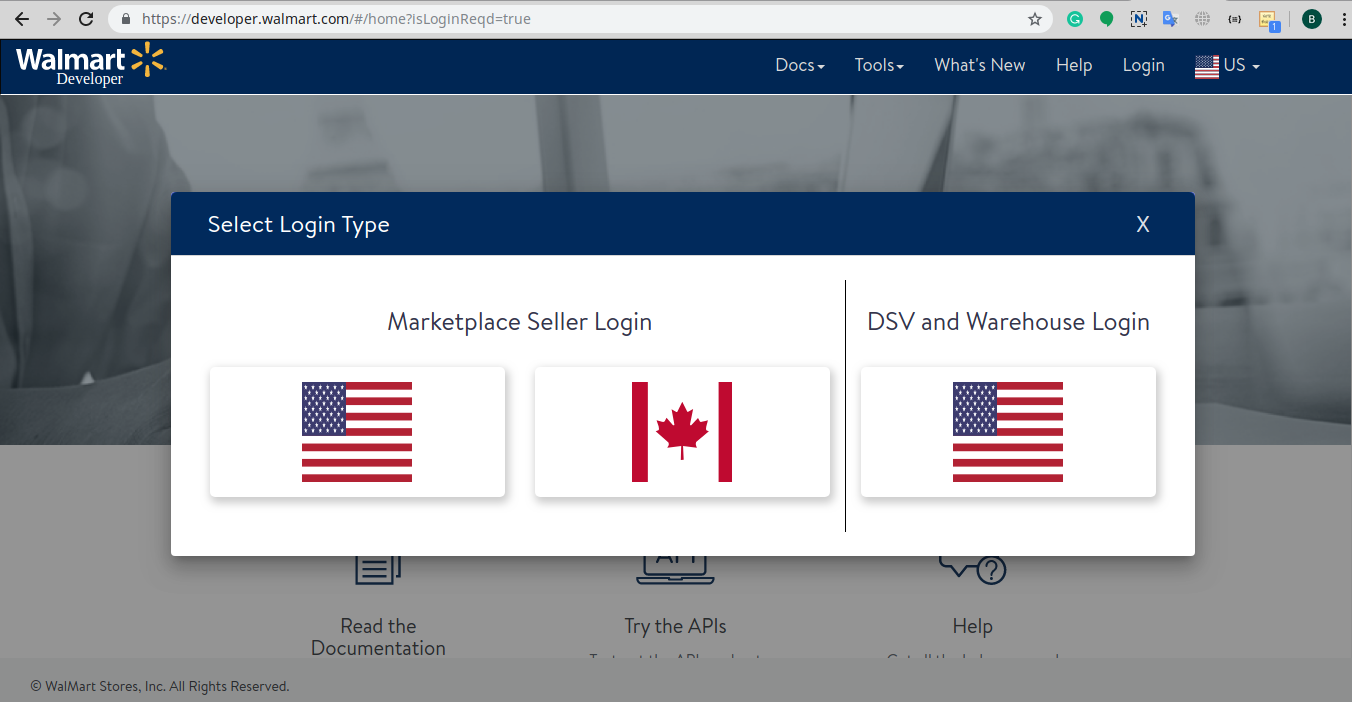
3. Log in using your Credentials.

4. Click on your account and select “API Keys“.
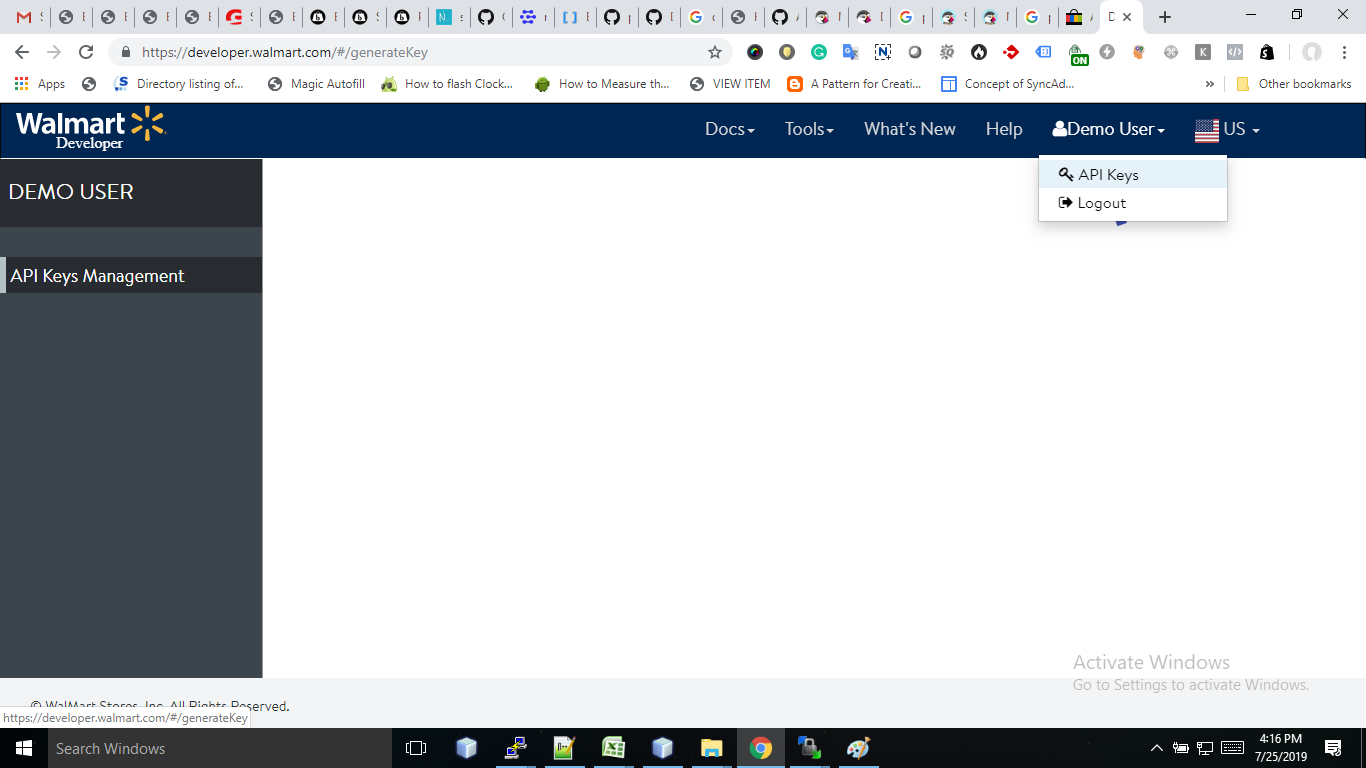
5. Now you can get the New “Client ID” and “Client Secret” from here.
 

4.0 Admin Interface

Once the seller account setup is complete, the merchant can configure his shop on Walmart.com

The Prestashop Walmart Marketplace Integration extension offers 17 configuration tabs in the main menu of the admin interface. These options include the following:
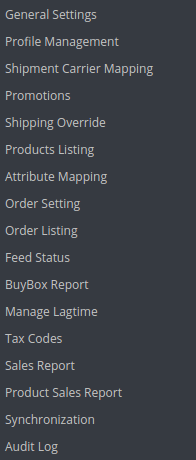
  • General Settings
  • Profile Management
  • Shopping Carrier Mapping
  • Promotions
  • Shipping Override
  • Product Listing
  • Attribute Mapping
  • Order Setting
  • Order Listing
  • Feed Status
  • BuyBox Report
  • Manage Lagtime
  • Tax Report
  • Sales Report
  • Product Sales Report
  • Synchronization
  • Audit Log

Each option is discussed in detail below.

4.1. General Setting

To authenticate the Prestashop to Walmart integration, the Prestashop store admin needs to fill-up the following field:
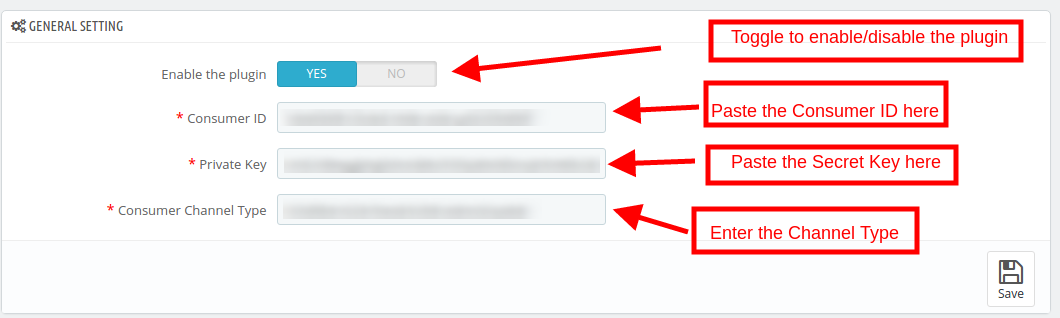
1. Enabled the Plugin

Toggle the button to enable/disable the Prestashop Walmart Marketplace Integration addon from the store.

2. Consumer ID

Enter the Walmart Consumer ID that was copied while setting up the connection.

3. Private Key

Enter Walmart API Secret Key here that was copied from the seller’s account. It is mandatory for authenticating the integration between the store and Walmart Marketplace.

4. Consumer Channel Type

The value for the Channel Type header is used to send information to the API.

4.2. Profile Management

The Prestashop store admin can create, edit or delete N number of profiles from the back-end.

4.2.1 How to Create a New Profile?

Click on the ‘Add New Profile’ or ‘+’ sign to create a new profile.
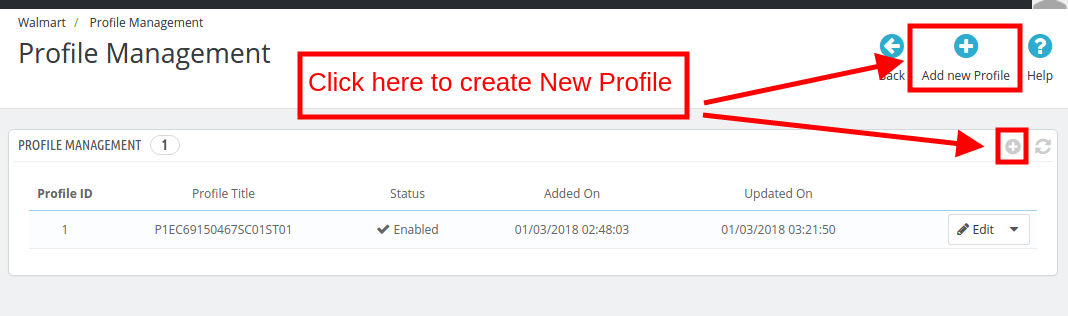
Once the button is clicked, the admin will be redirected to the profile creation page. Here are the fields that you need to fill.
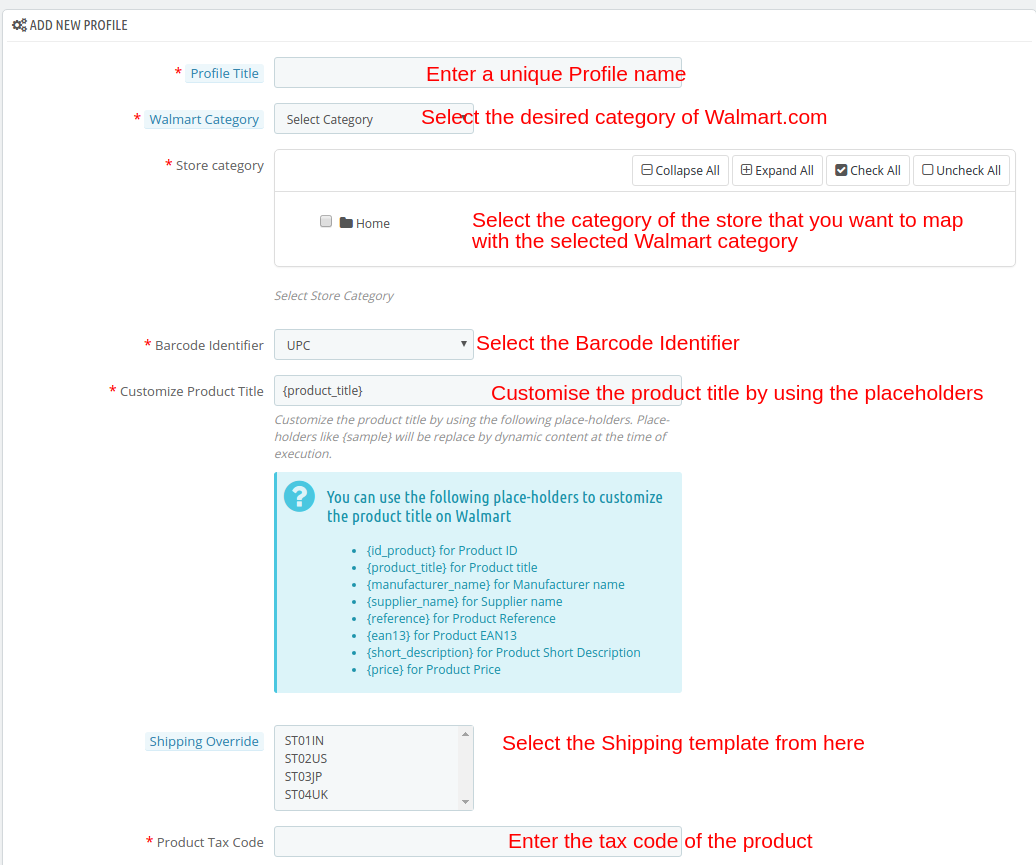
Profile Title: Enter a unique name for the profile.

Walmart Category: Select the category of the Walmart where you want to map the category of the store.

Store Category: Expand the category and select the category of the Prestashop that you want to map in the category of Walmart.com.

Barcode Identifier: This is the unique field of the product. Select anyone from the dropdown list, so that, the Prestashop extension can identify the product according to the mapped attribute. The various options to choose from include: UPC, EAN13.

The various place-holders are listed below.

  • {id_product} for Product ID
  • {product_title} for Product title
  • {manufacturer_name} for Manufacturer name
  • {supplier_name} for Supplier name
  • {reference} for Product Reference
  • {ean13} for Product EAN13
  • {short_description} for Product Short Description
  • {price} for Product Price

Enable Custom Pricing: Enable this option to change the price of the product without changing the price of the product on the Prestashop site.

 

The admin can enter the custom price change in this section.

Select whether you want to change the price by a fixed amount or a percentage amount.

Select whether you want to increase or decrease the price of the products by that particular value.

For instance, the admin chooses ‘Fixed’ and ‘Increase’ and enters the custom price of $5, then, the price of all the products of that particular profile will increase by $5.

Shipping Override: This is an optional field. Select the shipping options from the list provided. This section includes all the shipping templates added in the Shipping Override tab.

Product Tax Code: Enter the product tax code in this section.

Also, the store admin can add relevant attributes of the products.

4.2.2 How to Edit the Existing Profiles?

You can find the list of the created profile in the Profile Management tab of the admin interface.

To edit the profile, click on the ‘Edit’ button corresponding to the profile.
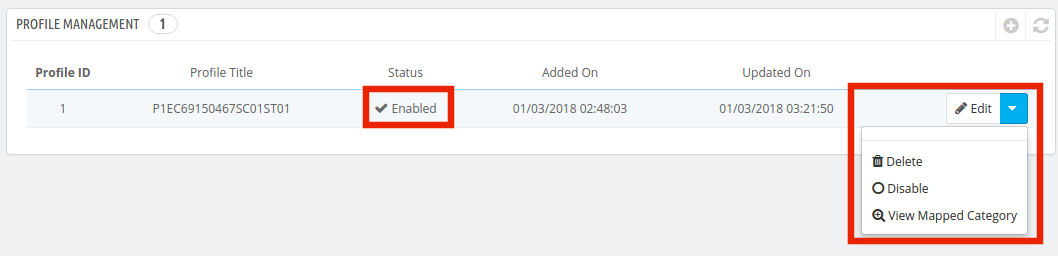
The Prestashop store admin can enable/disable by changing the status as shown in the image below.

The category mapped can even be viewed by clicking the ‘View Mapped Category’ button shown in the above image.

The mapped categories will be shown as the image below:
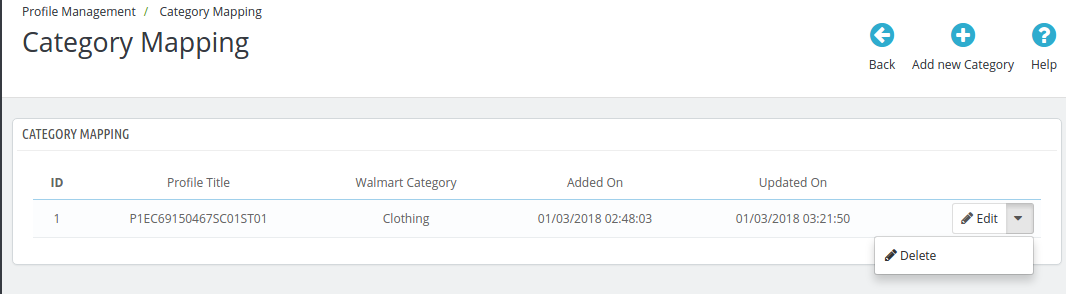
The store admin can even add new categories for mapping.

4.2.3 How to Add New Category?

To add a new category click on the ‘Add New Category’ on the top right side of the admin interface.
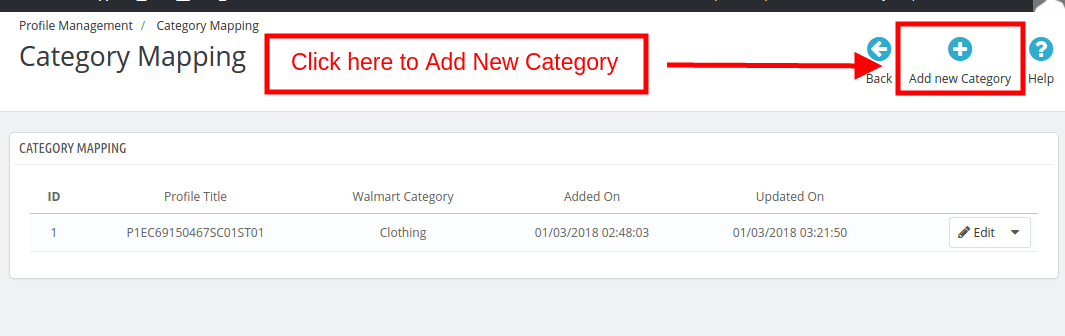
You’ll be redirected to the category creation page as shown below.
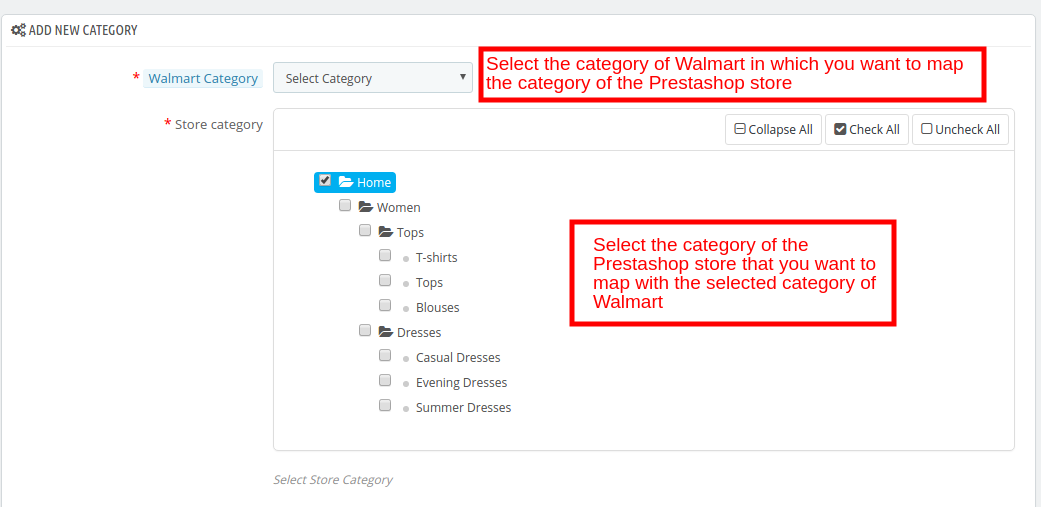
Walmart Category: Select the category of Walmart in which you want to map the category of the Prestashop store.

Store Category: Select the category of the Prestashop store that you want to map with the selected category of Walmart.

4.2.4 How to Edit/Delete the Categories?

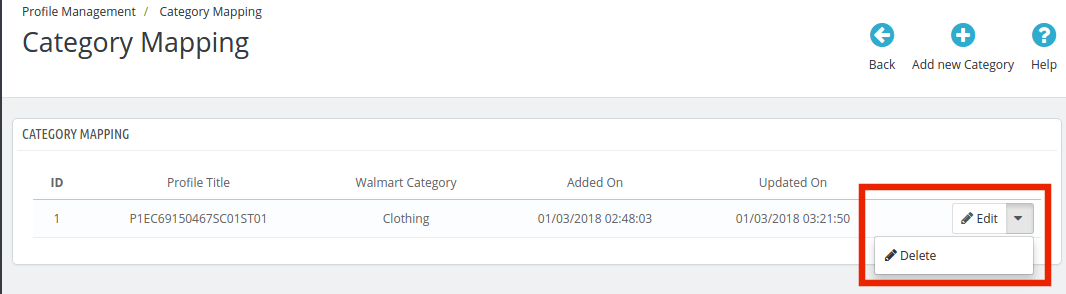
There is an Edit and Delete button corresponding to every category as shown below. Click on the respective buttons to Edit and Delete the categories.
4.3. Shipment Carrier Mapping

The Prestashop Walmart Integration addon allows the admin to map the shipping carrier with ease.
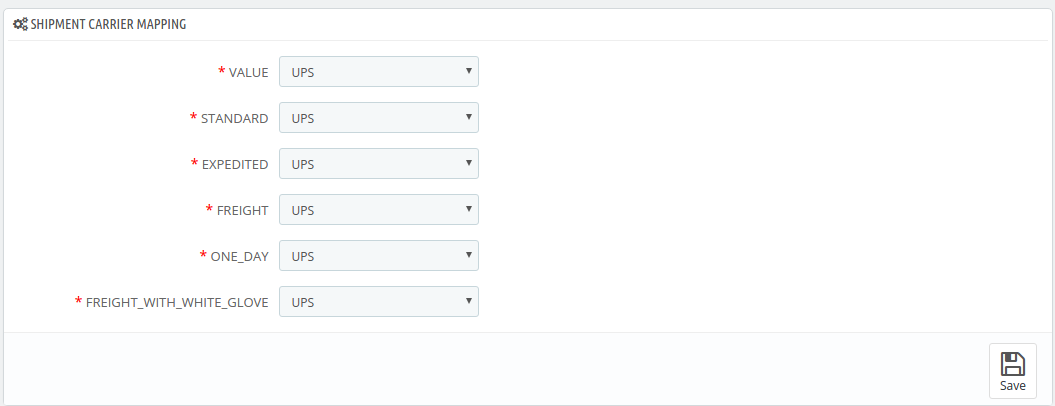
Just the options from the drop-down menu for the various shipment carrier methods.

4.4. Promotions

The admin gets an option to add promotional deals for the marketplace customers with the help of the Prestashop Walmart Integration addon.

4.4.1 How to add Promotions on the Walmart marketplace?

To add promotional deals, click on the ‘+’ sign or ‘Add New Promotion’ on the top right side of the Walmart Prestashop Integration module.
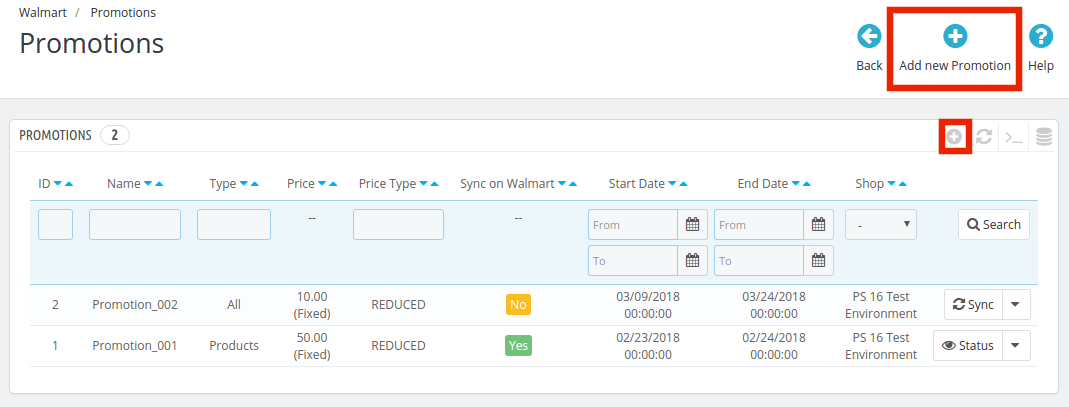
You’ll be redirected to the promotion creation page. Fill in the required details that are discussed below:
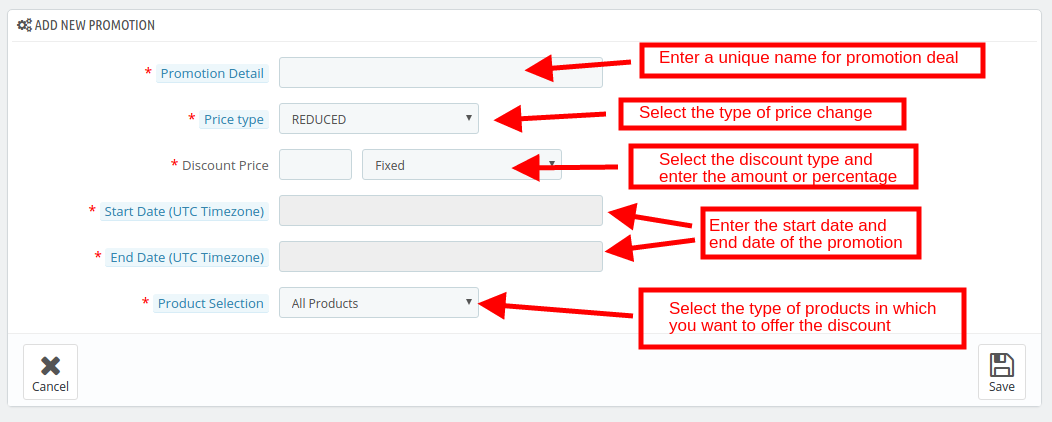
Promotion Detail: Enter the detail of the promotion in this section.
Price Type: Select the price change type. It can be Reduced or Clearance.
Discount Price: Select the discount type, Fixed or Percentage. Enter the fixed amount or the percentage amount.
Start Date: Enter the start date of the deal.
End Date: Enter the date when the deal will end.
Product Selection: Select the product group in which you want to offer the discount. It has 3 options:

  • All Products: This will apply for the promotion of all the products listed in the marketplace.
  • Products of Selected Profile: This will apply the deal on all the products of the selected profile. Once this option is selected, all the profiles will be listed in the Select Profile section.

  • Selected Products: This will allow the admin to offer discounts on the selected products. The products can be selected in the Select Product section.

4.4.1 How to Sync and Edit/Delete the Promotions?

The promotion deals will be listed in this tab of the Prestashop Walmart API integration extension as shown in the image below:
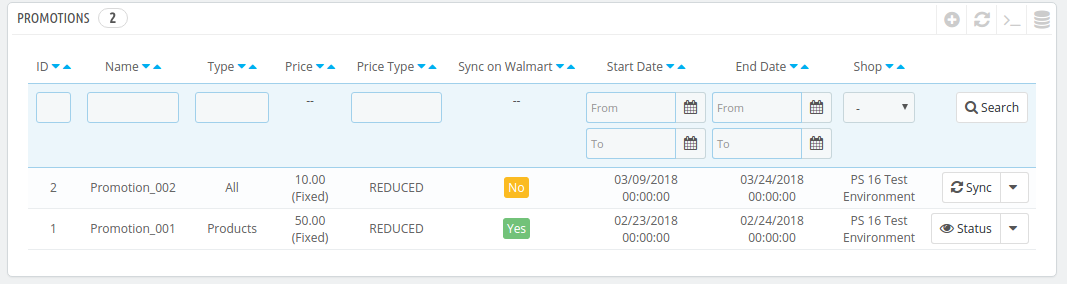
The promotions can be synced with the Walmart marketplace by hitting on the ‘Sync’ button corresponding to each promotion rules.
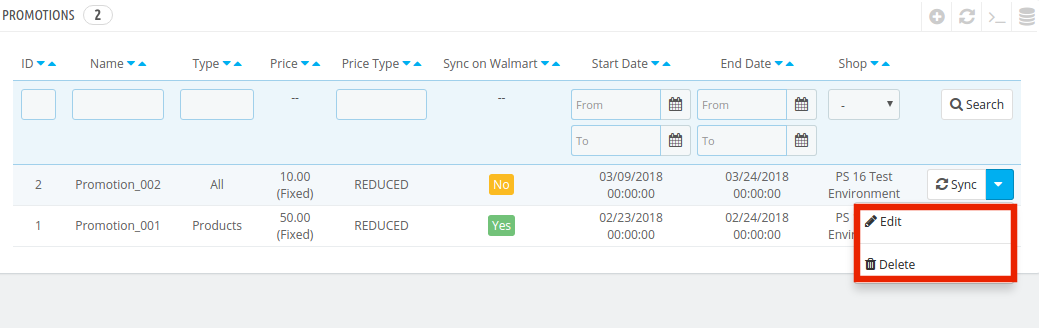
To edit or delete the promotion rules, click on the ‘Edit’ or ‘Delete’ button corresponding to each rule as shown below:
4.5 Shipping Override

The Prestashop Walmart Integration extension allows the store admin to add shipping methods for the Walmart consumers.

4.5.1 How to Create New Shipping Override?

The various information fields in this tab of the Prestashop Walmart Integration extension are listed below:
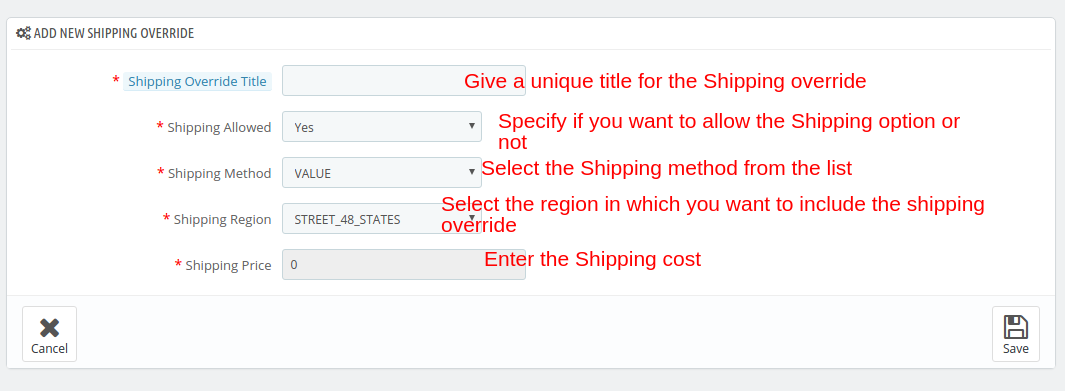
Shipping Override Title: Enter a unique title for the Shipping override.

Shipping Allowed: The dropdown menu includes the option of Yes and No. Select Yes, if you want to allow this shipping override.

Shipping Method: Select the shipping method that you want to include in this Shipping override.

Shipping Region: Select the region in which you want to incorporate the shipping override.

Shipping Price: Enter the shipping cost here.

Note: All the Shipping Override options created here will be listed in the Profile Management section.

4.5.2 How to Edit/Delete Shipping Override?

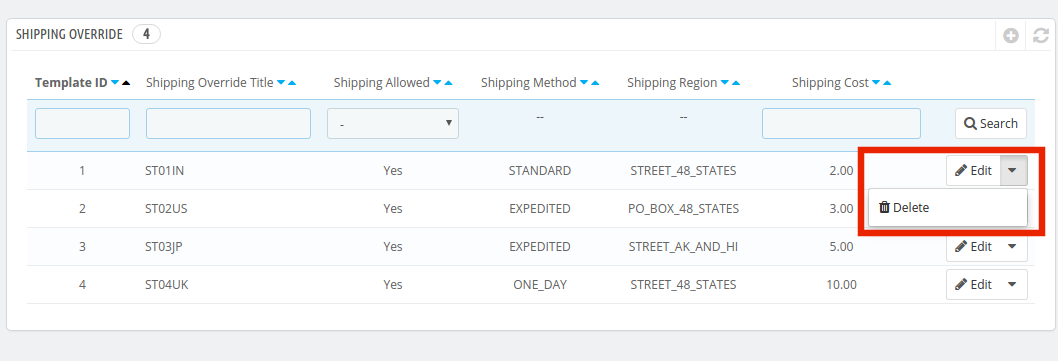
All the Shipping Override options can be viewed in this tab of the Prestashop Walmart Marketplace Integration plugin. To edit or delete the shipping override option, click on the Edit or Delete button corresponding to each option as shown in the image below.
4.6. Product Listing

The listed products can be viewed from the back-end of the Prestashop Walmart integration module as shown in the image below. The Prestashop Walmart Integration addon allows the admin to renew, delete or remove the product from the marketplace. These actions can be performed for individual products as well as in bulk.
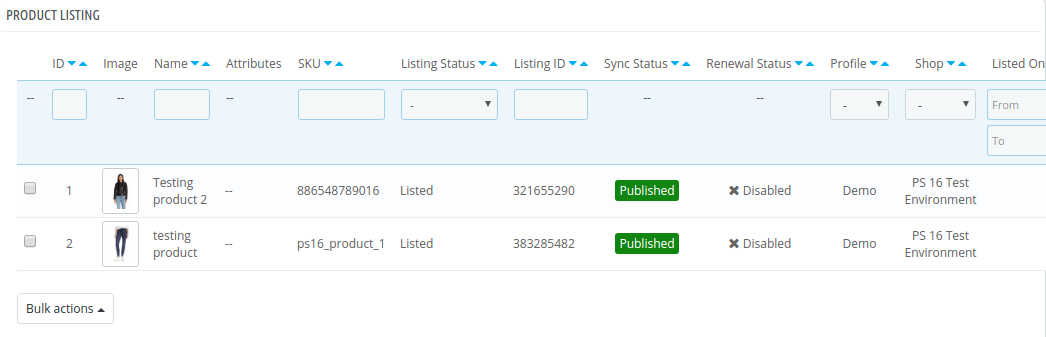
This section shows the list of all the products listed on Walmart Marketplace with their statuses.

To list the products on Walmart, run the Sync Inventory to Walmart cron. The products will get listed on the Walmart marketplace. (See Section 4.16)

Once the inventory is synced, the corresponding product details will be synchronized accordingly. To sync the price of the products, run the ‘Sync Price of the Product’ cron in the Synchronization tab.

Here are some of the options offered in this section:
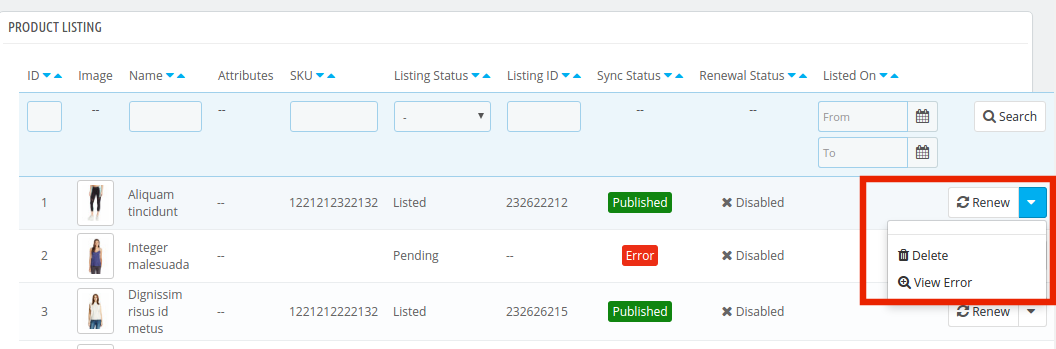
Product Listing Renewal

The Prestashop store admin can renew the product, in case the listing has expired from the Walmart Marketplace or the product is updated, by clicking on the “Renew” action corresponding to each product.

After the renewal of the products, action “Renew” will be changed to “Halt” action. This action is used to stop product renewal in case needed.

Product Listing Deletion

The store admin can disable the product from the marketplace by clicking on the “Delete” button corresponding to each product listing. To revert the action, click on the “Relist” button. The delete action will then be replaced with Relist action. Execute the Sync Products on Walmart cron to remove the products or mark them as inactive in the product listing page.

View Error

The admin can view the error occurred in listing the product by click on ‘View Error’ action.

Bulk Update of Products

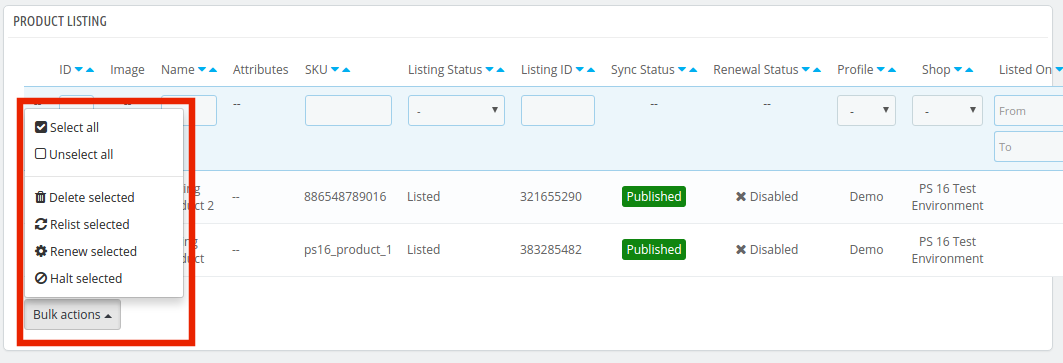
The Walmart Prestashop integration addon allows the admin to update the products in bulk. The bulk action offers the following options:

  • Delete Selected
  • Relist Selected
  • Renew Selected
  • Halt Selected

Select the products in which you want to perform any of the above-mentioned action as shown in the image below:
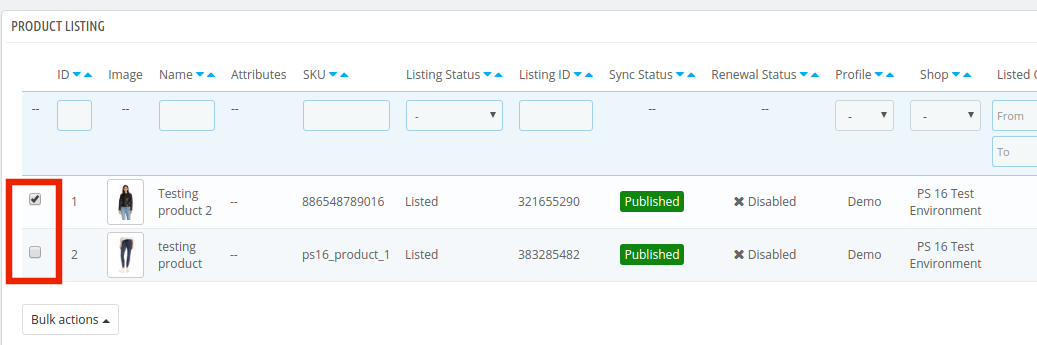
Once the products are selected, click on the action that you want to perform. The same action will be performed on all the selected products.

Mapping of Existing Products on Walmart

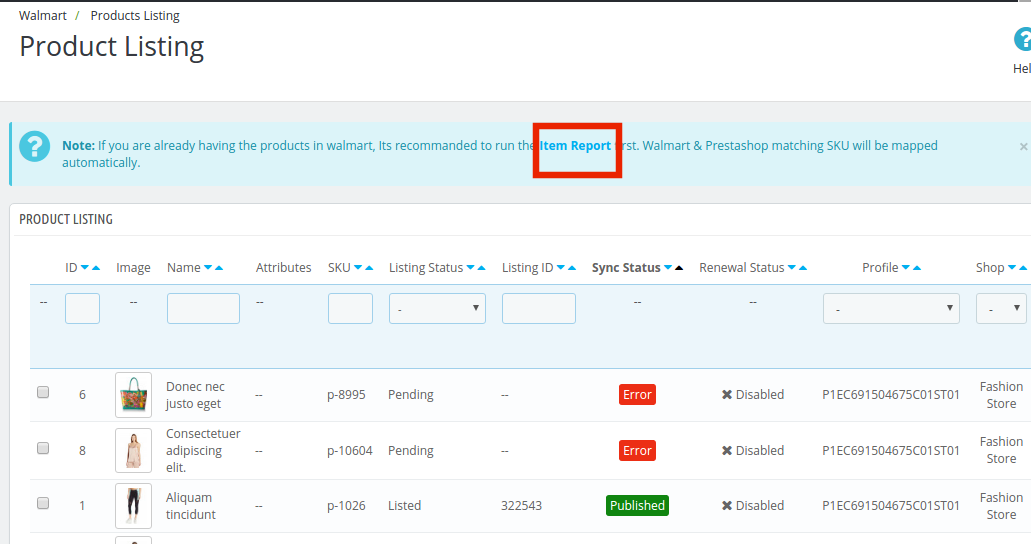
If you already have the products in Walmart, execute the Item Report cron first. Once this cron is executed, Walmart & Prestashop matching SKU will be mapped automatically. They can match the SKU, create the Listing ID and change the status as ‘Published’.
 

4.7. Attribute Mapping

The Prestashop Walmart Integration extension offers easy means to map the attribute of the Prestashop store with the Walmart marketplace. The store admin can map the attribute of Walmart.com with the attribute of the Prestashop eCommerce store in this tab.

4.7.1. How to create New Attribute Mapping?

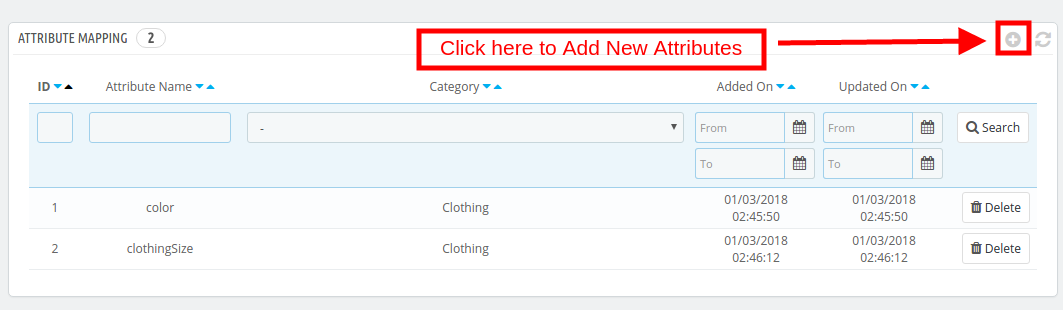
To create new attributes, click on the ‘+’ sign on the top right side of the admin interface. You’ll be redirected to the Attribute creation page. Follow the steps below for the Attribute mapping.
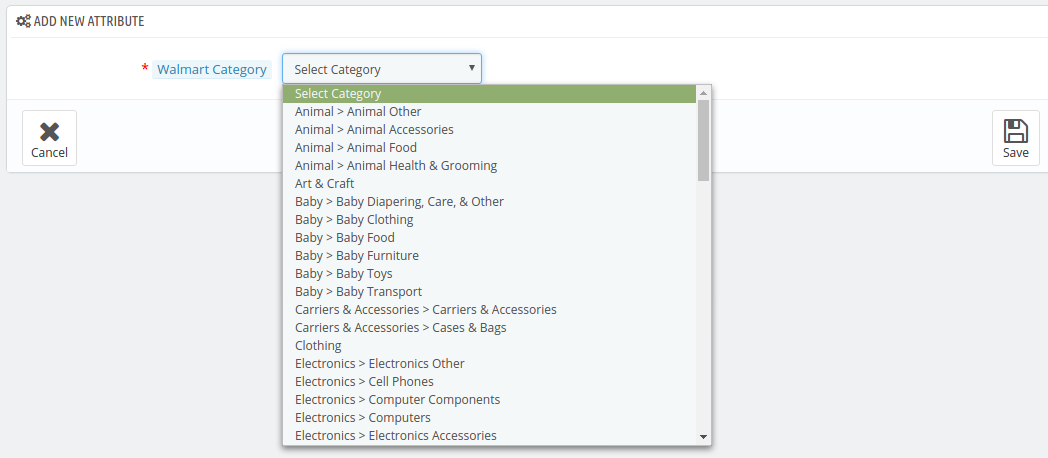
Select the Walmart Category in which you want to map the attribute as shown in the image below:
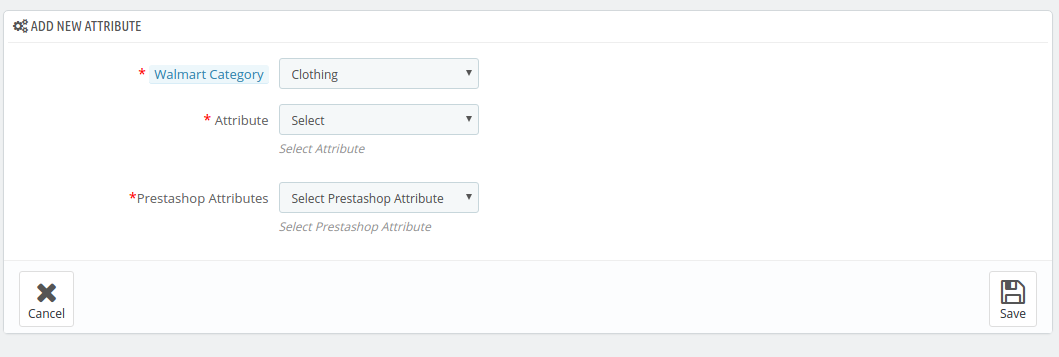
Attribute: Select the attribute of Walmart in which you want to map the attribute of the Prestashop.

Prestashop Attribute: Select the attribute of the Prestashop store that you want to map with the attribute of the marketplace.
4.8. Order Setting

The store admin can set the status of orders placed on Walmart that are mapped in the Prestashop store from the Order Setting tab of the Prestashop Walmart Integration plugin. This section consists of four different order statuses. They are:

Order Current Status, Order Shipped Status, Order Acknowledgment Status, and Order Cancel Status.
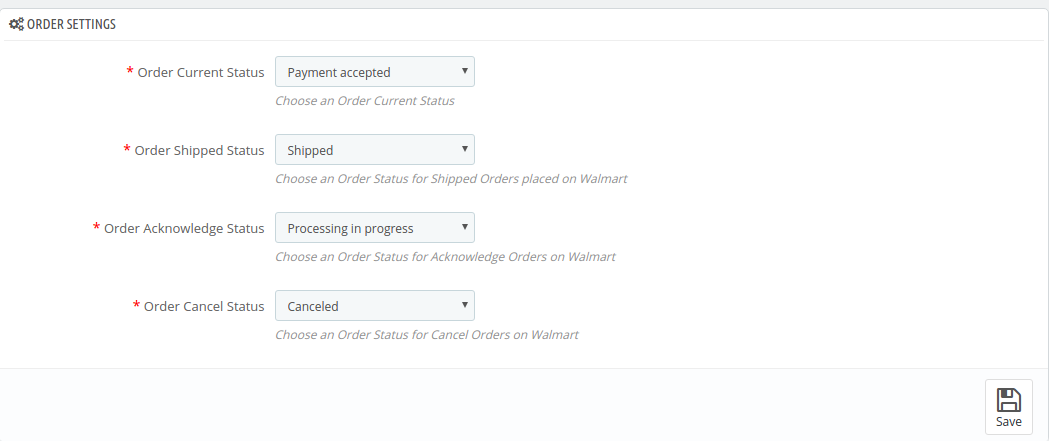
Once the status of the order is changed in the Prestashop store, run the ‘Update Order Status to Walmart’ cron. This will sync all the changes to the marketplace. (See Section 4.16)

4.9. Order Listing

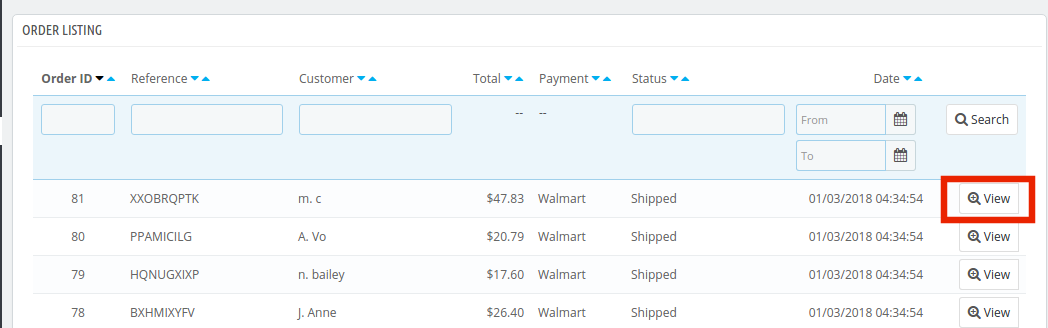
The orders received from the Walmart.com is listed in the admin interface of the Prestashop Walmart API Integration. For this, the store owner needs to run the ‘Sync Order Listing from Walmart’ cron. (See Section 4.16)

Once the cron is executed, the entire orders will be synced in the Prestashop store. These orders can then be processed by clicking on the ‘View’ button as shown below.
4.10. Feed Status

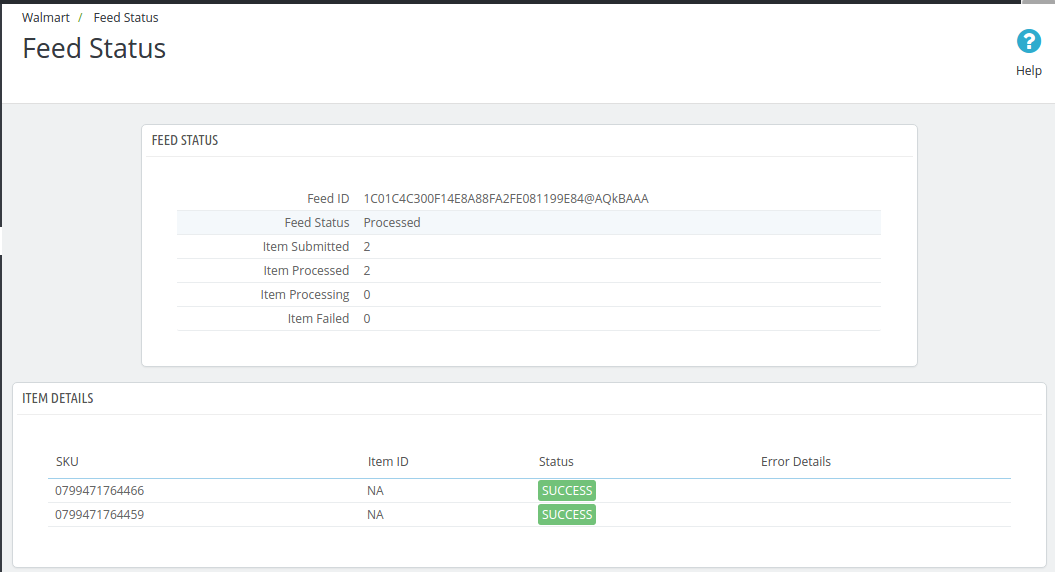
Every time a cron is executed, a Feed will be created in this tab as shown here. The status of the feeds can be seen by clicking on the ‘View’ button.
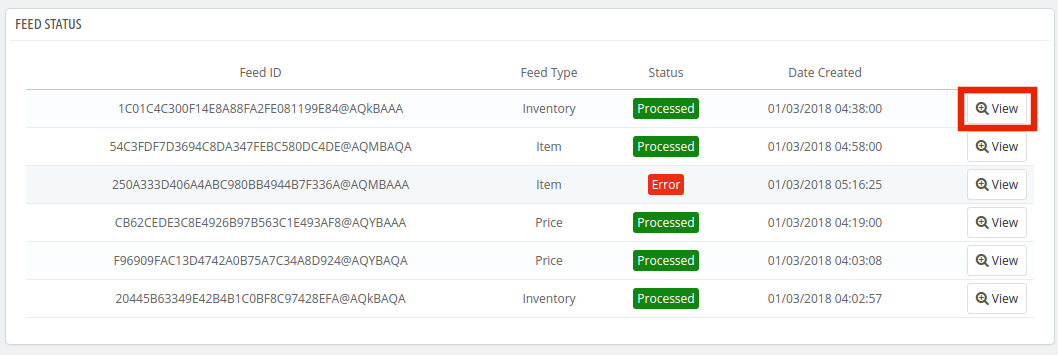
On clicking the button, you’ll be redirected to the feed status detail page.
4.11. BuyBox Report

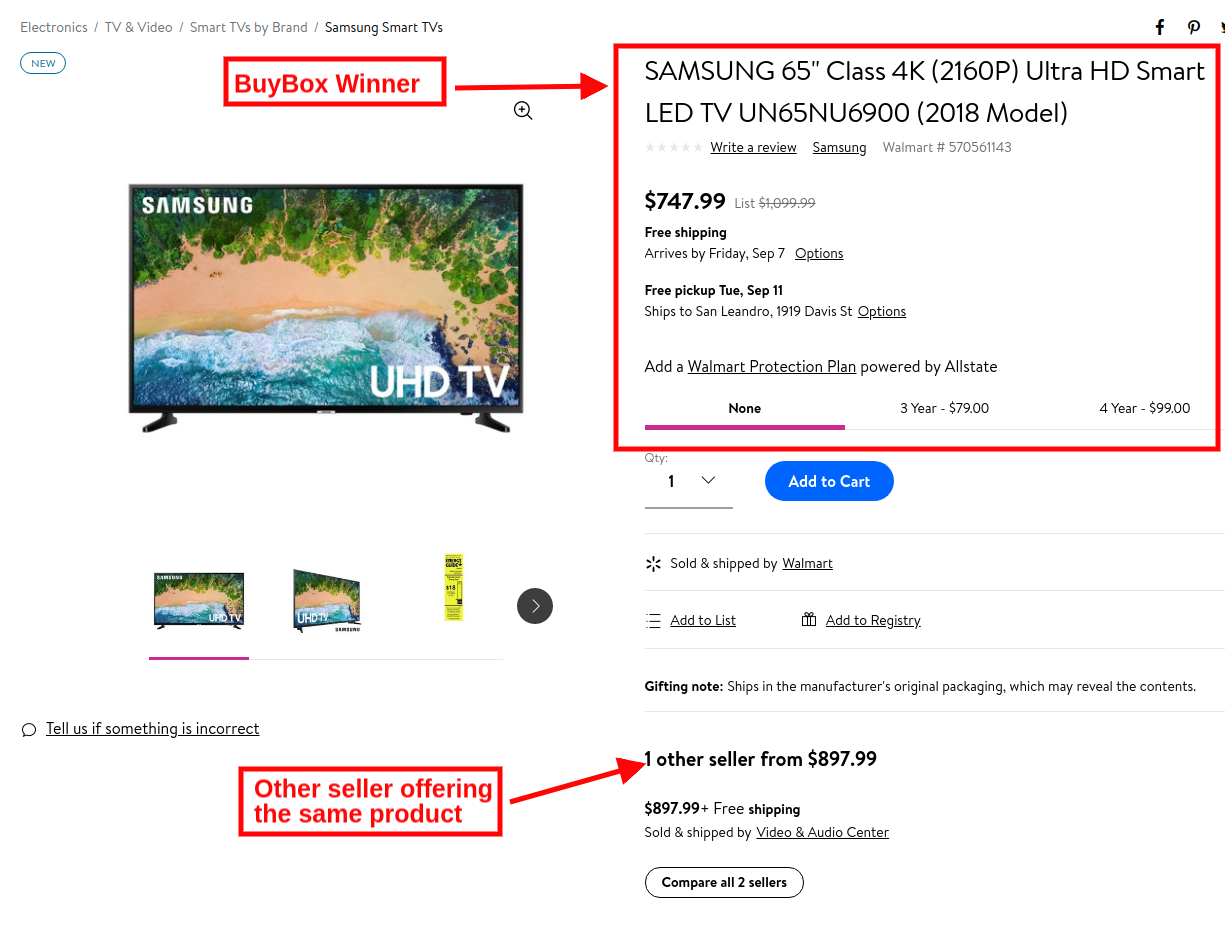
In case more than one seller is selling the same product, walmart.com displays them on a single page. This page displays the products and their pricing to the customer. Out of these products, one item wins the Buy Box. The customers are drawn to the very first option that they see. Hence, winning the buy box is essential for the vendors.

The sellers can see the products listed on the Buy Box with their status in the ‘Buy Box’ tab of the Prestashop Walmart Integration extension. To sync the latest buy box report, execute a cron job in the Synchronization tab of the Walmart Prestashop API integration addon. (See Section 4.16)
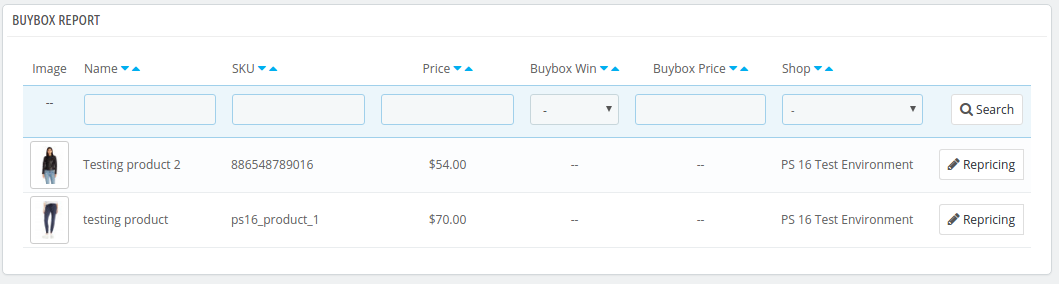
Also, Prestashop Walmart Integrator offers an easy means to reprice the products to win the buy box. The sellers can reduce the cost to boost their product visibility.

To reprice the products, click on the ‘Repricing’ option corresponding to each product.
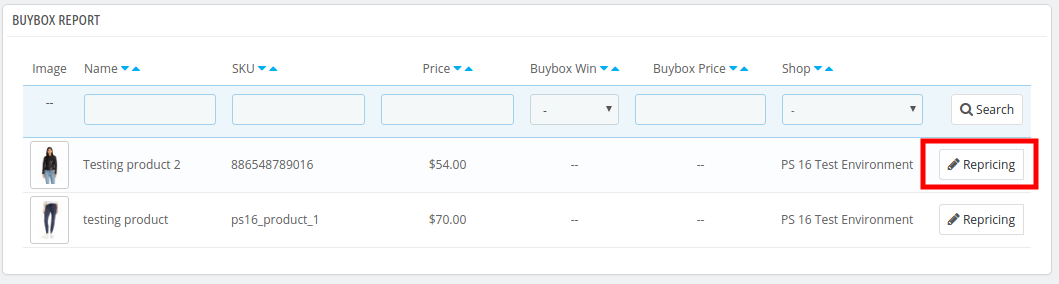
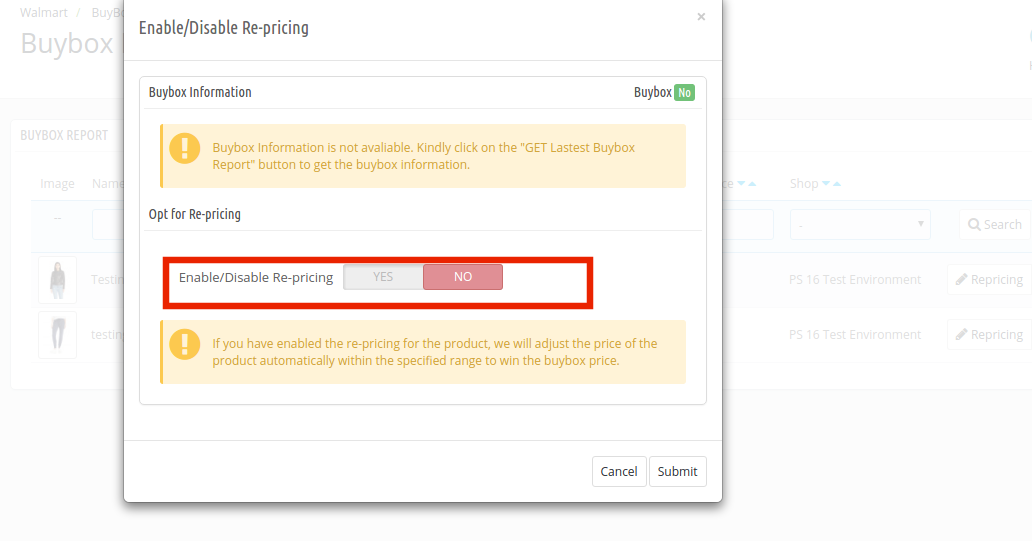
Once you click here, you’ll get a popup. Toggle the Enable/Disable Re-pricing option for the same.
Once you enable this functionality, you’ll be asked to enter the Minimum and Maximum Price.
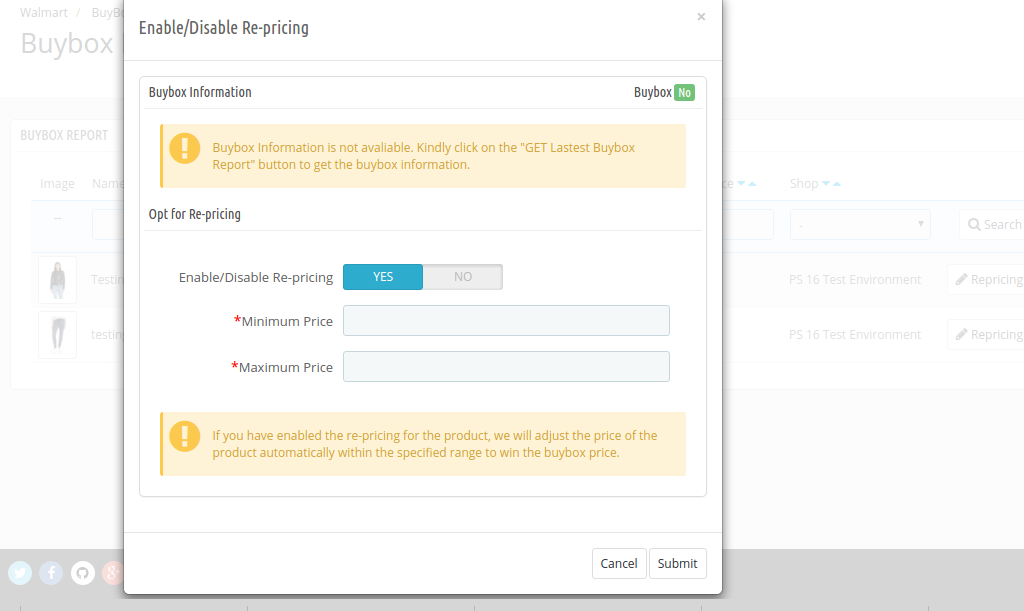
Enter the minimum and maximum price and click on the ‘Submit’ button. Sync the reprice with the marketplace by executing cron in the Synchronization tab of the Prestashop Walmart API integration addon. (See Section 4.16)

4.12. Lag Time

Lag Time refers to the minimum number of days when the shipment of the order is initiated. The lag time is the interval between the day when the order is placed and when it is shipped.

To update the shipping lag time, the admin is required to click on the ‘Update Lag Time’ button as shown below.
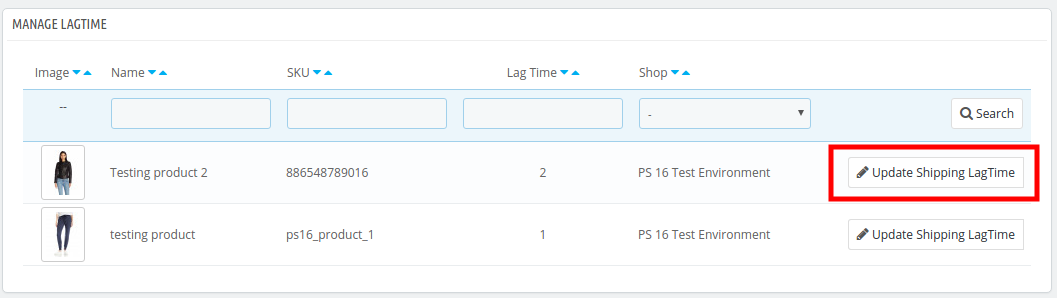
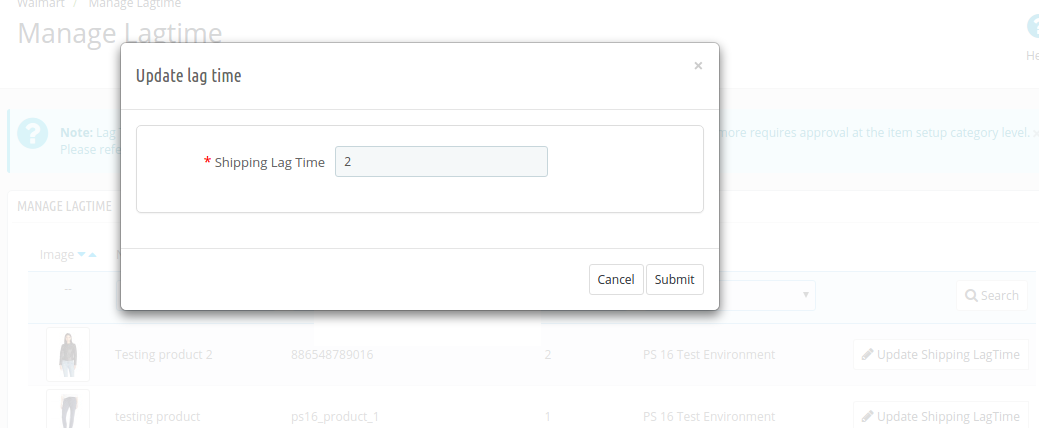
On clicking, a popup will appear as shown below:

Enter the lag time for each product. Once this is done, the admin can sync the lag time in bulk by executing cron in the synchronization tab of the Prestashop Walmart connector.
Refer to Section 4.15 for the cron job details.

4.13. Tax Code

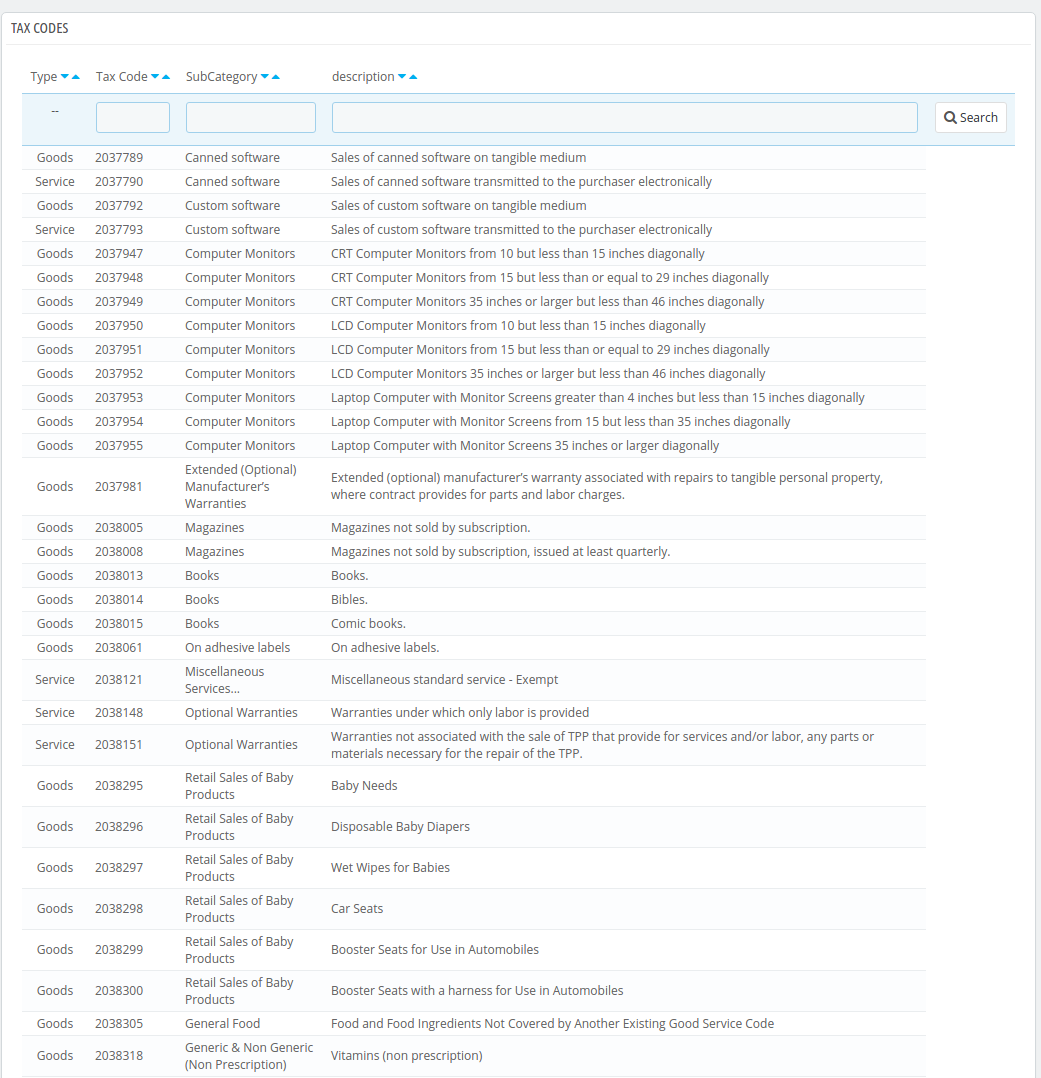
Walmart makes it mandatory for the sellers to provide the Tax Code for the products at the time of product listing. The store admin can check tax codes in this tab of the Prestashop Walmart marketplace integration module.
4.14. Sales Report

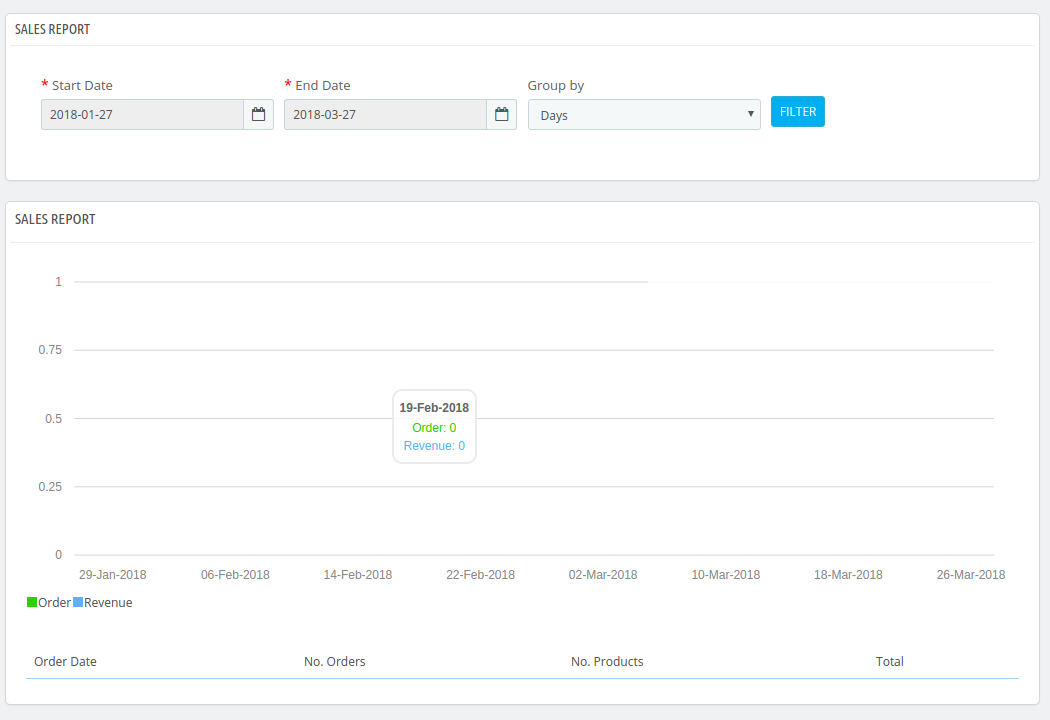
The seller gets a complete report of the marketplace sales from the Sales Report tab of the Walmart Prestashop connector. The sales report will appear in both graphical and tabular format.

Apply filter by selecting the Start and End date. The seller can even group the report by days, months and years.
4.15. Product Sales Report

The seller can even view the sales report of a particular product in the Product Sales Report tab of Walmart Prestashop Integrator.
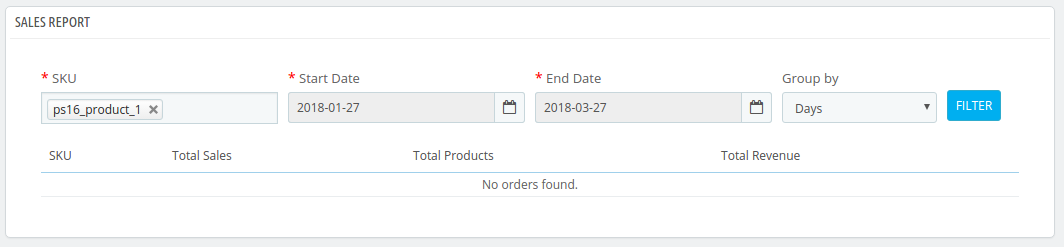
Enter the SKU, Start Date, End Date and apply the filter to view the sales report of that particular product.

4.16. Synchronization

This tab of the Prestashop Walmart Integration module synchronizes all the settings and changes done in the other tabs of the Prestashop Walmart Marketplace Integration Module. The synchronization between Prestashop Store and Walmart Marketplace and vice-versa can be done from the ‘Synchronize‘ tab.

The various cron jobs to synchronize the settings between Store and Walmart Marketplace are shown below –
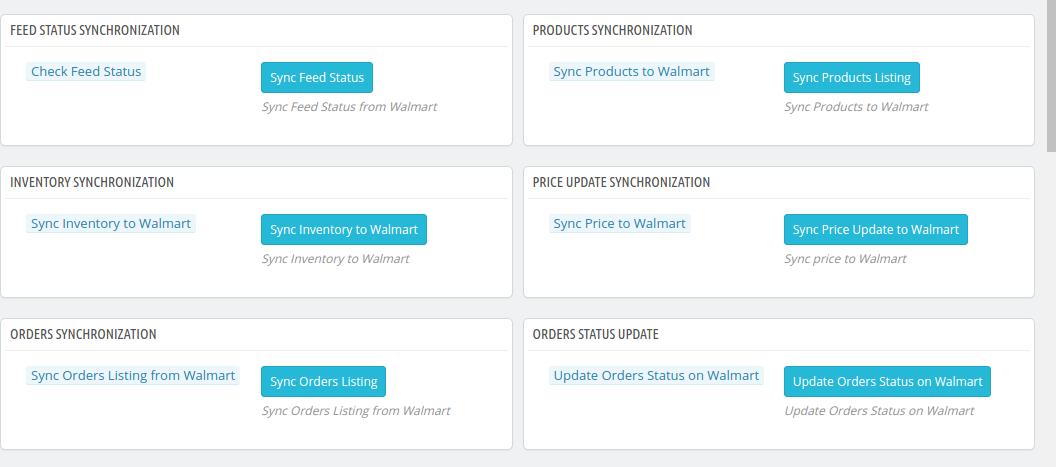
4.16.1 How to sync the status of the Feed?

Every time a cron is executed, a feed is created in the Feed Management tab. The initial status of the feed is submitted. To change the status of submitted or processing feed, click on Sync Feed Status.
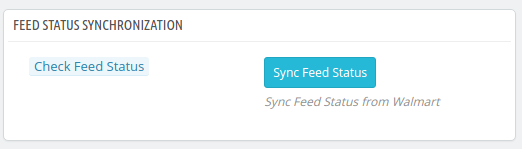
It would perform following actions –

  • A feed will be created every time a cron is executed in the admin interface.
  • This particular cron updates the status of the Feeds.

4.16.2 How to sync Products to Walmart Marketplace?

The product listed in the Prestashop Walmart Marketplace Integration addon will be synced to Walmart.com by clicking on ‘Sync Products to Walmart’.
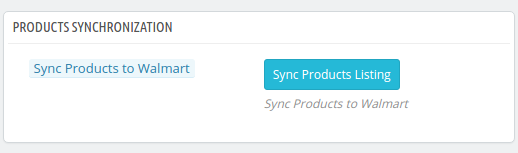
It would perform following actions –

  • The cron will update the products list in the Walmart marketplace.
  • It will add products on the Walmart Marketplace with the respective product details (e.g. Price, Quantity, Image, etc.).
  • It will update the products on the Walmart marketplace which are already listed.
  • It will update the expired products on Walmart Marketplace for the items in which ‘Renewal’ is enabled.
  • It will remove the products from Walmart Marketplace which are marked deleted on Store.

4.16.3 How to sync Inventory to Walmart Marketplace?

The quantity of the products can be updated on the Walmart Marketplace by executing the ‘Sync Inventory to Walmart’ cron from the Prestashop Walmart Integration module.
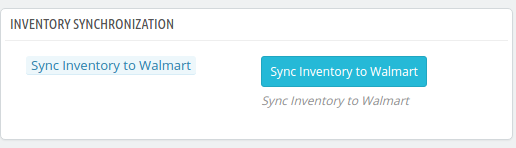
It would perform following actions –

  • It updates the quantity status of each product listed on Walmart Marketplace.

4.16.4 How to sync the price of the products to Walmart Marketplace?

The price of the products can be synced to the marketplace by executing ‘Sync Price to Walmart’ cron
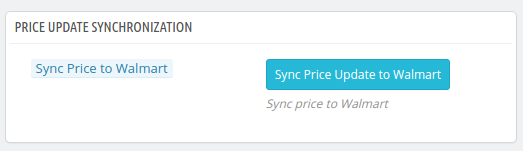
It would perform following actions –

  • The cron execution will display the updated price of the products on Walmart Marketplace.
  • It will update the changes in the price of the products.

4.16.5 How to sync Order Listing from Walmart Marketplace?

The orders received from the Walmart Marketplace can be synced in the store by executing ‘Sync Order Listing from Walmart’ cron.
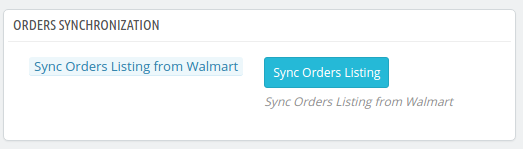
It would perform following actions –

  • The cron will sync the Orders and Transaction details from Walmart Marketplace.
  • It creates Orders into the Store as per the order received from Walmart Marketplace.

4.16.6 How to sync Lag time with the marketplace?

The lag time of the products fixed in the Lag time tab of the Prestashop Walmart Integration addon can be synced with the marketplace by executing ‘Sync Lag time on Walmart’ cron.
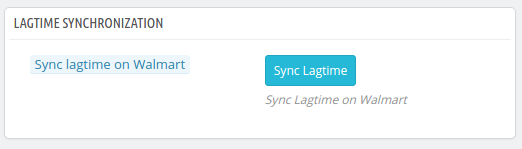
It would perform following actions –

  • The cron will sync the lagtime with the marketplace.
  • Any change in the lag time can be updated just by executing cron.

 4.16.7 How to sync Repricing Buy Box on the marketplace?

The admin can sync the Buy Box repricing by executing ‘Sync Repricing Buy Box on Walmart’.
 

It would perform following actions –

The cron will sync the change in the price of the Buy Box products.

4.16.8 How to get the latest Buy Box report from the marketplace?

The sellers can get the latest buy box report from the marketplace by executing the ‘Sync Latest Buy Box Report’ cron.

It would perform following actions –

The cron syncs the latest buy box report from the marketplace to the Prestashop Walmart API integrator.

Note:

On successful completion of synchronization, a message will be display – “Success”. Otherwise “Failed” will be displayed.

4.15. Audit Log

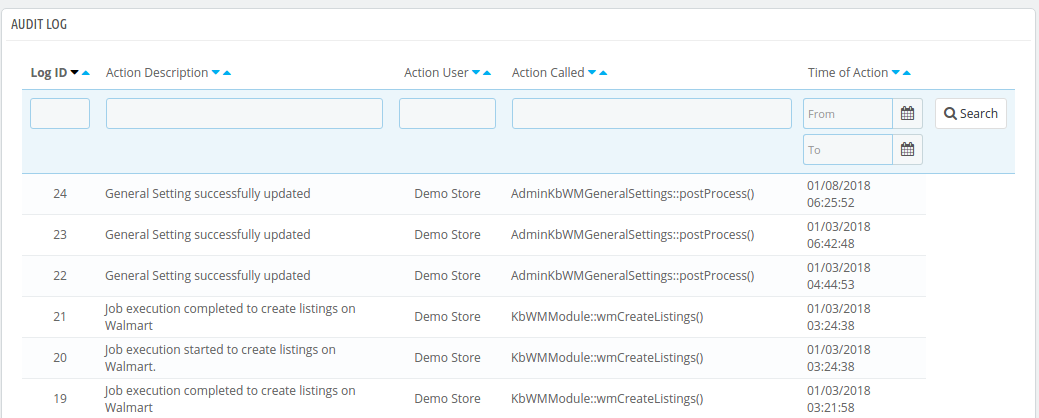
The admin can view all the jobs running occurred in the Audit Log tab of the Prestashop Walmart Integration extension. The status of the jobs can be viewed in this tab.
You can get Prestashop Walmart Integration at budget-friendly prices from the Knowband store.

Prestashop Walmart Integration Module Link: https://www.knowband.com/prestashop-walmart-integration

Prestashop Walmart Integration Admin Demo Link: https://psm.knowband.com/walmart/16/admin1/index.php?controller=AdminLogin&token=ffa17b0c72ff8c0ab7cf3e344c5ae4fc

Watch Video: https://www.youtube.com/watch?v=Dvhlpl8KTUk

Buy the Walmart Prestashop Integrator from the Addon store: https://addons.prestashop.com/en/third-party-data-integrations-crm-erp/30194-knowband-prestashop-walmart-integration.html

Contact us at support@knowband.com for any query or custom change request as per your business requirement.

The Pluses and Minuses of becoming a Walmart Marketplace seller

If you would have noticed, earlier in 2017, Amazon inaudibly dropped their shipping prices to match up with Walmart and Jet. To remain in the competition, it’s mandatory to be aware of the latest marketing techniques used by your competitors. As a consequence of this, the biggie store gave free shipping on orders above $49, the price dropped to $35. However, every action reacts to it and that’s when Walmart Marketplace announced its membership-free 2-day free shipping model. If you take a closer look, you’ll understand that Amazon is the biggest online store worldwide believes Walmart, the biggest retailer to be its competitor.

However, despite being the biggest marketplace that gives competition to Amazon, sellers are usually cynical about selling their products at Walmart. Well, that certainly has a lot of reasons for the reputation that Walmart has earned to the seller’s licensing agreements with brands and more.

So, it is always better to assess the ifs and the buts of selling your products at the Walmart marketplace.

If you are planning and thinking about becoming a seller on Walmart, you should go ahead and read the pros and cons of selling on Walmart below.

The PLUSES

If you do your homework properly, you’ll find that Walmart adds about a million products every month and out of which a huge chunk is by the new third-party sellers. Every e-seller, small or big, can now showcase their products to the Walmart visitors and tap a larger customer base now. Knowband compliments this quest of expansion of the e-sellers with a user-friendly solution for the CMS-based site. Walmart integrators are one such that allows the store owners to connect their site with Walmart.com and list their products with great ease and also they should rank high in the search results of customers.

Followed are the positives of selling your item on the Walmart marketplace.

Wide exposure

With 344 monthly visits of customers, Walmart.com has established itself to be the second most trafficked eCommerce site. With such stats, you would benefit from enormous exposure for your products. The exposure would let you reach out to newer customers as well as increase your loyalty. Our Walmart integration plugins can help you upload and manage the inventory in bulk. The profile-based listing option offered by Walmart integration extension allows you to upload the products and related details in bulk. Even automation or cron options allow the admin to edit, remove or relist the products with ease.

Higher credibility

Walmart has been in business for quite some time. Hence, if you are an e-merchant who deals in products like electronics, home appliances, decor, and more, you have a fair chance to be the credible one at the store and you’ll fit in well.

Walmart API integrator supports all types of products. Moreover, to stay ahead of the co-sellers, you can even offer products with promotional discounts with the help of Walmart  API integrator. The sellers can even win the Buy Box with the repricing option offered by  Walmart integration Extension.

Low investment

When you invest as a seller at Amazon or eBay, you pay monthly charges whereas; at Walmart marketplace, you only pay a certain amount of money when you start a sale on your products. Furthermore, the amount is decided to depend on the category of products that you choose to avail of the sale on.

Effortless transactions

You all hear a lot about businesses investing in eCommerce SEO services for a seamless shopping experience. Walmart invests a lot of money in providing a smooth shopping experience to the shoppers with faster checkouts and uninterrupted payment services. Hence, the bounce rates are low and the conversion rate is high.

Knowband makes marketplace transactions easier for the e-sellers. The cron options offered by the Walmart integration module sync the marketplace orders with the eCommerce store and allow the admin to process them from the back-end itself.

Return policies that suit you

One of the best aspects of selling at Walmart marketplace would be that the store allows its sellers to set their return policies. Now, they can choose whether the product can be returned within 30 days or a week.

Best customer support

BuyBox option

The marketplace is jam-packed and the number of sellers is increasing day-by-day. However, there is still an opportunity for the vendors to boost their presence and the visibility of their products at the marketplace. Walmart offers a BuyBox option where the sellers can compete for their product price. In case, the same products are being offered by multiple vendors, then, the products are displayed in the same place. The seller that wins the price gets the top position in the BuyBox. This way the customers can find the product at competitive prices. At the same time, it increases the chances of conversion for the sellers who win the BuyBox.

With the marketplace integrator like Prestashop, Magento, OpenCart, Magento 2 or Shopify Walmart Integrator Extension, the process of tracking the BuyBox report has become effortless. The report can be synced with the help of cron options and the sellers even get an option to reprise the product in order to win the BuyBox.

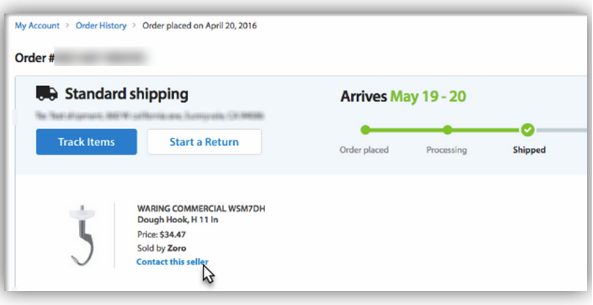
If you are to rate the best marketplace in terms of customer support, the Walmart marketplace would be on the top of the list. Wherever the Walmart marketplace feels that there are product issues, they would let the buyer contact the seller directly in order to resolve the issue or further assistance.

No thefts

Walmart.com has been in business since 2000 and security measures offered by the same are top-notch for both the sellers as well as the buyers.

The MINUSES

On the flip side, the following are the issues faced by the sellers on the Walmart marketplace:

Low prices reduce the chances of bigger profits

The Walmart marketplace has the reputation of being one of the most cost-effective marketplaces. That’s how the customers are in billions. However, for a seller to sell his product at a minimal price reduces the chances of the bigger margin of profit. Hence, a seller has to wait for a wide number of products in order to see the profit. And selling more products will only happen when you have high visibility among the customers.

Walmart integrator allows the admin to display the products at custom prices, that is, without changing them from the store.

Getting the opportunity at first place

Walmart believes in selecting only the best sellers to be a part of Walmart.com. If you have a credible selling history and a transparent track record, you are eligible to be selected by the Walmart marketplace but if you are unable to prove your worth, your application will be rejected.

Walmart favors brands over retailers

You have lesser chances to get in because Walmart gives priority to brands over the retailers.

Keeping the positives and negatives of selling the products on the popular marketplace, the e-sellers can probably now make up their mind whether they want to delve into the same or not. However, if these points are to be considered, the pluses of selling on Walmart has the upper hand.

How can Knowband’s Walmart Integrator help you?

Having discussed the pros and cons of Walmart’s shop, here are some of how Knowband’s Walmart integration extension can help you in the same.

The Walmart integration plugin offers an effortless means to set up the connection between the two stores. Follow the below mentioned steps for the same:

  • Install the Walmart integrator in your eCommerce site.
  • Establish the connection by sharing the API details in the back-end of the Walmart integrator.
  • Create profiles in the admin interface of the Prestashop Walmart integration plugin. Map the categories of the store with the category of the marketplace. The products of the selected category will be listed on the marketplace by executing cron in the back-end of the Walmart connector.

This integrator module is also available for various CMS platforms like Magento 2, Magento, OpenCart, PrestaShop and Shopify and serves all the functions listed above:

Here are some of the features offered by Walmart integration plugins that can take the burden off your shoulder:

  • The admin gets an option to connect their store with the marketplace just by sharing some API details in the back-end of the Walmart integrator.
  • The product listing and detail synchronization become effortless with seamless integration.
  • The admin can create profiles for mapping the categories and listing the products. This profile-based listing allows bulk product upload option.
  • The inventory, the details, and the pricing of the products are updated just by executing cron from the back-end.
  • The store admin can even relist or remove the products in bulk. These changes are synced with the marketplace by executing cron in the back-end.
  • The admin can synchronize the Walmart store order details to the store’s order details with the help of the cron job of Walmart Integration extension.
  • The admin can keep a check on the various feeds in the audit log section.
  • The Walmart BuyBox report is tracked from the back-end and the sellers can reprice the products in order to win the same.

So should you sell at the Walmart marketplace? The decision is left totally to you! The Walmart marketplace is doing everything to be the best in the industry and certainly, a good opportunity for you get on the bandwagon. If you want to become a seller, Walmart Marketplace Integration Module by Knowband would your sure shot way to higher conversions.

Watch Video of Prestashop Walmart connector

 Find more related articles:

  1. How to sell on Walmart Canada?
  2. 9 tips to help you sell more on Walmart Marketplace
  3. 5 eCommerce tips and tricks to ensure fast growth
  4. 8 tips to drive more customers on a Marketplace

Die Pluspunkte und Minuspunkte, ein Walmart-Marktplatz-Verkäufer zu werden

Wenn Sie bemerkt hätten, früher in 2017, Amazon hat unhörbar ihre Versandkosten gesenkt, um mit Walmart und Jet übereinzustimmen. Während früher der Biggie-Store bei Bestellungen über $ 49 versandkostenfrei war, fiel der Preis auf $ 35. Daher hat jede Aktion eine Reaktion darauf und das war der Zeitpunkt, an dem der Walmart Marketplace sein Mitgliedschafts-freies 2-Day Free Shipping Modell ankündigte. Wenn Sie genauer hinsehen, werden Sie verstehen, dass Amazon der größte Online-Shop ist, glaubt Walmart, der größte Einzelhändler, der sein Konkurrent ist.

Jedoch,

Es ist also immer besser, das Wenn und Aber zu bewerten, wenn Sie Ihre Produkte auf dem Walmart-Marktplatz verkaufen.

Wenn Sie planen und darüber nachdenken, ein Verkäufer auf Walmart zu werden, sollten Sie fortfahren und die Vor- und Nachteile unten lesen.

Die Pluspunkte

Wenn Sie Ihre Hausaufgaben richtig machen, werden Sie feststellen, dass Walmart jeden Monat etwa eine Million Produkte hinzufügt, von denen ein großer Teil von den neuen Drittverkäufern stammt. Jeder E-Verkäufer, ob klein oder groß, kann jetzt seine Produkte den Walmart-Besuchern präsentieren und einen größeren Kundenstamm erschließen. Knowband ergänzt diese Suche nach einer Erweiterung der E-Seller mit einer benutzerfreundlichen Lösung für die CMS-basierte Website. Prestashop Walmart Integration Addon ist eine solche, die den Ladenbesitzern erlaubt, ihre Website mit walmart.com zu verbinden und ihre Produkte mit großer Leichtigkeit aufzulisten. Ähnlich, Magento Walmart Integrationserweiterung kann den Magento-basierten Websites helfen, ihre Produkte auf dem Walmart-Marktplatz zu verkaufen.

Gefolgt sind die positiven Aspekte des Verkaufs Ihres Artikels auf dem Walmart-Marktplatz.

Breite Belichtung

Ein 92 Mio. Benutzer jeden Monat. Walmart.com hat sich als zweithäufigste E-Commerce-Website etabliert. Mit solchen Statistiken würden Sie enorme Exposition für Ihre Produkte profitieren. Das Engagement würde es Ihnen ermöglichen, neue Kunden zu erreichen und Ihre Loyalität zu erhöhen.

Höhere Glaubwürdigkeit

Walmart ist seit geraumer Zeit im Geschäft. Also, wenn Sie ein E-Merchant sind, der Produkte wie Elektronik, Haushaltsgeräte, Dekor und vieles mehr anbietet, haben Sie eine faire Chance, die glaubwürdige im Geschäft zu sein, und Sie werden gut passen. Prestashop Walmart API Integrator unterstützt alle Arten von Produkten. Darüber hinaus können Sie mit Hilfe des Walmart Prestashop API-Integrators sogar Produkte mit Aktionsrabatt anbieten, um den Mitverkäufern einen Schritt voraus zu sein. Die Verkäufer können sogar die Buy-Box mit der von Prestashop Walmart Integration Addon gebotenen Preisanpassungsoption gewinnen.

Geringe Investition

Wenn Sie als Verkäufer bei Amazon oder eBay investieren, zahlen Sie monatliche Gebühren, während; Auf dem Walmart-Marktplatz zahlen Sie nur einen bestimmten Betrag, wenn Sie einen Verkauf Ihrer Produkte starten. Darüber hinaus wird der Betrag abhängig von der Produktkategorie entschieden, für die Sie den Verkauf in Anspruch nehmen möchten.

Mühelose Transaktionen

Sie alle hören viel über Unternehmen, die in eCommerce SEO Services für ein nahtloses Einkaufserlebnis investieren. Walmart investiert viel Geld in die Bereitstellung eines reibungslosen Einkaufserlebnisses für die Käufer mit schnelleren Kassen und unterbrechungsfreien Zahlungsdiensten. Daher sind die Absprungraten niedrig und die Umwandlungsrate ist hoch.

Knowband erleichtert den E-Sellern die Marktplatztransaktion. Die Cron-Optionen, die vom Walmart Prestashop Integration Addon angeboten werden, synchronisieren die Marktplatzbestellungen mit dem Prestashop eCommerce Store und ermöglichen es dem Administrator, sie vom Backend selbst zu verarbeiten.

Rückgaberecht, die zu Ihnen passt

Einer der besten Aspekte, die auf dem Walmart-Marktplatz verkauft werden, ist, dass der Laden seinen Verkäufern ermöglicht, ihre eigenen Rückgaberichtlinien festzulegen. Jetzt können sie wählen, ob das Produkt innerhalb von 30 Tagen oder einer Woche zurückgegeben werden kann.

Bester Kundendienst

BuyBox-Option

Der Markt ist voll gepackt und die Anzahl der Verkäufer steigt von Tag zu Tag. Es gibt jedoch immer noch eine Gelegenheit für die Anbieter, ihre Präsenz zu verstärken und die Sichtbarkeit ihrer Produkte auf dem Markt. Walmart bietet eine BuyBox-Option, bei der die Verkäufer um ihren Produktpreis konkurrieren können. Wenn dieselben Produkte von mehreren Anbietern angeboten werden, werden die Produkte an derselben Stelle angezeigt. Der Verkäufer, der den Preis gewinnt, bekommt die Top-Position in der BuyBox. Auf diese Weise können die Kunden das Produkt zu wettbewerbsfähigen Preisen finden. Gleichzeitig erhöht es die Chancen der Conversion für die Verkäufer, die die BuyBox gewinnen. Mit dem Marktplatz-Integrator wie Prestashop, Magento, Magento 2 Walmart Integration Erweiterung, der Prozess der Verfolgung des BuyBox-Berichts ist mühelos geworden. Der Report kann mit Hilfe von Cron-Optionen synchronisiert werden und die Verkäufer erhalten sogar eine Option, das Produkt neu zu bewerten, um die BuyBox zu gewinnen.

Wenn Sie den besten Marktplatz in Bezug auf Kundensupport bewerten möchten, wäre Walmart Marktplatz ganz oben auf der Liste. Überall dort, wo der Walmart-Marktplatz Probleme mit Produkten hat, lassen sie den Käufer den Verkäufer direkt kontaktieren, um das Problem oder die weitere Unterstützung zu lösen.

Keine Diebstähle

Walmart.com ist seit 2000 im Geschäft und die von ihm angebotenen Sicherheitsmaßnahmen sind sowohl für die Verkäufer als auch für die Käufer erstklassig.

Die Minuspunkte

Auf der anderen Seite sind die Probleme, denen die Verkäufer auf dem Walmart-Marktplatz gegenüberstehen:

Niedrige Preise verringern die Chancen auf höhere Gewinne

Der Walmart-Marktplatz hat den Ruf, einer der kostengünstigsten Marktplätze zu sein. So sind die Kunden in Milliardenhöhe. Ein Verkäufer, der sein Produkt zu einem minimalen Preis verkauft, verringert jedoch die Chancen auf eine größere Gewinnspanne. Daher muss ein Verkäufer auf eine große Anzahl von Produkten warten, um den Gewinn zu sehen. Und der Verkauf einer größeren Anzahl von Produkten wird nur stattfinden, wenn Sie eine hohe Sichtbarkeit bei den Kunden haben.

Prestashop Walmart Integrator ermöglicht es dem Administrator, die Produkte zu benutzerdefinierten Preisen anzuzeigen, das heißt, ohne sie aus dem Geschäft zu ändern.

Die erste Chance bekommen

Walmart glaubt daran, nur die besten Verkäufer zu wählen, die Teil von Walmart.com sind. Wenn Sie eine glaubwürdige Verkaufshistorie und eine transparente Erfolgsbilanz haben, können Sie vom Walmart-Marktplatz ausgewählt werden, aber wenn Sie Ihren Wert nicht nachweisen können, wird Ihre Bewerbung abgelehnt.

Walmart bevorzugt Marken gegenüber Einzelhändlern

Sie haben geringere Chancen einzutreten, weil Walmart den Marken gegenüber den Einzelhändlern Priorität einräumt.

Behält man das Positive und Negative beim Verkauf der Produkte auf dem beliebten Marktplatz, können sich die E-Verkäufer jetzt wohl entscheiden, ob sie sich in das Gleiche vertiefen wollen oder nicht. Allerdings, wenn diese Punkte berücksichtigt werden, haben die Pluspunkte des Verkaufs auf Walmart Oberhand.

Wie kann der Walmart Integrator von Knowband Ihnen helfen?

Nachdem wir über die Wichtigkeit eines Walmart-Shops gesprochen haben, sind hier einige Beispiele, wie Sie die Integration von Prestashop Walmart von Knowband in die gleiche Weise unterstützen kann. Das Walmart Prestashop Integration Addon bietet eine mühelose Möglichkeit, die Verbindung zwischen den beiden Geschäften einzurichten. Befolgen Sie die unten genannten Schritte für das gleiche:

  • Installieren Sie den Prestashop Walmart Integrator in Ihrer Prestashop-Site.
  • Stellen Sie die Verbindung her, indem Sie die API-Details im Back-End des Walmart Prestashop-Integrators freigeben.
  • Erstellen Sie Profile in der Admin-Oberfläche des Prestashop Walmart Integration Plugins. Ordnen Sie die Kategorien des Geschäfts mit der Kategorie des Marktplatzes zu. Die Produkte der ausgewählten Kategorie werden auf dem Marktplatz aufgelistet, indem Cron im Back-End des Prestashop Walmart Connectors ausgeführt wird.

Ebenso Magento 2 oder Magento Walmart Integrator und OpenCart Walmart Integrator hat die gleiche Funktion für die jeweiligen CMS-Plattformen. Hier sind einige der Funktionen von Walmart Integration Plugins, die Ihnen die Last von der Schulter nehmen können:

  • Der Administrator erhält eine Option, um seinen Store mit dem Marktplatz zu verbinden, indem er einige API-Details im Back-End des Walmart-Integrators freigibt.
  • Die Produktauflistung und die Detailsynchronisierung werden mit nahtloser Integration mühelos.
  • Der Administrator kann Profile erstellen, um die Kategorien zuzuordnen und die Produkte aufzulisten. Diese profilbasierte Auflistung ermöglicht das Hochladen von Bulk-Produkten.
  • Das Inventar, die Produktdetails und Preise werden nur durch Ausführen von Cron aus dem Back-End aktualisiert.
  • Der Store-Administrator kann sogar die Produkte in großen Mengen neu bereitstellen oder entfernen. Diese Änderungen werden mit dem Marktplatz synchronisiert, indem cron im Backend ausgeführt wird.
  • Der Administrator kann die Bestelldetails des Walmart Shops mit Hilfe der Cron Job der Walmart Integration Extension mit den Bestelldetails des Shops synchronisieren.
  • Der Administrator kann die verschiedenen Feeds im Bereich Audit-Protokoll überprüfen.
  • Der BuyBox-Bericht wird vom Back-End aus verfolgt und die Verkäufer können die Produkte neu bewerten, um das gleiche zu erreichen.

Sollten Sie also auf dem Walmart-Marktplatz verkaufen? Die Entscheidung liegt ganz bei Ihnen! Der Walmart-Marktplatz tut alles, um der Beste in der Branche zu sein und sicherlich eine gute Gelegenheit für Sie, auf den Zug aufzuspringen. Wenn Sie ein Verkäufer werden wollen, Walmart-Marktplatz-Integration Modul von Knowband Würden Sie sicher zu höheren Conversions gelangen?

Für das Benutzerhandbuch von Prestashop Walmart Integrator, Klicken Sie hier

Für die Admin-Demo von Walmart Prestashop Integrator, Klicken Sie hier

Sehen Sie Video von Prestashop Walmart Stecker

Ähnliche Beiträge:

The Pluses and Minuses, aby zostać sprzedawcą Walmart Marketplace

Gdybyś zauważył, wcześniej w 2017, Amazon niesłyszalnie obniżył ceny swoich wysyłek, aby dopasować je do Walmart i Jet. Jeszcze wcześniej sklep Biggie oferował bezpłatną wysyłkę przy zamówieniach powyżej 49, cena spadła do $ 35. W związku z tym każde działanie ma na nie swoją reakcję i wtedy firma Walmart Marketplace ogłosiła swój darmowy model 2 z bezpłatnym członkostwem. Jeśli przyjrzysz się bliżej, zrozumiesz, że Amazon jest największym sklepem internetowym, który uważa Walmart, największego detalistę za swojego konkurenta.

Jednak,

Dlatego zawsze lepiej jest ocenić, czy i jak sprzedawać swoje produkty na rynku Walmart.

Jeśli planujesz i myślisz o zostaniu sprzedawcą w serwisie Walmart, powinieneś przeczytać poniższe plusy i minusy.

PLUSES

Jeśli wykonasz swoją pracę domową we właściwy sposób, przekonasz się, że Walmart dodaje około miliona produktów każdego miesiąca, a dzięki temu nowy sprzedawca innych firm ma ogromny udział. Każdy e-sprzedawca, mały lub duży, może teraz zaprezentować swoje produkty odwiedzającym Walmart i wejść do większej bazy klientów. Knowband uzupełnia to dążenie do rozszerzenia e-sprzedawców o przyjazne dla użytkownika rozwiązanie dla witryny opartej na CMS. Dodatek do integracji Prestashop Walmart jest jednym z takich, który pozwala właścicielom sklepu na podłączenie swojej strony do walmart.com i łatwą listę produktów. Podobnie, Rozszerzenie integracji Magento Walmart może pomóc witrynom opartym na Magento w sprzedaży swoich produktów na rynku Walmart.

Następuje pozytywna sprzedaż Twojego przedmiotu na rynku Walmart.

Szeroka ekspozycja

Na 92 milionów użytkowników co miesiąc. Walmart.com stał się drugą najczęściej odwiedzaną witryną eCommerce. Dzięki takim statystykom zyskałbyś ogromną ekspozycję swoich produktów. Ekspozycja pozwoliłaby Ci dotrzeć do nowych klientów, a także zwiększyć lojalność.

Większa wiarygodność

Walmart działa już od dłuższego czasu. W związku z tym, jeśli jesteś sprzedawcą internetowym, który zajmuje się produktami takimi jak elektronika, sprzęt gospodarstwa domowego, dekoracje i wiele innych, masz szansę być wiarygodnym sprzedawcą i dobrze się w nim zmieścisz. Prestashop Walmart API integrator obsługuje wszystkie typy produktów. Co więcej, aby wyprzedzić sprzedawców, możesz nawet oferować produkty z promocyjnymi rabatami za pomocą integratora API Walmart Prestashop. Sprzedawcy mogą nawet wygrać Buy Box z opcją ponownej wyceny oferowaną przez dodatek integracji Prestashop Walmart.

Niskie inwestycje

Kiedy inwestujesz jako sprzedawca w serwisie Amazon lub serwisie eBay, płacisz miesięczne opłaty, podczas gdy; na rynku Walmart płacisz tylko określoną kwotę, gdy rozpoczynasz sprzedaż swoich produktów. Co więcej, kwota jest ustalana w zależności od kategorii produktów, które zdecydujesz się na sprzedaż.

Bezproblemowe transakcje

Wszyscy słyszysz wiele o firmach inwestujących w usługi SEO w eCommerce, aby zapewnić bezproblemowe zakupy. Walmart inwestuje dużo pieniędzy w zapewnienie płynnego zakupów klientom dzięki szybszym zakupom i nieprzerwanym usługom płatniczym. W związku z tym współczynniki odrzuceń są niskie, a współczynnik konwersji jest wysoki.

Knowband ułatwia transakcje na rynku dla e-sprzedawców. Opcje cron oferowane przez dodatek integracji Walmart Prestashop synchronizują zamówienia rynkowe ze sklepem Prestashop eCommerce i umożliwiają administratorowi przetwarzanie ich z samego zaplecza.

Zasady zwrotów, które Ci odpowiadają

Jednym z najlepszych aspektów sprzedaży na rynku Walmart byłoby to, że sklep pozwala sprzedawcom na ustalanie własnych zasad dotyczących zwrotów. Teraz mogą wybrać, czy produkt może zostać zwrócony w ciągu 30 dni, czy tygodnia.

Najlepsza obsługa klienta

Opcja BuyBox

Rynek jest zatłoczony, a liczba sprzedawców rośnie z dnia na dzień. Jednak wciąż jest szansa dla sprzedawców na zwiększenie ich obecności i widoczność ich produktów na rynku. Walmart oferuje opcję BuyBox, w której sprzedający mogą konkurować o cenę swoich produktów. W przypadku, gdy te same produkty są oferowane przez wielu dostawców, produkty są wyświetlane w tym samym miejscu. Sprzedawca, który wygrywa cenę, otrzymuje najwyższą pozycję w BuyBox. W ten sposób klienci mogą znaleźć produkt po konkurencyjnych cenach. Jednocześnie zwiększa szanse na konwersję dla sprzedawców, którzy wygrywają BuyBox. Z integratorem rynku, takim jak Prestashop, Magento, Rozszerzenie Magento 2 Walmart Integration, proces śledzenia raportu BuyBox stał się bezproblemowy. Raport można zsynchronizować za pomocą opcji cron, a sprzedający otrzymują nawet opcję odświeżenia produktu w celu wygrania BuyBox.

Jeśli chcesz ocenić najlepszy rynek pod względem obsługi klienta, rynek Walmart znajdzie się na szczycie listy. Wszędzie tam, gdzie rynek Walmart uważa, że ​​istnieją problemy z produktem, pozwoliłby kupującemu bezpośrednio skontaktować się ze sprzedawcą w celu rozwiązania problemu lub dalszej pomocy.

Bez kradzieży

Walmart.com działa w branży, ponieważ 2000 i środki bezpieczeństwa oferowane przez to samo są na najwyższym poziomie zarówno dla sprzedawców, jak i kupujących.

MINUSY

Z drugiej strony są to problemy, z którymi stykają się sprzedawcy na rynku Walmart:

Niskie ceny zmniejszają szanse na większe zyski

Rynek Walmart ma reputację jednego z najbardziej opłacalnych rynków. W ten sposób klienci są miliardami. Jednak, aby sprzedawca sprzedał swój produkt po minimalnej cenie, zmniejsza szanse na większy margines zysku. W związku z tym sprzedawca musi czekać na szeroką gamę produktów, aby zobaczyć zysk. A sprzedaż większej ilości produktów nastąpi tylko wtedy, gdy będziesz mieć dobrą widoczność wśród klientów.

Prestashop Walmart integrator pozwala administratorowi wyświetlać produkty po niestandardowych cenach, czyli bez zmiany ich ze sklepu.

Zdobycie szansy w pierwszej kolejności

Walmart wierzy w wybór najlepszych sprzedawców, którzy będą częścią Walmart.com. Jeśli posiadasz wiarygodną historię sprzedaży i przejrzystą historię sprzedaży, możesz zostać wybrany przez rynek Walmart, ale jeśli nie jesteś w stanie udowodnić swojej wartości, Twój wniosek zostanie odrzucony.

Walmart faworyzuje marki w stosunku do sprzedawców detalicznych

Masz mniejsze szanse na wejście, ponieważ Walmart daje pierwszeństwo markom w stosunku do sprzedawców detalicznych.

Utrzymując pozytywne i negatywne strony sprzedaży produktów na popularnym rynku, e-sprzedający mogą teraz zdecydować, czy chcą zagłębić się w to samo, czy nie. Jednakże, jeśli te punkty mają być brane pod uwagę, plusy sprzedaży na Walmart ma przewagę.

W jaki sposób pomoże Ci integrator Walmart Knowband?

Po omówieniu znaczenia posiadania sklepu Walmart, oto kilka sposobów, w jaki rozszerzenie integracji Knowband's Prestashop Walmart może ci pomóc w tym samym. Dodatek do integracji Walmart Prestashop oferuje bezproblemowy sposób na skonfigurowanie połączenia między dwoma sklepami. Wykonaj poniższe kroki dla tego samego:

  • Zainstaluj integrator Prestashop Walmart na swojej stronie Prestashop.
  • Nawiąż połączenie, dzieląc się szczegółami API na zapleczu integratora Walmart Prestashop.
  • Twórz profile w interfejsie administratora wtyczki do integracji Prestashop Walmart. Mapuj kategorie sklepu z kategorią rynku. Produkty wybranej kategorii zostaną wymienione na rynku poprzez uruchomienie crona na zapleczu złącza Prestashop Walmart.

Podobnie, Magento 2 lub Magento Walmart Integrator i OpenCart Walmart Integrator pełni tę samą funkcję dla odpowiednich platform CMS. Oto niektóre funkcje wtyczek do integracji z Walmart, które mogą odciążyć Cię od ramienia:

  • Administrator ma możliwość podłączenia swojego sklepu do rynku poprzez udostępnienie pewnych szczegółów API na zapleczu integratora Walmart.
  • Lista produktów i synchronizacja szczegółów stają się łatwe dzięki płynnej integracji.
  • Administrator może tworzyć profile do mapowania kategorii i wyświetlania produktów. Ten profil oparty na profilu umożliwia opcję przesyłania produktów masowych.
  • Ekwipunek, szczegóły produktów i ceny są aktualizowane po prostu przez wykonanie crona z back-endu.
  • Administrator sklepu może nawet ponownie wystawić lub usunąć produkty luzem. Zmiany te są zsynchronizowane z rynkiem poprzez uruchomienie crona na zapleczu.
  • Administrator może zsynchronizować szczegóły zamówienia sklepu Walmart ze szczegółami zamówienia sklepu za pomocą zadania cron rozszerzenia integracji Walmart.
  • Administrator może sprawdzać różne kanały w sekcji dziennika kontroli.
  • Raport BuyBox jest śledzony z zaplecza, a sprzedający może powtórzyć produkty w celu wygrania tego samego.

Więc czy powinieneś sprzedawać na rynku Walmart? Decyzja pozostaje całkowicie Tobie! Rynek Walmart robi wszystko, aby być najlepszym w branży, a na pewno dobrą okazją, aby dostać się na modę. Jeśli chcesz zostać sprzedawcą, Integracja rynku Walmart moduł wg Knowband to byłaby Twoja droga do wyższych konwersji.

W instrukcji obsługi programu Prestashop Walmart integrator, Kliknij tutaj

Dla demo administratora integratora Walmart Prestashop, Kliknij tutaj

Obejrzyj wideo ze złączem Prestashop Walmart

Powiązane historie: