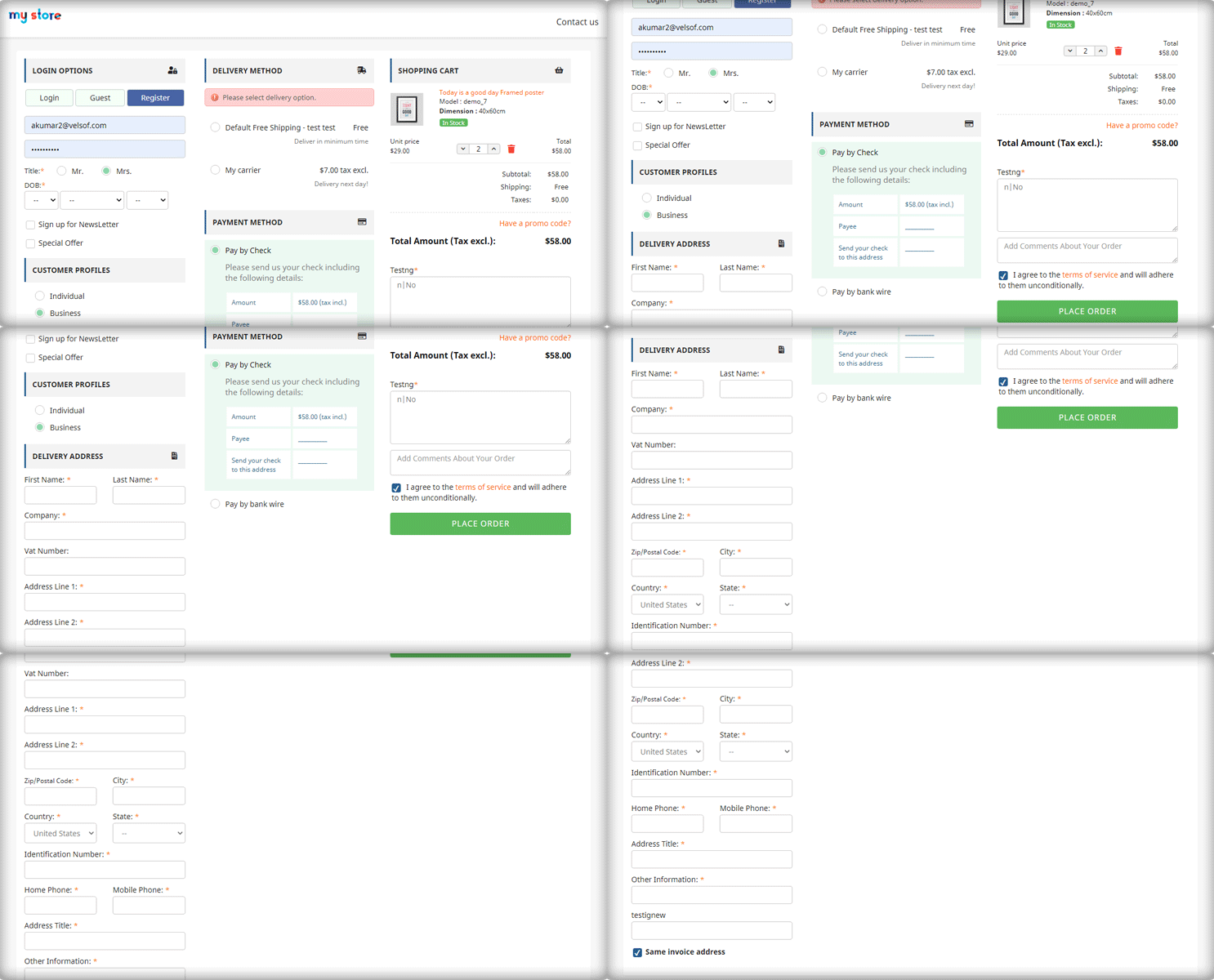
Cart abandonment is one of the biggest challenges faced by eCommerce stores today, and Prestashop merchants are no exception. With consumers becoming more impatient and expecting seamless online shopping experiences, a complicated checkout process can lead to high cart abandonment rates. This is where the Prestashop One Page Supercheckout comes into play, offering a streamlined solution that can drastically reduce cart abandonment on your Prestashop store.
Also known as the Prestashop One Step Checkout Addon, Prestashop Quick Checkout Addon, and Prestashop Fast Checkout Addon, this solution is designed to simplify the buying journey and improve conversion rates.
In this article, we will explore how the Prestashop One Page Checkout addon can simplify the checkout process and help you retain more customers by reducing friction.
The Problem with Traditional Checkouts:
A complicated, multi-step checkout process is one of the main reasons for cart abandonment. Many traditional checkouts require users to fill out multiple forms, navigate through different pages, and endure long loading times before completing a purchase. This leads to frustration and eventually pushes the customer to abandon their cart.
On the other hand, the Prestashop merchants who are looking to fix this issue need a Prestashop fast checkout addon that simplifies the entire process for their customers, providing a seamless and responsive experience that encourages them to complete their purchase in just a few clicks.
How the Prestashop One Page Supercheckout Solves This Problem!
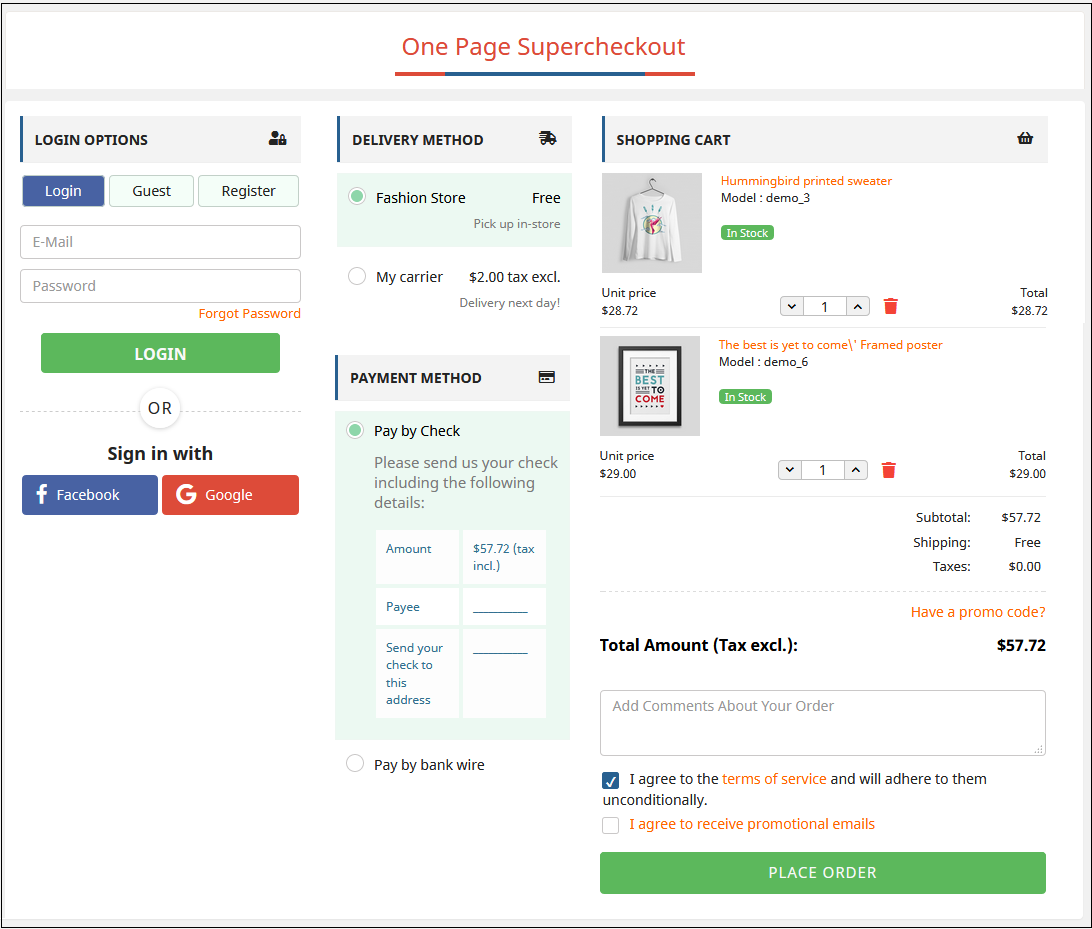
The Prestashop One Page Supercheckout is designed to address all the pain points associated with a complex checkout process. Furthermore, the Prestashop One Page Checkout Extension consolidates all checkout steps—billing, shipping, payment methods, and order summary—into a single, easy-to-navigate page. This means no more multiple clicks and loading screens, reducing the time and effort required from customers to complete their orders.
This makes it one of the most reliable Prestashop Simplified Checkout Addons available for merchants looking to enhance user experience and reduce drop-offs.
Key Features of One-Page Supercheckout for Prestashop:
1. Single-page Checkout:
Unlike traditional checkouts, this quick checkout extension for Prestashop simplifies the entire process by placing all required fields on a single page. Moreover, it removes unnecessary steps and speeds up the checkout, significantly improving the customer experience.
2. Guest Checkout Option:
One common reason for cart abandonment is the forced account creation process. The Prestashop One Step Checkout addon provides a guest checkout option, allowing customers to complete their purchases without the hassle of creating an account. This feature alone can reduce cart abandonment rates by making the purchase process more accessible.
3. Responsive and Mobile-Friendly Design:
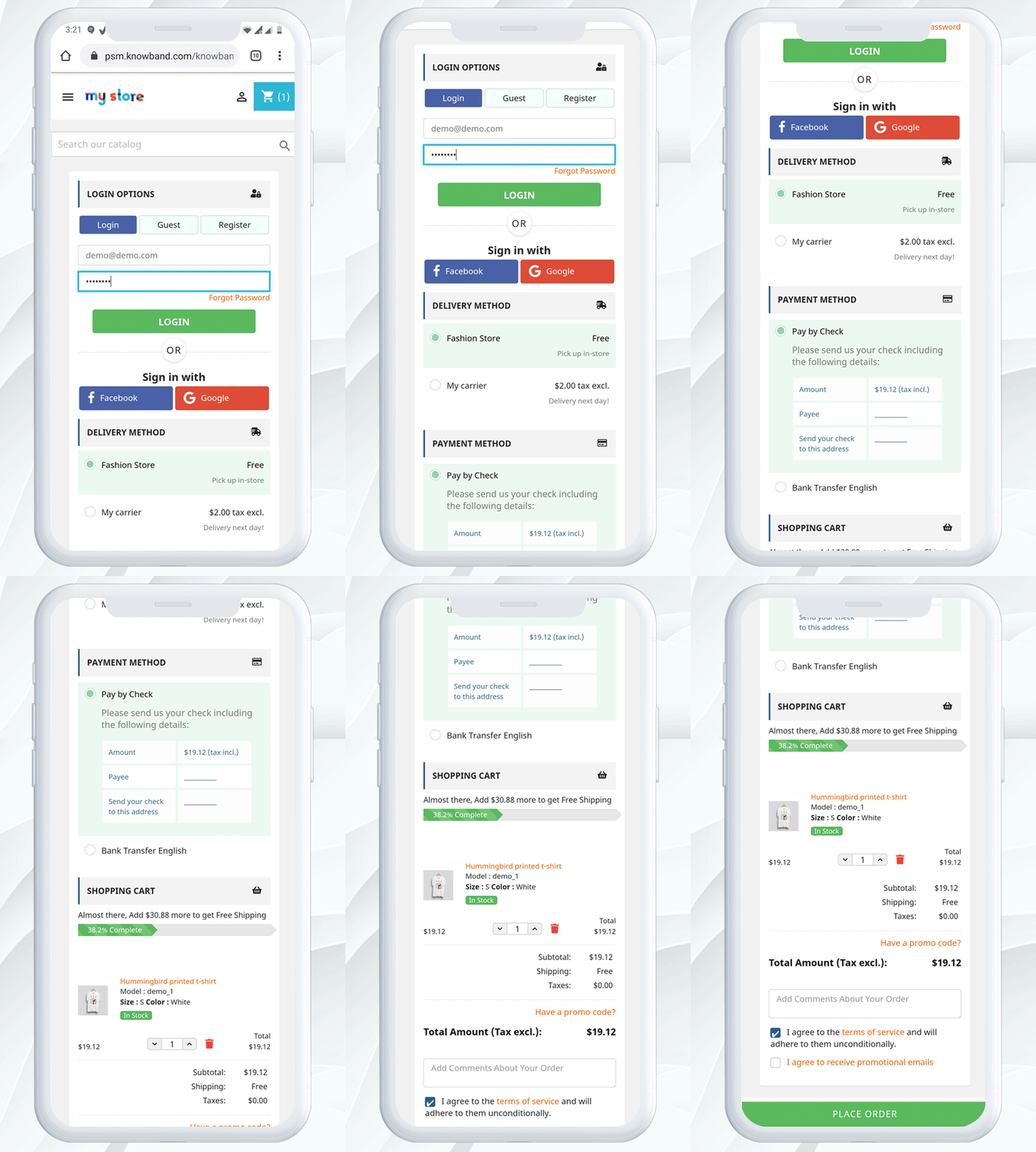
With mobile commerce on the rise, having a checkout page that works smoothly on all devices is crucial. Therefore, the Prestashop responsive one-step checkout addon by Knowband ensures that the checkout process is fully optimized for all screen sizes, providing a seamless experience whether your customers are shopping from their phones, tablets, or desktops.
This responsive one page checkout Prestashop solution helps capture mobile users who are more likely to abandon slow or cluttered checkouts.
4. Multiple Payment and Shipping Options:
Customers appreciate having choices when it comes to payments and shipping. Knowband’s One Step Checkout Prestashop extension integrates multiple payment gateways and shipping methods, ensuring that customers can select their preferred option without leaving the checkout page.
5. Customizable Design:
You can easily customize the look and feel of the One Page Checkout Prestashop to match your store’s branding. Whether it’s adding logos, changing colors, or reordering fields, this quick checkout addon for Prestashop is fully adaptable to your store’s needs.
6. Compatibility with Popular Prestashop Modules:
The Prestashop One Page Supercheckout is designed to work flawlessly with other popular Prestashop modules, including loyalty programs, discount systems, and more. This ensures that you don’t lose out on any additional features while benefiting from a simplified checkout process.
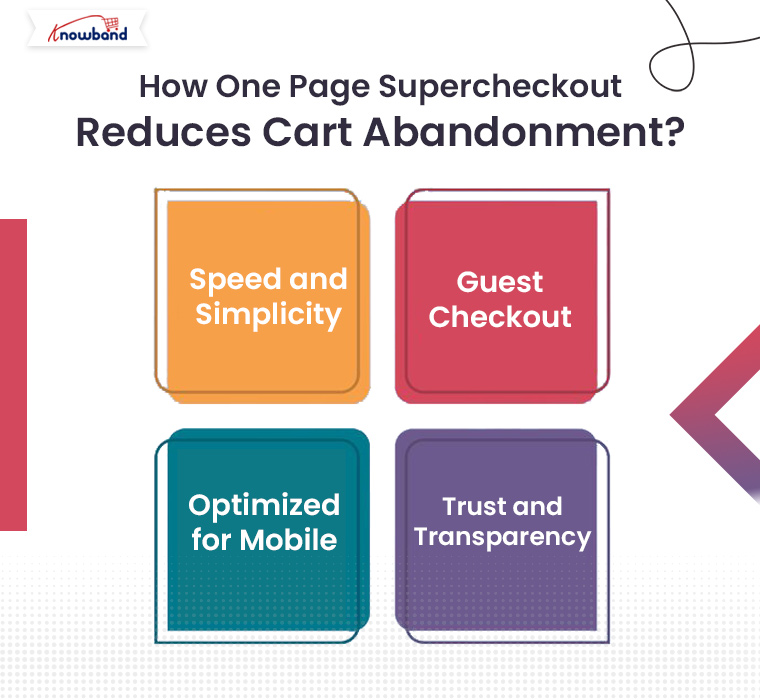
How One Page Supercheckout Reduces Cart Abandonment?
By reducing the number of steps involved in the checkout process, the Prestashop quick checkout addon makes it easier and faster for customers to complete their purchase. Furthermore, when the customers can complete an order in under a minute, they’re far less likely to abandon their cart.
Guest Checkout:
The guest checkout feature is especially important for first-time visitors. Many shoppers are reluctant to create an account on a site they haven’t shopped on before. Therefore, Knowband’s Prestashop One Step Checkout addon eliminates this hurdle, allowing customers to make a purchase as guests, which significantly improves conversion rates.
Optimized for Mobile:
Mobile shopping is becoming the norm, and the responsive one page checkout Prestashop ensures that your store’s checkout process is optimized for mobile devices. A mobile-friendly checkout process reduces frustration and cart abandonment from mobile shoppers.
Trust and Transparency:
The One Page Checkout Prestashop provides a clear, upfront summary of the order, including shipping costs and taxes. By offering this transparency, customers are less likely to feel overwhelmed or surprised by additional charges at the last step, which often leads to cart abandonment.
Knowband’s Prestashop One Page Checkout Addon
Streamline your checkout process with PrestaShop One Page SuperCheckout, reducing cart abandonment and boosting conversions with a fast, single-page checkout.
If you’re a small business or just starting out, you might be interested in the Prestashop One Page Supercheckout free version. While it offers fewer features than the premium version, it still provides many of the essential tools you need to streamline your checkout process and reduce cart abandonment.
For those looking to upgrade, the paid version offers even more customization options, integrations, and additional payment methods, making it an all-in-one solution for larger stores.
Conclusion!
If you’re a Prestashop merchant struggling with cart abandonment, the Prestashop One Page Supercheckout is the perfect solution to simplify your checkout process and retain more customers. With features like single-page checkout, guest checkout, mobile optimization, and multiple payment and shipping options, this quick checkout addon Prestashop is designed to help you minimize cart abandonment and boost your conversions.
Whether you opt for the Prestashop One Page Supercheckout free version or the paid one, this extension will undoubtedly make a positive impact on your store’s performance. Simplify your checkout today and watch your sales grow with this powerful Prestashop One Step Checkout addon!
Checkout is one of the most important aspects of the order process. It not only defines the hassle-free process for the customers but also impacts the bounce order rate by a huge margin. For the same reason, in today’s fast-paced e-commerce environment, optimizing the checkout process is crucial for eCommerce websites. Not only does an enhanced checkout process maximize conversions but also it enhances the customer experience. Thus, in today’s article, we have the Prestashop One Page Checkout by Knowband to streamline the checkout experience on your website. Let’s delve deep and have a quick overview of all the amazing features.
Where the Default Five-Step Checkout Loses Orders – Update (September 29, 2026)
PrestaShop’s default checkout runs five steps, and each page load is a chance to leave. Forced account creation is usually the biggest drop-off, followed by shipping costs appearing on a separate page. A one-page checkout with guest and social login fixes both.
It also supports popular payment gateways such as PayPal, Stripe, Klarna, Amazon Pay and Mollie, and carriers such as DHL, UPS, FedEx, DPD and GLS. With Ship2Pay, you can show only the payment methods that suit the delivery option the customer picks. The quick checkout addon to reduce checkout steps article explains the fix and how to test it in preview mode before going live.
Streamline Your Checkout with the PrestaShop One-Page Checkout Addon
Single-page checkout, social login, customizable layout, and MailChimp integration at no cost. A solid starting point before moving to the full premium version.
The Prestashop One Page Checkout Extension by Knowband revolutionizes the typical multi-page checkout process by consolidating all crucial elements into a single page. Furthermore, this approach not only speeds up the checkout flow but also makes it more user-friendly. Thus, with the One-page checkout installed on the website, customers can now view the cart, edit quantities, and enter shipping and payment details all on one page. This factor significantly reduces the time and hassle involved in navigating through multiple pages. As a result, the customers can complete the checkout easily and the bounce rate can be reduced immensely.
Enhanced User Experience:
While designing the supercheckout extension for Prestashop, we have focused on user experience. Moreover, its responsive design ensures that the checkout page looks great and functions smoothly across all devices, including smartphones and tablets. This is particularly important as mobile commerce continues to grow. The Prestashop responsive one-step checkout addon adapts to any screen size, providing a seamless experience for mobile users. Therefore, the following factor not only enhances the user experience but also ensures cross-platform usability for your customers.
Increased Conversion Rates:
The confusing checkout process is one of the most sounding reasons for checkout abandonment. Customers usually get frustrated by filling in different order information on different pages. On the other hand, the One Step Checkout Prestashop Extension effectively reduces cart abandonment by minimizing the steps required to complete a purchase. The quicker and simpler process encourages customers to complete their purchases, leading to higher conversion rates for businesses. On top of that, the intuitive layout of the Prestashop fast checkout addon, where all elements are visible at once, also helps in reducing customer confusion and decision fatigue.
Customizable and Flexible:
The Prestashop Quick Checkout Addon offers extensive customization options to fit the unique needs of your business. You can adjust the layout, fields, and even the colors to match your store’s branding. This level of customization ensures that the checkout experience not only feels integrated but also emphasizes your brand identity.
Improved Trust and Security:
The Prestashop One Page Checkout makes security a priority. Therefore, it integrates seamlessly with various secure payment methods, ensuring that customer payment information is handled safely. This security aspect is vital in building trust with your customers, encouraging repeat business, and enhancing the reputation of your store.
Features and Benefits:
Consolidates the checkout into a single page, reducing clicks and page loads, which streamlines shopping and lowers cart abandonment rates.
Responsive design ensures a smooth checkout on any device, which is crucial for capturing the growing mobile shopper demographic.
Simplifies the buying process, reducing friction and decision fatigue, which can lead to higher sales conversions.
We provide numerous options to tailor the checkout to your brand, improving the aesthetic and functional alignment with your business needs.
The one-page supercheckout module supports secure payment integrations to safeguard customer information, fostering trust and encouraging repeat business.
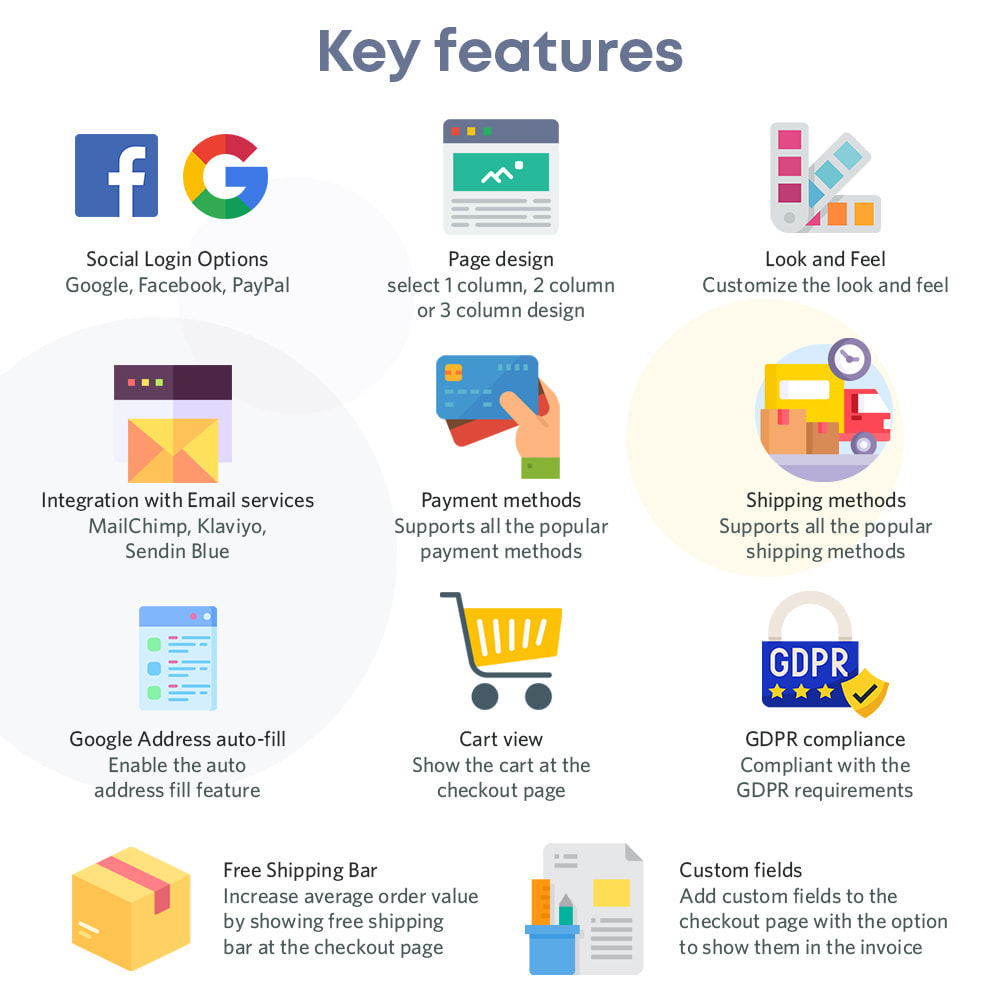
The module comes with social login, guest checkout, and auto-address fill to enhance user convenience and transaction speed.
In the END!
By incorporating these advanced features, the Prestashop One Page Checkout Module by Knowband not only simplifies the checkout experience but also transforms it into a competitive advantage for your e-commerce store, driving both customer satisfaction and business growth.
It is evident that for any e-commerce website, the checkout process stands as the final phase of order completion. It is the last interaction a customer has with your online store before becoming a paying customer, making it a crucial aspect of any e-commerce business. Further, streamlining this process can significantly impact sales and conversions, as idro-web discovered when they integrated Knowband One Page Checkout for Prestashop into their website.
Challenges of the Traditional Checkout Faced by idro-web
The idro-web, an online store specializing in various products related to water treatment and purification, was no stranger to the challenges of the traditional multi-step checkout process. Despite offering a wide range of high-quality products, their conversion rate at the checkout stage was lower than expected. Also, at some point, this rate started following the negative slope. Moreover, customers were often abandoning their shopping carts during the checkout process. The main reason for this was the lengthy, time-consuming process, and unnecessary steps in the checkout.
Recognizing the need for a solution to boost their conversions, the team at idro-web began their search for a Prestashop module that could address these issues. Therefore, after extensive research, they stumbled upon the Knowband Prestashop One Step Checkout Addon.
Knowband Prestashop Fast Checkout Addon
Prestashop Quick checkout addon is a powerful module designed to simplify the checkout process. Additionally, it helps in enhancing user experience and boosting conversions. It condenses the multi-step checkout into a single, user-friendly page, making it faster and easier for customers to complete their purchases.
After discovering this module, idro-web was joyous with its potential to resolve the issues they were experiencing with their checkout process. The team decided to give it a try, and the journey to transform their checkout experience began.
The Implementation: Streamlining the Checkout Process
The implementation of the Knowband Prestashop simplified checkout addon was a straightforward process. Further, the idro-web team integrated the module seamlessly into their Prestashop-based website. Therefore, the module’s user-friendly interface allowed them to customize the checkout page to match their brand’s needs. Also, it helped maintain a cohesive look and feel throughout the entire shopping process.
By having the checkout on a single page, the module eliminates unnecessary steps and the amount of time and effort to complete a purchase. Further, this simplicity was a game-changer for idro-web, and they were excited to see the impact on their customer’s shopping experience.
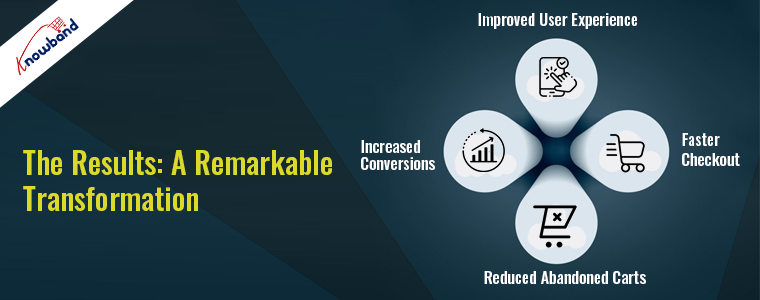
The Results: A Remarkable Transformation
The result of integrating the quick checkout addon Prestashop was nothing short of remarkable. As soon as Knowband One Page Supercheckout was implemented, idro-web witnessed a drastic change in their checkout conversion rates. Customers now find it easier to navigate the checkout process. Additionally, the store’s abandoned cart rate dropped significantly.
1. Improved User Experience:
The streamlined, one-page checkout process made it effortless for customers to complete their purchases. Customers appreciated the simplicity and convenience, which helped achieve a higher satisfaction level.
2. Faster Checkout:
With reduced steps and less time required to complete the purchase, customers were more likely to proceed to the checkout and complete their transactions.
3. Reduced Abandoned Carts:
The most crucial improvement was the significant reduction in abandoned shopping carts. The idro-web business saw a remarkable drop in the number of customers leaving their site during the checkout process. Therefore, this was ultimately helpful in boosting their sales and revenue.
4. Increased Conversions:
The combined effects of improved user experience, faster checkout, and reduced abandoned carts led to a remarkable increase in conversions. As a result, the business can turn more visitors into paying customers now.
Customer Feedback: A Glowing Testimonial
One of the most compelling aspects of the idro-web success story is the feedback from its customers. The store received numerous positive reviews regarding the improved checkout experience. Customers were not only completing their purchases but also taking the time to express their satisfaction with the changes.
After using the Prestashop fast checkout addon, the business started to experience exponential growth and decided to take some customizations too. The Knowband’s team of experts assisted the idro-web in the implementation of custom features as per their business requirements.
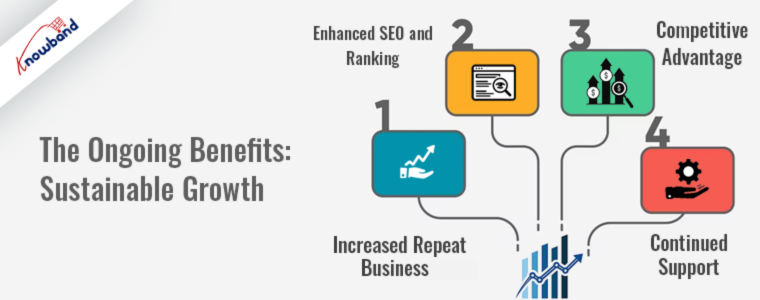
The Ongoing Benefits: Sustainable Growth
The implementation of Knowband One Page Supercheckout brought more than just short-term success. Now, the idro-web is on the path of continuous growth:
1. Increased Repeat Business:
Satisfied customers were more likely to return for future purchases, leading to a growth in the number of loyal customers.
2. Enhanced SEO and Ranking:
With improved user experience and reduced bounce rates, the business website experienced better SEO rankings and visibility in search results.
3. Competitive Advantage:
The streamlined checkout process gave idro-web a competitive edge over other e-commerce stores in their domain.
4. Continued Support:
Knowband modules are known for their continuous updates and support, ensuring that idro-web would always have access to the latest features and optimizations.
Conclusion:
The journey of idro-web with Knowband One Page Checkout Prestashop is proof of the transformative power of simplifying the checkout process. By streamlining its checkout, idro-web improved its business drastically. Their customers’ satisfaction levels and the store’s reputation were significantly enhanced.
If you’re facing similar challenges with your e-commerce checkout process, consider the journey of idro-web and the impact of Knowband One Page Supercheckout. Streamlining your checkout experience could be the key to unlocking higher conversions, customer satisfaction, and long-term success for your online business. Please do not hesitate to connect with the Knowband team. Further, we will be happy to assist you in finding the most suitable extensions for your website.
Lessen the possibility of cart abandonment and bounce rate of your Prestashop store with this Prestashop One Page Checkout by Knowband. Which replaces the default checkout usefulness of your Prestashop store and offers the online store owners to put every one of the steps on a single page.
This gives a lot less difficult checkout process to the clients and gives them a better shopping experience too.
The Prestashop One Page Checkout by Knowband is one of the most famous modules. It has been sold more than multiple times on Knowband and the Addon Store. Along these lines, there’s even more requirement for the Prestashop One Step Checkout Addon to your store.
Must-have features of the Prestashop One Page Checkout by Knowband
Complete the buy as a visitor
One of the best components that make Single Page checkout an absolute requirement is the Guest Checkout choice. Utilizing the visitor checkout highlights, new customers might complete their buys without enlisting in the business.
Utilize your informal communication record to sign in
Clients may effectively sign in or register thanks to the accompanying capacities. They might sign in or register involving social login choices in Prestashop’s One Page Checkout. Take, for instance, a Google, Facebook, or another social account.
Prestashop offers an assortment of installment choices
Assuming your clients like to pay through a specific strategy, he/she can do that. The choices accessible are PayPal, PayU, or Braintree, for example. You ought to have the option to oblige them. In actuality, Prestashop offers a wide scope of installment techniques.
There are many shipping choices accessible
The One-Page Responsive Checkout Prestashop offers a few conveyance choices. Mondial Relay, So Colissimo, Ulozenka Delivery, Zasielkovn Delivery, LP Express 24 Delivery, and others are a couple of models.
One will see the issues quickly with Inline Validation
Suppose a client commits an error while finishing up the data on the checkout page. The ongoing capacities of the Prestashop One Page Checkout feature the issue at a similar second. Subsequently, clients will want to cure it.
The pieces of the checkout procedure streamline
The store administrator can rapidly move the subtleties of the checkout page all over because of their need. Moreover, the Single Page Checkout administrator can without much of a stretch achieve a similar errand from the backend.
Item amount refreshes
Customers can without much of a stretch change the rundown of components on the checkout page by using the Prestashop One Page Checkout choice. Therefore, Prestashop’s One Page Checkout permits you to change something very similar on the checkout page.
Finishing out the Google auto-address structure
At the point when a client starts entering his area data, Google Auto-address fill gives address proposals. The postal district and city segment are naturally delivered when you pick the proposed address.
Various layout formats
Three different layout formats are accessible in Knowband’s Prestashop One Page Supercheckout. Besides, the store chairman might pick the one that best suits the subject of the eCommerce firm.
MailChimp, SendinBlue, and Klaviyo integrators
Clients’ exact subtleties go straightforwardly into your various records. For example, MailChimp, SendinBlue, or Klaviyo accounts. Further, when they utilize the Prestashop One Step Checkout Addon.
Information on abandoned checkouts is accessible
The One Page Responsive Checkout Prestashop likewise offers an extremely valuable capacity to the entrepreneur. They can likewise screen transformation rates at the checkout. Besides that, there are abandoned checkouts, abandoned incomes, the number of orders put in, and the money acquired from such exchanges.
Checkout Behavior Report
The administrator will right now need to know the number of fields their clients are finishing up. It provides the overseer with a decent comprehension of which checkout stage the clients skipped and abandoned their shopping baskets.
The finished marker with the expectation of complimentary shipping
A free shipping progress bar is accessible in the most recent variant of the Prestashop One Page Checkout. Clients may likewise perceive the amount they need to add to their shopping to fit the bill ‘with the expectation of complimentary conveyance.’
Making a new customer profiles
Besides the abilities recorded over, the new version currently permits you to make unmistakable client profiles. The director can characterize custom profile type fields on the checkout page utilizing this ability.
Thusly, with this multitude of elements, the Prestashop One Page Checkout by Knowband is an unquestionable requirement. In addition, there are various advantages of introducing the plugin in your store. What do you think of the addon? Do you have any queries related to the module? Do let us know at support@knowband.com.
Knowband’s Prestashop One Page Checkout is an astonishing option for your eCommerce business. Truly, a superb apparatus can help your eCommerce organization in an assortment of circumstances. In this article, we will investigate why the Single Page checkout is an absolute requirement. Above all, how about we examine how Responsive one page checkout Prestashop functions.
Presently, how about we look at the reasons you want to purchase the Prestashop One Step Checkout Addon.
Why is Prestashop One Page Checkout by Knowband popular?
The motive of the Prestashop responsive one step checkout addon
Knowband’s One Step Checkout Prestashop Module assists you with smoothing out the checkout page. Besides, it helps the owner in diminishing cart relinquishment and expanding incomes. It further develops purchaser fulfillment. Besides, the administrator can add or erase custom fields from the checkout page. Therefore, to ensure that clients do not worry while finishing the information. Besides, finish the buying system effortlessly. Since checkout is a crucial point in time when most carts abandon.
The Prestashop one page checkout is a consistent arrangement
Knowband guarantees that the Prestashop module is a simple choice for you. In fact, beginning from the establishment to its working, everything occurs easily. Moreover, update the boundaries from the administrator connection point to guarantee that it runs well. Therefore, you can rapidly help your organization’s development.
The Prestashop One Page Supercheckout incorporates a visitor checkout choice
Visitor checkout is a fabulous other option. A checkout technique ought to likewise contain. Truth be told, this capacity permits clients to shop without first enrolling on the site. Besides, people can undoubtedly complete their exchanges in the store without giving an excessive number of subtleties. Thus, the Prestashop One Page Checkout sparkles with the visitor checkout.
There is a social login highlight
The meaning of social login usefulness is not generally hidden. Besides, customers can easily join or sign in utilizing social login. Truth be told, Facebook and Google are two of the most famous potential outcomes. The Prestashop One Page Checkout Addon from Knowband, then again, gives buyers two other options.
Additional features of Knowband Prestashop One Page Supercheckout
Prestashop One Page Supercheckout acknowledges an assortment of installment and conveyance techniques.
The in-line validation system guarantees that no mistakes happen. As a general rule, if the buyer commits a blunder while finishing up the structure, the strategy will fall flat.
The administrator can lay out many profiles for clients utilizing the client profile’s usefulness. For instance, businesses, individuals, etc. Accordingly, when the customer chooses the profile, every one of the information under that profile will be accessible. For instance, the location, contact data, etc.
Integrators for MailChimp, Klaviyo, and SendinBlue are accessible in the module. You can catch a shopper’s information in your MailChimp, SendinBlue, or Klaviyo account when they enter their data.
There is a back-end choice where the custom CSS and JSS might be acquainted with the checkout page. The store executive might use this part of the Prestashop One Page Checkout to roll out important improvements without changing the code of the Prestashop one page checkout module.
This element of the Prestashop One Page Checkout addon permits the store administrator to concentrate on the way of behaving of customers. Further, who forsakes the bin while on the checkout page. The module shows a rate worth of the data. Moreover, given by online clients who abandoned their bins. This permits the overseer to discard superfluous areas. That of the checkout cycle and abatement cart surrender.
The Prestashop module permits the store head to effectively modify delivering/installment strategies and that’s just the beginning. Further, the name, or the thumbnail picture without changing the code.
The Prestashop addon incorporates a setting that permits store chairmen to make any field discretionary or compulsory.
The store administrator can likewise sort out some way to orchestrate all area fields utilizing the Prestashop module’s worked-on component.
Advantages of Prestashop One Page Checkout
The checkout cycle becomes straightforward
The module consolidates the entire checkout process onto a single page. This way simplifies it for clients to fill in their data.
Customers’ time is saved
Clients don’t need to finish out such a large number of fields or burden a few pages to buy with Knowband’s Prestashop responsive one step checkout addon. They can finish up the structure quickly and easily, and their exchange will finish in a matter of moments.
There will be lesser abandoned carts
It requires a great deal of work to draw in clients to the checkout page, and assuming he passes on the site without completing the exchange because of solid and tedious checkouts, he feels upset. The Responsive one page checkout Prestashop takes out this obstruction by making the checkout page perfect and simple. Further, permitting clients to rapidly complete their shopping.
The conversion rate increases
The Prestashop One Page Checkout from Knowband further develops your customers’ checkout experience. Moreover, assists you with expanding your web-based company’s change rate.
Mobile-friendly
Customers can likewise finish orders utilizing their smartphones on account of the addon’s versatile checkout interface.
Conclusion
There is a long way to go about the One Step Checkout Prestashop Module. For sure, these are the reasons that make Knowband’s Prestashop one page checkout an unquestionable requirement. What is your take? If it’s not too much trouble, reach us at support@knowband.com assuming that you have any inquiries. You could look at additional insights concerning the module on the Knowband store.
Further sources for most useful Prestashop addons:
We are excited to announce that the KnowBand’s PrestaShop Checkout Page has crossed 10000+ downloads this month. These numbers are increasing every day on PrestaShop Addon Store. Also, the downloads have exceeded a count of 12000+ on the KnowBand store.
We are awarded with PrestaShop Gold Partner Agency and have Superhero Sellers ranking. A PrestaShop development agency is awarded Superhero Seller ranking when they have an average rating of 5 stars.
From Conqueror to Captain and now Superhero Seller, KnowBand proved itself as a PrestaShop developer. It has happened because of our talented team who has made this product a success! I’d like to extend our profound gratitude to every member of the Knowband for their support on behalf of the team.
We strongly believe this wouldn’t have been possible without your trust in our products and services. The PrestaShop One Page Checkout Addon has several high-quality features. The 10K downloads on the PrestaShop Addon store and 12K on KnowBand, explain it very well!
Why Customers Choose KnowBand as their PrestaShop Development Partner?
If you are reading this content, you might know about the PrestaShop platform already. KnowBand is a PrestaShop Gold Partner agency. We believe in providing the most sophisticated and satisfactory customer experience. On the official PrestaShop addon store, KnowBand is recognized as a Superhero Seller. We have also become the Module Partner Creator of PrestaShop Marketplace.
Every product developed by KnowBand is quality tested by technical experts. Who doesn’t want to give a smooth and satisfactory customer experience? Keeping this in mind, we have developed around 80 PrestaShop addons to help you flourish your business.
All the modules have amazing UI/UX design with super handy module configuration options. One Page Checkout is developed with the same perspective and it is loved by many. The amazing products, customer service, and customer support are reasons for people’s choice.
Our PrestaShop One Page Checkout Clients worldwide:
Not sure which company to choose for your next development project? If you are puzzled about it KnowBand provides you the best Prestashop development services.
The PrestaShop platform is being used worldwide. It has thousands of clients all over. Our clients trust KnowBand products. We are aware that trust is earned and it takes time. KnowBand has become a PrestaShop Partner agency, providing PrestaShop development services since 2010.
Every plugin be it a marketplace addon or an exit pop-up, customers use our solution for their PrestaShop website.
Similarly, PrestaShop One Page Checkout has users all across the globe. Have a look at some live examples of One Page Checkout:
Apart from the One Page Checkout, several other PrestaShop modules have crossed 1000+ downloads.
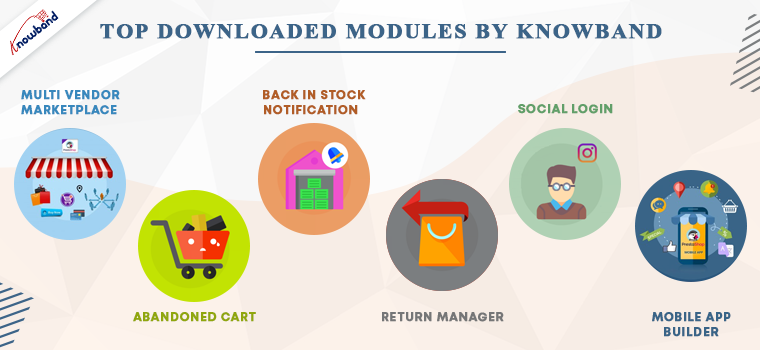
Below is the list of modules that have earned the best seller badge on the PrestaShop Addon store. Every PrestaShop store should count on them.
PrestaShop Abandoned cart Addon– Track the carts and allows the admin to send serial abandoned cart reminders. It has options like Email, pushes notifications, and pop-ups for customers.
PrestaShop Return Manager Module– Customer can make return requests with ease. The store manager can track the returns and reasons.
Multi-vendor marketplace Addon– Great application to convert your existing website into a functional marketplace in just a few simple steps.
PrestaShop Back-in-stock addon– Send stock alerts, subscription mail, low stock messages, and back-in-stock alerts with this module.
Social login PrestaShop Module– Allow customers to log in with 14 different social media platforms. It is compatible with PrestaShop One Page Checkout.
KnowBand’s most in-demand solutions for eCommerce
Marketplace Builder: Our marketplace module is one of the best sellers on the PrestaShop Addon store. Create a marketplace in 3 simple steps. Download the module, configure it and start selling!
Mobile App Builder: Not sure if your website is bringing enough traffic? Get a mobile app for your PrestaShop store that has all the necessary features. The mobile app builder is available for Android and iOS systems.
The marketplace with a booking and rental system provides tremendous growth opportunities. It is also compatible with android and iOS Mobile apps.
Website Development Services: KnowBand is providing eCommerce solutions for more than a decade. We have helped thousands of clients in developing their websites and optimizing them for higher conversions.
Innovation is the key to compete and win. KnowBand has developed some modules by following innovative approaches for modern business trends.
With no delay, you can start selling on the world’s most popular marketplaces using the Marketplace integration addon. KnowBand thrives to create solutions that make your business stand out. PrestaShop Booking and rental system, Accelerated Mobile Pages (AMP) are other, Delivery Boy App, Store locator to start BOPIS are some of those.
These days, on-demand print businesses are booming. It’s time you can start your own with this super amazing Product Customization addon. Think about a business idea and explore the KnowBand store for the services. In case you couldn’t find what you are looking for, KnowBand can provide a custom solution for eCommerce website.
Get your custom PrestaShop development solutions and ace it!
It provides easy login to customers. Allows Social media login with Facebook, PayPal, and Google+ and email registration.
Every customer can now login within seconds with social login and mobile login. Anyone in hurry can checkout as a guest.
2. Its unique layout
The layout design is different and has three variations. Prestashop One Page Checkout users can choose a single-column layout, double-column layout, or a three-column layout.
3. Customers get informed while filling in wrong details
If anyone makes an error while filling the form, it shows an inline message. Google auto address fill and auto-detect region features are a bonus.
4. Several payment gateways and shipping methods
Adding multiple payment methods and shipping methods with an individual payment method is now possible with PrestaShop One Page Checkout.
5. Shopping cart details on the checkout page
The PrestaShop One Page Checkout shows all the cart products on the checkout page. Customers can increase or decrease the product quantity there itself. Additional features that no other module offers
6. GDPR Compliant
The PrestaShop Single Page Checkout is GDPR compliant. Users who do not want to share their information with the store can request it.
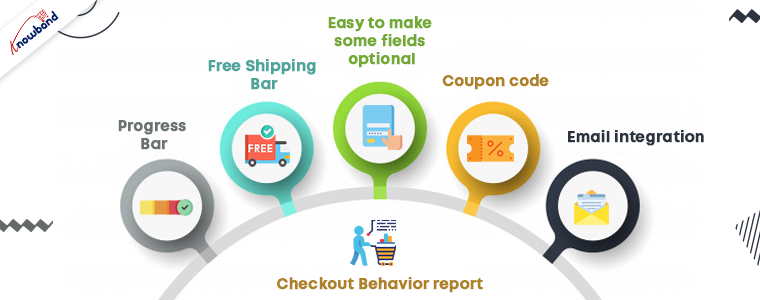
7. Free Shipping Bar
Any condition/rule can be added for offering free shipping. To get the offer, customers have to meet the eligibility. This increases the average cart value.
8. Easy to make some fields optional
If you think, not every detail in the registration form is necessary; you can make that field optional. Offering fields to skip can reduce the bounce rate.
9. Admin can Create Customer Profiles
In the upcoming version of the PrestaShop Checkout Page, the admin can create customer profiles however they like to:
Individual
Business
Agency
10. Coupon code
Customers can put in the coupon code if they have any.
11. Email integration
To make your marketing campaigns more effective, you cannot ignore the importance of email marketing.
Allows easy email integration options with Sendinblue, MailChimp, and Klavio.
Ask them to subscribe to newsletters.
12. Checkout Behavior report
This is to find out the pain points of your customers. The reports show the checkout behavior of the customers. Abandoned carts, orders, missed sales and many other things can be tracked.
Advantages of PrestaShop One Page Checkout:
The PrestaShop store owners can give a unique and explicit checkout experience to their users. One Page Checkout appears to be quick and easier than multiple page checkouts.
Increases conversions- The fast process, quick login and registration options, guest checkout increases the conversion rate.
A fall in bounce rate- Multiple payment and shipping methods add more weight to the conversion rate and reduces bounce rate.
Increases average cart value: Customers try to grab the free shipping offers as they see them. Hence, it increases the average cart value.
Mobile responsive
Multi-lingual and multi-store compatible
All these features have made it a success. A huge achievement for the KnowBand family!
In conclusion, we believe that we have reached 10K downloads for PrestaShop One Page Checkout is because our clients trust us. We’ll continue to enhance our relationship with our community by providing exclusive and prompt services to our clients. Start your business on the PrestaShop platform with the PrestaShop partner agency using modules developed by KnowBand.
Prestashop is one of the widely used eCommerce platforms because of the awesome themes, features, and extensions available for the store owners. Every store owner wants to provide a smooth and fast shopping experience to their customers to make their business more successful. The checkout process became the key point of this process. Hence, Prestashop One Page Checkout Addon is a solution to this issue.
The One Page Checkout options reduce the additional efforts of the customers. It allows them to complete the checkout process on a single page hence reducing the abandoned cart. The best part that comes with Prestashop one checkout module is Social login. With this feature, users can log in with Google and Facebook login.
Mobile View:
Note: The Prestashop one step checkout Module by Knowband is GDPR compliant.
What’s New in PrestaShop One Page Checkout:
There are some newly added features in the PrestaShop One Page Supercheckout:
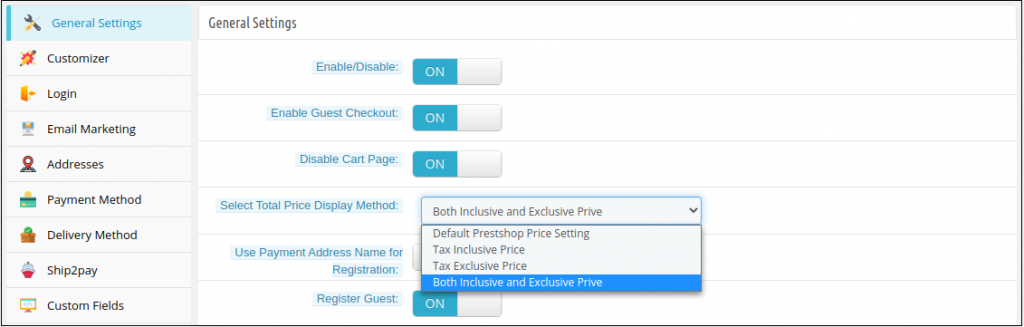
1) Choose Total Price Display Methods for the Checkout Page: Now the e-merchant can choose different methods to display the total price of the products on the checkout page. The store admin can choose default PrestaShop price, price inclusive tax, price exclusive tax, or both inclusive and exclusive price from the back office of the PrestaShop One Page SuperCheckout addon.
2) Option to Show the Custom Field in the Invoice: The store owner can now show the custom field’s data in the Invoice of the orders placed. The customers can check the custom field they added on the checkout page in their invoices.
3) Compatibility with Zasielkovna and gmparcellocker addons: Knowband’s PrestaShop One Page SuperCheckout addon is now fully compatible with the gmparcellocker and Zasielkovna addons.
4) Fixed Compatibility with Mollie Payment Method: In the latest update, the issues with the compatibility with the Mollie Payment Method have been fixed.
5) Compatible with PS v1.7.7.1: The PrestaShop One Page Checkout module is now compatible with the latest PrestaShop version v1.7.7.1.
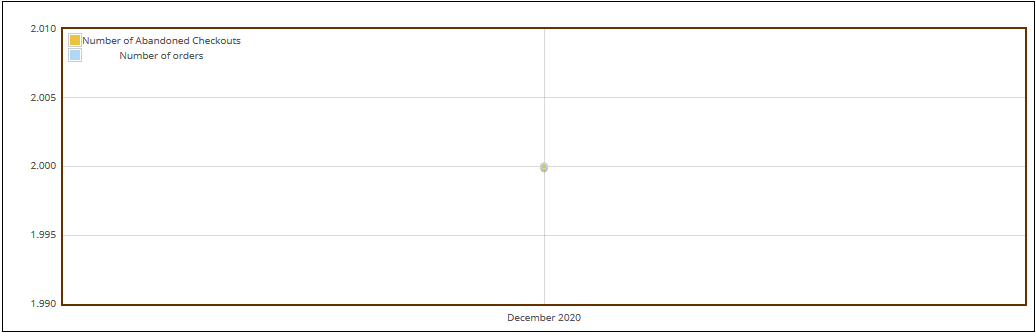
6) The admin can make a detailed comparison between the order revenue earned and the revenue lost in abandoned carts in the form of a graphical data. They can filter analysis results in days, weeks, months and year to get a precise data.
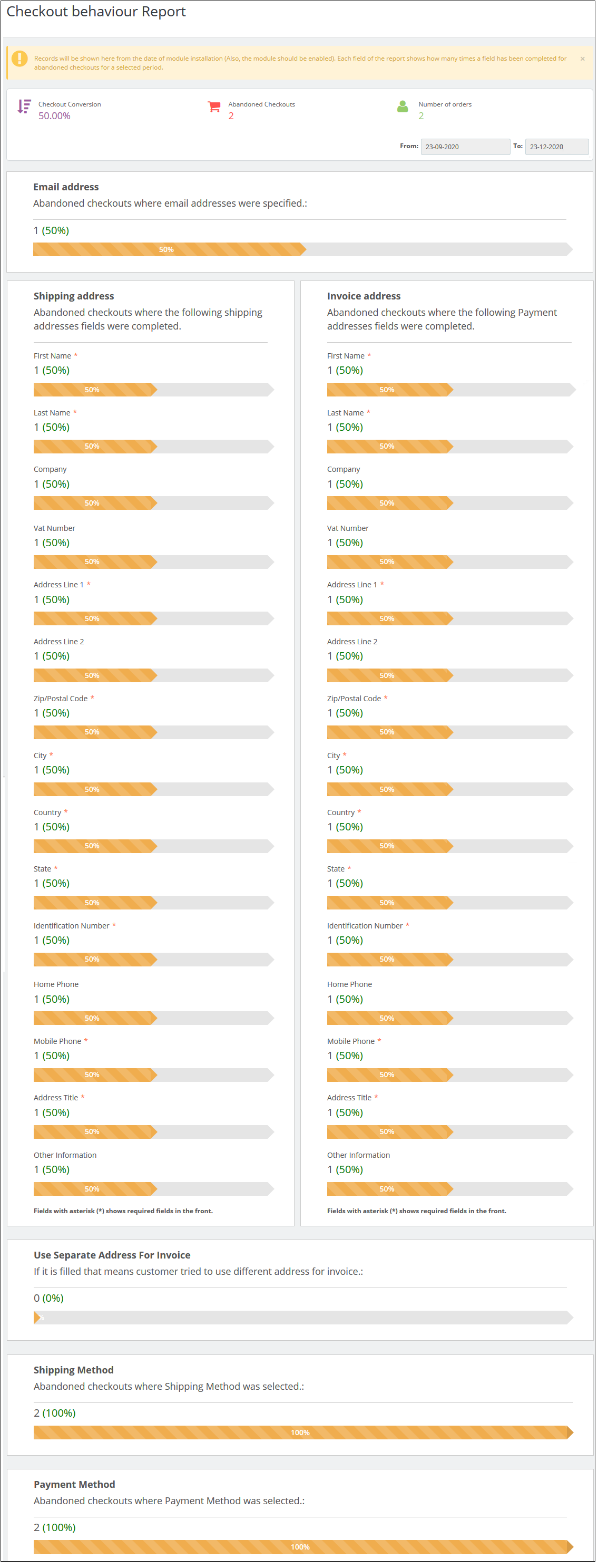
7) There is a new added functionality to track the checkout behaviour. The admin can check the percentage of data filled or skipped by the online users who left their cart abandoned so that the admin can remove the unnecessary steps which are bothering the customers.
8) There is an option to verify whether the identification number CFI/DNI/NIF entered by the customers of Spain is correct or not.
1.1 Admin-Benefits of One Page Checkout Prestashop Addon
Let’s take a quick look at the benefits of having a Prestashop One step checkout module on your Prestashop store:
Prestashop Quick checkout addon allows the store owners can design their own one page checkout page as per the website theme.
Prestashop simplified checkout addon is compatible with multiple stores and devices.
This quick checkout extension Prestashop Targets multi-lingual customers.
The Prestashop fast checkout addon offers less and relevant checkout steps.
This quick checkout add-on Prestashop serves a better customer experience.
Prestashop One Page Checkout addon eliminates page reload time and keeps checkout information at a single page.
With the help of this Prestashop One Page Checkout Extension, custom fields can be added as desired.
Prestashop One Step Checkout Addon allows the admin to get a thorough statistical report about the rate of abandoned checkouts and the completed orders.
The new checkout behavior report helps the eCommerce merchant to analyze the behavior of the customers who abandoned their carts during the checkout process.
1.2 Features of Prestashop One Step Checkout Addon
One Page Checkout Prestashop offers easy customization.
With the addon, you can offer Guest checkout functionality to your customers.
Prestashop One Page Supercheckout provides simple & quick Login.
Social login options are offered in this one page checkout Prestashop addon.
Prestashop One Step Checkout Addon has an inline validation feature that shows an error to customers if any wrong value is entered.
One Step Checkout Prestashop Extension is compatible with multiple payment and shipping methods.
Responsive one page checkout Prestashop is mobile and tablet responsive.
This one page checkout module is GDPR compatible.
The responsive one page checkout Prestashop module allows the admin to create as many privacy policies as per the requirement.
The one step checkout Prestashop addon offers the admin to make any of the privacy policies mandatory or optional.
The admin can view the customer consent along with all the details including order id, email id, customer name, accepted consent, time, and date as well.
Prestashop responsive one step checkout addon is compatible with free and virtual/digital products.
Cart Customization on Prestashop One Page Checkout Page.
Prestashop one page checkout addon offers an option to add custom fields as well.
MailChimp Integration is provided in this Prestashop Quick checkout addon. Other integrators SendInBlue and Klaviyo are also supported.
Offers Ship2Pay feature which allows the store owner to map payment methods with the selected delivery methods.
Supercheckout provides an option to update or delete the saved address.
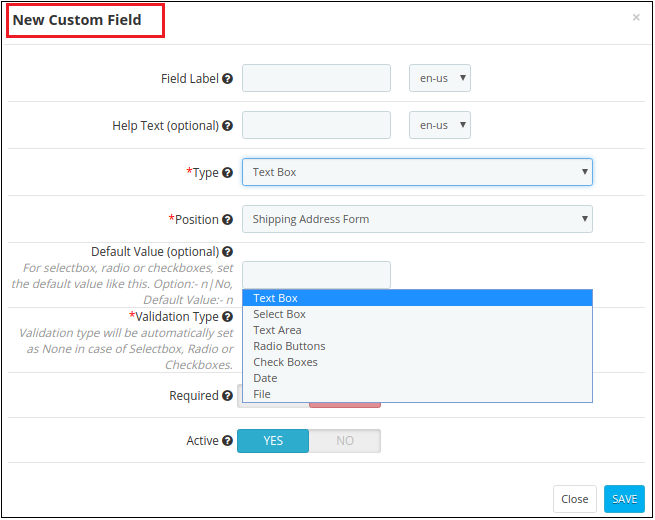
You also get an option to create ‘Date’ and ‘File’ type custom fields.
One Page Checkout displays shipping and payment methods only when the customer saves the address.
Admin can test the one page checkout on a specific URL that is provided at the backend.
Provides compatibility with various payment methods like Amazon Pay(only 1.7 version), a4paypalpro, and Play plug.
Prestashop simplified checkout addon allows the admin to add custom CSS and JS.
This quick checkout extension Prestashop SEO Friendly.
The Prestashop fast checkout addon offers multilingual Support.
Prestashop One Page Checkout module allows the admin to show/hide any fields.
Prestashop One Page Checkout Extension offers automatic customer registration.
More attractive feature
Country Autofill: The autofill feature of this Supercheckout module helps in auto-selecting the country for the customers based on their IP.
Google Address Autofill: The auto-fill feature automatically fills up the address fields at the Supercheckout page. The auto-fillup functionality uses Google Places Integration services for which Google API Key has to be configured from the backend.
Gift message: Allow your customers to add a gift message with the order. Admin can check this message on the order details page from the backend interface.
Show/Hide total tax field: Admin can show/hide the total tax field in the cart summary section of one page checkout.
Address Fields Layout Changes: Admin can change the address fields layout from 1-column to 2 columns. Example: User detail fields like First name & last name can be shown in a single row.
One Page Checkout is now compatible with Stripe Official and PayPal Plus payment methods.
Set Condition for Free Shipping: Prestashop Supercheckout gives an option to set a minimum amount for showing a free shipping banner at the checkout page.
Enable validation for CIF/DNI/NIF: Prestashop fast checkout addon offers validation for CIF/DNI/NIF for Spain.
Abandoned Checkout Statistics: Prestashop Quick checkout addon offers a graphical analysis of the abandoned cart details and completed order details.
Checkout Behaviour Report: The admin can track the checkout behavior in a precise graphical format.
With the addon, the store owner can now allow customers to log in with their Paypal ID.
The e-merchant can now redirect the customers directly to the checkout page after clicking on the Checkout button. If the admin disables this feature, then the users will be redirected to the cart page.
The store owner can now allow the customers to register themselves with their Payment address name. Earlier the users had the option to register with the delivery address but now they can use their Payment address as well.
2. One Page Checkout Prestashop Module Installation Guide
2.1 Copy the “SuperCheckout” module folder under your root_directory/modules/of your store via FTP or use the Prestashop interface to upload the plugin.
2.2 After copy, Prestashop one page checkout module will be listed on the module listing page in the admin panel as shown given below screen
2.3 If Prestashop one page checkout module is not displaying on your module listing page, search it by filtering the module with the following details.
Filter by: Installed & Not Installed/Enabled & Disabled
Note:
When you will click on the install button, a pop-up box will appear which will display warning messages. You can ignore these messages and move ahead. There will be no negative impact of this warning message on your store.
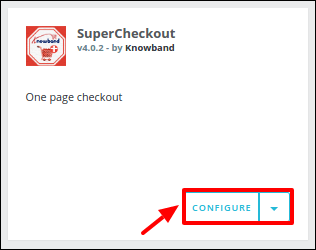
After installing Prestashop Supercheckout addon, a “configure” button will be in front of this one page checkout plugin on the module listing page as shown on the screen below:
3. User Manual
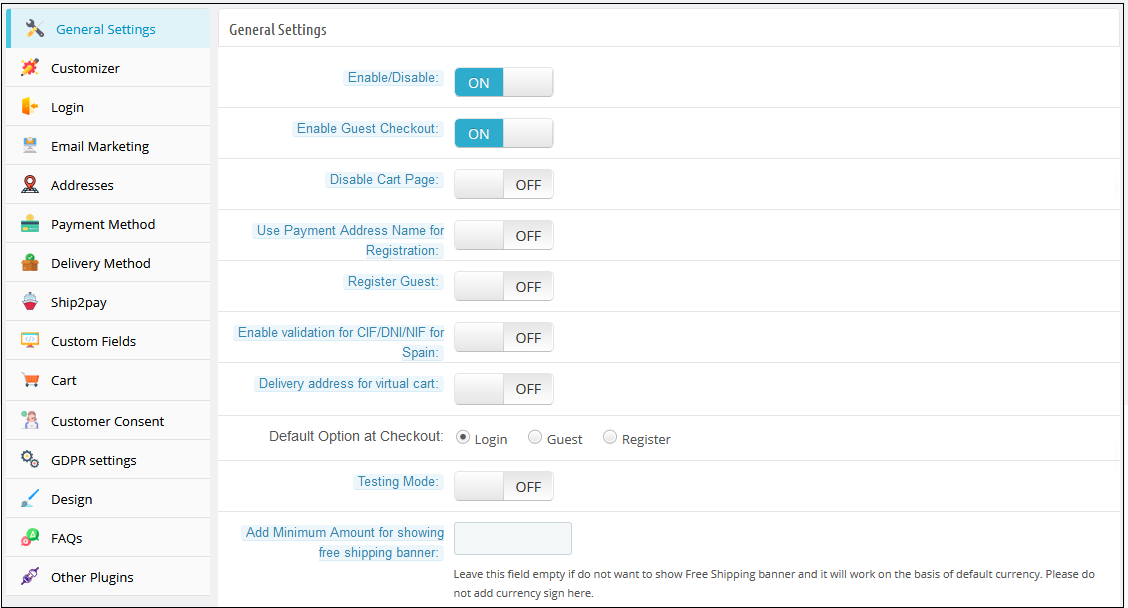
To access this Prestashop one page checkout addon, Click on the configure button of the Supercheckout module. On clicking, One Page Checkout Prestashop module interface will be open and the following screen will display as given below:
3.1 General Settings
3.1.1 General Settings of Prestashop Fast Checkout Addon
Enable/Disable: To enable the Prestashop one-page checkout plugin, switch the enable button from OFF to ON. The default value will be OFF.
Enable Guest Checkout: By enabling this option of the Prestashop quick checkout module, the store will allow the customer to checkout as a guest. The default value will be OFF
Register Guest: By enabling this option of the simplified checkout Prestashop module, the store will register guests automatically and send a registration email to the corresponding customer. The default value of this field of Prestashop One Step Checkout Addon will be OFF.
Enable validation for CIF/DNI/NIF for Spain: The admin can check and verify if the identification number CIF/DNI/NIF entered by the customers of Spain is valid or not.
Delivery Address for Virtual Cart: Admin can enable or disable this option to show/hide delivery addresses for the virtual or downloadable products.
Disable Cart page: With the module, the store admin can disable the cart page from the General Settings. If it is disabled, then the customer will be redirected directly to the Checkout page after clicking on the “Process to Checkout” button.
Select Total Price Display Method: With the addon, the store owner can select from various methods to display the product’s total price format on the checkout page. The admin can display the default PrestaShop price, price inclusive tax, exclusive tax, or both inclusive and exclusive tax.
Use Payment Address Name for Registration: The PrestaShop One Page Checkout module allows the customers to use the name mentioned in the Payment Address for registration.
Default Checkout Option: There are 3 options in this field of the One Step Checkout Prestashop Extension, which will display at the front end. With these options of the fast checkout Prestashop module, the admin can set which option will display to customers on the one page checkout. These options are:
1. Login: If this option of the Responsive one page checkout Prestashop addon is selected, the customer will see the login form in the login section.
2. Guest: If this option of the Prestashop responsive one step checkout addon is selected, the customer will see only the email field in the login section.
3. Register: If this option of the one page checkout Prestashop module is selected, the customer will see the registration form in the login section.
On the front, the customer can also change the checkout option. By default, the login option will be selected
Testing Mode: If you want to test the Prestashop one page checkout addon before making it live on your store then you can enable this option. While this option of the One Step Checkout Prestashop Extension is enabled your customers are redirected to the normal checkout page but you can open the SuperCheckout page directly through the URL. The URL for the same appears below this option once you enable it.
Add Minimum Amount for Showing Free Shipping Banner: Using this option, you can set a minimum amount for showing a free shipping banner at the checkout page.
3.1.2 Customizer settings of Prestashop fast checkout module
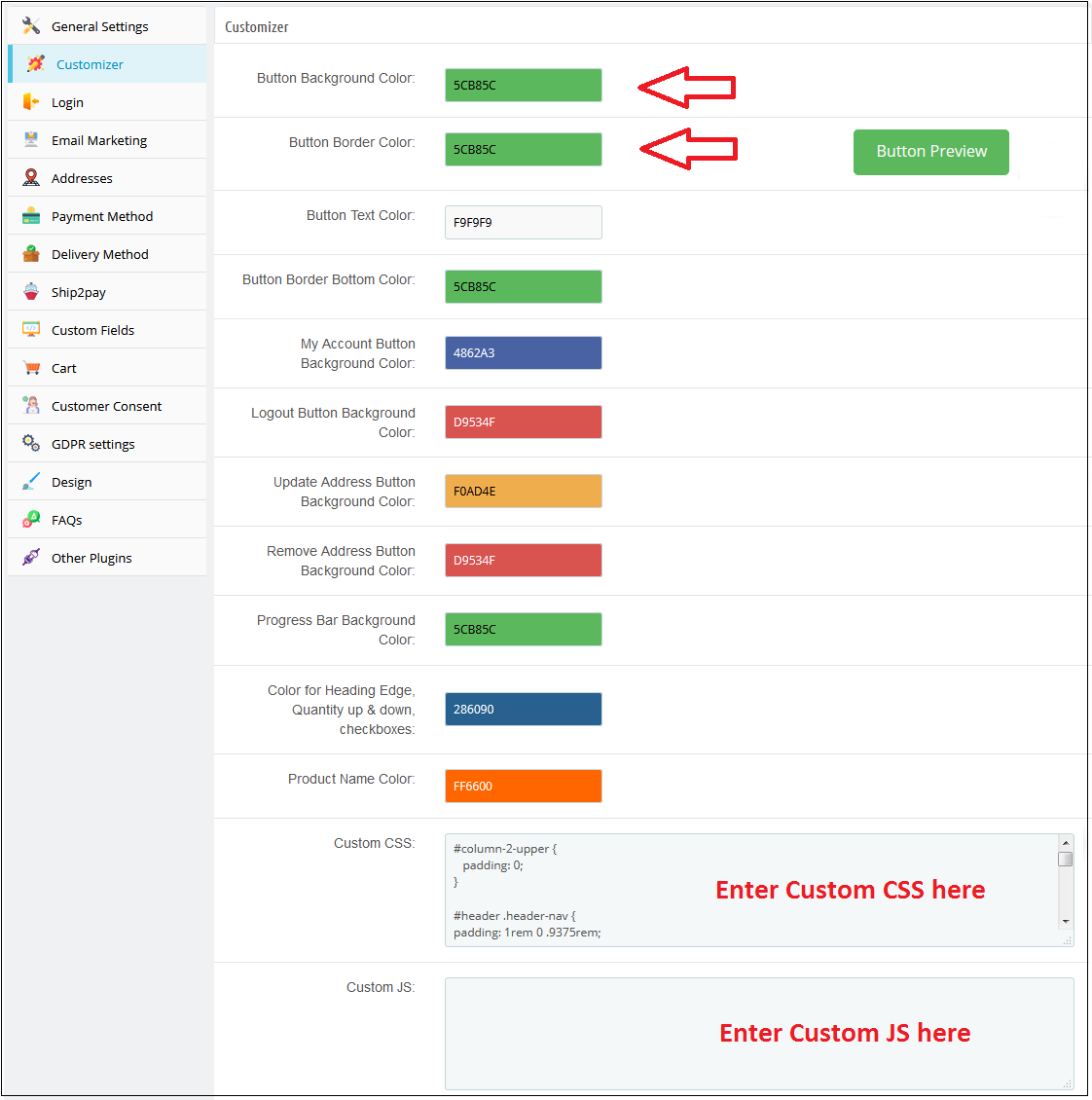
This tab in Prestashop one page checkout addon has the features using which the admin can modify the checkout front end by adding some CSS or JS in its fields. This tab of Prestashop fast checkout addon already has the feature to change the colors of buttons that appear in the checkout. Whatever CSS will be placed in the custom CSS field that CSS will appear in the front of the store and the same is the case with the custom JS field.
3.1.3 Login Tab
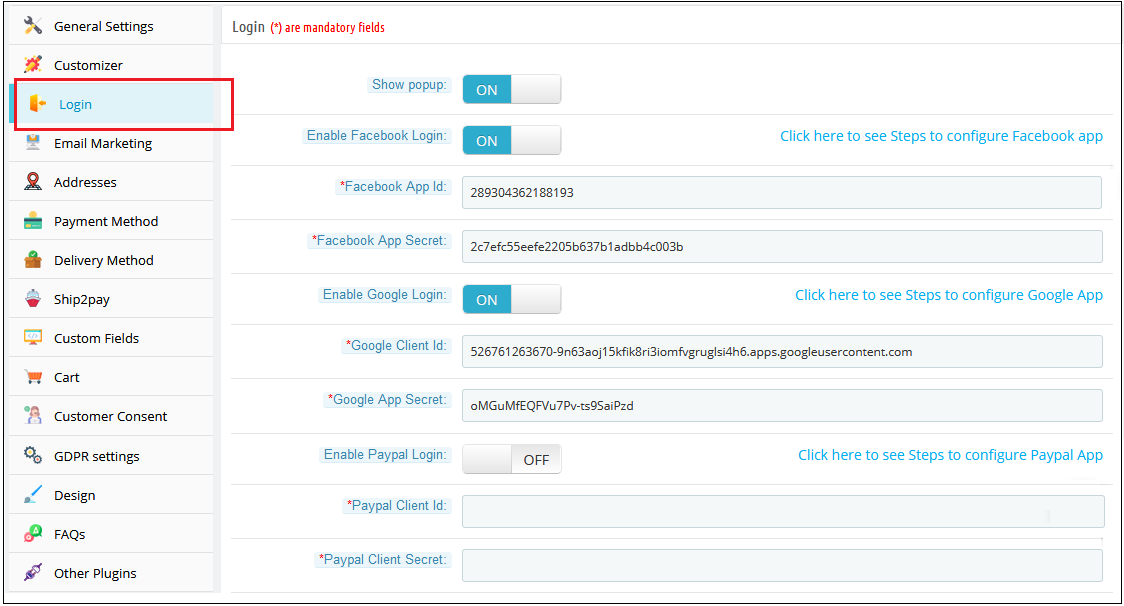
This tab of Prestashop fast checkout addon contains a setting to enable /disable Facebook and Google registration & login as shown below.
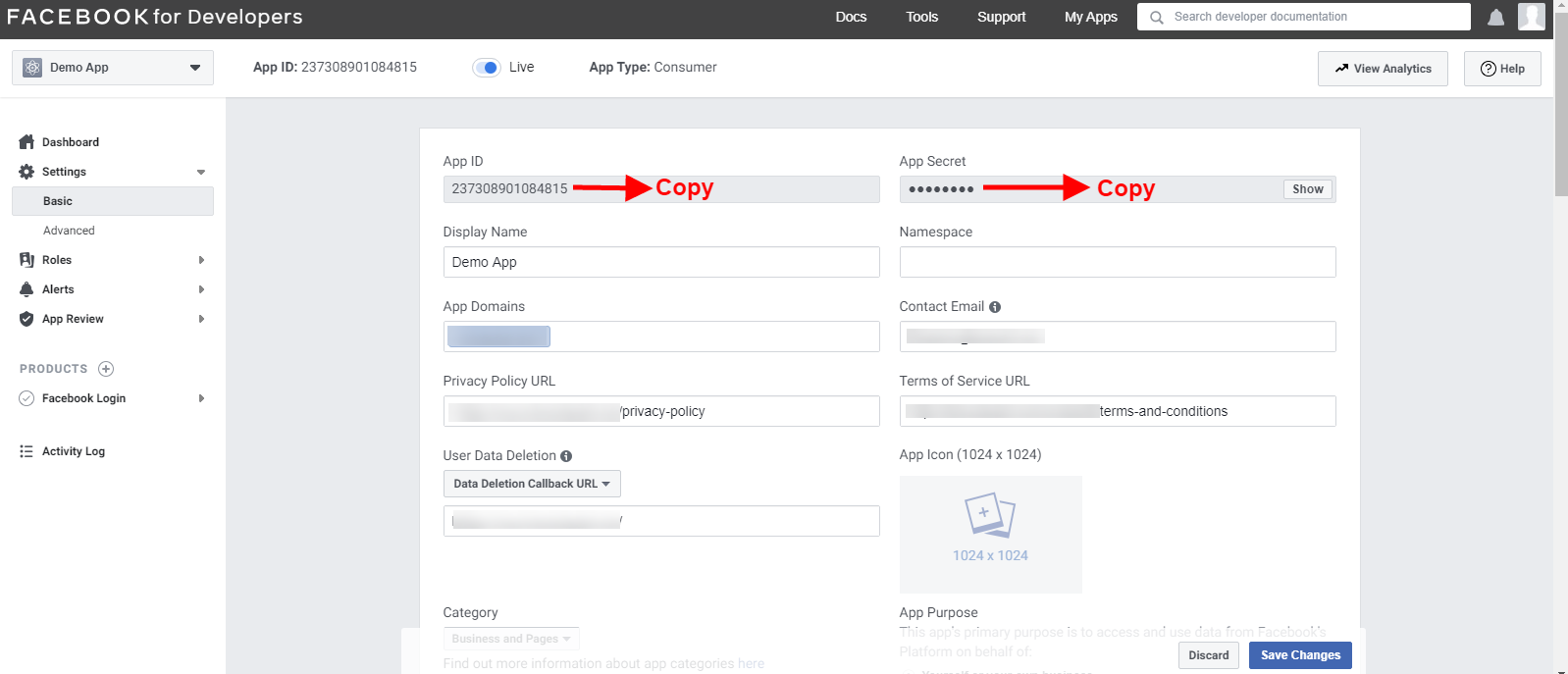
Enable Facebook Login: To enable Facebook Registration & Login, switch the button from OFF to ON. But before you do that do get Facebook APP ID and APP SECRET from https://developers.facebook.com without these keys, this functionality of the Prestashop single step checkout addon will not work. By default, this functionality of the one page checkout Prestashop addon will be disabled.
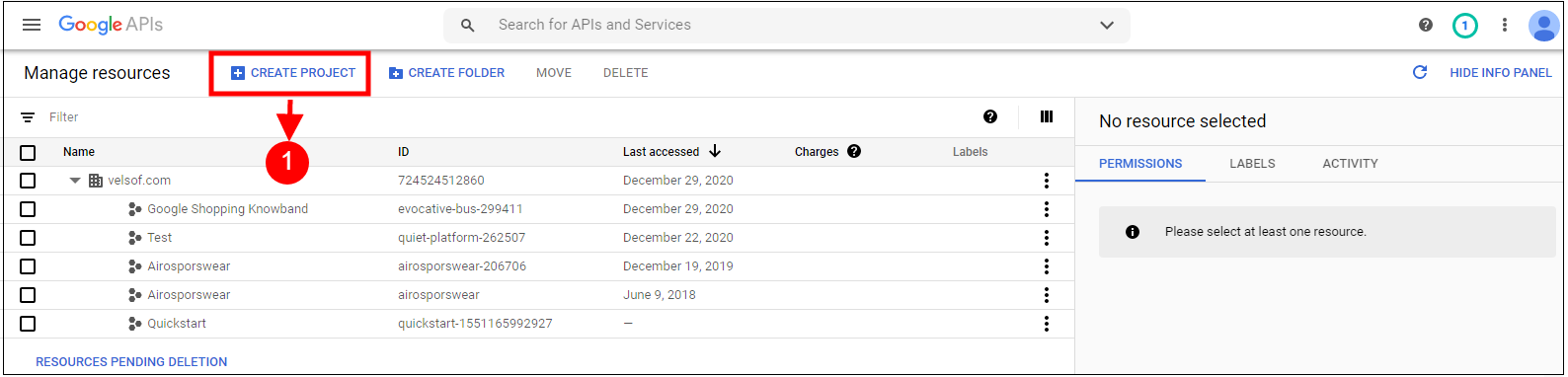
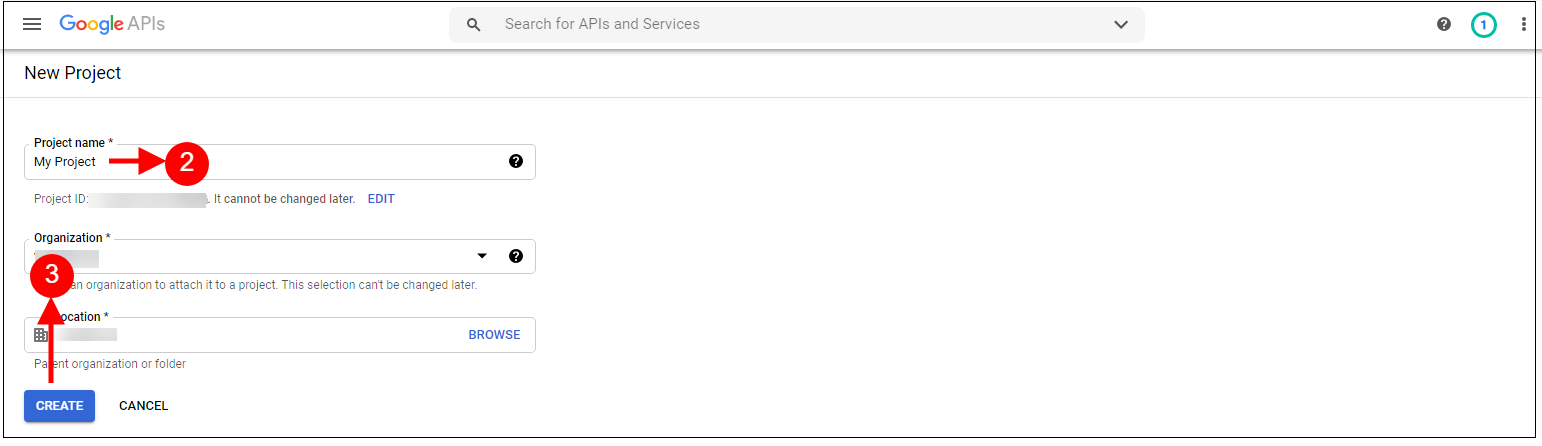
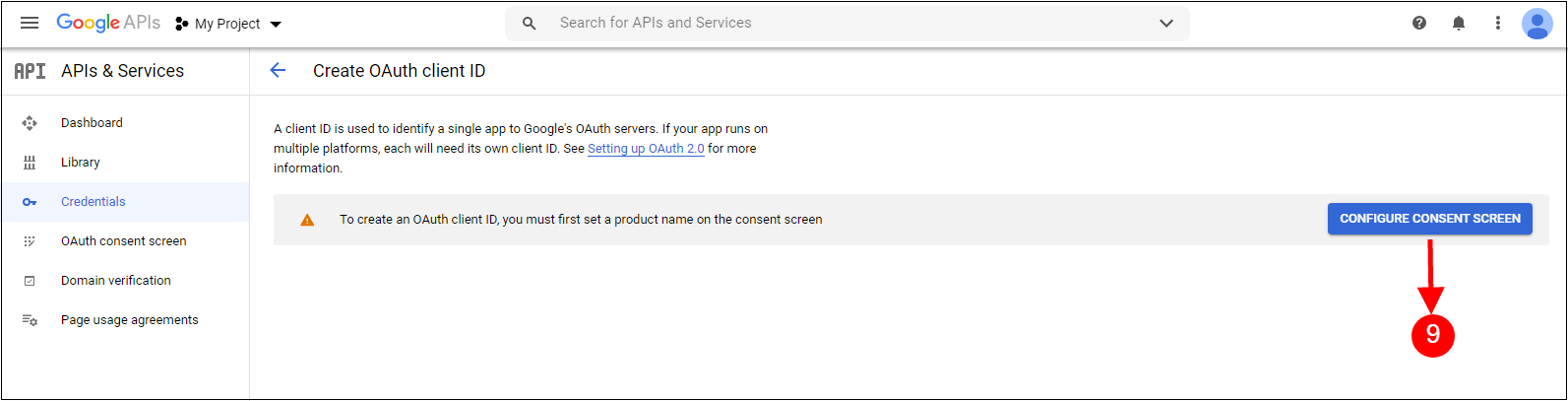
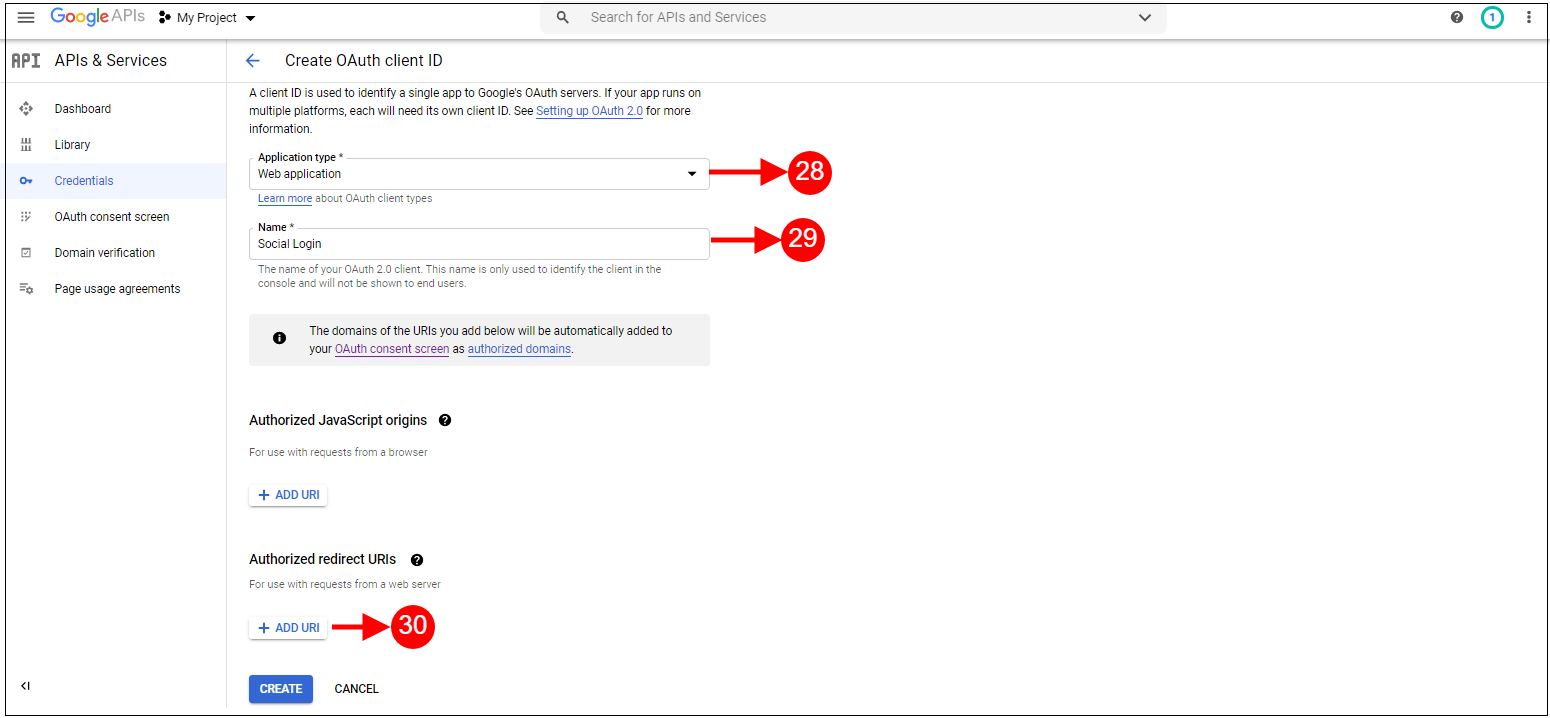
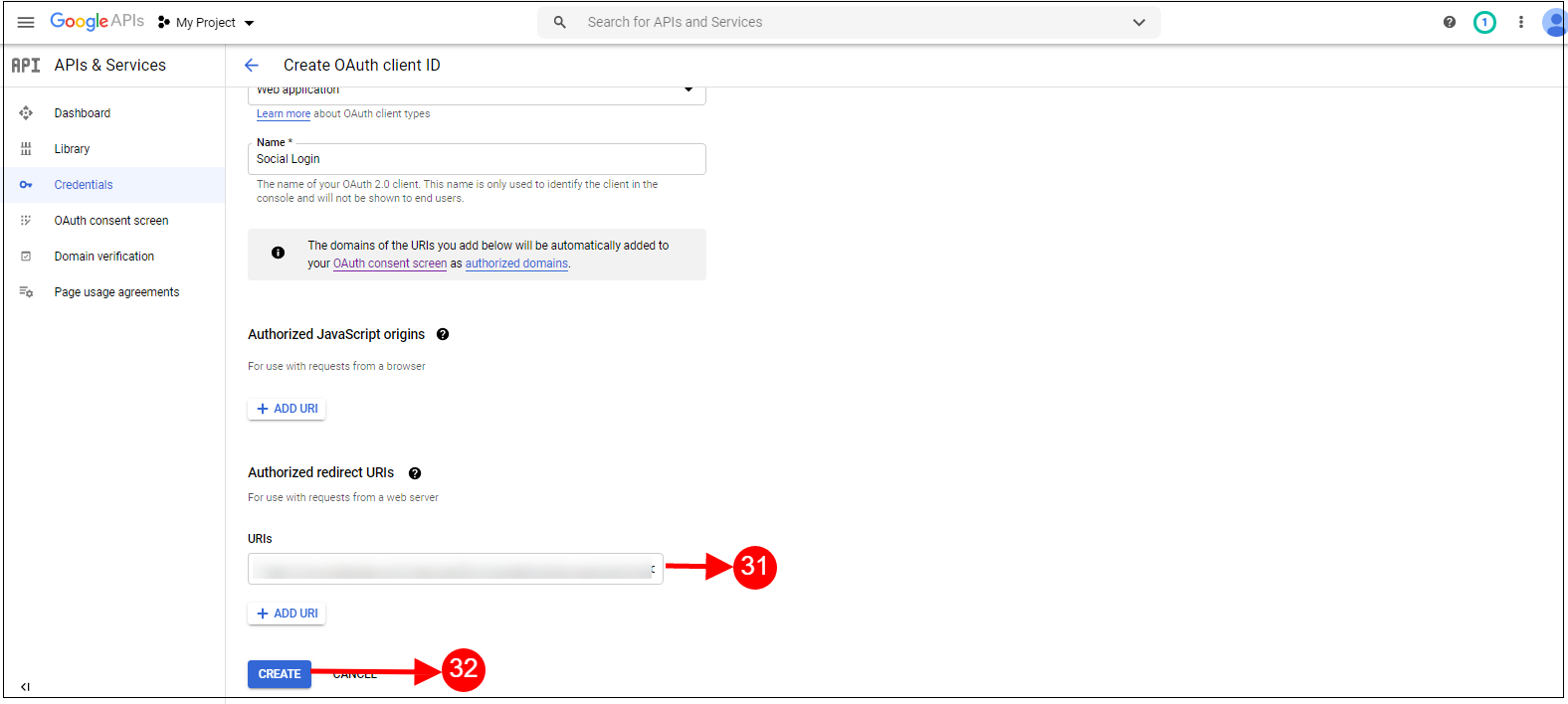
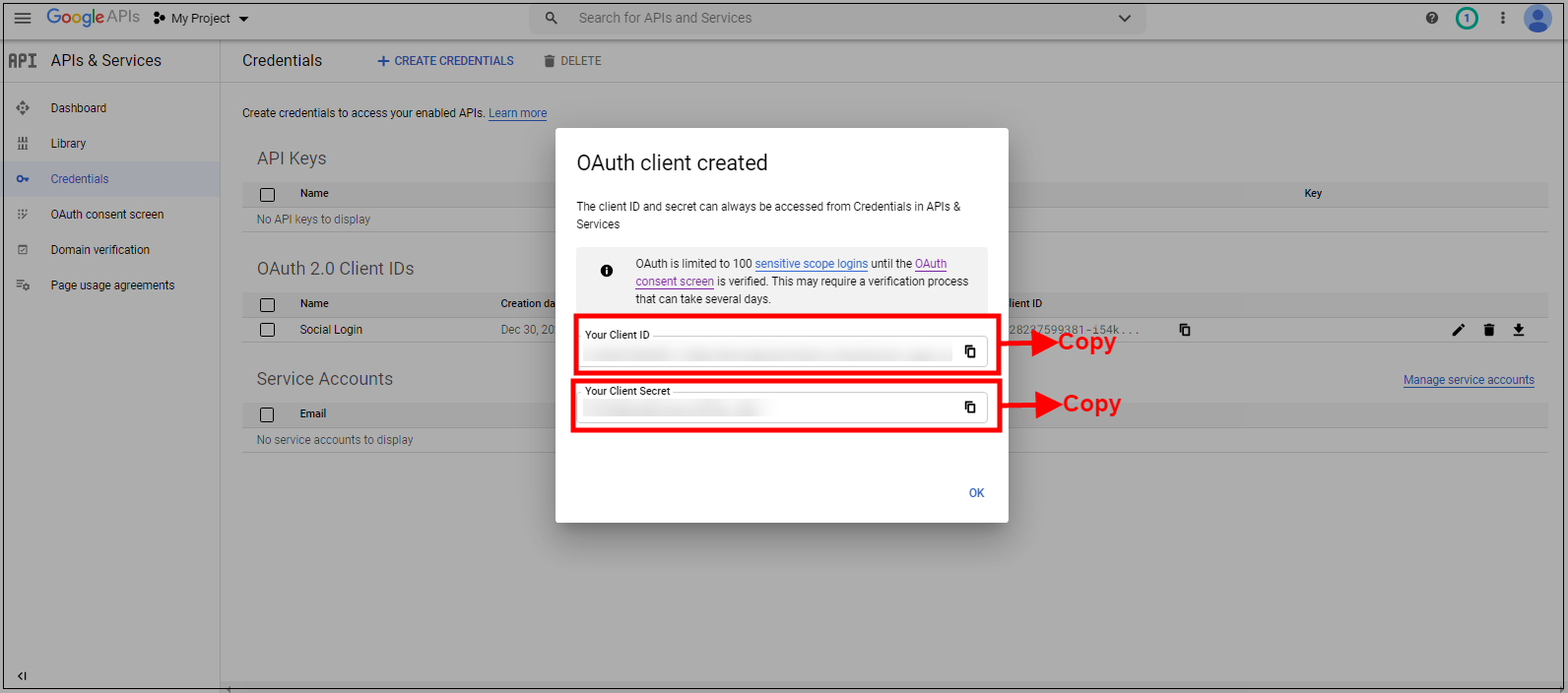
Enable Google Login: To enable Google Registration & Login, switch the button from OFF to ON. But before you do that do get Google APP ID, CLIENT ID, and APP SECRET from https://code.google.com/apis/console without these keys, this functionality of the quick checkout addon Prestashop will not work. By default, this field of the Prestashop One Step Checkout Addon will be disabled.
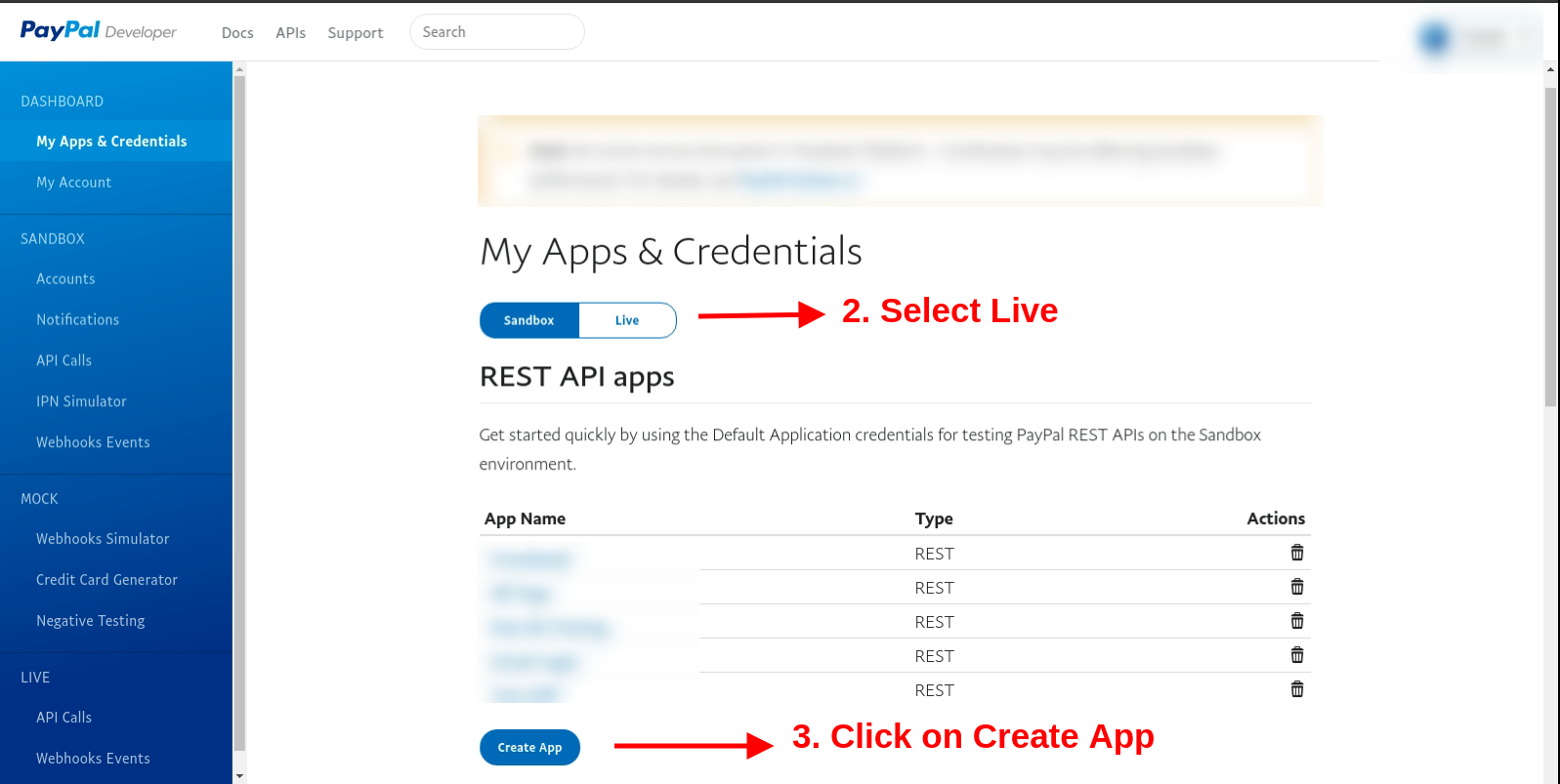
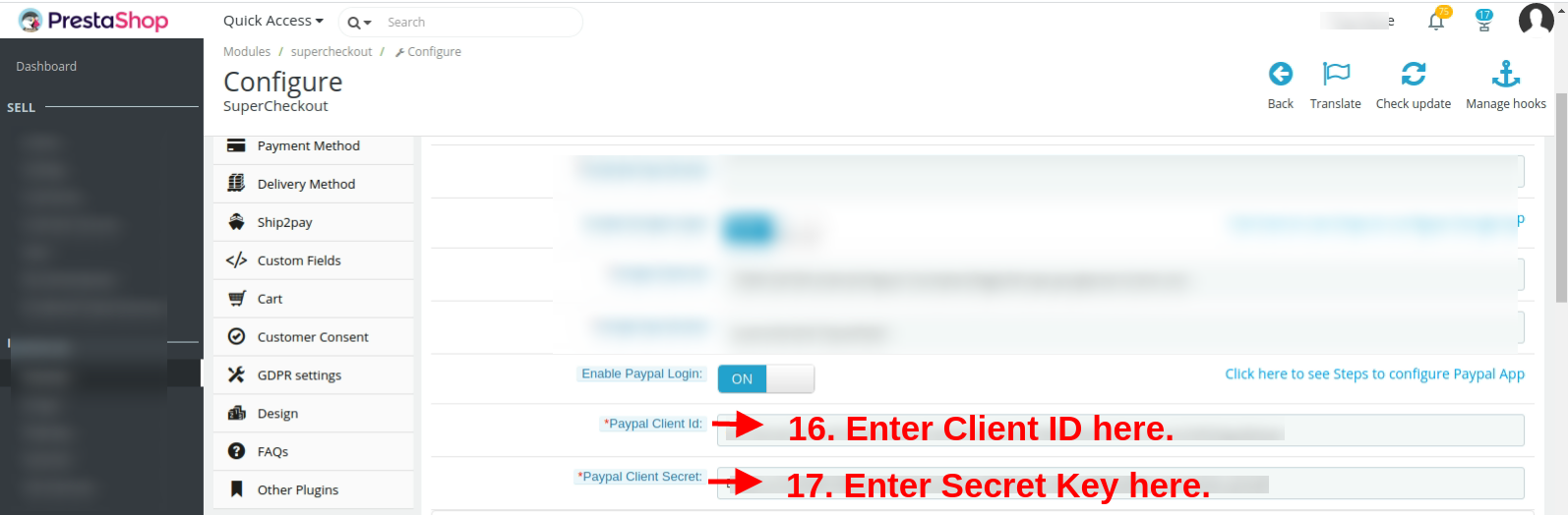
Enable Paypal Login: Activate or deactivate the login options from the admin interface. Enter PayPal client id and client secret from https://developer.paypal.com/developer/accounts/ and save the settings.
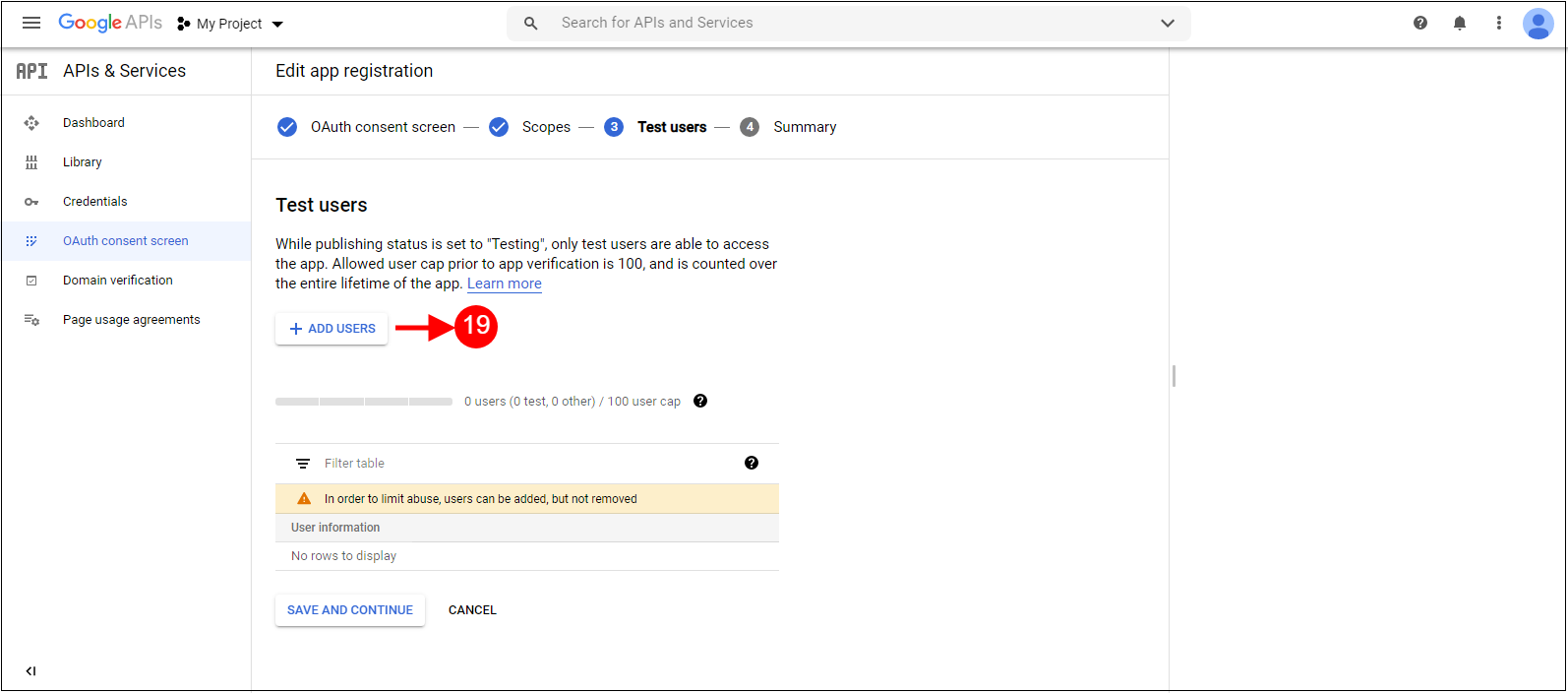
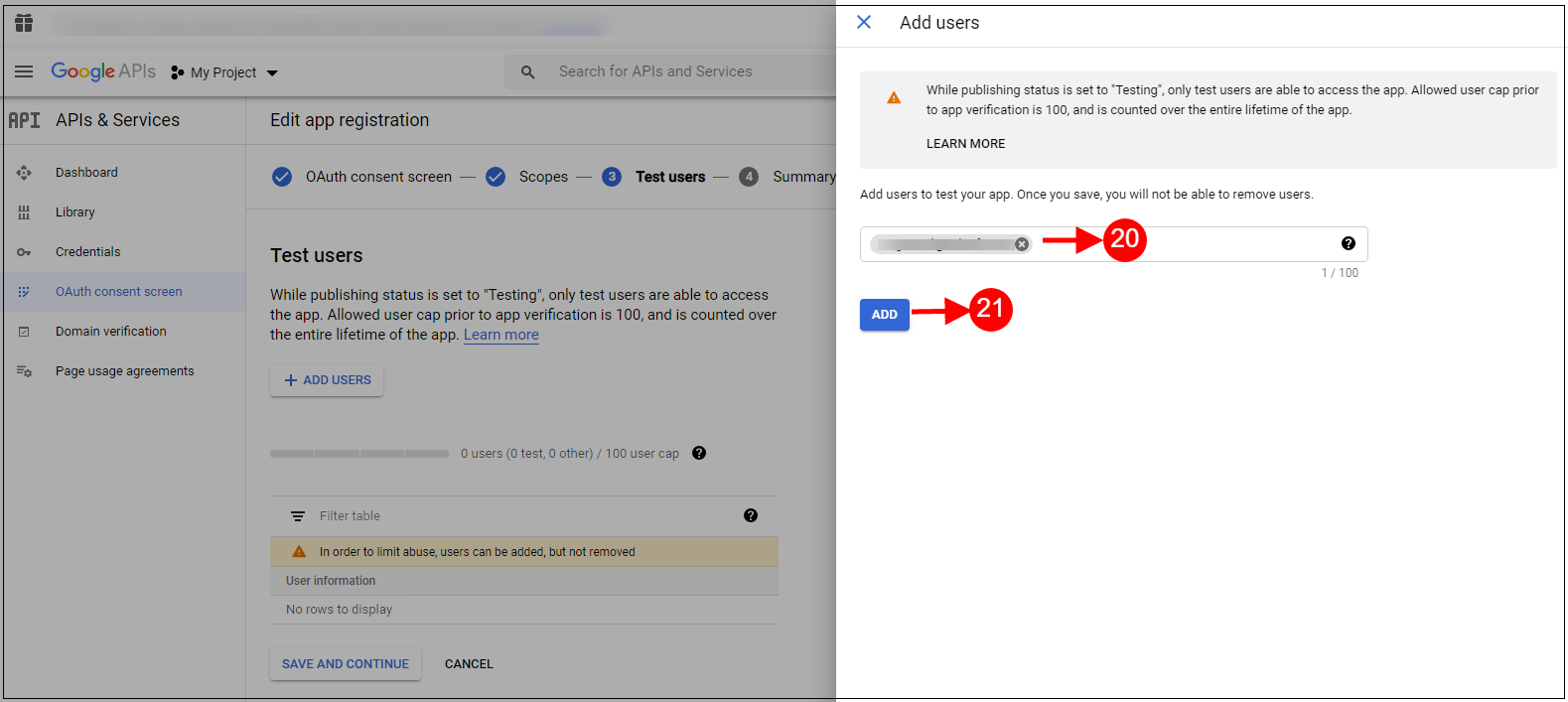
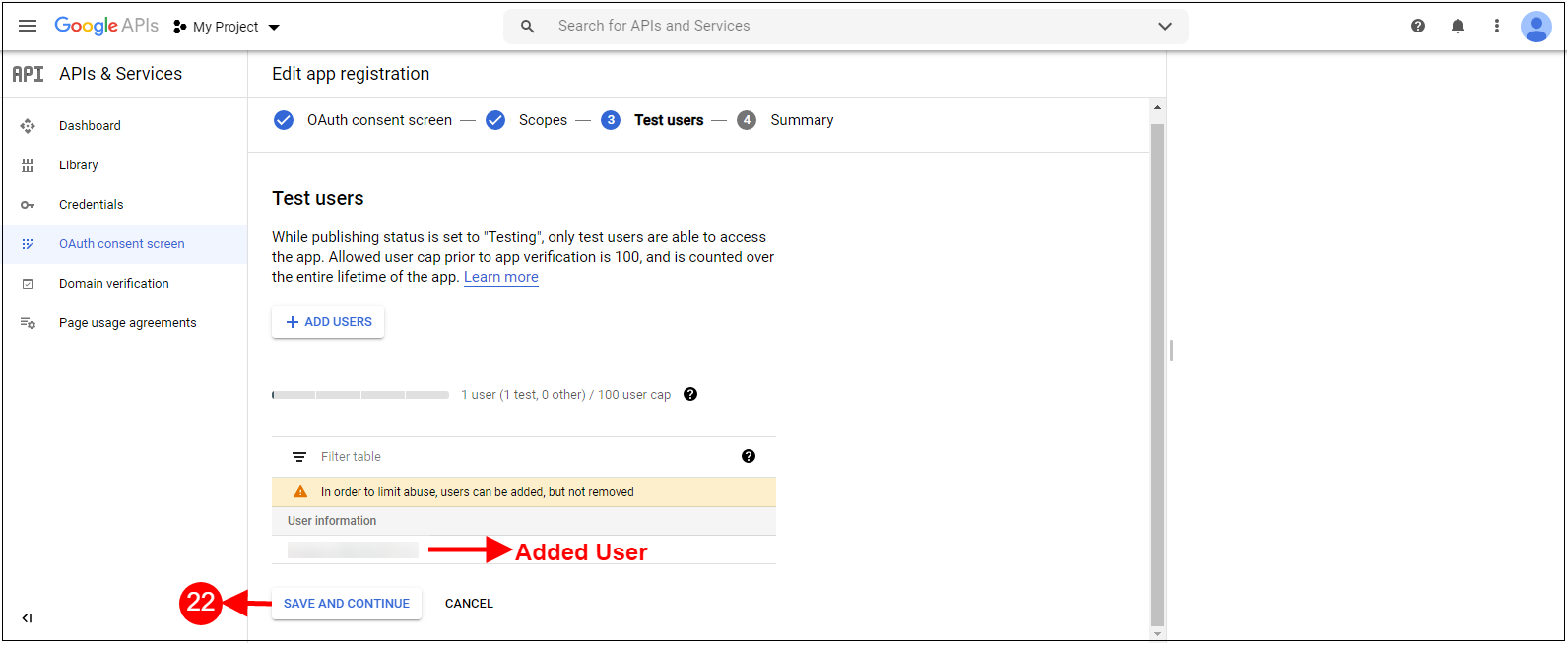
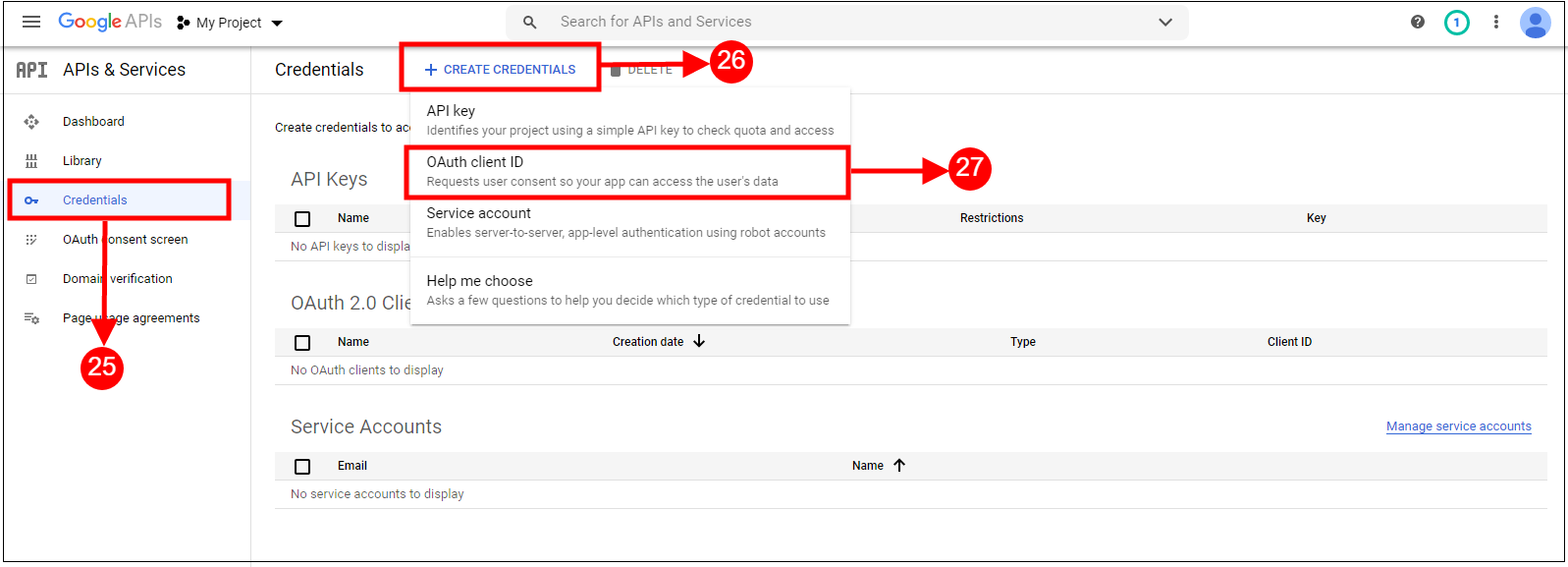
Please read Annexure A to set up Google, Facebook, and PayPal login.
3.1.4 Email Marketing Tab of the One Step Checkout Prestashop Extension
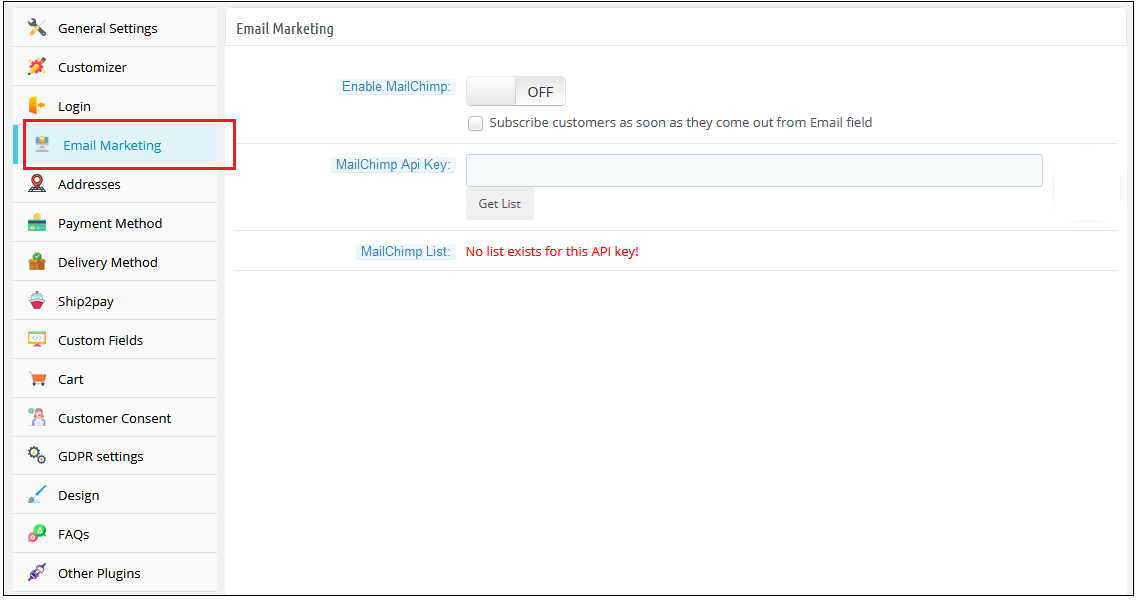
Mail Chimp is an email marketing service by which you can send bulk newsletters/offer emails to your customers. Mail Chimp also provides many attractive Templates and many more features. Our Prestashop one page checkout module allows you to add custom email directly to mail chimp list as soon as they register using our Prestashop one page checkout addon.
For using Mail Chimp you need to have an API Key.
A) How to configure Mail Chimp?
Login to your Mail Chimp account.
Click on the right corner tab > Choose Profile > Extras > API Keys.
Here Admin Can Create an API key by clicking on the “Create a Key” button.
Copy the API key.
Admin can also make a Different list for Each Social login customer by clicking on “List” in the Top Menu Bar.
Now Paste the API Key in the Provided Mail chimp API Key section and click on the “Get List” Button.
Select the list from the Dropdown menu.
B) Mail Chimp Settings:
Enable/Disable: To enable the Mail chimp, switch the enable button from OFF to ON. The default value will be “OFF”.
Subscribe Customer Checkbox: Check this option of the Responsive one page checkout Prestashop module, if you want to subscribe customers to mail chimp as soon as he comes out from the email field. Please note that this function will not subscribe them to the Prestashop list. Our mail chimp integration is responsible to subscribe only to the Mailchimp list.
Mail Chimp API Key: Enter Your Mail Chimp API Key and Click on the “Get List” button.
Mail Chimp List: Select your desired list and save settings.
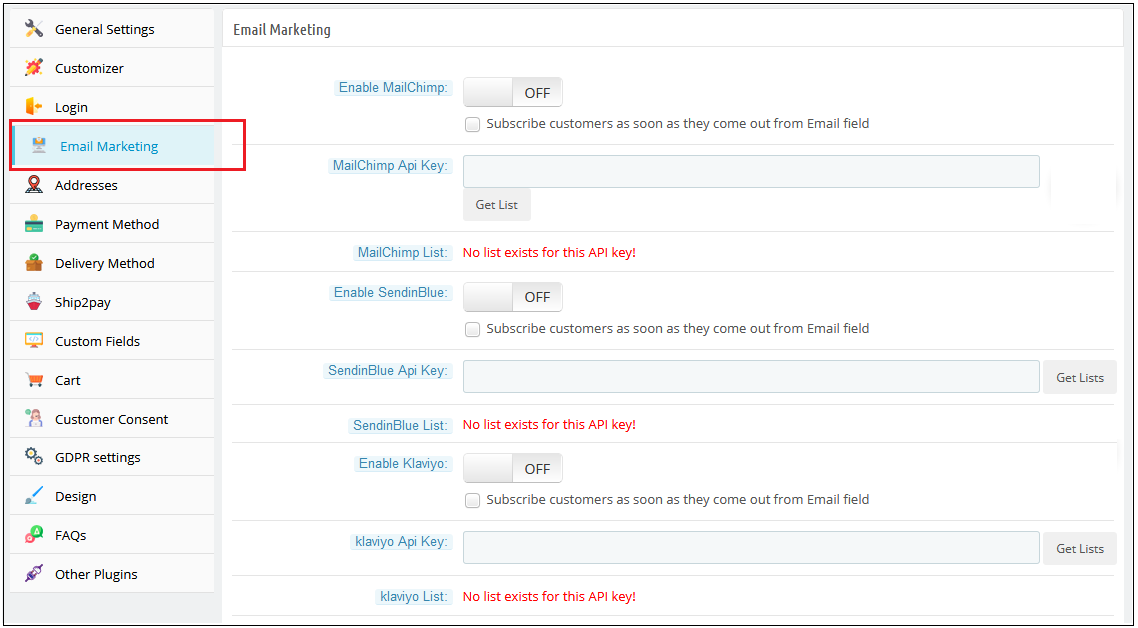
Similarly, you can configure the other two email marketing integrators including Klaviyo and SendinBlue.
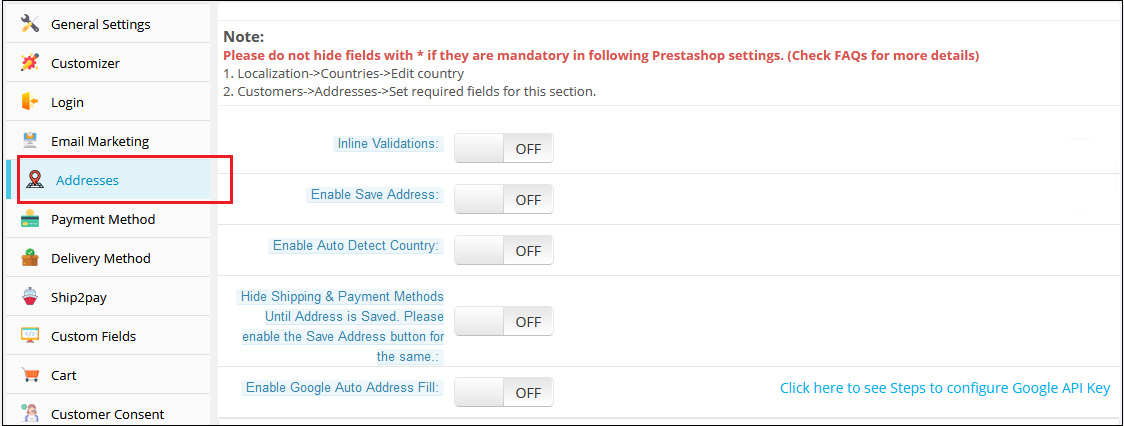
3.1.5 Addresses Tab
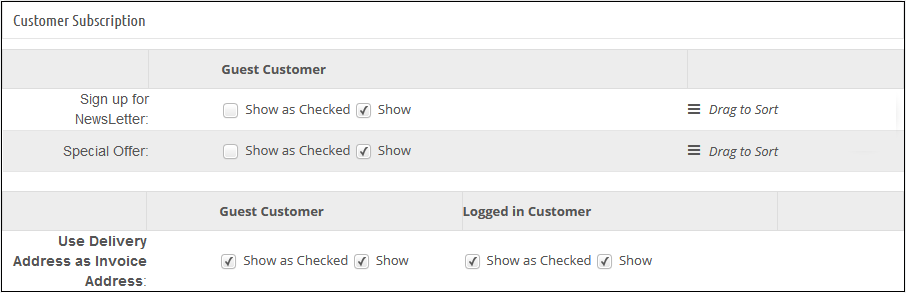
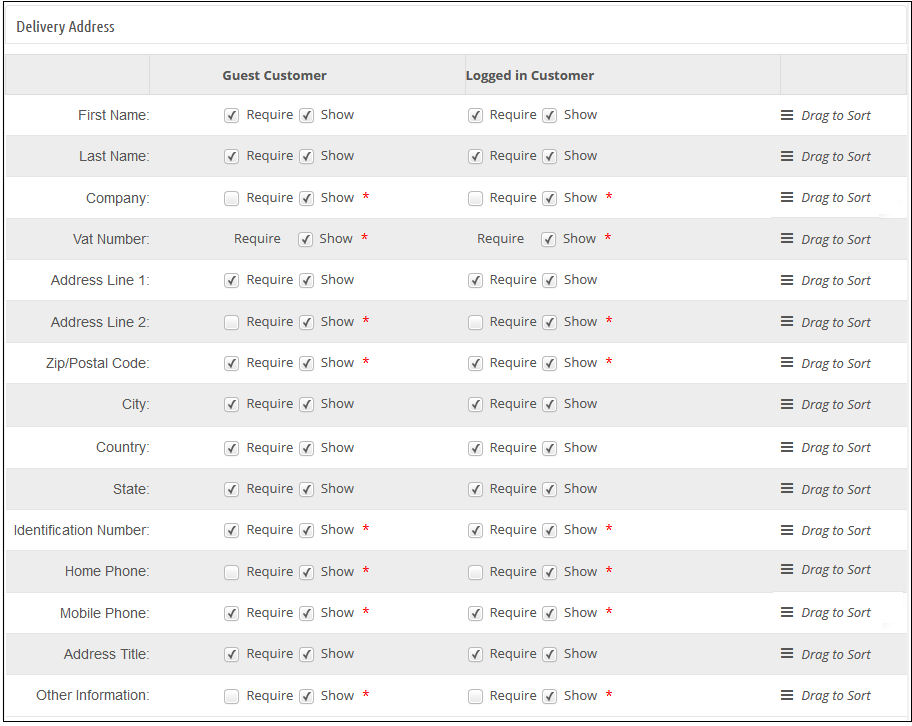
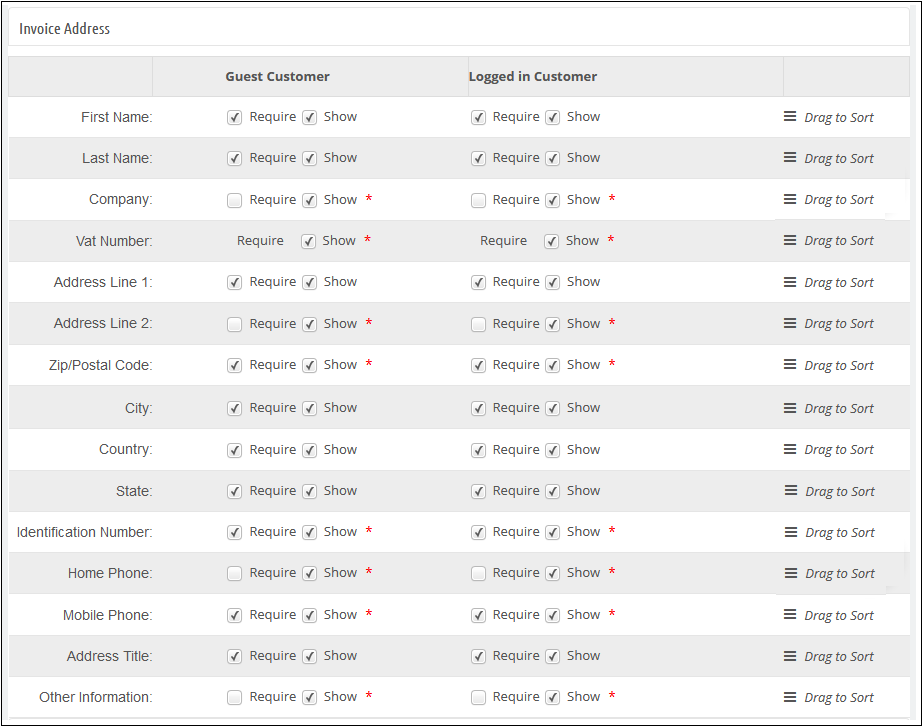
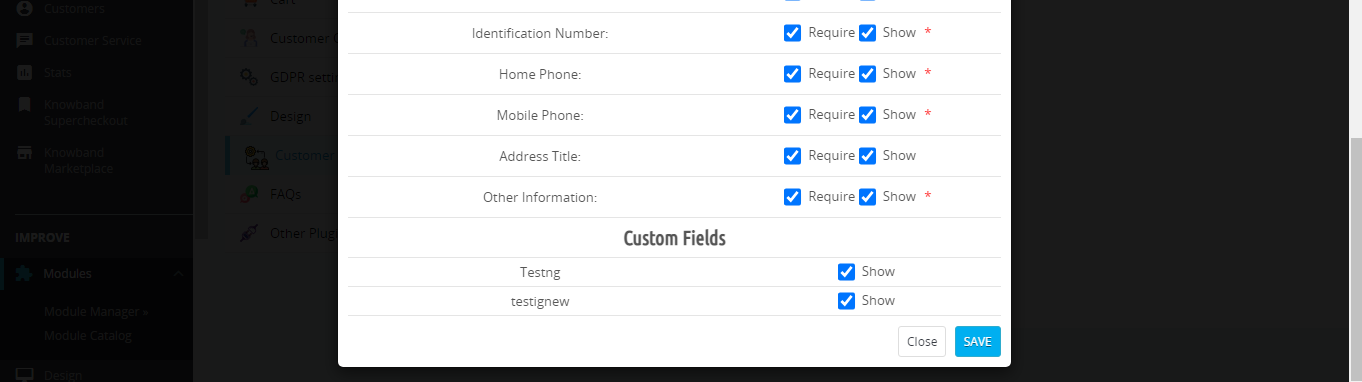
This tab in Prestashop one page checkout addon contains a setting for the fields which are to be shown in the customer registration, delivery address, and invoice address section on the front.
The Addresses Tab of the Prestashop Quick checkout addon consists of two sections. The one on the left is for Guest Customers and the right one for Registered Customers.
To make a field show/hide in the Prestashop one page checkout page, check the checkbox just to the left of the Show label.
To make a field of this fast checkout Prestashop checkout addon as mandatory (required field), check the checkbox just to the left of Require Label.
The fields of the Prestashop One Page Checkout Extension can also be rearranged according to the requirement. To rearrange just hold icon () and drag & drop the field vertically, wherever it is required.
On saving, the fields will be rearranged as per the changes.
This tab of the One Page Checkout Prestashop addon also has more features named inline validation and enables the save address feature. If inline validation is enabled then the fields like first name, last name, zip code are validated as soon as they are filled which lets the customer know that he/she is entering the wrong value. If the save address feature is enabled then a button with the text “SAVE” appears just below the address field of the Prestashop one page checkout addon and using that button the customer can save his/her address before placing the order.
Enable Auto Detect Country: If this option is enabled, then the country of the customer is automatically detected and filled into the provided country field on the Supercheckout page.
Enable Google Auto Address Fill: Using this option, the admin can enable auto-fillup of address with Google Places Integration.
Google API Key:For the above feature to work, the admin needs to set the Google API key through this configuration option.
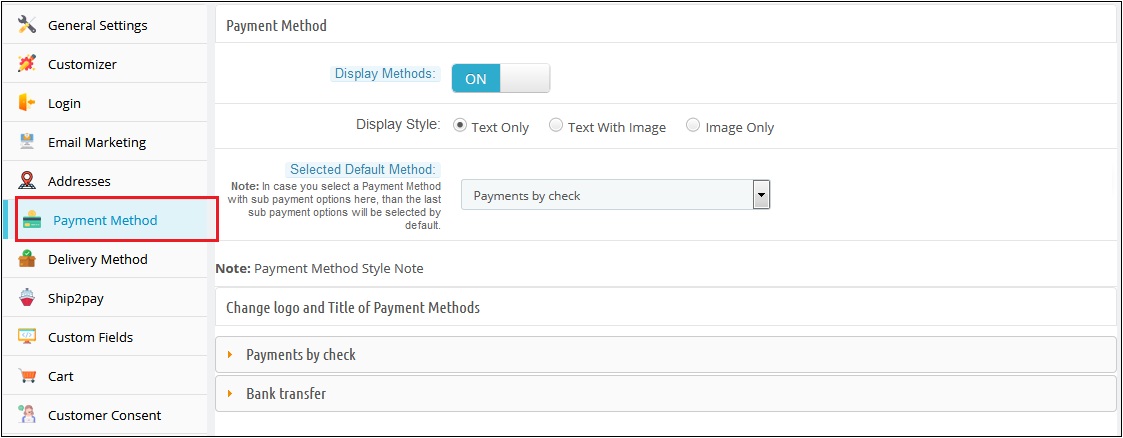
3.1.6 Payment Method Tab of the Prestashop One Page Checkout Module
1. In Prestashop one page checkout addon, this tab contains settings for payment methods shown in one page checkout page like enabling/disabling, or selecting a default method.
2. Display Method: To Enable/Disable the payment methods on the checkout page, switch the button from ON to OFF or vice-versa. This will disable the payment method block from the checkout page. By default, this option of the Prestashop fast checkout addon will be enabled.
3. Display Style: There are 3 options in this field of the Prestashop One Step Checkout Addon to display how your payment methods will be displayed on the checkout page. By default, payment methods will be displayed with its name. If you select the style with the image, then please upload the image of size (95 X 20) for the corresponding payment method under the appropriate payment module directory.
4. Selected Default Method: This option of the One Step Checkout Prestashop module, will be a drop-down list of all installed payment modules. Here you can select the payment method, which will be displayed as selected at the time when a customer comes on the checkout page.
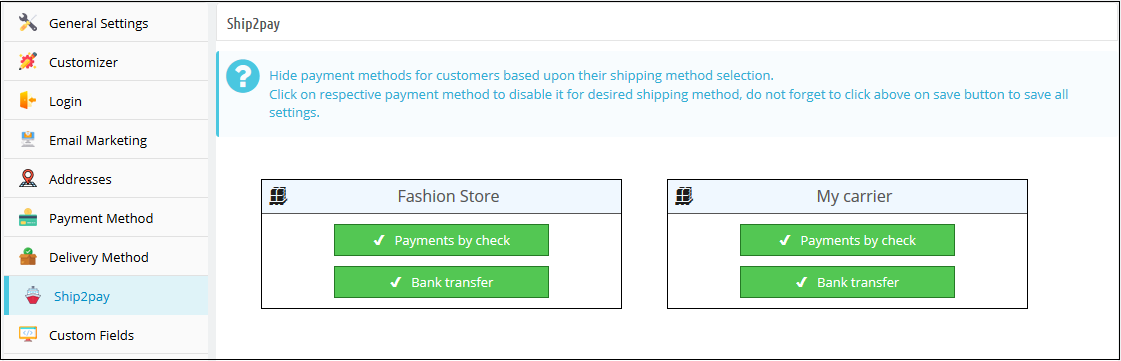
Ship2Pay: With the Ship2Pay feature, the store admin can map the payment methods with the selected delivery methods. If the admin has mapped some payment methods with a particular delivery method then other payment methods will be disabled for the customers on selecting this particular delivery method.
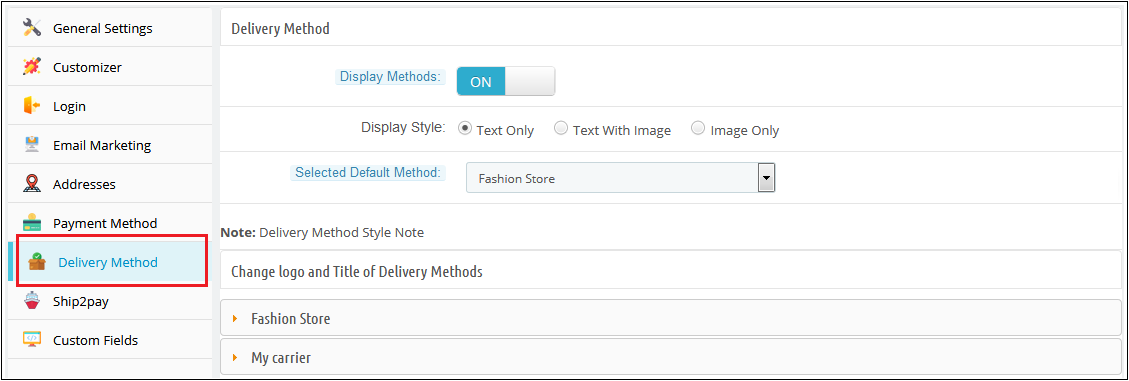
3.1.7 Delivery Method Tab of the Prestashop One Page Checkout Module
In one page checkout Prestashop, this tab contains settings for delivery methods shown on the checkout page like enabling/disabling, or selecting a default method
2. Display Method: To Enable/Disable the delivery methods on the checkout page switch the button from ON to OFF or vice-versa. This will disable the delivery method block from the checkout page. By default, this will enable.
3. Display Style: There are 3 options in this field of the Prestashop fast checkout addon to display how your delivery methods will display on the checkout page. By default, delivery methods will display with their name. If you select a style with an image, then please upload an image of size (95 X 20) for the corresponding delivery method.
4. Selected Default Method: This option of the Prestashop One Page Checkout addon will be a drop-down list of all active delivery methods. Here you can select the delivery method, which will be displayed as selected at the time when a customer comes on the checkout page. The selection will differ according to customer location. If your selected method maps with customer location, then the method will show as selected at the time of checkout page loading.
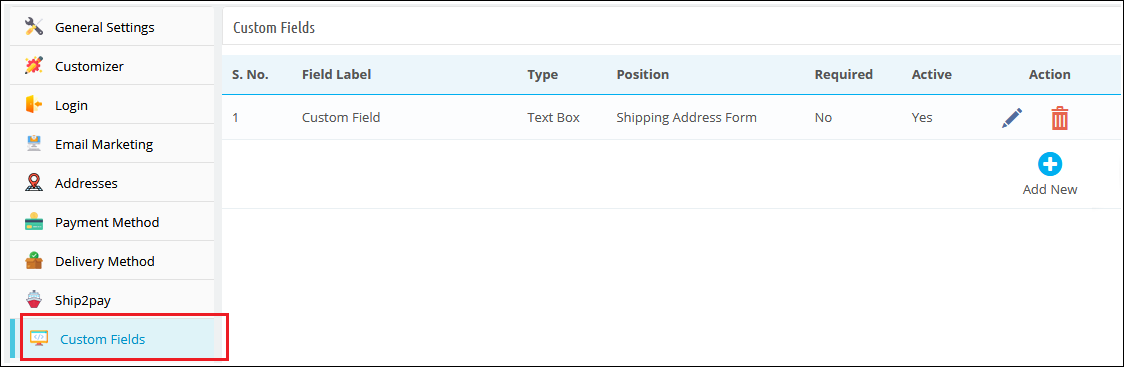
3.1.8 Custom Fields Tab of the Prestashop fast checkout module
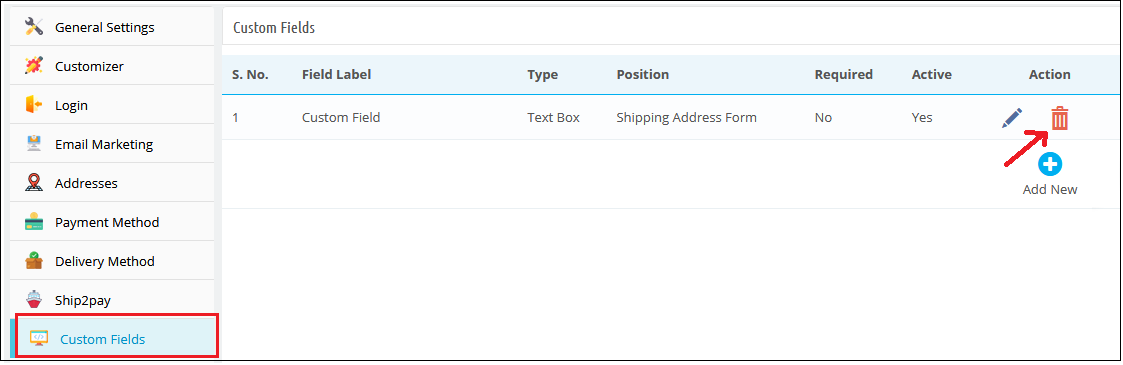
In Prestashop one page checkout module, this tab is used to add custom fields on the front checkout page. This tab of the Prestashop simplified checkout addon contains a list of custom fields and options to Add, Edit, or Delete any field.
These custom fields of the Prestashop fast checkout addon can be used to get some additional data from the customer and display it in different positions i.e. Shipping Address Form, Payment Address Form, Cart Block, or Customer Registration Block.
A) How to add a custom field?
Following are the steps to add a custom field on the checkout page:
Click on the “Add New” button.
A pop-up will display, fill all the required fields and add your desired features.
Click on the “Save” button.
Example 1 – If the admin wants to add a drop-down with the label “Want to become Member ?”
Following are the steps to be followed –
1. Add a new custom field as shown below.
Configure its position as “Shipping Address Form”.
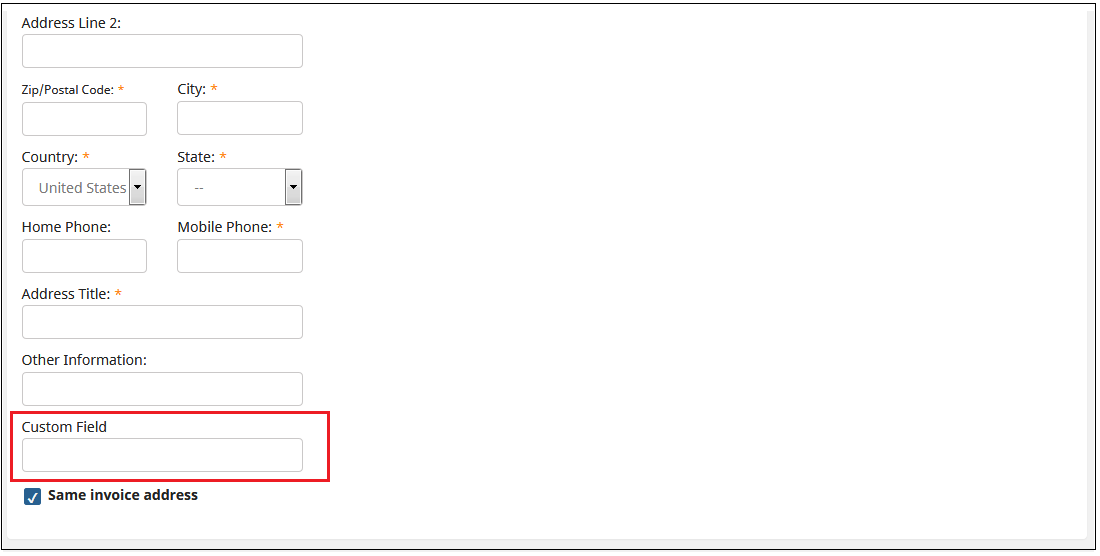
2. Go to Front End, add the product to the cart and proceed to “Checkout”. On the Checkout page, the custom field will be displayed as shown below.
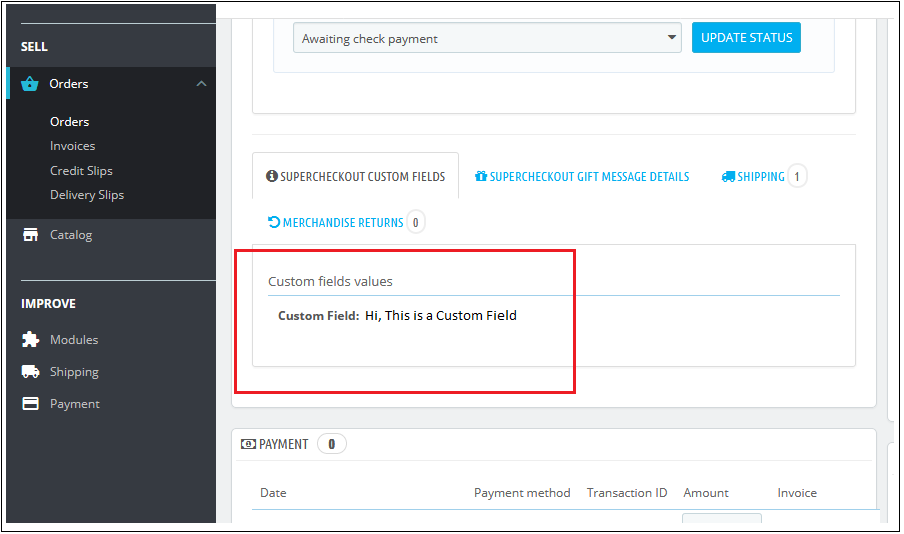
3. Admin can check the data fetched from the customer by following steps –
(a) Go to the “Orders” tab. (b) Click on the “View” button for a particular order you want to check. (c) The Customer’s information will be displayed in the “SUPERCHECKOUT CUSTOM FIELDS” tab as shown below.
4. Customer can also check the Custom field by following steps-
(a) Go to the “My Account” page. (b) Click on “Order History and Details” (c) Click on the “Details” button (d) Image shown below will display.
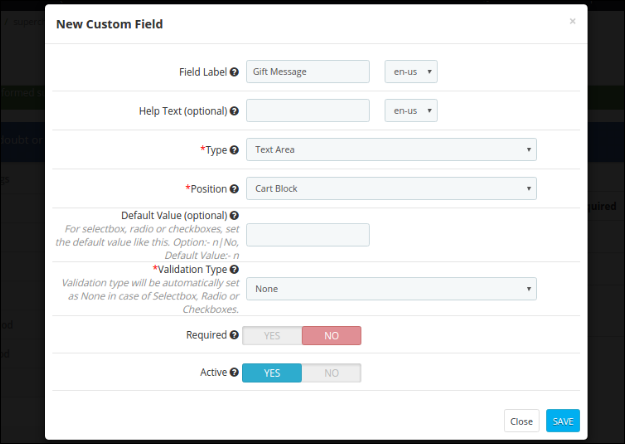
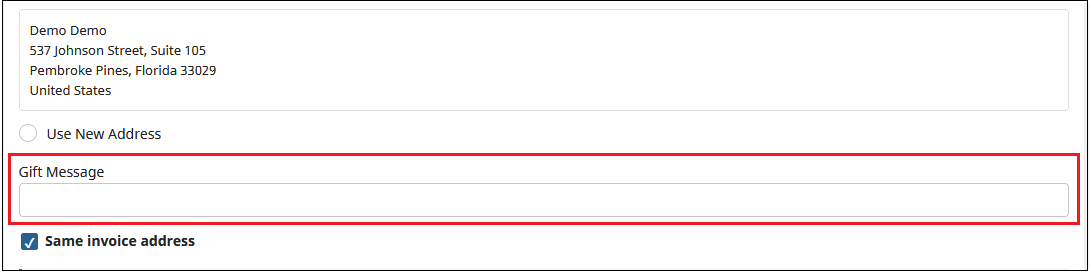
Example 2 – If the admin wants to add a text area with the label “Gift Message”. Following are the steps to be followed –
1. Add a new custom field as shown below.
Configure its position as “Shipping Address Form”.
2. Go to Front End, add the product to the cart and proceed to “Checkout”. On the Checkout page, the custom field will be displayed as shown below.
3. Admin can check the data fetched from the customer by following steps –
(a) Go to the “Orders” tab. (b) Click on the “View” button for a particular order you want to check. (c) The Customer’s information will be displayed in the “SUPERCHECKOUT CUSTOM FIELDS” tab as shown below.
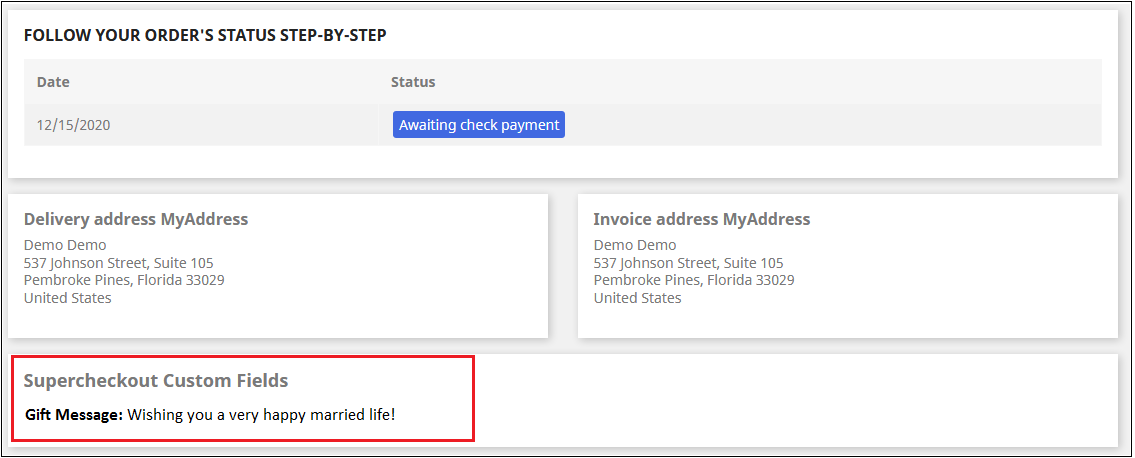
5. Customer can also check the Custom field by following steps-
(a) Go to the “My Account” page. (b) Click on “Order History and Details” (c) Click on the “Details” button (d) Image shown below will display.
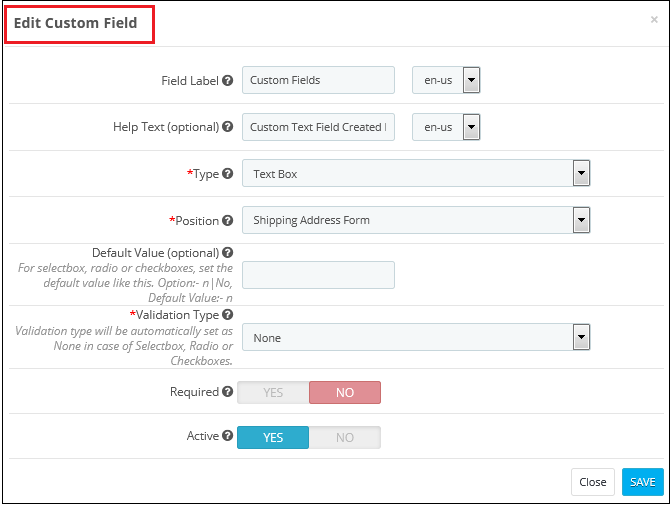
B) How to edit a custom field?
To edit a custom field, click on the ‘Edit’ icon shown in front of any row of this Prestashop quick checkout module. It will open a form shown below. Values of the form in this Prestashop quick checkout module will be filled already.
Admin will have to click on the ‘Save’ button to save the edited details.
C) How to delete a custom field?
To delete a custom field of the Responsive one page checkout Prestashop module, the admin will have to click on the delete icon shown next to every table row. It asks for confirmation to delete a row.
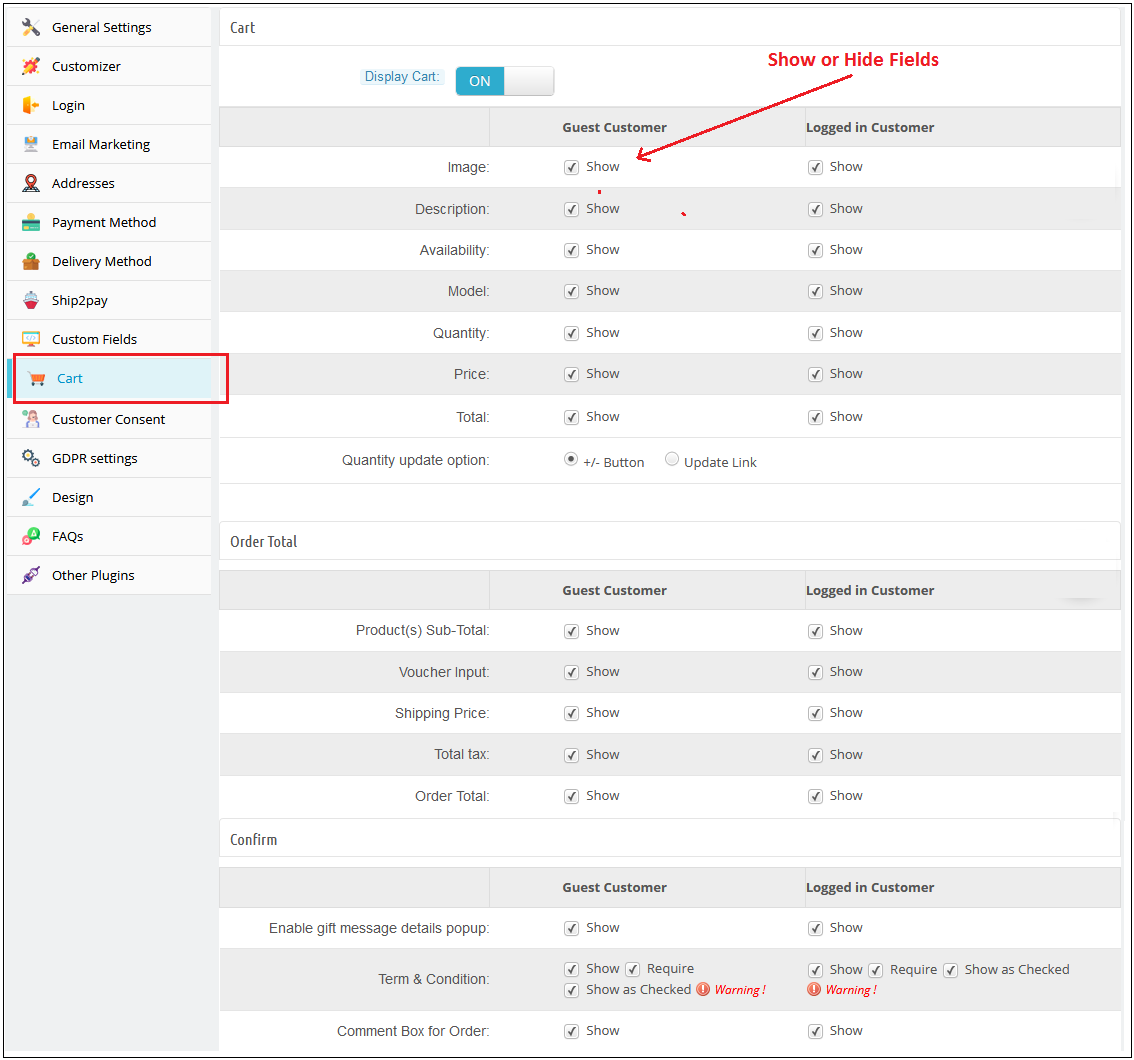
3.1.9 Cart Tab of the Prestashop responsive one step checkout addon
This tab One Step Checkout Prestashop module contains setting for the cart, order total, and confirming the order as shown below :
Its divides into three sections :
Cart
Order Total
Confirm
A) Cart
1. Display Cart: By default, cart display will enable.
2. To Show/Hide cart summary options from the checkout page, check to uncheck the checkbox present in front of the Cart Summary Option label.
3. Product Image Size: This option of the one step checkout Prestashop module will show which size of the product image will be displayed on the One checkout page. By default, this field of the Prestashop quick checkout addon will be shown with their default values.
B) Order Total
To Show/Hide cart summary options from the checkout page check uncheck the checkbox present in front of the Cart Summary Option label.
C) Confirm
To Show/Hide cart summary options from the checkout page check uncheck the checkbox present in front of the Cart Summary Option label. Admin can provide an option to add a gift message along with their product order. Admin will have the option to check this message on the order details page from the backend.
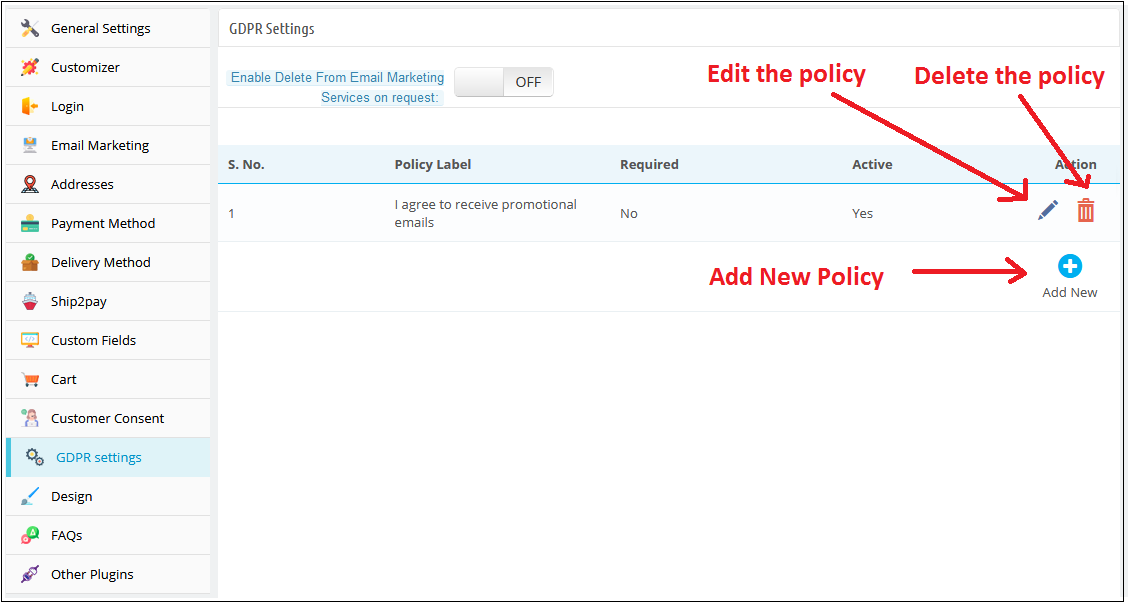
3.1.10 GDPR Setting Tab of the One Page Checkout Prestashop Addon:
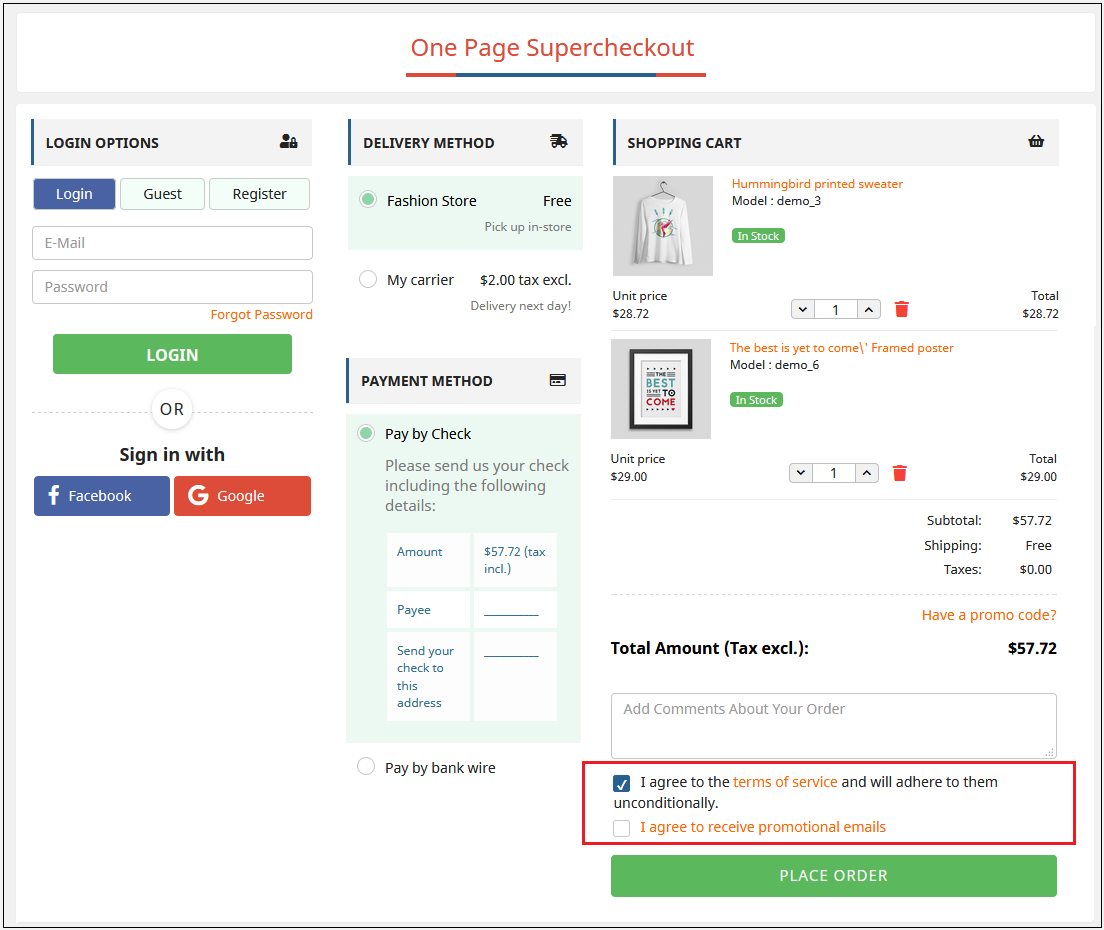
This field of the Prestashop one page checkout module allows the admin to add the opt-in boxes (checkbox) on the checkout page to meet the GDPR requirements. Admin can add the multiple opt-in boxes at the checkout page. As per the GDPR directives “The GDPR is clearer that an indication of consent must be unambiguous and involve a clear affirmative action (an opt-in). It specifically bans pre-ticked opt-in boxes. It also requires distinct (‘granular’) consent options for distinct processing operations. Consent should be separate from other terms and conditions and should not generally be a precondition of signing up to a service. You must keep clear records to demonstrate consent”.
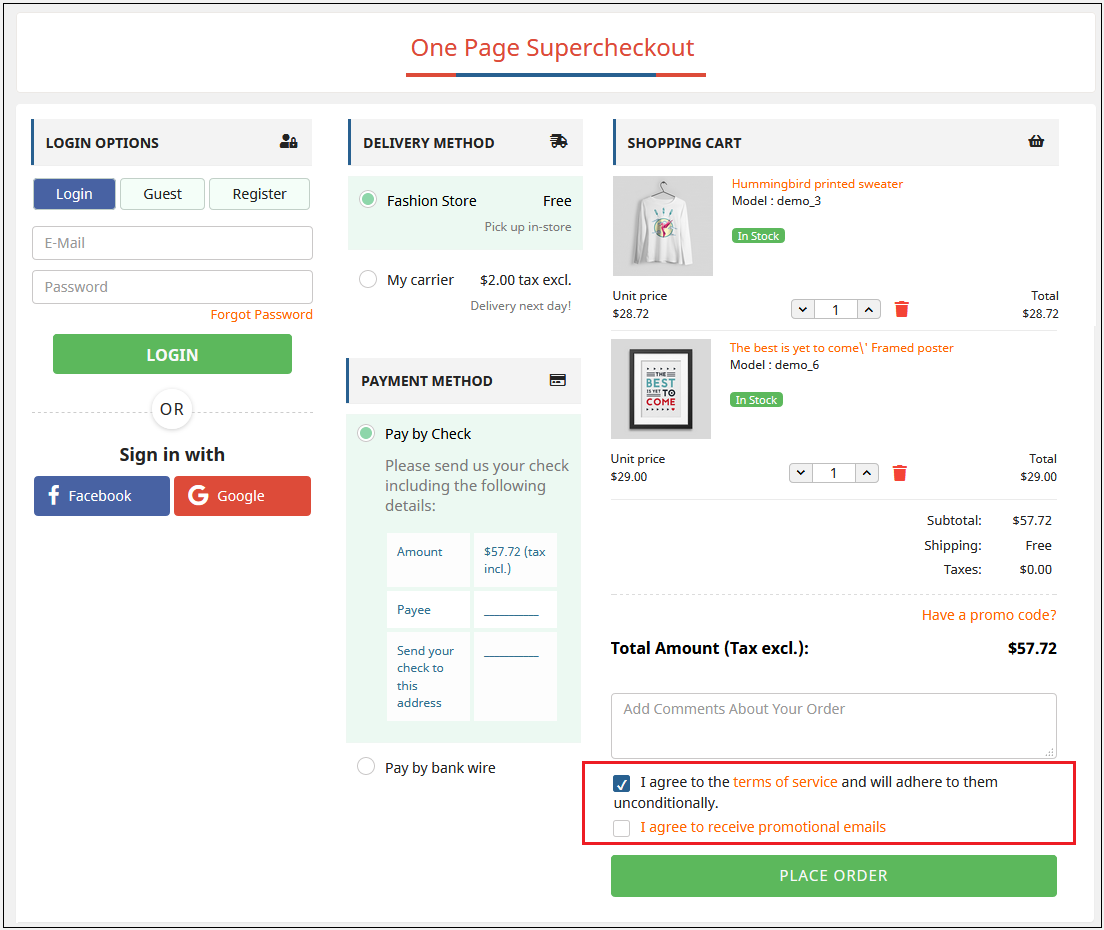
Let’s take a look at the screenshot below:
Please refer to the attached screenshot of the front end:
3.1.10.1 Adding New Policy:
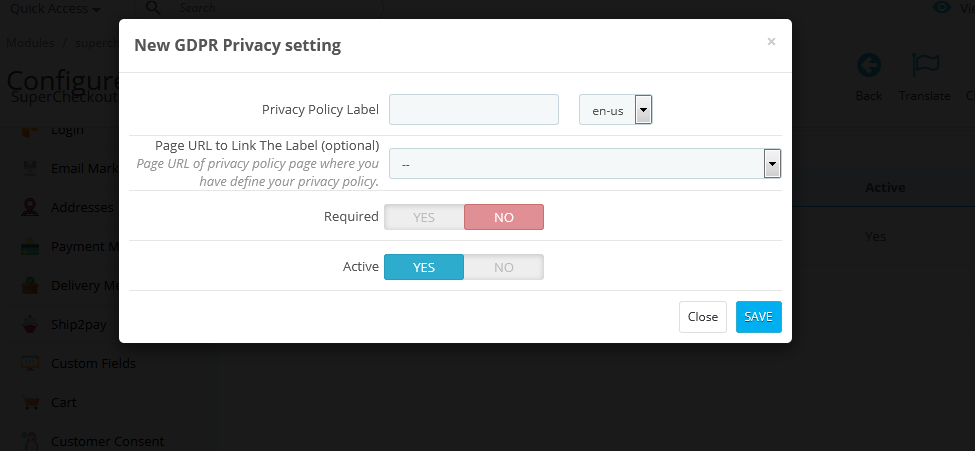
The one page checkout Prestashop addon allows the admin to add as many policies. To add a new policy, the admin will just need to click on the “Add New” option. After doing so, a popup will appear, where the admin will ask to fill in the details of the policy.
Privacy Policy Label: In this field, enter the privacy policy label. The text entered here will be visible to the user on the front end. Page URL to Link the Label: This field is not mandatory. But if you have any URL to link the label where you have defined your privacy policy, then enter the same here.
Required: This option is to make the policy field required or optional. If you make this field optional then the customers can continue to place his order without providing consent. Otherwise, only after providing consent, the user will be able to place the order.
Active: This field of the GDPR setting is to make the opt-in option enable or disable at the front end.
Let’s take a look at the screenshot below:
3.1.11 Customer Consent Tab of the one step checkout Prestashop module
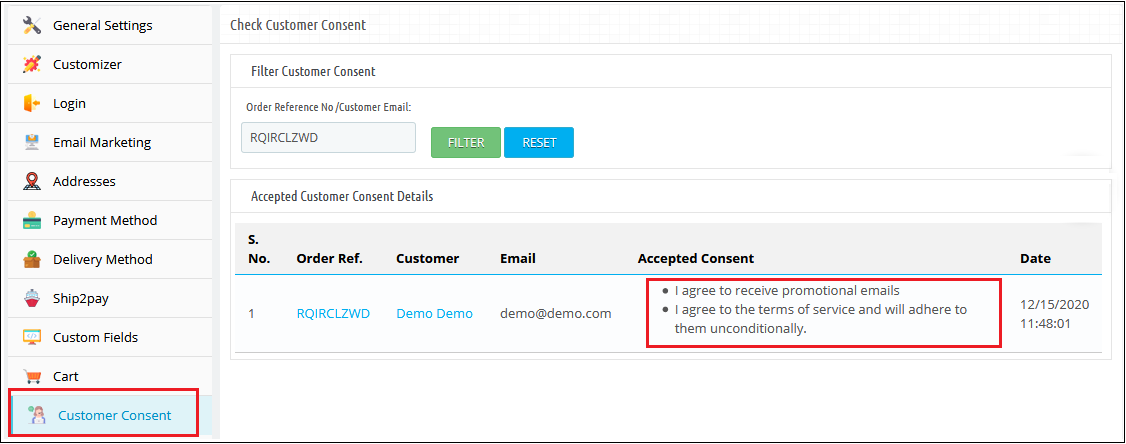
This field of the Prestashop one step checkout displays the data of all the customers who have agreed to any privacy policy(s) defined by the admin. The data will also display the date, time, and order reference number as well. To view the list, the admin must have to enter the email id or order reference number and click on the Filter button. The accepted customer consent details will be displayed along with the order reference number, customer name, email id, accepted consent, date, and time as well. Let’s take a look at the screenshot below:
3.1.12 Design Tab of the Responsive one page checkout Prestashop module
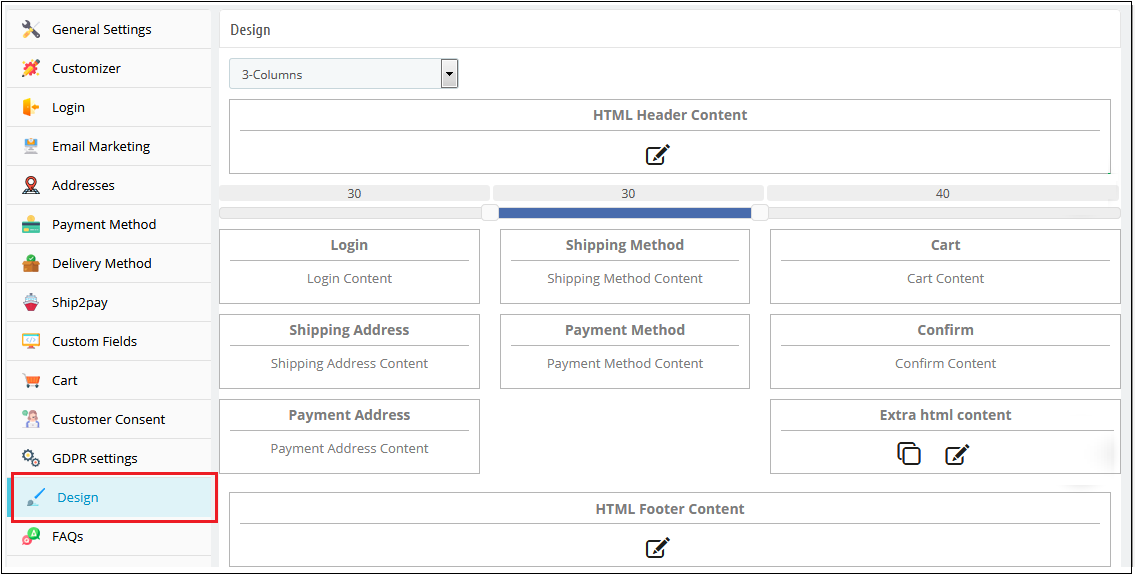
This tab of the Prestashop one step checkout module contains the settings for the design of the checkout page in the catalog as shown below:
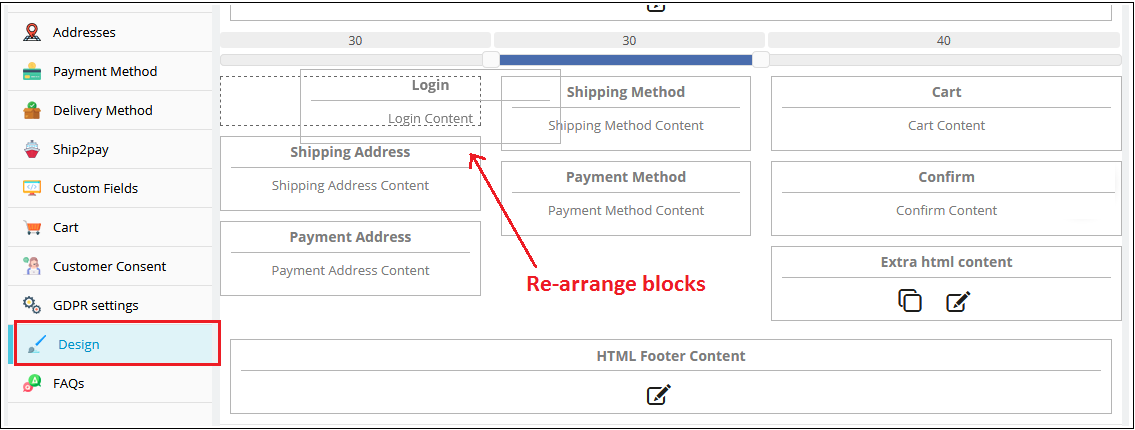
2. To change the width of any column adjust the slider present at the top as shown below :
3. Block of different steps of the simplified checkout Prestashop module can also be rearranged from one column to the other or in the same column as shown below:
4. On saving, the block will be rearranged in the checkout page as per the changes
3.1.13 Add Customer profile type as a custom field in PrestaShop Supercheckout
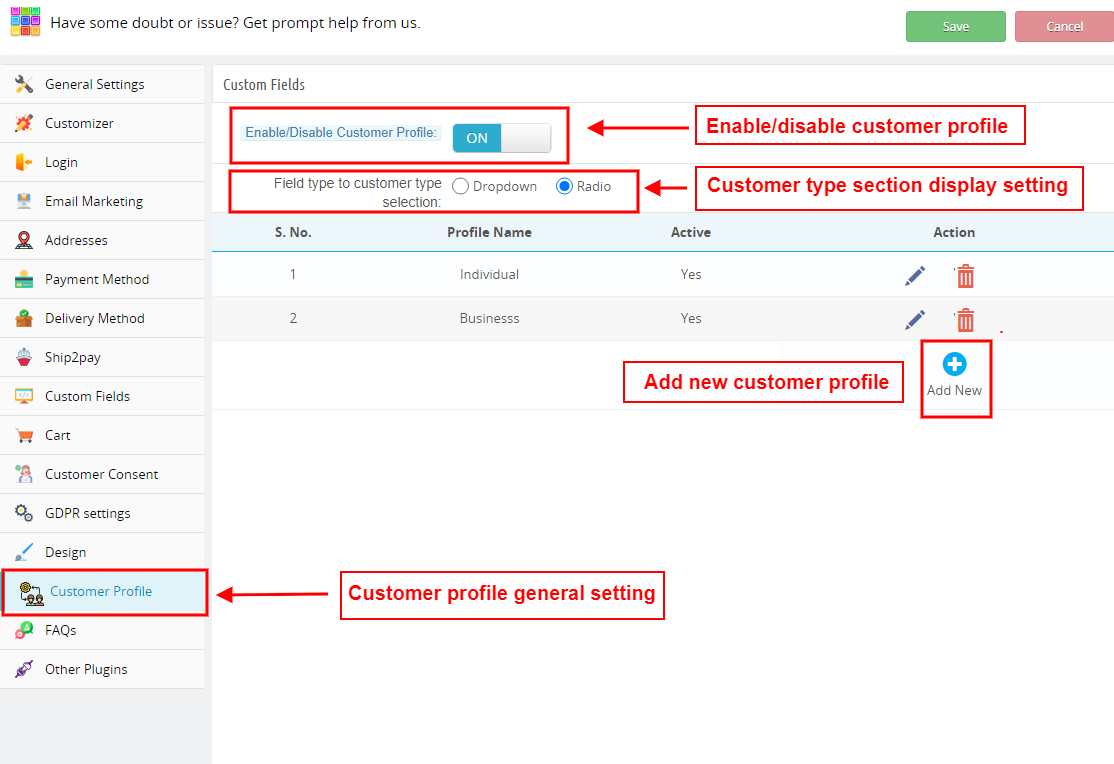
This tab of One Page Checkout allows the seller to add a custom field to select the customer type for the users. Admin can add various profile type options.
Enable/Disable Customer Profile: Admin can show or remove the customer type custom field by choosing the Yes and No option
Field type to customer type selection: Admin can decide if this field will be displayed as a dropdown menu or with radio buttons.
How to add a new customer type?
The administrator can build separate profiles for different categories of clients, such as business customers and personal orders, and display different fields for checkout for each type of profile, as well as decide whether or not the information is mandatory.
Click on the ‘Add New’ button on the customer profile page.
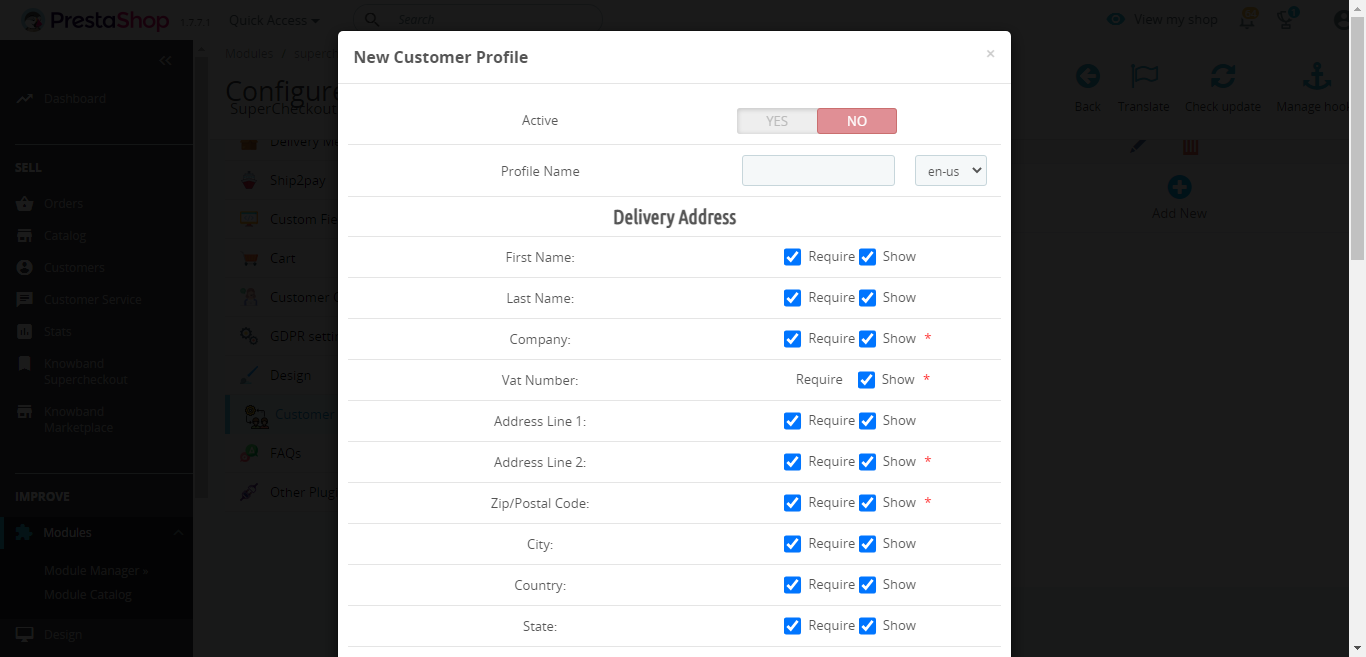
You will be redirected to a new page with the title ‘New Customer Profile’
Active: Enable or disable the profile from here.
Profile Name: Add or update the profile name
Delivery address: You will find various address field options like name, company, VAT number, address, city, country, contact number, etc. in this tab.
Make sure to select the ‘require’ checkbox if you want to make any field mandatory.
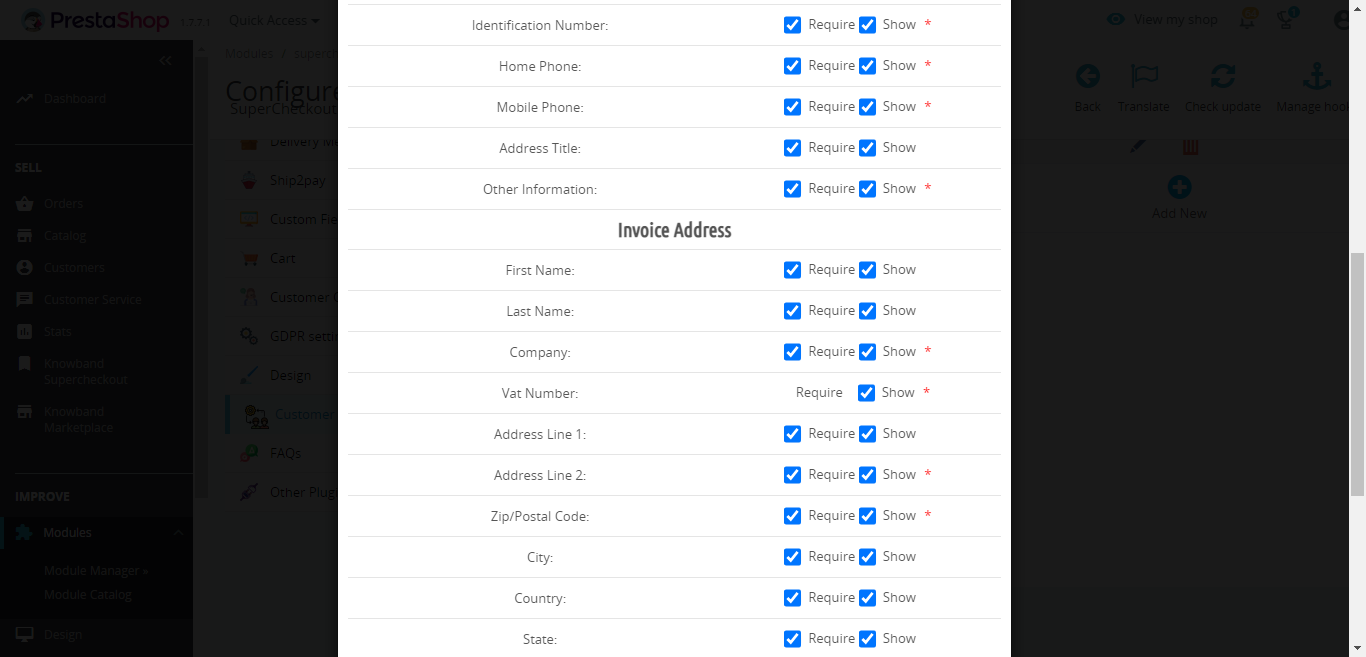
Display Address on Invoice: You will find various address field options like name, company, VAT number, address, city, country, contact number, etc. in this tab. The selected fields will be displayed on the invoice.
Make sure to select the ‘require’ checkbox if you want to make any field mandatory.
Enable/Disable Custom fields: You can show or hide the custom fields from this tab.
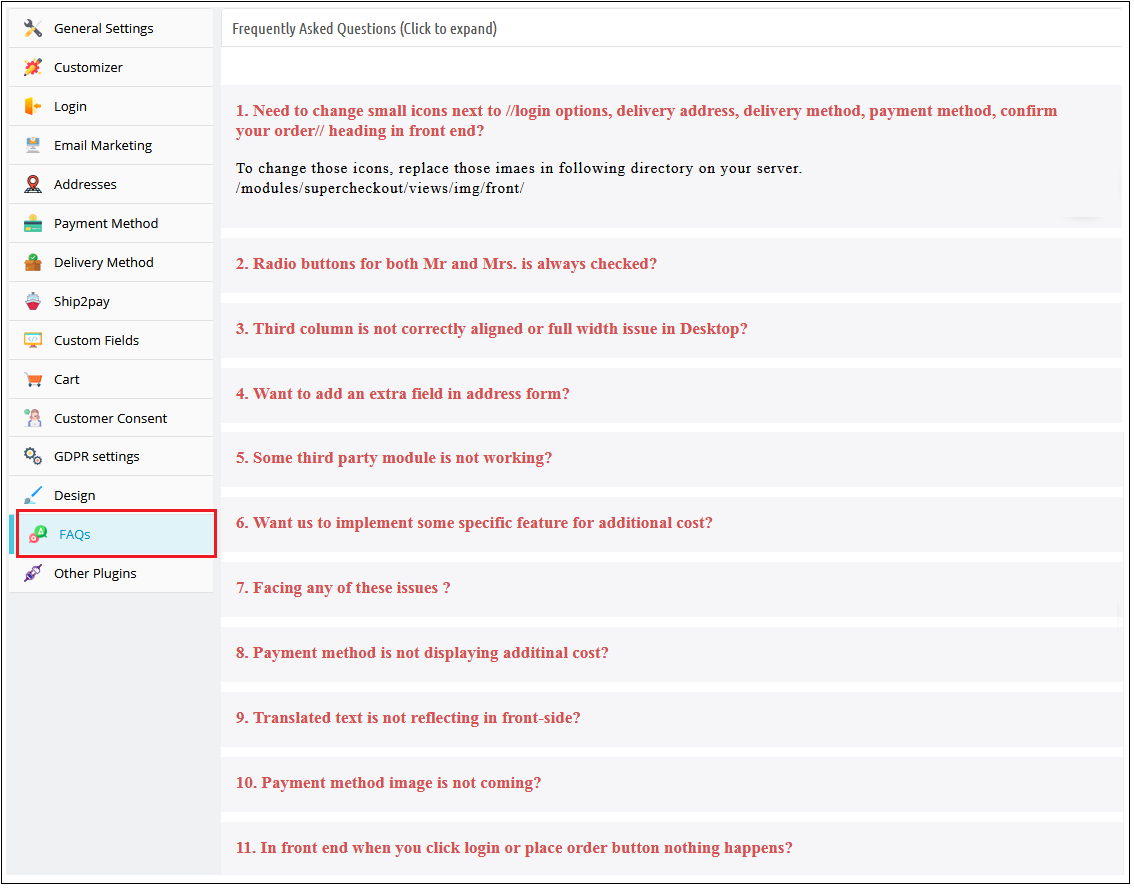
3.1.14 FAQ Tab of the Prestashop responsive one step checkout addon
This tab of the one page checkout Prestashop module contains several questions (with answers to them) that are asked by our customers. We recommend you go through the questions before raising any ticket for this Prestashop fast checkout addon.
3.1.15 Other Plug-ins Tab
This tab of the Prestashop fast checkout addon redirects to our developer page having a list of other plug-ins developed by us. If you like this Prestashop Quick checkout addon then you can try our other plug-ins also.
3.2 Abandoned Checkout Statistics
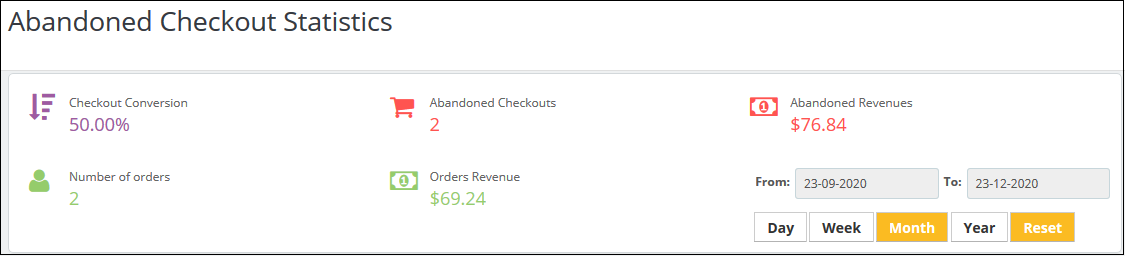
Here, the admin can look for the number of orders they have received, checkout conversion rate, abandoned checkouts, order revenue generated and revenues lost in abandoned carts.
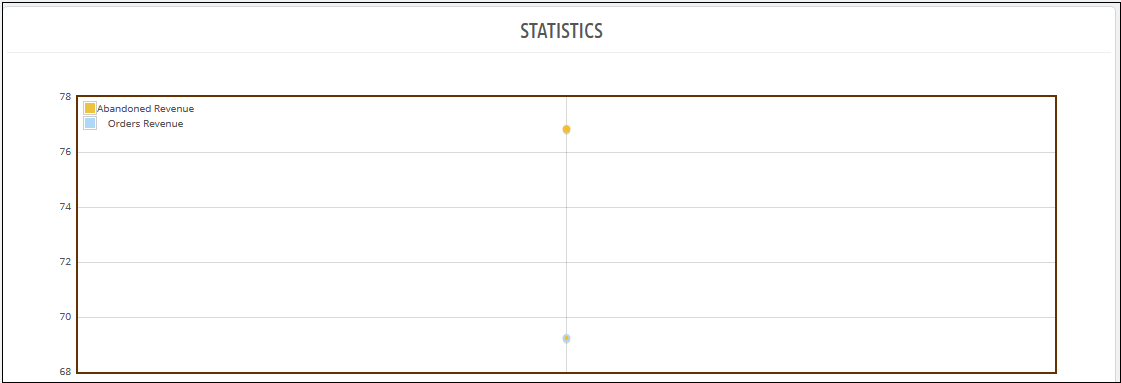
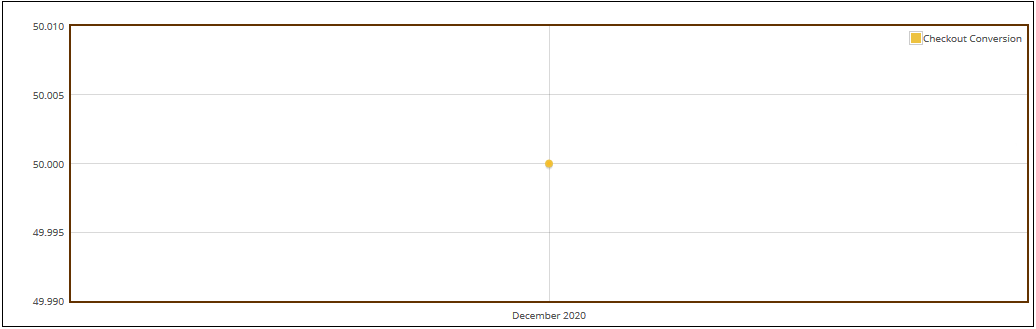
Prestashop simplified checkout addon offers a comparison report between the completed orders and abandoned cart orders. The admin can analyze reports for a specified day, week, month, and year. This PrestaShop\ module offers a total of 3 graphical reports. Those are:
Prestashop simplified checkout addon offers a comparison report between the completed orders and abandoned cart orders. The admin can analyze reports for the specified day, week, month, and year. This PrestaShop module offers a total of 3 graphical reports. Those are:
Abandoned Revenues v/s Order Revenues
Number of Abandoned Checkouts v/s Number of orders
Checkout conversion
The data will appear in tabular format. The table includes the number of orders received, number of abandoned checkouts, revenue earned from orders, revenue lost due to abandoned carts, and checkout conversion rate.
The admin can check the data for a specified day, week, month, and year.
3.3 Checkout Behaviour Report
This feature offers a detailed report of the customers who abandoned their carts. It gives the data if they left the checkout process. The online store merchant can check the filled information percentage provided by the users who left the cart abandoned. They can check reports for any specific day, just by filtering out these dates.
4. Annexure A
4.1 How to Set up Facebook Login?
Follow the steps below to create Facebook App:-
1: Go to the given URL: https://developers.facebook.com/apps/
2: Click on the “Create App” button.
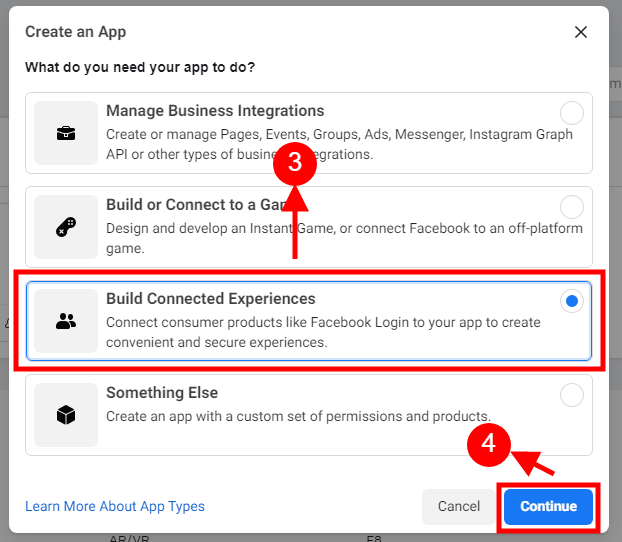
Step 3&4: Select the “Build Connected Experiences” option and click on the ‘Continue’ button.
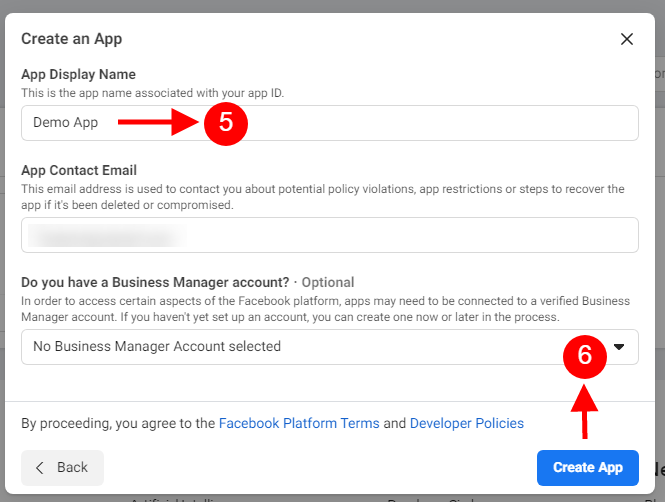
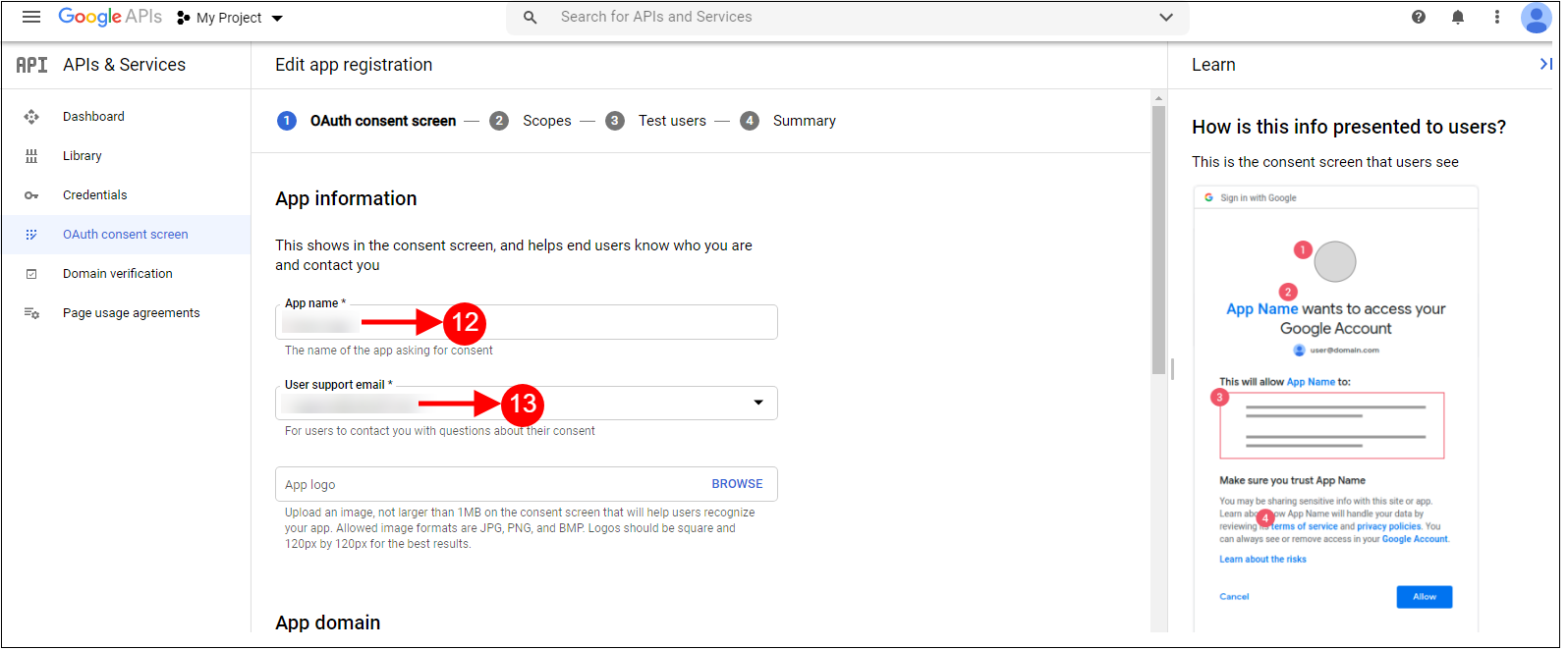
5&6: Add “App Display Name”, “App Contact Email”, and choose from the “Do you have a Business Manager Account?” and then click on the “Create App” button.
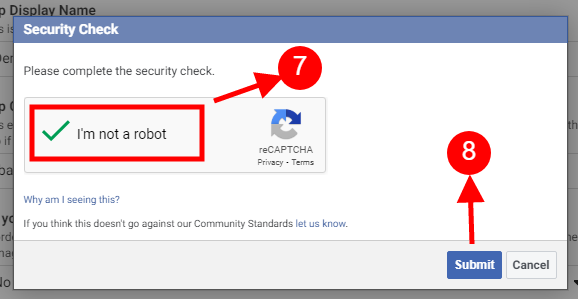
7&8: After clicking on Create App ID you will have to go through a security check as shown:
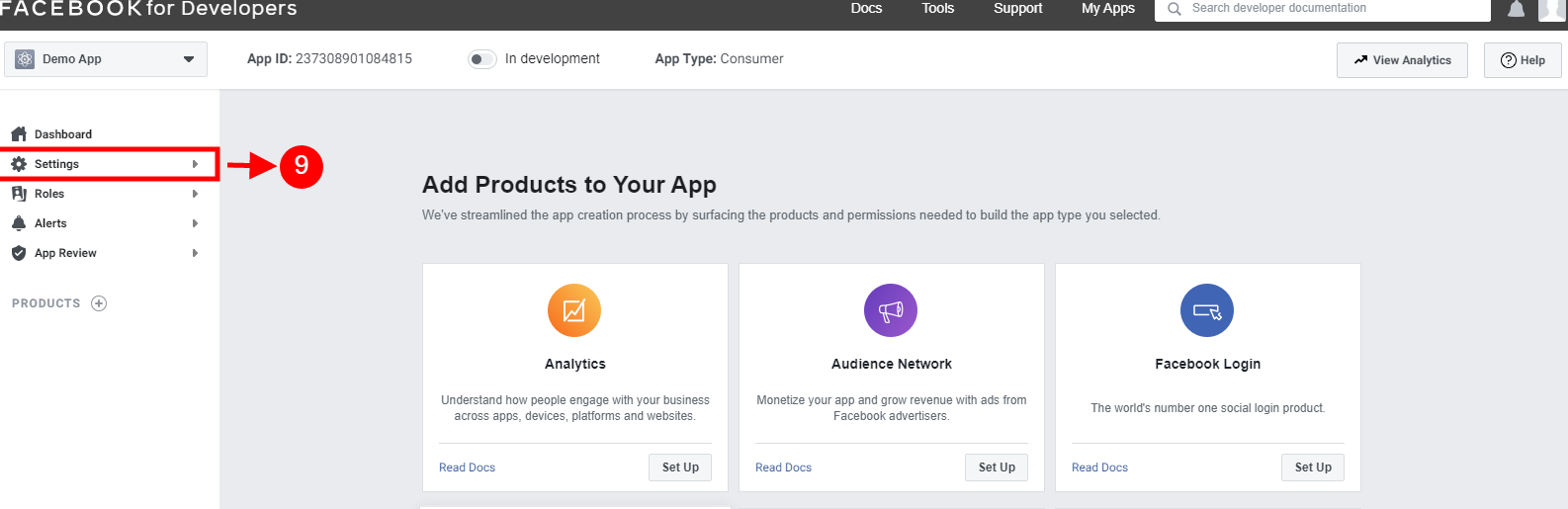
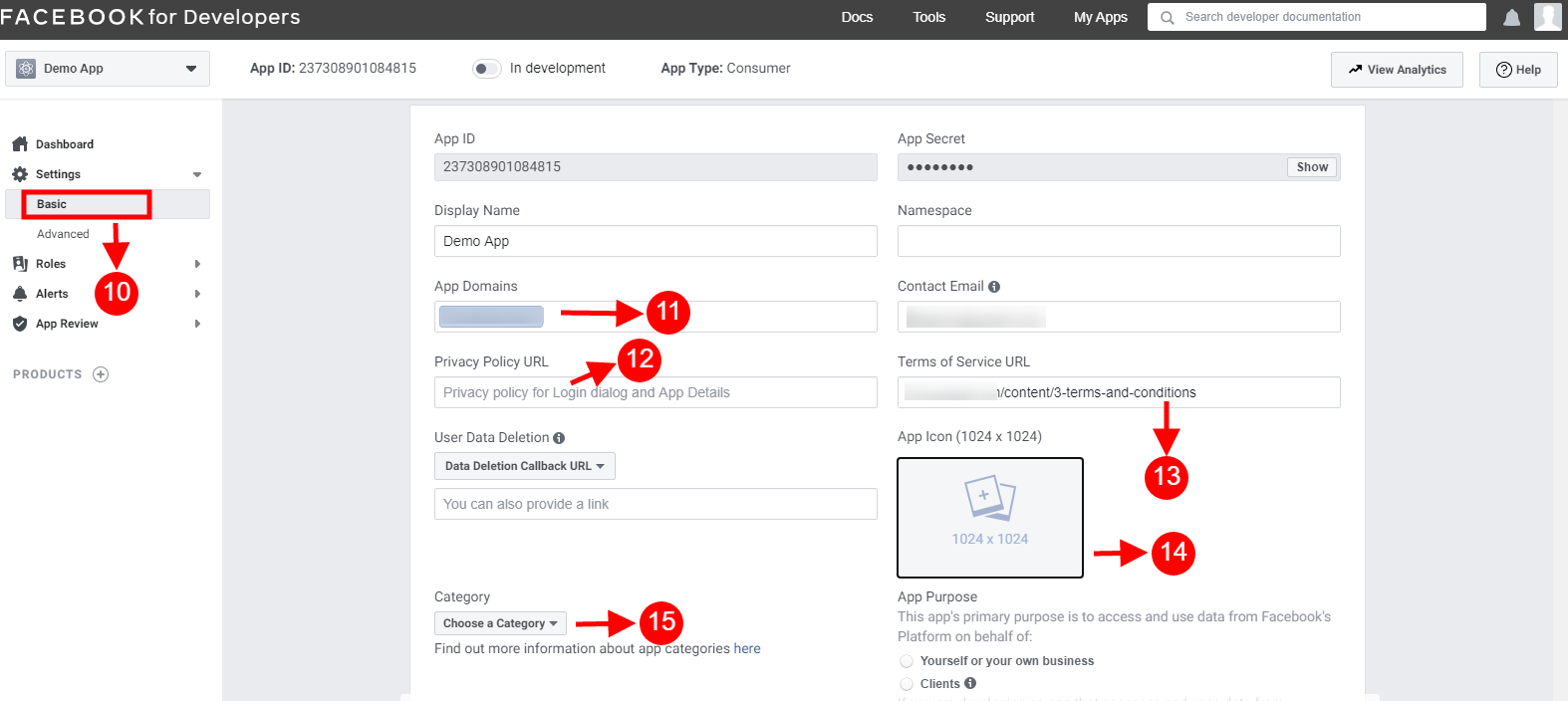
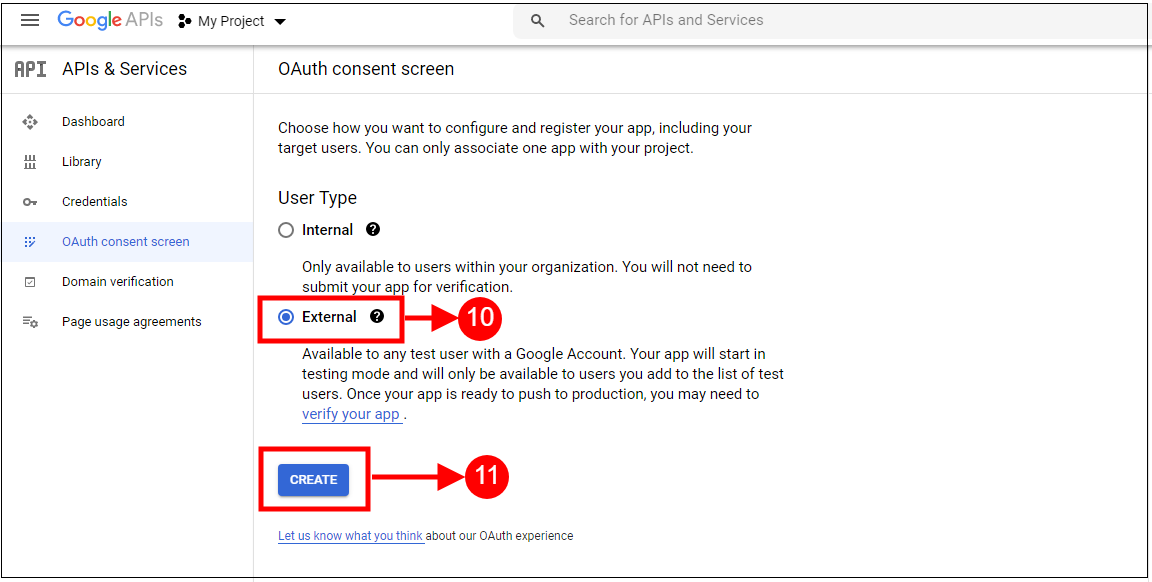
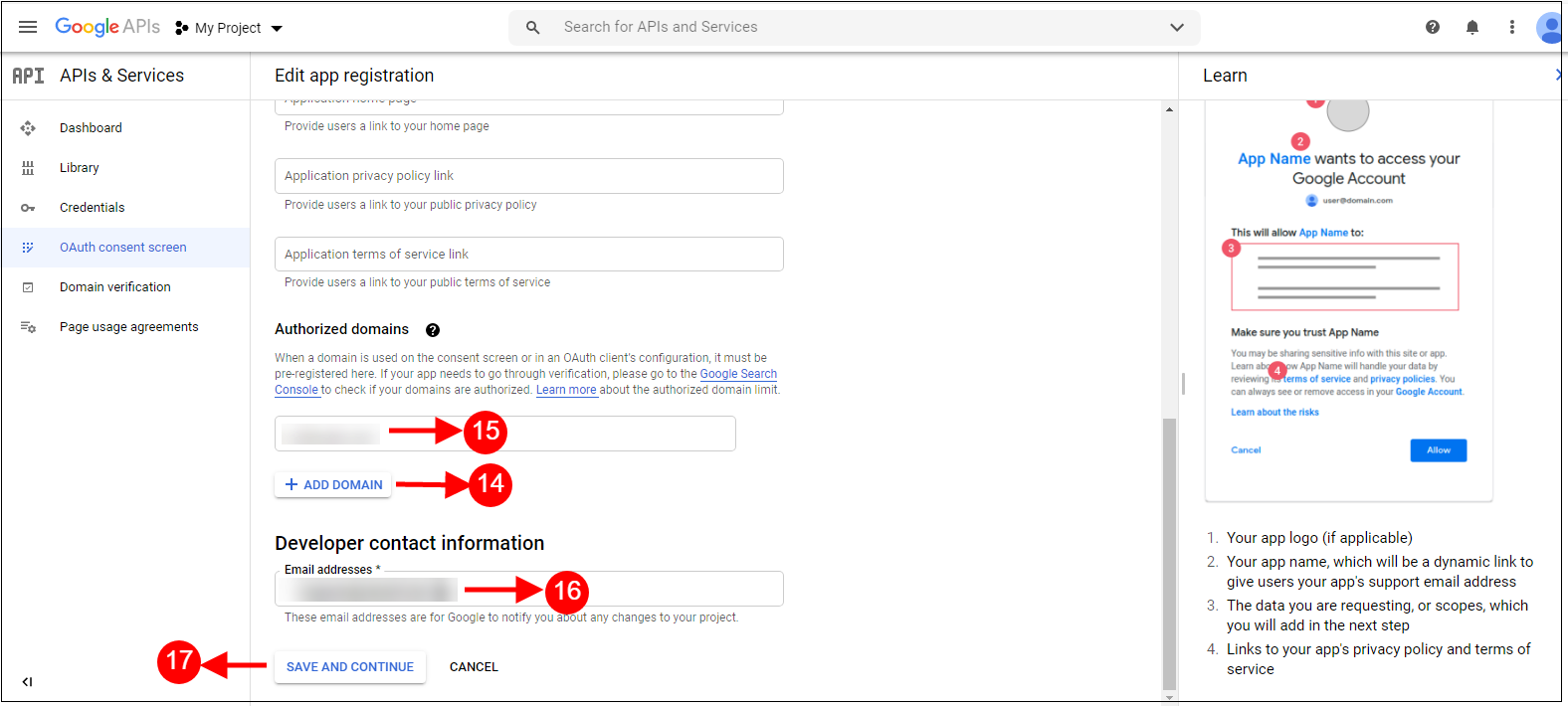
10-15: Two options will be available in the dropdown, Basic and Advanced, click on “Basic”. And then enter your “App Domain”, ”Privacy URL”, ”Terms of Service URL”, ”Add Icon”, ”Select Category” and click on the “Save Changes” button.
App Domains:
yourdomain.com is correct
yourdomain.com/store is incorrect
www.domain.com is incorrect
16: Now click on “+Add Platform”.
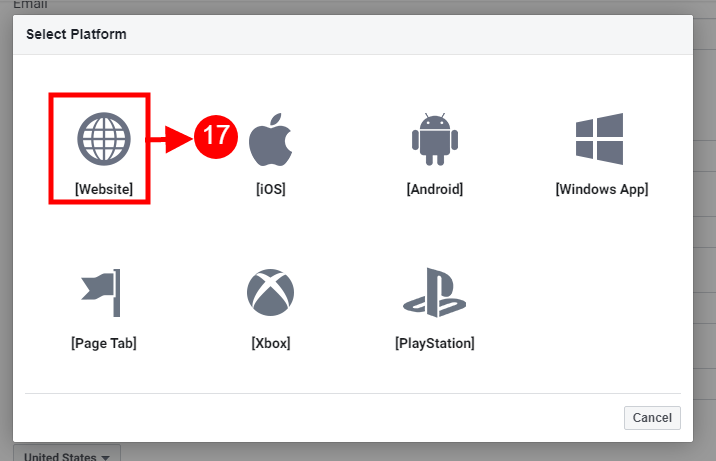
17: And select Website as Platform.
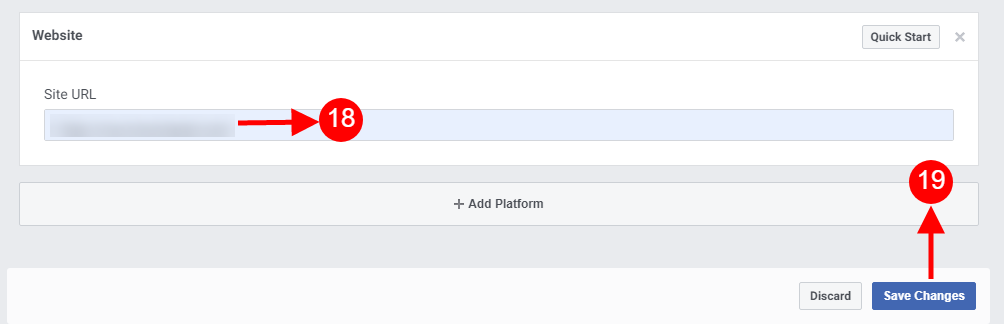
18&19: Now Enter your site URL.
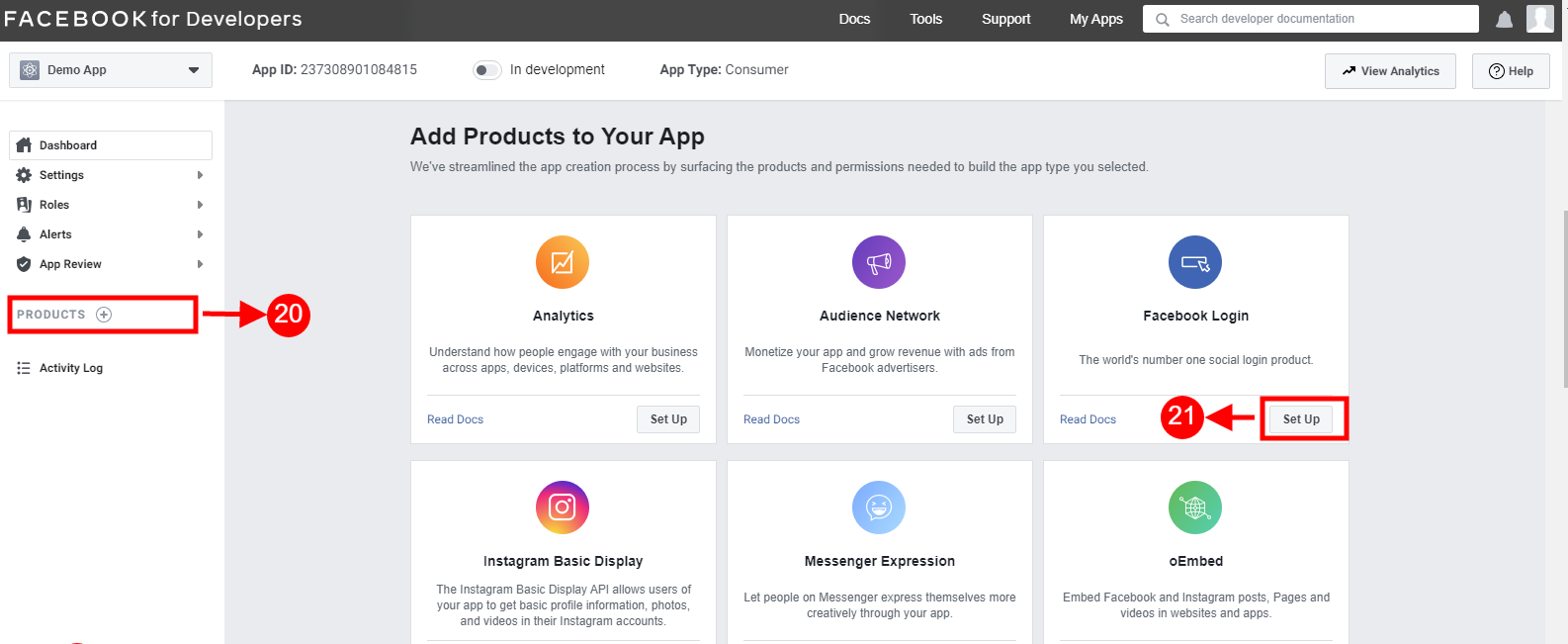
20&21: Click on “Products+” and click on the Setup button from the Facebook login tab.
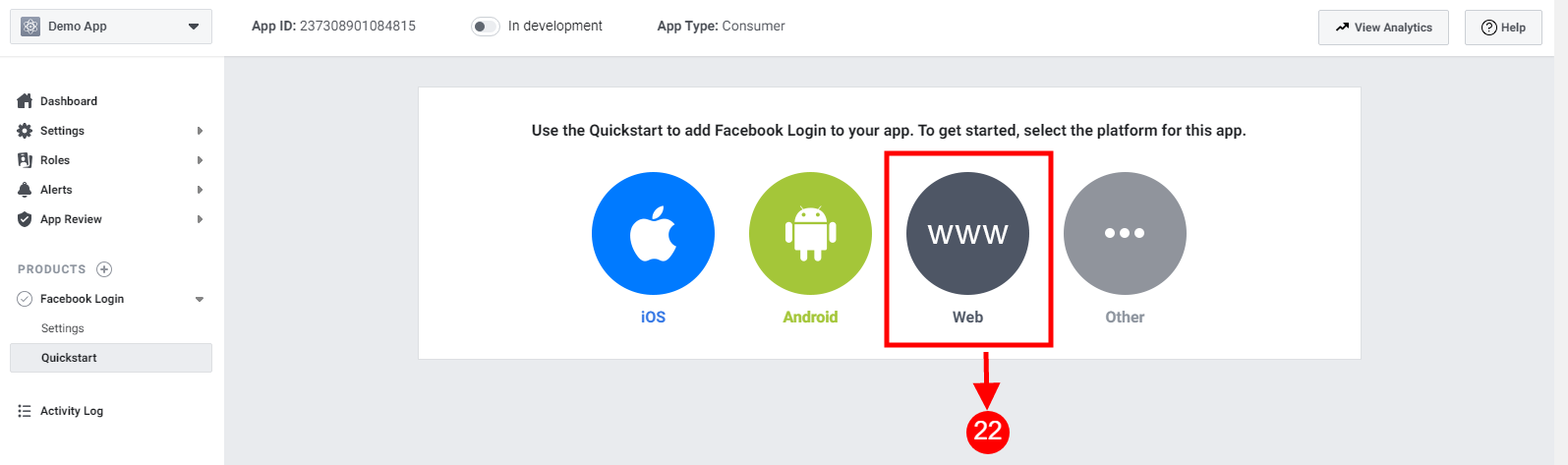
22: Select the web as the platform for the app.
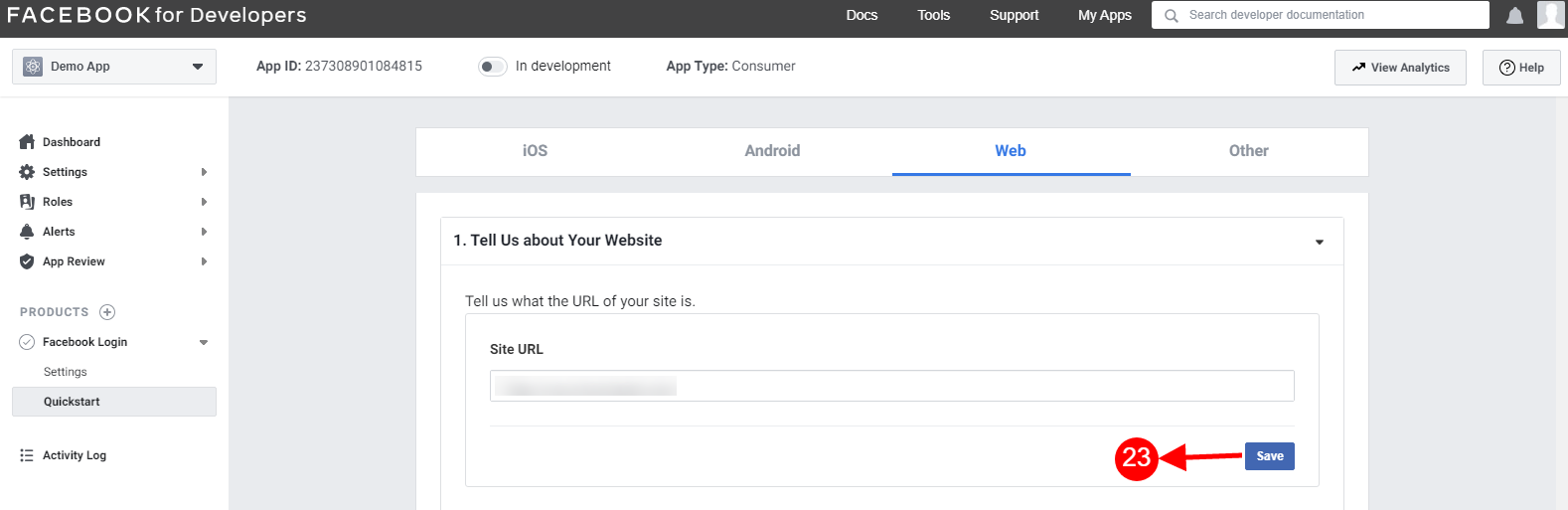
23: Add Site URL and click on save.
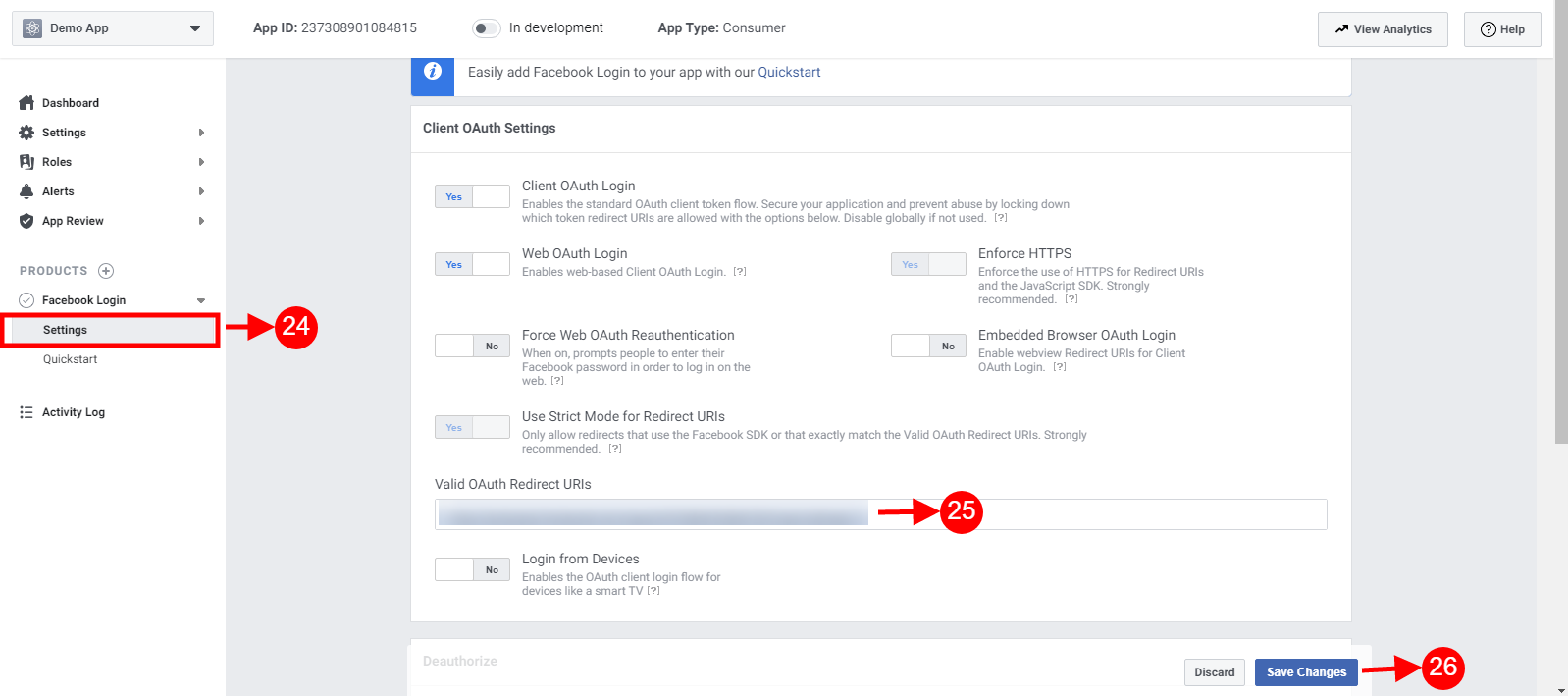
24-26: Click on Settings and add a Valid OAuth Redirect URIs.
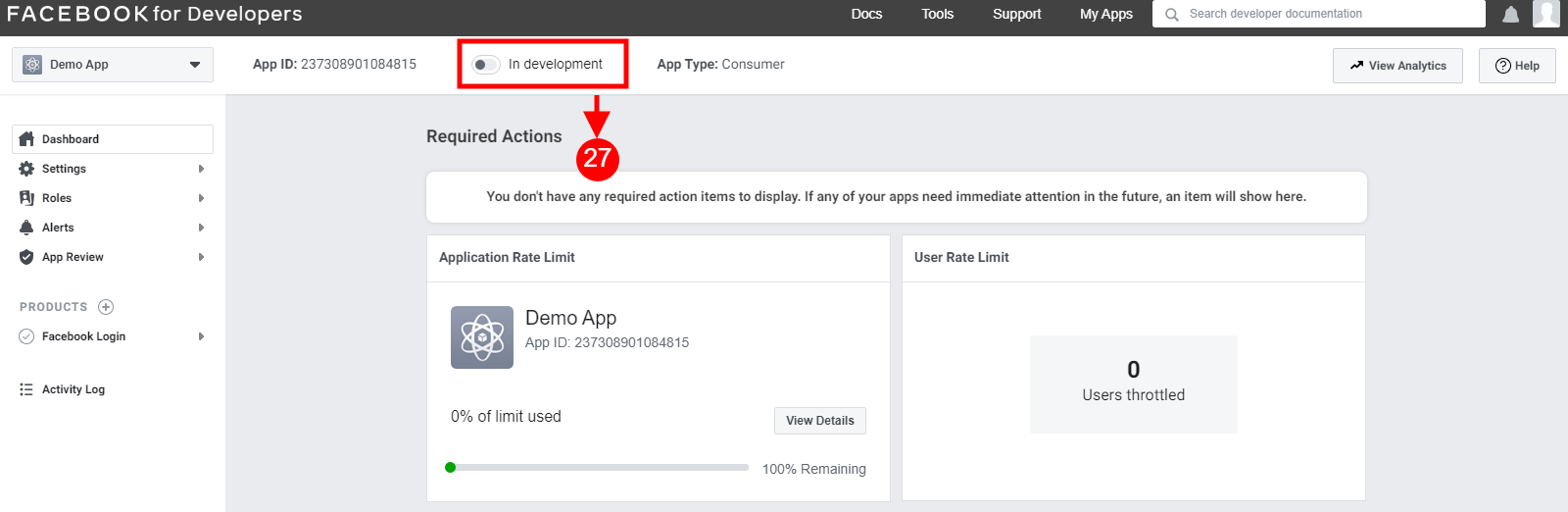
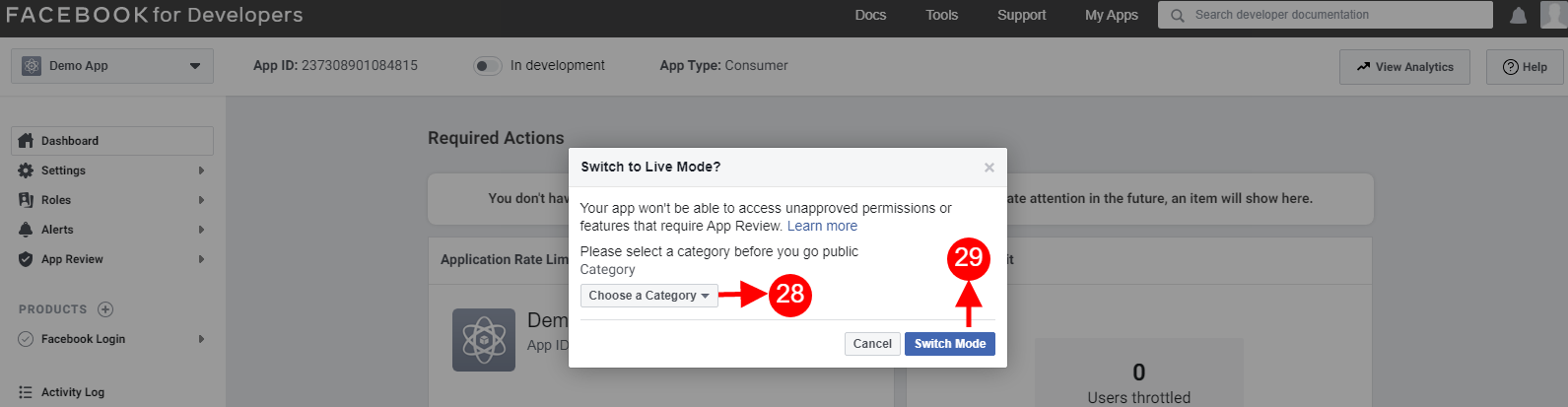
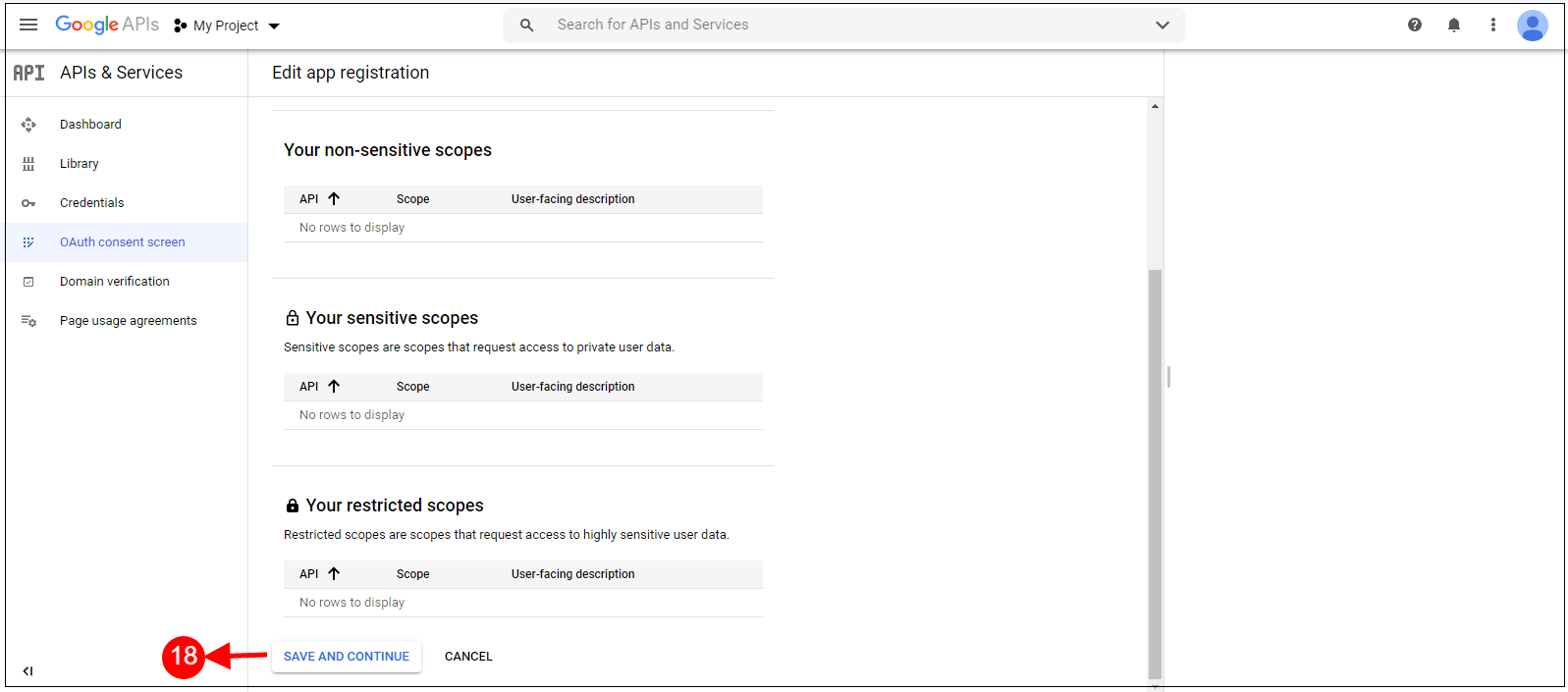
Select Live from the “My apps and credentials” section. After that click on Create App button.
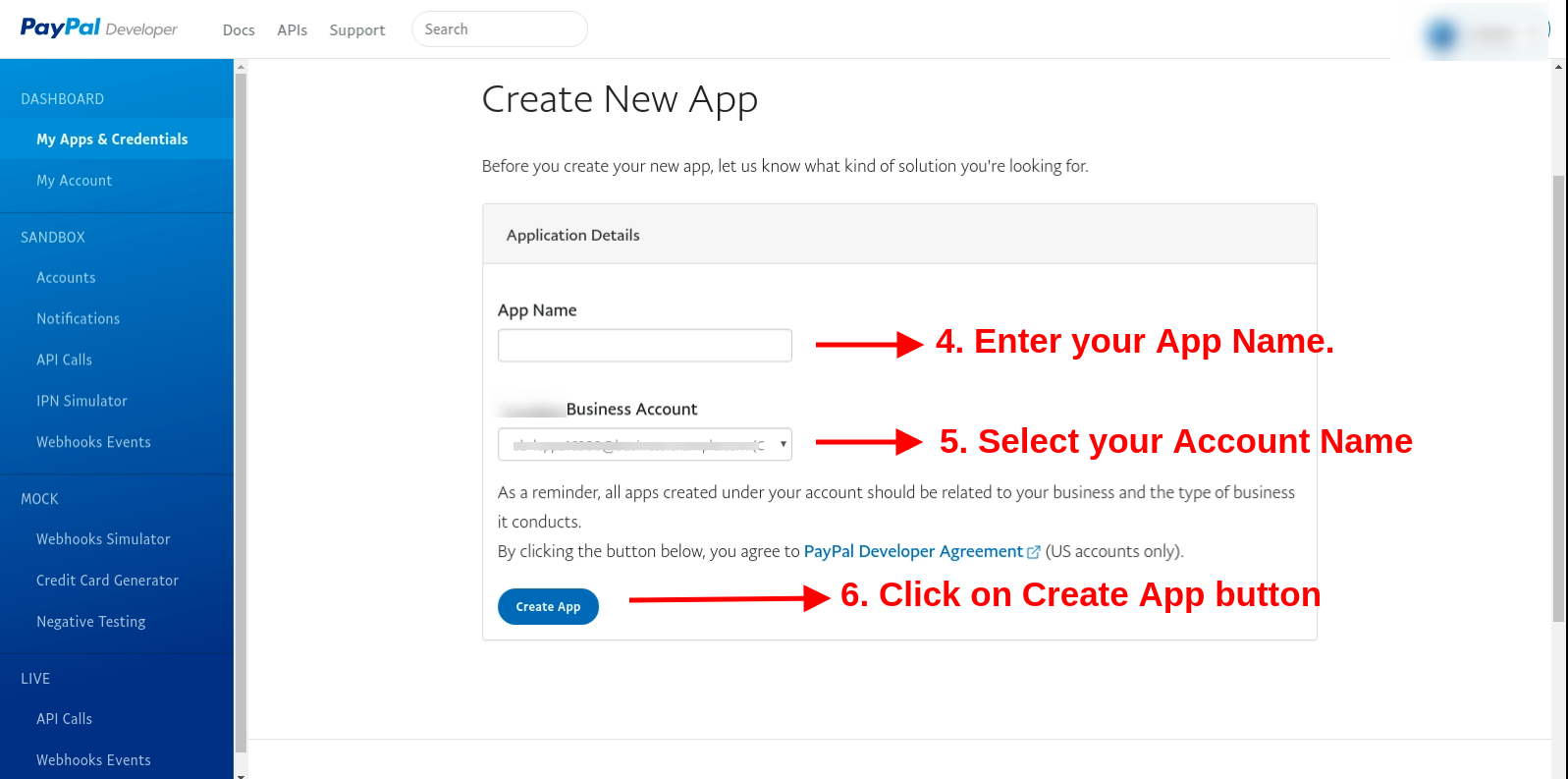
Now enter the app name, select the account name and click on create app button.
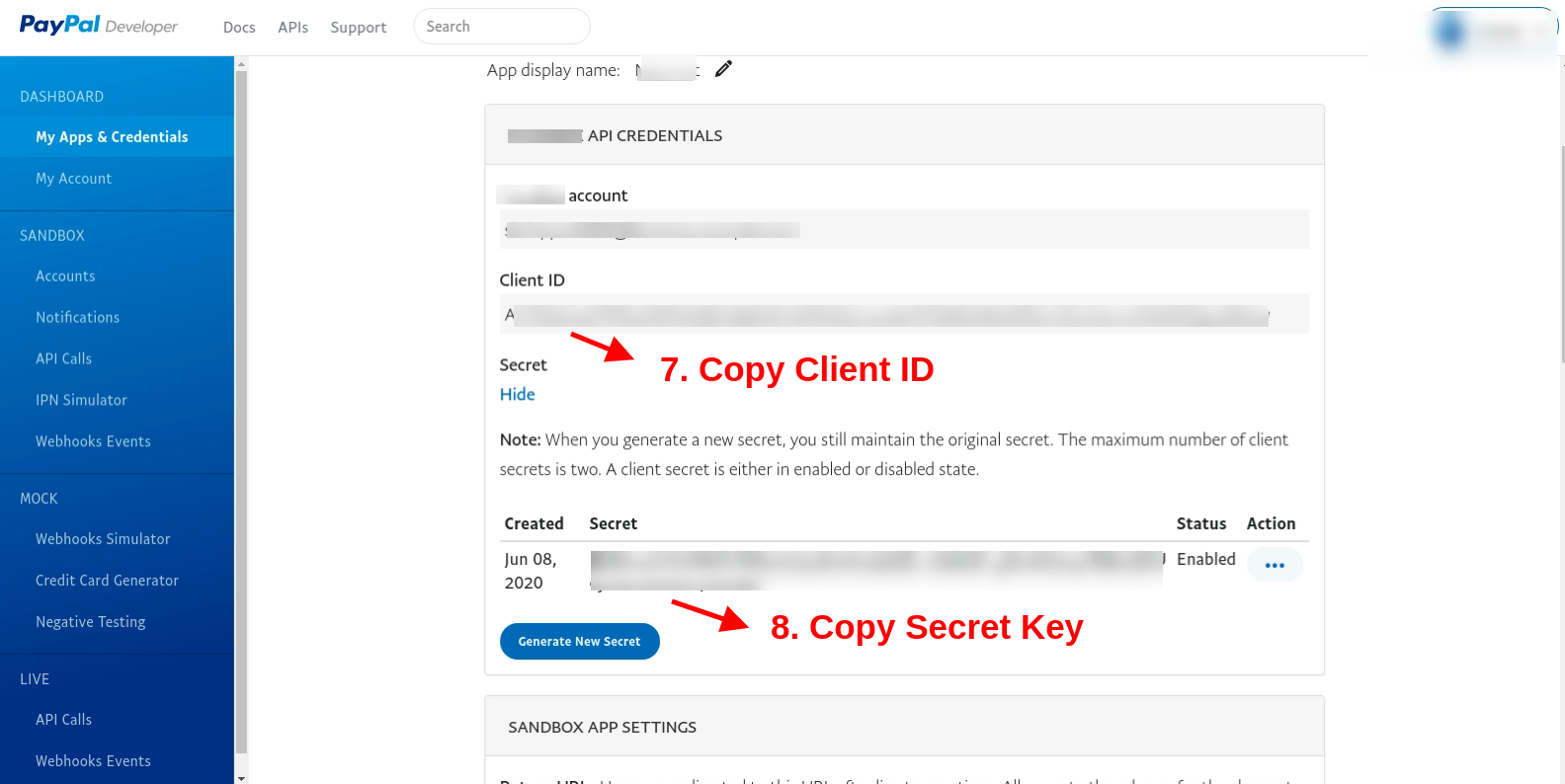
Copy client Id and secret key from here:
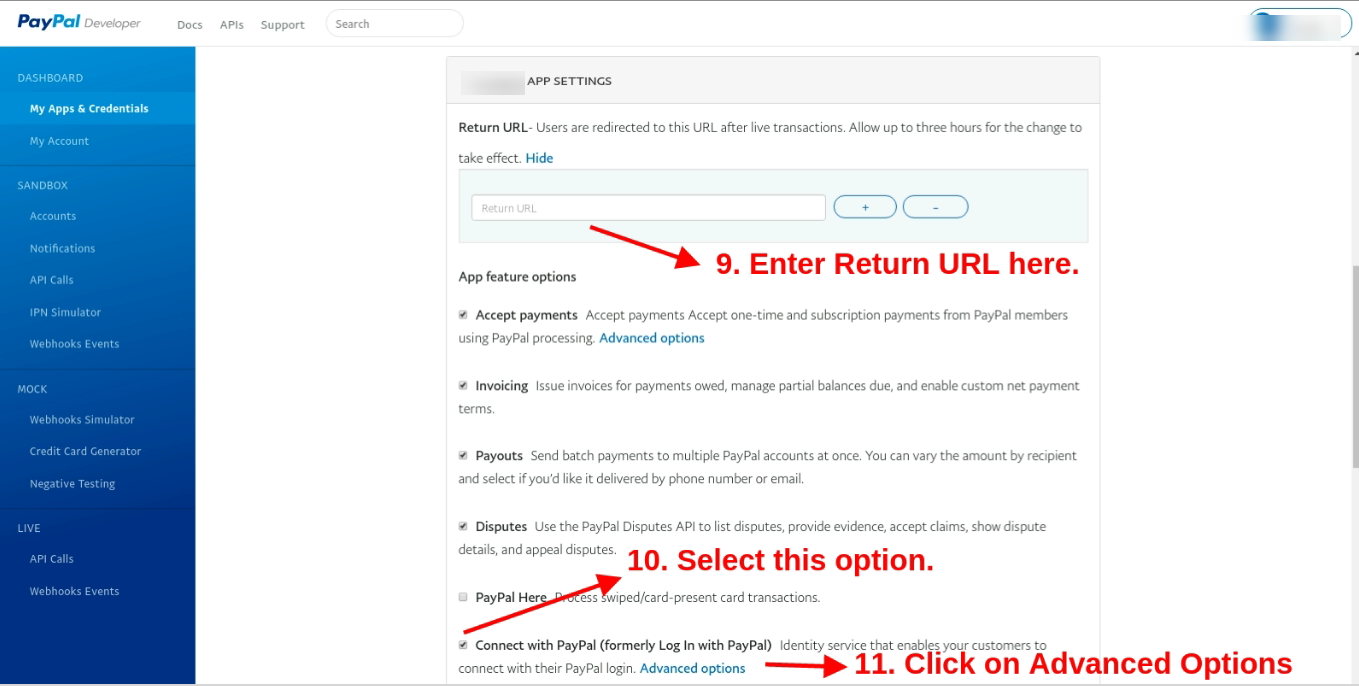
Here, enter the return URL ie. https://psm.knowband.com/supercheckout_demo/17/index.php?fc=module&module=supercheckout&controller=supercheckout&login_type=paypal after that select the “Connect with PayPal” option and click on “Advance options”
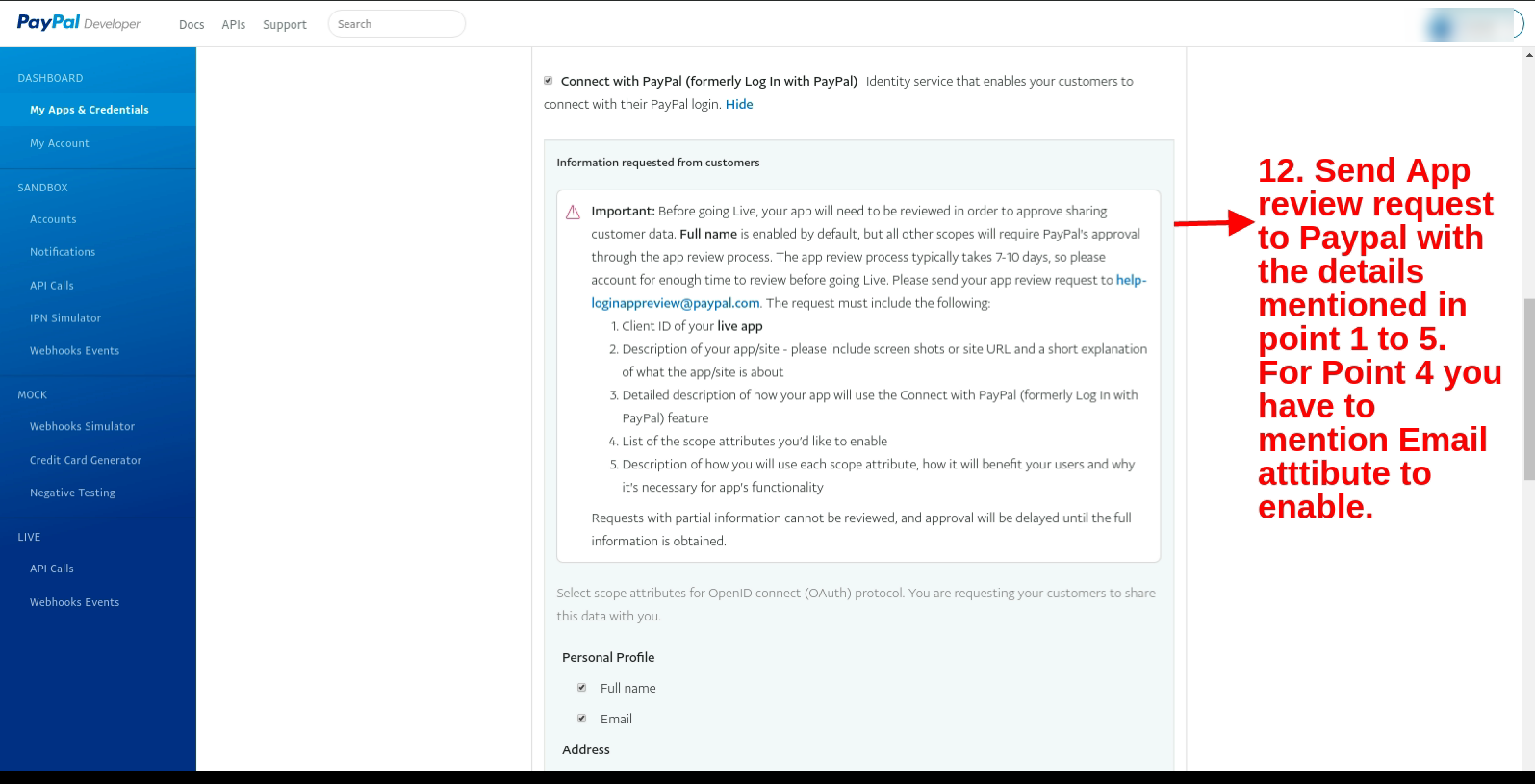
Send an App review request to Paypal with the details mentioned in points 1 to 5 (present in the screenshot). For Point 4 you have to mention the Email attribute to enable.
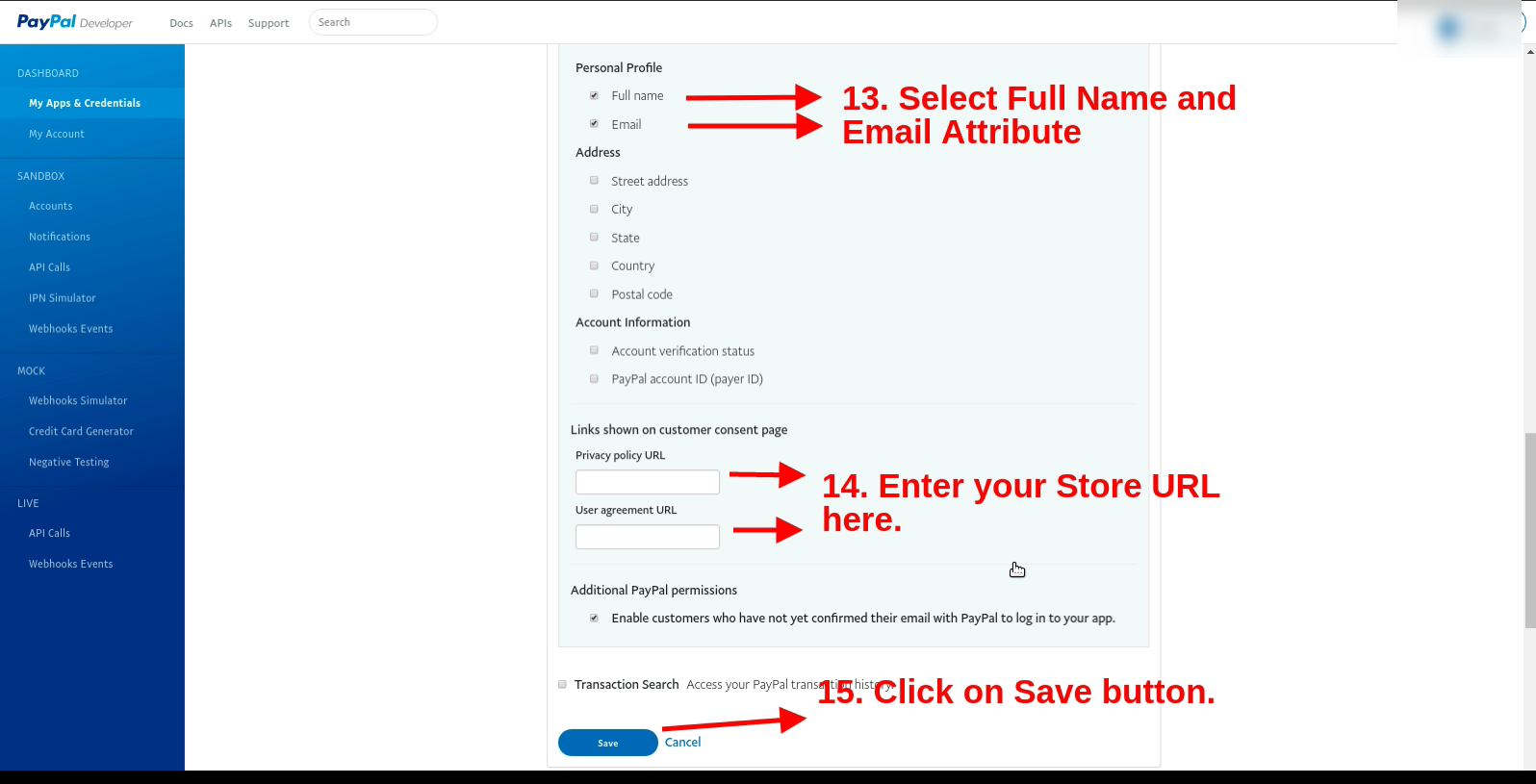
In the personal profile, section select the full name and email option. After that enter the store URL (https://psm.knowband.com/supercheckout_demo/17/) and click on the Save button.
Now enter the client ID and secret key after enabling the PayPal login page option.
5.0 Front-end Interface
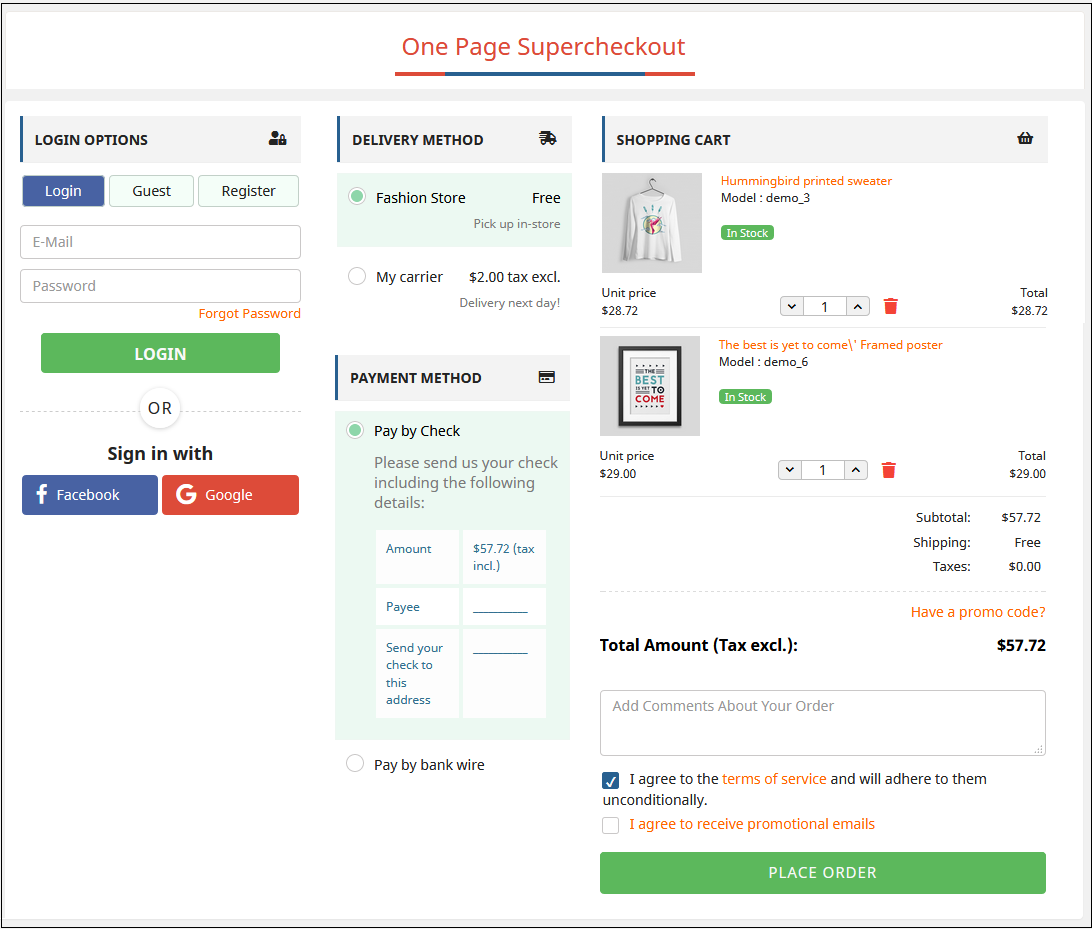
After successful installation, the Checkout page will look like this. The admin can add or remove fields from the checkout page and thus can display all the checkout steps in one place.
In the updated version, there is a Paypal login option for the users.
Watch how this Prestashop One Page Checkout Plugin works:
Find more details about this Prestashop Simplified Checkout Addon below:
Prestashop One Page Checkout Module Product Link:Click Here One Page Checkout Prestashop Addon Admin Demo: Click Here Responsive one page checkout Prestashop Addon Front Demo: Click Here
Find this Prestashop One Page Checkout Module on Addon Store as well.Visit: Click Here