Infinite Scroll Optimization: You Enroll while they Scroll

In the past couple of years, there has been a significant increase in the number of eCommerce stores. On one hand, this has opened multiple options for the online shoppers to shop from, while on the other hand, this tremendous rise has made it quite challenging for the e-retailers to keep their customers stick to their store. The competitive market has led the eCommerce merchants to come up with some unique ideas on their store at regular intervals to ensure that their visitors enjoy a smooth experience and remain loyal. One such idea adopted by the e-merchants is the use of Infinite Scroll, also known as an endless scroll.

Great user experience is essential to ensure customer acquisition as well as customer retention. To make sure that users enjoy a hassle-free browsing experience, Knowband comes up with the Infinite Scroll module for Prestashop, OpenCart, Magento and Magneto 2 store owners.

The Infinite Scroll module eliminates the traditional pagination system from your eCommerce store and optimizes your site to load the next page products automatically within the same page. It helps customers browse your store products easily without the need to navigate to the next page manually. The infinite scroll module saves a lot of time and effort of your customers.

Why do we prefer the Infinite Scroll module?

Infinite Scroll module has proved to be very effective in increasing the conversion rate. How? Check out the points mentioned below.

Efficient

With the help of the Infinite Scroll module, merchants can now provide an easy browsing experience to their customers. Because of continuous loading, customers can now browse all the products of a particular category on a single page. Since a user needs to put minimum efforts to browse content, this makes infinite scroll an efficient module as it saves time that otherwise would have been wasted while switching multiple pages. Along with this feature, the customers are provided with a “Go to top” link button, clicking on which they would be able to navigate to the top of the page with just a button click.

Engaging

The availability of Infinite Scrolling has proved to be very engaging for the customers, which has helped store owners in keeping high the customer engagement rate on their store The potential buyers now need not skip from page to page in order to browse their desired product. The option to view all the products under a single page makes an infinite scroll module more convincing and provides an interactive interface to the store. With easy automatic scrolling, e-retailers have found a significant increase in the average time spent by the customer on their eCommerce store.

Effective

The infinite scroll module has turned out to be very effective as far as the conversions are concerned. Most of the time, when customers don’t find the product matching their expectations after scrolling a number of pages, it certainly kills their interest to browse further. Who knows if they had got the perfect fit on the next page? But since they stopped after a point, they couldn’t be converted into potential buyers. This causes an effect on your sales. Hence, with the introduction of the infinite scroll module, it becomes quite easy for the customers to keep looking for the products without skipping to another page. It doesn’t break their flow and keeps the chances of conversions very high.

Emerging

The infinite scroll module has given a new definition to product browsing. The concept has emerged and started to catch the attention of merchants as well as the customers. A majority of the customers now seek for the Infinite Scrolling feature on different eCommerce stores. It won’t be wrong to say that, “Infinite scroll is the new cool” for the e-commerce industry. Most of the web stores have already opted for this feature. If your store is lagging behind, you are seriously missing out on a great opportunity to scale-up your conversion funnel.

Evident

Serving customers with better features and functionality to provide them an amazing user experience is the necessity of every store owner today. The infinite scroll module is one of the features that have evidently proved to be a boon for the eCommerce merchants. This not just ensures better conversion rates but also promises to keep your customers stays intact with your web store for future purchases.

If you run your e-commerce store on Prestashop, OpenCart, Magento or Magneto 2, do try this module today. Check out: Infinite Scroll addon for Prestashop, Infinite Scroll extension for OpenCart, Magento Infinite Scroll extension, Magento 2 Infinite Scroll extension.

Conclusion

The tough competition in the e-commerce market has enforced the online businesses to come up with creative ideas to stand out in the market. Businesses are keen on looking for ways to improvise user experience, and reducing clicks is one of the best practices for that matter. If you found this article helpful, do drop a comment in the comment section below.

👉Explore the Module with Our Video Guide

Do give a read:

Pagination vs Infinite Scrolling: Which is better and why?

How can Infinite Scroll benefit your eCommerce Site?

How can Infinite Scroll benefit your eCommerce Site?

With the availability of multiple eCommerce stores, online shoppers have a number of options to choose from. But what leads to the decision making of the shoppers when it comes to choosing the best store among all? Can you guess?

It’s the User Interface. Apart from UI, it is the UX. Your website appearance is the first impression of your eCommerce store on your visitors. If it doesn’t look pleasing, you won’t be able to make your visitors stay on your store. A good user interface is followed by good user experience. If your UI is impressive but you are failing to provide a comfortable browsing experience to your visitors, you are probably not going to see them back on your store.

So, in order to provide customers with a smooth and pleasant experience, enhancing the user interface as well as the user experience is a must. Bridging the gap between the user experience and user interface is highly important for the success of an eCommerce store. E-commerce merchants use different tools and features on their web stores to make it more interactive and engaging. One such method to enhance the UI and UX of an eCommerce website is the Infinite scrolling.

Infinite scrolling, also referred to as Endless scrolling, eliminates the pagination process from your store by bringing the automatic and continuous loading. As a user scrolls downs the page, the product list continues to populate. As a result, users do not require to click on the next page to browse further.

The Infinite Scroll module by Knowband helps the eCommerce merchants get rid of the conventional pagination system. It adds an automatical scroll on the product listing page and enables the user to easily navigate through your store products, on a single page. If you run an e-commerce store on Prestashop, OpenCart, Magento or Magento 2, you can avail the benefits of this Infinite Scroll module. Try them out:

Infinite Scroll addon for Prestashop

OpenCart Infinite Scroll extension

Infinite Scroll extension for Magento

Infinite Scroll extension for Magento 2

Are you still sitting on the fence of whether to implement this infinite scroll feature on your store or not? Here are some of the compelling reasons that would help you make up your mind.

Infinite scroll is time-saving

As an e-retailer, your primary focus should be to maintain the user flow when they are present in your store. A pagination process can disturb the user flow and create frustration when users go through a number of pages. Infinite Scrolling, on the other hand, makes the browsing interesting and time-saving.

Infinite scrolling offers Easy browsing

One of the main advantages of infinite scrolling is that it makes browsing easy. With the automatic loading of products, the customers just need to scroll to find their desired product. But continuous scrolling, sometimes, can make a user dig so deep that it will be difficult to reach to the top of the page again. For this matter, the Infinite Scroll module contains a “Go to top” button to make a user easily navigate to the top section of the page.

Infinite Scrolling increases session duration

To be very true, users get bored and tired after browsing a number of pages. They do not even look further to see more results and take an exit from your store. This isn’t the case with Infinite Scrolling. When products are displayed continuously on a single page to the users, they browse more products and spend more time on your store, which helps in increasing the average time spent by a user on your site.

Infinite Scroll offers fast browsing

Customers prefer fast loading. They just hate to wait for the pages to load. Clicking on the next page several times and waiting for the page to load every time can irk your visitors. Infinite Scrolling overcomes this issue and keeps adding the next page content automatically. Users find this way more convenient.

Amazing for touchscreen devices

Touchscreen mobile devices are heavily dominating keypad devices over the last few years. Today, almost every user owns a touchscreen mobile phone. This is why Infinite Scrolling is considered to be the ideal way and preferred over pagination by e-commerce merchants. It gets so simple to just use a thumb to navigate to different pages. Facebook is a prime example.

Infinite Scrolling creates more user engagement

When the content gets loaded quickly, it makes a user stay longer on the page, hence increases customer engagement. Because of the continuous appearance of products, users find themselves interacting in your store for a longer period.

Conclusion

Customers love the Infinite Scrolling feature. It enhances their user experience and keeps them engaged in your store. I guess this is enough for you to make this feature available on your e-commerce store. Check out the Infinite Scroll modules and let me know the results that you obtain afterward.

Liked this article? You will like these too:

Pagination vs Infinite Scrolling

Infinite Scroll Optimization: You enroll while they Scroll

Magento Infinite Scroll – User Manual

1.0 Introduction

Magento Infinite Scroll Module is a Magento extension incorporates the feature of infinite scroll in the site. When enabled, Magento Infinite Scroll extension makes changes in the product listing page. With the Magento fast scrolling, the store admin can remove the pagination from the category pages of the site. Magento quick scroll module even reduces the load time in refreshing the page everytime a visitor navigates to the next page. Magento Infinite Scroll Extension by Knowband also has the feature of load more link which can allow the store visitors to move directly to the top of the web page.

1.1 Merchant Benefits of Magento Infinite Scroll Module:

  • The store admin can include the option of the infinite scroll with the help of Magento infinite scroll plugin with making any code changes.
  • The Magento Infinite Scroll extension even allows the store admin to include the ‘Load More’ option on the site. With this, more products will be loaded only if the customers click on the link.
  • The admin gets an option to change the look and feel of these features from the back-end of the Magento Endless Scrolling module.
  • The Go to the Top link, allows the store visitors to move to the top of the web page. Even the appearance of this link can be changed from admin interface of Magento Infinite Scroll extension.
  • The admin can either add or remove the toolbar from the front-end of the site.
  • Magento Infinite Scroll module even offers the admin to set-up their sandbox site for the testing purpose.

2.0 Steps for Installation of Magento Infinite Scroll Extension

Follow the following steps for installing Magento Infinite Scroll Module:

1. Download the Magento extension package.

2. Unzip the package on your root folder of Magento setup via FTP manager (like Filezilla or WinSCP – download here: https://filezilla-project.org/).

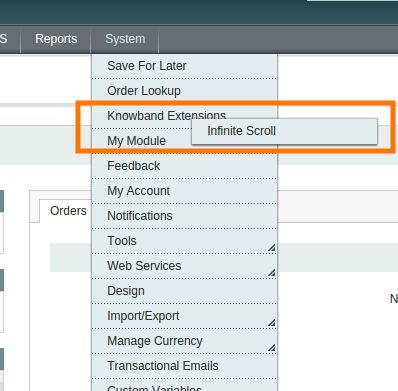
3. In Admin Panel go to System > Knowband Extensions > Infinite Scroll.

4. That is all – Your system is ready.

3.0 Admin Panel

The Magento Infinite Scroll Module offers a number of easy customization options to the store admins. They are discussed in details below.

3.1 General Settings

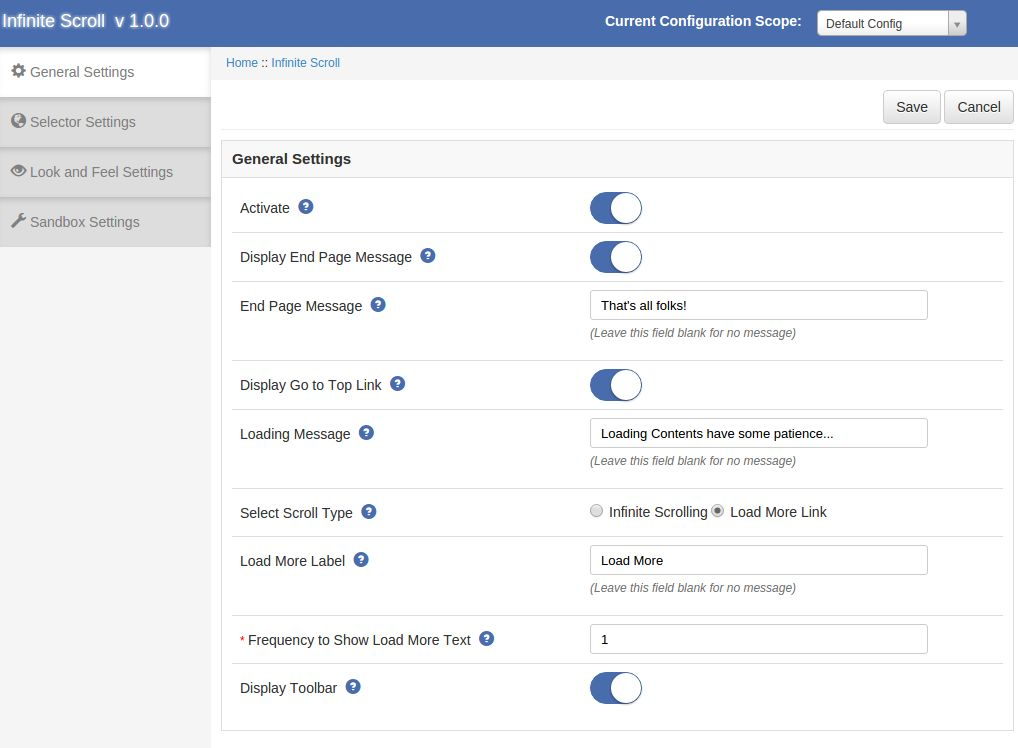
The General Settings tab of Magento Infinite Scroll plugin has following options:

Active: Enables or Disables the Magento Product Auto Loading plugin on the storefront.

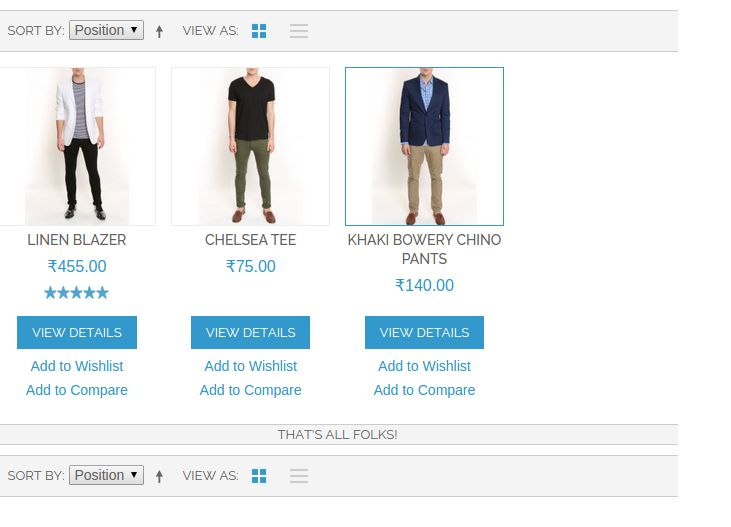
Display End Page Message: Enable to display the message at the bottom of the page.

End page Message: Set the text which is to be displayed at the bottom of the page.

Text on Next Button: Set text which is to be displayed on next button.

Display Go to top Link: Enable to show go to the top link at the left bottom of the page.

Loading Message: Set the message which is to be displayed when the content of next page is loaded.

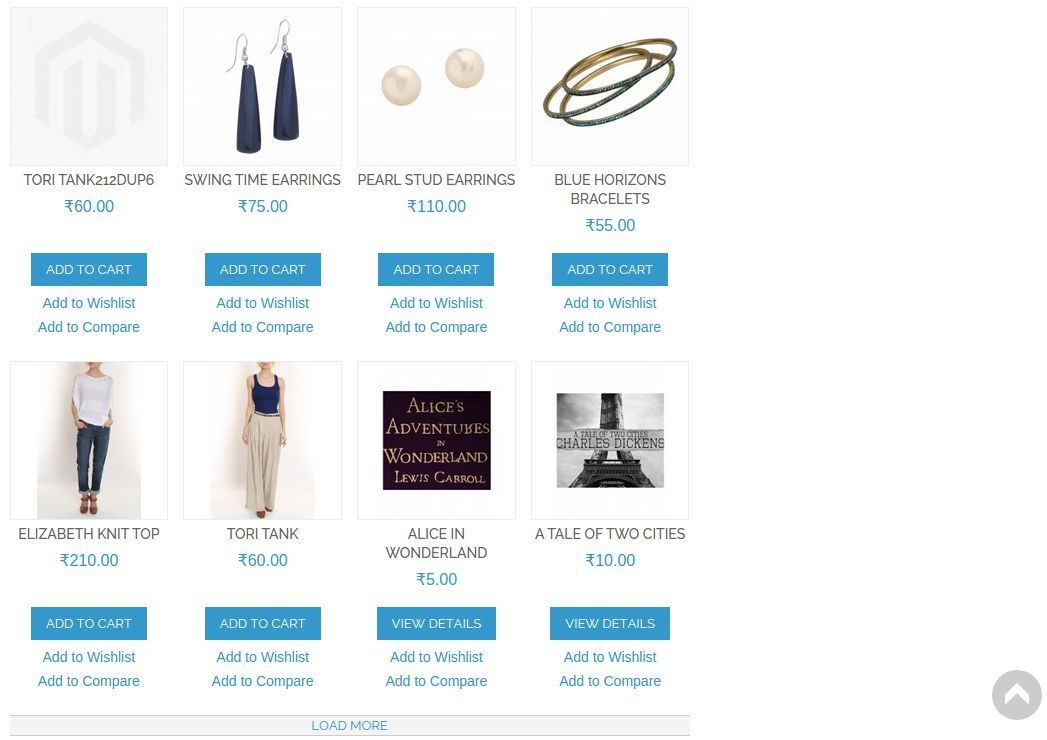
Select Scroll Type: Select the type of scrolling whether infinite or load more link. When infinite scroll is opted, the feature of infinite scrolling will be enabled in the front-end. Whereas when the Load More option is selected, you will be required to enter following information.

Load More Label: Set the label text which is shown at load more link.

Frequency to show load more text: Set the page number from which load more link appears.

Display Toolbar: Enable it to display toolbar at product listing page.

3.2 Selector Settings

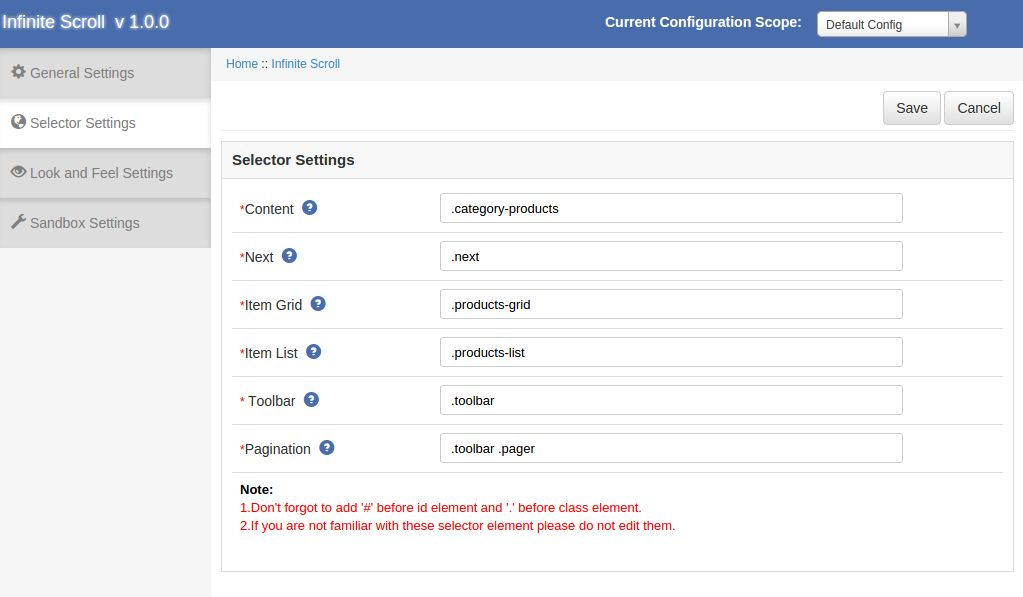
The Selector Settings tab of Magento Infinite Scroll extension is to set class name and id name of following option:

Content: Set the class name of container on which the loaded content is appended.

Next: Set the class name of next element.

Item Grid: Set the class name of the element on which product is shown if it is grid set .products-grid.

Item List: Set the class name of the element on which product is shown if it is list set .products-list.

Toolbar: Set the class name of toolbar element.

Pagination: Set the class name of pagination element.

Note: Leave the Selector Setting untouched if you are not familiar with the same.

Look and Feel Settings

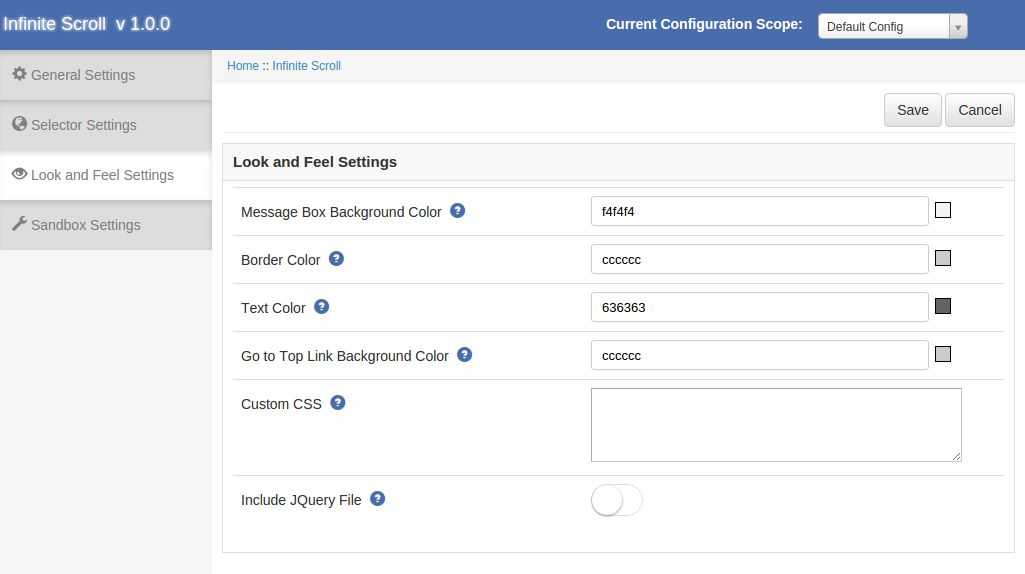
The look and feel settings tab of Magento Infinite Scroll has the following options:

Message Box Background Color: Set the background color of the message box.

Border Color: Set the border color of the message box.

Text Color: Set the text color of message text.

Got to Top Link Background Color: Set the background color of the ‘Go to top’ link.

Custom CSS: option to add your own CSS code.

Include JQuery: Enable if the current theme does not have the jquery file.

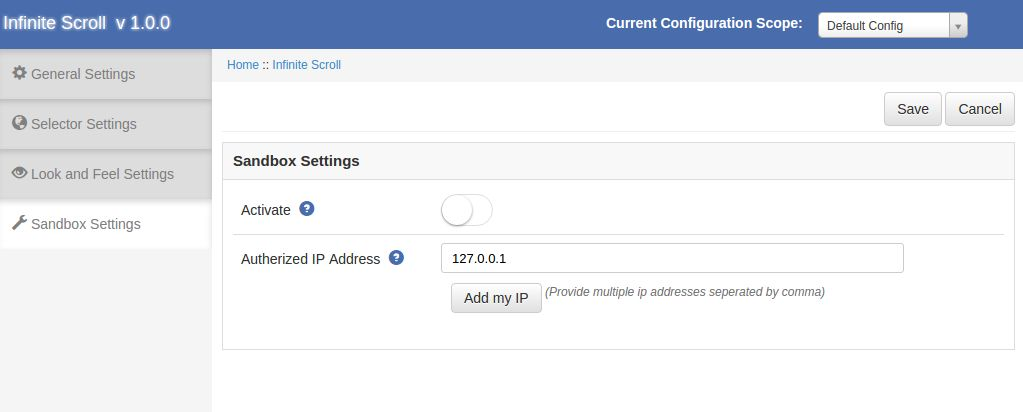
3.4 Sandbox Settings

The Sandbox Settings tab of Magento Infinite Scroll is to enable this module on a particular IP.This tab has the following options:

Activate: Enable it to use sand box mode.

Authorized IP Addresses: Provide the multiple IP addresses separated by comma or you can add your IP by clicking on Add my IP button.

4.0 Store Front

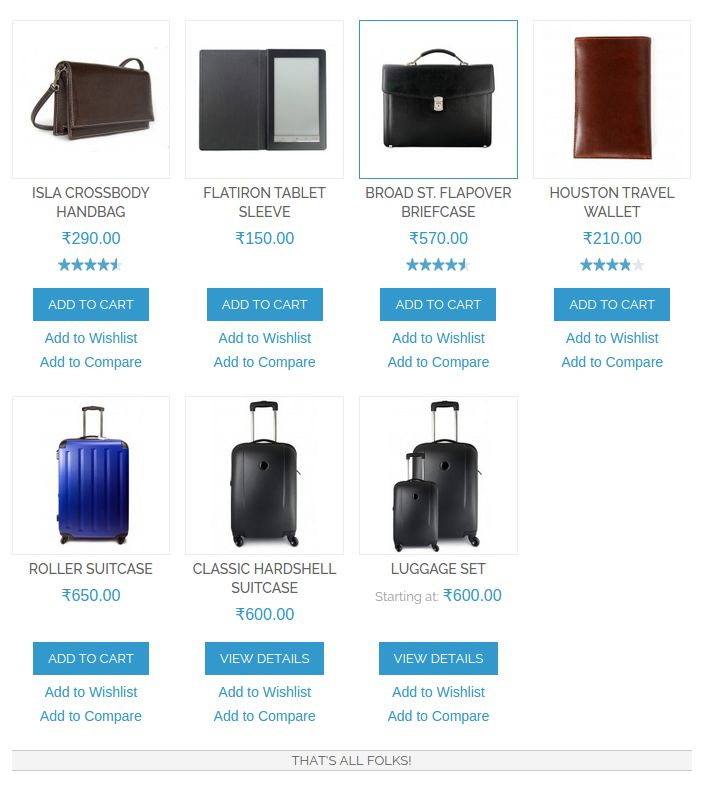
The changes made from the back-end of the Magento Infinite Scroll will be incorporated in the front-end of the site as well. After enabling the Magento Infinite Scroll plugin the product listing page in the front of the shop will change a bit as the pagination is disappear and next page product is loaded by scrolling or as per the settings saved.

The Magento Infinite Scroll module at the front-end appears as follows:


Admin Demo Link: https://mademo1.knowband.com/index.php/endlessscroll/adminhtml_index/index/key/ac91efaa6d652ee58a922da7896dbb33/

Front Demo Link: https://mademo1.knowband.com/men/shirts.html