Opencart Product Preorder Plugin – User Manual

1.0. Introduction:

Are you an ambitious OpenCart store owner seeking a cutting-edge solution to boost your sales and customer satisfaction? Look no further! Presenting the Knowband Opencart product Pre-Order Extension, the ultimate tool to revolutionize the way you manage pre-orders, backorders, and advance bookings for your products.

The Opencart Product Backorder Extension is a powerful, feature-rich module designed exclusively for OpenCart merchants. It offers a seamless and hassle-free way to enable pre-order functionality on your store. Empowering your customers to book upcoming products in advance. Furthermore, the OpenCart product Advance Booking Plugin comes packed with robust features to cater to a variety of pre-order scenarios, making it the ultimate choice for any e-commerce business.

1.1. Key Features Offered by OpenCart Product Preorder Plugin:

Pre-Order Functionality:

With our extension, you can effortlessly offer pre-order options for upcoming or out-of-stock products. Ensuring your customers never miss the chance to secure their desired items in advance.

Advance Booking Made Easy:

Now, you can streamline the booking process for upcoming products. Customers can reserve their favorite products in advance and eagerly await their release, driving excitement and anticipation.

Real-time Status Updates:

Keep your customers informed at all times! The OpenCart Sell Out-of-Stock Products plugin provides real-time notifications on pre-order, backorder, and advance booking status, ensuring transparency and building trust.

Customizable Pre-Order Button:

Tailor the pre-order button to match your store’s theme, attracting attention and encouraging customers to reserve their products effortlessly.

Inventory Management:

Knowband’s OpenCart Preorder Module ensures efficient inventory management by allowing you to set pre-order limits and automatically disabling pre-orders when stock is available.

Seamless Integration:

Opencart Pre-Order Extension seamlessly integrates into your existing OpenCart store, requiring no complex coding or technical expertise.

Boost Sales & Revenue:

By offering pre-order options, you can drive product demand, increase sales, and maximize revenue potential like never before.

Pre-Order Pricing Options:

Offer flexible pricing for pre-order items. You can set special prices for pre-orders, giving your loyal customers exclusive discounts and incentives.

Partial Payments for Pre-Orders:

Allow customers to make partial payments for their pre-ordered products. Making it easier for them to secure their desired items without breaking the bank.

Pre-Order Stock Notifications:

With the help of the OpenCart Product Advance Booking Plugin, the store admin can enable the customers to receive email notifications when pre-ordered products are back in stock, ensuring they never miss the chance to complete their purchase.

SEO-Friendly:

The extension is designed with SEO best practices in mind. Furthermore, it ensures that pre-order products can be indexed by search engines, boosting your store’s visibility and driving organic traffic.

Cart Rules for Pre-Orders:

The Opencart store admin can set specific cart rules and restrictions for pre-ordered items. Such as minimum order quantities or eligibility for certain promotions, to optimize your pre-order management.

Guest Pre-Order:

Allow guest customers to place pre-orders without requiring them to create an account, reducing barriers to purchase and enhancing the overall shopping experience.

Multilingual and Multi-store Support:

Reach a global audience and cater to diverse markets with multilingual support, while managing pre-orders efficiently across multiple stores from a single admin panel.

1.3. Benefits to the Customers:

Knowband’s OpenCart Product Pre-Order Plugin offers several benefits to customers, enhancing their shopping experience and providing added convenience. Some of the key benefits for customers include:

Early Access to Desired Products:

Customers can pre-order products that are not yet available for regular purchase. This allows them to get early access to highly anticipated or newly launched items, ensuring they don’t miss out on popular products.

Guarantee Product Availability:

Pre-ordering with Knowband’s OpenCart backorder module ensures that customers secure their desired items before they run out of stock. This feature is especially useful for limited edition products or items with high demand.

No Missed Opportunities:

Customers won’t miss out on their favorite products even if they are out of stock at the moment. They can place an order in advance and receive the item as soon as it becomes available. The following functionality helps the Opencart Product Pre-order plugin stand out from the rest.

Convenience and Time-saving:

Pre-ordering eliminates the need for customers to constantly check the website for product availability. They can place their orders in advance and relax, knowing the product will be delivered once it is back in stock.

Flexibility in Payment:

The OpenCart Pre-order plugin allows the customers to make a partial payment or reserve the item without paying the full amount upfront. This flexibility is appreciated by customers who might not have the entire amount available at the time of pre-ordering.

Notification Alerts:

Customers can receive notifications when their pre-ordered products are back in stock or when the release date arrives. Furthermore, it helps the customers to keep them updated about the status of their orders.

Exclusive Offers:

Retailers can offer special discounts, promotions, or exclusive deals to customers who pre-order products with the OpenCart product advance booking plugin. Not only it incentivizes them to use the pre-order feature but also helps to build a healthy business-customer relationship.

Planned Purchases:

Pre-ordering allows customers to plan their purchases in advance, especially for upcoming events or special occasions. Ensuring they have the desired products in hand when needed.

Early Bird Access:

In cases where products are in limited supply or high demand, pre-ordering allows customers to be among the first to get their hands on the product, giving them a sense of exclusivity.

2.0 Installation Guide

To install the OpenCart Product Pre-Order Plugin, please follow the following steps:
Purchase the OpenCart Preorder Extension from the Knowband store. You’ll get the following files:

  • Zipped File containing the source code of the OpenCart backorder plugin.
  • User Manual of OpenCart Product advance booking plugin.

Follow the steps below to install the OpenCart Product Advance Booking Extension in the OpenCart store:

  1. Unzip the zipped. You’ll get the folders as shown in the image below:
  2. Copy all the files and folders of the zip file in the Root Directory of OpenCart setup via FTP manager.
  3. The OpenCart Pre-order is now installed and is ready to use. Go to Admin -> Main Menu -> Extensions as shown in the image below:
  4. Select Pre-Order from the list of modules and click on the Edit button as shown in the image below:


3.0. Admin Interface Overview: Opencart Pre-Order Plugin:

The OpenCart product pre-order plugin provides an easy to customizable admin panel for pre-order management. The store admin can find easy configuration options at their convenience.

3.1. General Setting:
opencart-pre-order-plugin-general-setting-1

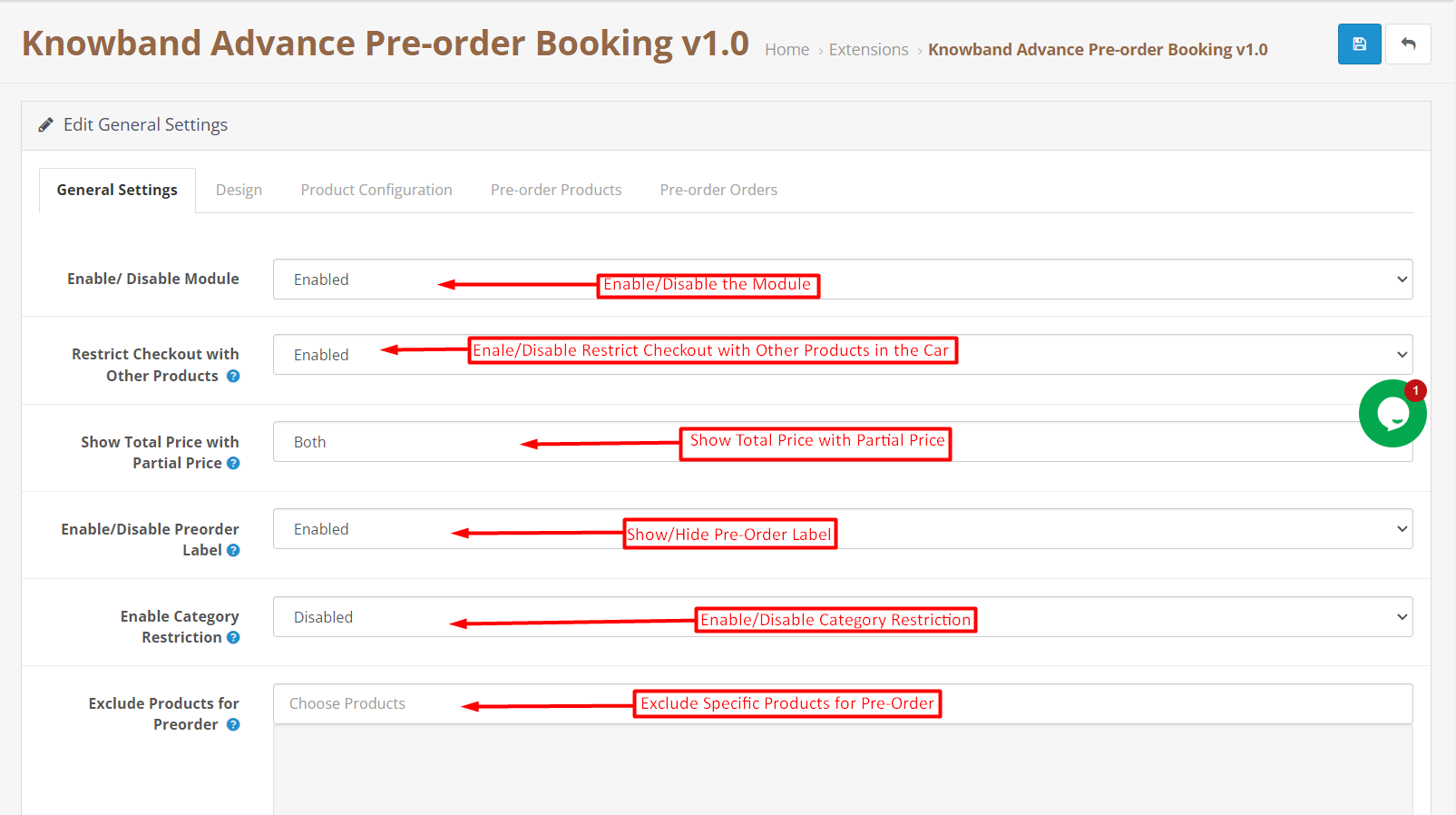
The OpenCart store administrator can find module all the general configurations in the following tab.

Enable/Disable Button: The following button can be used for enabling/disabling the OpenCart Product Advance Booking Plugin.

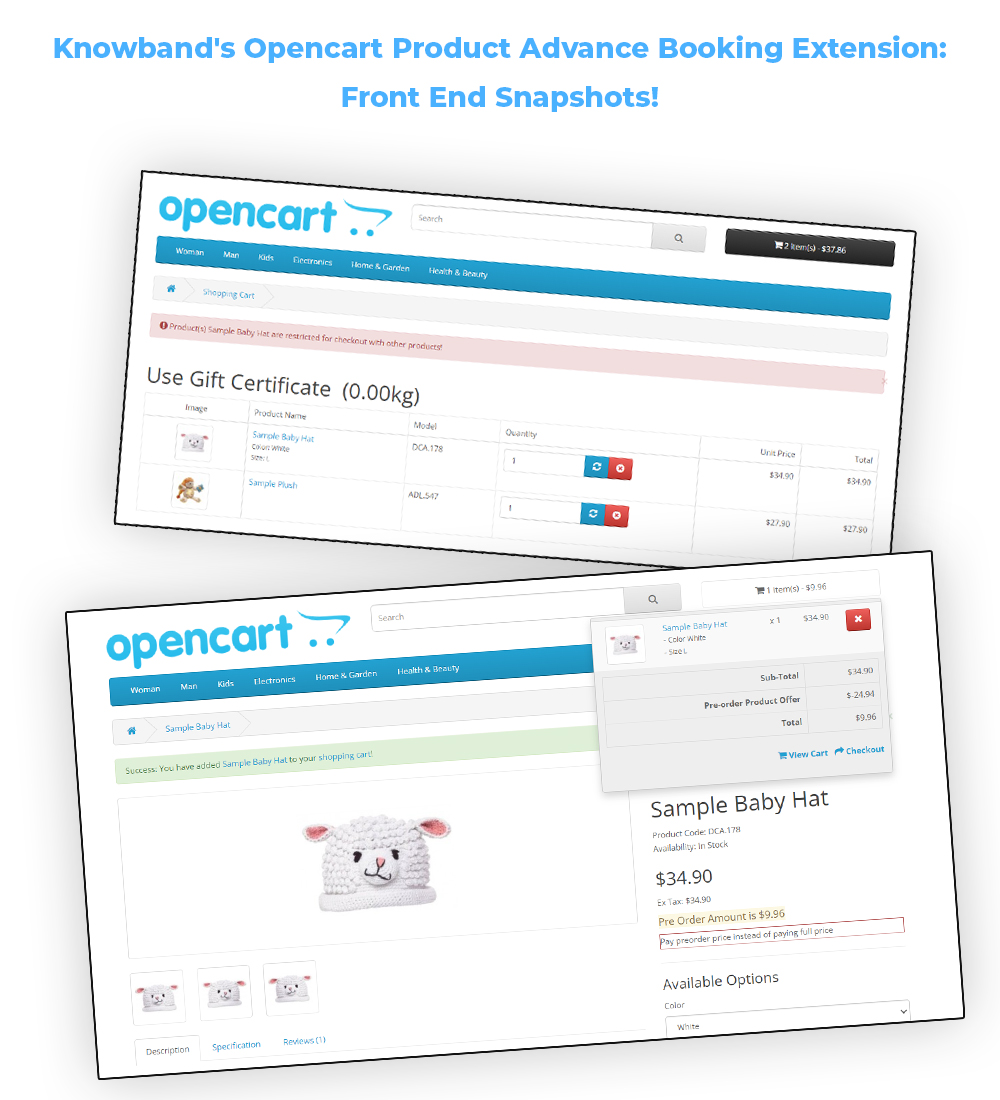
Restrict Checkout with Other Products: If the following button is enabled, the customers will not be able to complete checkout of pre-order products with other products. Only one pre-order product in the cart will be allowed for checkout.

Show Total Price with Partial Price: The admin can show/hide the total price with partial price using the following button. The admin can choose whether they want to display both the prices or any one of them. This is applicable only on the product page.

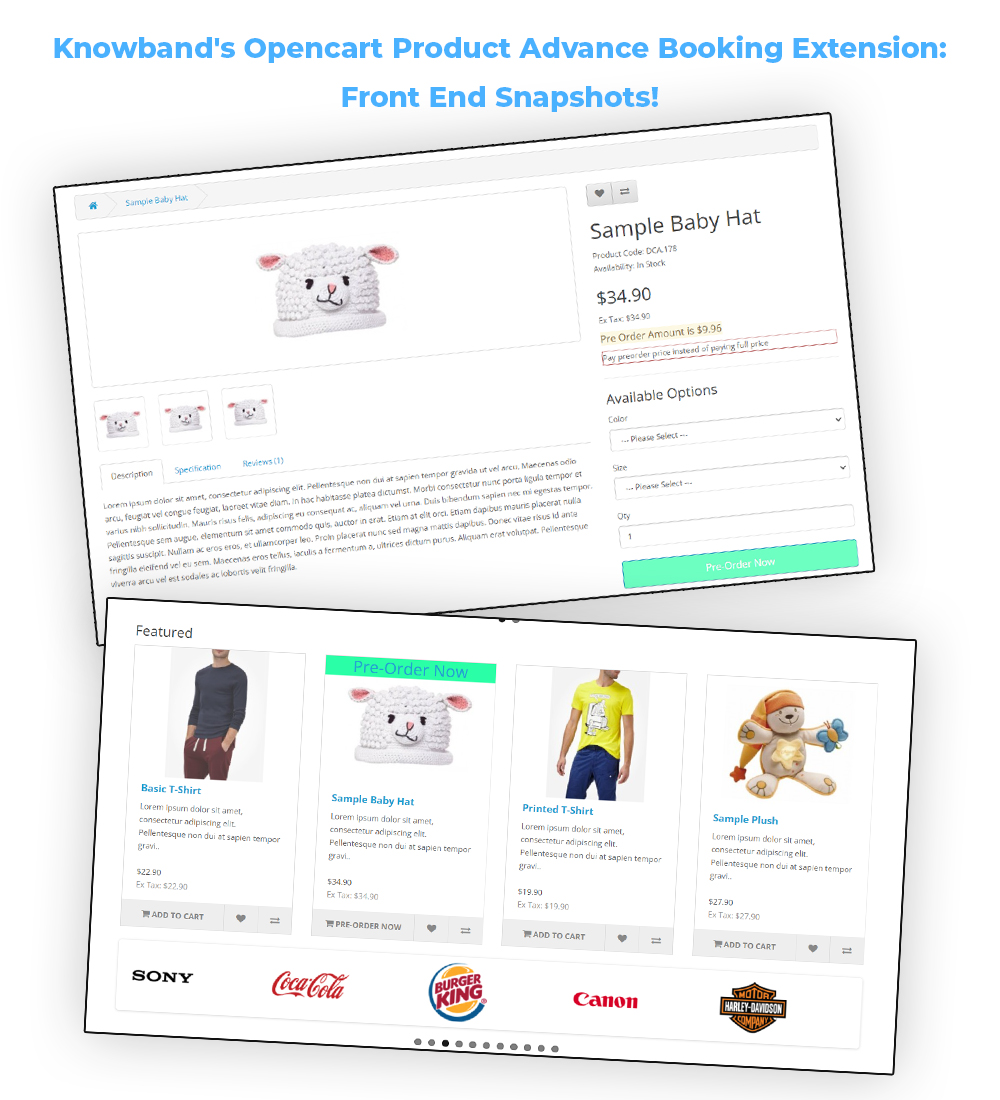
Enable/Disable Pre-Order Label: The admin can show/hide pre-order labels from the products with this button. The pre-order label will only appear on the product listing pages such as the home page, category listing page, search result page, etc. This label can be modified also in the Design Tab.

Enable/Disable Category Restriction: The store retailers can enable/disable category restriction for Preorder products from here.

Exclude Products for Preorder: In case you want to exclude any specific products for advance booking, you can enter the same in the shown text field in the above image.
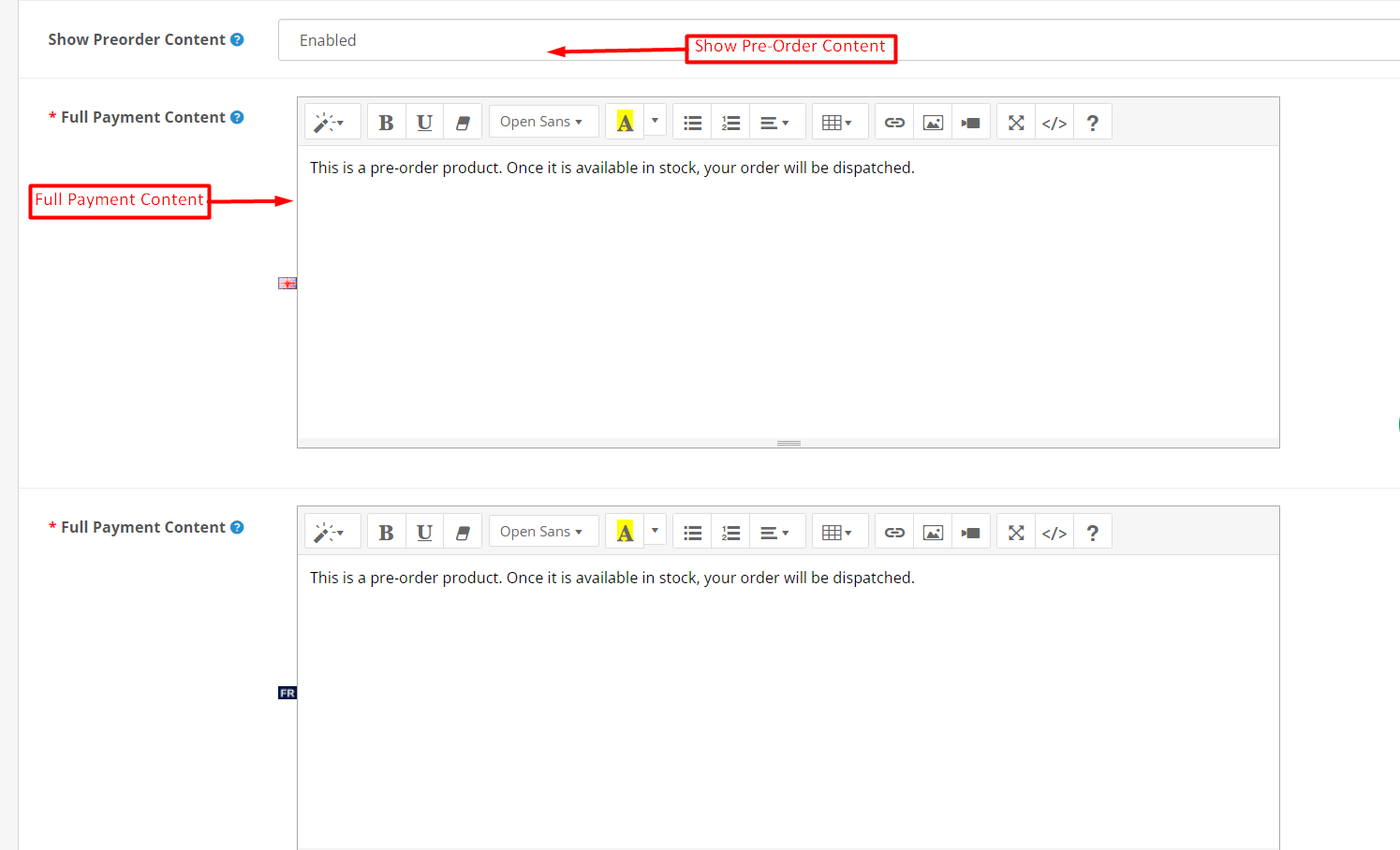
Show Preorder Content: The admin can show/hide pre-order content using the following button. This content is displayed only on the product description page.

Full Payment Content: The following content will appear in case the full payment option is selected for the preorder products.

Partial Payment Content: The content entered in the following text field will appear in case the partial payment option is selected.
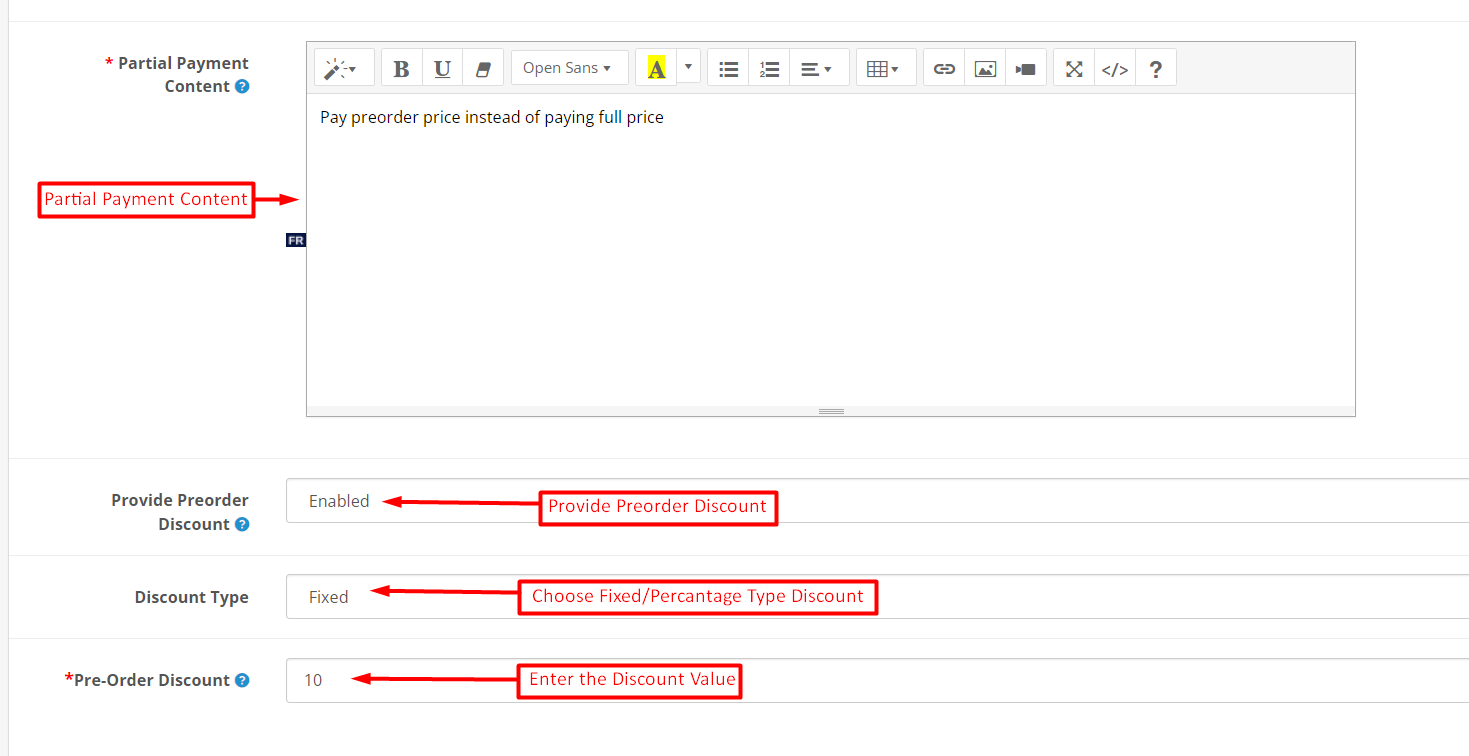
Provide Preorder Discount: Enable the following option if you are willing to provide the preorder discount to your customers.

Discount Type: The store admin can choose the discount type as a fixed amount or percentage based on the order total from here.

Pre-Order Discount: The following text field is provided for entering the exact amount for the discount on the pre-order products.

3.2. Design:

The store admin can modify the look and feel of the preorder label and button that appears on the product images on product listing pages.
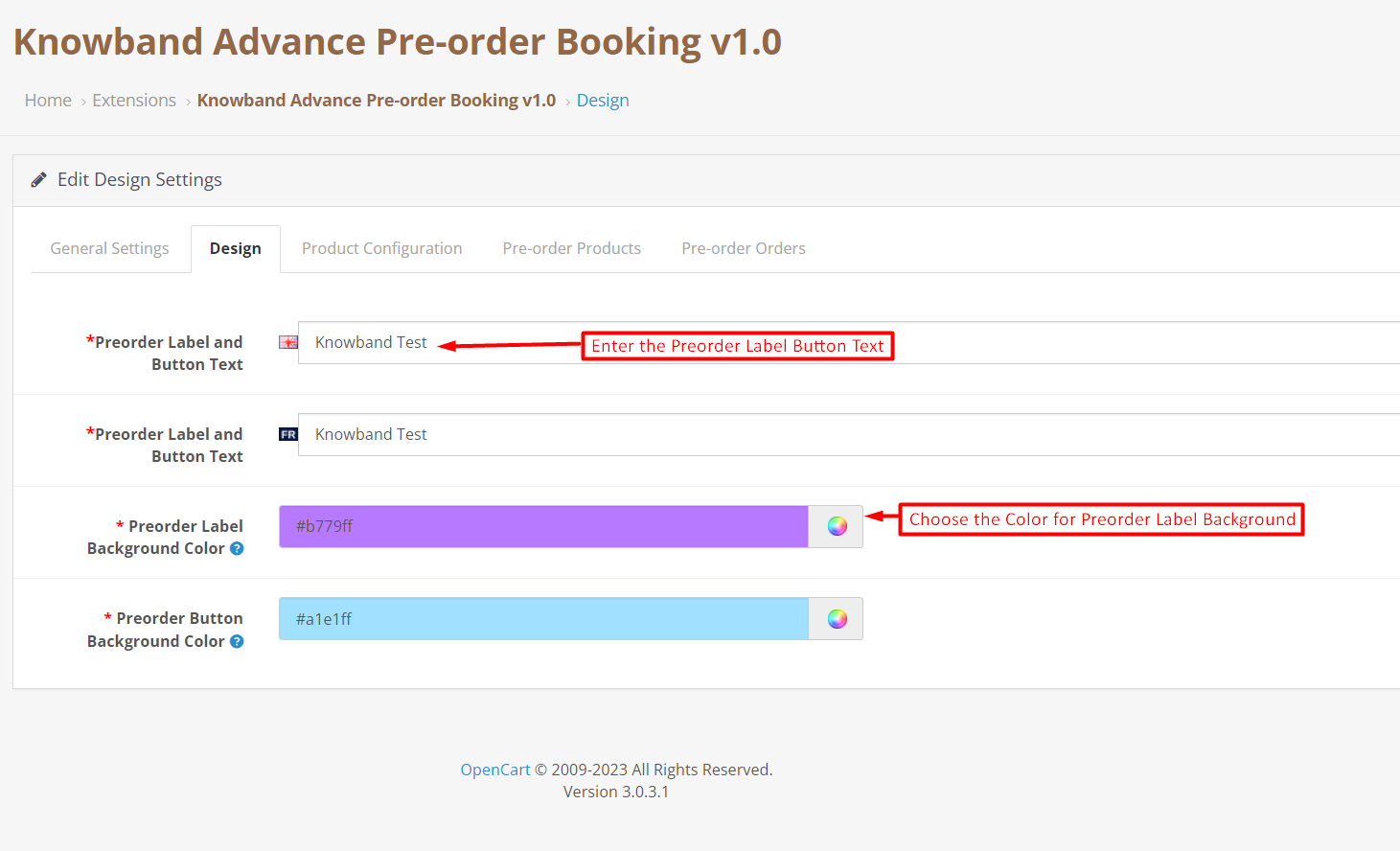
Preorder Label and Button Text: The text entered in the following text field will appear on top of the preorder product images. As this extension is multilingual, you can add the Label And Button text according to the languages enabled on your store.

Preorder Label Background Color: The store admin can choose the background color for the pre-order product label from here.

3.3. Product Configuration:

The product configuration tab allows the store admin to set all the product configurations for the pre-order products.
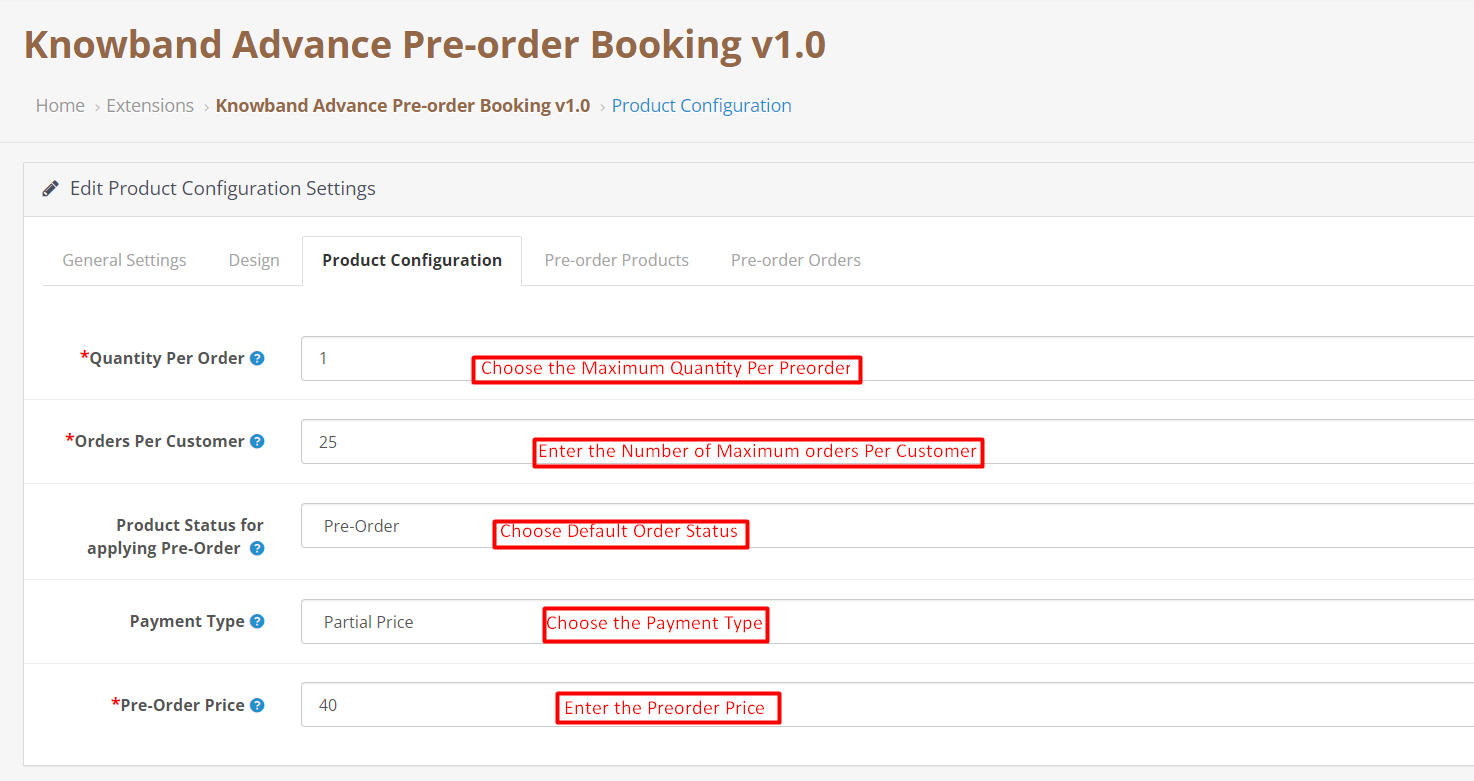
Quantity Per Order: The Opencart store admin can add the maximum quantity per order he wants to allow the customers to purchase.

Orders Per Customer: Here, the admin can enter the maximum number of pending Pre-orders he wants to allow the customer to make.

Product Status for Applying Pre-Order: Choose the default status of the product for applying pre-order using the following button.

Payment Type: The Opencart product pre-order plugin allows the store admin to allow the customers to complete product advance booking by just paying a partial or full amount.

The admin can enable/disable partial price using the following button.

Pre-Order Price: This particular text field is provided for selecting the percentage for the partial price that the customer is going to pay for product advance booking.

3.4. Pre-Order Products:

The Opencart Product Advance Booking Extension allows the store admin to set different rules for specific products. Here, Admin can create different price rules for different products. If the product is not listed here, then the price rules will be applied from the values set in Product Configuration.
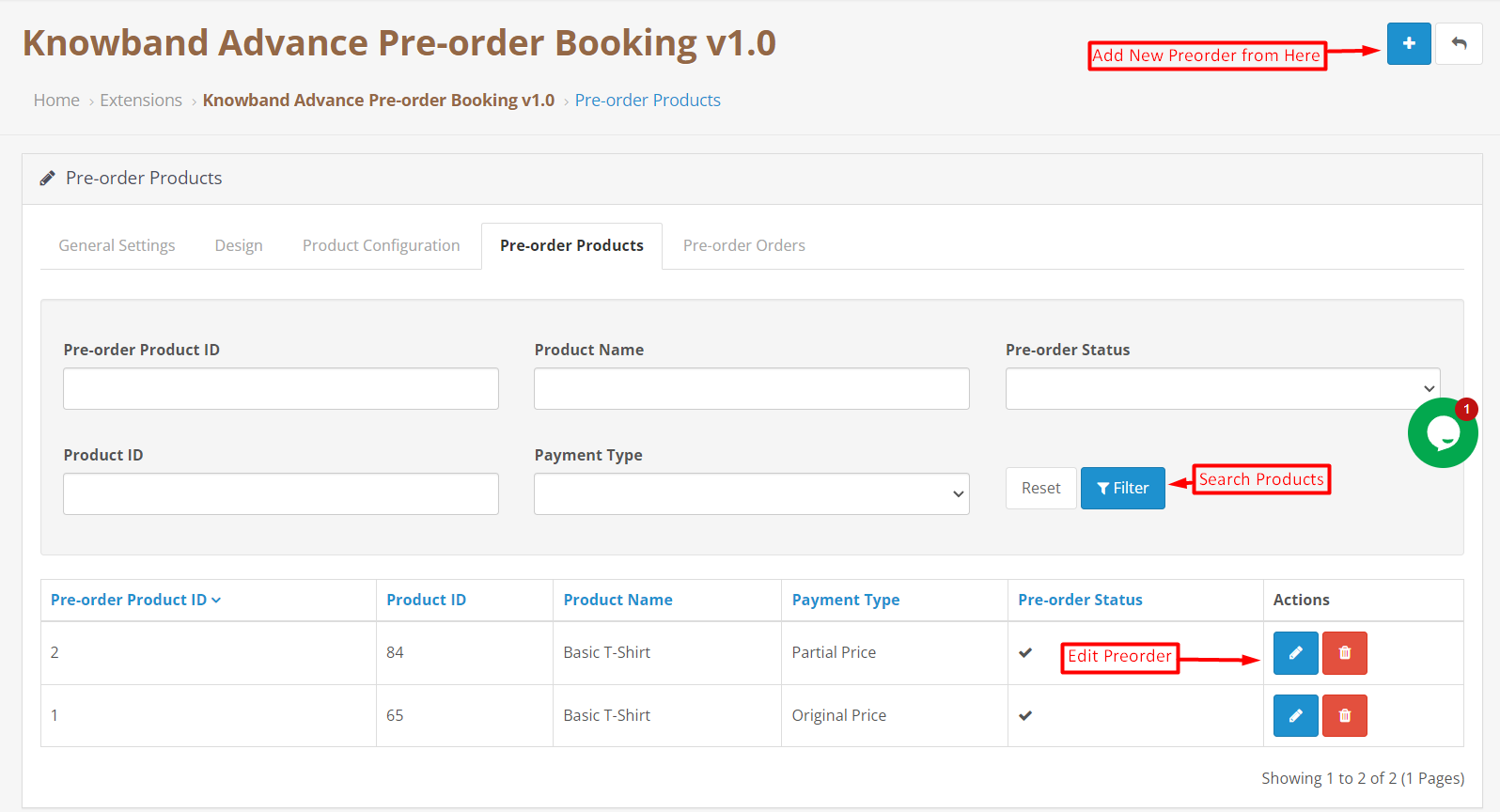
Add New Preorder Product:

The store admin can add new price rules for specific preorder products just by clicking on the add new button shown in the above image. Furthermore, the admin just needs to select some basic details such as product name, product price, product discount, etc, and your new price rule for the selected pre-order product is all set to dive into your eCommerce store.

Search Pre-Order Product: The OpenCart Product Backorder extension allows the admin to search the pre-order products just by adding product ID, payment type, product name, etc.

3.5. Pre-Order Orders:
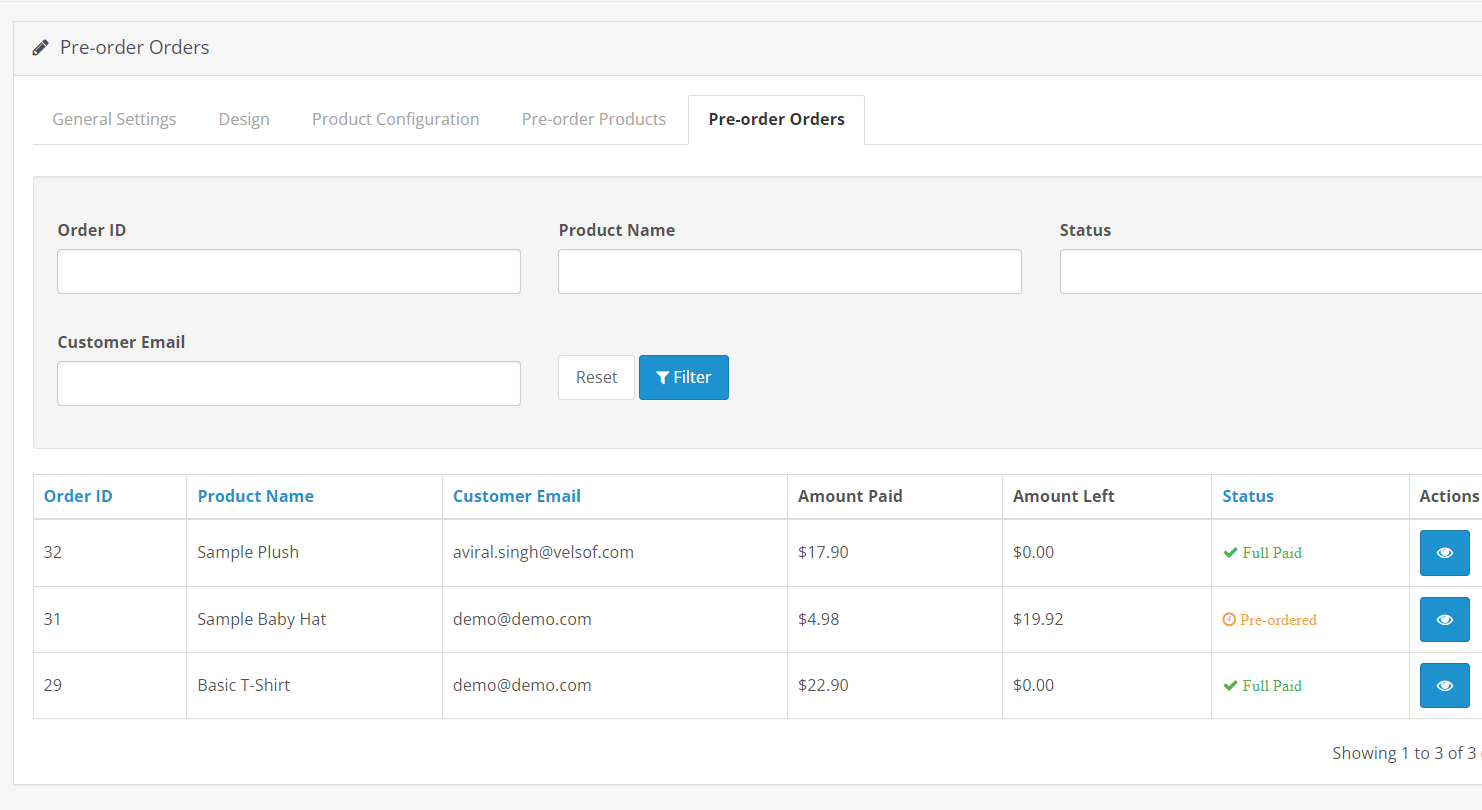
We have provided a separate tab for tracking all the booking orders. In the following tab, the store retailers can track all the pre-orders in a single place and further make the changes at their convenience.

4.0. Front End Preview: Opencart Pre-Order Extension:

Till now, we have discussed the various configuration options and their use in modifying the pre-order plugin as per your business needs. Furthermore, the Opencart product preorder plugin does take zero coding and technical skills to make your eCommerce shop preorder ready for various occasions.
Here are some of the front-end snapshots mentioned below for providing a better understanding of the pre-order flow for the customers.

Pre-Order History:
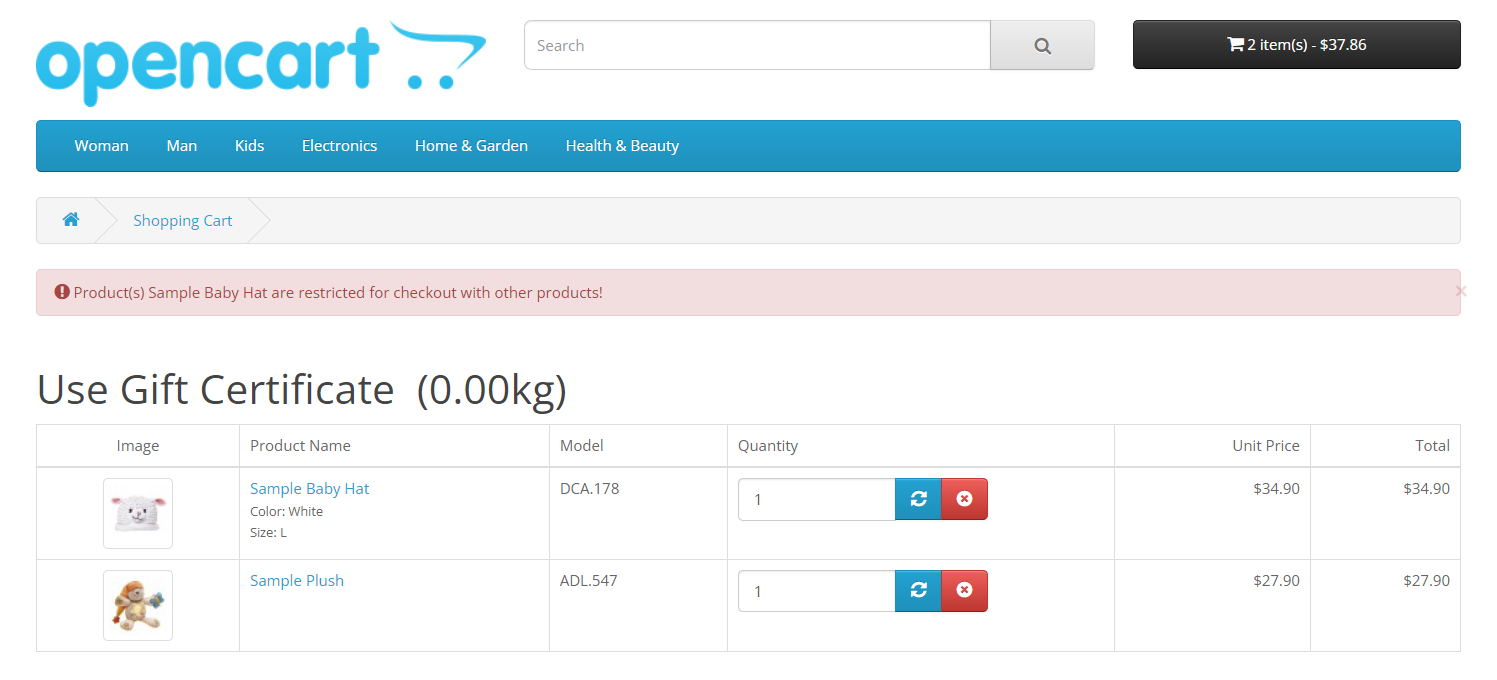
The customers can find the history of all the placed pre-orders in the following tab. Along with the pre-orders, the customers can also check the order balance (paid amount and remaining amount), order status, and order status.

Front End Snapshots:
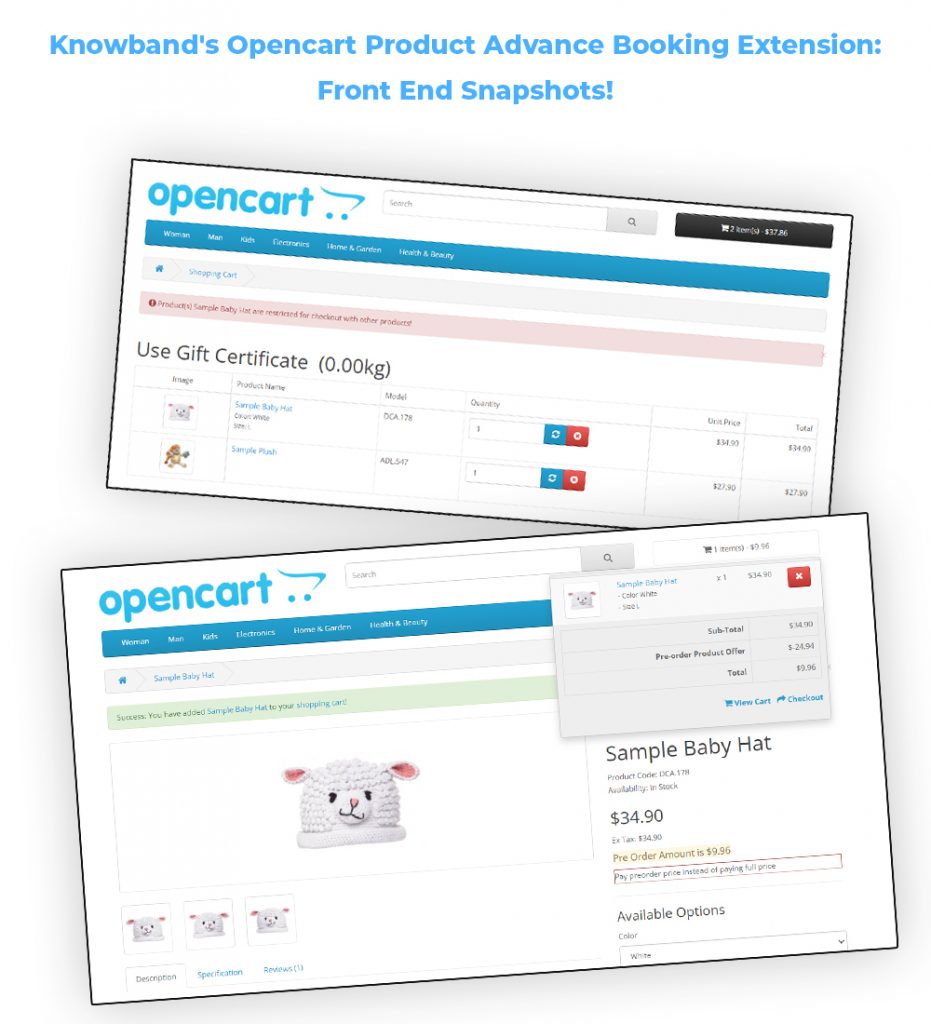
Furthermore, in case you are having queries/suggestions regarding our Product Pre-Order Plugin, you can also reach out to our technical support staff at knowband.com/helpdesk.

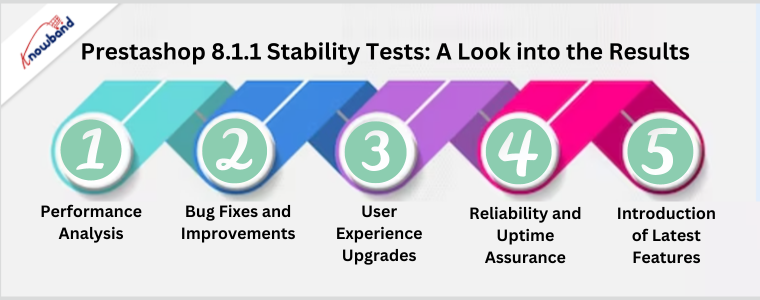
Prestashop 8.1.1 Stability Tests: A Look into the Results!!

The highly anticipated release of Prestashop 8.1.1 has generated a buzz among e-commerce enthusiasts. One of the critical aspects of any software update is its stability and performance. Because both of these factors not only define the business stability but also sets the future scope of an online business.
In this blog, we delve into the comprehensive stability tests conducted on Prestashop 8.1.1 to evaluate its robustness and reliability. Join us as we explore the results and uncover how this latest version is set to revolutionize the e-commerce landscape.


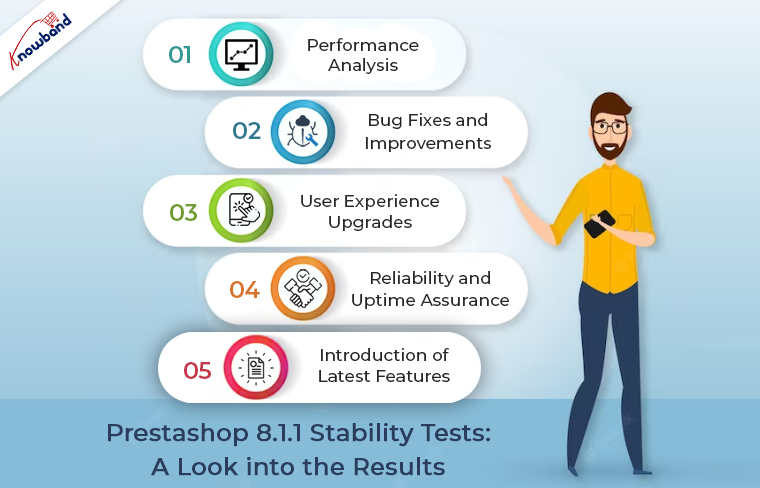
Performance Analysis:

The stability tests commenced by rigorously assessing Prestashop 8.1.1’s performance under different loads and scenarios. Our tech professionals simulated various traffic patterns, including peak loads, sustained traffic, and sudden spikes. To gauge the platform’s ability to handle heavy user activity. The results were nothing short of impressive, with Prestashop 8.1.1 showcasing exceptional performance even during the most demanding situations.


Bug Fixes and Improvements:

Prestashop 8.1.1 also addressed numerous bug fixes identified in the previous versions. The developers worked diligently to eliminate any existing issues. Creating a more seamless and reliable user experience. The stability tests verified these bug fixes and confirmed the successful resolution of known problems. Providing users with enhanced satisfaction and fewer disruptions.


User Experience Upgrades:

An e-commerce platform’s success often hinges on the user experience it offers. Prestashop 8.1.1 introduces several user-centric improvements to elevate customer satisfaction. Through stability testing, the team ensured that these enhancements did not only function flawlessly. But, also deliver an intuitive and engaging experience for shoppers. From a streamlined checkout process to responsive design, Prestashop 8.1.1 is geared toward maximizing user retention and conversion rates.


Reliability and Uptime Assurance:

Reliability is paramount for any online business, and Prestashop 8.1.1 recognizes this core requirement. Following the same, the stability tests analyzed the platform’s uptime and robustness, guaranteeing that online stores powered by Prestashop remain accessible and operational at all times. The results demonstrated an impressive track record of stability, instilling confidence in businesses relying on the platform for their day-to-day operations.


Introduction of Latest Features:

Prestashop 8.1.1 brings an array of new features designed to propel e-commerce businesses to new heights. From enhanced inventory management tools to integrated marketing features. The latest version empowers online retailers to stay competitive in the dynamic digital landscape. The stability tests confirmed that these new features seamlessly integrate with the existing framework, enabling businesses to capitalize on the platform’s full potential.

Conclusion!

The stability tests conducted on Prestashop 8.1.1 reveal a resounding success, showcasing the platform’s robustness, reliability, and enhanced performance. With its extensive bug fixes, user-centric upgrades, and introduction of innovative features. Prestashop 8.1.1 is set to transform the e-commerce experience for businesses and customers alike. Embrace the latest version and witness how it empowers your online store to thrive in an ever-evolving digital world.

Furthermore, you can also check out a wide range of feature-rich Prestashop 8.1.1 plugins on our website.


Maximizing eCommerce Success: Prestashop Google Shopping Integration Made Easy with Knowband

In this article, we will explore the Prestashop Google Shopping Integration Addon developed by Knowband, a leading provider of eCommerce plugins and modules. Google Shopping has become a vital platform for online retailers to showcase their products and reach a broader audience. Integrating your Prestashop store with Google Shopping can significantly enhance your visibility and increase sales. Let’s delve into the features, benefits, and steps to set up this powerful addon.

Introduction to Prestashop Google Shopping Integration Addon

Google Shopping is a specialized platform by Google that allows online merchants to display their products directly in the search results. It enables potential buyers to compare prices and make informed decisions without leaving the Google interface.


Understanding the Importance of Google Shopping for eCommerce

Google Shopping has gained immense popularity among online shoppers due to its visual appeal and ease of use. Integrating with Google Shopping opens up new avenues for online retailers to attract customers and drive sales.


Knowband’s Prestashop Google Shopping Integration Addon

Knowband’s Google Shopping Prestashop API Integration addon simplifies the process of integrating your Prestashop store with Google Shopping. Its user-friendly interface and powerful features make it an ideal choice for eCommerce store owners.


Key Features of the Addon

  • Easy installation and setup process.
  • Real-time synchronization of product data with Google.
  • Advanced mapping options for accurate categorization.
  • Automatic currency conversion for global reach.
  • Customizable product attributes for better control.


Getting Started with the Integration

To begin this integration process, follow the steps below:


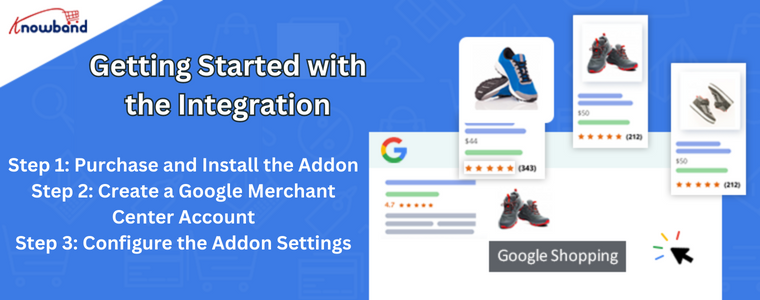
Step 1: Purchase and Install the Addon

Visit the Knowband website, purchase the Google Shopping Integration Addon, and download the installation files. Then, install the addon in your Prestashop store.

Step 2: Create a Google Merchant Center Account

If you don’t have a Google Merchant Center account, sign up for one. The Merchant Center is where you manage your product data and monitor performance.

Step 3: Configure the Addon Settings

Navigate to the configuration panel of the addon and enter the necessary details, such as API keys and merchant ID, to establish a connection with Google.


Configuring Google Shopping Feed

The Google Shopping Prestashop API Integration addon offers a comprehensive feed configuration to ensure accurate product representation on Google Shopping.

Step 1: Select the Target Country and Language

Choose the target country and language for your product listings. This helps Google display your products to relevant audiences.

Step 2: Map Prestashop Categories to Google Product Categories

Accurate mapping of your Prestashop categories to Google product categories is crucial for visibility.

Step 3: Set Pricing and Shipping Information

Specify pricing and shipping details for each product, making it easier for shoppers to make decisions.

Step 4: Customize Product Data

Optimize product titles and descriptions to make them appealing to potential buyers.

Step 5: Synchronize Product Data

Initiate the synchronization process to ensure that your product data is up to date on Google Shopping.


Benefits of Using Prestashop Google Shopping Integration

Integrating your Prestashop store with Google Shopping offers various advantages:

Increased Product Visibility

Your products appear on Google’s search results page, giving them more exposure.

Targeted Audience Reach

Gain an edge over competitors by connecting with prospective customers actively seeking products like yours.

Automatic Product Updates

Product data is automatically updated on Google Shopping, reflecting real-time changes in your store.

Better Conversion Rates

Google Shopping visitors are more likely to convert as they have access to crucial product information upfront.


Tips for a Successful Google Shopping Integration

Follow these tips to make the most out of your Google Shopping integration:

Optimize Product Titles and Descriptions

Craft compelling titles and descriptions that are SEO-friendly and relevant to user queries.

Use High-Quality Product Images

High-quality images attract shoppers and increase the chances of conversion.

Implement Google Analytics for In-depth Analysis

Leverage Google Analytics to gain valuable insights into user behavior and refine your marketing strategy.


Common Challenges and Troubleshooting

Though the integration is seamless, you may encounter some common challenges:

Data Feed Errors

Ensure that your product feed adheres to Google’s specifications to avoid disapproval.

Disapproved Products

Address disapproved products by making necessary changes to meet Google’s guidelines.

Low Conversion Rates

Analyze your campaigns and product listings to identify areas for improvement.


Frequently Asked Questions (FAQs)

Q1: Can I use the addon for multiple Prestashop stores? 

Yes, you can use the addon for multiple stores with a single purchase.

Q2: How frequently does the product data sync with Google Shopping? 

Product data synchronizes in real-time, ensuring up-to-date listings on Google Shopping.

Q3: Will my products appear on Google Search as well? 

Yes, integrating with Google Shopping can also improve your product visibility on Google Search.

Q4: Can I use the addon for specific product categories only? 

Absolutely, you have the flexibility to choose specific categories for integration.

Q5: What is the cost of Knowband’s Prestashop Google Shopping Integration Addon? 

The addon’s cost varies based on your store’s needs and requirements.


Conclusion

Integrating your Prestashop store with Google Shopping using Knowband’s Prestashop Google Shopping Integration Module can significantly enhance your online business’s success. The seamless integration, powerful features, and global reach offered by this addon empower online retailers to expand their customer base and boost sales. Embrace the power of Google Shopping today and witness your eCommerce journey reaching new heights.

Explore how this module helps you manage Google Shopping listings more efficiently and attract more customers. Read More

OpenCart 4.0: Is It Time to Upgrade Your OpenCart Shop?

OpenCart is a popular PHP-based CMS platform that allows eCommerce merchants to start their online shop without specific coding skills.

Today, we’re diving into the world of OpenCart and exploring the latest release – OpenCart 4.0. As an e-commerce entrepreneur, you know the importance of staying up-to-date with the latest technologies and trends. To ensure your online store remains competitive. With the release of OpenCart 4.0, you might be wondering whether it’s time to upgrade your shop. Well, the answer depends on various factors and your business needs.
Let’s take a closer look at the features and improvements this new version offers and help you make an informed decision.

About OpenCart 4.0:

OpenCart is a popular open-source e-commerce platform thousands of online merchants use worldwide. Known for its user-friendly interface and extensive range of extensions. It has been a reliable choice for setting up and managing online stores. Therefore, OpenCart 4.0 is the latest major release, promising significant advancements over its predecessors.

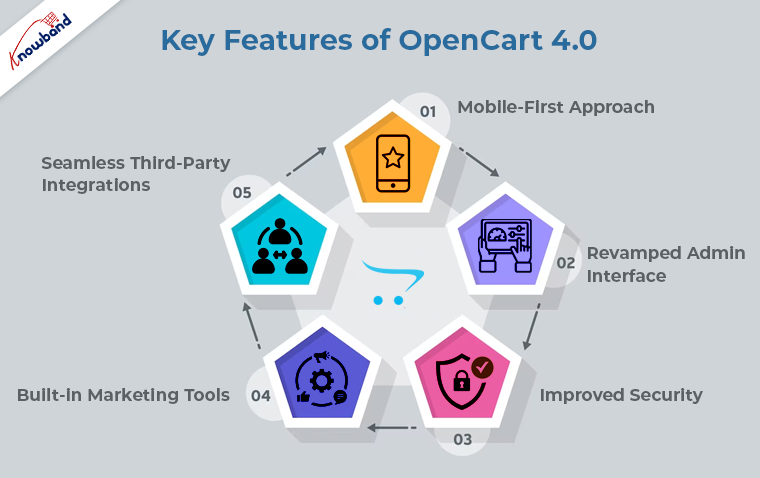
Key Features of OpenCart 4.0:


Enhanced Performance: With the ever-increasing demand for faster and more responsive online shopping experiences. OpenCart 4.0 boasts substantial performance improvements. Further, with the major upgrade, the page load times are reduced, leading to better SEO rankings and, ultimately, higher customer satisfaction.

Mobile-First Approach: 

Mobile shopping continues to dominate the e-commerce landscape. Following the same, OpenCart 4.0 is built with a mobile-first approach. Ensuring your store looks and performs flawlessly on all devices, from smartphones to tablets.
Furthermore, if you are willing to launch the Android and iOS Apps for your Opencart store, you can also check out Knowband’s OpenCart Android and iOS Mobile App Builder Plugin.

Revamped Admin Interface: 

The administration dashboard receives a complete overhaul, making it more intuitive and easier to navigate. Store owners can now manage products, orders, and customer data more efficiently, saving time and effort. Therefore, it is considered one of the major improvements from the store admin perspective.

Improved Security: 

Cybersecurity is a top priority for any online business. OpenCart 4.0 addresses this concern with strengthened security measures, providing a safer environment for both merchants and customers.

Built-in Marketing Tools: 

OpenCart 4.0 introduces new marketing tools, such as advanced analytics, personalized recommendations, and targeted promotions. Furthermore, these tools are designed to help you reach your target audience more effectively and increase conversions.

Seamless Third-Party Integrations: 

The latest version offers enhanced compatibility with various third-party integrations. Enabling you to easily connect your store with popular payment gateways, shipping providers, and other essential services.

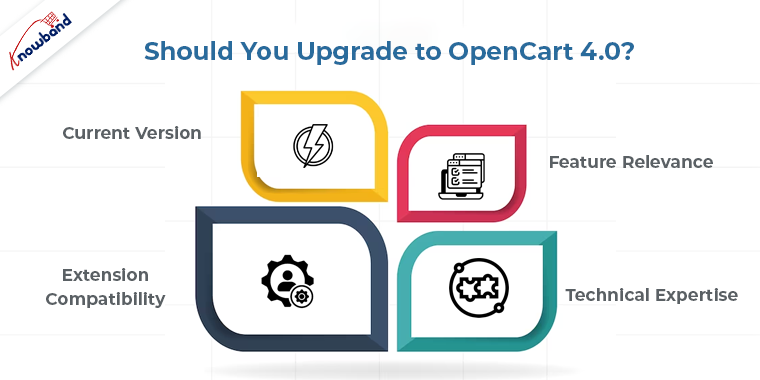
Should You Upgrade to OpenCart 4.0?

Now that we’ve explored some of the exciting features of OpenCart 4.0, the big question is whether you should upgrade your shop. Here are a few factors to consider before making the decision:


Current Version: 

If you are still running an older version of OpenCart, upgrading to the latest release is highly recommended. Newer versions often come with bug fixes, performance enhancements, and security updates that will benefit your store.

Feature Relevance: 

Evaluate the new features of OpenCart 4.0 and determine if they align with your business needs. If the enhancements directly address your current pain points, upgrading could significantly improve your store’s performance and customer experience.

Extension Compatibility: 

If your store relies heavily on third-party extensions, check their compatibility with OpenCart 4.0. Some extensions may not be immediately compatible, so it’s crucial to ensure that your essential plugins are ready for the upgrade. Furthermore, you can also check out a wide range of OpenCart Plugins offered by Knowband for more information.

Technical Expertise: 

Upgrading an e-commerce platform requires technical knowledge. If you lack experience in handling such updates, consider seeking assistance from a developer or a reliable e-commerce agency. Moreover, you can also reach out to us at support@knowband.com to safely move your data from the older version to the latest OpenCart 4.0.

Conclusion!!

OpenCart 4.0 presents an exciting array of features and improvements that can potentially elevate your online store to new heights. However, the decision to upgrade should be taken thoughtfully. Considering factors like your store’s current version, feature relevance, extension compatibility, and technical capabilities.

By making an informed decision, you can leverage the power of OpenCart 4.0 to provide your customers with an exceptional shopping experience, improve your store’s performance, and stay competitive in the ever-evolving world of e-commerce. Remember to back up your data before attempting any major upgrades and, if possible, test the new version in a staging environment to ensure a smooth transition.

So, is it time to upgrade your shop to OpenCart 4.0? The answer lies in your unique business requirements and growth aspirations. Happy selling!


OpenCart WhatsApp Live Chat Manager Plugin by Knowband – User Manual

Introduction:

Introducing the Knowband OpenCart WhatsApp Live Chat Manager Plugin. With the OpenCart WhatsApp Live Chat Manager Plugin, you can effortlessly engage with your customers in real-time. By providing them with instant assistance and personalized support. Gone are the days of lengthy email exchanges or waiting for customers to call your helpline. Now, you can meet your customers where they are, on their preferred messaging platform.

Furthermore, the OpenCart WhatsApp Chat plugin offers a user-friendly interface, making it easy for you to manage and respond to customer queries efficiently. Whether it’s answering product inquiries, resolving issues, or providing pre or post-sales support. You can do it all through WhatsApp, ensuring a seamless and convenient customer experience.


2.0. Features Offered by OpenCart WhatsApp Chat Module:

  1. Real-time Chat: The Knowband’s WhatsApp live chat plugin for Opencart enables real-time communication between website visitors and store owners or support staff via WhatsApp.
  2. WhatsApp Integration: The plugin integrates the WhatsApp messaging platform into your OpenCart website. Allowing customers to directly communicate with your business through their WhatsApp accounts.
  3. Quick Setup: The extension offers an easy setup process, allowing you to connect your WhatsApp account with your OpenCart store. Furthermore, it takes zero coding skills to make your shop customer support ready with the WhatsApp Chat plugin.
  4. Chat Notifications: The OpenCart WhatsApp Live Chat Manager plugin provide notifications for incoming messages. Ensuring that you don’t miss any customer inquiries or messages.
  5. Multiple Agent Support: If you have a team managing customer support, the extension allows assigning different timing slots to different chat agents.
  6. Offline Messages: If you or your support staff are unavailable, the OpenCart WhatsApp Chat extension helps capture offline messages from customers, which can be responded to later.
  7. Mobile-friendly: The extension is mobile-responsive, allowing customers to initiate chats and receive responses easily on mobile devices.
  8. Multiple Language Support: The extension supports multiple languages, allowing customers to communicate in their preferred language.
  9. Condition-Based Chat Options: The store admin can choose specific product categories and product pages where they want to provide the WhatsApp chat option. Furthermore, it helps to resolve customer queries within a very limited time in an effective way.


3.0. Benefits of Using Knowband’s OpenCart WhatsApp Live Chat Plugin on Your Website:

Improved Customer Communication:

Live chat allows for direct and real-time communication with customers. This further enables prompt responses to their inquiries, providing a better customer experience, and increasing customer satisfaction.

Increased Sales and Conversions:

Live chat offers an opportunity to engage with customers during their buying journey, answer their questions, address concerns, and provide personalized recommendations. This can not only lead to higher conversion rates but will also lead to increased sales.

Instant Customer Support:

With Knowband’s Opencart WhatsApp live chat plugin installed, customers can get immediate assistance without having to wait for an email response or phone call. This improves customer satisfaction and builds trust in your business.

Cost-Effective Support Solution:

Live chat can be more cost-effective compared to traditional customer support channels like phone support. It allows support agents to handle multiple chats simultaneously, reducing the need for a large support team.

Efficient Issue Resolution:

Furthermore, the live chat enables real-time back-and-forth conversation. Making it easier to understand and resolve customer issues quickly. This can help in reducing customer frustration and resolve problems promptly.

Increased Customer Engagement:

The interactive nature of live chat encourages customers to engage with your website and ask questions. This engagement can lead to a deeper understanding of their needs and preferences, enabling you to offer personalized recommendations and build long-term relationships.

Enhanced Customer Insights:

Knowband Opencart WhatsApp Live chat extensions often provide visitor information, such as location and referral source, allowing you to gather valuable insights about your customers. This information can be used to tailor your marketing strategies and improve overall customer targeting.

Improved Cross-Selling and Upselling Opportunities:

During live chat conversations, agents can identify opportunities to recommend related products or upsell additional services. Thereby, increasing the average order value and revenue per customer.

Easy Integration with Existing Systems:

Live chat extensions, including the “OpenCart WhatsApp Live Chat Extension,” are typically designed to integrate smoothly with your existing OpenCart store, making it convenient to set up and manage without major disruptions.

Competitive Advantage:

By offering live chat support, you differentiate your business from competitors that may rely solely on traditional support methods. This can attract customers who value quick and convenient support and give you an edge in the market.

4.0. Installation Guide:

To install this OpenCart WhatsApp Live Chat Manager Plugin, please follow the following steps:

Purchase the OpenCart WhatsApp Live Chat Manager Extension from the Knowband store. You’ll get the following files:

Zipped File containing the source code of the OpenCart WhatsApp Chat Extension and the User Manual.

Follow the steps below to install the OpenCart WhatsApp Chat Plugin in the OpenCart store:

  1. Unzip the zipped File: You’ll get the folders as shown in the image below:


  1. Copy all the files and folders of the zip file in the Root Directory of OpenCart setup via FTP manager.

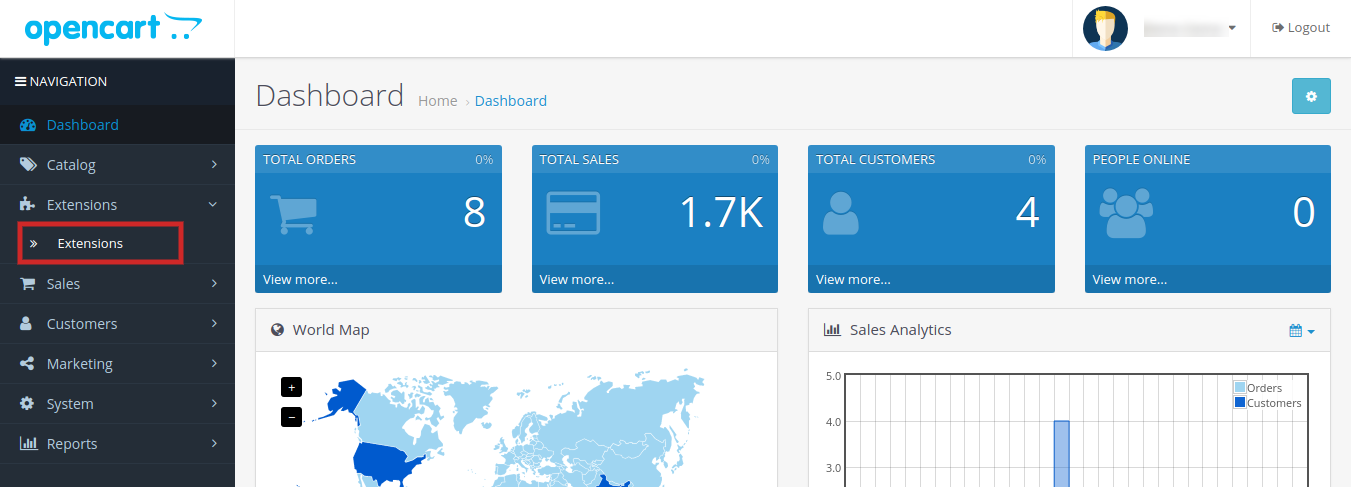
3. The OpenCart Infinite Scroll module is now installed and is ready to use. Go to Admin -> Main Menu -> Extensions as shown in the image below:


5.0. Admin Interface:

The OpenCart WhatsApp Chat Extension provided a dedicated and easy-to-manage admin panel for the module configurations.
The store admins can modify module settings at their convenience without the need for coding or technical skills.

5.1.0 General Setting:

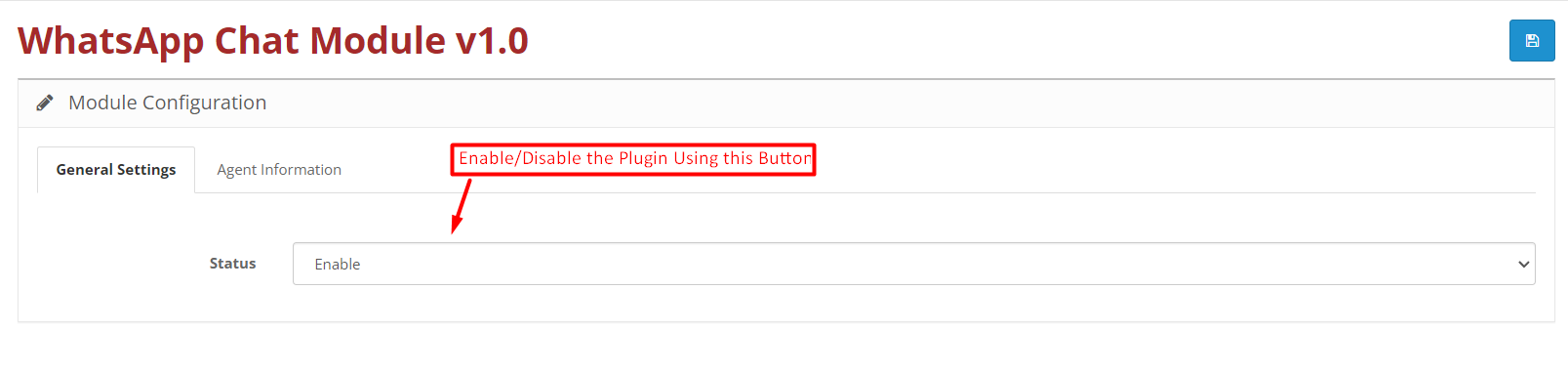
The store admin can enable/disable the WhatsApp Chat Plugin using the shown button in the below image.

5.2.0 Agent Information:

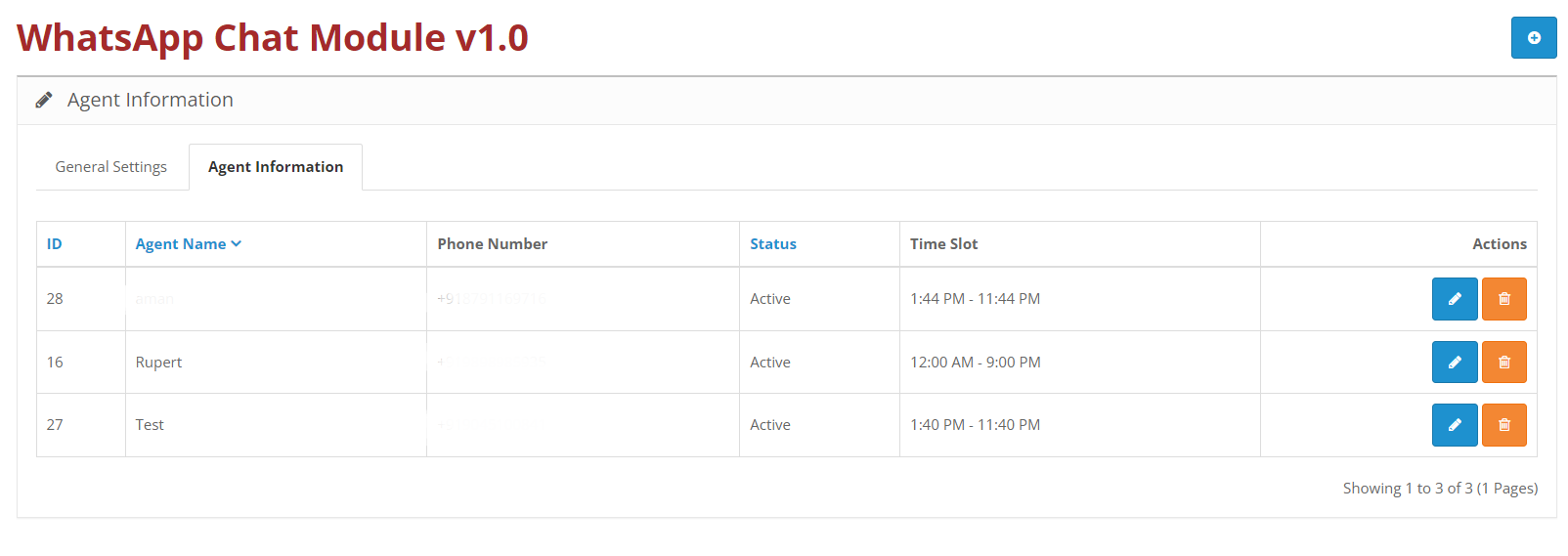
In the following tab, the admin can find the list of all the chat agents and can manage (edit/delete) any chat agent information if required.


5.2.1 Agent Information Setting:

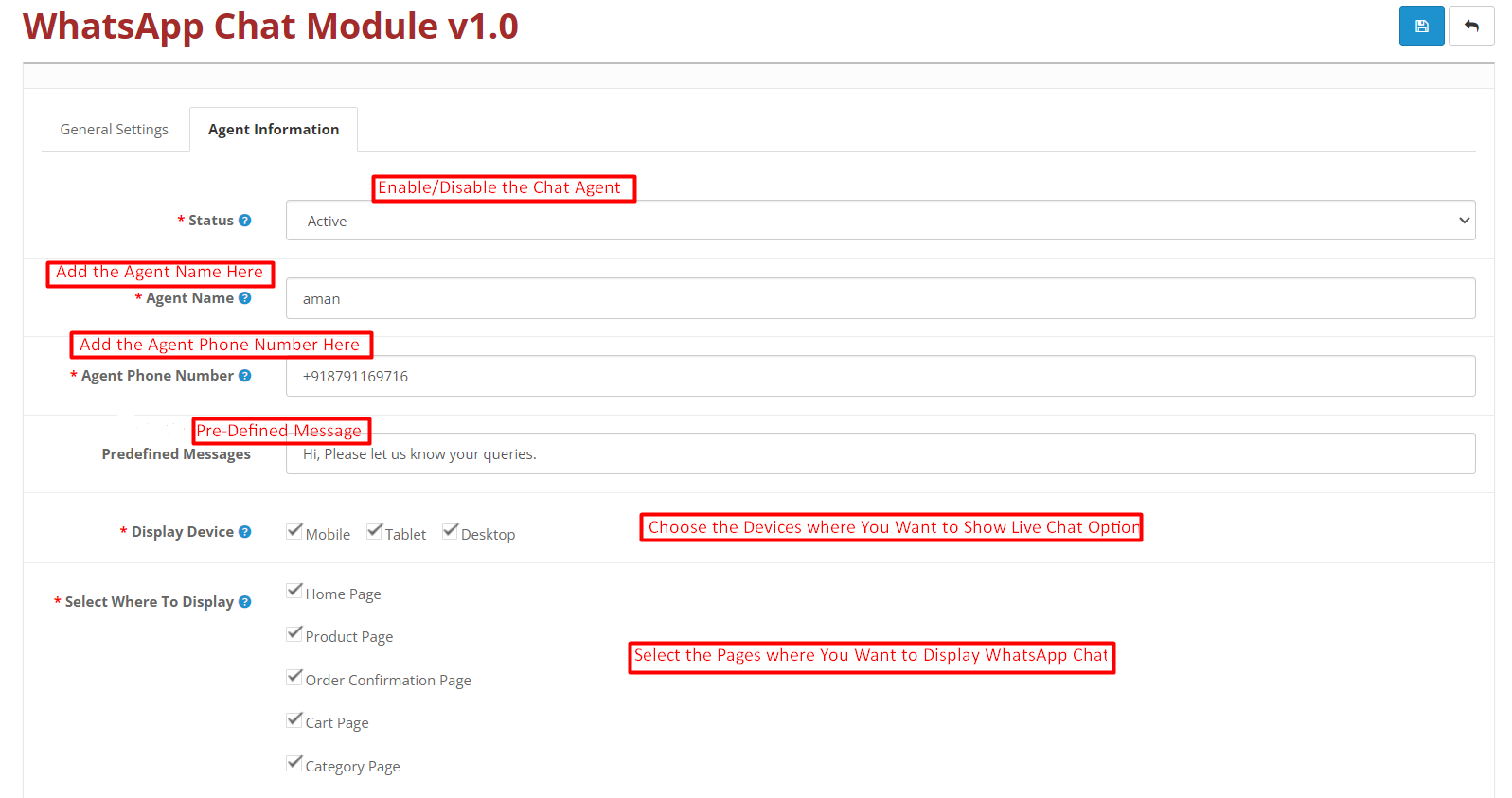
We have provided the agent configuration options in the following tab. The OpenCart store admin can choose the specific products, specific categories, agent timing slots, etc. from the agent information tab provided by Knowband OpenCart WhatsApp Live Chat Manager Plugin.


Status: The admin can enable/disable any particular chat agent with the following button.

Agent Name: You can modify your chat agent name in the following section.

Agent Phone Number: The following text field is designed to contain the chat agent phone number to which the customers will be redirected after clicking on the WhatsApp chat button.

Predefined Message: The store admin can add pre-defined messages for customers in this field.

Display Device: You can choose the specific devices where you want to display the WhatsApp chat option. Select Mobile, Tablet, Desktop, or all as per your business needs.

Select Where to Display: The admin can choose the specific pages where he is looking forward to providing the chat support option. For example, we have provided the option for selecting the home, product, order confirmation, cart page, and category page.


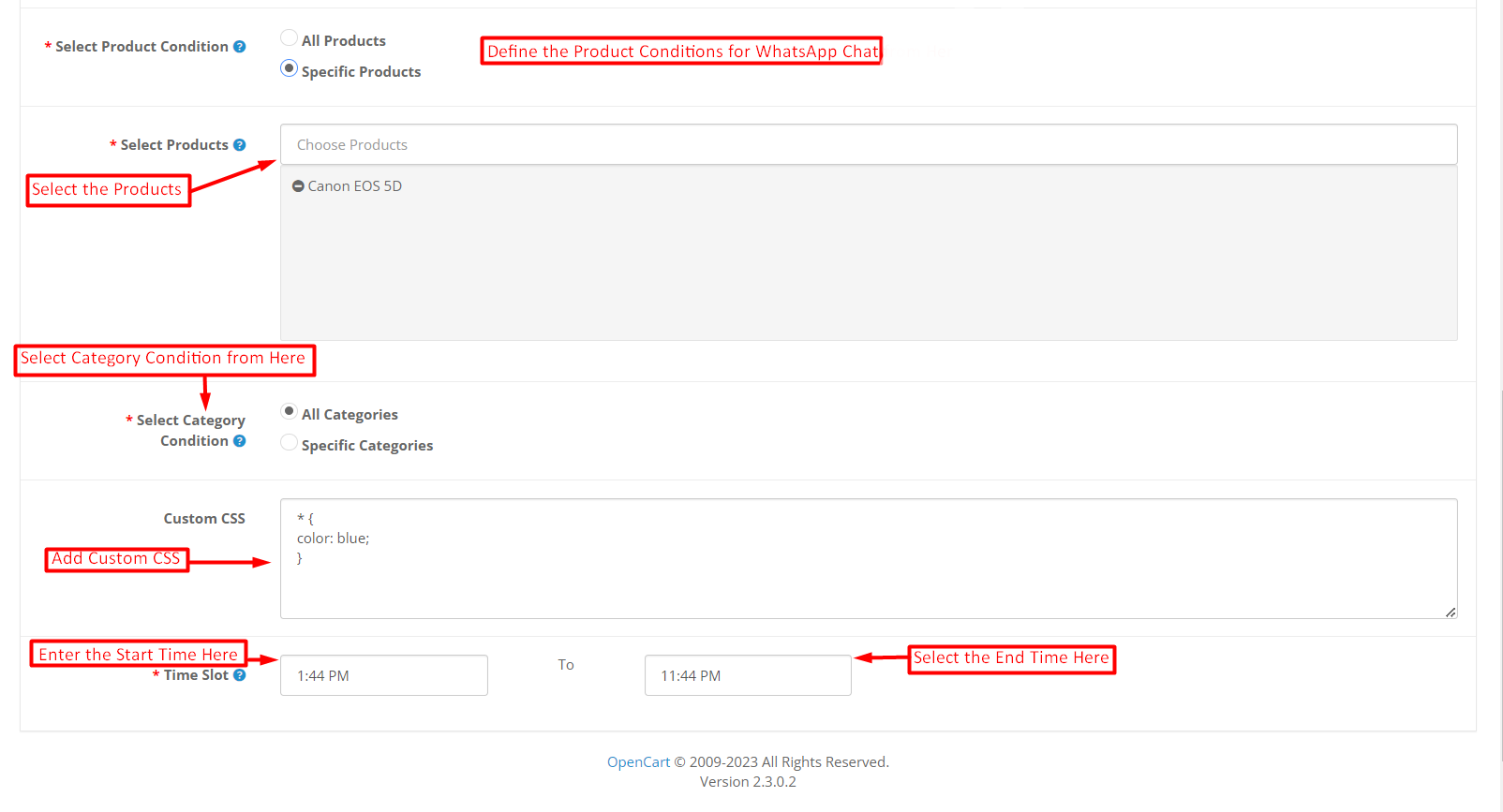
Select Product Condition: The store admin can choose the specific products for the WhatsApp chat option from here. If you want to show the chat option for all the products, you can select the “All Products” checkbox.

However, if you just want to show the WhatsApp chat option on some specific product pages, you can enter the name of the same in the shown field.

Select Category Condition: This option is provided for allowing the admins to choose if they just want to provide the WhatsApp chat option for specific categories or all categories.

If you want to show the WhatsApp Chat option for some specific categories only, you can enter the name in the provided fields.

Add Custom CSS: In this particular text field, the OpenCart store admin can custom CSS to modify the look and feel of the WhatsApp Chat icon.

Time Slot: We provide a time slot option in OpenCart WhatsApp Chat Extension. In the start and end fields shown in the above image, the admin can add shift starting and ending dates for the live chat agents.

6.0.0. Front End: OpenCart WhatsApp Chat Manager Plugin:

As we have discussed the easy to configurable back-end settings offered by OpenCart WhatsApp Live Chat Extension. After making the required configurations, the store admin can enable the customer support option on the storefront within no time.

Furthermore, you can also check out the module demo for checking the live front-end and back-end preview of the WhatsApp Chat Plugin for Opencart.

Moreover, in case you are having any queries or suggestions regarding the WhatsApp Chat Manager Plugin, you can also reach out to our support staff at support@knowband.com.


Knowband Introducing the New Opencart Pre-Order Extension!!

Knowband, a leading provider of innovative e-commerce solutions, is thrilled to announce the launch of the Opencart Pre-Order Extension. The OpenCart product pre-order is designed to empower online businesses with advanced pre-order functionality. Furthermore, the OpenCart advance order extension is set to revolutionize the way merchants manage and sell their products.

In today’s fiercely competitive e-commerce arena, maintaining a competitive edge is paramount. Following the same, The Opencart Pre-Order plugin allows online retailers to create a buzz around upcoming products. This further leads to generating early sales and ensures a seamless shopping experience for their customers.
By enabling pre-orders, businesses can increase product visibility, build anticipation, and maximize revenue potential.

Key Features of the Opencart Product Advance Booking Plugin:


Easy Integration: 

The extension seamlessly integrates with your existing Opencart store, enabling hassle-free setup and configuration. Moreover, you can create pre-orders using OpenCart Pre-order plugin on the go without having any coding skills.

Product Previews: 

Showcase upcoming products with attractive images, descriptions, and expected release dates to entice customers and create a sense of exclusivity.
Moreover, this will not only help the eCommerce admins to create a sense of urgency among customers. But also, it will lead to generating early sales even before the product launch.

Pre-Order Placement: 

Customers can conveniently place pre-orders for upcoming products, ensuring they don’t miss out on the latest releases. Moreover, they can also reserve their products by paying a small pre-order amount which the admin can set from the store back-end.

Inventory Management: 

Using the OpenCart Sell Out-of-Stock Products Plugin by Knowband the admins can effectively manage stock levels and automatically notify customers when pre-ordered products become available for purchase.

Flexible Payment Options: 

Offer customers the choice to pay upfront or during product release. Providing them with convenience and flexibility in purchasing their favorite products.

Customizable Labels: 

Personalize pre-order labels and messages to align with your brand identity and engage customers effectively. Furthermore, the store admins can specify the pre-order products by showing lucrative text labels on the pre-orders.

Order Tracking: 


Keep customers informed about the status of their pre-orders, from initial purchase to shipment and delivery. Moreover, we have tailored the OpenCart pre-order extension for sending regular mail updates to customers regarding pre-orders.


In the end:

Today’s rapidly evolving e-commerce environment necessitates creative solutions that empower businesses to boost sales. Enhance customer experiences, and maximize revenue potential.”
Knowband’s Opencart Pre-Order Plugin empowers merchants to tap into the power of pre-orders, building excitement, and anticipation among their customer base.

Whether you’re launching a new product or running a limited-edition release. This extension provides the necessary tools to streamline your pre-order process and boost customer engagement.

To learn more about the Opencart Pre-Order Extension and how it can benefit your online business, please visit the following link or contact our sales team at support@knowband.com.


About Knowband:

Knowband is a leading provider of cutting-edge e-commerce solutions, empowering businesses of all sizes to thrive in the digital realm. With a strong focus on innovation and customer satisfaction, Knowband offers a comprehensive suite of extensions and services to enhance online store functionality and drive success.
Moreover, along with OpenCart, Prestashop, WooCommerce, Magento, and Magento 2 plugins. We also offer custom eCommerce and Mobile App development services at very reasonable prices.


Knowband Launches OpenCart WhatsApp Chat Manager Plugin for Seamless Customer Communication!!

Knowband, a leading eCommerce plugin development company, has unveiled its latest innovation – the OpenCart WhatsApp Chat Extension. This powerful plugin aims to revolutionize customer communication for OpenCart store owners. Offering a seamless and convenient way to connect with customers through the popular messaging platform, WhatsApp.

In today’s highly competitive eCommerce landscape, effective customer communication plays a vital role in building trust and driving conversions. With Knowband’s OpenCart WhatsApp Chat Manager module, online store owners can now leverage the widespread popularity of WhatsApp. To provide personalized and real-time support to their customers.

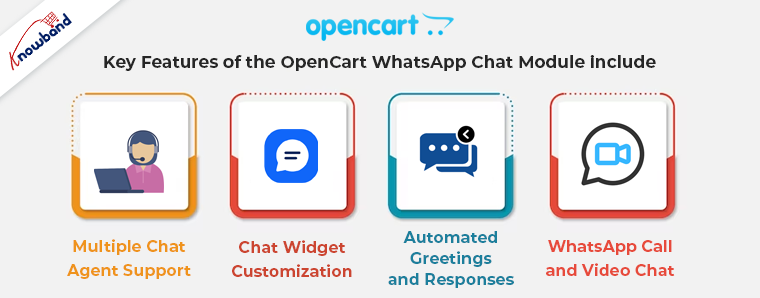
Key features of the OpenCart WhatsApp Chat module include:


Multiple Chat Agent Support: 

The plugin allows store owners to assign multiple chat agents to handle customer queries. Furthermore, OpenCart store admins can assign particular chat slots to different chat agents.
This enables efficient management of customer interactions, reducing response time and enhancing customer satisfaction.

Chat Widget Customization: 

Store owners can customize the appearance of WhatsApp chat widgets to align with their brand’s aesthetics. They can choose and add the WhatsApp chat support icon on the desired pages and products at their convenience.

Automated Greetings and Responses: 

The plugin offers automated greetings and responses to engage customers and handle frequently asked questions.

WhatsApp Call and Video Chat: 

The plugin empowers store owners to provide enhanced customer support by enabling WhatsApp call and video chat functionality. Customers can initiate voice or video calls directly from the chat widget, fostering a more personalized and interactive communication experience.

In the End:

“The Knowband OpenCart WhatsApp Live Chat Manager Plugin is designed to streamline customer communication for OpenCart store owners.”
Furthermore, we understand the importance of personalized and real-time support in driving customer satisfaction and loyalty. With this plugin, OpenCart merchants can leverage the popularity of WhatsApp and deliver exceptional customer experiences.

To learn more about the Knowband OpenCart WhatsApp Chat Manager Plugin and its features, you can also visit Knowband’s official website.

About Knowband:

Knowband is a leading eCommerce plugin development company that offers a wide range of plugins and modules for popular eCommerce platforms. Like OpenCart, Magento, Magento 2, PrestaShop, and WooCommerce. With a dedicated team of experts and a proven track record of delivering innovative solutions. Knowband is committed to empowering online businesses and enhancing the customer experience.
Furthermore, you can also reach out to us at support@knowband.com for more information and eCommerce queries.


Introducing Knowband OpenCart WhatsApp Live Chat Manager Plugin: Revolutionizing Customer Communication!!

In today’s highly competitive e-commerce landscape, effective customer communication is the key to success. Online businesses are constantly striving to provide personalized and instant support to their customers. And, one platform that has gained immense popularity is WhatsApp.
Recognizing the power of this messaging giant, at Knowband we proudly present the Knowband OpenCart WhatsApp Live Chat Manager Plugin. The OpenCart WhatsApp Customer chat module is specially designed for making customer support easier for the OpenCart store admins.

Unleashing the Power of WhatsApp for OpenCart Stores:

The Knowband OpenCart WhatsApp Live Chat Manager extension is an innovative solution designed to streamline customer communication. And, enhance user experience on OpenCart-powered online stores.
By seamlessly integrating WhatsApp into the website, this plugin empowers businesses to connect with their customers in real-time, nurture relationships, and drive conversions.

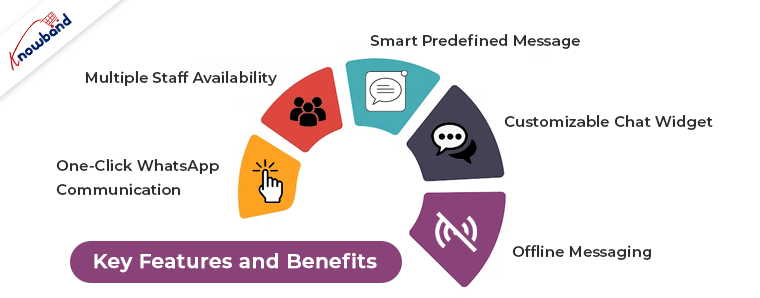
Key Features and Benefits:

Instant Chat: With the WhatsApp Live Chat feature, visitors can initiate real-time conversations directly from the website. Eliminating the need for traditional contact forms or email inquiries. Customers can instantly seek assistance, resolve queries, and get product recommendations, fostering a positive customer experience. Moreover, it will also help in decision-making further leading to enhanced sales.


One-Click WhatsApp Communication:

The OpenCart WhatsApp chat plugin enables a single click to start a conversation with the store’s WhatsApp number. Customers can easily reach out for support or inquiries, resulting in improved customer satisfaction.

Multiple Staff Availability:

The OpenCart WhatsApp Live Chat module provides the store admins with the option to add multiple chat agents for different timing slots.
Furthermore, the store admins can set the availability of the different chat agents to provide convenient chat support to the customers.

Smart Predefined Messages:

The plugin offers the ability to create predefined messages that can be used to greet customers. Provide quick responses to common queries, or offer promotional information. This feature saves time for both customers and support staff while maintaining consistent messaging across interactions.

Customizable Chat Widget:

The chat widget’s appearance can be easily customized, ensuring a seamless and integrated user experience. Businesses can choose the pages where they want to display the WhatsApp chat option and even can select some specific product pages where they want to provide WhatsApp chat support.

Offline Messaging:

Even when the support staff is unavailable, customers can leave messages through the chat widget. This feature ensures that no customer inquiry goes unanswered, improving customer satisfaction and building trust.


Easy Integration and Configuration:

Knowband’s OpenCart WhatsApp Chat Manager Extension is designed to be user-friendly and easy to install.
The step-by-step installation guide ensures a seamless integration process. Further, allowing businesses to quickly leverage the power of WhatsApp for customer communication.

Conclusion: Embrace the Future of Customer Communication:

In the era of instant messaging, businesses need to adapt and leverage platforms that customers are already using. With the Knowband OpenCart WhatsApp Live Chat Manager module, online stores can harness the power of WhatsApp to provide. Exceptional customer support, increase engagement and ultimately drive conversions.

By implementing the OpenCart WhatsApp chat messenger plugin, businesses can foster stronger customer relationships, and improve customer loyalty. And can gain a competitive edge in the market. Get the Knowband OpenCart WhatsApp Live Chat Manager Plugin today and unlock the true potential of WhatsApp for your online store.
Furthermore, you can also reach out to us at support@knowband.com for more information and custom module development services.


PrestaShop 8.4: The Ultimate E-commerce Solution

Introduction

In the rapidly evolving digital landscape, having a robust and feature-rich e-commerce platform is essential for businesses to succeed online. PrestaShop 8.4 is a cutting-edge e-commerce solution that offers a wide range of features and functionalities to empower online store owners. In this article, we will explore the benefits and key features of PrestaShop 8.4 and how it can help businesses thrive in the competitive online market.

Key Features of PrestaShop 8.4:

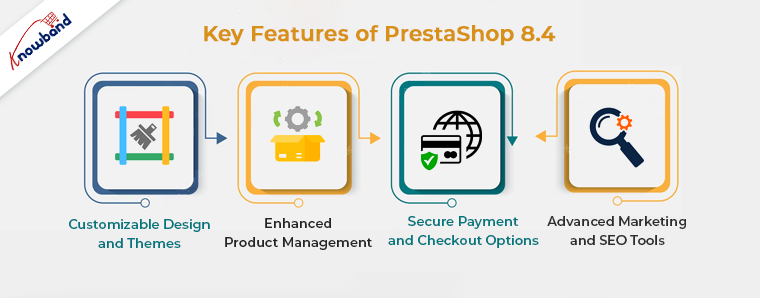
Customizable Design and Themes

PrestaShop 8.4 offers a vast library of customizable design templates and themes that enable store owners to create visually stunning and unique online stores. Hence, with its intuitive interface, users can easily customize the look and feel of their store to align with their brand identity, ensuring a seamless and immersive shopping experience for their customers.

Enhanced Product Management

Efficiently managing products is crucial for any e-commerce business, and PrestaShop 8.4 simplifies this task with its advanced product management features. Furthermore, store owners can effortlessly add, edit, and organize their product catalog, including details such as descriptions, prices, and stock levels. So, the platform also supports batch product import/export, saving valuable time and effort for businesses with extensive inventories.

Secure Payment and Checkout Options

With online security being a top concern for both businesses and customers, PrestaShop 8.4 provides a secure payment gateway integration. Hence, it supports a wide range of payment methods, including major credit cards, digital wallets, and even cryptocurrency, ensuring convenient and secure transactions. 

Additionally, the platform offers a streamlined checkout process, reducing cart abandonment rates and maximizing conversions.

Advanced Marketing and SEO Tools

PrestaShop 8.4 understands the importance of effective marketing and search engine optimization (SEO) for online businesses. Moreover, the platform offers a suite of marketing tools, such as promotional banners, discount codes, and cross-selling features, to attract and engage customers. 

Furthermore, PrestaShop 8.4 is designed with SEO best practices in mind, allowing businesses to optimize their store’s visibility in search engine results and drive organic traffic.

Frequently Asked Questions (FAQs)

Q: What is the minimum system requirement for installing PrestaShop 8.4?

A: PrestaShop 8.4 requires a web server with PHP 7.2 or higher, MySQL 5.7 or MariaDB 10.2 or higher, and Apache 2.4 or Nginx 1.10 or higher.

Q: Can I migrate my existing online store to PrestaShop 8.4?

A: Yes, PrestaShop 8.4 provides migration tools and services to help you seamlessly transfer your data from other e-commerce platforms.

Q: Is PrestaShop 8.4 mobile-friendly?

A: Absolutely! PrestaShop 8.4 incorporates a responsive design, ensuring optimal user experience across different devices, including smartphones and tablets.

Conclusion

In the competitive world of e-commerce, having a powerful and feature-rich platform like PrestaShop 8.4 can give businesses a significant edge. So, its customizable design options, enhanced product management capabilities, secure payment and checkout features, advanced marketing tools, and SEO optimization make it a comprehensive solution for online store owners. Whether you’re starting a new e-commerce venture or looking to migrate your existing store, PrestaShop 8.4 provides the tools and functionalities you need to succeed in the digital marketplace. Therefore, Embrace the power of PrestaShop 8.4 and unlock the full potential of your online business.

Remember, PrestaShop 8.4 is not just a name; it’s a game-changer for your e-commerce success!


Advantages of Prestashop Product Sticker and Label Module for Websites

In the world of e-commerce, standing out from the competition is crucial for success. One effective way to catch the attention of potential customers and highlight your products is by using product labels and stickers. So, if you’re using Prestashop as your e-commerce platform, you’re in luck! With the Prestashop Product Sticker and Label module, you can easily add eye-catching labels to your products. Let’s explore the advantages of this powerful addon and how it can benefit your online store.


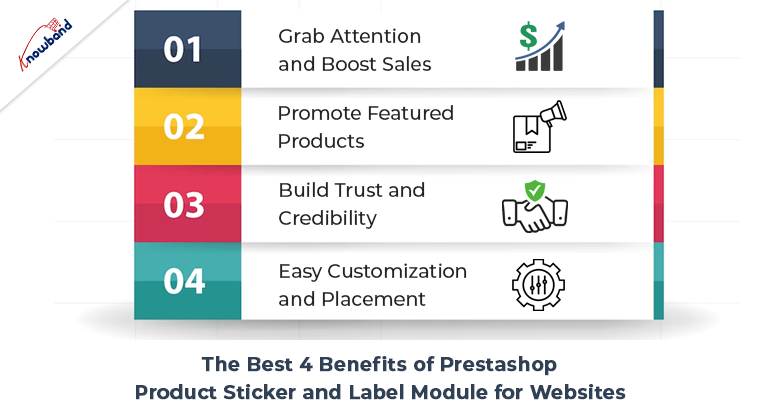
The Best 4 Benefits of Prestashop Product Sticker and Label Module for Websites:


Grab Attention and Boost Sales:

With the Prestashop product badge plugin, you can create visually appealing labels that instantly grab the attention of your website visitors. Therefore, these labels act as virtual stickers, showcasing various offers, discounts, new arrivals, best sellers, or any other promotional messages. By highlighting special offers and exclusive deals, you can encourage customers to make quick purchasing decisions, ultimately boosting your sales.


Promote Featured Products:

Highlighting your featured products is crucial to driving conversions. The Prestashop product sticker module allows you to easily mark specific products as “Featured” with a distinct label. Hence, this instantly communicates to customers that these products are recommended by your store and can create a sense of trust and reliability. By prominently displaying your top products, you can effectively increase their visibility and encourage customers to explore and purchase them.


Build Trust and Credibility:

Prestashop Product Label and Stickers module can play a vital role in building trust and credibility among your customers. By using labels such as “Best Seller” or “Top Rated,” you showcase the popularity and positive feedback your products have received. This helps instill confidence in potential buyers and encourages them to choose your products over competitors. The module allows you to display labels based on customer reviews or sales, giving your store an added level of authenticity.


Easy Customization and Placement:

The Prestashop product label extension offers a user-friendly interface that allows you to customize labels as per your requirements. You can choose from a range of pre-designed templates or create your unique labels. Additionally, the module provides flexible placement options, allowing you to position the labels precisely where you want them on your product images. This ensures seamless integration with your store’s design and enhances the overall visual appeal.


Conclusion:

Further, incorporating the Prestashop label and badge module into your Prestashop store can significantly enhance its visual appeal and increase customer engagement.  Moreover, with the Prestashop Product Label and Stickers module, you have a powerful tool at your disposal to grab attention, promote featured products, build trust, and customize labels as per your needs. So take advantage of this addon to stand out from the crowd, boost your sales, and create a memorable shopping experience for your customers.

👉Explore the Module with Our Video Guide