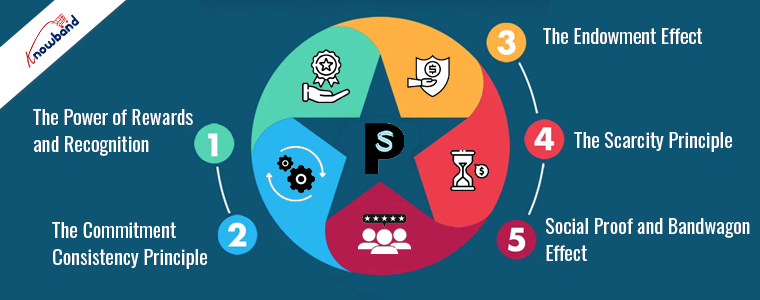
In the competitive world of eCommerce, retaining customers is as crucial as acquiring new ones. The reason behind this is that the existing customers provide better ROI if you are using the right tactics to get them back in the store.
Therefore, one effective strategy for boosting customer retention is implementing a loyalty program. Specifically, the PrestaShop Loyalty Point Module by Knowband stands out as a powerful tool to keep your customers coming back. But why do loyalty programs work? What psychological principles make them so effective? Let’s dive into the psychology behind loyalty programs and see why Knowband’s PrestaShop Loyalty Points addon is a game-changer for online businesses.
The Power of Rewards and Recognition:
Humans are inherently driven by rewards. Furthermore, this concept is deeply rooted in psychology, where positive reinforcement is known to encourage specific behaviors. On the other hand, the PrestaShop reward system addon taps into this principle by offering customers points for their purchases. These points can be redeemed for discounts, which provide immediate gratification and reinforce the buying behavior.
Furthermore, when the customers receive points for their purchases, it creates a sense of accomplishment and recognition. Moreover, they feel valued by the business, which enhances their overall shopping experience. This feeling of being rewarded for their loyalty encourages them to return and continue shopping with your store.
The Commitment-Consistency Principle:
The commitment-consistency principle is a powerful psychological concept that explains why people strive to act consistently with their commitments. When customers join a loyalty program, such as the PrestaShop Loyalty Points plugin, they are making a commitment to your brand. This initial commitment makes them more likely to continue shopping with you to remain consistent with their decision.
On top of that, Knowband’s PrestaShop loyalty discount module leverages this principle by encouraging repeat purchases. Once customers start accumulating points, they are more likely to return to your store to continue earning and using those points. Thus, this consistency in their behavior leads to increased customer retention and higher lifetime value.
Knowband’s PrestaShop Loyalty Point Module
Boost customer loyalty with our Prestashop Loyalty Points Addon, offering rewards for repeat purchases and encouraging customer retention.
The endowment effect is a psychological phenomenon where people value something more highly simply because they own it. When customers earn points through the Prestashop purchase points addon, these points become an asset they own. Therefore, the more points they accumulate, the more valuable they perceive them to be.
This perception of value makes customers more inclined to return to your store to use their points. The PrestaShop Loyalty Points system takes advantage of the endowment effect by creating a sense of ownership and value around the loyalty points. Thus, as a result, customers are more likely to stay loyal to your brand and continue making purchases to maximize the value of their points.
The Scarcity Principle:
By offering limited-time promotions or bonus points through the Prestashop Loyalty points and discount addon, you can create a sense of urgency among your customers. Furthermore, this urgency can drive immediate purchases as customers rush to take advantage of the exclusive offers.
The Loyalty points module for Prestashop allows you to implement such promotions effortlessly. Thus, by creating a sense of scarcity, you can encourage customers to act quickly and make more frequent purchases, boosting your sales and enhancing customer loyalty.
Social Proof and Bandwagon Effect:
When customers see others participating in your loyalty program and earning rewards, they are more likely to join in. Thus, the bandwagon effect further amplifies this behavior, where the popularity of the loyalty program encourages more customers to participate.
By showcasing testimonials or user-generated content featuring satisfied customers using the Loyalty points Addon for Prestashop, you can leverage social proof to attract more participants. This not only boosts engagement with your loyalty program but also enhances the overall perception of your brand.
Conclusion!
Understanding the psychology behind loyalty programs can help you effectively implement and optimize them for your eCommerce store. The PrestaShop Loyalty Point Module is designed to leverage these psychological principles, making it a powerful tool for boosting customer retention and driving sales.
Moreover, by tapping into the power of rewards and recognition, the commitment-consistency principle, the endowment effect, the scarcity principle, and social proof, the Prestashop Loyalty Points addon creates a compelling reason for customers to stay loyal to your brand. Implementing this addon can transform your customer retention strategy, ensuring that your customers keep coming back for more.
In the vast world of eCommerce, understanding the psychology behind customer behavior is crucial for achieving success. With millions of online stores competing for attention, knowing how to influence and guide your customers can make all the difference. Thus, in this article, we’ll delve into the fascinating world of consumer psychology and provide actionable strategies to help you boost conversions and sales.
The Power of Perception:
Visual Appeal:
The first impression matters, and it’s often visual. Ensure your website design is clean, aesthetically pleasing, and aligned with your brand. Furthermore, the Colors, fonts, and imagery also play a significant role in shaping the perception of your brand.
Thus, always make navigation and information retrieval effortless. Customers should quickly find what they’re looking for without confusion. Simplify the purchasing process to reduce friction. Moreover, to provide your customers with relevancy in exploring your website, you should always include a sitemap.
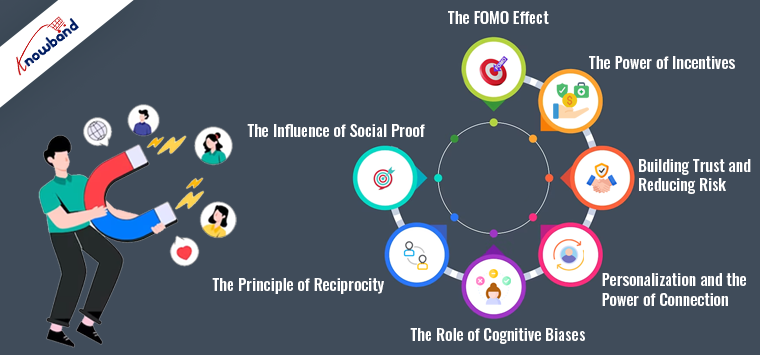
The Influence of Social Proof:
Reviews and Testimonials:
Positive reviews and testimonials are potent social proof. Thus, you can encourage satisfied customers to leave feedback and prominently display these on your product pages. Honest opinions from real people build trust. And guess what, people are well aware of what’s fake and what’s real.
Scarcity and Urgency:
Create a sense of urgency by showcasing limited-time offers or low stock levels. When customers feel like they might miss out, they’re more likely to make a purchase.
The Principle of Reciprocity:
As an eCommerce store admin, you should always provide valuable content, such as informative blog posts, tutorials, or free resources. Because, when customers receive something valuable without an immediate expectation of return, they are more likely to reciprocate by making a purchase.
The Role of Cognitive Biases:
Anchoring:
Use anchor prices to influence perception. Display the original price alongside a discounted price to make the discount seem more significant.
Furthermore, you can also highlight what customers might lose by not making a purchase. For instance, “Don’t miss out on this exclusive offer!” triggers loss aversion.
Personalization and the Power of Connection!
Personalized Recommendations:
Analyze customer behavior and use it to suggest products they might like. Personalization creates a sense of connection and enhances the shopping experience.
You can also share your brand’s story and values. Create an emotional connection with customers by showcasing how your products can improve their lives.
Building Trust and Reducing Risk!
Security and privacy are the two most important components of a process. The following thumb rule also applies while shopping online. Thus, as an eCommerce store owner, you can invest in robust security measures to protect customer data.
Also, a flexible return policy reduces the perceived risk of making a purchase. Make the return process hassle-free to build trust.
The Power of Incentives!
Loyalty Programs:
Reward loyal customers with exclusive discounts or early access to sales. Loyalty programs foster a feeling of belongingness while also stimulating recurring purchases. Furthermore, if you are a Prestashop or Opencart store owner, you can also check Knowband’s Prestashop Loyalty points addon to incentivize your customers with lucrative offerings and the User manual of the Prestashop Loyalty points system.
Furthermore, set a minimum purchase amount for free shipping. Customers are more likely to add items to their cart to reach that threshold.
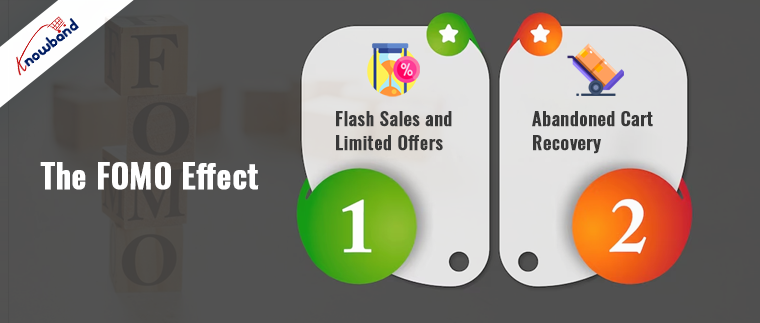
The FOMO Effect:
Flash Sales and Limited Offers:
Announce flash sales or limited-time offers through email and social media. These create a sense of urgency and fear of missing out (FOMO).
Abandoned Cart Recovery:
Implement abandoned cart recovery emails to remind customers of the products they left behind. Offer an incentive to encourage them to complete the purchase.
Conclusion!
Understanding the psychology of eCommerce is a powerful tool for influencing customer behavior. By leveraging principles such as perception, social proof, reciprocity, cognitive biases, personalization, trust-building, incentives, and FOMO, you can create a shopping experience that resonates with your customers and drives conversions. Keep in mind that these strategies should align with your brand and values, providing genuine value to your customers and building lasting relationships.
Furthermore, you can also reach out to our support staff at support@knowband.com for more amazing eCommerce tips.
The PrestaShop Loyalty Point Program will engage store users to increase sales by assigning them a reward point. This plugin has complete admin management so that the reward points of buyers can be easily managed by the admin. This will allow for a point-based loyalty program that is a great way to earn points for frequent visitors.
The loyalty program can be used in digital marketing. You can share emails with your customers about the points they have earned in previous purchases and how they can redeem them. Also, you can incentivize your lost customers by adding some points in their wallets and the eligibility criteria.
All the marketing ideas and cart rules of the PrestaShop Loyalty Point Program are highlighted in this article.
Let’s dive into it.
Why you need a PrestaShop Loyalty Point Program?
Loyalty Point Program the term itself suggests that the points are offered to loyal ones. The customer who visits your store or makes a purchase from your store earns some points that can be converted into currency (as per the rules defined by the store manager) and used in the next purchase. The PrestaShop loyalty point system is a one-stop solution to increase sales by improved conversion and higher retention advantages. Some of the benefits are listed below:
Increased cart value
More conversions
Maximize repeat sales
Grow your list of email subscribers
Flexible cart rules to reward customers and visitors
The loyalty points can be offered to all your visitors and existing customers as you wanted. You can plan your policies and offer such rewards as per your defined rules. It is good to make some cart rules that increase average cart value, product-wise rules to increase the sale of particular items, or according to weight and shipping choices they make.
Provide them with clear guidelines. Let them earn points and you earn their loyalty!
Marketing ideas for new visitors
There are more possibilities than ever to boost website traffic and visits to your PrestaShop store with the evolution of digital marketing. A loyalty program holds the power to influence visitors to take the action. The action here means clicking on the link or sharing an email address to claim the reward. The emails collected can be used later for marketing purposes.
How to offer Loyalty Points to New Visitors?
On the landing page
The PrestaShop Loyalty Point program allows the store manager to offer loyalty points to every new visitor. This entices the visitor and increases customer engagement in your store. You can promote this offer on your social media handles and grab the attention of the users.
Such offers always work!
On first purchase
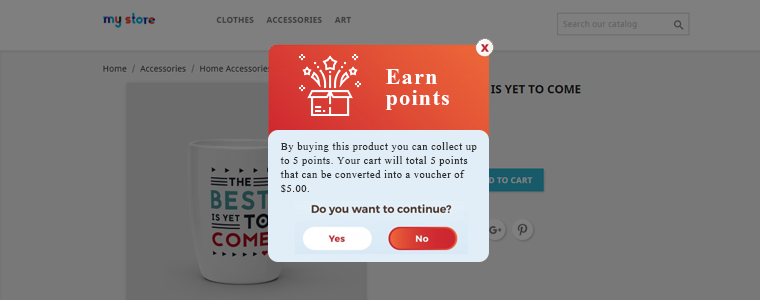
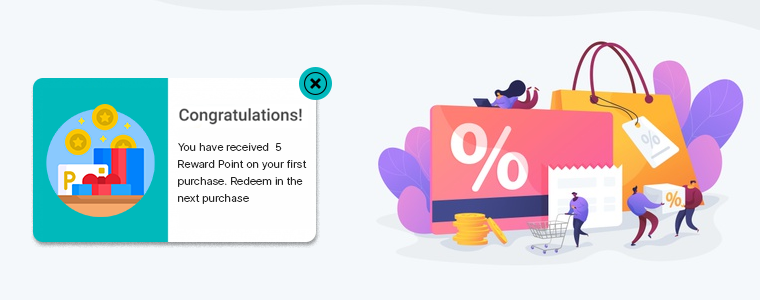
Also, the Loyalty Point Program can be used to reward customers on their first purchase. You can use a pop-up showing the program details and once they make the purchase, reward them with some points that they can redeem in the next purchase as per the rules defined.
Offering rewards on visits and first purchase are great tactics that you can apply to your store and increase the conversion rate remarkably.
How to benefit existing customers with Reward Points?
There are two types of customers that you need to take care of. First, the loyal -who always shops from your store and second- who used to shop from your store but didn’t show up in a long time. Since they have purchased from your store you already have their user data. Why put that data in junk when you can use it for marketing and boost sales?
Here is what you can do!
Reward on every purchase they make
Loyal ones are the best customers you have. Your competitors are always working hard to snatch them so, just make sure to keep them with you in the long run. You can incentivize your loyal customers and give them reward points on each purchase.
But, some customers shop once and never come back? Maybe they are not happy with your services or they might forget that you exist. Can you do something about it? Of course! You can.
Send an email and remind them that they are losing their loyalty points. You can add the timer with the email or you can share cart details, total earned points, and details to redeem it.
Add points to their wallet
Another way to get them back is by adding some loyalty points to their wallet. This maximizes repeat sales and brings back your potential customers.
Two ways you can tell them that they have earned loyalty points:
Notify with push notification
Via email
How and when you can offer loyalty points
The cart rules defined here underneath will possibly boost your eCommerce sales and increases the average cart value. Some of the best ways to define the rules are:
· On the total cart amount
Give loyalty points to the client for spending an amount above the amount mentioned. For instance, if customer shops for more than $20, you can give 10 loyalty points. Now let’s say if a customer’s cart total is $18, he or she will possibly add $3 more to take the total cart over $20 to gain 10 loyalty points.
· On the product quantity
Provide consumers with reward points after they shop for the quantity of product listed. Suppose you sell some points of loyalty for the purchase of 2 items. And if a customer comes to your shop to buy a single item, you can ask them to add one more item to collect loyalty points.
· On the particular payment method
Provide loyalty points with a PrestaShop Loyalty Points program when a customer purchases the defined payment process. If you want users to choose particular payment methods then this is the way to make them do.
· On the specific shipping service
Provide loyalty points when a customer selects the shipping service mentioned.
· Based on the product weight
To gain loyalty points, define what the total weight (in grams) of the goods should be.
· On selected products and categories
If you have products that are stocked in your inventory for several days or months then this is the chance. You should note the certain items for which the loyalty points are to be issued. Select a category and only goods falling under that category will be granted loyalty points.
Conclusion
The loyalty point programs are used by almost all organizations whether they are into eCommerce or banking. PrestaShop Loyalty Point Program developed by KnowBand provides you with several alluring functionalities that you can use in digital marketing campaigns.
KnowBand has a solution for all the eCommerce problems and has several modules that can bring back your lost sales. Do visit us or drop a comment below if you find this article helpful.
What are Loyalty Programs? Why have they become an important element for online businesses? What are the benefits of customer loyalty programs? How do loyalty programs work?
If you have these questions running through your mind, you have landed at the right place to get an answer to all these questions. Let’s begin.
When the eCommerce industry was less crowded and people had limited options to shop online, Brands did not use to be much concerned about losing customers. Since the choices were few, people used to shop from the same brand from which they shopped earlier.
But today, when the eCommerce sector has hugely expanded, people have countless options to shop from. This led to brands losing out customers to their competitors, and hence loyalty programs came into existence.
What is a Loyalty Program?
A Loyalty Program is a marketing strategy used by Brands where they reward incentives or loyalty points to the shoppers every time they purchase from their website/store. The points are awarded so that the customer continues to shop from the same brand in his/her future purchases.
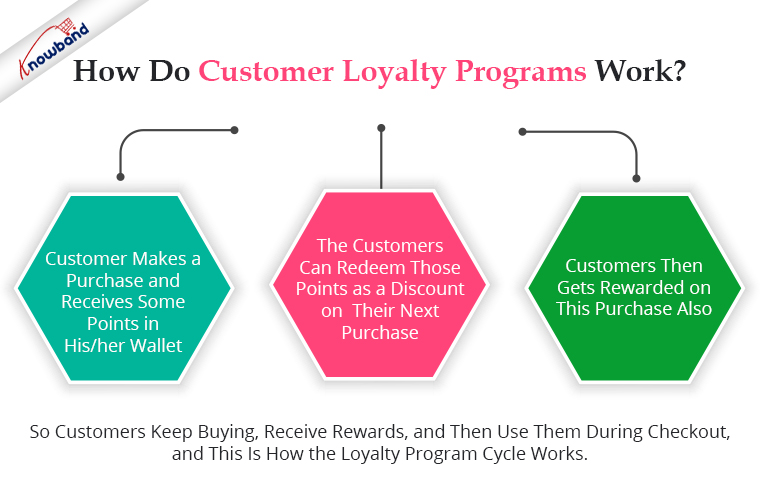
To begin with, the customer makes a purchase and receives some points in his/her wallet. It is a gesture by a Brand to thank customers for choosing their brand to shop for.
Upon receiving loyalty points, the customers can redeem those points as a discount on their next purchase.
What’s exciting about customer loyalty programs is that it is a continuous cycle where customers get rewarded for every purchase.
So customers keep buying, receive rewards, and then use them during checkout, and this is how the loyalty program cycle works.
The types of loyalty programs vary from business to business but they all have their focus centred around one purpose- Making customers loyal to the brand or in short, building customer loyalty.
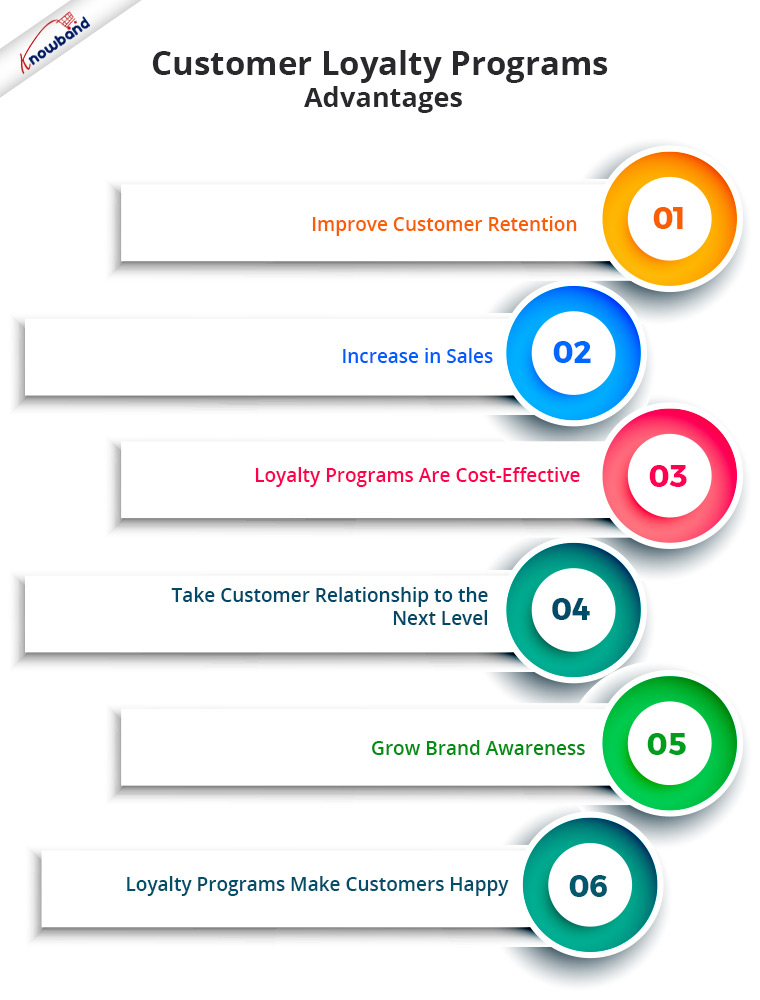
A loyalty program offers numerous benefits. In this article, I have put forward the top 6 benefits of loyalty programs for your online business.
1. Improve Customer Retention
The first and foremost benefit of a loyalty program is it helps you improve customer retention. I mean, every loyalty program has one primary motive, i.e. to retain customers, and they do make one of the best and most effective customer retention strategies.
Did you know around 60% of the retailers find customer retention their biggest obstacle? Loyalty Programs eliminate that hurdle to a certain extent.
2. Increase in Sales
Increased sales are the next advantage of loyalty programmes. So, loyalty programs are highly effective in boosting your eCommerce revenue. Offering loyalty points to a customer for buying products ensures repeat purchases and helps you win customer loyalty over time.
Once you win their loyalty, they will be likely to put more trust in your brand and prefer it over your competitors. And once they become your loyal customers, your sales graph would often remain high.
What if I tell you that existing customers contribute to 65% of a company’s business? I guess this is enough to make you understand the importance of customer loyalty programs.
Retaining existing customers is comparatively less expensive than acquiring new ones. The credibility that you have built with your existing customers would have taken you a lot of effort, time and money. To turn a new customer into a loyal customer would require the same commitment.
But your existing customers have been through your journey, hence, the expense to persuade them for regular purchases is less than what would be required to influence new customers.
Research says acquiring new customers costs 5 times more than retaining the existing ones.
4. Take Customer Relationships to the Next Level
To grow as a brand requires a healthy relationship with customers, and Loyalty programs help you build a strong bond with your customers.
76% of consumers think that Loyalty programs are a part of their relationship with brands. By getting rewards or loyalty points for making a purchase, customers feel more attracted and emotionally attached to your brand and prefer it as their go-to option for online shopping.
Value your customers, and treat them special. Make them feel that they are important and you want them to return to your store again. Build a personal connection through your loyalty programs.
5. Grow Brand Awareness
Adding to the benefits of customer loyalty programs is they boost your Brand Awareness.
If a customer receives loyalty points on a purchase, he or she will likely suggest your brand to his/her friends, family, colleagues or relatives. Those customers are what we call Brand Advocates who do word of mouth for your brand and bring you, new customers. So we can say that customer loyalty programs are effective in customer acquisition as well.
This gets your brand noticed. More and more people visit your store and look to buy from your brand.
Customer happiness and fulfilment are one things that customer loyalty programmes promise. Any consumer would adore getting anything in return for their buy.
And customers would also appreciate you for this and will have more liking towards your brand. It reflects that you not only see them as one-time customers but want to maintain a healthy relationship with them in the future as well.
Loyalty Points module by KnowBand
If you are also looking to set up a loyalty program for your eCommerce business, our Loyalty Points module will help you do so efficiently. It not only helps you with customer retention but also provides you with an opportunity to acquire new customers. How?
Well, the Loyalty Points module lets you reward a joining bonus to new users when they sign-up on your website and when a user makes a purchase. Customers can use loyalty points in the form of a discount voucher.
This is a feature-packed module that lets you define several conditions for a customer to earn loyalty points, for example, when a user has shopped for a certain amount or a certain quantity, etc. Simply expressed, a user will only be qualified to collect loyalty points if they meet the criteria established by the store.
To make things more interesting, you can surprise your customers by crediting loyalty points in their store wallets anytime. Knowband offers the Loyalty Points module for PrestaShop, OpenCart and Magento 2. Check out the module to know its complete features and benefits-
Over to You
More than 80% of online shoppers said that loyalty programs encourage them to continue purchasing from certain brands. Therefore, you simply cannot overlook the benefits of loyalty programs.
Your competitors, somewhere, are taking away your potential customers from a loyalty program scheme. It’s high time that you have a similar program too. Do not overthink what your competitors are doing. Focus on what you can do best to motivate your customers to remain loyal.
I Hope, this information that I shared with you made you understand the importance of customer loyalty programs. If you would like to add something to this article, feel free to leave a comment below. For any assistance or queries regarding the module, you can contact us at support@knowband.com
Improve the conversion rates of your store with the help of customer reward system. Integrate Knowband’s Prestashop Loyalty Points addon at your store that grants loyalty points to your customer upon creating a new account on the store, placing an order for a particular product or a specific product in the category and other events. The loyalty points can be converted to loyalty discount coupons by the customers during their next purchase from the store. This Prestashop Loyalty points and discount addon helps in increasing customer retention and reorders letting customers to collect more & more reward points which they can redeem during future orders. Thus Prestashop Loyalty points system implements a customizable reward and discount scheme at your store to encourage customer orders and signups.
1.1 Striking Features of Prestashop Loyalty Points Module
Prestashop Loyalty Points addon is highly customizable plugin with no core changes required. You can define as many loyalty points rule for your eCommerce store and award loyalty based discount vouchers to your customer. Lets quickly check different features offered by this Prestashop Loyalty points and discount addon.
Prestashop Loyalty points system grants loyalty points to your customers for placing an order with specific cart value, creating an account , ordering a certain product etc. The loyalty points are defined specific for different rules.
Prestashop Loyalty reward points can be offered manually or automatically to the customers based on their cart value, product selection or site activity.
Prestashop purchase points addon allows an option to set order status when the loyalty points are added to the customer account.
With Prestashop Loyalty points and discount addon, you can set the order status when the loyalty points assigned to any customer are automatically cancelled.
With this Loyalty points module, you can set the discount equivalent to a single loyalty point. This discount value can be set in any desired currency.
Prestashop Loyalty points addon gives an option to set minimum cart amount to be eligible to apply loyalty discount coupon.
The tax over Prestashop loyalty discount coupons can be enabled or disabled from the backend.
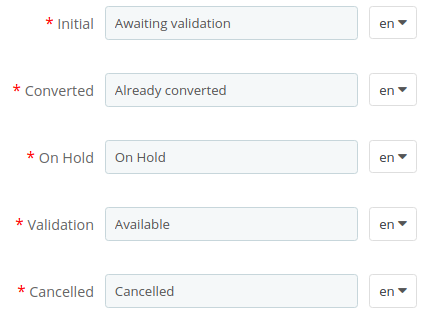
Loyalty points module for Prestashop allows you to set various progression names in multiple languages.
Prestashop Loyalty Points addon lets you create unlimited loyalty points rules based on customer’s Cart, Product or Behavior.
With this loyalty point module, you can set the title, description, number of loyalty points, start date, end date and validity for each rule.
You can modify, enable, disable or delete the existing rules from the back-office of Reward points module.
The status and detailed history for Prestashop loyalty discount coupons can be viewed at the backend.
With Prestashop customer loyalty system, you can easily get into the details of loyalty points earned by the customers of store.
The different email sent for points credit, points cancellation and points redemption can be modified from the back-office of this Prestashop Loyalty reward points module.
Prestashop Loyalty points system is simple to enable or disable from back-office interface.
Prestashop loyalty discount module is multi-lingual compatible.
1.2 Technology for Development
Language: PHP Frame Work: PrestaShop
2.0 Installation Guide for Prestashop Loyalty Points and Discount Addon
You can follow these simple steps for installing the Prestashop Loyalty Points addon on your eCommerce store:
1. Firstly, download the addon package from the Knowband store.
2. You will get a zipped file containing the source code and user manual. Unzip the complete package in the root directory of your Prestashop store through FTP manager (like Filezilla or WinSCP – download here: https://filezilla-project.org/). You’ll find the files and folders as shown in the image below:
3. The Prestashop Loyalty Point plugin is all set to be installed in the store. Go to the Store Admin and then to ‘Modules and Services’.
4. Click on the “Install” button just next to your module. It would show a pop-up for your confirmation. Click on “Proceed with the installation” option. This step will install the module and show notification – “Module(s) installed successfully”.
3.0 Admin Interface of PrestaShop Purchase Points Addon
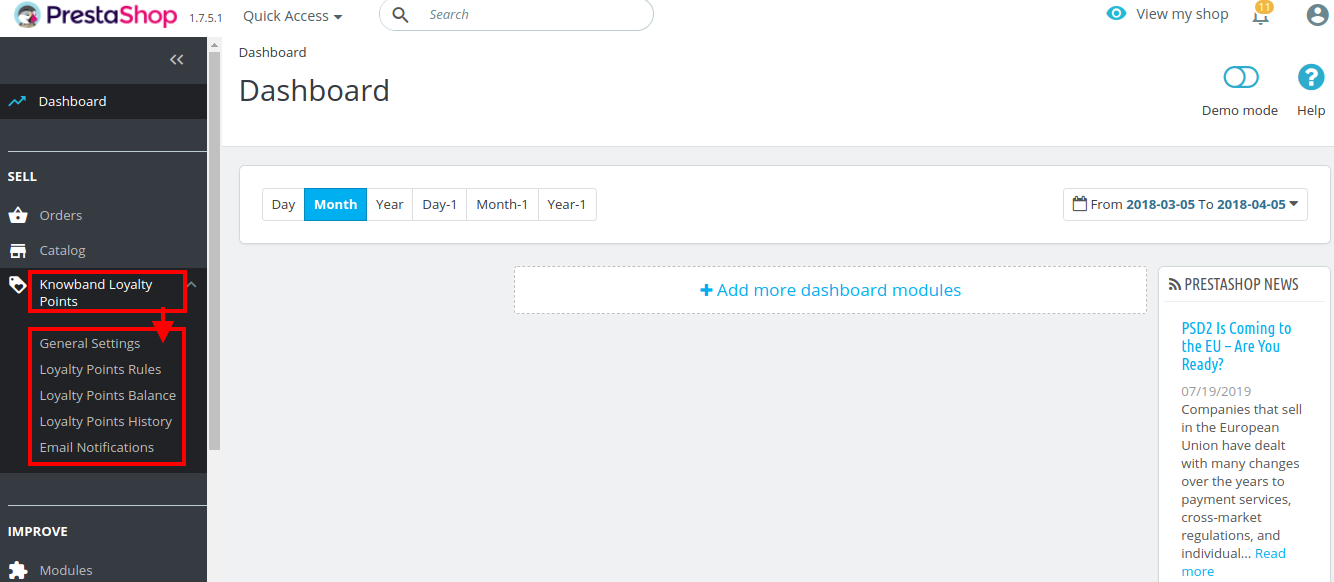
Just after successful installation of Prestashop Loyalty Points addon at your website, you can create and apply as many loyalty points rules for your store. You can grant loyalty points to your customers manually or automatically based on various criteria. In the admin panel or dashboard, click on “Knowband Loyalty Points”. It will list you various configuration tabs as shown in the given screenshot.
Here, in this interface of Prestashop Loyalty points system, you will see five sub sections under Loyalty Points module.
General Settings
Loyalty Points Rules
Loyalty Points Balance
Loyalty Points History
Email Notifications
Each section of this Prestashop Loyalty points and discount addon has been discussed below.
3.1 General Settings
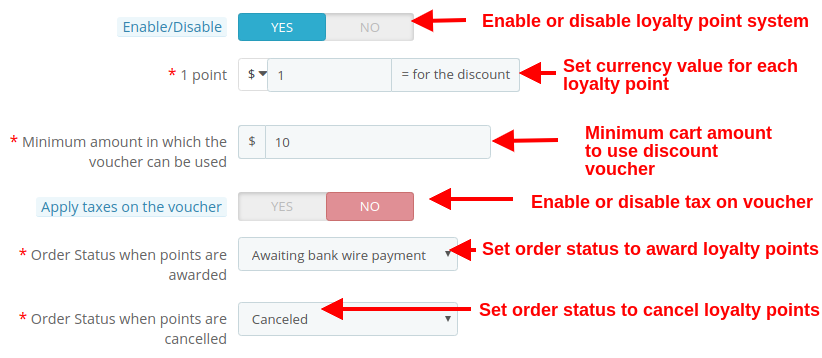
Under the general settings of Loyalty points module for Prestashop, you can perform the basic settings for the reward points system.
Enable/Disable: This option fully enables or disables the loyalty point system for the store.
1 Point: This option sets the currency value equivalent to each loyalty point. You can set this amount in any selected currency.
Minimum amount in which the voucher can be used: This option sets the minimum cart amount over which the coupon can be applied.
Apply taxes on the voucher: This option will enable or disable the taxes over the discount voucher.
Order status when points are awarded: This option sets the order status when the loyalty points are awarded.
Order status when points are cancelled: This option sets the order status when these loyalty points are cancelled.
As shown in the below screenshot, you can set the names for various loyalty points progression. Theses names are applicable to complete module settings.
3.2 Loyalty Points Rule
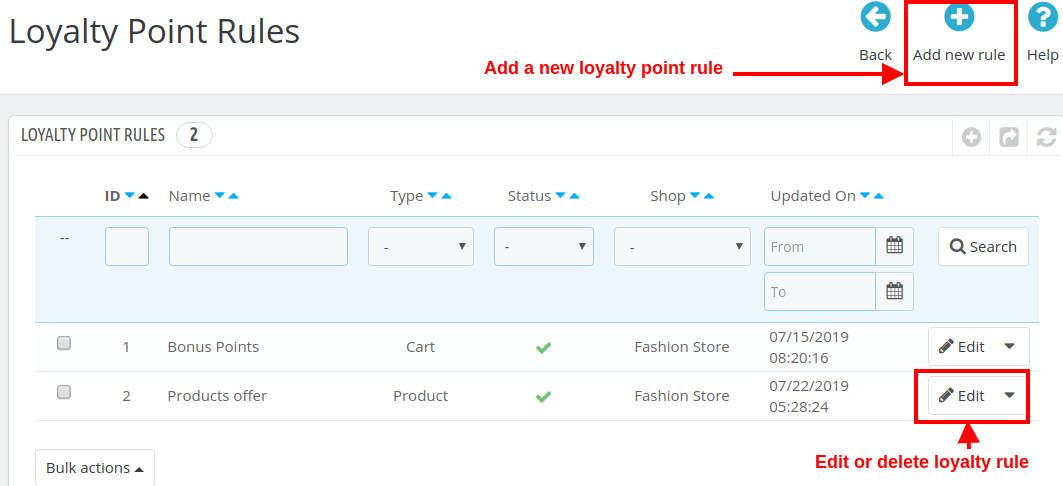
Under this section of Prestashop purchase points addon, you can create multiple loyalty points rule based on various customer activity. Each rule can be modified, enabled, disabled or deleted as per site requirements.
The above screen shows the list of existing loyalty point rules at your store. These can be modified, deleted or you can create a new rule as discussed below.
To create a new loyalty point rule for your store, click on the “Add new Rule” button at the top right screen. Initially, it will only show you the “Configuration” tab. Once you will save the Configuration options, it will show you the next two tabs: “Conditions” and “Notifications”.
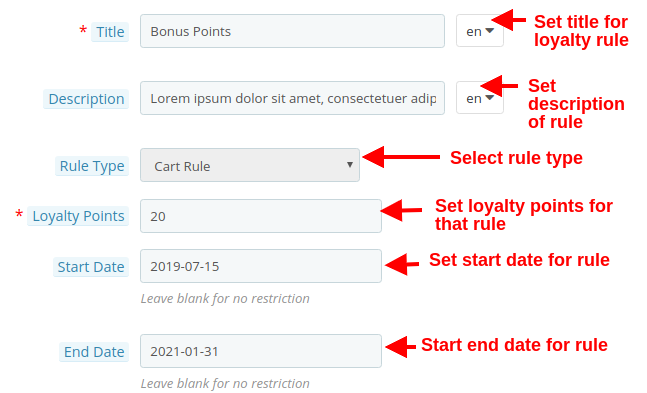
Following options are listed under the “Configuration” tab of new rule.
1. Configuration
Title: This option sets the title for the loyalty point rule.
Description: This option allows you to set a small description of the rule.
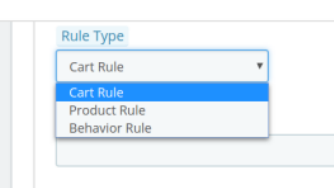
Rule Type: Using this option, you can set the rule type out of three options as Cart Rule, Product Rule, or Behavior Rule as shown below.
Loyalty Points: Using this option, you can set the number of loyalty points for this selected rule.
Start Date: This option defines the start date for the rule.
End Date: This option defines the end date for the rule.
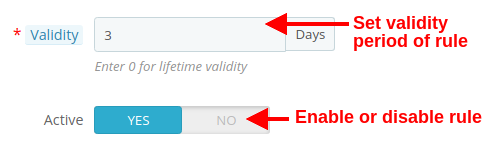
Validity: This option will set the validity period of the loyalty points (in days). If set to 0, the loyalty points has lifetime validity.
Active: Enable or disable the rule using this option.
2. Conditions
For the selected rule type, you can select the rule conditions as shown below.
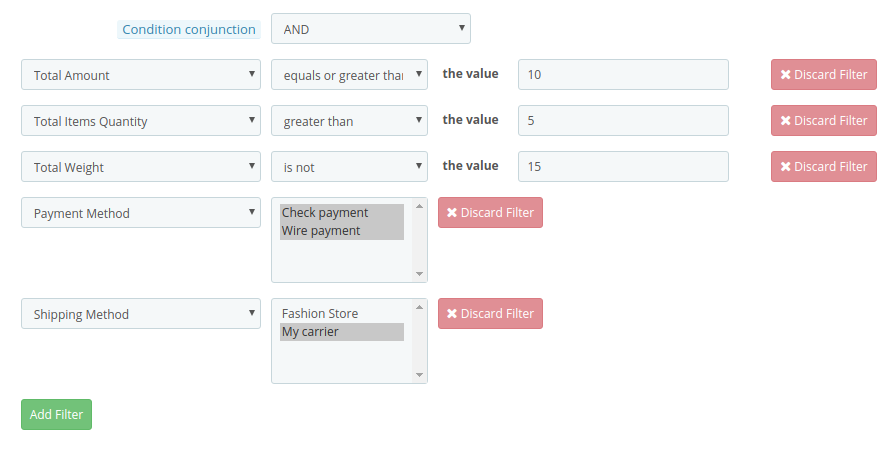
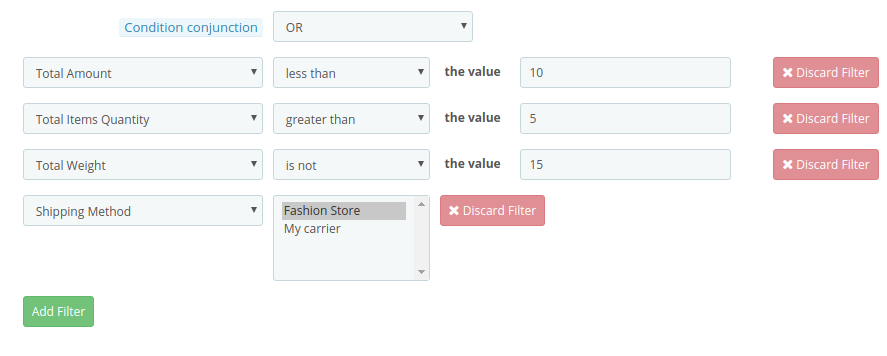
Condition Conjunction: This option will select the conjunction type as “OR” or “AND”.
A) Conditions for Cart Rule
You can create any type of rule using conjunctions: “AND” & “OR”
Admin can apply conditions on the basis of Total Amount, Total Items quantity, Total weight, Payment Method, Shipping Method.
Below are the examples of the rules that can be created using these conditions:
1.This rule works when (total amount >= 10) and (total items quantity > 5) and (total weight ≠ 15) and (payment method = check/wire) and (shipping method = my carrier) are all applicable to customer’s cart. To get specific points, all conditions should be TRUE. (Refer below screenshot)
2.This rule works when (total amount < 10) or (total items quantity > 5) or (total weight ≠ 15) or (shipping method = Fashion store/my carrier) is applicable to customer’s cart. To get specific points, any one condition should be TRUE. (Refer below screenshot)
Similarly, you can create other rules as well with different filters and values.
B) Conditions for Product Rule
You can create any type of rule using conjunctions: “AND” & “OR”
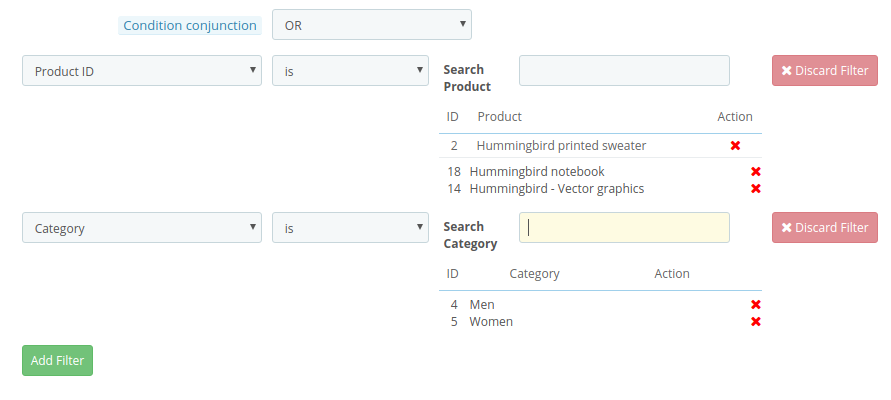
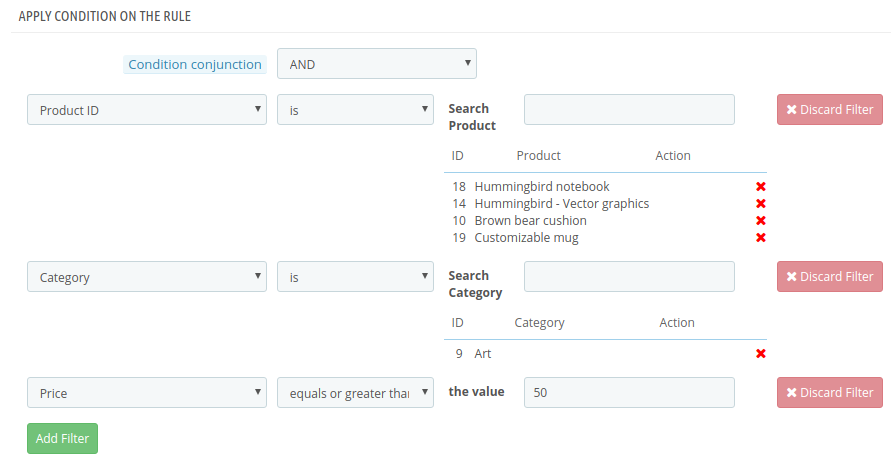
Admin can apply conditions on the basis of Product ID, Category, Price.
Below are the examples of the rules that can be created using these conditions:
1.This rule works when (product ID is 2/18/14) or (category is 4/5) is TRUE. To get specific points, any one condition should be TRUE. (Refer below screenshot)
2.This rule works when (product ID is 2/18/14) and (category is 4/5) and (price >= 50) is TRUE. To get specific points, all the conditions should be TRUE. (Refer below screenshot)
Similarly, you can create other rules as well with different filters and values.
C) Conditions for Behavior Rule
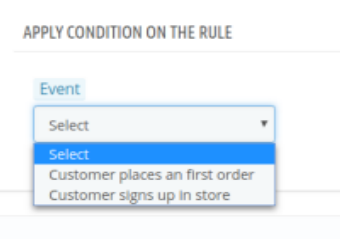
Admin can apply condition on the basis of customer’s sign up and customer’s first order.
1. First Order – The Loyalty points will be granted to the customers when they place their first order on the store.
2. Sign Up – The Loyalty points will be granted to the customers when they will create an account on the store.
3. Notifications
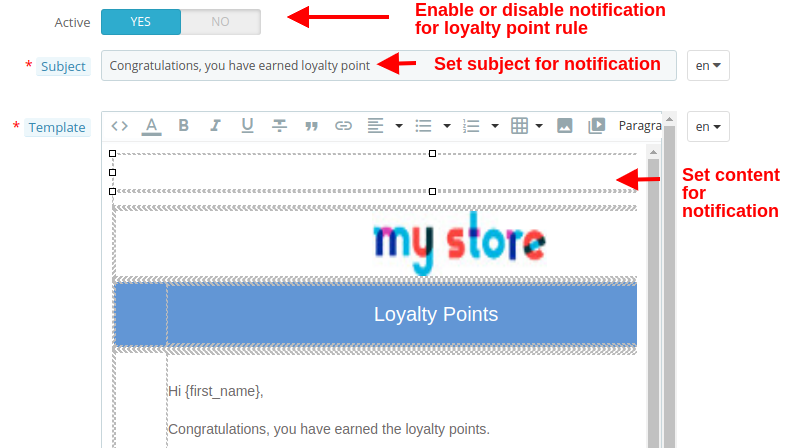
The Notification tab shows the configuration options for email sent to the customers when they earn loyalty points through the selected rule. The options include:
Active: This option enables or disables the notification for the selected loyalty point rule.
Subject: This option sets the subject for the email sent to customers upon winning loyalty points at the store.
Template: This option sets the email content or body which details about the loyalty points they have earned on the store.
3.3 Loyalty Points Balance
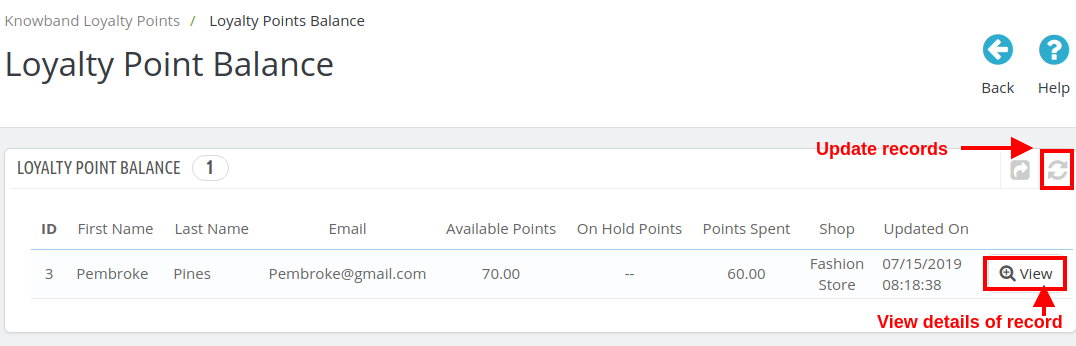
Here in this section of Prestashop Loyalty points and discount addon, you can check the status of loyalty points granted to various customers of the store. You can view the details of each of the customer who have been granted the loyalty and discount points.
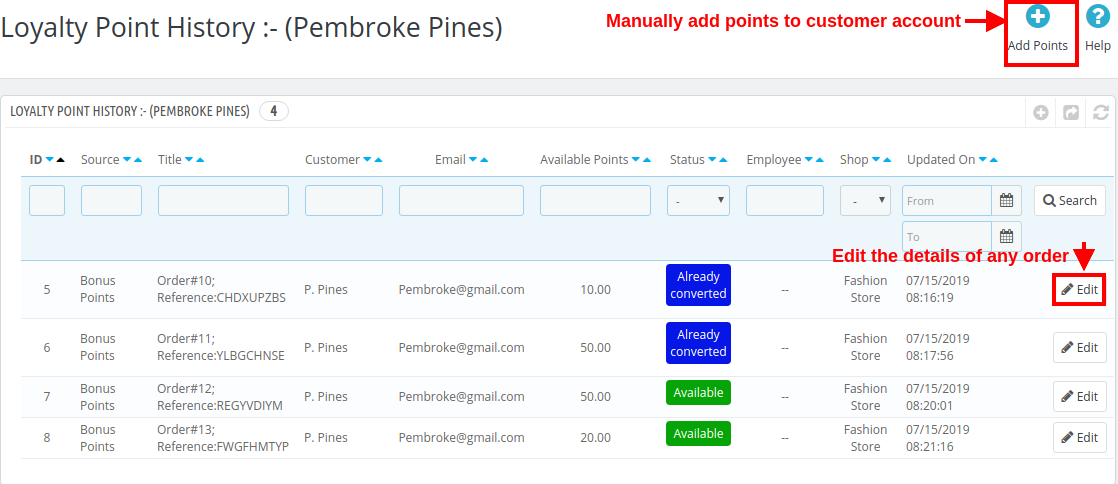
You can click the “Refresh” button in order to update the loyalty points records for store customers. Click on “View” button to check the details of a particular record (all records of the same customer) like shown in the image below.
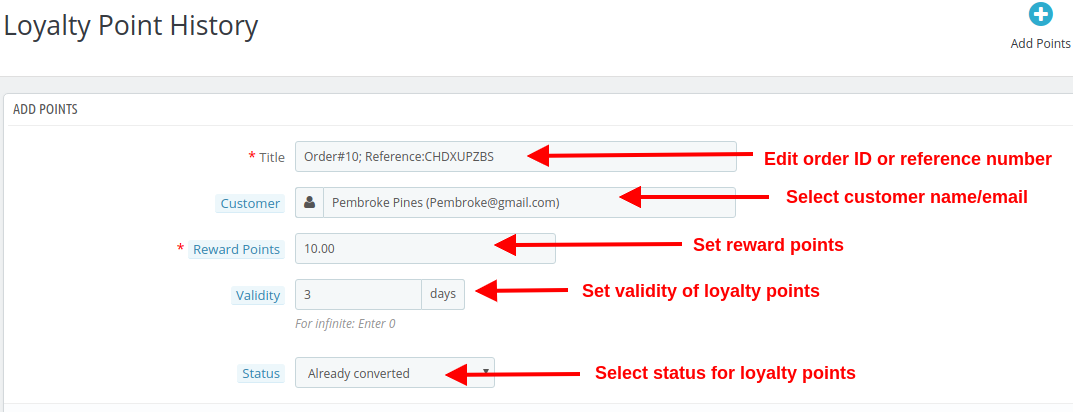
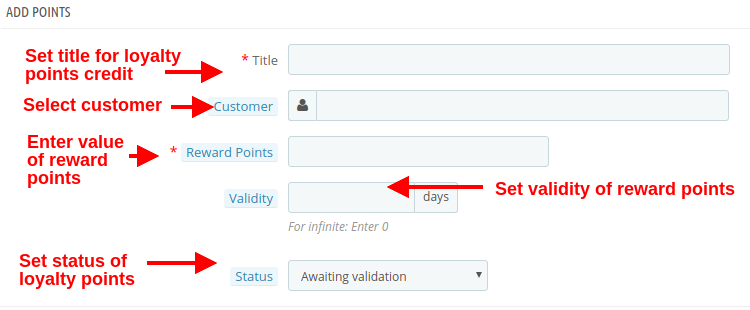
You can edit the various order records of a same customer by clicking on the “Edit” button. To assign the loyalty points manually, click on “Add Points” button as shown in the image above. When you add points manually, you will see the following configuration options.
Title: The option sets the order or reference number for crediting loyalty points to the customer’s account.
Customer: With this option, select the name or email of the customer to whom you want to reward loyalty points.
Reward Points: Set the number of loyalty points you want to offer to the customer.
Validity: Set the validity of loyalty points using this option. Set this as 0 for infinite days validity.
Status: This option sets the status of the loyalty points granted to the customer.
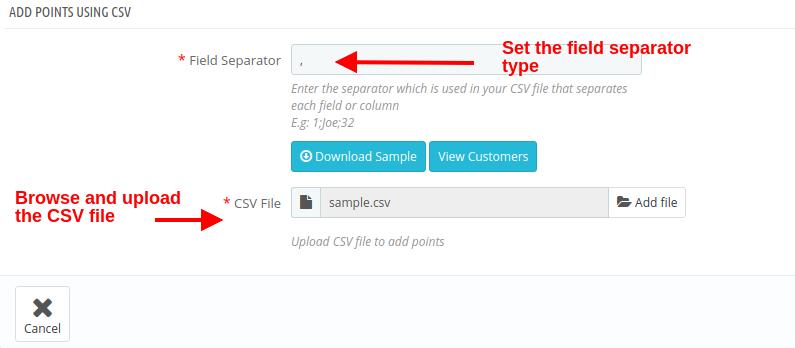
If you want to add loyalty points manually for bulk customers, you can simple upload a .csv file as shown below.
Field Separator: This field allows you to specify the type of field separator you have used in your CSV file for separating various records.
CSV File: This option allows you to browse and upload the .csv file saved at your local space.
3.4 Loyalty Points History
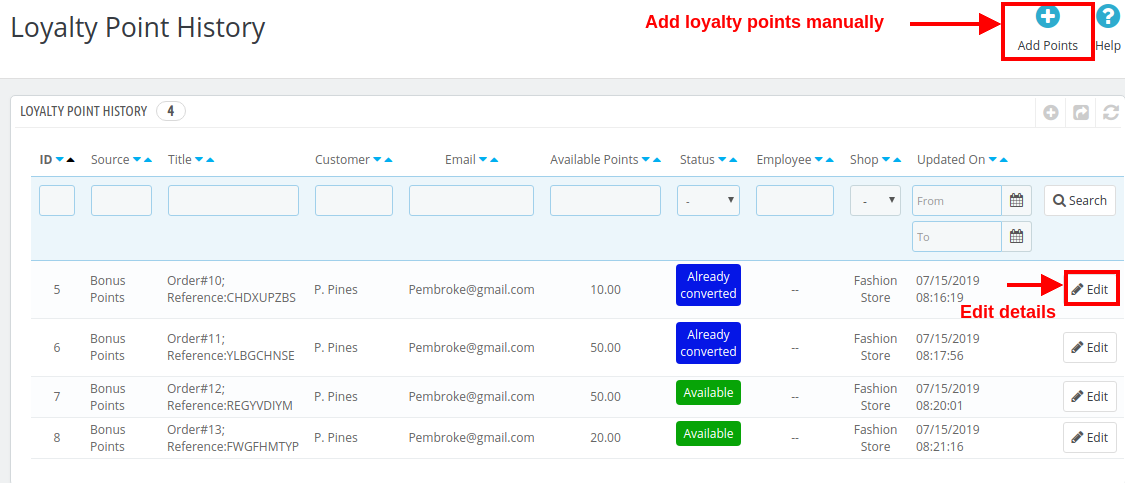
With Prestashop Loyalty points system, you can view the loyalty points history along with the customer details. From this panel, you can manually grant loyalty points to the customers.
By clicking on Add Points button, you will be shown the below screen. (already discussed in 3.3 section)
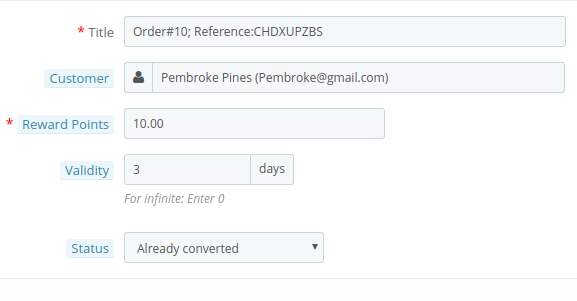
On clicking the “Edit” button corresponding to any record, you will be shown the below screen.
Title: This option will allow you to modify the reference title or order title.
Customer: This option allows you to change the customer name or email who are assigned these loyalty points.
Reward Points: This option lets you set the loyalty points.
Validity: With this option, you can change the validity period for the rewarded loyalty points.
Status: This option lets you change the status of those loyalty points. The status of these points can be checked from the customer’s “Account Dashboard”.
3.5 Email Notifications
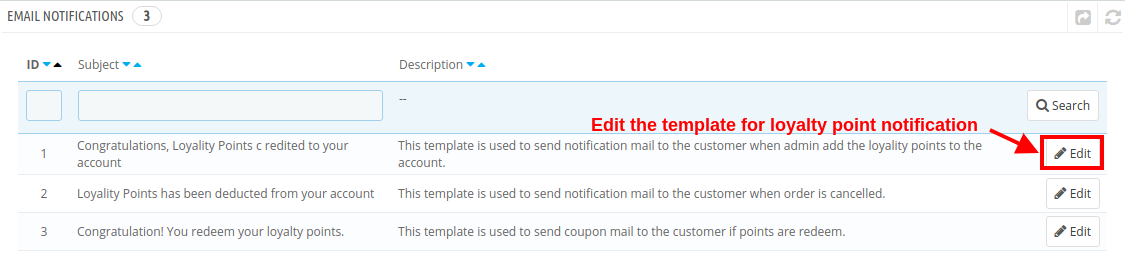
Prestashop purchase points addon gives you flexibility to modify/edit the email templates when loyalty points are credited to customer account, loyalty points are deducted and when loyalty points are redeemed into discount coupons.
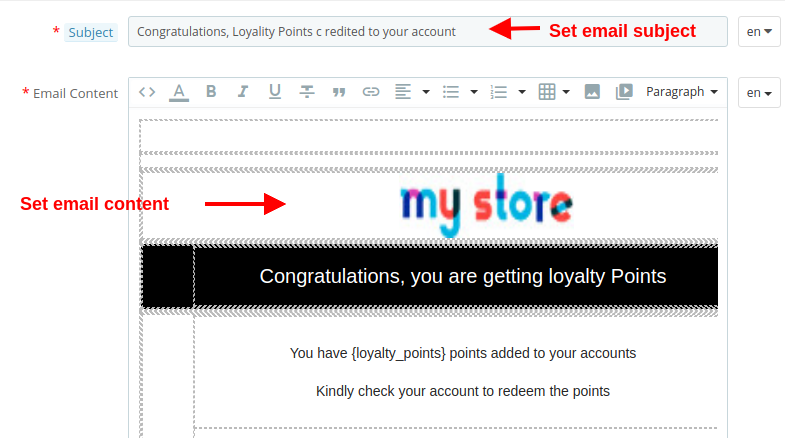
Click on the “Edit” button to configure the email template with the given options:
Subject: This option allows you to set a subject for the email sent to the customer for credited points, deducted points or redeemed points.
Email Content: This option allows you to set the content for the email sent to the customer for credited points, deducted points or redeemed points.
4.0 Front Interface of PrestaShop Loyalty Points System
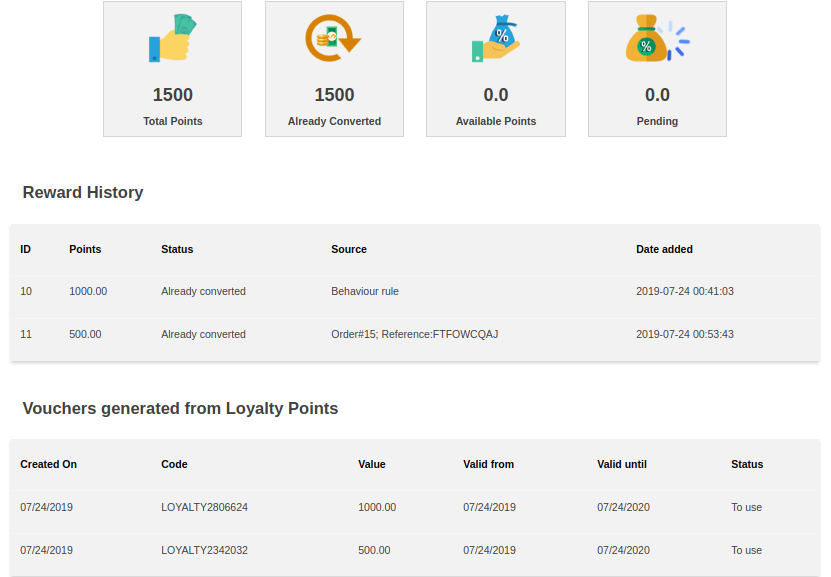
As soon as the customer redeems the loyalty points, a discount voucher is generated and all Available Points are turned into Converted Points.
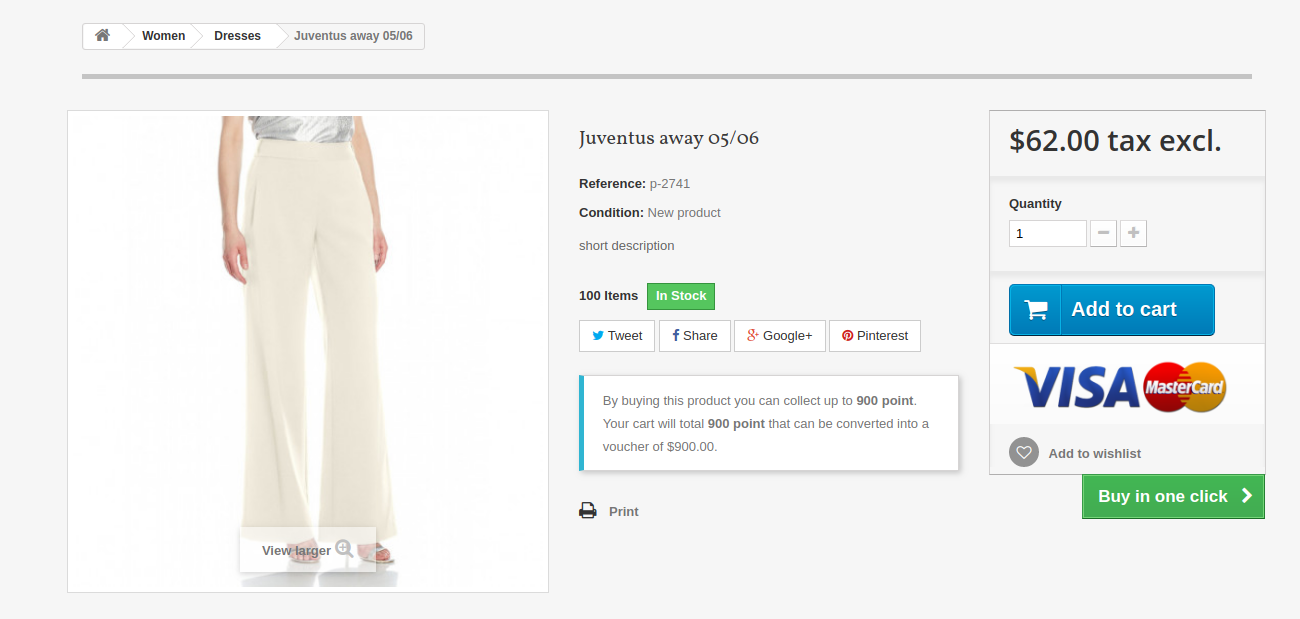
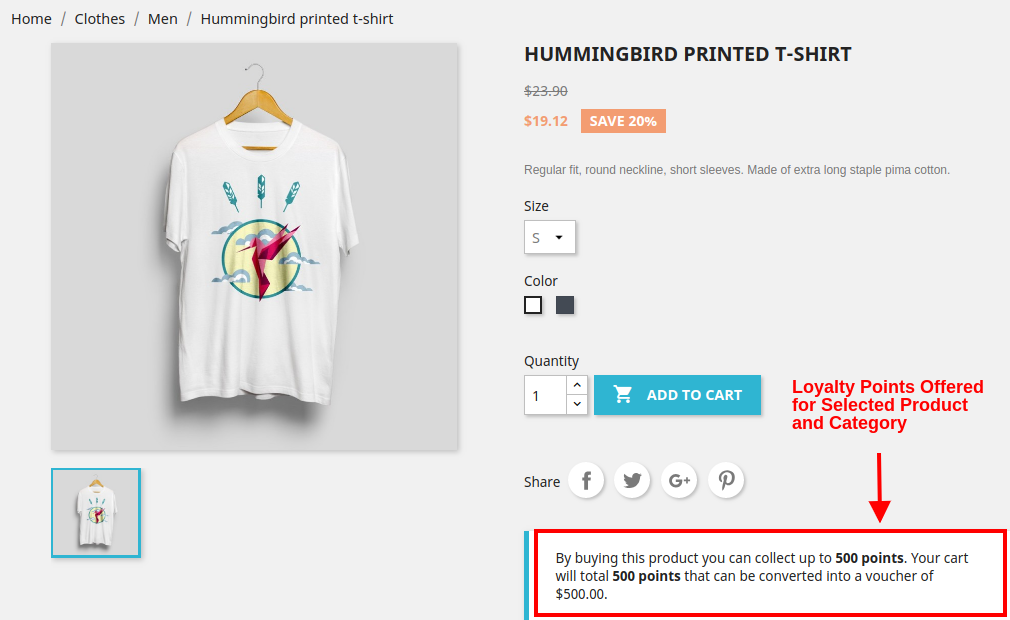
A) When Product Rule is set for specific product and categories, you will see the following screen.
1.6 Version:
1.7 Version:
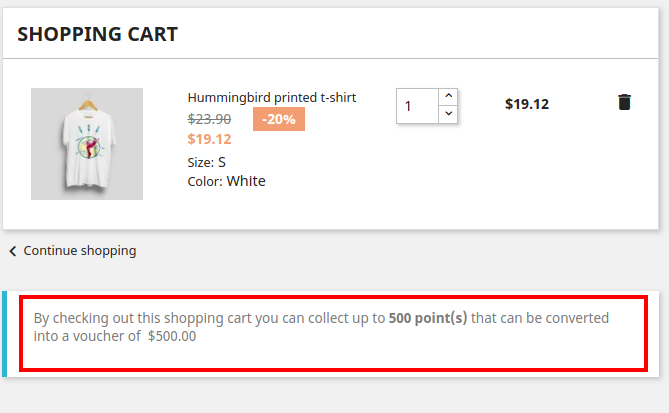
B) When Behavior rule is set. Like when customer sign-ups on the store or place their first order. The below screenshot shows how the customer gets loyalty points for signing up on the store.
1.6 Version:
1.7 Version:
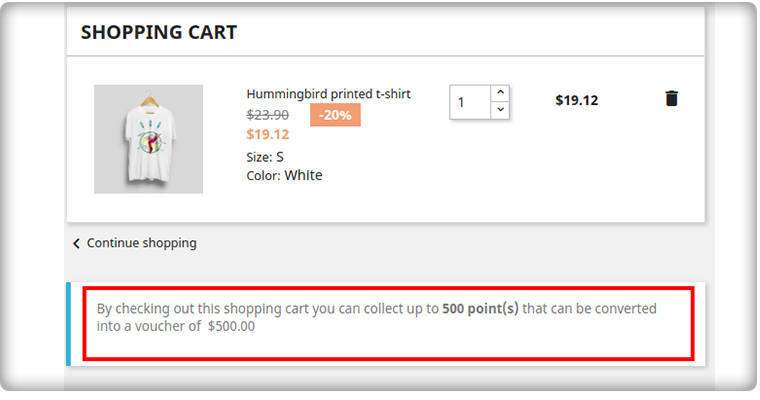
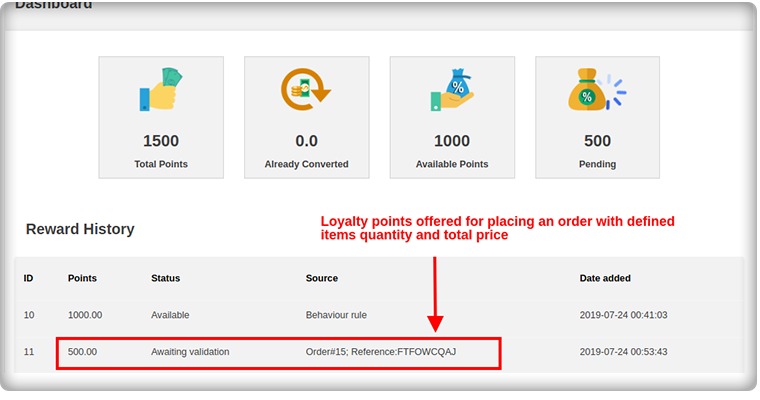
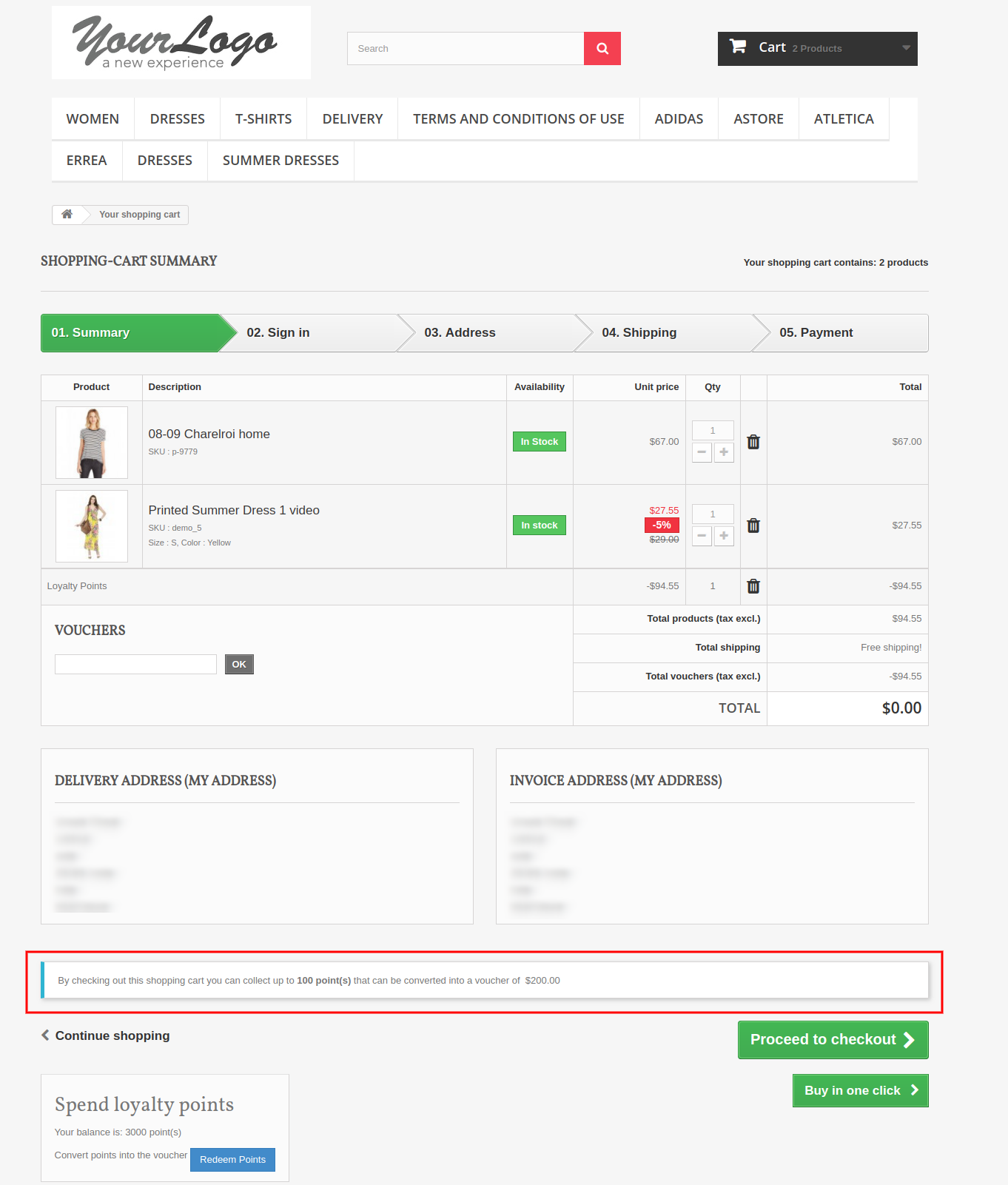
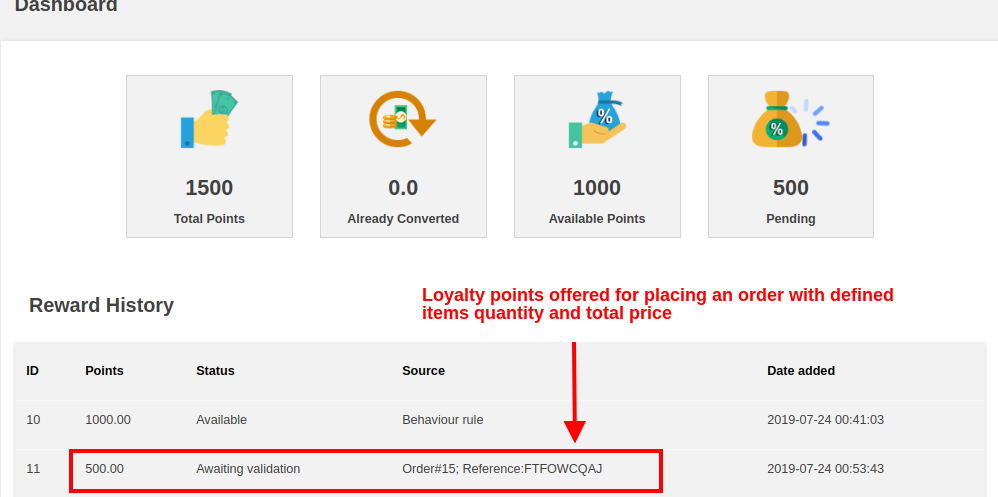
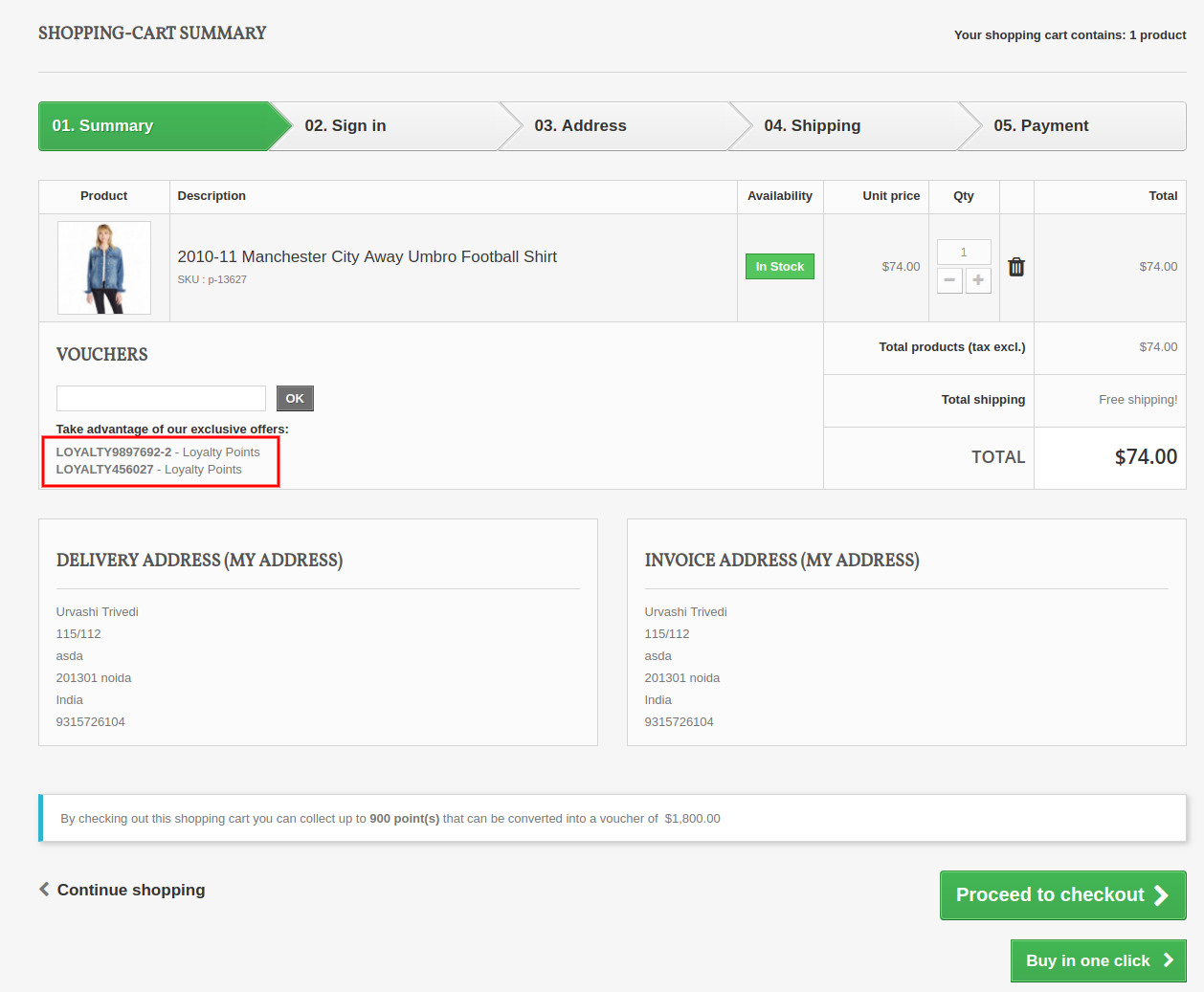
C) When customer’s cart follows some criteria based on total amount, total items quantity, total weight, payment method or shipping method. The below screenshot shows how the customer gets loyalty points for placing an order as per defined cart rule.
1.6 Version:
1.7 Version:
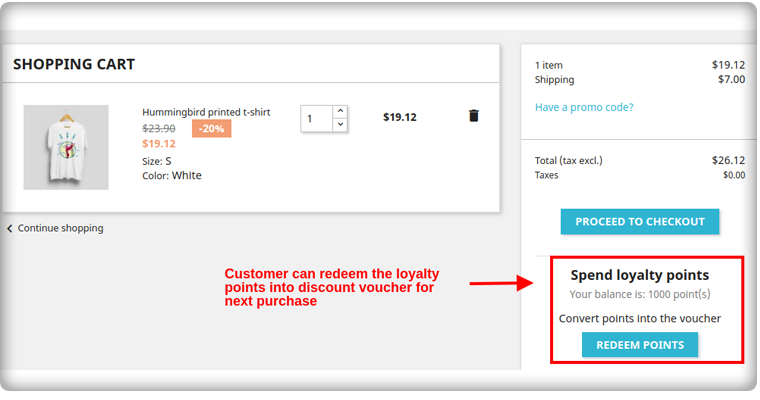
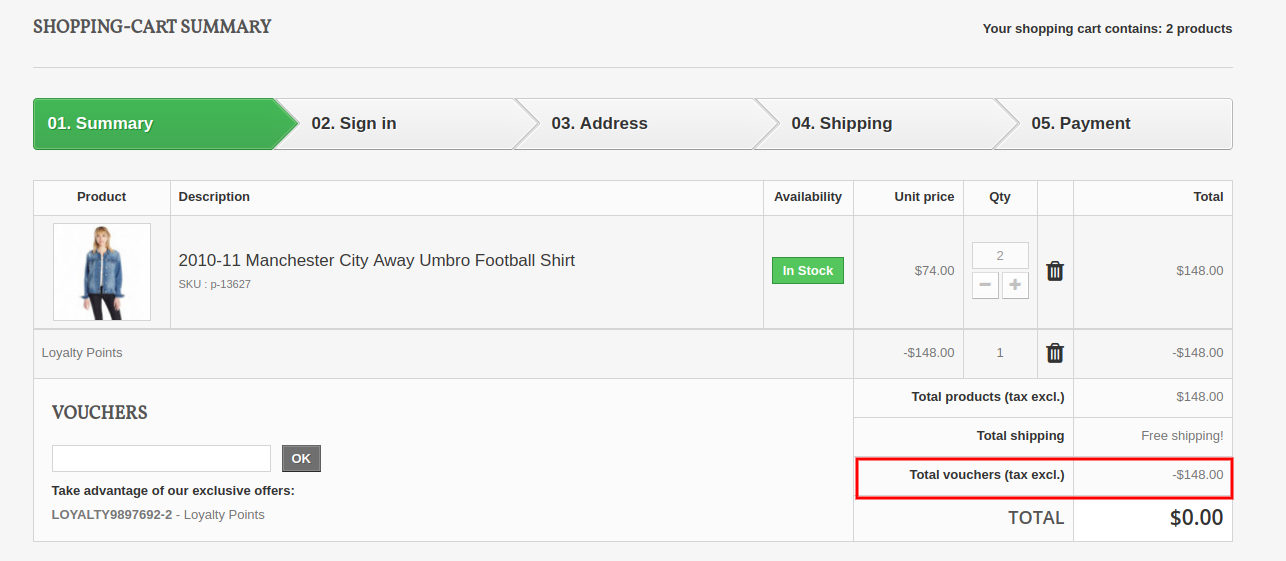
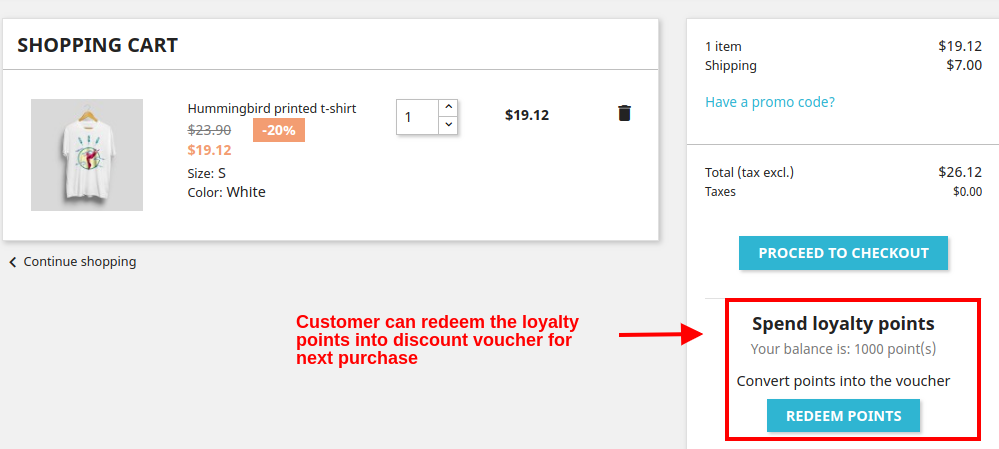
D) Customer can convert their available points into a discount amount. The loyalty points are redeemed into a discount voucher which can be applied for next purchase.
1.6 Version:
Customers can use the loyalty points and generate the vouchers.
1.7 Version:
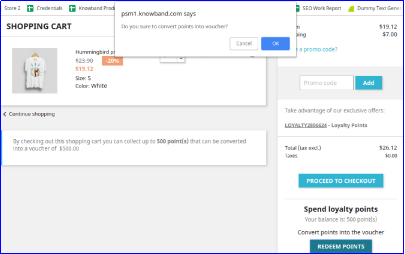
On clicking the Redeem Points button, you will see the following popup box on the screen.
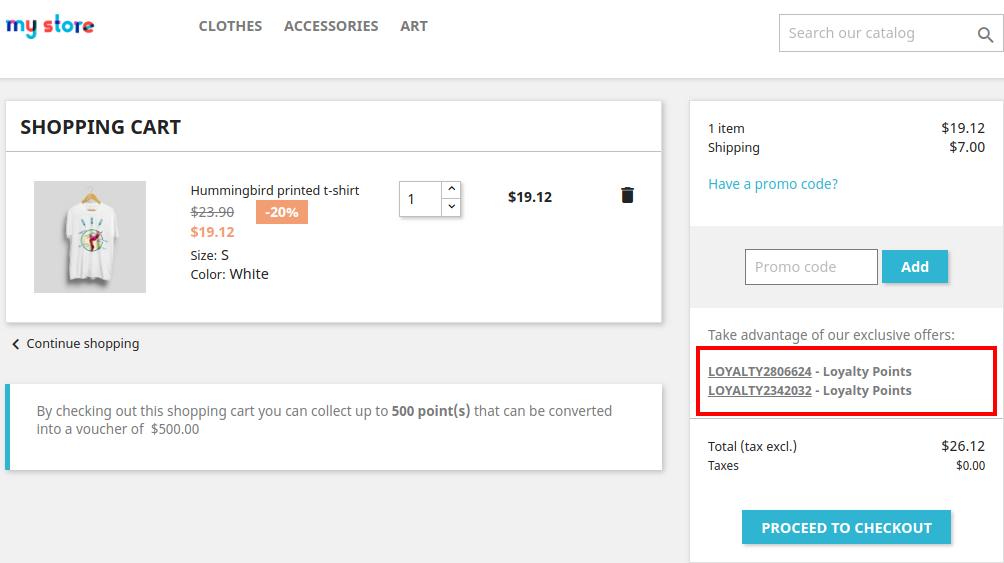
As the customer clicks on OK button their available loyalty points are converted into a discount coupon code as shown below.
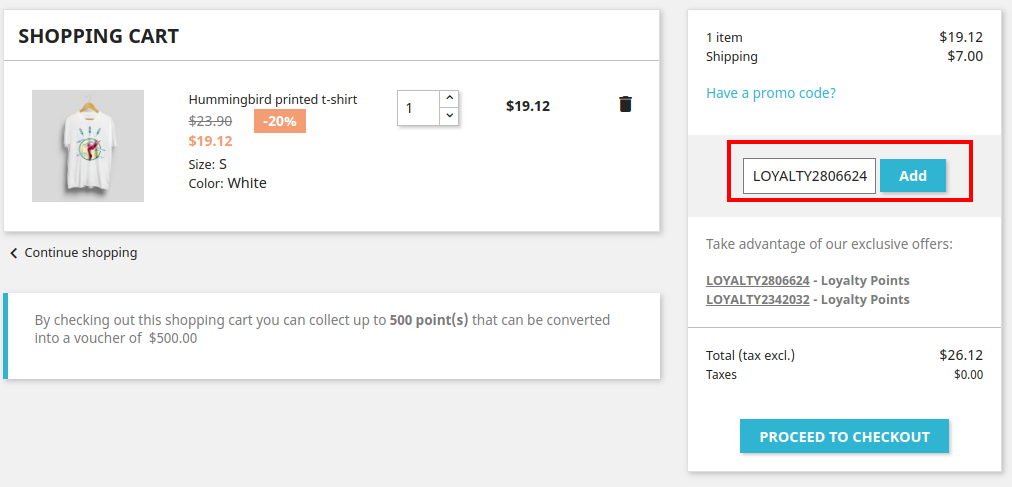
By clicking the desired discount code, it automatically gets copied into the Promo Code box as shown.
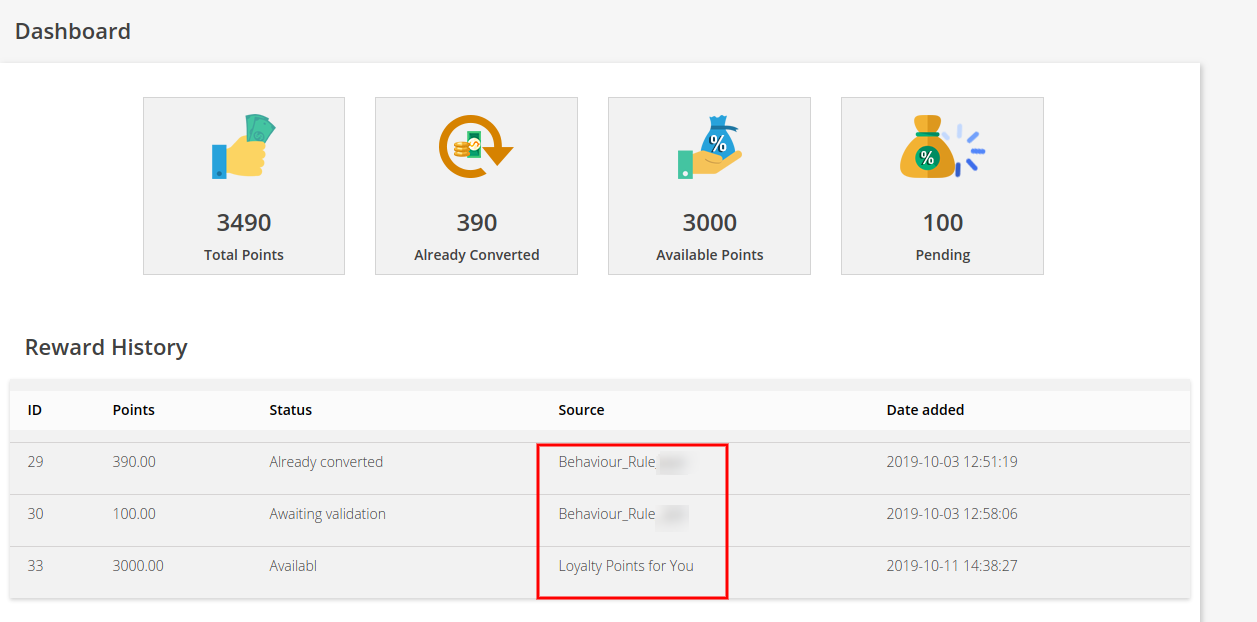
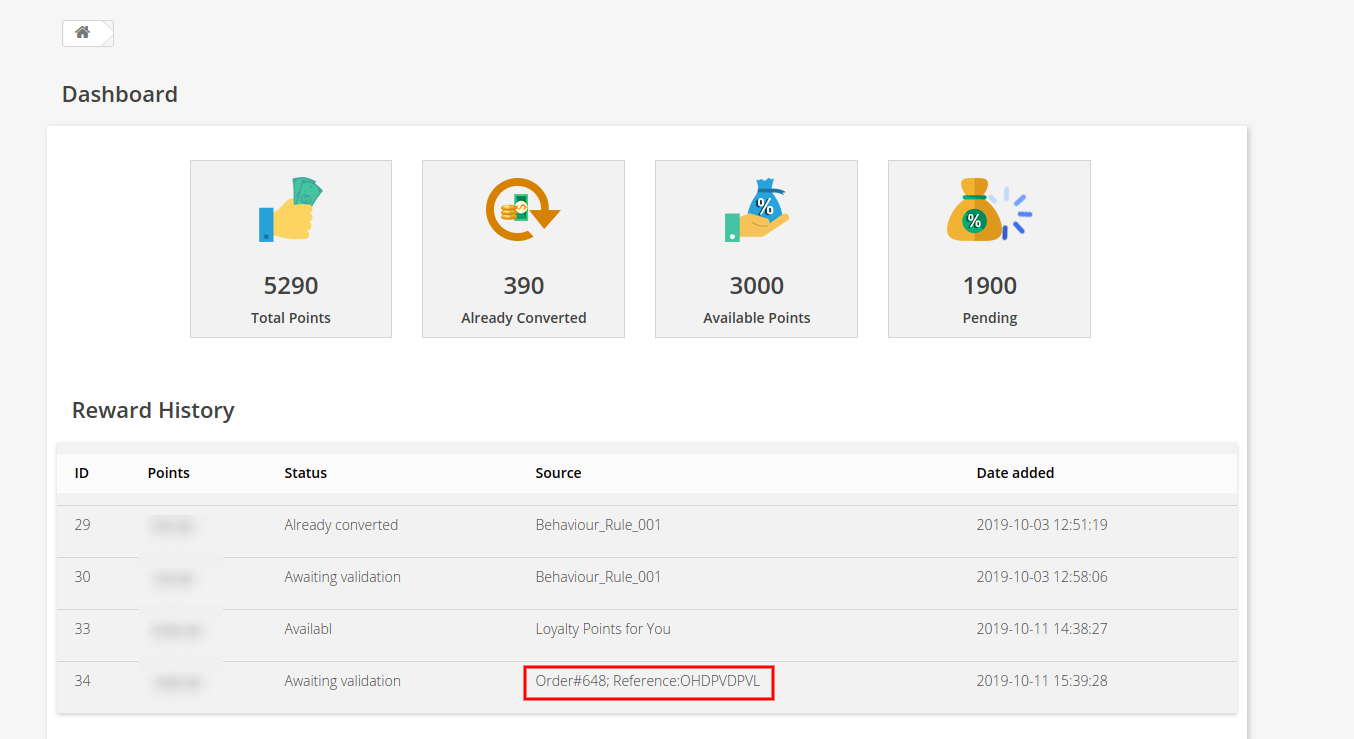
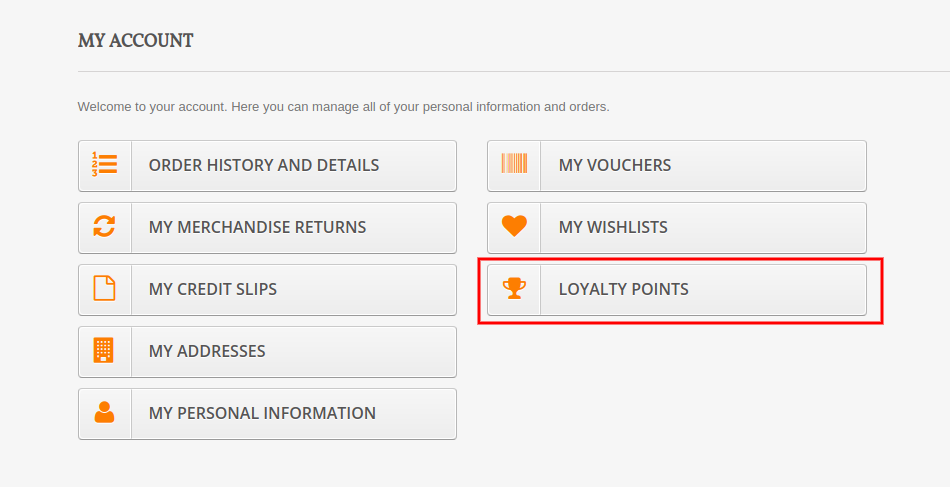
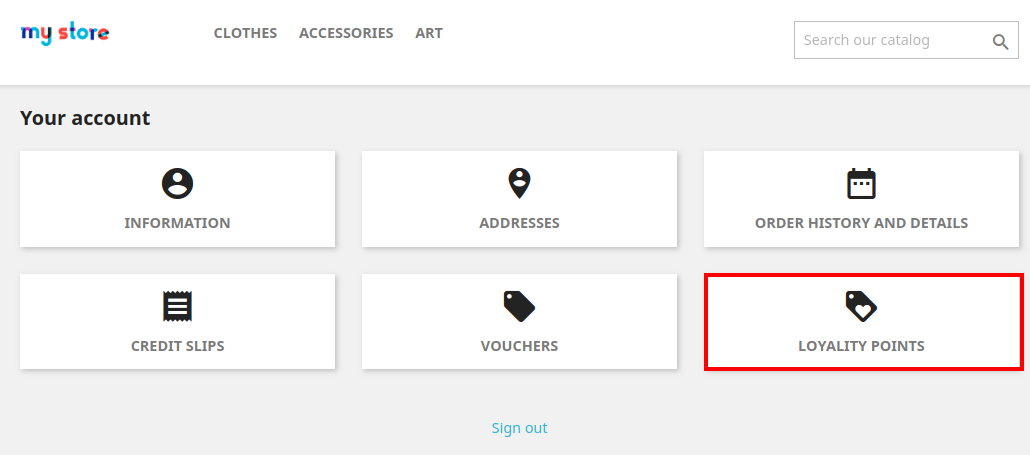
E) Customer can check the complete status of their loyalty points from their Dashboard.
1.6 Version:
1.7 Version:
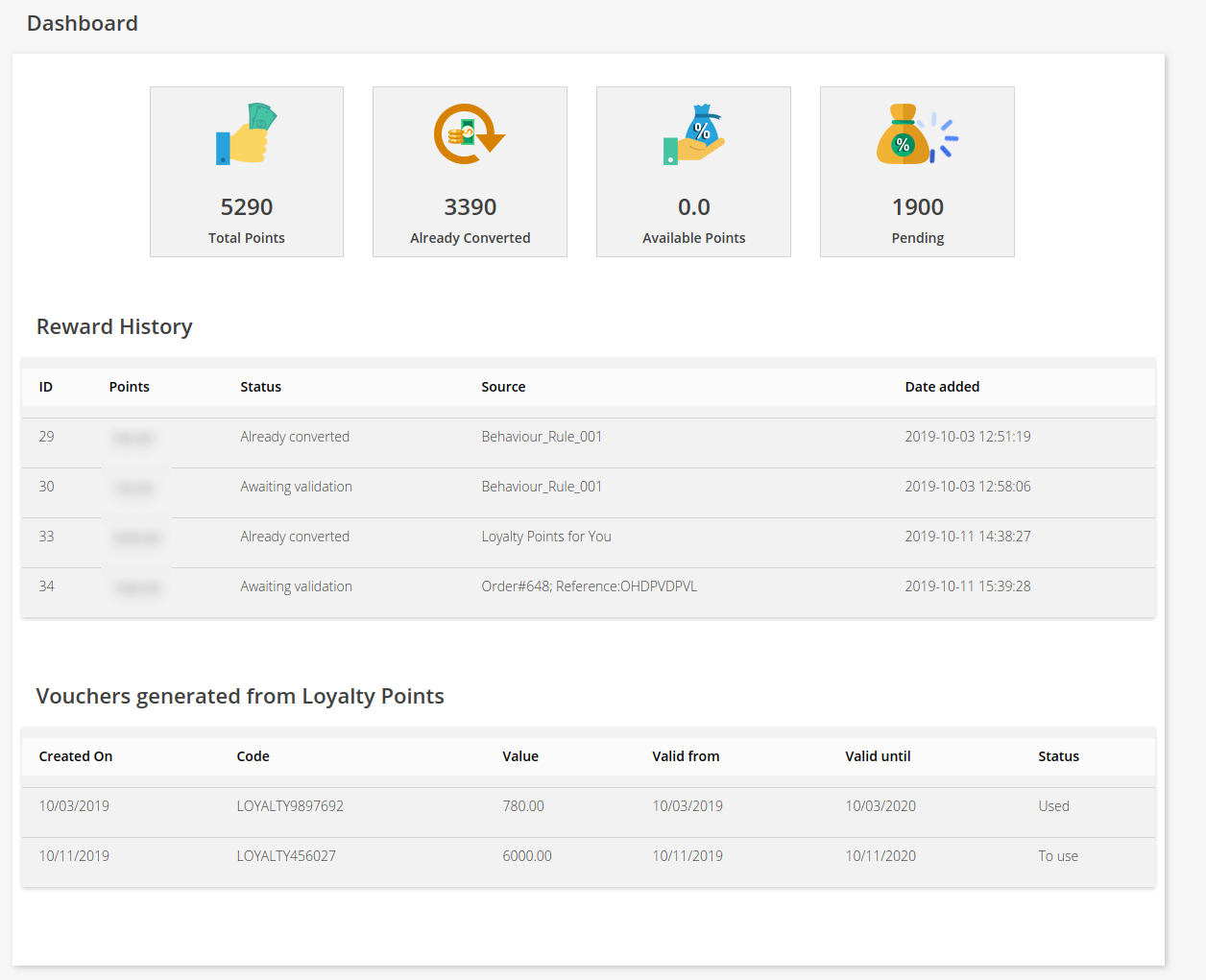
On clicking the Loyalty Points option, customer will jump to the below screen. Here they can check the complete status of their loyalty points, their reward history, discount vouchers generated from points etc.
Version 1.6:
Version 1.7:
5.0.0 Tutorial Video of Prestashop Loyalty Points Module
Checkout our complete tutorial videos, which cover all the features from Installation to the complete frontend working.


-300x300.jpg)