Prepare Your Prestashop Store for Holiday Shoppers with Easy-to-Use Gift Cards

The holiday season is the busiest time of the year for eCommerce stores, and it’s essential to make shopping easy and enjoyable for customers. One of the best ways to prepare your Prestashop store for the holiday rush is by offering gift cards. Furthermore, Gift cards are a great choice for both last-minute shoppers and customers who want to let their friends or family pick their own gifts. With the PrestaShop Gift Card Manager Addon, you can provide an easy-to-use solution that enhances customer satisfaction and boosts your holiday sales.

In this article, we’ll explore how gift cards can benefit your store and how the Gift Card Module for Prestashop can help you capitalize on the holiday shopping surge.

Why Offer Gift Cards in Your Prestashop Store?

Gift cards have become one of the most popular gift choices among consumers. They’re convenient, and flexible, and allow recipients to choose their preferred items. Moreover, for eCommerce businesses, gift cards provide a way to increase revenue, attract new customers, and reduce the chances of product returns.

Here’s why adding the PrestaShop Gift Card Module to your store is a smart move for the holiday season:

Attract Last-Minute Shoppers: During the holidays, many shoppers are looking for quick and convenient gift options. Therefore, gift cards are a perfect solution for customers who may not have the time to shop for specific items.

Increase Customer Retention: Offering a Prestashop Gift Card Manager Addon gives your customers a reason to return to your store. Thus, when the recipients receive a gift card, they’re likely to browse your store, potentially becoming regular customers.

Boost Sales and Revenue: Many customers spend more than the gift card’s value when shopping. By adding a Gift Card Addon for Prestashop to your store, you can encourage additional purchases and boost your holiday sales.

Tailored for all Your Gift Card Needs this Holiday Season

Use Code: DEAL20 for Extra 20% OFF

SHOP NOW

Key Features of the PrestaShop Gift Card Module!

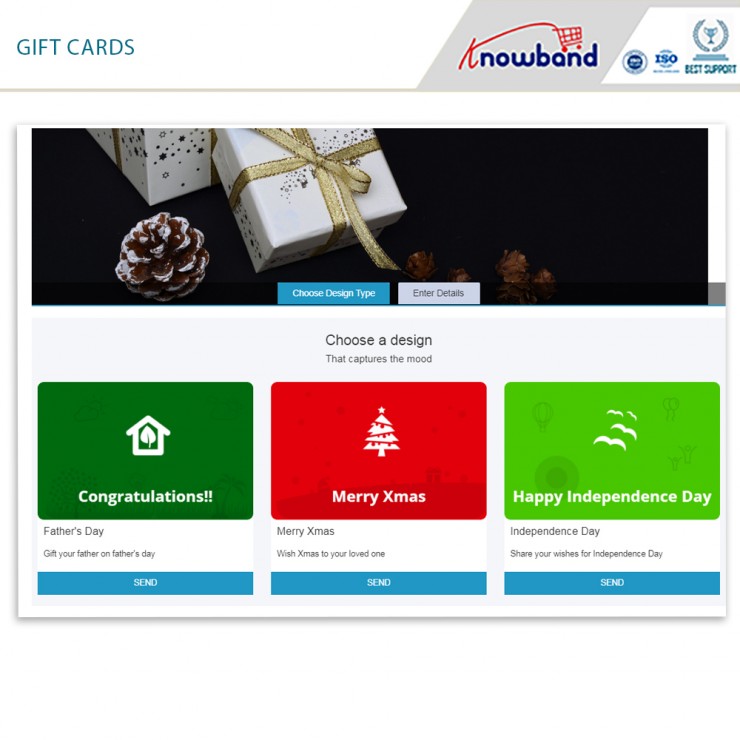
Customizable Gift Card Designs: You can offer a range of holiday-themed designs, allowing customers to choose a style that suits their needs. Customization helps make the gift card more appealing, increasing the chances of a sale.

Flexible Gift Card Values: With the Prestashop Gift Module, you can set different values for your gift cards, catering to various budgets. Whether a customer wants a $20 or $200 gift card, they’ll have the flexibility to find a suitable option.

Scheduled Delivery Options: The PrestaShop Gift Voucher Module lets customers schedule their gift card delivery for specific dates, making it ideal for holiday gifts. This feature allows shoppers to plan ahead, ensuring their gift is delivered at the right time.

Easy Management Interface: The PrestaShop Gift Manager Addon provides a user-friendly interface that allows store owners to manage all gift card settings with ease. Thus, from creating new gift card templates to tracking purchases, the module is designed for easy navigation.

Personalized Messages: The PrestaShop Gift Card Voucher Module allows customers to add personalized messages when sending gift cards to loved ones. This adds a personal touch to the shopping experience and enhances customer satisfaction.

How to Use the Gift Card Module for Prestashop to Drive Holiday Sales?

Implementing the Gift Card Module for Prestashop is easy and can help drive significant holiday sales. Here’s how to make the most of it:

1. Promote Your Gift Cards on Key Pages:

Add banners or notifications on your homepage, product pages, and checkout page to inform customers about the availability of gift cards. This can encourage shoppers who are unsure of what to buy to choose a gift card instead.

2. Create Holiday-Themed Gift Cards:

The PrestaShop Gift Card Manager Addon allows you to create holiday-specific designs that resonate with the season. Offer gift cards with festive designs for Christmas, New Year, or any other special occasion. This seasonal customization adds to the appeal of your gift cards.

3. Offer Discounts or Free Gift Cards:

Consider offering discounts on gift card purchases, such as 10% off when buying a $100 gift card. Therefore, another strategy is to provide a Prestashop Free Gift Card Manager Addon with a certain purchase amount. For example, offer a $10 gift card for every $100 spent, motivating customers to shop more.

4. Highlight Gift Cards in Your Marketing Campaigns:

Promote your gift cards in email newsletters, social media posts, and holiday marketing campaigns. Make sure your customers know about the option to purchase gift cards as an easy, flexible gift solution.

Final Thoughts!

Adding the Prestashop Gift Module to your store is a smart move for the holiday season. By offering gift cards, you cater to the needs of last-minute shoppers and those looking for flexible gift options. The PrestaShop Gift Card Manager provides a feature-rich and easy-to-use solution that’s perfect for eCommerce stores looking to enhance their holiday offerings.

With the Prestashop Gift Manager Addon in place, you can easily drive more sales and create a better shopping experience for your customers. Whether you’re offering gift cards as a convenient holiday gift or as part of your year-round product range, this module will help you take your store to the next level.

5 Must-Have Prestashop Addons to Boost Engagement and Sales this Holiday Season

The holiday season not only brings a tremendous opportunity to attract new customers and boost sales but also brings increased competition. Therefore, with online shoppers looking for festive, engaging, and seamless experiences, having the right tools in your Prestashop store is essential. Here are five must-have Prestashop Addons by Knowband that can help you create an inviting shopping environment, enhance engagement, and encourage more purchases this holiday season.

1. Prestashop Website Decoration Effect Addon:

Setting a festive ambiance is a simple yet effective way to draw customers in and enhance their shopping experience. The Prestashop Website Decoration Effect Addon lets you add holiday-themed decorations and animations to your website, such as falling snowflakes, twinkling lights, or festive icons. Furthermore, these small touches immediately communicate the holiday spirit, giving your store a warm and inviting feel.

Moreover, the customization options in the website decoration addon for Prestashop allow you to control where these effects appear, their frequency, and how they integrate with your brand’s look and feel. Thus, by creating a visually appealing holiday atmosphere, this Addon encourages customers to stay longer and browse more, increasing the chances they’ll make a purchase.

2. Prestashop Spin and Win Pop-Up Module:

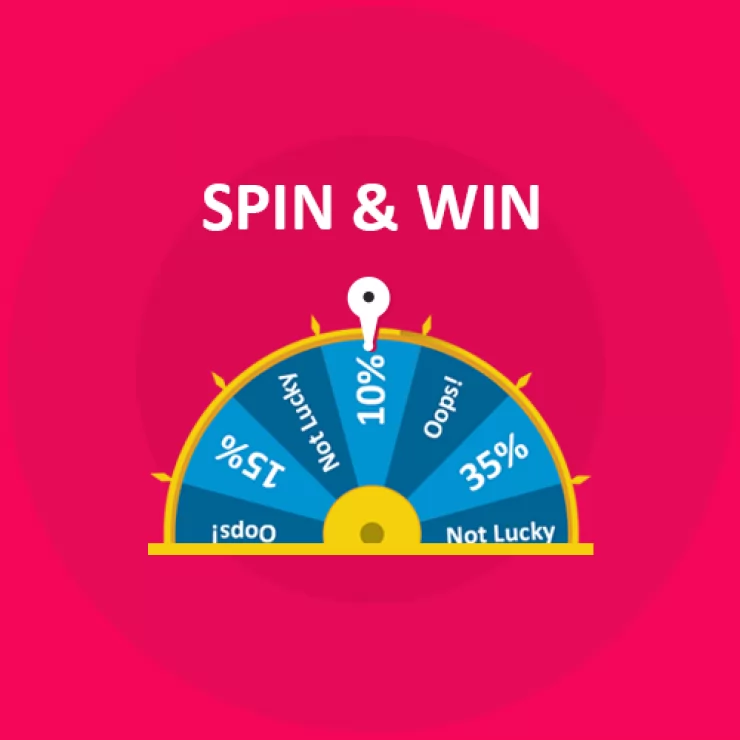
The Second Recommendation: The Prestashop Spin and Win Pop-Up Module is a gamified feature that offers an interactive and exciting experience for visitors. Instead of a traditional discount pop-up, this module presents a spinning wheel where customers have the chance to win a variety of rewards, such as discounts, free shipping, or special offers. Furthermore, the act of spinning the wheel adds an element of fun to the shopping journey, helping to capture visitors’ attention and engage them right from the start.

Additionally, Knowband’s Spin and Win module for Prestashop asks customers to enter their email addresses before spinning, which helps build your mailing list for future promotions.

Boost Customer Engagement with Spin and Win Gamified Pop-Up

Use Code: DEAL20 for Extra 20% OFF

SHOP NOW

On the other hand, the sense of excitement created by the possibility of winning a prize can increase conversions as customers are more inclined to complete their purchase to use their reward. Therefore, by incorporating an engaging feature like this, you not only entertain visitors but also encourage them to shop with enthusiasm.

3. Prestashop Product Sticker and Label Addon:

Highlighting specific products or promotions can make a significant difference during the holiday season when customers are often looking for the best deals. The Prestashop Product Sticker and Label Addon allows you to add customizable stickers and labels to your products, such as “Best Seller,” “Holiday Special,” or “Limited Time Offer.” Furthermore, these visual markers help shoppers identify key items and holiday deals quickly, making it easier for them to navigate through your store.

Thus, with the Prestashop Product Sticker Addon, you can customize the design, colors, and placement of the labels to match your store’s holiday theme, ensuring they complement your brand rather than cluttering the page. Moreover, the labels not only make products stand out but also guide customers toward important items and offers, creating a smoother and more effective shopping experience.

Moreover, this can speed up decision-making and lead to quicker purchases, which is beneficial for both customers and store owners during the busy holiday season.

👉Explore the Module with Our Video Guide


4. Prestashop Gift Card Manager Addon:

Gift cards are an increasingly popular gift option, especially during the holidays, as they allow recipients the flexibility to choose their own gifts. The Prestashop Gift Card Manager Addon makes it easy for you to offer digital gift cards, a convenient and thoughtful solution for holiday shoppers. With this Addon, customers can purchase gift cards directly from your store and send them digitally to friends or family members. This is particularly useful for last-minute shoppers who may need a quick gift option that can be delivered instantly.

Furthermore, Knowband’s Prestashop Gift Card Addon also allows for customizations, so you can brand your gift cards with holiday-themed designs that match your store’s aesthetic.

Digital gift cards not only provide a convenient gift option but also encourage future spending, as recipients are likely to spend beyond the card’s value. By offering gift cards, you can cater to holiday shoppers’ needs while also driving additional revenue for your store.

5. Prestashop Gift the Product Addon:

The Prestashop Gift the Product Addon simplifies the process of gifting products, allowing customers to purchase items and send them directly to friends or family with just a few clicks. This feature is perfect for holiday shoppers who want to give a personal gift without going through a complicated checkout process. With this Addon, customers can add recipient details, select a personalized message, and choose gift packaging options if available, creating a seamless gifting experience that adds a personal touch.

Creating a Cohesive Holiday Shopping Experience with These Addons!

Using these five Addons in combination can transform your Prestashop store into a one-stop holiday shopping destination that customers will love. By setting a festive mood with decorations, adding interactive elements like Spin and Win, guiding shoppers with product labels, and offering convenient gifting options, you create a seamless and joyful shopping experience. Furthermore, each Addon plays a unique role in improving the shopping journey, whether it’s enhancing the visual appeal of your store, engaging customers with fun incentives, or simplifying the gifting process. 


Enhance Customer Loyalty with Knowband’s PrestaShop Free Gift Card Manager Addon!

In the dynamic world of eCommerce, establishing and maintaining customer loyalty is paramount. Furthermore, a proven method to foster this loyalty is through the implementation of gift cards. With PrestaShop’s Free Gift Card Manager Addon, merchants have a powerful tool to seamlessly integrate gift card functionality into their stores. This addon not only simplifies the creation and management of gift cards but also offers numerous benefits that can enhance customer loyalty and boost sales.

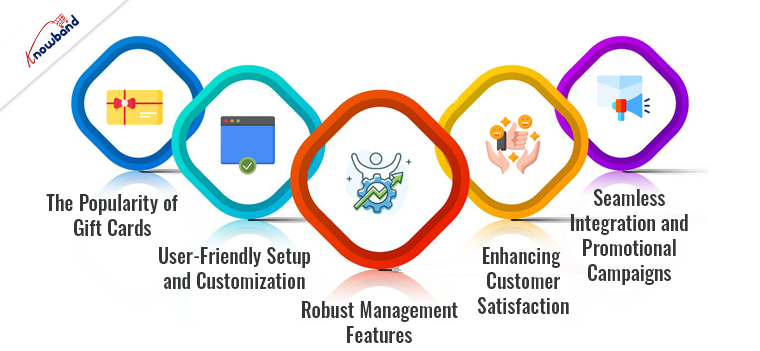
The Popularity of Gift Cards:

Gift cards are incredibly popular among consumers for their convenience, flexibility, and the personal touch they add to gifting. Moreover, the gift cards allow recipients to choose exactly what they want, making them a preferred choice for many. For merchants, gift cards represent an opportunity to attract new customers, encourage repeat purchases, and increase the average order value. Therefore, the PrestaShop Gift Card Manager Addon leverages these advantages, providing a seamless experience for both the merchant and the customer.

Gift cards are not just seasonal gifts; they have a year-round appeal. Whether it’s for birthdays, anniversaries, holidays, or even corporate incentives, gift cards remain a top choice. The convenience they offer to both the giver and the recipient makes them a universally appealing option.

User-Friendly Setup and Customization:

The PrestaShop Gift Card Manager Extension is designed to be user-friendly, allowing even those with limited technical skills to set up and manage gift cards with ease. Furthermore, the Gift card addon for Prestashop provides various customization options that enables merchants to design gift cards that align with their brand’s aesthetic. This personalization not only enhances the customer experience but also reinforces brand identity.

Furthermore, the merchants can effortlessly create attractive and personalized gift cards that reflect their brand’s unique style. Customization options include adding logos, selecting color schemes, and choosing from various card templates. This level of customization ensures that the gift cards are not only functional but also visually appealing, which can enhance the overall shopping experience for customers.

Robust Management Features:

The PrestaShop gift voucher module also offers robust management features. Merchants can easily track the issuance and redemption of gift cards, monitor the remaining balances, and generate detailed reports. These capabilities provide valuable insights into customer behavior and the effectiveness of gift card campaigns, allowing for data-driven decision-making.

Detailed analytics and reporting tools enable merchants to understand how gift cards are being used. This data can reveal trends and patterns, such as peak periods for gift card purchases and redemptions, popular gift card values, and customer demographics. Armed with this information, merchants can refine their marketing strategies and tailor their offerings to better meet customer needs.

Enhancing Customer Satisfaction:

Customer satisfaction is further enhanced by the smooth purchasing and redemption process facilitated by the PrestaShop Gift Card Manager. Therefore, customers can purchase gift cards just like any other product, and the redemption process is straightforward, ensuring a hassle-free experience. This ease of use is crucial in maintaining a positive customer relationship and encouraging repeat business.

The seamless integration of the gift card system into the checkout process ensures that customers have a frictionless experience from start to finish. Automated notifications and reminders about remaining balances further enhance the customer experience by keeping them informed and engaged.

Seamless Integration and Promotional Campaigns:

The PrestaShop gift card voucher module integrates seamlessly with other PrestaShop functionalities, ensuring that the gift card system works harmoniously with the store’s existing setup. This integration means that merchants do not have to worry about compatibility issues or complex configurations, allowing them to focus on their core business operations.

Promotional campaigns are another area where the Gift Card Module for PrestaShop shines. By offering gift cards as part of promotional activities, merchants can attract new customers and incentivize existing ones. For example, a promotion that offers a free gift card with purchases over a certain amount can drive higher sales and encourage larger transactions. Additionally, gift cards can be used as rewards for loyal customers, further strengthening the customer relationship.

Merchants can create targeted promotions that leverage the power of gift cards. For instance, during holiday seasons or special sales events, offering bonus gift cards can entice customers to spend more. Such promotions not only drive immediate sales but also ensure future visits when customers return to redeem their gift cards.

Knowband’s Prestashop Free Gift Card Manager Addon

Create and manage gift cards easily with the PrestaShop Free Gift Card Manager by Knowband. Perfect for boosting sales and customer engagement.

SHOP NOW

Conclusion!

In conclusion, the PrestaShop Gift Card Manager Addon is a valuable tool for any PrestaShop merchant looking to enhance customer loyalty and drive sales. Its user-friendly setup, flexibility in gift card creation, robust management features, and seamless integration make it an indispensable addition to any e-commerce store. By leveraging the power of gift cards, merchants can create a more engaging and rewarding shopping experience, ultimately fostering greater customer loyalty and long-term success.

The PrestaShop gift manager addon not only simplifies the process of managing gift cards but also opens up new avenues for customer engagement and revenue generation. In today’s competitive eCommerce landscape, investing in tools that enhance customer satisfaction and loyalty is essential. The PrestaShop Gift Card Manager does just that, providing a comprehensive solution that benefits both merchants and customers alike.

Watch the video on Knowband’s Free Prestashop Modules here:

What settings are there in the Configuration tab of Prestashop Gift Card Manager?

Nowadays. it can get hectic for people to choose gifts for their friends and family. What they could appreciate and what they’ll give as gifts from their finish to other people, is something that irritates the provider. Consequently, they began giving gift cards instead of actual gifts. This is when e-gift cards come into the image.

What is a Digital Gift Card or eGift Card?

A computerized card is an electronic gift card that includes an extraordinary code that can be benefited from an internet-based store (of which the gift card has a place) to purchase something of the very esteem as that of the gift card.

For instance, on the off chance that it is an Amazon gift card worth 1000 rupees, the provider can gift it to any individual who emails the code to the beneficiary. Consequently, the beneficiary can add a result of a similar worth ($100) to the truck and enter the code while on the checkout page to shop the item.

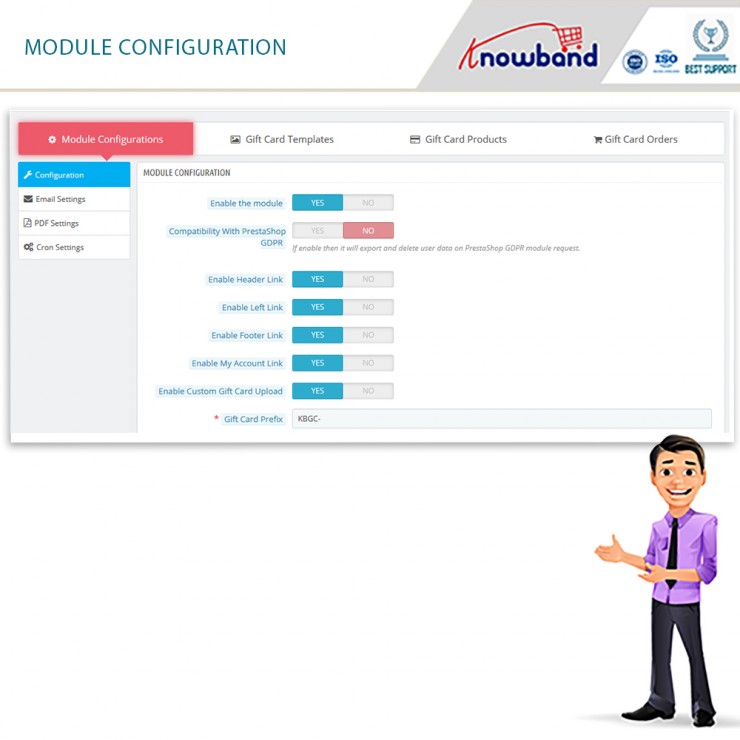
The Prestashop gift card manager by Knowband is a stunning tool for your eCommerce business. In fact, there are several settings where you can configure the plugin without any hassle. In this blog, we will take a look at the various settings under the Configure Tab of the Prestashop send gift card addon.

Configure Tab settings of the Prestashop Gift Card Manager

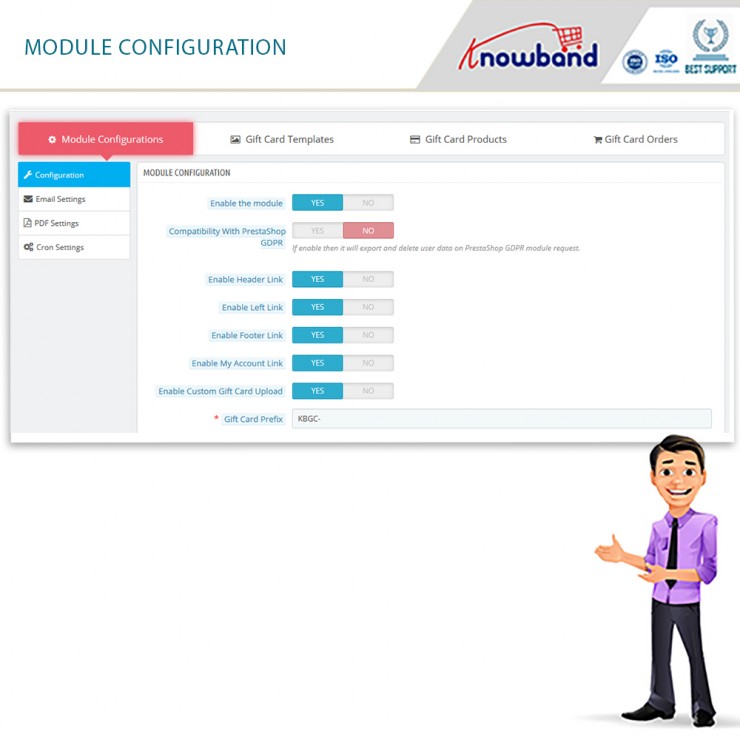
  • Enable the Module

The main functionality is where you enable or disable the whole existence of the Prestashop gift card addon on the front end of the website.

  • Compatibility with Prestashop GDPR

Once you enable this function, then it will export and delete user data on the PrestaShop GDPR module request.

  • Enable Header Link

With this functionality, the admin can enable the module’s function on the header of the website.

  • Enable Left Link

With this functionality, the admin can enable the module’s function on the left sidebar of the website.

  • Enable Footer Link

With this functionality, the admin can enable the module’s function on the footer of the website.

Note: Our Module adds a Gift Card Link in the footer if the footer contains the displayMyAccountBlock Hook. Also, if the Theme editor is present in the store then Admin can add a gift card link in the footer using the theme editor.

  • Enable My Account Link

With this functionality, the admin can enable the module’s function on the My Account page of the website.

  • Enable Custom Gift Card Upload

Do you wish to allow your customers to make custom gift cards? You can allow them to use this functionality.

  • Gift Card Prefix

This option enables the store owner to input the prefix for the gift voucher code through the module.

  • Gift Card Code Order Status

This setting of the Prestashop gift card module allows the admin to update the order status when the gift card will be marked delivered and the gift card code will generate.

  • Minimum Gift Card Delivery Gap

Under this tab of the Prestashop gift voucher module, the admin can set the delivery gap. Further, between the order placement and delivery of the gift card.

  • Email Setting

Under this setting of the Prestashop gift card manager, the admin can easily select the language of the email settings. Furthermore, the options include English, French, Italian, and Spanish.

Once the admin selects and saves the language, more settings unfold further. The segregated settings include the following:

  • Recipient Email Subject

This email template will be sent to the recipient of the Gift Card. In fact, this contains the subject of the email.

  • Recipient Email Content

In this option of Prestashop Gift Card Manager, the admin can add the content or the body of the email for the receiver of the gift card.

  • Sender Email Subject

This email template will be sent to the sender of the Gift Card. In fact, this contains the subject of the email.

  • Sender Email Content

In this option of Prestashop Gift Card Addon, the admin can add the content or the body of the email for the sender of the gift card.

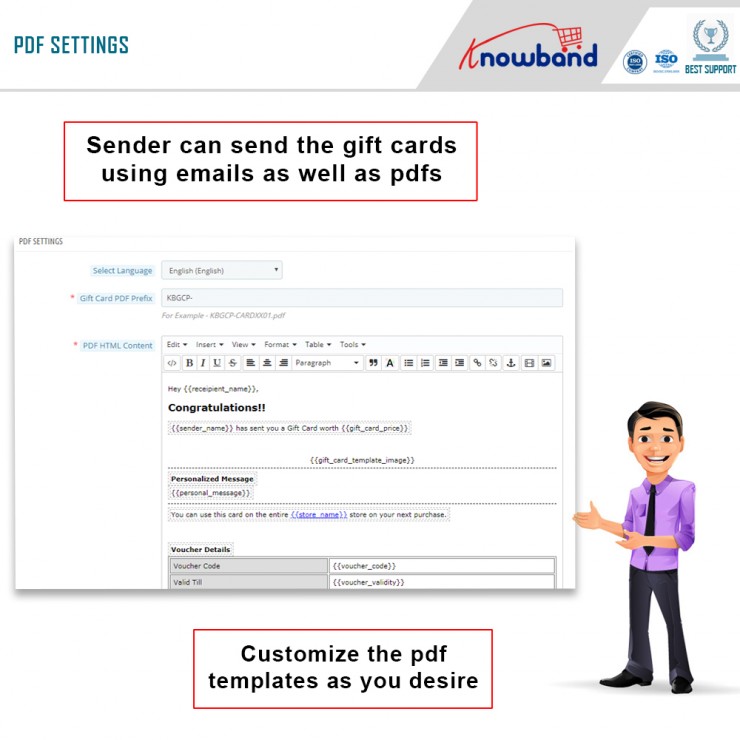
  • PDF Setting

Under this setting of the Prestashop gift card module, the admin can easily select the language of the PDF settings. Furthermore, the options include English, French, Italian, and Spanish.

Once the admin selects and saves the language, more settings unfold further. The segregated settings include the following:

  • Gift Card PDF Prefix

In this option, the admin should enter the prefix of the PDF file. Furthermore, that will generate gift cards.

  • PDF HTML Content

NOTE: Keywords like {{sample}} will replace by dynamic content at the time of execution. Please do not remove these types of words. Otherwise, proper information will not be displayed. You can only change the position of these keywords in the HTML.

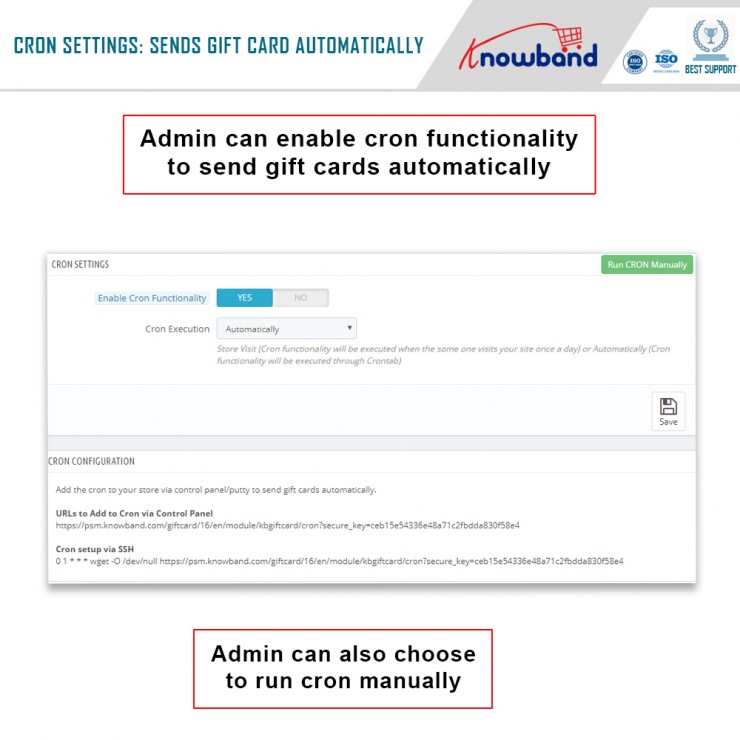
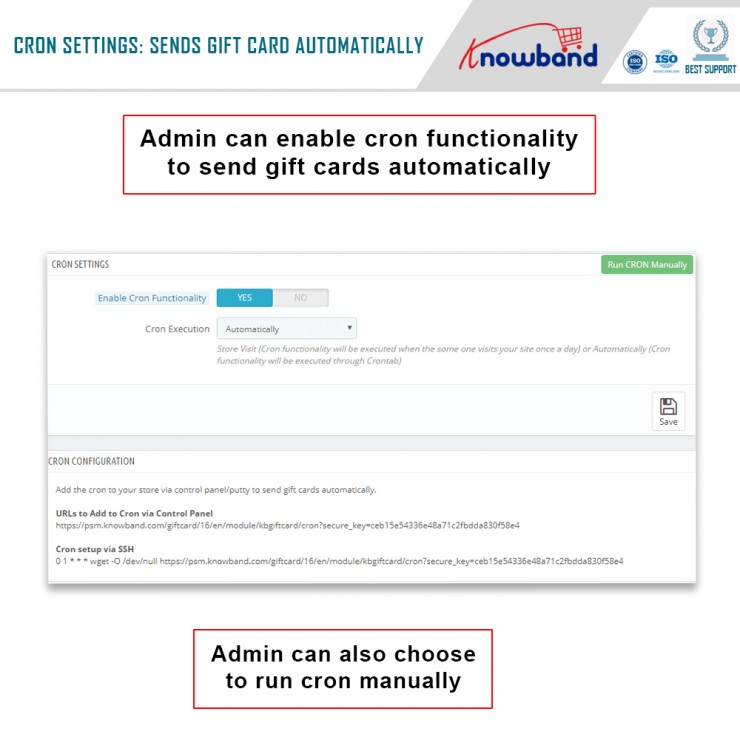
  • CRON Setting

Under this setting of the Prestashop send gift card addon, the following options are available:

  • Enable CRON functionality

With this setting, the admin can enable or disable the cron functionality. Moreover, send gift cards automatically.

  • Cron Execution

With this setting, the store owner can run CRON automatically or set it to Store Visit.

Note: Store Visit (Cron functionality will execute when someone visits your site once a day) or Automatically (Cron functionality will execute through Crontab).

In the End

Thus, this is what the main settings of the Prestashop Gift Card Manager look like. Furthermore, there are other settings like Gift Card Templates, Gift Card Orders, and Gift Card Products. Would you like to invest in the Prestashop plugin by Knowband? In case you have any doubts or queries, please let us know at support@knowband.com.

Check Video here:


Know it all about the Prestashop Gift Card Addon here

Knowband’s Prestashop gift card Addon is a practical and excellent option for marketers. In reality, it only facilitates the sale of gift cards on your website. Additionally, boost your company’s sales and profits. You can easily allow your consumers to buy digital gift cards, thanks to their growing popularity. Furthermore, send them to the recipients at the specified time.

We’ll look at the features of the Prestashop gift card in this blog. Furthermore, as you conclude the article, you will have a better knowledge of the plugin.

Knowband’s Prestashop gift card Addon incredible features

  • It’s easy to get started

The Prestashop gift card manager is a straightforward module. It’s simple to integrate into your eCommerce business. To complete the installation, the shop administrator does not need any specific skills. The user manual and customer support are available to assist you if you get stuck.

  • Set the top and lower limits

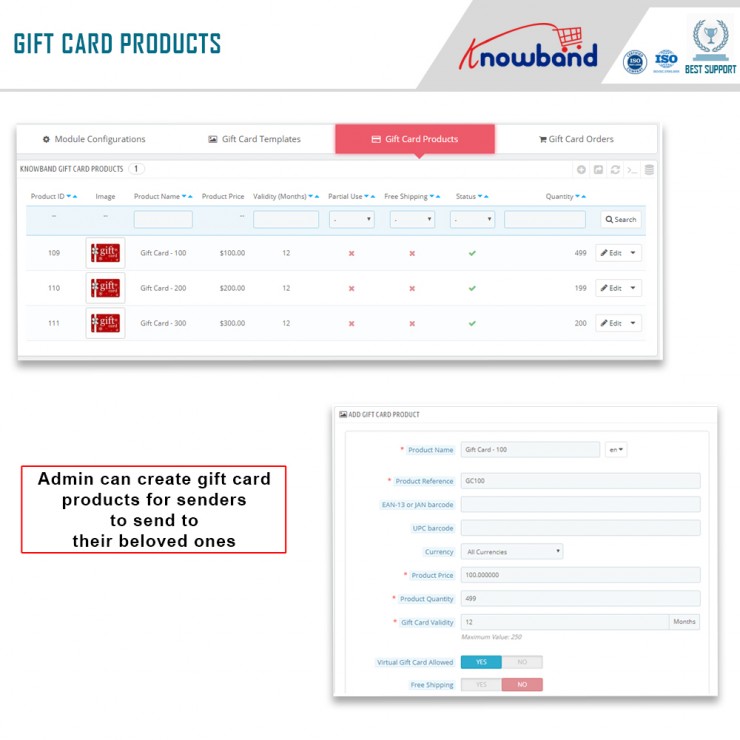
A gift card’s standard amount and greatest limit are set by the shop administrator. Customers may now use the Prestashop module to buy a gift card up to a specified value.

  • ‘N’ number of gift cards can be made

The Prestashop send gift card addon allows the business administrator to create an unlimited number of gift cards. Also, with the Prestashop plugin, the store administrator may produce as many gift cards as he likes.

  • Choosing the intervals between deliveries

In the Prestashop gift card Addon’s interface, you may set the number of days between Gift Card delivery.

  • The PDF format is available

The gift card will repair to us the new form using a simple yet thorough pdf.

  • A unique prefix code appears on gift certificates

The Prestashop gift module may be used by the business administrator. Further, to apply a custom prefix password to the gift certificate.

  • You can use the module to update the status of your orders

The admin may update the order status for Gift Card orders using the Prestashop gift voucher module. Furthermore, only once the order status has been updated to the mentioned condition will the gift card be provided to the designated recipient.

  • Purchases of gift cards can be trackable

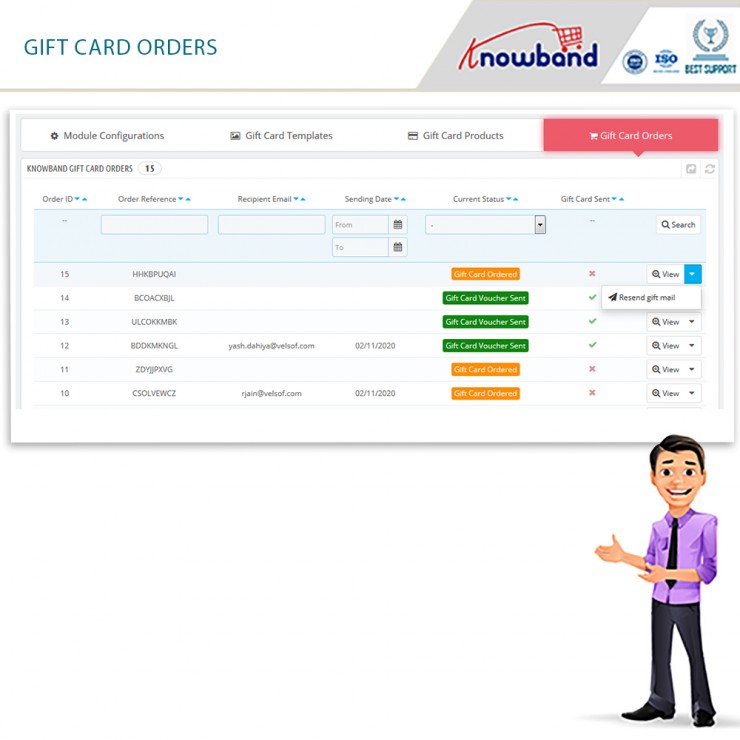
From the backend, the store administrator has access to order information, status, delivery date, and other order data.

  • Users must submit specific information to gift the gift card

A consumer must enter the value of the gift card as well as the sender and receiver’s names for it to be sent to the intended recipient. Furthermore, while purchasing a gift card for a recipient, the latter’s email address is required.

  • Important keywords should be included

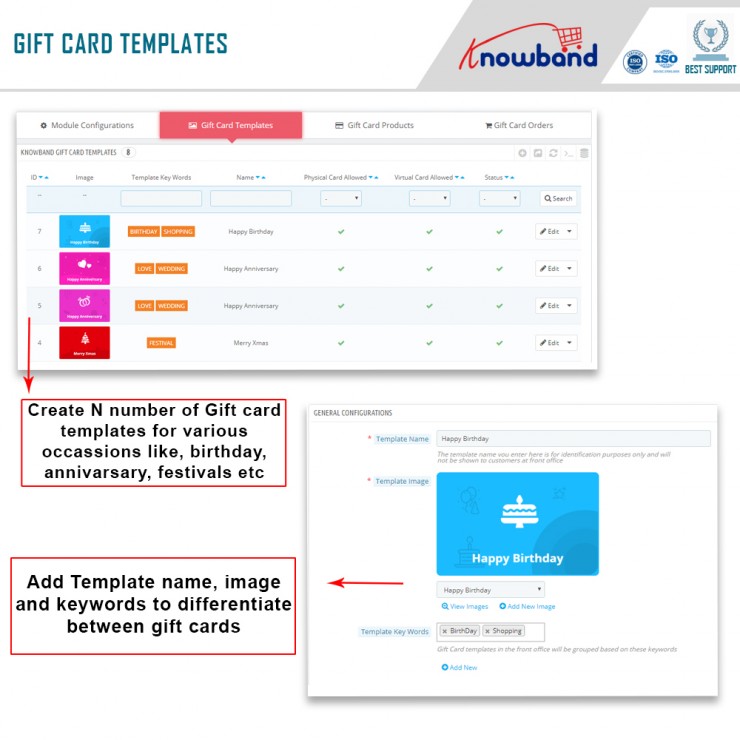
They map to any categorization by putting relevant keywords in the design of the Prestashop gift voucher module. Like, Valentine’s Day, Anniversaries, Birthdays, and Holidays (Christmas, New Year’s, Halloween, Thanksgiving, and so on) are just a few examples.


  • Gift cards may now have pictures added to them

Another new feature in Knowband’s Prestashop gift card module is the ability for customers to attach photos to gift cards.

  • Partial use of gift voucher is available

Customers may use a portion of their gift certificates using Knowband’s Prestashop addon. Also, by sending an email, the administrator can create a new gift card item with a number and an expiration date.

  • Multiple languages are supported

Prestashop gift card Addon is multilingual. Further, customers will now be able to discover gift vouchers in their native language. In reality, depending on the location, the language for interactions and email layouts may be customized.

  • Access to several different retailers

The Prestashop module works with a broad selection of retailers.

  • A gift card symbol is available in a variety of places

When using the Prestashop gift card module, you may position the gift card button anywhere on the website where you think buyers would see it. For example, a site’s header, footer, or left sidebar.

  • The user interface

The way a user interacts with the features determines whether a business succeeds or fails. Customers may also utilize Prestashop’s mobile-friendly and user-friendly interface to explore, pick, and purchase digital gift cards from your store.

  • Customization

    The Prestashop Gift module offers a feature that allows the business owner to send a customized picture to the front end from the backend. Customers may use this to make a photo-based personalized gift card.

  • Email templates are customizable

To make things easier for the business owner/admin, the Prestashop Gift Card Addon includes customizable email templates. When a client puts an order or the status of an existing purchase changes, the administrator simply selects a design from the options and sends it to them.

  • Working with cron is a plus

Customers have the option of choosing when their physical and digital gift cards will be delivered (via mail).

  • Include a catchy title as well as a personal message

The administrator can now add a title and a representation to the Gift Card layout. Also. this revised version of the Prestashop plugin allows you to send gift cards. In addition, the title, representation, and images will all be visible to the customer.

  • Buying stock

The Prestashop Gift module now has a lot of new features. Additionally, it allows the administrator to keep track of all gift cards in one place. You may also order gift cards using the Gift Card Orders website.

In the End

The Prestashop gift card addon by Knowband is a functional option that brings in new customers, sales, and more revenues. In fact, it helps you engage customers as well. If you want to grow your eCommerce business, this is one of the best options. What are your thoughts on the Prestashop addon? Would you want to invest in the plugin as well? Do let us know your thoughts and queries at support@knowband.com.

What are different ways of reducing Post-Holiday Returns?

It is very essential to reduce post-holiday returns. Industry, sales channel, product type, and how to return data are collected and counted all affecting return rates. Further, the younger customers are driving the trend according to the reports. The reason is, they see internet purchases as rentals. Moreover, returns might rapidly undo your holiday success if you don’t account for them and discover:

  1. Sales are lower than expected
  2. Converted fewer clients than the originally
  3. Compared to sales cost and profit margins, sales cost is higher and profit margins are lower.

Therefore, in this blog, we will be discussing ways of reducing holiday returns and automating the returns process. However, before that, we will understand why it’s important to reduce the returns?

Why it’s important to reduce the returns?

The first step is to analyze why do people are returning products as this will give you valuable insights and even make you understand the real problem. Furthermore, it is to everyone’s best advantage to reduce the number of returns you receive. 

You might not be aware but lesser returns can save a lot of money on replacement items, shipping, as well as other factors. Moreover, it provides a better as well as efficient customer experience which is again good for eCommerce business. As a result, trust is created between your business and potential buyers.  

Henceforth, keeping the rate of return lower can result in better business. 

What are the ways of reducing returns?

  • Begin with quality control

The first way that helps in reducing post-holiday returns is “Begining with quality control”. Furthermore, 23% of returns happen as companies ship an incorrect item. Mis-ship happens usually when businesses grow.

Being a small retailer, you can wrap as well as send every order. It would be great if you double-check the order before shipping. When you adopt a hands-on approach, it’s easy to ensure that shipments are proper. Whereas larger businesses can opt for automation that can help you in resolving the issues. Furthermore, the Inventory management software includes a warehouse management feature that helps in reducing the number of returns your receive. 

  • High-Quality Photos

High-quality photos can even help in reducing post-holiday returns. Furthermore, such photos help customers understand the product better. Make sure you take pictures from different angles to make customers understand each feature of the product. 

In case you are not good at photography, feel free to hire a professional photographer. Money spent on getting good pictures will pay for itself with a reduced return rate. 

  • Better Product Descriptions

Writing better product descriptions can help customers understand the product well. Speaking about better product descriptions, make sure you include everything about the product. For example, if you have been selling furniture, make sure your product descriptions consist of measurement of the product, color, and material. This way customers can decide better and this will create transparency which is liked by customers a lot. 

  • Represent Sizing Correctly

Products that do not fit are one of the most common reasons for returns in the apparel industry. Because online buyers can’t try on garments before buying them, it’s understandable that products be returned because they don’t fit.

With the assistance of resources like size software and sizing charts, you may limit the number of returns you receive due to sizing concerns.

Knowband Modules assist in reducing post-holiday returns

Knowband, known as an eCommerce solution provider and module development company. Furthermore, Knowband has earned a reputation for offering efficient development services and post-sales support. Moreover, it offers a boost to your business by offering best-in-class plugins for different eCommerce platforms such as Magento, Prestashop, OpenCart, Shopify, and others. 

Knowband even offers some great modules for reducing post-holiday returns as well as reading the specifications of these modules helps in reducing the chances of return.

Module 1: Product size chart

The product size chart module helps in reducing post-holiday returns. Knowband offers this module for different eCommerce platforms such as:

Prestashop Addons

Magento 2 ® Extensions

Magento ® Extensions

Opencart Extension

Module 2: Product Video

The product video module is highly beneficial for eCommerce businesses. This helps customers to understand the product better. As a result, the return chances get reduced. Knowband even offers the module for different eCommerce platforms:

Magento 2 ® Extensions

Magento ® Extensions

OpenCart Extensions

Prestashop Addons

Module 3: Gift Card

Digital Gift Cards are a blessing for eCommerce stores. These enable customers to purchase accordingly from the specific store. Gift cards even provide freedom to permit them to purchase what they need. Furthermore, this offers the satisfaction of having gifted well.

PrestaShop Addons

Opencart Extensions

Magento 2 ® Extensions

Magento ® Extensions

Module 4: Product Review

Product review also helps customers make decisions better and feel more confident. Furthermore, the more reviews you have, the more confident a customer is that they’re making the right choice. Reviews can also assist a store’s internet visibility.

Product Review Reminder And Incentives – Prestashop Addons

Review Reminder And Incentives – Magento 2 ® Extensions

Review Reminder And Incentives – Magento ® Extensions

Final Note

Analyzing as well as testing your approach to returns and ways of measuring up to your peers is a great way of generating a return on your post-holiday returns. Along with that, another way of generating a return on post-holiday returns is by utilizing these modules.

In case you face trouble, feel free to write us at support@knowband.com