[Urgent Update] Don’t Miss Prestashop eBay Marketplace Connector v2.2.1!
Attention Prestashop sellers! The latest v2.2.1 version of Knowband’s Prestashop eBay Integration Addon is officially released, and it’s packed with features designed to revolutionise how you manage your eBay store.
With the fast-paced e-commerce world, staying ahead of your competitors is critical. Version 2.2.1 introduces Rate Limit API Monitoring to ensure your API calls never exceed limits, keeping your synchronization smooth and error-free. No more worrying about failed updates or missed orders.
Additionally, the Inventory Comparison Tab allows you to instantly detect mismatches between your Prestashop stock and eBay listings. This means fewer overselling issues, more accurate listings, and ultimately, happier customers.
The clock is ticking! Upgrade to v2.2.1 today to take full advantage of these powerful enhancements and keep your eBay store running at peak efficiency.
From selling to buying new and used products, eBay comes in handy for the customers. The online marketplace can deal in both B2C and C2C marketplace. Furthermore, eBay revenues from the sellers for a listing of products as well as the commission on the sale of the item.
To purchase things on an online marketplace, buyers must pay the product price. Every month, sellers can list the first 50 products for free on the eBay online marketplace. Following then, the corporation charges a listing fee based on the product category. On goods sales, the company additionally charges a commission fee. Ebay’s marketplace generates over 90% of gross merchandise volume.
Well, that’s the gist of the introduction. What we will talk about is how promising the Prestashop eBay Integration Addon by Knowband is for Merchants. Moreover, the features that help them sell on the platform.
What does the Prestashop eBay Integration Addon do?
The Prestashop eBay Integration Plugin makes the product listing management and inventory management on the eBay marketplace easier for merchants from the Prestashop store itself.
How promising is eBay Prestashop API Integrator to Merchants?
eBay Prestashop Integrator promises to provide incredible features to the admin. Further, the module even allows admin to connect their Prestashop store to eBay with a few clicks. Moreover, the admin saves the store admin’s time in installation and configuration procedure as it is simple and quick.
With the assistance of Prestashop eBay Integration Addon, merchants can easily build different profiles through the module backend. Moreover, the profile-based product listing saves both, effort and time in the manual listing. Further, the profiles generated can help owners to monitor and even manage the inventory.
Shop owners may instantly connect product attributes and categories to eBay Marketplace attributes and categories using the eBay Connector. With the Prestashop eBay Integrator, merchants can rapidly add, delete, update, or relist items on their eBay store. Also, order management becomes a breeze with the Prestashop eBay Connector.
How can Prestashop merchants sell easily on the eBay marketplace?
Knowband offers Prestashop eBay Integration Addon makes product listing easier for Prestashop merchants as it syncs the items to the eBay marketplace with ease.
Profiles Management
Select eBay Site, Select Language, Shipping Profile Selection, Profile Name, Category Mapping, Product condition and duration, Product Description template, Quantity Management Option, Price Management, Product Dispatch Time, Refund Selection, and Payment Method Selection are all available in the Profiles Management tab of the eBay Prestashop Connector.
Bulk Listing of Products
The eBay Prestashop API Integrator allows for bulk product listing. Further, the admin can effortlessly map the category to eBay Marketplace. Further, ensuring that all products in the Prestashop store category feature on eBay Marketplace. That too, under the eBay category you choose. Furthermore, multiple Prestashop categories are mappable to a single eBay category by the admin.
Category Mapping
The Prestashop store admin must map the store category to the most suitable eBay Store category. Further, for all store products to be mappable to the eBay category. The eBay Prestashop Connector provides a simple interface for Category Mapping to the store admin.
The admin can simply choose the store category along with the eBay category at the time of profile creation.
Product Description Template
The HTML template can be added to the description by the Prestashop store administrator. The Prestashop eBay Marketplace Integration module works with HTML templates and allows store administrators to easily manage product descriptions on eBay. Moreover, provided are placeholders for sending the Prestashop store description to the eBay store.
Quantity Management
eBay has strict policies against no stock selling. Thus, it becomes crucial for the vendors to keep track of stock management.
To get around eBay’s selling restrictions, the store administrator can sync precise product quantities to eBay Marketplace. For example, if you put 5 in this area and have 100 units of a product, the system will send an amount of 5 for the product to eBay, and if the item quantity is less than 5, the system will send quantity 0 to eBay. The Knowband’s Prestashop eBay Module’s Quantity Management feature makes it simple for store administrators to meet eBay’s product listing standards.
Price Management
The Prestashop eBay Integration module allows the Prestashop store admin to sell products from the Prestashop store on the eBay Marketplace at a different price than the Prestashop store. Also, the admin can set a lower or higher pricing for the products based on a fixed or percentage-based price.
Return Management
The Prestashop eBay Marketplace connection module allows the admin to customize the returns option. The Prestashop eBay Connector Module allows the store administrator to choose the Return Description, Return Duration, Type of Return, and whether or not the return shipping will be reimbursed.
Payment Methods
The Prestashop admin can select the desired payment option while configuring the eBay profiles. Furthermore, the cross-platform synchronization offered by the Prestashop eBay integration Extension will ensure that the payment information is up-to-date on the eBay marketplace.
In the End
In addition to streamlining inventory and listing management, the Prestashop eBay Integration Addon significantly enhances customer interaction. Furthermore, it enables merchants to respond swiftly to customer inquiries and manage feedback directly from their Prestashop dashboard.
Thus, the Prestashop eBay Integrator not only simplifies operations but also helps build a loyal customer base by improving the shopping experience on both platforms.
Moreover, from managing the product listing to inventory management on eBay Marketplace from the Prestashop store, the Prestashop eBay Integration Addon performs each activity efficiently. Hence, the eBay API Integration Module is a must-have if planning to start selling on the eBay marketplace. What do you think of the plugin by Knowband? Reach out to us at support@knowband.com.
With its large consumer base, eBay Marketplace is one of the most popular online marketplaces worldwide. It may be tough for an online retailer to run both its eBay and Prestashop stores at the same time. The eBay Marketplace requires a significant amount of time and effort to monitor and manage stocks and orders. Knowband has released a fantastic solution for Prestashop business owners to address these challenges. Store owners may effortlessly combine their Prestashop shops with eBay stores using the Prestashop eBay Integration Addon. The Prestashop eBay Integration Module provides a single interface for managing both your Prestashop and eBay stores.
On top of that, the Prestashop eBay Integration Addon is designed not just for efficiency but also to enhance the user experience. It simplifies complex processes such as product listings and inventory management. These amazing features allow merchants to focus more on customer engagement and less on backend operations. This focus on user experience is a key driver behind the addon’s popularity among Prestashop merchants.
Do you want to link your Prestashop store to eBay Marketplace?
Knowband’s Prestashop eBay Integration Plugin is available on the website. Buy it!! Store owners only need to add the module to their Prestashop store’s backend. The business owners may quickly customize the module when the setup procedure is completed. The eBay Prestashop Integrator allows store owners to offer items on eBay. Additionally, modify the eBay order status from the Prestashop store’s backend.
Features of the Knowband’s Prestashop eBay Integration Addon
Business owners may quickly sync stock levels on eBay using the inventory sync tab in the dashboard of their Prestashop store.
Product status reports from the eBay Marketplace may be readily imported from eBay. In reality, the administrator can simply accomplish this.
Prestashop store owners may select the item nation from the admin dashboard when building eBay profiles.
The eBay Prestashop Connector is simple to install and set up. In reality, installing and configuring the eBay integrator requires no technological expertise.
In the backend of eBay Prestashop API Integrator, items can synchronize locally.
The module’s automated method permits the merchant to list and update items and their data on eBay.
The progress information of the products from eBay is imported effortlessly. In fact, the admin can easily do it.
From the backend, the store owner can quickly adjust product inventories.
The admin of the Prestashop eBay Integrator may establish several shipping accounts from the admin panel.
A standout feature of the Prestashop eBay Integration Addon is its real-time update capability. This feature ensures that any changes made in the Prestashop store—be it price adjustments, stock updates, or product modifications—are immediately reflected on eBay. This synchronization helps maintain consistency across platforms, reducing the likelihood of customer complaints related to outdated information.
Orders from the eBay Marketplace simply sync in real-time. The Prestashop eBay Connector add-ons ensure real-time order synchronization between eBay and Prestashop.
The store’s admin panel may change the order status and sync it with the store. Furthermore, utilizing the cron job, in the eBay shop.
Prestashop eBay API Integration Module Benefits
The Prestashop eBay Integration Module allows shop owners to connect their Prestashop store to eBay Marketplace with only a few keystrokes.
The setup and configuration steps are easy and rapid. As a result, the Prestashop Addon helps store administrators save time.
The admin of the Prestashop eBay Integration Module can create several profiles from the backend.
The profile-based product listing feature of the Prestashop eBay Integration Plugin helps company owners save time and money when manually listing items.
Marketers may easily supervise and manage inventory with the help of these accounts embedded into the backend of eBay Prestashop Integrator.
The plugin allows the store owners to swiftly upload product characteristics and classifications to eBay
Prestashop eBay API Integration Module attributes and categories.
With the eBay Prestashop Connector, sellers may easily add, delete, alter, or relist items on eBay.
Order management is a breeze with the Prestashop module.
Purchases made on their eBay store can seamlessly transfer to their Prestashop site.
From the Prestashop shop’s backend, business owners may easily manage synchronized eBay orders.
The backend of the Prestashop Module is available to track down the problem that arises when listing the items.
For merchants, how hopeful is the eBay Prestashop API Integrator?
The Prestashop eBay API Integration Module promises to provide the administrator with exceptional benefits. Furthermore, the plugin allows the administrator to link their Prestashop store to eBay with a few clicks. In reality, it saves him time during the setup and establishment process. How? The User Manual guides you through the stages of installing and configuring the Prestashop eBay Integrator.
Merchants may surely create numerous profiles with the aid of the Prestashop addon. Furthermore, the backend of the module. Furthermore, the profile-based product listing saves time and effort compared to the manual listing. In fact, the profiles established might aid owners with inventory control and management.
Merchants may attach product credits and categories to the eBay Marketplace in a matter of seconds. Furthermore, using Knowband’s Prestashop module. Merchants may quickly add, delete, edit, or relist items on their eBay store with the Prestashop eBay Integration Addon. Similarly, the Prestashop plugin makes order administration a snap.
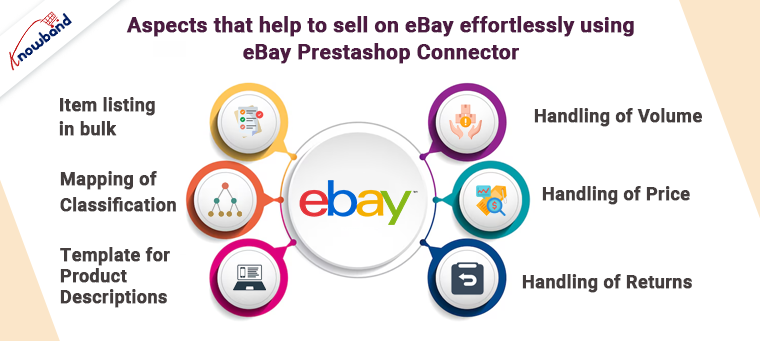
Aspects that help to sell on eBay effortlessly using eBay Prestashop Connector
Item listing in bulk
The eBay Prestashop Integration plugin considers bulk product listing. In addition, the administrator can map the Prestashop shop category to the eBay Marketplace category. In reality, all goods in the Prestashop shop class are guaranteed to be available on eBay Marketplace. Furthermore, within the chosen eBay category. The administrator can link many Prestashop classes to a single eBay category.
Mapping of classification
For all Prestashop store goods, the administrator should arrange the store categorization to the most logical eBay store class. In addition, for eBay class preparation. The eBay Prestashop Connector serves as a simple interface. In addition, the store administrator is responsible for category mapping.
Template for product descriptions
The Prestashop shop administrator can add the HTML layout to the representation. HTML layouts are supported by the eBay Prestashop API Integrator. Additionally, allow shop administrators to easily monitor product descriptions on eBay. There are also placeholders for sending the Prestashop store representation to the eBay store.
Handling of volume
The shop administrator can sync precise product quantities to get around eBay’s selling constraints. Finally, there’s the eBay Marketplace. The quantity control feature of the Prestashop eBay Integrator makes it easier for store managers to comply with eBay’s product listing requirements.
Handling of Price
The marketer can use the eBay Prestashop Integration plugin. Furthermore, in comparison to the Prestashop store, to sell items from the store on the eBay marketplace at an unexpected cost. Because of a fixed or rate-based cost, the administrator can establish a lower or higher assessment for the items. It allows you to offer low prices with little resistance.
Handling of returns
The admin may change the profit option with the Prestashop eBay API Integration Module. The module allows the shop administrator to customize the Return Description, Return Duration, Return Type, and whether or not the return is refunded to the shipping company.
With eBay marketplace connector’s robust capabilities and continuous updates, the addon is well-positioned to support merchants as they navigate the complexities of multi-platform selling. Furthermore, it’s an investment that promises to keep paying dividends in the form of increased sales and customer satisfaction.
Therefore this is what the Prestashop eBay Integration Addon by Knowband is all about. It is a very functional and beneficial option for selling on the platform. What do you think of the plugin? In case you have any queries or doubts, let us know at support@knowband.com.
Prestashop eBay Integration addon by Knowband is the solution if you are planning to integrate your Prestashop store with eBay Marketplace.
Headquartered in San Jose, California, eBay is a multinational eCommerce corporation that popular as an online auction and shopping site. It facilitates consumer-to-consumer and business-to-consumer sales and offers an easy. In addition, customizable interface for sellers across the globe to list and sell their products effortlessly. Further, eBay operates in over 30 nations. The product listing of eBay combines 800+ million product listings that are not just unique but are even coupled with great deals. eBay is a marketplace where people around the world connect to sell and buy different seller products which would help store owners to increase the sale and extend the store reach.
The Prestashop store owners can now sell their products in the eBay marketplace with the help of Knowband’s eBay integrator. Prestashop eBay marketplace connector module integrates Prestashop Store with eBay Marketplace. The store admin can now perform various operations in the marketplace which include product listings, category mapping, order listing, etc with the help of Prestashop eBay Marketplace Integration Extension.
1.1 Features offered by Knowband Prestashop eBay integrator:
The eBay Prestashop Integration addon makes it easier for sellers to sell their products on the popular marketplace.
The eBay Prestashop connector module offers a profile-based listing that allows the store admin to list the product in the marketplace in bulk.
The seller can add, remove or relist the products from the back end of the eBay Prestashop integrator.
The automated approach of the eBay Prestashop integration plugin makes inventory management effortless.
The admin gets an option to offer desired shipping methods to the marketplace customers from the back end of the eBay Prestashop integrator module.
The admin can sync the orders received from the marketplace into their Prestashop site. The change in the order status can sync back to ebay.com.
With easy inventory and order management of eBay Prestashop integrator, online merchants get to tap the larger audience base with the least effort.
The eBay Prestashop integrator addon lists the error that occurs while listing the products.
The latest feature of the eBay Connector module will enable the store admin to select the product country while creating their profile.
Now, the online store owner with Action validates the order hook can sync the product inventory data on both eBay and the Prestashop store after an order gets placed at the Prestashop store.
[New] Now store admins can easily compare their eBay inventories with their prestashop store using the Prestashop eBay Marketplace integrator. This enhancement is specially developed to ensure the accurate no. of products available across both the eBay marketplace as well as prestashop store.
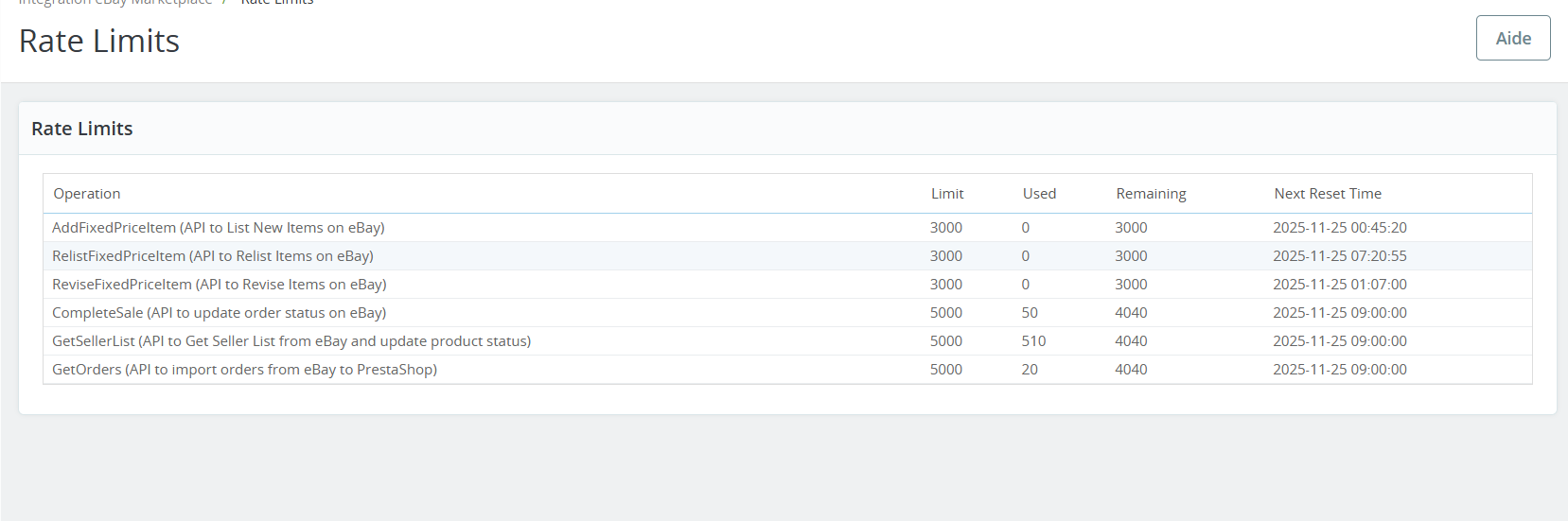
[New] The module now provides the feature to track the rate limits of the APIs that are called. Through this feature, store owners can check the no. of times the APIs have been called.
What’s New in the Recent Enhancements!
Profile Level Product Synchronization:
Knowband’s Prestashop eBay marketplace connector addon now supports profile-level product synchronization. This feature enables merchants to manage and synchronize their product listings more efficiently by categorizing them into profiles. Furthermore, each profile can be customized with specific synchronization settings, streamlining inventory management and ensuring consistency across platforms.
Product Listing with Custom Product Title and Description:
The enhanced eBay Prestashop connector addon allows for product listings with custom titles and descriptions on eBay. Moreover, the merchants can now tailor their product titles and descriptions to better match eBay’s search criteria and buyer preferences. This customization helps improve visibility, attract more potential buyers, and ultimately increase sales.
eBay Business Policy Import:
The latest update to Knowband’s Prestashop eBay marketplace connector includes eBay business policy import. This feature simplifies the process of importing eBay’s business policies into Prestashop, ensuring alignment in shipping, return, and payment policies. It enhances compliance, reduces manual errors, and saves time for merchants managing multiple platforms.
PrestaShop eBay Marketplace Integration Module
The Knowband Prestashop eBay Marketplace Integration Addon enables seamless product synchronization, order management, and automated updates between your Prestashop store and eBay.
You can watch our video on “New Features in Knowband’s eBay marketplace Integration Module v2.1.6 for Prestashop” here:
2.0 Installation
After purchasing the Prestashop eBay Connector module, you will get the following files:
1. Zipped file with the source code of the eBay Prestashop integration module.
2. User Manual
You can upload the module in two ways:
Manual by uploading files from FTP
Automatic by uploading a zip file from the admin
Manual
Follow the following steps to install the extension:
1. Unzip the zip file. It would contain files and folders as shown below –
2. Copy all the files and folders of the unzipped folder into your store “Modules” directory on the path – Root Directory/modules/.
Now Prestashop eBay Connector is ready to install on your store. Moreover, you can find that in Store Admin -> Modules and Services.
Automatic
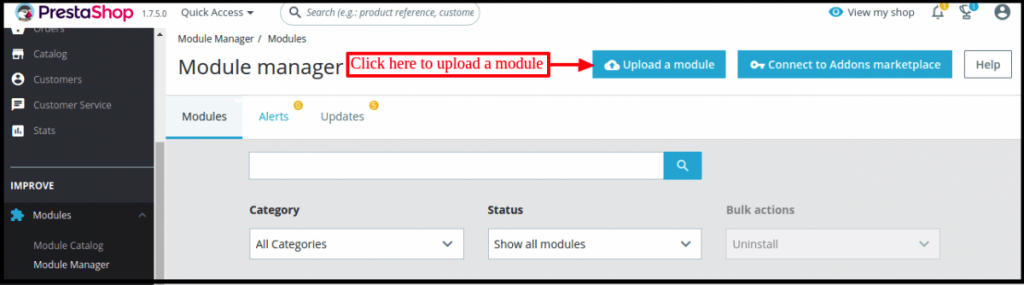
Login to admin and click on Module & Services from the left-hand column. Go to the Store Admin -> Modules and Services
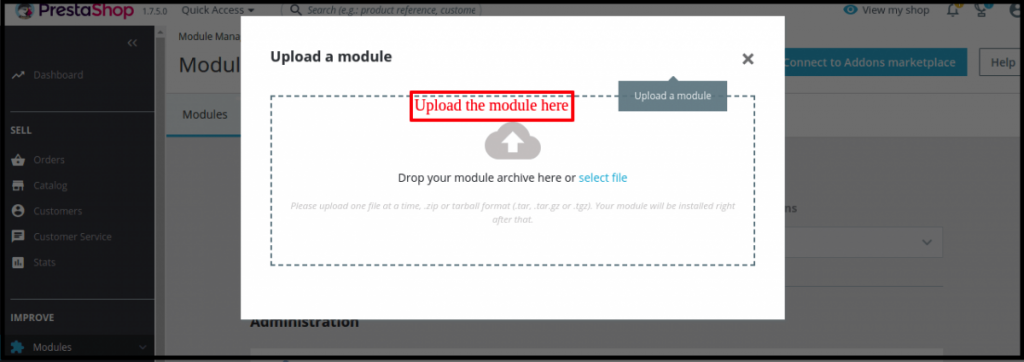
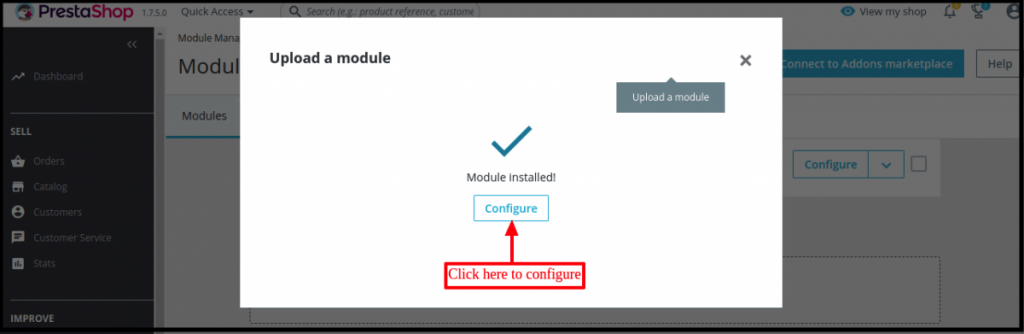
Click on “Upload a module”. Drag the file or simply select the file from the system.
Now module is ready for installation on your store and you can find that in Store Admin -> Modules and Services.
Once the file completely uploads, a notification of “Module(s) successful installation” will display.
After the eBay Prestashop Connector Module installs properly, the Install button will automatically change to Configure.
In case, you are not able to find eBay Prestashop Connector in the admin modules list, please try searching module with the following details
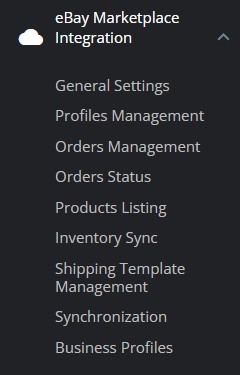
After installation, store admin can find a menu named “eBay Marketplace Integration” in the left panel of Admin as shown below –
3.0 System Setup
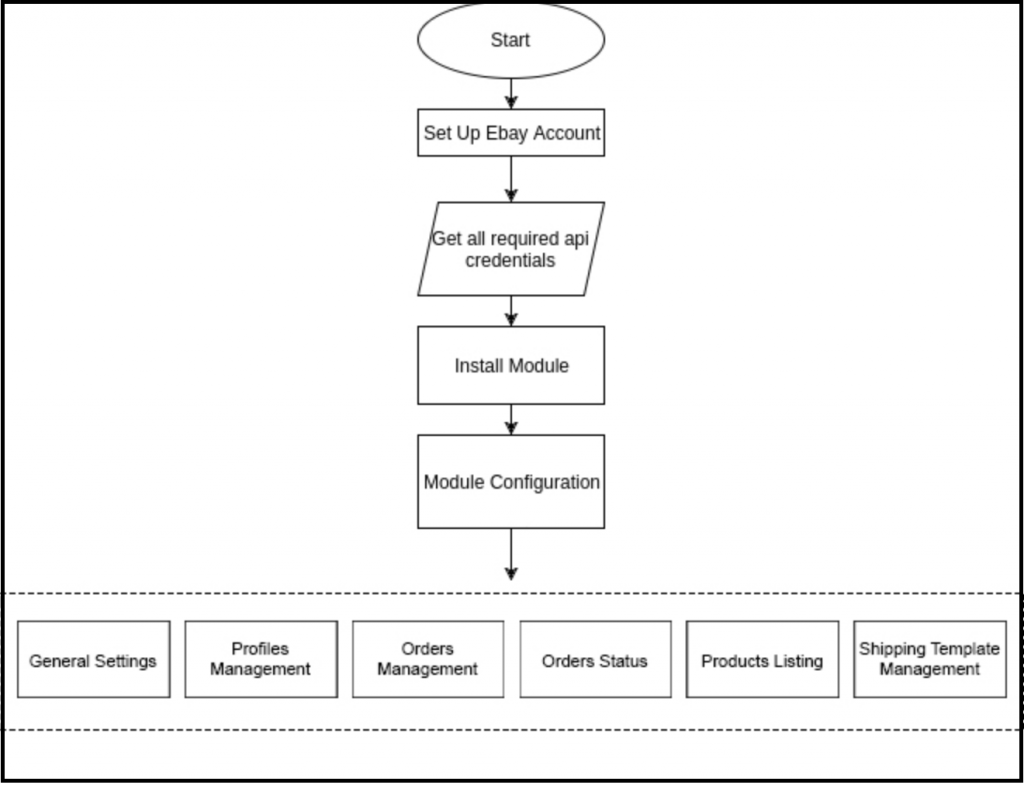
Before proceeding ahead, it is important to know that what is the correct flow of actions to set up this system as several things are dependent on other things and if we do not take care of them then it would become difficult to process smoothly or maybe error-prone.
4.0 eBay Marketplace – Seller Account Setup
To start selling on eBay Marketplace you need to have a seller account on eBay. In this section, we are listing all the steps to create a seller account on eBay. Please find them below –
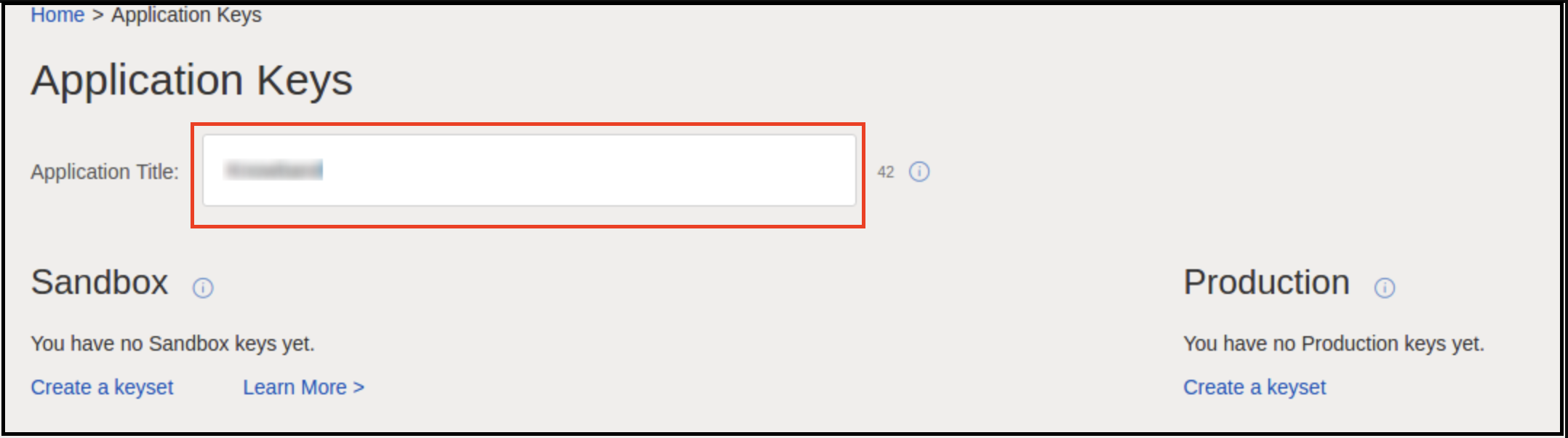
After filling in the valid data, click on the “join” button. You will head to the application creation page.
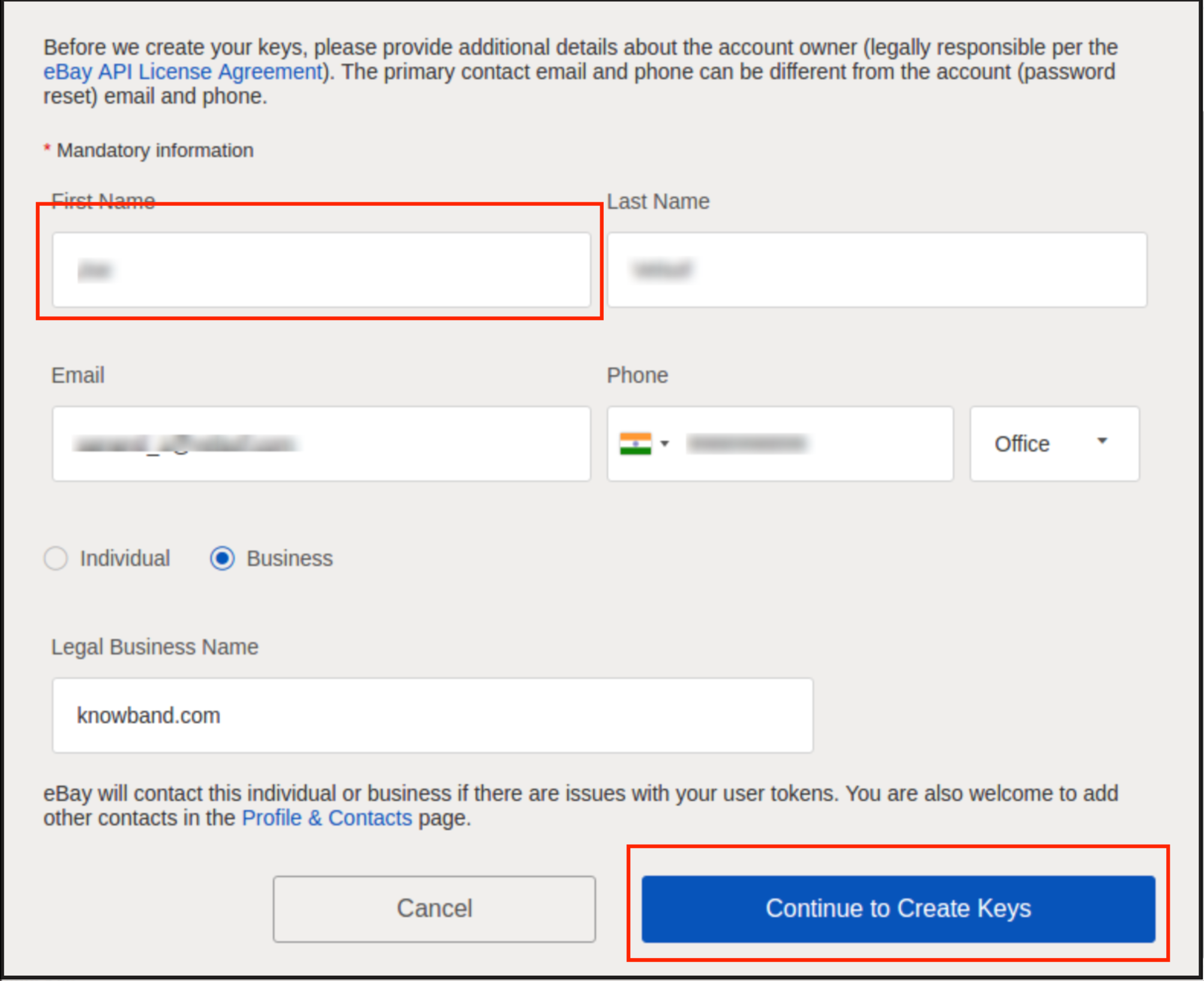
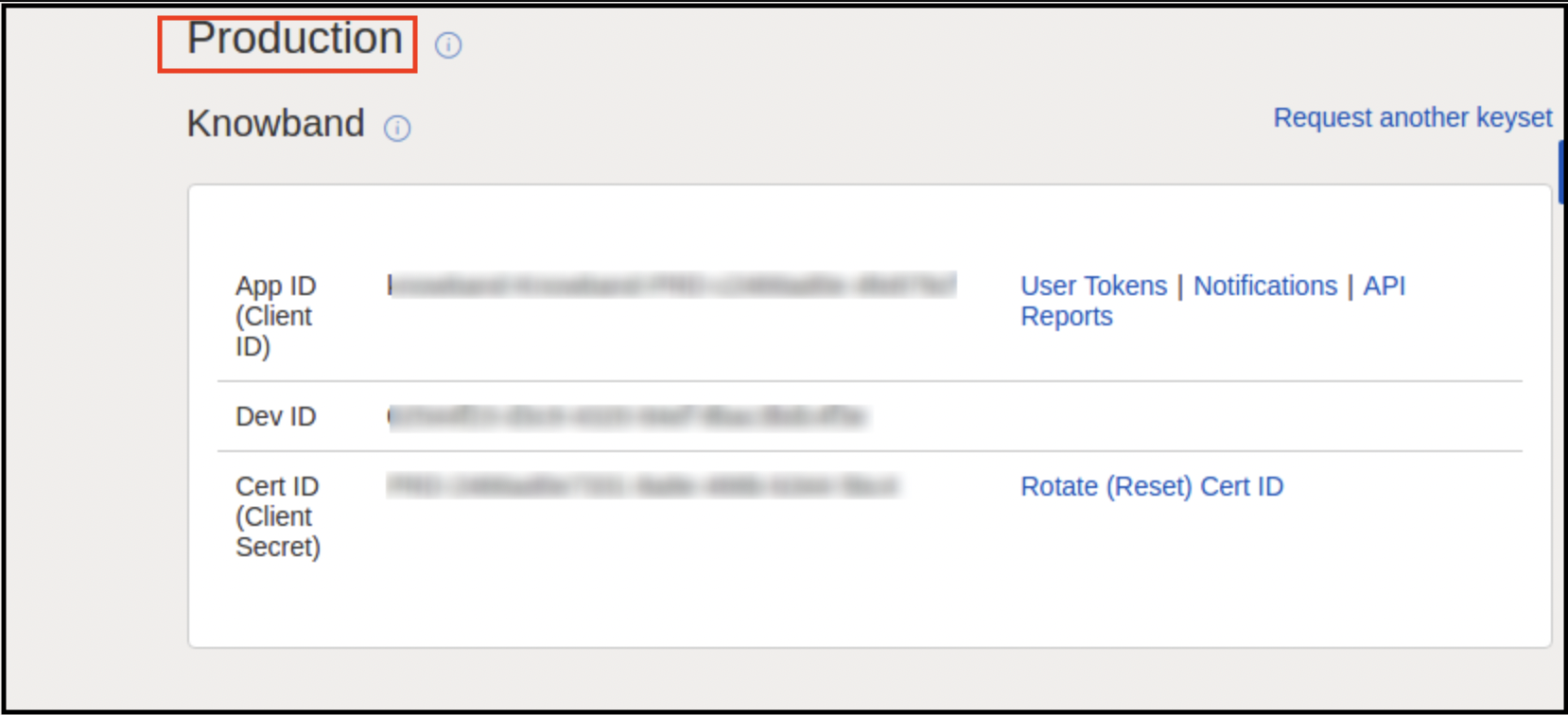
Enter the application name and click on create key set under the Production section, a new form will be opened.
Enter the details and click on Continue to create Keys.
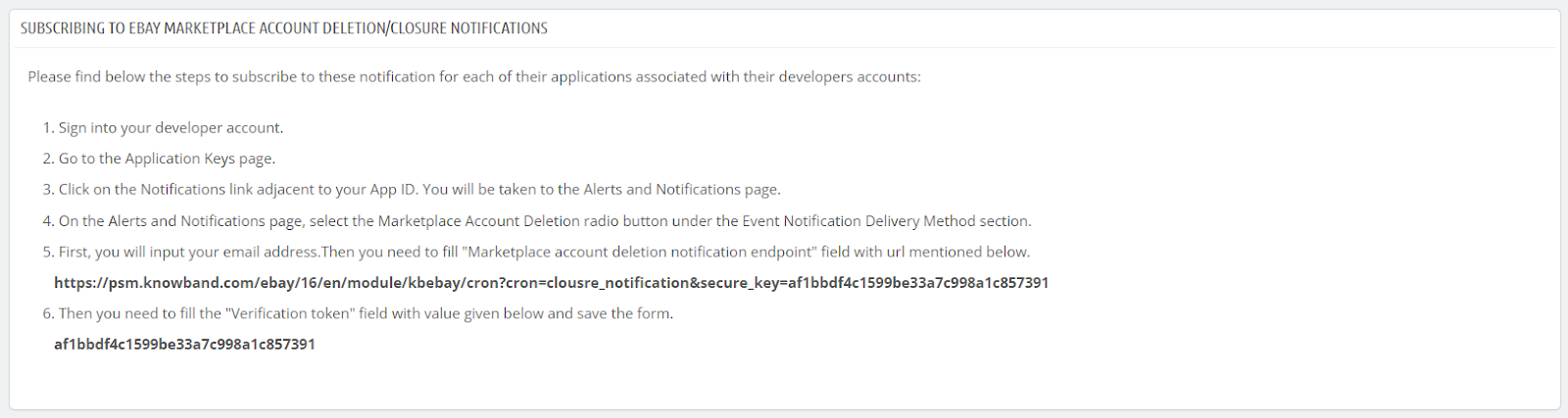
The application keys will be disabled until subscribed to eBay Marketplace Account Deletion/Closure Notifications.
To comply witheBay Marketplace Account Deletion/Closure Notifications follow the steps mentioned in the general setting steps of the Prestashop eBay Marketplace Integrator module.
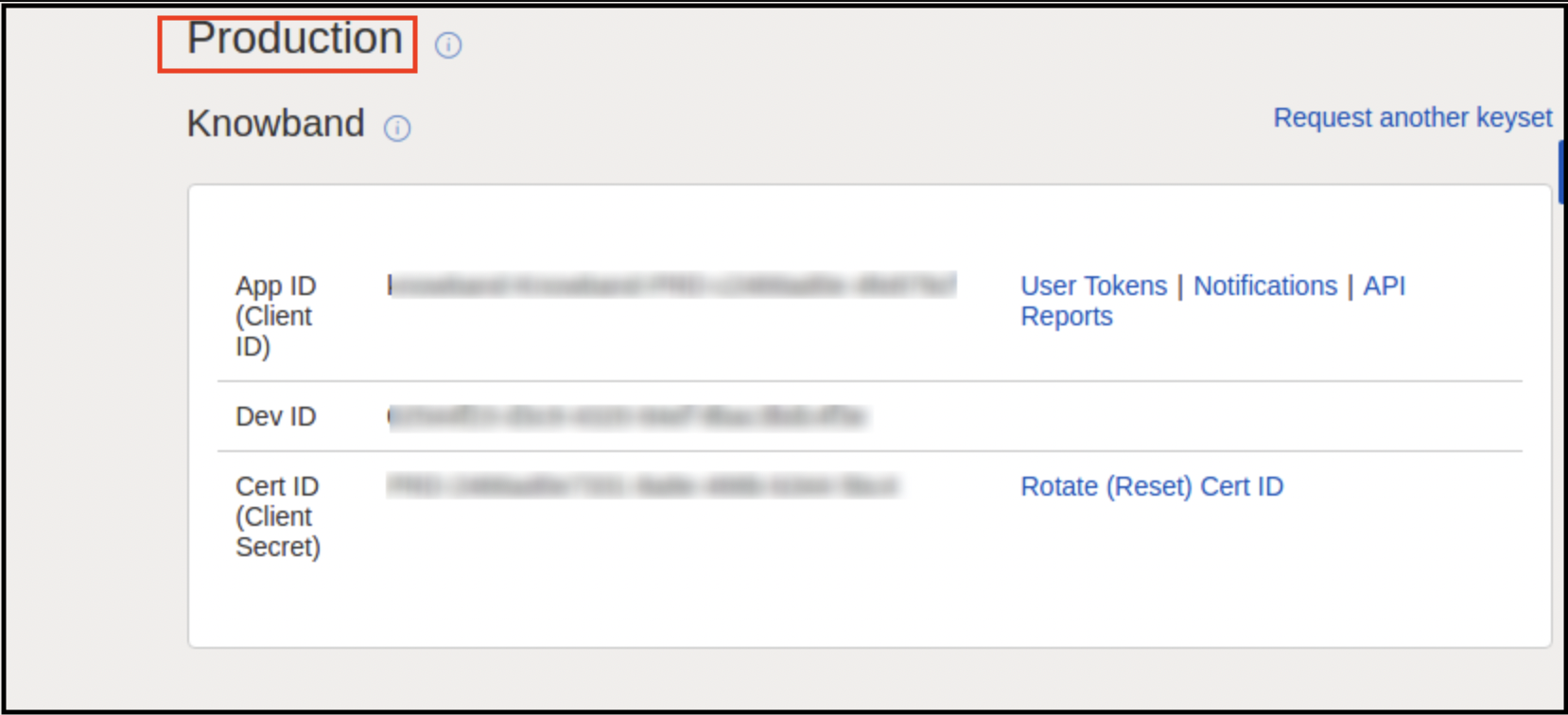
Once your enrolment to eBay account deletion/closure will be done successfully. You can easily access eBay API keys.
The application keys will be shown.
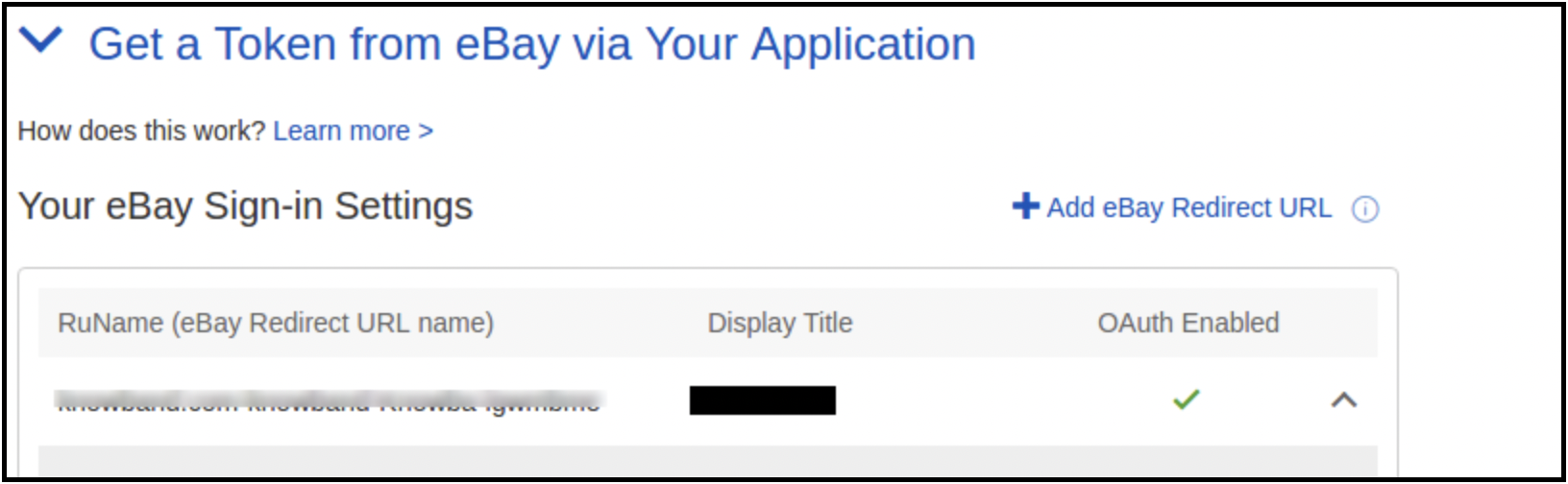
RU Name:
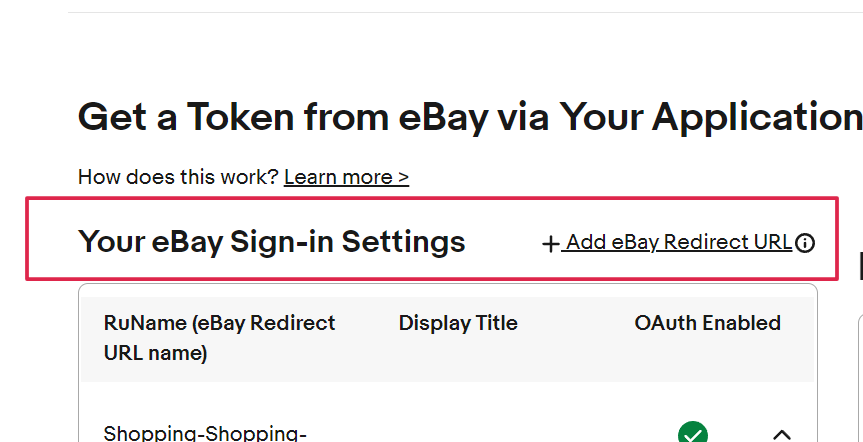
For creating your RU name hit the “Add eBay Redirect URL” button as shown in the below image.
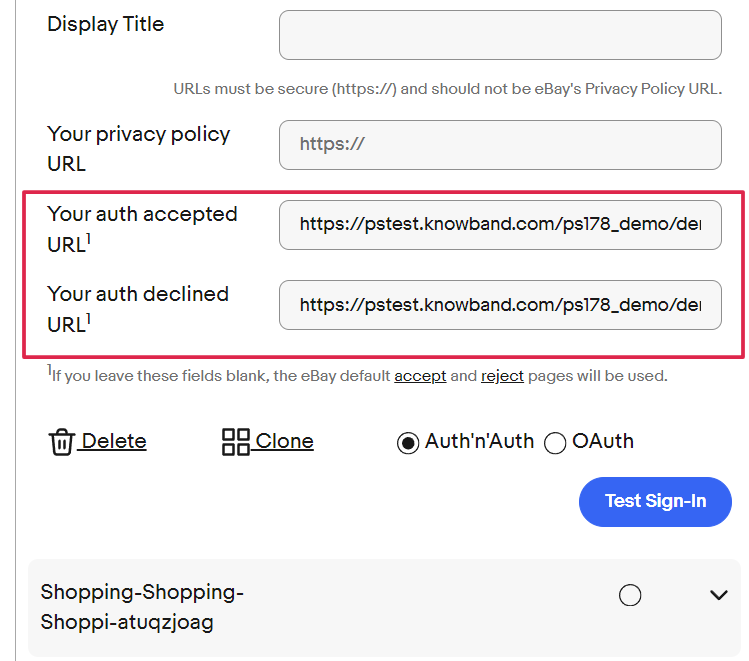
Kindly copy the redirected URL from the module general setting and place it in the “Your auth accepted URL1” and “Your auth declined URL1”.
Click Save and Test Sign-in.
5.0 Assumptions
1. All products having default categories as the selected categories for the profile will list on eBay.
2. By default free shipping will add to products, Shipping details for listing will be
Shipping Service:- UPSGround
Shipping Type:- Flat
It is changeable from the eBay account.
3. By default, the return policy will add. Policy details are:-
RefundOption – MoneyBack
Days – 30 days
Description-If you are not satisfied, return the item for a refund
ShippingCostPaidBy – Buyer
It is also changeable from the eBay account.
4. eBay account of the admin is connected to the PayPal account.
6.0 Admin Interface
The Prestashop eBay Integrator menu contains the following options:
General Settings
Profiles Management
Orders Management
Orders Status
Products Listing
Inventory Sync
Shipping Template Management
Synchronization
Each tab of the Prestashop eBay integrator module is explained in detail below.
6.1 General Settings
The very steps involve connecting your store with the eBay Marketplace. Go to Module and Settings of the admin interface of the Prestashop eBay API Integration module. You’ll find your module as shown below:
Each field for the configuration panel of eBay Prestashop integrator is explained below:-
Activate
This is an on/off switch. Admin has the option to Activate/Deactivate the module. If enabled, then only this module and all its settings will be working otherwise there will be no impact of this module on the store.
Account Type
This field choice allows the admin to select the account type. The store owner can select the sandbox or live site from the dropdown.
Image Size of Product
In this dropdown option, store owners can select the type of image that will be sent to eBay.
Dev Id
This is a text field. In this field, you will have to input the Dev Id of the eBay account. Dev Id can be found by signing in to the eBay developer account.
App Id
This is a text field. In this field, you will have to input the App id of your eBay account. App ID can be found as shown in the above image.
Cert Id
This is a text field. In this field, you will have to input the Cert Id of the eBay account. Cert Id can be found as shown in the above image.
RU Name
This is a text field. In this field, you will have to input the RU Name of your eBay account. RU name can be found in the tab for Getting a Token from eBay Via Your Application after adding a redirect URL.
Paypal Email
This is a text field. You have to enter a valid PayPal mail id for will all listing will happen.
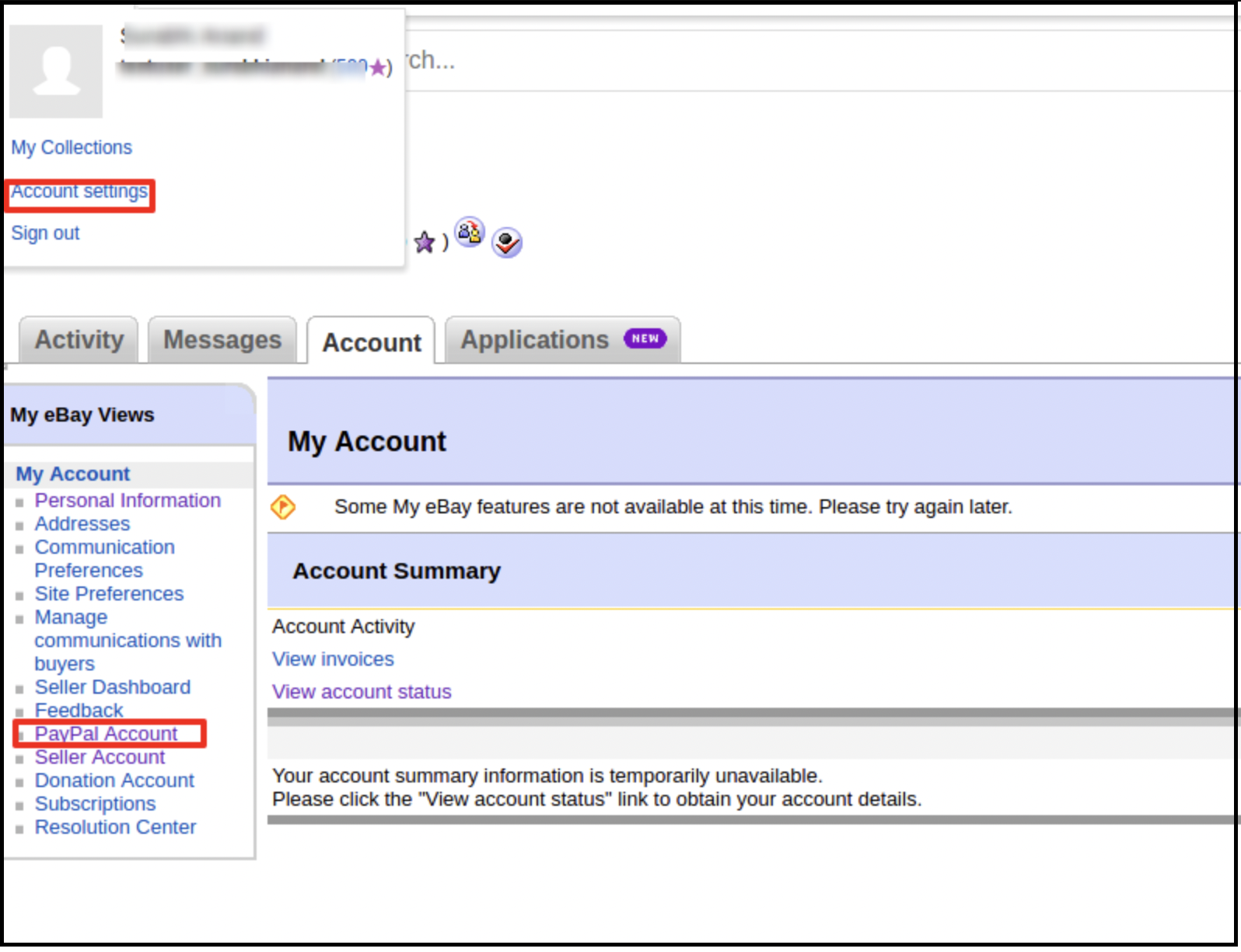
Log in to your eBay seller account.
Click on account settings from the top-left dropdown and click on PayPal account.
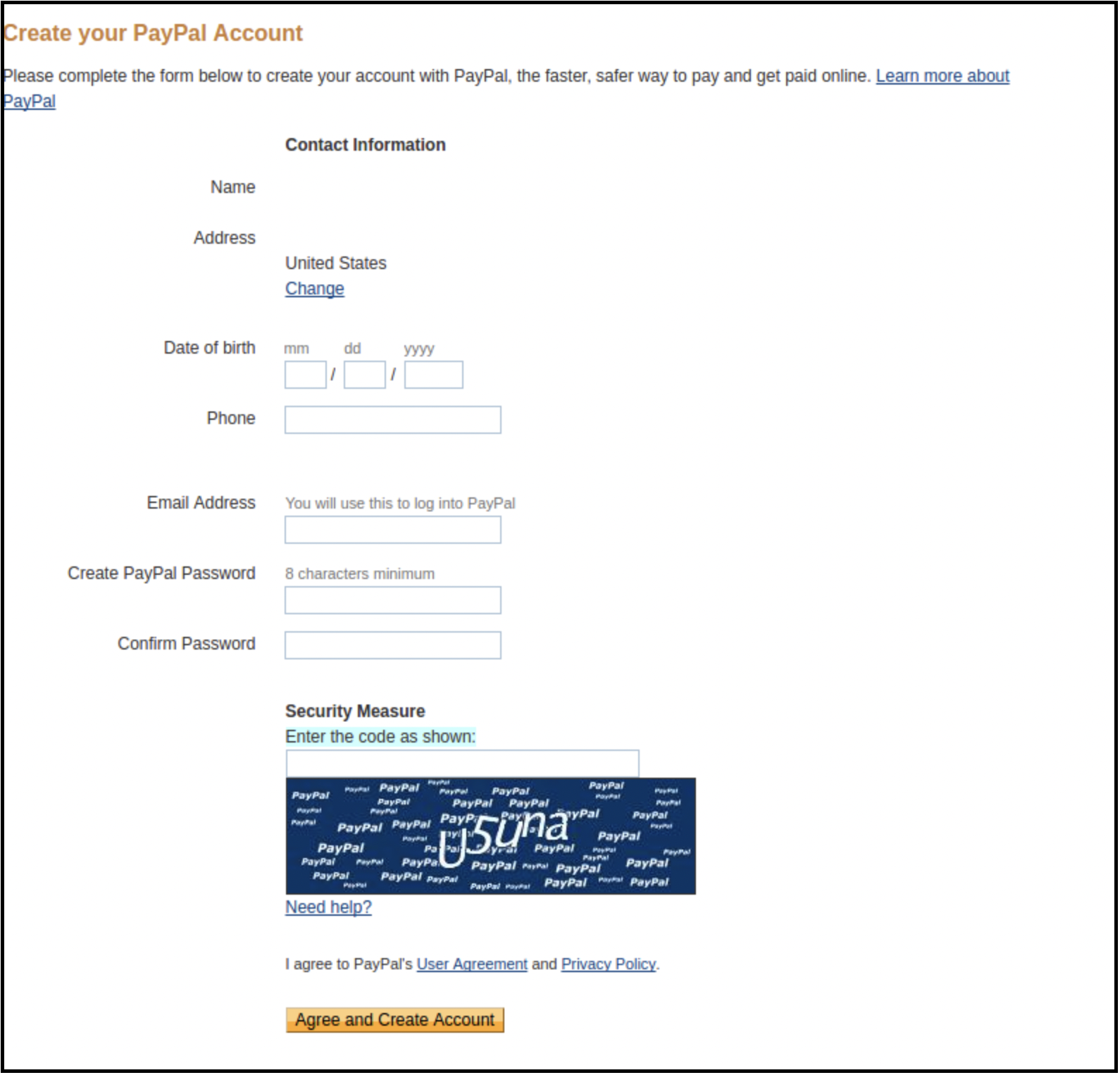
3. Now Sign up or link your already created PayPal account with the eBay seller account.
On clicking Sign Up, you will be redirected to the PayPal account creation page. Just create a profile by filling in details and linking it with your seller account.
Token listing link
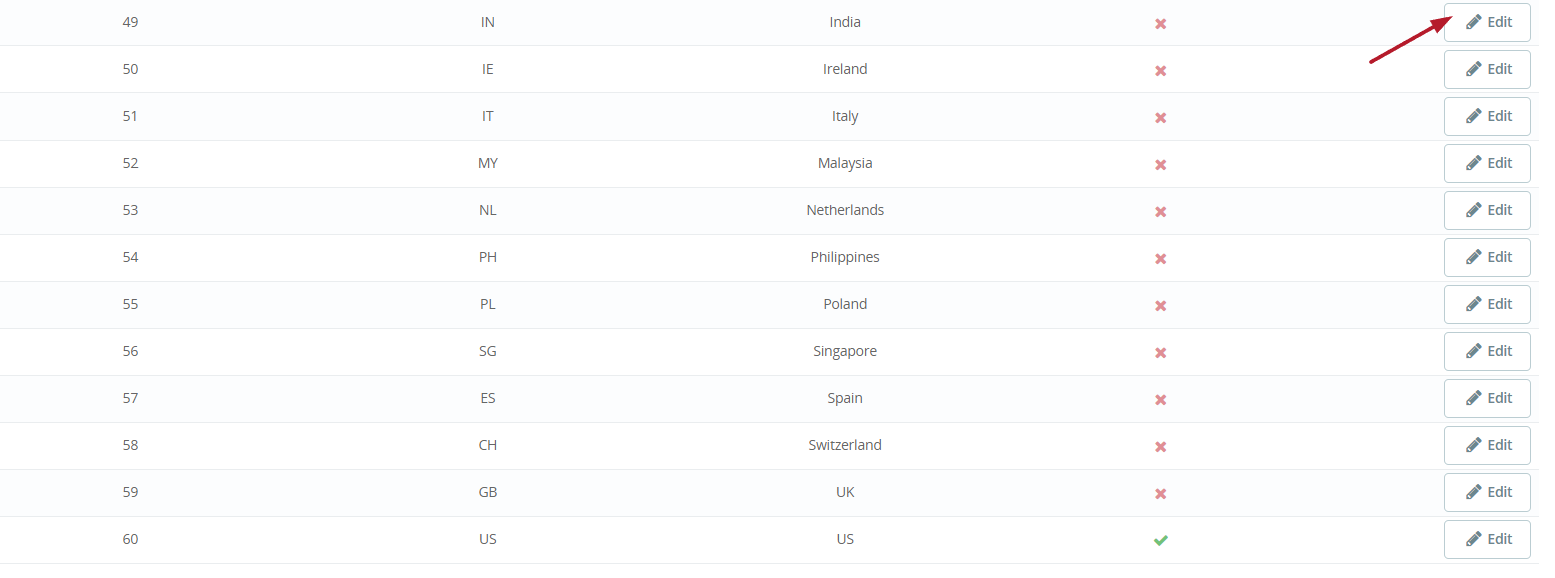
Click on \”Click here to add tokens for all the eBay Countries\” from the general settings of the module.
2. On the next page, click on the Edit button against the country for which you want to generate a token.
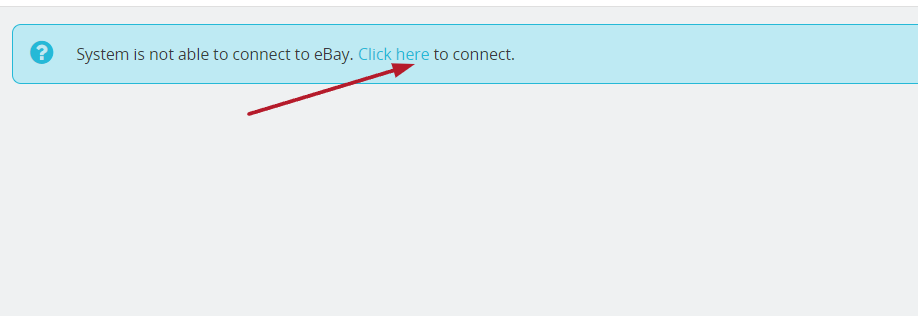
3. On the next page, click on the “Click here” to generate a token.
6.2 Profiles Management
The Profile Management tab of the Prestashop eBay integrator provides options to create a profile for product listing. In this section, the admin will be able to map the eBay category with the Prestashop store category and other product listing details can be saved.
6.2.1 How to add Profile to the system?
Following are the steps to add Profile into the system –
Step 1: Go to the eBay Marketplace Integration-> Profiles Management (Menu Option)
Step 2: It would redirect admin to a page where already available profiles will list (If any). Click on the “+” (plus icon as shown in the screenshot below) and it would redirect admin to a new page where a form with some input fields will be shown.
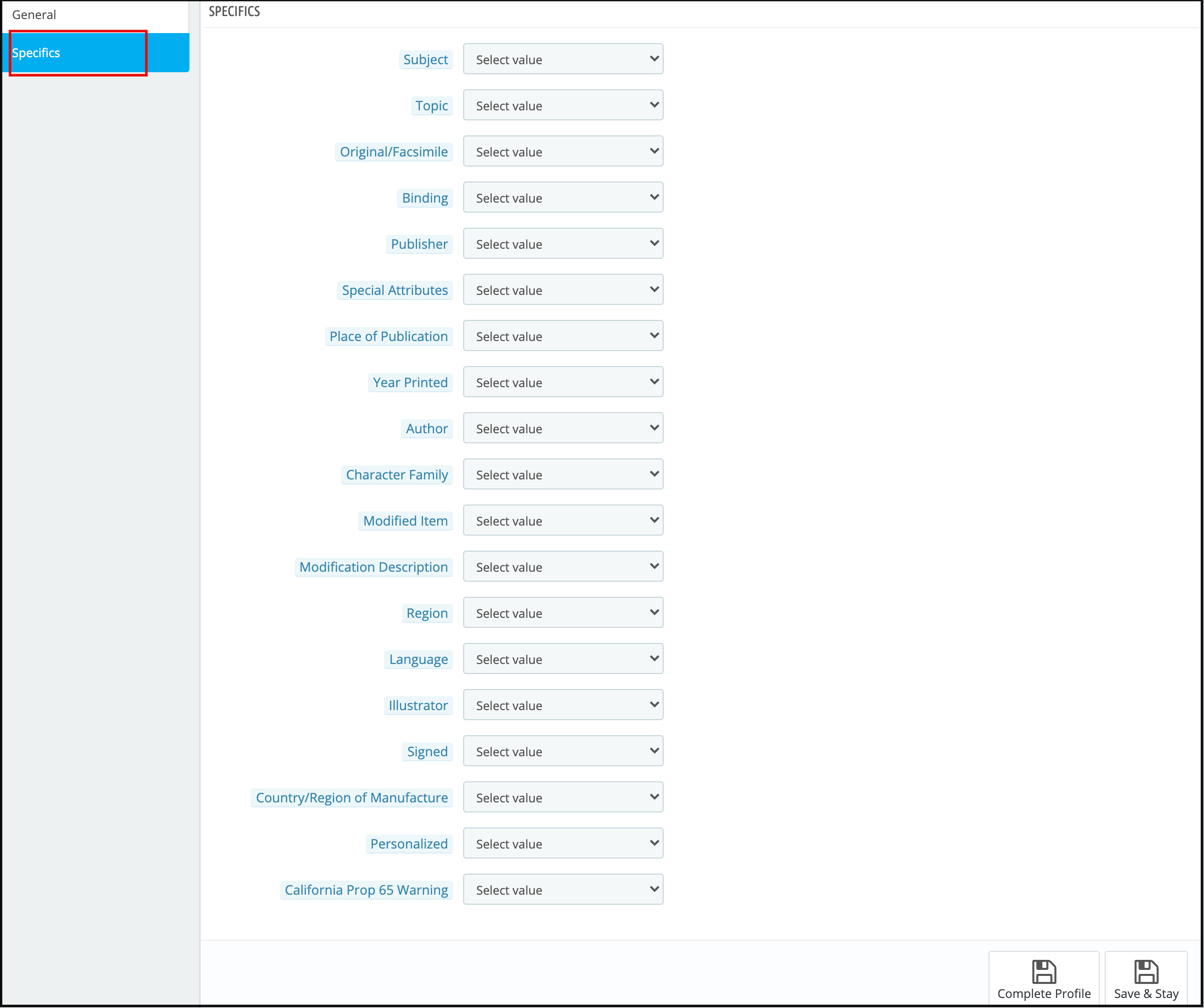
Step 3: There will be two tabs:- General and Specifics. Before adding General and Specifics we need to click on Sync Categories.
Sync Categories will sync the eBay categories. Further, that will be usable in mapping with Prestashop store categories in Profile management > General section.
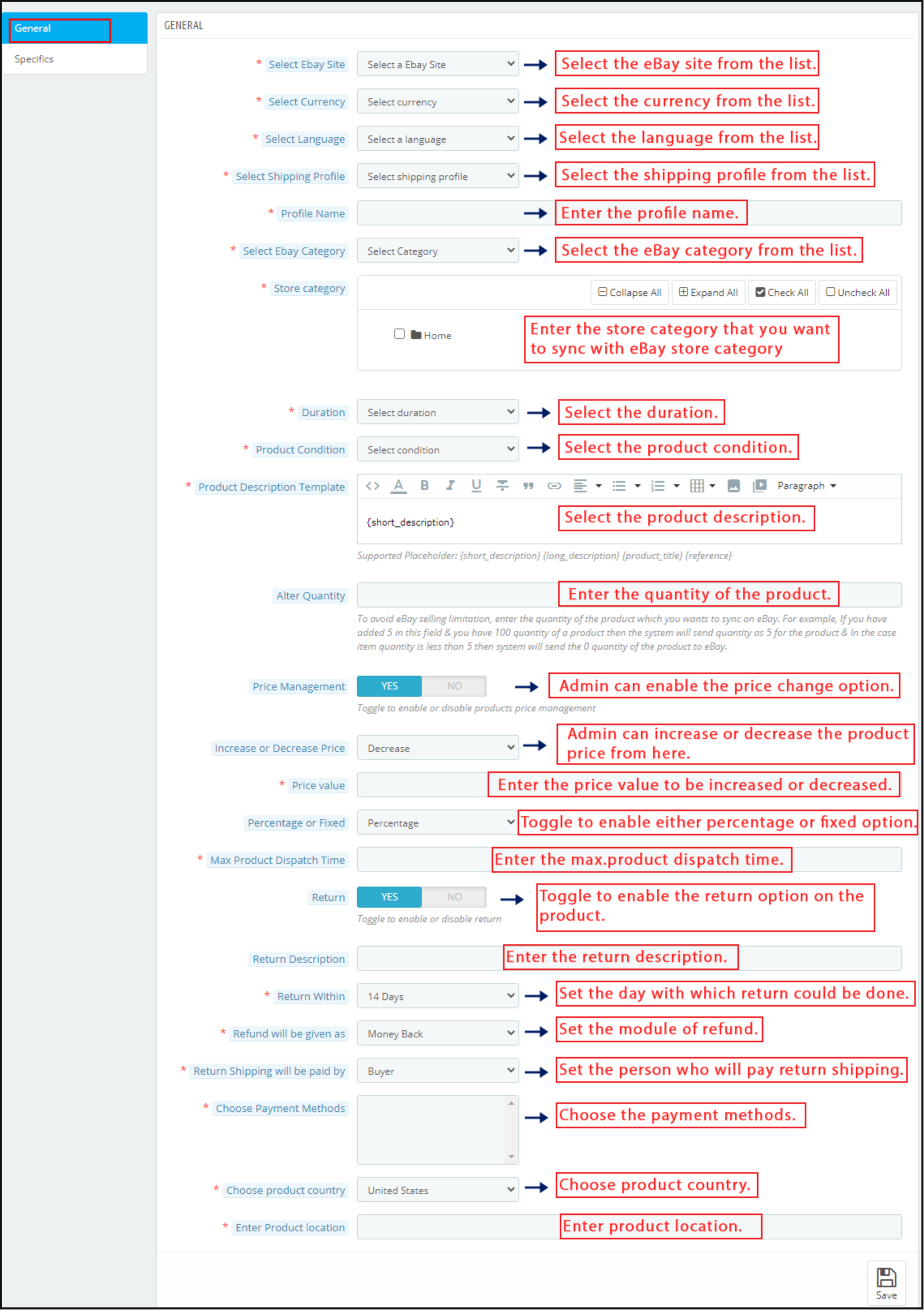
Now, we need to add the General and Specifics settings of Profile Management.
Select eBay Site: The Prestashop eBay API integrator allows you to connect your site with the various eBay marketplace across the globe. Choose the site from the given list.
Choose Language: The Prestashop eBay integrator offers multi-lingual support. Select the desired language from the drop-down menu.
Select Shipping Profile: The shipping profiles created in the Shipping tab will list in this section of the eBay Prestashop API Integrator. Choose the option that suits your requirements.
Profile Name: Enter a unique name for the Profile.
Select the eBay category: The drop-down menu lists out the eBay categories in which the products are to be listed. The Prestashop store admin can select the eBay category. In addition, the products will be mappable in the selected one with the help of Prestashop eBay Marketplace Integration.
Store category: Select store categories that you want to map with the eBay category. All the products of this category will then be mappable in the selected category of eBay with the help of the Prestashop eBay Marketplace Integrator module.
Duration: Select the duration for which the product lists.
Product Condition: Dropdown to select product condition i.e. New or Used etc.
Product Description Template: Enter the product description for the creation of a template.
Alter Quantity: Enter the quantity of the products that list on eBay.
Price Management: Prestashop eBay Integration Plugin enables the admin to sell the products at eBay Marketplace at different prices.
Increase or Decrease price: With eBay Prestashop API Integrator, the online merchant can increase or decrease the price value from the backend of their Prestashop store.
Price Value: The store owner can enter the amount value that he wants to increase or decrease in the price value of products at the Marketplace.
Percentage or Fixed: Prestashop eBay API Integration Module allows the admin to change the price value of the product at the Marketplace by a fixed amount or a percentage value.
Max. Product Dispatch Time: Enter the maximum expected dispatch time of the products that the admin maps.
Return: Enable the button if you want to provide the return option on the products to your customers. In the following section, you get the option to choose from existing eBay business policies or you can also create your own return policy from the module admin settings.
The Return Description: Enter the return description.
Return Within: Enter the days within which the return can happen.
Refund will be given as: Enter the mode of refund.
Return shipping will be paid by: Select the person who will pay for the return shipping from the list.
Choose Payment Methods: Select the payment methods from the various options available in this section.
Choose Product Country: Choose the product country from the list of country choices available.
Enter Product location: Submit the location of the product while creating the admin profile in the admin panel.
Once you fill-up the form and save the general settings, you need to add the specifications related to the category selected in the Specifics tab. Enter the attributes of the same as shown in the image below and save the changes.
Step 4: Click Save, all data will be validated and saved if valid and Profile will be created in the completed state.
6.2.2 How to Edit the Existing Profile?
Following are the steps to edit profile –
1. Go to the eBay Marketplace connector-> Profiles Management (Menu Option)
2. It would redirect admin to a page where already available profiles will list (If any, shown in the screenshot below).
3. Click on the “Edit” button corresponding to each profile as shown in the above screenshot.
4. It would redirect the admin to a new page where a form with some already filled input fields will be shown. Admin can simply update values and save the details by clicking on the “Save” button.
6.2.3 How to Enable/Disable Profile?
Following are the steps to enable/disable profile created in the Prestashop eBay integration extension-
1. Go to the eBay Marketplace connector-> Profiles (Menu Option)
2. It would redirect admin to a page of the Prestashop eBay Marketplace Connector where already available profiles will list.
3. To disable the Profile, the admin has to click check the option under the active column for the table.
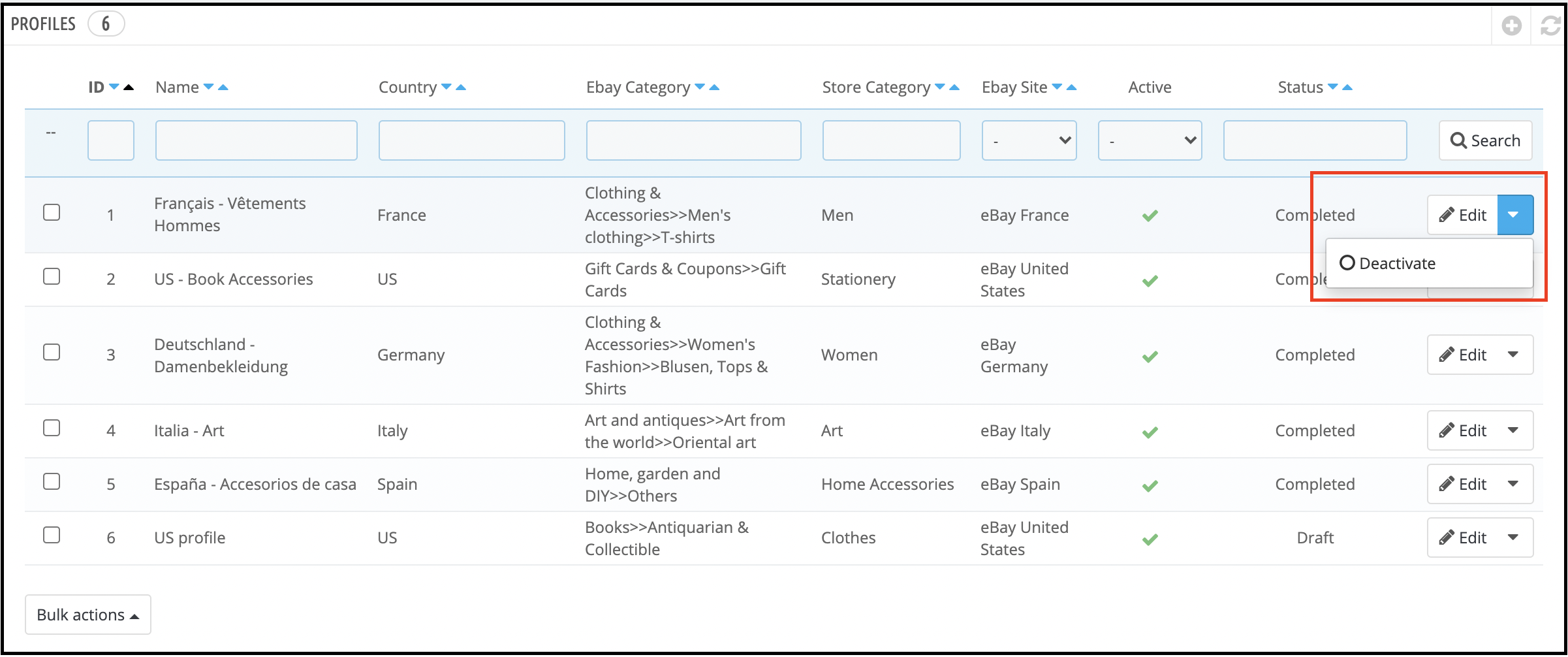
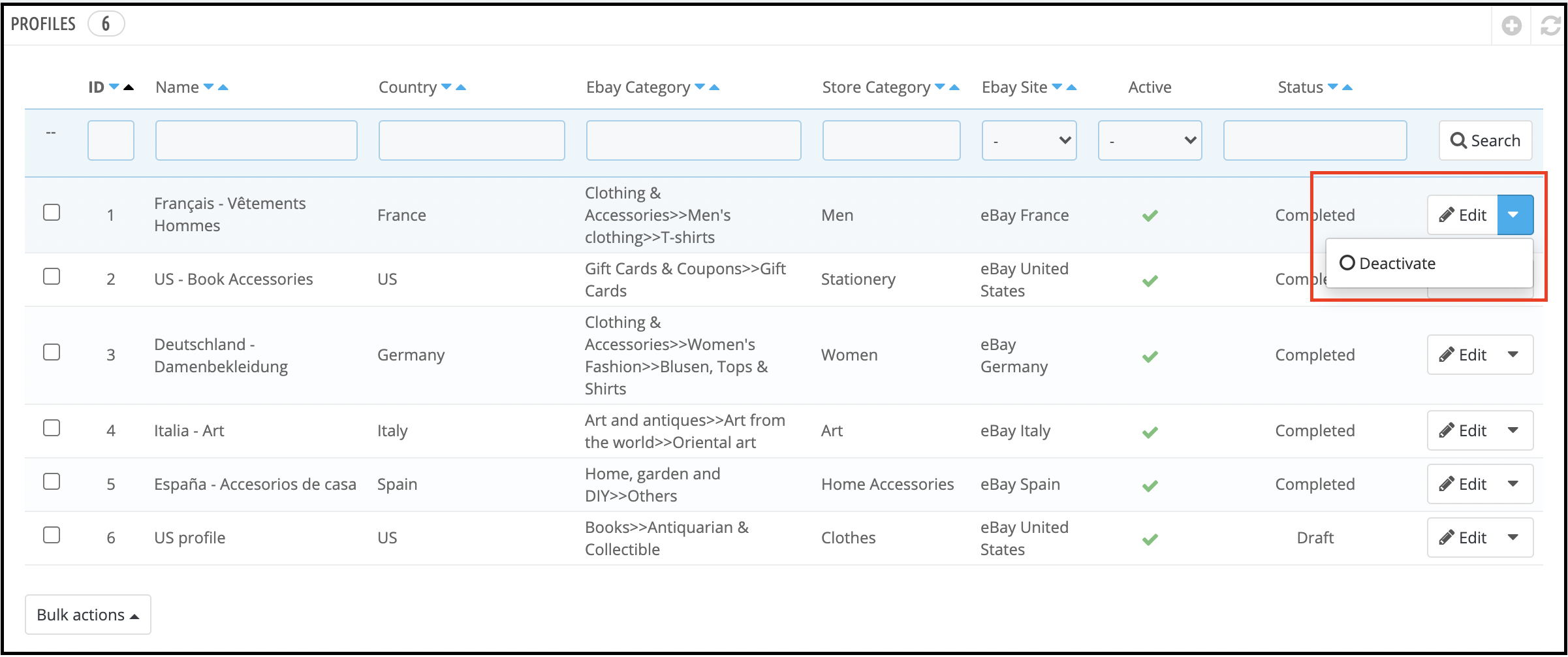
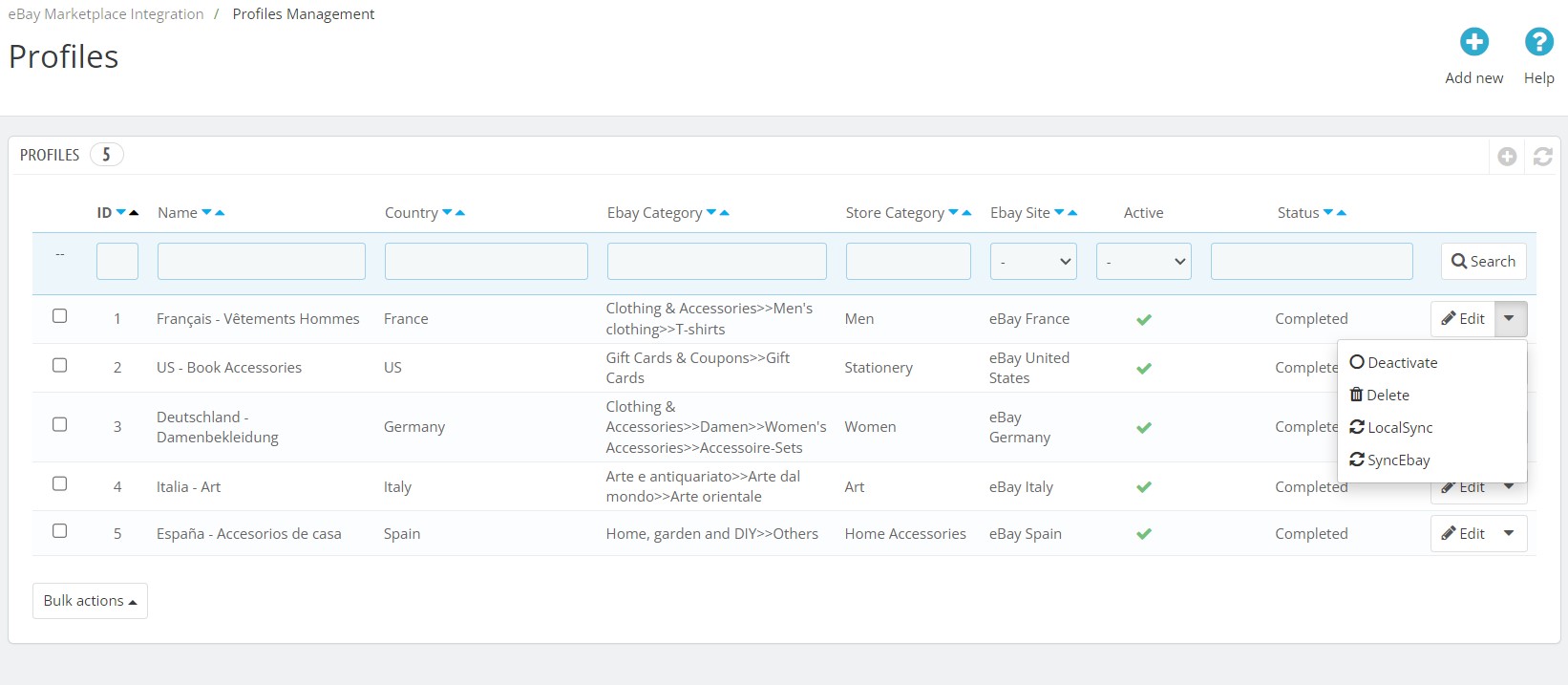
4. The green check sign shows that the profile is active. To deactivate it, click on the Deactivate button as shown below.
Note:- Disabling profile will end all the listed products from eBay listing and admin will have to relist them once the profile is again enabled.
6.3 Orders Management
Prestashop eBay integration plugin allows the store admin to sync the orders received from the marketplace. Once the orders are imported, they can be processed from the back-end of the Prestashop eBay connector module.
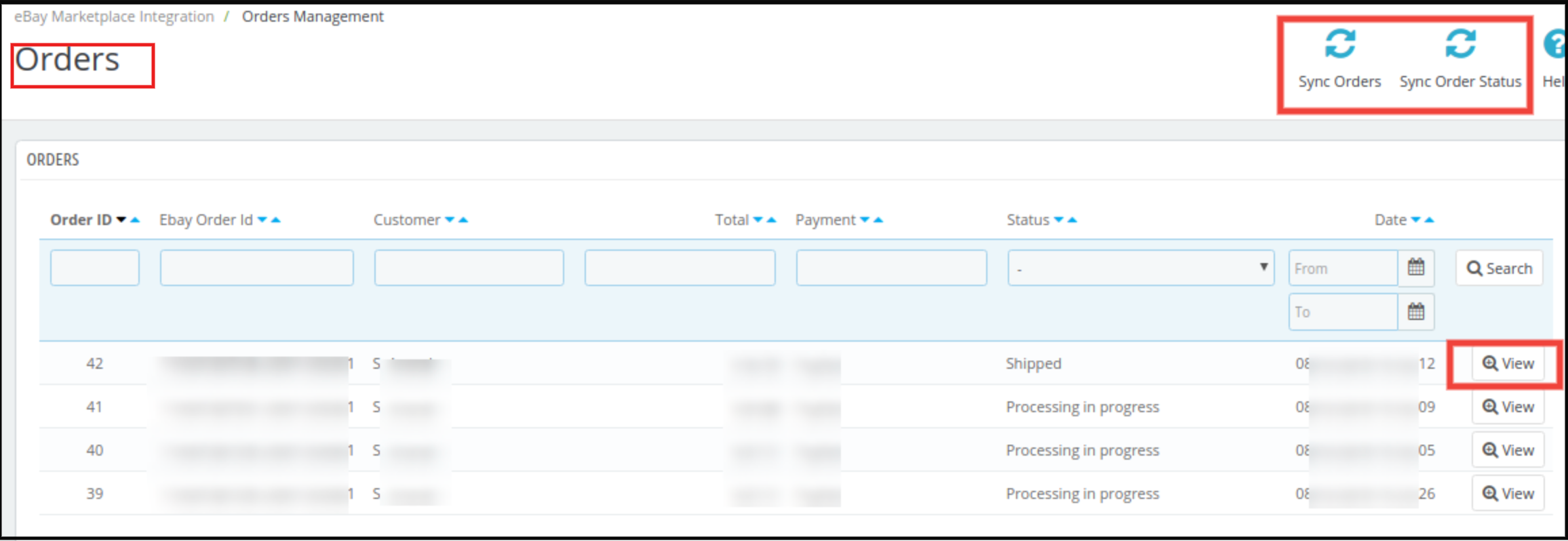
1. Go to the eBay Integration-> Orders Management(Menu Option)
2. All the orders from eBay will be available here.
To sync the orders from the eBay marketplace to the Prestashop store, execute Sync eBay Orders cron present on the top right corner.
3. Click on view to see order details and update the status of the order.
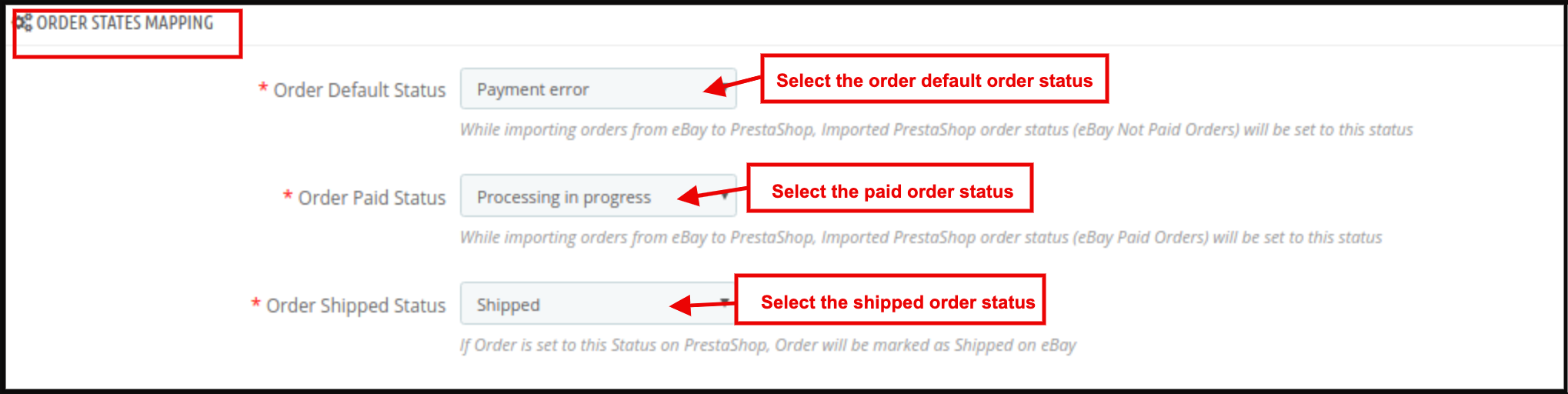
6.4 Order Status
Order Status tab of the Prestashop eBay integration plugin can map the order statuses updated by the store admin with the eBay Marketplace order statuses.
6.4.1 How to map Order Status?
Following are the steps to map order status –
1. Go to the eBay Marketplace integration module-> Order Status (Menu Option)
Once the status changes, execute the Update Order Status cron in the Orders Management tab. The changes will sync in the marketplace as well. (See section 6.3)
Note –
1. Default status means that the first status of an order when it is placed on the store.
2. Paid status means that order payment has been made and accepted.
3. Shipped status means that ordered items have been shipped.
6.5 Products Listing
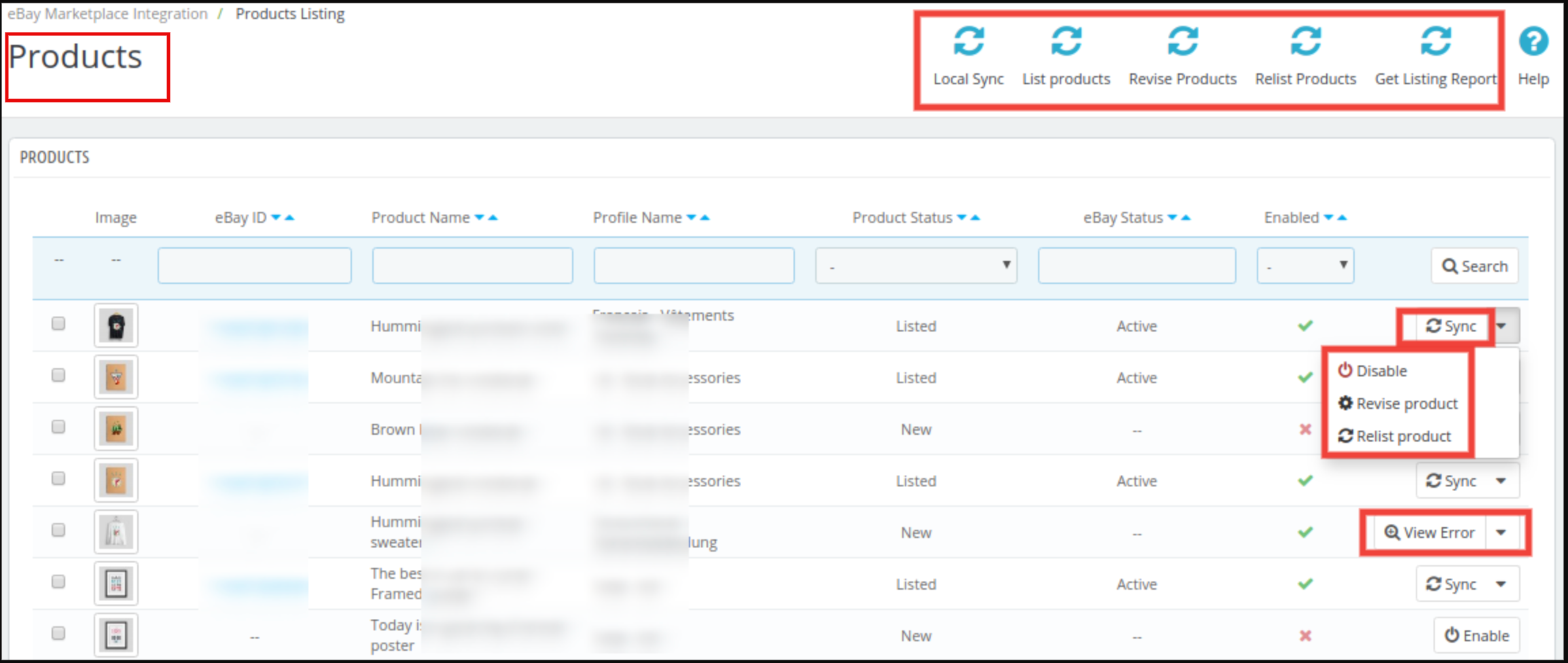
This section of Prestashop eBay integrator addon shows the list of all the products selected to list or listed on eBay Marketplace with their status and values as shown in the screenshot below
There are the following options available corresponding to each product listing:
Disable the Product
This tab enables the admin to disable the product from the backend of the module. After disabling the product, it will not be shown on the front-end of the Marketplace. It can be only visible after enabling the product from the backend.
Product Listing Relisting
This option offered by eBay Prestashop integrator allows the admin to relist products in case the listing is expired on eBay Marketplace. To relist the product, the admin has to click on the “Relist” action given in bulk actions.
Product Listing Revision
If any update happens in product details, then by default it marks as updated and if cron is set for this action then it will be sent for revision. If the admin manually wants to send products for revision then he can mark the product and click on “revise” from bulk actions.
Individual Product Synchronization
This feature enables the admin to sync the products one by one (Along with the bulk sync option at the top right corner). By this, the admin can filter out the products that need not be shown on the front end of the eBay Marketplace.
View Errors
This feature enables the admin to view errors in the product. Admin can simply click on the View Error button and the error will display on the screen.
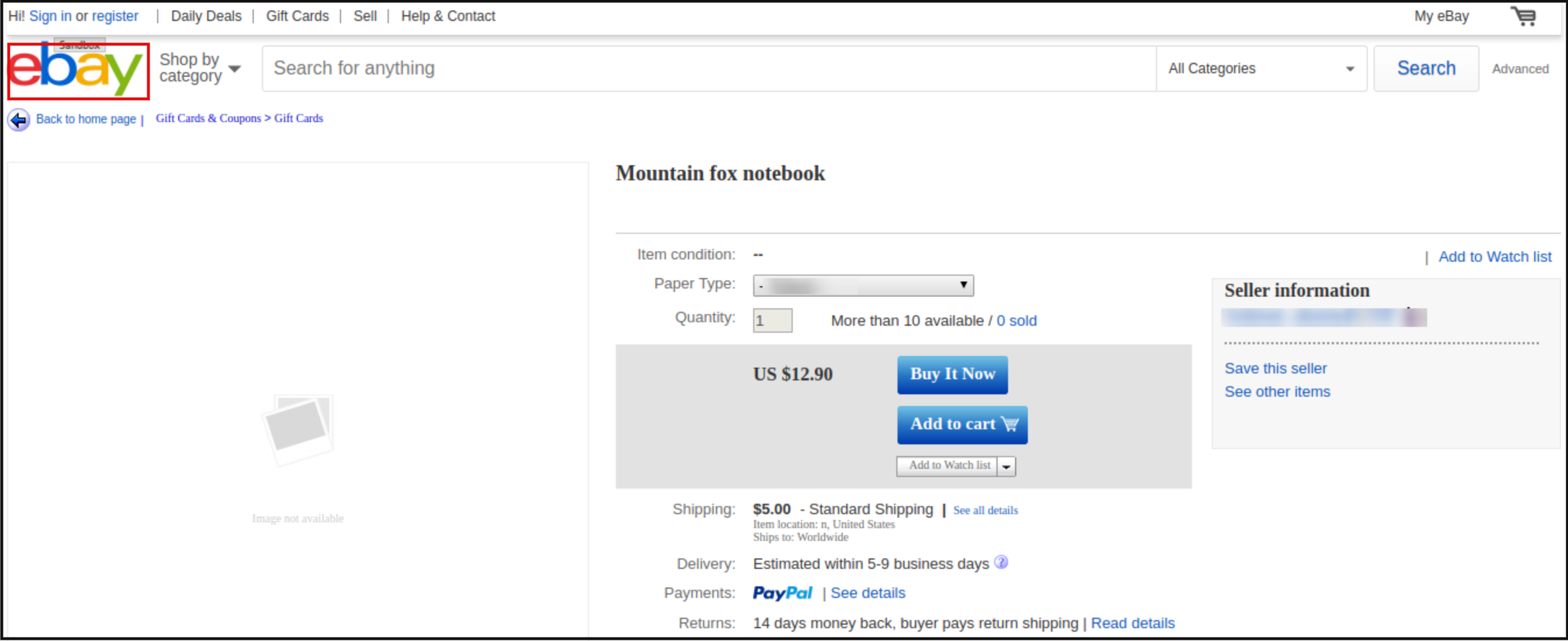
Visit eBay Product Page from the backend
This feature provides an option to go to the eBay product page from the module product page directly. For that, the admin has to click on the eBay ID and he would on the eBay Product page as shown below
Adding products from the product listings tab
If you want to add a product to the product listing tab, the admin has to create a profile of the product in the Profile section of the module. (read section 6.2.1) There you will get a step-by-step procedure of creating a profile and adding the product in the products listing tab.
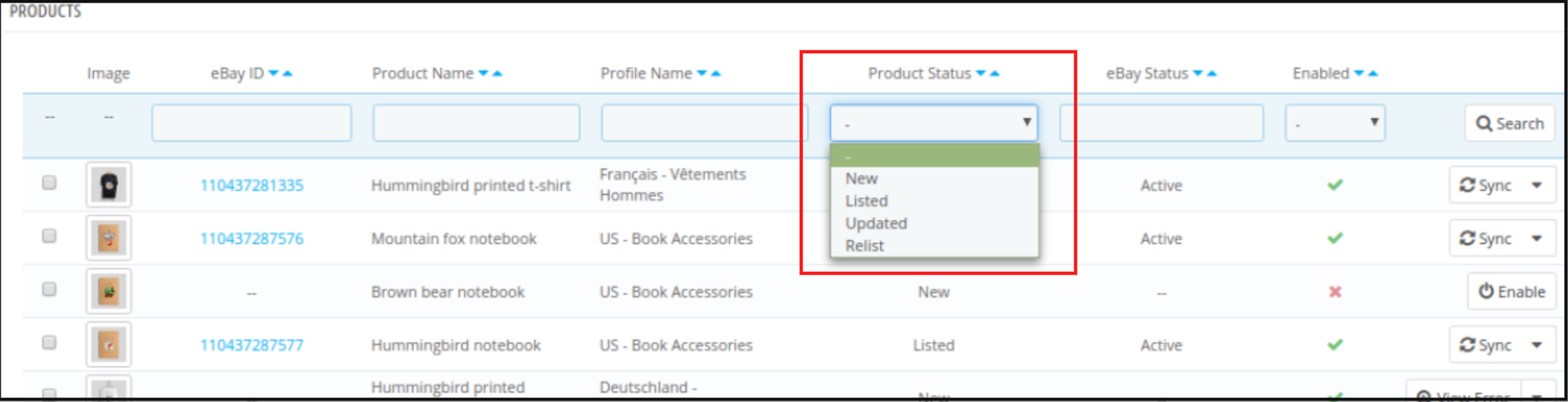
Different statues in the filter of the product listing
Here are some different statuses in the filter of the product listing.
New: After applying this filter, the admin can view the new products on the Marketplace.
Listed: After applying this filter, the admin can view the products on the Marketplace.
Updated: After applying this filter, the admin can view the updated products on the Marketplace.
Relist: After applying this filter, the admin can view the relist products on the Marketplace.
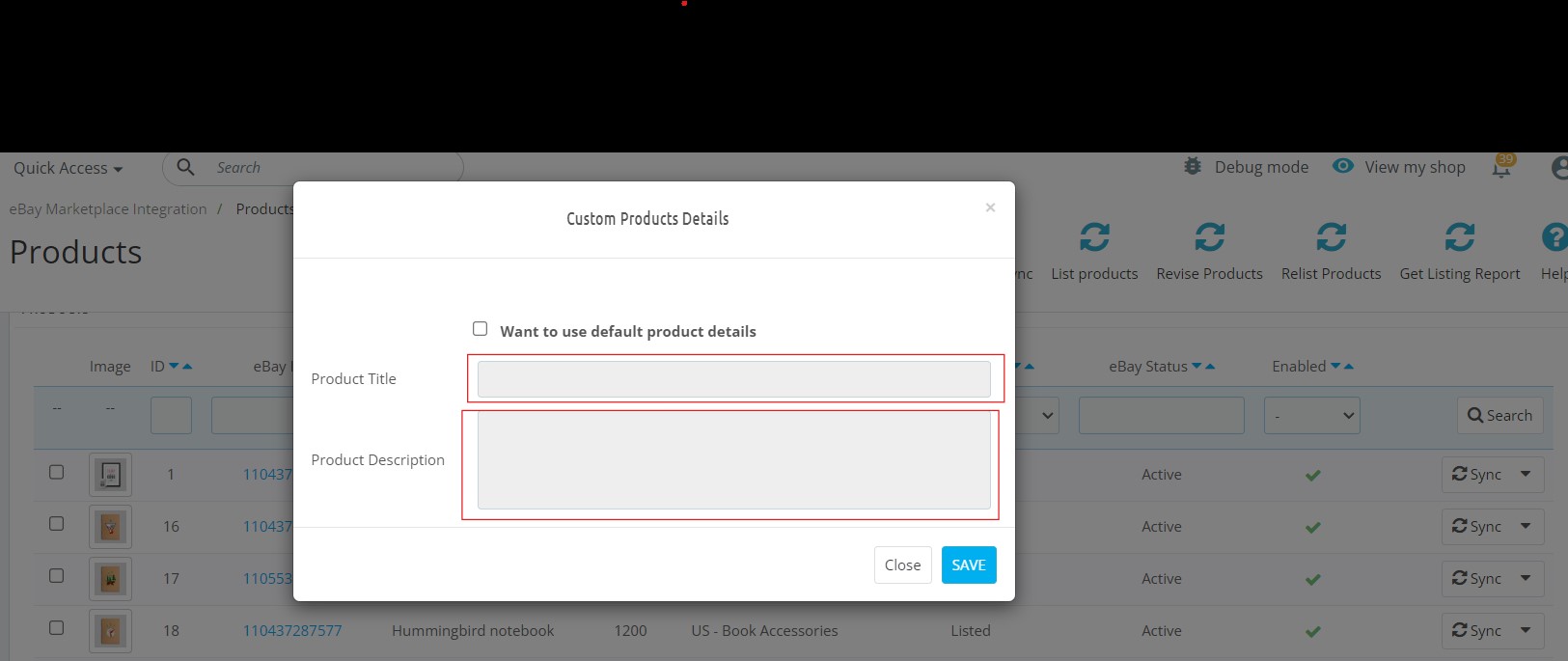
Custom Product Title: The Prestashop store admin can list the same products with different product titles on eBay with this option.
Custom Product Description: This option allows the admin to list the products with different product descriptions on the eBay marketplace.
6.6Shipping Template Management
The Prestashop eBay Integrator allows the Prestashop admin to create an N number of domestic and international shipping methods.
6.6.1 How to Create New Shipping methods?
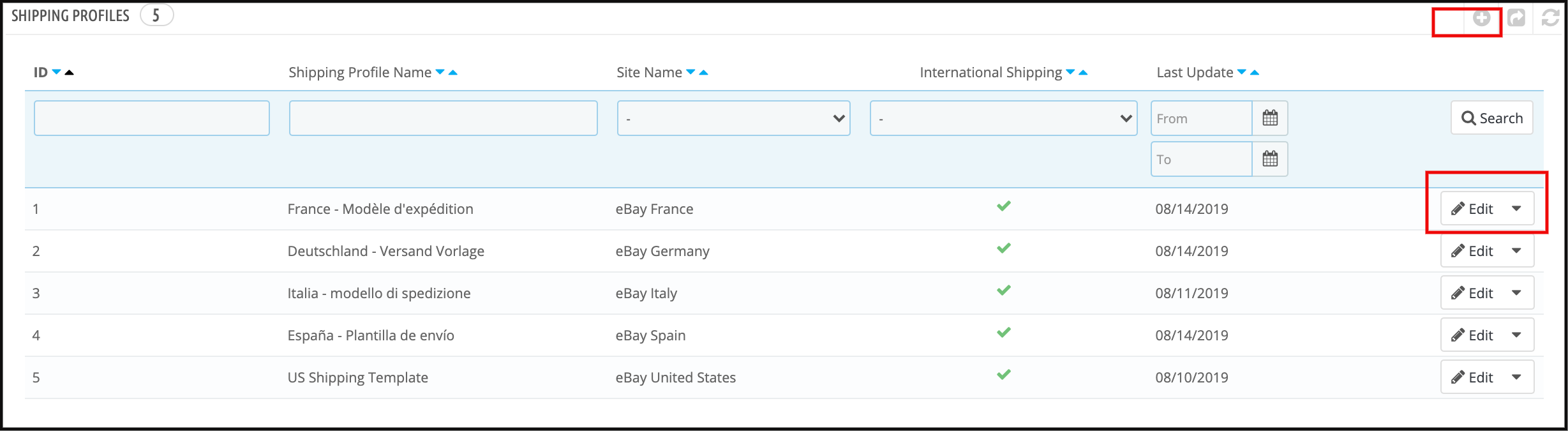
Click on the ‘+’ sign in the top right portion of the Prestashop eBay connector extension to create a new shipping method.
Once you click here, you’ll head to an interface. For the first time, you need to click on “Import eBay shipping methods” to import shipping methods of eBay to this module.
Now, fill-up the form as mentioned below:
Select eBay Site: Select the eBay site in which you want to include the shipping option.
Service Type: Select the service type for shipping.
Shipping Profile Name: Enter a unique name for the shipping profile.
International Shipping Allowed: Enable the button if you want to allow international shipping with this shipping method.
Exclude Location: Select the location that you want to exclude from availing of the shipping option.
6.6.2 How to Edit/Delete Shipping methods created in the back-end of the Prestashop eBay API Integration Module?
The store admins can even edit or delete the shipping as per the requirement from the backend of the Prestashop eBay Integrator.
To do so, click on the Edit and Delete buttons respectively as shown in the image below.
Once the shipping methods are created admin can either import or export the shipping methods to eBay Marketplace.
6.7 Synchronization
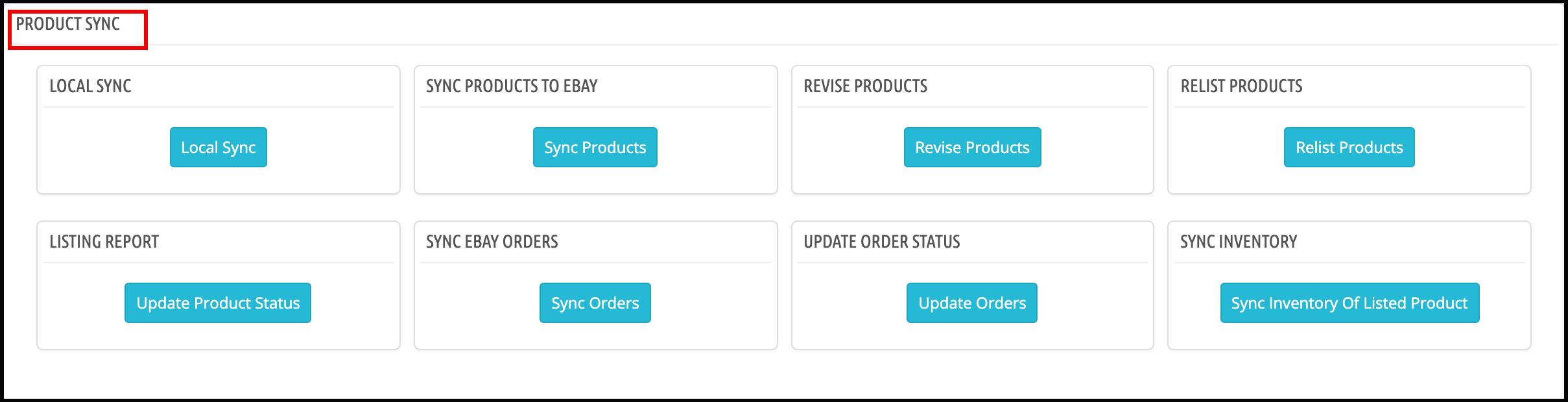
This tab adds the following CRONS to the Control panel/SSH to synchronize data between your store and eBay Marketplace automatically.
You can find all the crons listed in the following tab, however, it is to be noted that these crons will work for all the product listings in a single go. If you want to update any particular profile only, you can find the option for the same in the profile management tab itself.
LocalSync: This cron allow the store admin to list the products locally for a single profile only.
SyncEbay: If you want to list/make changes for the products within a single eBay profile, you can hit the SyncEbay cron shown in the above screenshot.
6.7.1 Local Sync
This action will prepare the PrestaShop products to sync on eBay i.e sync products from the PrestaShop store to eBay Module.
6.7.2 Sync Products To eBay
This action will sync the PrestaShop products to eBay. Products of only those categories will sync on eBay which maps under the profile section of the module.
6.7.3 Revise Products
This action will update the product information (including quantity, price, etc) on eBay which updates into the PrestaShop.
6.7.4 Relist Products
This action will relist those products on eBay which has been ended on eBay and marked to relist on the product listing page of the eBay module.
6.7.5 Listing Report
This action will pull the latest product listing report from eBay and update the listing status of the products into the module.
6.7.6 Sync eBay Orders
This action will pull the orders from eBay and will add them to PrestaShop.
6.7.7 Update Order Status
If eBay orders are marked as shipped on PrestaShop, this order will be marked as shipped on eBay.
Also, the available Action Validate Order hook feature will auto-sync the product inventory on both eBay and the Prestashop store after an order is placed.
6.7.8 Sync Inventory
This action will update the inventory of the list of products.
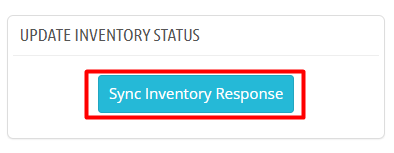
6.7.9 Update Inventory Status
This Cron will update status of inventory task from eBay to Prestashop.
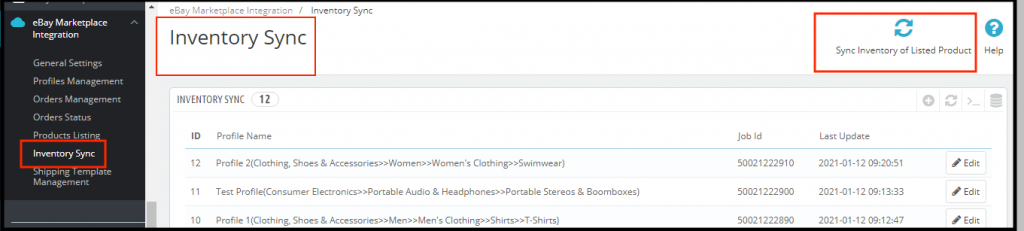
6.8 Inventory Sync
This section has a button “Sync Inventory of Listed Product” on the top right side to sync the inventory of all the available barcodes to eBay.
It also shows the list of Job IDs corresponding to the profile with the date of the last inventory sync of all products.
On click of Edit button, it will open the log of inventory sync for that Job Id where we can see the barcodes for inventory updates with eBay status.
6.9 [New] Inventory Comparison
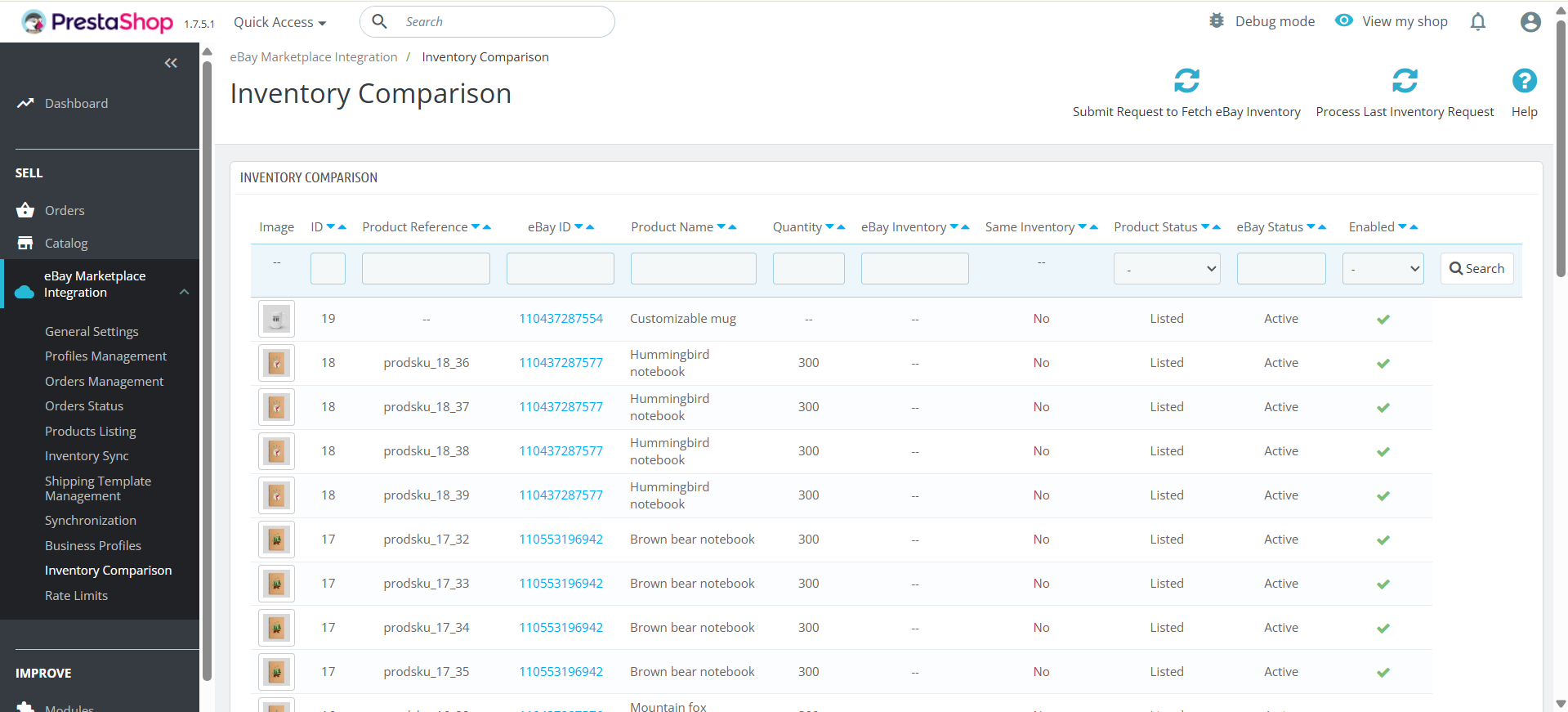
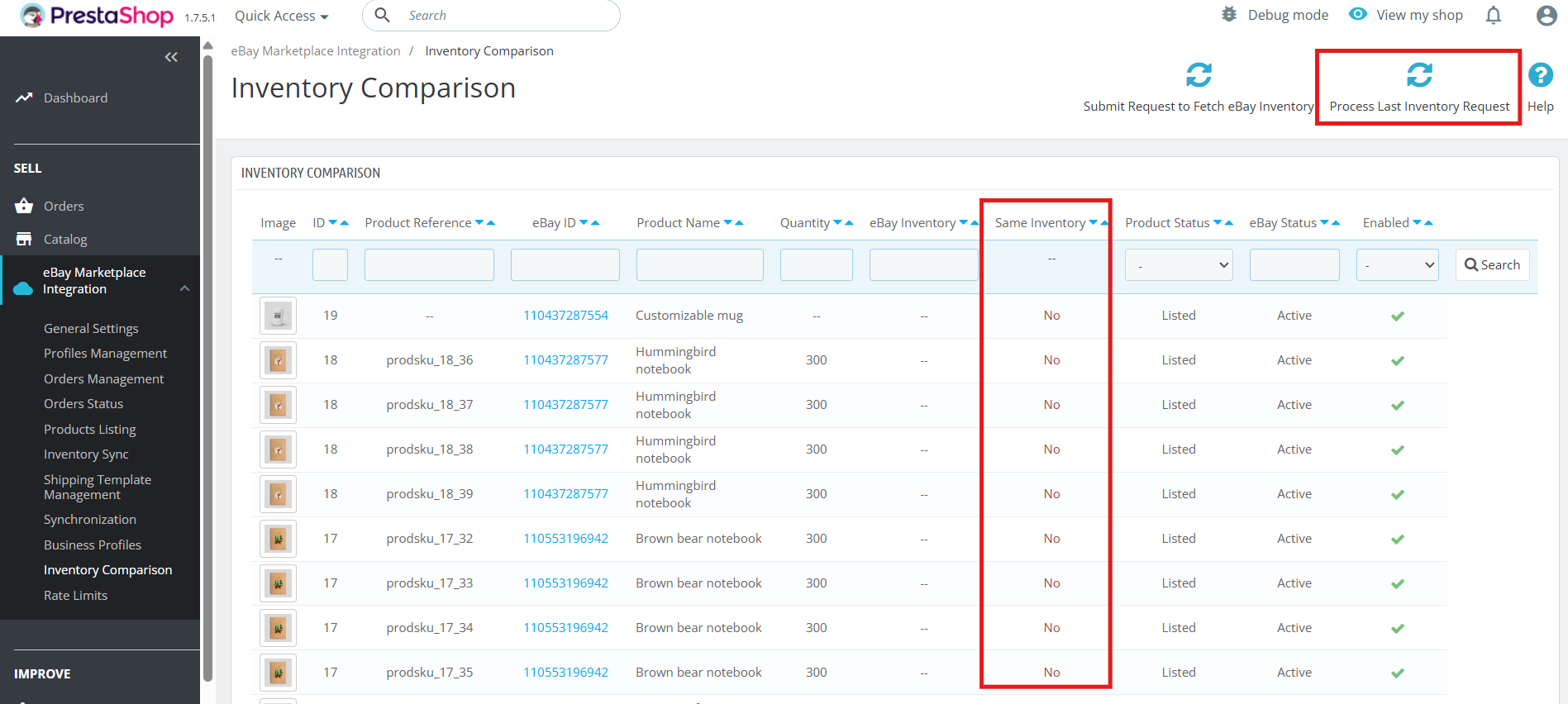
This inventory comparison tab in Prestashop eBay Marketplace Integrator allows you to compare your Prestashop inventories with your eBay inventories, quickly identifying discrepancies and ensuring accurate product availability across both platforms.
Moreover, this helps prevent overselling, stockouts, and keeps your inventory perfectly synchronised, saving you time and reducing errors.
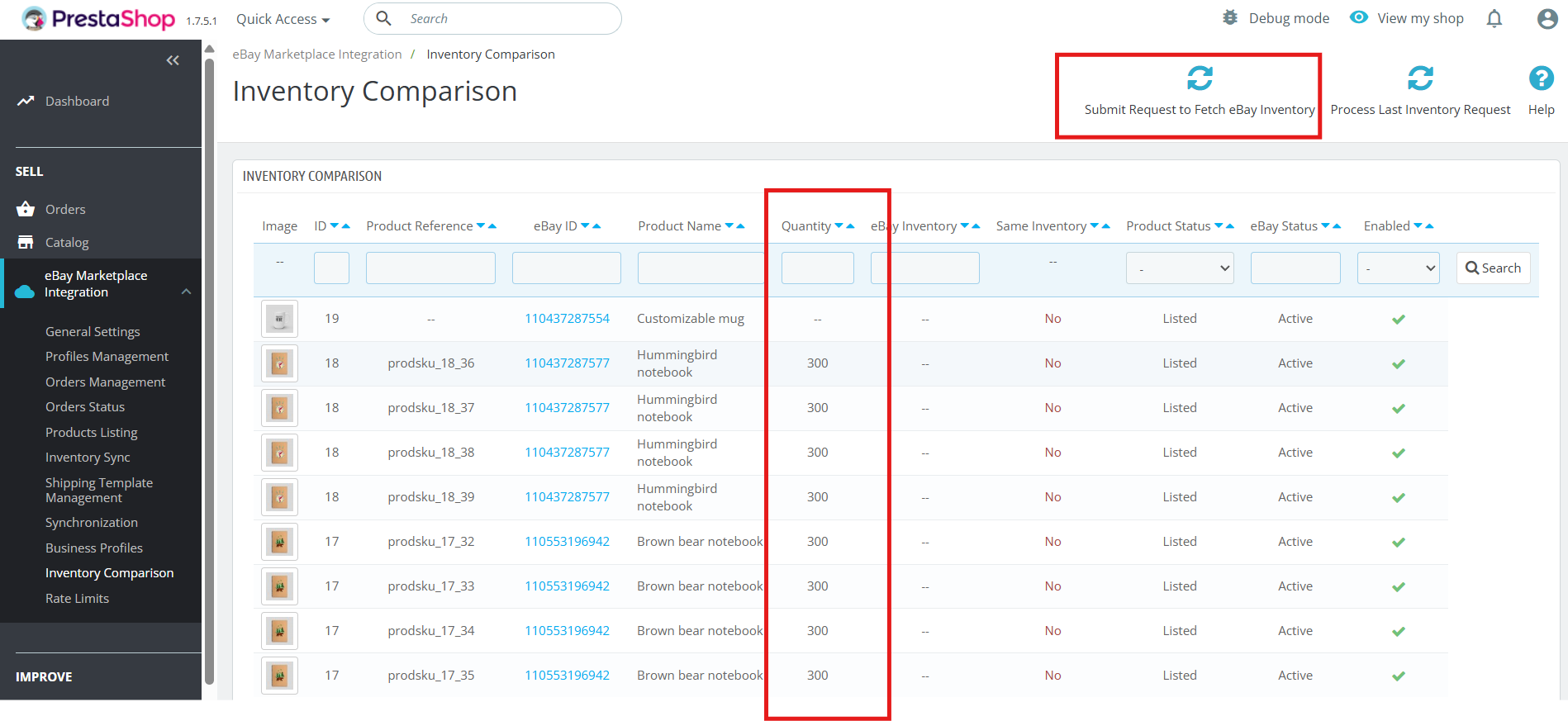
The inventory sync provides the two crons including ‘Submit request to fetch eBay Inventory’ and ”Process Last Inventory Request’ Cron.
6.9.1 Submit a Request to fetch eBay Inventory
This cron allows the store owners to fetch the current inventory from your eBay store. Submit a request to fetch eBay Inventory cron add the current inventory in the quantity section in the tab.
6.9.2 Process Last Inventory Request
This cron processes the last inventory request and matches the current inventory, marking discrepancies with Yes or No in the inventory comparison tab
These tabs in the inventory comparison, Knowband’s Prestashop eBay Marketplace connector Addon include the following cron jobs:
Submit Request to Fetch eBay Inventory
This cron fetches the latest inventory data from your eBay store.
Ensures that the system always has the most up-to-date information for comparison.
Process Last Inventory Request
This cron processes the previously fetched eBay inventory data.
6.10 Rate Limit Feature
Additionally, the module provides comprehensive API rate limit tracking, displaying the number of times each API has been called and monitoring all operations, including product and inventory syncing. Furthermore, it highlights when an API call exceeds its limit, offers detailed logs of module activities, and simplifies troubleshooting.
Together, these enhancements give you greater control, transparency, and reliability in managing your prestashop to eBay listings.
6.11 Business Profile:
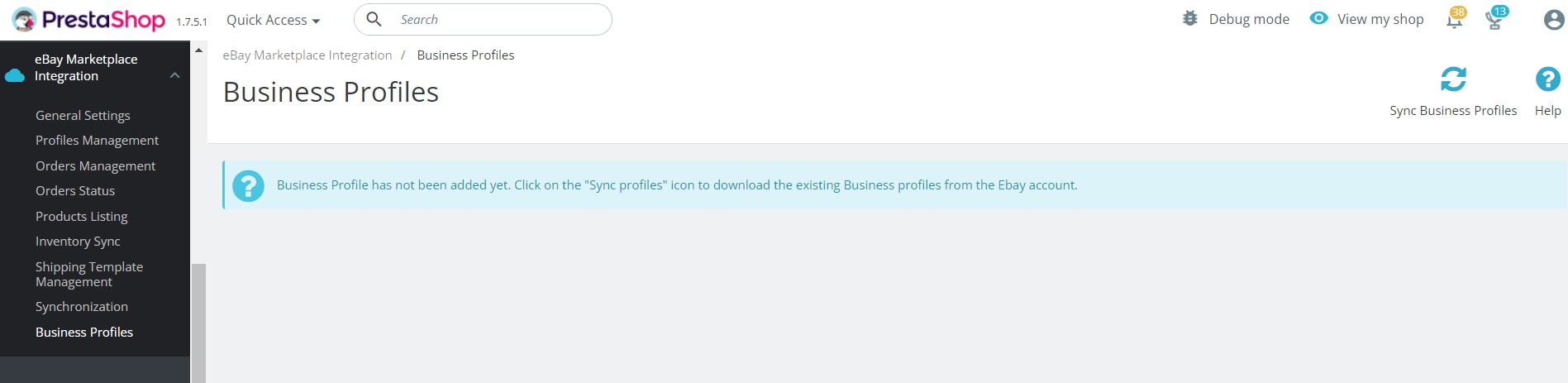
Knowband’s eBay Connector addon for Prestashop allows the store admin to import eBay business profiles in the module. These profiles included necessary configurations such as return policies, eBay shipping templates, and eBay payment policies.
Once the business profiles are imported, you can use the same while creating your shipping templates and eBay profiles.
Watch the Tutorial of Prestashop eBay Connector Plugin:
To help you set up and use the Prestashop eBay Connector module, we have created a YouTube tutorial. This step-by-step video guide walks you through the installation process, configuration options, and how to list and manage your product listing on eBay from your store through module.
Contact us at support@knowband.com for any query or custom change request as per your business requirement.