The week of love is just around the corner. On one hand where the love birds would be searching a perfect gift for their partner, Brands, on the other hand, would love to make their shopping experience better and smoother.
Have you done your preparations for Valentine’s Day? Is your marketing strategy ready to be implemented? Well, even if you haven’t, it is still not too late.
OpenCart Extensions for Valentine’s Day
If you have a website on the OpenCart platform, here are the 7 must-have OpenCart extensions that you can consider implementing on your website to catch the spirit of Valentine’s Day. Check them out.
1. OpenCart Gift Card Extension
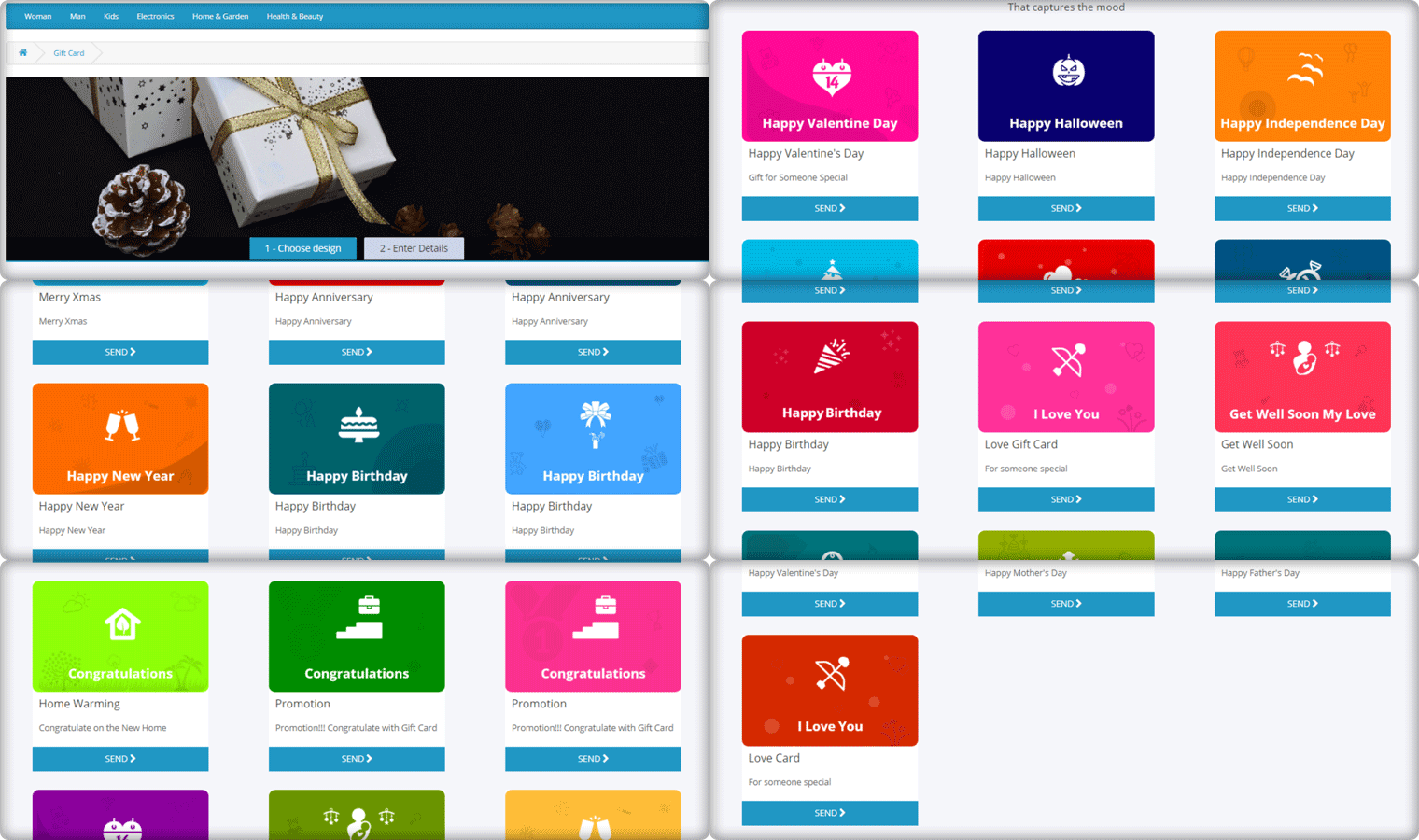
Gift Cards purchases are seen in high numbers during Valentine’s week and there is no doubt shoppers would be looking for some Valentine’s theme-based Gift Cards on your website too. Reduce this hassle with OpenCart Gift Card Extension.
The Gift Card module adds a gift card section on your OpenCart website and provides you with pre-existing gift card templates for multiple occasions including Valentine’s Day. It allows the users to print personalized gift card by uploading a custom image. You can customize these templates, add new ones, and do many more customization with the help of this OpenCart Gift Card Extension.
2. OpenCart Spin and Win Extension
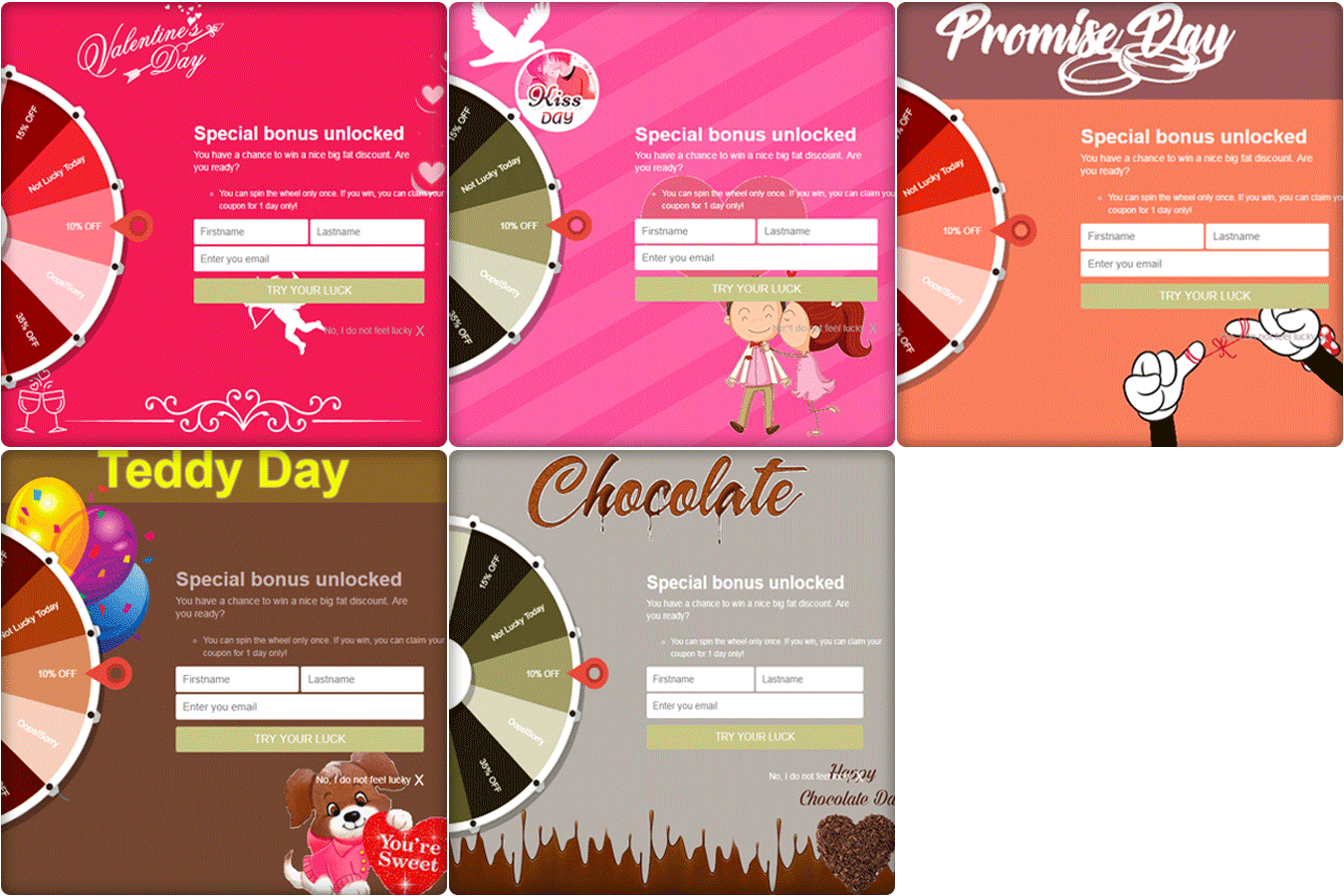
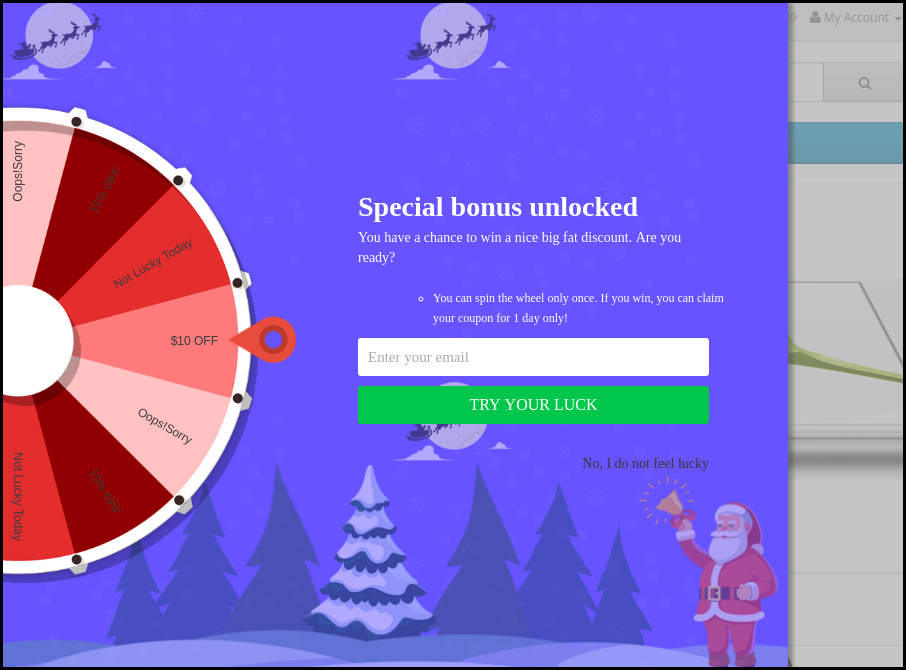
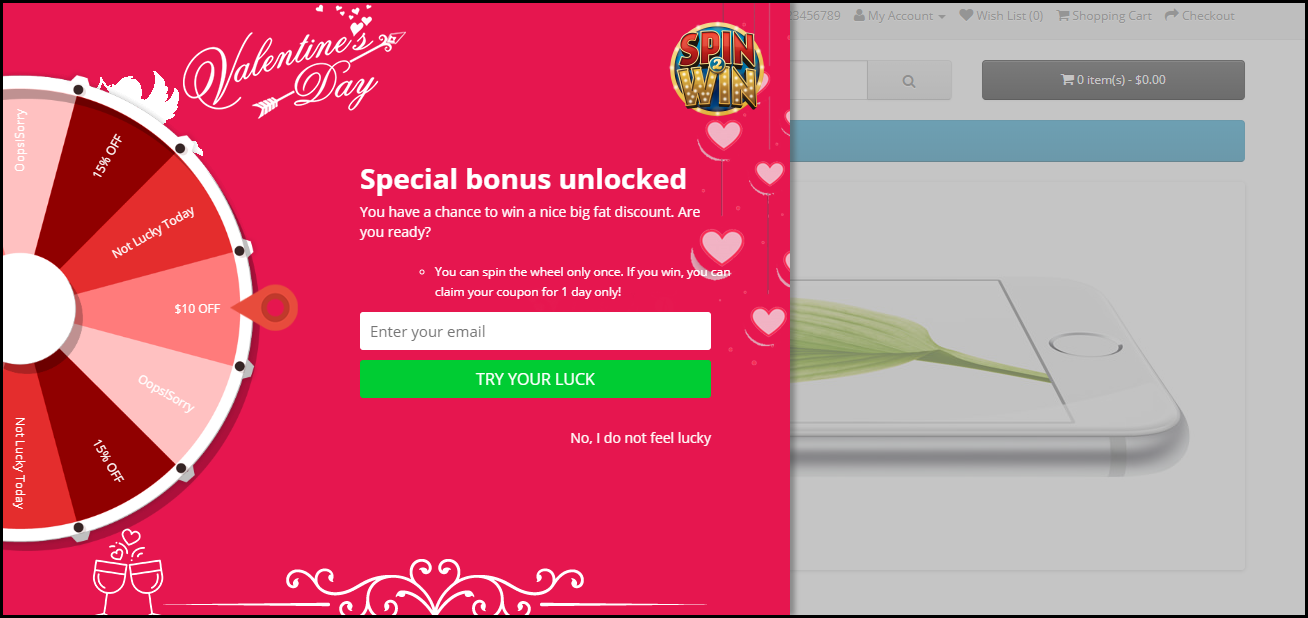
How about giving your visitors Valentine’s feel as soon as they enter your website? The OpenCart Spin and Win extension has multiple themes designed for Chocolate Day, Hug Day, Rose Day, Kiss Day, Promise Day, Propose Day, Teddy Day, and Valentine’s Day, to give your popup an amazing look.
The Spin and Win Popup extension adds a gamified Spin 2 win wheel on your website. Besides keeping Valentine’s feel, it tends to generate higher user engagement, helps you grow your email list, and boosts your conversions.
It lets you encourage your visitors to spin the wheel and earn some enticing discounts.
This OpenCart module helps you set a countdown timer on the front end of your website for your upcoming sales so that your store visitors are very well aware of the commencement of your sales day and do not miss out on it later.
It is a perfect module to highlight your future sale offers without disturbing the user experience. By implementing this module on your OpenCart website, you can expect an increase in your sales when the actual sale season starts.
4. OpenCart One Page Checkout
Though this might make you think as to how one page checkout can be helpful during Valentine’s, it is something that you should definitely consider using.
Many cart abandonments take place due to a long and complicated checkout process. And you can lose out on huge conversions when the visitors count on your store is high but they are not making past the checkout page.
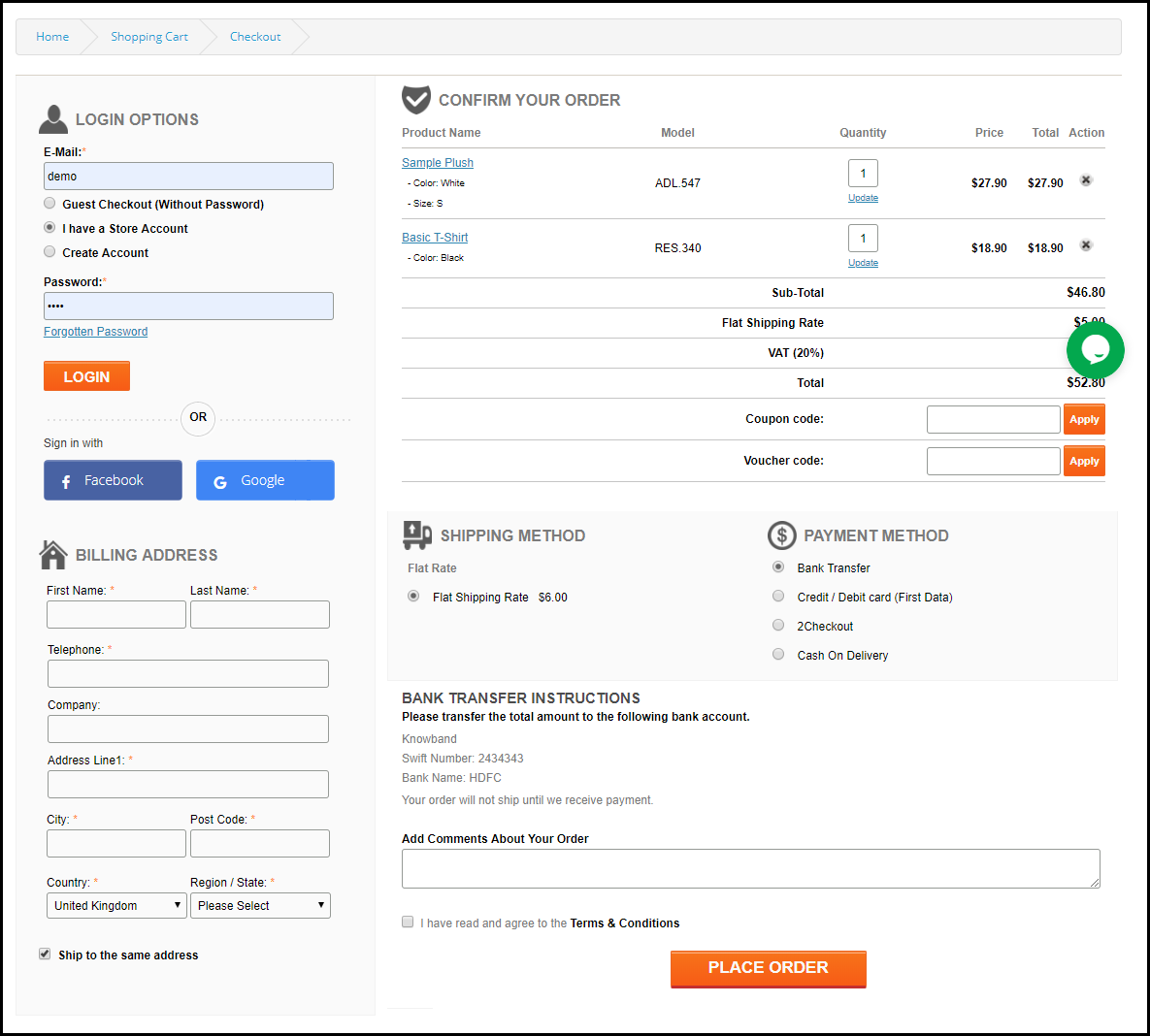
Remove the multi-step checkout barrier with the simple OpenCart One Page Checkout. The extension puts all the checkout fields on a single page and helps your prospects take a quick exit. A user can fill the entire checkout related information in any particular order and check out quickly.
Guest checkout, Social login, checkout field customization, multiple shipping and payment modes support are some of the amazing features of OpenCart One Page Checkout.
5. Print-on-demand Products
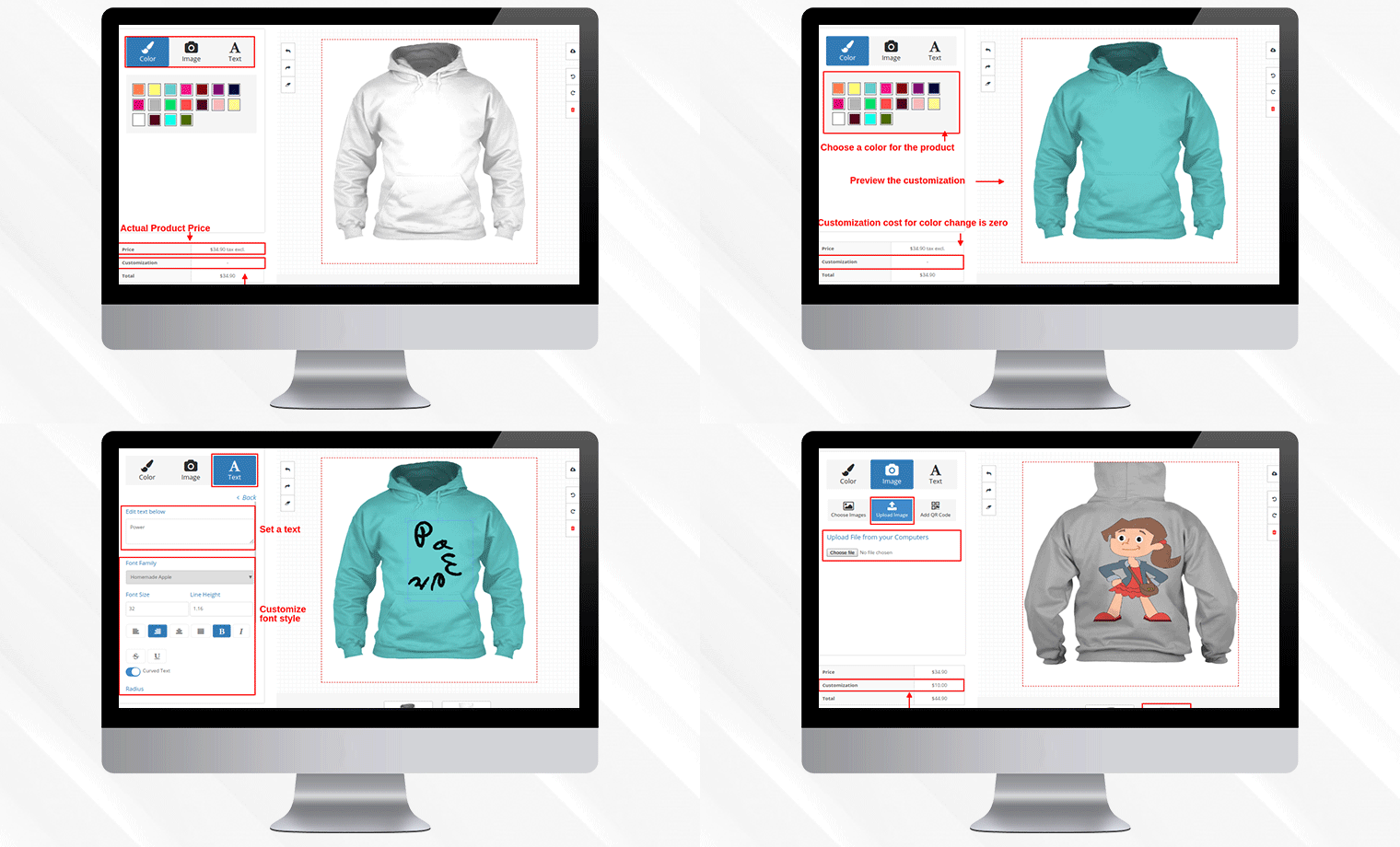
Print-on-demand services provide an alternative way to bypass inventory management time, investment, and risk, letting you go from creating to selling custom items at a fraction of the cost.
You can put your original spin on everyday items and sell them online, from t-shirts to posters, backpacks to books.
You can always graduate from using a print on demand platform to keeping your inventory if one of your online business ideas pans out and you start making a large number of sales or continue to use these services while exploring new ways to expand your audience.
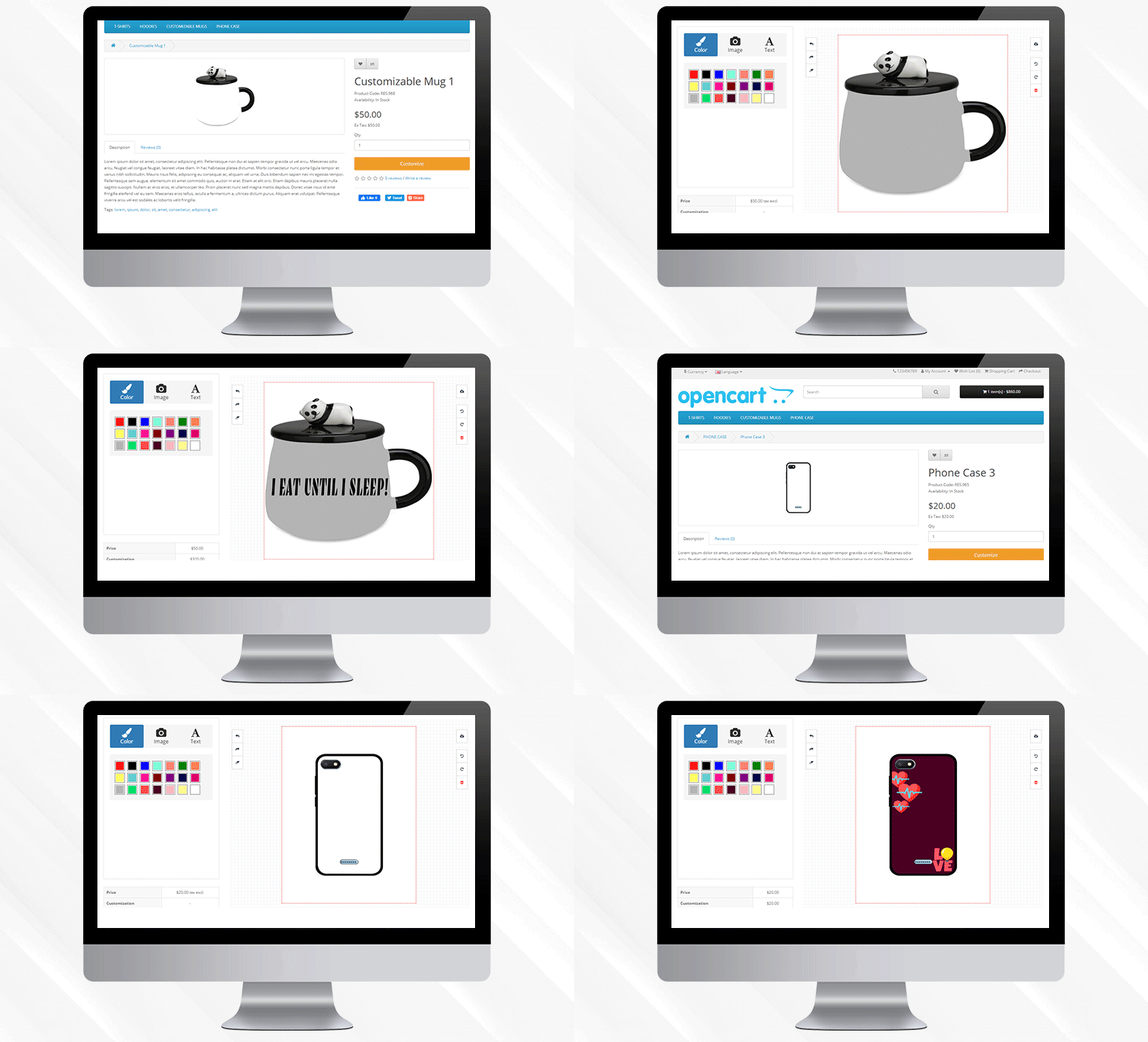
This Valentine’s Day, to achieve this you can add a Product Customization Module to your eCommerce store. The users surprise their loved ones with custom, personalized gift items. The choice is yours!
6. OpenCart Preferred Delivery Time Extension
There will be many last-minute shoppers on your store this Valentine who would want to order an item and get it as soon as possible or at a specific date and time. Make this possible for those shoppers with OpenCart Preferred Delivery Time extension.
Through this module, shoppers can specify the date and time on which they want to get their order delivered. They can choose their preferred delivery time on the checkout page. This would prove very beneficial to those users who want to receive a product at a certain occasion and at a certain time.
From the backend configurations, you can make certain changes in the module functionality.
7. OpenCart Cash on Delivery with Fee Extension
With OpenCart Cash on Delivery with Fee extension, you can ask your customers to pay an additional fee when they choose COD option on the payment page. The cash on delivery method is the widely adopted payment method as the majority of the shoppers do not like paying the product price until it reaches them.
The extension helps customers feel more secure and relaxed as they do not need to worry about sharing their card details online.
Over to You
Make the best of this Valentine’s week with these 7 OpenCart Extensions. You will surely witness a boost in your conversions.
If you face any issue with any of these modules or need any kind of assistance, reach out to us at support@knowband.com
Erweiterung OpenCart Spin and Win permettre l’administrateur du magasin OpenCart d’incorporer une fen tre contextuelle gamifi e dans le front-end du site Web. Der Modulkontext ist interaktiv, wenn OpenCart das Popup-Menü enthält, um 10% des Kunden-Messagingie-Clients zu ändern. Au lieu de cela, le Modul OpenCart Spin und Win Exit Popup de Knowband ajoute un moyen ludique de Collector l’ID de messagerie des clients. Les Kunden doivent saisir leurs Identifiants de Messagerie und Faire Tourner la roue pour gagner des cadeaux ou des r ductions. Wheelio semble tre un v ritable moyen de gagner gros et de faire une bonne affaire. OpenCart Beenden Sie das Popup-Menü, um die Anzahl der Mitarbeiter zu verbessern. Ainsi, l’approche ludique du plugin les d tails personnels du magasin visiteurs.
1.1 Avantages bietet das Modul OpenCart Spin and Win an:
Erweiterung OpenCart Spin and Win peut aider l’administrateur du magasin sammler les identifiants de messagerie des kunden ohne les ennuyer avec les fen tres contextuelles Conventionnelles.
Das Plugin OpenCart Spin and Win peut tre configuration für eine reichhaltigere Rotationsrotation l’entr e la sortie des clients ou n’importe o sur le site.
Le Modul OpenCart Spin und Win de Groupe de connaissances est facile comprendre et utiliser. Aucune Connaissance-Technik ist nicht unbedingt erforderlich, um Cette-Popup-Spiele auf der Website zu erstellen.
L’administrateur Peut Facilitation Modifier l’aspect et la convivialit de la fen tre contextuelle OpenCart spin et win.
L’OpenCart Spin and Win schlagen verschiedene Themen und Designs für Roues vor.
M me l’emplacement et la fr quence de l’affichage contextuel peuvent tre modifi s partir de l’interface d’administration du module contextuel de l’abonn OpenCart Spin and Win.
Le Plugin OpenCart Spin und Win int gre un int grateur MailChimp et Constant Contact.
Les couleurs du texte, des boutons et de l’arri re-plan peuvent tre modifi es partir du back-end du module OpenCart Spin and Win.
La fen tre contextuelle d’intention de sortie d’OpenCart peut r duire le taux de sortie du site.
Augmentant l’engagement des utilisateurs, la fen tre contextuelle de sortie d’OpenCart erhöht die Chancen auf Conversions.
L’administrateur peut d finir la dur e d’expiration des Codes de r duction. Les offres limit es dans le temps d clenchent la d cision d’achat instantan e des clients.
Installation de 2.0
Achetez l’extension OpenCart Spin und Win dans la Boutique Knowband. Vous obtiendrez les fichiers suivants: 1. Fichier compress contenant le code source du module OpenCart Spin and Win 2. Manuel de l’utilisateur du plugin OpenCart Spin and Win. Suivez les tapes ci-dessous pour installer le plugin OpenCart Spin und Win dans la boutique OpenCart: 1. D compressez le fichier compress . Vous obtiendrez les dossiers comme indiqu dans l’image ci-dessous:
2. Copiez tous les fichiers und Dossiers du fichier zip dans le r pertoire racine de la configuration d’OpenCart via le gestionnaire FTP. 3. Das Modul für die Absicht, OpenCart Spin und Win zu installieren, wird installiert und verwendet. Allez dans Admin -> Menüprinzipal -> Erweiterungen comme indiqu dans l’image ci-dessous:
4. S lectionnez Spin und Win dans la liste des modules et cliquez sur le Diter .
3.0 Administrationsschnittstelle
L’Erweiterungskontext OpenCart Exit-Intent Offre Un Option de Personnalisierung Facile l’administrateur du Magasin. Die verschiedenen Konfigurationsoptionen werden nicht kritisch und nicht detailliert beschrieben.
Parameter g n raux 3.1
Cet onglet de la fen tre contextuelle d’abonnement OpenCart Spin and Win permet l’administrateur du magasin d’apporter les Modifikationen de base dans la fen tre contextuelle de sortie.
Aktiviertes Modul: S lectionnez ‘jaOpenCart Spin and Win ist das Modul, das das Modul OpenCart Spin and Win enthält.
Rev rifier les E-Mails: Wenn die Option aktiv ist, können die Kunden einen fairen Tourer besuchen, um die Identität der Messagerie zu erkennen. Cette fonctionnalit emp che la r p tition des identifiants de messagerie.
Afficher les onglets d roulants: Si activ , l’administrateur peut afficher un onglet extrahierbar dans le front-end du site. Au cas o le visiteur du magasin ne voudrait pas faire tourner la roue, il peut cliquer sur le lien “Je ne me sens pas Chanceux”.
Les Kunden peuvent ramener la roue l’ cran en cliquant sur la Sprache der Retrait comme indiqu dans l’image ci-dessous.
Montrer feu d’artifice: Des feux d’artifice sont affichs sur la roue si les Kunden gagnent une sorte de prix apr s l’avoir fait tourner. Cette fonction peut tre affich e ici.
Intervalle d’affichage des roues: L’administrateur peut entrer l’intervalle apr s lequel la roue sera affich e dans le front-end. Par d faut, c’est 0 , ce qui signie que le client verra la fen tre contextuelle chaque visite.
D finir la dur e d’expiration du coupon: Entrez le nombre de jours apr s lequel le code de coupon expirera.
CSS personnalis : Entrez le code CSS personnalis ici pour effectuer les modifikationen personnalis es.
JS personnalis :“ Saisissez ici le code JS personnalis pour effectuer les modifikationen personnalis es.
3.2 Param tres d’affichage
L’administrateur du magasin OpenCart peut modifier le param tre d’affichage partir de cet onglet du plugin OpenCart Spin and Win.
Taille d’ cran dünner: S lectionnez la taille d’ cran minimale avec vous pour que la roue soit kompatibel. La roue de rotation fonctionne sur tout l’ cran au-dessus de celui s lectionn .
Fr quence d’affichage maximale: S lectionnez ici la fr quence d’affichage de la molette de rotation.
Cacher Apr s: Choisissez le moment o vous souhaitez masquer la fen tre contextuelle ici.
D finir le temps de korrigierung: S lectionnez si vous souhaitez afficher la roue anhänger une dur e fixe ou non. Si “ Oui ” est s lectionn , alors, l’administrateur devra fixer l’heure de d but et de fin comme indiqu ci-dessous:
O afficher: S lectionnez les pages Web du site sur lesquelles vous souhaitez afficher la fen tre contextuelle. La fen tre contextuelle d’intention de sortie OpenCart peut tre plac e l’entr e ou la sortie des visiteurs du magasin.
Wenn ,war Dffichage: , KriegChoisissez le moment o vous souhaitez afficher le spin et gagner la pop-up. Das Pop-up de r compense peut tre affich e imm diatement lorsqu’un utilisateur visite le magasin, ou apr s quelques secondes de visite oder l’heure de sortie ou lorsque vous faites d filer vers le bas un bestimmten guss.
Cas I: Si “Lorsque le% de d filement vers le bas” est s lectionn , alors l’administrateur doit entrer le pourcentage de d filement, apr s quoi il souhaite afficher la fen tre contextuelle, dans le Champion Erwähnung.
Cas II: Si Apr s le temps (secondes) est s lectionn , alors l’administrateur doit entrer le temps en secondes, apr s quoi il veut afficher la fen tre contextuelle, dans le champ Erwähnung .
Einlagerung g ographique: S lectionnez la g olocalisation o vous souhaitez afficher la molette. Si Worldwide est s lectionn , alors, il sera affich tous les endroits o le site fonctionne.
3.3 Param tres d’apparence et de convivialit
L’administrateur a la possibilit de modifier l’aspect et la convivialit du spin partir de cet onglet de la fen tre contextuelle OpenCart Exit Intent.
S lectionne un th me: La fen tre contextuelle d’abonnement OpenCart est fournie avec un bestimmte nombre de th mes d’arri re-plan parmi lesquels choisir. L’administrateur peut s lectionner le th me souhait en fonction de diverses Anlässe sagt que No l, Halloween, Thanksgiving, Black Friday, etc. Un aper u du th me s lectionn appara tra sous l ‘onglet du th me s lectionn pour voir quoi il ressemblera sur le frontend du boutique.
Konzeption de Roue: La fen tre contextuelle d’abonnement l’intention de sortie d’OpenCart schlägt m me des roues de Rotation pr con ues vor. L’administrateur peut choisir celui qui entspricht l’interface utilisateur du site.
Aper u de la roue: L’administrateur peut pr visualiser la conception de roue s lectionn e ici.
Afficher l’image: L’administrateur a la possibilit d’afficher l’image ou le logo sur la roue. Si “ Oui ” est s lectionn , l’administrateur obtient une option pour s lectionner l’image afficher comme indiqu ci-dessous:
L’administrateur peut modifier ou supprimer l’image en cliquant sur les boutons respektifs.
Couleur d’arri re-Plan de la Roue: S lectionnez ici la couleur d’arri re-plan de la roue.
Couleur de la Police du Texte: Auswahl der Polizei, die die Polizei betrifft.
Famille de polices de texte: Auswahl der Familie der Polizei, die sich um die Zukunft kümmert.
Couleur d’arri re-plan du bouton: La couleur des boutons affichs sur la roue peut tre s lectionn e partir du nuancier.
Nicht, je ne me sens pas Chanceux Couleur: Changez la couleur du lien “Nicht, je ne me sens pas Chanceux” Partir d’ici.
3.4 Parameter de texte
Tous les textes affichs sur le front-end de la roue de rotation peuvent tre modifi s partir de l’onglet Parameter des Texts des Rotationsmoduls und des Victoire d’OpenCart. L’administrateur du magasin peut modifier le texte du titre, le texte des sous-titres et les r gles.
3.5 Parameter von l’offre
L’administrateur peut modifier les tranches de la roue partir de cet onglet du plugin OpenCart Spin and Win.
Gutscheintyp: Cela sp cifie le Typ de Coupon Angebot. L’administrateur peut offrir une remise fixe ou en pourcentage.
Tiquette: Entrez l’ tiquette qui sera affich e l’avant de la roue.
Valeur du Gutschein: Entrez la valeur du Gutscheinangebot.
La gravit : Entrez la possibilit que la tranche apparaisse lorsque la roue est Tourn e. Afin de modifier la tranche de r duction, cliquez sur le bouton Modifier comme indiqu dans l’image ci-dessus.
3.6 , KriegAbonnement Parameter
L’int grateur OpenCart mailen Sie einen int gr MailChimp et Int grateur Constant Contact. Les IDs-E-Mails werden von OpenCart Spin et l’Erweiterung doppelt doppelt synchronisiert, wobei die automatische Automatisierung mit dem Respekt des Magasin-Administrators erfolgt.
L’administrateur peut activer l’outil marketing respektif en s lectionnant Oui dans la liste d roulante. Afin de configure la connexion, entrez la cl API et le jeton secret. Auswahl der Liste der Identifikatoren der Nachrichtensynchronisationssynchronisation.
3.7 Messparameter
Cet onglet de la fen tre contextuelle d’abonnement OpenCart Spin and Win permet l’administrator du magasin d’envoyer des E-Mails Promotionnels aux Kunden.
Affichage du coupon: S lectionnez l’emplacement o vous souhaitez afficher le coupon. L’administrateur peut soit l’afficher sur la roue, soit l’envoyer per E-Mail. Cela d pend de l’option s lectionn e dans le Backend du Popup Responsive OpenCart.
Sujet du courriel: Entrez la ligne d’objet de l’e-mail Gesandter aux Kunden.
Contenu de l’e-Mail: Saisissez ici le contenu du mail.
Statistiken 3.8
Le rapport statistique des coupons g n r s et des coupons utilis s / non utilis s peut tre Consult dans cet onglet du module contextuel d’abonnement aux e-mails d’OpenCart.
4.0 Schnittstelle utilisateur du site Web
Der Kontext der Rotation ist ein Thema, das sich auf das Front-End des Standorts bezieht, und das Bild, das sich auf das Bild bezieht.
Une fois que le client remporte un prix apr s avoir fait tourner la roue, le coupon sera g n r comme indiqu ci-dessous:
Le client peut r clamer le coupon en cliquant sur Continuer. Ce Code de r duction peut tre utilis sur la Seite de paiement pour obtenir la remise.
Avertissement: Si spin fen tre contextuelle de la roue “Spin and Win” ne s’affiche pas l’avant, veuillez vider le cache ou supprimer les cookies. Parfois, les cookies emp chent la fen tre contextuelle de s’afficher l’avant.
OpenCart Spin and Win extension allow the OpenCart store admin to incorporate a gamified popup in the front end of the website. The OpenCart interactive popup module is one of the ways to forget about the annoying subscription popup that offers a 10% discount in return for the email ID of the customers. Instead, the OpenCart Spin and Win Exit Popup module by Knowband adds a playful way to collect the email ID of the customers.
The customers need to enter their email IDs and spin the wheel to win gifts or discounts. Wheelio appears to be a genuine way to win big and hit a bargain. OpenCart Exit popup offers a fun approach to enhance user engagement. Thus, the gamified approach of the OpenCart Spin and Win plugin is a better way for the store admin to offer the desired discount and collect the personal detail of the store visitors.
1.1 Benefits offered by the OpenCart Spin and Win Module:
OpenCart Spin and Win extension can help the store admin collect the email IDs of the customers without annoying them with the conventional popups.
The OpenCart Spin and Win plugin can be configured to show the spin wheel at the entry, exit of the customers, or anywhere on the site.
The OpenCart Spin and Win module by Knowband is easy to understand and use. In fact, he needs no technical knowledge to include this gamified popup on your website.
The admin can easily change the look and feel of the OpenCart spin and win an exit-intent popup.
The OpenCart Spin and Win offers various elegant themes and wheel designs to choose from.
Even the location and frequency of the popup display are changeable from the admin interface of the OpenCart Spin and Win subscriber popup module.
OpenCart Spin and Win plugin have an inbuilt MailChimp and Constant Contact integrator.
The text, button, and background colors are changeable from the back-end of the OpenCart Spin and Win module.
The OpenCart exit intent popup can curb the exit rate of the site.
Increasing user engagement, the OpenCart exit popup boosts the chances of conversions.
The admin can set the expiry duration of the coupon codes. The time-bound offers trigger instant purchase decisions of the customers.
2.0 Installation
Purchase the OpenCart Spin and Win extension from the Knowband store. You’ll get the following files:
1. Zipped File containing the source code of the OpenCart Spin and Win module
2. User Manual of OpenCart Spin and Win plugin.
Follow the steps below to install the OpenCart Spin and Win plugin in the OpenCart store:
1. Unzip the zipped. You’ll get the folders as shown in the image below:
2. Copy all the files and folders of the zip file in the Root Directory of OpenCart setup via FTP manager.
3. The OpenCart Spin and Win exit intent module is now installed and is ready to use. Go to Admin -> Main Menu -> Extensions as shown in the image below:
4. Select Spin and Win from the list of the modules and click on the Edit button.
3.0 Admin Interface
OpenCart exit-intent popup extension offers an easy customization option to the store admin. The various configuration options are discussed in detail below.
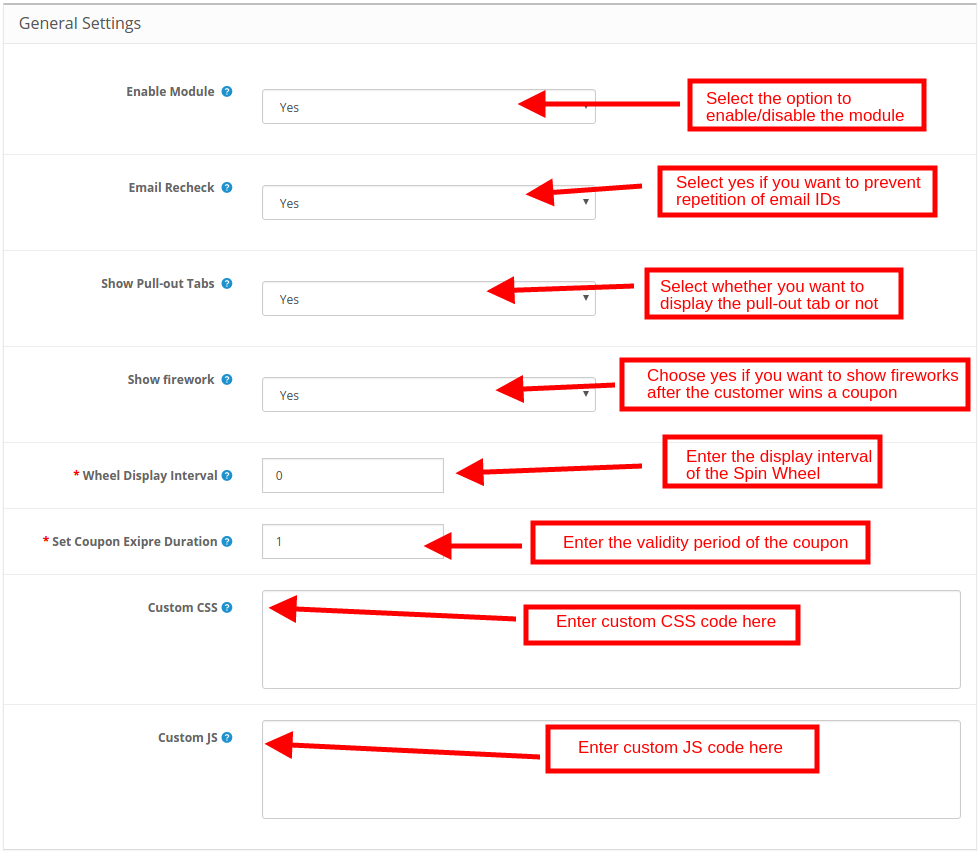
3.1 General Settings
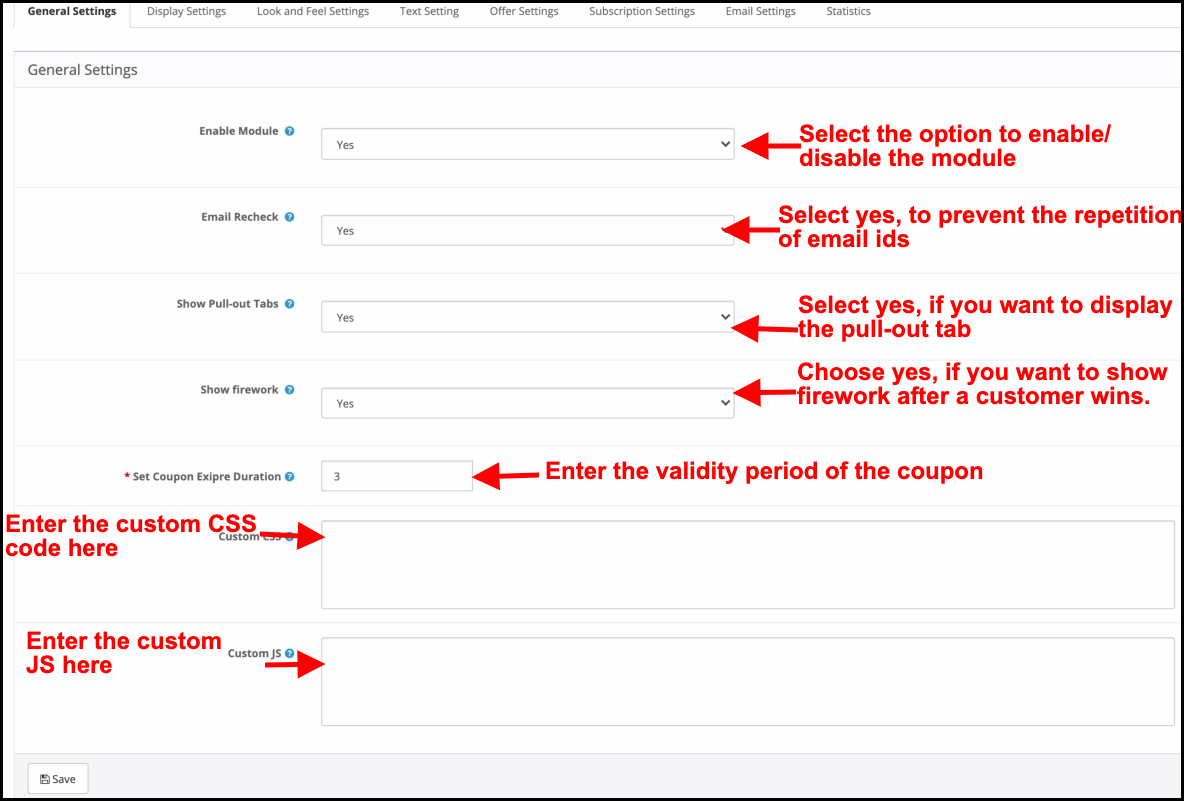
This tab of the OpenCart Spin and Win subscription popup allows the store admin to make the basic changes in the exit popup.
Enable Module: Select ‘Yes’ from the drop-down list to enable the OpenCart Spin and Win module.
Email Recheck: If enabled, the customers will be allowed to spin the wheel only once with a single email ID. This functionality prevents the repetition of email IDs.
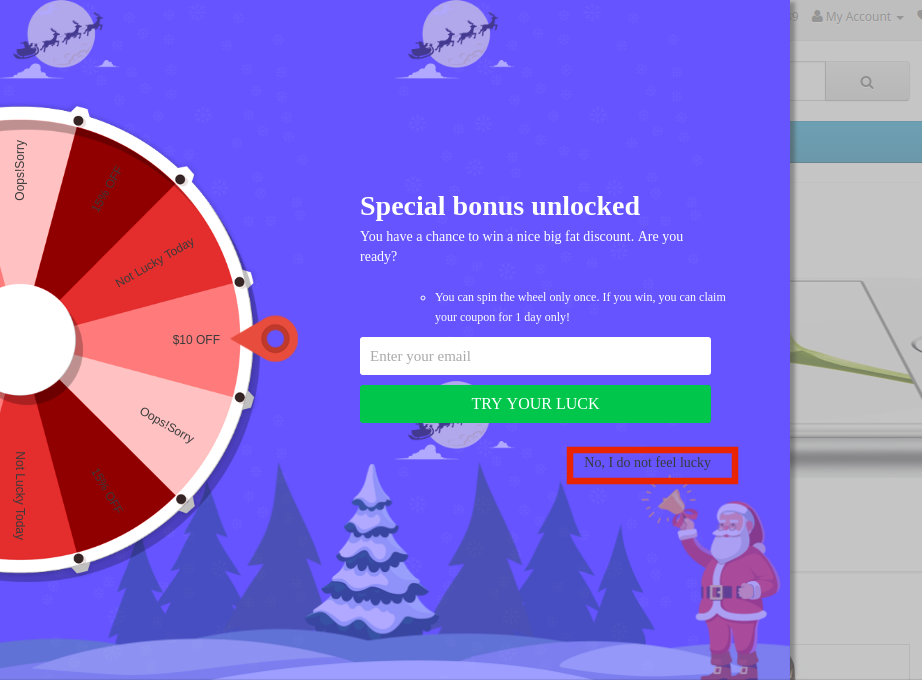
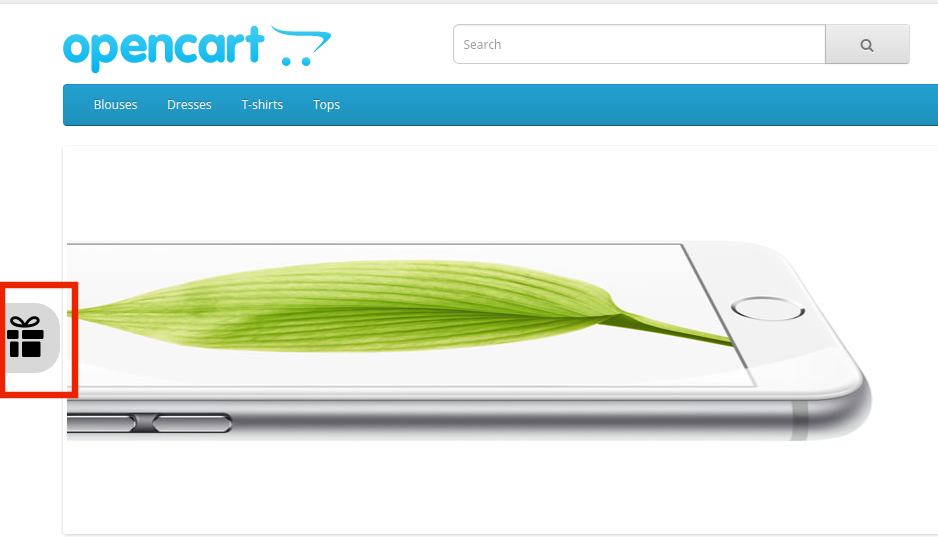
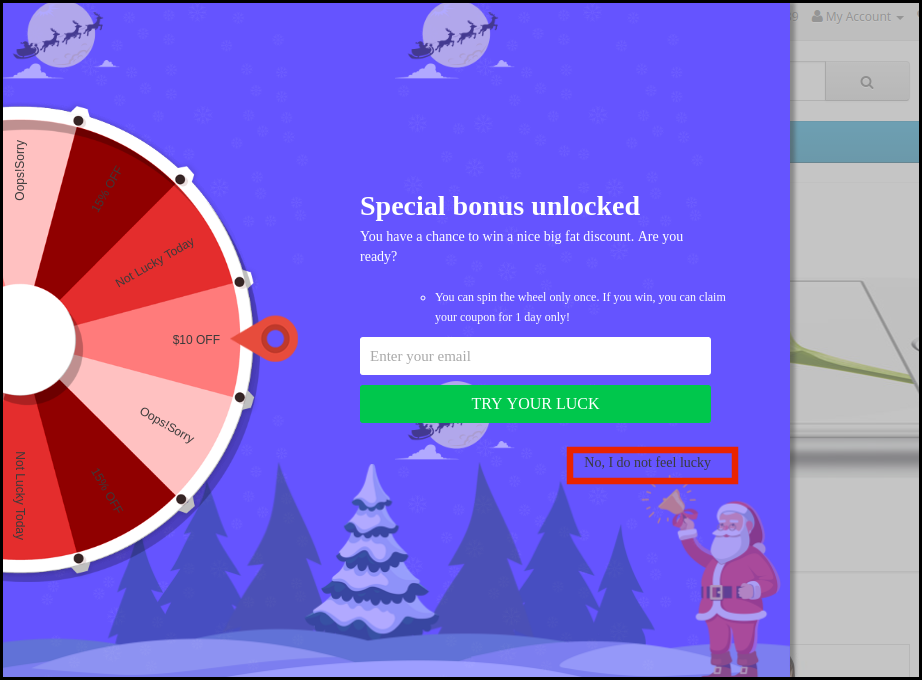
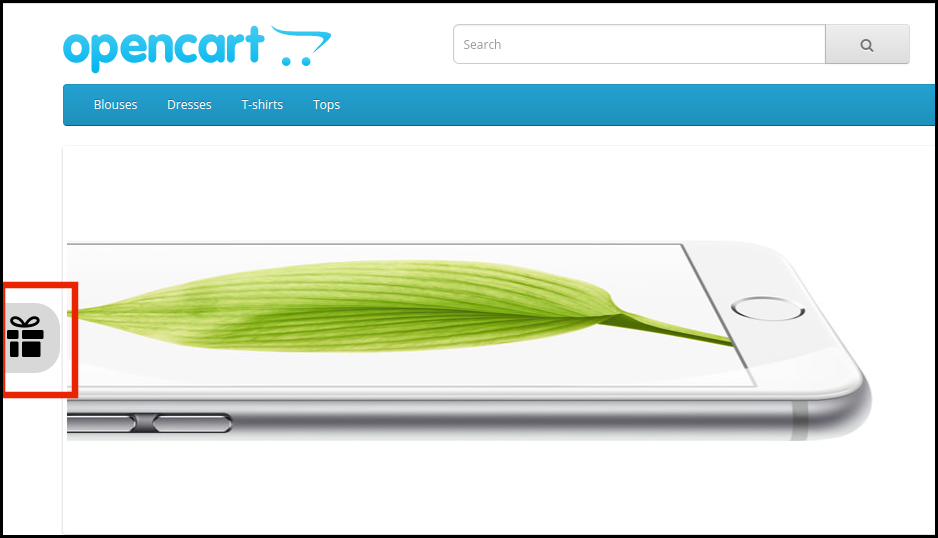
Show Pull-out Tabs: If enabled, the admin can display a pull-out tab in the front-end of the site. In case, the store visitor is not willing to spin the wheel, he can click on the ‘I do not feel lucky’ link.
The customers can bring the wheel back on the screen by clicking on the pull-out tab as shown in the image below.
Show Firework: Fireworks display on the wheel if the customers win any sort of prize after spinning it. This feature display here.
Wheel Display Interval: The admin can enter the interval after which the wheel will display in the front-end. By default, it is ‘0’ which means the customer will see the pop-up on every visit.
Set Coupon Expiry Duration: Enter the number of days after which the coupon code will expire.
Custom CSS: Enter custom CSS code here to make the custom changes.
Custom JS: Enter custom JS code here to make the custom changes.
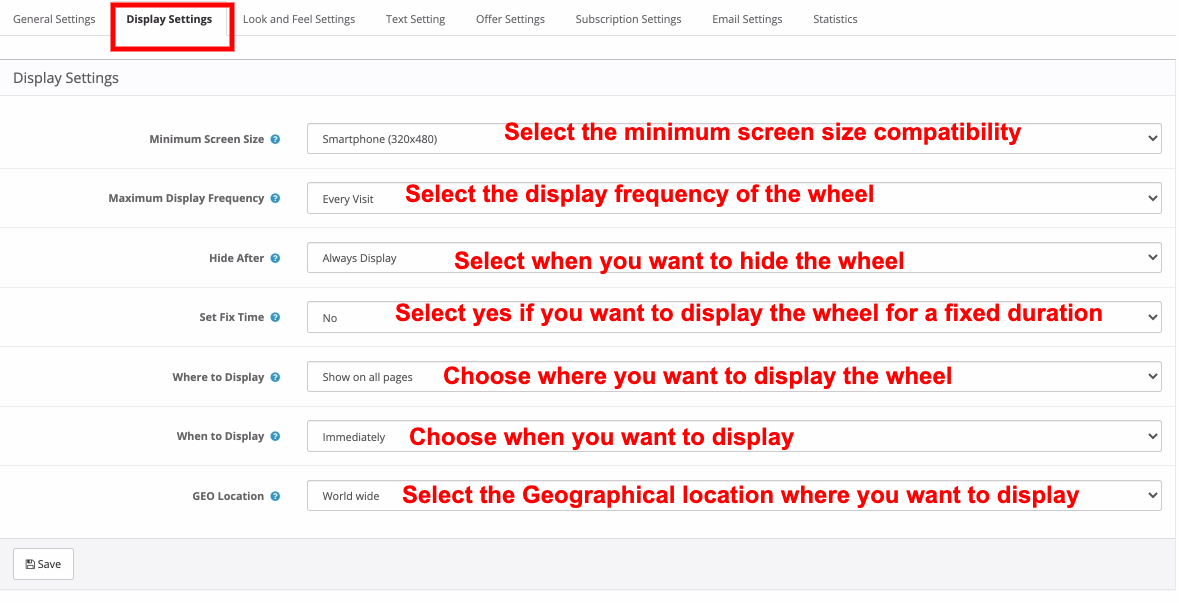
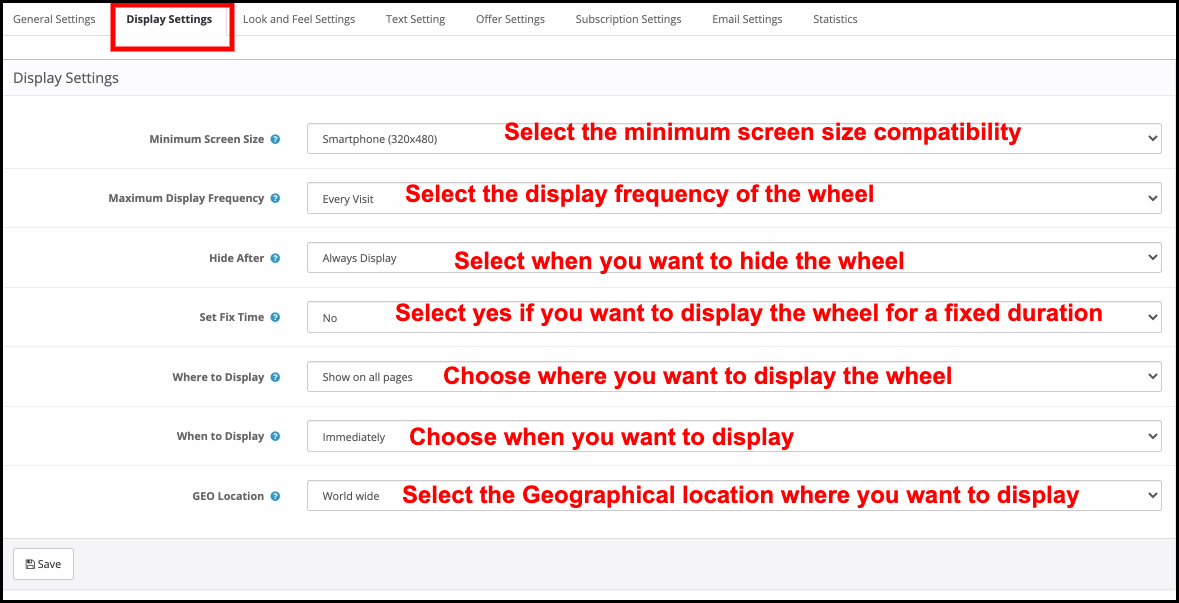
3.2 Display Settings
The OpenCart store admin can change the display setting from this tab of the OpenCart Spin and Win plugin.
Minimum Screen Size: Select the minimum screen size with you to want the wheel to be compatible. The spin wheel work on all the screens above the selected one.
Maximum Display Frequency: Select the display frequency of the spin wheel here.
Hide After: Choose when you want to hide the popup here.
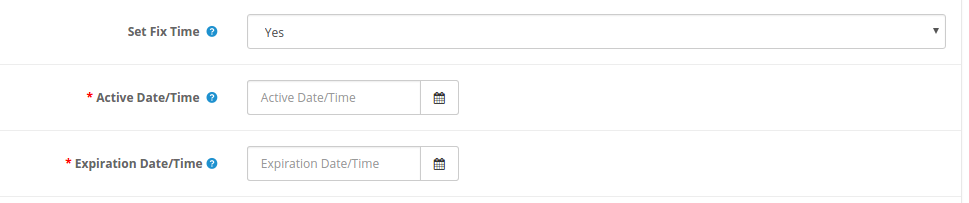
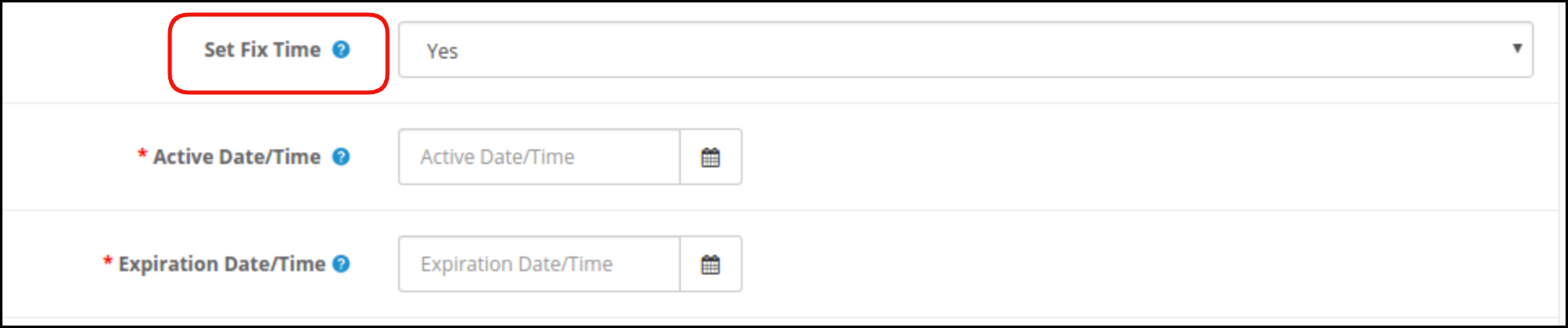
Set Fix Time: Select whether you want to display the wheel for a fixed duration or not. If he selects ‘Yes’, then, the admin will be required to fix the start and end time as shown below:
Where to Display: Select the web pages of the site where you want to display the popup. The OpenCart exit-intent popup can be placed at the entry or exit of the store visitors.
When to Display:Choose the moment when you want to display the spin and win popup. The reward popup can display immediately when a user visits the store, or after seconds of visitor’s visit or at the time of exit or when scrolling down some certain percentage.
Case I: If he selects “When Scroll Down %” then the admin needs to enter the scroll percentage, after which he wants to display the popup, in the mentioned field.
Case II: If he selects “ After a time (seconds)”, then the admin has to enter the time in seconds, after which he wants to display the popup, in the mentioned field.
Geo Location: Select the geolocation where you want to display the spin wheel. If he selects Worldwide, then, it will display at all the places where the site is operating.
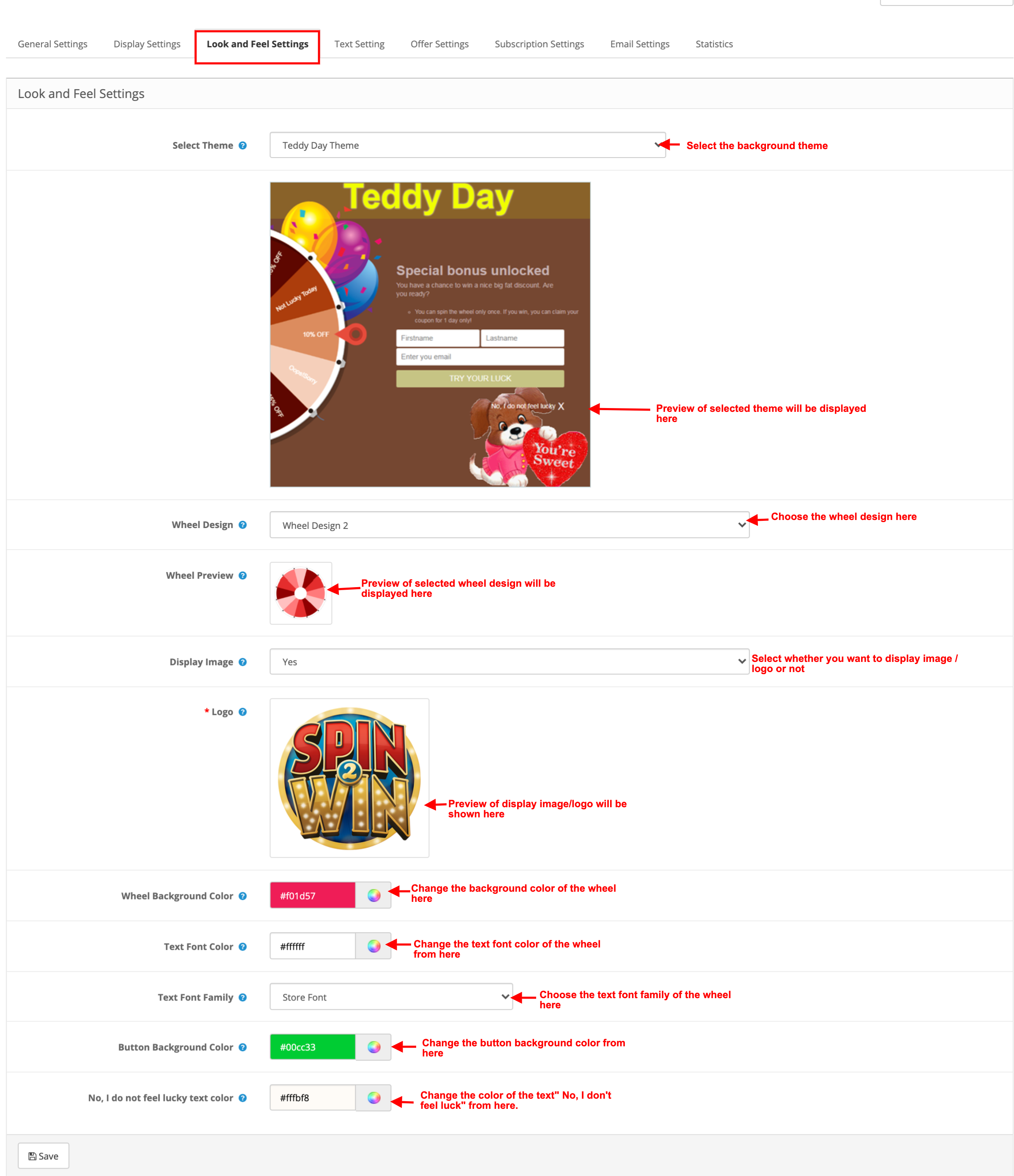
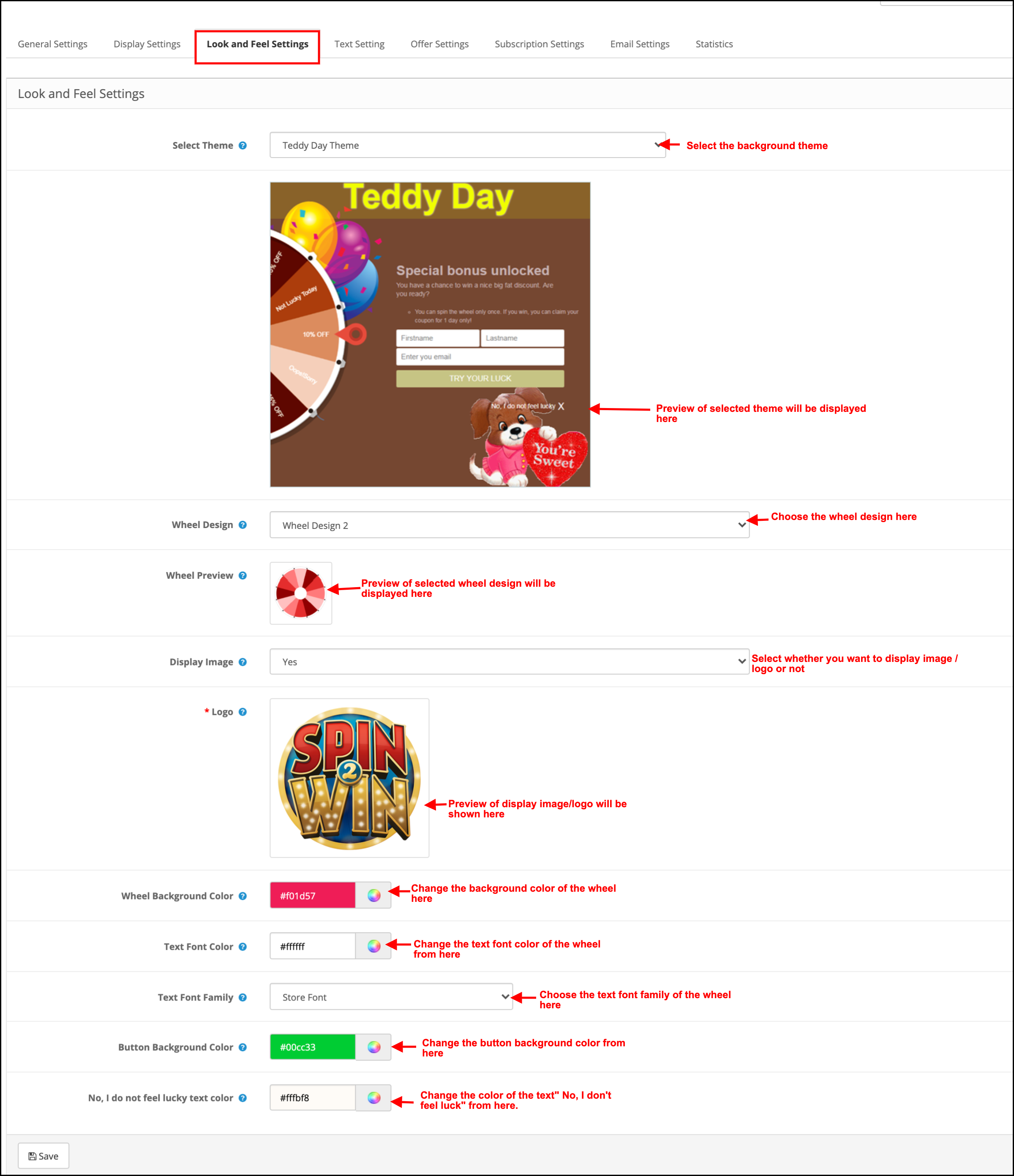
3.3 Look and Feel Settings
The admin gets an option to change the look and feel of the spin from this tab of the OpenCart Exit Intent popup.
Select Theme: The OpenCart subscription popup comes with several background themes to choose from. The admin can select the desired theme depending upon various occasions like Christmas, Halloween, Thanksgiving, Black Friday, etc.
Preview of the theme he selects will appear below the selected theme tab to see how it will look on the front end of the store.
Wheel Design: The OpenCart exit intent subscription popup even offers pre-designed spin wheels. The admin can choose the one that matches the UI of the site.
Wheel Preview: The admin can preview the selected wheel design here.
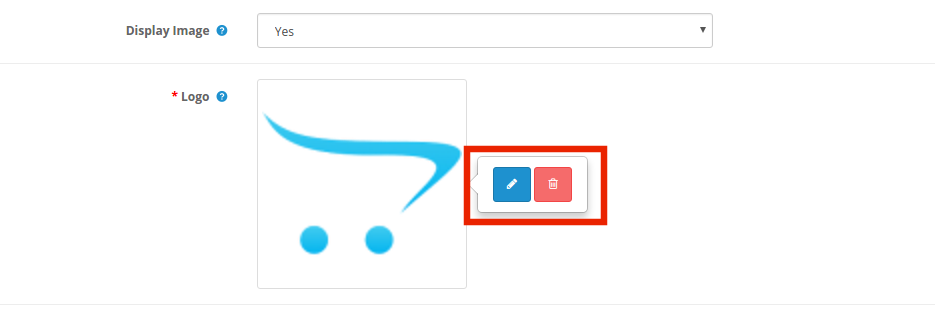
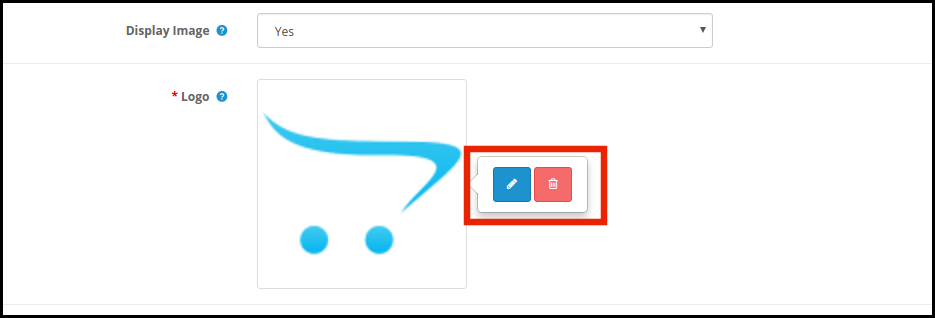
Display Image: The admin gets an option to display the image or logo on the wheel. If he selects ‘Yes’, the admin gets an option to select the image to display as shown below:
The admin can change or delete the image by clicking on the respective buttons.
Wheel Background Color: Select the background color of the wheel from here.
Text Font Color: Choose the font color of the text for displaying on the wheel.
Text Font Family: Selected the font family of text for displaying on the wheel.
Button Background Color: The color of the buttons for displaying on the wheel can be selected from the color chart.
No, I do not feel lucky Color: Change the color of the ‘No, I do not feel Lucky’ link from here.
3.4 Text Settings
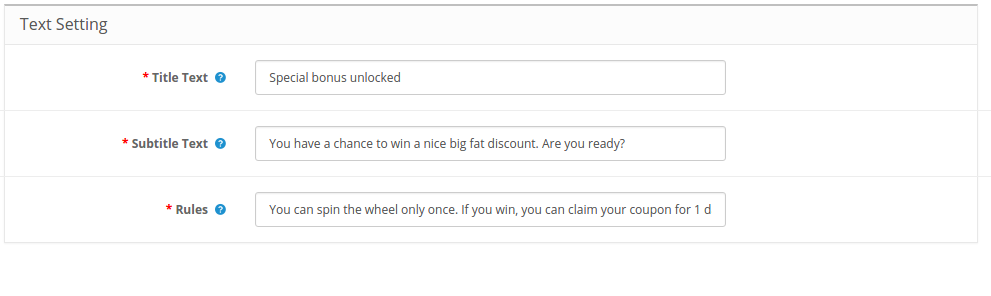
All the texts on the front end of the spin wheel is changeable from the Text Settings tab of the OpenCart spin and win module. The store admin can edit the Title Text, Subtitle Text, and Rules.
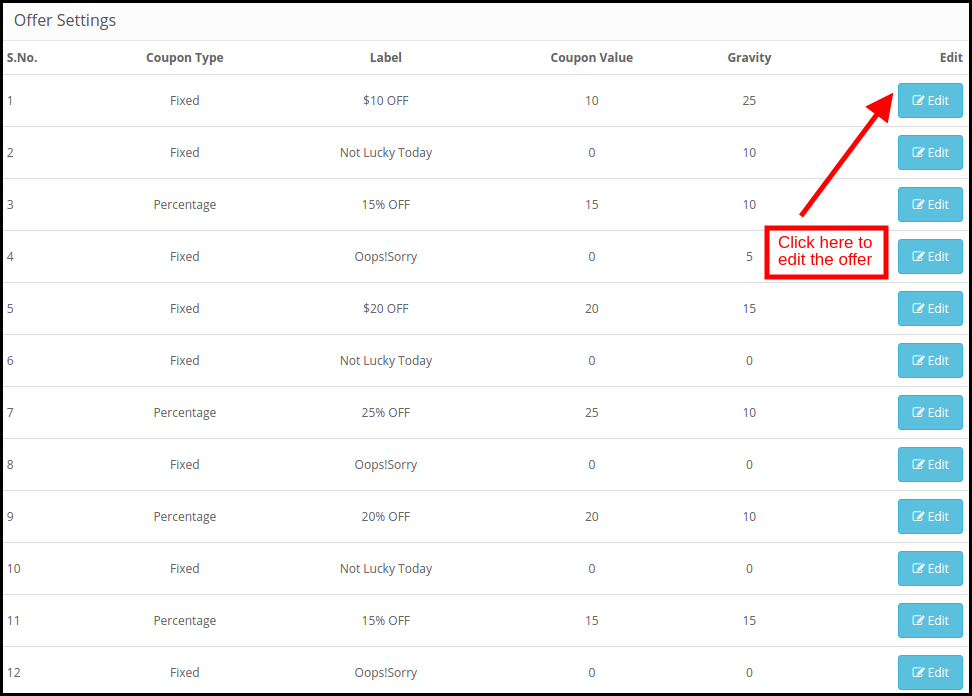
3.5 Offer Settings
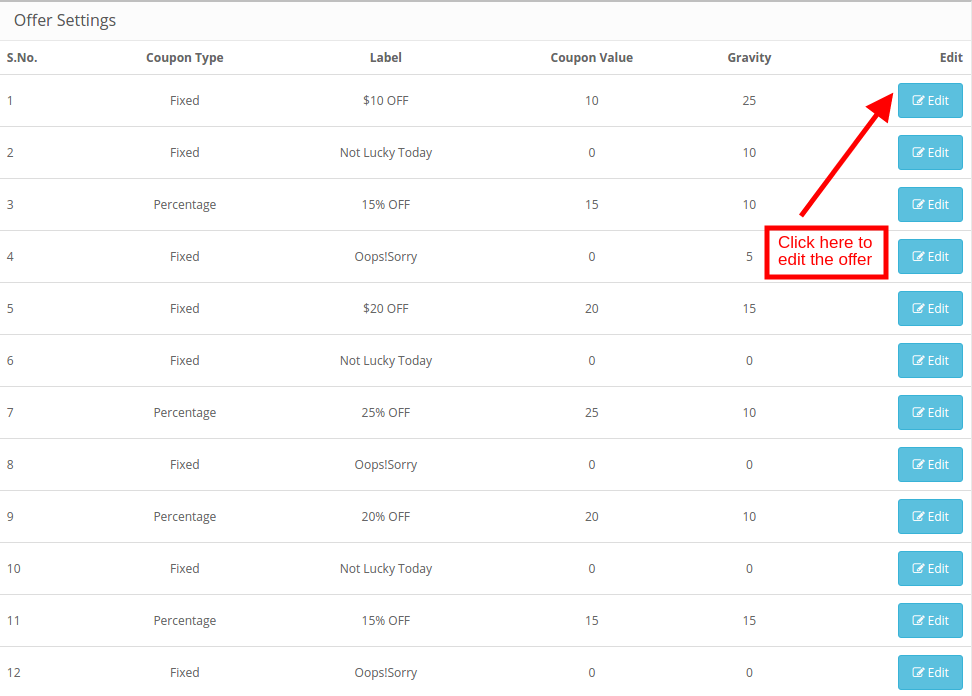
The admin can edit the slices of the wheel from this tab of the OpenCart Spin and Win plugin.
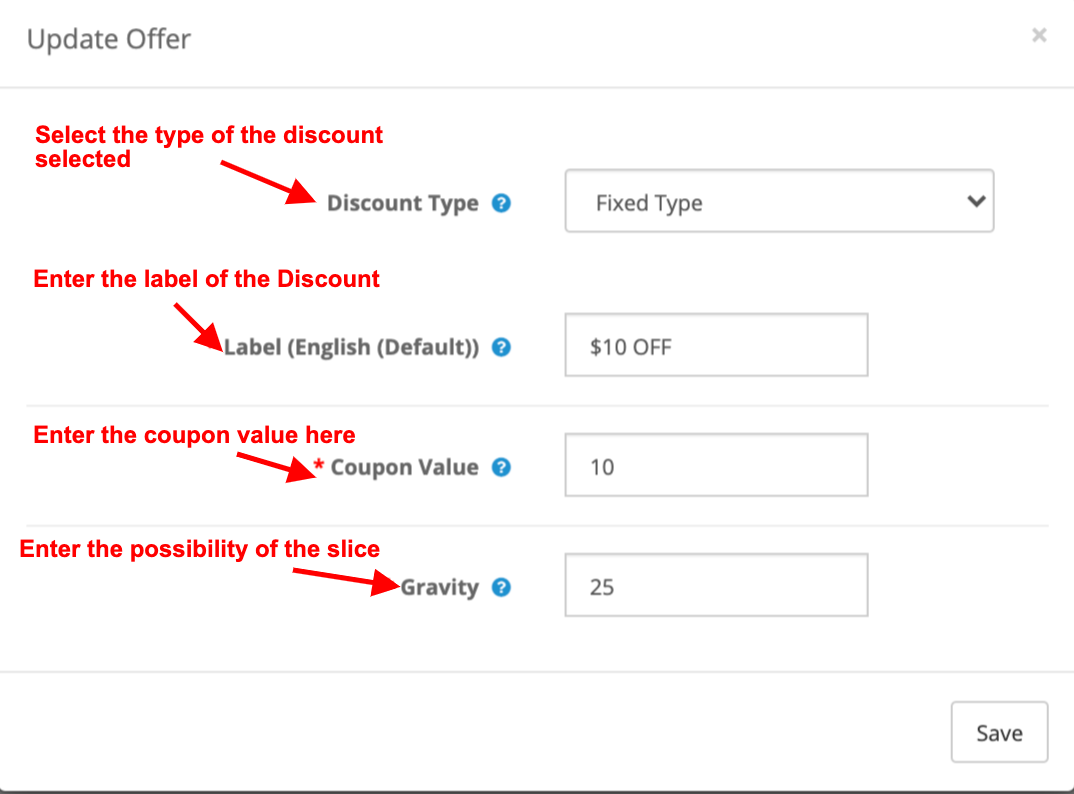
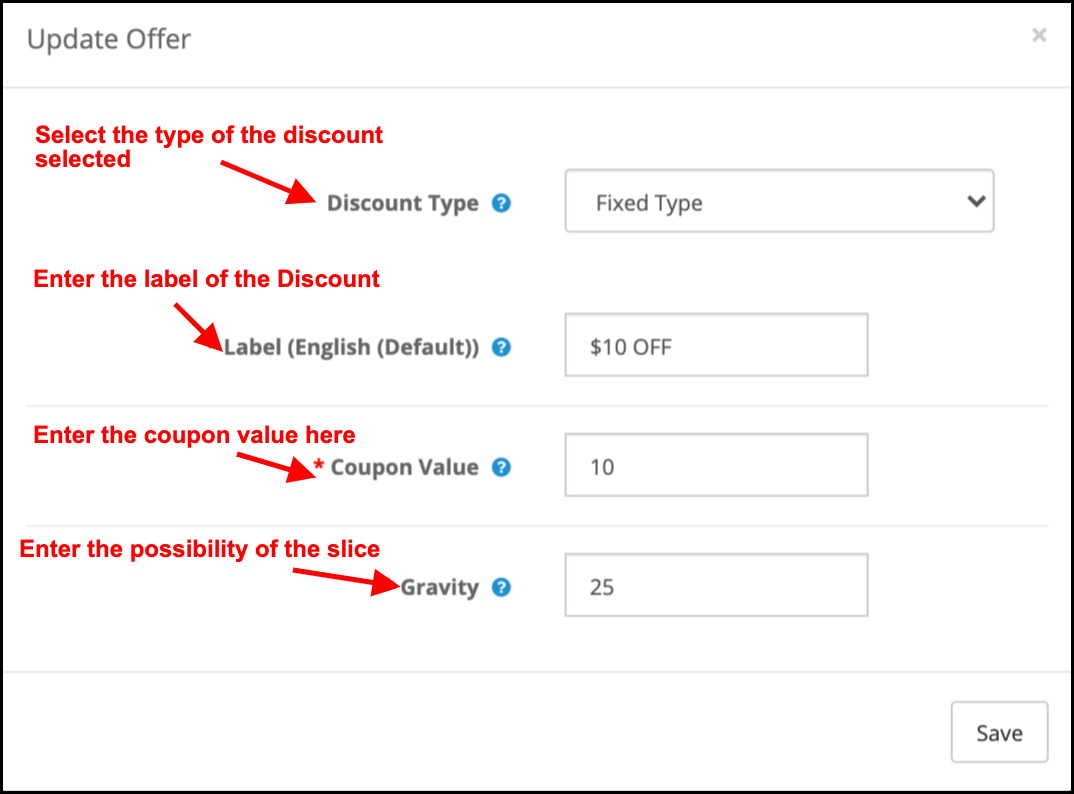
Coupon Type: This specifies the type of coupon being offered. The admin can offer a Fixed or Percentage discount.
Label: Enter the label that will display at the front end of the wheel.
Coupon Value: Enter the value of the coupon offered.
Gravity: Enter the possibility of the slice showing up when the wheel is spun.
To edit the discount slice, click on the Edit button as shown in the above image.
3.6Subscription Settings
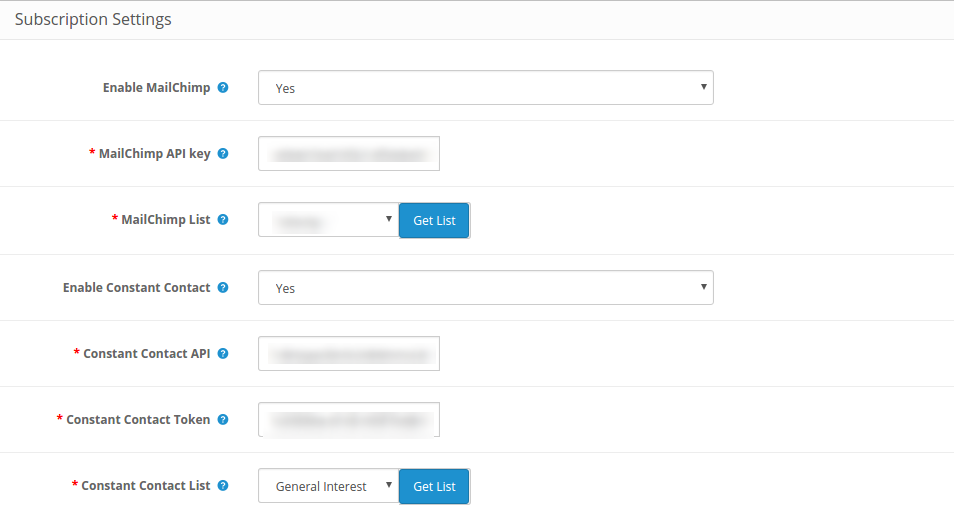
The OpenCart email integrator has an inbuilt MailChimp and Constant Contact integrator. The email IDs captured by OpenCart spin and win extension are automatically synced with the respective account of the store admin.
The admin can enable the respective marketing tool by selecting Yes from the drop-down list. To set up the connection, enter the API key and Secret Token. Select the list and the email IDs will be synced automatically.
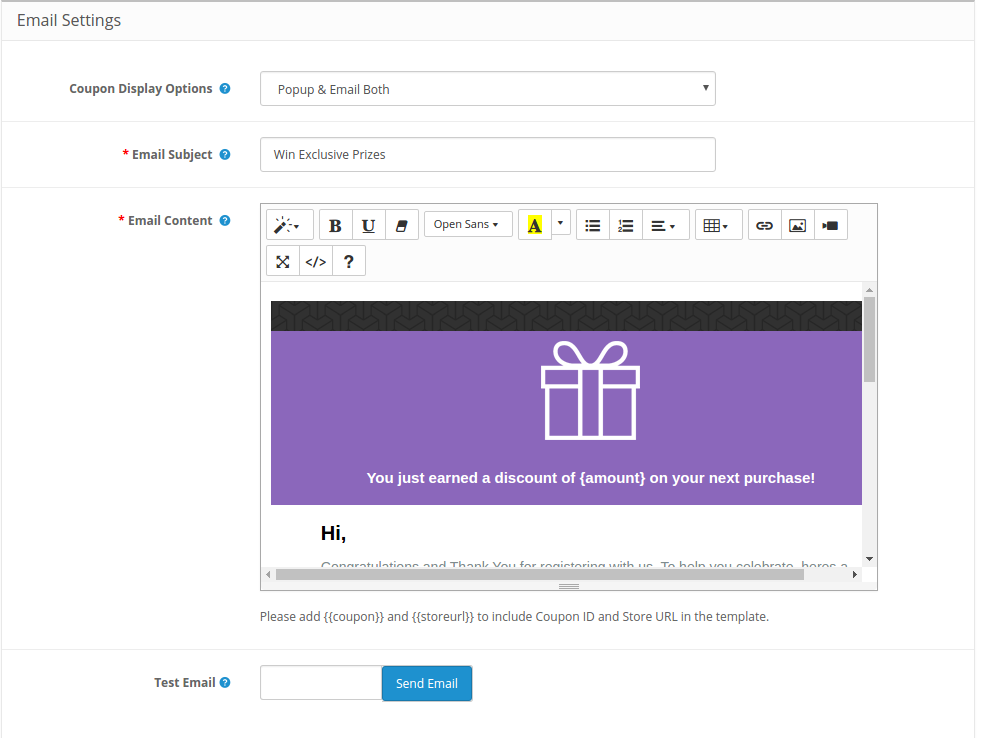
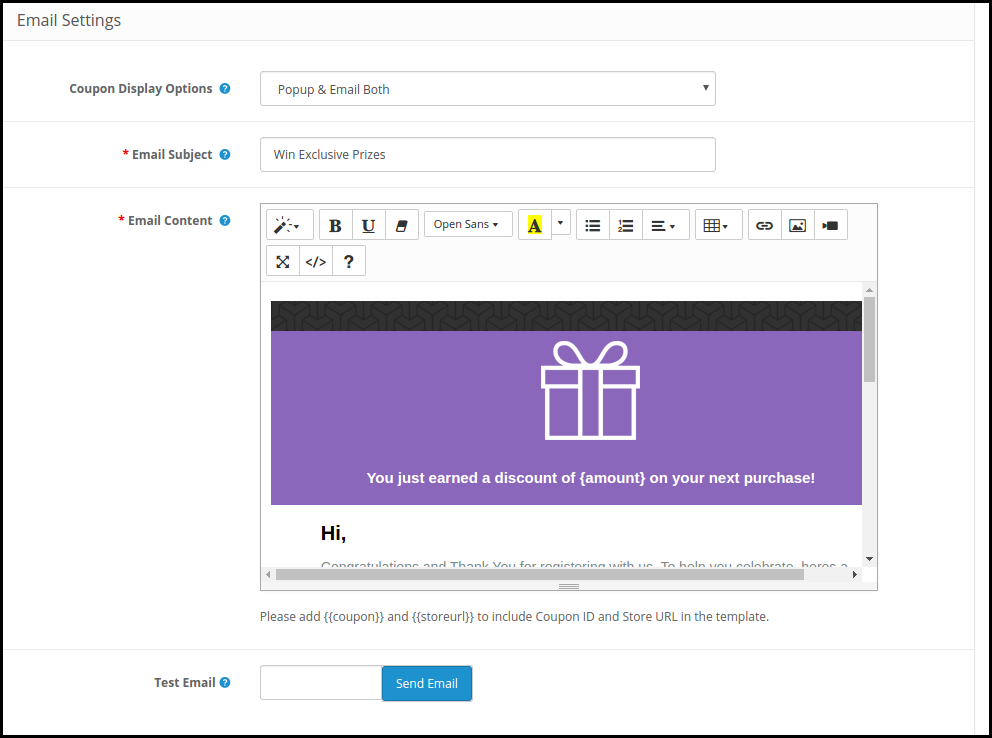
3.7 Email Settings
This tab of the OpenCart Spin and Win subscription popup allows the store admin to send promotional emails to the customers.
Coupon Display: Select where you want to display the coupon. The admin can either display it on the wheel or can send it via email. It depends on the option selected from the backend of the OpenCart responsive popup.
Email Subject: Enter the subject line of the email to be sent to the customers.
Email Content: Enter the content of the mail here.
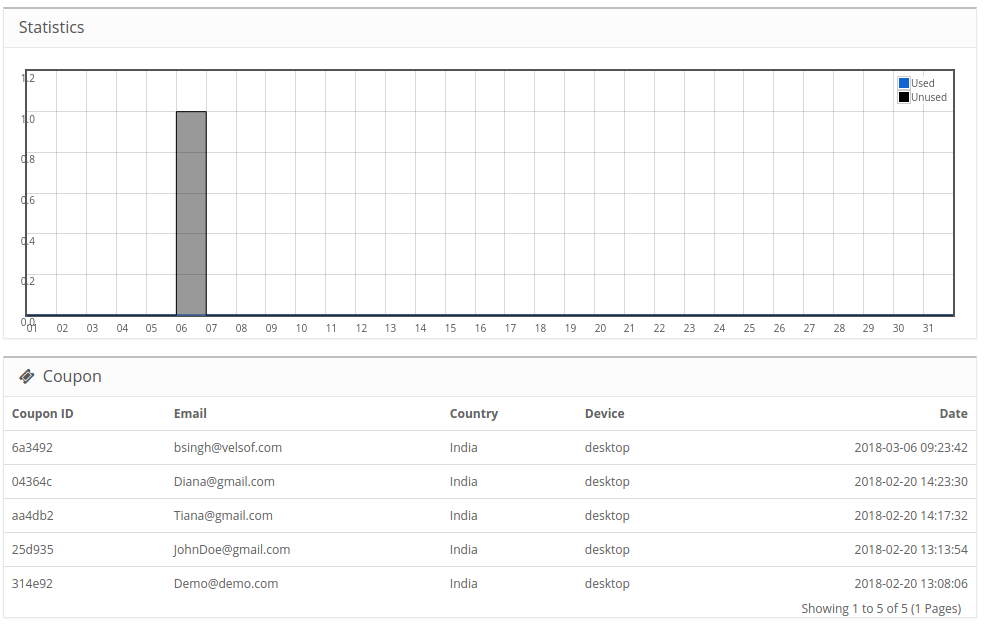
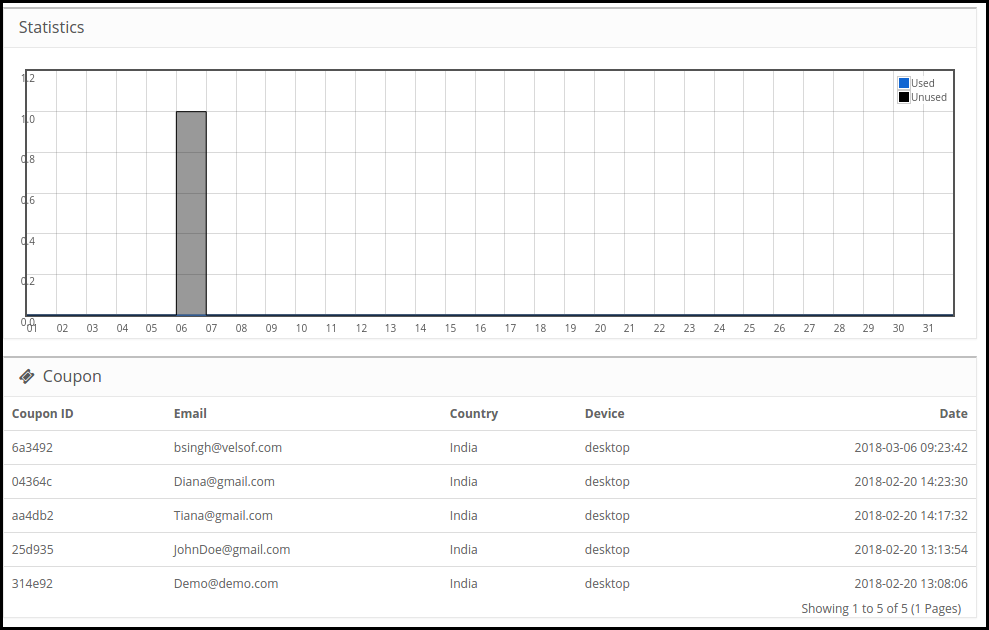
3.8 Statistics
The statistical report of the coupons generated and the coupons used/unused can be viewed in this tab of the OpenCart email subscription popup module.
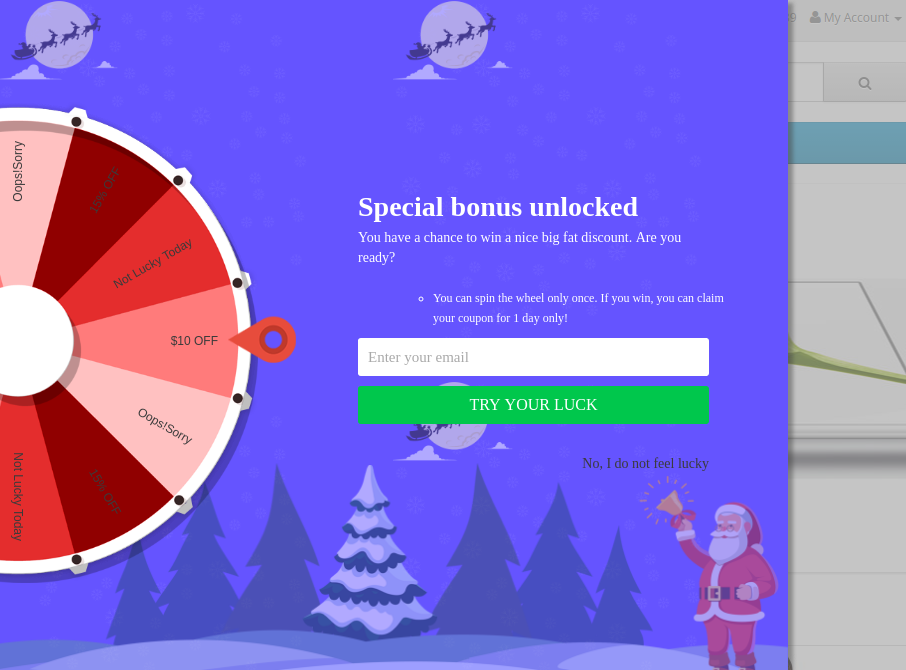
4.0 Website UI
The spin wheel popup will display in the front-end of the site as shown in the image below.
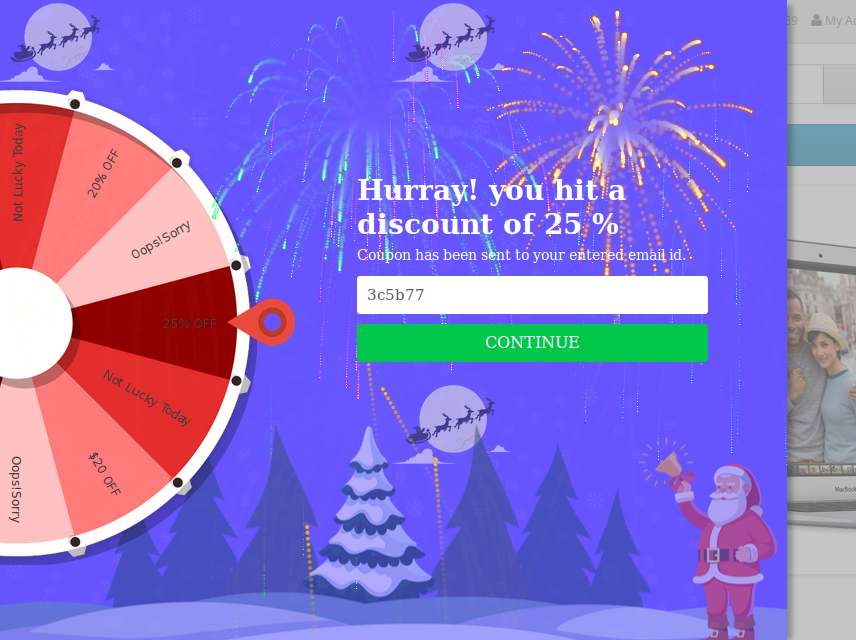
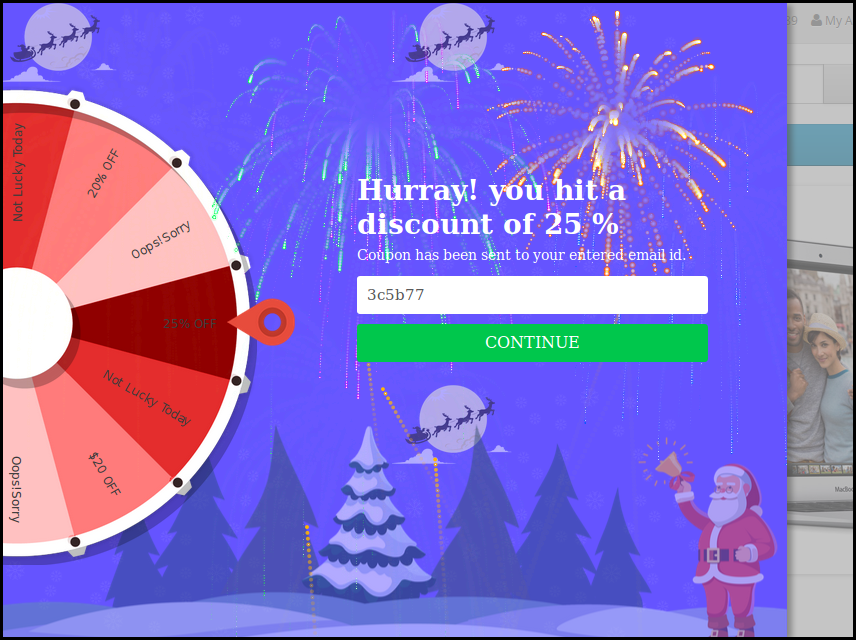
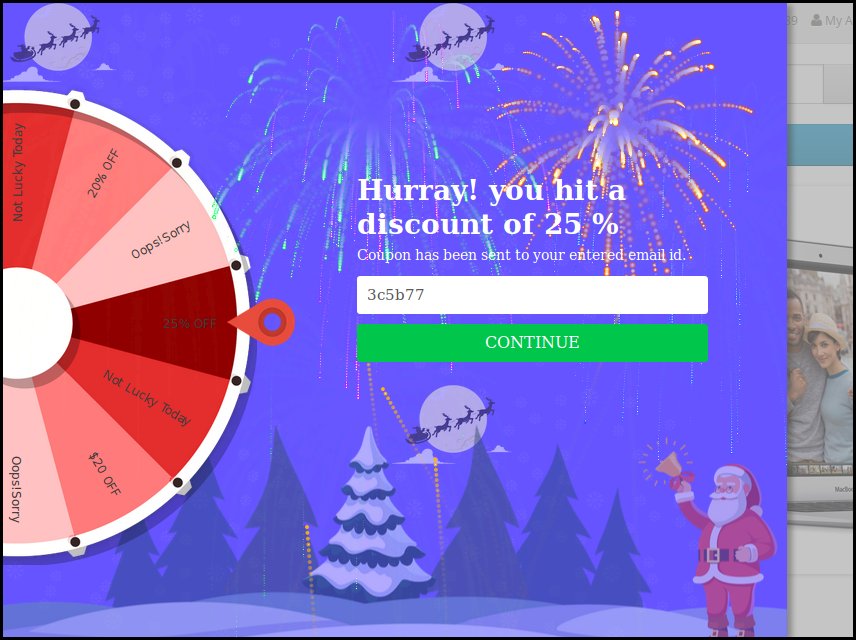
Once the customer wins a prize after spinning the wheel, the coupon will be generated as shown below:
The customer can claim the coupon by clicking on Continue.
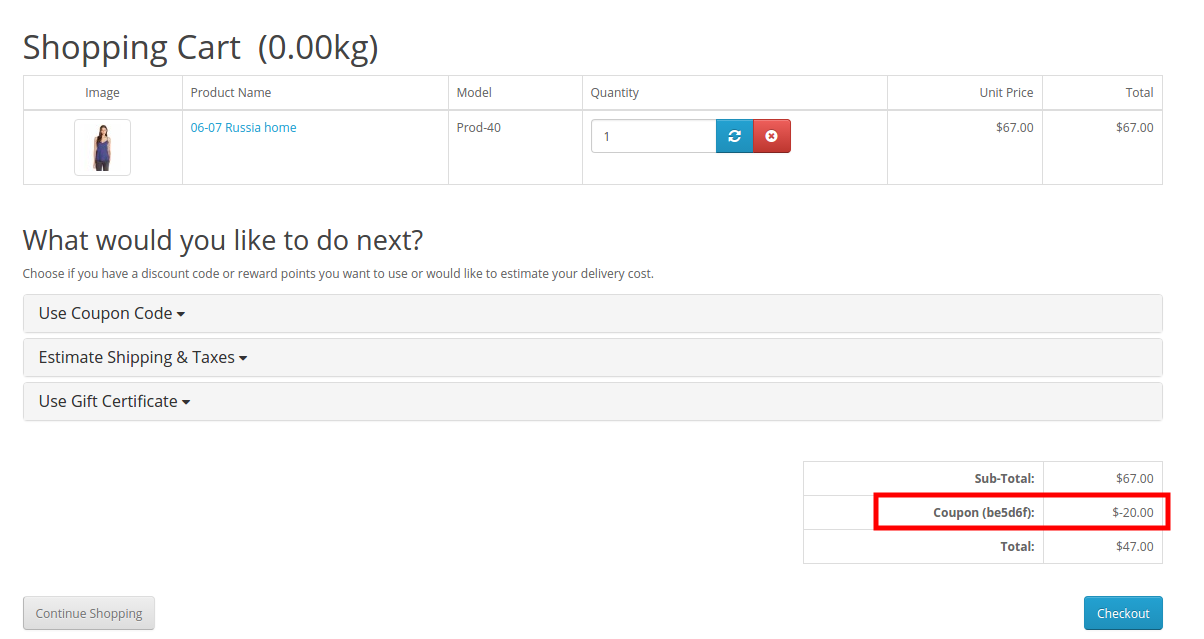
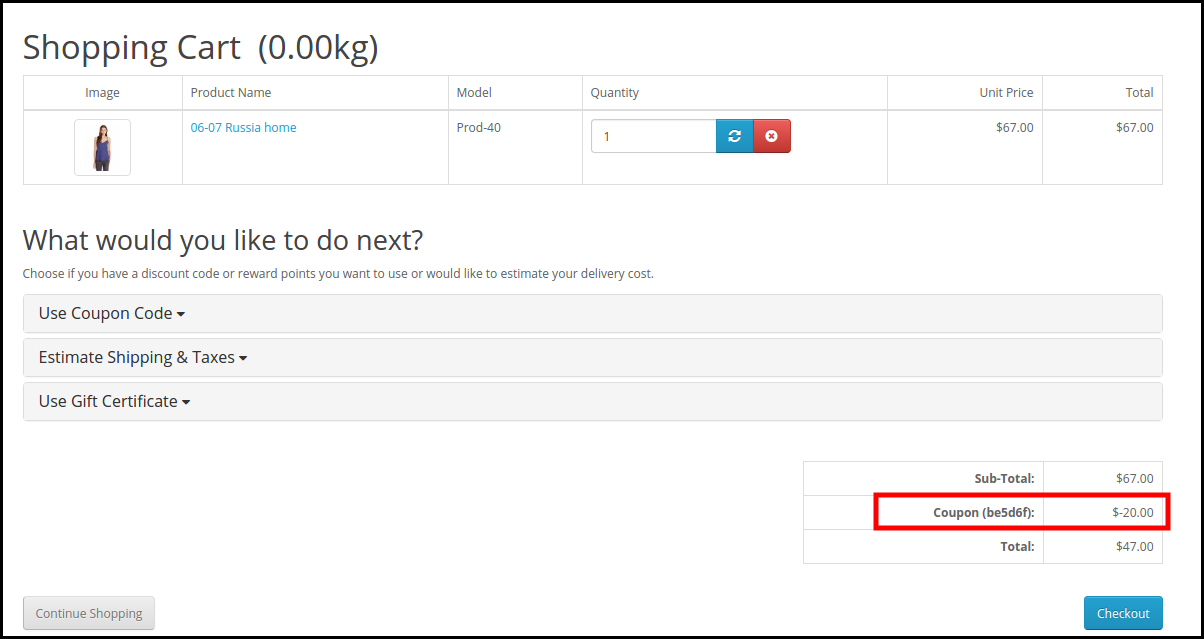
This coupon code can be used on the checkout page to get the discount won.
Disclaimer: In case the “Spin and Win” wheel popup does not display at the front, kindly clear the cache or delete the cookies. Sometimes cookies prevent the popup from displaying at the front.
OpenCart is one of the most widely used eCommerce platforms. Even though the ease of doing business with the help of this CMS system is intriguing, the online customers seek way more features than the basic ones offered by it. This is when the role of the extensions come into play.
This article talks about the 7 OpenCart extensions that you must implement on your OpenCart store in order to enhance customer experience and provide them with better services. Let’s have a look.
1. OpenCart Social Loginizer
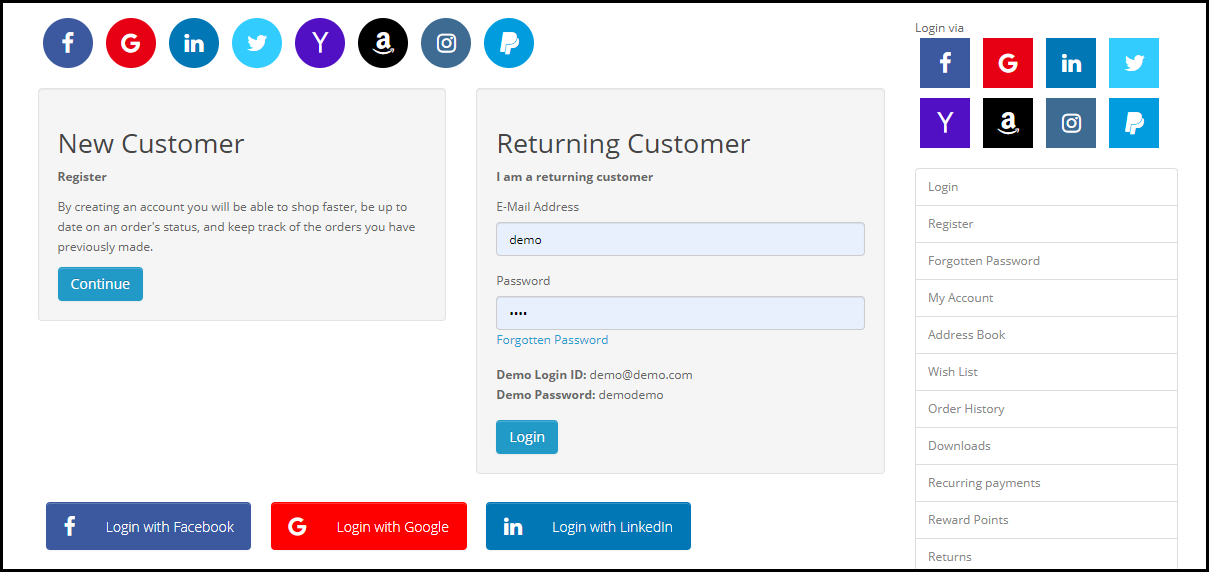
The OpenCart Social Loginizer extension offers 8 social login options to the customers including the likes of popular social media network such as Facebook, Instagram and Twitter, and allows the customers to access the web store without getting themselves registered.
Visitors can use their social media login details during the sign-up process. This saves a lot of time of the customer, and at the same time, the bounce rate of the website also reduces to a large extent. This OpenCart extension is quite handy as most of the time, the customers are already logged into their social media accounts, hence, it makes the registration process easy.
2. OpenCart One Page Checkout
The idea of filling out the information in multiple steps during the checkout may seem quite annoying for the customers who wish to make a quick purchase.
The OpenCart One Page Checkout extension puts together all the checkout fields involved in a multi-step checkout on a single page and enhances the checkout experience of the customers. This OpenCart extension offers the Guest Checkout Facility, Social login facility, supports multiple shipping and payment methods, etc. It is a feature-packed extension that focuses on simplifying the checkout process of your OpenCart website.
3. OpenCart Mobile App Builder
Many brands today are now trying to launch their mobile app in order to simplify the shopping experience of their mobile users, also because the majority of the online transactions are now taking place through mobile devices.
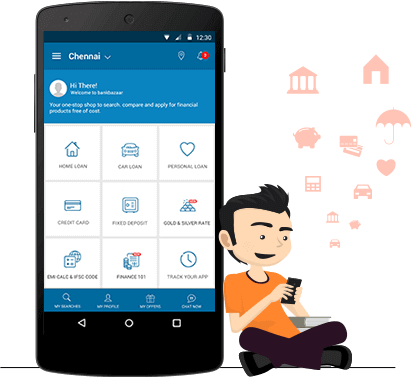
The OpenCart Mobile App Builder helps the website owners easily launch a mobile app for their brand without any knowledge of coding. The Mobile App Builder provides Social Login, Fingerprint login, OTP login, Home Page Layout Customization, Zopim and WhatsApp Chat Support, Multiple Payment and Shipping support, Unlimited Push Notifications, Simplified Checkout and much more.
4. OpenCart Abandoned Cart
Every website owner has to deal with Abandoned Carts. This is something which cannot be put an end to if you are running an online business. But there are certain modules that will help you reduce the number of abandoned carts on your website and OpenCart Abandoned Cart module by Knowband is one of them.
This OpenCart extension lets you track the abandoned cart users, and allows you to convert them into your customers through regular email follow-ups. You can include discounts in your reminder emails to persuade those users to complete their purchase.
5. OpenCart Exit Pop-up
Wouldn’t it be amazing if you could make a sale even when a user is trying to take an exit from your website? This is the job of Exit Popups, i.e. to draw your visitor’s attention at the very last moment.
With OpenCart Exit Popup extension, you can display an email popup to your visitors right when they intend to leave your website. In the popup, you can display some enticing offers to grab their attention and encourage them to use those offers during their purchase.
Apart from boosting conversions, this OpenCart extension is quite effective in increasing user engagement on your website which simultaneously increases the average time on site.
6. OpenCart Spin and Win
Obtaining the email address of your website visitors is not an easy task anymore. People usually don’t share their details with any online platform unless they get something valuable.
With OpenCart Spin and Win extension, you can acquire the email address of your visitors without putting much effort. Besides, this OpenCart extension increases user engagement on your website and boosts your eCommerce conversions.
The module adds an attractive and fun-filled Spin 2 win on the front-end of your website, making your users curious to spin the wheel. You can customize the popup slices as per your choice and also design the popup for various occasions like Halloween, Christmas, Black Friday, New Year, etc.
To spin the wheel, users would be required to enter their email address which would make it easy for you to capture the email address of your visitors.
Over to You
The availability of multiple OpenCart extensions has helped the web store owners to make their store a better place for the online shoppers and the feasibility of these modules in various aspects definitely takes the user experience to the next level.
If you need any assistance in these OpenCart extensions, you can contact us at support@knowband.com