Sell Gift Vouchers Using Knowband’s OpenCart Gift Card Extension

KnowBand’s OpenCart Gift Card extension makes it easy for you to sell gift cards on your website to provide your customers with customized options like a Photo Gift Card.

For a shopper, finding a perfect gift for their friends or family for events like Christmas, New Year, Holiday season is always a difficult choice as there are thousands of options available. Thanks to Digital Gift cards that have put an end to the long hour’s gift search.

Digital Gift Cards

Digital gift cards have made it convenient for people to purchase a gift card anytime, anywhere, and send it to their special ones within no time. This is the reason why many eCommerce businesses offer gift card facilities to their customers. If you are also looking to incorporate a gift card section on your OpenCart website, OpenCart Gift Card Manager Extension by Knowband is all you need. KnowBand’s OpenCart Gift Card extension makes it easy for you to sell gift cards on your website to provide your customers with customized options like a Photo Gift Card.


Best Time to sell Gift Cards on Opencart store

The best time to sell gift cards at the Opencart store is the holiday season. The holiday season is the time when eCommerce and retailers achieve the highest sales of the year. The 4th quarter of the year brings a lot of traffic to the website and this is the best time when you can start selling Gift Cards on your online store. There is no time when you can’t sell a gift card but a few occasions must call for it. Include some most common gift cards like Birthday Gift Vouchers, Congratulation Gift Certificates, and Anniversary gift cards.

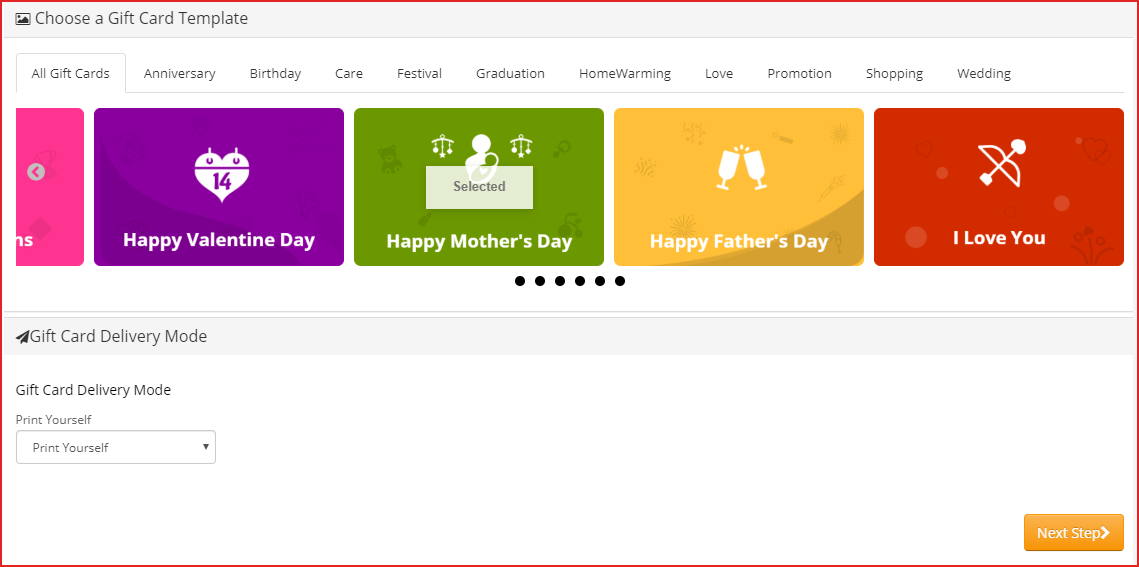
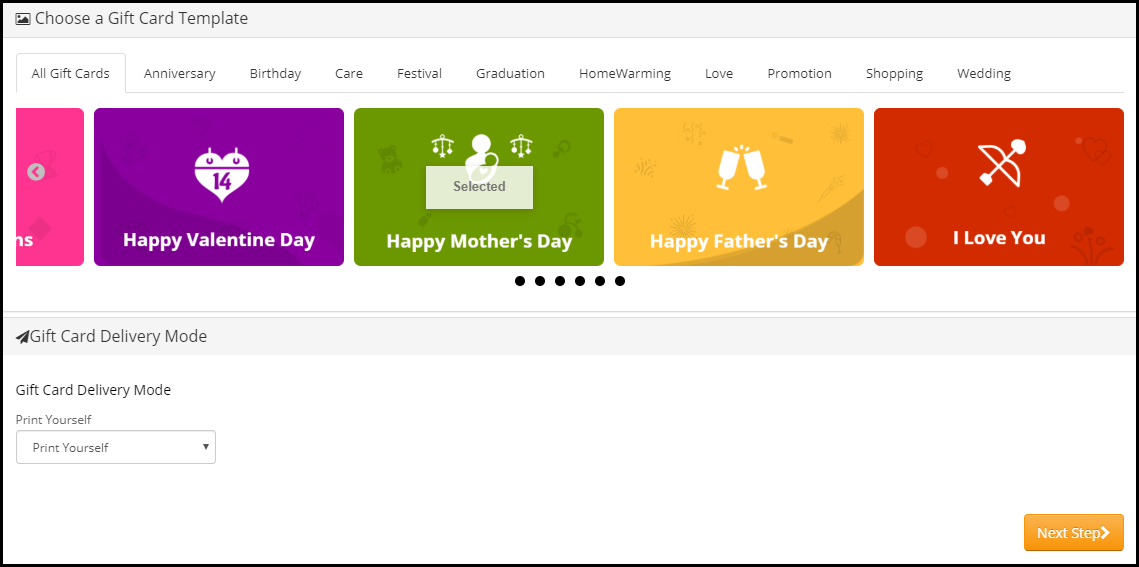
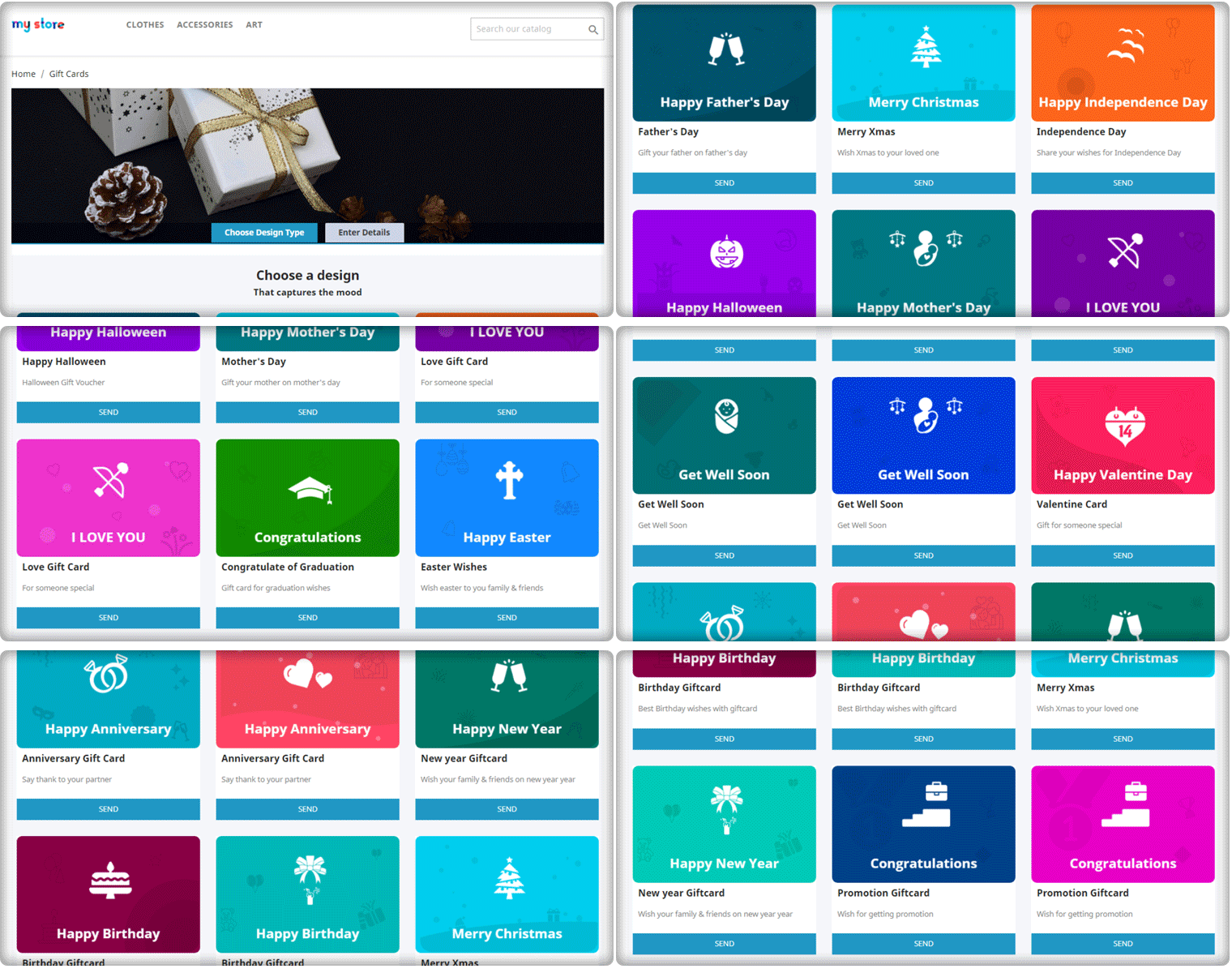
You can create custom gift cards for occasions like Christmas, New Year, Halloween, Diwali, Holi, Independence Day, Valentine’s day, and other festivals based on your target audience. For instance, have a look at the mother’s day gift voucher and how easy it is to customize its template. In the US, the Mother’s Day Gift voucher spending was around 21 billion U.S. dollars which is remarkable.


Benefits of Selling Digital Gift Cards

  1. Increase your store sales

Anyone looking for a gift card will shop from your store in the future. Henceforth, Gift Cards bring more revenue to your store and increase advance sales.

  1. Boost brand awareness

Digital gift cards, along with sales, also help in increasing brand awareness. Furthermore, the Gift Card recipient will come to know about your store when they receive it from their loved ones. Moreover, you can add the logo as well as the brand name on the physical card and even in the email.

  1. Capture new customers

Every time a sender buys and sends a Gift Card will bring you a new customer. Digital gift cards are the best way to capture new customers to store during the holiday season.

Overview of OpenCart Gift Card Manager

  1. Place the gift card link in multiple places.
  2. Set up gift cards of multiple price ranges.
  3. Allow customers to create personalized Gift Card by uploading an image
  4. Set the gift card delivery gap
  5. Customizable gift card templates for multiple occasions
  6. View all ordered gift cards in one place
  7. Multi-lingual support, GDPR, and multi-store compatible
  8. 3 Gift Card Delivery options:
  • Print yourself,
  • Send by email,
  • Physical card

How to sell gift vouchers on Opencart?

Features of OpenCart Gift Card extension [Detailed]-

As the store owner, you must know the facilities a gift card plugin can offer because you have to provide the best possible options. Thus, know how you can configure it for increasing the Gift card sale. Let’s dive in.

Ways to create Gift Certificate with Opencart Gift Card Plugin

1. Customized Photo gift cards & templates

  • Customizable default templates:

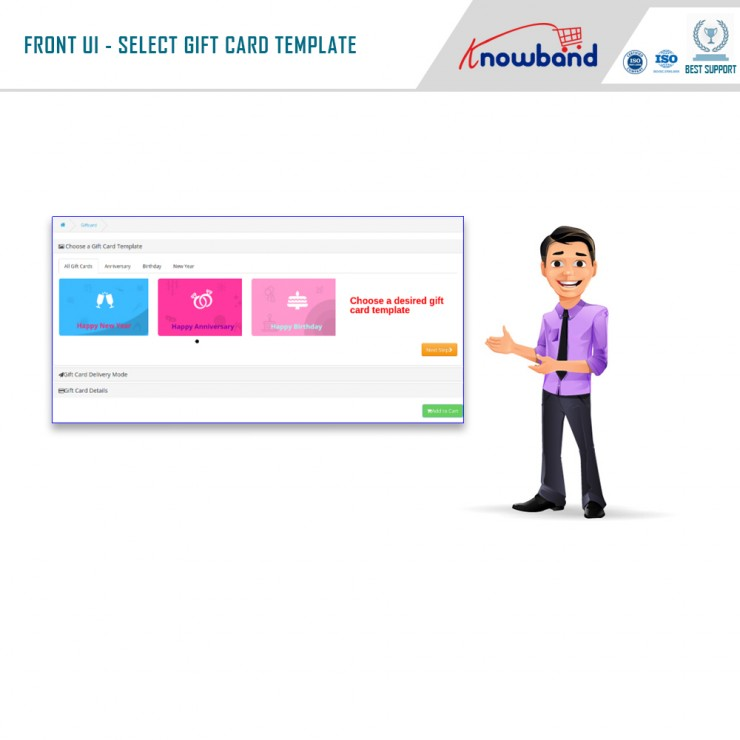
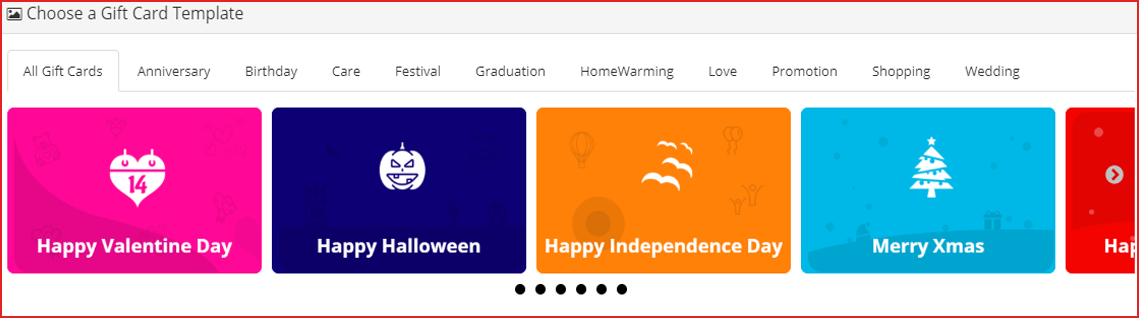
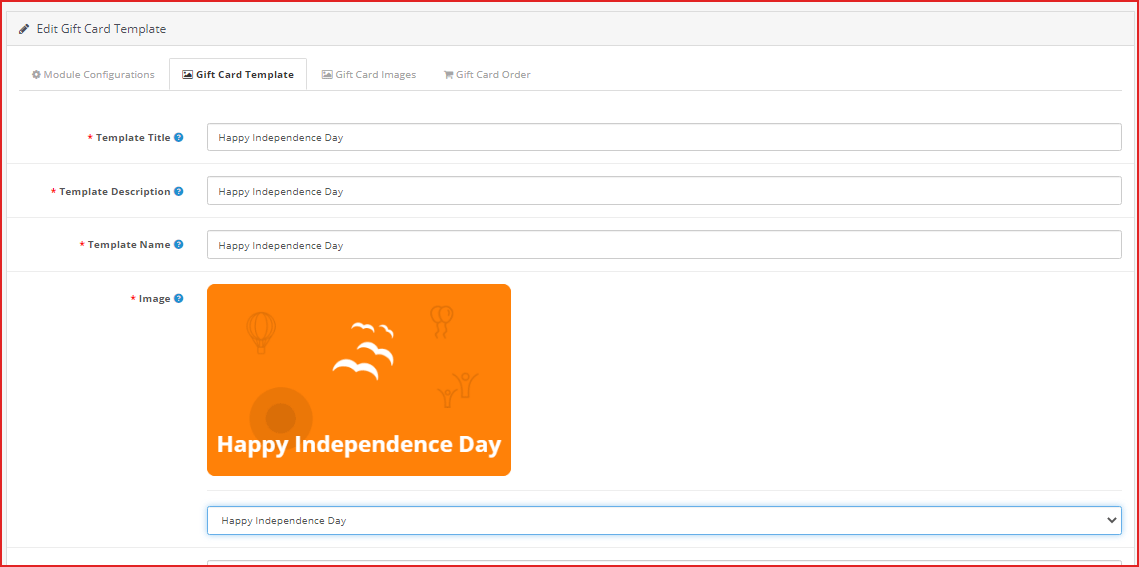
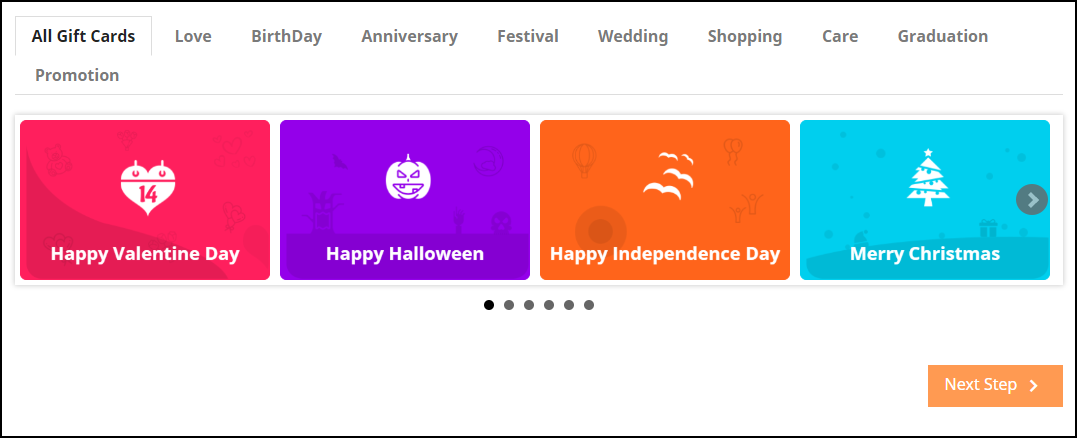
OpenCart Gift voucher extension provides you with gift card templates for multiple occasions like Valentine’s, Halloween, Christmas, Easter, Birthdays, Anniversaries, Father’s Day, Mother’s Day, etc. The templates can be customized as per your choice.

  • Personalized Photo Gift Card–

With the OpenCart Gift Certificate plugin, now you can let your shoppers create their own customized gift card by uploading an image. The sender can also add a custom message for the email and PDF.

Advanced Admin Configuration

2. Offer Gift Cards of variable Amounts:

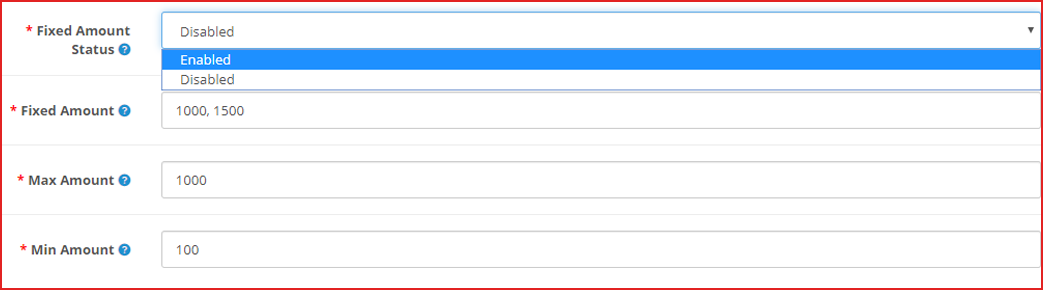
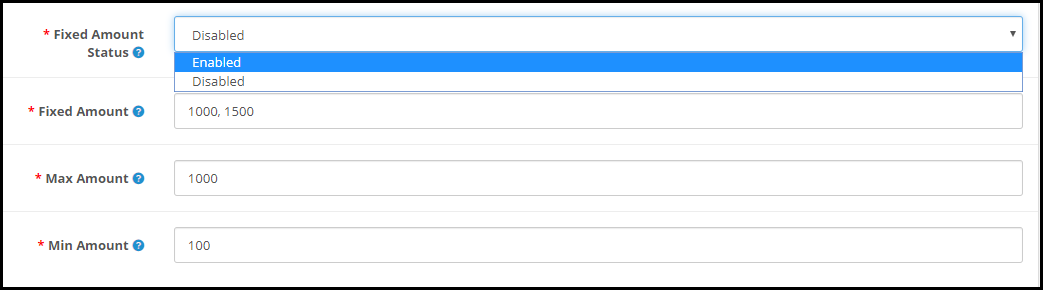
OpenCart Gift Card Manager extension enables you to set up gift cards in different price ranges. For example, you can have gift cards of $100, $200, $500, etc. If you do not want to provide fixed-value gift cards, you can specify a range within which a customer can shop for the gift card. For example, if the specified range is between $100 and $1000, then a customer can buy the gift card for any amount in between.

3. Add gift vouchers product link to multiple places on the website

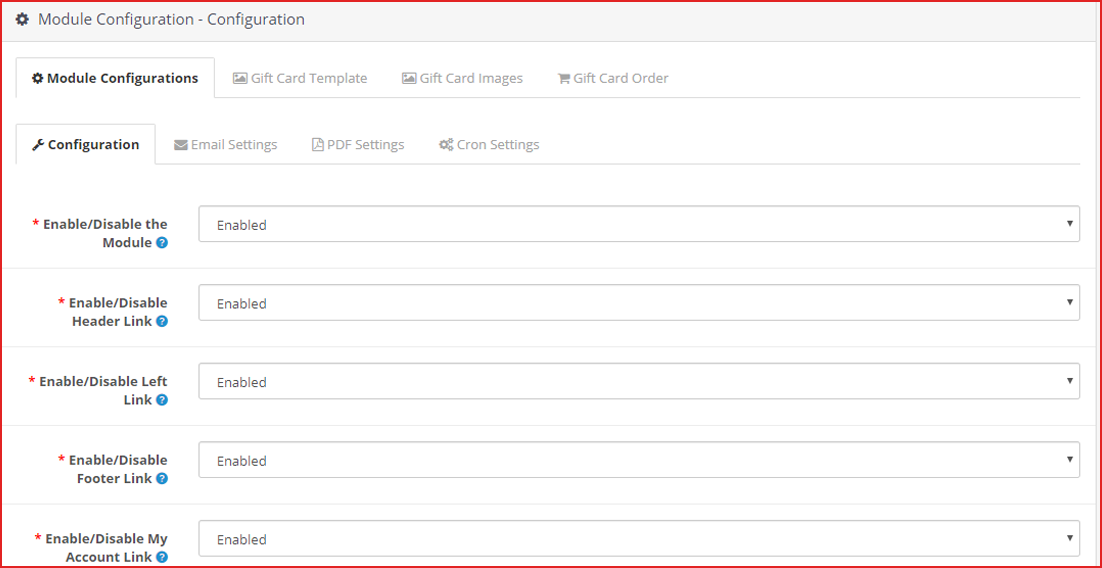
OpenCart Gift voucher extension allows you to place the gift card link on various places on your website such as the Header, Footer, My Account section, and on the center-left of the website.

The image shows the Gift card link present on the left-most of the web page.

4. Categorize the Opencart Gift certificates by Occasion

In Opencart Gift Card manager settings, you can also define a category for gift cards to make it easy for the customers to find the relevant gift card.

For example, put the gift cards for the holiday season like Christmas, Halloween, New Year under one category.

Follow the eCommerce marketing calendar to plan your gift card categories.

5. Send Custom email and PDF to sender and receiver

OpenCart Gift voucher extension also lets you customize your email templates that would be sent to the recipient and the sender when the gift card has been delivered. The email subject and the inside email content can be customized as per your choice.

Customers can also download the gift card in PDF format.

6. How to make the Gift Card Delivery?

  • Frame Delivery Rules

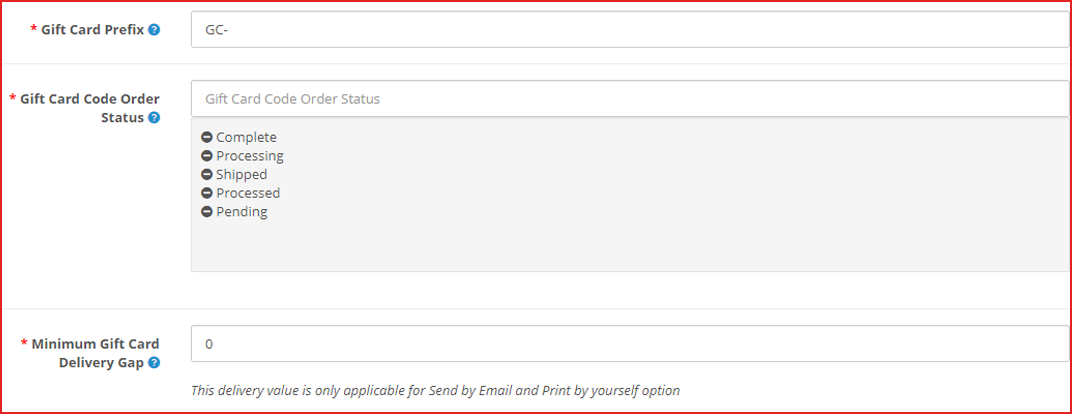
OpenCart gift certificate extension lets you specify the order status for which the gift card would be generated and would be sent to the recipient.

You can define the minimum number of days within which the customers can expect the gift card delivery.

7. Offer Multiple Gift Card Delivery Options

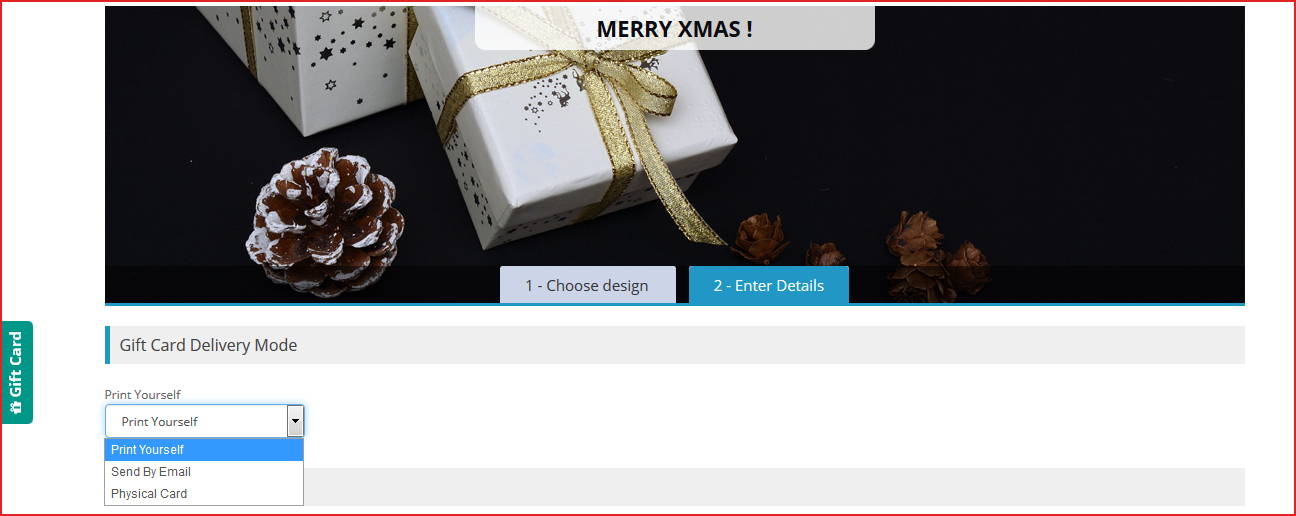
Sometimes customer likes to send gift card physically. There are three options available for the delivery of the Opencart Gift cards. With the help of the OpenCart Gift Card extension, you can specify whether a particular gift voucher should be allowed to send

  1. physically deliver the Gift Card
  2. Print the Gif Certificate by Yourself
  3. Send virtual gift card via email

8. OpenCart Gift Certificate builds brand identity

You can set a prefix for your gift cards to promote your brand.

For example Knowband-12XZ

9. Track redeemed Gift Card Coupons

OpenCart Gift certificate plugin lets you track your gift card orders. It contains details like the recipient’s email address, Order reference ID, sending date of the gift card, and the current status of the gift card. This helps you manage the stocks and inventory.

10. Store and theme compatibility

OpenCart Gift voucher module is GDPR compatible, multi-store compatible, and provides multi-lingual support. You can use the Gift Card module for the OpenCart Journal theme as well.

What kind of features can we expect from the updated version of the Opencart Gift Card Extension?

Opencart Gift Card Vouchers Plugin’s updated version offers some special features for a better user experience.

  1. When online users select the “Print by yourself” option, an additional email template is available for sending an email notification to them. This email will be forwarded to the person who sent the gift card.
  2. On the website front end interface, the fixed amount to drop-down can be displayed. Moreover, online users can select the amount for the gift card and the amount can be separated by comma by the store admin.
  3. From the admin interface, online merchants can efficiently set the minimum and maximum gift card value. Furthermore, users must select gift card value in between max and min amount.
  4. While selecting a virtual Gift card option, there is no need for clients to pay shipping charges.

In the end

With the festive season around the corner, now is the perfect time to have a gift card section on your eCommerce store. Start selling the exclusive gift cards which are most recommended for personal and corporate giftings. Knowband is offering the module at $28.79 and Year-End Sale – Min 20% Off Sitewide + Extra 20% Off | Use Code: KBOFF20

Have any query? Feel free to ask in the comment section below. Or you can contact us at support@knowband.com for any kind of assistance regarding this module.

Live Demo:

KnowBand OpenCart Gift Card Voucher/Certificate Extension

You may also like:

Why Digital Gift Cards are Important to your eCommerce Business?

Get more Holiday sales by setting up a Gift Card section on your store

Give Some Holiday Season Flair to an Ecommerce Website Design

Get more Holiday Sales by Setting up a Gift Card section on your Store

“This holiday season, turn up your sales volume by adding the gift card facility to your online business.”

Gifting sounds great but not for the one who has to gift. Well actually, this has remained a problem for people. Gifting was never a concern but when it comes to deciding what to gift, people find themselves in a stressful situation. According to the National Retail Federation, 80% of holiday buyers will include a gift card in their buying list this year, according to a separate poll. Furthermore, to reduce the hassle of searching for the right gift for customers, Knowband offers the Gift Card Manager module.

Gift Card Manager

Gift Card Manager by Knowband helps your customers find the desired gift card easily. The module integrates a gift card section on your eCommerce website.

With Christmas and New Year around the corner, it is high time that you get this module and start offering gift cards on your website related to these occasions. Furthermore, the Knowband Gift Card module makes it easy to add multiple gift cards to your website.

Have a look at what our Gift Card module offers:

1. Pre-existing Gift Card templates for multiple occasions

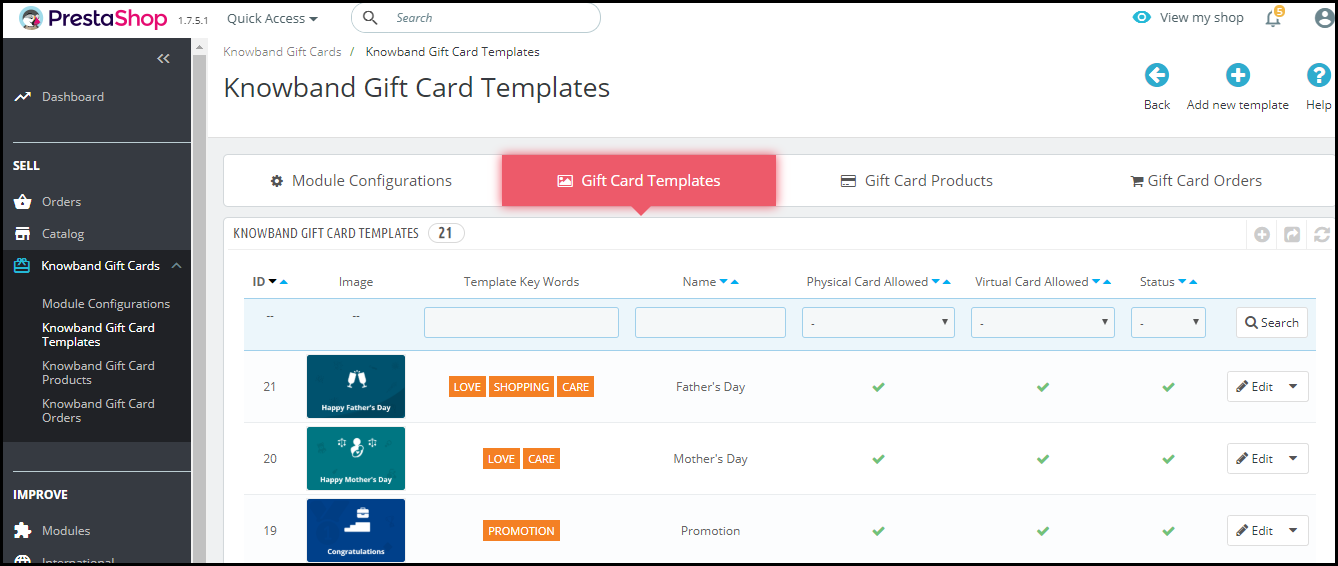
We have added a number of Gift Card templates to ease up the task for the merchants. The Gift Card Manager extension provides merchants with Gift card templates for Halloween, Christmas, New Year, etc. Apart from the Holiday based Gift cards, the Gift Card Manager comes up with templates related to Birthdays, anniversaries, Mother’s Day, Valentine’s Day, etc.

2. Add new Gift Cards

Couldn’t find the template you were looking for? No issues. You can add templates on your own. Just tap the “Add new template” button and make your customizations.

3. Assign a category to your Gift Cards

Assigning a category to your Gift Cards helps customers to look for the desired gift card quickly. When you assign multiple categories to different Gift Cards, those categories are shown at the front end of your website, hence saving customers time in search of the desired gift card.

For example, Gift cards related to Halloween and Christmas can be put under the Festival category.

4. Customize your Gift cards

Well, attracting more and more customers is possible only if your Gift cards look more appealing. Furthermore, the Gift Card Manager provides you with the option to set attractive images for your gift cards.

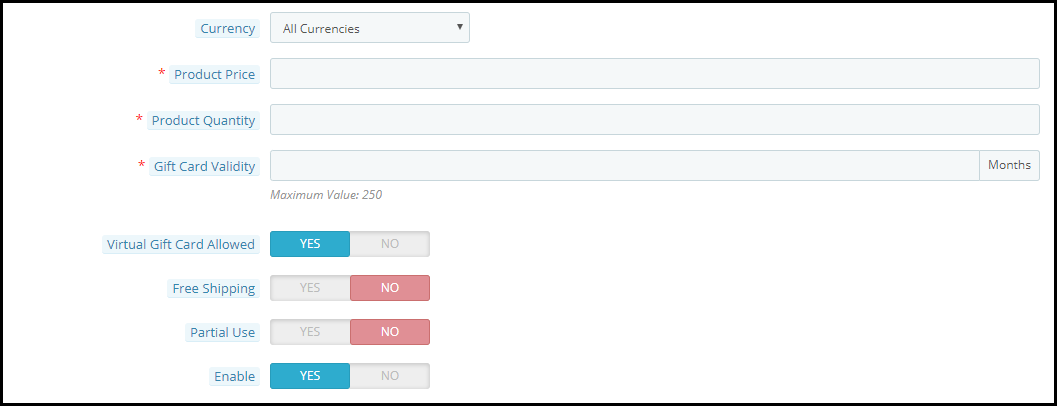
You can also allow your customers to send the gift card to the recipients over their email address or deliver at their residence address. The “Physical Gift Card allowed” option needs to be enabled for the gift card delivery to a recipient’s address and on the other hand, the “Virtual Gift Card allowed” option needs to be enabled for giving customers the option to send it via email.

The Gift Cards tab allows you to define the gift card’s worth. Within this tab:

1. You can provide a name to your gift card

2. Set the gift card price

3. Define the gift card quantity

4. Set the gift card validity

5. Allow free shipping

6. Allow partial usage of the gift card amount

7. Set the currency in which the gift card can be purchased. If currency preference is set to “All currencies”, then a gift card can be purchased for all of the mentioned currencies.

5. View your Gift card orders

Every gift card purchased will be displayed under the “Gift Card orders.” The tab consists of the order reference id, recipient’s email address, delivery date, gift card status, etc.

6. Set a minimum delivery gap for the gift card

You can keep a few days’ gaps between the order placement and the delivery of the gift card. No gift card will be delivered before this period.

7. Display the Gift Card block at multiple places

You can display the gift card tab at the header, footer, or under the “My Account” section of the customer.

It can also be displayed separately on the center-left side of the website.

8. Print Photo Gift Card

The module allows your customers to send photo gift cards to their loved ones. You can have several default gift card templates but nothing is better than giving an option to your customers to print their own gift card. They can upload a picture and create a new gift card.

9. Personalize your email content

Changes can be made in both email content and subject for both the recipient and the sender. Moreover, the Gift Card Manager Extension by Knowband is GDPR compliant and available for different platforms including PrestaShop, OpenCart, Magento, and Magento 2.

PrestaShop Gift Card addon

OpenCart Gift Card extension

Magento Gift Card extension

Magento 2 Gift Card extension

Knowband is offering year-end sale – Min 20% Off Sitewide + Extra 20% Off. Use Code KBOFF20

Encouraging individuals to purchase gift cards is the next stage once your program is up and running. Follow these ideas for increasing sales:

  • Promote your business both online and in person.
  • Customize your gift cards
  • Provide incentives
  • Analyze your customers.

Front End View of the Gift Card Module

Final word

This holiday season, turn up your sales volume by adding the gift card facility to your online business. If you are looking for Gift Card modules for the holiday season, you must try Knowband Gift Card Manager for your respective platform. Hence, get the module today and boost your sales on Christmas and New Year. Let Gifting not be a trouble anymore. Drop a mail to us at support@knowband.com in case of any query.

Happy shopping and Merry Christmas!!

Have any doubts about any of the modules? Drop a mail to us at support@knowband.com

Also read:

Why Digital Gift Cards are important to your business?

Knowband’s list of modules to look out for this Holiday season

10 Halloween Marketing Ideas to Uplift your Sales this October

This Holiday Season, launch Spin-wheel integrated PrestaShop Mobile App to boost sales

4 Magento extensions to capture holiday sales

Top 6 PrestaShop addons to boost your Holiday sales

13 Marketing Ideas to boost your Holiday sales