5 Conventional Mistakes that are Killing your Email Subscriptions

The e-retail is now not just restricted to a few eCommerce giants. It is actually steering international platform. At the same time, the era of growth hack is marked with the commencement of a number of start-ups. While the acquisition of new website traffic is inevitable, customer retention is what contributes to the overall success of the eCommerce platforms. It is said that an increase in 5% of customer retention can boost sales by 25% — 125% depending on other factors as well.

With so many shopping sites and ample choices for online shoppers, the seemingly easy task of getting their email addresses is actually a challenge, the same goes true with customer retention. E-commerce subscriptions are one of the ways to repeat purchases. It won’t be wrong to state that it is an easy hack to amortize the acquisition cost with repeat purchases. Thus, it is inevitable to say that in order to increase your sales, you need to increase your customer base.

The conventional subscription pop-ups have been a trend in the eCommerce ecosystem ever since their commencement. However, these pop-ups have been rather accused of putting the customers off instead of motivating them to enter their email addresses. Going with the outrageous tactics of mouse-hover pop-ups and others have shown results, but at the same have their own negative impact. Hence, being careful with these conventional mistakes is the key when it comes to increasing the subscription of the site.

In a nutshell, let us discuss some of the mistakes that may be killing your eCommerce subscriptions. Check them out.

Mistake 1: Sticking to the traditional means
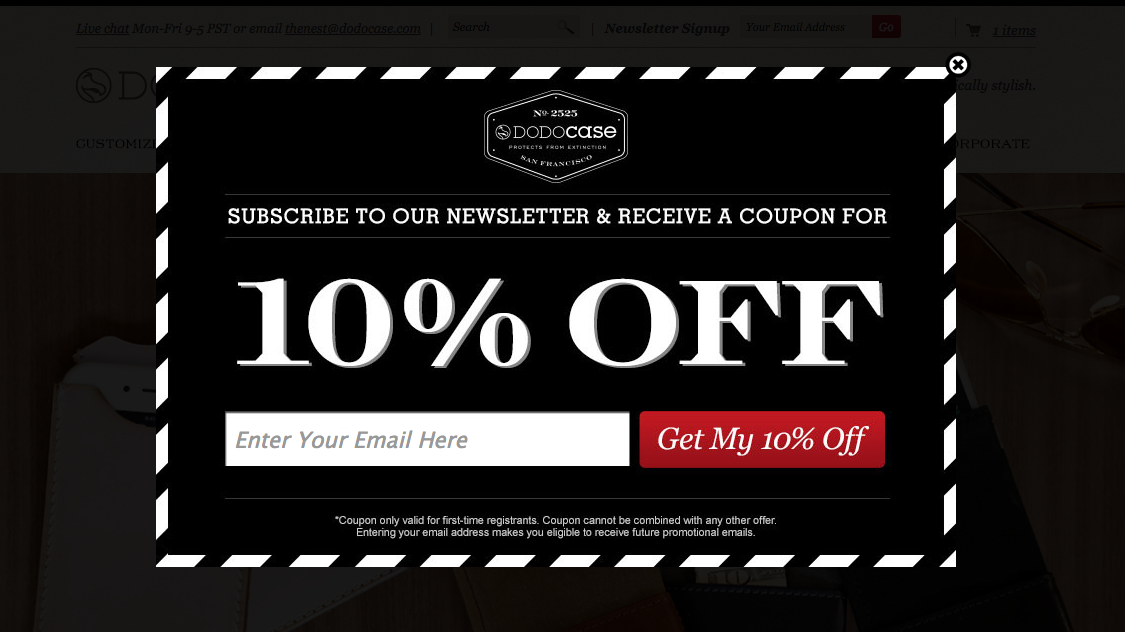
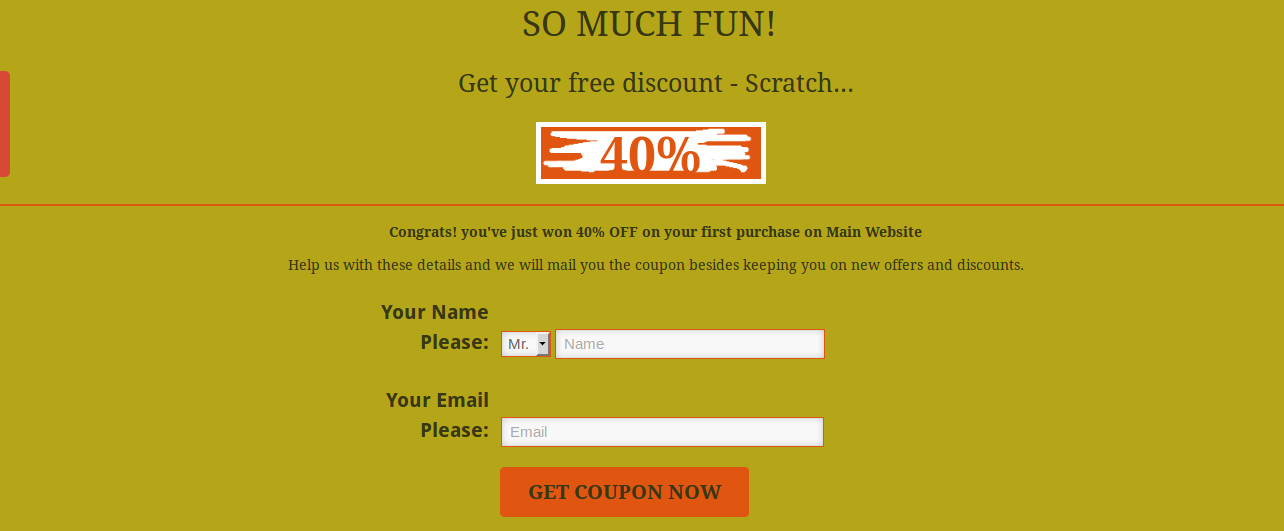
Do you really think a store visitor would share his or her personal details with you in return for the small discounts that you are offering? Why would they subscribe to your newsletters or marketing programs without feeling the need? The chances of this happening are very slim. To grow your email list, you need to have a slightly different approach. This is where the Scratch Coupon popup and Exit popup can do wonders for you. Scratch coupon popup can arouse curiosity in your visitors whereas an Exit popup can help you get the email addresses of your visitors at the end moment, basically when a user is about to leave your store.

To avail the benefits of the Scratch coupon on your online store to get more subscribers, you can try out Knowband’s Scratch coupon addon for Prestashop, Scratch Coupon extension for OpenCart, Scratch coupon extension for Magento and Scratch coupon extension for Magento 2.

Similarly, you can check out the Exit popup addon for Prestashop, Exit popup extension for OpenCart, Exit popup extension for Magento and Exit popup extension for Magento 2.

Mistake 2: No personalized touch

Online marketing is now being over-powered with emotional marketing. The coming era is all about finding the emotional connection with your prospective customer base. A lot is being talked about customer behavior and the personalization of marketing tactics with this insight. The very first thing that any of the e-marketers would do is to get an understanding of customer behavior. The real-time behavior can be used to provide a personalized touch to the campaign. E-commerce companies can boost brand awareness and generate quality leads by creating a personal connect with the audience. Not making use of the customer’s insight is the biggest mistake that e-merchants are committing even today. Optimize your communication and you shall reap the desired result.

Mistake 3: Not being innovative

If you wish to capture maximum email addresses of your visitors, a general popup offering a discount and asking users to enter their email address won’t work. You need to innovate the way you ask your visitors to subscribe to you. Let your creativity speak. Get your users involved in some kind of fun activity.

Gamification is one of the ways to make the entire process fun and addictive for store visitors. Something like Spin and Win popup can help the e-merchants motivate their customers to enter their email ids without annoying them. The interactive pop-up asks the users to try their luck by rotating the wheel and allows them to avail the best offers of the online store only by entering the email ids. The gracious way of engaging the visitors can set your site rocking, increasing customer engagement So, be innovative and start spinning some leads.

Checkout Knowband’s Spin and win: Entry, Exit and Email Subscription popup for Prestashop, Spin and Win popup extension for Magento, Spin and Win popup extension for Magento 2, Spin and Win popup extension for OpenCart and Spin and Win popup for WooCommerce.

Mistake 4: Lack of customer interaction

Online shoppers these days are in a habit of researching things on the internet. Thus, content marketing is one of the ways to trigger the interest of the visitors on your site. Provide them with the information they are looking for with quality content. Not just the web store’s content, even the contents you post on the third party sites plays a vital role. Blog posting on quality sites can help you attract a larger audience. You may even ask them to subscribe to the blogging site for the updates on the same. In addition, interacting with the customers is the best way to keep them engaged and lure them to subscribe. Provide real-time chat services and customer support.

Mistake 5: Not leveraging the social media platform

The social media sites are the best platforms to find your audience base and boost up your sales. Facebook, Instagram, and other such sites can help you get a better insight into the customer’s behavior. So, leverage the power of social media platforms effectively. Interact and engage with them in these sites. There are sites that use the option of auto-subscribe. They may get you some easy instant leads, but in the long run, it may hit hard on the trust factor. Building up a strong and lasting relationship with the target audience is the key to success. Tricking them into subscriptions may cost you some loyal customers. So, create a connection on these platforms and use it efficiently in order to enhance the customer base.

Final Word

The more visitors you add to your email subscribers list, the better are the chances of conversions and sales. At the same time, the customers should never feel like they are being forced by the online stores into subscribing for their marketing emails. There are many factors to look out before asking for the subscription, but the idea of presenting them in front of the customers must be done in a manner where both the merchant and the buyer feel comfortable.


Things to Consider While Adding Subscriber pop-up in your Site

The addition of subscriber pop up in any website comes with a lot of added advantages. Most of the time, the website owners wishes to connect with a very large number of people, so that, if they want to update or inform them about any new activity, it can be done via the subscription Email id. It is one of the oldest and the most reliable form of communication between the sellers and the customers.

In this regard, today most of the website has come up with numerous form of email subscription pop up in order to get a better customer base. They try to lure the customers to subscribe to the website through various means. This has become a common practice as the conversion rate using the email subscription method are quite appreciable. The more number of email subscription improves the chances of the web store to gather a large number of traffic to the web store. It is noticed that at least 57% of the customers respond to the Email subscribed messages from the websites.

Most of the time, it is fruitful to use these email subscription pop up but the website must make sure that the inclusion of these pop ups is done in a very exciting manner The increasing number of these email subscription pop up have started to annoy the customers and most of the time they tend to ignore to fill out any details required by these forms. Therefore, the websites face a challenge on how to successfully incorporate these subscription pop ups in the website, so that the customers are not annoyed and at the same time the websites can make successful email subscription.

The points that must be kept in mind by the web stores owners before incorporating email subscription pop up in the websites can be listed as-:

Why to use?

The first thing that occupies the owners mind regarding the web store is Conversions. Every web store owner wants to make a healthy number of conversions on from their web store. In order to do so, it becomes quite important to have an approach. Thus, using the email subscription pop up allows the web store to connect to maximum number of the customers on the web store. The web store owner can inform them about the new arrivals, product updates and any ongoing sales on the web store. Therefore, a better subscriber base helps the web store owner to maximize the reach of the webs store and gather a better traffic to the web store.

What to use?

The owners can use the various forms in order to get the subscription from the customers. The first and the foremost requirement of a better email subscription pop up is that it must be attractive and the customers must not at any time feel like the web store is demanding way too much from them. Therefore, the various forms of pop up such as Spin and win pop up, Magento Scratch coupon pop up or some attractive email subscription pop up can be used, which can provide the customers with better offers on their purchase and at the same time can fetch the web store with a better number of subscribers to promote the web store.

Where to use?

One of the most important thing about the email subscription pop up is the position. The constantly appearing email subscription pop up annoys the customers very much and at one point or other the customers feel like giving up the web store and quitting. Therefore, the position and the timing of the email subscription popup is one of the important thing to be kept in mind. The better way to use the pop up would be as the exit pop up or during the checkout page because the customer is leaving the website either on a high note or on a lower note. Therefore, in this case if the web store provides the customers with some opportunities in the form of scratch card or freebies, it may motivate them to provide email ids. This is what makes the exit pop-ups a must-have for the eCommerce websites in particular. It compels the visitors to reconsider their exit.

When to use?

The web store can make sure the frequency of using the email subscription pop up may not be exceeding the customers tendency to go with them. If at any point the customer feels like the web store is being way too demanding than that may lead to negative results for the customers and they may leave or wouldn’t consider making a purchase. Thus, it becomes quite important to make sure that the timings of the email subscription pop up are evenly distributed and would fit in with the concern of the customers.

How to use?

The idea of using email subscription pop up is quite dependable. Every web store owner will have a different idea on how to make use of these pop ups. Thus, if the web store want they can opt various options such as use them as a gaming pop up like Spun and win pop up, which is a email subscription pop up but offers the customers a lot of offers based on owner’s preferences by taking their Email Id as a token of entrance to the contest. Same if the case with Magento scratch card, which offers the customers with the handsome discount based on their luck by taking their Email Id. Therefore there are a lot of ways to use these email subscription pop up. It basically depends upon the web store owner, in which way he wants to make use of these pop ups.

Over to You

The idea of using email subscription pop up is quite innovative. The web stores can gain a good number of subscribers if they make better use of these email subscription pop up. As, the email subscription pop ups are not limited to the classic way off asking for Email id, therefore they are one of the important assets for the web store owners in order to make a good number of conversions on the web store. Redefine your subscription based request and reap the desired result for your site.

Knowband Magento Scratch Coupon Module – User Manual

Introduction

Knowband offers scratch coupon module will enable store owner to allow the system to give discount coupons to endpoint customers and analyze the customer’s need by tracking discount coupons. As we know that customers attract to any shopping sites on the base of attractive offers and various type of discounts. So, keeping these points in mind, this plug-in will generate discount coupon on the front end to all visited customers, based on defined discount criteria by the store owner.

Features:

  • The Magento email subscription module is fully customizable.
  • The Magento subscription module is fully compatible with all themes.
  • The scratch coupon Magento extension is easy to install and configure.
  • The Magento scratch game offers hassle-free implementation.
  • The store admin can allow free shipping.
  • The store admin can fix coupon code length.
  • The store admin can include JQuery if needed.
  • Expiry date of the coupon can be fixed in the admin panel.
  • The Magento scratch game offers mobile responsive layout.
  • The store admin can choose the page to show scratch coupon.
  • The store owner doesn’t need to change codes on the back-end.
  • It is so easy to enable/disable the module just by a button toggle.
  • The Magento scratch card offers fixed or percentage based coupon code.
  • The Magento scratch game allows look and feel settings on the admin panel.
  • There are coupon statistics represented in the form of a pie chart or via graphical figures to track an overall view.
  • The Magento scratch pop up offers an analysis report for monitoring the performance of this functionality from the admin end.

User Guide

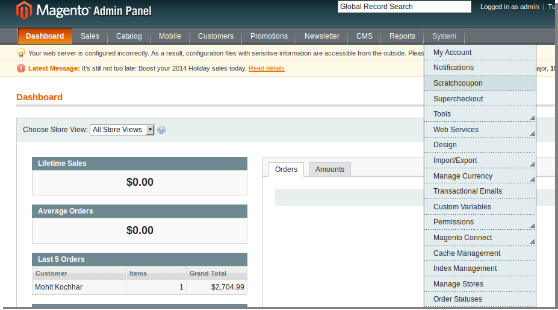
1. To excess Scratch Coupon plugin, Click on scratch coupon option appearing as a sub-menu in navigation menu under System main menu as shown below.

2. On clicking sub-menu “Scratchcoupon” the module for the plugin will open. It contains navigational bar at the top, the menu at the left and main content in the center.

General Settings

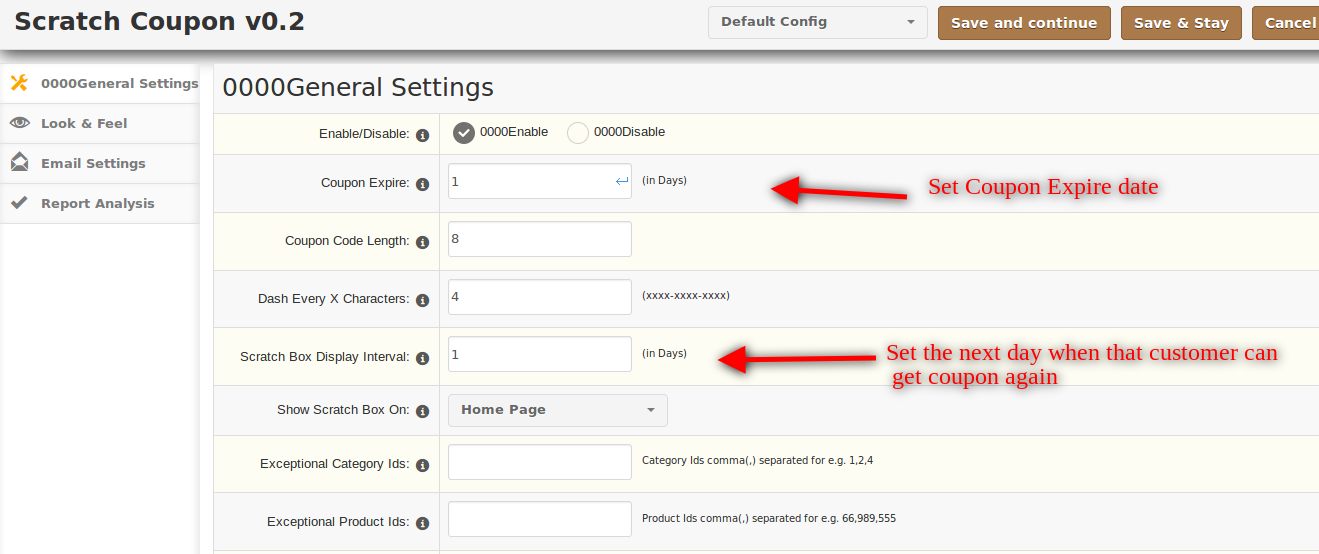
1. Enable/Disable: To enable the plugin, select enable present right to the label of “Enable/Disable”.

2. Coupon Expire: Enter coupon expire(in days) in the text-box present to the right of the label “Coupon Expire”. This will create a coupon which will expire in the days entered by you in the text-box.

3. Coupon Code Length: This will create coupon code of exactly that length which is entered by you in the text-box present to the right of label “Coupon Code Length”.

4. Dash every X characters: To create the coupon with code containing “-” i.e. xxx-xxx-xxx enter the value after which the dash will appear in the code. In case you don’t want a dash in the code, enter 0.

5. Scratch Box Display Interval: Scratch Box will be available again to a particular user after a certain period of time, this period depends on the value entered by the user in the text-box present.

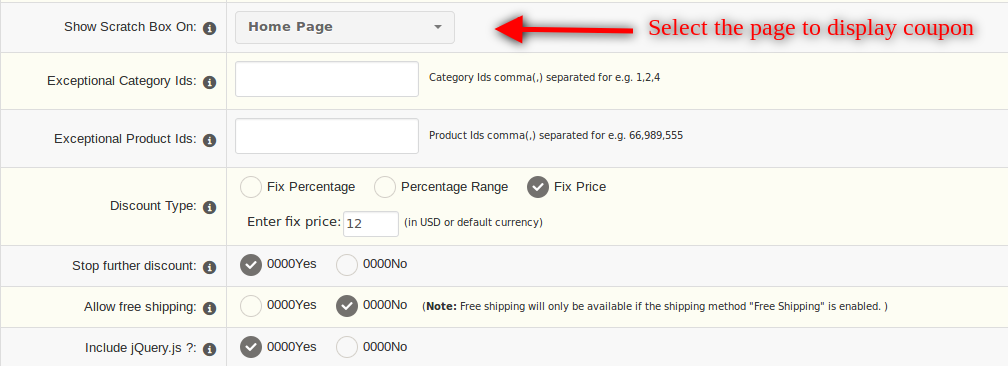
6. Show Scratch Box on: Here admin can select the page on which the scratch coupon will be shown.

7. Exceptional Category ID/Product ID: The store admin can enter the product and category ID to which he/she wants to exclude the scratch coupon box.

8. Discount Type: Three different types of discount can be provided to users.

  1. Fix Percentage: In this fix, percentage value has to be entered in the textbox present.
  2. Percentage Range: Random percentage range will be provided as a discount if this is selected.
  3. Fix price: In this fix, the price will be provided as a discount, value has to be entered in the text-box.

9. Stop further discount: On enabling this option further discount to shop cart won’t be allowed if a coupon is applied.

10. Allow Free Shipping: Coupons created should allow free shipping or not is controlled by this option. If selected yes, free shipping will be provided. If selected no, free shipping won’t be provided.

11. Include jQuery: jQuery is a javascript framework which is required to make this plugin work. Sometimes themes used already contain this framework, in such cases, this should be selected as “No” otherwise it should be “Yes”.

Look and Feel

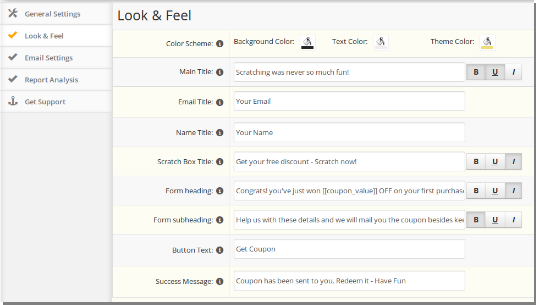
This tab basically contains setting for how the scratch box will appear in the catalog.

1. Color Scheme: This contains the color appearance of the scratch box.

  • Background Color: This will control the background color of the box which will be shown in the catalog.
  • Text Color: This will control the color of the text being shown in the scratch box.
  • Theme Color: This will control the color of other options like border color, button color and etc.

2. Main Title: This will control the title shown at the top of the scratch box. Options to make the title Bold, Italic and underline are available.
3. Email Title: This will control the label shown in the scratch box form.
4. Name Title: This will control the label shown in the scratch box form.
5. Scratch Box Title: This will control the secondary title present just below the Main title. Options to make the title Bold, Italic and underline are available.
6. Form Heading: This will control the title present at the top of the scratch box form.Options to make the title Bold, Italic and underline are available.
7. Form Subheading: This will control the title present below the Form Heading in the scratch box form.Options to make the title Bold, Italic and underline are available.
8. Button Text: This will control the text shown in the button which is present the scratch box form section.
9. Success Message: This will control the success message which is shown after coupon is successfully dispatched to the user.

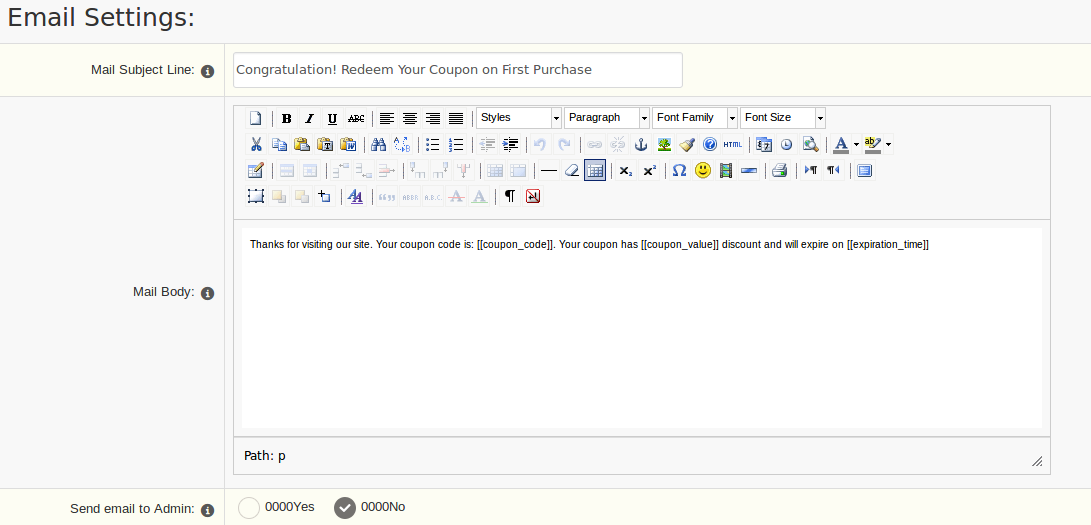
Email Settings

This tab contains setting for email which is sent the customer after scratching the coupon.

1. Mail Subject Line: This will control the text of the subject in the email which is sent to the customer after scratching coupon.

2. Mail Body: This will control the text of the main message which is sent to the customer after scratching coupon.

3. Send the email to Admin: If a copy of the email which is being sent to the customer is also required by admin, then this option should be selected as “Yes”. In case a copy is not required by admin, this should be selected as “No”.

Report Analysis

This tab contains reports related to coupons and discount being generated from the scratch coupon.

It is divided into four sections:

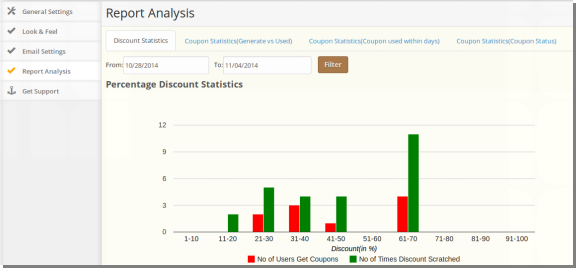
  1. Discount Statistics
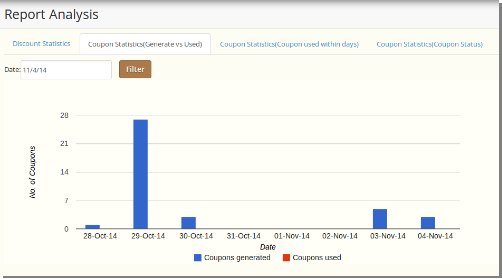
  2. Coupon Statistics(Generate vs Used)
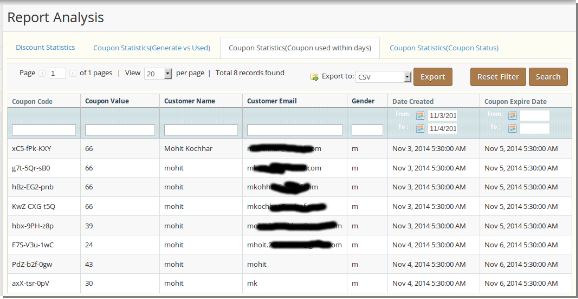
  3. Coupon Statistics(Coupon used within days)
  4. Coupon Statistics(Coupon Status)

1. Discount Statistics:

This tab will show the statistics related to the type of discount i.e. Fixed or Percentage. Also, it shows statistics related to no of times coupons were scratched and no of users that actually received a coupon.

2. Coupon Statistics-Generate vs Used:

This tab will show the statistic related to no of coupon generated and no of coupon that was used. By selecting a date, you can get statistics related to that particular day.

3. Coupon Statistics-Coupon used within days:

This tab will show the statistic related to coupons generated within particular days. It also contains list of all coupons generated and assigned to customers as shown below:

4. Coupon Statistics-Coupon status:

This tab will show the statistic related to coupons generated, coupons used and coupons expired between given interval of time in form of a pie chart as shown below.

Front End: 

The  front-end will look like this:

For more deails:

Module Link: https://www.knowband.com/magento-scratch-coupon

Admin Demo Link:  https://mademo3.knowband.com/index.php/admin/dashboard/index/key/178e67cede3ca718eb701ff7ac4c11fc/

Front Demo Link: https://mademo3.knowband.com/

YouTube Video Link:  https://www.youtube.com/watch?v=6NNAZjEoscM&feature=youtu.be

Please contact us at support@knowband.com for any query or custom change request as per your business requirement.