When you have to improve the performance and utility of your Magento store, you need to have mind blowing Magento themes. They can not only grab the instant attention of your targeted customers but can also be the game changer for numerous businesses around the world. If you want to achieve stupendous growth in terms of conversion rates, site traffic and product sales, here are some of the free Magento themes that can show you the guiding light.
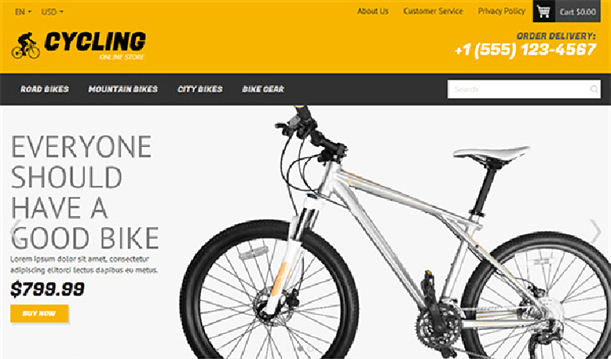
1. Cycling
Now, presenting your product in an appealing manner is a seamless task due to the availability of this free Magento theme. It has a clean and fully mobile responsive design that makes it accessible to multiple devices like desktops, laptops, smart phones and tablets. Due to other features, this Cycling theme is one of the most important free Magento theme from Template Monster, a Magento theme development company.
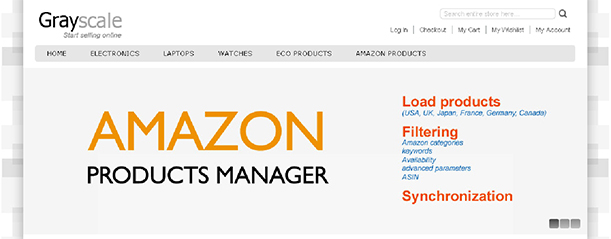
2. Grayscale
With this Magento theme, you get a clean design along with a boxed layout. One of the specialty of this eCommerce theme is that it doesn’t include any excessive elements for the store owners in order to keep their attention attracted towards the management of their products and store.
3. Eros
Magento development services have arrived with a clean code and a wide range of advanced features in the form of this Eros theme that can provide you seamless site performance and fast loading speed. Apart from this, the theme can be effortlessly customized and adjusted to any screen resolution within few seconds.
4. HandyStore
This eCommerce theme, HandyStore consists of a fully responsive design that can adapt to every other screen resolution. Due to this feature, the content of your site is automatically adjustable to any given screen size where it is intended to be displayed. Now, more people can access your website through multiple available devices and can boost your chances of business growth. It is mostly targeted for educational purpose sites and is not recommended for commercial sites. However, eCommerce store owners can take this theme as a reference material for designing their eCommerce site.
5. HelloWired
With the emergence of this free responsive Magento theme, store owners can effortlessly take their online business to great heights. It is exclusively designed for interior or furniture related business segment and has given a big boost to the Magento theme development services across the world. There are various features like outstanding support, high quality related assurance, enhanced safety and security, seamless customization facility, lightweight structure and optimized for search engine results.
6. Gala Eva
With more than 20+ transition effects in image slide show, this free Magento theme is a perfect example of exemplary Magento development services that can effortlessly grab maximum customer attention and conversion rates for your online store. It has other amazing features like easy color, background, seamless font customization, social media and payment method icons and other such functionalities that can provide an outstanding look and feel to your Magento store.
7. Yummy
Responsive themes have become the necessity of the hour as people are browsing site through numerous devices like desktops, laptops, smart phones or tablets. In these circumstances, only an impressive eCommerce theme can provide an effective business results in terms of conversion rates, product sales and site traffic. Within a few clicks, you can easily set up your business in the online environment and can take required actions to turn your venture into a profitable business entity.
For achieving sure shot business results by your Magento store, you need to adopt these amazing free responsive themes that can make your Magento stores accessible to various devices for better conversions and sales. Apart from these impressive themes, you also need to have wonderful eCommerce modules from an effective Magento development services such as Knowband that can improve the functionality, performance and site traffic for your online store be it on Magento, PrestaShop, OpenCart or any other such platform.
Every eCommerce store needs the support of an amazing Magento themes and templates for improving the performance and productivity of their store. These themes consists of various features and functionalities that can help in making your various tasks perform in a seamless manner. Although, there are thousands of Magento themes and templates available but there are only few of them that have the potential to change your business fortune in a tremendous manner. Let us take a look at some of the mind blowing free Magento themes of 2015 that can be the game changer for your eCommerce store.
Fit Body
This amazing Magento theme is designed by Magento theme development company, TemplateMonster and is equipped with a wide range of advanced tools and features that can improve the appeal and functionality of your eCommerce store. The theme consists of a clean and minimal layout with parallax, hover, sliders and galleries for adding various features and functionality to your Magento site. Due to the presence of fixed mega menu, visitors can effortlessly navigate to any section of the site on the fly and thus improves the website navigation to a great extent.
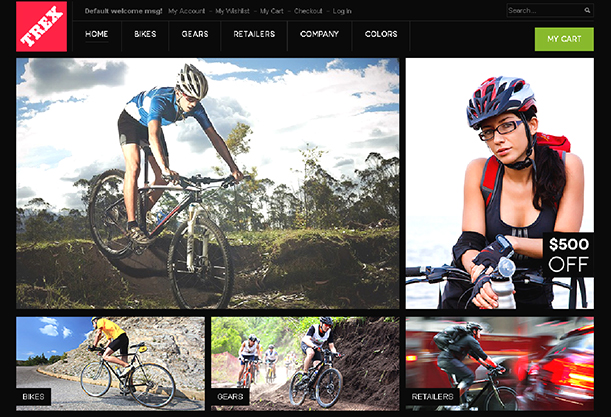
Trex
Trex is a dynamic theme that comprises of an engaging look and clean code. This fully responsive design along with an off- canvas menu provides a superb performance on multiple devices like desktop, laptop, smart phone or tablet.
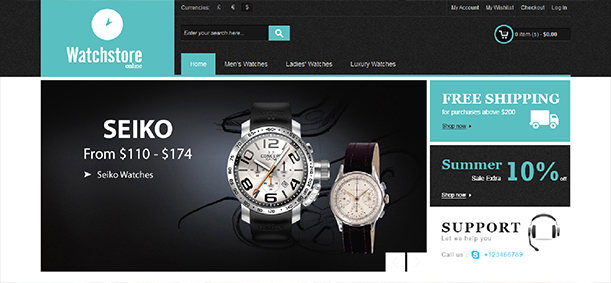
Watch Store
Now, you can build a stylish store with the help of this up to date theme. This free Magento theme provides a clean and minimal layout that helps store owners to showcase their products in the best possible manner.
Hello Magento
If there is one theme that is perfect for every type of eCommerce store, it is this theme only. This free Magento theme provides a clean layout with an easy navigation facility which makes the product management a much easier task.
AccessShop
For all those professional people who want to give a boost to their product sales, this Magento theme is the ultimate choice for them. It can help you in creating an up to date site for increasing the sales of your online store. You can easily modify the theme according to your business requirements. Moreover, you need to worry about the performance of this theme on multiple devices due to this fully mobile responsive design.
Wine Shop
This free Magento theme is designed by the Magento theme development company for various wine and liquor stores but it does not mean that it can’t be used for any businesses or eCommerce store. It consists of numerous options and features which makes it adaptable for clothes, sports, gift stores and other types of businesses.
If you have made a new transition into the world of Magneto, it is high time that you need to install these free Magento themes for grabbing that initial business lead among your rivals. If you miss out these mind blowing themes for your eCommerce store, you are sure to suffer a huge business setback in terms of conversion rates, product sales and brand awareness. For more information about the various amazing plugins and extensions for your eCommerce store, do visit our Knowband store which has plugins for Magento, OpenCart and PrestaShop stores.
Magento site owners have a reason to be cheerful again as up till now they have been able to perform some of the site optimization tips on their Magento store for making a significant improvement in terms of the conversion rates, product sales and site traffic. Further, in this final part of this article series, let us discuss some more mind blowing tips that can improve the website loading speed of your online store drastically. Take a close look below.
1. Utilize the services of PHP accelerators
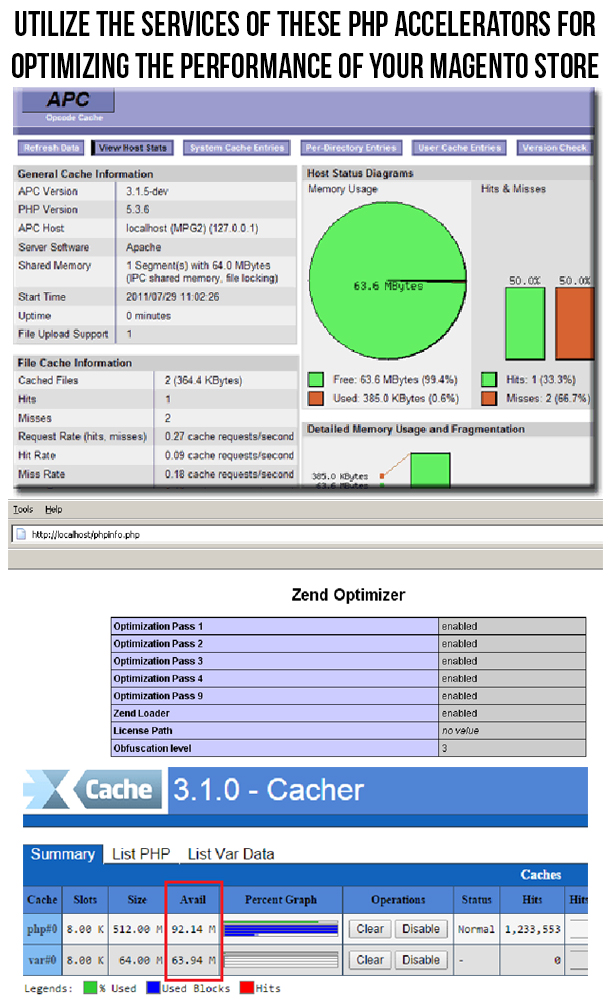
For improving the performance of a Magento site, you can utilize the services of a PHP accelerator, which is another form of caching. With the help of these accelerators, it is now easy to improve the performance of your PHP scripts by caching them in their compiled state. Apart from this, you can utilize the various PHP accelerators like APC, ZendOptimizer+ or Xcache. Some of them are described below.
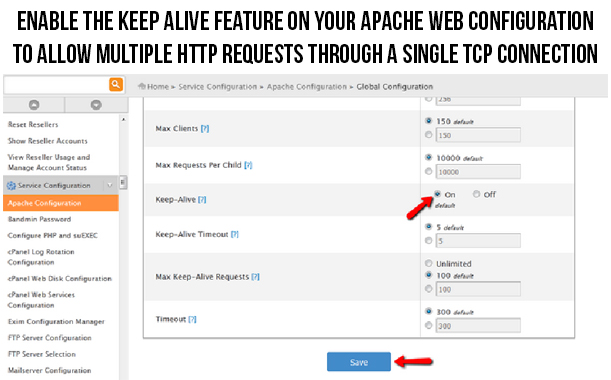
This Apache Keep Alive is a mind blowing feature that establishes open connection between the client and server platform. In order to improve the loading time of your site, you need to ensure that the multiple requests are handled on the same connection. To take required step in this direction, you need to check that the “Keep Alive” option on your Apache configuration is enabled. This option is an effective tricky solution that allow multiple HTTP requests to be funneled through a single TCP connection. Due to this, the additional time that is spent on the setting up of the individual TCP connection is reduced and thus the downloading time required for files like HTML, JavaScript, images and others are minimized to a significant level.
3. Replace Apache web server with other suitable alternatives
For improving the performance of your Apache web server, you need to look out for the suitable alternatives for your web server. LiteSpeed Enterprise web server that can be used as an effective replacement for the Apache web server due to various available features and facilities. With the help of this server, the performance of the PHP application can be increased by up to 50% and it is about 6 times faster than the Apache serving static content. Besides LiteSpeed, Nginx is also an effective replacement for Apache web server.
4. Make use of the advantage performance optimization
Due to the complexity of the Magento system, it is important to implement the caching in the workflow process of your Magento site. For situations like this, you need to have a full page cache extension that can save the excess load on your Magento server. Apart from this, you can utilize the services of Varnish Magento extensions to optimize the performance of your Magneto site. Check out this link to try out this free Magento extension for the purpose of full page caching.
5. Optimize the performance of your website on mobile devices
Due to the increased use of the mobile devices, more and more number of people are surfing the site through these mobile devices. Therefore, it is important to optimize the performance of your site on mobile devices for providing the same level of user experience to your customers irrespective of the device used by them. In order to carry out this crucial task, you need to take the help of various mobile optimization tools like PageSpeed Insights, Pingdom, Mobile Friendly Test, GT Metrix and such others. Apart from this, you need to utilize the various other factors like HTML5, CSS and Javascript files, mobile responsive design, optimized images and other such components that can make your Magento site more accessible on numerous mobile devices.
6. Disable ETags for the faster performance of your browsers
Browsers make use of ETags feature for validating the cached components across the various subsequent visits. Due to this, it can slow down the performance of a site if it is served from the cluster that has not implemented ETags properly. To avoid such a situation, it is important to disable them completely with the following syntax:
############################################
## If running in cluster environment, uncomment this
For optimizing the performance of your Magento site, you need to install a JS/CSS minifer like the Minify Javascript/CSS that can optimize the performance of your site drastically. This Minify JS/CSS Magento extension can effortlessly combine, compress and cache the Javascript and CSS file for faster site loading and performance. Apart from this, the minifer will also add forever expiry tags to your Magento files for ensuring the faster browser loading time.
8. Make required changes in the PHP realpath_cache settings
For optimizing the website loading speed of your Magento store, you need to update the realpath of your PHP coding accordingly. This is due to the fact that whenever a new file is added to the PHP, it is required to use a relative path so that the PHP does not have to spend a considerable time in looking out for that particular file. This Realpath cache minimizes the disk lookup time by allowing PHP to cache the reference paths and location of various files/directories that are being used by you. Further, in order to improve the efficiency of real path cache, you need to increase the parameter realpath_cache_size. If you are not capable to change your filepaths at a regular interval of time, it is recommended to increase the count of realpath_cache_ttl.
9. Reduce the logging time of your web server
For reducing the disk write up time of your web server, you need to take efforts towards reducing or disabling the logging time of your server. For Linux servers that are having access time logging enabled on any of their mysql, web server or any other cache partitions can easily get them disabled for optimizing the performance of their Magento site. Moreover, for the users that are using ext3 or reiserfs, you need to check out the faster journal write methods by clicking on this valuable link.
With the help of these mind blowing site optimization tips, Magento site owners can effortlessly improve the performance of their online store for grabbing the maximum site traffic, conversion rates, product sales and customer engagement. Therefore, it is your time to make the mark in your particular business segment by providing a seamless online shopping experience to your targeted customers.
Most of the online users are always in a dearth of time and are in mood to wait for even a few extra seconds while accessing a particular website. Due to this habit of impatience, they often leave a particular site without even completing a particular task and thus adds up to your list of shopping cart abandonments and thus affects your product sales to a great extent. All this significant loss to the credibility and popularity of your Magento site can be effectively tackled by reducing your website loading speed to an acceptance level. Don’t test the “patience” of your targeted customers while trying to access your particular website. But, try to provide them a seamless ride through the entire process by implementing these site optimization tips on your Magento site.
1. Make sure to enable flat catalog on your site
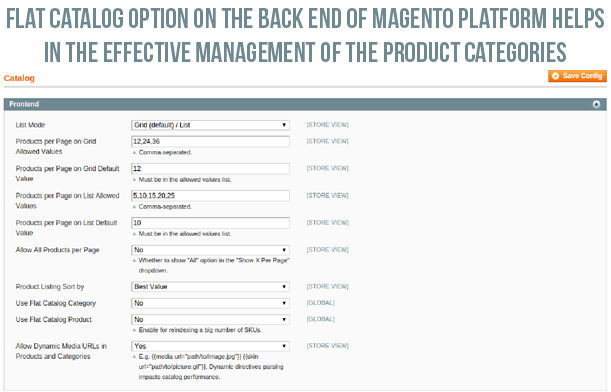
In order to improve the performance of your Magento store, it is important to enable the flat catalog for various categories and products on your site in order to facilitate their seamless merging into one single table. Due to this step, website performance is said to improve drastically as MySQL queries can now be processed in a faster manner. For utilizing this effective feature, you need to perform the following steps:
Click on the “System” -> “Configuration” and then “Catalog”.
Now, click on the “Frontend” and then change the “Use Flat Catalog Category” and “Use Flat Catalog Product” option to “Yes”.
After the above step, click on “Save Config” option.
It is advised to clear the cache. One of the recommended way to perform this is by deleting everything from the /var/cache directory. Otherwise, you can also do it by following these simple steps.
Navigate towards “System”-> “Cache Management” and then click on the “Flush Cache Storage” option for deleting the entire cache from your Magento site.
2. Delete unwanted files from Magento database and clear up your logs
Due to the default settings of the Magento, the log files in Magento are stored for upto a period of 180 days. This results in storage of a large number of log files which ultimately occupies a lot of your Magento server space. To avoid such a situation, site owners have the freedom to change their settings to a smaller time duration like two weeks (14 days) to reduce your occupied space. To perform this action, just follow these simple steps.
– Go to “System” -> “Configuration” -> “Advanced” -> “System”-> “Log”.
– Now, under the “Save Log, Days”, you need to change the settings over there to 14 days or any other specific time period of your choice.
– Finally, click on the “Save Config” option.
Apart from this, you can also perform the above task in another manner by clearing up your lob tables manually in your database. To do this, follow these steps,
– For this, you need to select all of the log_% tables from the phpMyAdmin and then select the “Empty” option from the drop down menu.
– Now, click on the “Yes” option when a popup asks you about whether you want to truncate the tables or not.
3. Install only limited number of extensions on your site
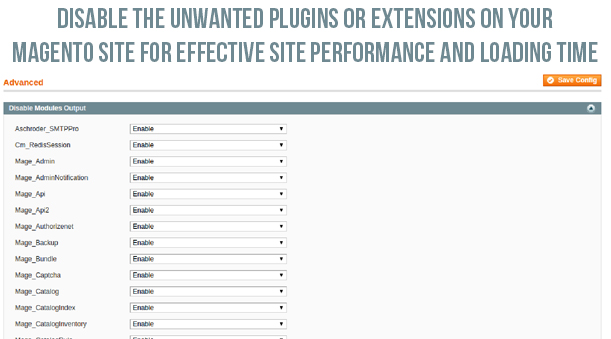
It is a known fact that too many extensions often utilize too many server space and resources which ultimately affects your website loading speed. This is due to the numerous reasons like running up of multiple HTTP requests along with the additional loading up of the CSS and Javascript files. In order to optimize your website performance, you need to install the only relevant Magento modules that can perform multiple tasks at one go. If you are clueless about which extensions to choose for your Magento store, you can check out the various amazing eCommerce plugins from our Knowband store. For disabling the other rarely used extensions, you need to perform the following steps.
Go to “System” -> “Configuration” -> “Advanced” -> “Advanced”-> “Log”.
Now, in front of the required plugins, you need to select the “Disable” from the drop down box and then click finally on the “Save Config” option.
4. Configure your MySQL database- This open source relational database management system (RDBMS), MySQL consists of its own “query cache” that is utilized on the Magento platform for the generation of dynamic pages and content in order to improve your site performance. Take a look at some of the recommended settings for your my.cnf file.
query_cache_type = 1
query_cache_size = 32M
query_cache_limit=2M
Apart from this, the recommended settings for php.ini file is as follows:
php_value memory_limit 128M
5. Optimize the Magento server configuration for your site
An effective web hosting server can play a decisive role in improving the website loading speed and is one of the important site optimization tips. If this is not the case with your Magento store, there are possible chances that your site may crash or go down due to the large incoming site traffic. Thus, to avoid such issues, you need to have a reliable and robust Magento server that can handle the multiple HTTP requests from numerous clients.
6. Use a productive theme for your website
For making your website as the ultimate obsession among your site visitors, you need to have an appealing Magento theme that can improve the functionality and performance of your Magento site. The theme allow site visitors to perform various tasks with great ease and without any headache. There are various free themes like Eros, Wine Store, Glamour, Blue Scale, Bag Store and such others that can help in giving a unique look, appeal and functionality to your Magento store for improving the customer engagement, site traffic and various other site performance metrics.
7. Update indexes of your Magento site
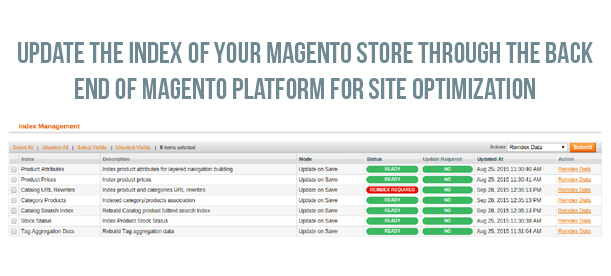
Although, indexes are automatically updated on the Magento platform by default whenever an object store is added. But, in some cases, this process does not take place automatically and needs to be done manually. This index updation is important as it improves the performance of your MySQL queries. To accomplish this crucial task, you need to implement the following steps.
Navigate towards the “System” -> “Index Management”.
Now, you need to select all the indexes or those indexes which you need to update. After this, you need to choose the “Reindex Data” option from the dropdown menu.
Finally, click on the “Submit” button.
Now, by implementing these mind blowing site optimization tips, Magento site owners can easily speed up the performance of their Magento store to a great extent. With this crucial information, you can effortlessly improve the online shopping experience, customer engagement and site traffic on your online store and can easily tread the “first step” towards being a market leader in your particular business segment. For making a drastic improvement in the field of site optimization and performance, you need to check out the final part of this series of article titled- Turbo boost your Magento site with these tips- Volume 3.
Introduction of Magento Social Login Extension by Knowband:
Magento Social Login Extension by Knowband allows users to login via their social accounts out of prvided 15. For example Facebook, Google Plus, Twitter, LinkedIn, Live, Yahoo, Instagram and many others. The Magento social login plugin is designed to simplify the logins for the users. By integrating social login plugin on your Magento store, you allow your visitors to login to your website with their existing social network accounts.
Steps For Installation of Magento Social Loginizer Extension:
Required Materials:
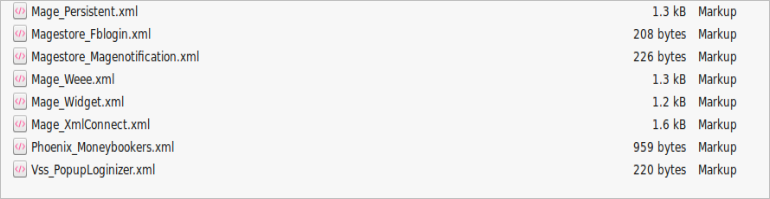
All files used by the extension.
FTP access to your website.
The connect manager is a useful tool for installing Magento extensions, but prefer hands-on method when it comes to installations. It feels more comfortable when you are personally in control of the process.
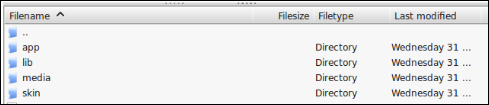
Do you see an app-code directory there, what about app-etc-modules? If you don’t see these directory paths and files contained within them, chances are that the extension download was faulty. Take a look at the package.xml file, this is the blueprint used by Magento Connect to arrange the files in the proper places. You may need to use this to ensure that everything is as it should be. Once you have reviewed the extension files you are ready to perform the last step. Using your ftp client, drag all of the files onto the store root of the magento instance.
Depending on the number of files in the Magento extension by Knowband, this may take a few moments. Now go to the admin console and click Flush Cache Storage. This is the requirement for any extension that adds pages to the admin console. Logging out and back in is also required to ensure that everything loads properly. If you cannot clear the cache via the admin console for any reason, you will need to clear the cache manually via your FTP client (see the first FAQ question for assistance). That is the final step. Congratulations on a successful installation.
Troubleshooting & FAQs
I loaded all files onto my Magento store, and now get a white screen for some or all of the admin console.
This is a fairly common problem, and 99% of the time it is cache related. If you can get to it, go to System->Cache Management and click Flush Cache Storage. This will ensure that everything cached by Magento is deleted and will to be regenerated. Log out and back in to complete the process.
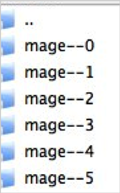
If you are completely cut off from the admin console, navigate to the var-cache directory of your website. You should see a series of directories named mage*. Delete all of these directories (DO NOT DELETE var-cache). This is the equivalent of flushing the cache storage from the admin console.
I am receiving a Magento error when accessing certain pages. How can I debug this?
This question really deserves a blog post all to itself, but a good start would be to go into the errors directory of your store. Locate the local.xml.sample file and rename it local.xml. The next time you see the error detailed information will be provided explaining where the error took place. Dont forget to change this back when you are finished troubleshooting!
I have a critical error with my webstore and need to turn off an extension I cannot access the admin console. What do I do?
Go to the app-etc-modules directory and open the file that goes with your extension. The naming convention is generally DeveloperName_ExtensionName.xml. In this case it would be Velocity_SocialLoginizer.xml.
Look for the active tags in the file, change the value from true to false and save your changes. This tells Magento that the Magneto extension is disabled and not to run any code associated to it. Deleting the Magento cache is recommended (and most likely required) for this change to take effect.
User Guide
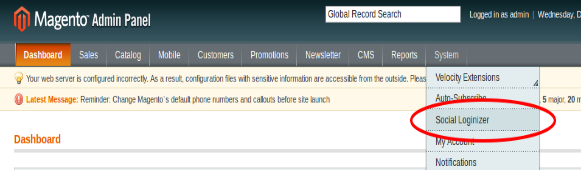
To excess Magento Social Loginizer plugin, Click on Social Loginizer Menu appearing in System Menu navigation menu as shown below.
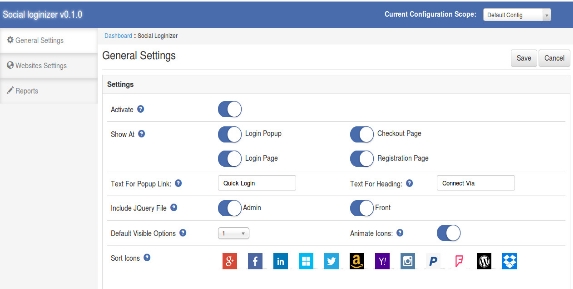
After clicking on Social Loginizer menu, the Magento social login plugin by Knowband will open. It contains navigational bar at the top, Tab menu at the left and in main content the first general setting tab will display.
General Settings Tab
General Settings:
Active: To enable the Magento facebook login extension plugin, select enable present under the label Activate.
Show At :
Login Popup: To enable the login popup.
Checkout Page: To add Magento social media login plugin on checkout page.
Login Page: To add social login bar on login page.
Registration Page: To add Magento social login extension on registration page.
Test for Popup Link: Set the text for login popup link which will shown next to default login link of the Magento social login plugin.
Test for Heading: Set the text for heading of social media login plugin Magento which will shown on selected pages.
Include jQuery File: jQuery i.e. a javascript framework is required for this Magento plugin to work. Sometimes themes used in Magento already includes it but sometime they do not. If jquery is already included in your theme then deactivate else activate to include it.
Default Visible Option: Select the no. of social icons to be visible by default on Magento social media login extension.
NOTE : In Magento social login module, only small icons will be visible and only maximum 6 icons will be visible.
Animate Icons: Activate this option to turn on the animation effect on icons of Magento social login.
Sort Icons: This option of Magento social media login allow to sort the order of icons in which they will display at login bar and login popup.
Loginizer Settings Tab
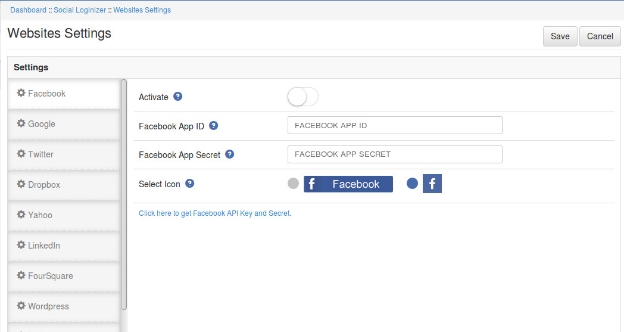
In this tab of Magento twitter login extension, you can save API key and Secret for each social website. There is a side bar listing all the websites. On click of any website its corresponding setting options will be shown. Below option there a link of corresponding website where you can create your application and get your client id and secret. In each website settings there will be following 4 options:
Website Settings:
Active: To enable the Magento social login, select enable present under the label Activate.
App ID (eg. for Facebook : Facebook App Id): In this field of Magento social media login, you need to enter your Application ID/Client ID/Consumer ID provide by corresponding website
App Secret (eg. for Facebook : Facebook App Secret): This field of Magento social login extension allows you to enter your Application Secret/Client Secret /Consumer Secret provide by corresponding website.
Select Icons: For each Magento social login, there are two kind of icons small and large. Select any one of the icon to show at social login bar.
Report Tab:
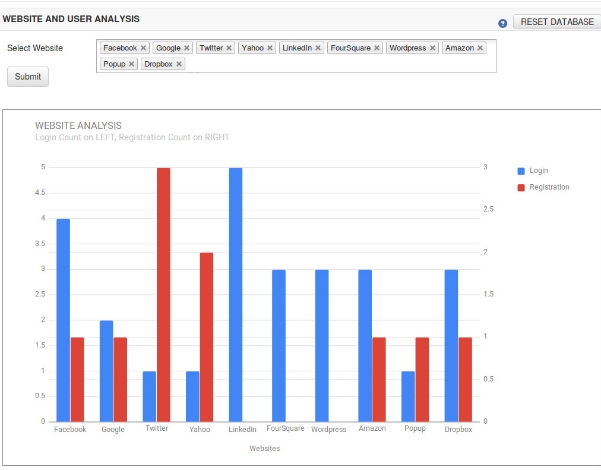
In this tab of Magento social login module, you can get graphical and tabular analytic data that will help you for analysis. There is a option of select website. On click of the option a dropdown listing all the websites will display choose websites and click on the submit button. That will create a graph for the selected website represent login and registration count for each selected websites.
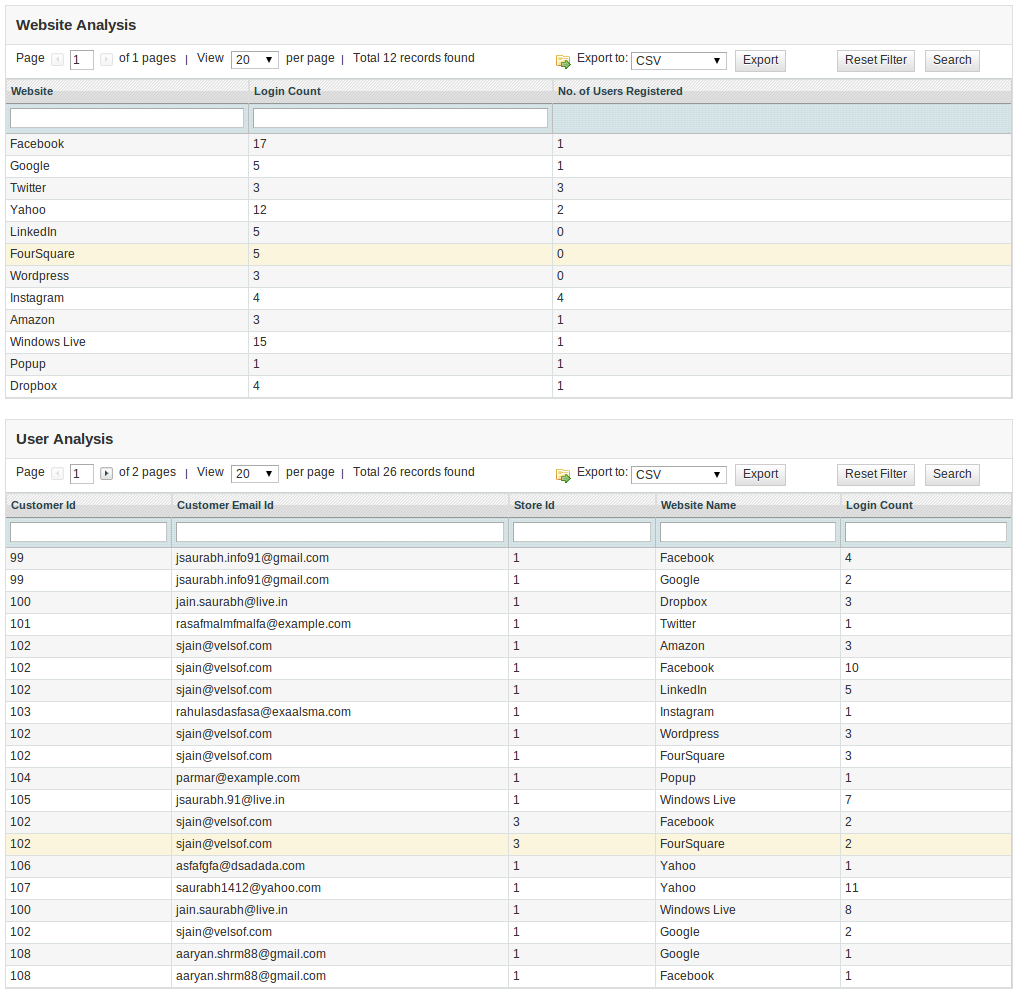
In the graph below, you can see the table for website analysis and another table for customer analysis data. The website analysis table show websites and their total login and registration count and the customer analysis table shows customer details and his login details (login count and website name).
At top right , there is button Reset Database. This option will delete all the login and registration data from database. This will not affect your core database table. It will clear records only from the table created by this magento social media login extension.
How To Set Redirect URL?
Let your website url be www.example.com.
If Url Rewrite is enabled in your website then redirect url will be
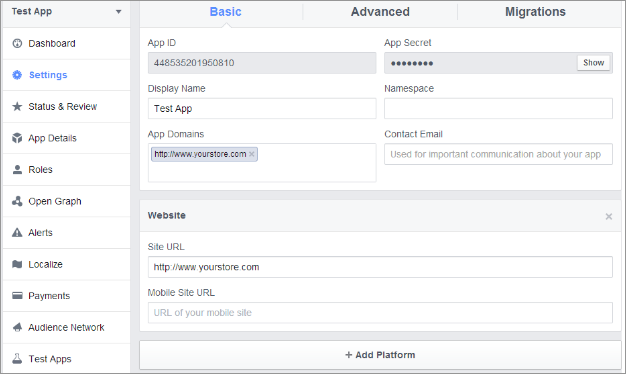
1. Go to Facebook Developers Website (https://developers.facebook.com) or click on link given top right of respective tab in module configuration page.
2. Click on Apps -> Create a new App.
3. Follow the instructions on the screen.
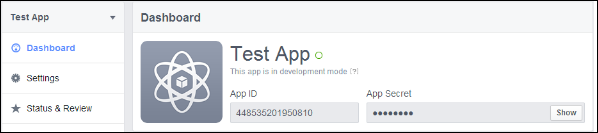
4. You will get the App ID and App Secret (Click Show button).
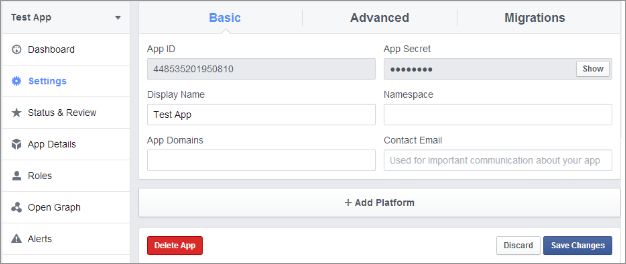
5. Now, go to Settings from left menu.
6. Click on Add Platform button.
7. Select Website.
8. Enter your App Domain and Site URL.
Application Type: Web Application.
Authorized JavaScript origins: Your store domain name. (https://www.example.com)
9. Click Save Changes button.
10. Now, go to Status & Review tab from left menu and make the Application Live.
How To Get Google App Details?
Steps:
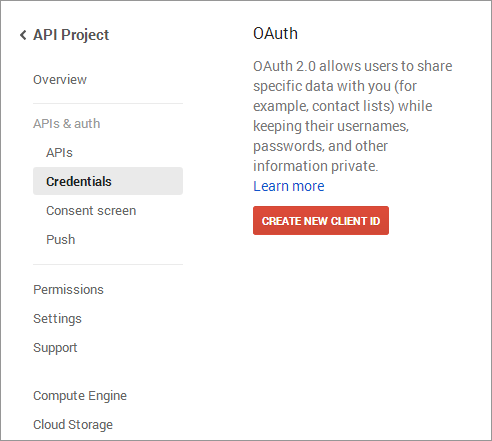
1. Go to Google Developers Console (https://code.google.com/apis/console)or click on link given top right of respective tab in module configuration page.
2. Now click Apps &Auth-> Credentials from left menu.
3. Click Create New Client ID button from the right panel of the screen.
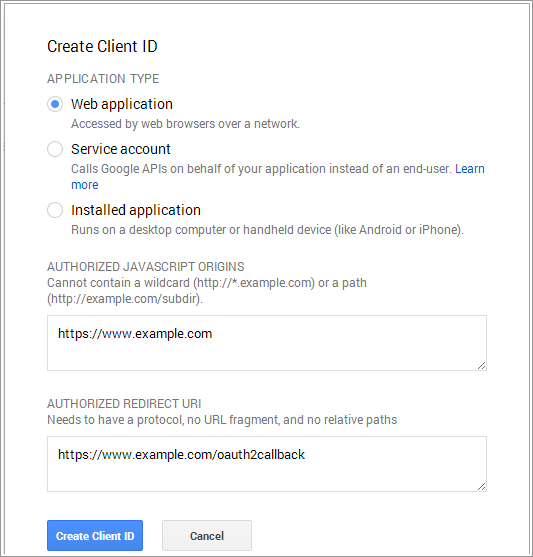
4. Fill the pop-up form with below details:
Application Type: Web Application.
Authorized JavaScript Origins: Your store domain name. (https://www.example.com)
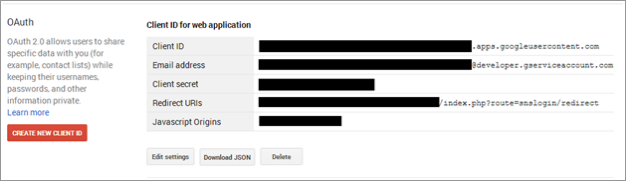
5. Now click Create Client ID button to get your Client ID and Client Secret Key.
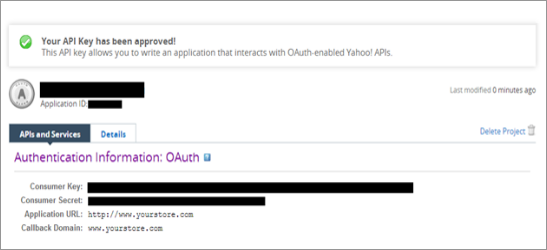
3. Fill the required details as per instructions. Home URL will be your Store URL.
4. Click Create Project button.
5. Copy your Consumer Key and Consumer Secret.
How To Get Amazon App Details?
Steps:
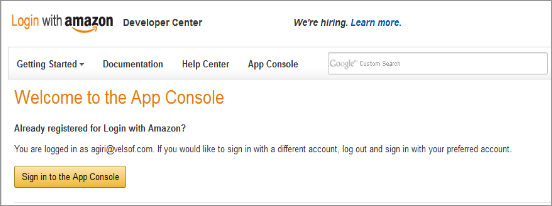
1. Go to Amazon Developer Network (https://login.amazon.com/manageApps) or click on link given top right of respective tab in module configuration page.
2. Click on Sign in to App Console button.
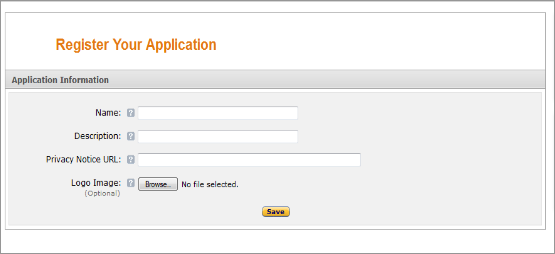
3. After successful login to App Console click on Register new application button in top right of page and you will be redirected to following page.
4. Enter Application Details as follows:
Name: Name of your Application.
Description: Description of your application.
Privacy Notice URL: Url of privacy policy page of your store.
5. Logo Image: Select optional logo image of your store.
6. Click Save button.
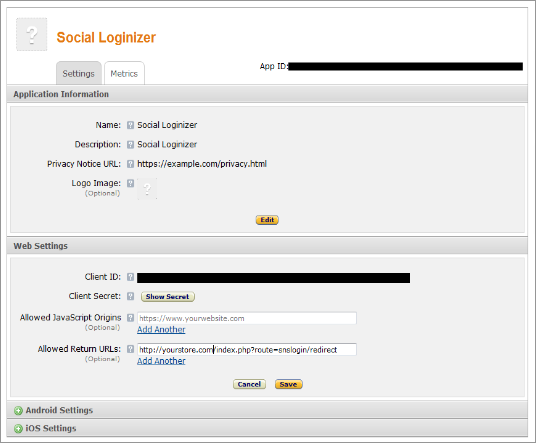
7. Now click on Web Settings to get your client id and secret.
8. Allowed Return URL : Loginizer redirect page URL of your store.
Note: To enable Amazon login into your website, your website must be secure with HTTPS otherwise Amazon login will not work.
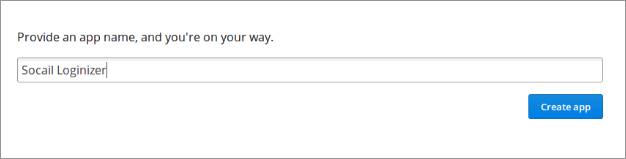
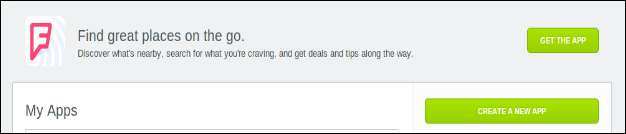
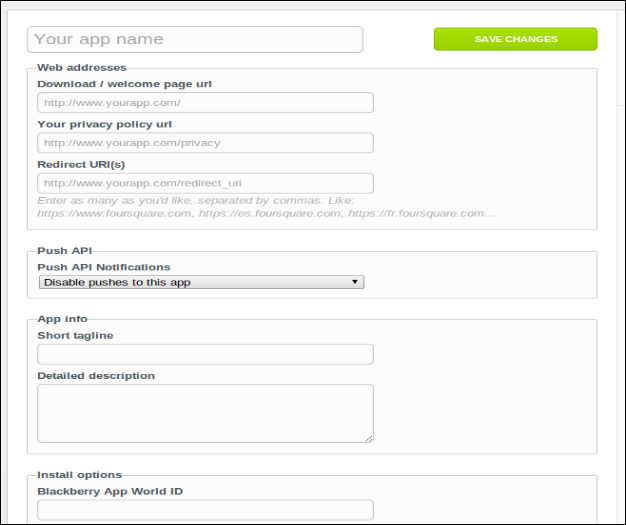
2. Click On the Create App button and provide a name for Application.
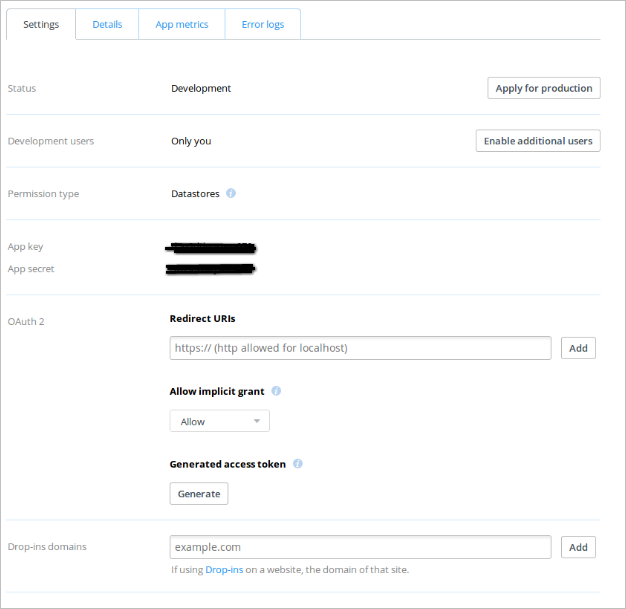
3. Fill up the details , set redirect url and save the settings.
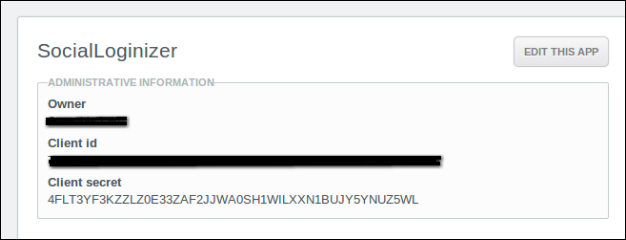
4. Copy and paste the key and secret in plugin admin panel.
How To Get WordPress App Details?
Steps:
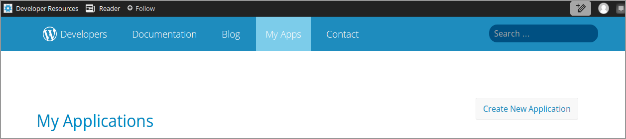
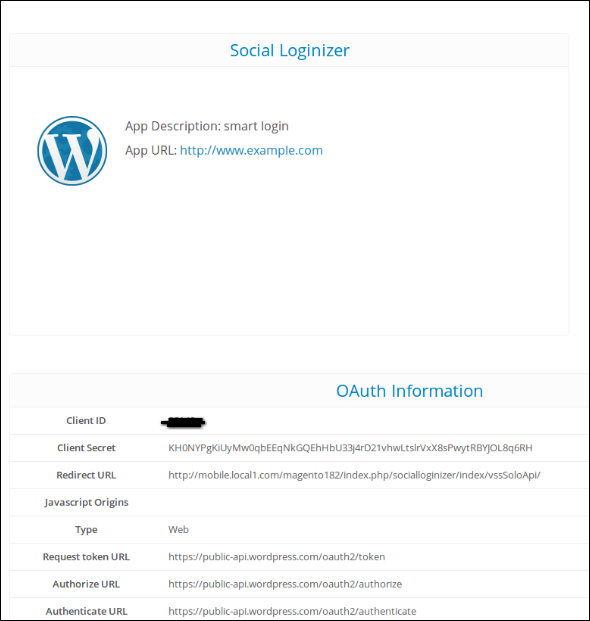
1. Go to WordPress Developer Website (https://developer.wordpress.com/apps/) or click on link given bottom of respective tab in module configuration page.
2. Click On the Create App button and provide a name for Application.
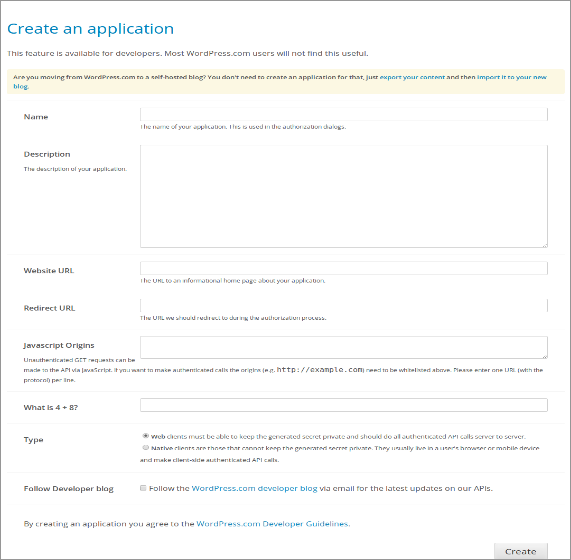
3. Fill up the details and save the application.
4. Copy and Paste the credentials in Magento extension admin console.