Magento Spin and Win Module – User Manual

Introduction to Magento Spin and Win(Email Subscription) Extension

Knowband’s Magento Spin and Win (email subscription) extension takes the opportunity of the customer interaction to its maximum potential. The seemingly easy task of retaining the customers is actually the biggest challenge in the eCommerce scenario. Highly responsive and interactive spin and win pop-up makes this tedious job easier for the sellers and fun-filled for the customers. Without boring them with the annoying subscriber notification, the exit-intent popup compels the customers to enter their email id in order to spin the wheel. The gamified interface in return provides alluring offers to the customers which can be further used for shopping from the site. The addictive lucky draw contest lures the visitors to visit the site again and again.

The Extension is a 3 in 1 pop up:

a. Entry Pop up: Display the pop up as soon as the visitor enters the website.

b. Exit Pop up: Display the pop up as soon the visitor tries to leave the website (The extension works on the exit intent of the visitors)

c. Email subscription pop up: The Interactive extension is used to capture emails for newsletter subscription. The email Id entered in the Subscription pop up is directly integrated with the Mail Chimp and Klaviyo account of the Magento store admin.

1.1 Merchant Benefits

  • Increased customer engagement on your store using interactive gamified interface.
  • Increased customer base by capturing email Ids for Newsletter subscription, which can be later used for personalized promotions and email marketing.
  • High Impact on direct sales and ensures returning customers
  • Turns normal visitors into potential buyers
  • Fully customizable Email subscription pop up
  • Offers detailed reporting.
  • Intuitive back end interface, which is easy to understand and configure.
  • New attractive themes for spin and win popup helps merchant in drawing the attention of the visitors.

1.2 Features of Magento Spin and Win-Email Subscription extension

1. Lets your customer spin the wheel and win discounts using a fun filled spin-win game.

2. Responsive Exit pop up, Entry pop up or Email Subscription pop up

3. It is a great tool to enhance customer base as the customer has to enter their email Ids to get the discounts.

4. The Interactive email subscription pop up converts normal visitors into potential buyers by offering a complete new way to offer discounts.

5. This Exit pop up extension is fully customizable, you can match it with your website theme.

6. Offers 5 Ready-made email templates, Magento store admin can customize them further.

7. Offers Mail Chimp and Klaviyo Integration

8. Look and Feel settings to set spin and win pop up background color, font and button color, Display Image, etc.

9. Customize the email subscription pop up using Custom CSS and JS.

10. Email Recheck option to restrict the use of same email Id to get discounts multiple times.

11. Pull Out Tab facility to close the Spin and Win subscription pop up.

12. Choose whom to display, where and when to display, maximum display frequency of the Spin and win (email subscription) pop up

13. Option to display the pop up on Category page, Home page, Product page etc.

14. Option to set the discounts on each slice and the probability of each slice.

15. Check the performance of the interactive spin and win pop up by comparing the total generated vs used coupons using interactive graphical reports and tabular reports.

16. Intuitive back end interface.

17. Desktop, Mobile and Tablet responsive design

18. Multi lingual supported

19. Magento Spin and Win is Compatible with all themes.

1.3 Installation of Magento Spin and Win-Email subscription pop up extension:

Follow the simple steps in order to install the Magento Spin and Win Extension:

  1. Download the extension package from the Knowband store.
  2. You’ll get a zipped file. Unzip the package on the root folder of your Magento setup via FTP manager (like Filezilla or WinSCP – download here: https://filezilla-project.org/). You’ll find the files and folders as shown in the image below:
  3. The extension is now installed and ready for use. In Admin Panel, go to “System > Knowband Extensions > Ajax Spin and Win”.
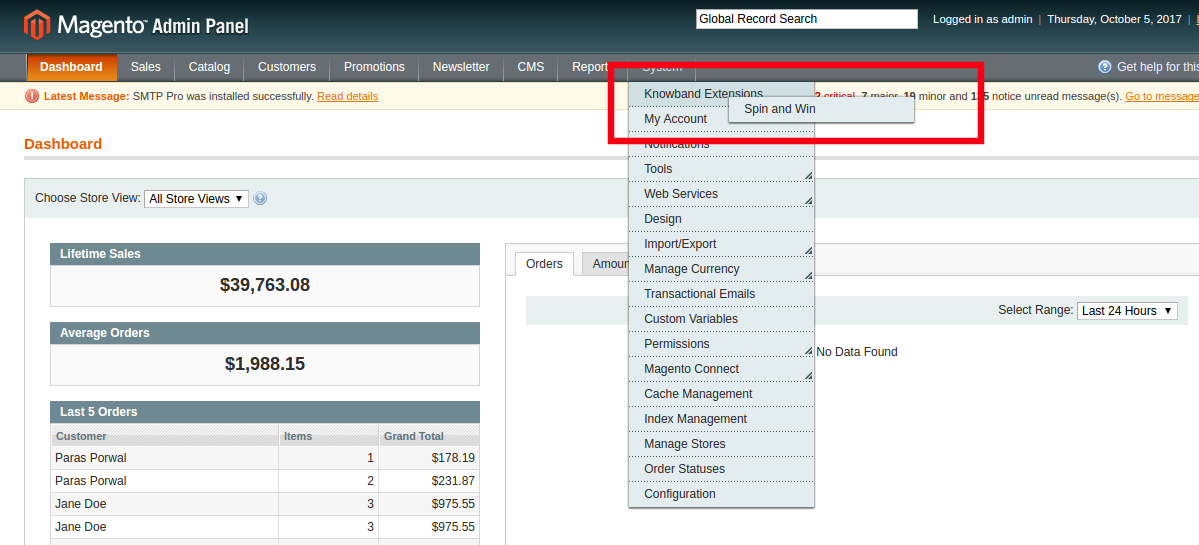
OnPaste.20171005-181002

You can now use and configure the extension.

Admin Interface

The web admin interface of highly responsive Magento Wheelio offers complete customization option to the store admin. The various features and functionalities offered by the extension can be modified from the admin panel. Some of the customization options offered by the plugin includes the following:

  • General settings
  • Display settings
  • Look and feel settings
  • Slice settings
  • Email marketing
  • Email settings
  • Statistics

Let us discuss the various customization options which are discussed in detail.

General Settings

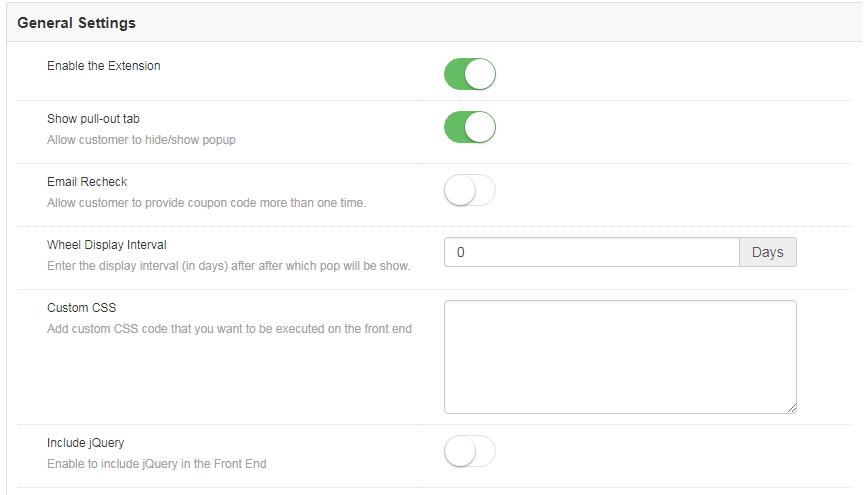
The General settings offer a number of customization options. The various fields in this tab are discussed below.

1.2.1.1How to enable and configure the extension?
  1. Enable the extension

The various customization options include enabling or disabling the plugin as well. The admin can switch the button to enable the extension on the Magento store.

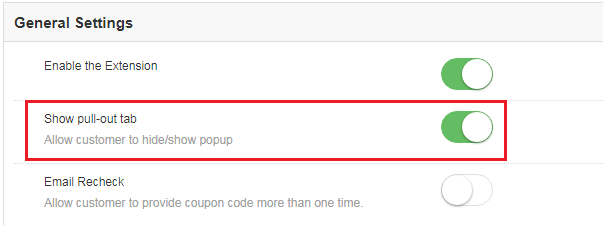
  1. Show Pull-out tab

The site visitors can remove the spin wheel from the screen of the website by clicking on the ‘No I do not feel lucky’ button.
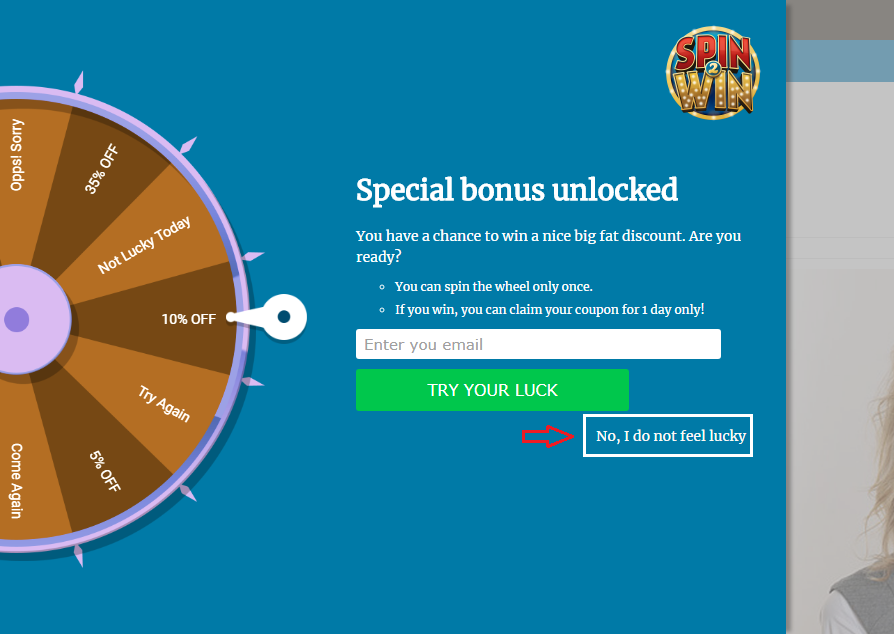
Magento Spin and Win wheel can be brought back to the screen if this option is enabled.
  1. Email Recheck

Magento Spin and Win can check the duplicity of email ids entered in the Email subscription pop-up by enabling this option. Once this is enabled, the store visitors can spin the wheel only once with a single email id.
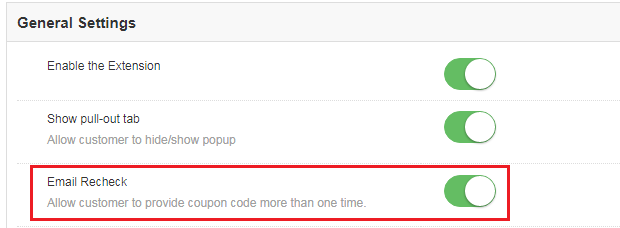
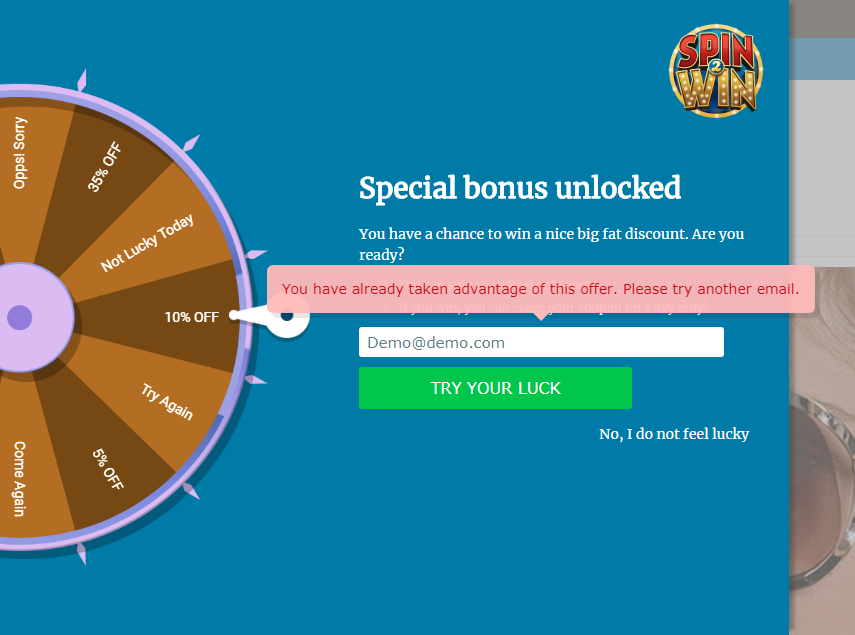
This makes sure that one email id can avail the offer only once. In case the same id is used to spin the wheel twice, then, the extension will flash a message as shown in the image below.
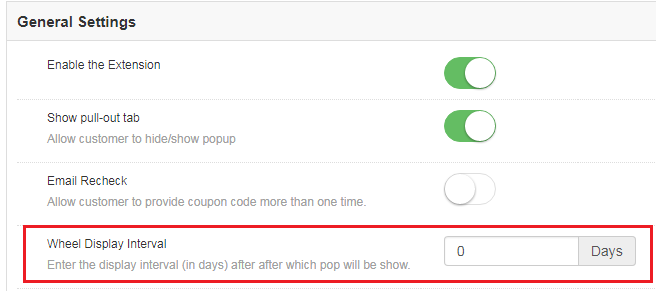
  1. Wheel Display Interval

This field allows the Magento store admin to set the number of days after which the pop-up will be shown on the website. By default, it is set to 0.
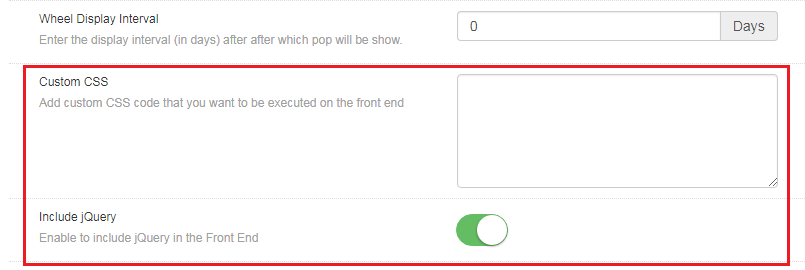
  1. Custom CSS

Magento store admin gets to change the look and feel of the Magento extension by including Custom CSS code in this section.

  1. Include jQuery

Magento store admin can enable the JQuery in the front end by enabling this button. This option allows him/her to include jQuery in the extension.
Display Setting

This tab allows the Magento store admin to change the display settings of the interactive pop-up shown in the front-end of the eCommerce site.
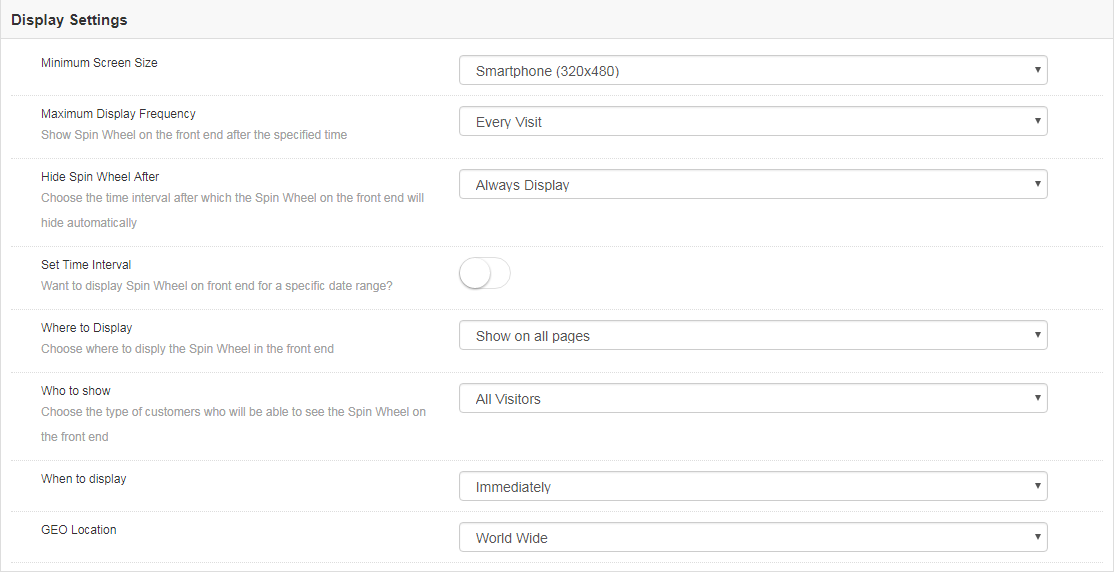
The various customization options are discussed in detail below:

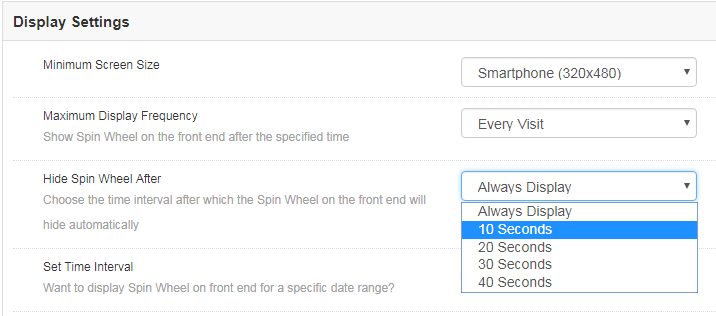
  1. Minimum Screen Size

This tab can help you set the minimum standard size of the screen with which the extension will be compatible. Select the minimum screen size and the extension will flawlessly work on any size larger than the one selected.
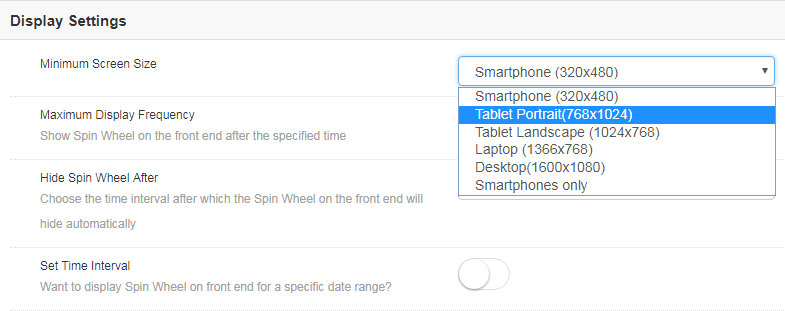
The admin gets to choose from a number of options in the drop-down list. All he needs to is to select the one that he finds suitable.

  1. Maximum Display Frequency

You can even select the maximum frequency of the email subscriptiondisplay. The admin gets to choose from the varied options in the list. You can either allow the wheelio to pop-up on every visit of the customer or else, you can set it’s display on hourly, weekly or monthly basis.
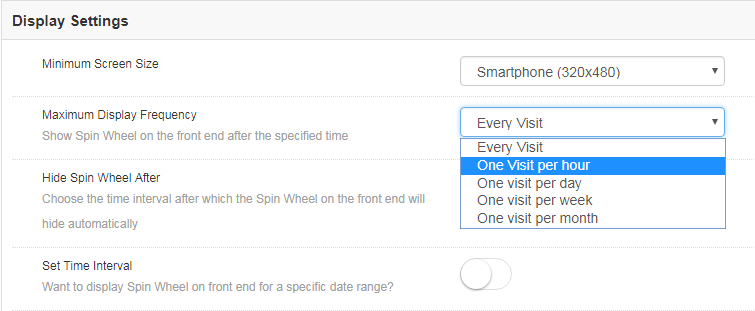
  1. Hide Spin Wheel After

Along with the display option, the store admin gets an option to hide the spin wheel as well. Magneto store admin can either display the wheel all through the customer’s visit unless it is manually removed by the customers. The merchant can even set the time after which it will be removed from the web page.
  1. Set Time Interval

Do you want to display the gamified pop-up for a certain time? This tab allows you to set the duration when you want display or hide the email subscription pop up. All you need to do is to enable the button shown in the image below.

Once it is enabled, you will get an option to set the time and date of the duration when you want the spin wheel to be enabled or disabled on the front-end.
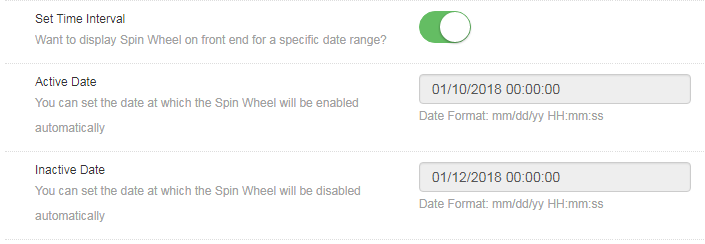
Enter the date in the prescribed format, that is, mm/dd/yy as well as the time in both the sections. The Exit intent pop up will be displayed only in between the duration set.

  1. Where to Display

The entry and exit pop-up can be displayed anywhere in the website. No code changes are required to be done for the same. All the admin needs to do is to select the web page where he wants this spin and win extension to show up.
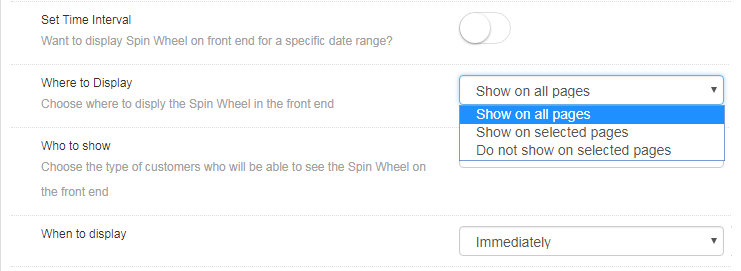
By default, the ‘Try your Luck’ wheel will be shown on every page of the website. However, if the admin wants to display it on a particular page only, he can choose ‘Show on selected pages’. The admin will then get an option to choose the pages where he wants to flash this email subscription pop-up.

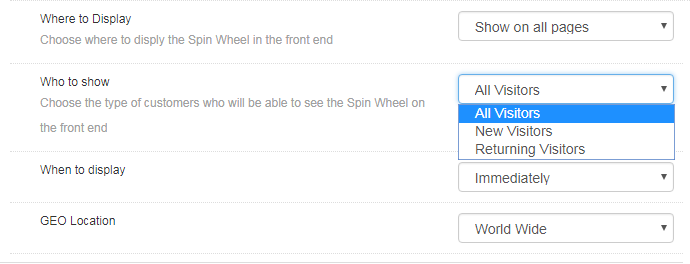
  1. Who to Show

Choose your target audience whom you want to avail the coupons offered by the spin the wheel extension. You can either show the wheel to all the visitors, or to the new visitors or to the customers who are visiting your site again.
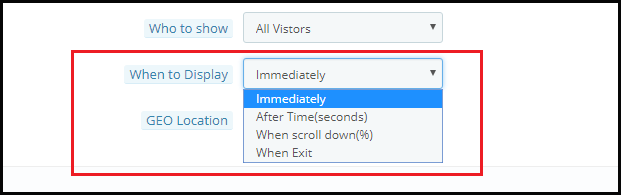
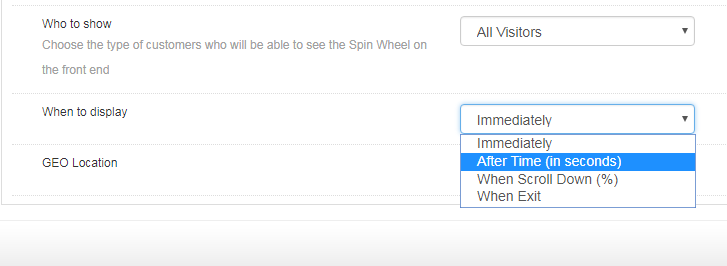
  1. When to Display

Choose the time which you think is feasible for displaying the wheel by selecting one from the options shown in this tab.
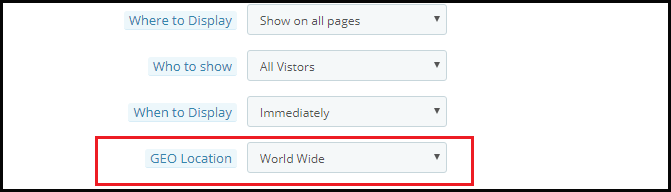
  1. GEO Location

The admin can even select the GEO location in which he wants to display the pop-up.
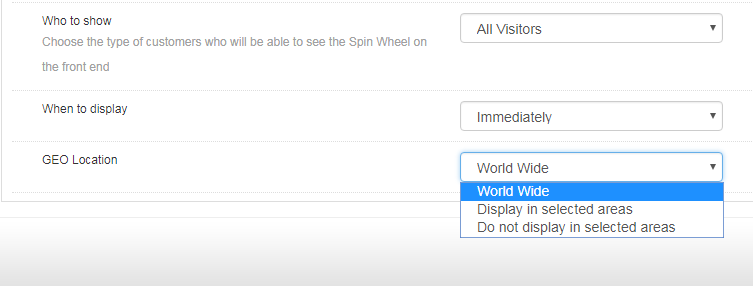
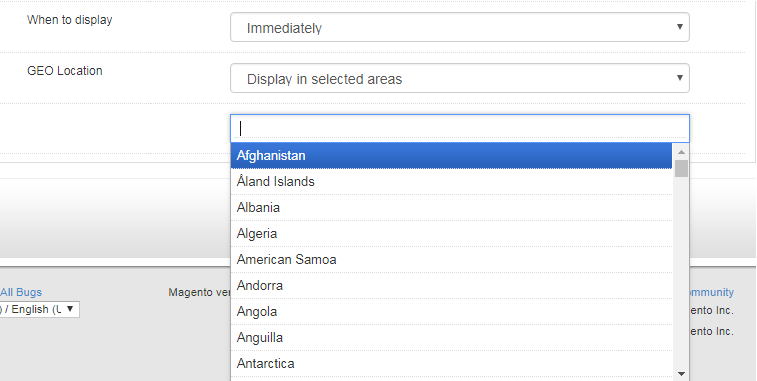
Selecting the default option of worldwide will allow to display the extension at every places where the website is being viewed. In case, you want to display or do not want to display it at a particular location, then, you can select the place as shown in the image below.

Look and Feel Settings

Along with the various customization options, the web admin panel allows to change the look and feel of the entire Magento email subscription pop-up.

1.2.3.1 How to change the look of the spin wheel?

Here are some of the ways in which you can change the look and feel of the spin and win(Exit Intent pop up) extension.

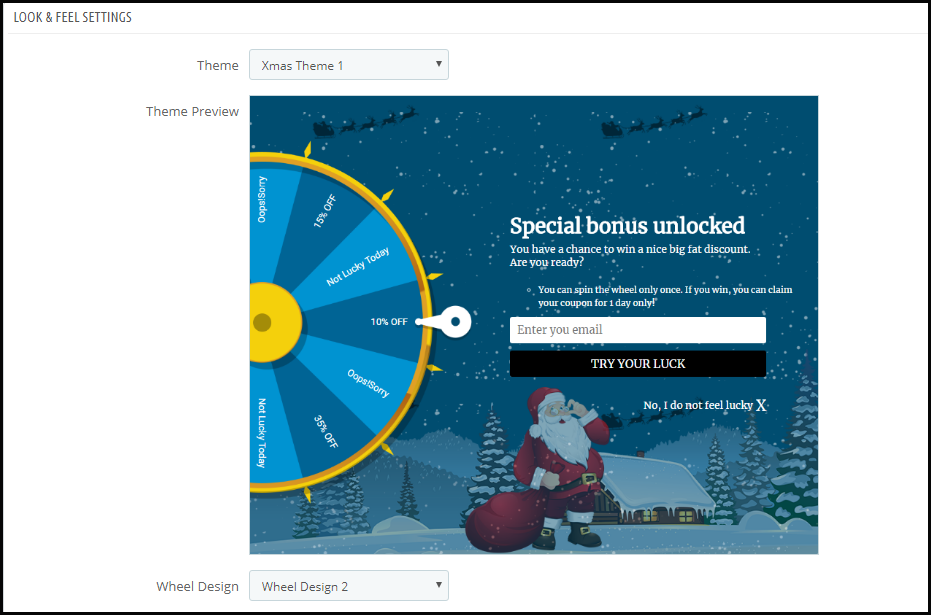
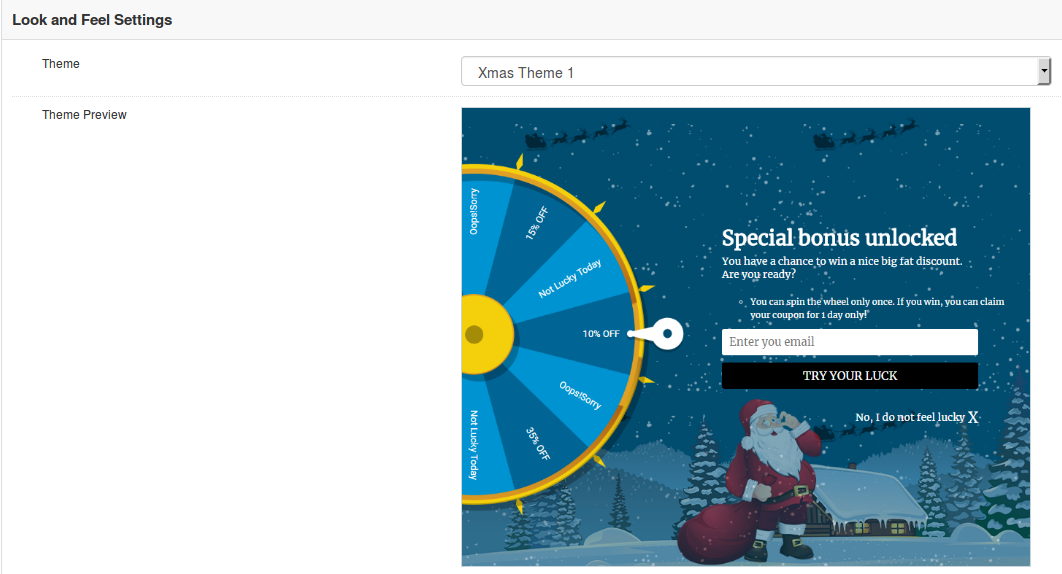
  1. Theme: Admin can select a desired theme for the spin and win email subscription popup based on different occassions like Thanksgiving, Easter, Black Friday, Christmas etc
  2. Theme Preview: Using this option of Magento Spin and Win module, you can preview a template before applying the final changes to your website.
  3. Display image

Magento spin and win extension allows the store owner to show an image on the spin wheel. The image can enabled by switching the button as shown below.

Not just this, the admin can even change the image as per the requirement by choosing it from the local drive.
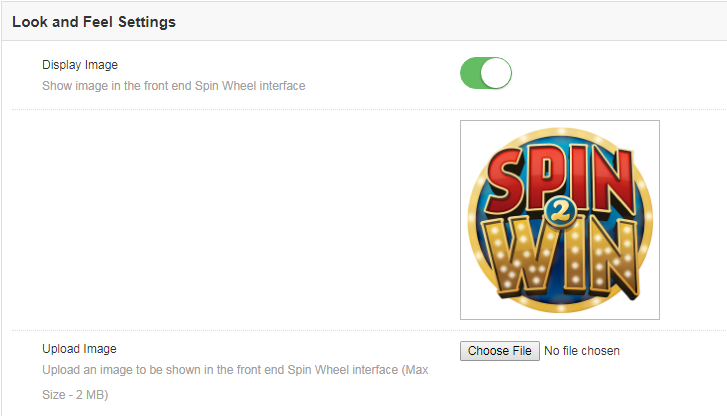
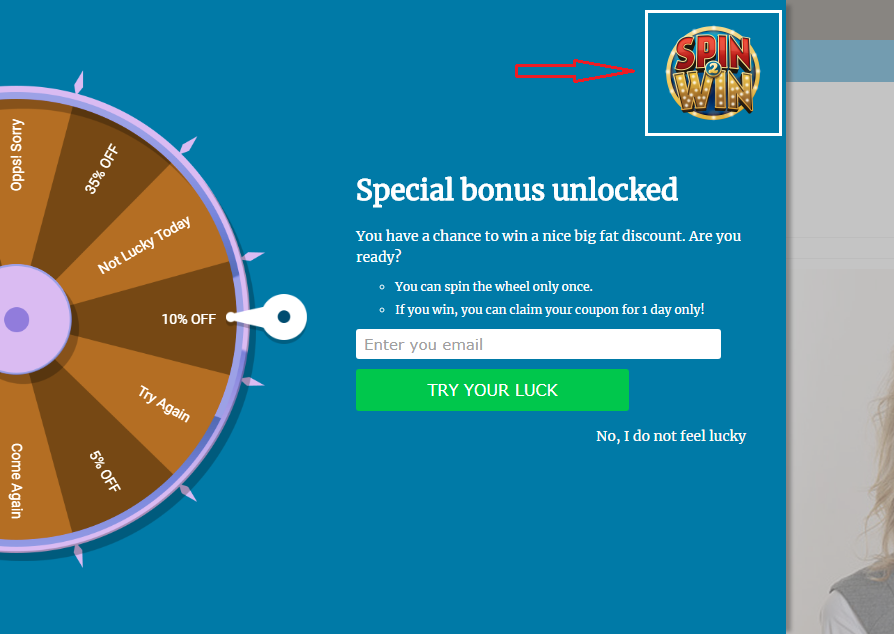
The image selected at the back end of the extension will be shown in the front end.
  1. Background and Font Colors

The Responsive Email subscription pop up extension offers a completely customizable interface. Right from the background color of the wheel to the color of the slices as well as font color, everything can be changed by selecting the color that suits the theme of your website.
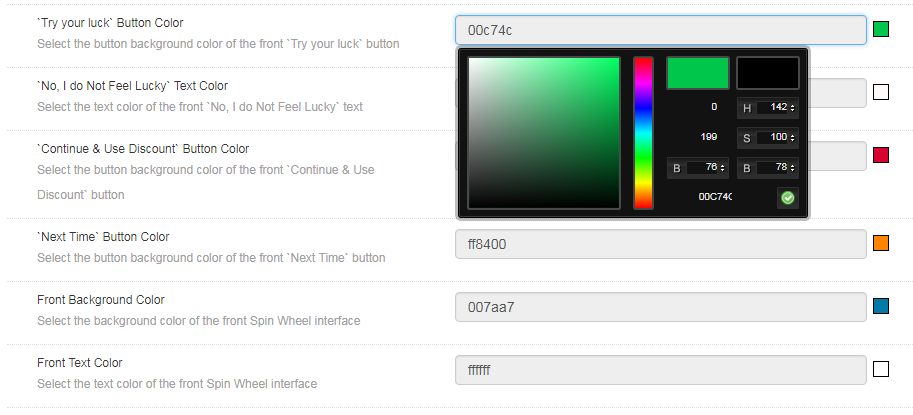
‘Try your luck’ button color: This can change the font color of the button that is clicked before spinning the wheel.

‘No, I do not Feel Lucky’ color: Change the font color of the button by selecting the shade from here.

‘Continue & Use Discount’ and ‘Next Time’ button color: Select the color of this button in accordance with the color of the background.

Front Background Color: Select the background color of the front interface of the spin wheel from here.

Front Text Color: The font color of the text displayed on the interface can be changed from here.

Slice Settings

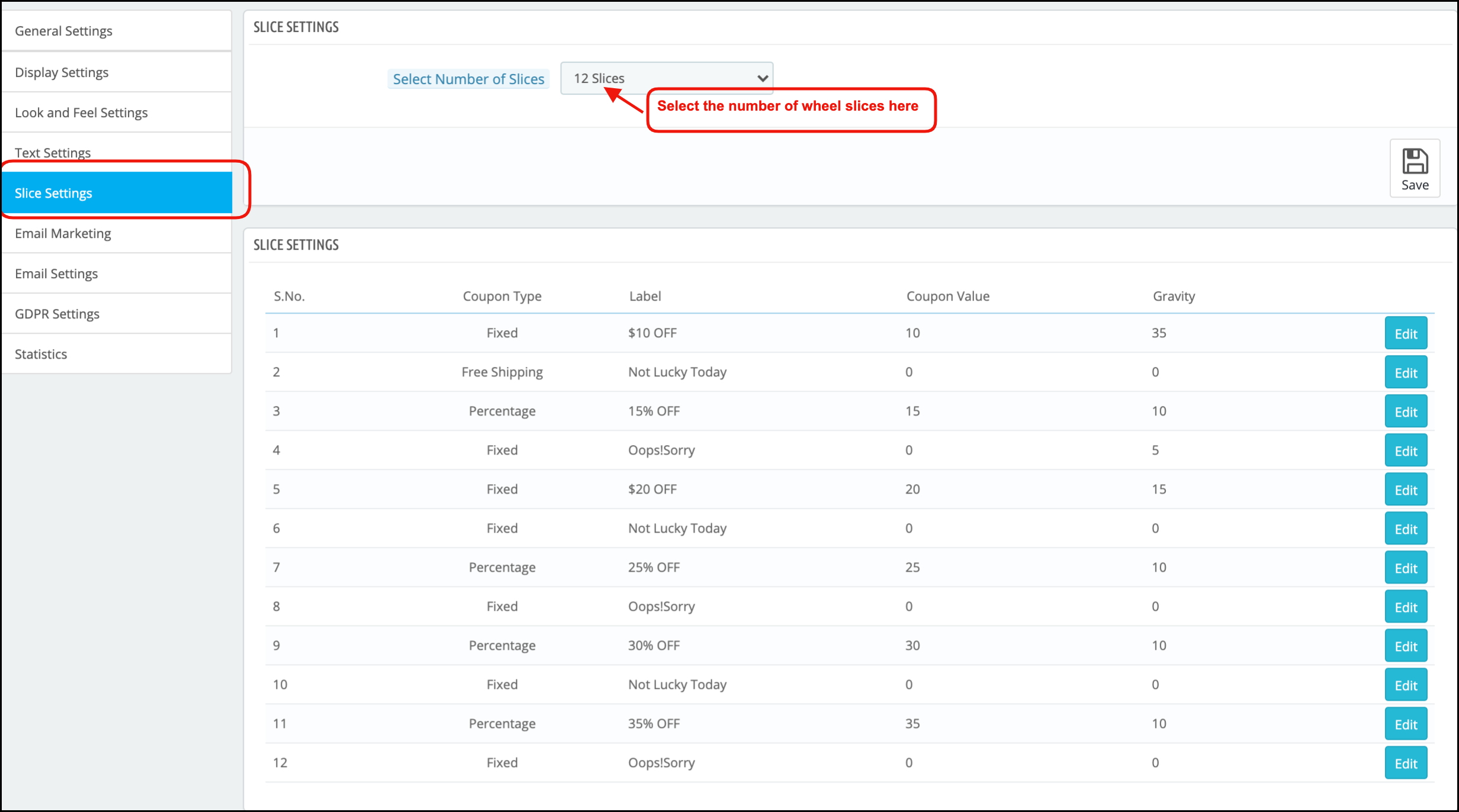
Not just the look and feel of the spin wheel, even the slices of the wheel can be changed and customized as per the need of the Magento store admin. There are 12 slices offered in the admin panel by default. The discounts offered, the label of the slice, the coupon type as well as the value coupon.
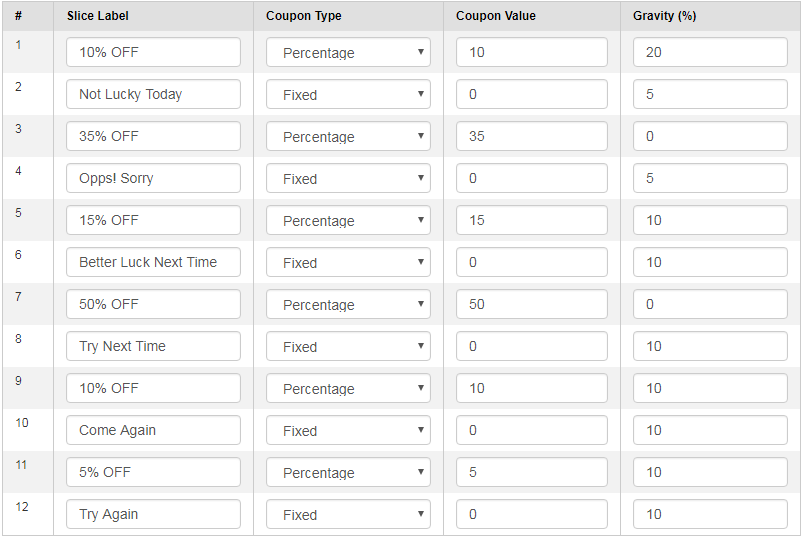
In addition, the possibility of a particular slice being selected after the spin can be set as well. Enter the desired value in the Gravity column accordingly. This value cannot be greater than 100 or less than 1. Moreover, the sum of the value of all the 12 slices should not exceed 100.

Email Marketing

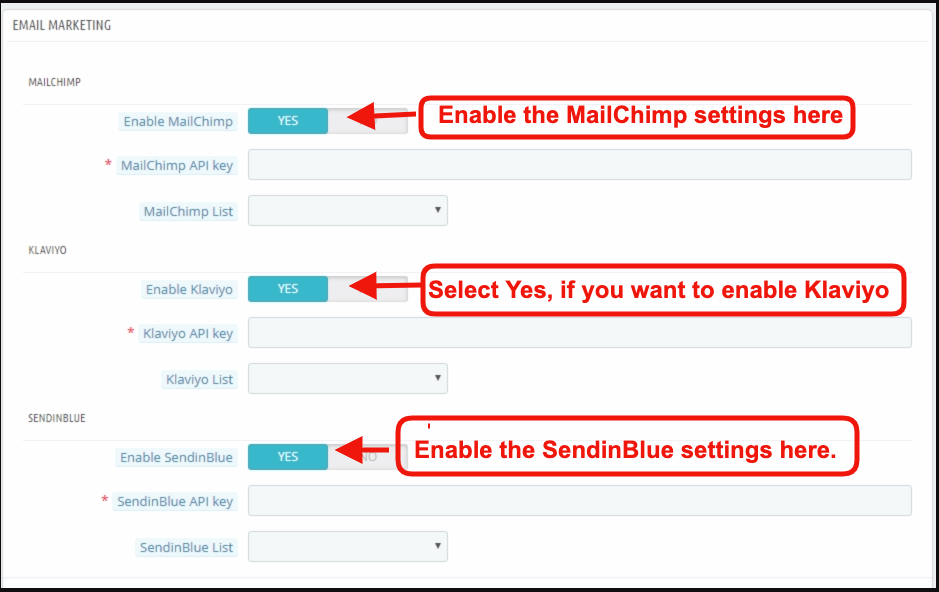
The Spin and Win extension has an inbuilt email integrator. The email ids of the store visitors captured by the plugin is automatically added to the MailChimp, Klaviyo accounts of the Magento store owner. Reducing the effort and time consumed in manual synchronization, the Magento email integrator makes email marketing easier for the merchants.
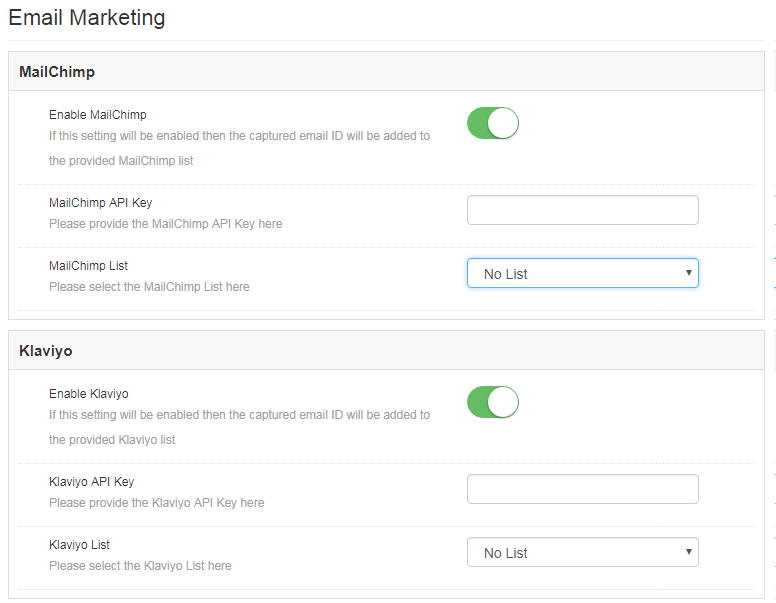
All you need to do to enable this functionality is, enter the API Key of your account, select the list of the email ids that you want to synchronize and your job is done. You are now ready to send promotional triggers in order to compel your customers to visit your store back.

Email Settings
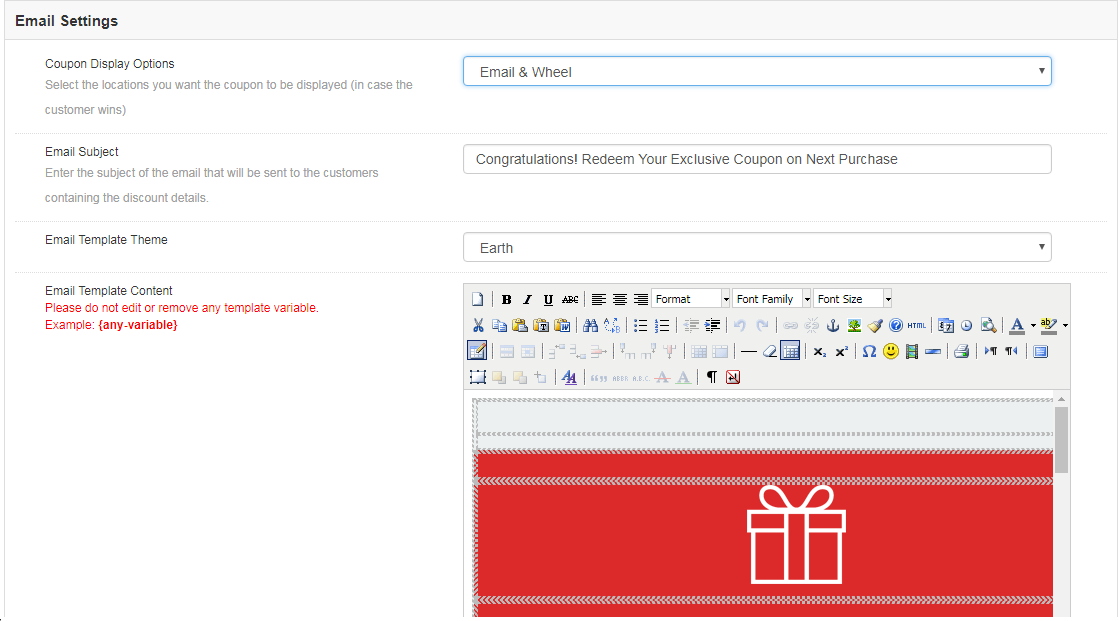
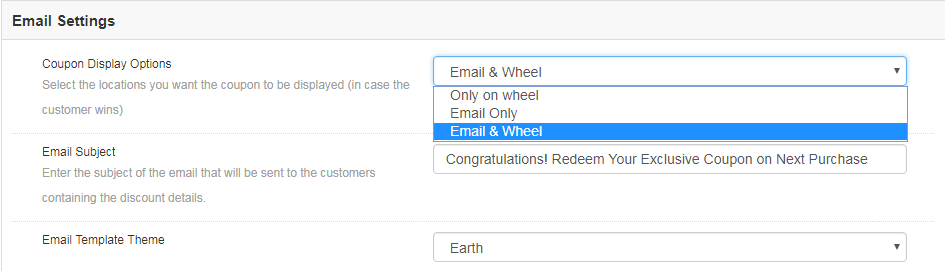
The coupon generated by the spin wheel can be copied directly from the wheel and used for shopping. At the same time, the coupons can be sent to the customers via email notification. It depends on the admin. He can choose the Coupon Display Option that suits his business model best.
Instead of setting the subject line manually for every mail, you can directly change it from the admin panel and set it for each and every email that is to be send to the customers.

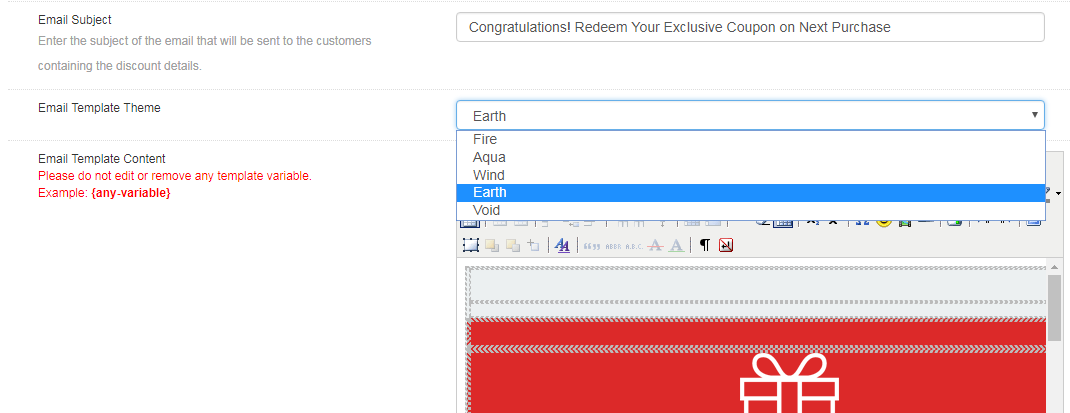
The email integrator comes with a bundle of email templates. The store admin can choose the one that he finds attractive, personalize it as per the need and send it to the prospective customers.
Statistics

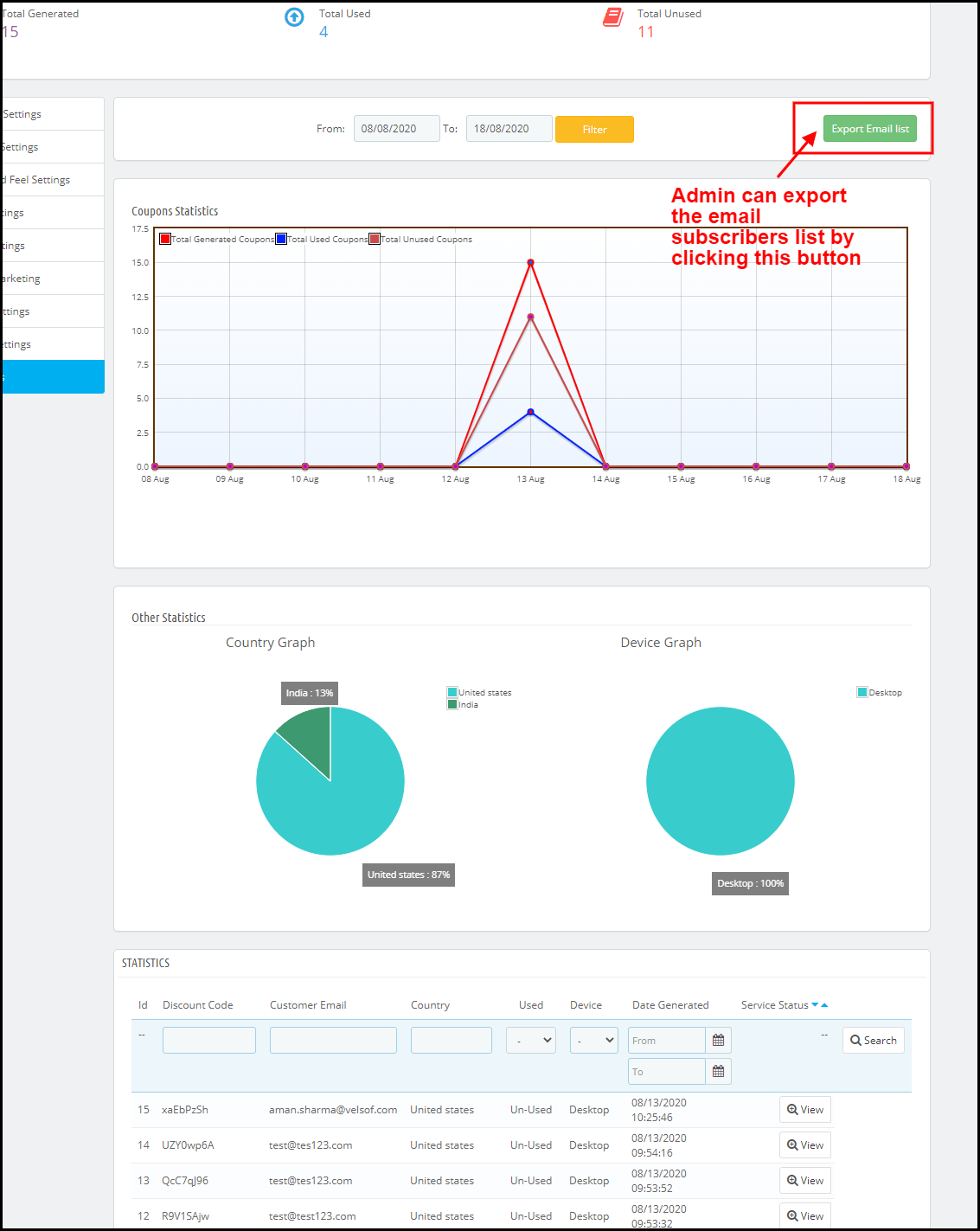
Magento Spin and win extension offers the statistical report of the number of coupons that are generated along with the number of coupons that were used and the ones that were left unused.
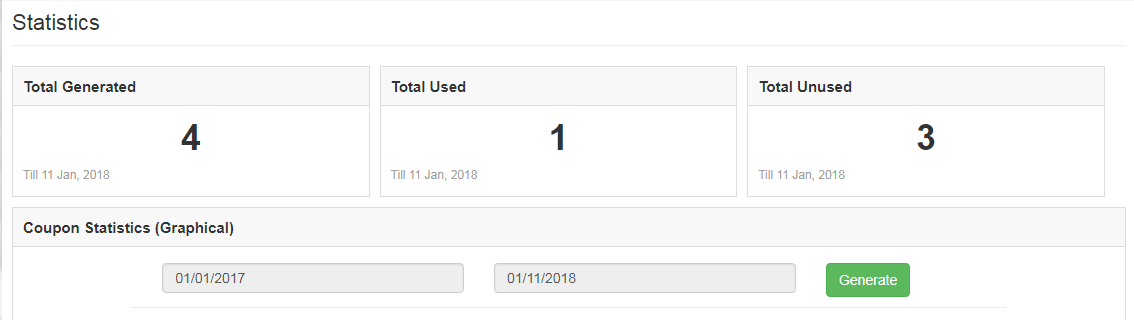
The same report is generated in tabular as well as in the graphical format. The report can be filtered by selecting the dates.
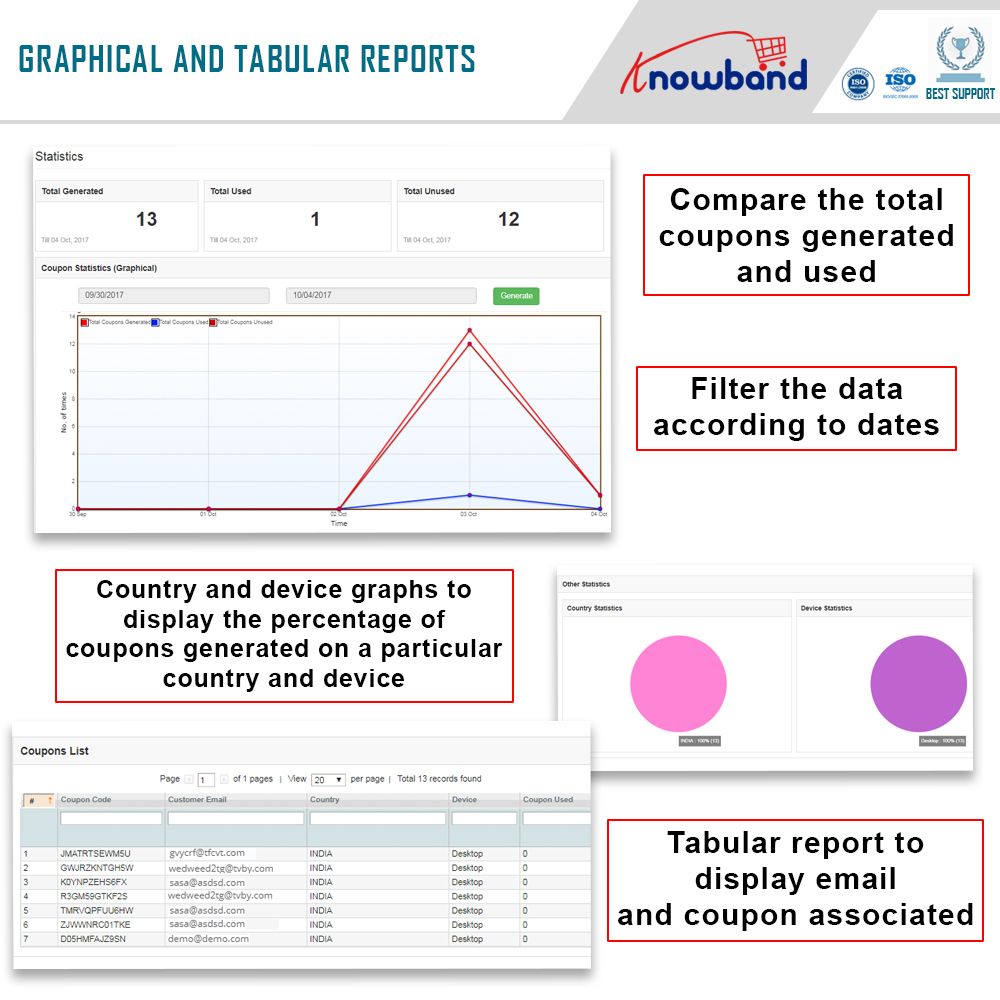
This tab even generates country-wise statistics. Along with this, it offers the insight whether the coupon was generated on the desktop computers or on any other device.

Store Front-end

Once Spin and Win extension is enabled, the interactive pop-up will show up in the front end of the eCommerce store.
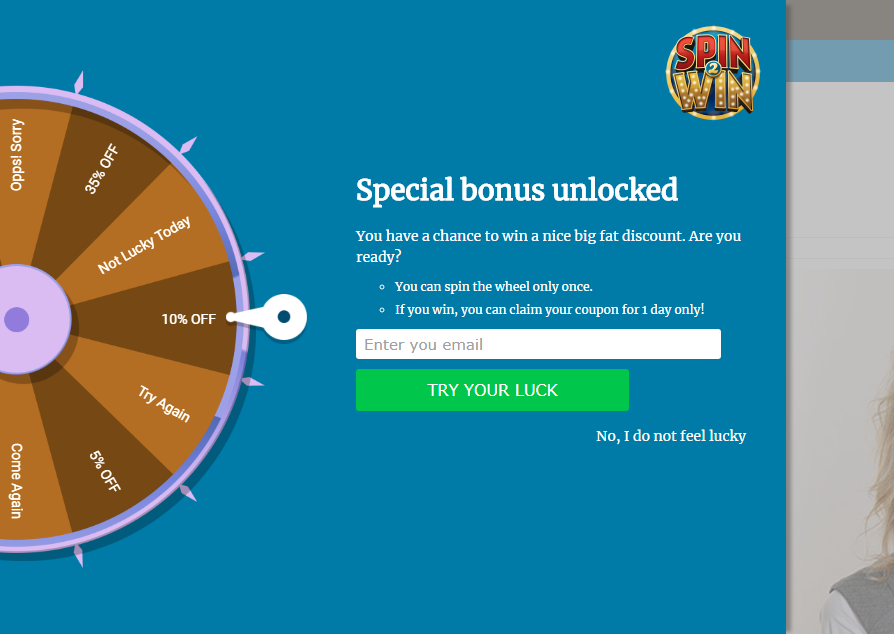
The store visitors can spin the wheel by entering their email ids. Thus, you need not stick to the annoying exit pop-ups in order to get the personal data of the customers. You can effortlessly lure them by offering enticing giveaways in return of spinning the wheel.
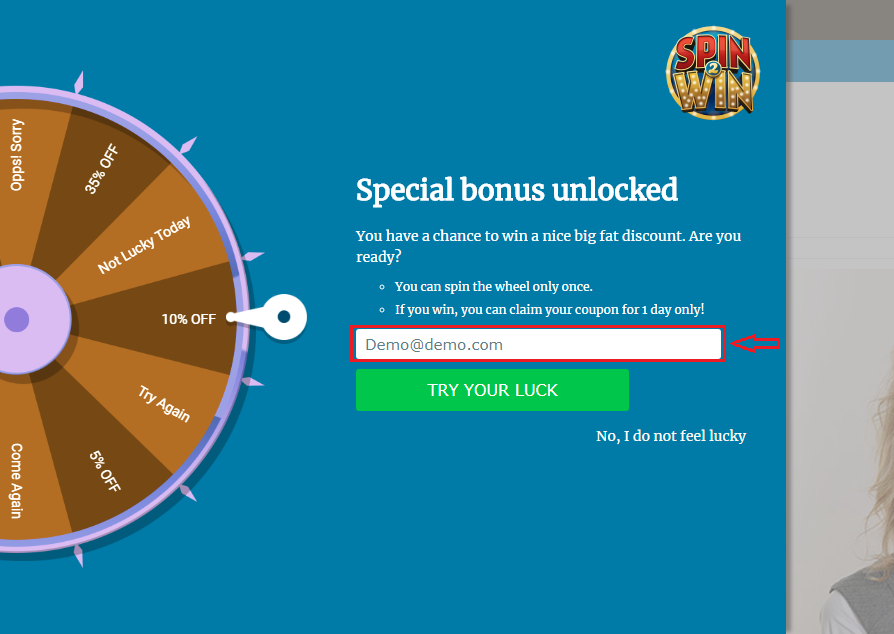
The coupon will be generated automatically once the wheel spins. The customer can then avail the offer by copying the code.
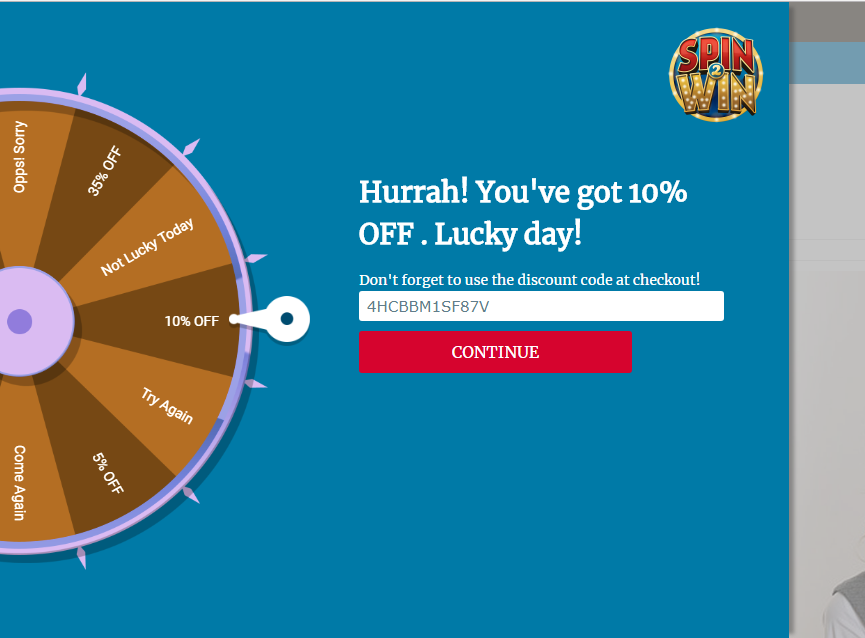
The same code can even be conveyed to the customers via email notification.

                            

Disclaimer: In case the “Spin and Win” wheel popup does not display at the front, kindly clear the cache or delete the cookies. Sometimes cookies prevent the popup from displaying at front.

Prestashop Spin and Win(Email Subscription popup) Module – User Manual

1.0 Introduction to Prestashop Email subscription popup – Spin and Win

PrestaShop is a free, open-source eCommerce solution. Anyone can create his/her store using Prestashop with minimal effort. The admin needs no technical knowledge to set up the Prestashop store. Prestashop Email subscription popup by Knowband has replaced the old way of email subscriptions as the old-fashioned way of offering a 10% discount in exchange for email ids does not excite the visitors. We at Knowband have come up with a new way of engaging the customers with the website. Prestashop Spin and Win (Prestashop Email Subscription popup) addon display an interactive and responsive gamified interface in the front-end of the website.

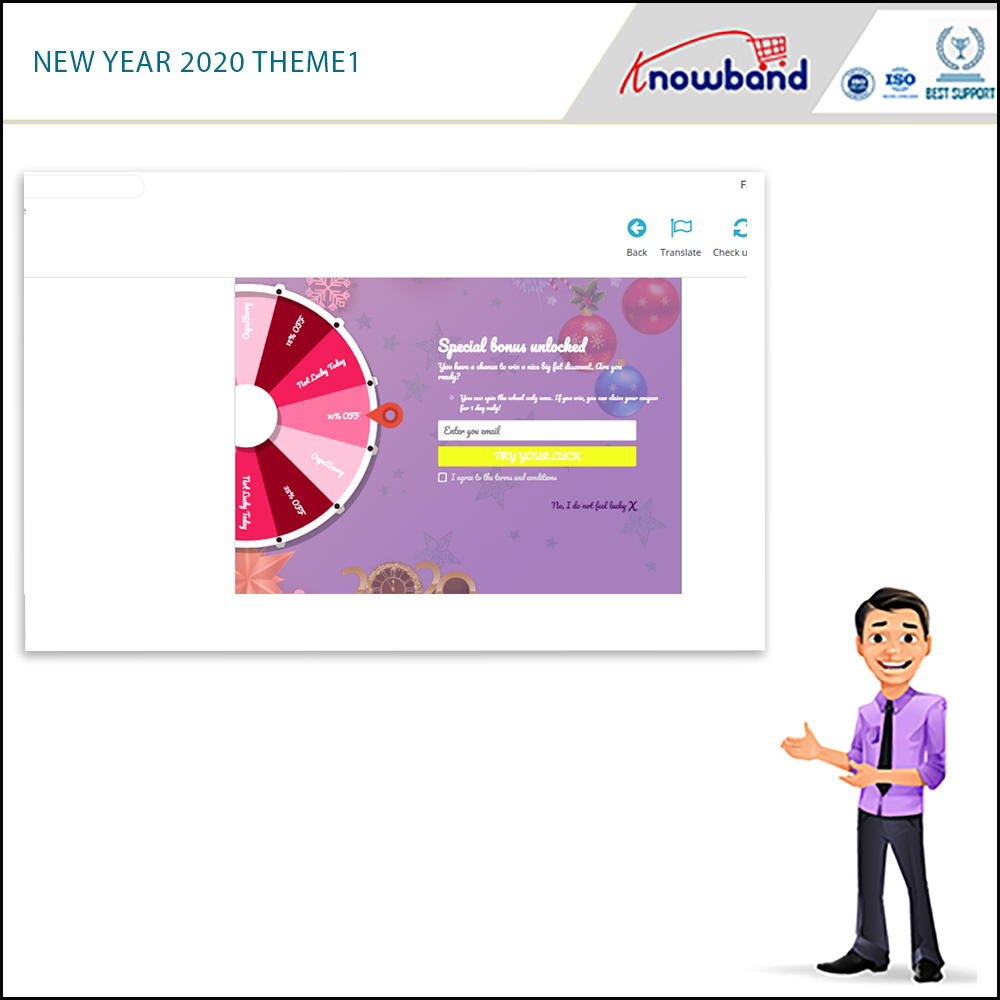
New themes available: In 2020, there are 4 New Year themes available for the store admin.

Spin and Win addon is now compliant with the GDPR. GDPR settings are available in the module using which the Prestashop admin can comply with the rules of the GDPR. Please refer to the GDPR Settings to know more about the GDPR.

The overall functionality of Spin and win(a responsive email subscription pop up):

1. The customer visits the website.

2. Newsletter subscription pop up appears on the Prestashop storefront. (is usable as an entry or exit pop up)

3. The user enters the email Id.

4. Spin the spin and win pop up and get discounts

5. Email Ids entered are captured by the addon.

The responsive and interactive email subscription pop interface enhances the customer experience and compels them to visit your site again. The addonis usable as an exit-intent pop-up as well as email subscription pop-ups in the eCommerce sites.

What’s New?

  • Theme Scheduling: The eCommerce store owner can schedule a theme for any occasion by adding the start and end date.
  • Update Number of Slices: This new feature allows the admin to select the number of slices for when. Now admin can select 6, 8, or 12 slices for the wheel.
  • Export Email Functionality: Updated version has Export Email functionality to export emails of customers into a CSV file from the admin panel.
  • Show Progress meter: Under the general setting of Spin and Win, the store admin can set the Progress meter percentage which will display on the front end of the Popup.
  • Provide an option to customers to choose to generate a coupon with or without email ID: If the admin enables, it has the functionality to provide an option for customers to choose whether they want to provide their email id or not.
  • Testing based on IP Address: The eCommerce store owners can now test the Spin and Win addon before actually implementing it on the store by entering their IP Address.
  • Set Coupon Expiry day: This new feature allows the admin to set the coupon expiry date even after the coupon is generated.
  • Minimum Amount filled: Under the slice settings tab, the admin can now set the minimum value the cart should have for the coupon. Further, that the customer uses.

1.1 Merchant Benefits of this Newsletter subscription popup addon:

By using this Exit popup cum Entry popup addon, the store owners can achieve the following things.

  • Boosts Lead generation.
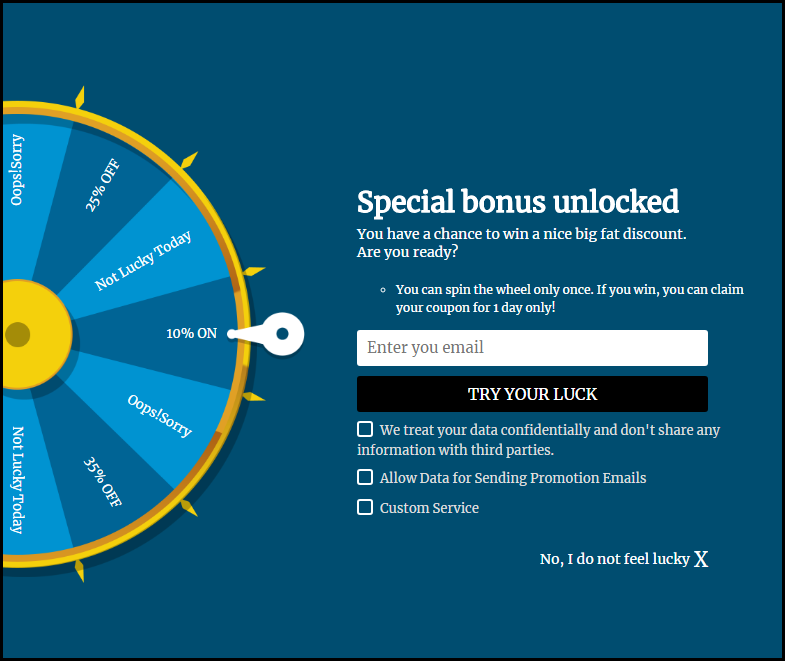
  • The customer can claim the discount by entering their email id. Hence, it increases the customer base of the store user.
  • The responsive and interactive user-friendly interface ensures a high impact on direct sales. It improves the overall conversion rate, using coupons and discounts.
  • Turn Visitors into potential buyers and improve conversion rates by offering users a completely different way to win discounts.
  • Fully Customizable subscription pop up
  • Detailed Reporting.
  • Export Email subscriber list in.CSV format
  • Theme scheduling for occasions without taking extra effort.
  • Extremely easy-to-use intuitive back-end interface.
  • The look and feel of the spin and win pop up as well as the email notification is customizable from the back end.
  • GDPR Settings are available in the module using which the Prestashop admin can comply with the rules of GDPR.
  • New classic themes for Spin and Win popup help e-merchants in drawing user attention on different occasions. New Holiday themes for Christmas and New Year are available to attract more and more visitors to the store.
  • Effortlessly generate a fixed coupon code for each Spin Win slice.
  • Restrict the compatibility of Spin and Win coupons with other active coupons of the store.
  • The store owner can now display the latest New Year 2020 themes on his website.

1.2 Features of Prestashop Spin and Win addon:

1. Responsive 3 in 1 pop-up: Is usable as an Entry pop up, Exit pop up, or Email Subscription pop up.

2. The admin can select from the multiple available wheel designs as well as spin and win themes to choose from.

3. The new version allows the admin to schedule a valid active and expiry date for a theme. After the expiry date, it will be set to the default one.

4. The interactive Spin and Win game lures customers and helps admin to engage more customers thereby increasing the customer base of the site.

5. The interactive Spin and Win game lures customers and helps admin to engage more customers thereby increasing the customer base of the site.

6. The back-end offers Readymade Email Templates which is further customizable.

7. The store admin can change the look and feel of the Prestashop exit pop-up as per the requirement. The admin can now apply the latest New Year 2020 themes as well on his website.

8. Prestashop Spin and Win (email subscription) pop up offers Mail Chimp, Klaviyo and, SendinBlue Integration.
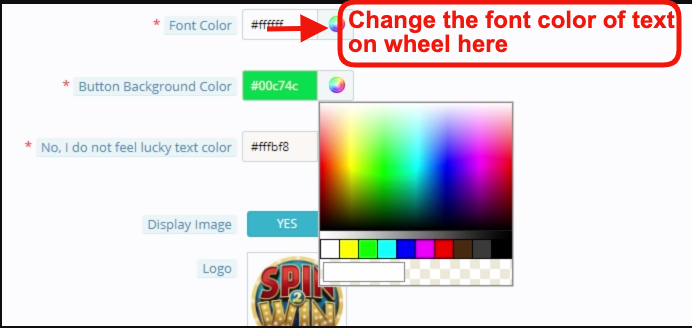
9. Spin and win popup allows the admin to choose the number of slices in a wheel. There are 6, 8, and 12 sliced wheel options available.

10. Show the progress meter on the front end with a progress percentage. This will display with a label that the admin adds.

11. Prestashop Exit pop up allows admin to provide an option for customers to choose whether they want to provide their email id or not.

12. Set the discounts and offers on each slice and also set the gravity of each slice, the slice with maximum gravity will have larger occurrences.

13. Prestashop Newsletter subscription popup addon allows admin to customize the email subscription pop up using Custom CSS and JS without making any changes in the base code

14. Prestashop Entry popup addon allows admin to choose whom to display, where and when to display, maximum display frequency of the Spin and win (email subscription) pop up.

15. Prestashop Newsletter subscription popup offers wheel sound options which adds a sound when the Spin wheel rotates, it gives a more lively feeling of the Spin and Wins game.

16. Prestashop Exit intent popup addon offers an option to show fireworks on the Spin and Win popup when a customer wins a discount to make the win of the customer more exciting and fun.

17. Prestashop Newsletter popup offers an Email Recheck option on the cart as well. Just to make sure if the customer who is applying the coupon is the same who played the Spin and Win game.

18. Prestashop Exit popup addon allows admin to choose the pages to display the pop up i.e, Category page, Home page, Product page, etc.

19. Email Recheck option to Restrict the same Email Id from availing the discount coupon more than once.

20. Prestashop Newsletter subscription popup addon offers to Pull Out Tab facility for customers as spinning the wheel is not compulsory for visitors.

21. Prestashop Newsletter popup addon allows Prestashop admin to preview the Email subscription popup and the Spin wheel at the admin panel itself.

22.  Prestashop Email Subscription popup addon offers a Responsive and Interactive user-friendly interface that ensures a high impact on direct sales. Turn Visitors into potential buyers and improve conversion rates by offering users a completely different way to win discounts.

23. Prestashop Spin and win is compliant with the GDPR, GDPR settings are available in the Spin and Win admin panel. Using these settings admin can comply with the rules of GDPR.

24. Prestashop Spin and Win module offers Detailed Reporting

  • Check the performance of the interactive spin and win pop up by comparing the total generated vs used coupons using interactive graphical reports
  • Tabular reports displaying coupon codes, details of coupon holders (customers), the country where the addon is usable, and the device on which the customer uses it.
  • The report which incorporates email addresses of the customers can be exported in the form of.CSV file

25. Extremely easy-to-use intuitive back-end interface.

26. Support multiple languages.

27. Prestashop Spin and Win are Compatible with all themes.

28. Desktop, Mobile, and Tablet responsive design

29. Prestashop Spin and Win popup module allow the admin to control the compatibility of Spin and Win coupon with other site coupons. If this feature disables, then the coupon generated from Spin and Win will not work with the other active coupons. They can also set a coupon expiry date as well.

30. Admin can generate a fixed coupon code for each slice of the Spin Wheel. They can also fix the minimum cart value customers should have to generate the discount coupon.

31. This interactive spin and win popup offer a direct coupon generation functionality that allows the customers to generate a spin win coupon without filling any user name fields.

32. Prestashop email subscription popup allows admin to select one or more customer groups which include: visitor, guest, the customer.

33. Admin can set the visibility of Spin and Win popup on the specified number of page visits. If 0 is entered then this functionality will disable and the user will see the spin wheel popup as they enter the site.

34. Prestashop Interactive popup addon allows the store owners to test the module before implementing it on the store.

2.0 Installation of Spin and Win – Responsive Email Subscription pop up

Once you purchase the addon, follow the below steps:

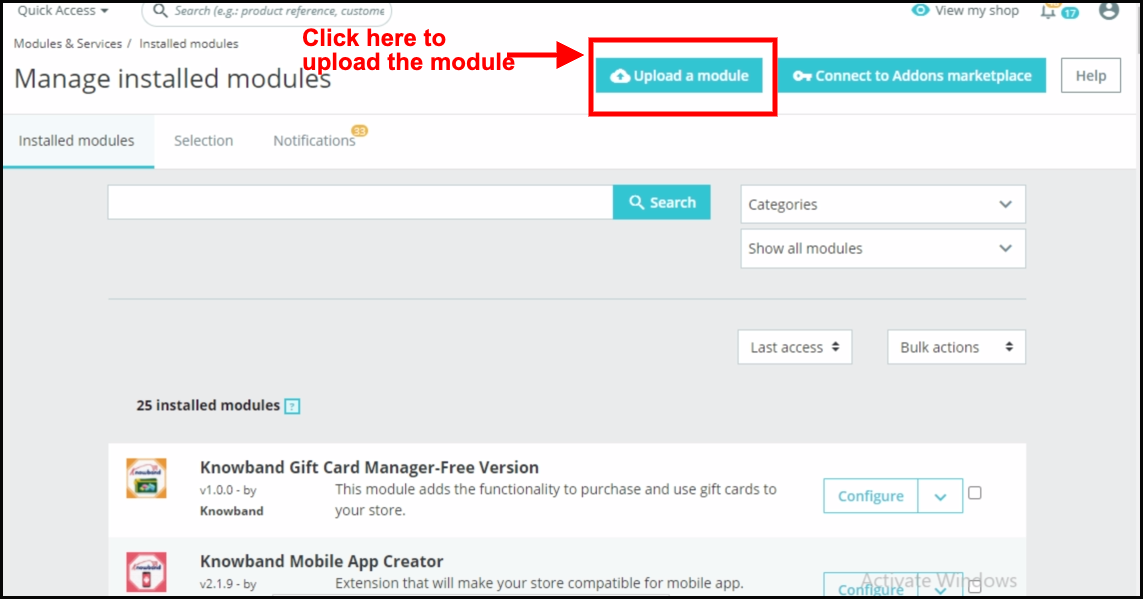
  1. Go to the Store Admin -> Modules and Services.

2.  Click on “ Upload a module”. You can drag or drop the file or can simply select the file from the system.

Once the file is completely uploaded, a notification of “Module(s) installed successfully” will display.

3.0 Admin Interface – Spin and Win – Entry, Exit, and Email subscription pop up

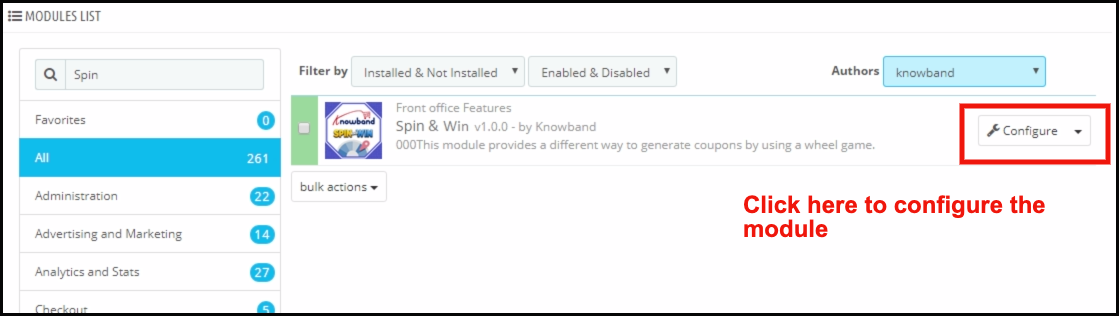
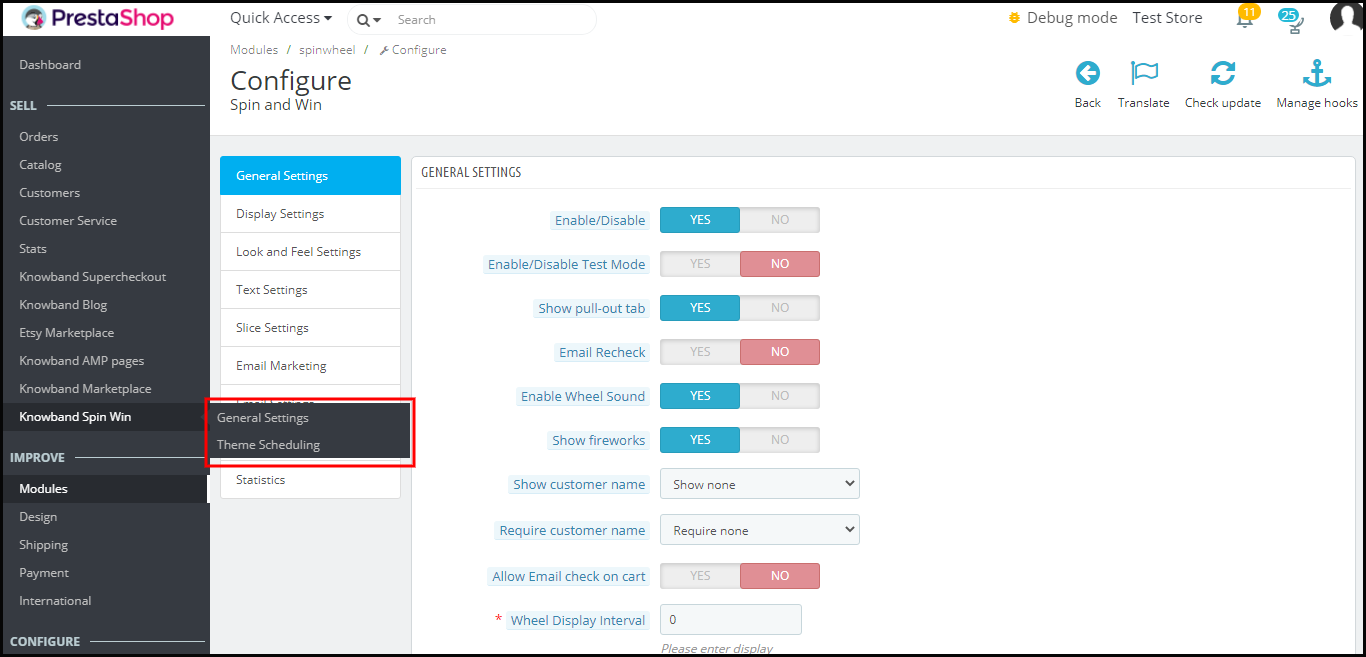
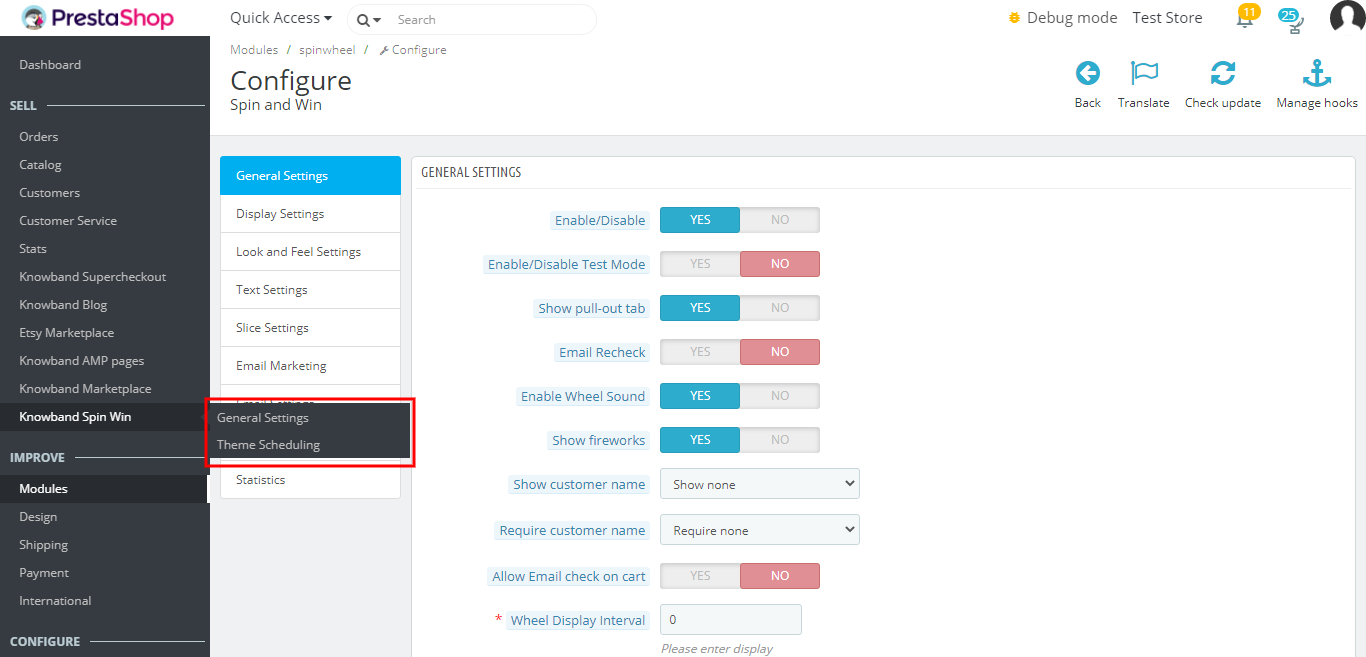
Once the installation is complete, the next steps include configuring the addon. Click on the ‘Configure’ button just next to Prestashop Spin and Win Addon.

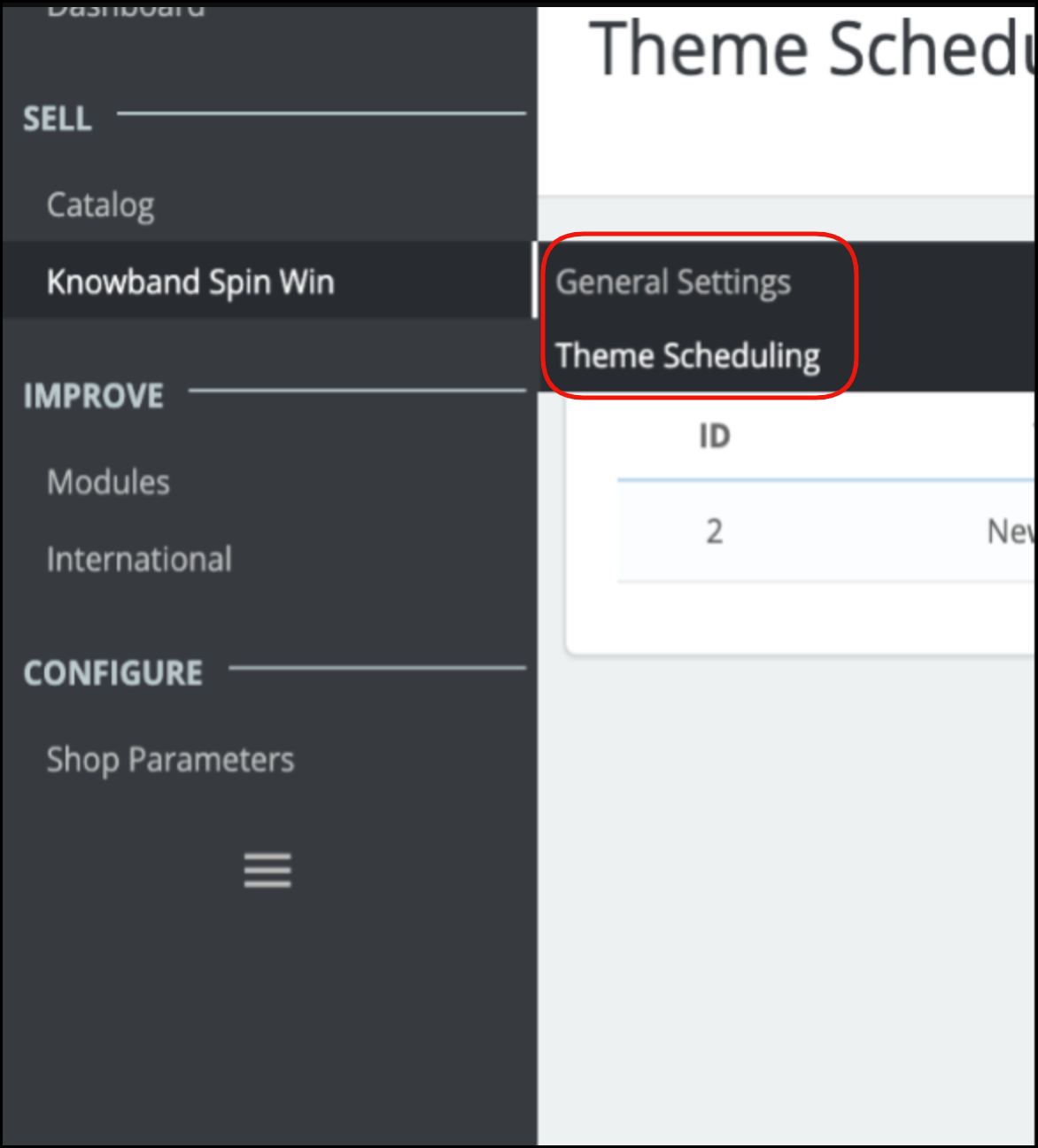
The Prestashop admin panel of the addon offers various customization options to the Prestashop store owners. The new version has two default setting options separately for General settings and Theme scheduling.

3.1 How to start the configuration process?

On clicking configure from the module listing page, Prestashop Admin will be redirected to the configuration page. The very first tab in the main menu includes “General Setting” as shown below:-

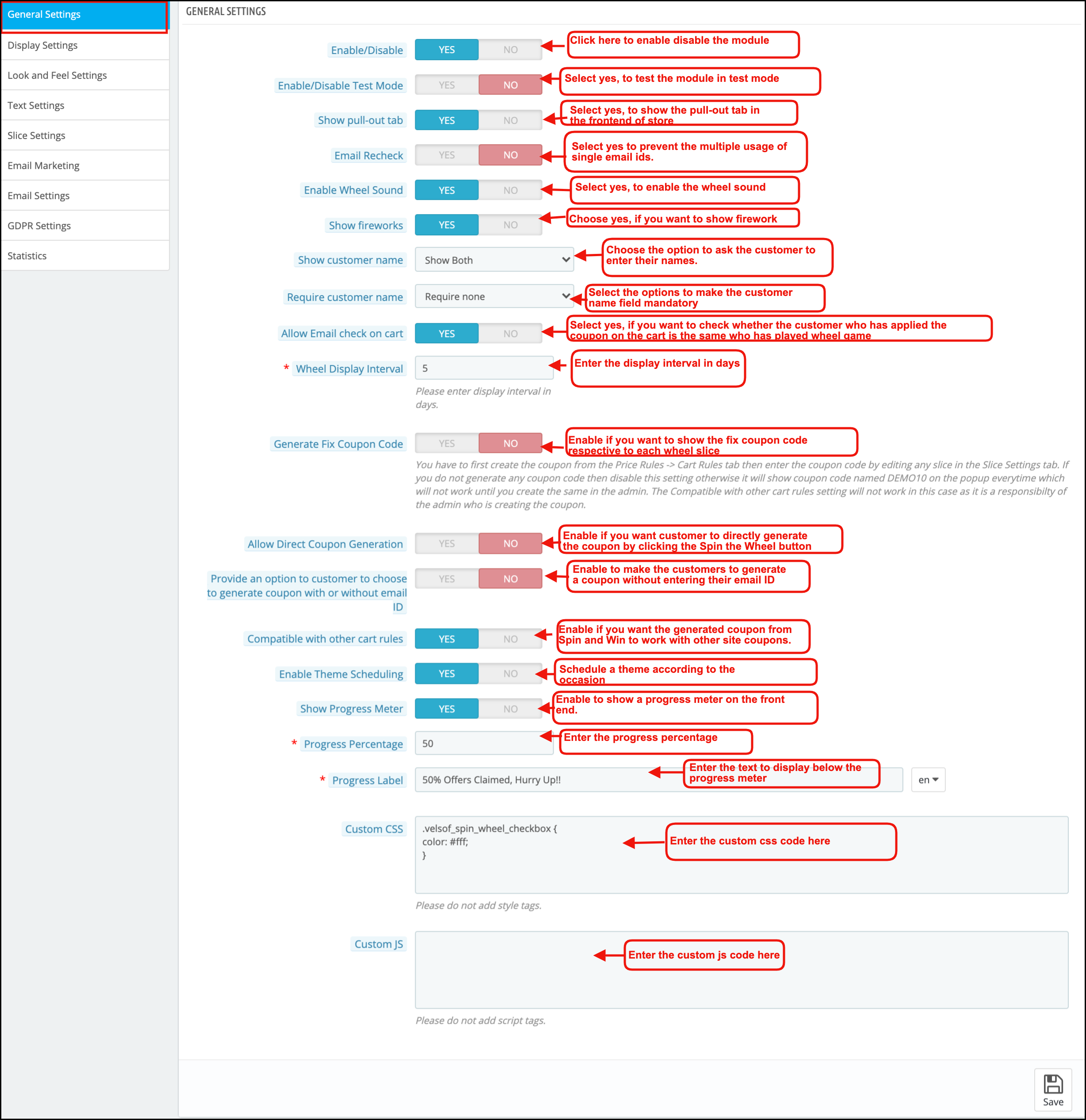
Listed below are some of the customization options that can help the admin make the initial changes in their Spin and Win (email subscription) Addon.

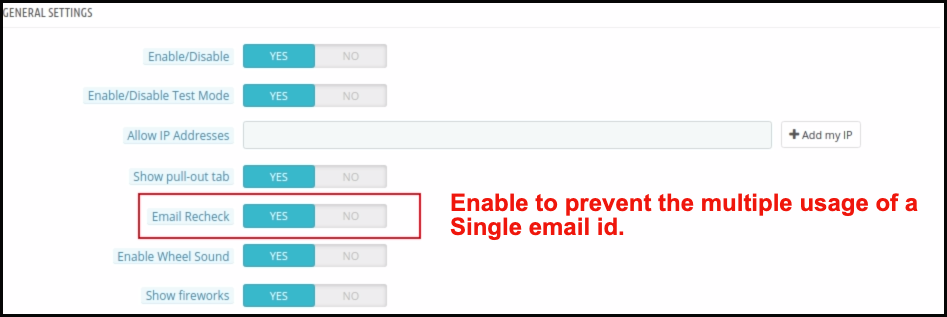
1. Enable/Disable:-The admin can enable or disable the addon using this setting.

2. Enable/Disable Test Mode:- The store admin can enable the test mode and enter their IP Address to test the module before implementing it in the store

3. Show Pull-out Tab:- The visitors of the website can remove the spin and win pop up by clicking on the ‘I’m not feeling lucky link as shown in the image below.

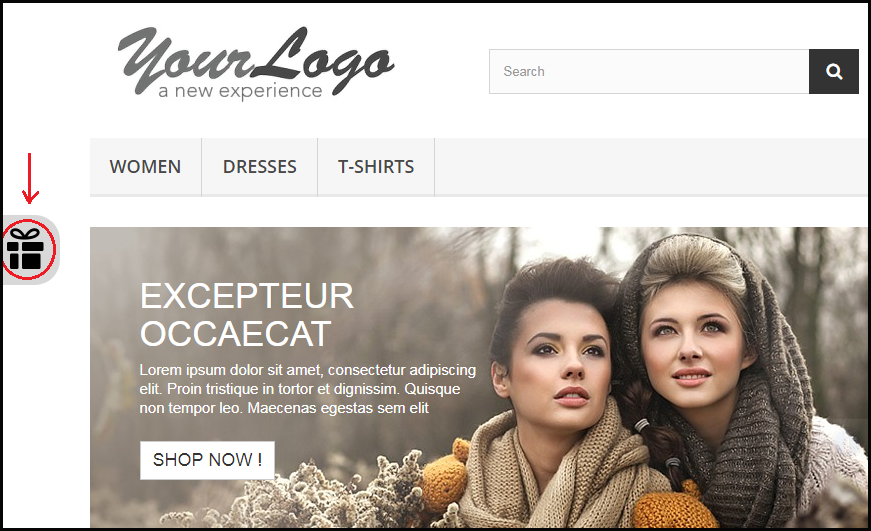
By enabling this setting, the store owner can provide the option to pull the spin and win spin and win pop up back on the screen by the user.

The customer can click on the gift icon on the left side as highlighted in the image above to pull out the email subscription pop up spin and win pop back.

4. Email Redundancy Check:- This provides an option on the Prestashop store to verify the email id of the customer to ensure that there is no repetition of email ids. In case, the customers are only allowed to use coupon code ones. The customers cannot use the single email id twice. This can be done by enabling the Email Recheck option as shown in the image below.

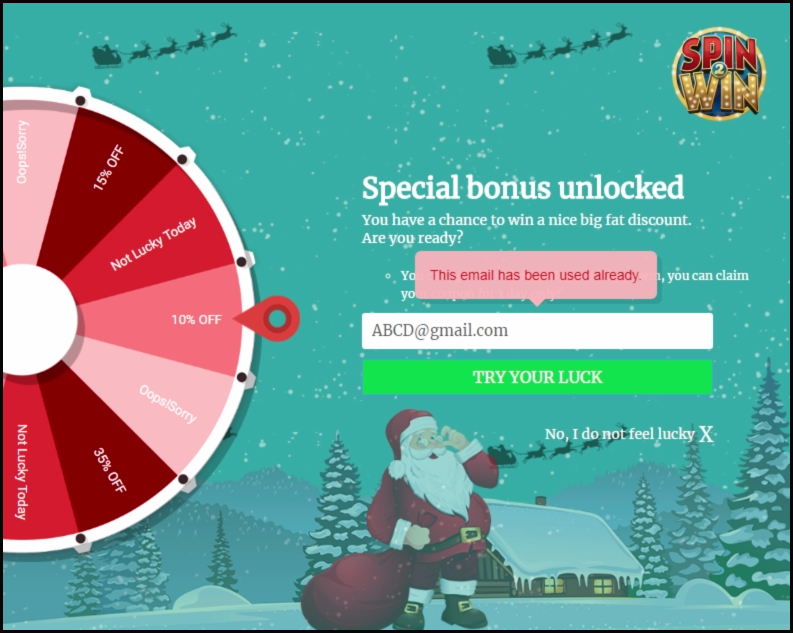
In case the same email id is entered again, a message will be shown as below.

5. Enable Wheel Sound: Prestashop store admin can enable wheel sound. Further, the wheel will generate a tapping sound when he enables this option.
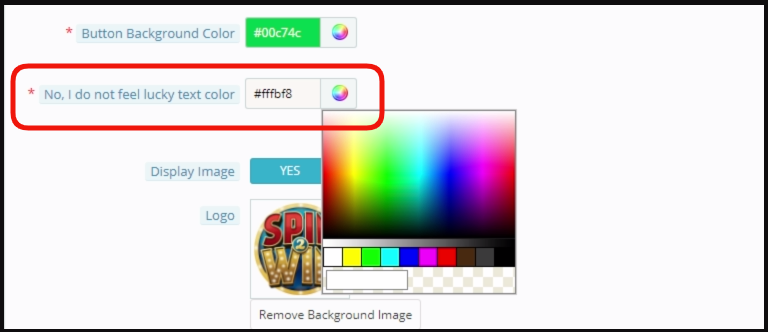
6. Show Fireworks: Prestashop Newsletter subscription popup addon offers an option for admin to show fireworks on the email subscription popup when a customer wins a discount. Admin can enable this setting to make the win of the customer more special and exciting.

7. Show Customer Name: Prestashop admin can now ask for the Customer name before a customer plays the Spin and Win game.

8. Require Customer Name: Prestashop admin has an option to make the Customer name field mandatory or optional.

9. Allow Email Recheck on Cart: This option will check whether the customer who has applied the coupon on the cart is the same who has played the Spin and Win the game.

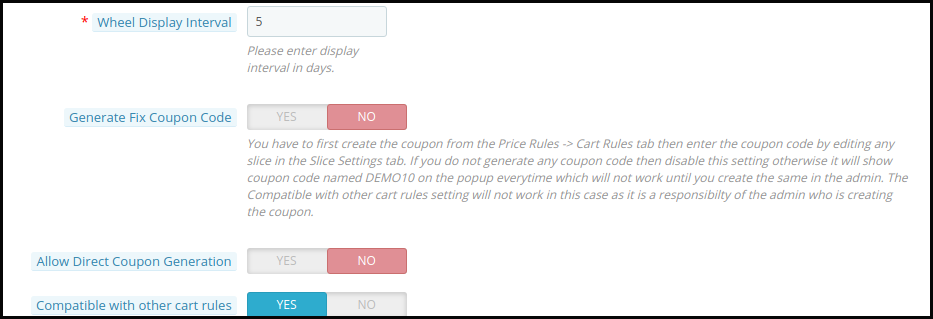
10. Spin and win pop up Display Interval:- Prestashop store admin can enter the number of days after which the Spin and win pop up(email subscription pop up) will display to the customer.

11. Generate Fix Coupon Code: Admin can enable/disable this option to add fix coupon code respective to each wheel slice under the Slice Settings tab of the module. For this, the admin has to first create the coupon code from the Price Rules -> Cart Rules tab then enter the coupon code by editing a particular slice.

12. Allow Direct Coupon Generation: If the admin enables this setting, then the customer can directly generate the coupon by clicking the Spin the Wheel button. If he disables it, then the customer has to fill in the required information to play the game.
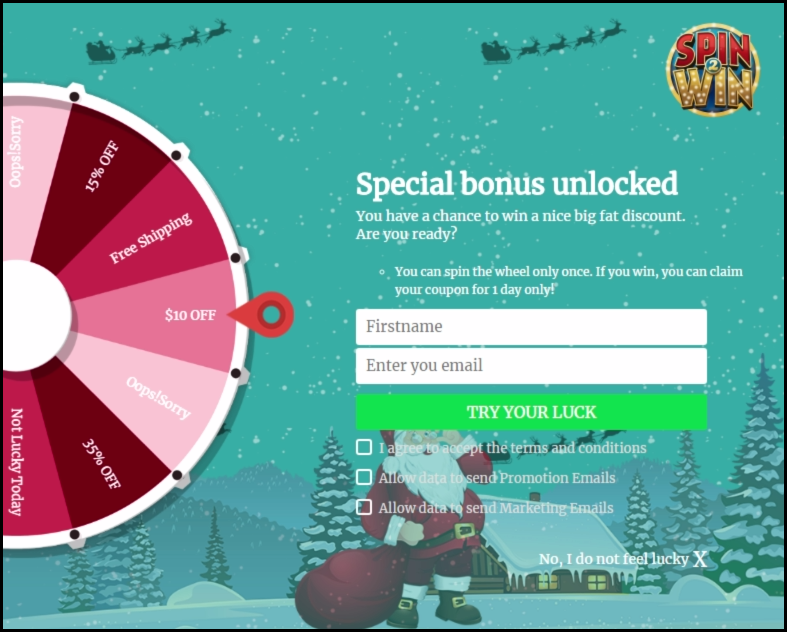
13. Provide an option to customers to choose to generate a coupon with or without email ID: With Prestashop Spin and win, the admin can allow users to generate a coupon without entering their email ID.


14. Compatible with other cart rules: Admin can control the compatibility of spin and win coupon code with other active coupons on site. If the admin disables this setting, then the coupon generated from Spin and Win will not work with other site coupons.

15. Enable Theme Scheduling: If the admin enables this, he can now schedule a theme according to the occasion, and once the validity of the theme gets over, it will be set to the default theme.

16. Show Progress Meter: With this new feature of Exit pop up, the admin can show a progress meter on the front end. 

17. Progress Percentage: Prestashop spin and win module allow admin to insert a value for displaying the progress percentage i.e. the value for offers claimed.

18. Progress label: In this tab, the admin can add a text which will display below the progress meter like ‘75% Offers Claimed, Hurry Up!!’.

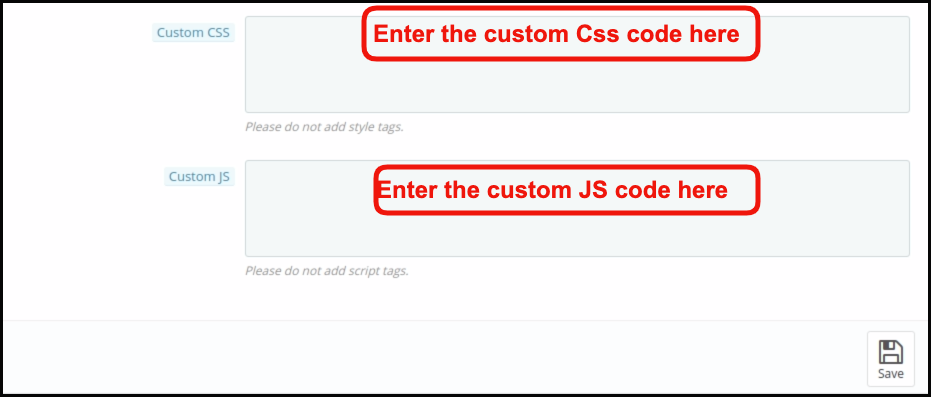
19. Custom CSS and Custom JS:- The admin can even change the look and feel of the addon as per their need by entering the custom CSS and custom JS code in this section.
Save the changes that you have made in the configuration setting.
3.2 How to change the Display Settings?

This option enables you to change the setting of the display of this email subscription Spin and win pop up. It includes the following setting options.

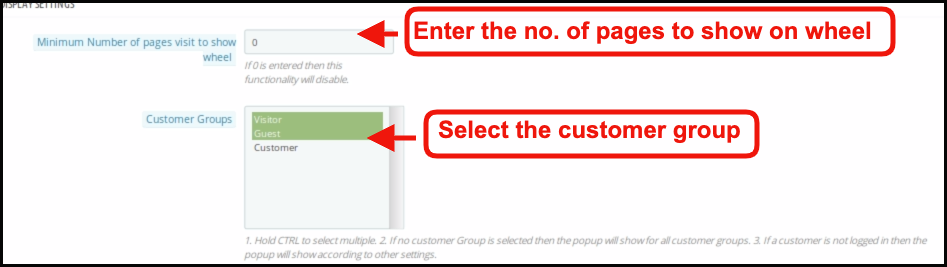
1. Minimum Number of pages visit to show wheel: Admin can set the minimum count of site pages while should be visited to show the spin wheel to customers. If the admin enters 0, then the functionality disables.

2. Customer Groups: Admin can select one or more groups to which the spin and win popup will display. Use the CTRL key to select multiple options.

3. Minimum Screen Size: The drop-down list offers a few screen sizes for the admin to choose from.

4. Maximum Display frequency: The admin can select the frequency of the spin and win pop up email subscription pop up display here. Select one option from the multiple choices offered in the drop-down list.

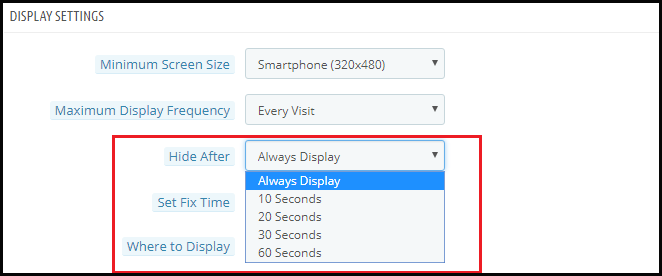
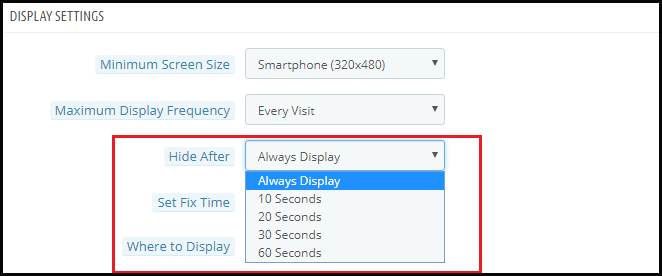
5. Hide After:  The admin can select the time interval in seconds after which he wants to hide the spin and win pop up and win pop up.


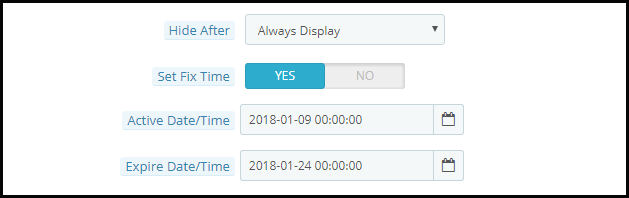
6. Set Fix Time: You can enable or disable the fixed time from here.

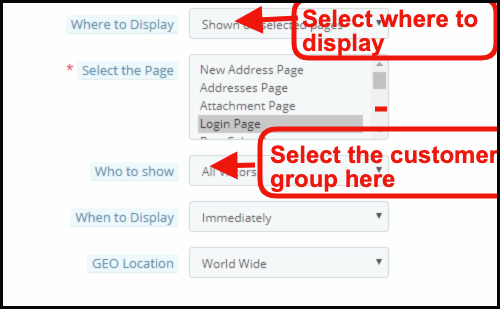
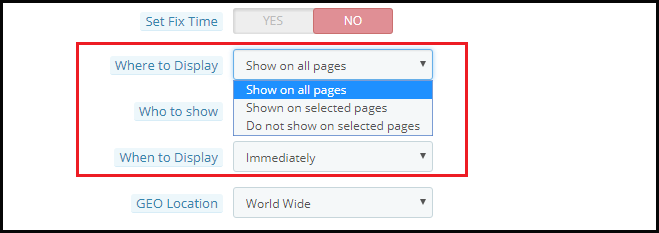
7. Where to Display: You can select the pages where you want to display the spin and win pop up. Admin can select Product page, category, Home page to display this interactive and responsive email subscription pop up.

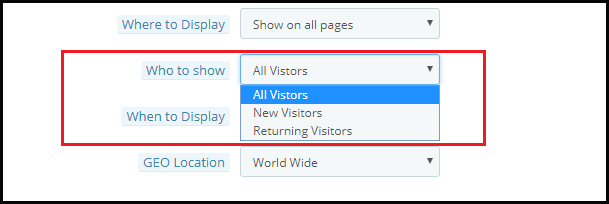
8. Who to Show: You can select the visitors to whom you want to show the spin and win pop up. You may select ‘All Visitors’, ‘Registered Visitors’, or ‘Guest Visitors’.

9. When to Display: You may choose exactly when you want the spin and win pop up to display. You can either display it immediately when the customer lands on your site or after some time or when the visitor scrolls down or you can use it as an exit intent pop up.

10. Geo Location: You can even select the display option as per the Geolocation of the visitor.

3.3 How can the look and feel of the addon be changed?

The Look and Feel Setting in the Prestashop admin panel allows you to change the look of the spin and win pop up as it appears on the website.

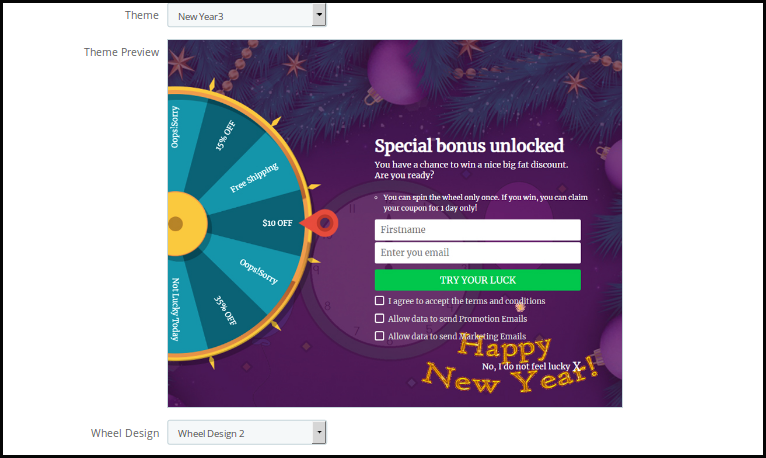
1. Theme: Prestashop admin can see the preview of the Prestashop Newsletter popup in the admin panel itself before making it live. There are multiple themes to choose from. Admin can choose as per the occasions like New Year and Christmas. The PrestaShop admin can now apply the latest New Year 2020 themes on his website. There are 4 eye-catching New Year 2020 themes to choose from.

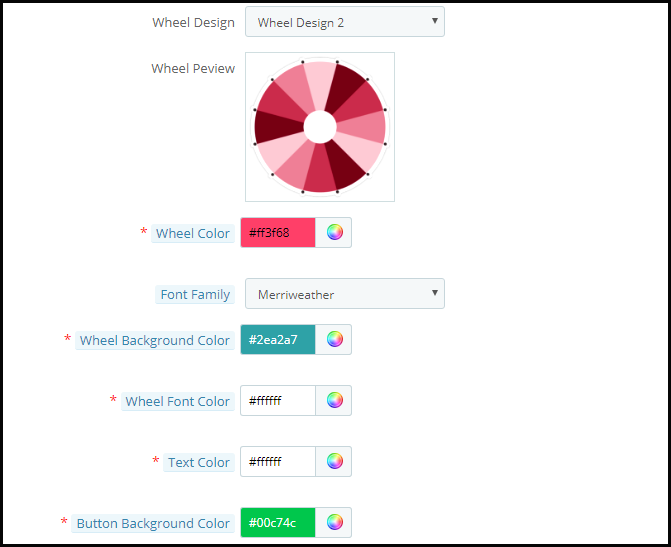
2. Wheel Design: Prestashop store admin can change the Design of the spin wheel. Prestashop admin can also see the preview of the Spin wheel in the admin panel itself.

3. Wheel Color: Prestashop admin can select the color of the Wheel using this option. The spin wheel is customizable in endless ways and the admin can even match it with the Prestashop store theme.

4. Font Family: Prestashop email subscription popup allows Prestashop admin to choose the Font suitable on the Newsletter subscription popup.

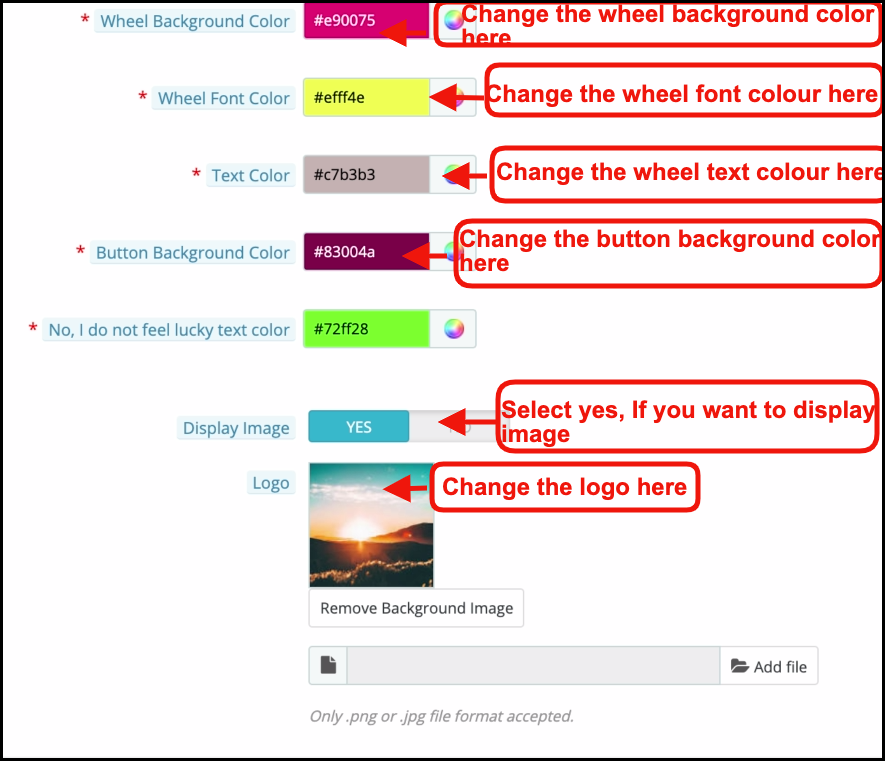
5. Wheel Background and Font color: Background color and Fonts on the Spin Wheel are customizable using these options.

6. Text Color and Button Background color: The Text color and the Button background color on the Email subscription popup is customizable using these options.

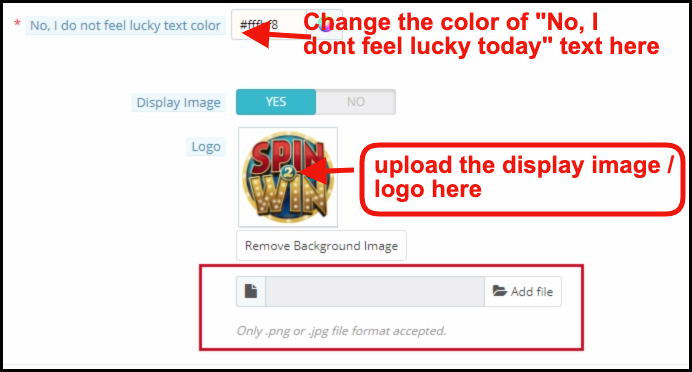
7. Display Image: You can enable or disable the Display Image by selecting the Yes or No button.

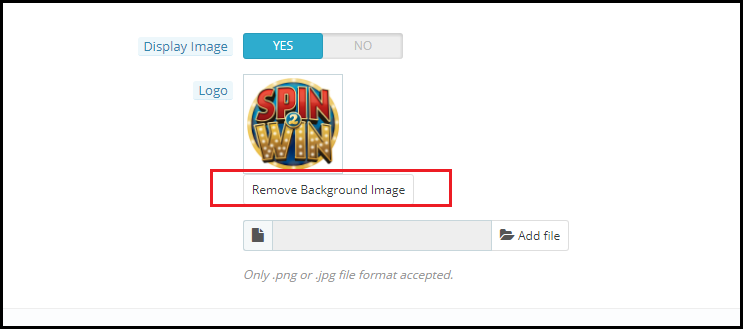
You can change the logo that displays with the spin and win pop up. The image of the logo to display can be selected from the device by clicking on the Add File button as shown in the image below.

The changes made here will be reflected on your website.

The spin and win pop up shown on the website includes the ‘Try Your Luck’ button. You can change the color of the button by changing the setting of ‘Button Background Color’.

Even the font of ‘I’m not feeling lucky’ can be changed as shown in the image below.

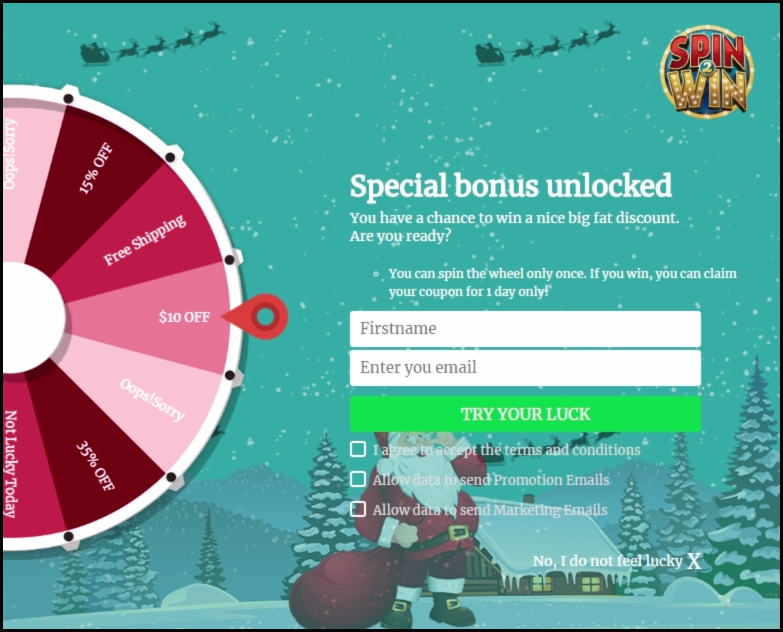
The entire changes made by you will be reflected on the front end as shown in the image below.

At last, the admin panel even provides an option to remove the background image if he wants to by clicking on the Remove Background Image Button.

3.4 How can the look and feel of the Spin and win pop up be changed?

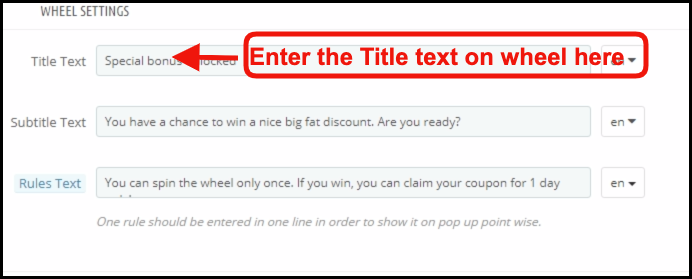
The admin can change the look and feel of the spin and win pop up by changing the Look and Feel Settings configuration in the ‘Wheel Setting’ option.

3.5 How can Prestashop admin change the Text on the Email Subscription pop up?

Prestashop admin can change the text on the Email Subscription pop up using the Text settings. Admin can customize the text in any language.

3.6 Can admin change the setting of the different slices of the Spin and win pop up?

Yes, even the settings and the text or offers available in the different slices of the spin and win pop up can be changed from the ‘Slice Setting’ option.

As you click on the setting, you will get an option to select the number of slices to show on the front end and the list of the various slices will be shown.

Select Number of Slices: With the Updated version of the spin and win module now admin can select out of six, eight, or twelve slices for the front end.

Each slice can be configured by clicking on the Edit button.

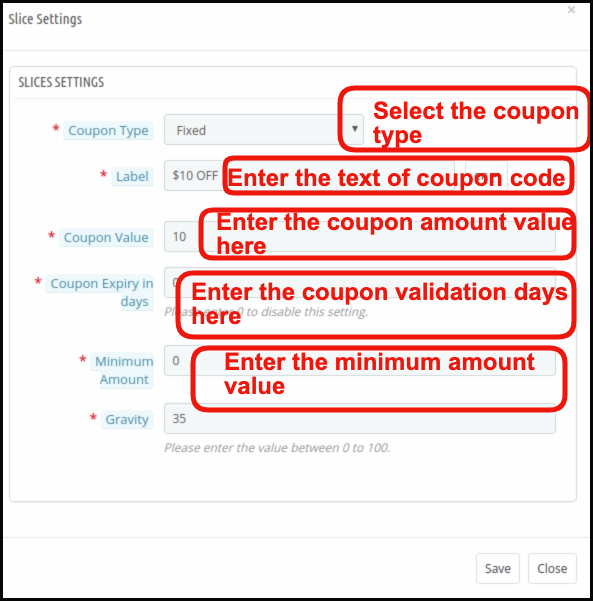
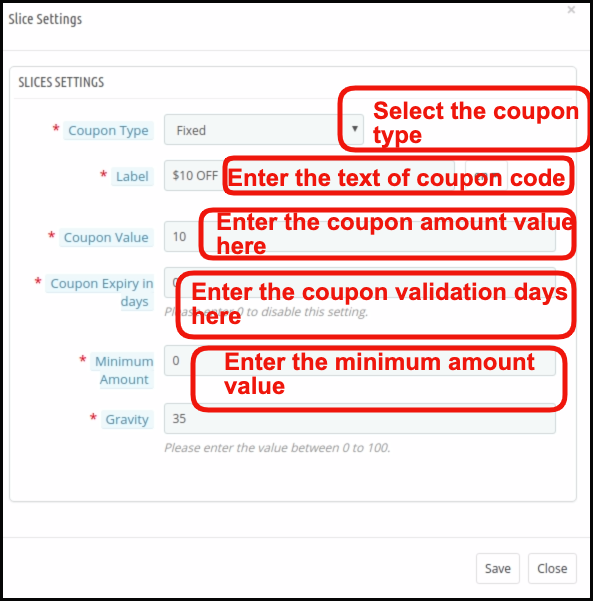
As you click on the Edit button, a pop up will appear where Prestashop store admin can set the Coupon Type (Which can be Fixed or in Percentage or gift or free shipping ), Label, Coupon Value, Coupon expiry in days, minimum amount, Gravity and fix coupon code. Save the changes and the same will be reflected in the spin and win pop up shown on your website.

3.7 How is the email customized?

Prestashop spin and win addon offer Mail Chimp, Klaviyo and, SendinBlue integration. The email Id entered in the email subscription popup is automatic with the store owner’s Mail Chimp, Klaviyo and, SendinBlue account. The emails captured are usable for personalized promotions.

3.8 How can I change the email settings?

The ‘Email Setting’ option allows the admin to customize the email templates that are sent to the customers.

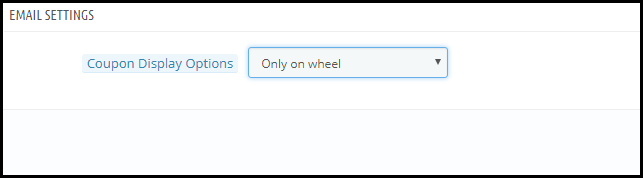
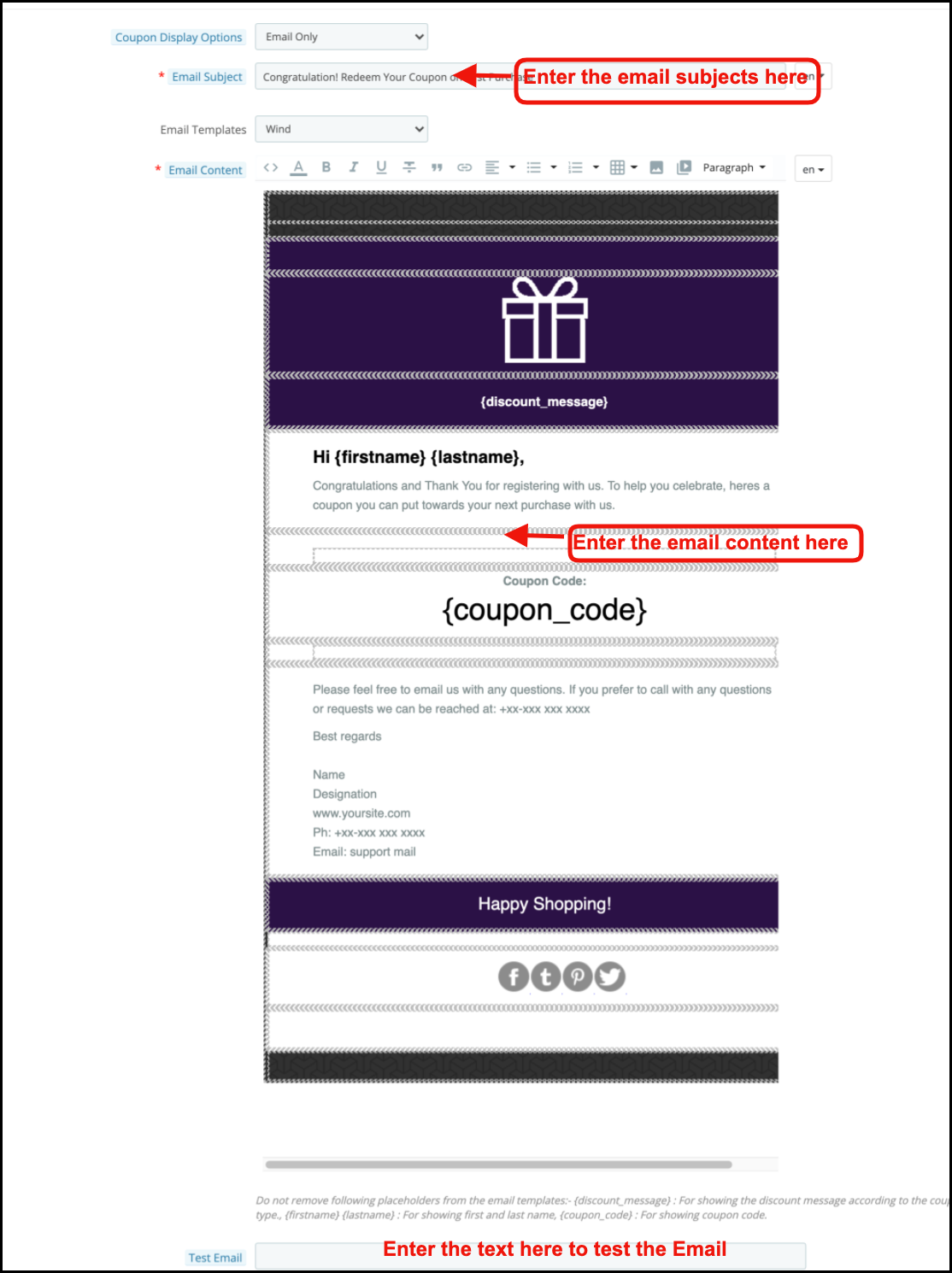
Coupon Display Options: It allows the admin to choose the places where he wants to display the coupon. Namely ‘Only on Wheel’, ‘Email Only’, ‘Email & Wheel’.

Email subject: Set the subject of the email in this tab.

The Email Templates: In the next tab sellers can choose the templates from the available templates.

Email content: In this tab, the store owner can customize the email body at his convenience.

3.9 GDPR Settings

GDPR or General Data Protection Regulation is a new act that will be enforced from 25 May 2018. It is mandatory for all the companies which are handling the personal data of EU citizens. GDPR offers various rights to the customers (mentioned below) which helps them to keep their data safe and secure.

1. The right to be informed

2. The right of access

3. The right to rectification

4. The right to erasure

5. The right to restrict processing

6. The right to data portability

7. The right to object

8. Rights concerning automated decision making and profiling

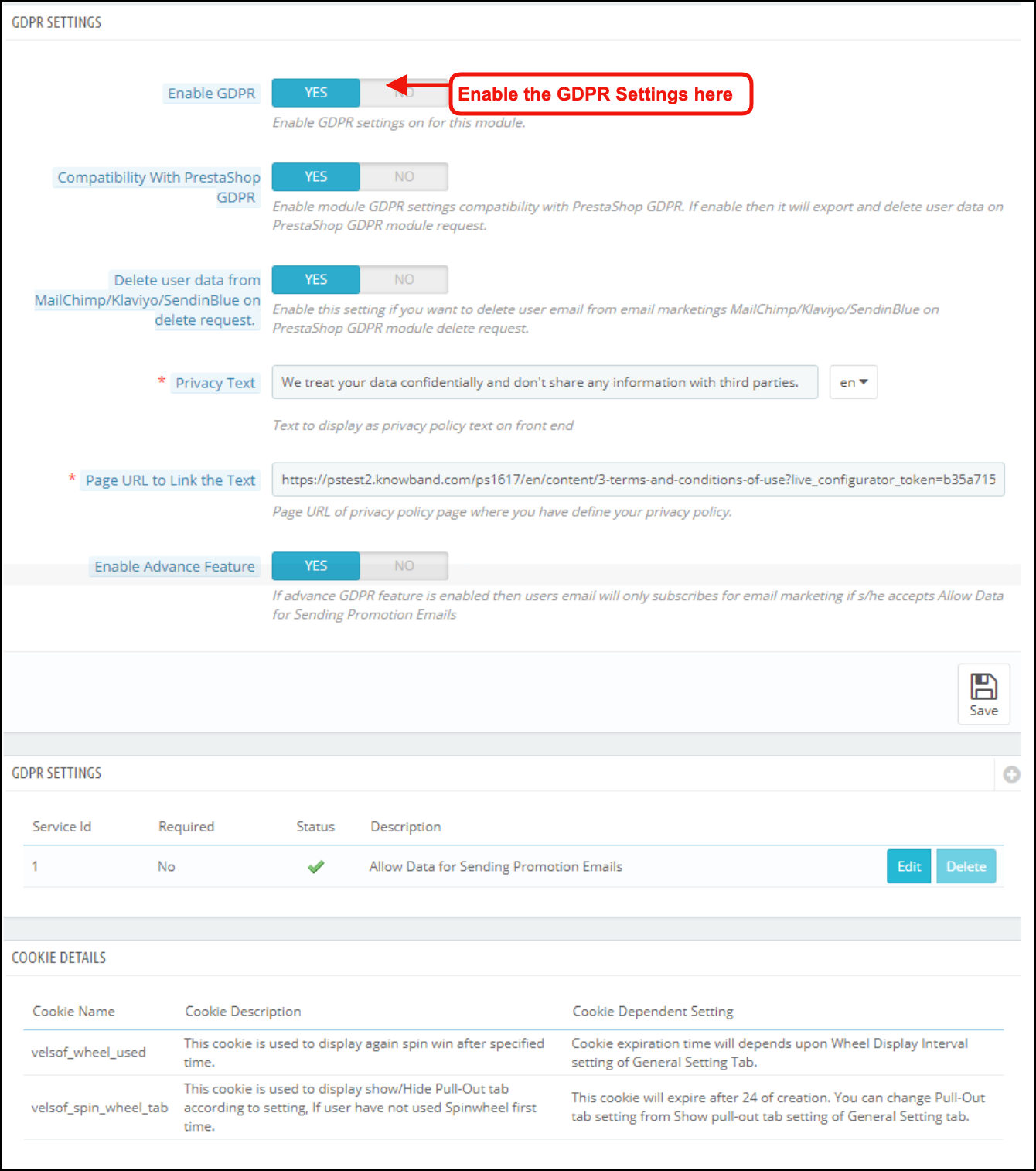
GDPR settings will help the Prestashop store admin to comply with these rules. Please refer to the attached screenshot in which we have highlighted the GDPR Settings tab.

a) Enable GDPR: Enable or disable the GDPR options using this option. There are the following options in the GDPR settings tab for the merchants to make the popup module compliant with the GDPR. The GDPR settings will remain unavailable by default and as per the business need, the store admin needs to enable it.

b) Compatibility with Prestashop GDPR: Admin has the option to enable/disable this feature. If you are using the official GDPR module then you must need to enable this setting. The main purpose of this feature is to export and delete user data on the PrestaShop GDPR module request. It is also compatible with Prestashop GDPR Module developed by Knowband.

c) Delete user data from MailChimp/Klaviyo/SendinBlue on delete request: As the Spin and Win pop-up addon syncs the captured email ids to the MailChimp/Klaviyo/SendinBlue email service providers (third-party service providers, so if this setting is on and you use the services of any one of these email service provider then on the data deletion request the subscriber details will get deleted automatically).

d) Privacy Text: The module will add a checkbox to the pop-up design with the privacy text; this text will be visible to the front-end user at the time of entering the email id in the email box.

e) Page URL to Link the Text: Admin can add the link to “Privacy Policy” or any other page with this message.

f) Enable Advanced Feature: This option allows the store admin to add more checkboxes to the pop-up design for marketing permission or any other permission like age verification (age should be 16+).

If the admin enables the Advance Feature setting, then he will be able to access the additional checkbox setting option. As per requirement, the admin can add multiple checkboxes.

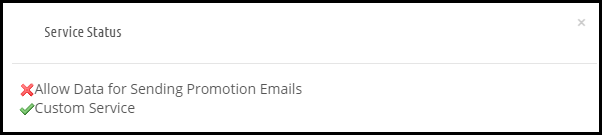
g) Service Settings: All the additional checkboxes that the admin adds will be listed under the Service Settings. Admin can add multiple checkboxes with ease.

How to add a new checkbox:

1. Click on the (+) sign to add a new checkbox.

Note: By default one service will be listed on the service list and the admin can update the text for the service.

2. On clicking the + sign will open a pop-up and admin need to enter the details like – Service Label, Make service mandatory and Enable Service.

  • Service Label: This is a text input field. The text entered here will be visible to the front-end user.
  • Make Service Mandatory: This is a toggle button. If this is set to Yes, then this field will be marked as Mandatory, and without confirming the checkbox visitors will not be able to get the offer.
  • Enable Service: Admin has the choice of Enable/Disable a service at any time.

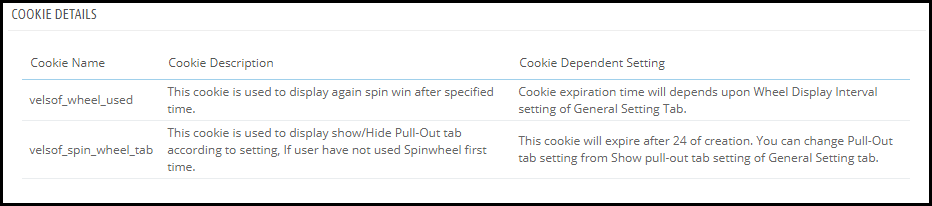
Cookie Details:

As the Spin and Win module uses the Cookies so the description and the use of these cookies have been listed in the section so that the admin can put these details on the Cookie Policy or Privacy Policy page.

Record of consent:

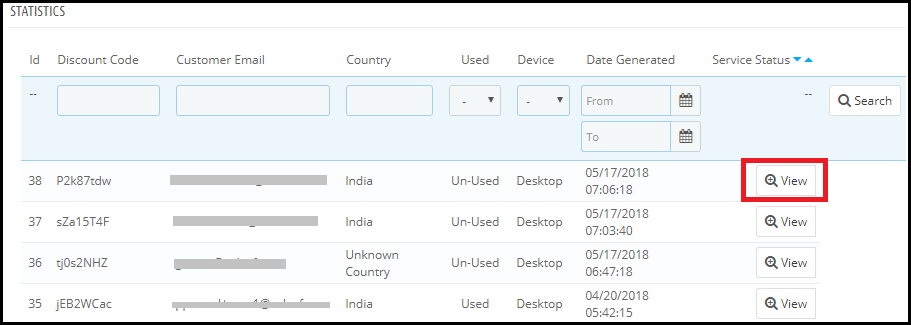
As soon as the user opt-in for the promotion and spin and the wheel to get the discount coupon code. The Spin and Win Pop-up module keeps the proof of the opt-in, as it is needful for the lawful processing of the captured data. As the unique coupon code is generated each time so the Statistics tab of the Spin and Win GDPR Compliant Module also records the permissions of the users. Please refer to the attached screenshot.

On clicking the view button admin can check the permission of the user.

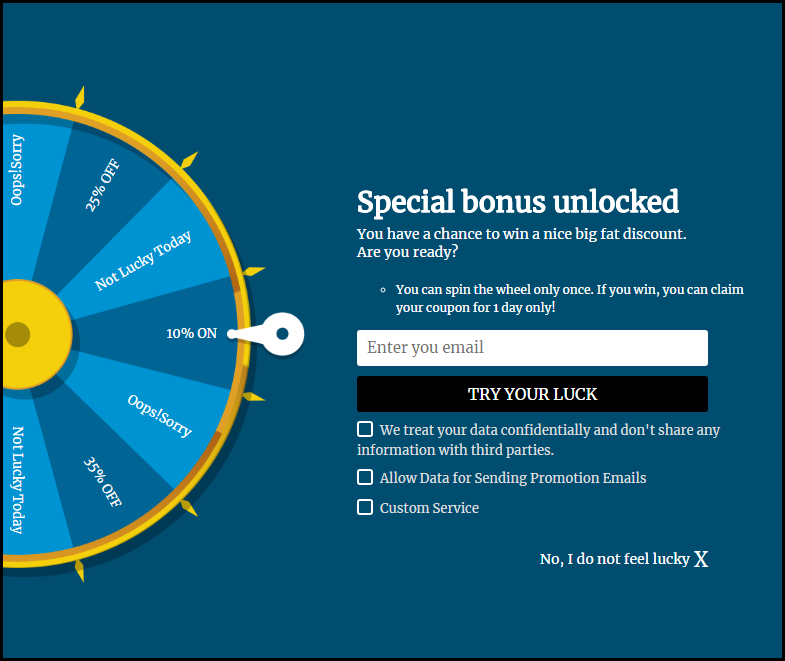
After enabling the GDPR Settings the Spin and Win pop-up design will look like this –

3.10 How is the statistical report of the Spin and win pop up generated?

Yes, the Prestashop admin has complete access to the statistical report of the visitors who spin the wheel and claim the coupon generated by the same. The report is generated in both graphical and tabular format.

(New Feature) Export Email List: Now Prestashop Exit Pop Up allows the store admin to export the list of email subscribers by clicking the Export Email Button on the Statistics Setting Page.


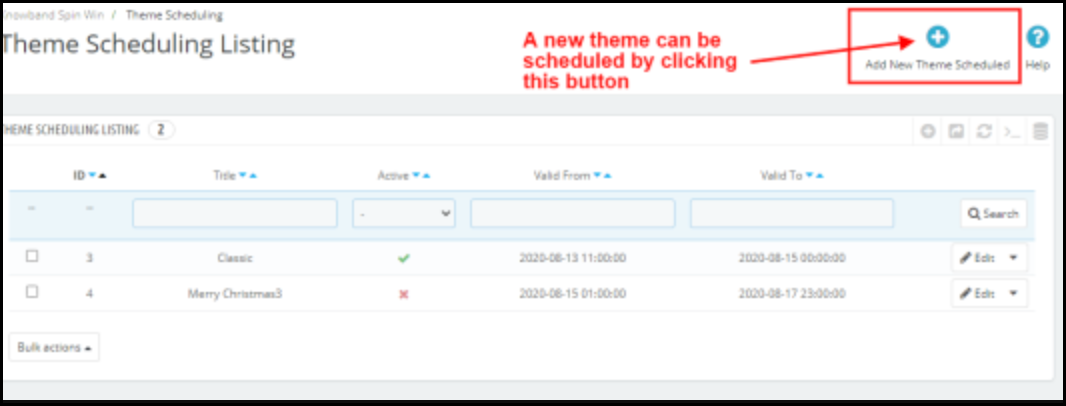
4.0 Theme Scheduling

Theme Scheduling is the new feature in Prestashop Spin and Win email subscription module. This feature allows the admin to select the validity date and expiry date for a particular theme. Prestashop Store owner can now set a schedule for displaying a specific theme on a particular occasion and this will automatically change to the default theme on the theme deactivation date.


Add New Theme Schedule: Prestashop store admin can add a new theme schedule by clicking the ‘Add New Theme Schedule’ button.

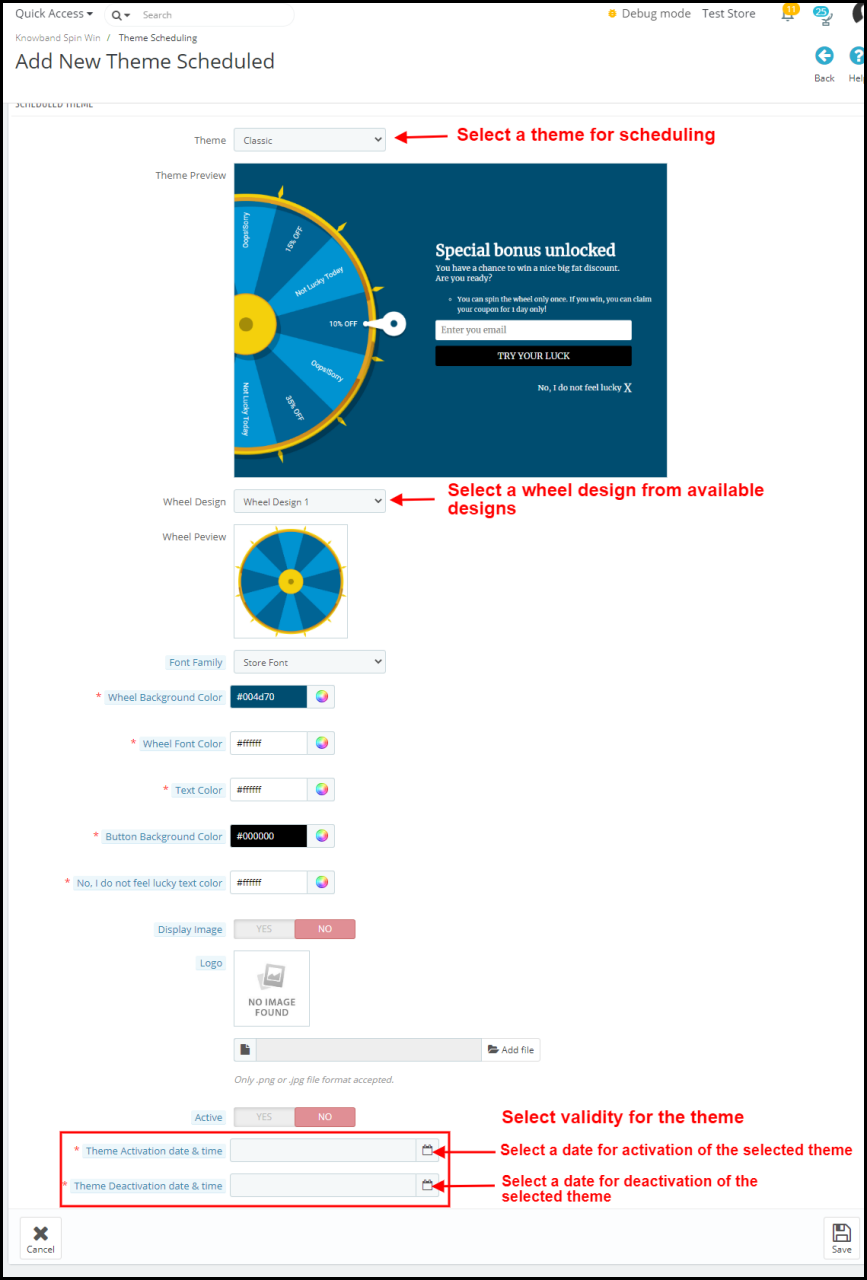
For this, you can select the theme type and change the look and feel of the wheel. (refer 3.3  Look and Feel Setting)

The new feature in Theme Scheduling

Active: With Prestashop spin and win module admin can activate or deactivate a new theme schedule by a toggle button.

Theme Activation date and time: If the new theme is activated, the store admin will have to enter the date and time for the activation of a particular theme.

Theme Deactivation date and time: The activated theme will be deactivated on the date and time entered in this tab. This allows the admin to apply a theme for the Spin and Win module for a fixed time and the store admin can plan this way before the special day.


Disclaimer: In case the “Spin and Win” wheel popup does not display at the front, kindly clear the cache or delete the cookies. Sometimes cookies prevent the popup from displaying at the front.

You may also be Interested In:

https://www.dailymotion.com/video/x6knw2k

https://www.authorstream.com/Presentation/John_Michael-3460323-prestashop-spin-win-upload/