Selling on popular platforms expands your business growth and gives you a platform where millions of customers visit every day. Etsy Marketplace is one such opportunity where sellers can reach the zenith. With the aid of Etsy Marketplace Integration extensions, every seller can dream about selling on Etsy with ease.
Etsy is a community of one of a kind. Etsy is a worldwide online marketplace where individuals come together to produce, sell, and purchase and collect unique products. It supports independent creators. There is no warehouse for Etsy, just millions of people selling the stuff they love. The entire selling process is easy, helping you directly connect with manufacturers to find something extraordinary.
Why Do You Need a Marketplace Integration Extension?
If you are a seller or a manufacturer of creative products then this is the platform you are looking for. Managing things over two different platforms can be time taking and required extra effort twice. To save you from this problem, KnowBand created some super-smart marketplace integrators that connect your eCommerce store with the Etsy Marketplace and allows you to manage everything from your store. There are two main reasons you need a marketplace integration module:
- It Saves Time
- Reduces Extra Efforts
Beyond this, there are several benefits of using a marketplace Integration. Integration of the Etsy API offers the best solution for the listing of goods and synchronizes the product specifics such as price, definition, photos, inventory, etc. to the ongoing Etsy store.
Sellers can handle the shipping and order processing for the Etsy shop from their own eCommerce platform with the use of the Etsy API integration module.
Sellers can also configure cron jobs in order to simplify the synchronization method.
KnowBand’s Etsy Marketplace Integration has Proven to be Useful to Sellers
It’s the best time to share some excellent news on the client’s reviews! The Marketplace integration module is connecting many eCommerce stores to Etsy to sell seamlessly. With all-new capabilities, the plugins will help you scale your business much more easily.
The Etsy Marketplace Integration Module has proven to be so useful to sellers that they have been able to seamlessly operate multiple stores with it. We were in constant contact with them at KnowBAnd, understanding their needs, assisting them in their growth, and developing additional features for the much-loved App. Let us now explain what these are. than before.
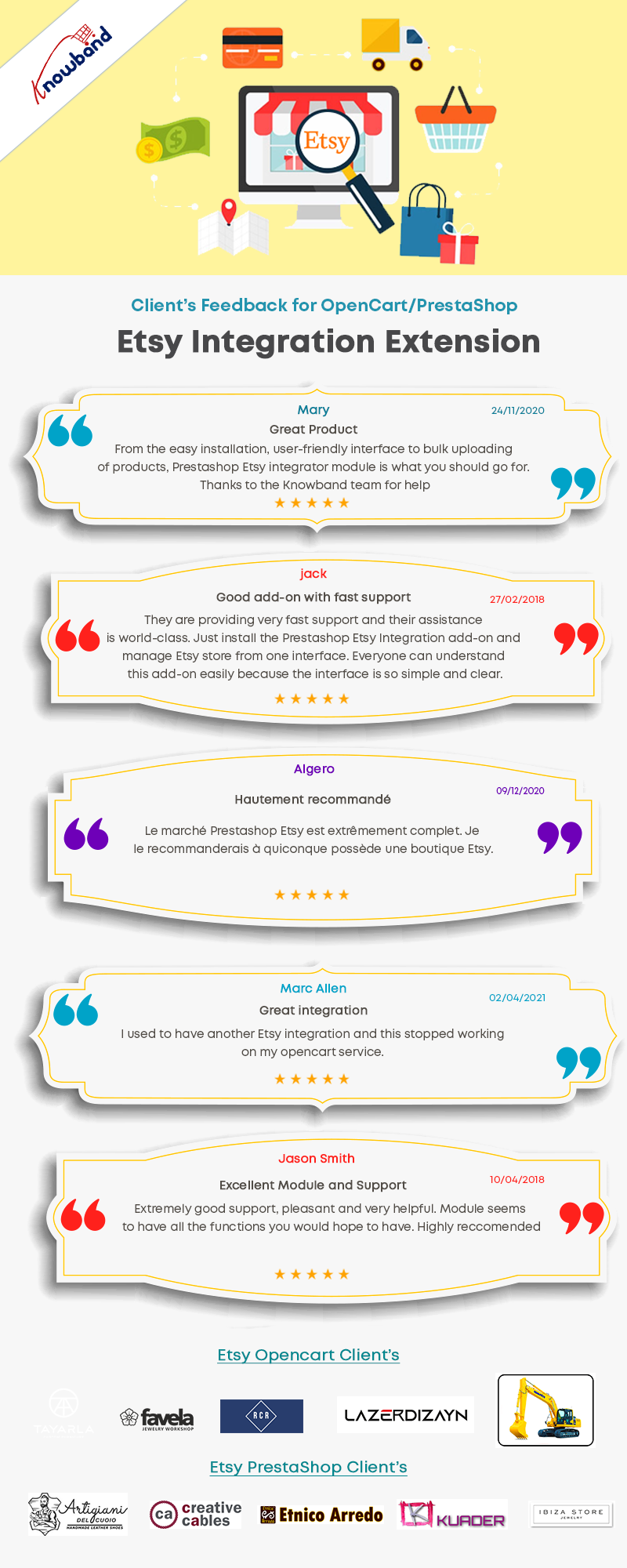
Clients are happy with KnowBand’s Etsy Marketplace Integration Facilities
How Etsy Marketplace connector helps in selling Products on the Etsy platform?
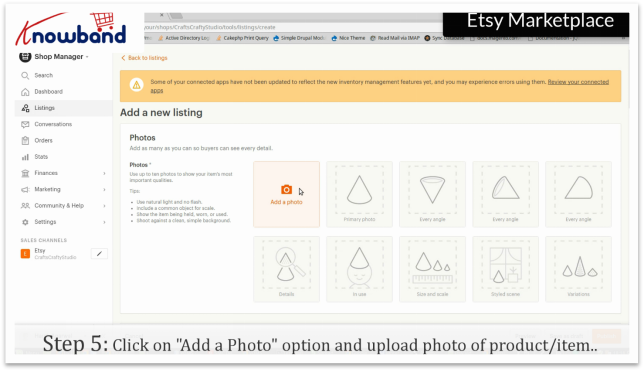
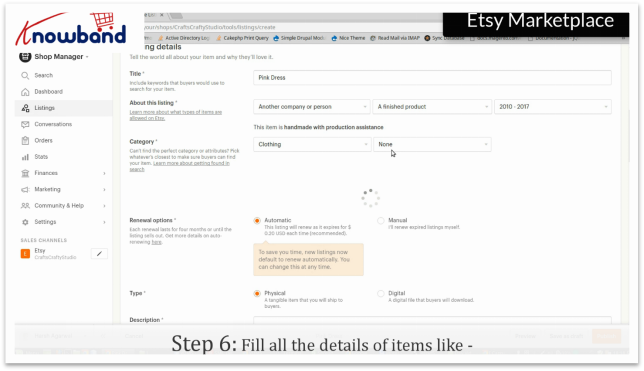
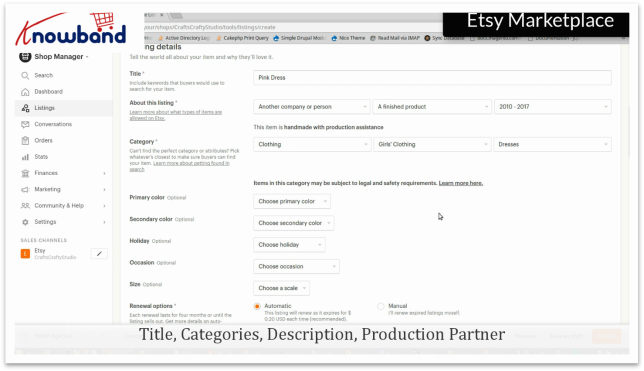
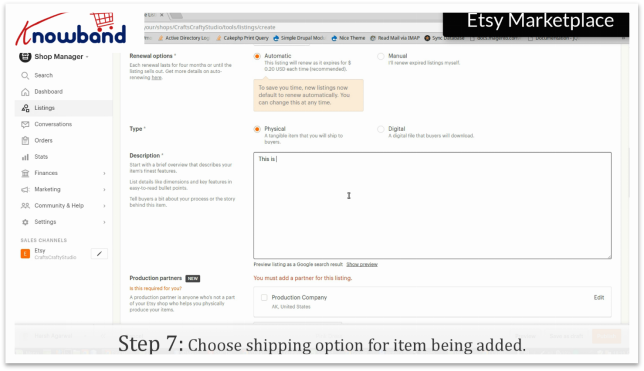
The Etsy marketplace integration is a tool that enables sellers to list and sell their products on the Etsy marketplace with ease. This module reduces the efforts of listing and inventory management.
In four easy steps, you can connect Etsy and your eCommerce store:
- Create an Etsy seller account: An Etsy seller account must be created by the Magento store administrator.
- Etsy’s Setup App: Create a marketplace app on Etsy.
- Install and Configure: After you’ve set up the seller’s account and the app, you’ll need to install the Etsy integration plugin in your shop. Configure your Etsy shop to meet your needs.
- Start Selling: The products in the marketplace are now ready to be sold. The Etsy Magento Integration extension’s admin interface makes it simple to process orders received from the marketplace.
KnowBand’s Etsy-Marketplace Integration Module for major eCommerce Platforms:
The Etsy integration extensions for various eCommerce platforms such as Magento, Prestashop, OpenCart, and Shopify are provided by KnowBand. With more than 10 years of experience, KnowBand’s development team has developed seamless solutions for various eCommerce stores.

The Etsy integration extensions developed by KnowBand are flawless and have been tested for the respective platforms by the Prestashop, OpenCart, and Magento developers. All the criteria of the PrestaShop, OpenCart and Magento testers have been met by the integration extensions.
How to sell PrestaShop Products on Etsy Marketplace?
To sell your PrestaShop products on Etsy Marketplace, integrate your PrestaShop store with KnowBand’s PrestaShop Etsy Marketplace Integration module.
How to sell OpenCart Products on Etsy Marketplace?
For selling your OpenCart products on the Etsy store, link the two using the marketplace integration extension developed by KnowBand.
How to sell Shopify Products on Etsy Marketplace?
Shopify is growing rapidly and to help you bring your Shopify products to Etsy, KnowBand’s Etsy – Shopify Integration is an amazing plugin.
How to sell Magento Products on Etsy Marketplace?
We also have developed the Etsy-Magento connectors for both Magento and Magento 2 eCommerce websites.
How does Etsy Marketplace Integration assist the sellers?
Store Synchronization Made Simple
It synchronizes the entire eCommerce store products to your marketplace profile in real-time.
Inventory Management and Quick Product Listing
Moreover, it allows the store merchant to enter products in bulk. Also, the seller can create multiple profiles for the Etsy store.
Order Management
The eCommerce store’s admin can process the order from the admin interface just like any other order. The Etsy connector has a dedicated tab for specifying order statuses.
Shipping Management
The admin can develop their own shipping templates for Etsy customers, and they can offer an unlimited number of shipping alternatives as well as map shipping entries to the templates they’ve created.
Cron to automate the process
By executing cron in the back-end of the Etsy Integration plugin, the admin can add, remove, relist, or update product descriptions and pricing. There is no need for manual synchronization with the crons provided by the Etsy integrator.
Top Features of Etsy Marketplace Integration for PrestaShop, OpenCart, and Magento Platforms:
Facilities offered to Etsy Sellers with Marketplace Integration plugin in a nutshell:
- User-Friendly Interface
- Allows uploading of the products in bulk with ease
- Map Attribute and category of eCommerce store products with Etsy marketplace characteristics attributes and category
- The tags can be defined by the store admin when creating the profile, and these tags will be synced with the Etsy shop. Tags aid in the visibility of products in search results.
- This extension allows the store administrator to create templates for the shipping
- Gives you complete control of inventories. The administrator can look at the errors that happened throughout the product listing process.
- The ability to sync the actual or special price of the products is available in the Etsy Integration Extension. The type of price – Actual or Special – can be chosen by the store admin when building the profile.
- You can easily manage orders from your eCommerce store
- There is an option to hide the out-of-stock products.
- The secondary language is also supported by this extension.
- Set a custom price for items listed in the Etsy store. The Etsy Integration Extension enables store administrators to list things on Etsy at varying prices.
- The store owners now have the opportunity to reveal tax breakups in the order of Etsy.
- Set the product image size from the admin to sync on Etsy Marketplace.
- The admin can set the maximum quantity (Alter Quantity) of products to be synced to Etsy.
There are several features added to the Etsy Marketplace Integration Module which is available for all the major eCommerce platforms such as PrestaShop, Magento, and OpenCart.
Click on the links below to take the demo tour of the Etsy Marketplace Integration Module:
- Magento-Etsy-Marketplace-Integration
- Magento-2-Etsy-Marketplace-Integration
- Opencart-Etsy-marketplace-integration
- Prestashop-Etsy-marketplace-integration
Conclusion: The marketplace integration module is easy to install and configure. The Etsy connection module saves online businesses time and effort by providing an intuitive product, inventory, and order management system. The Etsy integrator walks you through simple steps to get started selling on Etsy with this connection.
For the first 3 months after purchasing the Etsy Integration Extension, Knowband offers totally FREE technical support. We’re even helping you list the products in the ETSY store. Sellers can easily start selling from their existing eCommerce store with the help of the Etsy integration module and reach a wider audience.
KnowBand has everything to uplift your eCommerce business
Every seller who is having an eCommerce website and planning to expand on a marketplace like ETSY, eBay, or Google Shopping can explore the Knowband’s marketplace integration modules here.
Also, you can create your dream website like Etsy Marketplace using a Multi-vendor marketplace plugin. You can discuss your requirements at support@knowband.com. Our team will be happy to help you.