

As 7 principais estratégias de e-mail para recuperar carrinhos abandonados usando o Knowband
Conheça as 7 principais estratégias de e-mail da Knowband para recuperar carrinhos abandonados e aumentar suas conversões com automação inteligente.
Almost every e-commerce business faces issues with customers leaving items in their cart without completing the purchase. Customers add products but leave without purchasing, resulting in lost sales and engagement opportunities. That’s why Knowband’s Abandoned Cart PrestaShop, Spin & Win PrestaShop, and Back In Stock PrestaShop modules offer a powerful way to recover these potential sales through emails.
Here are seven effective email strategies to bring those customers back.
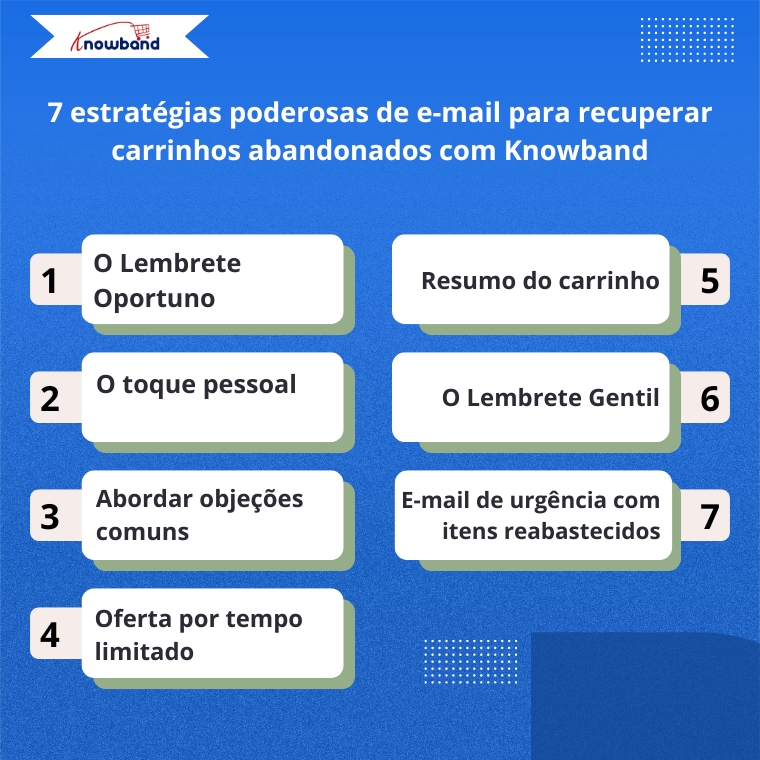
1. The Timely Reminder
Time is of the essence when it comes to recovering abandoned carts. That’s why the Abandoned Cart Addon for PrestaShop lets you send the first reminder email 1-3 hours after abandonment, when your store is still fresh in the customer’s mind. Additionally, Knowband’s Abandoned Cart Addon lets you set up automated sequences with precise timing, maximizing your recovery chances.
2. Targeted Email Engagement
One way is to address customers by name and mention specific items they left behind. Knowband’s PrestaShop Abandoned Cart Module automatically captures this information, allowing you to create personalized emails that show customers that you value their individual shopping experience.
3. Address common objections
There can be many reasons for abandoned carts, such as product cost, shipping cost, payment, or technical issues. Knowband’s Spin & Win module allows admins to add discount coupons, which can motivate customers to come back and make new purchases.
4. Limited time offer
Create urgency with time-sensitive offers. The Abandoned Cart module lets you include emails with discounts and coupons, as well as expiration dates for discount codes, to encourage quick action. For example, a 10% discount that expires in 24 hours can be the perfect motivation to complete a purchase.
5. Cart Summary
Provide a clear summary of the abandoned cart in your email. This includes product images, names, quantities, and prices, making it easy for the customer to remember what they were interested in. Abandoned Cart Module for PrestaShop Knowband sends the email when the user abandons the cart, so keep the email template concise and visually appealing to pique their interest and remind them of the value they were about to purchase.

6. The Gentle Reminder
Sometimes, customers abandon their carts by mistake or forget that they left items behind. A gentle reminder email can be sent a day after abandonment using Knowband’s Abandoned Cart Module and can impact them without being too pushy. Additionally, this email should be friendly and polite, encouraging them to return and complete their purchase.
7. The Urgent Email with Restocked Items
If an abandoned item is back in stock, the retailer can send an email informing the customer that the desired item is back in stock. This can be achieved by implementing the PrestaShop Back in Stock Module by Knowband, which can help create urgency, especially when products are in limited supply or high demand, and can prompt the customer to act quickly.
How these modules work
The Abandoned Cart Module helps you track, manage, and recover incomplete purchases through automated and personalized email campaigns. Additionally, the Prestashop abandoned cart tracking add-on allows merchants to set up smart reminders, offer discounts, display product images, and include one-click recovery links, making it easier for customers to return and complete orders.
The Spin & Win Module for PrestaShop , on the other hand, helps prevent abandonment before it even happens. Furthermore, this interactive pop-up module for PrestaShop captures visitors’ emails, offering them the chance to win attractive discounts through a gamified interface. Furthermore, this not only adds fun to the user experience but also offers coupons for purchases and grows your email list for future marketing.
The Back in Stock Module for PrestaShop allows your customers to subscribe to restock alerts for out-of-stock products. Additionally, as soon as an item becomes available again, customers will receive an automatic email notification, giving them the chance to return and complete their purchase, without any manual effort on your part.
Bringing it all together with Knowband
Implementing these strategies becomes simple with Knowband’s PrestaShop Abandoned Cart Module, PrestaShop Spin & Win Pop, and PrestaShop Back In Stock.
These modules offer:
- Automated email sequences with custom timing
- Personalized content for each client
- Built-in discount code generator
- Detailed analytics to refine your approach
- One-Click Cart Recovery Links
- Mobile Responsive Email Templates
Additionally, these PrestaShop modules from Knowband are easy-to-use add-ons that allow you to track recovery rates and revenue earned, helping you continuously improve your abandoned cart strategy.
Start recovering lost sales today
Cart abandonment doesn’t necessarily mean lost revenue. With the PrestaShop Abandoned Cart Module, PrestaShop Spin & Win Entry Pop-Up Module, PrestaShop Back in Stock and these seven email strategies, you can effectively bring customers back and significantly increase your conversion rates.
So, install Knowband’s PrestaShop modules today and turn abandoned carts into completed orders with these proven email strategies.
- O melhor módulo de SEO para PrestaShop: 10 recursos essenciais para melhorar o posicionamento nos mecanismos de busca.
- Como criar um blog otimizado para SEO no PrestaShop: um guia prático para conteúdo, SEO e busca com IA.
- Knowband lança gerenciador de blogs para PrestaShop com inteligência artificial para simplificar conteúdo, SEO e engajamento.
- 7 problemas comuns no comércio eletrônico e como resolvê-los em 2026
- Módulo de Blog do PrestaShop: Como os proprietários de lojas estão gerando tráfego orgânico diretamente de suas lojas virtuais sem um CMS de terceiros.