Level Up Your Mobile Apps with PrestaShop Mobile App Builder Addon v6.1

The eCommerce landscape is evolving rapidly, and having a dedicated mobile app is no longer a luxury—it’s a necessity. With the release of PrestaShop Mobile App Builder Addon v6.1, Knowband empowers PrestaShop store owners with advanced features that make mobile app creation easier, more customizable, and more profitable. Whether you’re new to mobile apps or looking to enhance your existing setup, this update has something for everyone.

Why Mobile Apps Are Crucial for PrestaShop Stores?

A mobile app is an essential tool for modern eCommerce businesses. Furthermore, with the rise of mobile shopping, having a PrestaShop Mobile App ensures a seamless shopping experience for your customers. Thus, using an App Maker like Knowband’s PrestaShop Android and iOS Mobile App Builder Addon, you can create user-friendly apps tailored to your brand’s identity.

Let’s dive into how the latest v6.1 update helps you take your PrestaShop eCommerce Mobile App to the next level.

What’s New in PrestaShop Mobile App Builder v6.1?

The new features in the PrestaShop Android and iOS Mobile App Builder Module are designed to give store admins greater control over their apps.

Here’s what’s included in the v6.1 update:

1. Customizable Tab Bar Layout:

With v6.1, you can now customize your app’s tab bar layout. This feature allows you to:

  • Add unique icons for each tab.
  • Rename tabs to align with your brand tone.
  • Create a seamless navigation experience for your users.

Customizable tab bars not only improve the look of your Mobile App for PrestaShop but also enhance user engagement. Your app can now reflect your brand’s personality in every detail.

2. In-App Advertising:

Monetizing your PrestaShop Mobile App just got easier! With the in-app advertising feature, you can:

  • Display advertisement banners in strategic locations within the app.
  • Manage ads easily from the module backend.
  • Earn additional revenue without disrupting the shopping experience.

This update transforms your PrestaShop Android and iOS Mobile App Creator Addon into a revenue-generating tool, making it a win-win for both you and your users.

How Does PrestaShop Mobile App Builder Help Store Owners?

Knowband’s Mobile App Builder Addon for PrestaShop simplifies app creation and management for store admins. Here’s why it’s a must-have:

1. User-Friendly Interface:

The PrestaShop Free Mobile App Maker provides an intuitive backend interface. Moreover, the admins can easily customize their app’s layout, colors, and features without requiring technical expertise.

2. Supports Android and iOS Platforms:

Whether your customers use Android or iOS devices, the PrestaShop Android and iOS Mobile App Maker Addon ensures a seamless shopping experience. It supports:

  • PrestaShop Android App Builder for creating apps compatible with Android devices.
  • PrestaShop iOS App Maker for apps that cater to Apple users.
  • No Coding Required:

Don’t know how to code? No problem! The PrestaShop Free Mobile App Builder for Android and PrestaShop Free Mobile App Creator for iOS lets you design professional apps without writing a single line of code.

Benefits of Using PrestaShop Mobile App Maker!

Using the Android and iOS App Maker for PrestaShop gives you a competitive edge in the eCommerce market. Here are some key benefits:

Enhanced User Experience:

Apps built with the Prestashop App Maker are optimized for mobile devices, offering faster load times and better navigation compared to mobile websites.

Increased Sales:

Mobile apps encourage repeat purchases by providing a convenient shopping experience. Therefore, features like push notifications and a smooth checkout process can significantly boost sales.

Brand Visibility:

Having a PrestaShop Free Mobile App ensures your brand stays on customers’ devices, increasing visibility and fostering customer loyalty.

Build Android and iOS App for Your Store

No Coding Skills Required

SHOP NOW

Why Choose Knowband’s Mobile App Builder Addon?

Knowband’s Prestashop Android and iOS Mobile App Builder Addon stands out for its flexibility, affordability, and ease of use.

Features That Set It Apart:

  • Seamless integration with your PrestaShop store.
  • Fully customizable templates and themes.
  • Regular updates, including the new tab bar customization and in-app advertising.

Conclusion!

The release of PrestaShop Mobile App Builder v6.1 brings game-changing features that make app creation more dynamic and profitable. With customizable tab bars and in-app advertising, store admins can now create a truly unique PrestaShop eCommerce Mobile App while generating additional revenue.

Whether you’re a seasoned PrestaShop user or just starting out, the PrestaShop Free Mobile Apps created with this module will elevate your business to new heights.
Don’t miss out on the opportunity to reach your audience with a professional, user-friendly app built using the PrestaShop Free eCommerce Mobile App Maker. 

AI at Your Fingertips: Prestashop ChatGPT Content and Translator Addon

In the fast-paced world of eCommerce, creating engaging content and managing translations can be time-consuming and challenging. To help Prestashop store owners streamline these tasks, Knowband has introduced an innovative solution: the Prestashop ChatGPT Content and Translator Addon. This powerful tool, powered by AI, simplifies content creation and translation, making it easier than ever to manage your online store.

What Is the Prestashop ChatGPT Content Generator?

The Prestashop ChatGPT Content Generator is an advanced addon that leverages artificial intelligence to create high-quality content for your eCommerce store. Whether you need product descriptions, meta titles, or category content, this module can handle it all. Furthermore, with AI capabilities at your fingertips, you no longer need to spend hours crafting engaging content.

This AI content generator for Prestashop ensures that your content is optimized for search engines and resonates with your audience. Thus, from improving your website’s SEO to saving valuable time, this addon provides the ultimate content management solution.

Key Features of the Prestashop ChatGPT Content Generator Addon!

AI-Powered Content Generation:

The Prestashop ChatGPT SEO Content Generator uses advanced AI algorithms to produce SEO-friendly and engaging content. Furthermore, with just a few clicks, you can create professional-quality text that boosts your store’s online visibility.

Customizable Outputs:

Store owners can define specific keywords, tone, and structure, ensuring the content aligns with their branding and marketing strategy.

Time and Cost Efficiency:

Say goodbye to hiring professional writers or spending hours creating content yourself. Therefore, the Prestashop ChatGPT Content Generator Addon delivers high-quality results in seconds.

Introducing the Prestashop Translator Addon!

Running an international eCommerce store requires accurate and effective translation. The Prestashop ChatGPT Content Translator Addon is designed to address this need. Powered by AI, this module translates product descriptions, category pages, and other essential content with precision. It eliminates the hassle of manual translations, helping you expand your business globally.

Why Choose the Prestashop ChatGPT Translator Module?

The Prestashop ChatGPT Translator Addon is a game-changer for multi-lingual eCommerce. Here’s why it stands out:

AI-Powered Translation: This module delivers accurate, context-aware translations that maintain the original meaning and tone of your content.

Multilingual Support: Translate your store into multiple languages, breaking down language barriers and reaching a wider audience.

SEO Compatibility: Translated content is optimized for search engines, ensuring better rankings in international markets.

User-Friendly Interface: The module is easy to install and use, requiring no technical expertise.

Benefits of Using the Prestashop ChatGPT Content Generator and Translator Addon

Combining the power of the Prestashop ChatGPT Content Generator Module with the AI-powered translation addon for Prestashop gives store owners a significant edge. Here are some notable benefits:

1. Improved Productivity:

Both add-ons save time by automating the repetitive tasks of content creation and translation. This allows you to focus on other critical aspects of your business, such as sales and customer service.

2. Enhanced SEO:

The Prestashop ChatGPT SEO Content Generator creates content that aligns with search engine best practices. Thus, by using AI to generate keyword-rich descriptions and titles, the module helps improve your website’s visibility and drive organic traffic.

3. Global Reach:

With the Prestashop ChatGPT Content Translator Addon, expanding into international markets becomes seamless. Furthermore, you can offer a localized shopping experience for your customers, boosting trust and sales.

4. Cost Efficiency:

By using these AI-driven tools, you can significantly reduce the costs associated with hiring writers and translators, making it an affordable solution for small and large businesses alike.

5. Consistency and Accuracy:

AI ensures consistency in tone, language, and style across all content and translations, creating a cohesive brand identity.

How the Prestashop ChatGPT Addons Work?

Installation and Setup:

Install the module through your Prestashop back office. The user-friendly interface ensures a smooth setup process.

Content Generation:

Use the Prestashop ChatGPT Content Generator Addon to create content for specific pages, products, or categories. Customize the outputs by providing guidelines such as keywords or tone.

Translation:

Enable the Prestashop ChatGPT Content Translator Module to translate your store’s content into multiple languages. The AI ensures accurate and context-aware results.

SEO Optimization:

The addon works seamlessly to generate and translate SEO-friendly content, improving your store’s rankings in local and global markets.

Why Choose Knowband’s AI Addons for Prestashop?

Knowband is a trusted name in eCommerce extensions, known for delivering high-quality solutions that meet the evolving needs of online retailers.

Therefore, the Prestashop ChatGPT Content Generator Addon and the Prestashop ChatGPT Content Translator Addon are the latest innovations in their portfolio. Designed with user convenience and efficiency in mind, these addons are the perfect tools for any Prestashop store owner looking to simplify operations and enhance customer experience.

Generate and Translate the Content Effortlessly with AI

Read More..

SHOP NOW

Final Thoughts!

In today’s competitive eCommerce landscape, managing content and translations effectively is crucial for success. With Knowband’s Prestashop ChatGPT Content Generator Module you can harness the power of AI to streamline these tasks and take your store to the next level.

Whether you’re a small business owner or a large-scale retailer, these AI-driven addons offer unmatched value by saving time, reducing costs, and improving your store’s SEO performance. Don’t miss out on this opportunity to revolutionize your Prestashop store with AI content generation for Prestashop.

Prestashop ChatGPT Content Generator/Translator Addon – User Manual

The Prestashop ChatGPT Content Generator/Translator Addon is an innovative solution designed to revolutionize content management for your Prestashop store. This powerful module leverages advanced AI to streamline content creation and translation tasks, making it an indispensable tool for modern eCommerce businesses. Furthermore, with the Prestashop ChatGPT Content Generator Module, you can effortlessly create engaging product descriptions, product titles, and SEO-optimized content, enhancing your store’s visibility and customer experience.

The AI Content Generator for Prestashop goes beyond simple text creation by offering seamless integration with Prestashop ChatGPT Furthermore, the SEO Content Generator capabilities, ensure your content is not only unique but also search engine friendly. Additionally, the module includes a Prestashop ChatGPT Content Translator, which serves as an AI-powered translation addon for Prestashop, enabling store owners to expand their reach into new markets with accurate, context-aware translations.

Whether you’re managing content in multiple languages or aiming to improve the quality and efficiency of your content strategy, the Prestashop ChatGPT Content Generator Addon simplifies the process. Furthermore, the Prestashop ChatGPT Content Translator Module combines cutting-edge AI with user-friendly features, empowering merchants to save time and elevate their online store with high-quality, multilingual content.

1.0. Key Features Offered by Knowband’s Prestashop ChatGPT Content Generator/Translator Addon!

Effortless Content Creation: Generate high-quality product titles, detailed descriptions, and optimized meta tags effortlessly with the Prestashop ChatGPT Content Generator Module, saving time and ensuring consistency across your store.

Dual AI Engines: Powered by the latest ChatGPT 3.5 and 4.0 models, the Prestashop AI Content Generator module provides advanced options for generating creative content and translating it accurately to meet diverse store needs.

SEO-Friendly Content: Easily create SEO-optimized content for your Prestashop store using Knowband’s AI Content Generator, helping improve search engine rankings and driving more traffic to your store.

AI Translation Made Simple: Translate your store’s content into multiple languages seamlessly with the AI-Powered Translation Addon for Prestashop, enabling you to expand your business globally with minimal effort.

User-Friendly Setup: The Prestashop AI Content Creator offers a straightforward setup process, making it easy to use for all store admins, even those without technical expertise, ensuring a smooth onboarding experience.

Category and Meta Tags: Quickly generate and translate category names and meta descriptions with precision, ensuring consistency and professionalism in just a few clicks using this addon.

Bulk Content Generation: Ideal for stores with extensive catalogs, the module supports batch content generation, allowing you to process multiple items in one go and significantly boost efficiency.

Enhanced Store Management: Streamline your store’s content management tasks, enabling quicker product updates and improving operational efficiency for both small and large-scale businesses.

Multi-Language Support: With support for all languages, including right-to-left (RTL) scripts, and compatibility with various Prestashop versions, the module ensures flexibility and usability for global businesses.

2.0 How to Generate the ChatGPT Key for Module Configurations?

To enable ChatGPT functionality in your PrestaShop module, you must configure an API Key. Follow the steps below for a seamless setup process.

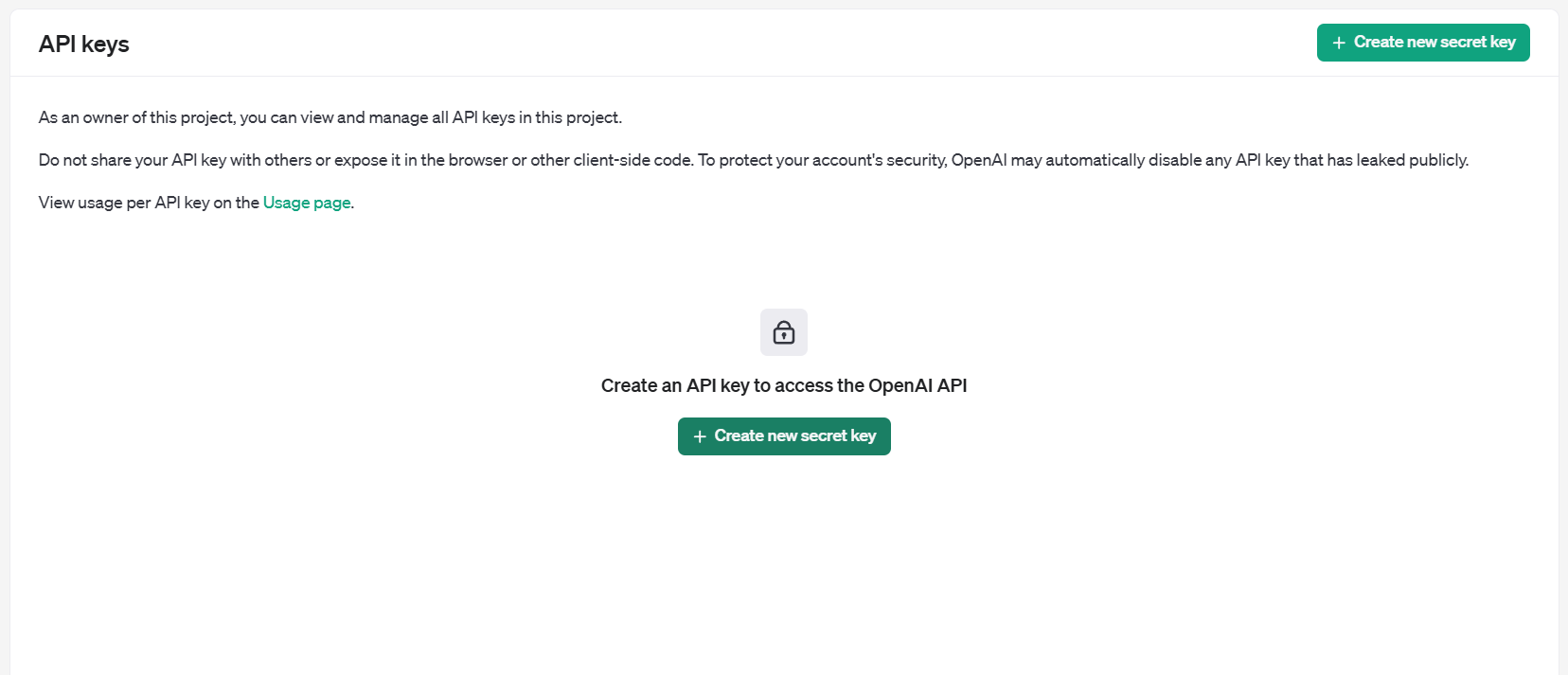
Step 1: Obtain an API Key

  • Visit the OpenAI API Key Generation Page.
  • Log in to your OpenAI account. If you don’t have one, create a new account to proceed.Once logged in, click the “Create new secret key” button.

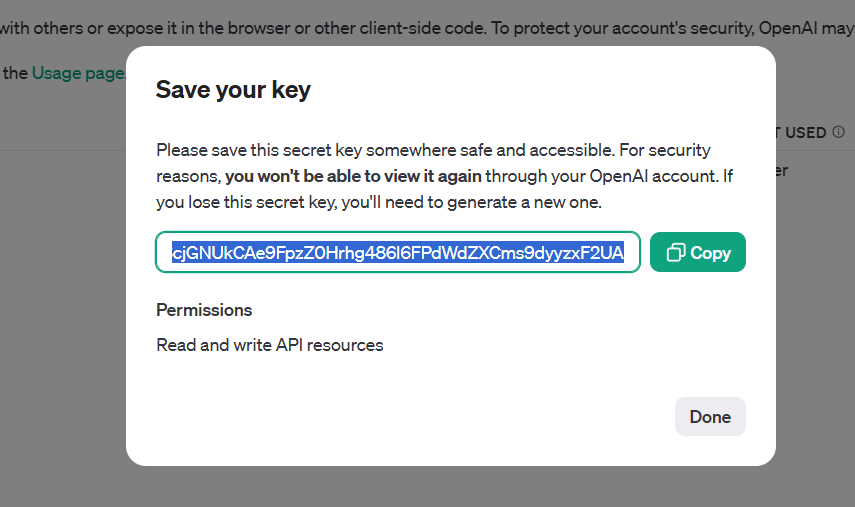
  • A unique API Key will be generated. Copy this key as you will need it in the subsequent steps.

Important: This is the only time the key will be displayed, so save it securely. The ChatGPT module will now be ready to interact with the OpenAI API, enabling its features within your PrestaShop store.

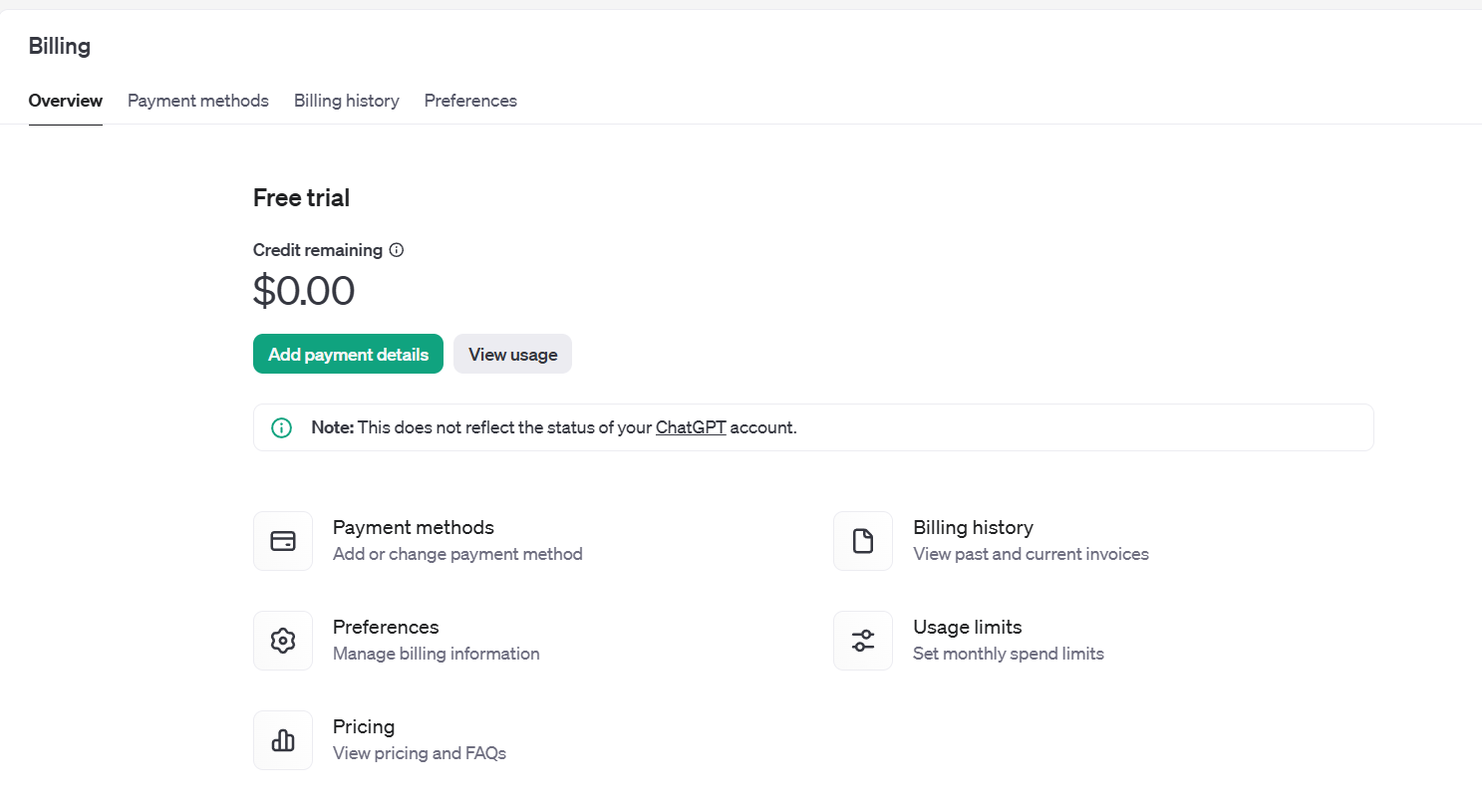
Important: Verify Billing Requirements!

To ensure uninterrupted functionality, confirm that your OpenAI account has an adequate credit balance:

  • Check your current balance and add funds if necessary.
  • Note: If your account balance is depleted, API requests from the ChatGPT module will fail.

3.0 Installation Guide for Prestashop AI Content Creator Addon:

Once you purchase the addon, follow the below steps:

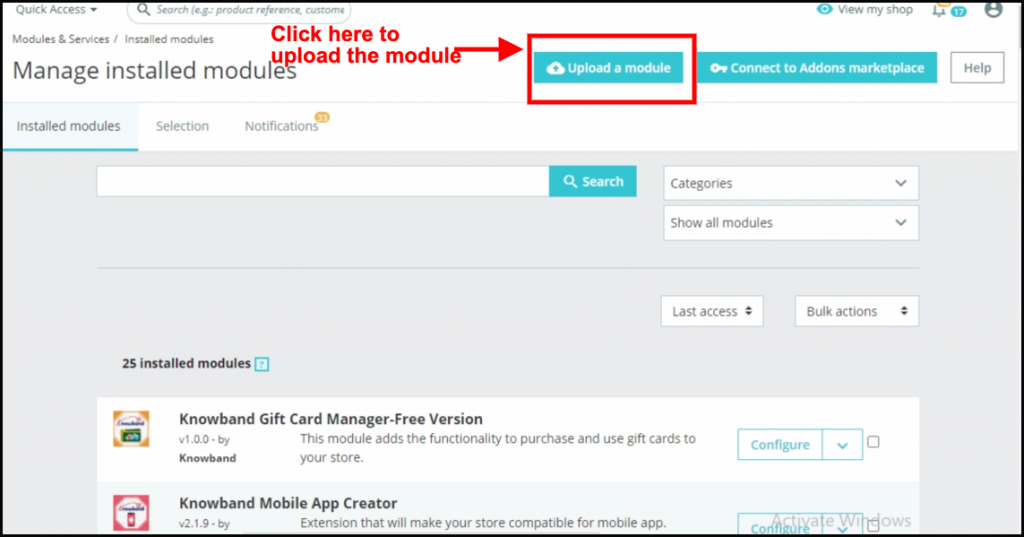
  • Go to the Store Admin -> Modules and Services.

  • Click on “Upload a module”. You can drag or drop the file or can simply select the file from the system.

4.0 Admin Interface Overview:

4.0.1 General Setting:

The module comes with an easy to manage admin dashboard that allows the admin to manage the module efficiently even without any technical skills.

Here is a Brief Overview:

Enable/Disable the Module: The store admin can enable/disable the module with the help of this button.

API Key for ChatGPT: Here, you need to enter the ChatGPT API key that will be responsible for the smooth operations. Please follow the steps mentioned above to generate the API key in just a few clicks.

ChatGPT Engine for Content Generation: The Prestashop AI Content Generator Addon comes with 2 powerful ChatGPT engines 3.5 and 4.0. Where the GPT-3.5-turbo is a cost-effective, suitable solution for general tasks, on the other hand, the GPT-4-turbo is an Advanced model with improved accuracy and context handling.

Choose the suitable module from the dropdown.

ChatGPT Engine for Translations: Select the ChatGPT engine for content translation.

Default Language for Translation/Content Generation: Choose the default language for content generation.

Languages to Translate Content: Choose the additional languages you would like to generate the content for.

4.0.2. ChatGPT Prompts:

The module comes with 14 in-built ChatGPT Prompts that are useful for handling various tasks. Here is a list of the Prompts and what they do:

Generate Product Description: Generate a detailed SEO-Friendly and engaging product description for the following product {product_name}. Make sure the description includes the main features, benefits, and use cases of the product. Please use HTML tags for formatting so the content is ready for a web page. The product is listed in the {category} category

Generate Product Meta Title: Generate a concise and catchy meta title for a product named “{product_name}” in the “{category}” category. Keep the title under 60 characters. Avoid using double quotes. The title should include the main keyword and attract potential customers.

Generate Product Meta Description: Generate a compelling meta description for the product named {product_name} which lies in the category {category}. Limit the description to about 140 characters.

Translate Product Title: Translate the following product title and make sure to give translated content only

Translate Product Description: Translate the following product description and preserve the HTML structure and tags, and only translate the visible text content and make sure to give translated content only.

Translate Product Meta Title: Translate the following product Meta Title and make sure to give translated content only.

Translate Product Meta Description: Translate the following product Meta Description and make sure to give translated content only.

Generate Category Description: Generate the SEO-Friendly Category Description for the {category} Generate a detailed, SEO-friendly category description for the “{category}” category. Please use HTML tags for formatting so the content is ready for a web page.

Generate Category Meta Title: Generate a concise and catchy meta title for a “{category}” category. Keep the title under 60 characters. The title should include the main keyword, attract potential customers, and avoid using double quotes.

Generate Category Meta Description: Generate a compelling meta description for the category {category}. Limit the description to about 140 characters and avoid using double quotes.

Translate Category Title: Translate the following category title and make sure to give translated content only.

Translate Category Description: Translate the following Category description and preserve the HTML structure and tags, and only translate the visible text content and make sure to give translated content only

Translate Category Meta Title: Translate the following Category Meta Title and make sure to give translated content only.

Translate Category Meta Description: Translate the following category meta description and make sure to give translated content only.

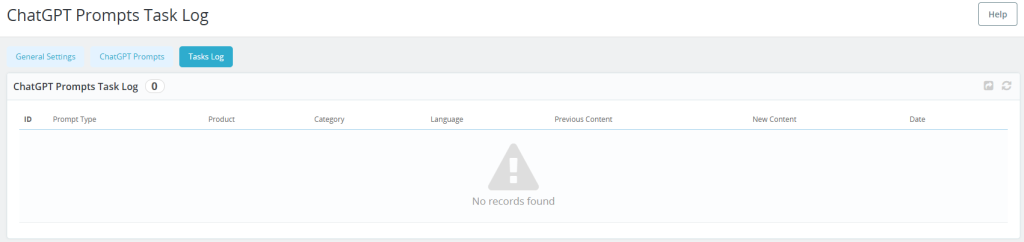
4.0.3. ChatGPT Prompts Task Log:

This tab provides the details of all the prompts that are executed. Here, you can find all the details such as Prompt Type, Product, Category, Language, Previous Content, New Content, and Date.

 5.0. How to Execute ChatGPT Prompts?

To execute the ChatGPT prompts, the store admin can find the options under Catalog>>Products.

Select the products and click on the bulk actions tab as shown in the above screenshot. Here you can select different prompts for various actions.


Black Friday & Cyber Monday Sale: Enhance Your Store with Knowband’s Holiday Essentials

The most awaited shopping season of the year is here! Black Friday and Cyber Monday (BFCM) are not just about deals for customers—they’re golden opportunities for eCommerce businesses to skyrocket sales. At Knowband, we are thrilled to offer an exclusive FLAT 30% OFF on our carefully curated holiday essential modules. Furthermore, these addons are designed to help Prestashop, Opencart, WooCommerce, and Magento 2 stores maximize customer engagement and drive conversions this holiday season.

Here’s how our top-performing modules can enhance your store during BFCM and beyond.

Spin and Win Entry-Exit Pop-Up Addon:

Engaging customers is key during BFCM, and nothing grabs attention quite like the Spin and Win Entry-Exit Pop-Up Addon for Prestashop and other eCommerce platforms. This gamified pop-up tool keeps visitors hooked while helping you grow your email list and offer enticing discounts.

Benefits of Spin and Win:

  • Boost Customer Interaction: Create a fun and interactive experience for your visitors.
  • Reduce Exit Rates: Show a pop-up when a user tries to leave the site and entice them with a special offer.
  • Increase Conversions: Use personalized discounts and offers to convert casual visitors into loyal customers.

Thus, by integrating this module, your store can capture more leads and drive sales while keeping the shopping experience entertaining and festive.

Website Decoration Effect:

Give your online store a festive vibe with the Website Decoration Effect Addon. First impressions matter, and the Website decoration effect module for Prestashop and Opencart allows you to add a touch of holiday magic to your website without any coding knowledge.

Why You Need Website Decoration Effect:

  • Holiday-Themed Customizations: Add snowflakes, Christmas lights, and other holiday decorations to your site effortlessly.
  • Improve User Experience: A visually festive store can create a memorable shopping experience, encouraging customers to browse and buy more.
  • No Technical Hassle: Simply install the module, and you’re ready to decorate your store in minutes.

A well-decorated store isn’t just visually appealing—it sets the mood for holiday shopping and keeps customers engaged.

Gift Card Manager Extension:

Gift cards are a must-have feature during the holiday season, making the Gift Card Manager Addon an essential tool for any eCommerce store. Therefore, with gift cards being one of the most popular choices for last-minute shoppers, this addon helps you tap into a lucrative revenue stream.

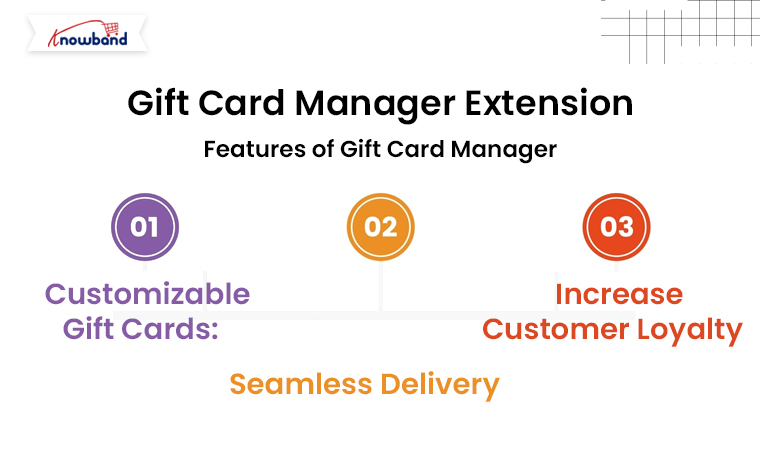
Features of Gift Card Manager:

  • Customizable Gift Cards: Allow customers to personalize gift cards with custom messages, designs, and amounts.
  • Seamless Delivery: Send gift cards via email or let customers download them instantly.
  • Increase Customer Loyalty: Gift cards encourage repeat visits and word-of-mouth referrals.

By offering digital gift cards, you can provide convenience to your shoppers while securing sales during BFCM.

Abandoned Cart Serial Reminder Addon:

Every eCommerce store owner knows the pain of abandoned carts. This powerful tool sends automated email reminders to users who leave items in their carts, urging them to complete their purchases.

Why Use Abandoned Cart Reminder Addon?

  • Automated Follow-Ups: Send timely reminders via email, encouraging customers to return to their carts.
  • Customizable Templates: Tailor your email content to match your brand and include personalized discounts to entice users.
  • Increase Revenue: Recover up to 30% of abandoned carts with targeted messaging.

This module is a game-changer during high-traffic periods like BFCM, ensuring you don’t lose out on potential sales.

Why Choose Knowband During BFCM?

Knowband has built a reputation for offering user-friendly, feature-rich eCommerce extensions that enhance store performance. Here’s why our tools are perfect for your BFCM strategy:

  • Ease of Use: No technical expertise is needed to install and use our modules.
  • Responsive Support: Our team is always ready to help you make the most of your investment.
  • Proven Results: Thousands of stores have seen success with Knowband’s extensions.

Don’t Miss Out: Grab FLAT 30% OFF on Knowband’s Holiday Essentials

This BFCM, makes your eCommerce store the ultimate shopping destination with our holiday essential modules. With a FLAT 30% OFF, now is the perfect time to invest in tools that can help you attract, engage, and retain more customers.

Final Words!

Black Friday and Cyber Monday are your golden opportunities to boost revenue, and Knowband is here to help. Furthermore, our holiday essential extensions are designed to simplify your operations, enhance customer experience, and maximize sales during the busiest shopping season of the year.

Don’t wait—this limited-time offer is your chance to level up your eCommerce store. Visit Knowband today and take advantage of our 30% OFF BFCM Sale!

Prepare Your Prestashop Store for Holiday Shoppers with Easy-to-Use Gift Cards

The holiday season is the busiest time of the year for eCommerce stores, and it’s essential to make shopping easy and enjoyable for customers. One of the best ways to prepare your Prestashop store for the holiday rush is by offering gift cards. Furthermore, Gift cards are a great choice for both last-minute shoppers and customers who want to let their friends or family pick their own gifts. With the PrestaShop Gift Card Manager Addon, you can provide an easy-to-use solution that enhances customer satisfaction and boosts your holiday sales.

In this article, we’ll explore how gift cards can benefit your store and how the Gift Card Module for Prestashop can help you capitalize on the holiday shopping surge.

Why Offer Gift Cards in Your Prestashop Store?

Gift cards have become one of the most popular gift choices among consumers. They’re convenient, and flexible, and allow recipients to choose their preferred items. Moreover, for eCommerce businesses, gift cards provide a way to increase revenue, attract new customers, and reduce the chances of product returns.

Here’s why adding the PrestaShop Gift Card Module to your store is a smart move for the holiday season:

Attract Last-Minute Shoppers: During the holidays, many shoppers are looking for quick and convenient gift options. Therefore, gift cards are a perfect solution for customers who may not have the time to shop for specific items.

Increase Customer Retention: Offering a Prestashop Gift Card Manager Addon gives your customers a reason to return to your store. Thus, when the recipients receive a gift card, they’re likely to browse your store, potentially becoming regular customers.

Boost Sales and Revenue: Many customers spend more than the gift card’s value when shopping. By adding a Gift Card Addon for Prestashop to your store, you can encourage additional purchases and boost your holiday sales.

Tailored for all Your Gift Card Needs this Holiday Season

Use Code: DEAL20 for Extra 20% OFF

SHOP NOW

Key Features of the PrestaShop Gift Card Module!

Customizable Gift Card Designs: You can offer a range of holiday-themed designs, allowing customers to choose a style that suits their needs. Customization helps make the gift card more appealing, increasing the chances of a sale.

Flexible Gift Card Values: With the Prestashop Gift Module, you can set different values for your gift cards, catering to various budgets. Whether a customer wants a $20 or $200 gift card, they’ll have the flexibility to find a suitable option.

Scheduled Delivery Options: The PrestaShop Gift Voucher Module lets customers schedule their gift card delivery for specific dates, making it ideal for holiday gifts. This feature allows shoppers to plan ahead, ensuring their gift is delivered at the right time.

Easy Management Interface: The PrestaShop Gift Manager Addon provides a user-friendly interface that allows store owners to manage all gift card settings with ease. Thus, from creating new gift card templates to tracking purchases, the module is designed for easy navigation.

Personalized Messages: The PrestaShop Gift Card Voucher Module allows customers to add personalized messages when sending gift cards to loved ones. This adds a personal touch to the shopping experience and enhances customer satisfaction.

How to Use the Gift Card Module for Prestashop to Drive Holiday Sales?

Implementing the Gift Card Module for Prestashop is easy and can help drive significant holiday sales. Here’s how to make the most of it:

1. Promote Your Gift Cards on Key Pages:

Add banners or notifications on your homepage, product pages, and checkout page to inform customers about the availability of gift cards. This can encourage shoppers who are unsure of what to buy to choose a gift card instead.

2. Create Holiday-Themed Gift Cards:

The PrestaShop Gift Card Manager Addon allows you to create holiday-specific designs that resonate with the season. Offer gift cards with festive designs for Christmas, New Year, or any other special occasion. This seasonal customization adds to the appeal of your gift cards.

3. Offer Discounts or Free Gift Cards:

Consider offering discounts on gift card purchases, such as 10% off when buying a $100 gift card. Therefore, another strategy is to provide a Prestashop Free Gift Card Manager Addon with a certain purchase amount. For example, offer a $10 gift card for every $100 spent, motivating customers to shop more.

4. Highlight Gift Cards in Your Marketing Campaigns:

Promote your gift cards in email newsletters, social media posts, and holiday marketing campaigns. Make sure your customers know about the option to purchase gift cards as an easy, flexible gift solution.

Final Thoughts!

Adding the Prestashop Gift Module to your store is a smart move for the holiday season. By offering gift cards, you cater to the needs of last-minute shoppers and those looking for flexible gift options. The PrestaShop Gift Card Manager provides a feature-rich and easy-to-use solution that’s perfect for eCommerce stores looking to enhance their holiday offerings.

With the Prestashop Gift Manager Addon in place, you can easily drive more sales and create a better shopping experience for your customers. Whether you’re offering gift cards as a convenient holiday gift or as part of your year-round product range, this module will help you take your store to the next level.

Boost Conversions with New Payment Fee Options in Prestashop One Page Supercheckout Addon

In the competitive world of eCommerce, having an efficient checkout process is key to converting visitors into paying customers. Knowband’s Prestashop One Page Supercheckout Addon simplifies and accelerates the checkout process for Prestashop stores, addressing a common pain point that often leads to cart abandonment. Recently, this Prestashop quick checkout addon has been enhanced with new, flexible payment fee options, adding even more value for store owners looking to increase conversions.

Therefore, we’ll explore how these new payment fee options benefit online stores, along with the core features that make Prestashop One Page Supercheckout an essential addon for eCommerce success.

Why Streamlined Checkout is Essential?

Shoppers today expect a quick, straightforward checkout process. When faced with multiple steps, complex forms, or unexpected fees, many abandon their carts. Furthermore, studies have consistently shown that checkout complexity is a leading cause of cart abandonment. That’s where Knowband’s Prestashop One Page Checkout Addon comes in, offering a seamless, one-page checkout experience that keeps customers focused and engaged.

This Prestashop fast checkout addon displays all necessary checkout fields—shipping details, billing information, payment options, and order summary—on a single page. Thus, simplifying the checkout process, significantly reduces the likelihood of abandonment, helping to boost conversions and enhance the customer experience.

Introducing the New Payment Fee Configuration!

With the recent update, Prestashop One Page Supercheckout introduces a customizable payment fee option, empowering store admins to set payment fees based on specific conditions.

Here’s how it works:

Cart Total: Admins can set payment fees based on the total value of the cart, allowing flexibility to add or waive fees depending on the purchase amount.

Product Category: Store owners can apply payment fees only to certain categories, ensuring the fees align with specific product types.

Total Product Value: This option allows setting fees based on the total value of selected products in the cart.

These options make the checkout process more adaptable, letting store owners cover transaction fees or charge additional amounts when needed without impacting the checkout flow.

Key Benefits of the New Payment Fee Options:

The new payment fee feature adds value by offering greater flexibility and control in the checkout process. Here are some of the main benefits:

Transparent Fee Structure: Customers see all fees upfront, which improves transparency and trust. Thus, when customers know exactly what they’re being charged for, it reduces the likelihood of cart abandonment due to unexpected costs.

Enhanced Profit Margins: Customizable fees allow store admins to balance transaction costs more effectively, helping to manage overall profit margins.

Improved Flexibility for Store Admins: With options to apply fees based on specific conditions, the addon allows for tailored checkout experiences. This adaptability is beneficial for different business models, such as stores with high-value items, specific product categories, or higher transaction fees.

These benefits directly enhance the customer experience while giving store owners more control over their checkout process, making this Prestashop responsive one-step checkout addon a valuable addition.

Key Features of Knowband’s Prestashop One Page Supercheckout Addon!

Beyond the new payment fee options, Prestashop One Page Supercheckout offers numerous features that make it a robust tool for improving the checkout process. Here’s a look at some of the key features:

Single-Page Layout: This One Step Checkout Prestashop Extension consolidates all essential checkout steps—address, shipping, payment, and order summary—into a single page, reducing the steps customers must complete.

Guest Checkout Option: Many online shoppers prefer not to create an account. Therefore, with Prestashop One Page Checkout, guests can easily complete their purchase, helping reduce friction for new customers.

Social Login: The addon allows customers to log in using their social media accounts, such as Facebook or Google, which speeds up the process by auto-filling customer details and removing barriers to checkout.

Mobile Responsiveness: The Prestashop responsive one-step checkout addon adapts seamlessly to any device, whether desktop, tablet, or mobile. This feature is crucial in a mobile-first world, as more customers shop on their smartphones.

Real-Time Validation: Input fields, such as email addresses or phone numbers, are validated in real-time, alerting customers to errors instantly. Furthermore, this feature helps customers complete forms accurately and reduces checkout delays.

Customizable Layouts: Store admins can choose from various layouts to fit their store’s design, making it easy to create a checkout experience that matches the brand’s look and feel.

Streamline the Checkout Process on Prestashop Store

Use Code: DEAL20 for Extra 20% OFF

SHOP NOW

These features work together to create a fast, easy-to-navigate checkout experience that encourages customers to finalize their purchases.

Why Choose Prestashop One Page Supercheckout?

With its recent enhancements, Prestashop One Page Supercheckout Module offers a powerful solution for creating a streamlined, efficient, and adaptable checkout experience. Furthermore, the new payment fee options give store owners more control over checkout costs, while the addon’s core features provide a smooth, responsive, and customizable experience for customers.

Whether you’re interested in the Prestashop One Page Supercheckout free version or the premium version, this addon is a valuable investment for any Prestashop store looking to improve conversions. By choosing Prestashop One Page Checkout, store admins can reduce cart abandonment, build customer trust, and ultimately boost sales.

OpenCart Mobile App Builder v4.5: Unlock New Customization and Revenue Streams with Admob Integration

In today’s digital-first world, having a mobile app is essential for any eCommerce business to thrive. OpenCart, a popular platform for online stores, has continuously adapted to this demand. Furthermore, with the release of the latest OpenCart Mobile App Builder v4.5 by Knowband, OpenCart store owners can now take their mobile app experience to the next level.

Moreover, this new version is packed with customization features and the added benefit of Google AdMob integration, creating new opportunities for branding and revenue generation.

In this article, we’ll explore the exciting new updates to the OpenCart Mobile App Builder and how these enhancements can make your OpenCart eCommerce Mobile App more effective and profitable.

Enhanced Customization Options with OpenCart Mobile App Builder v4.5!

One of the standout features in the latest version is the enhanced tab bar layout customization. The tab bar is the bottom navigation menu of the app, which users interact with frequently as they browse products or navigate the store. Therefore, with the new version, the OpenCart Mobile App Maker offers store admins full control over this layout, allowing them to tailor the appearance and functionality to their brand’s unique style and customer needs.


1. Customizable Icons for Bottom Navigation:

With the OpenCart Mobile App Builder v4.5, the Mobile App for OpenCart allows you to change the icons in the bottom navigation. Now, store admins can select icons that align with their brand aesthetics, whether they want to stick with classic icons or add a unique twist.

Thus, visually appealing bottom navigation can lead to a smoother and more engaging user experience, making it easier for customers to explore your store, access key features, and browse products efficiently.

2. Flexible Redirect Activities:

The latest OpenCart Android and iOS Mobile App Builder Plugin also enables you to customize where each tab leads. For example, you may want one tab to direct users to a specific category, a sale page, or even a promotional section. Therefore, this increased flexibility allows store admins to direct users to high-conversion pages, enhancing the overall shopping experience while driving sales.

3. Text and Color Customization for Icons:

In addition to customizing icons, the OpenCart Mobile App Builder now allows admins to change the text and text color for each icon in the tab bar. This seemingly small change can significantly impact the app’s overall look and feel, making it possible for store owners to match the navigation bar to their brand’s color scheme and style.

Furthermore, these three options make the OpenCart Android and iOS Mobile App Builder Module a powerful tool for creating an app that’s visually appealing, easy to navigate, and consistent with your brand’s identity.

Monetize Your Mobile App with In-App Advertising!

Besides customization, OpenCart Mobile App Builder v4.5 introduces a game-changing feature: Google AdMob integration. This feature allows store owners to earn revenue by displaying advertisements within their OpenCart Android App or OpenCart iOS App.

The integration of Google AdMob means that you can now place ads on various screens within your OpenCart Mobile App. This presents an opportunity for OpenCart Mobile App Creators to generate passive income through ad placements on product pages, the home screen, or other sections that users frequently visit.

Whether it’s banner ads, interstitial ads, or rewarded video ads, AdMob offers a variety of ad types to suit different app layouts and preferences. Moreover, Android and iOS App Makers for OpenCart can now choose to include ads on pages with high user engagement, ensuring better visibility and higher revenue potential.

Check What’s New in the Mobile App Builder v4.5

Use Code: MOBI40 for Extra 40% OFF

SHOP NOW

Why Choose OpenCart Mobile App Builder v4.5?

With the competitive landscape in eCommerce, having a mobile app that is not only user-friendly but also customizable and monetizable is a significant advantage. OpenCart Mobile App Builder Plugin v4.5 addresses these needs, offering:

Flexibility and Control: Customizable navigation options make it easy for you to direct users to essential areas, enhancing user experience.

Revenue Potential: With in-app advertising through AdMOB, your app can generate income passively.

Brand Consistency: The new tab bar customization options allow you to align every aspect of the app with your brand’s identity.

At Knowband, we also offer demo versions to try out these features before committing to a premium version. This makes it easy to see the value of the Mobile App Builder Plugin for OpenCart firsthand.

Conclusion!

The OpenCart Mobile App Builder v4.5 by Knowband is a comprehensive solution for OpenCart store owners looking to take their mobile app to the next level. Furthermore, with advanced customization options for the tab bar layout and the ability to integrate Google AdMob for in-app advertising, it provides tools to improve user experience while creating a new income stream.

Explore the possibilities with OpenCart Mobile App Builder v4.5 and transform your mobile shopping experience today!

5 Must-Have Prestashop Addons to Boost Engagement and Sales this Holiday Season

The holiday season not only brings a tremendous opportunity to attract new customers and boost sales but also brings increased competition. Therefore, with online shoppers looking for festive, engaging, and seamless experiences, having the right tools in your Prestashop store is essential. Here are five must-have Prestashop Addons by Knowband that can help you create an inviting shopping environment, enhance engagement, and encourage more purchases this holiday season.

1. Prestashop Website Decoration Effect Addon:

Setting a festive ambiance is a simple yet effective way to draw customers in and enhance their shopping experience. The Prestashop Website Decoration Effect Addon lets you add holiday-themed decorations and animations to your website, such as falling snowflakes, twinkling lights, or festive icons. Furthermore, these small touches immediately communicate the holiday spirit, giving your store a warm and inviting feel.

Moreover, the customization options in the website decoration addon for Prestashop allow you to control where these effects appear, their frequency, and how they integrate with your brand’s look and feel. Thus, by creating a visually appealing holiday atmosphere, this Addon encourages customers to stay longer and browse more, increasing the chances they’ll make a purchase.

2. Prestashop Spin and Win Pop-Up Module:

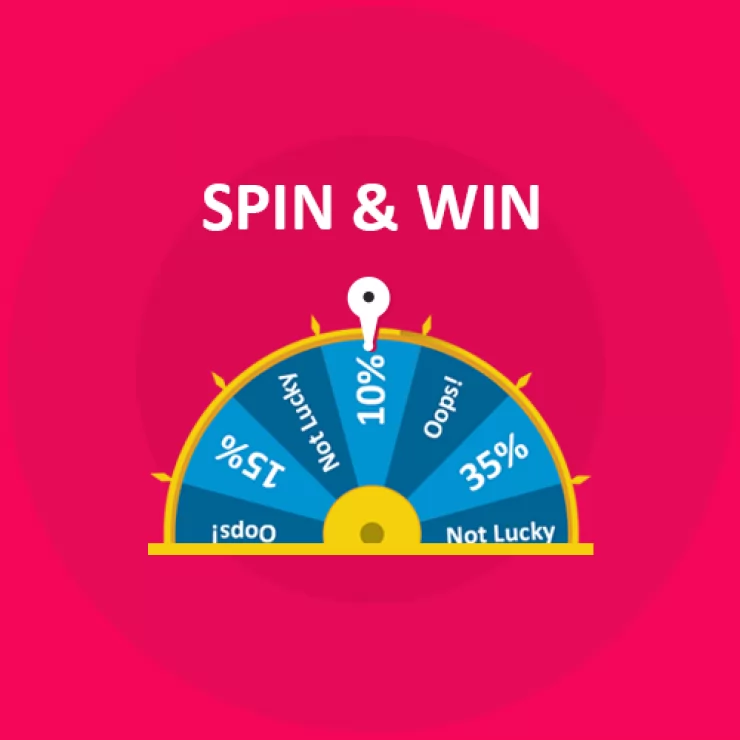
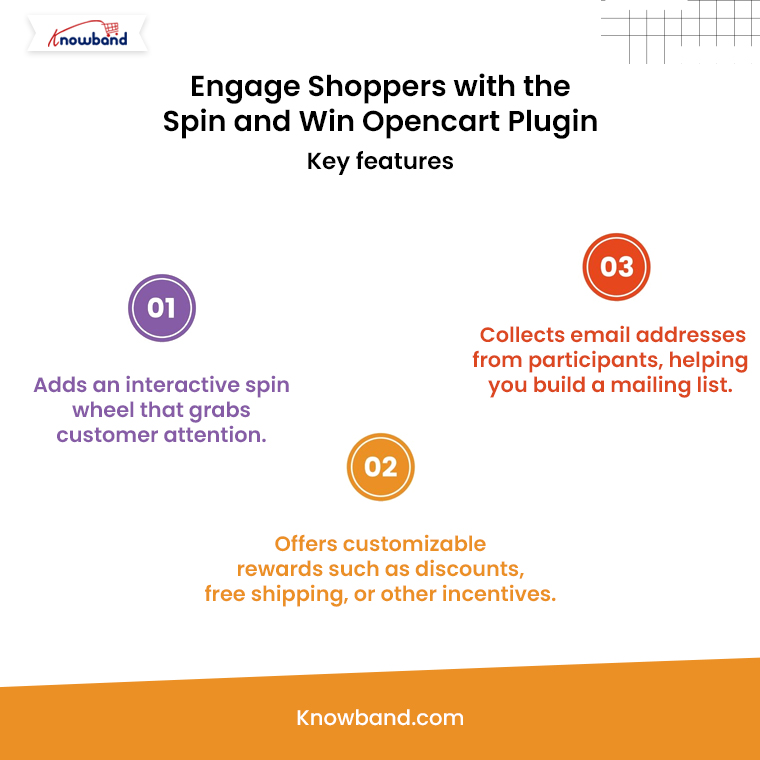
The Second Recommendation: The Prestashop Spin and Win Pop-Up Module is a gamified feature that offers an interactive and exciting experience for visitors. Instead of a traditional discount pop-up, this module presents a spinning wheel where customers have the chance to win a variety of rewards, such as discounts, free shipping, or special offers. Furthermore, the act of spinning the wheel adds an element of fun to the shopping journey, helping to capture visitors’ attention and engage them right from the start.

Additionally, Knowband’s Spin and Win module for Prestashop asks customers to enter their email addresses before spinning, which helps build your mailing list for future promotions.

Boost Customer Engagement with Spin and Win Gamified Pop-Up

Use Code: DEAL20 for Extra 20% OFF

SHOP NOW

On the other hand, the sense of excitement created by the possibility of winning a prize can increase conversions as customers are more inclined to complete their purchase to use their reward. Therefore, by incorporating an engaging feature like this, you not only entertain visitors but also encourage them to shop with enthusiasm.

3. Prestashop Product Sticker and Label Addon:

Highlighting specific products or promotions can make a significant difference during the holiday season when customers are often looking for the best deals. The Prestashop Product Sticker and Label Addon allows you to add customizable stickers and labels to your products, such as “Best Seller,” “Holiday Special,” or “Limited Time Offer.” Furthermore, these visual markers help shoppers identify key items and holiday deals quickly, making it easier for them to navigate through your store.

Thus, with the Prestashop Product Sticker Addon, you can customize the design, colors, and placement of the labels to match your store’s holiday theme, ensuring they complement your brand rather than cluttering the page. Moreover, the labels not only make products stand out but also guide customers toward important items and offers, creating a smoother and more effective shopping experience.

Moreover, this can speed up decision-making and lead to quicker purchases, which is beneficial for both customers and store owners during the busy holiday season.

👉Explore the Module with Our Video Guide


4. Prestashop Gift Card Manager Addon:

Gift cards are an increasingly popular gift option, especially during the holidays, as they allow recipients the flexibility to choose their own gifts. The Prestashop Gift Card Manager Addon makes it easy for you to offer digital gift cards, a convenient and thoughtful solution for holiday shoppers. With this Addon, customers can purchase gift cards directly from your store and send them digitally to friends or family members. This is particularly useful for last-minute shoppers who may need a quick gift option that can be delivered instantly.

Furthermore, Knowband’s Prestashop Gift Card Addon also allows for customizations, so you can brand your gift cards with holiday-themed designs that match your store’s aesthetic.

Digital gift cards not only provide a convenient gift option but also encourage future spending, as recipients are likely to spend beyond the card’s value. By offering gift cards, you can cater to holiday shoppers’ needs while also driving additional revenue for your store.

5. Prestashop Gift the Product Addon:

The Prestashop Gift the Product Addon simplifies the process of gifting products, allowing customers to purchase items and send them directly to friends or family with just a few clicks. This feature is perfect for holiday shoppers who want to give a personal gift without going through a complicated checkout process. With this Addon, customers can add recipient details, select a personalized message, and choose gift packaging options if available, creating a seamless gifting experience that adds a personal touch.

Creating a Cohesive Holiday Shopping Experience with These Addons!

Using these five Addons in combination can transform your Prestashop store into a one-stop holiday shopping destination that customers will love. By setting a festive mood with decorations, adding interactive elements like Spin and Win, guiding shoppers with product labels, and offering convenient gifting options, you create a seamless and joyful shopping experience. Furthermore, each Addon plays a unique role in improving the shopping journey, whether it’s enhancing the visual appeal of your store, engaging customers with fun incentives, or simplifying the gifting process.