5 Ways to Increase Your PrestaShop Sales with the Mobile App Builder 

In today’s fast-paced digital world, most people use mobile apps instead of websites as mobile apps are more convenient to use. With more consumers shopping on mobile devices, businesses must adapt to this shift to stay ahead of the competition. A properly designed and easy-to-use mobile app not only enhances the shopping experience for the customers but also enhances the customer experience.

The PrestaShop Mobile App Builder by Knowband offers a powerful and user-friendly solution for PrestaShop store owners to create a custom mobile app for their stores. Moreover, by simplifying the app creation process, the Mobile App Builder module for store owners to deliver a smooth mobile shopping experience.

Here are 5 proven strategies to leverage Mobile App Sales through Mobile App Builder

Enhance User Experience with a Customizable App Interface

With the Prestashop Mobile App Builder by Knowband, store admins can create a completely customizable interface that reflects your brand and gives your customers a seamless shopping experience. Moreover, a well-designed mobile app enhances user experience, leading to increased customer satisfaction and higher sales.

Push Notifications for Targeted Marketing

Push notifications can be a powerful strategy that can help you re-engage your customers and encourage them to make more purchases, which can increase your overall sales.

With the PrestaShop Mobile App Builder by Knowband, you can send personalized alerts straight to your customers’ phones. Use them for new product launches, flash sales, or order updates. Sending the right notification to the customers helps drive repeat purchases and increase conversions.

Offer Exclusive Mobile-Only Discounts and Promotions

Encourage more users to shop through your mobile app by offering exclusive mobile-only discounts and promotions. In addition, these exclusive deals can increase app downloads and engagement, ultimately driving sales. Additionally, The mobile app creates urgency and excitement around mobile-only deals to boost both new and returning customer purchases.
Integrate Your Opencart Shop with Mobile App

No Coding Skills Required

SHOP NOW

Seamless Payment Integration for Quick Purchases

The iOS Mobile App Builder for Prestashop integrates seamlessly with the payment methods and gateways. A quicker and easier checkout process is very important because it helps customers finish their purchases faster, which often leads to more sales. By offering multiple payment options credit cards, digital wallets, and COD, you give customers more flexibility, improving their shopping experience.

Leverage Social Media Integration to Expand Reach

Lastly, promoting your mobile app through social media channels can significantly increase brand visibility and drive more traffic to your store. The Prestashop Mobile App Builder allows easy integration with social media platforms, enabling users to share products directly from the app to their social profiles.

Key benefits of using the Knowband’s Mobile App Builder for PrestaShop stores:

  • Increased Sales and Revenue:  Firstly, by offering a mobile app to your customers, you make it easier for customers to browse and purchase products on the go, leading to higher conversion rates and increased sales.
  • Improved Customer Engagement: Push notifications, personalized offers, and updates keep customers engaged, informed, and coming back for more. Moreover, you can send real-time notifications about sales, discounts, or new arrivals, which helps drive customer retention.
  • Enhanced Brand Visibility: A mobile app increases your store’s visibility by keeping your brand right on your customers’ home screens. Furthermore, this makes it easier for them to shop and engage with your business at any time.
  • Seamless Shopping Experience: Furthermore, the mobile app ensures a smooth and responsive experience on all devices, providing users with quick access to the store and a user-friendly checkout process.
  • Improved Customer Loyalty: Lastly, by providing a mobile app, you offer a personalized shopping experience that builds customer loyalty. Moreover, Loyalty programs, exclusive offers, and personalized recommendations enhance the overall experience and make customers feel valued.  Significantly, this integration of a mobile app into your prestashop store can help you tap into a wider audience, and engagement of customers. Additionally, the mobile app encourages viral marketing, leading to more purchases and higher sales.

Conclusion

The Prestashop Mobile App Builder by Knowband offers an all-in-one solution for Prestashop store owners to create a powerful mobile app without any technical expertise. Moreover, by implementing these strategies, you can improve user engagement and increase sales.

Don’t miss the chance to grow your business by creating a custom mobile app with the PrestaShop Mobile App Builder. It’s a great way to reach more customers, improve their shopping experience, and boost your sales.


How AI Is Revolutionising the E-Commerce Industry in 2025

As the e-commerce industry is growing, AI is also evolving in e-commerce, reducing the manual effort that a humans can do. Like writing product descriptions, titles, and meta descriptions, the content that increases the seo ranking on the search engines.

This is where Knowband’s OpenCart AI Powered Content Generator Extension come in. The Knowband has designed the AI Extensions for OpenCart, OpenCart, Magento 2 and WooCommerce. Significantly, these smart plugins allow store owners to automatically generate and translate product and category content, which helps in saving time, improving SEO, and reaching new market trends effortlessly.

Why AI Content Generation Matters in 2025

Today’s customers expect more than basic product listings. The customers liked the  Products’s with rich look, relevant, and engaging content that helps them make faster decisions to buy. On top of that, SEO optimization and multilingual support are no longer optional as they’re critical to growth and global reach.

So, are you creating all this content manually? It’s time-consuming and mostly likely error-prone. Therefore, Knowband’s AI Content Generator solves this problem with automation and precision.

Harnessing the Power of Multi-Engine AI Technology

What makes Knowband’s solution unique is its support for multiple advanced and popular AI models. E-Merchants can choose the most suitable engine based on their content needs and budget. 

Knowband’s has launched the AI Extensions with individual AI Engines and with combine AI Large Language Models or engines like Openai: GPT-3.5, GPT-4, Anthropic Claude: Haiku 3, Sonnet 3.5 and Google Gemini: 1.5 Pro, 1.5 Flash, 1.5 Flash-8b, 2.0 Flash, and 2.0 Flash Lite Preview and one more most awaiting AI Model DeepSeek.

Essential Features of the Knowband OpenCart AI-Powered Content Generator Extension

Smart Content Generation

Firstly, AI Content Generator for OpenCart makes content creation effortless by producing compelling product and category descriptions, meta details like title and description, and SEO-friendly copy. With minimal input, the Extension delivers well-structured content that motivates customers and enhances conversions, giving store owners more time to focus on strategy and customer relationships.

Seamless Language Translation

Expanding to global audiences is simple with built-in AI translation. The  AI Content Translator Extension automatically converts your store content into multiple languages with international customers.

Versatile AI Model Integration

The AI-powered content Generator for OpenCart is powered by multiple advanced AI engines, giving users the authority to choose the most suitable model. Moreover, the Extension supports Chatgpt (GPT-3.5, GPT-4), Claude (Haiku 3, 3.5, Sonnet 3.5 new and old), and Gemini.

Built-In SEO Enhancements

The AI Extension follows SEO guidelines to automatically generate SEO-optimised content. Furthermore, from product descriptions to metadata, everything is generated to help increase visibility, drive organic traffic, and improve your rankings on platforms like Google.

User-Friendly Dashboard

Lastly, you don’t need to be a tech expert or coder to use this Extension. Additionally, the intuitive interface ensures anyone can generate, customise, and manage content directly within the OpenCart store.

Benefits of the powerful AI Content Generator to the E-Merchants

Optimised for SEO Results

OpenCart AI-Powered Extension is built to enhance search engine visibility across different languages. Significantly, by aligning with modern SEO standards, it helps increase organic traffic and contributes to long-term online store success, ultimately leading to higher conversions and revenue.

AI-Powered Content Creation

With advanced AI integration, this AI-powered content Generator Extension empowers merchants to generate compelling product descriptions, meta titles, and meta descriptions automatically. Moreover, this automation not only improves content quality but also saves valuable time and manual effort.

Multilingual Content Made Easy

Reaching a global audience becomes effortless with the Extension’s automatic translation feature. Furthermore, the multilingual content helps the store owner to increase engagement and drive sales.

High-Efficiency Bulk Generation

If you have to manage the content of hundreds or thousands of products? No problem. Moreover, the AI-powered Extension can create content for large product catalogues in one go. Furthermore, this efficient solution helps you scale your store’s content strategy while reducing manual work.

Conclusion

The Knowband OpenCart AI Content Translator Extension empowers store admins to streamline content creation and multilingual translation with ease. Furthermore, this powerful plugin automates repetitive content-related tasks, freeing up valuable time that you can redirect toward strategic business activities.

Moreover, by leveraging the intelligence of AI Models, the AI Content Generator Extension enhances product content to align with SEO best practices, thus boosting your store’s visibility in search results and driving more organic traffic.

With just a few clicks, merchants can generate engaging product descriptions, compelling titles, and concise summaries. Additionally, the Extension supports automatic translation of content into multiple languages, making it easier to tap into international markets seamlessly.


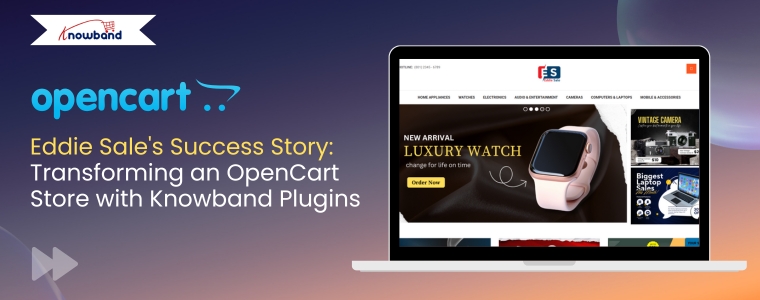
Eddie Sale’s Success Story: Transforming an OpenCart Store with Knowband Plugins

Launched in April 2019, Eddie Sale is a growing UK-based electronics store that offers affordable, reliable gadgets and tech products. Founded by Amanda White, the store was built on the OpenCart platform to avoid the high monthly fees of SaaS-based eCommerce solutions. 

As the online marketplace grew more competitive and customer expectations changed, Amanda realized the store needed smarter solutions to stay ahead. That’s when she discovered Knowband’s Opencart plugins, which ended up revolutionizing how the business operates.

“I spent hours writing product descriptions, but I was still not happy when I read the content of the products.” Amanda White said.

Mobile App Revolution

Amanda used the OpenCart Mobile Builder App which helps her to launch her own app for the store without any coding expertise. Additionally, Amanda revealed that more than 65% of her traffic now comes from mobile devices. “We were totally missing the mobile traffic before” she admitted. 

The team took a chance on Knowband’s Mobile App Builder without huge expectations. The results surprised everyone with how quickly things changed.

Results were amazing:

AI-Powered Content Creation

The Knowband’s OpenCart ChatGPT AI Content Generator Module helps the store to generate the product description as well as meta details and obviously category details. Moreover, this module became a game-changer for Eddie Sale, especially when it came to handling product and category content.

Before using the AI content generator, Amanda had to manually write every single product description, category text, and SEO meta detail. 

Implementing Knowband’s AI Content Generator:

  • Generated and translated the content for products
  • They expanded into 3 new language markets almost accidentally
  • The team reclaimed 40+ hours monthly for customer service
  • Organic traffic climbed 28% from the SEO benefits

Moreover, Amanda’s take was refreshingly honest: “The content was very informative and good. When I first read the description of my own products, it really looked motivating”

Smart Cross-Selling That Actually Works

Cross-selling pr showing related products was once a tough task by manual process that required constant updating and monitoring. Also, since downloading Knowband’s Automatic Related Product module, customers now seamlessly see relevant suggestions based on their browsing history and cart items or the product that they want.

Results:

  • Average cart value increased by $23.40 (28%)
  • Customers spent longer exploring the site
  • Their electronic sections, like audio gadgets, previously underperforming, started connecting with their customers

Opencart Visual Appealing Stickers Plugins

Meanwhile, by using Knowband’s Opencart Product Sticker Module, Eddie Sale strategically added visual labels like “Hot,” “New,” “Limited Stock,” and “Sale” to highlight top products and create a sense of urgency. This visual enhancement strategy led to: 

  1. Get 25% more clicks on products with stickers 
  2. Help customers decide faster 
  3. Reduce the time it takes to make a purchase 
  4. Make the store look more attractive and professional 
  5. Build trust with shoppers

Make Content Creation Easy with ChatGPT

No Coding Skills Required

SHOP NOW

The Eddie Sale Store

Eddie Sale is an online electronics store started by Amanda White in April 2019. Amanda wanted to run her store without paying monthly fees, so she chose OpenCart, a platform that gave her full control. 

The store offers a variety of affordable gadgets, tech accessories, and smart devices. Amanda’s goal was to make good tech products easy to find and easy to buy. Furthermore, instead of hiring expensive teams, she used smart tools from Knowband to automate tasks like writing product descriptions, translating content, and improving SEO. Significantly, the Opencart ChatGPT Module helped her grow the store faster and save time

With Knowband’s OpenCart extensions, Amanda transformed her store’s operations:

  • Delivered a smooth, app-like mobile shopping experience that increased mobile conversions.
  • Eliminated the guesswork and repetitive tasks of manually adding the content and around translating product content and SEO.
  • Entered new markets effortlessly by auto-translating content into different languages.
  • Boosted average cart values with smart cross-selling, showing customers what they didn’t know they needed.
  • Captured attention and drove urgency with clean, strategic product stickers that increased click-through Rate
  • She improved organic discoverability through AI-enhanced metadata and keyword-rich content

Final Thoughts:

Running an online store isn’t easy — it takes time, effort, and the right tools to stand out in a competitive market. However, as Amanda’s story shows, with the help of smart solutions like Knowband’s OpenCart plugins, even a small team can achieve big results.

Whether you’re just starting your eCommerce journey or you’re ready to take your store to the next level, these extensions can help you work smarter, not harder. Moreover, these tasks take care of repetitive tasks, improve user experience, and give you more time to focus on what matters — growing your business.


Knowband Introduces OpenCart Google Tag Manager Extension to Simplify Store Tracking

Running an online store is not just about selling products. To grow your business, e-merchants also need to understand the customer’s behavior. However, tracking that behavior can often be complicated, especially if you don’t have a technical background.

That’s why Knowband has launched the OpenCart Google Tag Manager (GTM) Extension, a smart and easy plugin to help store owners connect their OpenCart store with Google Analytics 4 (GA4)  without writing a single line of code.

What Is Google Tag Manager?

First of all, let’s quickly understand what Google Tag Manager is. GTM is a free tool by Google that lets you manage all your website’s tracking codes in one place. Instead of adding code to every page of your site, you can simply add it once through GTM and manage everything from there.

This saves time, reduces errors, and makes your store’s tracking more accurate. As a result, you get better data to improve your marketing and customer experience.

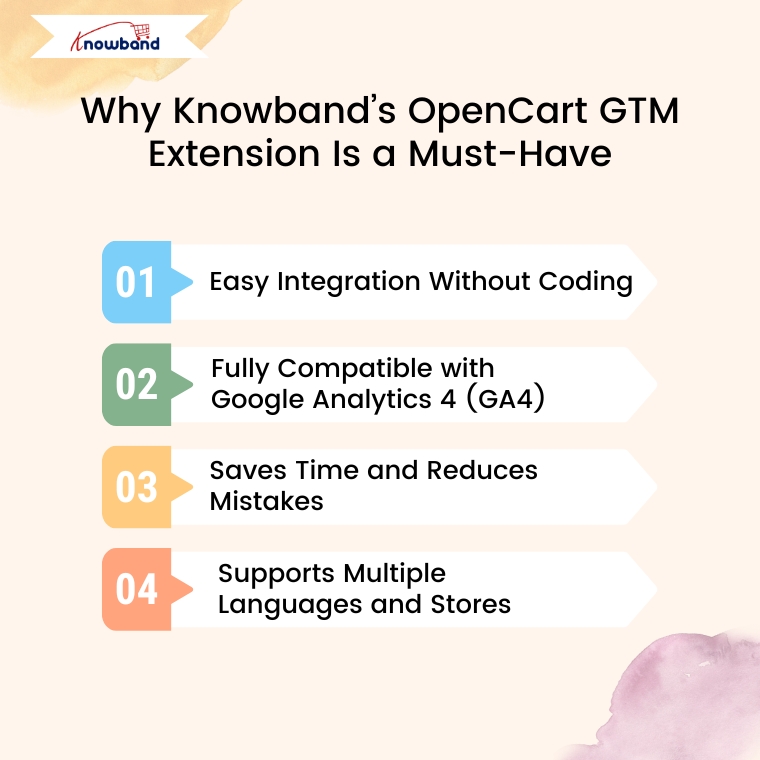
Why Knowband’s OpenCart GTM Extension Is a Must-Have

Now that you know the importance of GTM, you might wonder how Knowband’s Google Tag Manager Plugin helps.

Well, the answer is simple:

It makes the process easier, faster, and error-free. Let’s take a look at how it works and what makes it stand out.

1. Easy Integration Without Coding

To begin with, the Knowband GTM Extension is incredibly easy to install and use. Once you upload it to your OpenCart store, you can link it with your Google Tag Manager account in just a few clicks. There’s no need for technical knowledge or a developer’s help.

2. Fully Compatible with Google Analytics 4 (GA4)

In addition, the Google Tag Manager extension for Opencart is fully compatible with the latest version of Google Analytics — GA4. This means it can track all important actions taken by your customers, including:

  • Page View – Track when a visitor opens any page.
  • View Category – Know when someone browses a category.
  • View Product – See when users view a product’s detail page.
  • Add to Cart – Track the products or cart data when users add items to their cart.
  • Remove from Cart – Know when they take something out of the cart.
  • Checkout Begins – See when the customer starts the checkout process.
  • Order Confirmation – Track successful purchases and revenue.
  • Apply Discount Code – Monitor the use of coupon codes.
  • View Cart – Know when customers review their cart before checkout.
  • Login/Register – Track customer sign-ins and new account sign-ups.
  • Add/Remove from Wishlist – See what customers are saving or removing from wishlists.
  • Search Products – Understand what people are searching for on your site.
  • UTM Tracking – Capture campaign performance with UTM parameters.
  • Scroll Depth – Measure how far down a page users scroll.

These detailed events give you a clear picture of how visitors interact with your store from the moment they land on your site until they make a purchase.

3. Saves Time and Reduces Mistakes

Furthermore, the Opencart Google Tracking extension helps you avoid the manual setup of tracking codes. The OpenCart GTM Plugin not only saves you time but also reduces the chance of mistakes. Instead of worrying about where to place each code, you can relax knowing everything is managed from one place.

4. Supports Multiple Languages and Stores

If you’re running multiple OpenCart stores or serving customers in different countries, the Opencart Google Tag Manager extension is perfect for you. The OpenCart No-Code Google Tag Manager Plugin supports multi-store and multi-language setups, so you don’t have to install separate tracking for each version of your site.

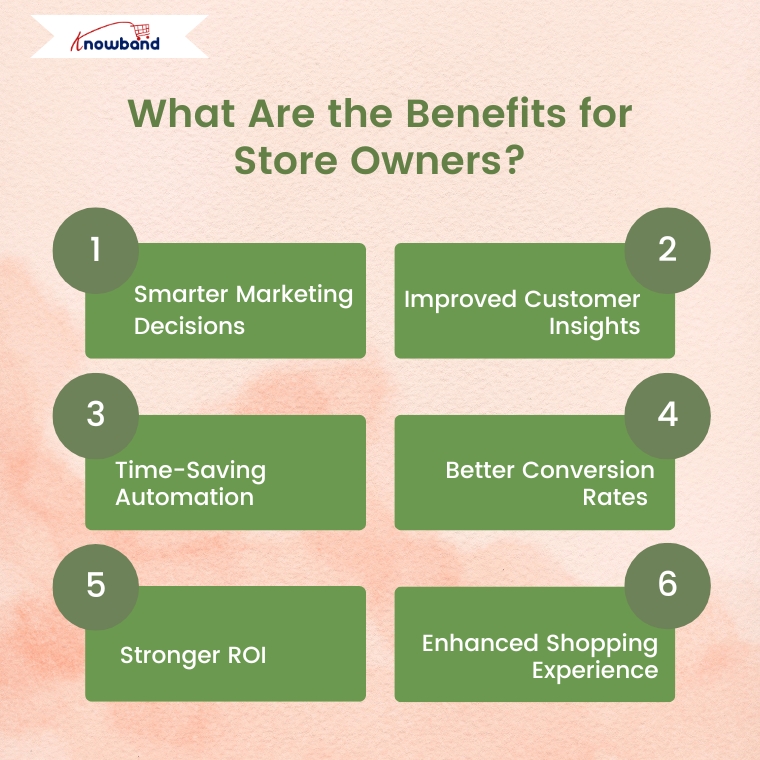
What Are the Benefits for Store Owners?

Now that we’ve covered the features, let’s talk about the real benefits you’ll enjoy when using the OpenCart Google Tag Manager Extension:

  • Smarter Marketing Decisions – With accurate tracking, you’ll know exactly which ads and campaigns are bringing sales.
  • Improved Customer Insights – See how users interact with your store and what they’re most interested in.
  • Time-Saving Automation – No more copying and pasting code across your site. Everything is automated.
  • Better Conversion Rates – With insights from GA4, you can improve your store’s layout, fix problem areas, and make the checkout smoother.
  • Stronger ROI – When you invest in the right marketing based on real data, your return on investment improves.
  • Enhanced Shopping Experience – Understanding what customers like helps you create a more enjoyable and personalized experience.

Final Thoughts

In conclusion, the Knowband OpenCart Google Tag Manager Extension is a powerful yet simple plugin for any OpenCart store owner. It connects your store to GA4 without any technical headache, tracks important customer actions, and gives you the insights you need to grow your business.

Whether you’re just starting out or already running a successful online store, this extension can help you make smarter decisions, save time, and boost your sales.

If you’re serious about improving your store’s performance, it’s time to upgrade your tracking system. Try the Knowband GTM Extension today — and take the guesswork out of your marketing and analytics.

Magento 2 Claude AI Content Generator/Translator Addon – User Manual

The Magento 2 Claude AI Content Generator/ Translator Plugin is a cutting-edge solution designed to streamline content creation and generation for Magento 2 store owners. Powered by Claude AI, the Magento 2 Claude AI Translator module enables merchants to generate high-quality SEO optimized product descriptions, engaging product titles, category descriptions, meta titles and meta descriptions for both product and category as well.  As a result, businesses can attract more visitors, improve search engine rankings, and boost conversions effortlessly.

Moreover, the Claude AI Content Generator for Magento 2 integrates seamlessly with Claude 3 Haiku, Claude 3.5 Haiku, Claude Sonnet old and Claude Sonnet new AI engines, ensuring a smooth and hassle-free experience. The Magento 2 SEO Content Translator Plugin is a SEO Content Generator, guaranteeing unique, compelling, and search engine-friendly content. Additionally, Knowband’s Magento 2 Claude AI Content Translator Extension allows merchants to expand globally with accurate and natural-sounding translations.

1.0 Key Features of Magento 2 Claude AI Content Generator/Translator Extension

AI-Powered Content Generation: The Magento 2 Claude SEO Content Generator/Translator Plugin by Knowband enables merchants to create compelling product descriptions, meta titles, and SEO-friendly content effortlessly. By leveraging the advanced Claude AI model, the extension ensures that all content is engaging, informative, and optimized for better search engine rankings.

Cutting-Edge AI Technology: The AI-driven translation extension for Magento 2 utilizes Anthropic’s latest Claude AI models, including Claude 3.5 Sonnet new and old, and Claude 3 Haiku new and old. Moreover, with these advanced AI engines, merchants can generate high-quality content and precise translations, enhancing the store’s global reach.

Smart AI-Powered Translation: The Magento 2 AI Translation Extension guarantees accurate and contextually relevant translations with minimal effort. As a result, merchants no longer need to translate product details manually, saving time while ensuring linguistic accuracy across different markets.

User-Friendly Installation & Configuration: Designed for seamless integration, the Magento 2 Claude AI Content Generator Extension features an intuitive interface. Additionally, even store admins with no coding experience can easily install, configure, and start using the extension without any hassle.

Bulk Content Creation for Large Catalogs: Ideal for businesses with a vast inventory, the Claude AI Content Generator for Magento 2 can generate content in bulk. Furthermore, this automation eliminates the need for manual content creation, streamlining product management and enhancing efficiency.

Global Language Support: Magento 2 AI Content Generator Plugin supports multiple languages, including right-to-left (RTL) scripts, catering to international businesses. Furthermore, the extension is compatible with various Magento 2 versions, making it a reliable and versatile solution for online merchants.

2.0 Steps To Generate Claude AI API For Magento 2 Claude AI Generator

To activate the Magento 2 Claude AI Content Generator Plugin in your Magento 2, you must first generate an API Key. Follow these steps to integrate it seamlessly:

Step 1: Claude API Key Generation

Step 2: Configure the API Key in Magento 2

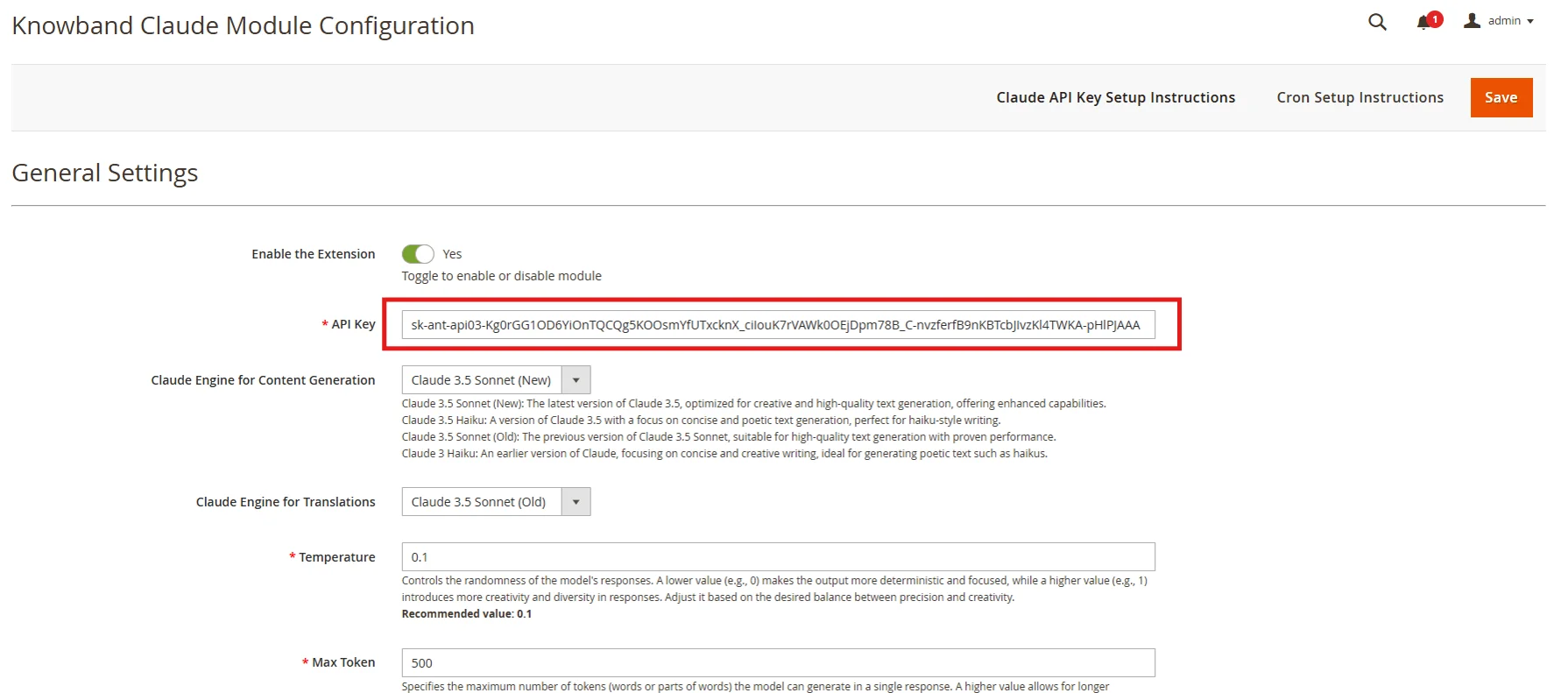
  • Access your Magento 2 Admin Panel and navigate to Stores → Configuration → Knowband → Magento 2 Claude AI Generator/Translator.
  • Find the “API Key for Claude” field and paste the copied key into it.

Step 3: Save the Settings:

  • After adding the API Key in General Settings, click “Save” to store the settings. The Claude AI module will now use this key to interact with the Claude API.

Smarter Content Starts Here – Claude for OpenCart

Easy setup, no code needed.

🛍️ Get Claude AI Now

3.0 Admin Interface Overview:

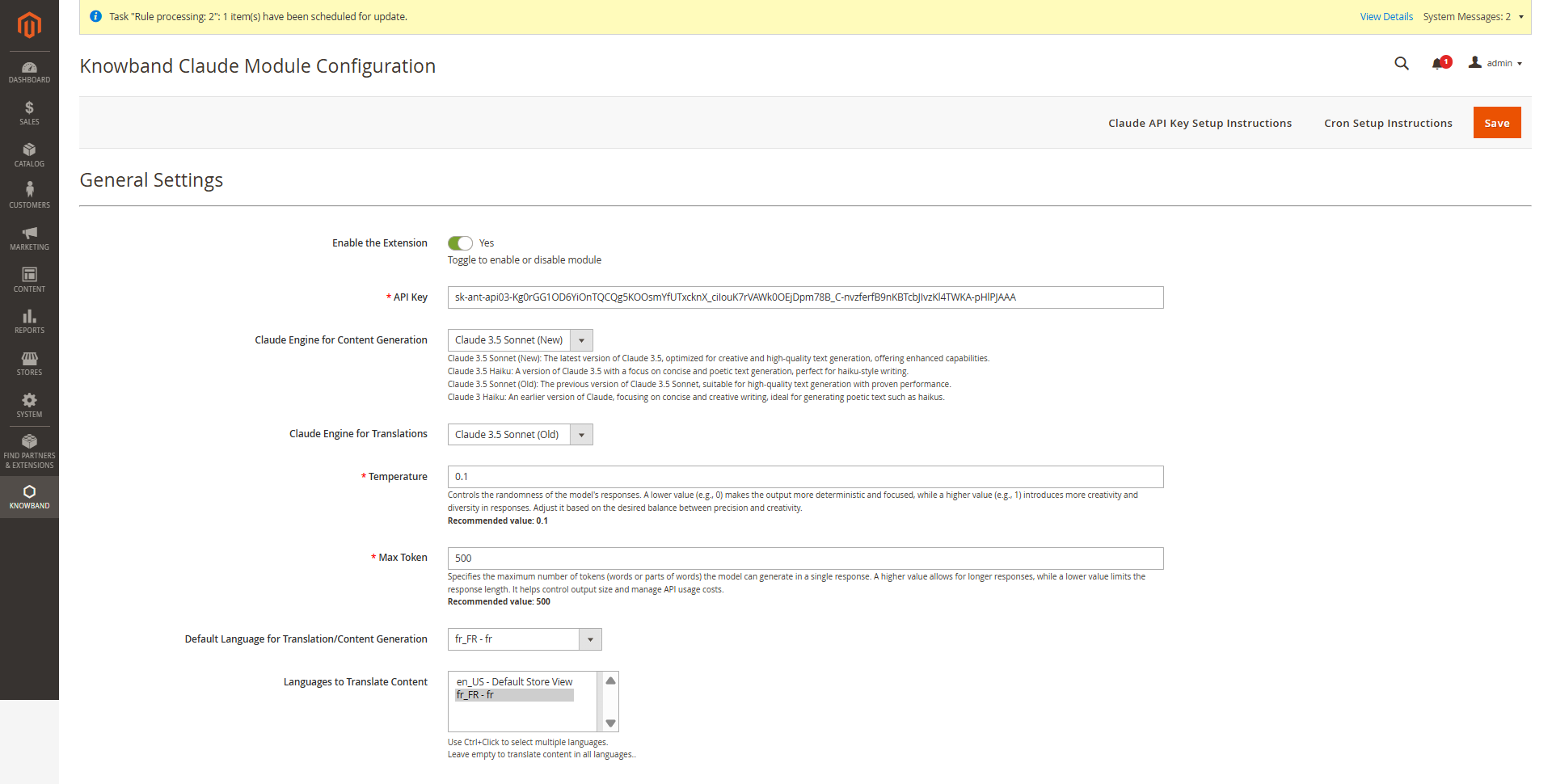
The Magento 2 Claude Translator Extension by Knowband provides store admins with an intuitive interface to configure settings and efficiently manage bulk content generation and translation.

3.0.1 Key Configuration Options

Enable/Disable – Activate or deactivate the Magento 2 Claude Content Generator with a single tab.

API Key for Claude – Enter your Anthropic API Key(Claude API Key) in the provided field to enable the functioning of the Knowband AI-powered content generator/Translator Module

Claude Model Selection – Choose from Claude 3.5 Sonnet (New), Claude 3.5 Sonnet (Old), and Claude 3.5 Haiku as well as Claude 3 Haiku, to generate content based on your store’s requirements.

Temperature: Adjust the creativity of the content —higher values generate more creative content, while lower values ensure consistency and focused content.

Maximum Tokens: Set a token limit (default: 500), representing text fragments used by the AI.

Claude Engine for Translations: Choose from Claude 3.5 Sonnet (New), Claude 3.5 Sonnet (Old), Claude 3.5 Haiku and Claude 3 Haiku to generate content tailored to your store’s needs.

Primary Language: Set your default language of the store for content generation and translation in the general settings.

Target Languages: Choose multiple target languages to expand your store’s global reach and improve accessibility for international customers.

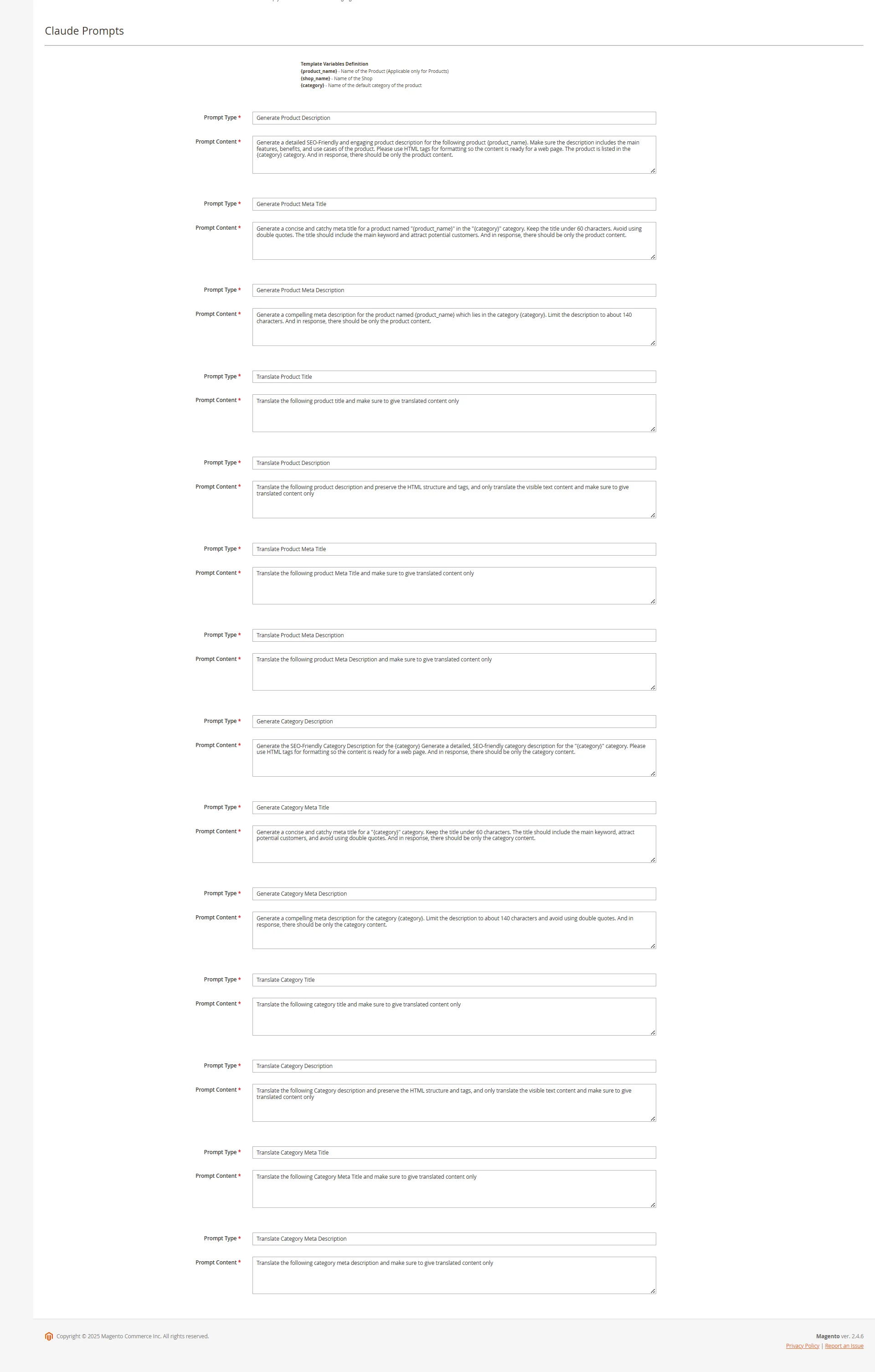
3.0.2 Magento 2 Claude AI Content Generator Prompts

The Magento 2 Content Generator Module includes 14 pre-configured prompts tailored for various e-commerce content needs.

Knowband Magento 2 Claude Content Generator Extension AI Prompts 

Generate Product Description: Creates SEO-friendly, formatted descriptions for products, ensuring the generated data is accurate and in context.

Generate Product Meta Title: Crafts optimized meta titles (under 60 characters) with relevant product and category keywords. 

Generate Product Meta Description: Produces engaging meta descriptions within 140 characters. 

Translate Product Title: Converts product titles accurately into multiple languages. 

Translate Product Description: Accurately translates product descriptions while retaining HTML formatting.

Translate Product Meta Title: Converts meta titles into multiple languages with precision.

Translate Product Meta Description: Provides accurate translations of meta descriptions across various languages.

Generate Category Description: Creates SEO-optimized category descriptions with proper HTML structure. 

Generate Category Meta Title: Generate concise, keyword-rich meta titles (under 60 characters). 

Generate Category Meta Description: Creates compelling meta descriptions (within 140 characters). 

Translate Category Title: Converts category titles, descriptions (maintaining HTML structure), and meta details into multiple languages.

Translate Category Description: Translates accurate category descriptions while maintaining HTML structure.

Translate Category Meta Title: Converts category meta titles into multiple languages with precision.

Translate Category Meta Description: Delivers accurate translations of category meta descriptions across various languages.

3.0.3. Knowband’s Magento 2 Claude Prompts Task Log

The Magento 2 Claude AI Content Generator/ Translator maintains a detailed activity log of all executed prompts, allowing users to track content generation and translation tasks efficiently.

The task log includes:

Prompt Type: Specifies whether the task involved content generation or translation.

Product/Category: Identifies the associated product or category.

Language: Displays the source and target languages for translations.

Previous Content: Shows the original content before modification.

New Content: Records the updated or translated content.

Timestamp: Logs the date and time of execution for tracking and auditing purposes.

RollBack Feature: Enables users to restore previous content instantly if the new version is unsatisfactory. Moreover, this feature ensures flexibility by allowing store owners to revert to the last saved version with a single click, maintaining content quality and accuracy.

4.0 Pending Task Logs of Magento 2 Claude AI Plugin

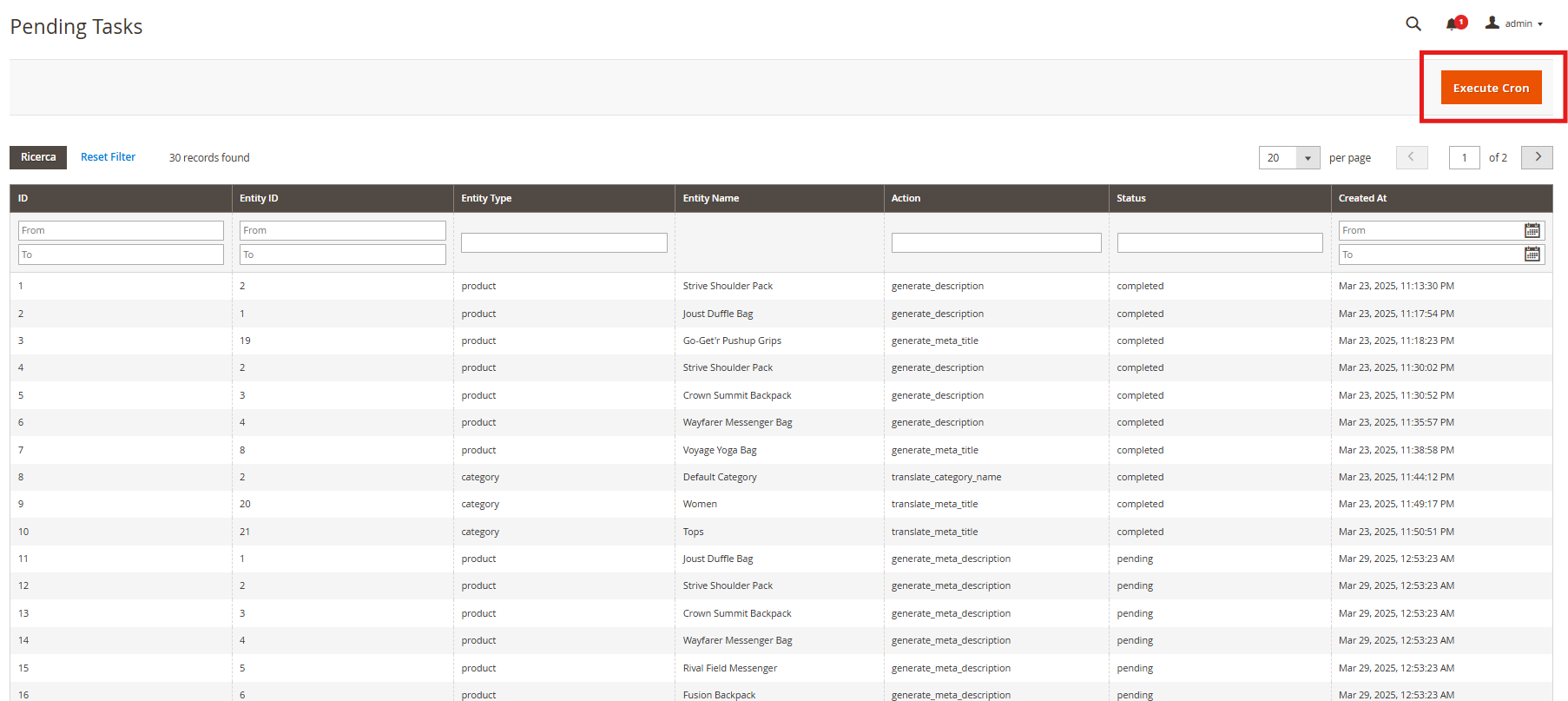
The Pending Task Logs feature in Knowband’s Magento 2 AI Content Generator Extension allows users to efficiently manage and monitor content generation and translation tasks before execution. 

How Pending Task Logs Work

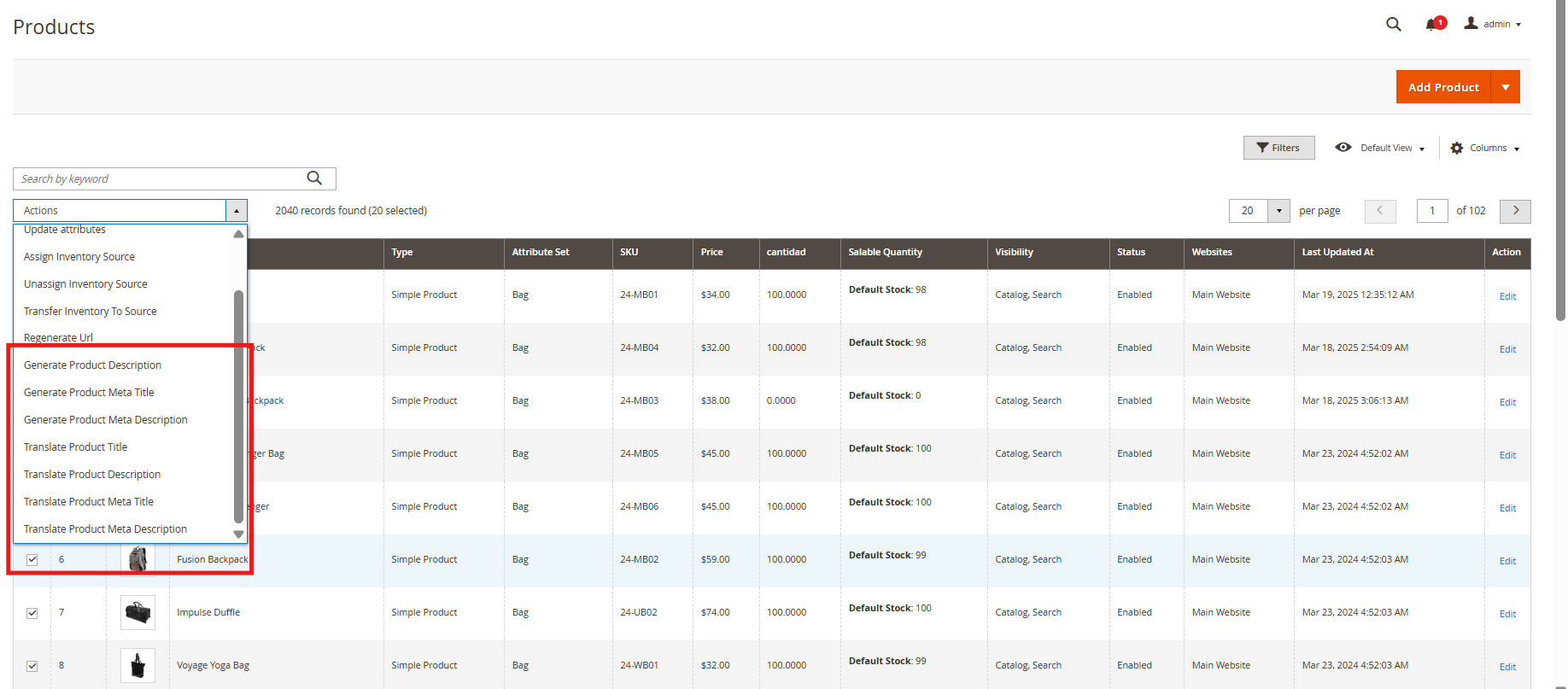
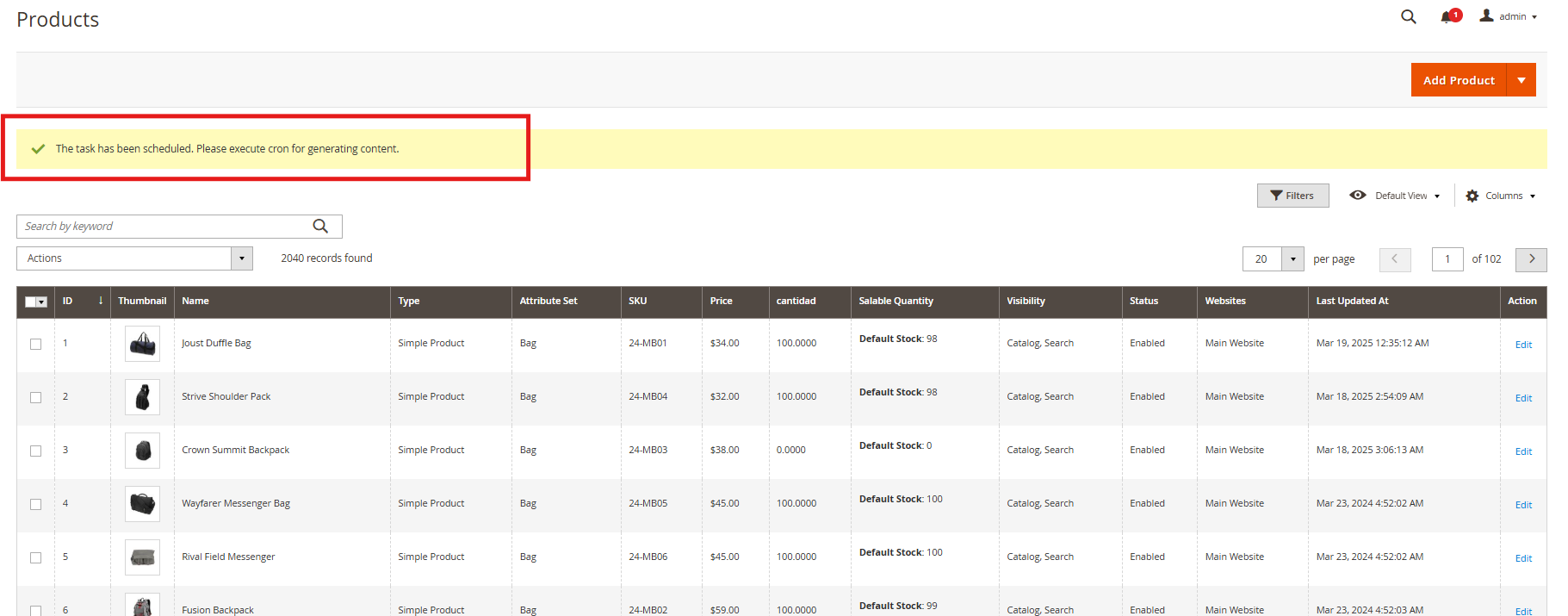
When a content generation or translation request is initiated, it is first stored in the Pending Task Logs section. Users can review, modify, prioritize, or delete tasks before execution. Moreover, the “Execute Cron” tab allows manual or scheduled processing, ensuring accuracy and efficient workflow management.

5.0. Steps to Execute the Prompts 

The Knowband PrestaShop Claude AI Content Translator module streamlines content generation and translation through a structured process. 

Follow these steps to execute prompts efficiently:

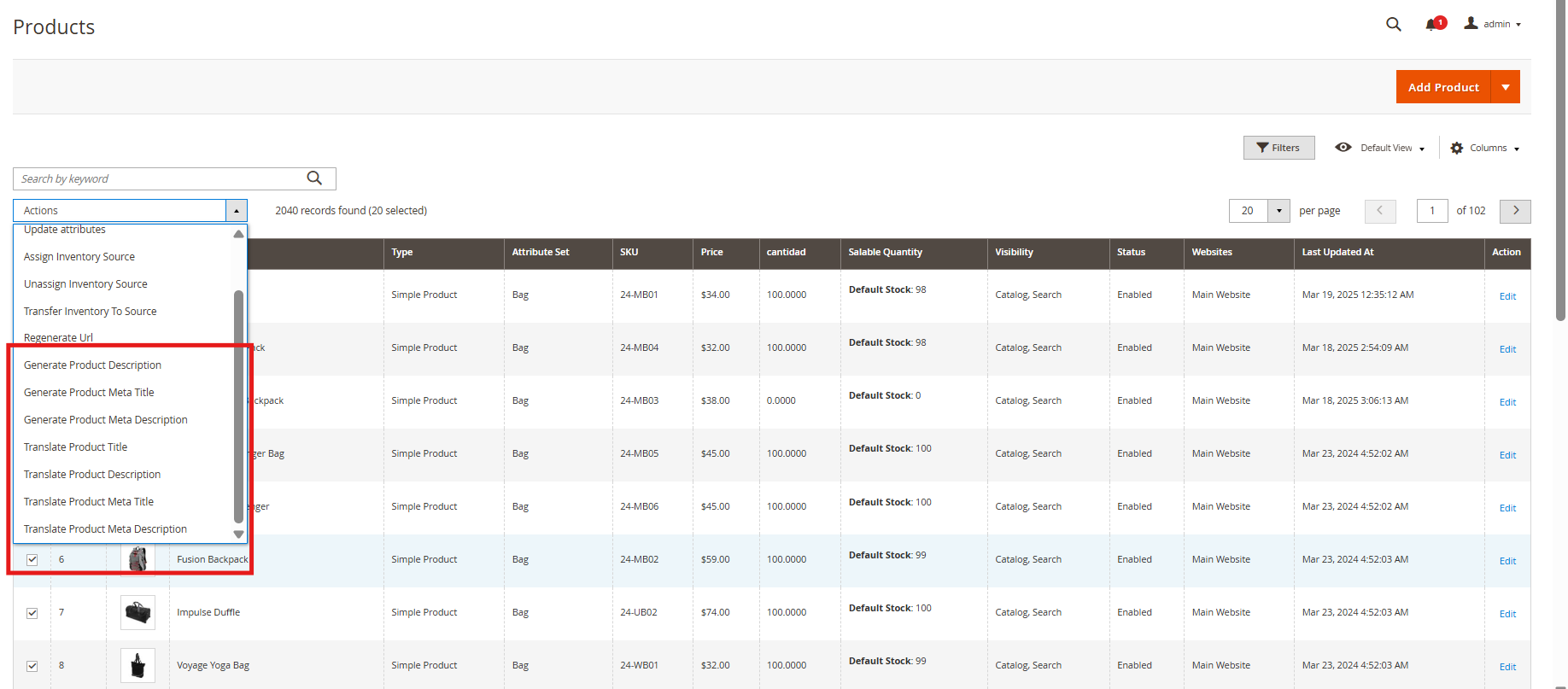
Step 1: Product/Category Selection: Choose the products or categories for which you want to generate or translate AI-powered content.

Content includes product descriptions, category descriptions, titles, meta titles, and meta descriptions.

Step 2: Task Execution: Once selections are made, the system sends the content generation or translation requests to the Pending Task Logs for processing.

Managing Pending Task Logs: Review, modify, or remove pending tasks before execution, ensuring accuracy and preventing unnecessary content changes.

Step 3: Executing the Cron Job: Run the cron job to process all pending tasks automatically.

The generated or translated content is applied to the respective products/categories seamlessly.


OpenCart Google Tag Manager (gtag, GA4, GTM Events) Extension – User Manual

The Knowband OpenCart Google Tag Manager Extension is a powerful plugin designed to simplify the integration of Google Tag Manager (GTM) with your OpenCart store. With its intuitive interface, the Opencart Google Tag Manager Plugin enables store owners to add and manage various Google tags without requiring technical expertise. It allows you to monitor essential events such as product views, category, add-to-cart actions, remove-from-cart events, check-out events, payment events, shipping events, and order confirmations, giving you valuable insights into customer interactions.

Additionally, the OpenCart Google Tag Manager Plugin seamlessly captures UTM parameters, helping store owners to analyze the impact of their marketing campaigns. By leveraging the OpenCart Google Marketing Integration Plugin, e-merchants can identify which campaigns drive the most traffic and conversions, enabling smarter ad spend allocation and improved return on investment (ROI).

The Knowband’s OpenCart Google Tag Manager is Ideal for businesses looking to enhance tracking data or analytics about the stores and events, boost conversion rates, and improve the shopping experience. The Knowband OpenCart Google Tag Manager Extension supports Google Analytics, GA4, and other Google marketing tools, making data-driven decision-making easier and more efficient.

1.0 Key Features Offered by OpenCart Google Tag Manager Extension:

Seamless Google Tag Manager Integration: Easily connect Google Analytics, Google Ads, GA4, and other essential tracking tools to the OpenCart store without any coding skills required.

Live Event Tracking for Better Insights: The store owners can monitor key user actions in real time, such as Add to Cart, Product Views, Checkout events, applied coupons, as well as the payment& shipping methods, to gain instant insights into customer behavior.

Track Campaign Performance with UTM Parameters: Automatically capture UTM parameters to measure the success of your marketing campaigns and determine which channels drive the most traffic and conversions.

Advanced eCommerce Tracking for Data-Driven Decisions: Get in-depth analytics on product views, cart additions, and completed purchases to optimize your store’s sales performance.

Quick & Easy Setup – No Coding Required: With a user-friendly interface, the OpenCart GTM Extension makes tag management simple and stress-free, even for non-technical users.

Intuitive Admin Dashboard for Full Control: Manage and monitor all your tracking tags and events directly from your OpenCart admin panel with a clean, easy-to-use dashboard.

Multi-Language Support for Global Stores: The OpenCart GTM Extension supports multiple languages, allowing you to use it seamlessly in different regions and enhance the shopping experience for international customers.

2.0 Google Consoles IDs to Enable Functionality Knowband Opencart  Google Tag Manager Plugin

2.1 Steps to Get the Google Tag Manager ID

Step 1: Create the Google Tag Manager account.

Step 2: Create a new container or choose an existing container.

Step 3: The Container ID will look in this format GTM-XXXXXX and can be easily seen in the top-right corner of the interface of Google Tag Manager

 Step 4: Copy the Container ID and add it to the GTM container ID field in the configuration field.

2.2 Follow these steps to get the Google Measurement ID 

Step 1: Visit the Google Analytics account.

Step 2: Select the property for which you want to get the Measurement ID.

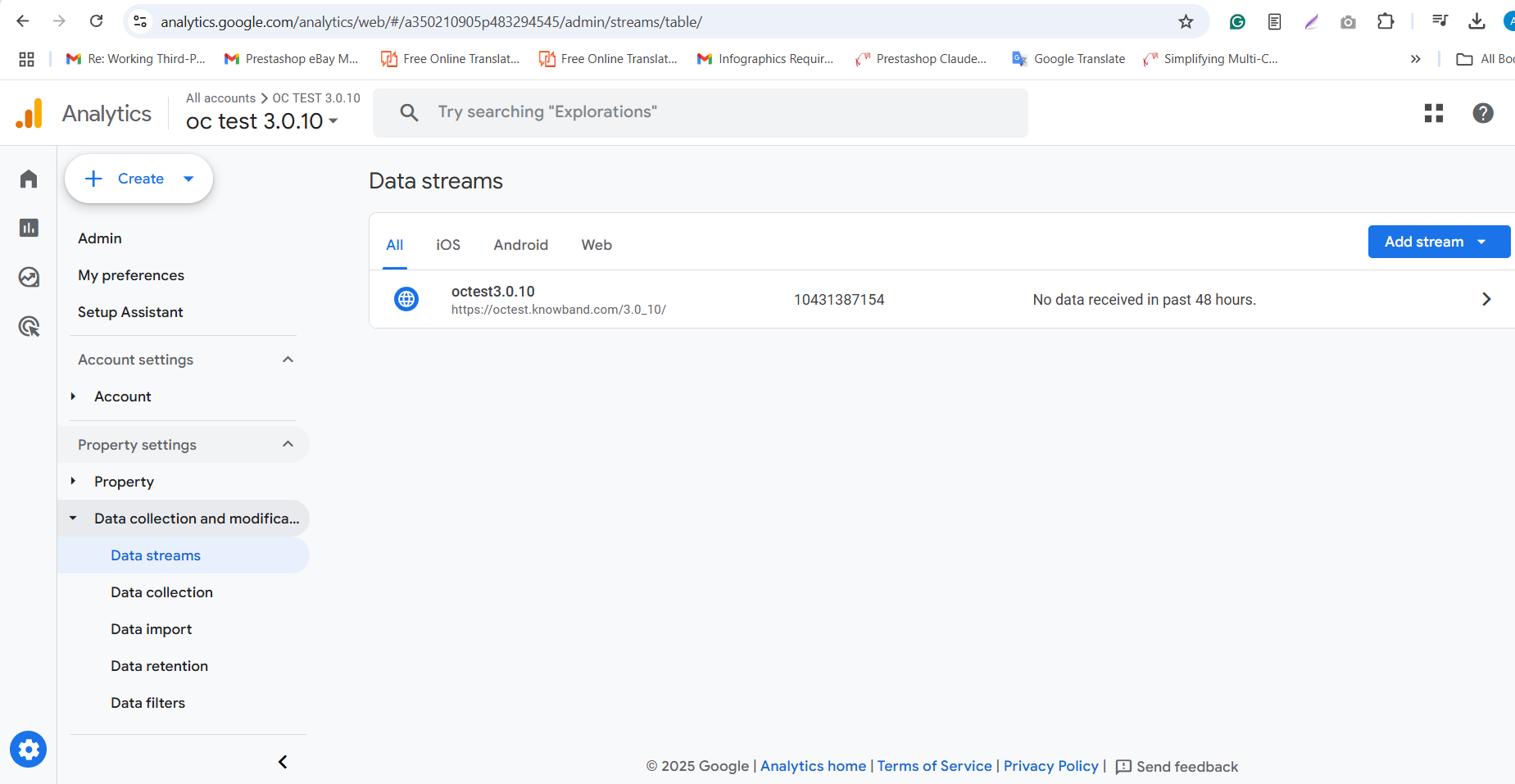
Step 3: Navigate to Admin ->Data Streams and choose your web data stream.

Step 4: The Measurement ID will be in this format- G-XXXXXXXXXX.

Step 5: Copy the Measurement ID and add it to the Google Measurement ID field in the module’s configuration.


2.3 How to Configure Events in Google Tag Manager?

Step 1: Download GTM Events from the module configurations. You can find the direct download link under Configurations > Instructions tab.

Step 2: Log in to your Google Tag Manager account.

Step 3: In Google Tag Manager, go to Admin > Import Container.

Step 4: Select the downloaded GTM Event file from your system.

Step 5: Choose the workspace where you want to import the events and select the “Merge” or “Overwrite” options as required.

Step 6: Click Confirm to complete the import process.

Step 7: Save and publish your container to activate the events in your Google Tag Manager.

3.0 Steps to Set Up OpenCart Google Tag Manager in 3 Simple Steps

Once you’re ready to integrate Knowband’s Opencart Google Tag Manager with your OpenCart store, follow these three simple steps to get started with the OpenCart Google Tag Manager Extension:

Purchase the OpenCart Google Tag Manager Extension from the Knowband store. You’ll get the following file: a Zipped File containing the source code of the module.

Follow the steps mentioned below to install the OpenCart Google Tag Manager plugin in your store:

Step 1: Purchase the Extension, and then you will receive a ZIP file containing the module’s source code.

Step 1: Extract and Upload Files

  1. Unzip the downloaded file – this will contain the kbgtag. OCMod file and necessary folders.
  2. Go to the upload folder and locate the admin and catalog files.
  3. Copy these files into the root directory of your OpenCart store

Step 2: Install and Activate the Module

Go to Extensions > Installer in your OpenCart admin panel.

  1. Upload the kbgtag.ocmod file in the installer.
  2. Go to Extensions > Modifications and click Refresh to apply the changes.

Integrate your store with Prestashop Google Tag Manager

No Coding Skills Required

Buy Now

4.0. Admin Panel Overview:

The Google Tag Manager for OpenCart offers an easy-to-use admin dashboard for OpenCart store owners. The store admin can easily set up and manage all tags directly from the Opencart admin panel. 


Enable or Disable Extension: The store admin can easily turn the module on or off whenever needed.

GTM Container ID: Enter the GTM Container ID in the box. The admin can find this ID by following the steps in section 1.1.

Google Analytics ID: Enter your Google Analytics Measurement ID here to connect Google Analytics with GTM for tracking.

Track Page Views: You can turn on or off the “Page View” tag to track when customers visit different pages.

Category Views: Control the “View Category” tag to track when customers view product categories on your site.

Product Details Page: Turn on the “View Product Details” tag to track when a customer looks at a specific product page.

Cart Removal: Enable or disable the tag that tracks when items are removed from the shopping cart.

Add to Cart: Turn the “Add to Cart” tag on or off to track when items are added to the cart.

Checkout Start: Turn on the tag to track when a customer begins the checkout process.

Checkout Page: Enable or disable the tag that tracks activity on the checkout page.

Address Selection: Turn on the tag to track when customers add or select their shipping address during checkout.

Shipping Method Choice: Enable the tag to track when customers choose their shipping method during checkout.

Order Confirmation: Control the “Order Confirmation” tag to track when a customer completes an order.

Discount Code Use: Turn on or off the “Apply Discount Code” tag to track when customers use a discount code.

Discount Code Removal: Enable or disable the tag that tracks when customers remove a discount code.

Cart Views: Use the “View Cart” tag to track when customers look at their shopping cart.

Customer Login: Enable or disable the tag that tracks when a customer logs into their account.

Customer Registration: Turn on or off the tag to track when customers create an account on your site.

Add to Wishlist: Enable the “Add to Wishlist” tag to track when a customer adds an item to their wishlist.

Track Remove from Wishlist: Turn on or off the tag that tracks when a customer removes an item from their wishlist.

 Search Product Tracking: Manage the tags for products that customers search for on your store.

Capture UTM Parameters: The store admin can enable or disable the capture of UTM parameters using this toggle button.


5.0 Steps to Preview Events in Google Tag Manager Plugin

Steps to Preview an Event in OpenCart Google Tag Manager Extension

Step 1: Log in to your Google Tag Manager account.

Step 2: Select the container associated with your OpenCart store.

Step 3: Click on the Preview button in the top-right corner.

Step 4: Enter your OpenCart store URL in the Tag Assistant popup and click Connect.

Step 5: Perform the action you want to track (e.g., adding a product to the cart or completing checkout).

Step 6: Go back to the Tag Assistant window to check if the event is firing correctly.

Step 7: If the event appears in the Tag Assistant, it is working correctly. Otherwise, troubleshoot using the event details shown.


6.0 Configuration Instructions:

The OpenCart no-code Google Tag Manager integration offers simple instructions that require no technical expertise for module setup. The store admin can easily visit the Google Tag Manager and Google Analytics Consoles and follow the easy steps to obtain the necessary credentials.

These instructions will help the store admin with extension configuration. However, if you face any issues during the setup or with the extension, you can reach out to us by emailing support@knowband.com or by raising a ticket at knowband.com/helpdesk.

Magento 2 Gemini AI Content Generator/Translator Extension – User Manual

Knowband’s Magento 2 Gemini AI Content Generator/Translator Extension helps store owners create and translate content quickly using Google’s Gemini AI technology. With the Magento 2 Gemini AI Extension, store owners can easily generate product descriptions, meta titles, meta descriptions, category descriptions, meta titles, meta descriptions and SEO content without spending hours writing.

The Magento 2 Gemini AI Extension also translates your content into different languages, helping you reach customers worldwide. It’s easy to use and works for all types of online stores, whether you have a small shop or a large marketplace.

The Magento 2 Gemini AI Extension saves you time and ensures all your product listings look professional and appealing to both customers and search engines. Simply install the extension, and you can start generating high-quality content right away. The Gemini AI Extension for Magento 2 utilizes Google’s advanced Gemini AI models, including Gemini 2 Flash, Flash Light Preview, Gemini Flash 1.5, Gemini Flash 8B, and Gemini 1.5 Pro, which generate and translate SEO optimized content.

2.0.0 Key Features of the Knowband’s Magento 2 Gemini AI Content Generator/Translator Extension

Automated Content Generator: The Magento 2 Gemini AI Content Generator/Translator allows the admin to generate SEO Optimized content for the products. 

Focused Content Translator:  The Magento 2 Gemini AI-powered content Translator translates the generated content as well as product titles. Additionally, the Magento 2 Gemini Powered Translator Extension supports all the languages that are listed on your store.

Gemini Engines: The Gemini AI Extension for Magento 2 uses Google Gemini AI models, including Gemini 2 Flash, Flash Light Preview, Gemini Flash 1.5, Gemini Flash 8B, and Gemini 1.5 Pro, which generate and translate focused and SEO optimized content.

Bulk Product Content Generator: The Knowband’s Magento 2 Content Generator Extension can generate SEO-optimized content and translate the content into multiple languages with the focused content.

User-Friendly Interface: The Magento 2 Gemini AI Content Generator provides a user-friendly interface for the store admin as it doesn’t require any coding knowledge.

Global Market Reach: The Magento 2 Gemini AI Plugin benefits the user by increasing international sales by providing SEO-optimized and focused content translation in all the store’s languages.

Accurate Translation: The Magento 2 Gemini AI plugin translates the generated content and product title accurately into multiple languages.

3.0 Steps to Generate  the Gemini API Key to Enable Knowband’s Magento 2 Gemini AI-Powered Content Generator Plugin

To enable Gemini AI functionality in your Magento 2 Gemini AI Extension, follow these 3 steps to get your API key.

Step 1: Obtain an API Key

  1. Visit the Google AI Studio to generate the API Key

(https://aistudio.google.com/app/apikey)

  1. Click on “Create new secret key”. Make sure to copy the key.

Step 2: Add the API Key to the Magento 2 Gemini

  • In Magento 2 Backend, go to the “Knowband Gemini” General Configuration page.
  • Add the Gemini API Key into the provided “API Key ” field.

Step 3: Save the Settings:

  • After pasting the API Key in General Settings, click “Save”. Now, you can use Knowband’s Magento 2 Gemini Module Extension.

4.0 Admin Interface Panel


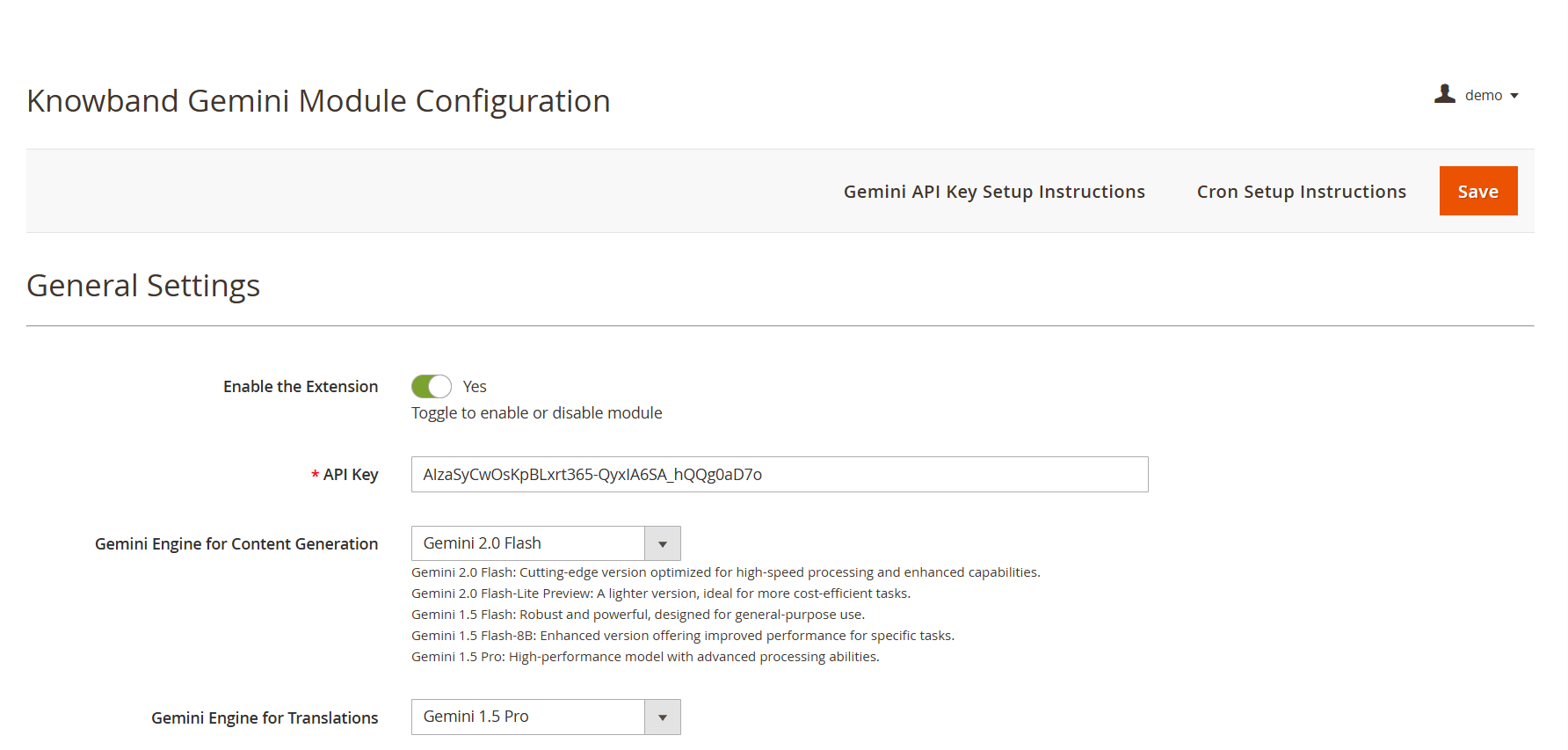
API Key: Add your API KEY from Google AI Studio in the required field.

Gemini AI Model Selection: The Magento 2 Content Generator Extension offers Google’s latest Gemini AI models, including Gemini 2 Flash, Flash Light Preview, Gemini Flash 1.5, Gemini Flash 8B, and Gemini 1.5 Pro to generate the content.

Temperature: The e-merchants can adjust the temperature from 0.0 to 1.0 – higher values represent more creative content, while lower values represent more accurate content.

Maximum Tokens: The Knowband’s Magento 2 Gemini Content Generator allows the admin to set a token limit (default: 500). The token represents the number of words that the AI Model can generate.

Gemini AI Engine for Translations:  The Magento 2 Gemini Translator Extension provides various Gemini AI Models, including Gemini 2 Flash, Flash Light Preview, Gemini Flash 1.5, Gemini Flash 8B, and Gemini 1.5 Pro, to select the model that the store owners want.

Primary Language: The admin can select the store’s default language for content generation and translation of the products

Target Languages: The Magento 2 Gemini Translator Extension provides the option for store owners to select which languages they store owners want their content to be translated into.

Prestashop Gemini AI Content Generator/Translator Module

No Coding Skills Required

Buy Now

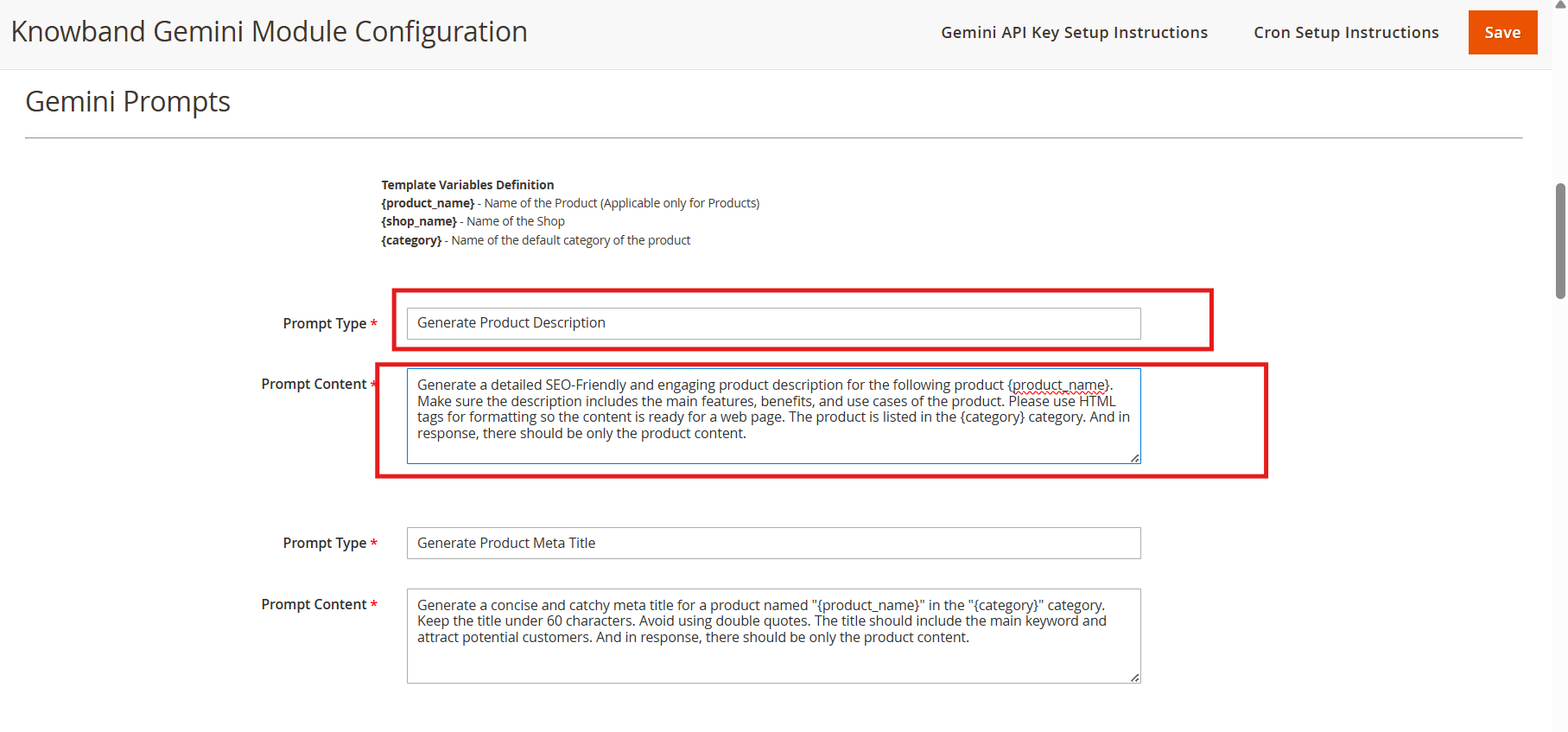
4.0.2. Gemini AI Prompts:

The Magento 2 Gemini AI Content Generator Extension features 14 pre-configured prompts designed for various e-commerce content needs. Also, the store owner can change the content of the prompts based on their needs.

Knowband Magento 2 Gemini AI Content Translator AI Prompts

Generate Product Description: Generate the description based on the product name and category. The store owner can also change the content for the Generate Product Description prompt.

Generate Product Meta Title: Generates SEO- optimized meta titles under 60 characters, including keywords and product categories to increase the search rank.

Generate Product Meta Description: The prompt generates the product meta descriptions of the product within 140 characters maintaining accurate and context-aware information according to the product.

Translate Product Title: Translates the product titles or names to multiple languages selected on the store.

Translate Product Description: The prompt translates the product descriptions while preserving HTML formatting and focused content.

Translate Product Meta Title: Translate Product Meta Titles to multiple languages according to the store theme.

Translate Product Meta Description: The prompt translates Product meta descriptions to multiple languages,, maintaining translated content focused and accurate.

Generate Category Description:  The Generate Category Description prompt generates a category description while preserving the formatting and information of the product.

Generate Category Meta Title: Translate category meta titles within 60 characters with keywor,ds maintaining the category meta title SEO Optimized and focused.

Generate Category Meta Description: Translates category meta descriptions within 140 characters, focusing on the generated meta keywords.

Translate Category Title: The prompt is to translate category titles into multiple different languages based on the needs of the store.

Translate Category Description: Translates category descriptions in the multiple languages selected on the configuration of the extension while maintaining the HTML structure and generated category descriptions.

Translate Category Meta Title:  Translates category meta titles to multiple languages keeping the accurate translation of generated or added meta titles.

Translate Category Meta Description: Translates category meta descriptions to multiple languages, focused on the prompt’s content.

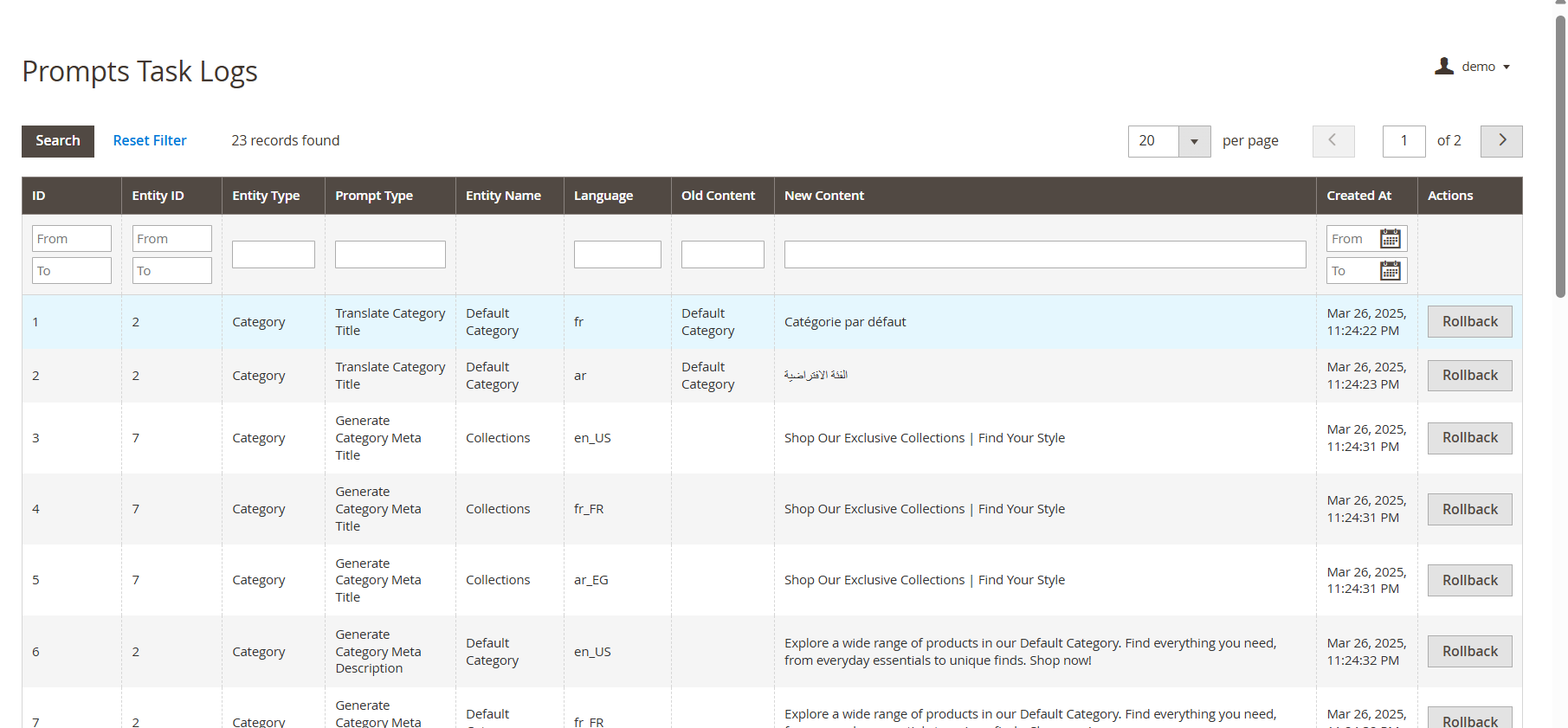
4.0.3. Gemini AI Task Log:


The Task Logs keep a record of all changes and actions performed within the store. Additionally, Knowband’s Magento 2 Gemini AI Extension maintains detailed logs, allowing store owners to track modifications, review past actions, and, if necessary, undo or revert changes for better control and accuracy.

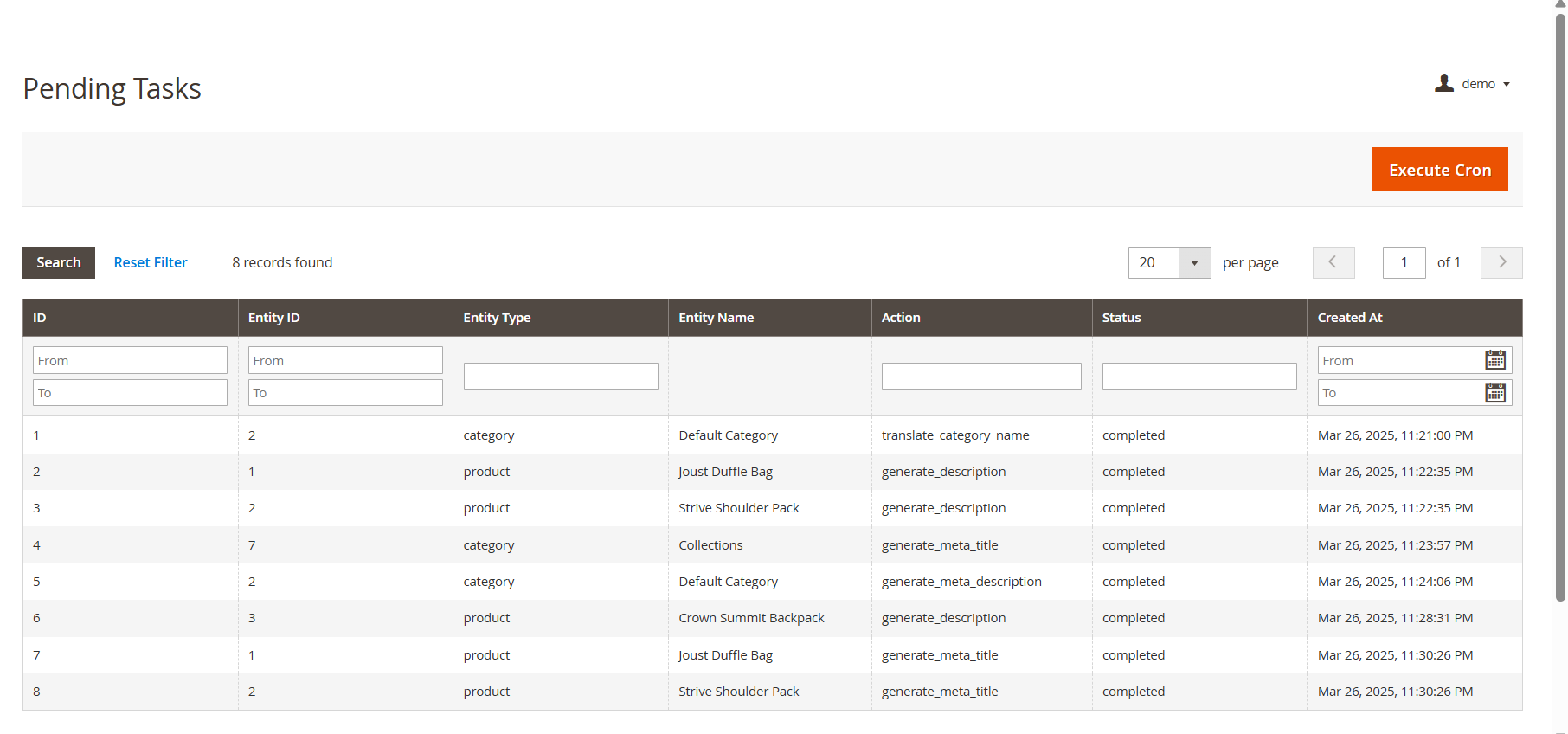
4.0.4 Pending Task Logs

The Pending Task Logs feature in Knowband’s Magento 2 Gemini Content Generator Extension allows users to efficiently manage and monitor content generation tasks before execution. When users initiate a content generation request, it does not get processed immediately. Instead, all tasks are first stored in the Pending Task Logs, providing a tab “ Execute Cron” to execute pending tasks.

5.0. Steps to Execute the Prompts 

The Knowband’s Magento 2 Gemini Content Generator Extension provides an efficient way to manage content generation tasks through a structured process. The key steps involved in this feature are:

  • Product Selection: Users start by selecting the products for which they want to generate or translate AI-powered content, such as product or category descriptions, titles, meta titles, and meta descriptions.
  • Executing the Task: After selecting the products, users execute the task, which sends all content generation requests to the Pending Task Logs section.
  • Managing Pending Task Logs: All pending tasks are stored in the log, allowing users to review, modify, or remove any task before final execution.
  • Executing the Cron Job: To complete the process, users run a cron job that automatically processes all pending tasks and applies the generated content to the respective products.

The Ultimate Guide to Multi-Channel Selling on PrestaShop

Expanding Your Reach: Why Selling on Multiple Channels Matters

Running an online store isn’t just about setting up a website and waiting for customers. Today’s shoppers explore multiple platforms before making a purchase. If your products aren’t available across channels like Google Shopping, Etsy, eBay, and more, then you’re missing out on potential sales. Multi-channel selling helps you tap into a broader audience, build brand recognition, and create multiple revenue streams. 73% of online shoppers use multiple channels before making a purchase decision.

Key Benefits of Multi-Channel Selling

High Sales and Revenue

 Each additional platform you sell on creates new revenue opportunities, allowing you to attract different customer bases that prefer shopping on specific platforms.

Better Visibility and Great Engagement

Your products become more accessible to a larger customer base, increasing the chances of discovery and purchase. With better visibility, your store attracts more visitors, leading to higher engagement and better conversions.

Stronger Brand Recognition

Customers see your products more often, increasing trust, credibility, and brand recall over time. Thus, it helps increase brand recognition. More Customer Base and Increased Sales: Selling on different platforms increases the scalability of the products of your store. That’s why it attracts more customers on different marketplaces.

How to Succeed in Multi-Channel Selling

1. Know Your Audience and Choose the Right Platforms

Every sales platform works differently. Identify where your customers shop the most and focus your efforts there. Whether they browse marketplaces, use social media, or search on Google, understanding their habits helps you sell smarter.

Research Market Trends: Stay updated on industry trends to see where similar products are selling best. Analyze competitors, read customer reviews, and follow market reports to identify the most profitable channels. Look for seasonal trends and emerging shopping habits to stay ahead of the competition, where similar products are selling best.

Consider Product Fit: Each platform caters to a different audience and product type. For example, fashion and lifestyle products perform well on social media, while specialized electronics may sell better on dedicated marketplaces. Therefore, choose platforms that align with your product category and customer preferences to maximize success.

2. Keep Your Inventory in Sync Across Channels

One of the biggest challenges in multi-channel selling is managing inventory efficiently. Selling the same product on multiple platforms without a centralized inventory system can lead to overselling, customer dissatisfaction, and retention.

Automatic Inventory Synchronization: Get Plugins that update your stock on all platforms at the same time. This way, you don’t have to change it manually, and there won’t be mistakes in the product.

Keep Extra Stock: Always have some extra products, especially for popular items. This helps you avoid running out when many people buy at once.

3. Optimize Product Listings for Each Channel

Managing stock across different platforms can get confusing. If you don’t update your products properly, you might sell an item that’s already out of stock or run out of popular products too fast. A good system helps avoid these problems and keeps your business running smoothly.

Managing stock properly is important when selling on multiple platforms. If you don’t keep track, you might sell products that are already out of stock or struggle to fulfil orders. Keeping your inventory updated helps you avoid these problems and keeps your customers happy.

Use automatic stock updates: Use to sync inventory across all platforms in real-time. This means whenever a product is sold on one platform, the stock updates everywhere, preventing overselling or manual errors. Without automation, you might accidentally sell more than you have, leading to cancellations and unhappy customers..

Track best-selling products: The PrestaShop Google Shopping allows the admin to analyze past sales and predict future demand. Some products perform better than others, and by checking which items are selling fast, you can prepare in advance. This helps you stock the right amount of products and prevents running out of popular items.


Knowband’s PrestaShop Modules for Multi-Channel Selling!

At Knowband, we create easy-to-use PrestaShop Modules that help you sell on multiple platforms without extra effort.

 1. PrestaShop Google Shopping Integration

Google Shopping is a powerful platform where millions of shoppers search for products daily. By listing your products on Google Shopping, you can increase visibility and attract more buyers. The research has shown that 87% of people begin their search for shopping from Google.

The Knowband PrestaShop Google Shopping Integrator allows you to showcase your products directly on Google Shopping without the need for manual updates. This automation increases product visibility, boosts traffic, and helps drive more sales.

Key Features of the PrestaShop Google Shopping Integration Module.

Automated Product Syncing: Automatically sync your PrestaShop store with Google Shopping so product details stay updated without manual work.

Bulk Product Uploads: Save time by uploading all your products at once. The Knowband’s Google Shopping allows the admin to list the products in bulk at a time, reducing the manual work.

Smart Attribute Mapping: Easily match your product details with Google’s requirements to improve listing accuracy. The admin can map the store’s category with all the attributes to Google’s category.

Auto-Generated Feeds: Keep your listings fresh with automated product feed updates. The extension allows the feed features to automatically sync all the updated product details. With Knowband’s PrestaShop Google Shopping Integration, you can effortlessly display your products in Google search results, driving more traffic to your store.
2. PrestaShop eBay Marketplace Integration

The Knowband PrestaShop eBay Marketplace Integration Extension makes it effortless to manage your eBay store directly from your PrestaShop dashboard. Instead of manually updating listings and tracking stock, this extension automates the entire process, helping you scale your business smoothly.

Key Features of the eBay Integration:

1.  Sync Products & Inventory: The Knowband’s PrestaShop eBay Integration module ensures that your product listings and stock levels remain consistent across both platforms. Any changes made to product details, stock quantities, or pricing in your PrestaShop store are automatically reflected on eBay. This prevents overselling and stock discrepancies, ensuring a smooth selling experience.

2. Real-Time Updates: Stay up to date with automated real-time synchronization of orders, pricing, and inventory changes. As soon as a product is sold on eBay, the stock is adjusted in PrestaShop. Order statuses are updated instantly, keeping customers informed and reducing manual effort. This feature helps in avoiding price mismatches, out-of-stock issues, and processing delays.

3. Customizable Product Listings: Easily create and manage eBay product listings directly from your PrestaShop back office. Optimize listings by customizing product titles, descriptions, images, pricing, and attributes for better visibility on eBay. You can also apply different pricing rules for eBay without affecting your PrestaShop store, ensuring better profitability.

Integrate Your Opencart Shop with Etsy Marketplace

No Coding Skills Required

SHOP NOW

3. PrestaShop Etsy Marketplace Addon

Etsy is a leading marketplace for handmade, vintage, and unique products, with over 95 million active buyers. It hosts over 7.5 million active sellers, making it a competitive yet rewarding platform for businesses that specialize in niche and creative products. In 2023 alone, Etsy sellers generated over $13 billion in gross merchandise sales, proving the platform’s massive potential.

The PrestaShop Etsy Marketplace Addon simplifies the process of managing your Etsy store directly from your PrestaShop dashboard. Instead of manually updating listings, tracking orders, or adjusting stock levels, this extension automates everything, saving time and reducing errors.

Key Features of the Etsy Connector:


Price and Order Synchronization: Knowband’sPrestaShop Etsy Marketplace Addon ensures real-time price and order synchronization, keeping your inventory and pricing updated across both platforms.

Bulk Uploads: Easily add multiple products to Etsy in one go. The Knowband’s Etsy Marketplace Addon allows the admin to list bulk products at the same time smoothly.

Category Mapping: Ensure your products appear in the right Etsy categories with the correct attributes for better visibility.

Price & Stock Synchronization: Keep pricing and stock updated to prevent overselling. The Knowband’s Etsy Marketplace Integration Addon allows price management within the module.

Conclusion: Sell Smarter with Knowband’s PrestaShop Multi-Channel Extensions

Selling on Google Shopping, eBay, and Etsy opens up new sales opportunities. With Knowband’s PrestaShop solutions, you can automate inventory management, sync orders, and optimize product listings all from one place. The Knowband’s Marketplace Addons save time, reduce manual errors, and help you grow your business effortlessly.

Knowband’s PrestaShop Marketplace Integration Addons simplify the process by automating inventory updates, order synchronization, and product listing management. With these smart integrations, you can sell effortlessly across multiple platforms, save time, and focus on growing your business. Take advantage of multi-channel selling today and unlock new opportunities for success.


Fashion Plano’s Success Story: Leveraging Knowband’s Modules for Growth

In today’s highly competitive e-commerce World, having a strong digital presence is essential for success. Fashion Plano, an emerging online fashion store, aims to provide a seamless and engaging shopping experience for fashion enthusiasts. However, as the store expanded, it faced challenges in product labelling, promotional strategies, and content creation. To overcome these obstacles, Fashion Plano turned to Knowband, a leading provider of PrestaShop eCommerce solutions. By integrating the Knowband PrestaShop Product Stickers &  Label Module and PrestaShop ChatGPT Content Generator Module, Fashion Plano was able to enhance its product visibility, automate content generation, and improve user engagement.

This case study explores how Knowband’s innovative solutions helped Fashion Plano streamline its operations, improve product presentation, and enhance engagement through the PrestaShop Product Sticker  & Label Module and PrestaShop ChatGPT Content Generator Module.

About Fashion Plano

Fashion Plano, established in 2023, started as a small online fashion store with a vision to offer trendy and high-quality clothing to style-conscious customers. Headquartered in London, United Kingdom the company aims to bring the latest fashion trends to customers worldwide through a seamless shopping experience.

Fashion Plano is an online fashion store that offers trendy and high-quality clothing and accessories. The store focuses on providing stylish options for fashion lovers. Since its establishment in 2023, Fashion Plano has rapidly expanded, attracting a growing customer base. However, as the store evolved, it faced several challenges, including:

  • Limited customization options for product labels.
  • Difficulty in creating engaging and SEO-friendly product descriptions.
  • The need to improve product visibility and enhance customer engagement.

Key Features Implemented with Knowband’s Solutions

Enhanced Product Labeling with Knowband’s PrestaShop Product Sticker & Label Module

Product presentation plays a crucial role in driving customer interest. However, the default PrestaShop system automatically assigned a “New” label to products, limiting Fashion Plano’s control over product promotions.

With Knowband’s PrestaShop Product Sticker & Label Module, Fashion Plano was able to:

  •  Remove the default “New” label from products
  • Add custom promotional stickers like “New Arrivals,” “Weekend Sales,” and “Best Seller.”
  • Increase product visibility by strategically placing eye-catching labels.

This customization helped highlight key products, making it easier for customers to identify trending and exclusive items, ultimately boosting conversions.

👉Explore the Module with Our Video Guide

AI-Powered Content Generation with Knowband PrestaShop ChatGPT  Content Generator Module

A major challenge for any eCommerce business is creating compelling product descriptions that are both engaging and SEO-friendly. Writing a well-optimized product description manually can be time-consuming. Fashion Plano leveraged Knowband’s ChatGPT Content Generator Module to:

  • Generate high-quality product descriptions in seconds.
  • Maintain consistent and appealing content across all product pages.
  • Optimize product information for better search engine ranking.

By automating content creation, Fashion Plano saved valuable time while ensuring that its product pages remained informative and attractive to potential buyers.

Expanding International Reach with AI-Powered Translation

Reaching a global audience requires content that resonates with international customers. Manually translating product descriptions and promotional content was a time-intensive challenge for Fashion Plano.

By utilizing the ChatGPT Translator Module, the store was able to:

  • Translate product descriptions and promotional materials efficiently into multiple languages.
  • Maintain accurate and culturally relevant translations to enhance customer trust.
  • Expand its customer base, resulting in a 35% increase in international customers.

Explore Our Solutions

No Coding Skills Required

Knowband Solutions

The Impact of Knowband’s Solutions on Fashion Plano

With Knowband’s PrestaShop Product Sticker Module and PrestaShop ChatGPT  Content Translator Module, Fashion Plano achieved significant improvements in in-store performance and customer engagement:

Better Product Visibility: Custom labels enhance product appeal, leading to increased conversions.
Faster and More Effective Content Creation: AI-powered descriptions improve efficiency and consistency.
Improved Customer Experience: Enhanced product presentation made it easier for shoppers to navigate and make purchase decisions.

Furthermore, these enhancements allowed Fashion Plano to stand out in the competitive fashion industry while providing an engaging and seamless shopping experience for its customers.

  • Enhanced Product Visibility: Custom labels helped showcase key products effectively, leading to a 22% increase in conversion rates.
  • Increased Efficiency in Content Creation: AI-generated descriptions maintained consistency and quality while reducing manual workload, improving content production speed by 70%.
  • Improved Customer Experience: A visually appealing and well-structured website made it easier for customers to navigate and make purchase decisions, leading to a 40% increase in customer retention.
  • Stronger Global Reach: AI-powered translations enabled the store to attract and engage international shoppers, increasing global sales by 35%.
  • Higher Overall Revenue: With improved engagement and automation, Fashion Plano saw a 30% boost in total sales within six month

Conclusion

Knowband’s innovative solutions played a pivotal role in Fashion Plano’s growth and success. By implementing Knowband’s PrestaShop product sticker & Label and PrestaShop AI-powered content generation/ translation Module, the store was able to optimize product presentation, enhance engagement, and improve operational efficiency.

For any eCommerce business looking to optimize its PrestaShop store, Fashion Plano highly recommends Knowband’s PrestaShop Modules as essential modules for automation, customization, and international expansion.

OpenCart Gemini/ Claude/ ChatGPT/DeepSeek Content Generator/Translator Extension – User Manual

The OpenCart AI Content Generator Extension is a powerful plugin designed to create and translate content for OpenCart store owners. By seamlessly integrating the advanced capabilities of Claude AI, ChatGPT API, DeepSeek API and Gemini API, the AI Content Generator and Translator for OpenCart enables store owners to generate high-quality, SEO-optimized product content. The OpenAI Content Translator Extension includes descriptions, titles, category content, meta titles, and meta descriptions, all while preserving authenticity.

Moreover, the OpenCart AI-powered Translator Plugin by Knowband provides seamless translation services across multiple languages, ensuring your OpenCart store can effectively reach global markets. As a result, store owners can generate professional content effortlessly, saving countless hours of manual writing and editing work. Additionally, the Extension enhances efficiency, as it streamlines both content creation and translation processes.

Furthermore, the OpenCart AI Bulk Content Generator Extension integrates smoothly with all three AI platforms (Claude, Gemini, DeepSeek, and ChatGPT). Whether you’re creating new content or translating existing product information, the extension ensures accuracy, consistency, and speed. Likewise, it minimizes errors, maintains brand voice, and improves content quality.

Meanwhile, the OpenCart SEO Content Generator Plugin ensures all content strictly follows SEO best practices. Consequently, this helps improve search rankings on Google and other search engines. In turn, better rankings lead to higher visibility, more traffic, and increased conversions. Thus OpenCart AI Content Extension is an essential plugin for OpenCart store owners who want to enhance productivity and maximize their reach.

1.0.0 Key Features Of the OpenCart AI Content Generator Extension

  • AI-Powered Content Generation- The OpenCart AI Content Generator and Translator Extension automatically creates high-quality product and category descriptions, meta titles, and meta descriptions by leveraging advanced AI technology, including DeepSeek, ChatGPT, Claude, and Gemini.
  • Seamless Multilingual Translation- Translate the content into multiple languages while maintaining accuracy and cultural relevance, allowing e-merchants to expand into international markets without hiring expensive translation services.
  • Enhanced SEO Performance- All generated and translated content is optimized for search engines, improving your store’s and product rankings and boosting store visibility through strategic keyword placement and best SEO practices.
  • Flexible AI Model Selection- The OpenCartAI Content Generator Extension provides a variety of AI models for both content creation and translation. Store owners can select from ChatGPT options like GPT-3.5 and GPT-4.0, Claude models such as Haiku 3, Haiku 3.5, Sonnet 3.5 (Old), and Sonnet 3.5 (New), along with Gemini variants, including Gemini 1.5 Pro, 1.5 Flash, 1.5 Flash-8b, 2.0 Flash, and 2.0 Flash – Lite Preview as well as DeepSeek Chat & Reasoner.
  • User-Friendly Interface- No technical expertise is required. The OpenCart AI Content Generator Extension provides an intuitive interface that makes content generation straightforward and informative, allowing even non-technical store owners to create professional content with just a few clicks.
  • Bulk Processing Capabilities- The perfect solution for stores with large product catalogues, enabling you to generate content for multiple products simultaneously and saving hours of manual work.
  • Comprehensive Activity Tracking- Records every action taken within the plugin, including timestamp and summary of changes, providing clear logs of all content generated and translated modifications.
  • Smart Product Categorization- Intelligently suggests appropriate product categories based on descriptions, helps in organizing your store more efficiently and ensures products appear in the most relevant sections.
  • Market-Specific Content Adaptation- Adjusts content for different target markets by considering local preferences, language, and cultural differences to make it more relevant and increase conversions.

2.0.0 Benefits of  Knowband’s OpenCart AI Content Generator Extension to E-Merchants

  • Time Savings- OpenCart Claude Content Translator Plugin quickly generate high-quality content in minutes, reducing manual effort. Focus on core business tasks instead of content creation.
  • SEO Improvements- AI-optimized content enhances search engine rankings and increases organic traffic. Ensure product descriptions and meta tags follow SEO best practices.
  • Global Reach- Translate your entire store into multiple languages effortlessly using OpenCart Content Translator & Generator Plugin. Expand into international markets and reach a wider audience.
  • Content Quality- OpenCart Content Translator & Generator Plugin allows the e-merchant to generate professional, engaging, and well-structured product descriptions. AI ensures accuracy while maintaining brand consistency.
  • Cost Efficiency- Save money on hiring copywriters and translators. AI Content Generator for OpenCart AI Content Translator reduces operational costs without compromising quality.
  • Competitive Advantage- Utilize advanced AI technology to stay ahead of competitors. Improve efficiency and offer better product information than rivals.
  • Enhanced User Experience- Detailed and engaging content helps customers make informed decisions. Improve conversions with clear and compelling product descriptions.
  • Performance Tracking- Monitor AI-generated content with a built-in task log. Keep track of past changes and refine content strategy over time

Automate the Content Generation and Translation on Your Prestashop Store

No Coding Skills Required

SHOP NOW

3.0.0 Installing the OpenCart AI Content Generator Plugin

Setting up the OpenCart AI Content Translator Plugin is simple. Follow the steps below to install and configure it easily.

What You Receive Upon Purchase:

  • A zipped file containing the OpenCart AI Content Translator extension.
  • A user manual to guide you through installation and setup.

Follow these steps for Installation

Step 1. Unzip the Downloaded File
Go to My Account > Downloads, locate the zipped file, and extract it. Once unzipped, you’ll see relevant folders.


Step 2. Transfer Files to the Root Directory

Use an FTP manager to copy the extracted files to your OpenCart root directory.

Step 3. Complete the Installation
The plugin is now installed and ready for configuration.

Step 4. Access and Configure the Extension
Go to Admin Panel > Main Menu > Extensions, select AI Content Generator Plugin by Knowband and click Edit to customize settings.


4.0 How to Generate the API Key for Knowband’s OpenCart AI Content Translator Plugin

Steps to Generate Claude API

  1. Visit Anthropic’s website, and click “Start Building”.
  2. Sign up for an account, go to your Dashboard, generate an API key, and store it securely.

Steps to Generate Gemini API

  1. Visit the Google AI Studio website.
  2. Click “Get API key,” accept the terms of service, create your key, and paste it into the configuration settings.

Steps to Generate ChatGPT API for OpenCart ChatGPT Plugin

  1. Go to OpenAI’s website and sign in.
  2. Click on View API Key and select Secret key.
  3. Make sure to copy the key immediately and store it safely.

Important- Billing Requirements

To generate a ChatGPT API key for the Knowband AI Content Translator Plugin, store owners need to set up billing in their OpenAI account. This means adding a payment method and ensuring you have enough credits or an active subscription to use the API. Without a billing setup, the API key won’t work.

Steps to Generate DeepSeek API for OpenCart DeepSeek AI Plugin

  1. Access the Deepseek platform via this URL https://platform.deepseek.com/api_keys to generate the API Key. Login or Signup to generate API Key
  2. Click on Create API Key after adding the key name.
  3. Copy or store the key to enable functioning of DeepSeek AI Content Generator Plugin

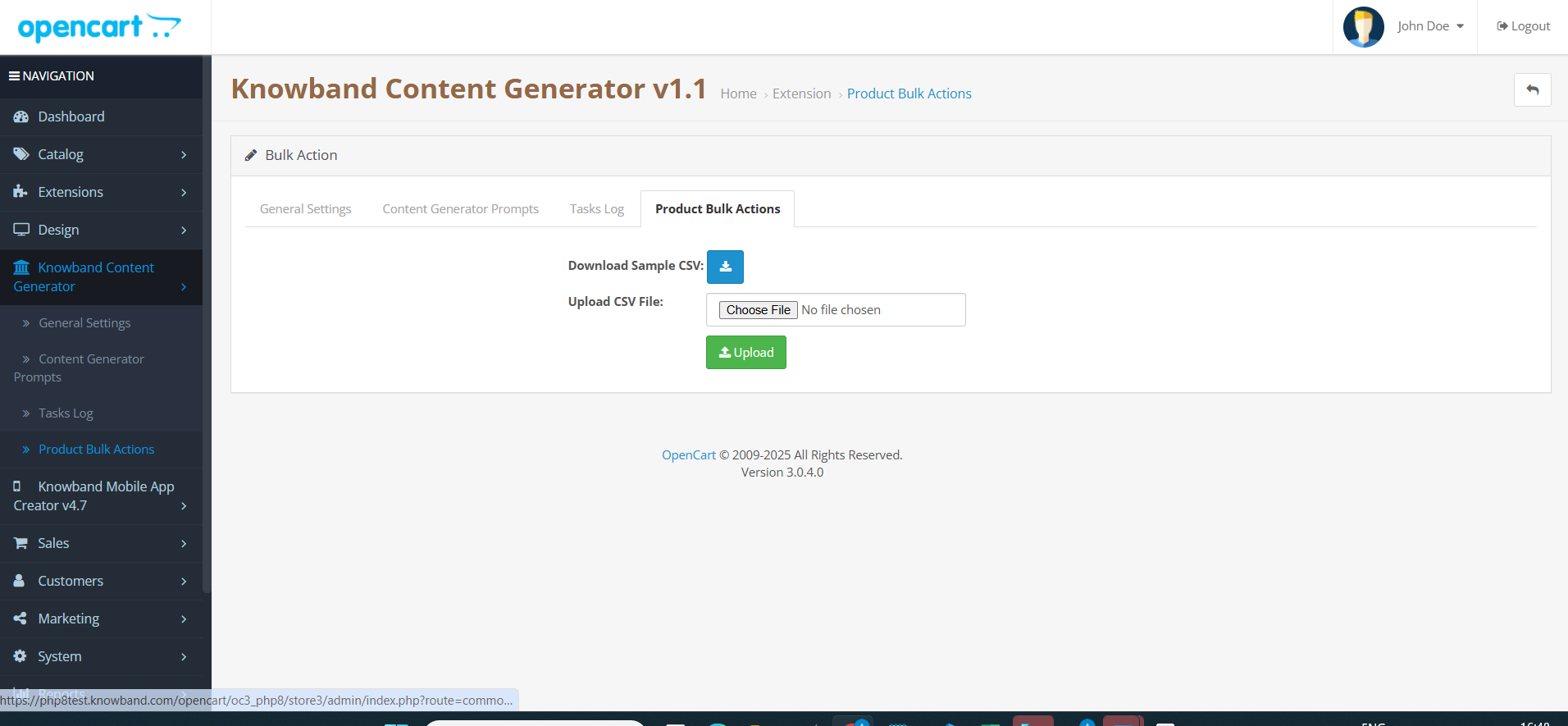
5.0.0 Admin Interface of OpenCart Gemini AI Content Generator Extension 

5.0.1 General Settings 

The OpenCart Gemini AI Content Generator Extension allows administrators to configure various AI settings and manage bulk content operations:

Configuration Options:

  • Enable/Disable- Turn the extension on or off as needed, allowing you to manage AI-generated content effortlessly.
  • API Key Configuration- Enter and store API keys for all AI engines, including Claude, ChatGPT, and Gemini, ensuring smooth functionality.
  • Enable/Disable the Claude- Easily activate or deactivate the Claude AI Engine with a single click.
  • API Key for Claude- Provide the required API key to unlock Claude AI’s content generation and translation features.
  • Select Claude Model for Generation- Choose from multiple Claude AI models, including Haiku 3, Haiku 3.5, Sonnet 3.5 (Old), and Sonnet 3.5 (New), for AI-powered content creation.
  • Select Claude Model for Translation- Pick the most suitable Claude AI model for translations, such as Haiku 3, Haiku 3.5, Sonnet 3.5 (Old), or Sonnet 3.5 (New).
  • API Key Configuration-Store and manage API keys for Claude, ChatGPT, and Gemini AI engines to enable seamless content generation and translation.
  • Enable/Disable the ChatGPT-Turn ChatGPT AI Engine on or off to control AI-generated content in your store.
  • API Key for ChatGPT- Enter the ChatGPT API key to activate content generation and translation capabilities.
  • Select ChatGPT Model for Generation- Choose between ChatGPT 3.5 and ChatGPT 4.0 for generating high-quality, SEO-friendly content.
  • Select ChatGPT Model for Translation- Select either ChatGPT 3.5 or ChatGPT 4.0 to translate content accurately while maintaining context.
  • Enable/Disable the Gemini AI- Activate or deactivate the Gemini AI Engine to manage content creation and translation efficiently.
  • API Key for Gemini- Provide the necessary API key to enable the Gemini AI Engine’s functionality.
  • Select Gemini Model for Generation- Select from various Gemini AI models like Gemini 1.5 Pro, 1.5 Flash, 1.5 Flash-8b, 2.0 Flash, or 2.0 Flash – Lite Preview for generating content.
  • Select Gemini Model for Translation- Pick a suitable Gemini model—1.5 Pro, 1.5 Flash, 1.5 Flash-8b, 2.0 Flash, or 2.0 Flash – Lite Preview to translate content seamlessly.
  • Enable/Disable the DeepSeek: Turn DeepSeek AI Engine on or off to use this  AI mode.l
  • API Key for DeepSeek- Enter the DeepSeek API key to activate content generation and translation.
  • Select DeepSeek Model for Generation- Choose between Deepseek Chat or DeepSeek Reasoner for generating the content for the products and categories.
  • Select DeepSeek Model for Translation- Select either Deepseek Chat or DeepSeek Reasoner to translate content accurately while maintaining context.
  • Model Selection– Easily select from available models across Claude, ChatGPT, DeepSeek and Gemini AI for content generation and translations.
  • Temperature Control- Adjust the AI creativity level using temperature settings (0.0 to 1.0). Higher values make content more creative, while lower values keep it consistent.
  • Token Limit- Set a maximum token limit for content generation across Claude, ChatGPT, DeepSeek and Gemini AI models
  • Primary Language- Define the main language for AI-generated content and translations to ensure consistency.
  • Target Languages- Select multiple languages for translations to reach a wider audience and enhance global accessibility.

5.0.2 Content Generation & Translation Prompts for OpenCart Gemini AI Content Generator Plugin

The OpenCart Gemini AI Content Generator plugin includes 14 pre-configured AI prompts designed specifically for e-commerce:

Product Content Generation & Translation Prompts of OpenCart AI Content Extension:

  • Generate Product Description – Creates SEO-friendly, structured product descriptions highlighting key features and benefits.
  • Generate Product Meta Title – Produces optimized titles under 60 characters with relevant keywords.
  • Generate Product Meta Description – Creates compelling descriptions within 140 characters.
  • Translate Product Title – Converts product titles into selected languages.
  • Translate Product Description – Translates descriptions while preserving HTML formatting.
  • Translate Product Meta Title – Converts meta titles to different languages.
  • Translate Product Meta Description – Translate meta descriptions while maintaining readability.

Category Content Generation & Translation Prompts:

  • Generate Category Description – Develop category content with proper HTML formatting.
  • Generate Category Meta Title – Creates keyword-rich category titles under 60 characters.
  • Generate Category Meta Description – Produces concise category descriptions within 140 characters.
  • Translate Category Title – Converts category titles to multiple languages.
  • Translate Category Description – Translates category descriptions with HTML formatting.
  • Translate Category Meta Title – Converts category meta titles to selected languages.
  • Translate Category Meta Description – Translates category meta descriptions across languages.

5.0.3 Task Log System of OpenCart AI Content Extension

The OpenCart AI Content Generator and Translator extension records all AI-generated and translated content, including prompt type, language, product/category, timestamp, status, previous content, and new content. This log helps track changes, review past updates, and monitor content evolution.

6.0 Bulk Content Generation by OpenCart AI Content Generator

The AI Content Generator Extension for OpenCart allows the store admin to upload the CSV File which will contain the product id with with 67columns of Prompts like Generate Product description, Generate Product Meta description, Generate Product meta description, Translate Product  Description, Translate Product Titles, Translate Product Meta Description and Product meta title translation.

Moreover, the extension follows this algorithm if the generate product description will contain 1 in field then the content will be generated.

6.0 Steps to Execute OpenCart AI Content Prompt

To generate or translate content using OpenCart DeepSeek Content Translator Extension

  1. Navigate to Products or Categories in your admin panel.
  2. Select the items you want to work with.
  3. Click on the Bulk Actions menu.
  4. Choose the desired AI operation (Description, Meta Title, Translation, etc.).
  5.  Select which AI engine to use for the task.
  6. Click the prompt you want to execute.
  7. Review and approve the generated content.

7.0 Tutorial: Watch the Video Guide

To help you set up and use the Opencart AI Content Generator, we have created a comprehensive YouTube tutorial. This step-by-step video guide walks you through the installation process, configuration options, and how to effectively translate & generate the content on your store.