WooCommerce Google Tag Manager (gtag, GA4, GTM Events) Plugin– User Manual

The Knowband WooCommerce Google Tag Manager Plugin is a robust solution that streamlines the integration of Google Tag Manager (GTM) with your WooCommerce store. Designed with ease of use in mind, this plugin allows store owners to effortlessly implement and manage various Google tags—no technical knowledge is required.

Moreover, with the WooCommerce GTM Plugin, you can accurately track key customer interactions, including product views, category views, add-to-cart and remove-from-cart actions, checkout steps, payment processes, shipping details, and order confirmations. As a result, these insights help you better understand customer behaviour and optimize the user journey.

In addition, the Google Tag Manager for WooCommerce also captures UTM parameters, giving you a clearer picture of how your marketing campaigns are performing. By doing so, it allows store owners to identify which campaigns generate the most traffic and conversions. Consequently, this enables smarter budget allocation and an improved return on investment (ROI).

Ultimately, this plugin is ideal for businesses aiming to enhance their analytics, boost conversions, and elevate the overall shopping experience. The Knowband WooCommerce Google Tag Manager Extension supports Google Analytics, GA4, and other Google marketing tools—thereby empowering data-driven decision-making with precision and ease

Key Features of WooCommerce Google Tag Manager Plugin

Effortless Google Tag Manager Integration
Knowband’s WooCommerce Google Marketing Integration user-friendly integration tool makes it easy to connect Google Analytics 4 to your WooCommerce store with no technical skills or coding experience needed.

Moreover, this plugin allows the store admins to track key e-commerce metrics like product views, add-to-cart events, purchases, and more in real-time. Make data-driven decisions to boost conversions and grow your business, all from an intuitive dashboard.

Real-Time Event Tracking for Actionable Insights
WooCommerce Google Marketing Integration Plugin allows store owners to track critical customer interactions as they happen, including product views, add-to-cart actions, checkout steps, coupon usage, and selected payment and shipping methods, giving you immediate visibility into user behaviour.

Campaign Tracking with UTM Parameter Support
Furthermore, Custom Event Tracking WooCommerce Plugin automatically capture UTM parameters to evaluate your marketing campaign performance and identify the channels driving the highest traffic and conversions.

Enhanced eCommerce Tracking for Smarter Decisions
GTM WooCommerce Plugin allows the store owners to gain deeper insights into your store’s performance with advanced tracking of product engagement, cart activity, and completed purchases—perfect for data-driven strategy optimization.

Fast and Simple Setup – No Technical Knowledge Needed
The WooCommerce Google Event Tracker Plugin features an intuitive interface that enables a smooth, hassle-free setup—allowing users to manage tracking tags effortlessly, with no coding required.

Powerful Admin Dashboard for Complete Control
Moreover, you can manage all your tracking tags and events directly from your WooCommerce admin panel using a streamlined and user-friendly dashboard.

Multi-Language Compatibility for Global Reach
Knowband’s WooCommerce Google Analytics Integration is designed for international stores, the extension supports multiple languages to help you deliver a consistent, localized shopping experience across different regions.

2.1 Steps to Get the Google Tag Manager ID and Google Analytics Measurement ID

2.1.1 Steps to Get Google Tag Manager ID

Step 1: Access the Google Tag Manager account.

Step 2: Create a new container or select an existing container within your Google Tag Manager account.

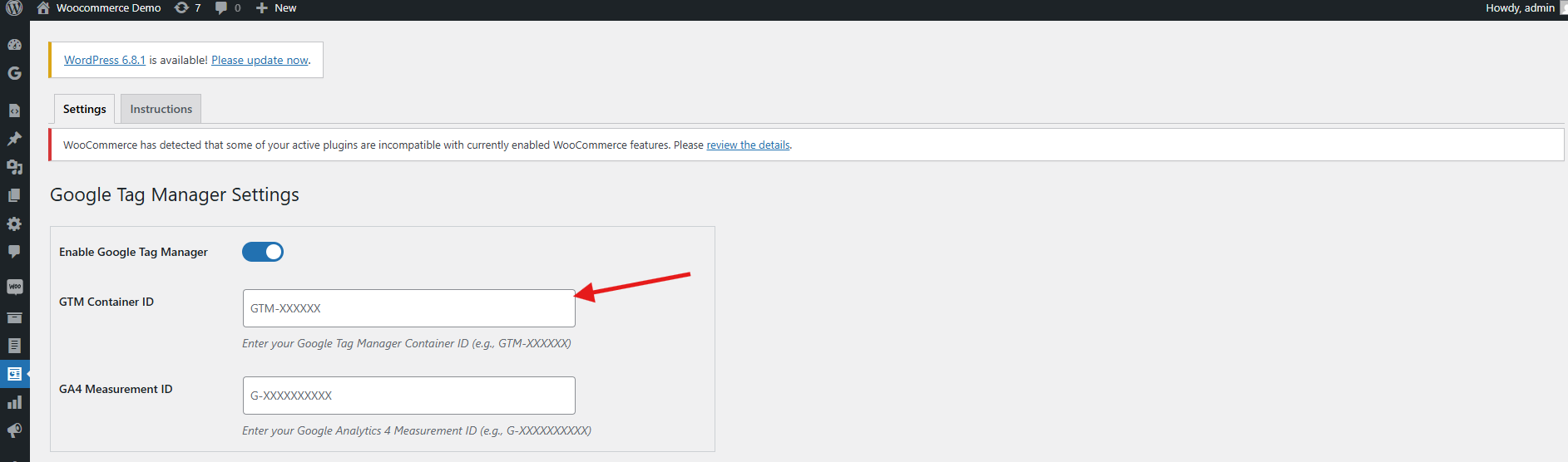
Step 3: The Container ID will be displayed in the top-right corner of your Google Tag Manager dashboard, typically formatted as: GTM-XXXXXX.

Step 4: Copy the Container ID and add it to the GTM container ID field in the configuration field.
2.1.2 Follow these steps to get Google Measurement ID 

Step 1: Visit the Google Analytics account.

Step 2: Select the property for which you want to get the Measurement ID.

Step 3: Navigate to Admin ->Data Streams and choose your web data stream.
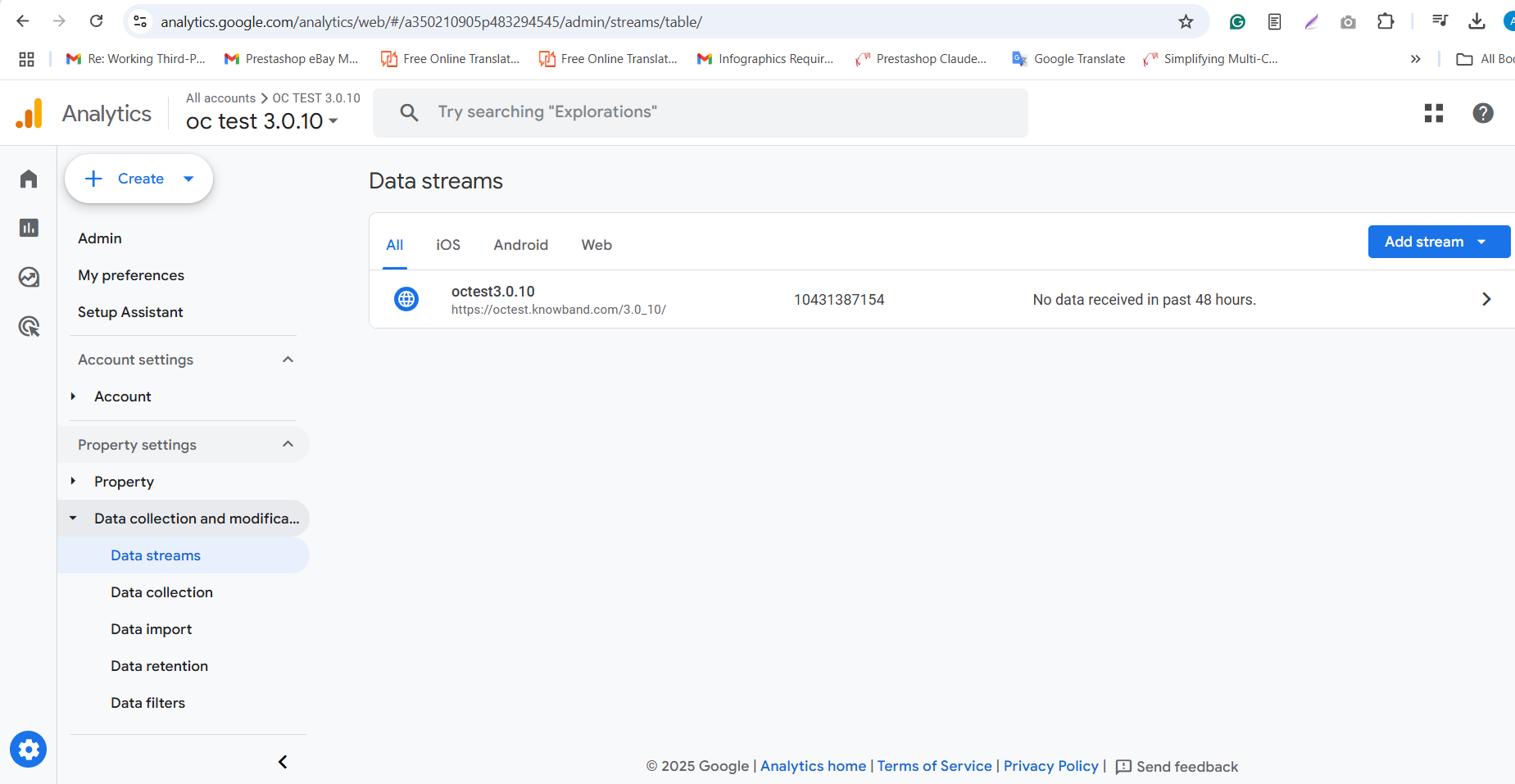
Step 4: Navigate to Admin > Data Streams in your Google Analytics account, then locate the Measurement ID, which appears in this format: G-XXXXXXXXXX.

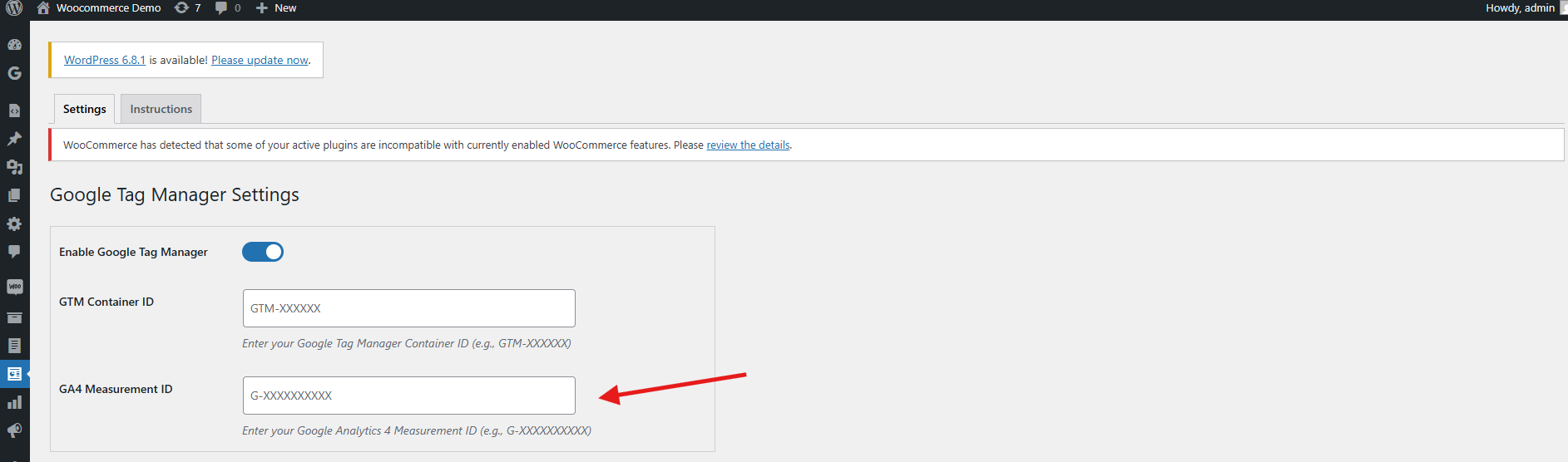
Step 5: Copy this ID and paste it into the Google Measurement ID field within the module’s configuration settings.
3.1 Configuring Events in Google Tag Manager

To enable event tracking in your WooCommerce store using the WooCommerce Google Analytics Integration Plugin, follow these steps:

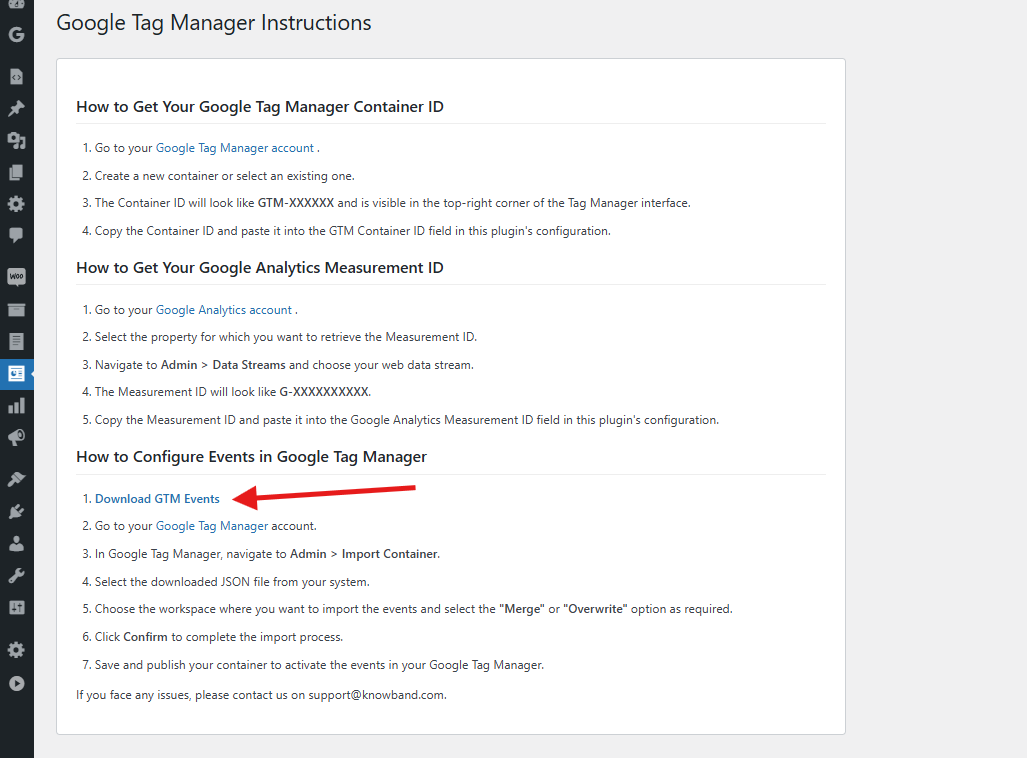
Step 1: Download the GTM Events File
Navigate to the WooCommerce gtag Integration Plugin’s configuration panel and go to the Instructions tab. There you’ll find a direct link to download the GTM events JSON File.
Step 2: Log into Google Tag Manager
Access your Google Tag Manager account.

Step 3: Import the Events Container
Go to Admin > Import Container in your GTM dashboard.

Step 4: Upload the JSON File
Select the downloaded JSON file from your computer.

Step 5: Choose the Workspace and Import Option
Pick the GTM workspace where you’d like to import the events. Then choose either Merge (to combine with existing settings) or Overwrite (to replace them entirely), based on your preference.

Step 6: Confirm the Import
Click Confirm to complete the import process.

Step 7: Publish the Container
Save and publish the updated container to activate the new events in your GTM account

By following the above steps, you can successfully configure the WooCommerce gtag Integration Extension. However, if you face any issues, please feel free to contact us at support@knowband.com.

4.0 Set Up WooCommerce Google Analytics Integration Plugin in 3 Simple Steps

Log in to your WordPress Admin Dashboard.

Navigate to Plugins > Add New.

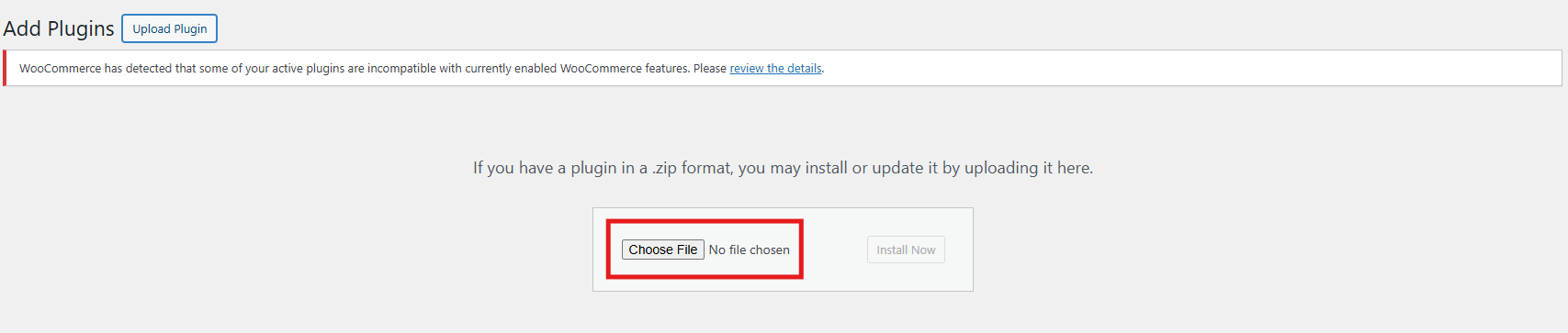
Upload the zipped file provided with the WooCommerce GA4 Integration purchase.
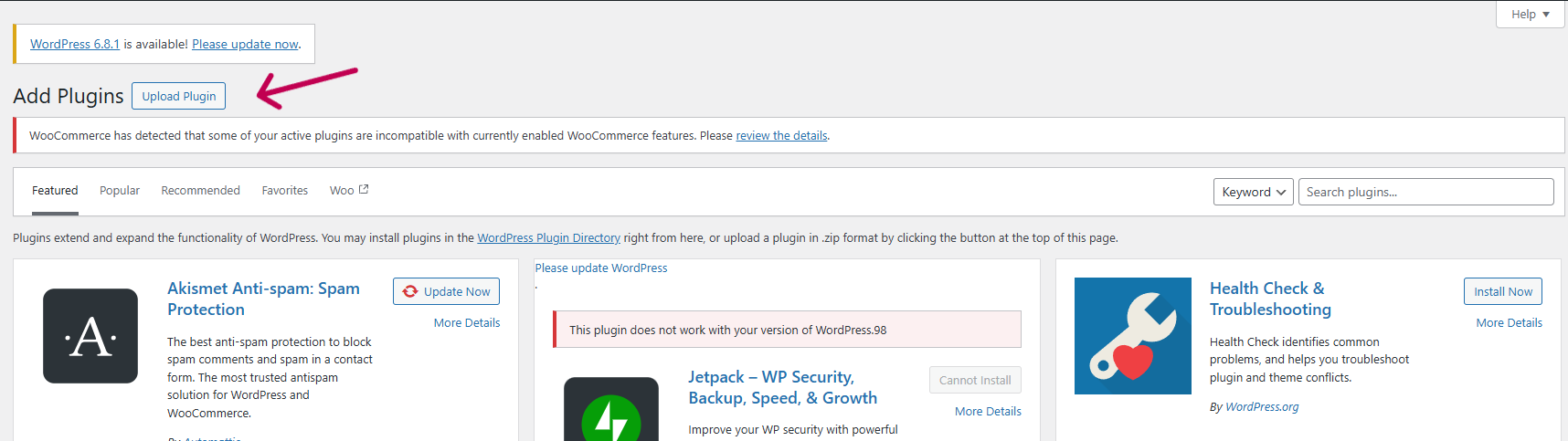
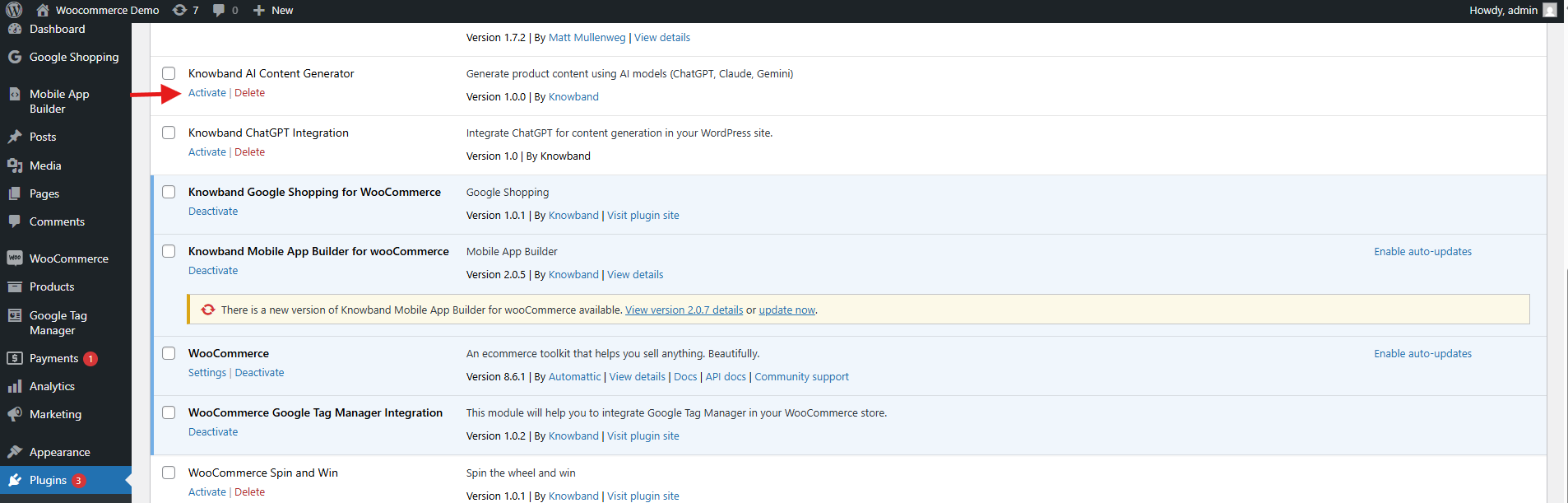
Click Install Now next to the plugin, then click Activate once installed.
5.0. Admin Panel Overview of WooCommerce eCommerce Measure Extension

The Google Tag Manager for WooCommerce extension includes a user-friendly admin dashboard that allows store owners to easily configure and manage tracking tags directly from the WooCommerce backend—no technical expertise required.

Core Features of the Admin Panel
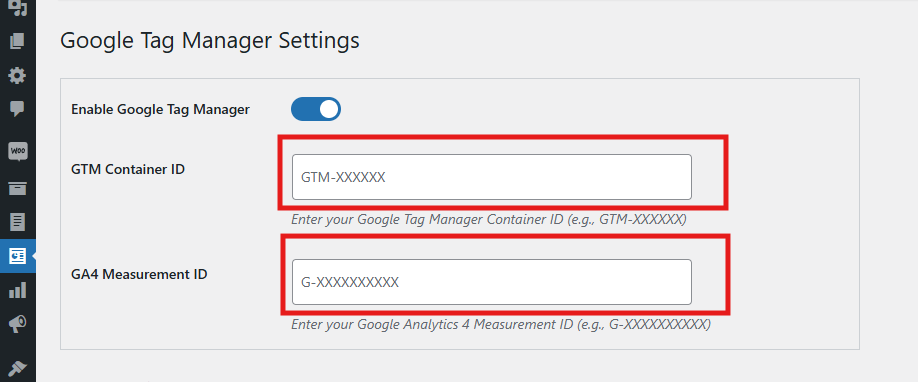
  • Enable or Disable Extension
    Instantly activate or deactivate the module as needed with a simple toggle.
  • GTM Container ID
    Please enter your Google Tag Manager Container ID in this field to seamlessly connect your WooCommerce store with GTM.
  •  Refer to section 1.1 for guidance on locating this ID.
  • Google Analytics ID
    Input your Google Analytics Measurement ID to link Google Analytics with GTM and start tracking store performance.

Event-Based Tag Management

Each event listed below can be individually enabled or disabled based on your store’s specific tracking requirements in the WooCommerce GA4 Integration Plugin. Consequently, this flexibility allows you to tailor the data collection, enabling Google Analytics to provide more relevant insights and helping you make smarter business decisions.
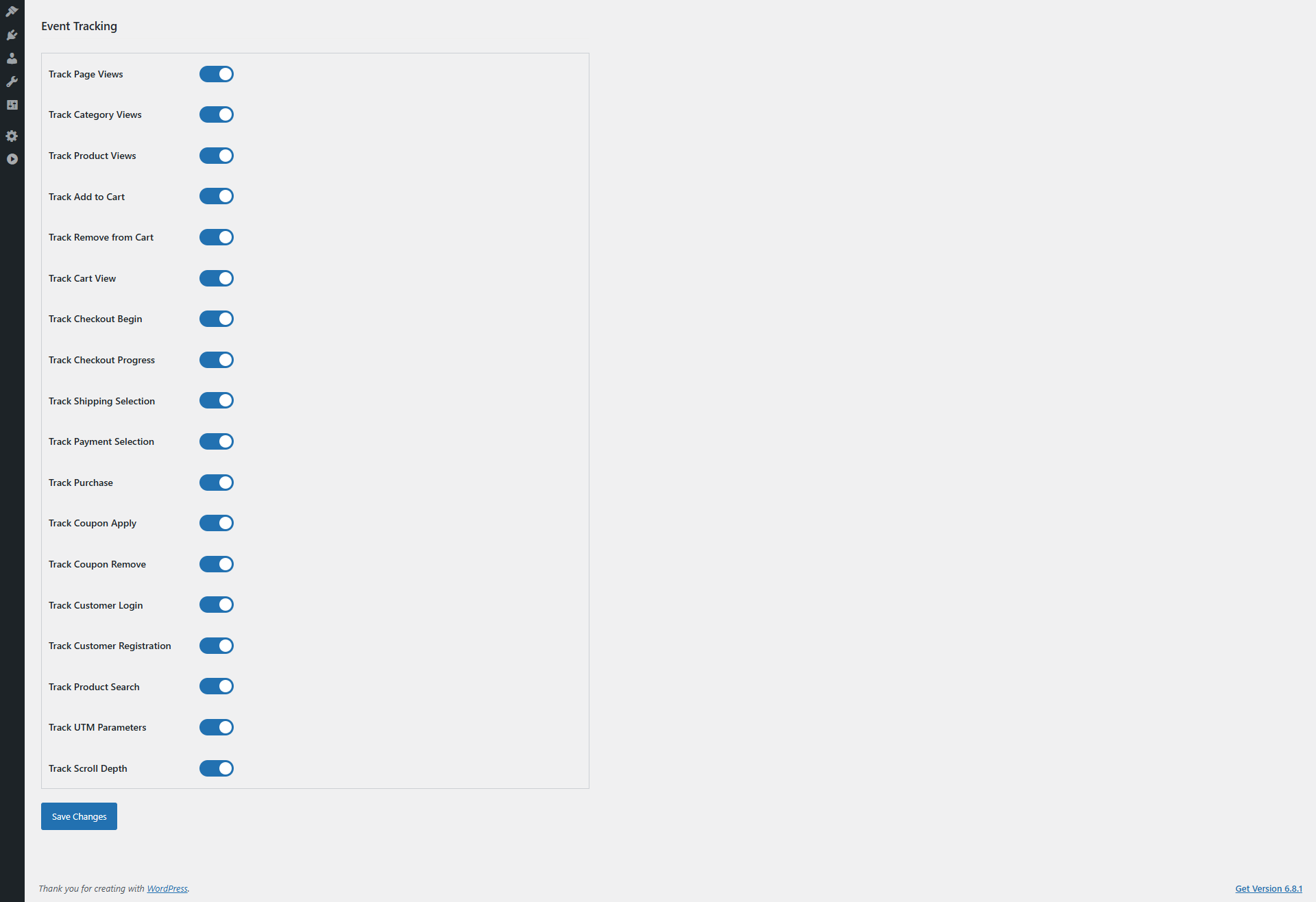
  • Track Page Views
    You can enable or disable the event as per your need. This event tracks every page visit, which helps GA analyze overall site traffic and user navigation patterns. Therefore, it is crucial to understand customer behaviour and optimise your site structure.
  • Category Views
    Enable or disable as needed. Moreover, this tracks visits to product categories, allowing GA to identify popular sections. As a result, you can focus your marketing efforts and manage inventory more effectively.
  • Product Details Page
    Furthermore, you can enable or disable the event as needed. This event in WooCommerce GA4 Integration Extension monitors engagement with individual product pages, providing valuable insights into which products attract the most attention. Thus, it aids in product promotion and stock management.
  • Add to Cart
    Enable or disable as needed. This event in WooCommerce GA4 eCommerce Events tracks when customers add products to their shopping cart, giving GA critical data on purchase intent. Consequently, you can optimize your sales funnel and remarketing strategies.
  • Cart Removal
    Enable or disable as needed. It detects when items are removed from the cart, which helps identify potential obstacles in the purchasing process.  Hence, you can improve the user experience to reduce cart abandonment.
  • Cart Views
    Enable or disable as needed. This monitors how often customers view their cart, providing insight into shopper engagement and possible bottlenecks before checkout.
  • Checkout Start
    Enable or disable as needed. It captures when a user begins the checkout process, allowing GA to track funnel progression. Therefore, you can improve the checkout experience to minimize drop-offs.
  • Checkout Page
    Enable or disable as needed. This tracks detailed interactions on checkout pages, offering valuable data for optimizing conversions at this critical step.
  • Address Selection
    Enable or disable as needed. It monitors when customers add or select shipping addresses, helping identify preferences or issues during checkout.
  • Shipping Method Choice
    Enable or disable as needed. This tracks which shipping options customers select, providing insights into customer preferences and aiding logistics and marketing planning.
  • Order Confirmation
    Enable or disable as needed. The WooCommerce eCommerce Measure Extension’s order confirmation captures successful order completions, the primary conversion event for GA. Consequently, it is essential for accurate revenue tracking and ROI measurement.
  • Customer Login
    Enable or disable as needed. This tracks when users log in to their accounts, offering insights into returning customer behaviour and loyalty program effectiveness.
  • Customer Registration
    Enable or disable as needed. It monitors new account creations, useful for tracking customer acquisition and growth trends.
  • Discount Code Use
    Enable or disable as needed. This monitors the usage of promotional or discount codes, helping assess the effectiveness of marketing campaigns and incentives.
  • Discount Code Removal
    Enable or disable as needed. It tracks when discount codes are removed during checkout, highlighting friction points that may cause cart abandonment.
  • Search Product Tracking
    Enable or disable as needed. This captures the search terms customers enter, offering valuable data to optimize product offerings and merchandising.
  • Capture UTM Parameters
    Enable or disable as needed. It automatically collects UTM parameters from URLs, allowing GA to accurately attribute traffic and conversions to specific marketing campaigns. Consequently, this is essential for boosting your campaign’s ROI.

5.0 Configuration Instructions:

The WooCommerce No-Code Google Tag Manager Integration provides straightforward, beginner-friendly setup instructions—no technical knowledge required. Store admins can easily access the Google Tag Manager and Google Analytics Consoles and follow simple steps to retrieve the necessary credentials for integration.
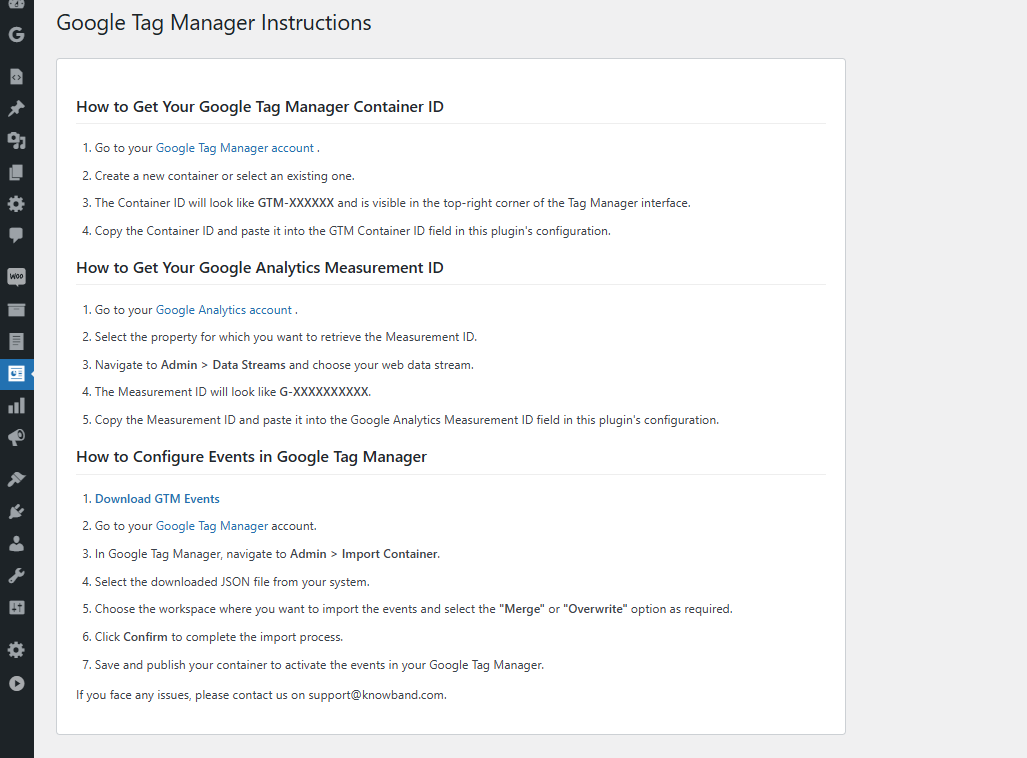
Moreover, these clear instructions are designed to guide you through the entire WooCommerce gtag Integrator Plugin configuration process with ease.

If you encounter any issues during setup or while using the extension, our support team is here to help. You can contact us by:

Now Live: Knowband’s AI Content Generation Plugin for WooCommerce!

Running an online store means creating lots of content. However, writing product descriptions, meta titles, and page content takes time. Fortunately, the Knowband’s WooCommerce AI Content Generator Plugin offers a simple solution. This powerful Plugin helps store owners create quality content quickly and easily.

What Is the AI Content Generator for WooCommerce?

The AI Content Generator for WooCommerce is a smart plugin that writes content for you. Instead of spending hours writing product descriptions, this Plugin does the work in minutes. Moreover, it uses advanced AI technology to create professional content that sounds natural and engaging.

Furthermore, the WooCommerce AI Generator Plugin supports multiple AI engines. This means you can choose from different AI models like ChatGPT, Claude, Gemini, and DeepSeek. As a result, you get content that fits your store’s unique style and needs.

Key Features Of WooCommerce AI Content Generator

The WooCommerce AI Content Creation Extension comes with many helpful features. First, it creates content for products, categories, and CMS pages automatically. Additionally, it generates SEO-friendly titles and descriptions that help your store rank better in search results.

Another great feature is bulk processing. The WooCommerce AI Bulk Content Generator can handle hundreds of products at once. Therefore, even large stores can update their content quickly without manual work.

The plugin also tracks all changes with detailed logs. This way, you can see what content was created and when. Consequently, managing your store’s content becomes much easier.

Multiple AI Engines for Better Results

What makes this Plugin special is its variety of AI options. The WooCommerce AI Content Generator uses Claude AI, Gemini and ChatGPT for natural-sounding content that works best for your products.

Perfect for All Types of Content

The AI Product Description Generator WooCommerce creates compelling product descriptions that sell. These descriptions highlight key features and benefits while using the right keywords. This helps in making your product highlighting to customers.

Not only products pages, the AI CMS Page Content Generator WooCommerce also genrates the content for categories as well as CMS Pages like Privacy Policy, etc. For instance, it can write About Us pages, FAQ sections, and shipping policies. Furthermore, this means your entire website can have professional content without extra effort.

Boost Your SEO Rankings

Search engine optimization (SEO) is important for the success of any online store. It helps your products appear higher in search engine results like Google, making it easier for customers to find you. The SEO Meta Title Generator in the WooCommerce AI plugin helps by creating product meta descriptions and title that include the right keywords.

These titles are not only made to rank well on search engines but are also easy for people to read and understand. This means your products are more likely to be seen, clicked on, and purchased by potential customers.

All-in-One Content Solution

The Multi-engine AI Content Generator for CMS and Products by Knowband combines everything you need in one plugin. Rather than using separate Plugins for different content types, this solution handles everything together. Moreover, this helps in time management and SEO rankings.

The plugin also supports multiple languages, which helps you reach global customers. Furthermore, it follows SEO best practices automatically, so you don’t need to be an expert to get good results.

Simple Setup and Easy Use

Setting up the plugin is straightforward, even for beginners. Once installed, you simply choose your preferred AI engine and start generating content. The user-friendly interface makes the process smooth and hassle-free.

Additionally, the bulk content generation feature allows you to create product content at scale by simply uploading a CSV file with product details. Once uploaded, the AI automatically generates titles, descriptions, and other relevant content for all listed items in one go.

This functionality is especially valuable for WooCommerce stores managing large inventories, saving hours of manual work and ensuring consistent, high-quality content across the catalog.

Benefits of WooCommerce AI Content Generator to the E-Merchants

Time-Saving: Automates content creation, freeing up countless hours for you to focus on other business tasks.

Consistent Quality: Delivers high-quality, professional content across all your product pages.

SEO-Friendly: Generates content optimized for current SEO best practices, helping improve your store’s search engine rankings.

Increased Visibility: Better rankings mean more organic traffic, helping customers find your store without relying on paid ads.

Cost-Effective: Reduces the need for hiring copywriters, cutting down on operational expenses..

Get Started Today

The WooCommerce AI content generation Plugin by Knowband make running an online store much easier. Whether you need product descriptions, meta tags, or page content, AI can help you create everything quickly and professionally.

With multiple AI engines, bulk processing, and SEO optimization built-in, these Plugins provide everything needed for successful content creation. Start using AI content generation today and transform how you manage your online store.

WooCommerce AI Content Generator Plugin– User Manual

The WooCommerce AI Content Generator Plugin is a powerful plugin designed to help WooCommerce store owners effortlessly create high-quality product content. By integrating the advanced capabilities of Claude AI, ChatGPT API, Gemini API, and DeepSeek, the plugin enables the generation of SEO-optimized product, category and CMS page descriptions, meta titles, and meta descriptions, all while maintaining a natural and authentic brand voice.

Moreover, the AI Content Generator for WooCommerce also functions as a robust, AI-powered plugin for seamless content creation across multiple languages. As a result, your store can connect with global customers and expand its reach without compromising quality or consistency.

Furthermore, Knowband’s WooCommerce AI Generator Plugin offers a variety of AI Models for content generation. Store owners can select from ChatGPT options like GPT-3.5 and GPT-4.0; Claude models such as Haiku 3, Haiku 3.5, Sonnet 3.5 (Old), and Sonnet 3.5 (New); along with Gemini variants, including Gemini 1.5 Pro, 1.5 Flash, 1.5 Flash-8b, 2.0 Flash, and 2.0 Flash – Lite Preview. In addition, DeepSeek offers both chat and coder reasoner models.

With support for bulk content generation, the plugin dramatically reduces the time and effort required for manual writing. Whether you’re creating content from scratch or updating existing product information, the WooCommerce AI Content Generator ensures accuracy, consistency, and speed.

Additionally, the WooCommerce SEO AI Content Generator plugin supports content generation for category pages and CMS pages, including About Us, FAQs, Shipping Policy, and more. This means you can create a fully optimized, content-rich WooCommerce store without needing to write manually. Whether launching a new store or updating an existing one, users can apply AI assistance to all key areas of their website.

1.0 Key Features of the WooCommerce AI Content Creation Extension

AI-Powered Content Generation
The WooCommerce Claude AI Content Generator Extension automatically creates high-quality product and category descriptions, meta titles, meta descriptions, and CMS page content by leveraging advanced AI technologies—including ChatGPT, Claude, Gemini, and DeepSeek. This ensures your entire store’s content is professional, engaging, and SEO-optimized.

Enhanced SEO Performance
All generated content follows best SEO practices, thereby improving your store’s search engine rankings and boosting visibility through strategic keyword placement and well-structured metadata.

Flexible AI Model Selection
The AI Content Generator for WooCommerce offers a wide variety of AI models for content creation. Store owners can choose from ChatGPT options like GPT-3.5 and GPT-4.0; Claude models including Haiku 3, Haiku 3.5, Sonnet 3.5 (Old), and Sonnet 3.5 (New); Gemini variants such as Gemini 1.5 Pro, 1.5 Flash, 1.5 Flash-8b, 2.0 Flash, and 2.0 Flash – Lite Preview; as well as DeepSeek Chat and Coder Reasoner.

User-Friendly Interface
Designed for ease of use, the extension provides an intuitive interface that allows store owners, regardless of technical experience, to generate professional, high-quality content quickly and effortlessly.

Bulk Processing Capabilities

Ideal for stores with large product catalogues, the WooCommerce DeepSeek AI Content Generator enables bulk content generation for multiple products simultaneously—saving both time and effort. 

Additionally, it supports bulk CSV import, allowing users to upload files and select specific entries for AI-generated content creation or updating, which offers flexible and efficient content management.

Comprehensive Activity Tracking
The plugin keeps a detailed log of all actions taken, including timestamps and summaries of changes. As a result, store owners benefit from transparency and easy tracking of content updates and modifications.

2.0 Benefits of WooCommerce AI Content Generator Plugin for E-Merchants

Time Savings
AI Product Description Generator WooCommerce quickly generates high-quality content in minutes, reducing manual writing efforts and freeing you to focus on your core business.

Improved SEO Performance
Create AI-optimized product content that follows SEO best practices to boost search engine rankings and organic traffic.

Superior Content Quality
Generate professional, engaging, and brand-consistent product descriptions that enhance your store’s credibility.

Cost Efficiency
Save on copywriting expenses by automating content creation with advanced AI technology.

Competitive Edge
Stay ahead by providing better, faster, and more accurate product information than your competitors.

Enhanced Customer Experience
Deliver clear, detailed content that helps customers make informed decisions and increases conversions.

Performance Monitoring
Track all AI-generated content changes with an activity log to review and improve your content strategy over time.

3.0. Installation Steps of the AI CMS Page Content Generator WooCommerce

Follow these simple steps to install the WooCommerce AI Content Generator Plugin on your WooCommerce site:

Step 1: Purchase the Plugin
Buy the WooCommerce AI Content Generator plugin from the Knowband store. After purchase, you will receive a zipped file containing the plugin’s source code.

Step 2: Access the WordPress Dashboard
Access your WordPress admin dashboard, then navigate to Plugins → Add New.

Step 3: Upload the Plugin
On the “Add Plugins” page, click the Upload Plugin button.

Step 4: Upload the File
Click Choose File, select the zipped plugin file you downloaded, and upload it.

After the upload completes, click Activate Plugin. 

4.0 API Key Generation

Steps to Generate Anthropic Claude API

  1. Visit Anthropic’s website, and click “Start Building”.
  2. Sign up for an account, and go to your Dashboard.
  3. Click on the Create key.

4. Copy the key and make sure to copy it.

Steps to Generate Gemini API for AI Content Generator for WooCommerce

  1. Visit the Google AI Studio website.
  2. Create your API Keys by clicking ”Get API Key”.

3. Copy the Key for the Plugin.

Steps to Generate ChatGPT API Key for WooCommerce AI Content Generator 

  1. Go to OpenAI’s website and sign in.
  2. Create your API Key by clicking Create API Key.

3. Make sure to copy the key immediately and store it safely.

DeepSeek API Content Generation Steps

Follow these steps to generate content using the DeepSeek API within the WooCommerce AI Content Generator plugin:

Step 1: Get Your DeepSeek API Key

  1. Register or log in to your DeepSeek account at their official website.
  2. Navigate to the API section and create or copy your unique API key.

3. Copy the API key to enable the functionality of DeepSeek AI Engine in WooCommerce AI Content Generator Plugin

4. Copy the DeepSeek API key for the OpenCart AI Content Generator Extension

4.0.0 Admin Interface of Knowband’s WooCommerce AI Content Generator Plugin

4.0.1 General Settings of WooCommerce Claude AI Content Generator

The WooCommerce Bulk AI Content Generator Extension allows store admins to customize AI settings and efficiently handle large-scale content generation tasks.

Configuration Options:

  • Enable/Disable- Enable or disable the module as per your need.
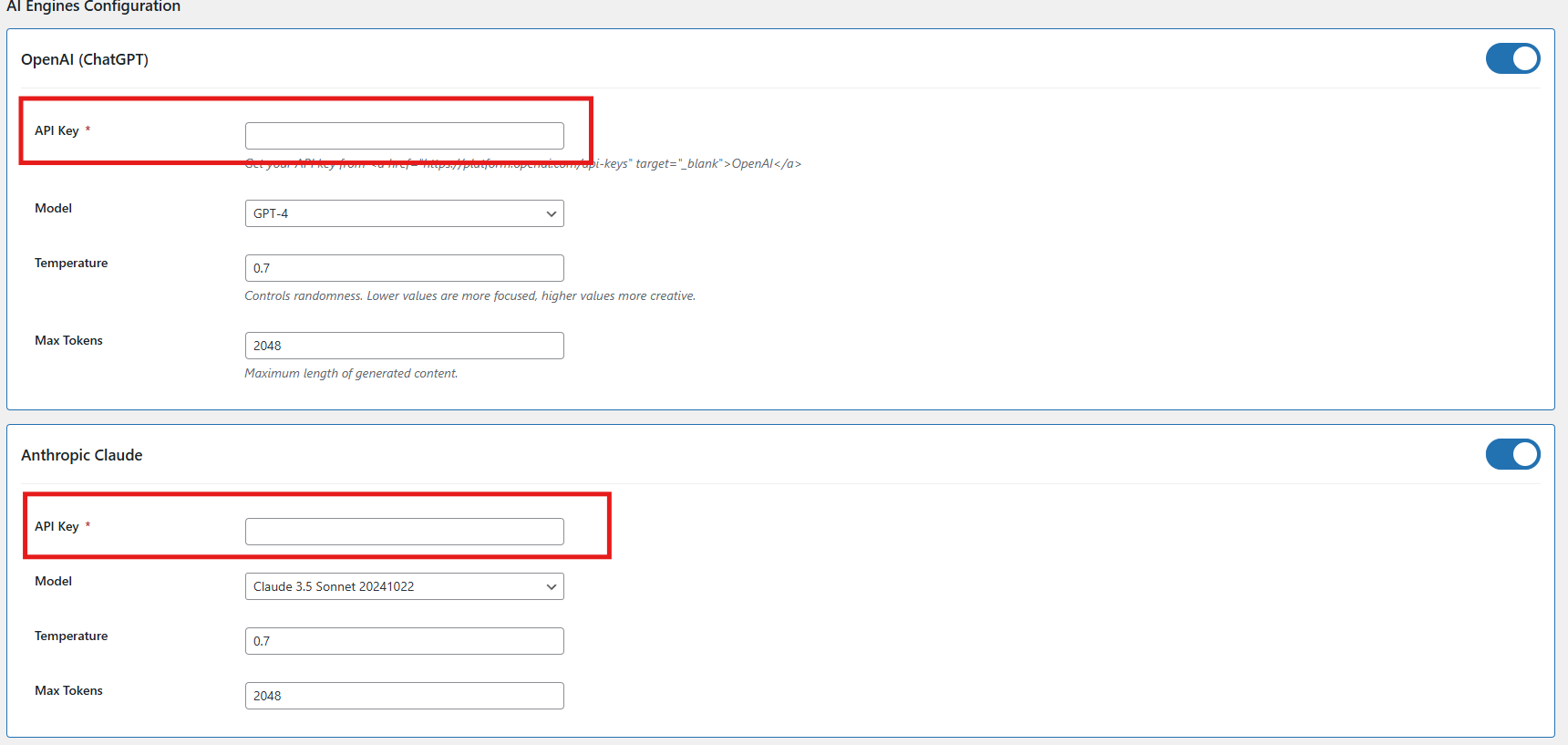
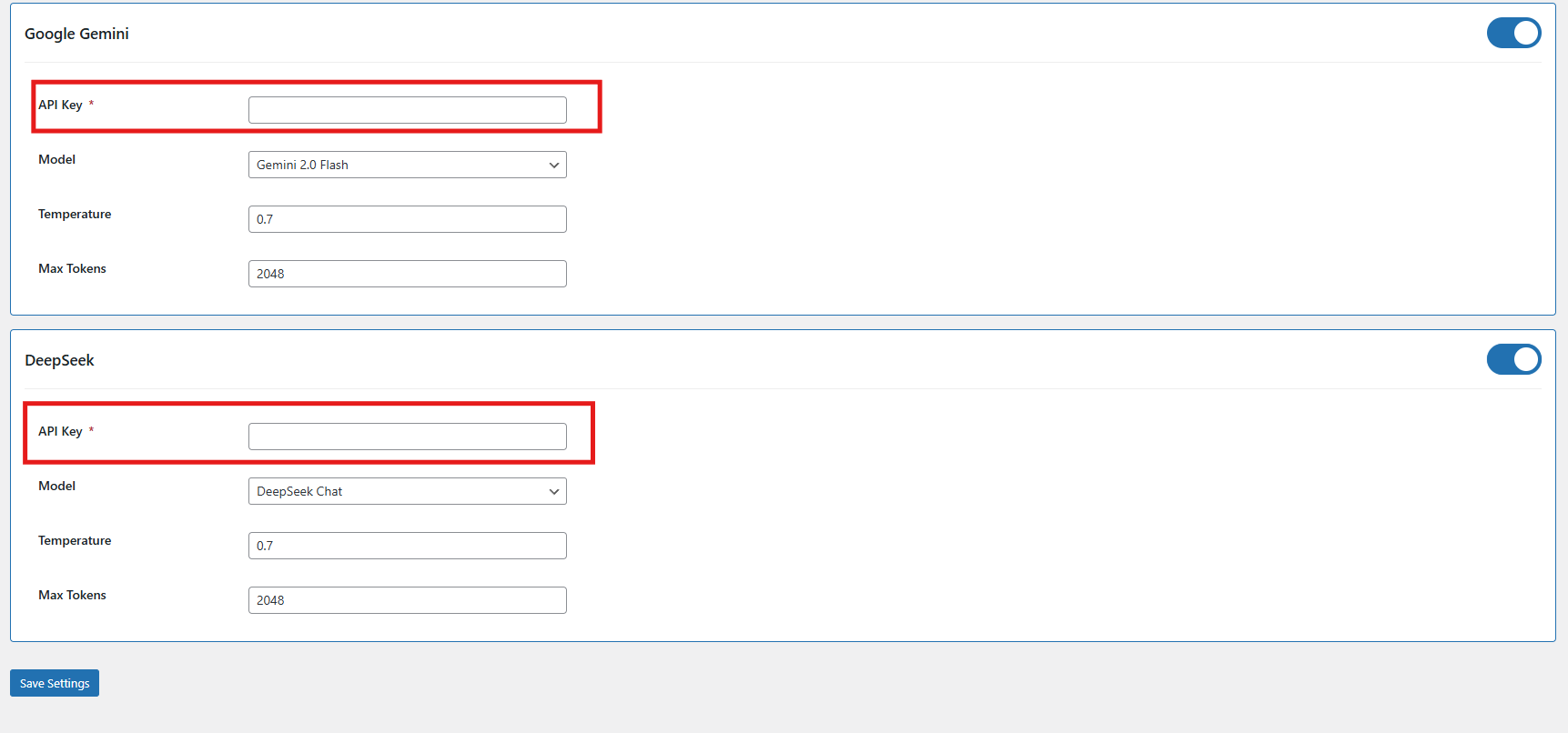
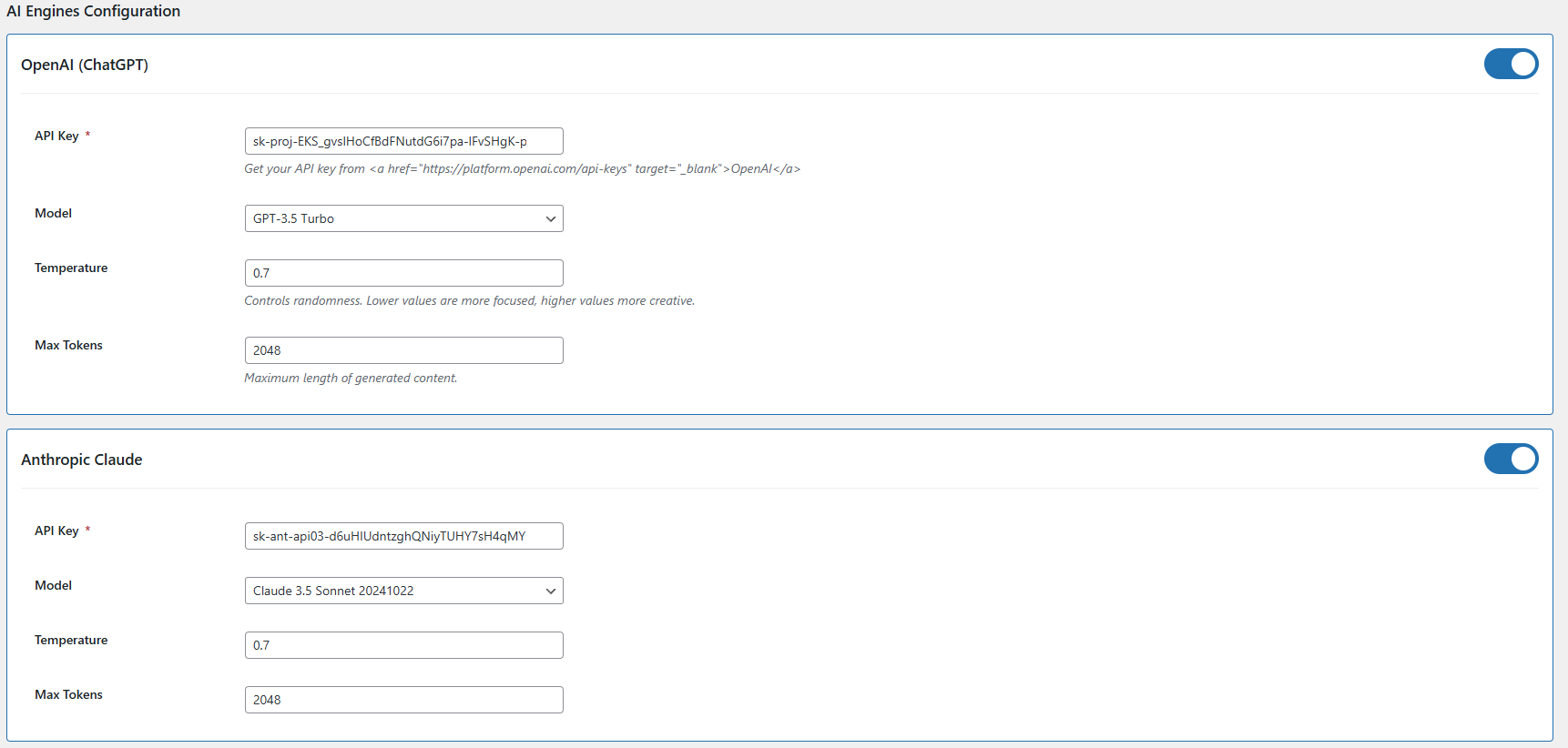
  • API Key Configuration – Add API keys for all supported AI models, including Claude, ChatGPT, Gemini, and DeepSeek, to ensure seamless integration and functionality.
  • Claude Engine Toggle – Quickly enable or disable the Claude AI engine with a single click based on your content generation needs.
  • API Key for Claude – Enter the necessary API key to activate Claude AI’s features for content generation and language.
  • Claude Model Selection – Select from a range of Claude AI models, such as Haiku 3, Haiku 3.5, Sonnet 3.5 and Sonnet 3.5, to power your content creation tasks.
  • Token- Add the token limit for the content generator default 2048, you can add up to 32000 as a token limit which will apply to all AI models
  • Enable/Disable ChatGPT – Turn the ChatGPT AI engine on or off to control its role in generating content for your store.
  • API Key for ChatGPT – Enter your ChatGPT API key to activate content generation capabilities.
  • Select ChatGPT Model – Choose between ChatGPT 3.5 and ChatGPT 4.0 for generating high-quality, SEO-friendly content.
  • Enable/Disable Gemini AI – Easily activate or deactivate the Gemini AI engine to manage content creation workflows.
  • API Key for Gemini – Provide your Gemini API key to enable its integration with the content generator.
  • Select Gemini Model – Choose from Gemini models like 1.5 Pro, 1.5 Flash, 1.5 Flash-8b, 2.0 Flash, or 2.0 Flash–Lite Preview based on your performance and output needs.
  • DeepSeek Model – Enable the DeepSeek engine by selecting the preferred mode for content generation.
  • Select DeepSeek Model Type – Choose between the Chat or Coder model based on the type of content you need to generate.
  • Temperature Setting – Adjust the creativity level of AI-generated content (range: 0.0 to 1.0). Lower values offer more consistency, while higher values produce more creative outputs.

4.0.2 Content Generation Prompts for WooCommerce Gemini AI Content Generator Plugin

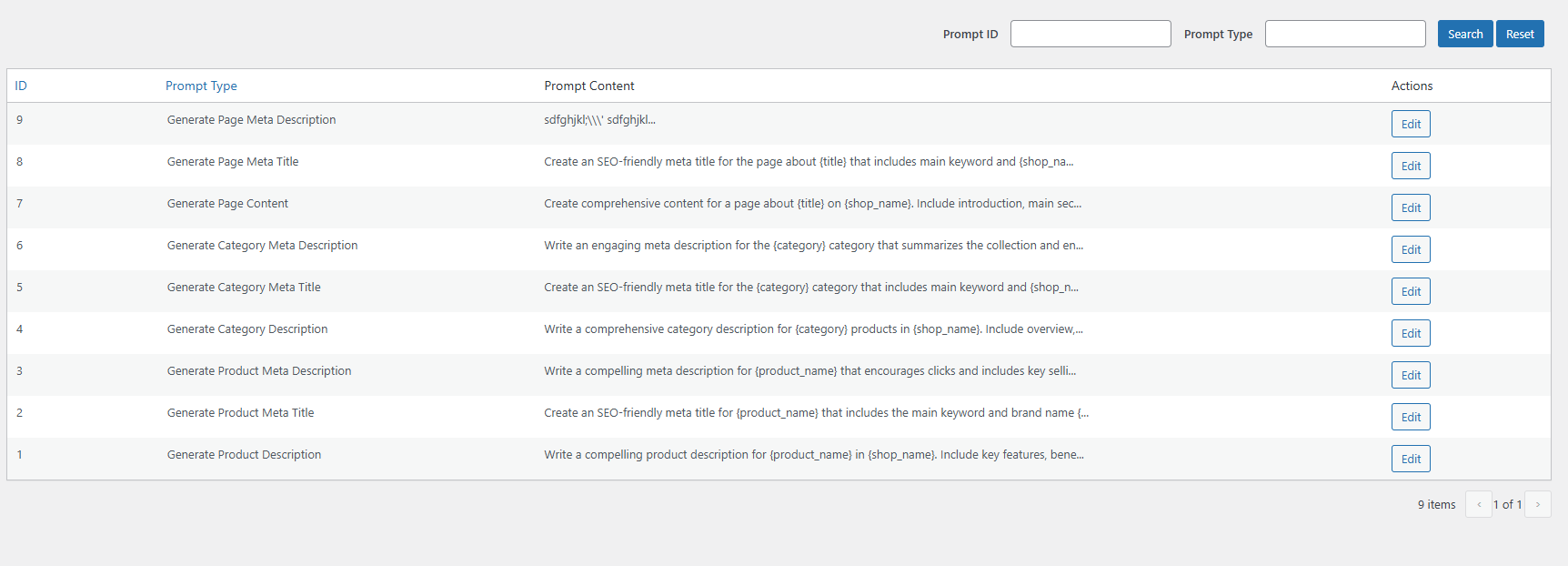
The Knowband WooCommerce Gemini AI Content Generator plugin offers ready-to-use AI prompts tailored specifically for e-commerce content creation.

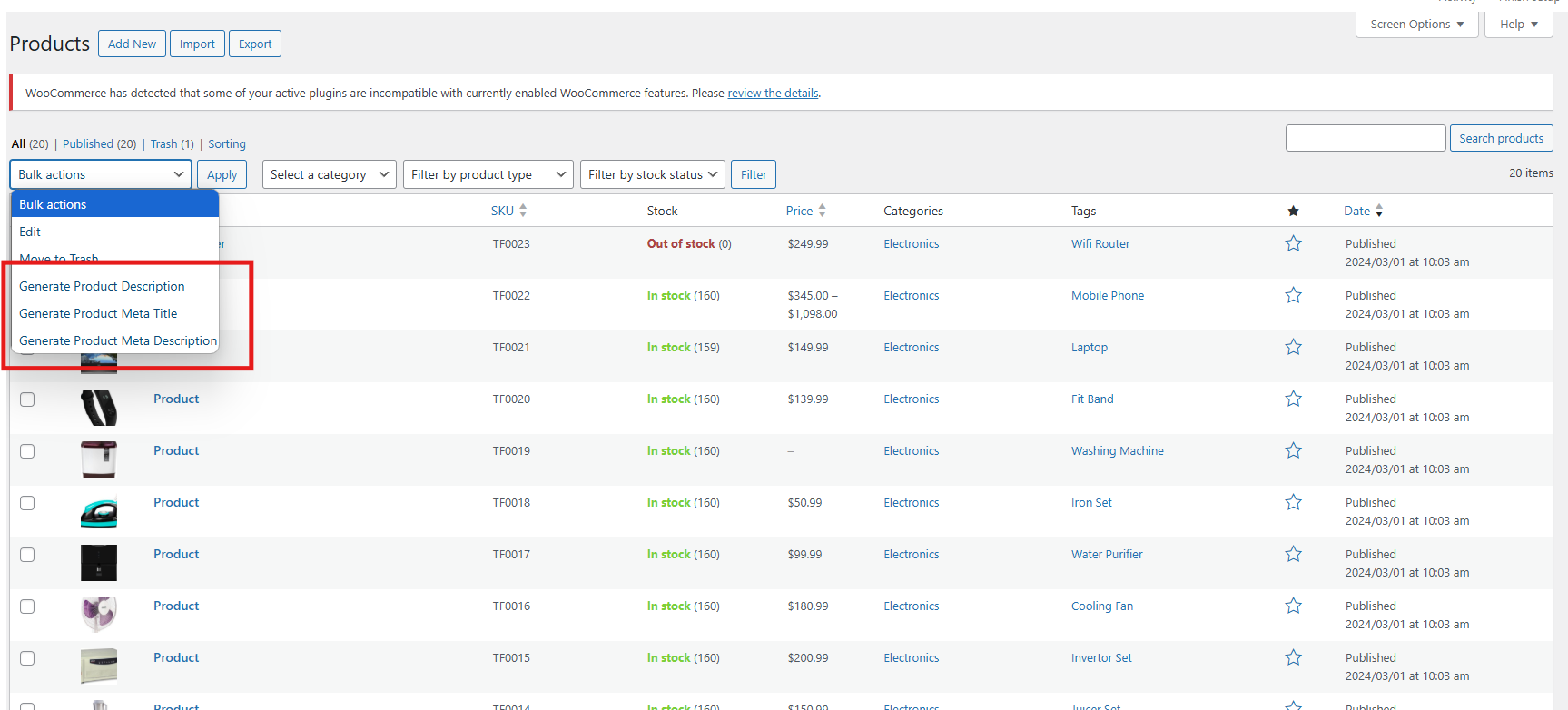
Product Content Generation Prompts

  • Generate Product Description- Creates SEO-optimized and well-structured product descriptions that emphasize key features and benefits.
  • Generate Product Meta Title- Generates concise, keyword-rich meta titles under 60 characters to improve search visibility.
  • Generate Product Meta Description-  Crafts engaging meta descriptions within 140 characters designed to attract clicks.

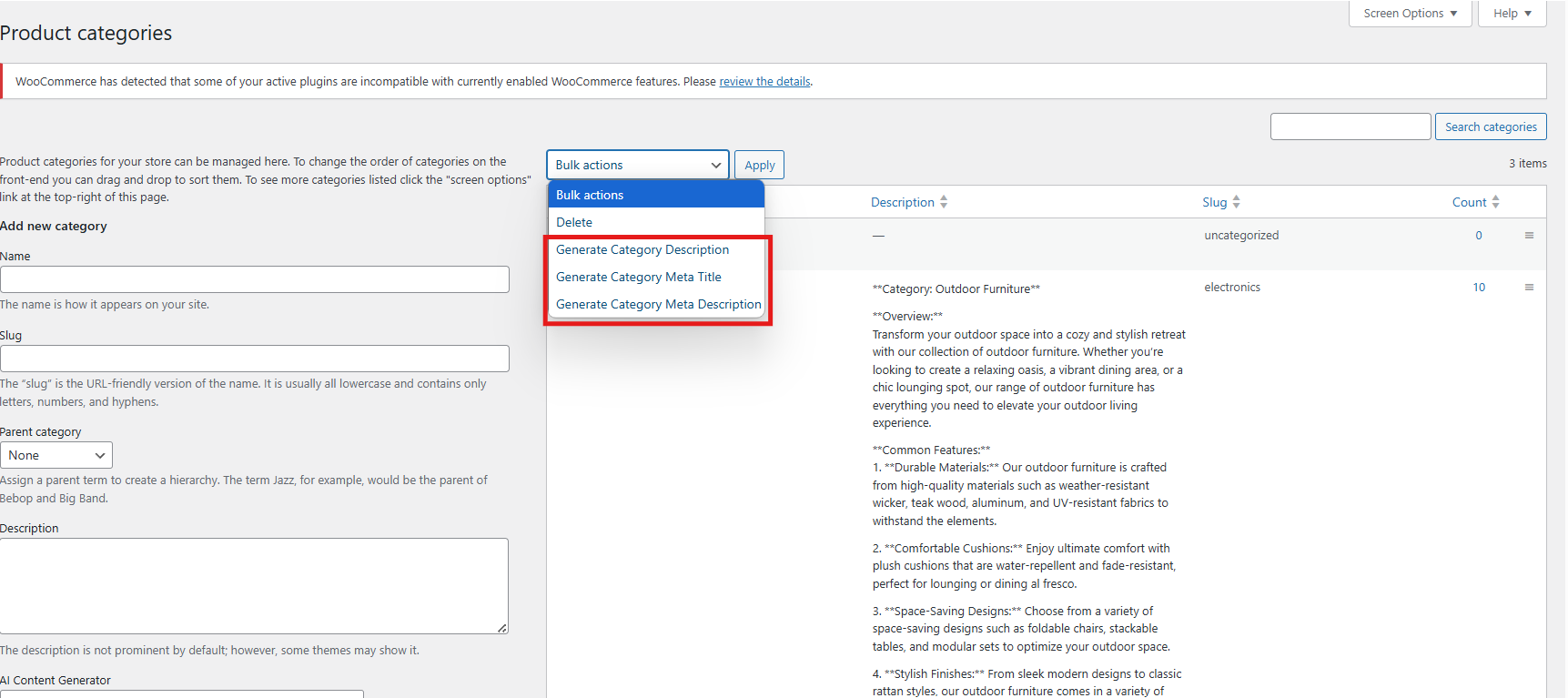
Category Content Generation:

  • Generate Category Description- Develop detailed category content with proper HTML formatting for better presentation.
  • Generate Category Meta Title- Produces keyword-focused category titles under 60 characters to boost SEO.
  • Generate Category Meta Description-  Creates clear and concise category descriptions within 140 characters for search engines.

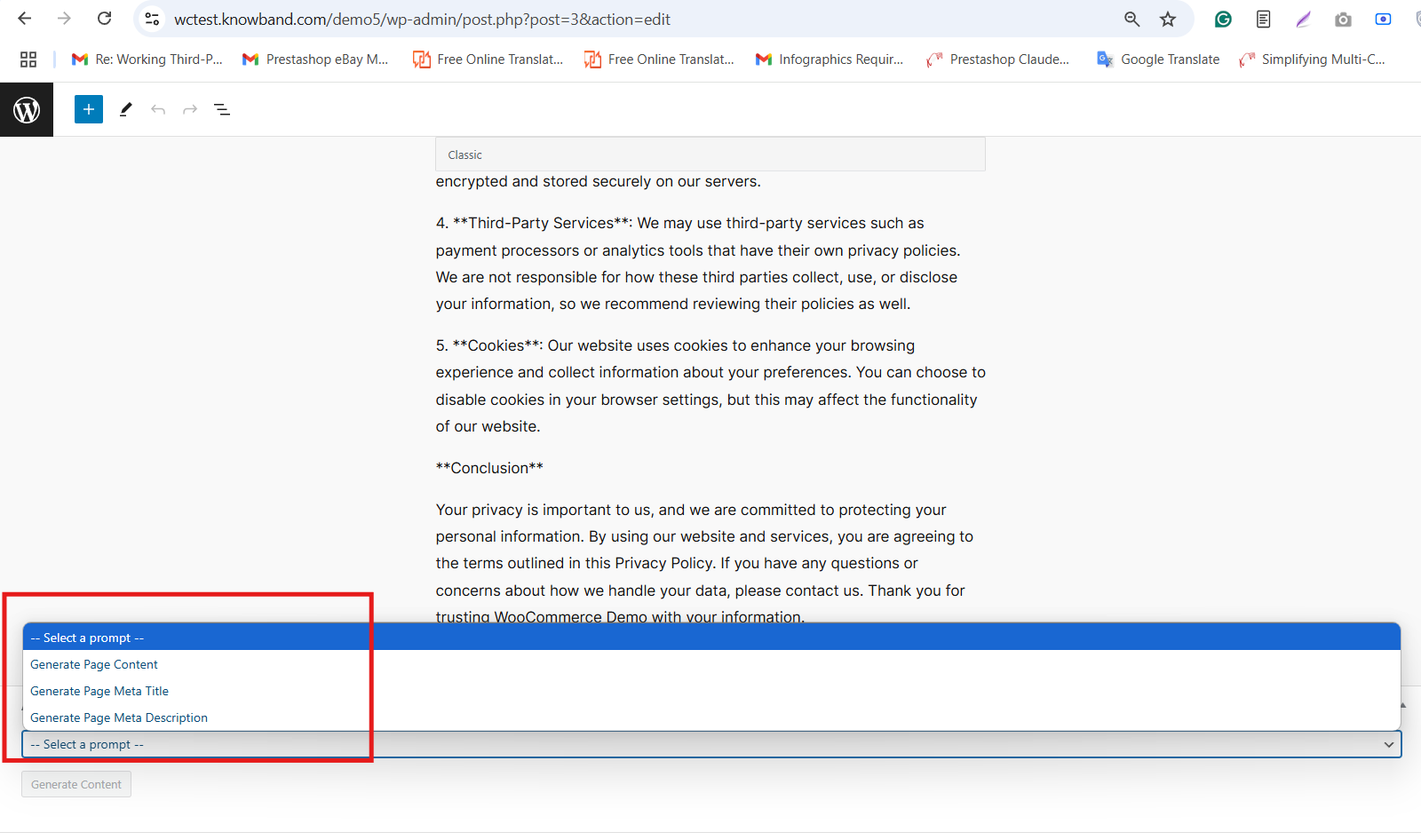
Page Content Generator for Multi-engine AI Content Generator for CMS and Products

  • Generate Page Meta Description: Create an SEO-friendly meta description that summarizes the CMS page content clearly and effectively.
  • Generate Page Meta Title: Generate a concise meta title including main keywords and your store’s name for better search ranking.
  • Generate Page Content: Produce well-structured, engaging content for CMS pages to inform and attract your visitors.

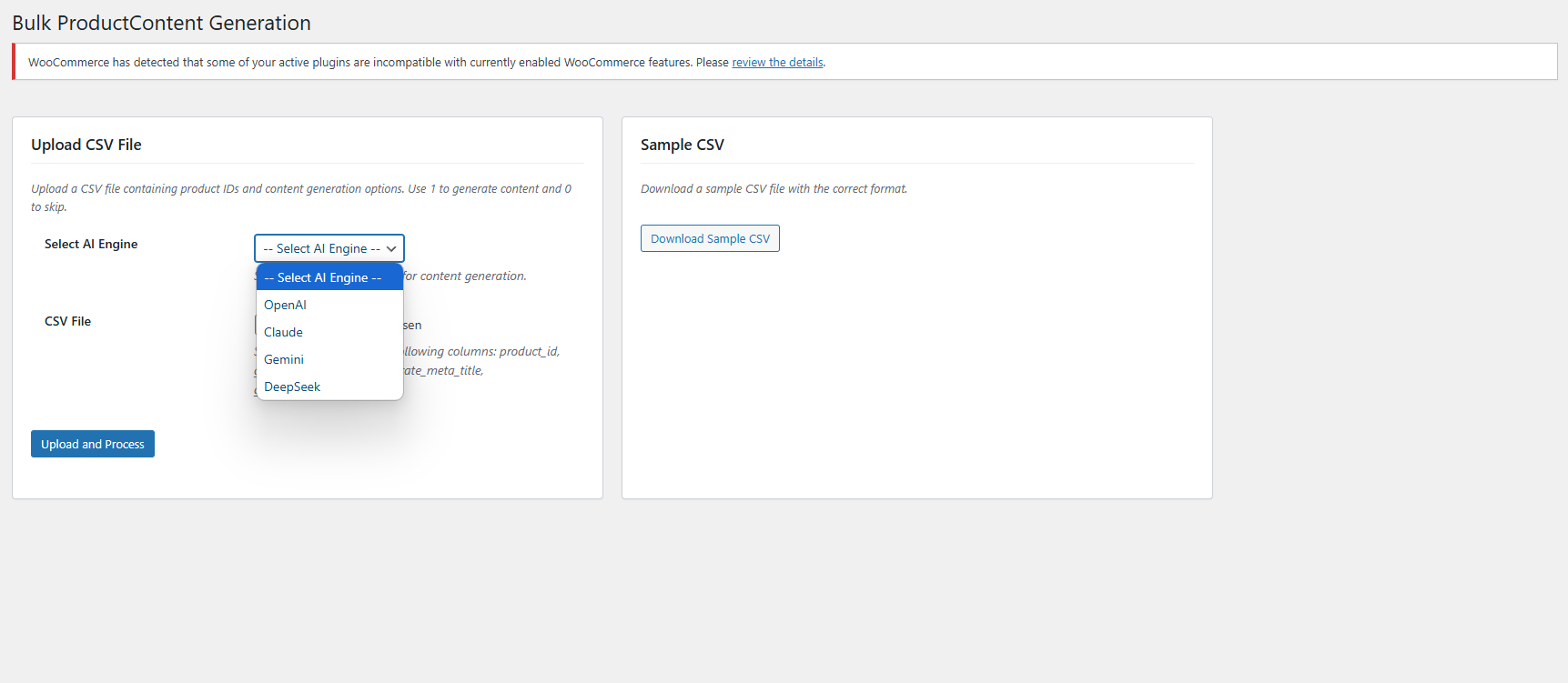
5.0. Bulk Product Content Generation

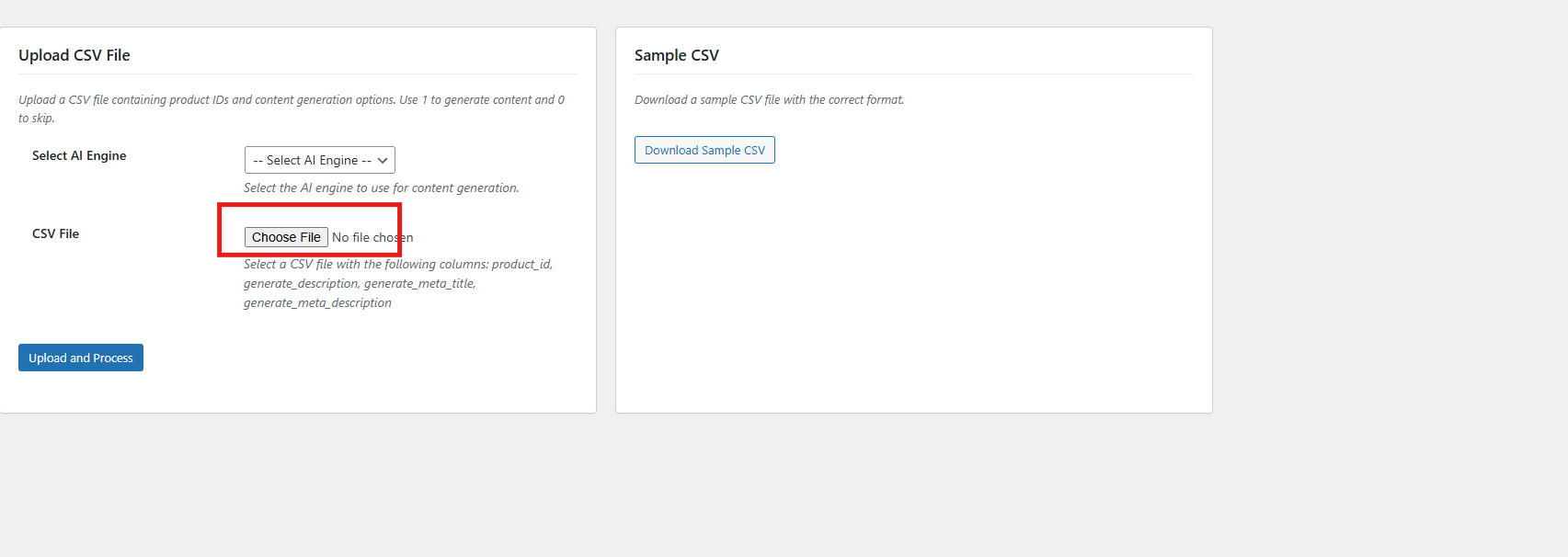
The SEO Meta Content Generator WooCommerce exhibit the feature that allows you to generate product content for multiple products at once by uploading a CSV file. This saves time and effort when managing large product catalogues.

Steps To Generate Bulk Product Content

1. Upload CSV File

Upload the CSV file by clicking Choose File and selecting your file.

2. Select AI Engine
Choose your preferred AI engine from the dropdown menu.

3. Upload and Process
After selecting your file and AI engine, click the Upload and Process button to start generating content for the products listed in your CSV. The plugin will process the file and create the requested content accordingly.

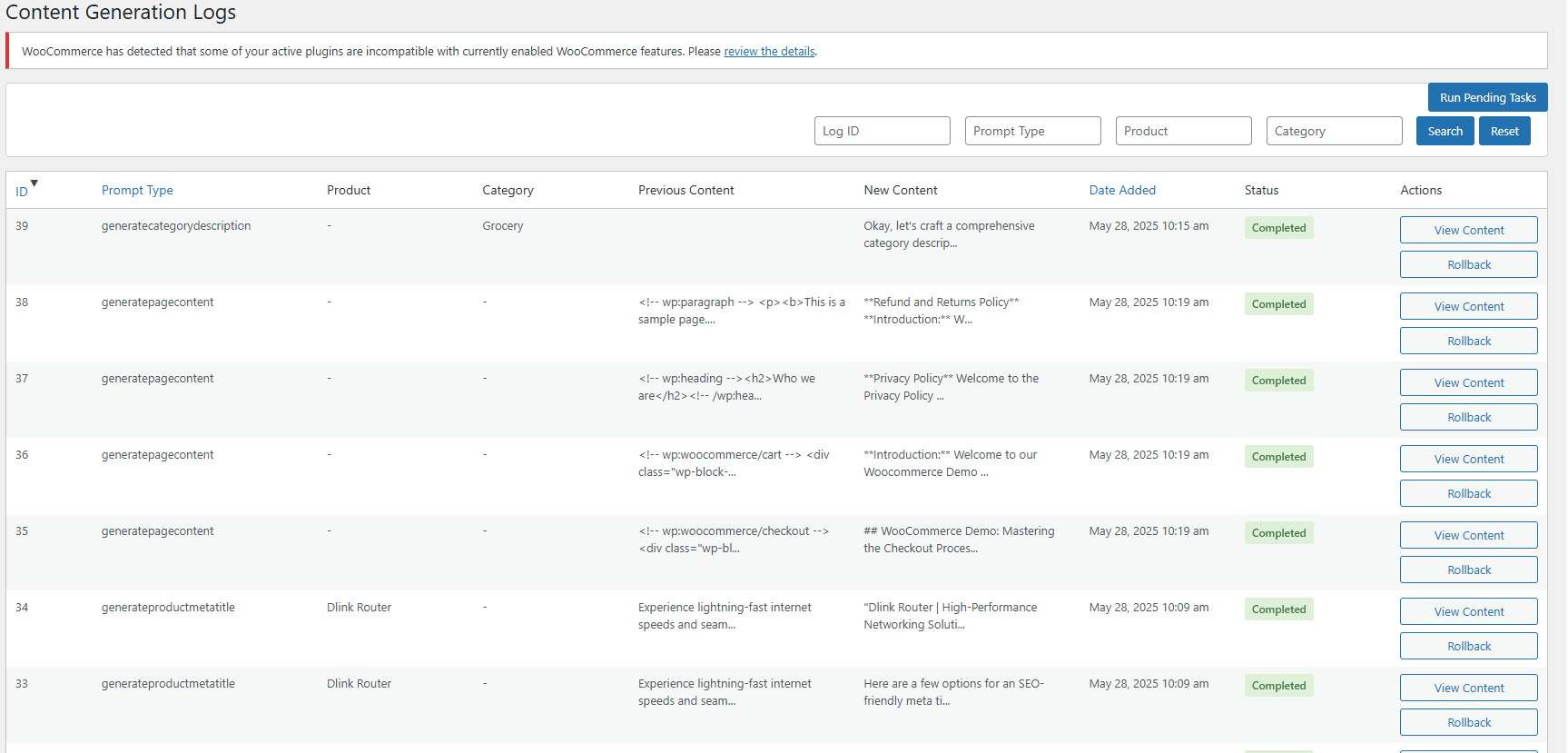
6.0. Task Logs In WooCommerce AI Content Extension

The WooCommerce AI Content Generator Plugin keeps a detailed log of all AI-generated content. This log includes information such as the type of prompt used, language, product or category involved, timestamp, status, previous content, and the newly generated content. Moreover, this helps you track changes, review past updates, and monitor the evolution of your content.

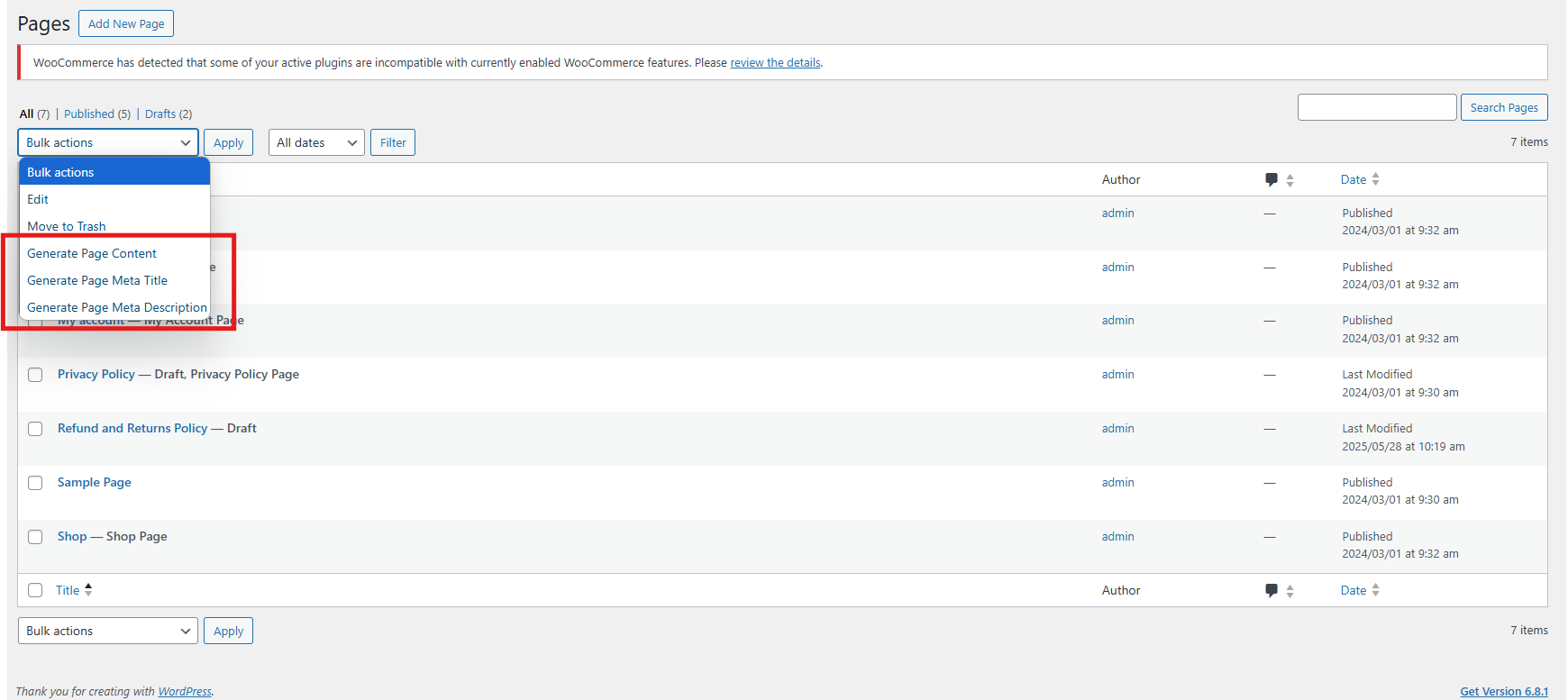
6.0 Steps to Execute the Prompts in AI Meta Description Generator for Woocommerce

Use the WooCommerce AI Content Generator plugin to create content easily for products, categories, and CMS pages such as descriptions, meta titles, and meta descriptions.

Follow these steps to execute the prompts–

Step 1: Navigate to Products, Categories, or CMS Pages in your WordPress admin panel.

Step 2: Select the specific items or pages you want to generate content for. You can work on individual items or select multiple for bulk processing.

Step 3: Click the Bulk Actions dropdown menu (for bulk) or use individual action buttons (for single items).
Step 4: Choose the AI operation you want to perform options include generating descriptions, meta titles, and meta descriptions.

Step 5: Select the AI engine you want to use for the content creation tasks.

Step 6: Review the AI-generated content carefully and approve it before publishing to ensure accuracy and brand consistency.

If you have any questions, need further assistance, or want to provide feedback about the WooCommerce AI Content Generator, please don’t hesitate to reach out to our support team. We’re here to help you make the most of the plugin and ensure a smooth content generation experience.
Contact us anytime at: support@knowband.com

Top Features of Knowband’s eBay PrestaShop API Integrator You Should Know

In the world of competitive e-commerce, expanding your store across multiple marketplaces is vital. Listing your product on marketplaces helps drive sales and gain new customers. For this reason, Knowband has introduced Prestashop eBay Integration Addon which is a game changer for the prestashop stores. The PrestaShop eBay Marketplace Integration Module integrates with the Prestashop store seamlessly. It not only seamlessly integrates but automatically lists the product through a synchronization feature. As a result, the store admin does not need to manually list the product. Moreover, the Prestashop eBay API Integrator Module automatically syncs all the features and attributes to eBay from your Prestashop store.

[Exciting Update] Prestashop eBay Marketplace Addon v2.2.1 is Here!

Knowband has the latest version of the Prestashop eBay Marketplace Addon (v2.2.1), designed to make your PrestaShop – eBay integration faster, smarter, and more efficient. Furthermore, this update brings powerful features to simplify inventory and API management.

What’s New in v2.2.1?

 Enhanced Inventory Sync
Now, keep your eBay listings and PrestaShop store perfectly aligned. The improved Inventory Comparison tab has been added in Knowband’s Prestashop eBay API Connector Module, which identifies stock differences automatically, helping you prevent overselling and maintain accurate product availability across both platforms.

Real-Time API Usage Tracker
Stay ahead of API limits with the upgraded Rate Limit Monitor. Now, with the new version 2.2.1, you can view real-time data for all eBay APIs, including total limits, usage, and remaining calls. Moreover,  this ensures uninterrupted synchronisation between your store and eBay, so your operations never skip a beat.

Why Upgrade?

  • Accurate Inventory Management: Reduce manual errors and overselling with the new release

  • Smooth Integration: Keep your PrestaShop and eBay stores perfectly in sync.

  • Active API Monitoring: Avoid downtime due to exceeded API limits because now you can check before listing. 

Upgrade today to v2.2.1 and experience a more reliable, hassle-free PrestaShop–eBay connection!

Need guidance? Refer to the updated user manual for step-by-step instructions.

Why Use Knowband’s PrestaShop eBay Integration Module?

Managing multiple sales channels manually can be complicated and time-consuming. Keeping track of product listings, inventory, prices, and orders on both PrestaShop and eBay often leads to mistakes. It also takes up valuable time. That’s why the PrestaShop eBay Integration Plugin make it all easy for store admins as it removes all the stress by automating the entire process.

With that in mind, everything becomes faster and easier. The module includes uploading products, updating stock levels, and processing orders. You don’t need to switch between platforms or worry about missing updates. In fact, the module keeps everything synced between your PrestaShop store and your eBay account. This gives you more time to focus on growing your business.

Key Features of the Prestashop eBay Marketplace Integration

Quick & Easy Setup: Even without technical expertise, the installation and configuration are straightforward. The PrestaShop eBay API Integration Module gets your products live on eBay swiftly.

Bulk Product Uploads: The module allows you to upload hundreds of products simultaneously. It includes accurate descriptions, images, and prices. In addition, you can also align your store categories with eBay’s categories. This boosts product discoverability and sales.

Live Inventory & Price Updates: Say goodbye to overselling. The eBay PrestaShop Connector instantly synchronizes your stock quantities in PrestaShop. This happens whenever orders are placed on eBay. At the same time, it ensures that any pricing updates are reflected simultaneously on both platforms.

Centralized Order Management: Orders placed on eBay are directly imported into PrestaShop. This happens via the eBay PrestaShop API Integrator. This means you can track sales and manage fulfilment in one place. You won’t need to juggle different dashboards.

Flexible Shipping Settings: Tailor your shipping options with custom profiles. These work for specific eBay marketplaces like eBay US and UK. You also have the ability to enable or exclude international shipping destinations.

Advanced Attribute Mapping: Map the store’s product attributes with eBay attributes. This ensures your listings meet marketplace standards. It also helps them appear in the right search filters.

Advantages of Using the Knowband eBay PrestaShop Integrator

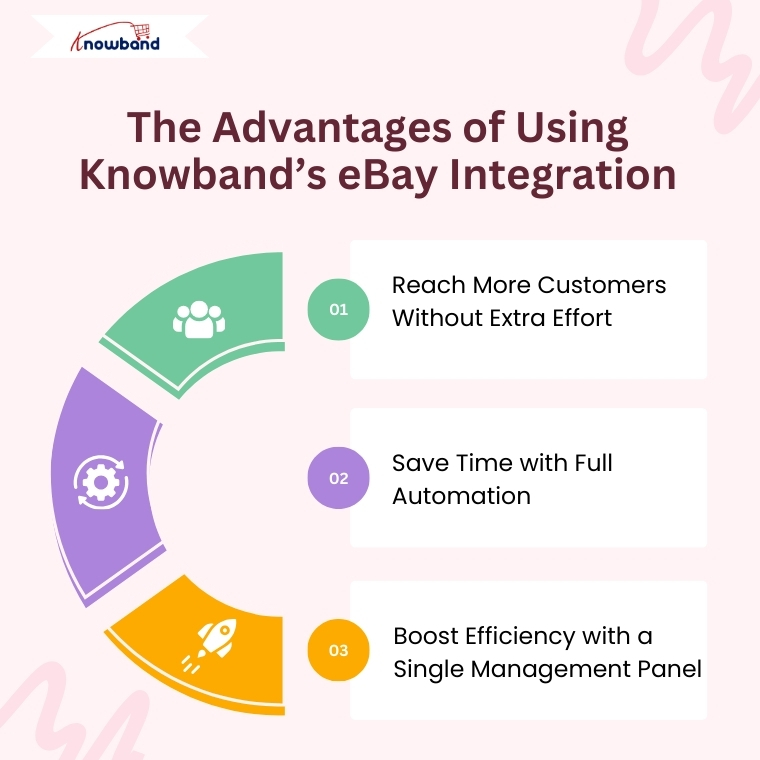
Expand Your Reach Globally: Connect your PrestaShop store with the vast eBay customer base effortlessly. The PrestaShop eBay Integration Free Module makes cross-border selling accessible. This works even for small businesses.

Save Time with Automation: Automate product uploads, stock syncing, pricing updates, and order processing. This way, you can focus on growing your business instead of handling tedious manual work.

Single Dashboard Control: Manage everything related to your eBay listings within your PrestaShop admin panel. This includes inventory, orders, and shipping. This improves efficiency and reduces errors.

Detailed Activity Logs: Keep track of all synchronization events with transparent logs. These monitor product updates, stock changes, and order statuses. This gives you full control.

How to Integrate Your Store with eBay Using Knowband’s Module

  1. Create an account on the eBay Developer Program.
  2. Next, obtain your API credentials by generating your Dev ID, App ID, and Cert ID.
  3. Configure the PrestaShop eBay Integrator by entering your API keys and PrestaShop store URL.
  4. Integrate your store’s categories with the appropriate eBay categories. Then set up your shipping options to ensure accurate product listings and hassle-free deliveries.
  5. Finally, start syncing your products, inventory, and orders seamlessly.

Final Thoughts

For PrestaShop store owners looking to scale their operations internationally, Knowband’s PrestaShop eBay Integration Addon offers an all-in-one solution. It simplifies multi-channel selling. Whether you’re interested in a free Prestashop eBay Integration addon or a feature-rich paid module, Knowband’s modules ensure your store stays up-to-date. As a result, your customers receive timely service.

So why wait? Leverage the power of the Prestashop eBay Integrator today. Unlock new growth opportunities with minimal effort.

The Ultimate Solution for eCommerce Tracking: PrestaShop GTM Module

In the competitive eCommerce, accurate data tracking is no longer optional but it has become a critical requirement for businesses to ensure effective marketing and performance analysis. From understanding customer behaviour to optimizing your ad campaigns, powerful analytics can drive smarter decisions and boost revenue. For PrestaShop users, the best way to streamline tracking and marketing integrations is with Knowband’s Prestashop Google Tag Manager.

Whether you’re new to analytics or want to integrate with advanced tracking tools like GA4, the PrestaShop Google Tag Manager Addon makes it easier than ever.

Why Choose the PrestaShop Google Tag Manager Addon?

Integrating GTM to your prestashop store manually can be complex, especially for non-developers. That’s where the PrestaShop Google Tag Manager Addon comes in. 

The Prestashop Google Tag Manager is developed especially for merchants who don’t have coding knowledge or have less technical expertise.

The e-merchants can run the Google Tag Manager just by installing it. Additionally, the PrestaShop Google Tracking Module automatically tracks crucial eCommerce events like purchase events, and page view events, letting you focus on data-driven growth without worrying about script placements or event handling.

Features of the Prestashop No Code Google Tracking Module


Quick and Simple Integration

To begin with, store owners simply need to add their GTM container ID, and the module takes care of the rest. In other words, there’s no need to manually insert any tracking code into your theme files.

Enhanced eCommerce Tracking

Furthermore, the PrestaShop Google Marketing Integration Module fully supports enhanced eCommerce events such as Page View, View Category, View Product Detail, Add to Cart, Remove from Cart, Checkout Begins, Order Confirmation, Apply Discount Code, View Cart, Customer Login, Customer Registration, Add to Wishlist, Remove from Wishlist, Search Product, Capture UTM Parameters, and Scroll Bar Depth.

As a result, all of this event data is sent through GTM to your connected analytics tools, giving you deep insights into the entire customer journey.

GA4 Integration Support

In addition, the module works seamlessly with PrestaShop GA4 Integration. It effectively tracks key actions such as when a product is viewed, added to the cart, or purchased—thus helping you better understand customer behaviour.

UTM Parameter Tracking for Marketing Campaigns

Moreover, the module automatically captures UTM parameters from your marketing campaigns. Consequently, it allows you to track campaign performance across various channels and optimize your marketing strategies with data-driven decisions.

Seamless Multi-Store & Multi-Language Support

Finally, whether you operate multiple stores or use different languages, the module offers full support for multi-store and multi-language environments. This ensures that your tracking and data collection remain accurate and consistent across all setups.

Benefits of the Prestashop Google Tag Manager Module

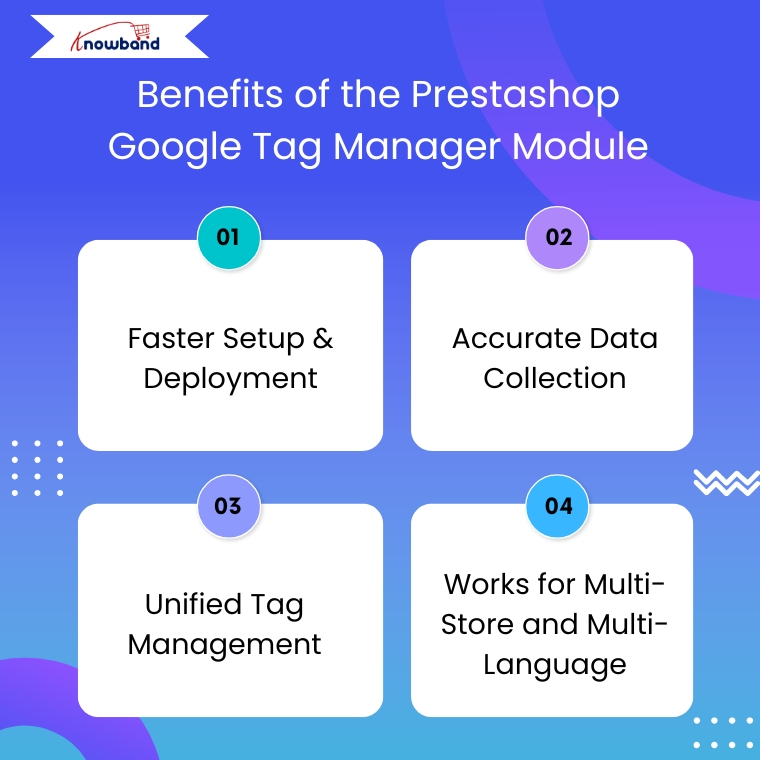
Faster Setup & Deployment

The PrestaShop Google Tag Manager module is simple to set up and easy to configure. They also need to enter their GTM Container ID and Google Analytics Measurement ID to make sure everything works smoothly.

Accurate Data Collection

With the PrestaShop Google Analytics Integration Module connected through GTM, you get more reliable tracking. Moreover, it helps avoid errors caused by outdated tracking codes or conflicting scripts.

Unified Tag Management

To get started, store owners just need to enter their GTM container ID, and the module handles everything else. This means there’s no need to manually add any tracking code to your theme files.

Works for Multi-Store and Multi-Language

If you’re running multiple stores or languages, the PrestaShop eCommerce Measure Addon ensures everything is tracked accurately across all setups without duplicating efforts.

Use Cases Of Google Tag Manager for PrestaShop

Here’s how store owners commonly use this module:

  • Monitor abandoned carts by sending event data to Google Analytics 4 (GA4) using Google Tag Manage
  • Improve the checkout process by finding out where customers drop off in the funnel.
  • Retarget visitors who viewed products but didn’t buy, using Facebook and Google Ads.
  • Understand product performance with detailed tracking of clicks, views, and other interactions.

Steps to set up the PrestaShop Google Tag Manager Addon?

Step 1: Install the Google Tag Manager addon in your PrestaShop store by uploading the zip file through your admin panel.

Step 2: If you haven’t already, create an account on Google Tag Manager and copy the container ID provided.

Step 3: Go to the addon settings in your PrestaShop dashboard and enter the container ID in the given field.

Step 4: Log in to your GTM account and create the tags, triggers, and variables you want to track.

Step 5: Your tracking setup is ready! You’ll now start receiving data without writing any code

Conclusion

In conclusion, the PrestaShop Google Tag Manager Module is a smart choice for store owners who want accurate tracking without a complex setup. Moreover, the module helps you understand customer behaviour, track key events, and improve your marketing performance.

With support for Google Analytics 4, UTM tracking, and multi-store environments, the Prestashop Google Tracking Module makes data collection simple and reliable. If you want to grow your store with the power of insights, this plugin is worth considering.

Top 7 Email Strategies to Win Back Abandoned Carts Using Knowband

Nearly every e-commerce business struggles with customers leaving items in their carts without completing the purchase. Customers add products but leave without purchasing, resulting in lost sales and engagement opportunities. Therefore, Knowband’s PrestaShop Abandoned Cart Module, PrestaShop Spin & Win Module, and PrestaShop Back In Stock Module offer a powerful way to recover these potential sales through emails.

Here are seven effective email strategies to bring those customers back.

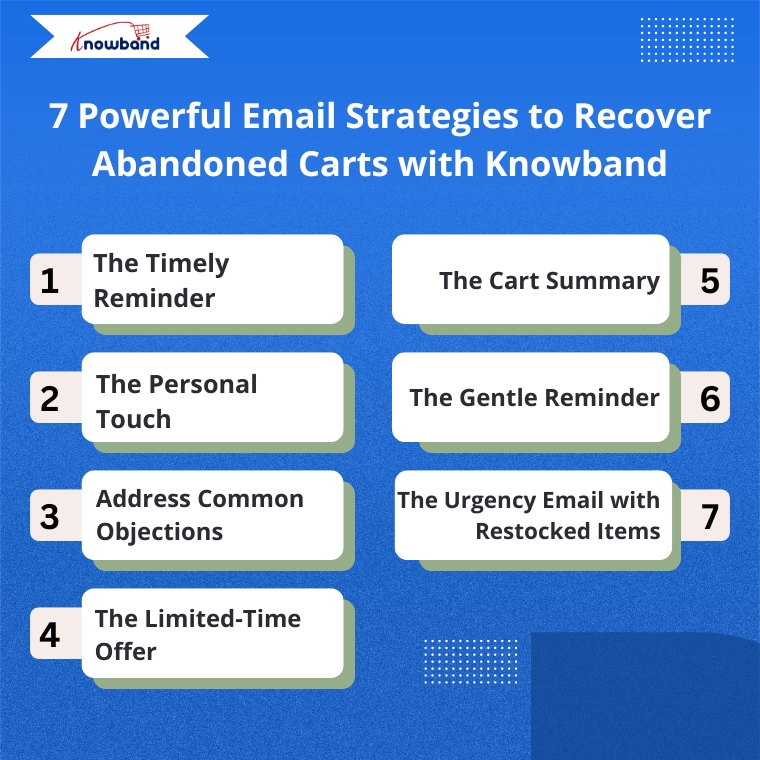
1. The Timely Reminder

Timing is everything when recovering abandoned carts. Therefore, the Abandoned Cart Addon for PrestaShop allows you to send the first reminder email within 1-3 hours after abandonment when your store is still fresh in the customer’s mind. Moreover, Knowband’s Abandoned Cart Addon allows you to set up automated sequences with precise timing, maximizing your chances of recovery.

2. Targeted Email Engagement

One way is to address customers by name and reference specific items they left behind.  Knowband’s PrestaShop Abandoned Cart Module automatically captures this information, allowing you to create personalized emails that show customers you value their individual shopping experience.

3. Address Common Objections

There can be many reasons for abandoned carts, like product cost, shipping cost, payment, or technical issues. So, Knowband’s Spin & Win module allows the admins to add coupon discounts, which can motivate the customers to go back and make purchases. 

4. The Limited-Time Offer

Create urgency with time-sensitive offers. The Abandoned Cart module allows you to include discount and coupon emails, and expiration dates on discount codes, encouraging quick action. For example, a 10% discount that expires within 24 hours can be the perfect motivation to complete a purchase.

5. The Cart Summary

Provide a clear summary of the abandoned cart in your email. This includes product images, names, quantities, and prices, making it easy for the customer to recall what they were interested in. The Abandoned Cart Module for PrestaShop by Knowband sends the email when the user abandons the cart, so keep the email template concise and visually appealing to spark interest and remind them of the value they were about to purchase

Integrate Your Opencart Shop with Abandoned Cart Module

No Coding Skills Required

SHOP NOW

6. The Gentle Reminder

Sometimes, customers abandon their carts by mistake or forget they left items behind. A gentle reminder email can be sent a day after abandonment using Knowband’s Abandoned Cart Module and can impact them without being too pushy. Additionally, this email should be friendly and polite, encouraging them to return and complete their purchase

7. The Urgency Email with Restocked Items

If an item that was abandoned is back in stock, the store owner can send an email informing the customer that their desired item is available again. This can be achieved by implementing the PrestaShop Back In Stock Module by Knowband, which can help create urgency, especially when products are in limited supply or high demand, and can drive the customer to act quickly.

How These Modules Operate

The Abandoned Cart Module helps you track, manage, and recover incomplete purchases through automated, personalized email campaigns. Moreover, the Prestashop Abandoned cart email follow-up addon enables store owners to set up smart reminders, offer discounts, show product images, and include one-click recovery links, making it easy for customers to return and complete their orders.

The Spin & Win Module for PrestaShop, on the other hand, helps prevent abandonment before it even happens. Moreover, this interactive pop-up module for Prestashop captures visitor emails by offering them a chance to win attractive discounts through a gamified interface. Moreover, this not only adds fun to the user experience but also provides coupons for purchases and grows your email list for future marketing.

The Back In Stock Module for PrestaShop allows your customers to subscribe to restock alerts for out-of-stock products. Furthermore, as soon as an item is available again, customers receive an automated email notification, giving them a chance to return and complete their purchase even without any manual effort from your side.

Putting It All Together with Knowband

Implementing these strategies becomes simple with Knowband’s PrestaShop Abandoned Cart Module, PrestaShop Spin & Win Pop, as well as PrestaShop Back In Stock.

 These modules offer:

  • Automated email sequences with custom timing
  • Personalized content for each customer
  • Built-in discount code generator
  • Detailed analytics to refine your approach
  • One-click cart recovery links
  • Mobile-responsive email templates

Furthermore, these PrestaShop modules by Knowband are user-friendly add-ons that allow you to track recovery rates and revenue gained, helping you continuously improve your abandoned cart strategy.

Start Recovering Lost Sales Today

Cart abandonment doesn’t have to mean lost revenue. With Knowband’s PrestaShop Abandoned Cart Module, PrestaShop Spin & Win Entry Pop-Up Module, PrestaShop Back in Stock, and these seven email strategies, you can effectively bring customers back and increase your conversion rates significantly.

Therefore, install Knowband’s PrestaShop Modules today and transform abandoned carts into completed orders with these proven email strategies.

For more details, check out the Prestashop Abandoned Cart E-mail Reminder Module which is available for PrestaShop, OpenCart, Magento, and WooCommerce.

Simplify Your Checkout and Increase Sales with PrestaShop One Page Supercheckout

Many online shoppers leave without completing their orders, and one major reason behind this is a long or confusing checkout process. Moreover, when customers are excited to buy something, they don’t want to deal with multiple steps, page reloads, or unexpected surprises at the end. These delays often lead to cart abandonment. As a result, it can decrease your store’s sales and growth over time. To help overcome this issue, Knowband has developed the PrestaShop One Page Supercheckout module. This addon simplifies the entire checkout experience by putting everything, personal details, shipping information, and payment options, on one single, easy-to-navigate page. As a result, by removing extra steps and making the process smoother, it helps customers place their orders faster and with less hassle.

Additionally, not only does this lead to a better user experience, but it also encourages more successful checkouts, which means higher conversion rates and happier customers. In this article, we’ll explore how this  PrestaShop One Page Supercheckout module works, the key features it offers, and how it can make a big difference for your PrestaShop store.

PrestaShop 9.2 contains a native module named ps_onepagecheckout which enables users to get contact, delivery, carrier, and payment all in one page. However, this is a very useful improvement, but the documentation of PrestaShop itself tells us that payment modules, carrier modules, and themes should be tested with the new single-page checkout process because it is only compatible with the Hummingbird 2.0 theme.( Updated September 28, 2026)

On 21 September 2026, PrestaShop 9.2 was released at its first release candidate. Read more here about Prestashop 9.2 One Page checkout

Area PrestaShop 9.2 Native One-Page Checkout Prestashop One Page Checkout by Knowband ( SuperHero Seller)
Compatibility Only PrestaShop 9.2, built for the Hummingbird 2.0 theme PrestaShop 1.7.x, 8.x and 9.x
Layout control Switch between one-page and four-page layout Show, hide and reorder fields, add custom fields, drag and rearrange blocks, custom CSS and JS
Payment and shipping Standard flow Ship2Pay ties payment methods to delivery options
Login options Guest-first, no account required Guest checkout plus Google, Facebook and PayPal login
Address entry NA Google Address Autofill and country autofill
GDPR NA Multiple opt-in checkboxes with a consent log
Analytics NA Checkout behaviour report and abandoned checkout statistics
Email tools NA Mailchimp, Klaviyo and SendinBlue integrations
Safe testing Not mentioned in announcements Testing mode on a separate URL before going live

What is the PrestaShop One Page Supercheckout?

To begin with, the Prestashop One Page Supercheckout Module is a feature-rich module created for PrestaShop stores. Traditionally, checkout processes are divided into multiple pages: billing, shipping, payment, and confirmation. However, these extra steps can frustrate customers, especially those shopping from mobile devices.

Furthermore, this module eliminates the hassle by combining all essential checkout steps onto a single page. In doing so, it minimizes delays, reduces the number of clicks, and significantly enhances the user experience.

Why Do Customers Abandon Their Carts?

Before diving into the module’s benefits, it is important to understand why cart abandonment occurs in the first place. Customers typically abandon their carts due to:

  • A long or complicated checkout process
  • The requirement to create an account before purchasing
  • Unexpected additional charges like shipping or tax
  • Limited or inconvenient payment and delivery options
  • Poor mobile experience or slow loading pages

When any of these barriers exist, shoppers may quickly lose interest or trust and abandon their cart altogether. That’s why simplifying the checkout is not just beneficial, it’s essential.

The PrestaShop One Page Supercheckout is designed specifically to address these problems head-on.

Key Features That Make Checkout Simple and Effective

Let’s now explore the core features that make this module so impactful for your store.

1. Unified One-Page Checkout

First and foremost, this PrestaShop One Page Supercheckout module presents all checkout components—such as personal information, delivery addresses, shipping options, and payment methods—on a single, unified page. As a result, customers can complete their purchases much more efficiently without switching between multiple steps or screens.

2. Fully Responsive Design

With the increasing number of mobile shoppers, it is crucial that your checkout works seamlessly across all devices. This  PrestaShop One Page Supercheckout module features a responsive layout, ensuring that users on smartphones, tablets, and desktops all enjoy a consistent and smooth experience.

3. Guest Checkout Functionality

Often, customers are discouraged when forced to register for an account. To avoid this friction, the module includes a guest checkout option, enabling customers to proceed without signing up. This greatly enhances convenience and encourages more users to finalize their purchases.

4. Support for Multiple Payment and Shipping Methods

Another major cause of cart abandonment is the absence of preferred payment or delivery choices. The Prestashop One Page Supercheckout Module supports a wide range of popular payment gateways and shipping methods, giving your customers the flexibility they need.

Additionally, you can configure country-based options and auto-select default carriers to streamline the process even further.

5. Highly Customizable Layout

Moreover, the PrestaShop One Page Supercheckout module allows for deep customization. You can easily manage the appearance and arrangement of checkout fields, buttons, and sections, all from an intuitive admin panel. Furthermore, this ensures that your checkout page aligns with your brand’s identity and design preferences.

6. Social Login Integration

In addition to regular and guest login options, the module supports social login through Google and Facebook, allowing customers to log in with just one click. As a result, this not only saves time but also builds trust.

7. Real-Time Error Validation

To further enhance the user experience, the module includes inline form validation. It detects and displays errors in real time, so customers can quickly correct mistakes before submission, reducing the chances of form rejection and frustration.

Integrate Your Opencart Shop with Etsy Marketplace

No Coding Skills Required

SHOP NOW

Benefits of Using the One Page Supercheckout

By now, it should be clear how the features translate into real-world advantages. Let’s look at the most notable benefits:

Reduced Cart Abandonment

Since the module removes unnecessary steps and friction points, it directly tackles the root causes of cart abandonment. As a result, more users complete their purchases.

Improved Conversion Rates

The easier it is for customers to buy, the more likely they are to do so. With fewer clicks and less waiting, the conversion rate naturally increases, helping your store grow revenue.

Better Mobile Checkout Experience

In today’s mobile-first world, a checkout process that functions well on all devices is essential. Thus, this PrestaShop One Page Supercheckout module ensures a consistent, user-friendly experience across screens, improving accessibility and reducing drop-offs.

Increased Customer Satisfaction

When users are not delayed or confused by the checkout process, they are more likely to have a positive impression of your store. This, in turn, leads to better reviews, greater loyalty, and repeat purchases.

Support for Global Audiences

In addition to its core features, the module supports multi-language and multi-currency environments, allowing your store to serve international customers effortlessly.

For European stores, customers look for GDPR consent checkboxes with a consent log. The simplified checkout addon for PrestaShop guide covers each of these, including guest checkout and social login. ( Updated September 29, 2026)

Explore the Free and Premium Versions

If you’re still on the fence, it’s worth noting that Knowband offers a free version of the PrestaShop One Page Supercheckout. Moreover, this version provides the basic features needed to test the module and assess how it fits your store’s needs.

Once you’re ready to unlock the full potential of the module. Thus, the premium version is available, offering advanced features such as:

  • Social login integration
  • Custom field management
  • Google Auto-Address Fill
  • Field sorting and visibility controls
  • Carrier condition-based display
  • Advanced analytics support

As a result, this flexibility ensures that the module can grow with your business as your needs evolve.

Why Choose Knowband’s One Page Supercheckout?

There are many checkout modules available, but few offer the combination of usability, flexibility, and performance that knowband addon provides. Some key reasons to consider this module include:

  • Seamless integration with your existing PrestaShop setup
  • Easy-to-use configuration panel for admins
  • Continuous updates and technical support
  • Compatibility with most themes and third-party extensions
  • Scalable for both small businesses and large enterprises

Conclusion

To sum up, the PrestaShop One Page Supercheckout Module is more than just a module, it’s an essential addon that improves user experience, enhances customer satisfaction, and boosts your store’s bottom line.

Moreover, by simplifying the checkout process, removing roadblocks, and offering powerful customization features, this addon helps you create a checkout experience your customers will appreciate and return to.

So, if you’re looking to lower your cart abandonment rate and increase conversions, this PrestaShop One Page Supercheckout module is definitely worth considering.

Fashion Plano Mobile App Goes Live with Knowband’s PrestaShop MAB: Mobile eCommerce Success Story

In the ever-evolving world of eCommerce, staying relevant means staying mobile. Today’s consumers aren’t just shopping from desktops, they’re scrolling, browsing, and buying on the go. For Fashion Plano, a rising star in the online fashion industry, this wasn’t just a trend to observe; it was a call to action. 

From the beginning, Fashion Plano had a clear mission: to make trendy, affordable fashion accessible to everyone. However, as their customer base grew, so did the demand for a smoother, more personalized mobile shopping experience. While their website performed well, the limitations of mobile browsing began to surface. Shoppers wanted speed, simplicity, and a platform that felt as stylish and seamless as the clothes they were buying.

Fashion Plano, an emerging online fashion brand, understood this shift and took a bold step toward mobile commerce by going live on the Mobile App platform using Knowband’s PrestaShop MAB Module.

This powerful move helped Fashion Plano overcome several obstacles, from enhancing product visibility and branding to improving the shopping experience on mobile devices. This case study explores how Prestashop MAB helped Fashion Plano build a feature-rich mobile app and connect with fashion enthusiasts more effectively.

About Fashion Plano

Fashion Plano, founded in 2023 and headquartered in London, United Kingdom, Fashion Plano started with a simple idea: to bring stylish and affordable clothing to people who love fashion. What began as a small online store quickly became popular among shoppers looking for trendy outfits.

As more customers started using their phones to shop, Fashion Plano knew it was time to improve the mobile experience and keep growing in the competitive online market. While their website offered a solid shopping experience, it became clear that a mobile app was essential to match the pace of their digital expansion.

As a brand, Fashion Plano faced a few obstacles. They struggled with limited flexibility in showcasing products creatively, faced challenges in boosting product visibility, and sought more dynamic ways to engage users on mobile devices.

The team faced several obstacles, including:

  •  Limited flexibility in showcasing offers effectively.
  • Low product visibility, due to desktop screens.
  •  A need for better mobile navigation and overall shopping experience.
  •  Struggles with engaging and retaining mobile users.

Integrate Your Opencart Shop with Etsy Marketplace

No Coding Skills Required

SHOP NOW

How Knowband’s PrestaShop MAB Transformed Fashion Plano’s Mobile Store

To stay ahead in today’s mobile-first shopping world, Fashion Plano knew they had to act fast. Their customers were already spending more time browsing on smartphones than desktops, and the existing mobile experience wasn’t keeping up. That’s when they discovered PrestaShop Mobile App Builder Module, a no-code solution that promised both speed and flexibility.

Unlike traditional app development, which can be time-consuming and expensive, the PrestaShop Mobile App Builder module gave Fashion Plano a quick and cost-effective way to launch a fully functional mobile app. Even without technical expertise, the team was able to set up a sleek and modern app that reflected our brand’s personality.

But more importantly, the app wasn’t just “launched”; it was thoughtfully built to solve real issues the brand was facing.

Here’s how the PrestaShop Mobile App Builder Module made a difference:

  • Smooth Setup, Zero Coding: Fashion Plano didn’t need to hire a developer or wait for months. The app was ready in a short time, saving both money and effort.
  • Better Product Visibility: With improved layout and intuitive design, customers can now view products clearly, even on smaller screens. This led to increased interest and more time spent on the app.
  • Real-Time Sync with Website: Any updates made on their PrestaShop store—be it a new product or price change—are automatically reflected in the app. This helped them stay consistent across platforms.
  • Enhanced Customer Engagement: Push notifications made it easier to share deals, restock alerts, and updates directly with users, keeping them coming back.
  • Faster Navigation and Checkout: With simplified menus, smart filters, and a quick checkout process, customers could shop without any frustration. As a result, this noticeably reduced cart abandonment.
  • Branded Look and Feel: Fashion Plano was able to customize the app’s look to match their branding—right from colors and banners to logo.

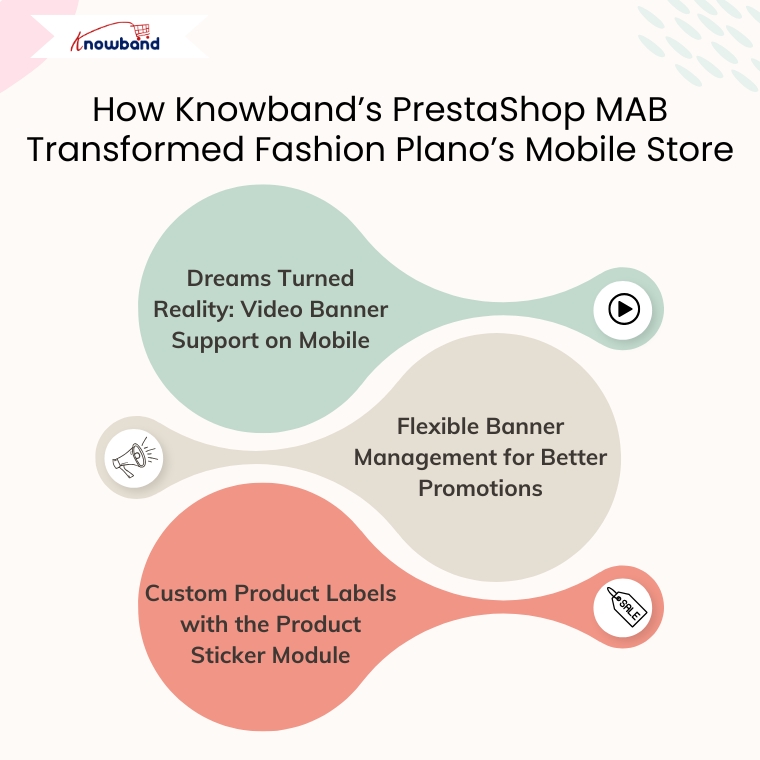
1. Dreams Turned Reality: Video Banner Support on Mobile

One of Fashion Plano’s biggest wish was to add a video banner to its store. Despite trying different PrestaShop themes, none of them supported this feature.

That’s where the PrestaShop Mobile App Builder module came in.

Moreover, with the help of this module, Fashion Plano successfully added a video banner to its mobile app. As a result, this feature transformed the app’s home screen, giving it a dynamic and engaging look. The moving visuals captured the user’s attention immediately and made the app more interactive.

Benefits of the video banner:

  • Grabbed attention within seconds.
  • Showcased promotions, seasonal offers, and featured collections.
  • Enhanced visual appeal and increased customer engagement.

What once felt like a limitation turned into a powerful addon for customer attraction, all thanks to PrestaShop Mobile App Builder Module flexible and customizable layout.

2. Flexible Banner Management for Better Promotions

Fashion Plano also took full advantage of Prestashop MAB’s banner features to promote products and collections effectively. These included:

Square Banners

Perfect for highlighting specific categories or collections. As a result, Fashion Plano used square banners to guide users directly to new arrivals, seasonal picks, or trending styles.

Banner Sliders

Thus, the sliders allowed them to display multiple promotions in one space. Fashion Plano used these to highlight offers, showcase brand stories, and keep the homepage visually dynamic.

Category Banners

These helped in organizing and displaying different product categories clearly. Moreover, with attractive images and labels, it became easier for customers to find what they’re looking for.

What’s even better? All these banners are fully customizable from the backend. As a result, the Fashion Plano team could update the banners, replace images, and change call-to-action links whenever they wanted, without needing any developer support.

Conclusion

To sum up, Fashion Plano’s journey with Knowband’s PrestaShop Mobile App Builder Module shows how the right technology, when used at the right time, can truly make a difference. What started as a small online fashion store quickly grew into a brand with big ambitions, and with the help of MAB, those ambitions became a reality.

Thus, the mobile app didn’t just “add features”; it gave the team the freedom to design their store the way they always imagined. Whether it was adding an eye-catching video banner on the home screen, customizing square and category banners, or syncing products in real-time, every detail was crafted to create a better experience for their customers.

More importantly, the app helped Fashion Plano connect with its audience on a deeper level. As a result, shoppers now enjoy faster browsing, smooth navigation, and instant updates on offers, all from the convenience of their phones. The result? More engagement, higher retention, and growing customer trust.

Furthermore, if you’re a PrestaShop store owner wondering how to take your mobile presence to the next level, without spending weeks on development or learning how to code, Fashion Plano’s experience speaks volumes.  PrestaShop MAB Module has completely transformed the way we engage with our mobile users. It’s powerful and easy to use, and it gives us a fully customized app that runs fast and looks great. Highly recommended.

Top 5 Reasons to Upgrade Your Store with the Prestashop One-Page Supercheckout Module

In the world of online shopping, speed and simplicity are more important than ever. Customers want to find what they need, place an order quickly, and move on with their day. If the checkout process is slow or confusing, it can easily drive them away. Many customers abandon their carts just because the checkout takes too long or asks for too much information.

This is where the Prestashop One Page Super checkout Module by Knowband can make a real difference. By bringing the entire checkout process onto a single page, this module helps you create a smoother, faster experience for your customers. Not only does it make shopping easier, but it can also help you increase sales and grow your business.

Additionally, the module includes conversion-focused enhancements like a Free Shipping Progress Bar and customer profile-based checkout fields to further improve order completion rates.

Let’s take a closer look at the top five reasons why upgrading to the Super checkout module is a smart move for your online store.

1. A Smooth One-Page Checkout

First and Foremost, one of the biggest reasons shoppers abandon their carts is because checkout feels like a long, complicated journey. They don’t want to click through multiple pages just to finish a purchase. Every extra page adds time and frustration, which can cause them to change their minds.

The Supercheckout module by Knowband solves this problem by placing everything — cart review, address details, shipping methods, and payment options all on one simple page. This means customers can complete their entire order without jumping back and forth between screens. Everything they need is right in front of them.

Significantly, when shopping feels easy, customers are much more likely to follow through and complete their purchases. A simple one-page checkout can turn casual browsers into loyal buyers.

2. Easy Guest Checkout

Sometimes, customers are ready to buy but hesitate when asked to create an account. They may worry about getting too many emails or simply not want to remember another password. Also, forcing customer to sign up can sometimes create a barrier that stops the sale altogether.

The Prestashop One Page Supercheckout Module by Knowband understands the strategy to overcome this problem. It offers a smooth guest checkout option, allowing customers to place an order without creating an account. They just fill out their details and move straight to payment.

Of course, you can still offer the option to create an account if customers choose to. You can even add social login options like Google or Facebook to make registration quick and painless. Furthermore, giving customers a choice makes them feel more comfortable and respected, which helps build trust.

3. Mobile-Optimized for a Better Experience

Today, more people shop on their phones than on desktop computers. This means that having a mobile-friendly checkout isn’t just nice to have — it’s necessary.

Additionally, the Supercheckout module is designed to be fully responsive. No matter what device your customer is using like a phone, tablet, or computer, the checkout page will adjust perfectly to fit the screen. Customers can easily fill in their information, choose shipping options, and pay without struggling to zoom in or scroll endlessly using Prestashop One Page Super checkout Module.

Having a mobile-optimized checkout means fewer abandoned carts, especially among busy shoppers who are placing orders on the go. A smooth mobile experience can make a big difference in your store’s success.

Integrate Your Opencart Shop with OnePage SuperCheckout

No Coding Skills Required

SHOP NOW

4. Customization That Fits Your Store

Every business is different. Some stores need a simple, quick checkout, while others need to collect extra information like delivery notes, VAT numbers, or special instructions depending on the country. That’s why flexibility is so important.

The Prestashop One Page Super checkout Module by Knowband makes it easy for store owners to customize the checkout page. You can add, remove, or reorder fields without any technical skills. Furthermore, you can also adjust settings based on customer location, cart value, or shipping method.

This way, you can design a checkout experience that fits your store’s needs perfectly. Plus, you can match the design to your branding, making everything feel more professional and trustworthy to your customers.

Significantly, offering a checkout page that feels familiar and easy can help build confidence and encourage shoppers to complete their purchases.

5. Live Cart Updates for a Seamless Journey

Lastly, another feature customers love is the ability to update their cart in real time. Sometimes, while checking out, a shopper might decide they want two of an item instead of one. Or maybe they want to remove a product they no longer need.

Along with this, the Free Shipping Progress Bar motivates customers to add more products to their cart by clearly showing how close they are to qualifying for free shipping.

Moreover, with Supercheckout, customers don’t have to go back to the cart page. They can easily update quantities or remove items right there during checkout, without refreshing or leaving the page. Significantly, this small but powerful feature keeps customers moving forward. It removes extra steps that could cause delays or confusion. A smoother journey means a better experience and more completed orders.

Conclusion

Making the checkout process easy and fast is one of the smartest things you can do for your online store. When customers don’t have to deal with a complicated process, they are much more likely to complete their purchases and come back for more.

Prestashop One Page Supercheckout Module by Knowband offers everything you need to create a better checkout experience. It brings together a simple one-page design, easy guest checkout, mobile optimization, full customization options, and live cart updates.

With added features like the Free Shipping Progress Bar and customer profile-based checkout customization, the module also helps increase order value and personalize the checkout journey.

Moreover, if you want to reduce abandoned carts, make shopping easier for your customers, and boost your sales, upgrading to Super checkout is the right step.
Give your customers a checkout experience they will love — and watch your business grow.

👉Explore the Module with Our Video Guide