As online competition intensifies, offering a streamlined and user-friendly shopping journey has become critical for success. Unfortunately, cart abandonment remains one of the most significant challenges for online retailers. In fact, studies reveal that a significant percentage of customers leave without completing a purchase simply because the checkout process is too long or complex. That’s where the Prestashop One Page Supercheckout module becomes a game changer.
If you’re looking to reduce bounce rates, increase conversions, and offer a faster checkout experience, then the Prestashop Quick Checkout addon by Knowband is the perfect solution.
Why Quick Checkout Matters
The moment a customer decides to buy, speed is everything. However, when checkout feels like a hassle, customers often give up and leave their cart behind.
Fortunately, the Prestashop simplified checkout addon is built to address this exact issue. By merging all checkout steps, billing, shipping, and payment, into one single, user-friendly page, it simplifies the buyer journey and speeds up the purchase process.
Whether you’re just starting out or already running a well-established online store, having a quick checkout extension integrated can make a big difference in your sales figures.
With One Page Super Checkout for Prestashop stores can integrate multiple payment options in a single, streamlined checkout. Supported gateways include PayPal, Stripe, Authorize.Net, Square, Razorpay, and flexible Buy Now Pay Later solutions. The Prestashop Fast Checkout Addon also allows payments via Apple Pay, Google Pay, and other modern wallets, helping reduce cart abandonment and improve conversion rates.
Key Features of the Prestashop Quick Checkout Addon
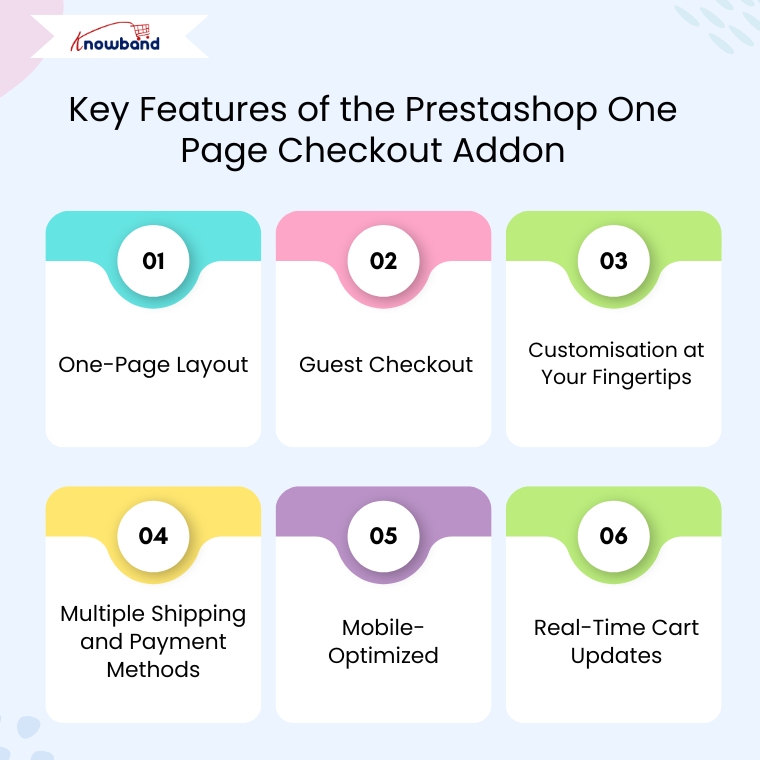
One-Page Layout
Unlike the traditional multi-step process, the Prestashop Quick Checkout Module brings everything together on one page. As a result, customers can view their cart, enter shipping details, and complete payment, all without having to click through multiple screens. This reduces friction and encourages faster transactions.
Guest Checkout
Not every customer wants to register for an account. Therefore, this quick checkout addon for Prestashop allows you users complete purchases as guests, eliminating unnecessary steps and improving the customer experience.
Customisation at Your Fingertips
You don’t need to be a developer to make changes. Furthermore, the module allows store owners to add, remove, or rearrange fields easily. You can also enable or disable certain sections based on your business needs. This makes the Prestashop fast checkout addon highly adaptable for different types of stores.
Multiple Shipping and Payment Methods
Offer your customers the freedom to choose from different shipping services and payment gateways. Additionally, you can also set visibility rules based on customer location or order value, making the process smarter and more flexible.
Mobile-Optimized
With more and more users shopping via mobile devices, the One Page Checkout Prestashop module is designed to work flawlessly on smartphones and tablets. Moreover, a responsive design ensures that the checkout page is smooth and clutter-free on all screens.
Real-Time Cart Updates
Customers can add or remove products and see real-time updates in their cart summary, no page refresh required. Consequently, this live update feature enhances usability and speeds up decision-making.
Benefits of Using the Prestashop One Page Supercheckout
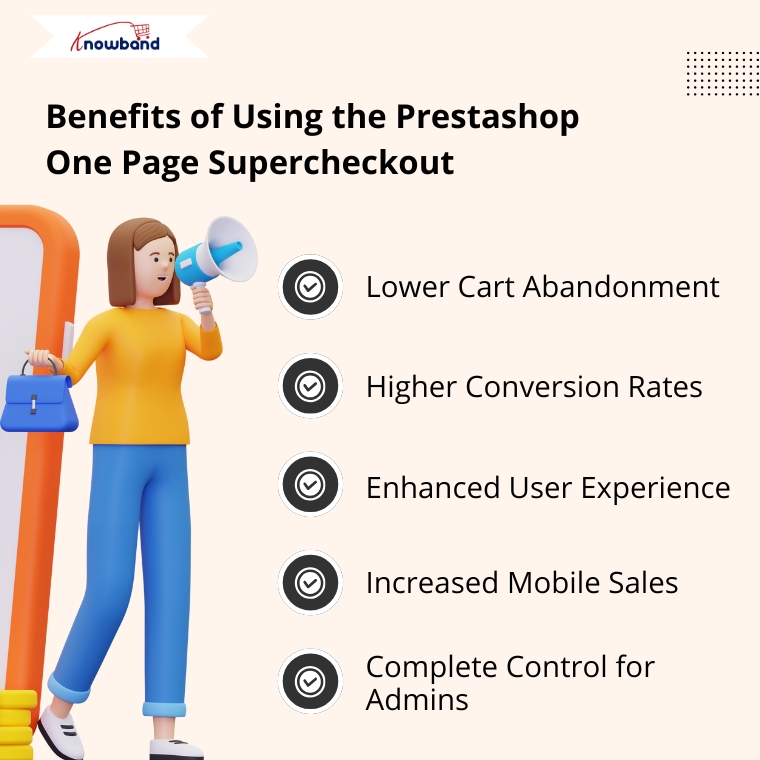
Lower Cart Abandonment
By eliminating unnecessary steps, the Prestashop Quick checkout addon significantly reduces the chances of customers leaving before completing their purchase.
Higher Conversion Rates
The shorter the journey to checkout, the higher the likelihood of conversion. Therefore, the simplified process encourages impulse purchases and provides a frictionless shopping experience.
Enhanced User Experience
Whether a customer is tech-savvy or not, the intuitive design of the quick checkout extension Prestashop ensures everyone can complete their order without confusion.
Increased Mobile Sales
Thanks to its responsive design, the Prestashop One Page Checkout works seamlessly on all devices, ensuring you don’t lose out on mobile shoppers.
Complete Control for Admins
You’re not stuck with a one-size-fits-all layout. Instead, the Prestashop simplified checkout addon gives you the tools to create a checkout page that reflects your brand and suits your specific needs.
Why Choose Knowband’s Supercheckout Module?
Knowband has become a trusted name when it comes to reliable and feature-rich Prestashop modules. Their Prestashop fast checkout addon is no exception. It’s trusted by thousands of eCommerce businesses worldwide and comes with excellent support, regular updates, and full documentation.
Moreover, the module supports additional features like social login, delivery date options, newsletter subscription, and more, making it more than just a basic quick checkout addon for Prestashop.
Final Thoughts
In the competitive e-commerce landscape, speed and simplicity are the keys to success. The Prestashop One Page Supercheckout module by Knowband offers everything you need to deliver a faster, easier, and more enjoyable checkout experience.
From reducing cart abandonment to improving mobile usability and boosting conversions, this all-in-one Prestashop One Step Checkout Addon is a smart investment for any online store.
So why wait? Upgrade your checkout experience today with the Prestashop simplified checkout addon and turn more visitors into loyal customers.
In today’s competitive eCommerce space, standing out requires more than just great products. It demands immersive, informative, and visually engaging shopping experiences. While product images serve as a basic necessity, they often fail to deliver the full picture. This is where video content becomes a game-changer—and why merchants across platforms are turning to modern video solutions to enhance the aesthetic appeal of their stores and connect with today’s visual-first customers.
Recognizing this growing demand, Knowband has launched the much-anticipated VideoMate Addon. Now available for PrestaShop, WooCommerce, and OpenCart, VideoMate is an all-in-one eCommerce video solution designed to bring your store to life with high-impact video marketing. Whether you want to display how-to guides, showcase product reviews, tell your brand story, or integrate short-form content from social platforms, this robust e-commerce video module simplifies it all.
Why Your Store Needs Video
To begin with, modern customers prefer to see products in action. The video gives them the next best thing to a hands-on experience, offering clarity, confidence, and connection that static visuals can’t match.
Studies show that customers are more likely to convert after watching a product video. That’s because video:
Provides better product understanding
Reduces hesitation and return rates
Builds trust through authenticity
Enhances emotional engagement
Increases time-on-site and improves SEO
Clearly, integrating video isn’t just a creative enhancement—it’s a conversion strategy.
How Video Content Influences Buyer Behavior
More specifically, video content speaks directly to the way online customers consume information. A PrestaShop Video Manager Module, for instance, lets customers see a product’s features, texture, and use cases. Similarly, a well-placed OpenCart product video extension builds credibility with visual proof, making it easier for customers to say “yes.”
Through a Prestashop Video Manager addon, you can share your brand’s mission, showcase behind-the-scenes content, or present video testimonials that make your store feel more human. In addition, short-form content such as downloaded Instagram Reels or Twitter videos can be uploaded using the PrestaShop Instagram Reels Addon or the OpenCart Twitter video plugin—further extending your reach and consistency across channels.
How Knowband’s VideoManager Addon for Prestashop, Opencart & WooCommerce Helps Your Store Stand Out
Fortunately, VideoMate takes the complexity out of video marketing. Whether you’re running PrestaShop, WooCommerce, or OpenCart, this addon allows you to upload, place, and manage videos across your store with ease. As a result, you can enhance product pages, boost homepage engagement, and even feature time-sensitive offers with floating widgets—all without technical skills.
By supporting formats such as a PrestaShop homepage video module, a PrestaShop video carousel module, and a floating video widget for both OpenCart and PrestaShop, VideoMate offers unmatched flexibility.
Key Features of the Knowband’s Prestashop Video Manager Addon
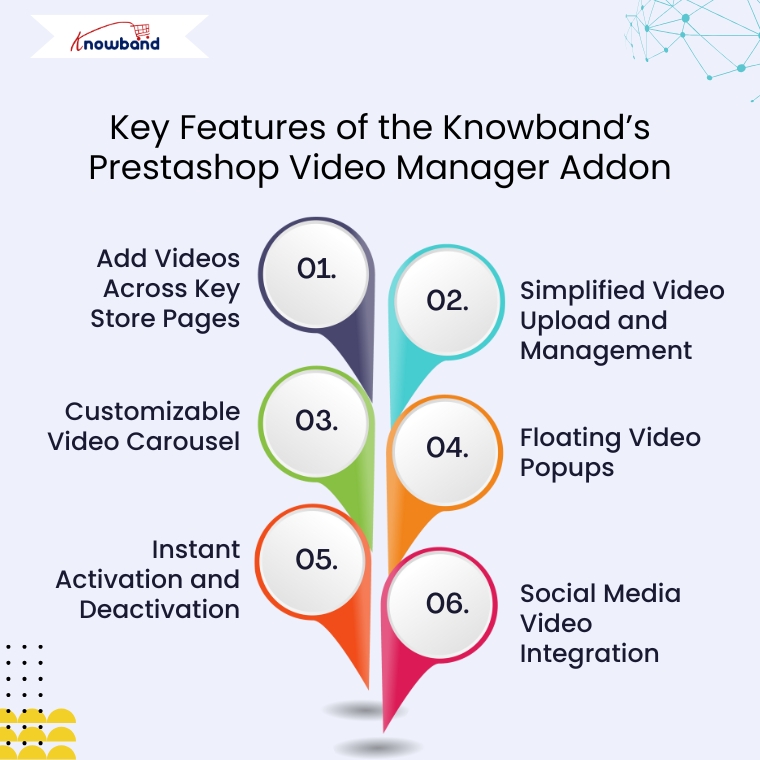
Add Videos Across Key Store Pages
First and foremost, VideoMate enables video placement on all crucial store pages. This includes product pages, category pages, homepages, best-seller sections, and even new arrivals. With options like the PrestaShop homepage video module and the OpenCart category video plugin, you can deliver compelling content exactly where it matters most.
Simplified Video Upload and Management
Next, the built-in video uploader for OpenCart video manager extension makes adding videos incredibly simple. Upload directly from your local system, assign content to specific pages, and edit or remove videos anytime—no coding required. This level of ease turns your store into a flexible video-powered selling machine.
Customizable Video Carousel
To further boost interactivity, the PrestaShop video carousel module and its OpenCart equivalent let you create scrollable, auto-playing video sections. Add custom headings, adjust transition timing, and control how many videos are displayed. This not only modernizes your store’s design but also improves customer engagement.
Floating Video Popups
For time-sensitive promotions or feature highlights, the floating video widget module for PrestaShop and OpenCart floating video extension provide an elegant solution. These popups can be positioned left or right, and are designed to attract attention without disrupting the browsing flow.
Instant Activation and Deactivation
For ultimate control, you can enable or disable videos directly from the admin panel. Whether you’re running seasonal campaigns, testing performance, or updating content, you have real-time flexibility without needing developer support.
Social Media Video Integration
Lastly, the PrestaShop social media video addon and OpenCart video plugin support embedded content from platforms like Instagram and Twitter. This means you can repurpose engaging short-form content—such as reels, product clips, or influencer shoutouts—right into your store. It’s a powerful way to unify your eCommerce and social marketing efforts.
Conclusion
In conclusion, integrating video into your online store is no longer just an enhancement—it’s a necessity. The VideoMate Addon equips merchants on PrestaShop, OpenCart, and WooCommerce with the trending features needed to transform static shopping experiences into engaging, video-rich journeys that build trust and boost sales.
With support for everything from product videos and video carousels to floating widgets and Instagram Reels, this addon combines ease of use with powerful functionality. Whether you’re telling your brand story, showcasing reviews, or launching new collections, VideoMate Plugin for WooCommerce helps you connect with customers in the most compelling way possible.
Explore the full potential of videos with the eCommerce Video Manager Addon because a product seen in videos is a product one step closer to being sold.
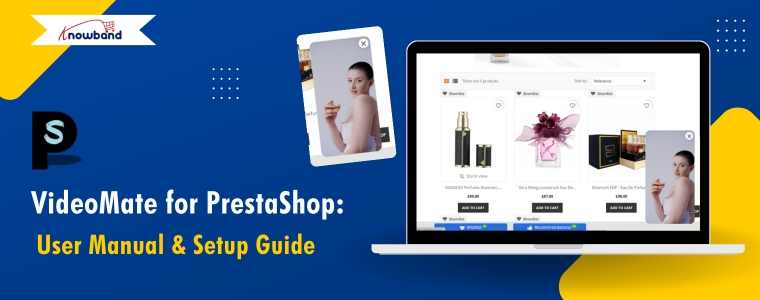
VideoMate is a comprehensive PrestaShop video addon designed to transform your online store with engaging video content. As a powerful PrestaShop product video module, VideoMate allows you to easily integrate MP4 videos into your store, creating dynamic and interactive experiences that help showcase your products, promotions, and brand story more effectively.
Furthermore, this versatile PrestaShop VideoMate Addon supports multiple widget types, including responsive video carousels, floating video players, and single video displays, giving you full control over how videos appear across your site. Whether you want to highlight your best sellers, or new products, or simply add captivating videos on the homepage or category pages, VideoMate offers flexible video mapping and display options tailored to your needs.
Additionally, with features like video library management, status toggling, and client-side validation, managing your video assets is effortless and secure. Meanwhile, the floating video module allows you to add stylish, movable video players that users can minimize or close, while the carousel module displays multiple videos with autoplay and navigation controls, ensuring a smooth and modern user experience.
Moreover, designed for seamless integration, Knowband’s PrestaShop product video addon enhances product pages with rich media content that increases user engagement and boosts conversion rates. Ultimately, whether you are looking for a PrestaShop category video module, a homepage video solution, or a full-featured video marketing module, VideoMate offers an all-in-one video widget module for PrestaShop that is responsive, customizable, and easy to manage.
[New] Latest Updates of PrestaShop Video Manager Module v1.0.4
PrestaShop VideoMate Manager v1.0.4 has been released with the following changes:
Dashboard and Reports: Now you can track impressions, plays, product clicks, and add to cart with charts, tables, date filters, and CSV export. Shoppable Video: Attach products to a video, with a product card and Add to cart on the storefront. YouTube and Vimeo: Add videos by link, with cover images fetched automatically or uploaded by you. Widget Controls: Schedule widgets, set delay or scroll triggers, target pages and devices, and choose landscape, portrait, or square video.
[New] Latest Updates of Prestashop Video Manager Module v1.0.3
This major update brings the new enhancement that now you can generate videos using AI Platforms.The Prestashop Video Manager Module now supports AI-powered video generation using Gemini and ChatGPT. Create product and promotional videos automatically with advanced AI technology.
[New] Latest Updates of Prestashop Video Manager Module v1.0.2
The new version of the PrestaShopVideomate module now includes new enhancements that give store owners greater control over video content and how customers interact with the videos.
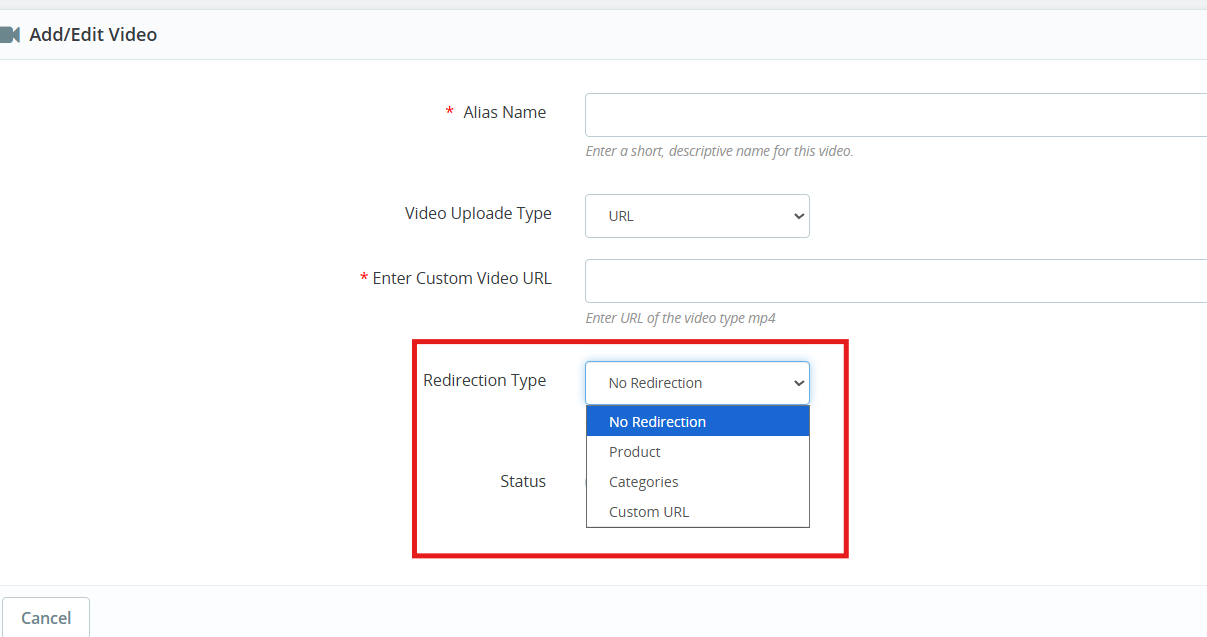
1. Video Upload Type Options
Now, store owners can choose between two methods of video type for their store:
Direct Upload: They can select and upload video files stored locally on their computer
External URL: Store owners can also add URLs to videos hosted on supported platforms using their URLs, which are publicly accessible.
These options give you flexibility in managing your video content based on your preferred hosting method.
2. Configurable Redirection Settings
The Prestashop Video Manager module introduces redirection controls that determine where customers land after clicking on a video.
You can direct them to redirection URLs of products and categories as well as any custom URL.
3. Video Integration on Product Pages
Videos now appear within the product image gallery on individual product pages. When you add a video, it displays alongside your product photos in the same viewing area.
These key features specially helps in
Demonstrate how products work in real
Keep potential buyers engaged longer on your product pages
Deliver more detailed product information without cluttering the page layout
1.0 Key Features of Prestashop VideoMate Addon
Video Library Management First and foremost, with the VideoMate PrestaShop Addon, upload MP4 videos (up to 50MB) and manage them easily using alias names, status toggle, and in-admin previews.
Video Mapping Management Additionally, this PrestaShop product video addon lets you map videos to products, categories, home pages, Best Sellers, or New Product pages with flexible widget types.
Frontend Video Display. Furthermore, use a carousel, single, or floating widget to display videos beautifully across your store. A responsive video module for PrestaShop ensures smooth playback on all devices.
Broad Widget Placement Moreover, this PrestaShop video carousel module supports placement on product pages, category pages, home pages, and special listings, maximizing visibility and customer engagement.
Custom Widget Configuration In addition, configure widget settings like autoplay, video count, position, and custom headings—making it a PrestaShop custom video display module with high flexibility.
Centralized Admin Panel Subsequently, manage all configurations from a clean admin panel with global enable/disable controls—ideal for store-wide video campaign control.
Optimized Performance & Compatibility Meanwhile, this lightweight PrestaShop MP4 video integration works seamlessly with prestashop versions 1.7 to 8. x.x.
Effective Video Marketing Strategies As a result, a true PrestaShop video marketing module, VideoMate enhances your store’s product pages with engaging video content that boosts conversions and customer trust.
Fully Responsive & Mobile-Friendly Consequently, VideoMate is a responsive video module built specifically for PrestaShop that automatically optimizes video display across all devices, delivering seamless playback on desktop, tablet, and mobile screens.
Knowband’s PrestaShop Addon to Show Product Videos Ultimately, VideoMate serves as your comprehensive video display solution for PrestaShop, offering versatile functionality as a homepage video module, category video module, or floating video module to meet all your site’s video integration needs.
2.0.0 Installation Guide for PrestaShop VideoMate Addon
Step 1: Purchase and download the Knowband’s Prestashop VideoMate Addon After your purchase is complete, you’ll receive the videomate.zip file. VideoMate is your complete PrestaShop video marketing module, designed to transform and enhance your storefront with professional video integration.
Step 2: Access Module Manager Once logged in, go to Modules > Module Manager > Upload a Module to begin the installation of your PrestaShop MP4 video integration solution.
Step 3: Upload and Install the Module Then, drag and drop the videomate.zip file or manually upload it. PrestaShop will automatically install this feature-rich video widget module for PrestaShop.
Step 4: Configure the Addon Finally, click Configure to start managing your video library, mapping videos to products, categories, or special pages like Best Seller and New Product – all with one of the best PrestaShop addons to show product videos.
3.0. Admin Panel Configuration
3.0.1 General Settings
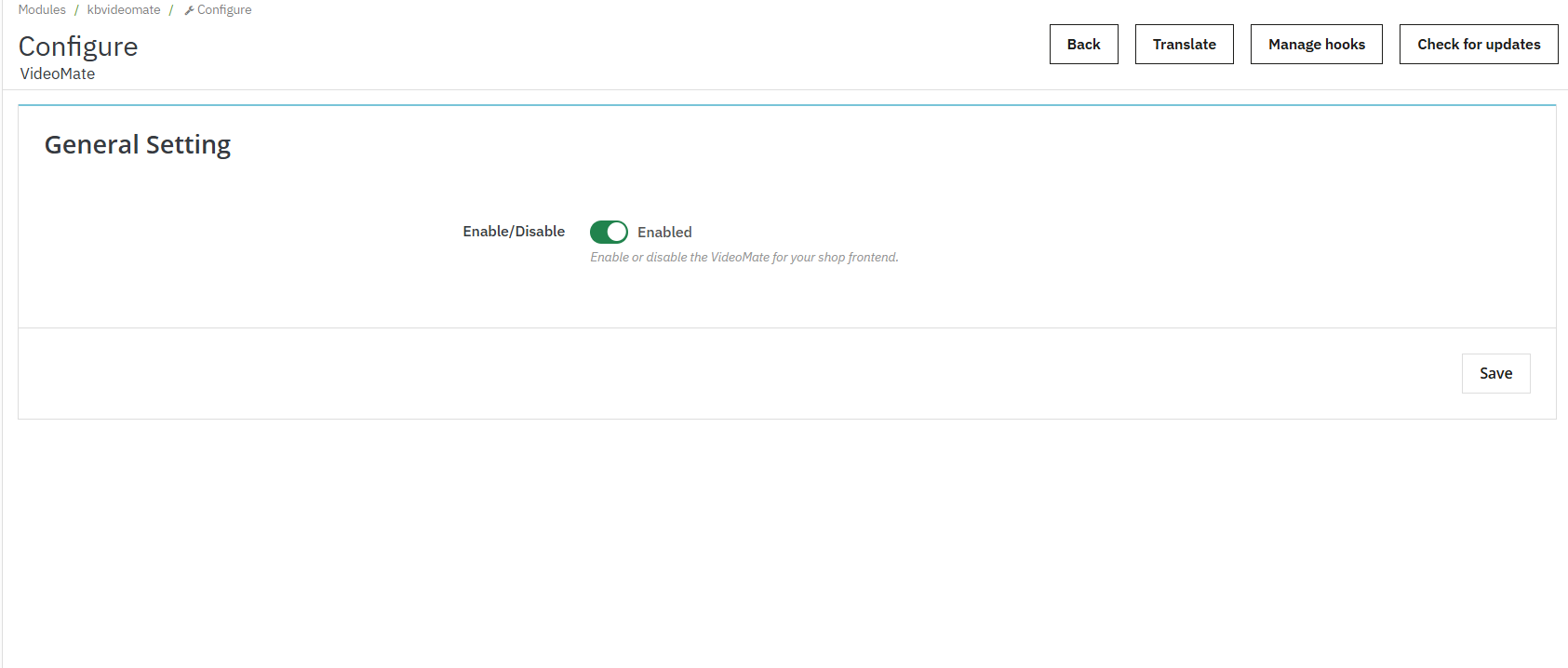
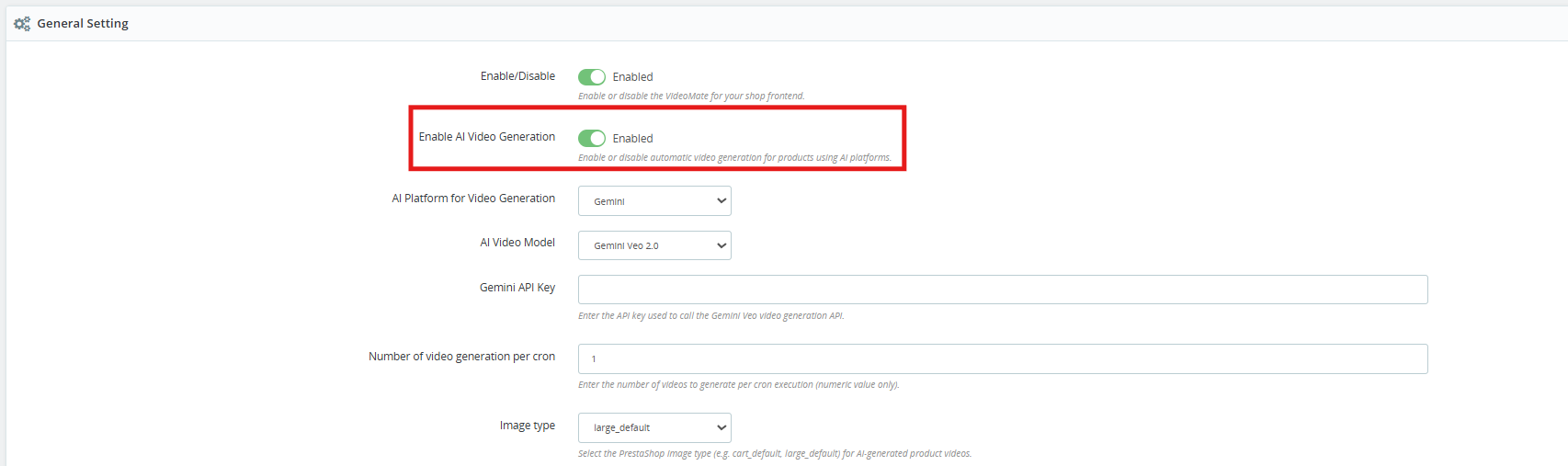
Enable or disable the entire video widget functionality across your store with a single toggle. Additionally, this is useful for temporary deactivation without losing configurations.
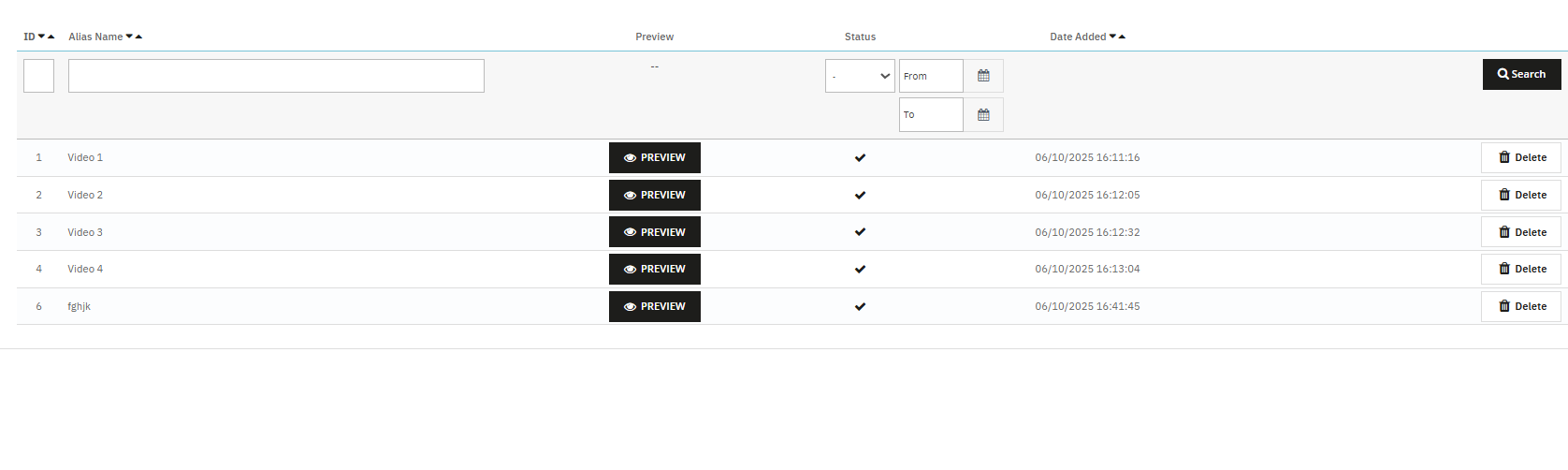
3.0.2 Video Library Management
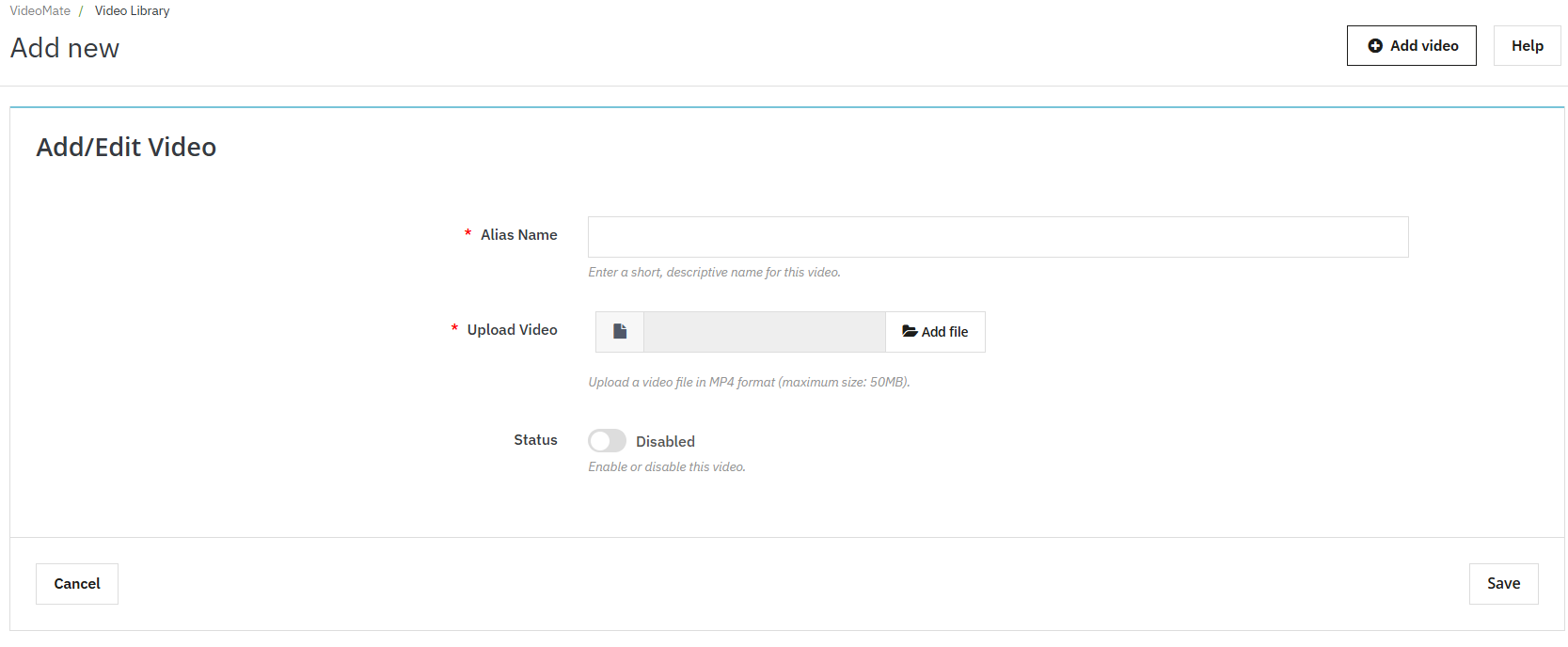
Add New Video: Click “Add New” to upload MP4 videos (up to 50MB) to the library. This feature enables PrestaShop MP4 video integration.
Alias Name: Assign a unique name to each video for easy identification and mapping.
Upload Video: The Videomate allows the store owners to browse and upload mobile-friendly video files in MP4 format.
Preview Option: Knowband’s VideoMate Prestashop Module allows store owners to preview before being mapped or published.
Redirection URL: The store owners can now link their videos to product pages, category pages and custom page URLs using the Prestashop Video Manager Module
3.0.3 AI Video Generation in Prestashop Video Manager Module
[New] Enable AI Video Generation: Enable this option to start the AI-powered video generation functionality.
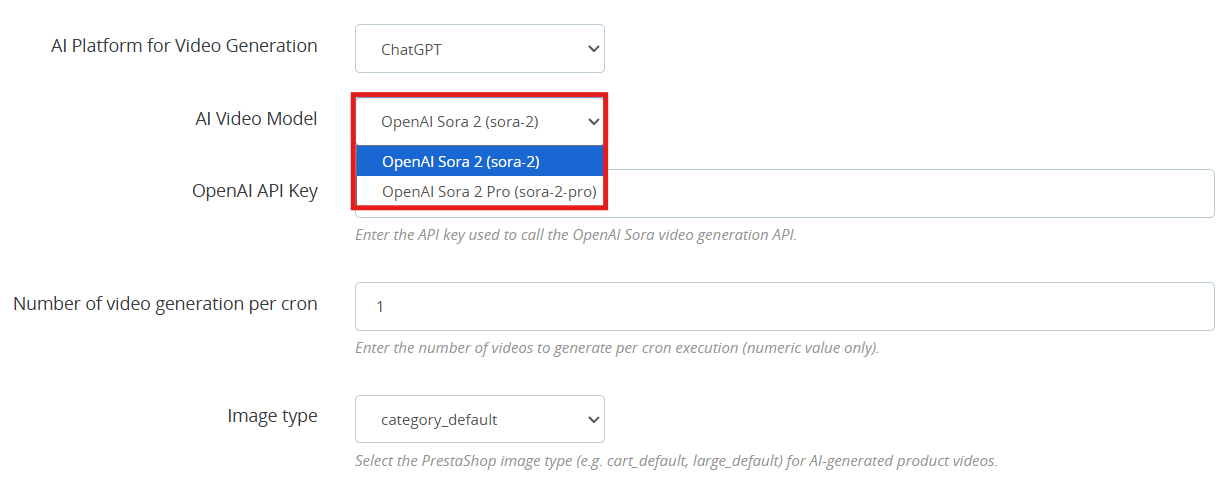
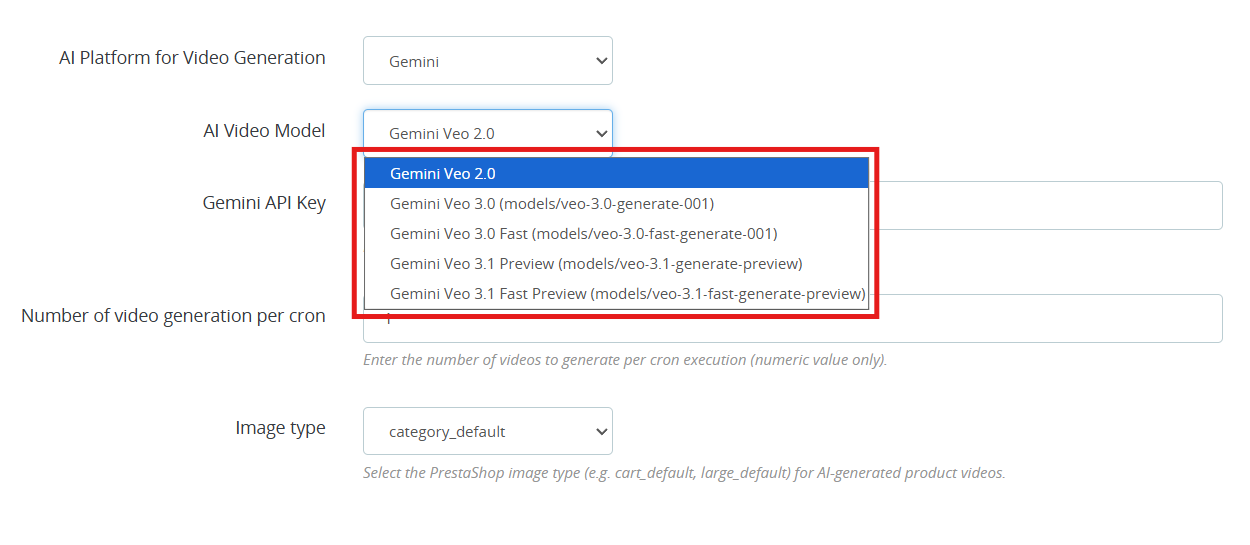
[New] AI Platform for Video Generation: Select either ChatGPT or Gemini as your generation platform. Both AI platforms work well and it really comes down to which fits your requirement and what you are willing to spend.
[New] AI Video Generation Models: VideoMate is one of the popular Prestashop AI Video Generation Module which is available right now. Whether you are going with the ChatGPT video generator or the Gemini video generation, you have clear options to work with.
ChatGPT Models (OpenAI)
OpenAI Sora 2: This model turns text prompts into sharp, visually strong videos. A good all-around pick for PrestaShop AI product video generation.
OpenAI Sora 2 Pro: this OpenAI ChatGPT model steps it up with finer detail, support for longer clips, and cleaner results on more complicated scenes. Worth it if your store needs polished, high-end AI-generated product videos.
Gemini Models (Google)
Gemini Veo 2.0 Output in Veo 2.0 is consistent and predictable, which makes it a natural fit for PrestaShop Gemini video generation tasks.
Gemini Veo 3.0 (models/veo-3.0-generate-001) Noticeably better motion handling and prompt accuracy over Veo 2.0. You can go here for PrestaShop marketing video generation or any product showcase.
Gemini Veo 3.0 Fast (models/veo-3.0-fast-generate-001) is designed for throughput. If you are running bulk AI video generation in PrestaShop through cron jobs, this is the one to use.
Gemini Veo 3.1 Preview (models/veo-3.1-generate-preview) handles more nuanced prompts better than previous versions.
Gemini Veo 3.1 Fast Preview (models/veo-3.1-fast-generate-preview) Same generation quality as 3.1 Preview but tuned for speed. It is practical for high-volume PrestaShop product video automation where you cannot afford long wait times.
OpenAI API Key: Paste your OpenAI key here to get PrestaShop ChatGPT video generation running. Steps are in section 3.4.
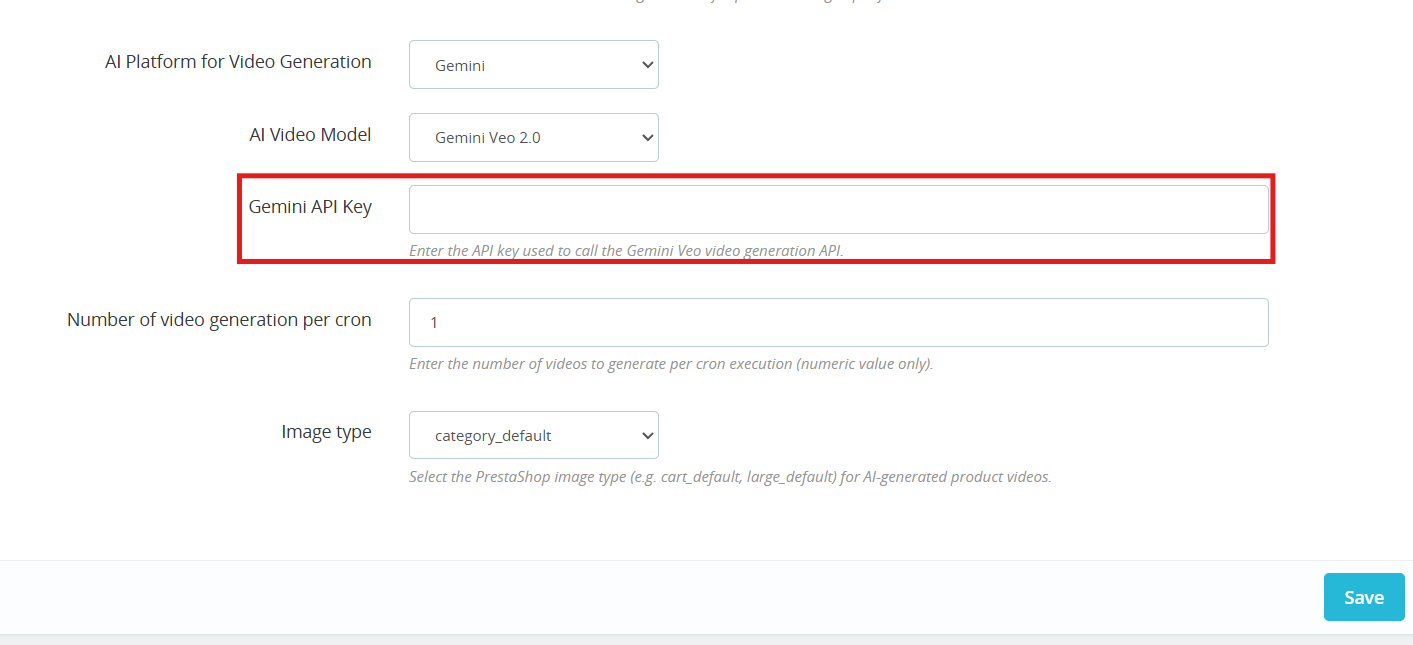
Gemini API Key Add your Gemini key to switch on PrestaShop Gemini AI video generation. Steps are in section 3.5.
Number of Videos per Cron Controls how many videos the PrestaShop AI Video Generation module queues up each time the cron runs.
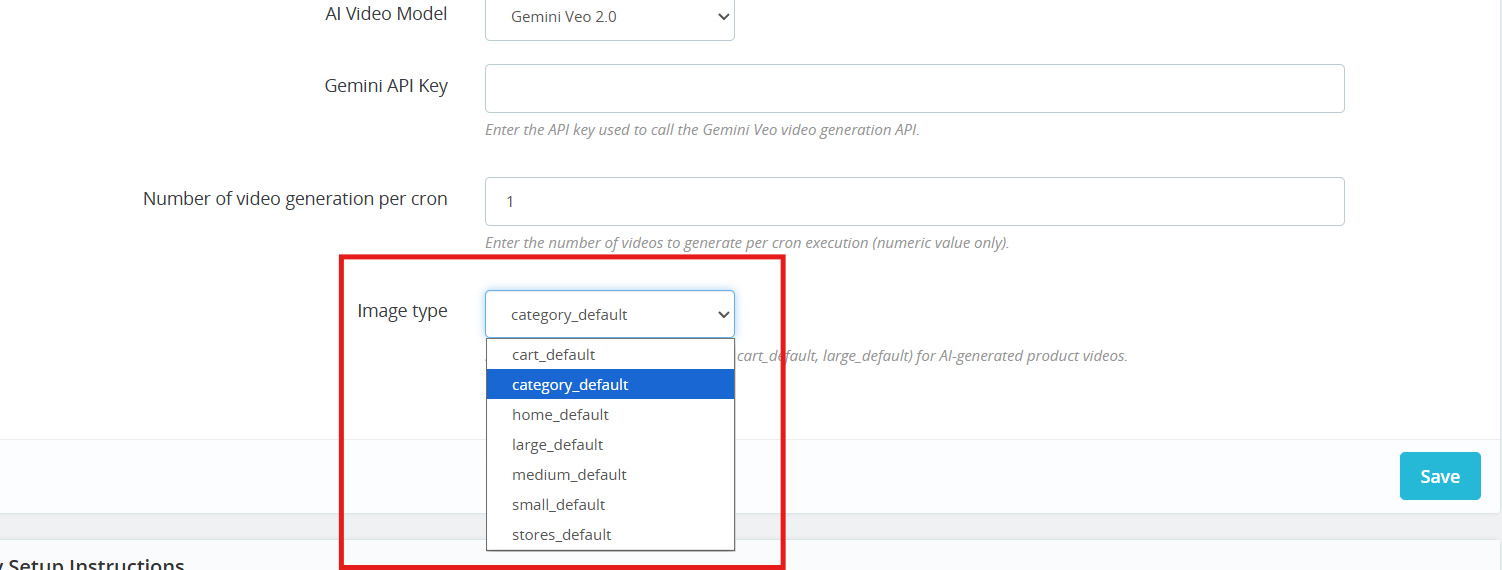
Image Type: Choose which image size gets passed to the AI during PrestaShop AI video generation: cart, large, small, medium, stores, or category.
Cron URL: Run the cron URL provided in the General Configuration section to automatically generate videos using AI.
3.0.4 AI Video Library
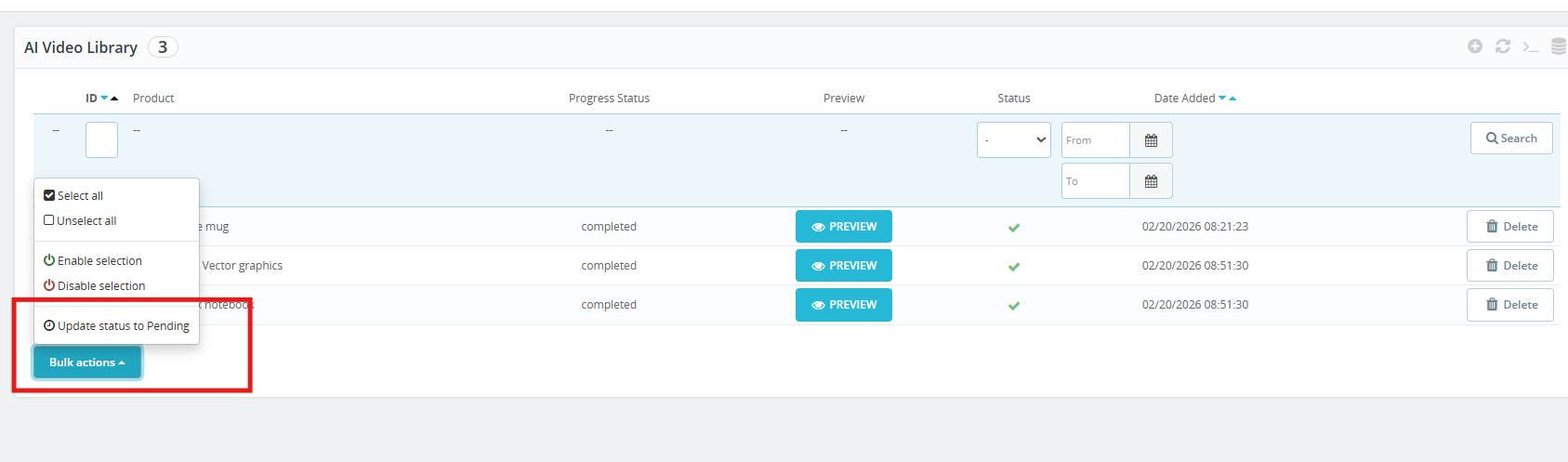
This is where all your PrestaShop AI Video Library entries live, queued, paused, or active. Click + to set up a new one.
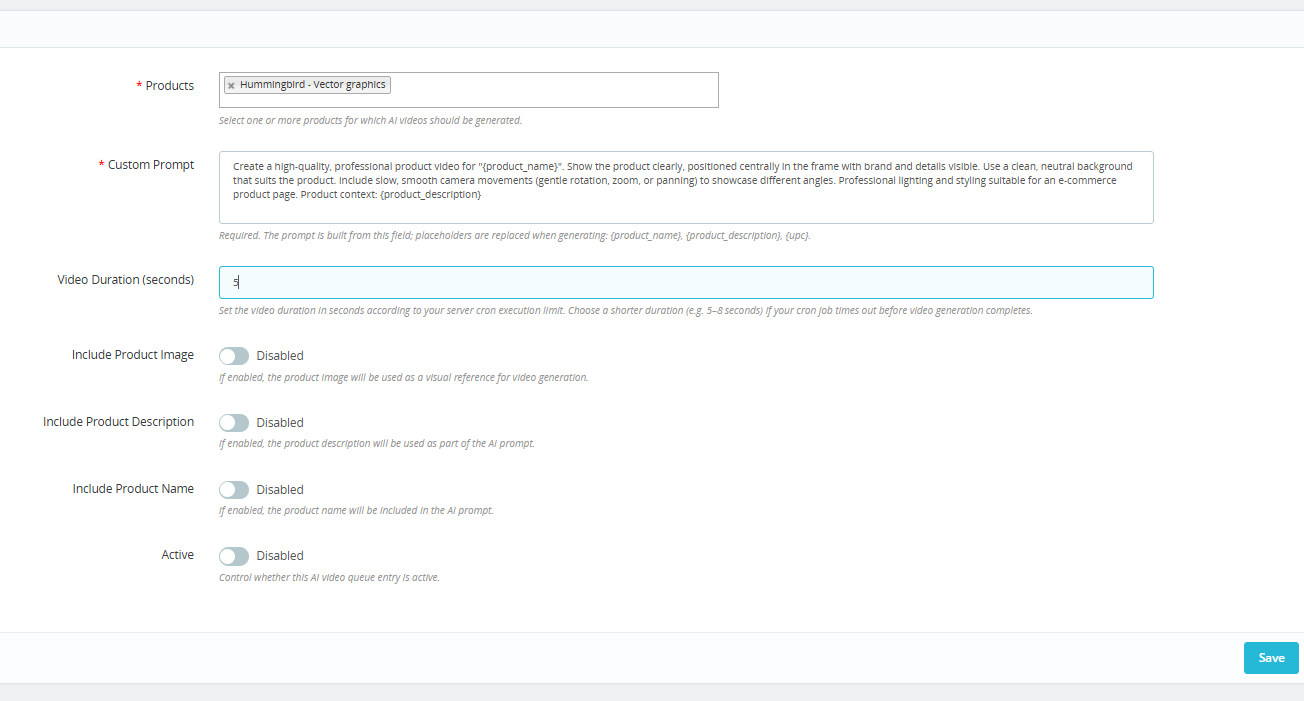
Products: Choose the products you want to cover. The PrestaShop AI Video Generation module handles the rest, generating a video for each one through ChatGPT or Gemini.
Custom Prompt: Type out what you want the AI to do. Add in {product_name}, {product_description}, or {upc} where needed. The module add these variable with live product data each time a video runs, which keeps your PrestaShop AI product video prompts scalable without extra manual work.
Video Duration (seconds) Staying in the 5 to 8 second range helps you avoid cutoffs during automated PrestaShop video generation.
Include Product Image: Allow the AI model to take your product photo as a reference so the output stays visually close to the real item. Helps the PrestaShop AI video generator stay on brand.
Include Product Description Gives the AI more to work with. More context generally means more relevant AI-generated product videos in PrestaShop.
Include Product Name Keeps the prompt tied to the right product so there is no mismatch in the final PrestaShop AI video output.
Active: You can enable or disable the AI Generation settings for the product. If this is disabled, then products will not be added to the queue for video generation.
The VideoMate PrestaShop Module exhibit the feature to place the dynamic video widgets across multiple pages.
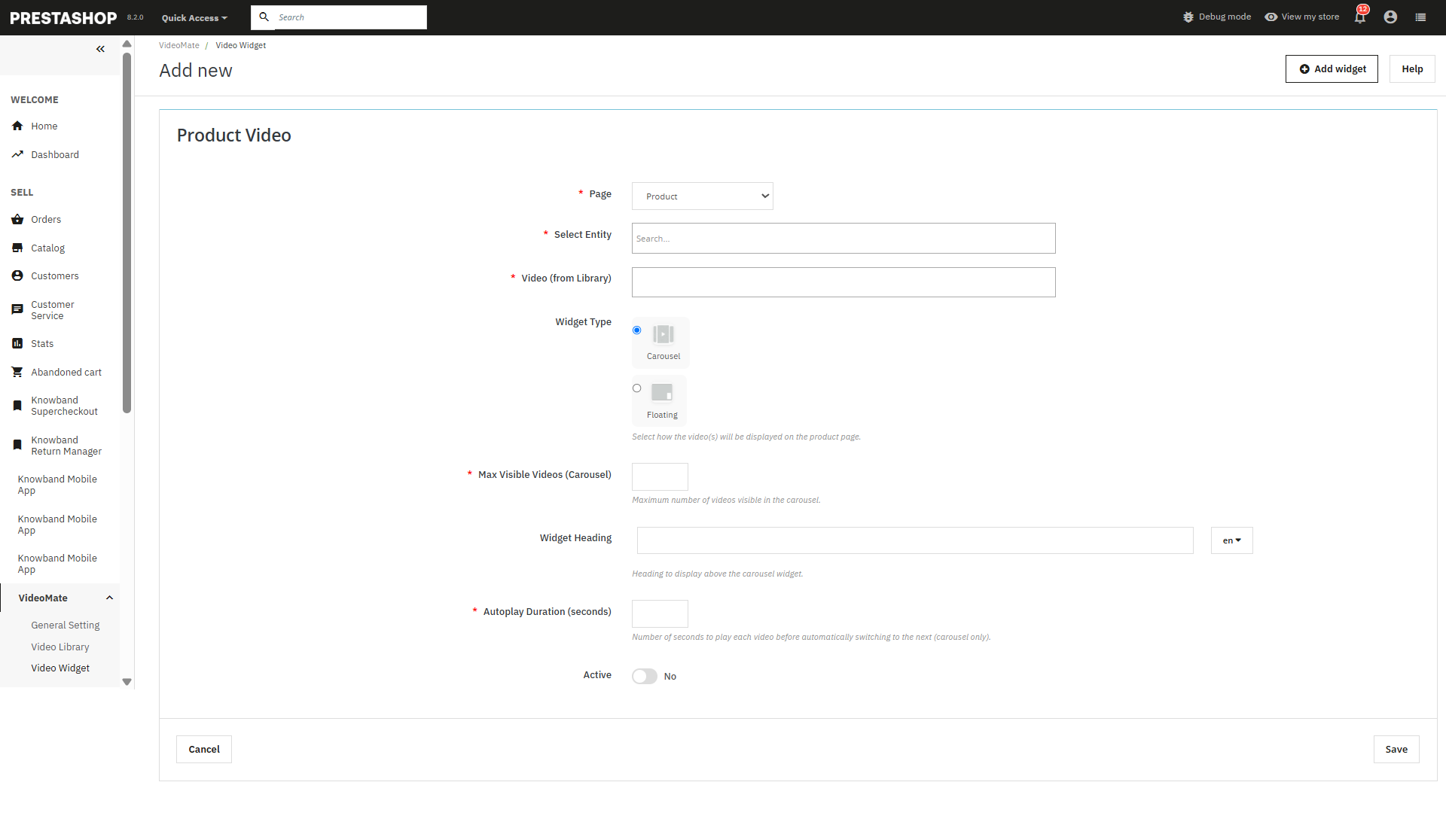
Add New Widget: Click to create a new video widget for YouTube or MP4 videos.
Page Selection: Choose where to display videos — Homepage, Product Page, Category Page, Best Seller, or New Product.
Select Entity: Dynamically assign videos to specific products or categories.
Video Selection: Select from videos already available in your media library.
Widget Type: Select between:
Carousel – For multiple videos in a slider format.
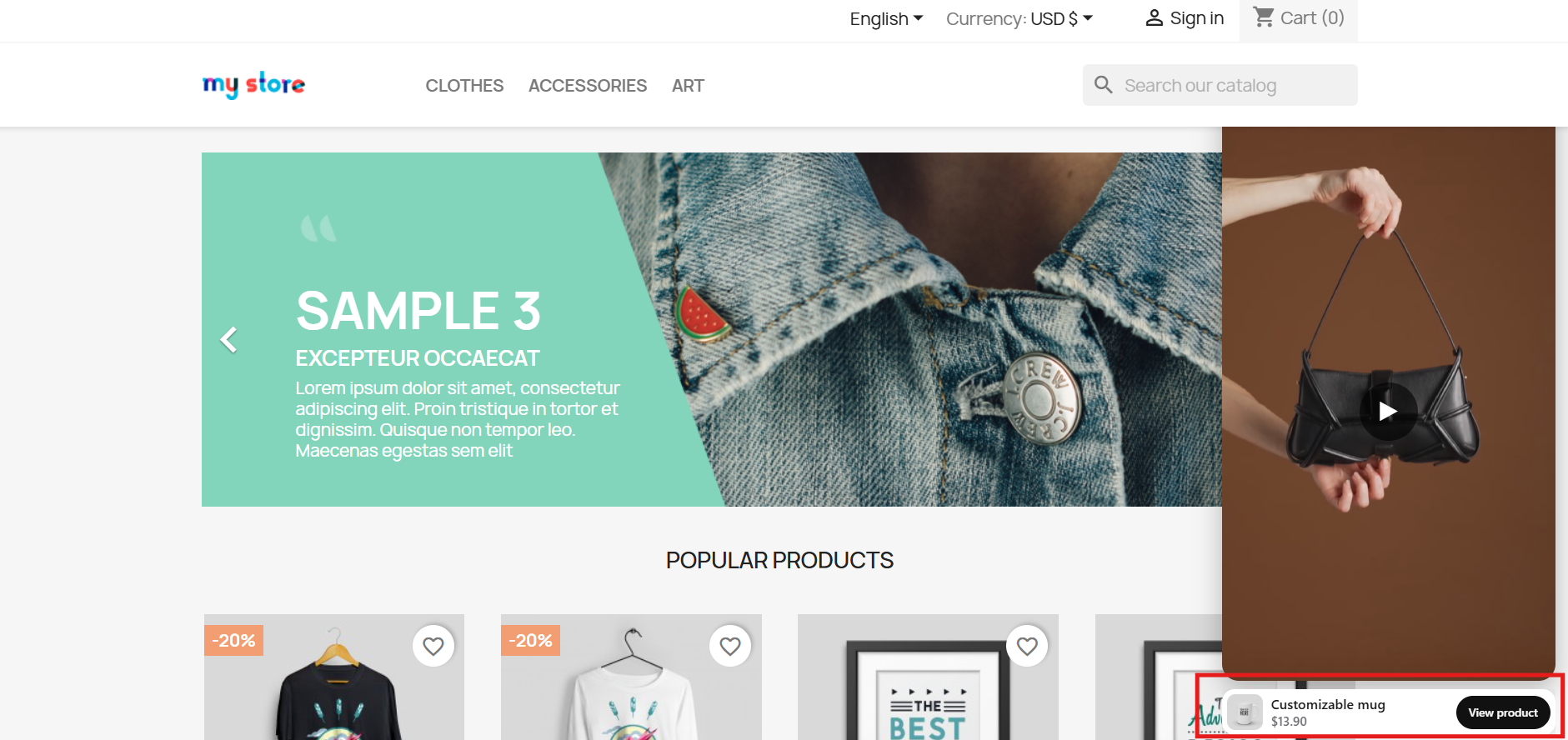
Floating – Provides a movable video player positioned at the bottom-left or bottom-right of the screen.
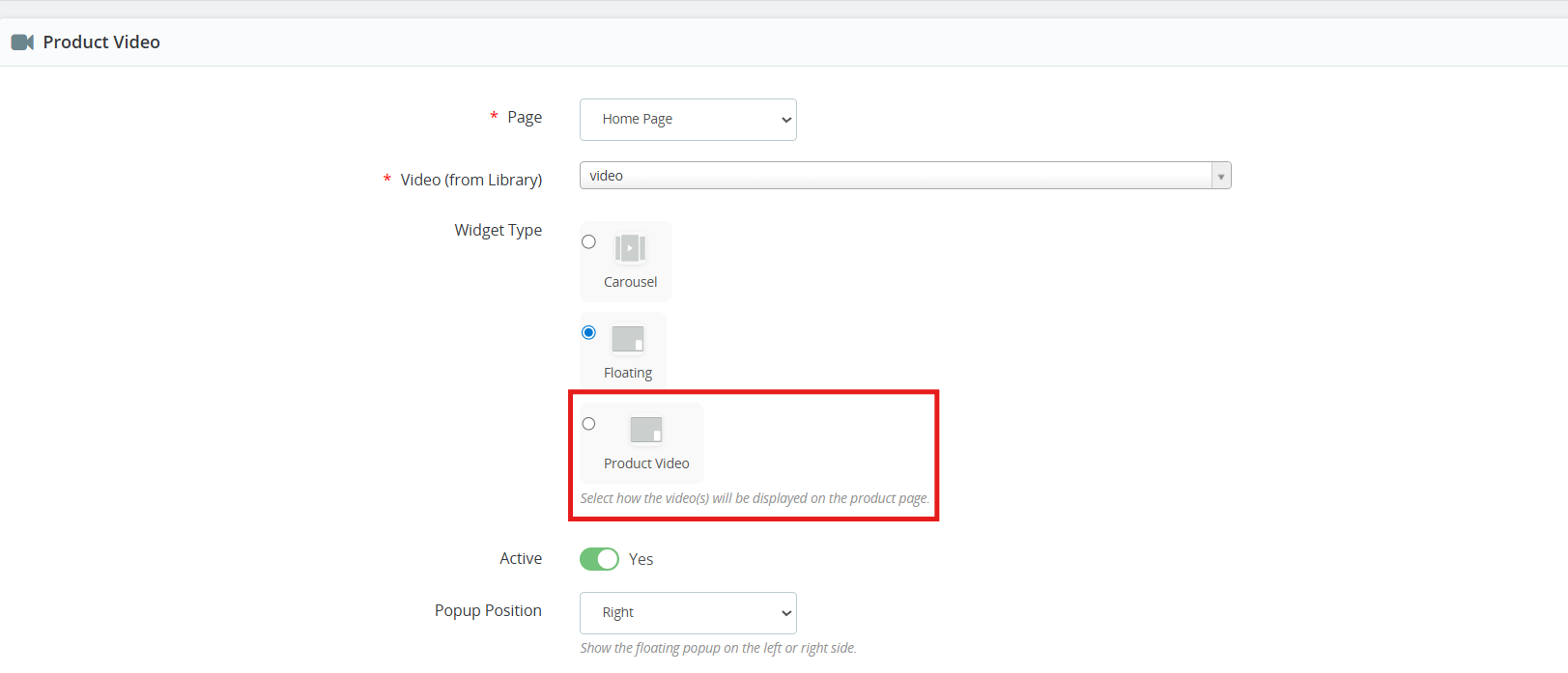
[New] Product Video: Store owners can now add videos to product pages using the new Product Video widget of the PrestaShop Video Manager. The added product videos will be displayed alongside product images on the product image section, allowing merchants to showcase product visuals more effectively.
Maximum Visible Videos: Prestashop video marketing module allows the store owners to define how many videos should be shown in a carousel (shows 5 in case of 5 maximum videos).
Autoplay Video: The Prestashop VideoMate Module allows the e-merchant to set the autoplay time in seconds for videos to begin automatically.
Status (Active/Inactive): This feature of the PrestaShop floating video module enables or disables the status of the widget without deleting it.
Store owners can disable the widgets added in the video Widgets.
Save: Click to save your configurations and apply the widget to your selected pages.
3.0.6 PrestaShop Video Dashboard
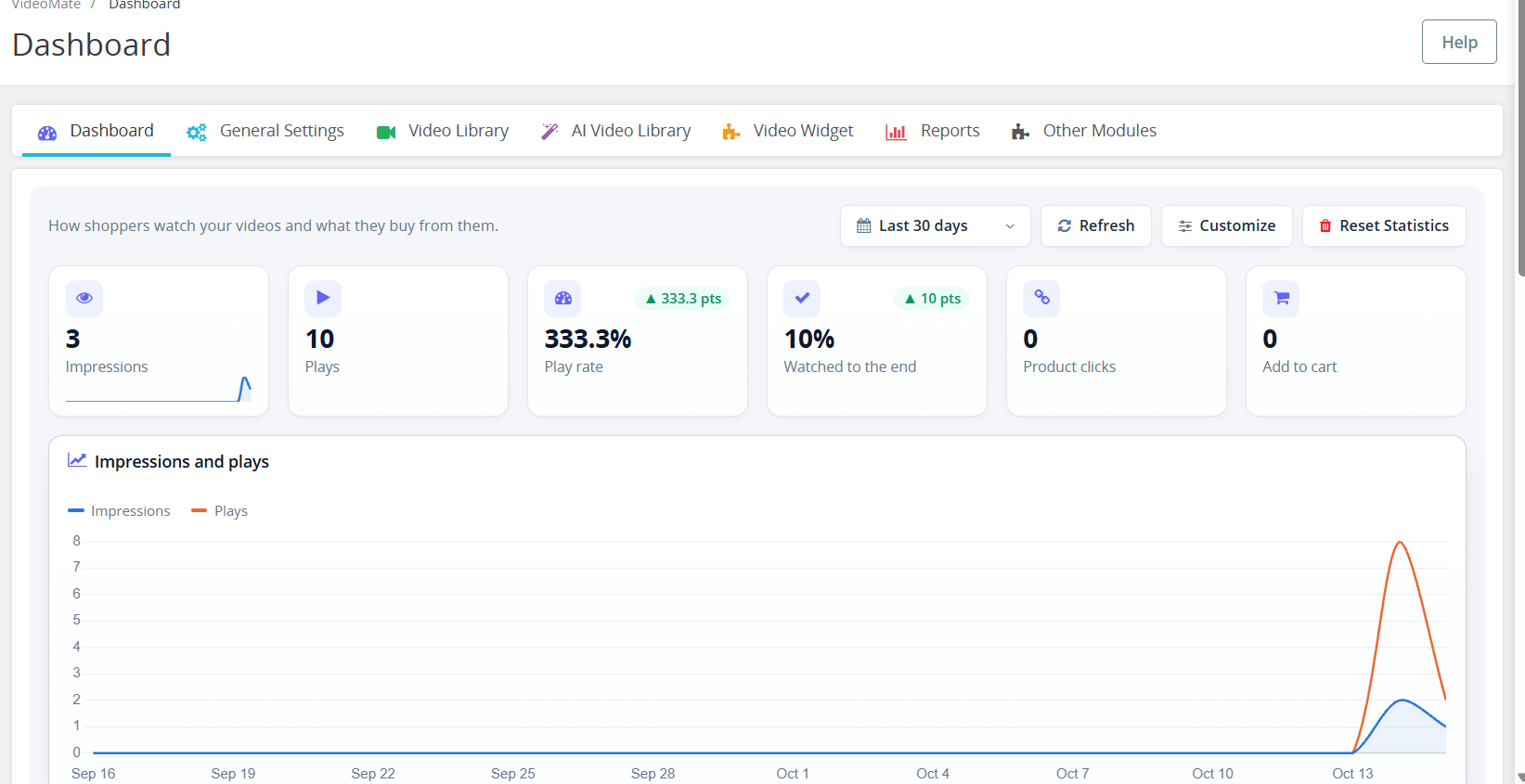
The Dashboard tab within the PrestaShop VideoMate plugin allows for tracking the way the customers watch your videos and which products they purchase through your videos. All your PrestaShop video statistics will be available to you in one place!
Period: choose the time period for all charts. Refresh: refreshes the statistics. Customize: Add, remove, and rearrange dashboard elements. Changes to the layout will be saved only to your admin profile. Clear Statistics: permanently removes the collected statistics. Cards: Impressions, Plays, Play rate, Watched to the end, Product clicks, and Add to cart.
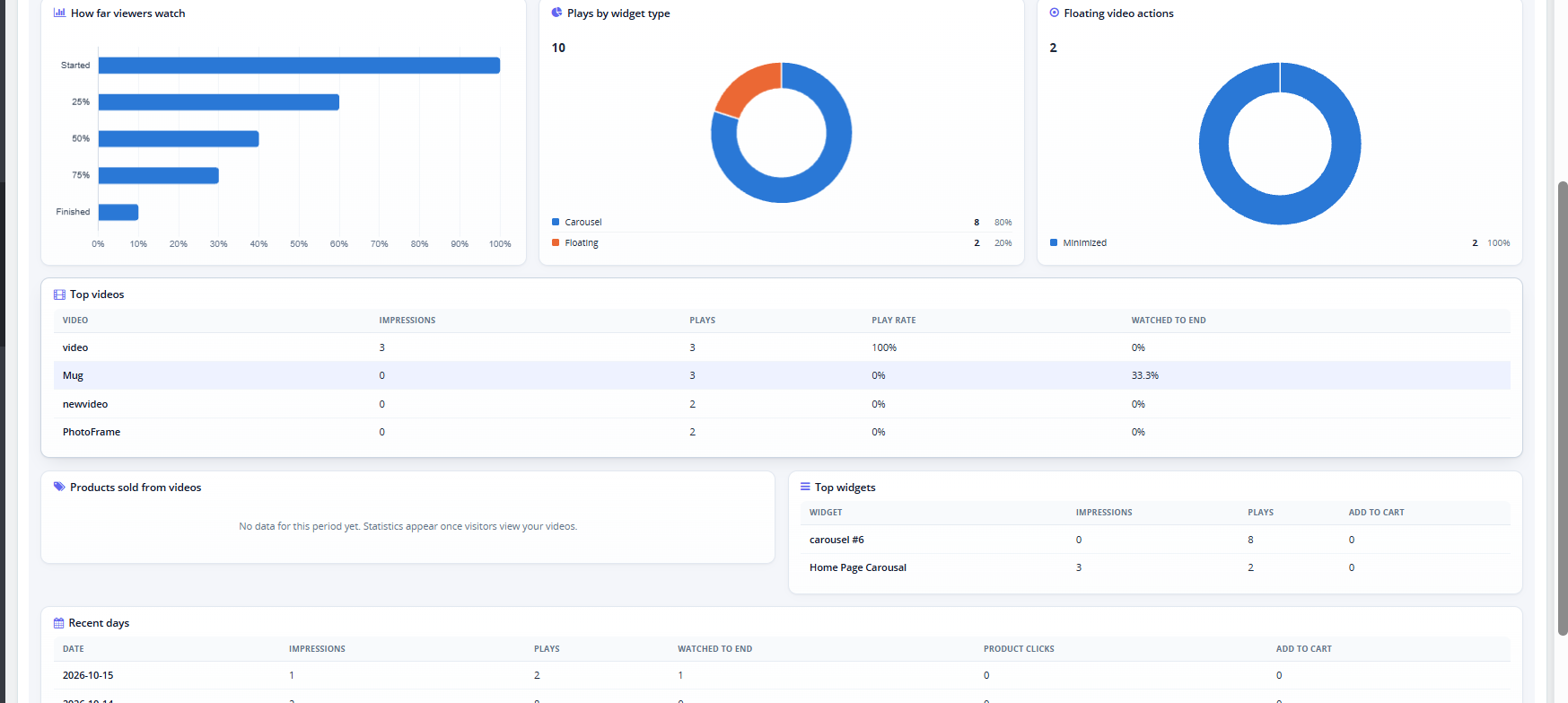
Charts: Impressions and plays over time, how far viewers watch (Started, 25%, 50%, 75%, Finished), plays by widget type, and floating video actions.
Tables: Top videos, Products sold from videos, Top widgets, and Recent days.
3.0.7 YouTube and Vimeo Videos in PrestaShop
This YouTube Vimeo PrestaShop module lets you add videos by link. In Video Library, the Video Source field now includes YouTube and Vimeo. Select one, paste the video link, and the module builds the embed automatically.
3.0.8 PrestaShop Video Cover Image (Poster)
The Poster Upload field sets the PrestaShop video cover image shown before the video plays. It accepts JPG, PNG, or WebP files up to 3 MB, at least 16×16 px. For YouTube and Vimeo videos the cover is fetched automatically, and you can upload your own to replace it.
3.0.9PrestaShop Shoppable Video
You can turn any video into a PrestaShop shoppable video by attaching products to it.
Shoppable Products: start typing a product name and select it from the list. You can attach up to 100 products to one video.
Bulk Add Products: paste product IDs or references, separated by commas or new lines, to add up to 1000 at once.
On the storefront, each attached product appears as a card with the image, name, price, and an Add to cart button. This PrestaShop video add to cart option lets customers buy without leaving the video. After a product is added, a View cart button appears. If a product has options, the card links to its product page instead.
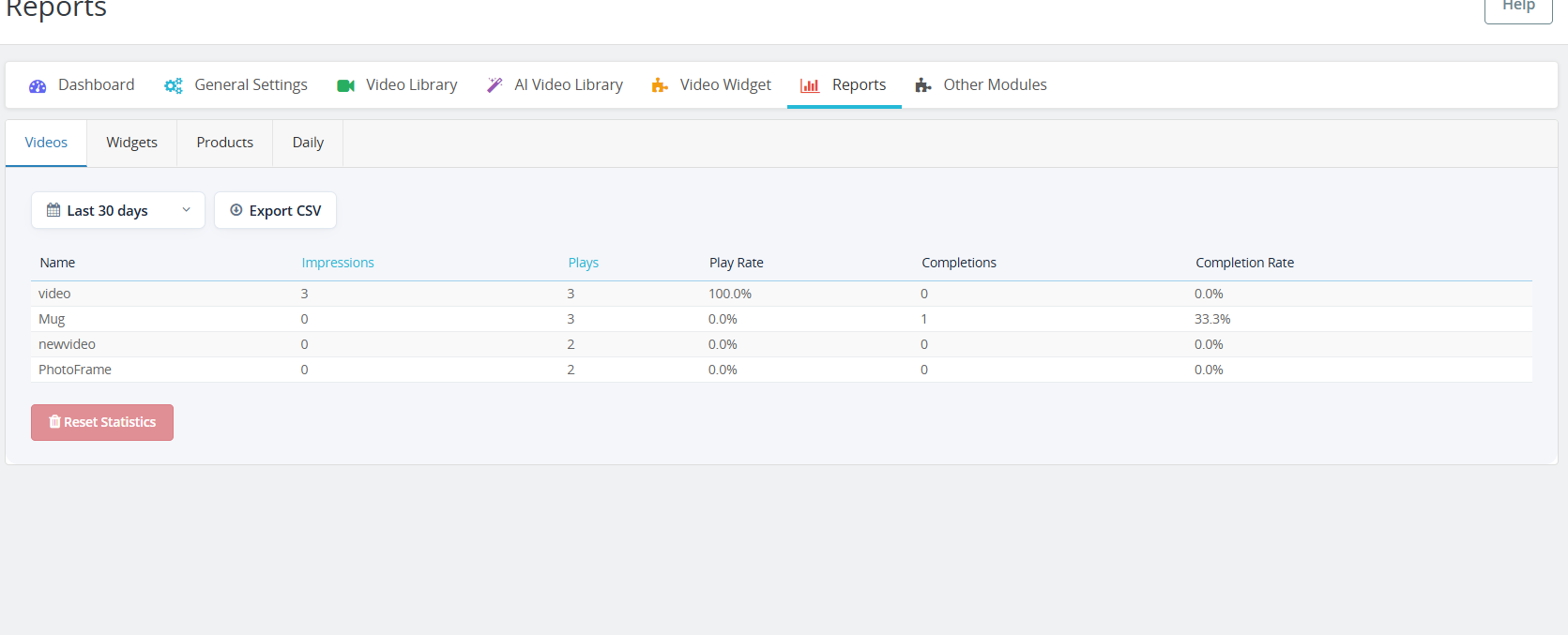
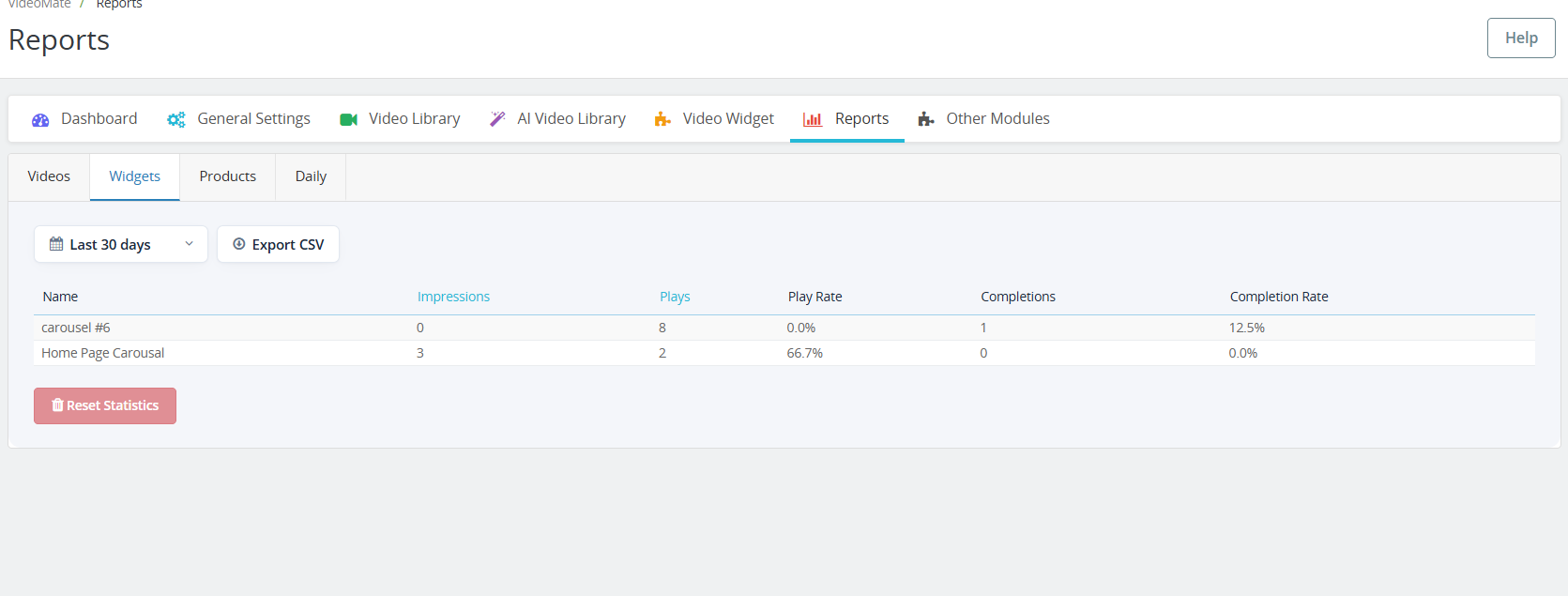
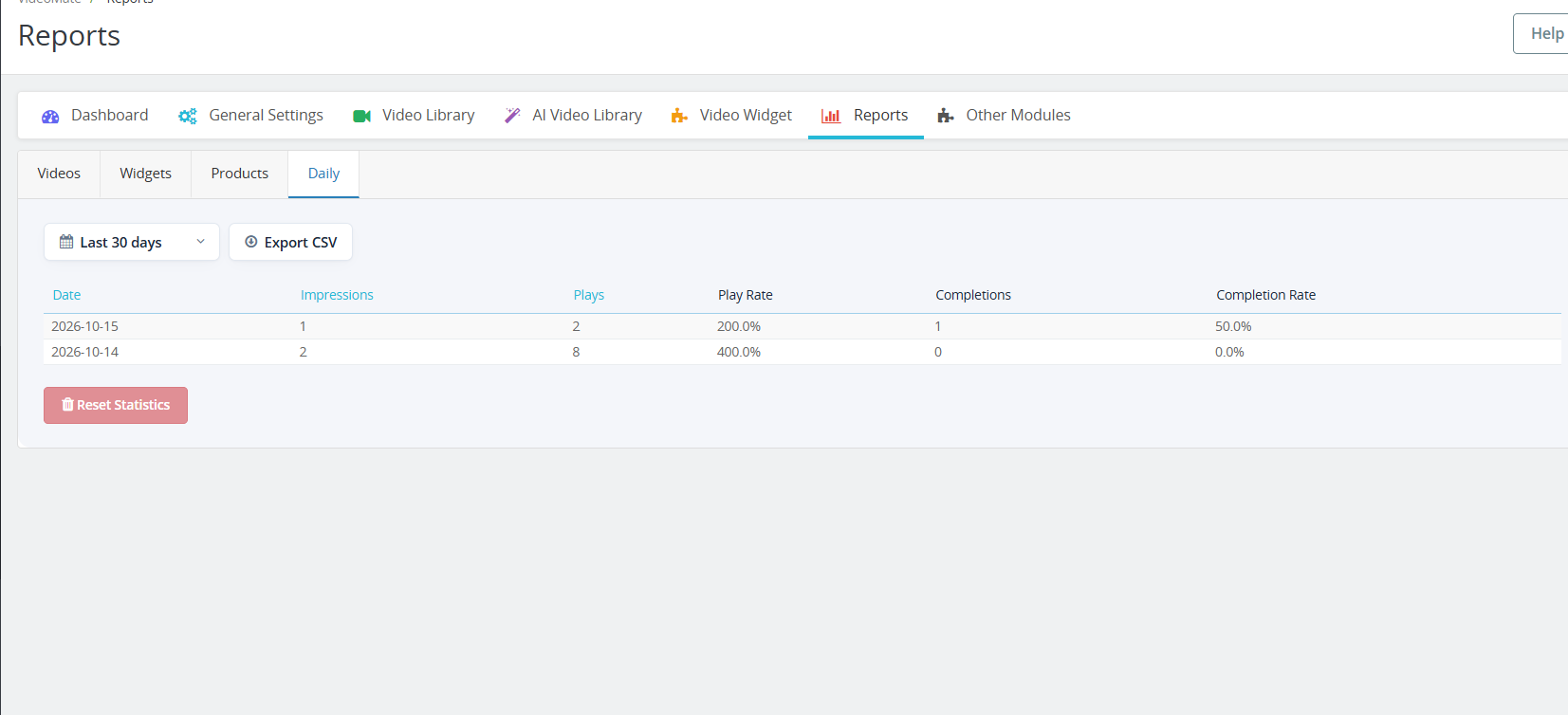
3.1.0 PrestaShop Video Reports
The new Reports tab has four sub-tabs: Videos, Widgets, Products, and Daily. Each one shows impressions, plays, play rate, completions, and completion rate.
Choose a period to filter the data.
Click Impressions or Plays to sort the table.
Click Export CSV to download the table. PrestaShop video reports can then be opened in Excel or Google Sheets.
Click Reset Statistics to clear the recorded data.
4.0 Benefits of PrestaShop VideoMate Module
Boosts Product Engagement
Videos provide a richer shopping experience, helping customers understand product features better and reducing purchase hesitation.
Improves Conversion Rates
Significantly, customers are more likely to convert when they see video demos or tutorials, making VideoMate a powerful PrestaShop product video module for increasing sales.
Flexible Video Placement
Add videos across product pages, category pages, homepage, Best Seller, and New Product pages – ensuring visibility where it matters most.
Multiple Display Options
Choose from the carousel, floating, or single video widgets for a dynamic and responsive presentation tailored to your design.
Supports A & YouTube Links
Furthermore, seamlessly upload MP4 videos (up to 50MB) or trending social media videos, enabling full PrestaShop video integration.
Mobile-Responsive Design
All video widgets are fully responsive, ensuring smooth performance across desktop, tablet, and mobile devices.
Tutorial: Watch the Video Guide
To help you set up and use the PrestaShop VideoMate Module, we have created a comprehensive YouTube tutorial. This step-by-step video guide walks you through the installation process, configuration options, and how to effectively add and manage video content on your store.
If you experience any difficulties during installation or when using the Prestashop VideoMate Extension, our support team is ready to assist you. Reach out to us through email at support@knowband.com or by submitting a ticket at knowband.com/helpdesk for prompt assistance with any technical issues or questions you may have.
In the world of competitive e-commerce, expanding your store across multiple marketplaces is vital. Listing your product on marketplaces helps drive sales and gain new customers. For this reason, Knowband has introduced Prestashop eBay Integration Addon which is a game changer for the prestashop stores. The PrestaShop eBay Marketplace Integration Module integrates with the Prestashop store seamlessly. It not only seamlessly integrates but automatically lists the product through a synchronization feature. As a result, the store admin does not need to manually list the product. Moreover, the Prestashop eBay API Integrator Module automatically syncs all the features and attributes to eBay from your Prestashop store.
[Exciting Update] Prestashop eBay Marketplace Addon v2.2.1 is Here!
Knowband has the latest version of the Prestashop eBay Marketplace Addon (v2.2.1), designed to make your PrestaShop – eBay integration faster, smarter, and more efficient. Furthermore, this update brings powerful features to simplify inventory and API management.
What’s New in v2.2.1?
Enhanced Inventory Sync Now, keep your eBay listings and PrestaShop store perfectly aligned. The improved Inventory Comparison tab has been added in Knowband’s Prestashop eBay API Connector Module, which identifies stock differences automatically, helping you prevent overselling and maintain accurate product availability across both platforms.
Real-Time API Usage Tracker Stay ahead of API limits with the upgraded Rate Limit Monitor. Now, with the new version 2.2.1, you can view real-time data for all eBay APIs, including total limits, usage, and remaining calls. Moreover, this ensures uninterrupted synchronisation between your store and eBay, so your operations never skip a beat.
Why Upgrade?
Accurate Inventory Management: Reduce manual errors and overselling with the new release
Smooth Integration: Keep your PrestaShop and eBay stores perfectly in sync.
Active API Monitoring: Avoid downtime due to exceeded API limits because now you can check before listing.
Upgrade today to v2.2.1 and experience a more reliable, hassle-free PrestaShop–eBay connection!
Need guidance? Refer to the updated user manual for step-by-step instructions.
Why Use Knowband’s PrestaShop eBay Integration Module?
Managing multiple sales channels manually can be complicated and time-consuming. Keeping track of product listings, inventory, prices, and orders on both PrestaShop and eBay often leads to mistakes. It also takes up valuable time. That’s why the PrestaShop eBay Integration Plugin make it all easy for store admins as it removes all the stress by automating the entire process.
With that in mind, everything becomes faster and easier. The module includes uploading products, updating stock levels, and processing orders. You don’t need to switch between platforms or worry about missing updates. In fact, the module keeps everything synced between your PrestaShop store and your eBay account. This gives you more time to focus on growing your business.
Key Features of the Prestashop eBay Marketplace Integration
Quick & Easy Setup: Even without technical expertise, the installation and configuration are straightforward. The PrestaShop eBay API Integration Module gets your products live on eBay swiftly.
Bulk Product Uploads: The module allows you to upload hundreds of products simultaneously. It includes accurate descriptions, images, and prices. In addition, you can also align your store categories with eBay’s categories. This boosts product discoverability and sales.
Live Inventory & Price Updates: Say goodbye to overselling. The eBay PrestaShop Connector instantly synchronizes your stock quantities in PrestaShop. This happens whenever orders are placed on eBay. At the same time, it ensures that any pricing updates are reflected simultaneously on both platforms.
Centralized Order Management: Orders placed on eBay are directly imported into PrestaShop. This happens via the eBay PrestaShop API Integrator. This means you can track sales and manage fulfilment in one place. You won’t need to juggle different dashboards.
Flexible Shipping Settings: Tailor your shipping options with custom profiles. These work for specific eBay marketplaces like eBay US and UK. You also have the ability to enable or exclude international shipping destinations.
Advanced Attribute Mapping: Map the store’s product attributes with eBay attributes. This ensures your listings meet marketplace standards. It also helps them appear in the right search filters.
Advantages of Using the Knowband eBay PrestaShop Integrator
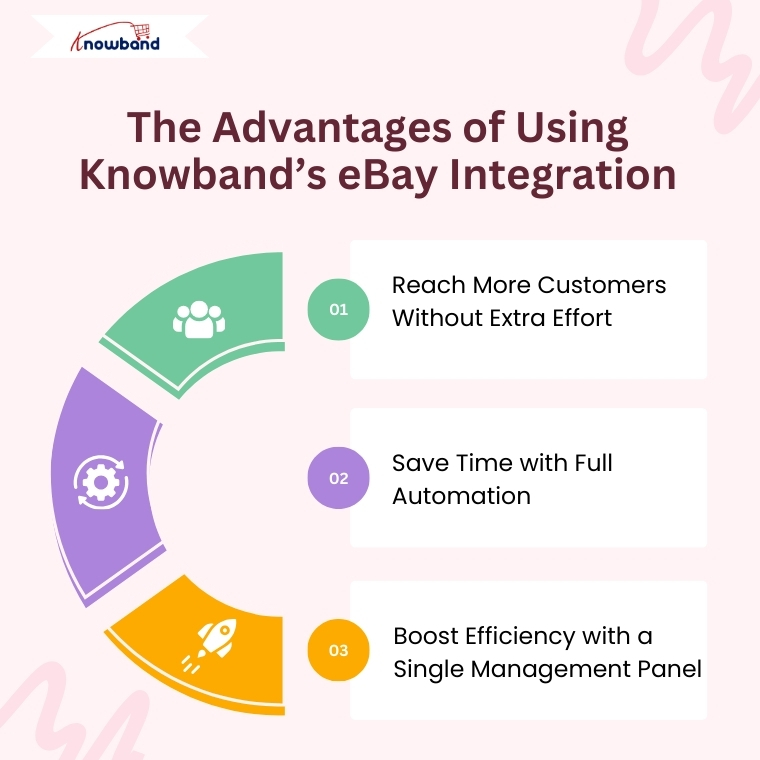
Expand Your Reach Globally: Connect your PrestaShop store with the vast eBay customer base effortlessly. The PrestaShop eBay Integration Free Module makes cross-border selling accessible. This works even for small businesses.
Save Time with Automation: Automate product uploads, stock syncing, pricing updates, and order processing. This way, you can focus on growing your business instead of handling tedious manual work.
Single Dashboard Control: Manage everything related to your eBay listings within your PrestaShop admin panel. This includes inventory, orders, and shipping. This improves efficiency and reduces errors.
Detailed Activity Logs: Keep track of all synchronization events with transparent logs. These monitor product updates, stock changes, and order statuses. This gives you full control.
How to Integrate Your Store with eBay Using Knowband’s Module
Create an account on the eBay Developer Program.
Next, obtain your API credentials by generating your Dev ID, App ID, and Cert ID.
Configure the PrestaShop eBay Integrator by entering your API keys and PrestaShop store URL.
Integrate your store’s categories with the appropriate eBay categories. Then set up your shipping options to ensure accurate product listings and hassle-free deliveries.
Finally, start syncing your products, inventory, and orders seamlessly.
Final Thoughts
For PrestaShop store owners looking to scale their operations internationally, Knowband’s PrestaShop eBay Integration Addon offers an all-in-one solution. It simplifies multi-channel selling. Whether you’re interested in a free Prestashop eBay Integration addon or a feature-rich paid module, Knowband’s modules ensure your store stays up-to-date. As a result, your customers receive timely service.
So why wait? Leverage the power of the Prestashop eBay Integrator today. Unlock new growth opportunities with minimal effort.
In the competitive eCommerce, accurate data tracking is no longer optional but it has become a critical requirement for businesses to ensure effective marketing and performance analysis. From understanding customer behaviour to optimizing your ad campaigns, powerful analytics can drive smarter decisions and boost revenue. For PrestaShop users, the best way to streamline tracking and marketing integrations is with Knowband’s Prestashop Google Tag Manager.
Whether you’re new to analytics or want to integrate with advanced tracking tools like GA4, the PrestaShop Google Tag Manager Addon makes it easier than ever.
Why Choose the PrestaShop Google Tag Manager Addon?
Integrating GTM to your prestashop store manually can be complex, especially for non-developers. That’s where the PrestaShop Google Tag Manager Addon comes in.
The Prestashop Google Tag Manager is developed especially for merchants who don’t have coding knowledge or have less technical expertise.
The e-merchants can run the Google Tag Manager just by installing it. Additionally, the PrestaShop Google Tracking Module automatically tracks crucial eCommerce events like purchase events, and page view events, letting you focus on data-driven growth without worrying about script placements or event handling.
Features of the Prestashop No Code Google Tracking Module
Quick and Simple Integration
To begin with, store owners simply need to add their GTM container ID, and the module takes care of the rest. In other words, there’s no need to manually insert any tracking code into your theme files.
Enhanced eCommerce Tracking
Furthermore, the PrestaShop Google Marketing Integration Module fully supports enhanced eCommerce events such as Page View, View Category, View Product Detail, Add to Cart, Remove from Cart, Checkout Begins, Order Confirmation, Apply Discount Code, View Cart, Customer Login, Customer Registration, Add to Wishlist, Remove from Wishlist, Search Product, Capture UTM Parameters, and Scroll Bar Depth.
As a result, all of this event data is sent through GTM to your connected analytics tools, giving you deep insights into the entire customer journey.
GA4 Integration Support
In addition, the module works seamlessly with PrestaShop GA4 Integration. It effectively tracks key actions such as when a product is viewed, added to the cart, or purchased—thus helping you better understand customer behaviour.
UTM Parameter Tracking for Marketing Campaigns
Moreover, the module automatically captures UTM parameters from your marketing campaigns. Consequently, it allows you to track campaign performance across various channels and optimize your marketing strategies with data-driven decisions.
Seamless Multi-Store & Multi-Language Support
Finally, whether you operate multiple stores or use different languages, the module offers full support for multi-store and multi-language environments. This ensures that your tracking and data collection remain accurate and consistent across all setups.
Benefits of the Prestashop Google Tag Manager Module
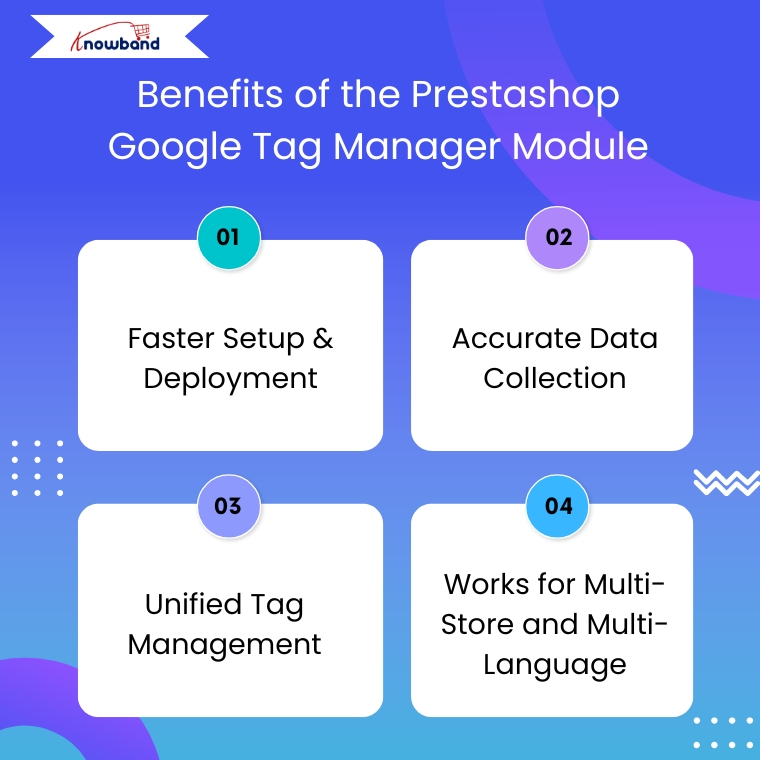
Faster Setup & Deployment
The PrestaShop Google Tag Manager module is simple to set up and easy to configure. They also need to enter their GTM Container ID and Google Analytics Measurement ID to make sure everything works smoothly.
Accurate Data Collection
With the PrestaShop Google Analytics Integration Module connected through GTM, you get more reliable tracking. Moreover, it helps avoid errors caused by outdated tracking codes or conflicting scripts.
Unified Tag Management
To get started, store owners just need to enter their GTM container ID, and the module handles everything else. This means there’s no need to manually add any tracking code to your theme files.
Works for Multi-Store and Multi-Language
If you’re running multiple stores or languages, the PrestaShop eCommerce Measure Addon ensures everything is tracked accurately across all setups without duplicating efforts.
Use Cases Of Google Tag Manager for PrestaShop
Here’s how store owners commonly use this module:
Monitor abandoned carts by sending event data to Google Analytics 4 (GA4) using Google Tag Manage
Improve the checkout process by finding out where customers drop off in the funnel.
Retarget visitors who viewed products but didn’t buy, using Facebook and Google Ads.
Understand product performance with detailed tracking of clicks, views, and other interactions.
Steps to set up the PrestaShop Google Tag Manager Addon?
Step 1: Install the Google Tag Manager addon in your PrestaShop store by uploading the zip file through your admin panel.
Step 2: If you haven’t already, create an account on Google Tag Manager and copy the container ID provided.
Step 3: Go to the addon settings in your PrestaShop dashboard and enter the container ID in the given field.
Step 4: Log in to your GTM account and create the tags, triggers, and variables you want to track.
Step 5: Your tracking setup is ready! You’ll now start receiving data without writing any code
Conclusion
In conclusion, the PrestaShop Google Tag Manager Module is a smart choice for store owners who want accurate tracking without a complex setup. Moreover, the module helps you understand customer behaviour, track key events, and improve your marketing performance.
With support for Google Analytics 4, UTM tracking, and multi-store environments, the Prestashop Google Tracking Module makes data collection simple and reliable. If you want to grow your store with the power of insights, this plugin is worth considering.
Many online shoppers leave without completing their orders, and one major reason behind this is a long or confusing checkout process. Moreover, when customers are excited to buy something, they don’t want to deal with multiple steps, page reloads, or unexpected surprises at the end. These delays often lead to cart abandonment. As a result, it can decrease your store’s sales and growth over time. To help overcome this issue, Knowband has developed the PrestaShop One Page Supercheckout module. This addon simplifies the entire checkout experience by putting everything, personal details, shipping information, and payment options, on one single, easy-to-navigate page. As a result, by removing extra steps and making the process smoother, it helps customers place their orders faster and with less hassle.
Additionally, not only does this lead to a better user experience, but it also encourages more successful checkouts, which means higher conversion rates and happier customers. In this article, we’ll explore how this PrestaShop One Page Supercheckout module works, the key features it offers, and how it can make a big difference for your PrestaShop store.
PrestaShop 9.2 contains a native module named ps_onepagecheckout which enables users to get contact, delivery, carrier, and payment all in one page. However, this is a very useful improvement, but the documentation of PrestaShop itself tells us that payment modules, carrier modules, and themes should be tested with the new single-page checkout process because it is only compatible with the Hummingbird 2.0 theme.( Updated September 28, 2026)
Prestashop One Page Checkout by Knowband ( SuperHero Seller)
Compatibility
Only PrestaShop 9.2, built for the Hummingbird 2.0 theme
PrestaShop 1.7.x, 8.x and 9.x
Layout control
Switch between one-page and four-page layout
Show, hide and reorder fields, add custom fields, drag and rearrange blocks, custom CSS and JS
Payment and shipping
Standard flow
Ship2Pay ties payment methods to delivery options
Login options
Guest-first, no account required
Guest checkout plus Google, Facebook and PayPal login
Address entry
NA
Google Address Autofill and country autofill
GDPR
NA
Multiple opt-in checkboxes with a consent log
Analytics
NA
Checkout behaviour report and abandoned checkout statistics
Email tools
NA
Mailchimp, Klaviyo and SendinBlue integrations
Safe testing
Not mentioned in announcements
Testing mode on a separate URL before going live
What is the PrestaShop One Page Supercheckout?
To begin with, the PrestashopOne Page Supercheckout Module is a feature-rich module created for PrestaShop stores. Traditionally, checkout processes are divided into multiple pages: billing, shipping, payment, and confirmation. However, these extra steps can frustrate customers, especially those shopping from mobile devices.
Furthermore, this module eliminates the hassle by combining all essential checkout steps onto a single page. In doing so, it minimizes delays, reduces the number of clicks, and significantly enhances the user experience.
Why Do Customers Abandon Their Carts?
Before diving into the module’s benefits, it is important to understand why cart abandonment occurs in the first place. Customers typically abandon their carts due to:
A long or complicated checkout process
The requirement to create an account before purchasing
Unexpected additional charges like shipping or tax
Limited or inconvenient payment and delivery options
Poor mobile experience or slow loading pages
When any of these barriers exist, shoppers may quickly lose interest or trust and abandon their cart altogether. That’s why simplifying the checkout is not just beneficial, it’s essential.
The PrestaShop One Page Supercheckout is designed specifically to address these problems head-on.
Key Features That Make Checkout Simple and Effective
Let’s now explore the core features that make this module so impactful for your store.
1. Unified One-Page Checkout
First and foremost, this PrestaShop One Page Supercheckout module presents all checkout components—such as personal information, delivery addresses, shipping options, and payment methods—on a single, unified page. As a result, customers can complete their purchases much more efficiently without switching between multiple steps or screens.
2. Fully Responsive Design
With the increasing number of mobile shoppers, it is crucial that your checkout works seamlessly across all devices. This PrestaShop One Page Supercheckout module features a responsive layout, ensuring that users on smartphones, tablets, and desktops all enjoy a consistent and smooth experience.
3. Guest Checkout Functionality
Often, customers are discouraged when forced to register for an account. To avoid this friction, the module includes a guest checkout option, enabling customers to proceed without signing up. This greatly enhances convenience and encourages more users to finalize their purchases.
4. Support for Multiple Payment and Shipping Methods
Another major cause of cart abandonment is the absence of preferred payment or delivery choices. The Prestashop One Page Supercheckout Module supports a wide range of popular payment gateways and shipping methods, giving your customers the flexibility they need.
Additionally, you can configure country-based options and auto-select default carriers to streamline the process even further.
5. Highly Customizable Layout
Moreover, the PrestaShop One Page Supercheckout module allows for deep customization. You can easily manage the appearance and arrangement of checkout fields, buttons, and sections, all from an intuitive admin panel. Furthermore, this ensures that your checkout page aligns with your brand’s identity and design preferences.
6. Social Login Integration
In addition to regular and guest login options, the module supports social login through Google and Facebook, allowing customers to log in with just one click. As a result, this not only saves time but also builds trust.
7. Real-Time Error Validation
To further enhance the user experience, the module includes inline form validation. It detects and displays errors in real time, so customers can quickly correct mistakes before submission, reducing the chances of form rejection and frustration.
Integrate Your Opencart Shop with Etsy Marketplace
By now, it should be clear how the features translate into real-world advantages. Let’s look at the most notable benefits:
Reduced Cart Abandonment
Since the module removes unnecessary steps and friction points, it directly tackles the root causes of cart abandonment. As a result, more users complete their purchases.
Improved Conversion Rates
The easier it is for customers to buy, the more likely they are to do so. With fewer clicks and less waiting, the conversion rate naturally increases, helping your store grow revenue.
Better Mobile Checkout Experience
In today’s mobile-first world, a checkout process that functions well on all devices is essential. Thus, this PrestaShop One Page Supercheckout module ensures a consistent, user-friendly experience across screens, improving accessibility and reducing drop-offs.
Increased Customer Satisfaction
When users are not delayed or confused by the checkout process, they are more likely to have a positive impression of your store. This, in turn, leads to better reviews, greater loyalty, and repeat purchases.
Support for Global Audiences
In addition to its core features, the module supports multi-language and multi-currency environments, allowing your store to serve international customers effortlessly.
For European stores, customers look for GDPR consent checkboxes with a consent log. The simplified checkout addon for PrestaShop guide covers each of these, including guest checkout and social login. ( Updated September 29, 2026)
Explore the Free and Premium Versions
If you’re still on the fence, it’s worth noting that Knowband offers a free version of the PrestaShop One Page Supercheckout. Moreover, this version provides the basic features needed to test the module and assess how it fits your store’s needs.
Once you’re ready to unlock the full potential of the module. Thus, the premium version is available, offering advanced features such as:
Social login integration
Custom field management
Google Auto-Address Fill
Field sorting and visibility controls
Carrier condition-based display
Advanced analytics support
As a result, this flexibility ensures that the module can grow with your business as your needs evolve.
Why Choose Knowband’s One Page Supercheckout?
There are many checkout modules available, but few offer the combination of usability, flexibility, and performance that knowband addon provides. Some key reasons to consider this module include:
Seamless integration with your existing PrestaShop setup
Easy-to-use configuration panel for admins
Continuous updates and technical support
Compatibility with most themes and third-party extensions
Scalable for both small businesses and large enterprises
Conclusion
To sum up, the PrestaShop One Page SupercheckoutModule is more than just a module, it’s an essential addon that improves user experience, enhances customer satisfaction, and boosts your store’s bottom line.
Moreover, by simplifying the checkout process, removing roadblocks, and offering powerful customization features, this addon helps you create a checkout experience your customers will appreciate and return to.
So, if you’re looking to lower your cart abandonment rate and increase conversions, this PrestaShop One Page Supercheckout module is definitely worth considering.
In the ever-evolving world of eCommerce, staying relevant means staying mobile. Today’s consumers aren’t just shopping from desktops, they’re scrolling, browsing, and buying on the go. For Fashion Plano, a rising star in the online fashion industry, this wasn’t just a trend to observe; it was a call to action.
From the beginning, Fashion Plano had a clear mission: to make trendy, affordable fashion accessible to everyone. However, as their customer base grew, so did the demand for a smoother, more personalized mobile shopping experience. While their website performed well, the limitations of mobile browsing began to surface. Shoppers wanted speed, simplicity, and a platform that felt as stylish and seamless as the clothes they were buying.
Fashion Plano, an emerging online fashion brand, understood this shift and took a bold step toward mobile commerce by going live on the Mobile App platform using Knowband’s PrestaShop MAB Module.
This powerful move helped Fashion Plano overcome several obstacles, from enhancing product visibility and branding to improving the shopping experience on mobile devices. This case study explores how Prestashop MAB helped Fashion Plano build a feature-rich mobile app and connect with fashion enthusiasts more effectively.
About Fashion Plano
Fashion Plano, founded in 2023 and headquartered in London, United Kingdom, Fashion Plano started with a simple idea: to bring stylish and affordable clothing to people who love fashion. What began as a small online store quickly became popular among shoppers looking for trendy outfits.
As more customers started using their phones to shop, Fashion Plano knew it was time to improve the mobile experience and keep growing in the competitive online market. While their website offered a solid shopping experience, it became clear that a mobile app was essential to match the pace of their digital expansion.
As a brand, Fashion Plano faced a few obstacles. They struggled with limited flexibility in showcasing products creatively, faced challenges in boosting product visibility, and sought more dynamic ways to engage users on mobile devices.
The team faced several obstacles, including:
Limited flexibility in showcasing offers effectively.
Low product visibility, due to desktop screens.
A need for better mobile navigation and overall shopping experience.
Struggles with engaging and retaining mobile users.
Integrate Your Opencart Shop with Etsy Marketplace
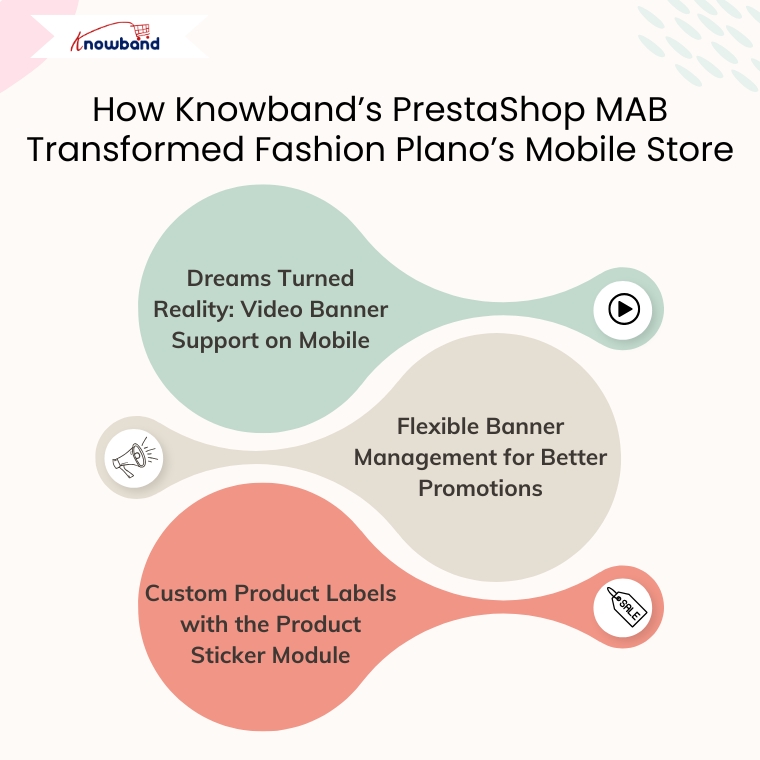
How Knowband’s PrestaShop MAB Transformed Fashion Plano’s Mobile Store
To stay ahead in today’s mobile-first shopping world, Fashion Plano knew they had to act fast. Their customers were already spending more time browsing on smartphones than desktops, and the existing mobile experience wasn’t keeping up. That’s when they discovered PrestaShop Mobile App Builder Module, a no-code solution that promised both speed and flexibility.
Unlike traditional app development, which can be time-consuming and expensive, the PrestaShop Mobile App Builder module gave Fashion Plano a quick and cost-effective way to launch a fully functional mobile app. Even without technical expertise, the team was able to set up a sleek and modern app that reflected ourbrand’s personality.
But more importantly, the app wasn’t just “launched”; it was thoughtfully built to solve real issues the brand was facing.
Here’s how the PrestaShop Mobile App Builder Module made a difference:
Smooth Setup, Zero Coding: Fashion Plano didn’t need to hire a developer or wait for months. The app was ready in a short time, saving both money and effort.
Better Product Visibility: With improved layout and intuitive design, customers can now view products clearly, even on smaller screens. This led to increased interest and more time spent on the app.
Real-Time Sync with Website: Any updates made on their PrestaShop store—be it a new product or price change—are automatically reflected in the app. This helped them stay consistent across platforms.
Enhanced Customer Engagement: Push notifications made it easier to share deals, restock alerts, and updates directly with users, keeping them coming back.
Faster Navigation and Checkout: With simplified menus, smart filters, and a quick checkout process, customers could shop without any frustration. As a result, this noticeably reduced cart abandonment.
Branded Look and Feel: Fashion Plano was able to customize the app’s look to match their branding—right from colors and banners to logo.
1. Dreams Turned Reality: Video Banner Support on Mobile
One of Fashion Plano’s biggest wish was to add a video banner to its store. Despite trying different PrestaShop themes, none of them supported this feature.
That’s where the PrestaShop Mobile App Builder module came in.
Moreover, with the help of this module, Fashion Plano successfully added a video banner to its mobile app. As a result, this feature transformed the app’s home screen, giving it a dynamic and engaging look. The moving visuals captured the user’s attention immediately and made the app more interactive.
Benefits of the video banner:
Grabbed attention within seconds.
Showcased promotions, seasonal offers, and featured collections.
Enhanced visual appeal and increased customer engagement.
What once felt like a limitation turned into a powerful addon for customer attraction, all thanks to PrestaShop Mobile App Builder Module flexible and customizable layout.
2. Flexible Banner Management for Better Promotions
Fashion Plano also took full advantage of Prestashop MAB’s banner features to promote products and collections effectively. These included:
Square Banners
Perfect for highlighting specific categories or collections. As a result, Fashion Plano used square banners to guide users directly to new arrivals, seasonal picks, or trending styles.
Banner Sliders
Thus, the sliders allowed them to display multiple promotions in one space. Fashion Plano used these to highlight offers, showcase brand stories, and keep the homepage visually dynamic.
Category Banners
These helped in organizing and displaying different product categories clearly. Moreover, with attractive images and labels, it became easier for customers to find what they’re looking for.
What’s even better? All these banners are fully customizable from the backend. As a result, the Fashion Plano team could update the banners, replace images, and change call-to-action links whenever they wanted, without needing any developer support.
Conclusion
To sum up, Fashion Plano’s journey with Knowband’s PrestaShop Mobile App Builder Module shows how the right technology, when used at the right time, can truly make a difference. What started as a small online fashion store quickly grew into a brand with big ambitions, and with the help of MAB, those ambitions became a reality.
Thus, the mobile app didn’t just “add features”; it gave the team the freedom to design their store the way they always imagined. Whether it was adding an eye-catching video banner on the home screen, customizing square and category banners, or syncing products in real-time, every detail was crafted to create a better experience for their customers.
More importantly, the app helped Fashion Plano connect with its audience on a deeper level. As a result, shoppers now enjoy faster browsing, smooth navigation, and instant updates on offers, all from the convenience of their phones. The result? More engagement, higher retention, and growing customer trust.
Furthermore, if you’re a PrestaShop store owner wondering how to take your mobile presence to the next level, without spending weeks on development or learning how to code, Fashion Plano’s experience speaks volumes. PrestaShop MAB Module has completely transformed the way we engage with our mobile users. It’s powerful and easy to use, and it gives us a fully customized app that runs fast and looks great. Highly recommended.
In the world of online shopping, speed and simplicity are more important than ever. Customers want to find what they need, place an order quickly, and move on with their day. If the checkout process is slow or confusing, it can easily drive them away. Many customers abandon their carts just because the checkout takes too long or asks for too much information.
This is where the Prestashop One Page Super checkout Module by Knowband can make a real difference. By bringing the entire checkout process onto a single page, this module helps you create a smoother, faster experience for your customers. Not only does it make shopping easier, but it can also help you increase sales and grow your business.
Additionally, the module includes conversion-focused enhancements like a Free Shipping Progress Bar and customer profile-based checkout fields to further improve order completion rates.
Let’s take a closer look at the top five reasons why upgrading to the Super checkout module is a smart move for your online store.
1. A Smooth One-Page Checkout
First and Foremost, one of the biggest reasons shoppers abandon their carts is because checkout feels like a long, complicated journey. They don’t want to click through multiple pages just to finish a purchase. Every extra page adds time and frustration, which can cause them to change their minds.
The Supercheckout module by Knowband solves this problem by placing everything — cart review, address details, shipping methods, and payment options all on one simple page. This means customers can complete their entire order without jumping back and forth between screens. Everything they need is right in front of them.
Significantly, when shopping feels easy, customers are much more likely to follow through and complete their purchases. A simple one-page checkout can turn casual browsers into loyal buyers.
2. Easy Guest Checkout
Sometimes, customers are ready to buy but hesitate when asked to create an account. They may worry about getting too many emails or simply not want to remember another password. Also, forcing customer to sign up can sometimes create a barrier that stops the sale altogether.
The Prestashop One Page Supercheckout Module by Knowband understands the strategy to overcome this problem. It offers a smooth guest checkout option, allowing customers to place an order without creating an account. They just fill out their details and move straight to payment.
Of course, you can still offer the option to create an account if customers choose to. You can even add social login options like Google or Facebook to make registration quick and painless. Furthermore, giving customers a choice makes them feel more comfortable and respected, which helps build trust.
3. Mobile-Optimized for a Better Experience
Today, more people shop on their phones than on desktop computers. This means that having a mobile-friendly checkout isn’t just nice to have — it’s necessary.
Additionally, the Supercheckout module is designed to be fully responsive. No matter what device your customer is using like a phone, tablet, or computer, the checkout page will adjust perfectly to fit the screen. Customers can easily fill in their information, choose shipping options, and pay without struggling to zoom in or scroll endlessly using Prestashop One Page Super checkout Module.
Having a mobile-optimized checkout means fewer abandoned carts, especially among busy shoppers who are placing orders on the go. A smooth mobile experience can make a big difference in your store’s success.
Integrate Your Opencart Shop with OnePage SuperCheckout
Every business is different. Some stores need a simple, quick checkout, while others need to collect extra information like delivery notes, VAT numbers, or special instructions depending on the country. That’s why flexibility is so important.
The Prestashop One Page Super checkout Module by Knowband makes it easy for store owners to customize the checkout page. You can add, remove, or reorder fields without any technical skills. Furthermore, you can also adjust settings based on customer location, cart value, or shipping method.
This way, you can design a checkout experience that fits your store’s needs perfectly. Plus, you can match the design to your branding, making everything feel more professional and trustworthy to your customers.
Significantly, offering a checkout page that feels familiar and easy can help build confidence and encourage shoppers to complete their purchases.
5. Live Cart Updates for a Seamless Journey
Lastly, another feature customers love is the ability to update their cart in real time. Sometimes, while checking out, a shopper might decide they want two of an item instead of one. Or maybe they want to remove a product they no longer need.
Along with this, the Free Shipping Progress Bar motivates customers to add more products to their cart by clearly showing how close they are to qualifying for free shipping.
Moreover, with Supercheckout, customers don’t have to go back to the cart page. They can easily update quantities or remove items right there during checkout, without refreshing or leaving the page. Significantly, this small but powerful feature keeps customers moving forward. It removes extra steps that could cause delays or confusion. A smoother journey means a better experience and more completed orders.
Conclusion
Making the checkout process easy and fast is one of the smartest things you can do for your online store. When customers don’t have to deal with a complicated process, they are much more likely to complete their purchases and come back for more.
Prestashop One Page Supercheckout Module by Knowband offers everything you need to create a better checkout experience. It brings together a simple one-page design, easy guest checkout, mobile optimization, full customization options, and live cart updates.
With added features like the Free Shipping Progress Bar and customer profile-based checkout customization, the module also helps increase order value and personalize the checkout journey.
Moreover, if you want to reduce abandoned carts, make shopping easier for your customers, and boost your sales, upgrading to Super checkout is the right step. Give your customers a checkout experience they will love — and watch your business grow.
In today’s fast-paced digital world, most people use mobile apps instead of websites as mobile apps are more convenient to use. With more consumers shopping on mobile devices, businesses must adapt to this shift to stay ahead of the competition. A properly designed and easy-to-use mobile app not only enhances the shopping experience for the customers but also enhances the customer experience.
The PrestaShop Mobile App Builder by Knowband offers a powerful and user-friendly solution for PrestaShop store owners to create a custom mobile app for their stores. Moreover, by simplifying the app creation process, the Mobile App Builder module for store owners to deliver a smooth mobile shopping experience.
Here are 5 proven strategies to leverage Mobile App Sales through Mobile App Builder
Enhance User Experience with a Customizable App Interface
With the Prestashop Mobile App Builder by Knowband, store admins can create a completely customizable interface that reflects your brand and gives your customers a seamless shopping experience. Moreover, a well-designed mobile app enhances user experience, leading to increased customer satisfaction and higher sales.
Push Notifications for Targeted Marketing
Push notifications can be a powerful strategy that can help you re-engage your customers and encourage them to make more purchases, which can increase your overall sales.
With the PrestaShop Mobile App Builder by Knowband, you can send personalized alerts straight to your customers’ phones. Use them for new product launches, flash sales, or order updates. Sending the right notification to the customers helps drive repeat purchases and increase conversions.
Offer Exclusive Mobile-Only Discounts and Promotions
Encourage more users to shop through your mobile app by offering exclusive mobile-only discounts and promotions. In addition, these exclusive deals can increase app downloads and engagement, ultimately driving sales. Additionally, The mobile app creates urgency and excitement around mobile-only deals to boost both new and returning customer purchases.
The iOS Mobile App Builder for Prestashop integrates seamlessly with the payment methods and gateways. A quicker and easier checkout process is very important because it helps customers finish their purchases faster, which often leads to more sales. By offering multiple payment options credit cards, digital wallets, and COD, you give customers more flexibility, improving their shopping experience.
Leverage Social Media Integration to Expand Reach
Lastly, promoting your mobile app through social media channels can significantly increase brand visibility and drive more traffic to your store. The Prestashop Mobile App Builder allows easy integration with social media platforms, enabling users to share products directly from the app to their social profiles.
Increased Sales and Revenue: Firstly, by offering a mobile app to your customers, you make it easier for customers to browse and purchase products on the go, leading to higher conversion rates and increased sales.
Improved Customer Engagement: Push notifications, personalized offers, and updates keep customers engaged, informed, and coming back for more. Moreover, you can send real-time notifications about sales, discounts, or new arrivals, which helps drive customer retention.
Enhanced Brand Visibility: A mobile app increases your store’s visibility by keeping your brand right on your customers’ home screens. Furthermore, this makes it easier for them to shop and engage with your business at any time.
Seamless Shopping Experience: Furthermore, the mobile app ensures a smooth and responsive experience on all devices, providing users with quick access to the store and a user-friendly checkout process.
Improved Customer Loyalty: Lastly,by providing a mobile app, you offer a personalized shopping experience that builds customer loyalty. Moreover, Loyalty programs, exclusive offers, and personalized recommendations enhance the overall experience and make customers feel valued. Significantly, this integration of a mobile app into your prestashop store can help you tap into a wider audience, and engagement of customers. Additionally, the mobile app encourages viral marketing, leading to more purchases and higher sales.
Conclusion
The Prestashop Mobile App Builder by Knowband offers an all-in-one solution for Prestashop store owners to create a powerful mobile app without any technical expertise. Moreover, by implementing these strategies, you can improve user engagement and increase sales.
Don’t miss the chance to grow your business by creating a custom mobile app with the PrestaShop Mobile App Builder. It’s a great way to reach more customers, improve their shopping experience, and boost your sales.
Expanding Your Reach: Why Selling on Multiple Channels Matters
Running an online store isn’t just about setting up a website and waiting for customers. Today’s shoppers explore multiple platforms before making a purchase. If your products aren’t available across channels like Google Shopping, Etsy, eBay, and more, then you’re missing out on potential sales. Multi-channel selling helps you tap into a broader audience, build brand recognition, and create multiple revenue streams. 73% of online shoppers use multiple channels before making a purchase decision.
Key Benefits of Multi-Channel Selling
High Sales and Revenue
Each additional platform you sell on creates new revenue opportunities, allowing you to attract different customer bases that prefer shopping on specific platforms.
Better Visibility and Great Engagement
Your products become more accessible to a larger customer base, increasing the chances of discovery and purchase. With better visibility, your store attracts more visitors, leading to higher engagement and better conversions.
Stronger Brand Recognition
Customers see your products more often, increasing trust, credibility, and brand recall over time. Thus, it helps increase brand recognition. More Customer Base and Increased Sales: Selling on different platforms increases the scalability of the products of your store. That’s why it attracts more customers on different marketplaces.
How to Succeed in Multi-Channel Selling
1. Know Your Audience and Choose the Right Platforms
Every sales platform works differently. Identify where your customers shop the most and focus your efforts there. Whether they browse marketplaces, use social media, or search on Google, understanding their habits helps you sell smarter.
Research Market Trends: Stay updated on industry trends to see where similar products are selling best. Analyze competitors, read customer reviews, and follow market reports to identify the most profitable channels. Look for seasonal trends and emerging shopping habits to stay ahead of the competition, where similar products are selling best.
Consider Product Fit: Each platform caters to a different audience and product type. For example, fashion and lifestyle products perform well on social media, while specialized electronics may sell better on dedicated marketplaces. Therefore, choose platforms that align with your product category and customer preferences to maximize success.
2. Keep Your Inventory in Sync Across Channels
One of the biggest challenges in multi-channel selling is managing inventory efficiently. Selling the same product on multiple platforms without a centralized inventory system can lead to overselling, customer dissatisfaction, and retention.
Automatic Inventory Synchronization: Get Plugins that update your stock on all platforms at the same time. This way, you don’t have to change it manually, and there won’t be mistakes in the product.
Keep Extra Stock: Always have some extra products, especially for popular items. This helps you avoid running out when many people buy at once.
3. Optimize Product Listings for Each Channel
Managing stock across different platforms can get confusing. If you don’t update your products properly, you might sell an item that’s already out of stock or run out of popular products too fast. A good system helps avoid these problems and keeps your business running smoothly.
Managing stock properly is important when selling on multiple platforms. If you don’t keep track, you might sell products that are already out of stock or struggle to fulfil orders. Keeping your inventory updated helps you avoid these problems and keeps your customers happy.
Use automatic stock updates: Use to sync inventory across all platforms in real-time. This means whenever a product is sold on one platform, the stock updates everywhere, preventing overselling or manual errors. Without automation, you might accidentally sell more than you have, leading to cancellations and unhappy customers..
Track best-selling products: The PrestaShop Google Shopping allows the admin to analyze past sales and predict future demand. Some products perform better than others, and by checking which items are selling fast, you can prepare in advance. This helps you stock the right amount of products and prevents running out of popular items.
Knowband’s PrestaShop Modules for Multi-Channel Selling!
At Knowband, we create easy-to-use PrestaShop Modules that help you sell on multiple platforms without extra effort.
Google Shopping is a powerful platform where millions of shoppers search for products daily. By listing your products on Google Shopping, you can increase visibility and attract more buyers. The research has shown that 87% of people begin their search for shopping from Google.
The Knowband PrestaShop Google Shopping Integrator allows you to showcase your products directly on Google Shopping without the need for manual updates. This automation increases product visibility, boosts traffic, and helps drive more sales.
Key Features of the PrestaShop Google Shopping Integration Module.
Automated Product Syncing: Automatically sync your PrestaShop store with Google Shopping so product details stay updated without manual work.
Bulk Product Uploads: Save time by uploading all your products at once. The Knowband’s Google Shopping allows the admin to list the products in bulk at a time, reducing the manual work.
Smart Attribute Mapping: Easily match your product details with Google’s requirements to improve listing accuracy. The admin can map the store’s category with all the attributes to Google’s category.
Auto-Generated Feeds: Keep your listings fresh with automated product feed updates. The extension allows the feed features to automatically sync all the updated product details. With Knowband’s PrestaShop Google Shopping Integration, you can effortlessly display your products in Google search results, driving more traffic to your store.
The Knowband PrestaShop eBay Marketplace Integration Extension makes it effortless to manage your eBay store directly from your PrestaShop dashboard. Instead of manually updating listings and tracking stock, this extension automates the entire process, helping you scale your business smoothly.
Key Features of the eBay Integration:
1. Sync Products & Inventory: The Knowband’s PrestaShop eBay Integration module ensures that your product listings and stock levels remain consistent across both platforms. Any changes made to product details, stock quantities, or pricing in your PrestaShop store are automatically reflected on eBay. This prevents overselling and stock discrepancies, ensuring a smooth selling experience.
2. Real-Time Updates: Stay up to date with automated real-time synchronization of orders, pricing, and inventory changes. As soon as a product is sold on eBay, the stock is adjusted in PrestaShop. Order statuses are updated instantly, keeping customers informed and reducing manual effort. This feature helps in avoiding price mismatches, out-of-stock issues, and processing delays.
3. Customizable Product Listings: Easily create and manage eBay product listings directly from your PrestaShop back office. Optimize listings by customizing product titles, descriptions, images, pricing, and attributes for better visibility on eBay. You can also apply different pricing rules for eBay without affecting your PrestaShop store, ensuring better profitability.
Integrate Your Opencart Shop with Etsy Marketplace
Etsy is a leading marketplace for handmade, vintage, and unique products, with over 95 million active buyers. It hosts over 7.5 million active sellers, making it a competitive yet rewarding platform for businesses that specialize in niche and creative products. In 2023 alone, Etsy sellers generated over $13 billion in gross merchandise sales, proving the platform’s massive potential.
The PrestaShop Etsy Marketplace Addon simplifies the process of managing your Etsy store directly from your PrestaShop dashboard. Instead of manually updating listings, tracking orders, or adjusting stock levels, this extension automates everything, saving time and reducing errors.
Key Features of the Etsy Connector:
Price and Order Synchronization: Knowband’sPrestaShop Etsy Marketplace Addon ensures real-time price and order synchronization, keeping your inventory and pricing updated across both platforms.
Bulk Uploads: Easily add multiple products to Etsy in one go. The Knowband’s Etsy Marketplace Addon allows the admin to list bulk products at the same time smoothly.
Category Mapping: Ensure your products appear in the right Etsy categories with the correct attributes for better visibility.
Price & Stock Synchronization: Keep pricing and stock updated to prevent overselling. The Knowband’s Etsy Marketplace Integration Addon allows price management within the module.
Conclusion: Sell Smarter with Knowband’s PrestaShop Multi-Channel Extensions
Selling on Google Shopping, eBay, and Etsy opens up new sales opportunities. With Knowband’s PrestaShop solutions, you can automate inventory management, sync orders, and optimize product listings all from one place. The Knowband’s Marketplace Addons save time, reduce manual errors, and help you grow your business effortlessly.
Knowband’s PrestaShop Marketplace Integration Addons simplify the process by automating inventory updates, order synchronization, and product listing management. With these smart integrations, you can sell effortlessly across multiple platforms, save time, and focus on growing your business. Take advantage of multi-channel selling today and unlock new opportunities for success.