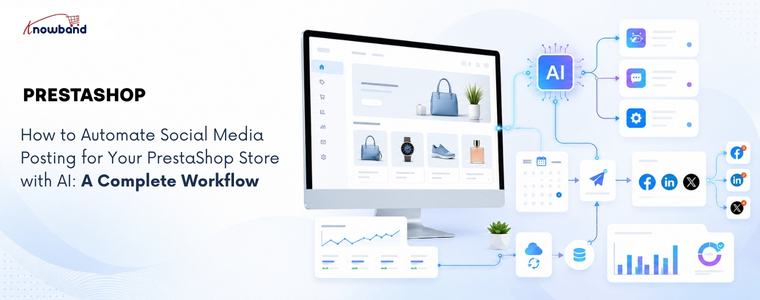
How to Automate Social Media Posting for Your PrestaShop Store with AI: A Complete Workflow

Launching a new product is only half the job. If it isn’t shared on social media at the right time, you risk missing the initial surge of attention that can drive traffic, engagement, and sales. In many stores, products go live first, while the social media announcement gets delayed or forgotten altogether. By the time someone remembers to post about it, the best opportunity to reach potential customers has already passed. This is where the PrestaShop AI Social Media Post Generator Module by Knowband can make a real difference. But generating captions alone isn’t enough. A truly effective solution should automate the entire workflow, from detecting a newly published product and creating platform-specific content to scheduling or publishing posts automatically. Otherwise, store admins still have to manually generate the content, choose the right social platforms, and publish each post themselves, leaving room for delays and missed opportunities.

Why a PrestaShop AI Social Media Post Generator Module Needs a Workflow

Marketers using AI content generation tools save an average of 6.1 hours per week on content-related tasks, according to HubSpot’s 2026 AI Trends Report, with senior practitioners saving 8 to 10 hours. That number only holds up if the solution they use is actually removing steps from the process, not just replacing a blank caption box with an AI-generated one someone still has to notice and post.

The real challenge with manual social media posting isn’t writing the post. It’s remembering to promote every new product, deciding what to say, and finding the right time to publish it.

A workflow-based setup removes all three decisions from the admin’s daily list, not just the writing part. That’s the actual difference between a caption generator and genuine automation.

The Trigger-to-Post Workflow: How Automated Social Content Actually Moves

Trigger-based automation starts with a store event, not a blank prompt. Here’s the full loop a properly configured setup runs through, from the moment a product changes status to the point an admin reviews what happened and adjusts the system.
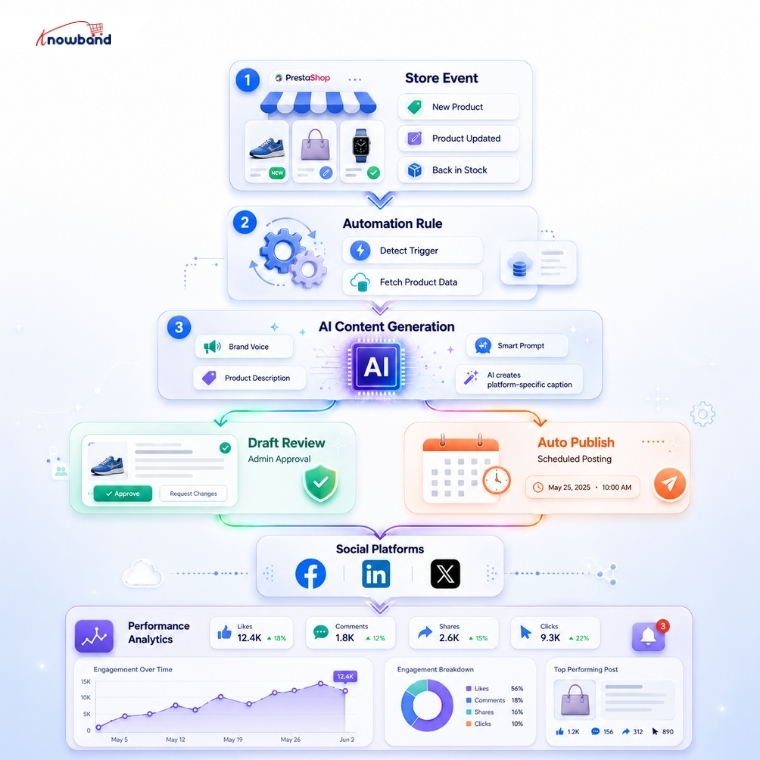
Every product event flows through the same loop: a trigger activates, the rule fetches the product data, AI generates the copy, and the post either waits for a human or is directly published, before performance data feeds back into the next round of prompts.

Building a Prompt Strategy So Posts Don’t Sound Like Generic AI Captions

The quality gap between AI social posts almost always comes down to what the prompt actually contains, not which AI model generated it. A prompt built only from a product name and price produces the same generic copy every AI tool writes when given nothing else to work with.

Brand voice closes most of that gap on its own. Feeding the AI a defined tone, whether professional, playful, or urgent, along with the actual industry context, gives it enough to write copy that sounds like a specific store instead of a template.

Product catalog content matters just as much here. A prompt built from the product name, description, price, and URL together produces noticeably more specific captions than one built from the name alone, since the AI has real details to reference instead of filling gaps with generic phrasing.

A word blacklist and per-platform CTA phrases round out the strategy. Blocking competitor names or discontinued product references prevents embarrassing mismatches, and a defined closing line per platform keeps the CTA on-brand instead of leaving the AI to invent one each time.

Choosing Between Draft Review and Auto-Publish with a PrestaShop Social Post Scheduling Addon

Immediate publishing works well once a rule has proven itself, but it’s the wrong starting point for a new rule. Running a new rule in draft mode first lets an admin check tone, accuracy, and CTA phrasing across a handful of real products before trusting it to publish unattended.

A PrestaShop Social Post Scheduling Addon adds a middle option worth using once a rule is trusted: scheduled publishing within a set delay window, rather than immediate or fully manual. Spacing a batch of fifty product posts across several days, instead of publishing all fifty the moment a rule is created, keeps a feed looking like ongoing activity rather than an obvious automated dump.

Limits on posts per day and posts per product per day exist specifically to prevent that dump effect. Restricting a single product to one post per day, even if a rule technically qualifies it for more, keeps the same item from appearing across every connected platform simultaneously and looking scripted.

Where a PrestaShop Social Media Automation Module Fits Into the Bigger Picture

Draft review, prompt strategy, and scheduling all solve pieces of the same problem, but they only work together if one system is coordinating all three. A PrestaShop Social Media Automation Module needs to sit between the store’s product events and the social platforms themselves, translating one into the other automatically.

That coordination is what separates a genuine workflow from a collection of separate settings an admin has to manage by hand. Post history, showing status, platform, engine used, and source, is what makes a PrestaShop Social Media Automation Module auditable rather than a black box once it’s running unattended.

How Knowband’s SocialAI Pro Runs This Entire Workflow

The Knowband SocialAI Pro PrestaShop AI Social Media Post Generator Module runs every stage of this workflow from one back-office panel. Rules handle the trigger logic (New Product, Back in Stock, or Manual); the AI engine (OpenAI ChatGPT, Google Gemini, or Anthropic Claude) generates platform-native copy for Facebook, LinkedIn, and X, and Post History logs every result with its engine, source, and status.

Brand voice fields, including tone, industry context, word blacklist, and per-platform CTA phrases, feed directly into the prompt for every generated post. The scheduled delay window spaces bulk posts across a configurable day range, and daily posting limits per rule and per product prevent the same item from flooding every channel at once.

Putting Your PrestaShop AI Social Media Post Generator Module Workflow Into Practice

A PrestaShop AI Social Media Post Generator Module earns its place by running the full loop, from trigger to publish to performance review, not by writing one caption at a time on request. Starting new rules in draft mode, refining the prompt once real output comes back, and only then moving to immediate or scheduled publishing is the sequence that actually works.

Store admins still assembling this manually, one post at a time, are spending hours a week on something a properly configured PrestaShop Social Media Automation Module already handles end-to-end. The workflow above is the difference between AI that writes captions and AI that runs a system.


7 Proven LLM Use Cases in E-commerce That Boost Sales in 2026


AI in e-commerce has evolved from being experimental to becoming a practical tool for daily operations and revenue generation. AI-referred traffic to US retail sites grew 393% year over year in the first quarter of 2026, and by March 2026, that AI traffic was converting 42% better than non-AI traffic, according to Adobe Analytics. Shoppers now arrive from ChatGPT, Perplexity, and Gemini already deep into their decision, and they are buying. For e-commerce merchants, the practical question is no longer whether AI belongs in the store, but which applications actually return more than they cost to set up. Some improve customers’ in-store experience directly, through faster responses and better product discovery. Others work quietly in the background, keeping the catalog visible to AI search engines or turning store data into decisions that a merchant can act on the same day. The following seven LLM use cases demonstrate how AI delivers value in e-commerce and how PrestaShop merchants can implement each one in practice.

Why LLM use cases in e-commerce shifted from experiment to revenue in 2026

Customers have started to rely on AI platforms more for their day-to-day decisions. When a customer is trying to figure out what to buy inside an AI chat, they are coming to your store with the intent to buy, which is why AI sessions are converting more than traditional channels and generating more revenue per visit.

As AI has become a bigger part of e-commerce, merchants who optimize their stores for AI visibility, AI-powered customer interactions, and faster content creation gain a competitive advantage.

1. Conversational AI shopping assistants that answer buyers in real-time

Conversational commerce is reshaping how customers interact with online stores. Bots have evolved simple but time-consuming question answering into a sophisticated shopping companionship, guiding customers throughout their journey by being present 24/7. This shift matters for conversion because most abandoned carts are not due to price. They occur because of unanswered questions. An assistant who resolves the question while intent is still warm generates revenue.

For PrestaShop stores, a good PrestaShop AI Chatbot handles this without hiring support staff. The PrestaShop AI Chatbot provides multiple model choices to store admin: ChatGPT, Claude, Gemini, DeepSeek, and trained on your catalog and FAQs, so it answers product and order questions, and suggests relevant items accurately. Because the AI-powered chatbot fetches from live store data, its answers stay accurate as your catalog changes, and a well-configured PrestaShop AI Chatbot quietly reduces the support load that used to take up weeks.

2. AI-generated product content and multilingual catalogs

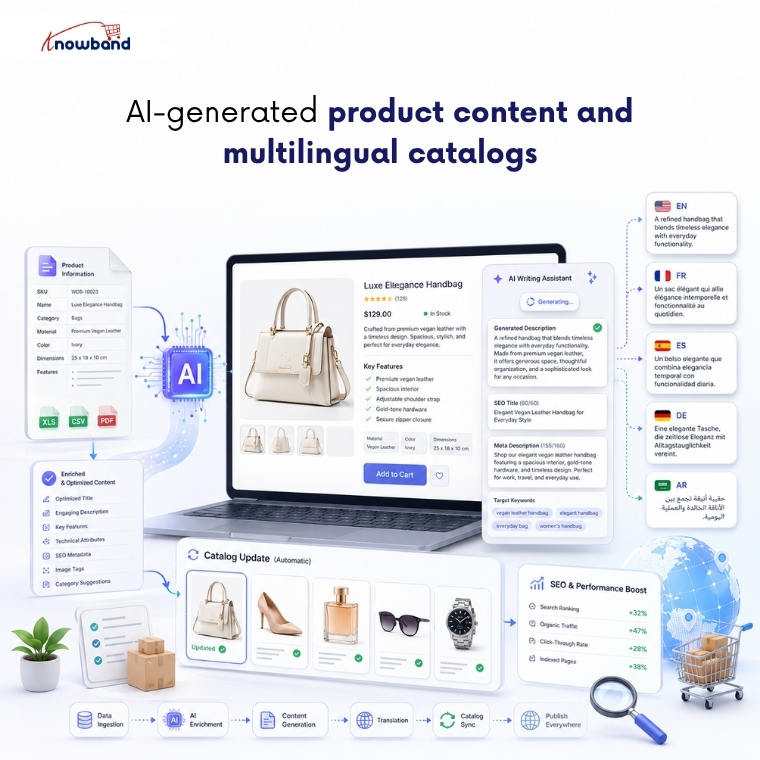
Product descriptions serve as the foundation of e-commerce listings. But creating a unique product description in multiple languages for thousands of products manually is a very hectic task. At the same time, they have to be convincing enough for a human to buy, and have to be optimized enough to get crawled by Google and AI crawlers. Thin, half-written descriptions fail at both.

This is where language models genuinely earn their place. They draft descriptions, titles, and meta fields in a consistent voice across your whole catalog, then translate as well so you can sell in a new country without hiring a translator. The PrestaShop AI Content Generator and Translator bring both jobs into the back office. The module runs across several providers, Gemini, ChatGPT, Claude, and DeepSeek, writes copy and SEO meta in bulk, also translating catalog into multiple languages for international customers. For growing stores, an AI Content Generator and Translation Module makes it easy to keep product information updated while maintaining a consistent brand voice across multiple languages.

3. AI-powered review generation and authentic social proof

Reviews are one of the strongest conversion triggers. Most shoppers read them before they commit, and a product page carrying honest, specific feedback converts far better than one sitting at zero. The difficulty is rarely the value of reviews. It is gathering enough of them that customers start trusting and purchasing without a second thought.

AI can generate review-style content: star ratings, titles, and body copy written for specific products, published through the native Product Comments module. The PrestaShop AI Review Generator does exactly this, and the e-commerce AI review generation module gives merchants granular control over tone, language, rating distribution, and publishing schedule.

The module generates AI-powered review drafts on demand or according to a predefined schedule, helping merchants keep product pages active with fresh content. Administrators retain full control through configurable publishing rules, scheduled publishing, and manual approval options, ensuring only appropriate reviews appear on the storefront.

4. AI-written social media and marketing content

Keeping social channels updated with regular postings is where most small teams fall behind. Creating posts for every launch, every promotion, every seasonal push manually consumes time that merchants rarely have. Generative AI can create a week’s worth of social media content using store products, adapting the tone for each platform while keeping your publishing schedule consistent.

SocialAI Pro is the PrestaShop way into this. As a PrestaShop AI Marketing Content Generator Addon, it reads your product data and produces posts, captions, and hashtags you can line up and schedule easily. For stores that rely on social media but lack the time to create content consistently, the PrestaShop AI Marketing Content Generator Addon automatically generates accurate, on-brand posts directly from your product catalog.

5. AI-assisted product video across the storefront

Video sells because it answers what a photo cannot. Watch a product move and you grasp its size, its fit, and how it is used far quicker than any still image explains it, and that understanding turns into conversions. But creating videos for thousands of products is not only time-consuming, but it is also very expensive. AI removes that obstacle by making short product videos in less time and at less cost by using just a prompt.

VideoMate provides the perfect solution for PrestaShop store owners. Merchants looking for a Prestashop AI Video Generator usually want live product video added without the involvement of a developer. The Knowband’s PrestaShop VideoMate helps to generate videos using AI and add them to the home page, product pages, category pages, and best-seller pages from the admin panel with just a few clicks. The Prestashop AI Video Generator makes sure AI-generated product videos are actually displayed on your product pages, where they can influence purchase decisions, instead of remaining unused.

6. Getting your store recommended by AI search engines

AI assistants can only recommend a store they can read, and Adobe has found that many retail sites are not yet machine-readable enough for AI systems to interpret cleanly. If ChatGPT or Perplexity cannot parse your catalog and policies, you are invisible in the answers where high-intent shoppers now start.

An llms.txt file fixes that. It gives AI crawlers a clean, structured summary of what you sell and how you operate, in the format those models actually read.

The LLMs.txt Generator produces that file from your existing catalog. A PrestaShop llms.txt generator module lets you filter to active or featured products, include the CMS pages that answer purchase questions like shipping and returns, and toggle individual crawlers such as GPTBot, PerplexityBot, and Google-Extended. For multistore setups, a PrestaShop llms.txt add-on generates a separate file per shop, and a cron keeps each one updated as your catalog moves. Configured well, a PrestaShop llms.txt generator module is how a store starts being a source that AI engines trust.

👉Explore the Module with Our Video Guide

7. AI back-office analytics that sharpen every sales decision

Every restock, promotion, and retention call depends on knowing what your data says right now, and manual reporting workflow delivers that answer too slowly to act on.

Large language models reduce that gap. Admins can ask questions in plain English, get the number instantly, and uncover trends and opportunities that traditional reports often fail to reveal.

The PrestaShop Smart AI Admin Assistant puts this capability directly inside the back office. Its PrestaShop Back Office Analytics layer pairs a natural-language query interface with a full dashboard of configurable widgets covering revenue trends, best sellers, slow movers, low stock alerts, and reorder suggestions, all through read-only database access, so nothing in the store can be changed through the chat. Role-based access control means operations staff see the data relevant to their role without exposing financials or customer records across the whole team.

The difference between knowing a product is slowing down and knowing it three weeks before a stockout is the difference between a proactive decision and damage control. Strong PrestaShop Back Office Analytics is what closes that gap, not at the end of the month when the report runs, but the moment someone thinks to ask.

👉Explore the Module with Our Video Guide

Where these LLM use cases in e-commerce leave your store in 2026

The through-line across all seven is simple. AI now shapes both how customers find your store and how efficiently you run it, and the stores that treat this as a channel are advancing. You don’t need to implement every use case at once; instead, focus on the one that is closest to resolving your current goal, whether that is unanswered questions, thin content, or invisibility in AI search, and build from there.

What makes this practical for PrestaShop merchants specifically is that most of these capabilities already exist as modules that install into the admin you use every day, several of them from Knowband. Start with the use case that is costing you sales right now, and let the rest follow as the channel grows.

PrestaShop Blog Module: How Store Owners Are Driving Organic Traffic Directly from Their Storefront Without a Third-Party CMS

Most PrestaShop merchants looking to add a blog to their online store typically choose one of two approaches: they attach a WordPress subdomain and maintain two completely separate systems, or they give up on content marketing entirely because the setup feels too complex to manage. Each approach comes with its own set of challenges. The first creates a fragmented user experience and a technical architecture that requires managing two platforms, two hosting setups, and two content workflows simultaneously. The second leaves one of the most cost-effective long-term traffic channels completely unused. Businesses that blog consistently generate 55% more website visitors than those that don’t, according to HubSpot data that has held roughly steady for years. The challenge for PrestaShop stores specifically has been that blogging wasn’t a native capability until a dedicated blog solution for PrestaShop, such as PrestaShop Blog Module by Knowband, brings it directly into the storefront without requiring an external CMS at all.

Why Running a Blog Outside PrestaShop Creates More Problems Than It Solves

The WordPress-on-a-subdomain approach is the most common solution, and it works, technically. But it creates a disconnect that becomes more noticeable over time. The blog lives at blog.yourstore.com or yourstore.com/blog on a separate WordPress install, which means a visitor reading a blog post has to navigate back to the main store to browse or buy. That navigation friction can reduce the conversion potential of every piece of content you publish.

From an SEO standpoint, the separation can also limit some of the internal linking benefits that make content marketing most valuable. Blog posts that link to product pages on the same domain help build that domain’s authority for product-related search terms. Blog posts on a separate WordPress install may build more authority for the subdomain itself, with less direct benefit to the main store domain.

The operational overhead matters too. Two platforms mean two sets of updates, two admin panels, two sets of plugin conflicts to manage, and content that exists in a completely different database from the store it’s meant to support. Merchants who’ve maintained this setup for more than a year rarely describe it as sustainable.

What a Native PrestaShop Blog Module Changes About the Content Workflow

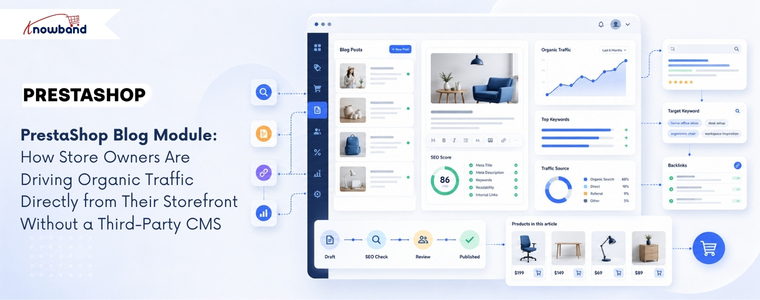
A PrestaShop Blog Module embedded directly in the store admin eliminates the platform split entirely. Blog posts, categories, comments, and banners all live in the same back office where the merchant manages products, orders, and customers. No external login, no separate workflow, no synchronisation problem.

The Knowband PrestaShop Blog Module organises content management into five admin sections: General Settings, Category Management, Post Management, Comments Management, and Banner Management. Each post has its own meta title, meta description, and keyword fields, meaning every article the merchant publishes is independently optimised for search without needing a separate SEO plugin. The blog homepage also has its own configurable meta title and meta description, which makes it a properly indexed landing page rather than an afterthought.

Post creation supports rich text formatting, cover images up to 5 MB, short descriptions for short previews, and the ability to mark any post as a popular post for sidebar featuring. Multiple blog themes are selectable from the admin panel without touching code, and the layout is fully mobile responsive across all PrestaShop themes.

How the Related Products Feature Connects Content to Commerce

The most commercially valuable feature in a PrestaShop Blog Module isn’t the SEO controls; it’s the related products display on each post page. The admin can select products to display below each blog article, drawing from either a specific category or a specific manufacturer. A post about outdoor furniture care can show the relevant product range beneath the article. A buying guide for running shoes can display the appropriate category directly in the content context where the reader’s intent is highest.

This feature turns content marketing from a pure traffic play into a conversion layer. The reader who arrives via a search query about “how to maintain garden furniture” isn’t just a pageview; they’re a prospective customer already in a relevant mindset, presented with matching products at the moment their interest is active. That connection between informational content and commercial product display is what makes a native blogging solution more valuable than a detached WordPress blog that can only link to the store externally.

The PrestaShop Content Marketing Module approach, treating each blog post as both a search traffic asset and a product touchpoint, is what separates stores that use content strategically from those that treat it as a branding exercise with no measurable return.

Comment Moderation, CAPTCHA, and Building a Sustainable Content Community

Blog comments are either a community-building asset or a spam management problem, depending on how they’re configured. The module lets the admin decide: comments can be restricted to registered customers only, opened to guest users, or disabled entirely. Admin approval is required before any comment appears publicly, which means the merchant controls what gets associated with the brand.

Facebook comments or the built-in comment system are both available, depending on whether the store wants to tie community discussion to social identity or keep it self-contained. reCAPTCHA integration prevents bot submissions at the comment form level. The admin enters the site key and secret key from the Google reCAPTCHA dashboard, and the verification runs automatically on every submission.

Comment management is handled from a dedicated admin panel where each comment can be approved, disapproved, or deleted. For stores where customer conversation around product-related content is a meaningful part of the brand experience, that moderation control matters more than it seems when first setting up a blog.

SEO Architecture: Categories, Priority Controls, and Sidebar Positioning

The PrestaShop Blog Manager Module includes category and subcategory management with individual meta title and meta description fields for each category, which means the content taxonomy the merchant creates is independently searchable rather than existing purely for navigation. A category called “Kitchen Appliance Guides” can rank for category-level search queries that a list of uncategorised posts cannot.

Sidebar block positioning, for blog categories, recent posts, popular posts, and the search box, is configurable independently from the admin panel, with priority settings that control which blocks appear first. The popular posts block drives internal page depth by showing readers other content worth exploring. The recent posts block keeps repeat visitors updated on new content without any manual curation required.

For merchants running multiple PrestaShop stores, the module is multi-store and multi-lingual compatible. Each store installation can maintain its own blog content, categories, and configuration, with language-specific metadata fields for each post and category. Knowband built this compatibility into the core of the module rather than as a feature addition, which means the admin workflow scales across store configurations without additional setup.

The Traffic Argument That Makes a PrestaShop Blog Module Worth Deploying

Content marketing compounds in a way that paid advertising does not. A product page optimised for a single transactional keyword captures traffic from people already ready to buy. A blog post targeting an informational or research-phase keyword captures traffic from people who aren’t yet in the store’s funnel, and who, given a related products display and a coherent browsing experience, may well enter it.

PrestaShop stores that publish consistently on topics their target customers search for build an organic traffic base that grows over months and years without proportional increases in ad spend. The PrestaShop Blog Module makes that approach available from within the existing admin panel, with the SEO controls, related product links, and comment community tools that turn a simple content feed into a functioning PrestaShop Blog Manager Module for long-term traffic growth.

The setup requires no code changes, no external platform, and no developer. The blog deploys from the module manager and integrates with the existing store theme automatically.


Why a Branded Mobile App Is Becoming the Default Growth Channel for PrestaShop Stores in 2026

Most PrestaShop merchants think about growth in terms of traffic: more ads, better SEO, wider social reach. What the data increasingly shows is that the stores pulling ahead aren’t necessarily acquiring more customers; they’re keeping more of the ones they already have, and a branded PrestaShop Mobile App is becoming the primary tool for doing that.

The math is unambiguous. Acquiring a new customer costs five to twenty-five times more than retaining an existing one, and retained customers spend up to 67% more than first-time buyers. Brands with mobile apps see up to 50% higher repeat purchase rates compared to mobile web alone, and app users purchase approximately 33% more frequently than non-app users. For a PrestaShop store with an established customer base, a dedicated app isn’t a feature addition; it’s a structural change to how the business grows.


What a PrestaShop Mobile App Does to Customer Retention That a Website Cannot

A website, however well-optimised, is passive. Customers need to remember the URL or find it through search. A branded PrestaShop Mobile App sits on the customer’s home screen, which is a qualitatively different relationship with the brand. Over a third of consumers keep their favourite brand’s app installed on their phone as a direct signal of trust and ongoing purchase intent.

The engagement gap is equally specific. Shoppers spend roughly 201 minutes per month in shopping apps, compared with around 11 minutes on mobile shopping websites. That difference isn’t explained by any single feature; it’s the cumulative effect of faster load times, saved preferences, native navigation, and the fact that an app is a contained environment without browser distractions. For merchants whose repeat customers are currently browsing, forgetting, and returning only when retargeted, that engagement gap represents recoverable revenue at low marginal cost.

Customer lifetime value responds directly to this shift. When 60% of first-time app buyers go on to make additional purchases, the app becomes less of a channel and more of a conversion funnel for turning single-purchase customers into repeat buyers who drive the majority of any store’s revenue.

Why Push Notifications Change the Economics of Re-Engagement

Email remains the backbone of eCommerce retention for most stores, but its limits are structural; average open rates rarely exceed 20%, and inbox competition compounds every quarter. Push notifications, available only to merchants with a native app, operate differently. They appear directly on a customer’s lock screen, require no inbox to compete in, and can be triggered automatically by purchase behavior or manually from the admin panel.

The Knowband PrestaShop Mobile App Builder includes automated notifications for order confirmation, delivery status updates, and abandoned cart recovery, each configurable with custom messages and time intervals. Manual campaigns can be pushed from the back office with an image, landing page redirect, and device targeting. The practical effect is that a merchant can send a back-in-stock alert, a flash sale notification, or an abandoned cart reminder, and reach customers who are already brand-familiar, without paying for an ad placement or competing in a crowded inbox.

Brands recover up to 22% of abandoned carts through automated push notifications, a channel that simply doesn’t exist for stores operating on mobile web alone. For a PrestaShop merchant running promotions or managing seasonal inventory, that recovery mechanism shifts from optional to significant quickly.

How the App Experience Drives Cross-Selling and Average Order Value

Repeat customers don’t just return more often, they buy more when they do. The app experience contributes to this directly through features that a mobile website handles inconsistently: related products on the product page, wishlist functionality that encourages return visits without requiring an immediate purchase, and a simplified checkout that removes the friction points that reduce order value on the first visit.

The PrestaShop Mobile App includes compatibility with PrestaShop’s Automatic Related Products module, bringing cross-selling directly into the app’s product pages. A customer browsing a jacket can see matching accessories without navigating away, and those related products appear in the same session where intent is already high. For stores where average order value matters as much as repeat frequency, this is a meaningful driver.

The wishlist feature compounds this over time. A customer who saves three items during one session and returns a week later for a specific purchase often converts on items they saved previously, a behavioral pattern that mobile web struggles to support because saved items depend on cookies and browser state rather than a persistent account.

The Brand Ownership Argument Most PrestaShop Merchants Haven’t Made Yet

There’s a competitive dimension to this that goes beyond retention rates. Every customer who downloads a store’s app has made a low-friction commitment to the brand; they found it, trusted it enough to install it, and allowed it to send notifications. That’s a qualitatively different customer relationship than one built through retargeting ads or search traffic, both of which disappear the moment spending stops.

A branded PrestaShop Mobile App with the store’s logo, colors, and theme deployed through Google Play and the Apple App Store gives the merchant a distribution channel they own outright. No algorithm changes, no ad auction dynamics, no platform dependency. The customer relationship exists in the app’s database, communicable directly through push notifications to a segment that opted in.

For international PrestaShop stores, the multi-currency and multi-language support built into the app extends this owned channel globally. A customer in Germany and a customer in Brazil both use the same app, see prices in their local currency, and browse in their native language without requiring separate storefronts or platform configurations.

What Building a PrestaShop Mobile App Actually Requires in 2026

The historical barrier to a branded app was development cost; custom Flutter or React Native builds ran from tens to hundreds of thousands of dollars before a single customer downloaded them. That barrier has changed for PrestaShop merchants specifically.

Knowband’s solution delivers ready-to-publish Android and iOS app files within one to two working days after a merchant shares their specifications. The app runs on Flutter with 100% synchronization to the live store, products, pricing, payment methods, shipping options, and inventory, all of which mirror the website in real time without a separate catalog to maintain.

The admin panel handles layout customization, push notification campaigns, GDPR compliance settings, and payment method configuration without requiring code access or developer involvement. For stores that have been weighing a PrestaShop Mobile App against the perceived complexity of building one, the actual setup process is considerably more straightforward than the question usually implies.

The Window for Early-Mover Advantage Is Still Open

Most PrestaShop stores have not yet deployed a branded app, which means merchants who move now face less customer-awareness competition than they will in two years. A customer who downloads a store’s app and builds a purchase habit inside it is significantly less likely to switch to a competitor, 76% of consumers who use brand apps do so more frequently when offered app-exclusive incentives, and the switching cost of an uninstall is psychologically higher than simply trying a different website.

The channel shift toward apps as the primary mobile commerce interface is already well underway in major retail categories. For PrestaShop merchants ready to stop depending entirely on paid acquisition and start building a retention-first growth model, a Mobile App for PrestaShop is the infrastructure that makes that shift possible without rebuilding anything that already works.


Build Any PrestaShop Form in Minutes- Form Studio All-in-One Module

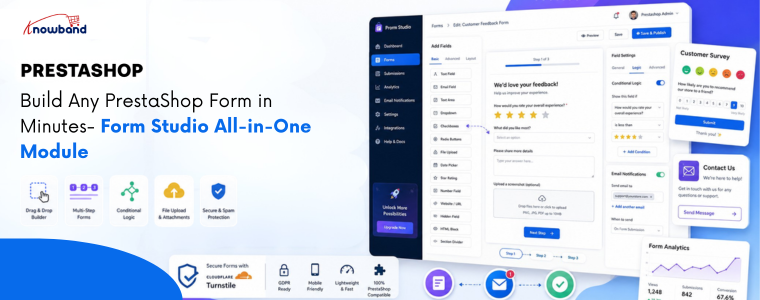
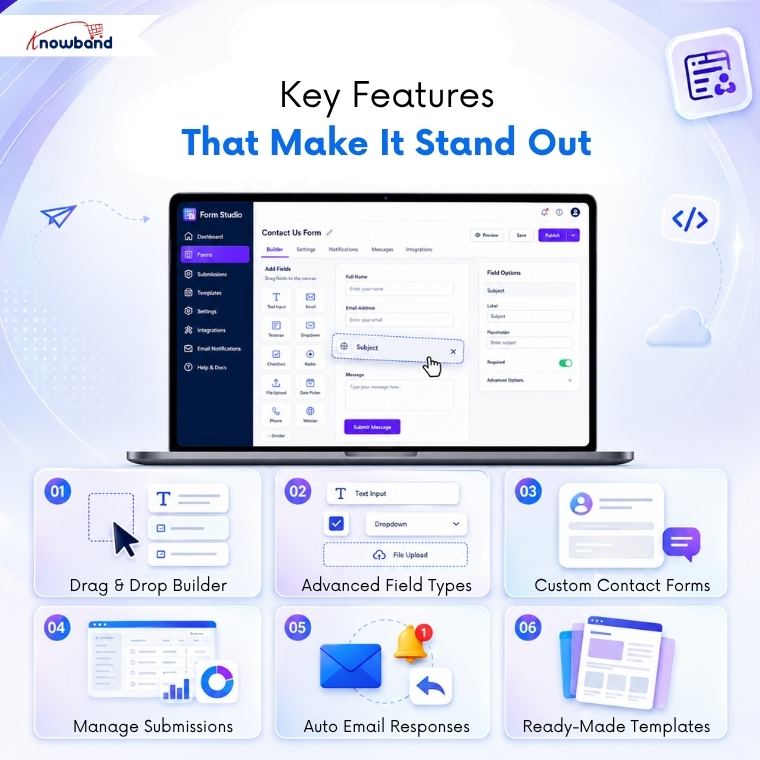
Prestashop Form Studio is an all-in-one form builder module that allows store owners to create custom forms without coding. With a drag-and-drop interface and flexible field options, you can quickly build contact forms, surveys, feedback forms, registrations, quote requests, and more directly inside your PrestaShop store.

If you’ve ever tried to collect customer feedback, run a product survey, or simply set up decent custom forms in PrestaShop, you already know the pain. Either you stitch something together with workarounds, or you spend hours digging through settings that weren’t built for what you actually need.

That’s exactly the problem Form Studio is designed to solve. It’s a PrestaShop Form Builder module that lets store owners create virtually any type of form, like Contact forms, Return request forms, Feedback form, Quote Request Form, Product inquiry forms and many more. Whether you need a quick contact form or a multi-step customer survey, it just works.

What Is Form Studio?

Form Studio is an all-in-one PrestaShop Form Builder Addon designed to give store owners complete control over how they collect information from visitors and customers.

This PrestaShop custom form builder combines a visual drag-and-drop interface with a flexible field library, making form creation genuinely easy, even for non-technical users.

Updated September 30, 2026: Need contact, quote, or registration forms without writing code? The PrestaShop Online Form Builder module gives you a drag-and-drop editor to create custom forms and collect customer data easily. It is ideal for capturing enquiries, feedback, and registrations. Explore the full introduction and features of the PrestaShop Online Form Builder module on PrestaShop Marketplace.

Key Features of Prestashop Form Builder Module

1. Flexible PrestaShop Form Builder

The drag-and-drop form builder in PrestaShop sounds simple because it is. You pick a field, drop it where you want it, configure it, and move on. No HTML. No PHP. No headaches.

You can arrange fields in any order, group them into sections, and preview exactly how your form will look before it goes live. That alone saves a ton of back-and-forth.

2. Every Field Type You Need in PrestaShop Form Studio

PrestaShop feedback forms support a wide range of input types:

  • Text fields, text areas, and email fields: For names, emails, and short answers
  • Number and phone number fields: For phone numbers, age, quantities, and more
  • Dropdown menus: Great for categorizing inquiries
  • Checkboxes and radio buttons: Perfect for surveys and polls
  • File uploads: Ideal for warranty claims or support tickets
  • Date pickers: Useful for collecting scheduling or timeline information
  • Cloudflare Turnstile: Added protection against spam bots

As a PrestaShop Survey Form Builder Module, it also handles complex survey logic, including conditional fields that show or hide based on previous answers.

3. Built-in PrestaShop Contact Form Module

Your default PrestaShop contact form is fine. But Form Studio turns it into something genuinely useful.

You can create branded, multi-section contact forms that route submissions to the right department, auto-respond to customers, and keep everything organized in one dashboard.

4. Submission Management & Notifications

Every form submission is stored inside your PrestaShop admin panel. You can check entries, filter submissions, and set up email notifications so you never miss an important message.

If you’re running a PrestaShop Survey & Form Builder campaign, you can also analyze responses directly from the backend.

5. Direct Backend From Communication

When a user submits a form, the module instantly notifies the admin via email and sends an automated confirmation to the customer. Every submission is logged in the backend under its respective form, giving store admins a complete record of responses, along with the ability to follow up with any submitter directly, using a personalized message.

6. Predefined Templates

The PrestaShop Survey Form Builder allows users to create predefined templates for:

  • Admin email notifications
  • Auto-response emails
  • Direct message templates for store admins

Furthermore, inside the email templates, you can dynamically include field values submitted by customers using the PrestaShop Feedback Form Builder Module.

.

🤖 Want AI platforms and LLMs to recommend your products?


LLMS.txt Generator for PrestaShop

Generate AI-ready llms.txt files to improve your store’s visibility and discoverability across AI search engines and large language models.

Try the demo for Free Now →


Who Should Use It?

Knowband PrestaShop Form Studio is a no-code form builder for PrestaShop websites and is a solid fit for:

  • Small to mid-sized PrestaShop stores that need flexibility without hiring a developer
  • Marketers running customer satisfaction surveys or lead capture campaigns
  • Support teams that need structured, organized inquiry forms
  • B2B stores handling complex onboarding or quote request workflows

If you’ve been searching for a reliable PrestaShop Form Creator that grows with your needs, Form Studio checks every box.

Types of Forms You Can Create

Additional types of forms that you can create using Form Studio include:

  • Contact forms
  • Return request forms
  • Product inquiry forms
  • B2B wholesale forms
  • Job application forms
  • Event registration forms
  • Warranty claim forms
  • Customer satisfaction surveys

How to Build a Form in Minutes

Here’s the basic workflow:

  1. Install Form Studio from your PrestaShop module manager
  2. Open the module and click “Create New Form”
  3. Drag your fields into the builder canvas
  4. Configure email configurations
  5. Place the form on any page using the configuration of where to display or hook

Frequently Asked Questions

1. What is Form Studio for PrestaShop?

Form Studio is an all-in-one PrestaShop Form Builder module by Knowband that lets you create contact forms, surveys, multi-step forms, and more using a visual drag-and-drop editor without any coding.

2. Can I use Form Studio as a PrestaShop Survey Module?

Yes. Knowband Prestashop Survey Module fully supports survey-style forms with multiple question types, conditional logic, rating fields, and submission analytics built directly into the PrestaShop admin panel.

3. Does Form Studio replace the default PrestaShop contact form?

It can. Form Studio works as a powerful PrestaShop contact form module replacement, giving you full design control, custom routing, and auto-response capabilities that the default form simply doesn’t offer.

4. Do I need coding knowledge to use the prestashop form builder?

Not at all. The entire PrestaShop Form Builder by Knowband experience is visual and no-code. You configure everything through a graphical interface inside your admin panel.

5. Is Form Studio compatible with all PrestaShop themes?

Form Studio is built to be theme-agnostic. It adapts to your store’s existing styles and can be placed on any page using hooks or shortcodes.

Conclusion

Building forms in PrestaShop doesn’t have to be technical.

With Prestashop Form Studio Builder Module, you get a true drag-and-drop PrestaShop Form Builder that handles everything from a simple contact form to a full-scale survey campaign inside one clean, easy-to-use module.

If your store currently relies on workarounds or a basic contact form that barely does the job, it’s time for an upgrade.

→ Try Prestashop Form Studio today and build your first form in minutes


How to Automatically Sync PrestaShop Products to eBay Without Manual Uploads

Quick Answer: Knowband PrestaShop eBay Marketplace Module is an integration plugin that connects your PrestaShop store to eBay, letting you manage your eBay products directly from your PrestaShop back office.

eBay attracts over 132 million active buyers globally, yet most PrestaShop store owners still manage their eBay listings by hand. That means copying product titles, re-entering prices, and manually updating stock every time something changes. Sound familiar? The process eats hours each week and leaves far too much room for costly errors. There is a better way, and it starts with the right PrestaShop eBay Integration Module.

What is the PrestaShop eBay Integration Module?

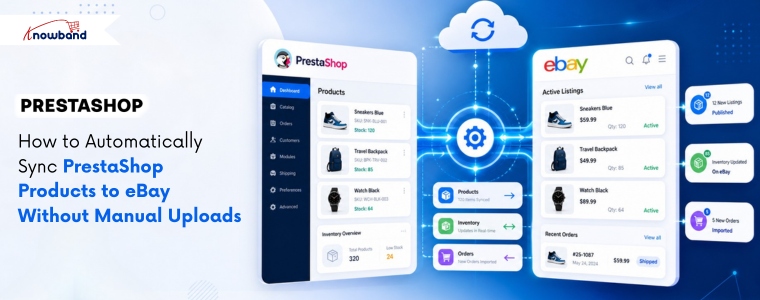
The PrestaShop eBay Integration Module is an e-commerce plugin that connects your PrestaShop store directly to your eBay seller account. It automates product listing, inventory updates, order imports, and price synchronisation, all from inside your PrestaShop admin panel. Store owners who sell across multiple channels use it to eliminate the double-entry problem that slows down growth. Knowband developed this module specifically for PrestaShop merchants who want to expand to eBay without building a separate workflow for it.

Core Features of the PrestaShop eBay Marketplace Integration Module

Bulk Product Listing from PrestaShop to eBay

The eBay PrestaShop Integrator lets you push entire product categories to eBay in one action. You map your PrestaShop categories to eBay categories once, and the module handles the rest. This removes the need to list products one by one, which is particularly valuable for stores with large catalogues.

Real-Time Inventory and Price Sync

Whenever a product sells on either platform, stock levels update across both stores automatically. Additionally, price changes made in PrestaShop reflect on eBay without manual intervention. This two-way sync keeps your data accurate regardless of where the sale happens.

Order Import and Centralised Management

eBay orders come into your PrestaShop back office directly through the PrestaShop eBay API Integration Module. Furthermore, you process, ship, and track everything from one dashboard. There is no need to log into eBay separately just to manage fulfillment.

Attribute and Variation Mapping

Products with multiple sizes, colors, or configurations map cleanly to eBay’s variation system. The eBay PrestaShop Connector handles attribute matching so your listings display correctly on eBay without reformatting each variant by hand.

Category and Condition Mapping

The Prestashop eBay Marketplace Module lets you define eBay-specific conditions (new, used, refurbished) and assign the right eBay category to each product group. Moreover, this ensures your listings meet eBay’s requirements and appear in the correct search results on the marketplace.

The Standout Feature: Profile-Based Listing Rules

Most integration modules push your PrestaShop data to eBay as-is. The PrestaShop eBay Integration Addon goes further by letting you create listing profiles and predefined rule sets that control how specific product categories appear on eBay. Want to apply a 10% price markup to all electronics listed on eBay, while keeping apparel at the original price? A profile created through the Knowband Prestashop eBay Marketplace Module handles that without touching individual products.

What makes this genuinely different is flexibility at scale. You are not locked into a one-size-fits-all sync. Instead, you define the rules once per product group, and the module applies them automatically on every subsequent upload or update. How many integration tools let you do that without custom development?

Frequently Asked Questions

How do I sync PrestaShop products to eBay automatically?

The PrestaShop eBay Integration Module syncs your products automatically by connecting both platforms through eBay’s official API. After initial setup and category mapping, the module pushes new products and updates existing listings whenever changes occur in your PrestaShop catalog. No manual uploads are required after configuration.

Does the PrestaShop eBay Integration Plugin support product variations?

The PrestaShop eBay Integration Plugin fully supports product variations including size, color, and custom attributes. It maps PrestaShop combinations to eBay’s variation structure automatically, so multi-variant listings appear correctly on eBay without manual reformatting.

Is the PrestaShop eBay Integration Module compatible with all PrestaShop versions?

The PrestaShop eBay Integration Module is built for PrestaShop 1.6 and above, including PrestaShop 8.x. Additionally, it connects through eBay’s official API, which means it works across all major eBay marketplaces including eBay US, UK, Germany, and Australia.

How does the eBay PrestaShop Connector handle orders?

The eBay PrestaShop Connector imports eBay orders directly into your PrestaShop admin panel in real time. You manage shipping, tracking, and fulfillment from PrestaShop alone — there is no need to process orders separately inside eBay Seller Hub.

Will the module keep my inventory accurate if I sell on both PrestaShop and eBay simultaneously?

The PrestaShop eBay API Integration Module runs a two-way inventory sync that updates stock levels on both platforms whenever a sale occurs. Therefore, if a product sells on eBay, PrestaShop reflects the new quantity immediately, and vice versa. This prevents overselling across channels.

How much does the PrestaShop eBay Integration Addon cost?

Pricing for the PrestaShop eBay Integration Addon varies by provider and license type (single store vs. multi-store). Most commercial modules are available as one-time purchases or annual subscriptions. It is best to check the official module page on Knowband’s website for current pricing and what each plan includes.

Can I control how my products appear on eBay pricing, titles, and conditions?

The module includes profile-based listing rules that let you set custom pricing rules, eBay-specific titles, and product conditions per category. Consequently, you can list the same product at a different price on eBay than on your PrestaShop store, without editing each product individually.

Start Selling on eBay Without the Manual Work

The PrestaShop eBay Integration Module removes the biggest barrier to multichannel selling: the operational cost of keeping two platforms in sync. Your catalog, inventory, pricing, and orders all connect through one module, and the setup pays for itself the first week you stop doing it manually. Visit Knowband to explore the module, review current pricing, and start your eBay expansion on a foundation that actually scales.


Build an Amazon-Like Marketplace in PrestaShop with a Multi-Vendor Module

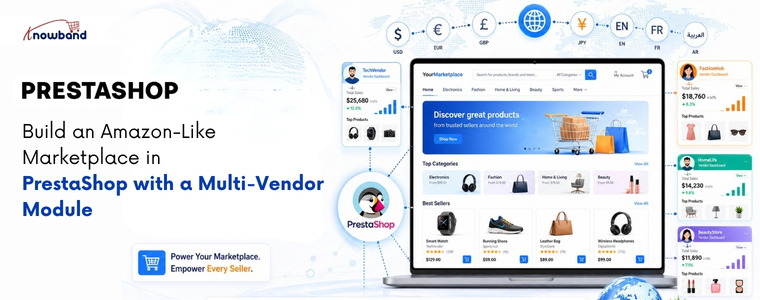
Yes! You can create a marketplace in PrestaShop by installing a PrestaShop Multi-Vendor Marketplace Module by Knowband that allows multiple vendors to register, manage their own store, and list products individually. This setup of the PrestaShop Multi Vendor Marketplace gives you centralised admin control, automated commission tracking, and individual vendor dashboards, without hiring a technical team to build from scratch.

Why PrestaShop Works Well for a Multi-Vendor Marketplace

PrestaShop is an open-source eCommerce platform used by over 300,000 merchants worldwide. Its modular structure makes it a practical choice for marketplace development because you extend what already works rather than rebuilding core functionality.

The prestashop platform natively supports multiple languages, currencies, and easy-to-handle store configurations. When you add a PrestaShop Multi Vendor Module  on top of that foundation, you get a marketplace that handles seller management, product listings, and order routing in one place. That combination is what makes it a genuine alternative to building on a proprietary platform.

According to most developers and merchants who have worked with both PrestaShop and competing platforms, PrestaShop offers more customisation control at a lower total cost, particularly for businesses that want marketplace features without the licensing fees of enterprise solutions.

What a Multi-Vendor Module Actually Does

The Prestashop Multivendor Module allows the sellers to register theirself as seller and list products. All the functionalities like approving seller, product, commission are handled by store admin from the backend.

Key Features of Knowband Prestashop Multivendor Listing Module

Vendor Registration and Approval
Sellers register through a front-end portal. The admin reviews each application and approves or rejects it. Furthermore, approved vendors get access to their own dashboard where they manage listings, orders, and payouts.

Separate Seller Storefronts
Each vendor operates their own product catalogue within your marketplace. They set prices, manage stock, and define their shipping for their listings. All purchases, however, go through your central checkout, so payment collection and commission stays under your control.

Commission Tracking and Payouts
The module automatically calculates your platform commission for every sale. For example, if you set a 12% commission on electronics, the system deducts that amount and generates a payout report for the vendor. You process the remaining balance manually or through an integrated payment options.

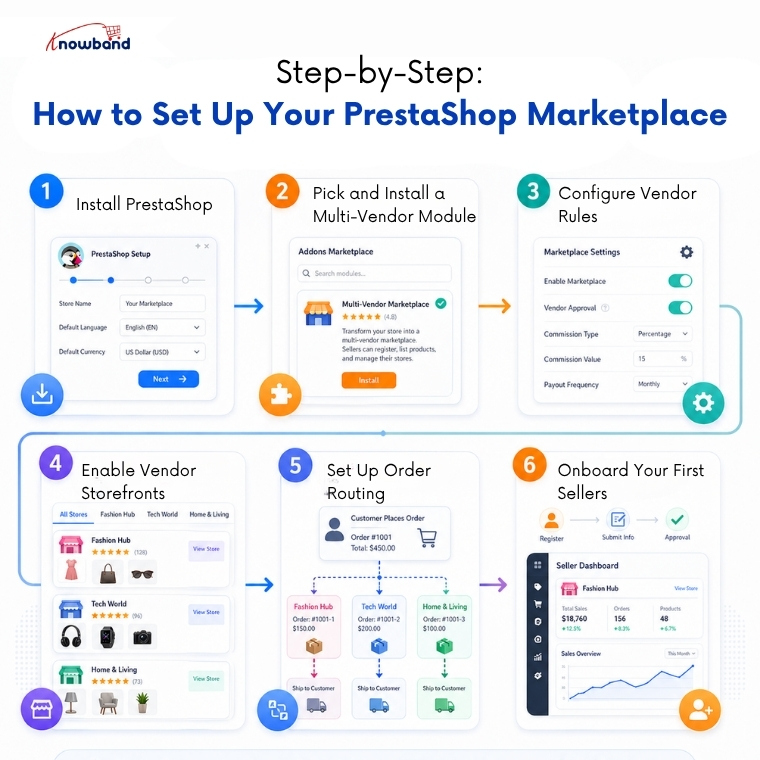
Step-by-Step: How to Set Up Your PrestaShop Marketplace

Step 1- Install PrestaShop
Download the latest PrestaShop version from the official site. Run the installation, set your store name, base currency, and primary language. Keep the admin credentials secure from the start.

Step 2 – Pick and Install a Multi-Vendor Module
Go to the PrestaShop Addons marketplace and search for PrestaShop Multi Vendor Module. Webkul’s Multi-Vendor Marketplace module is a dependable choice with broad feature coverage. Install it through the Module Manager inside your admin panel.

Step 3- Configure Vendor Rules
Open the module settings and define how vendor registration works. Set whether vendors need manual approval or can activate automatically. Establish your commission rates at this stage — either a flat percentage across all categories or different rates per category.

Step 4- Enable Vendor Storefronts
Turn on public-facing vendor pages. Each seller gets a dedicated storefront page showing their products, ratings, and basic business information. This gives buyers confidence and gives vendors a reason to promote their store URL.

Step 5- Set Up Order Routing
Configure how orders split between vendors when a buyer purchases from multiple sellers in one transaction. Most modules handle this automatically, but verify the settings match how you want fulfillment to work.

Step 6- Onboard Your First Sellers
Open registration and invite sellers to sign up. Prepare a short onboarding guide covering how to list products, set shipping options, and read their dashboard reports. Clear instructions reduce support requests significantly.

Why Customers Prefer Knowband’s Prestashop Multi Seller Listings Module

A functional marketplace needs more than product listings. These features separate a professional setup from a basic one:

  • A vendor dashboard with real-time order and earnings data
  • Product approval controls so admin reviews listings before they go live
  • A customer review and rating system for each vendor
  • Dispute management plugins for handling order problems between buyers and sellers
  • SEO-friendly vendor pages that search engines can index independently
  • Automated commission reports that vendors can download themselves

FAQ

Q1: Do I need a developer to build this marketplace?
Not necessarily. Prestashop Multi-vendor Marketplace module are designed for installation through the admin panel. However, if you want custom design changes or specific integrations, a developer saves time.

Q2: What is the best multi-vendor module for PrestaShop?
Knowband’s Prestashop Multi-Vendor Marketplace module covers the widest range of features including commission management, vendor dashboards, and shipping configuration.

Q3: Can vendors set their own shipping rates?
Yes. This Prestashop Multivendor Marketplace modules allow vendors to define their own carriers, delivery zones, and shipping costs independently from the main store settings.

Q4: How do vendor payouts work?
The Prestahsop Multi Vendor marketplace module owner collects all payments at checkout. This marketplace creator module generates commission-based payout reports for each vendor. You then transfer the vendor’s share manually or through tools like PayPal, bank transfer, or a payout integration.

Q5: How many vendors can PrestaShop support?
There is no hard vendor limit. Performance depends on your hosting environment. A well-configured VPS or dedicated server handles hundreds of active vendors and thousands of product listings without issues.

Conclusion

PrestaShop gives you a solid starting point, and the PrestaShop Multi Vendor Marketplace module fills in everything else needed to run a working marketplace. Set up vendor registration, configure your commissions, enable seller storefronts, and you have a platform where independent sellers can operate alongside each other under your brand. The technical barrier is lower than most people expect, and the operational control you retain is higher than most hosted marketplace solutions allow.


Why AI Isn’t Recommending Your Products (And How to Fix It)

Direct answer: AI usually ignores your products when your data lacks structure, your URLs confuse crawlers, and your website fails LLM protocols. Use a PrestaShop llms.txt generator and clean URLs to improve AI visibility and increase your chances of being surfaced in answers.

Understanding the Real AI Visibility Problem

Most merchants blame spammy backlinks for the real AI visibility from LLMs. However, that misses the point. AI models like ChatGPT, Gemini, and Claude read your site differently than Google does. They need explicit instructions from your content. Additionally, they require clean URLs and structured text files.

Your product may rank on Google. Yet, that does not guarantee AI visibility. These two systems operate separately. Therefore, you need a dedicated strategy for large language models on your PrestaShop store.

Why Traditional SEO Fails for LLMs

  • Googlebot crawls JavaScript. LLMs do not.
  • Keywords matter to search engines. Structure matters to AI.
  • Backlinks build domain authority. Meanwhile, clean data builds machine trust.

A furniture store ranked #2 for “office chair” on Google. Nevertheless, ChatGPT never recommended their products. Why? Their URLs contained random numbers. Additionally, their site lacked an LLMs.txt file. Consequently, AI could not fetch the information to their systems.

Step-by-Step Fixes to Regain AI Recommendations

Follow these three steps. Each targets a specific LLM requirement for your PrestaShop store.

Step 1: Deploy an LLMs.txt File Immediately Using the Knowband Prestashop LLMS.txt File Generator

Use a PrestaShop llms.txt file generator addon to generate an llms.txt automatically  to create a machine-readable map of your store. This file helps AI systems locate key pages faster

How to create LLMs.txt for PrestaShop:

  • Download the PrestaShop LLMs.txt Generator Module
  • Add the store details in the configurations
  • Select the crawlers of LLMs models like gptbot, Claude Anthropic bot, DeepSeek bot, and many more which you want to be active
  • Select the content that you want to add on the LLMs.txt file, e.g., specific products, categories, or CMS pages
  • Run the cron job. Your LLMs.txt file will update automatically on the server

Practical example: An electronics retailer, Eddie Sales, added an LLMs.txt file pointing to 500 product pages. Within one week, Claude and Perplexity started recommending their electronic items. As a result, AI traffic increased by 180%.

Step 2: Optimise Every URL for AI Parsing

AI models read URL content. They extract meaning from slashes and words. For instance, a URL like /p?id=3847 tells AI nothing. In contrast, a URL like /men-leather-boots-brown-size-10 tells AI everything.

How to optimize PrestaShop URLs:

  • Download the PrestaShop SEO URL Optimizer Module
  • Remove product ID, category ID, and supplier ID from the URLs of the catalog
  • Remove .html from the URLs of the catalog
  • Manage duplicate URL rewrite products

Example before optimization:
https://psm.knowband.com/urlcleaner/16/en/casual-dresses/3-printed-dress.html

Example after optimization:
https://psm.knowband.com/urlcleaner/16/en/casual-dresses/printed-dress.html

After enabling the remove product ID option, the module removes the product ID from the URL. Both product URLs become clean and identical. This PrestaShop SEO URL Optimiser Module offers three redirection options including 301, 302, and 303 to the store owner.

Step 3: Write Product Data for Machine Consumption

LLMs prefer bullet points over paragraphs. Moreover, they value consistency over creativity. Write every product description as structured data first. Then, add human-friendly text second.

Machine-ready product format in product description from the backend:

  • Start with a one-sentence summary
  • List five to seven attributes as bullet points
  • End with a use-case statement

For example, a kitchenware brand rewrote 200 product descriptions. Each followed the same template. Each included material, dimensions, care instructions, and best use. As a result, AI recommendations tripled within two weeks.

Advanced AEO and GEO Strategies

Answer Engine Optimisation (AEO) and Generative Engine Optimization (GEO) require different tactics than traditional SEO. Therefore, apply these three techniques immediately on your PrestaShop store.

Use Direct Answers Above Product Descriptions

Place a 40–60-word direct answer at the top of every product page. Answer one specific question. For example, “What problem does this solve?” or “Who should buy this?” AI models extract these answers for featured snippets and voice search.

Build Internal Linking with Descriptive Anchor Text

LLMs follow links to understand relationships. Hence, use anchor text like “see our waterproof jackets” instead of “click here.” This teaches AI the context between products in your PrestaShop catalogue.

FAQ

Q1: What exactly is an LLMs.txt file?

A plain text file that lists your website’s most important pages. AI models can use it to better discover and understand your PrestaShop content.

Q2: How does PrestaShop SEO URL optimisation affect ChatGPT recommendations?

ChatGPT and similar AI systems use URL structure as a context signal. Clean, descriptive URLs help them understand product categories and attributes more clearly.

Q3: Can I use my existing sitemap.xml instead of LLMs.txt?

No. A sitemap.xml helps search engines, while an LLMs.txt file is a simpler, emerging format aimed at improving AI accessibility and content discovery.

Q4: How often should I update my LLMs.txt file?

Update it whenever you add or remove products. Weekly updates work well for most stores, while large catalogs may benefit from daily updates.

Q5: Will fixing URLs hurt my existing Google rankings?

No, if you use proper 301 redirects. Search engines typically handle this smoothly, and rankings stabilize over time.

Q6: Which AI crawlers should I enable in the LLMs.txt generator?

Enable GPTBot, Claude (Anthropic bot), PerplexityBot, and DeepSeek bot. You can also include Google-Extended for Google’s AI systems.

Conclusion

AI ignores your PrestaShop products for one clear reason. You have not made your site readable for language models. Google rankings no longer guarantee AI visibility. Therefore, deploy an LLMs.txt file using the PrestaShop LLMs.txt Generator Module today. Moreover, optimise every URL with the PrestaShop SEO URL Optimiser Module. Finally, write product data as structured answers. These three actions take one weekend. Yet, they have delivered AI recommendations for years. Instead, start building for LLMs. Your PrestaShop products deserve a place in every AI answer.

Best PrestaShop Product Recommendation Module to Boost Cross-Selling Sales

Quick Answer: The PrestaShop Automatic Related Product module is the most effective PrestaShop product recommendation solution available today. This automatically displays related, alike, and cross-sell products on any product page, home page, cart pages and many more, helping store owners increase average order value, improve product discovery, and reduce bounce rates without manual configuration.

What Is the PrestaShop Automatic Related Product Module?

The PrestaShop Automatic Related Product module is a powerful addon that intelligently links products together based on categories, tags, attributes, or custom rules. Unlike manual product linking, this addon automates the entire process , saving time while delivering a personalised shopping experience at scale.

Store owners who install the PrestaShop-related products addon immediately gain access to smart recommendation widgets that appear on product pages, checkout screens, and even email follow-ups. Therefore, customers see relevant suggestions exactly when purchase intent is highest.

Key Features of the PrestaShop Advance Related Product Module

Most related product modules stop at basic category matching, and that is exactly where they fall short. The PrestaShop advance related product extension, however, goes further by giving store owners real control over how products are connected and where recommendations show up.

Here is what it actually does:

Automatic product linking: Instead of manually pairing every product, the module reads shared attributes, categories, and tags to make those connections for you. As a result, when you add a new product, it gets picked up straight away with no extra steps needed.

Cross-sell widget placement: You are not limited to just the product page. In fact, recommendation blocks can appear on product detail pages, inside the cart, and even on the order confirmation screen. That means there are multiple touchpoints where a customer might spot something worth adding to their order.

Alike product suggestions: Sometimes a customer is simply not sold on what they are looking at and just needs to see something similar. For that reason, this feature surfaces comparable products before the visitor leaves, which cuts down on those dead-end browsing sessions that lead nowhere.

Custom rules engine: Not every store has the same needs, and that is perfectly fine. That is why admins can set their own priorities, cap how many products appear, control the display order, and exclude anything that should not show up in recommendations, all from one place.

Responsive design: Whether a customer is shopping on a phone, tablet, or desktop, the recommendation sliders and grids adjust to fit the screen properly. In other words, nothing looks out of place or broken regardless of the device being used.

Multi-language and multi-shop support: For stores running across different regions or operating more than one shop, this feature handles everything from a single back-office. As a result, each shop can have its own setup without things getting unnecessarily complicated.

Why the PrestaShop Related Products Module Outperforms Manual Linking

Manual related product linking demands constant maintenance, especially as store catalogs grow. However, the Prestashop Automatic Related Product system eliminates that overhead entirely.As your catalog grows or changes, product relationships update on their own so your recommendations stay relevant without you having to revisit them manually. Keeping that consistency across a large product range by hand simply is not realistic. Product recommendations, when set up well, can become one of the stronger revenue drivers in your store.

🤖 WANT TO RECOMMEND YOUR PRODUCT THROUGH AI Assistant?


Recommend Products  with a Prestashop AI Chatbot using Popular LLMs


Answer customer questions 24/7, suggest products based on the queries, reduce cart abandonment, and free up your support team, all with one smart AI Chatbot for Prestashop.

Try the demo for Free Now →

Frequently Asked Questions

Q: What is the PrestaShop Automatic Related Product module for PrestaShop?

A: It is a PrestaShop addon that finds and shows related, similar, or complementary products on product and cart pages based on rules you define. No manual linking required.

Q: How does it help increase revenue?

A: Suggestions appear on the product page and in the cart, where shoppers are already considering a purchase. Seeing a relevant add-on at that moment makes it easy for them to throw it in which naturally lifts your average order value.

Q: Will it work with my theme?

A: In most cases, yes. The module connects through PrestaShop’s native hook system, so it fits into standard and custom themes without extra styling work.

Q: Can I control how many products show up in each widget?

A: Yes. From the settings panel you can set a minimum and maximum count, choose how products are sorted  by price, popularity, or relevance — and leave out any products or categories you do not want included.

Q: Does it work across multiple stores?

A: Yes. If you run more than one shop, you can set different recommendation rules for each from the same back-office.

Q: How is the alike product feature different from standard related products?

A: Standard-related products need to be assigned by hand. The alike product feature matches items by shared attributes and categories automatically,  so even products you added last week get picked up without any extra effort on your part.

Final Thoughts

If your store has more than a handful of products, manually maintaining related product links is a losing battle. Things get missed, catalogs change, and the whole setup quietly stops working. This Knowband Prestashop Product Recommendation Module takes that off your plate. You set your rules once, and it handles the matching from there, on product pages, in the cart, and at checkout. For most store owners, that kind of set-and-forget reliability is what makes it worth installing.