

Build an Amazon-Like Marketplace in PrestaShop with a Multi-Vendor Module
Build a multi vendor marketplace on Prestashop with ease using Knowband Prestashop Multivendor Marketplace Module.
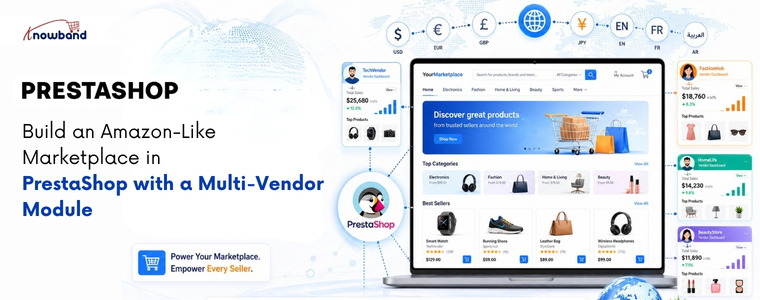
Yes! You can create a marketplace in PrestaShop by installing a PrestaShop Multi-Vendor Marketplace Module by Knowband that allows multiple vendors to register, manage their own store, and list products individually. This setup of the PrestaShop Multi Vendor Marketplace gives you centralised admin control, automated commission tracking, and individual vendor dashboards, without hiring a technical team to build from scratch.
Why PrestaShop Works Well for a Multi-Vendor Marketplace
PrestaShop is an open-source eCommerce platform used by over 300,000 merchants worldwide. Its modular structure makes it a practical choice for marketplace development because you extend what already works rather than rebuilding core functionality.
The prestashop platform natively supports multiple languages, currencies, and easy-to-handle store configurations. When you add a PrestaShop Multi Vendor Module on top of that foundation, you get a marketplace that handles seller management, product listings, and order routing in one place. That combination is what makes it a genuine alternative to building on a proprietary platform.
According to most developers and merchants who have worked with both PrestaShop and competing platforms, PrestaShop offers more customisation control at a lower total cost, particularly for businesses that want marketplace features without the licensing fees of enterprise solutions.
What a Multi-Vendor Module Actually Does
The Prestashop Multivendor Module allows the sellers to register theirself as seller and list products. All the functionalities like approving seller, product, commission are handled by store admin from the backend.
Key Features of Knowband Prestashop Multivendor Listing Module
Vendor Registration and Approval
Sellers register through a front-end portal. The admin reviews each application and approves or rejects it. Furthermore, approved vendors get access to their own dashboard where they manage listings, orders, and payouts.
Separate Seller Storefronts
Each vendor operates their own product catalogue within your marketplace. They set prices, manage stock, and define their shipping for their listings. All purchases, however, go through your central checkout, so payment collection and commission stays under your control.
Commission Tracking and Payouts
The module automatically calculates your platform commission for every sale. For example, if you set a 12% commission on electronics, the system deducts that amount and generates a payout report for the vendor. You process the remaining balance manually or through an integrated payment options.
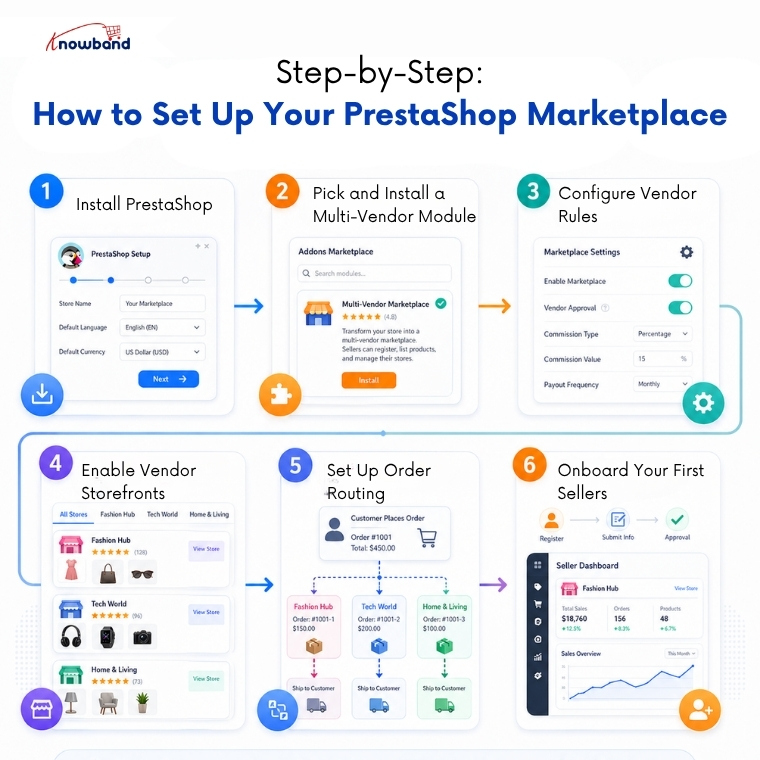
Step-by-Step: How to Set Up Your PrestaShop Marketplace
Step 1- Install PrestaShop
Download the latest PrestaShop version from the official site. Run the installation, set your store name, base currency, and primary language. Keep the admin credentials secure from the start.
Step 2 – Pick and Install a Multi-Vendor Module
Go to the PrestaShop Addons marketplace and search for PrestaShop Multi Vendor Module. Webkul’s Multi-Vendor Marketplace module is a dependable choice with broad feature coverage. Install it through the Module Manager inside your admin panel.
Step 3- Configure Vendor Rules
Open the module settings and define how vendor registration works. Set whether vendors need manual approval or can activate automatically. Establish your commission rates at this stage — either a flat percentage across all categories or different rates per category.
Step 4- Enable Vendor Storefronts
Turn on public-facing vendor pages. Each seller gets a dedicated storefront page showing their products, ratings, and basic business information. This gives buyers confidence and gives vendors a reason to promote their store URL.
Step 5- Set Up Order Routing
Configure how orders split between vendors when a buyer purchases from multiple sellers in one transaction. Most modules handle this automatically, but verify the settings match how you want fulfillment to work.
Step 6- Onboard Your First Sellers
Open registration and invite sellers to sign up. Prepare a short onboarding guide covering how to list products, set shipping options, and read their dashboard reports. Clear instructions reduce support requests significantly.
Why Customers Prefer Knowband’s Prestashop Multi Seller Listings Module
A functional marketplace needs more than product listings. These features separate a professional setup from a basic one:
- A vendor dashboard with real-time order and earnings data
- Product approval controls so admin reviews listings before they go live
- A customer review and rating system for each vendor
- Dispute management plugins for handling order problems between buyers and sellers
- SEO-friendly vendor pages that search engines can index independently
- Automated commission reports that vendors can download themselves
FAQ
Q1: Do I need a developer to build this marketplace?
Not necessarily. Prestashop Multi-vendor Marketplace module are designed for installation through the admin panel. However, if you want custom design changes or specific integrations, a developer saves time.
Q2: What is the best multi-vendor module for PrestaShop?
Knowband’s Prestashop Multi-Vendor Marketplace module covers the widest range of features including commission management, vendor dashboards, and shipping configuration.
Q3: Can vendors set their own shipping rates?
Yes. This Prestashop Multivendor Marketplace modules allow vendors to define their own carriers, delivery zones, and shipping costs independently from the main store settings.
Q4: How do vendor payouts work?
The Prestahsop Multi Vendor marketplace module owner collects all payments at checkout. This marketplace creator module generates commission-based payout reports for each vendor. You then transfer the vendor’s share manually or through tools like PayPal, bank transfer, or a payout integration.
Q5: How many vendors can PrestaShop support?
There is no hard vendor limit. Performance depends on your hosting environment. A well-configured VPS or dedicated server handles hundreds of active vendors and thousands of product listings without issues.
Conclusion
PrestaShop gives you a solid starting point, and the PrestaShop Multi Vendor Marketplace module fills in everything else needed to run a working marketplace. Set up vendor registration, configure your commissions, enable seller storefronts, and you have a platform where independent sellers can operate alongside each other under your brand. The technical barrier is lower than most people expect, and the operational control you retain is higher than most hosted marketplace solutions allow.
- Best PrestaShop SEO Module: 10 Must-Have Features to Improve Rankings
- Three Recovery Emails Recover 37% More Carts Than One: Building the Right PrestaShop Abandoned Cart Sequence
- How to Create an SEO-Friendly Blog in PrestaShop: A Practical Guide to Content, SEO & AI Search
- How to Turn Your OpenCart Blog Into a Revenue-Generating Content Strategy
- Integrating a Custom Payment Gateway in PrestaShop: Technical Requirements, API Flow, and Real-World OPC Challenges