Private Shop Addon for Prestashop: Perfect for Wholesale, VIP, or Members-Only Stores!

In today’s competitive eCommerce environment, offering exclusive access to certain products or services can be a significant advantage. Whether you’re running a wholesale store, a VIP program, or a members-only shop, controlling who can see and purchase from your store is essential. That’s where the Private Shop – Prestashop Addons comes in. Knowband’s Prestashop Private Shop addon is a powerful tool that helps online retailers create restricted, members-only shopping experiences.

In this article, we’ll explore how the Prestashop Private shop extension works, its key features, and why it’s the perfect solution for wholesale, VIP, or members-only stores.

About Private Shop – Prestashop Addons:

The Private Shop – Prestashop Addons is a module designed to limit access to your entire store or specific products. When installed, the restricted shop addon for Prestashop allows you to transform your shop into a private store where only registered or approved customers can view or purchase your items. Furthermore, this creates an exclusive environment for your customers, making it ideal for businesses that cater to VIPs, wholesalers, or specialized member groups.

Key Features of the Prestashop Private Shop Addon!
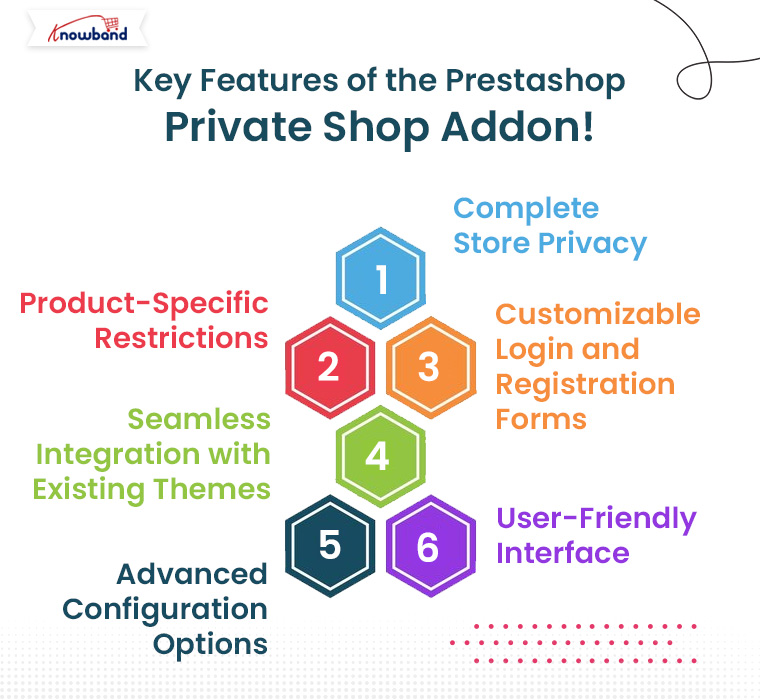
The Prestashop Private Shop extension is loaded with features that give you complete control over who can access your store and its products.
Below are some of its standout features:

1. Complete Store Privacy:

The Private Shop Prestashop module allows you to restrict access to your entire online store. This means visitors must log in or sign up to view products or even access the store’s content. Moreover, this feature is especially useful for businesses that want to limit sales to approved or registered customers only, such as wholesalers.

2. Product-Specific Restrictions:

If you don’t want to restrict access to your entire store, the Private Shop module lets you make individual products, categories, or pages private. For example, you might offer some products only to VIP members or restrict certain wholesale products from general customers. This flexibility ensures that different segments of your customers get personalized access, while others see only the products meant for them.

3. Customizable Login and Registration Forms:

To access your Prestashop Private shop, customers need to register and log in. Moreover, the add-on offers customizable login and registration forms that allow you to control the information you collect. Therefore, you can also approve or reject customer registrations manually, ensuring only qualified customers gain access to your store.
Knowband’s Prestashop Private Shop Addon

Create a secure shopping experience with the Prestashop Private Shop module, allowing you to restrict access to your store and offer exclusive products to registered customers.

SHOP NOW

4. Seamless Integration with Existing Themes:

The Private Shop Prestashop module integrates smoothly with your existing theme, ensuring a seamless user experience. It works with multiple versions of Prestashop, and it’s built to match the design and functionality of your store without causing any disruption.

5. Advanced Configuration Options:

The Prestashop Private Shop addon comes with advanced configuration options that allow you to fine-tune your privacy settings. You can select which customer groups have access, choose to display certain products to the general public while hiding others, and decide whether visitors see product prices before logging in. Furthermore, this customization ensures your store runs exactly as you need it to.

6. User-Friendly Interface:

You don’t need to be a technical expert to use the Prestashop Private Shop module. The module features an intuitive, user-friendly interface that makes setup and management simple. You can easily configure settings with a few clicks, ensuring your store privacy is maintained without hassle.

Benefits of Using the Prestashop Private Shop Addon!
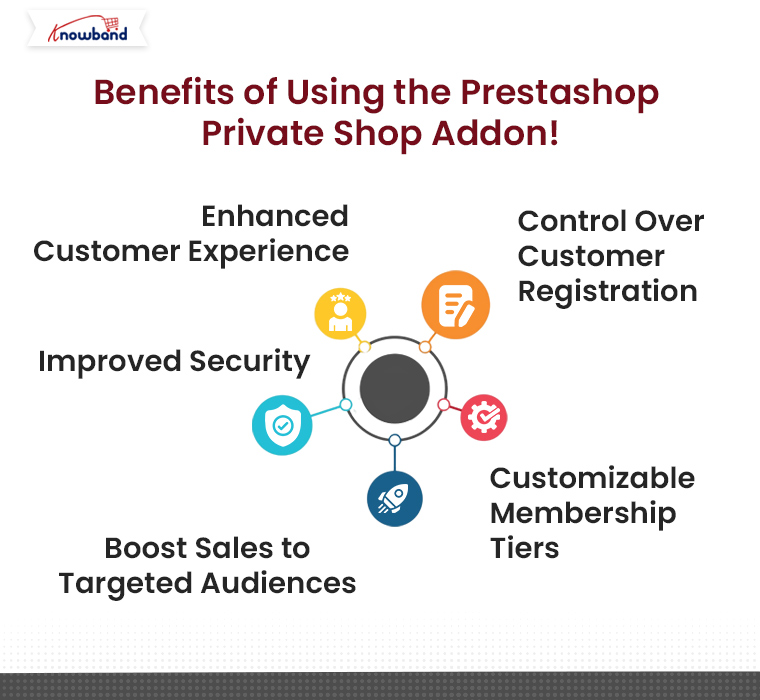
1. Enhanced Customer Experience:

Customers who are part of exclusive programs or members-only groups appreciate privacy and exclusivity. The Prestashop Private Shop extension allows you to offer a tailored shopping experience for them, increasing customer loyalty and engagement.

For example, wholesalers may prefer to see bulk pricing and exclusive product lines, while VIP customers could have access to limited-edition products. Offering such an exclusive experience makes customers feel valued and more likely to return for future purchases.

2. Improved Security:

By restricting access to sensitive products or pricing, you can protect your business from unauthorized or unwanted visitors. Moreover, this feature is particularly important for B2B sellers who may have wholesale pricing they don’t want to display publicly.
The Private shop module ensures that only approved customers can view products, adding an extra layer of security to your store.

3. Boost Sales to Targeted Audiences:

With the Prestashop Private shop, you can directly target your desired audience—be it VIPs, wholesalers, or loyal members. These groups are more likely to engage with your products and services when they know they have access to special or exclusive deals.

By focusing your efforts on these customers, you can foster a more targeted marketing approach, leading to higher conversion rates and increased sales.

4. Customizable Membership Tiers:

The Private Shop Prestashop module by Knowband allows you to create different levels of membership or access. You can grant some customers full access to all products while others have restricted access to specific categories or pricing tiers. This capability is particularly useful for wholesale businesses, where different customers might have access to different products and pricing based on their order volume or business type.

5. Control Over Customer Registration:

One of the most valuable features of the Prestashop Private Shop addon is its ability to give store owners control over who can register. If you’re running a wholesale or VIP shop, it’s crucial to ensure that only verified or approved customers can access your products. This addon allows you to manually approve every registration, ensuring that only legitimate buyers can view your product catalog.

Conclusion!

The Private Shop – Prestashop Addons is an essential tool for eCommerce businesses looking to offer exclusive, members-only access to their store or specific products. Whether you’re running a wholesale business, a VIP customer group, or a private members-only shop, the Prestashop Private Shop extension gives you complete control over who can access your store and its contents.

With its powerful features, such as customizable login forms, advanced configuration options, and seamless theme integration, the Private Shop module is the perfect solution for businesses looking to create an exclusive shopping environment. So, if you want to boost customer loyalty, increase security, and drive more targeted sales, this add-on is the ideal choice for your Prestashop store.

Empower Your PrestaShop Store Security with Knowband’s Top PrestaShop Modules!

Website security is one of the most important foundations of any successful online business. A secure store protects sensitive customer data, prevents financial losses, and preserves the reputation you have worked hard to build. As cyber threats continue to grow in sophistication, relying on basic security measures is no longer sufficient. For PrestaShop store owners, taking a proactive approach to blocking malicious bots, unwanted traffic, and suspicious IPs is essential to maintaining both performance and customer trust. A well-secured store also signals credibility to shoppers, which directly supports customer retention and long-term sales growth. Investing in the right security tools is not just about defense; it is about building a store that customers feel confident shopping in.

Importance of Website Security:

For businesses using PrestaShop, enhancing security doesn’t just protect against threats but also boosts customer confidence and ensures compliance with data protection laws. When it comes to website security, the topic covers several aspects, including SSL configurations, protection from spam and Bots, disabling shop access from particular countries, etc.
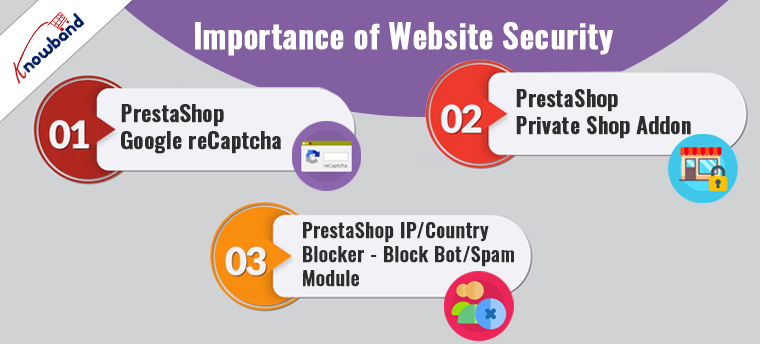
Here, we spotlight three essential PrestaShop modules designed to fortify your store’s security framework: PrestaShop Google reCAPTCHA, PrestaShop Private Shop Addon, and PrestaShop IP/Country Blocker.

🛡️ Related Read


How the IP Blocker for PrestaShop Shields Your Store Against Bots and Unwanted Traffic


Block malicious bots, spam accounts, and unwanted visitors by IP address, country, or user agent, a complete look at how the PrestaShop IP Blocker keeps your store secure and performing at its best.

Explore More About the IP Blocker Module

1. PrestaShop Google reCaptcha:

The internet is a vast space where security threats like bots and spam are ever-present. To safeguard your store from such nuisances, integrating the PrestaShop Google reCaptcha addon is a strategic move. Moreover, Knowband’s Prestashop v2 and v3 reCaptcha addon implements the advanced technology of Google reCAPTCHA, which distinguishes between human users and automated systems.

The beauty of Google reCAPTCHA is that it provides a seamless user experience by requiring minimal input from users, thus ensuring security without sacrificing usability. On top of that, the customers get an option to choose between Google reCaptcha v2 & reCaptcha v3 which are some of the most advanced captcha modules from Google. Thus, by adding this layer of security, you can prevent malicious activities and ensure that your interactions come from genuine users.

2. PrestaShop Private Shop Addon:

Privacy is a significant concern for many online shoppers. Following the same, Knowband’s PrestaShop Private Shop Addon caters to this need by allowing you to create an exclusive shopping environment. Furthermore, this module enables you to restrict access to your shop or specific products, making them accessible only to registered users.
Prestashop private shop module is an ideal solution for stores dealing with high-value goods, B2B transactions, or exclusive merchandise.
Additionally, it can serve as a tool for managing VIP customer experiences by providing access to special collections or promotions. Implementing this module not only enhances security but also gives you control over who views and purchases your products.

3. PrestaShop IP/Country Blocker – Block Bot/Spam Module:

Last but not least, to further enhance your store’s security posture, the PrestaShop IP/Country Blocker module is indispensable. The IP Blocker addon for Prestashop allows you to block access based on IP addresses or geographic locations.
Moreover, its primary function is to prevent bots and spam from harming your site, which can be particularly useful if you face frequent attacks from specific regions or need to comply with regional compliance requirements. Therefore, with the ability to customize restrictions, you can tailor security settings to best fit your business needs, ensuring that your store remains secure and compliant with international laws.

In the END!

In conclusion, strengthening your PrestaShop store with these top security modules can drastically reduce vulnerabilities and enhance customer trust. By implementing Google reCaptcha, creating a private shopping experience, and blocking unwanted IP addresses or countries, you ensure that your PrestaShop store remains a secure, trustworthy, and compliant digital shopping destination. Invest in these security enhancements to protect your business and provide your customers with a safe and enjoyable shopping experience.
Moreover, if you have any queries/suggestions regarding our website security special extensions, you can reach out to us at our email address support@knowband.com.

Why Do Businesses need a ‘Private Shop’?

Ever heard the word ‘Private Shop’? There are a few companies that allow you to see their products only when you register. The website content can be accessible after signup. 

While exploring articles and research papers, websites usually show a popup and ask for registration to access the entire content. They show you limited content to build up curiosity and for more details, you have no choice but to register.

Those websites were privatized and the same can be done for your eCommerce store. You can make your Opencart, PrestaShop, or Magento store private using ‘Private Shop’ modules. Why do you need a private shop? Go ahead and find out why.

This article is a compilation of 101s of ‘Private Shop’ for B2B businesses and other enterprises

What is a private shop?

When a store is accessible to registered clients only, the store comes under the ‘Private Shop’ category. Making a web store private allows you to effortlessly regulate the store’s sales. This way, the online store administrator can prevent customers from viewing the store, goods, or categories without first logging in or registering.

You can create a private customer group and allocate numerous private groups to each product/category, each of which is only accessible by the given group of consumers. Send emails to a specific group of clients about new offers, discounts, collections, and so on.

Why do businesses need a Private Shop?

If you have products for both B2B and B2C on your eCommerce site, you’ll need to create a private environment for each, which is where the Private Shop option comes in.

  • B2B businesses require private platforms

The wholesale group may get complete access to the store, whereas the general group is limited to a single product or category. You can create fully functional web pages and categories for restricted consumers and users.

The business works in a systematic manner and giving access to retailers for the wholesale prices will affect their business. A ‘Private Shop’ gives privacy to B2B businesses.

  • Increased registration and email subscribers

A ‘Private Shop’ can also benefit B2C businesses. If you run campaigns and tell your customers that you are running discounts on your store, it will influence them to register with your brand and get access to those discounted products. 

In a way, you are forcing them to register to get access to your store. This increases the registration on your store and builds up your email list.

  • Early access to registered customers for high-end products: 

Many businesses sales luxurious products or merchandise that have limited editions should go for a ‘Private Shop’. If you have a small set of audiences for your brand that purchases high-end products, you definitely don’t want everyone to access it.  

A limited group of people can be notified of this. As a result of which they feel privileged and you will be able to provide a satisfying customer experience.

How to convert your store into Private Shop?

You are just three steps away from converting your store into a Private Shop.

  1. Purchase the module and unzip the files and refer to the user manual
  2. Install the module on your respective website with the source code.
  3. Configure the Private Shop settings and begin!

Features you should consider before buying a private shop module

  • The store owner has the ability to construct a fully private shop
  • Create secret groups with IP addresses and only allow some of the clients
  • Visitors will not be able to see private products or categories
  • Also, work as a permissions extension for catalogs
  • Each product/category can have several groups assigned to it by the administrator
  • Customers can view their personal products/categories by a private group
  • Allow Google to crawl the private pages of your website
  • Each product/category can be made private by the administrator
  • In addition, the admin should have the ability to send emails to members of a private group
  • The product label/product label image can be changed by the administrator
  • Have a customized storefront with a registration form that allows changing background

Live Demo for Private Shop modules

Click here to see the PrestaShop demo

You can check the live demo for OpenCart here

Check the live demo for Magento from here

Prestashop Private Shop Addon – User Manual

1.0 Introduction

The eCommerce store owner can create his own private shop and control the sales of the store products to a selected group of customers. Knowband offers PrestaShop Private Shop Module which allows the eCommerce store owner to make the whole website as a private store. The admin can privatize the store products, categories and pages also. With the help of this Restrict categories and products addon the store admin can force the customers to login or register to visit the eCommerce store or selective section.

1.1 Salient features of Prestashop Private Shop Plugin

  • The eCommerce store admin can force the customers to login/register for accessing the website.
  • The admin can set the look and feel of the login/signup page.
  • Sends an email to the new customer whenever new registration occurs. An email is received by the customers to validate their email.
  • The Restrict categories and products module allow the e-merchant to apply the settings to approve the newly registered customer accounts automatically or manually.
  • The admin can allow/disallow Google crawler to index the private shop by enabling or disabling the settings.
  • The Restrict categories and products addon allow the admin to modify the login/signup title text.
  • The login/signup form can be in left, right or center position.
  • The admin can activate or deactivate new private registration option from the admin interface.
  • The admin can show an image, color or video to display as the background of the login/signup form.
  • The admin can set the entire shop or any specific selection as private.
  • Specific IPs are always allowed to access the eCommerce store.
  • The Prestashop Private shop addon provides a list of the private customers in the admin interface.
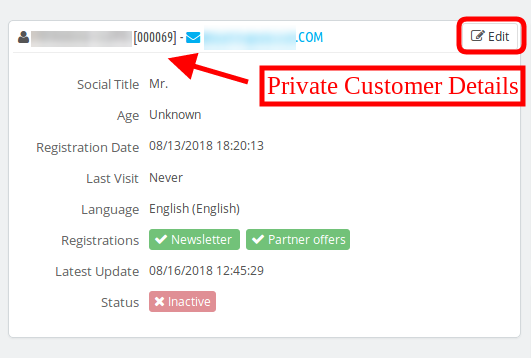
  • The store admin can view the details of the private customers and validate the newly registered accounts.
  • The store admin can also delete a private customer from the admin interface.
  • The Prestashop Private shop extension is multi-store compatible and offers multi-lingual support also.
  • The user-friendly and mobile responsive layout offered by this Restrict categories and products makes it hassle-free.

2.0 Installation Guide of Prestashop Private Shop

Once you purchase the Prestashop module from the store you’ll get these files:

  1. The zipped file that consists of the source code of this Prestashop Private shop addon.
  2. User Manual

Follow the following steps to install the Prestashop Private shop addon:

  • First of all, you need to unzip the zipped file. It includes some files and folders.
  • After that, you need to copy the overall content of the folder and paste them into the “Modules” folder of the store’s directoryYou can follow the path – Root Directory/modules/.
  1. Now you can install the Restrict categories and products addon. You can find that inStore Admin ->Modules and Services.It would be shown as below:

Now you just need to click on “Install” button to install this Prestashop Private shop addon. A confirmation pop-up will be shown. Click on “Proceed with the installation” option. This step will install the Private Shop Prestashop module and show notification – “Module(s) installed successfully”.

3.0 User Guide for Prestashop Private Shop

Using this Restrict category and products module, the admin can view the configuration options as shown below. Here, the eCommerce store admin can customize the Prestashop Private shop addon according to the requirements. The admin can configure these settings:

  • General Settings
  • Access Settings
  • Private Customers

3.1 General Settings

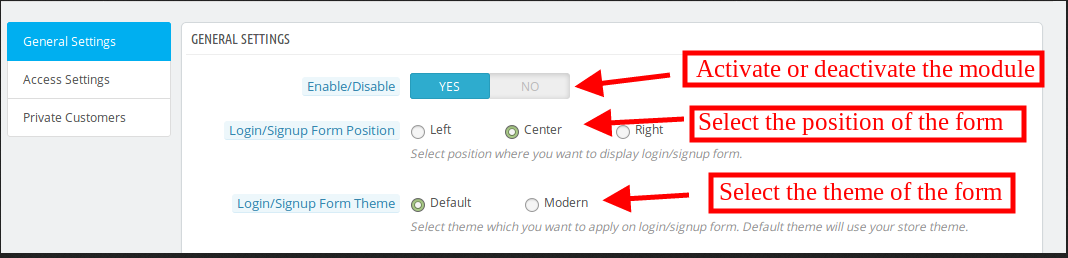
In the general settings submenu option, the eCommerce store admin can apply the settings to display and manage the look and feel of the login/signup form.

  • Enable/Disable:The Prestashop eCommerce store admin can activate/deactivate the functionality just by a single click.
  • Login/Signup Form Position: The admin can set the position to display the login/Signup form. The admin can select left, right or center position.

  • Login/Signup Form Theme: The admin can set the default or modern theme as per the requirement. While selecting the modern theme, these options will be displayed.
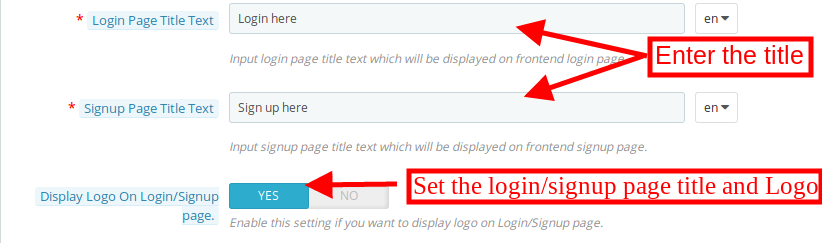
  • Login Page Title Text: Here the admin can set the title text which will be displayed on the Login page.
  • Signup Page Title Text: The admin can also set the signup page title text. The admin can insert the text in multiple languages.
  • Display Logo on Login/Signup Form: The Prestashop store admin can show a logo on the login/signup page by enabling the settings.

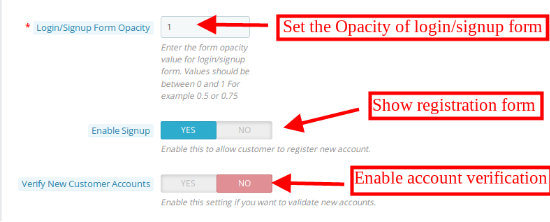
  • Login/Signup Form Opacity: The admin can enter form opacity value. The value can be between 0 to 1. For showing login form transparent, the store admin can set the form opacity 0.
  • Enable Signup: The admin can activate this option for allowing the customers to register a new account.

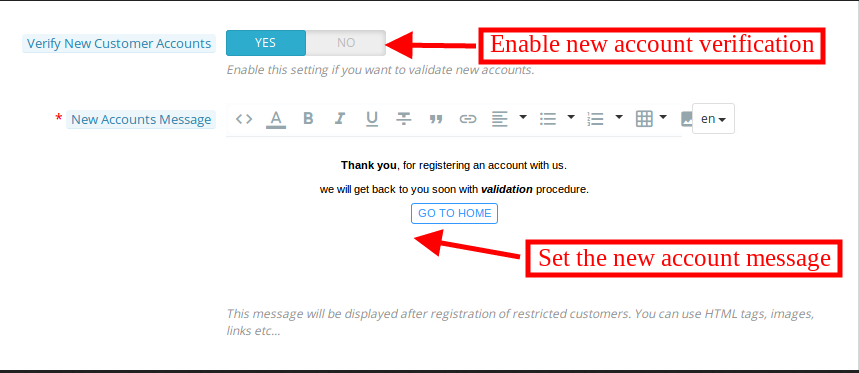
  • Verifying new Customer Account: If the admin wants to validate new accounts, he can enable this setting. After enabling this setting, the above option will be displayed:
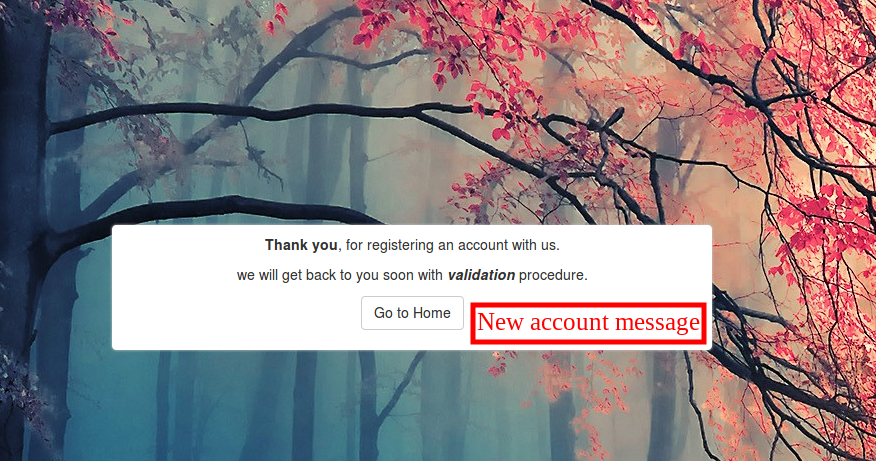
  • New Account Message: The admin can set the message to show for newly registered accounts. Admin can insert HTML tags, images, and links.

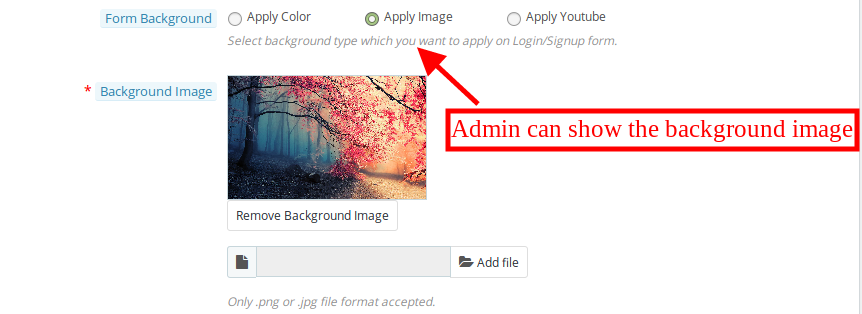
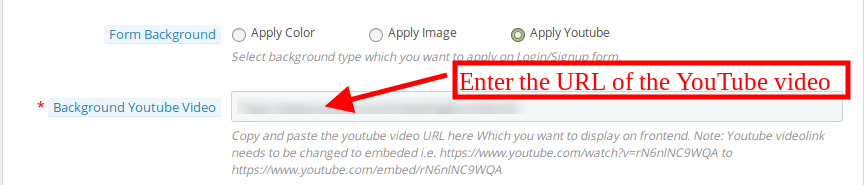
  • Form Background: The admin can select the background type which he wants to apply for the login or sign/up form. The admin can insert image, apply color or show video.
  • Apply colors: The admin can select the color from the color picker box. This color will be applied in the background of the login/signup page.

  • Background image: The admin can select the image for showing as a background image on the login/signup form.

  • Apply YouTube: The Prestashop store owner can insert YouTube video link from the admin interface. The e-merchant can enter the embeded link of the Youtube URL.

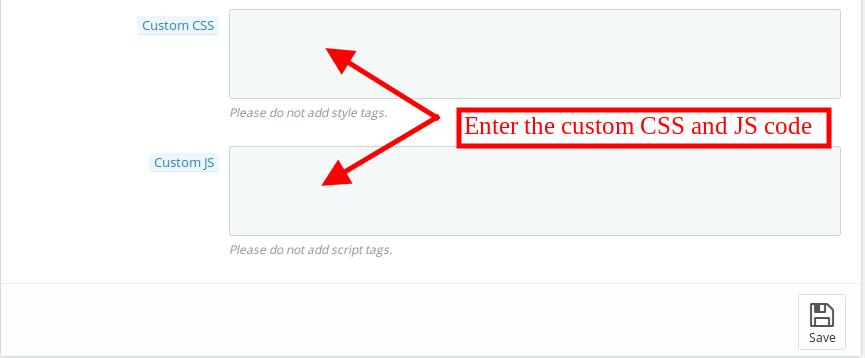
  • Custom CSS:Advance user can insert custom CSS code.
  • Custom JS:The store admin can also add custom JS code for further customization.

3.2 Access Settings

The Prestashop Private shop extension allows the admin to set the accessibility according to the requirements. The eCommerce store admin can privatize the entire website or selected portion of the store. These options are available in the access settings sub-menu.

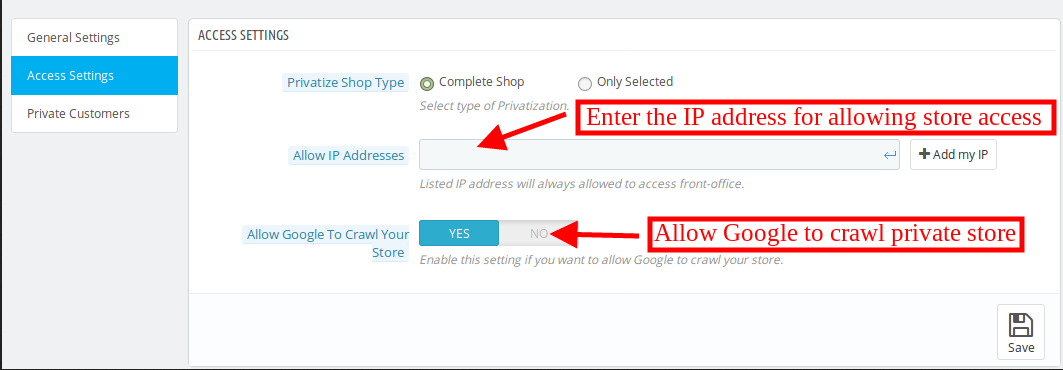
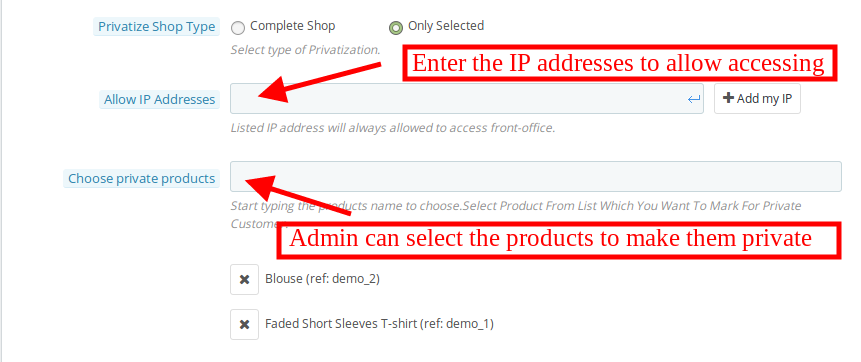
Privatize Shop type: The store admin can select the type of privatization. The admin can select complete shop or selected items.

3.2.1 While Selecting Complete Shop

  • Allow IP addresses: Admin can list the IP address. The listed IP addresses will be allowed to access front-office every time.
  • Allow Google to Crawl Your Store:The store admin can enable or disable the settings to allow or disallow Google to crawl.

3.2.2 While Selecting Selected option

  • Allow IP addresses: Admin can list the IP address. The listed IP addresses will be allowed to access front-office every time.
  • Choose Private Products: The admin can enter the product name. The admin can mark the products for the private customer.

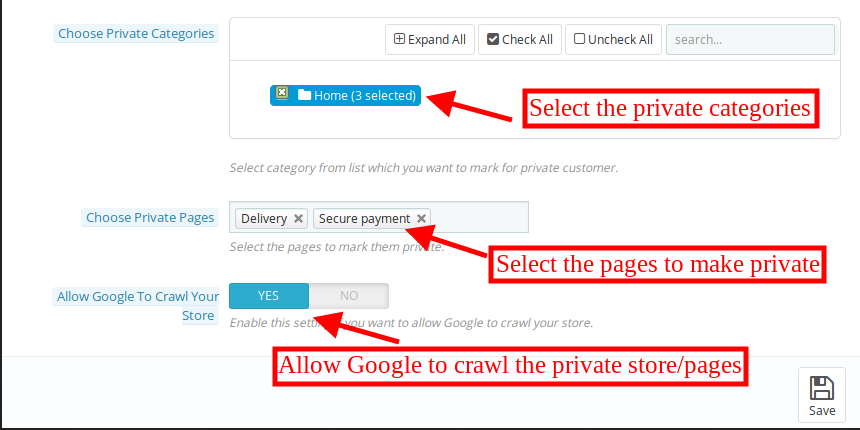
  • Choose Private categories:The store admin can select the categories, which he wants to mark for private customers.
  • Choose Private pages:Select the pages to mark as private.

  • Allow Google to Crawl Your Store: The store admin can enable or disable the settings to allow or disallow Google to crawl.

3.3 Private customers

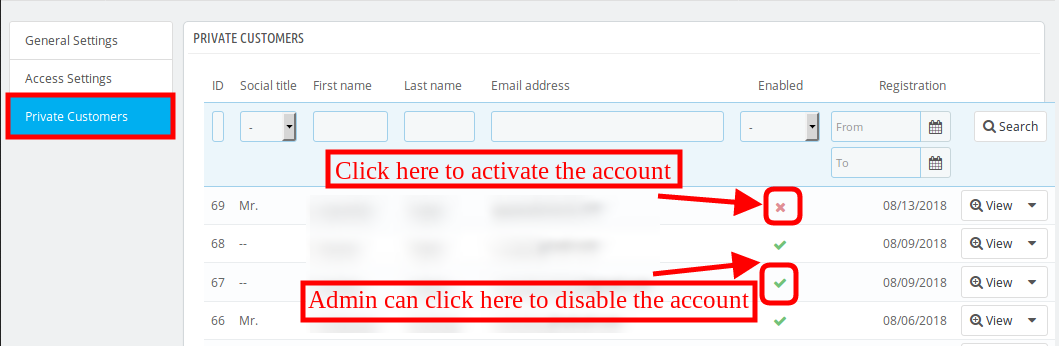
Once the eCommerce store admin has Restrict categories and products using the module, they will see the list of private customers from the admin interface. The admin can view the particular customer’s details and can verify the newly registered customer’s account.

  • For verifying the newly registered customer account the admin just needs to click on the highlighted icon.

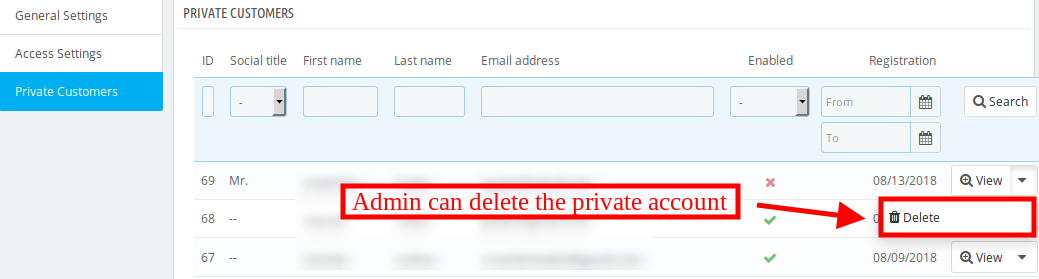
  • Admin can delete the customers account from the admin interface just by clicking on the “delete” option.

  • Admin can also view the details of the private customers from the admin interface.

4.0 Front-end interface

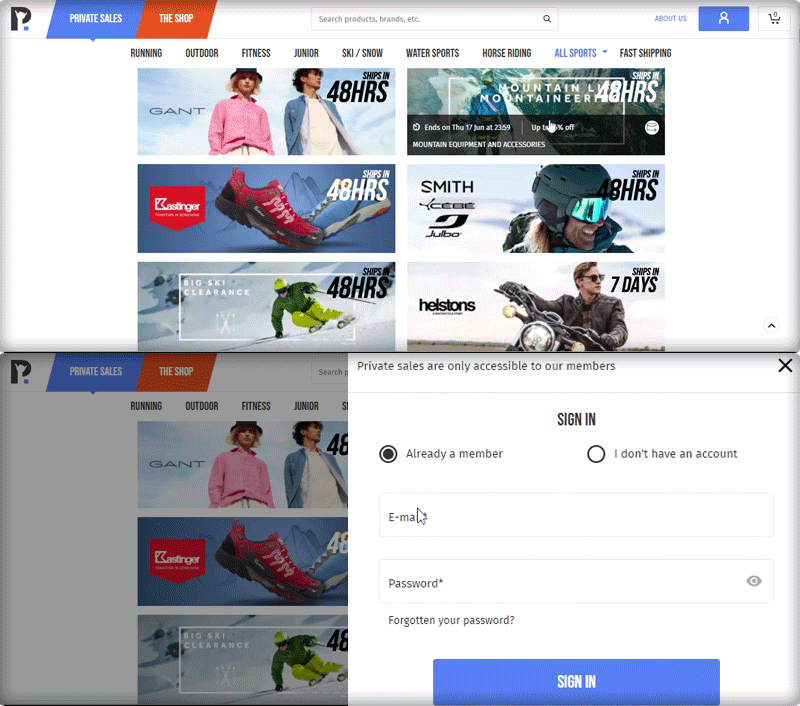
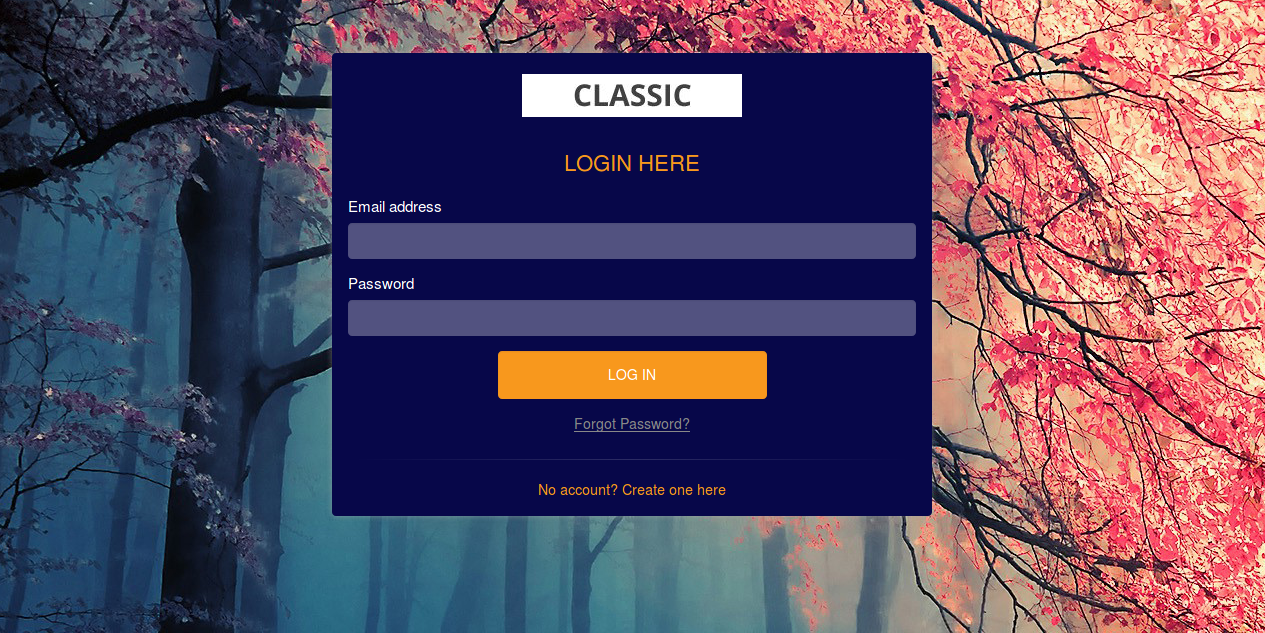
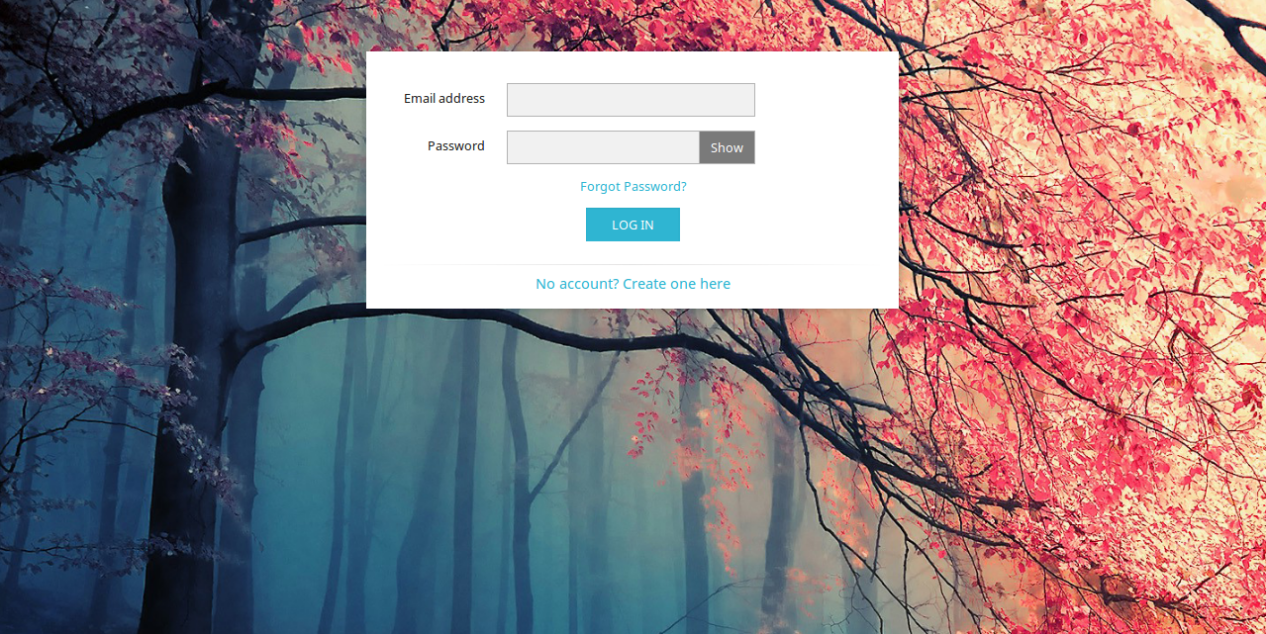
In the frontend interface, the customers can view the login/signup page as per the settings. They can login or register to view the products. If the admin select the modern signup/login format then the front-end interface will be displayed as shown below:

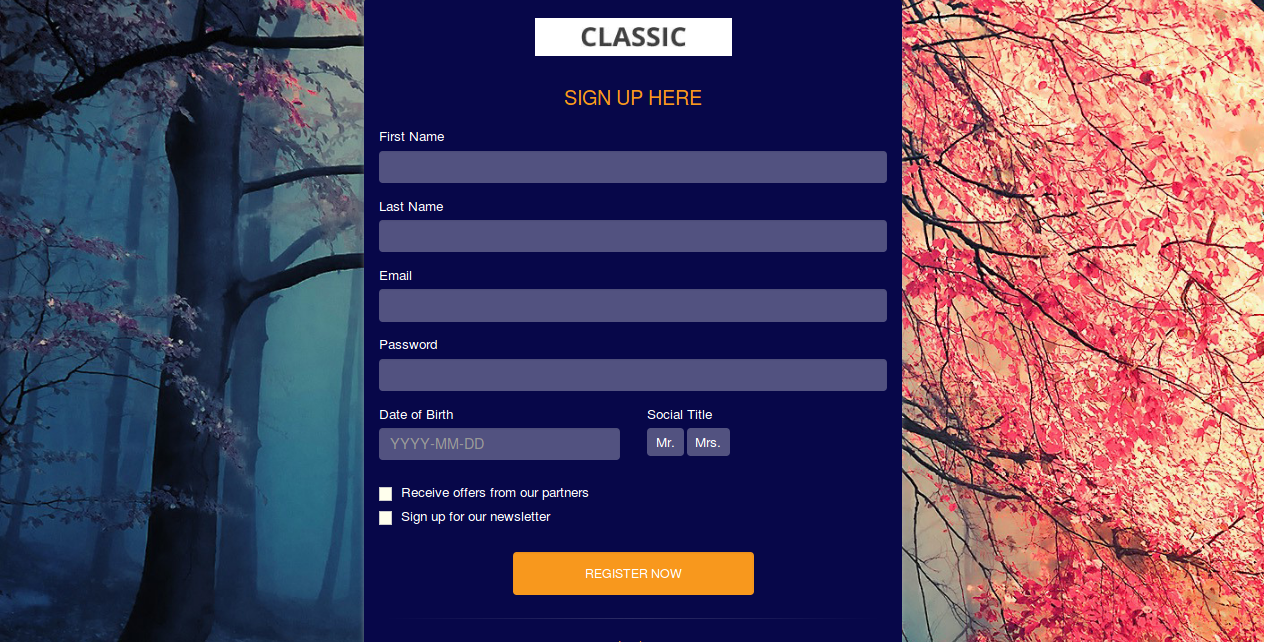
New customers can register here:

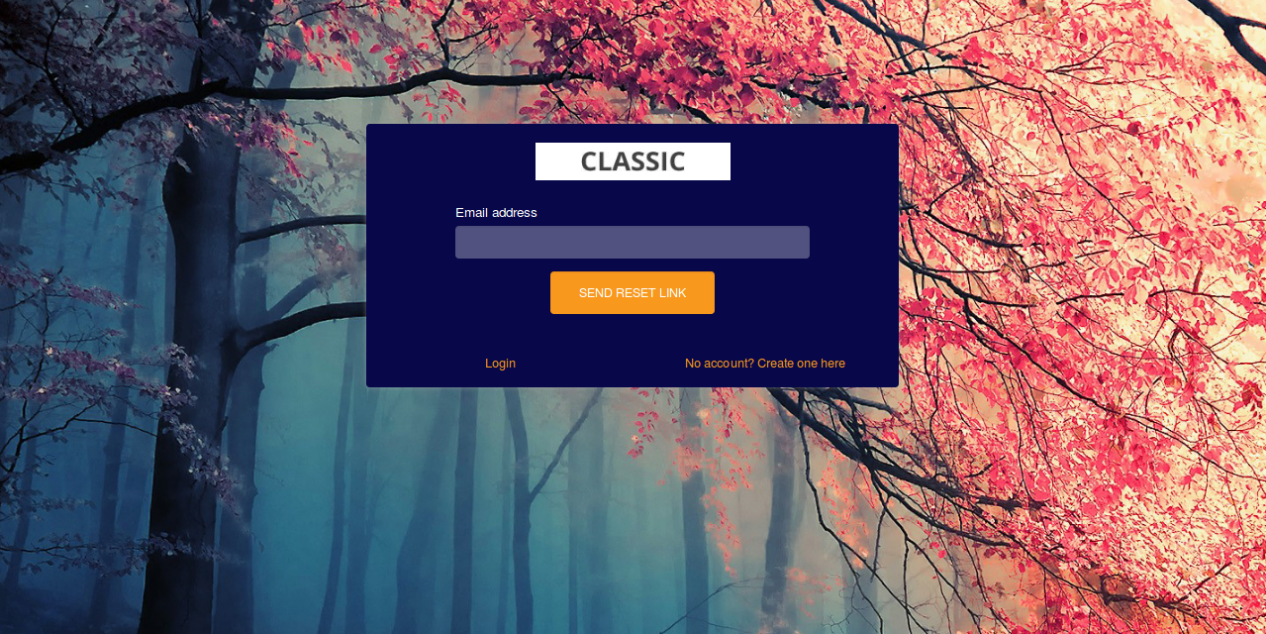
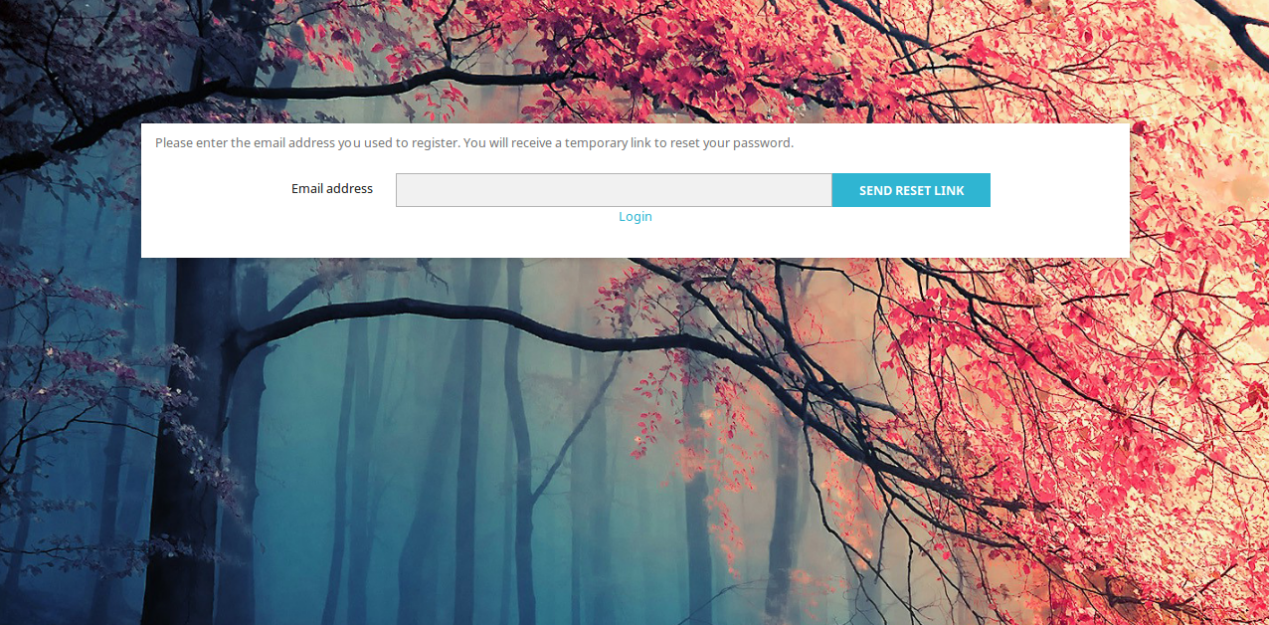
The customers can click on the forget password button if required. Here, they can enter the registered email address and get the reset link on that email id.

If the store admin selects the default login/signup format, the front-end interface will be displayed as shown below:

The customers can click on the forget password button in case of login difficulty. They just need to enter their registered email id in order to get reset password link.

The customers can view this message before validation of the newly registered account.

5.0.0 Tutorial Video of Prestashop Private Shop Module

Checkout our complete tutorial videos, which cover all the features from Installation to the complete frontend working.


This module is also compatible with our Custom Registration Fields – Prestashop Addons.

For more Prestashop Addons please visit Knowband.