Complete Hyperlocal Package Solution for your On-Demand Delivery Business

Recently, the Hyperlocal Delivery Model is trending in the eCommerce industry and the main features of on-demand hyperlocal delivery are efficiency and features. Along with a website, the demand for an application like a hyperlocal marketplace mobile app is empowering the home delivery model.

People pay extra for doorstep delivery and they do it willingly. They are already paying extra for food delivery services offered by Uber Eats and DoorDash.

Providing delivery services on the e-store can be the best service company for both seasoned and inexperienced entrepreneurs. Since 2014, digital ordering and delivery have risen 300% faster than dine-in traffic.  The concept is appealing because it does not entail significant investments and maintains a sufficiently high profit at the same time.

You can start with minimal resources and grow your company gradually. In addition, delivery services are more important than ever with the rise of e-commerce. That’s why it’s an excellent solution for an entrepreneur to start a courier service.
Knowband offers a Hyperlocal Delivery Package solution to start a delivery business with ease.

Do you know how Hyperlocal Delivery Model Works?

The hyperlocal delivery model is an ideal example of the fusion of age-old shopping methods and technical advancement. The hyperlocal on-demand delivery services work in a limited region and deliver products in the given time.

A hyperlocal company’s service scope could drop anywhere from a few meters to a few kilometers from the company’s location.

Think not only of FMCG, but also of house maintenance, grooming, and other customer-worthy services. So a hyperlocal company can step in and do the job if there is a restaurant nearby that does not provide home delivery for food.
You can refer to these articles for starting your hyperlocal delivery business:

Hyperlocal Mobile App for On-demand Delivery Business

Create your delivery application following the hyperlocal delivery model. Build various applications for different characters for this scenario, such as drivers, shippers, and customers.

Knowband’s hyperlocal delivery app is a robust solution for creating a delivery app for local home delivery services.

What is the ‘Hyperlocal Mobile Delivery Complete Package’?

The complete solution for Hyperlocal Marketplace is a combination of the Hyperlocal Marketplace Module and the Mobile Application. It has all the marketplace features for the website and gives you the mobile app advantages that are the major highlights of this article.

For PrestaShop Hyperlocal Marketplace Module, you can refer to our previous article:

Features of Hyperlocal Marketplace Application (Complete Package)

The Hyperlocal Marketplace Mobile App developed for the PrestaShop platform converts a hyperlocal online marketplace into a mobile app for native Android & iOS e-stores.

The Hyperlocal Mobile App allows users to select a specific location and shop for items in a specific region. By only selling goods from nearby vendors, the PrestaShop Hyperlocal Smartphone App makes deliveries quicker. It is ideal for services like online food delivery, grocery delivery, and medication.

1. Integrated with Google Map

In the PrestaShop Hyperlocal Marketplace module admin panel, the store admin can add a Google API key and retrieve worldwide locations. Also listed is the step-by-step guide for creating an API key.

It enables the store owner to pick locations for both its goods and sellers.

2. How sellers can register on Hyperlocal Marketplace?

The PrestaShop Hyperlocal Marketplace has an easy seller registration feature. Admin will approve your request and you are ready to sell.

3. Admin and seller can define shipping area and location

The PrestaShop Hyperlocal Marketplace Mobile App helps the owner and other registered sellers to offer their services. It offers various functionalities to admin and seller for setting up the price rules for different locations. The region in which they are going to deliver their products can be defined.

4. The UI of Hyperlocal Marketplace Mobile App

The user interface has various functionalities that provide a better customer experience and engagement in the marketplace. Customers can input their location by themselves or they can allow the app to auto-detect by providing GPS access.

Once it has been set, they will see products available in their location but it allows them to explore more products available in the store.

5. Customize your Hyperlocal Mobile App and give it a dynamic appearance

There is some very prominent functionality the app offers that enhances the UX in your store. A personalized app can be created as per your requirements. You can make some custom changes and update its look and feel accordingly.
The PrestaShop Hyperlocal App Builder module provides the store owners with a very powerful backend that allows them to edit & manage their applications effectively.

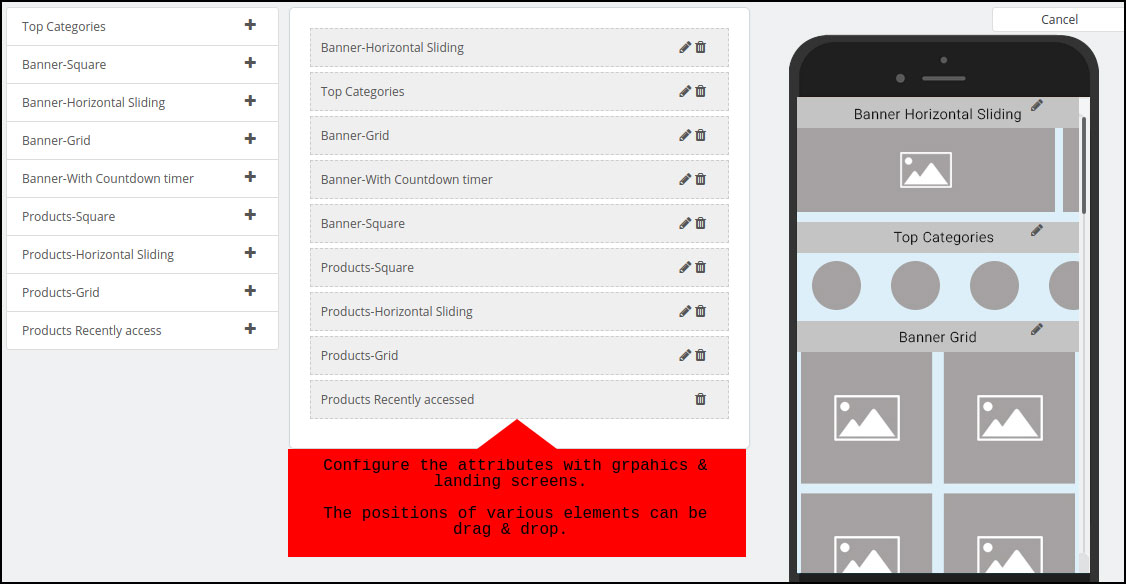
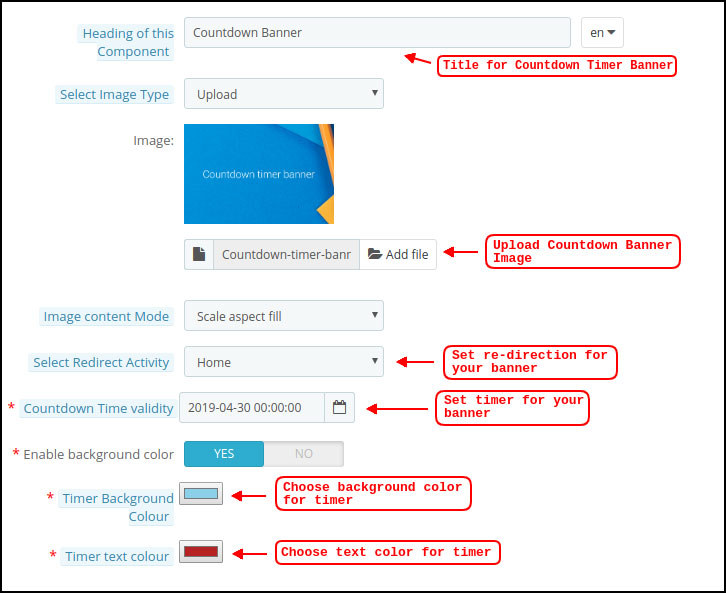
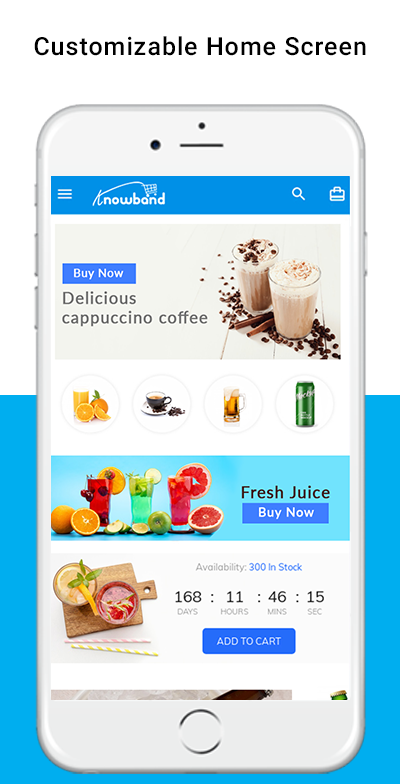
Home-page is the most important element of the app that abstractly represents everything about the app. It has a DIY drag and drops option for layout changes and various other features for banner, product display pattern, countdown timer, etc.

It is possible to set the App name, logo design, splash screen, theme, colors, font styles & much more as desired. The final applications on the website will have their unique brand identity. You can customize anything from color options to tab bar elements like home, category, cart, scan, etc.

6. Social proof helps in decision making

Reviews from customers play a huge role in improving reputation and boosting sales as well. The Mobile App Builder of the PrestaShop Hyperlocal Marketplace allows users of the app to post ratings & reviews of the products/services they buy. To improve cross-selling, the apps are made compatible with PrestaShop Related Products.

7. Deals and discounts are a game-changer

On the PrestaShop Hyperlocal Marketplace Mobile App, users of the app get the advantages of using website coupons & vouchers. Discount coupons/vouchers excite online shopping consumers as they get some cash off on the items to be bought.

8. Give your customers a smooth purchase flow

The Mobile App PrestaShop Hyperlocal Marketplace remains in full sync with the inventory of the website like categories, products, data, etc. As the inventory updates and adjustments will be automatically updated on the app simultaneously, you can sit back and relax.

9. Marketing is easy with Hyperlocal Marketplace Mobile App

Push notifications are the mechanism for getting users of the app back to the app by attracting ongoing deals& offers. The PrestaShop Hyperlocal Marketplace Mobile App does the same and enables store managers to configure and deliver to app users an infinite number of personalized templates push notifications.

App users have the option to share any product’s connection to any of their favorite platforms on social media. Social networking networks can add more new customers to the Mobile App Industry & sales can be boosted.

10. Automated order tracking notification system

What most app users don’t like is being confused about when the order is going to be shipped. Thus the PrestaShop Hyperlocal Marketplace Mobile App enables push alerts for order status updates to ensure accountability of order deliveries. It is possible to highlight new promotional deals along with these.

The complete Hyperlocal package benefits

  • The PrestaShop complete hyperlocal marketplace package has several benefits for the owner, seller, and customers.
  • The app is GDPR compatible and supports multiple languages that allow you to sell globally.
  • It has social login functionality that increases the number of registrations
  • In case of slow or no internet connectivity, the PrestaShop Hyperlocal Marketplace Mobile App offers offline browsing for app users.
  • Chat Support is the ideal medium for customers to communicate with the store manager via WhatsApp chat or Zopim chat support.
  • It supports all the shipping and payment gateways which are necessary for customer conversion.

Additional benefits with the Hyperlocal Marketplace Mobile App package:

Incorporated with one-page checkout

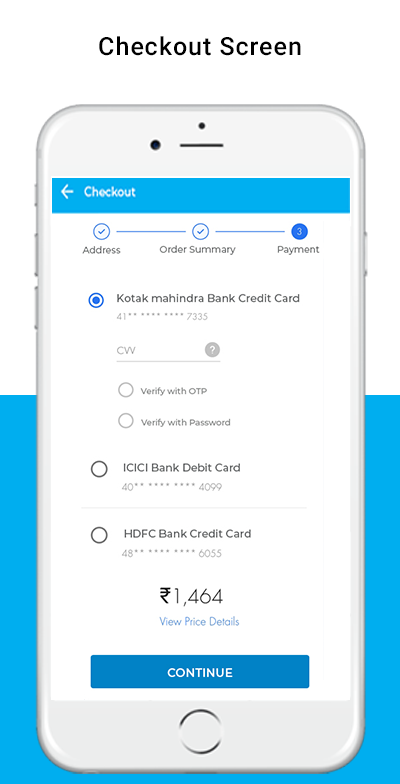
A single-page checkout screen provides the Hyperlocal Marketplace Smartphone App for PrestaShop. This makes it hassle-free for the purchasing process & keeps the user experience at par. Only the requisite inputs are taken from the app users during the one-page checkout.

Spin Win Email Subscription functionality

Compatible with the PrestaShop Spin Win extension is the PrestaShop Hyperlocal Marketplace Mobile App. If the store administrator uses both in the store, the pop-up gamified spin wheel can be seen only by opening the app with useful discounts. With email subscriptions, re-marketing can be aimed at consumers.

Conclusion: We believe this is the right time to invest in a hyperlocal business as individuals become more and more open to the idea of online delivery. The idea behind these is very simple and without huge amounts of capital, it can be implemented. Once the simple items are sorted, the only thing you need is to keep on top of your customer service game.

Refer to the information guide of PrestaShop Hyperlocal Marketplace Mobile App for complete module understanding.

All in all, the hyperlocal industry has given all stakeholders a great push and made them play their best game to represent consumers in the best possible way.

You can reach out to us at support@knowband.com for any eCommerce support.

The marketplace modules are available for Magento, OpenCart, and PrestaShop platform and the Hyperlocal Marketplace module is available for PrestaShop platform.

You may like to read:
PrestaShop Hyperlocal Marketplace Mobile App – User Manual

1.0 Introduction

The PrestaShop Hyperlocal Marketplace Mobile App Builder is for converting online hyperlocal multi-vendor marketplace into native Android and iOS shopping app without any coding/programming knowledge. The readymade plugin is a pre-designed framework for all PrestaShop store owners out there who are somewhere willing to launch mobile apps.

Buy Module: https://www.knowband.com/prestashop-hyperlocal-marketplace-mobile-app

1.1 What is a Hyperlocal Multi-vendor Marketplace?

A Hyperlocal Marketplace Module is a simple way to turn a regular PrestaShop marketplace into a multi-vendor marketplace with an inbuilt hyperlocal system. Hyperlocal functionality allows the store owner to allow himself or sellers on the marketplace to sell in a specific location. On a PrestaShop Hyperlocal Marketplace store, the owner can define the radius value (to be evaluated on the map) and set the location for product availability. Once customers onboard the e-store website or mobile applications, they will be asked to choose the location and browse products as per the availability. Based on the entered location of each individual user, they are presented with the products and sellers that are available nearby to them (as per the radius circle specified in the admin panel).

Hence, in simple words, a hyperlocal marketplace is a local ecosystem allowing peoples of a specific zone to shop or order products. These kinds of online shopping medium are great for ‘same-day delivery’ or ‘one-hour delivery’ kinds of models. Examples of some of such online marketplaces are online grocery stores, food delivery stores, medicine stores, gift shops, malls, etc.

1.2 What is a Hyperlocal Marketplace Mobile App?

The majority of the online shopping audience is on mobile. Considering the same, we have created a complete Hyperlocal Marketplace and Mobile shopping apps package for the PrestaShop e-store owners. Android and iOS shopping apps will be in sync with the PrestaShop hyperlocal marketplace. Both Admin and seller products will be available on the PrestaShop Hyperlocal Mobile App for customer browsing and purchasing products. Offering a localized PrestaShop Marketplace Mobile App in your native language will attract a wide range of users from the local market.

The users just need to choose a current location with inbuilt GPS in the app and view products and sellers available in that location.

Here are some of the snapshots for a better idea: 


2.0 Hyperlocal Marketplace Admin Panel

Refer below link for PrestaShop Hyperlocal Module admin panel configurations:

PrestaShop Hyperlocal Marketplace User Manual

3.0 Mobile App Builder Admin Panel

The below snapshots with a detailed explanation will make the module configurations and settings more clear. Check the step by step settings tab with details. After installing the PrestaShop Mobile App Builder module on the store, click on the “Configure ” option. You will get the following tab with simple-to-use interfaces.

3.1 General Settings

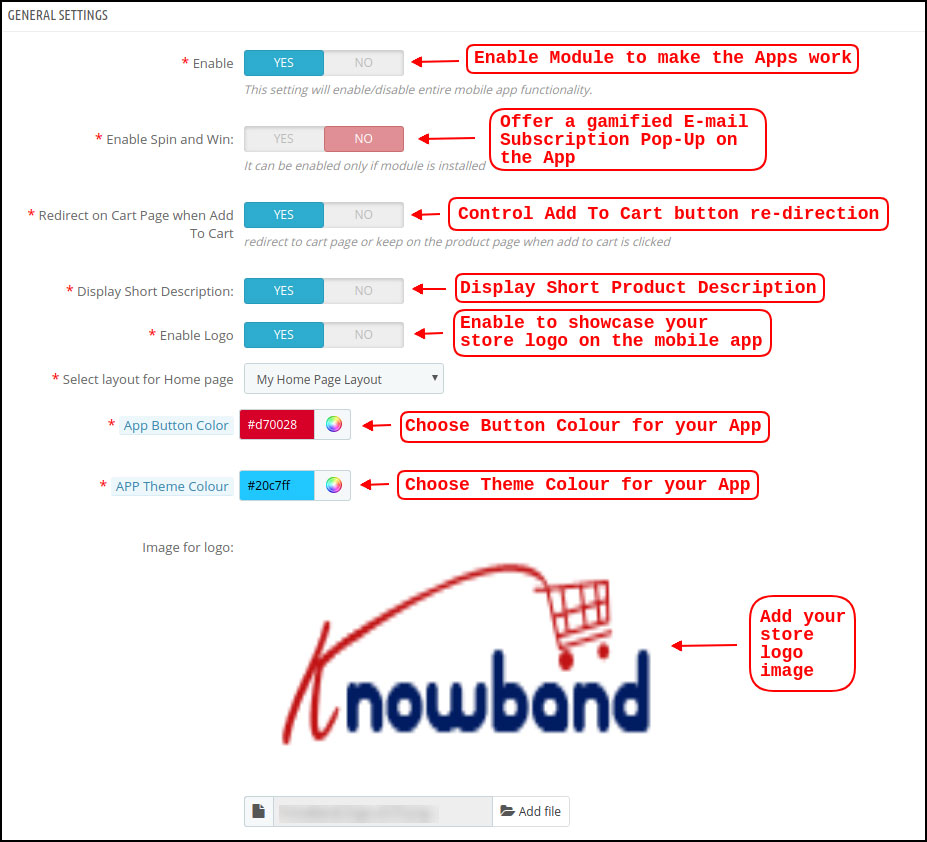
a) Enable/Disable Plugin: Enable PrestaShop Hyperlocal Marketplace Mobile App Builder to make mobile apps work on mobile devices. In case, you ever need to stop the app working, just disable this option.

b) Enable Spin and Win: This option is to display a gamified spin-win email subscription on the home screen of the PrestaShop Nearby Shopping App. The spinning wheel pop-up interface will be displayed on the home screen once the user opens the app. The store admin can set the discounts and other settings in spin-win extension and capture user emails for remarketing purposes and promotional strategies.

Note: To use the spin win functionality, you need to add the KnowBand Spin win extension on the Prestashop store.

c) Redirect on Cart Page when Add To Cart: This tab lets the store admin control the “Add To Cart” functionality in PrestaShop Hyperlocal Marketplace Mobile App. The users can be redirected directly to the cart screen or can stay on the product page for more shopping.

d) Display Short Description: Enable to display the short description on the product screen along with full description & other details. The short description will only be displayed if the same is added to the website inventory.

e) Select Layout for Home Page: Create a home screen look & design of the PrestaShop Hyperlocal Marketplace Mobile App as per your choice. (Same can be added from the Home Page Layout section). In this option, there will be all layouts available in the dropdown and chosen as per the requirement. Multiple app home screen layouts can be pre-designed and saved as per various festivals, sales, offers, deals, etc.

f) App Button Color: Choose the desired button color for PrestaShop Hyperlocal Marketplace Mobile App. This color will be for all the buttons available on the Android and iOS apps.

g) App Theme Color: Choose the desired theme/header color for PrestaShop Hyperlocal Marketplace Mobile App.

h) Image for logo: Upload your website/marketplace logo image to be displayed on the top header of hyperlocal shopping apps. This will be a simple way to offer apps branded to your business only. Our PrestaShop Hyperlocal Marketplace Mobile App Maker is a complete white label solution.

i) Disabled Shipping Methods: This option allows you to disable the shipping methods from PrestaShop Hyperlocal Marketplace Mobile App. (In case any shipping methods needs to be disabled from the app)

j) Enabled CMS Pages: Add desired CMS pages like About Us, Terms & Conditions, Privacy Policy, etc. (available on the website) on PrestaShop Hyperlocal Marketplace Mobile App.

k) Enable Request Log Reporting: Add an option on the PrestaShop Mobile App to enable error log. The log file can be used to identify and rectify any abnormal behavior of your app.

l) Enable Live Chat Support: Enable/disable Zopim (Zendesk) chat option on PrestaShop Hyperlocal Marketplace Mobile Apps. The chat API key will be provided with the final app that can be used to activate the live chat on mobile apps.

m) Enable WhatsApp Chat Support: Enable/disable WhatsApp chat option on your PrestaShop Nearby Shopping Mobile Apps. This option simply allows the users to connect with the store admin via Whatsapp chat option.

Note: Either Zopim chat or Whatsapp chat can be enabled from the admin panel.

n) Enable Fingerprint Login: Enable/disable Fingerprint login option in PrestaShop Hyperlocal Mobile App.

o) Enable/disable Phone Number Registration: Enable phone number login option (OTP) in PrestaShop Hyperlocal Marketplace Mobile App & allow users to authenticate using OTP verification.

3.2 Push Notifications Settings

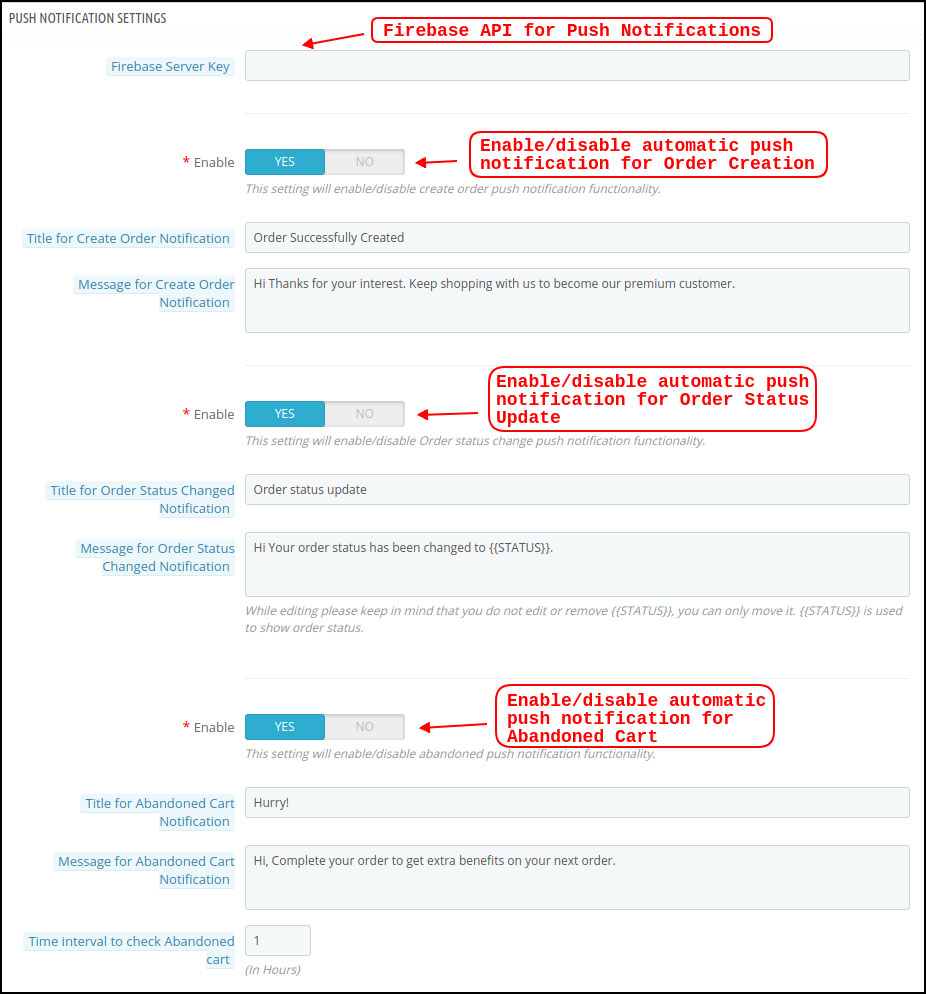
The Hyperlocal Marketplace Mobile App Creator offers unlimited push notifications to be sent from the admin panel of extension. The store admin can configure the push notifications template (Use own text, image, redirection link) and send it to Android and iOS app users. This can be an effective tool to market or promote the store deals, offers, and boost sales in the store.

a) Firebase Server Key: This key can be used to send the push notifications on PrestaShop Hyperlocal Mobile App. The firebase project will be created while marketplace mobile app development. Once entered, it makes sure that the push notifications will be received to all mobile app users.

b) Create Order Notification: Enable/Disable automated successful order push notification sent to the app users. The template for the notification is fully editable like title, message, image, etc.

c) Order Status Change Notification: Enable/Disable automated order status change push notification sent to the app users. The template of the notification can be edited like title, message, image, etc.

d) Abandoned Cart Notification: Enable/Disable automated abandoned cart push notification sent to the users who have left products in the cart without successful purchase. Enter the title & message of the push notification. For Abandoned cart notification, enter the time interval (in hours) after which push notifications will be sent.

3.3 Push Notification History

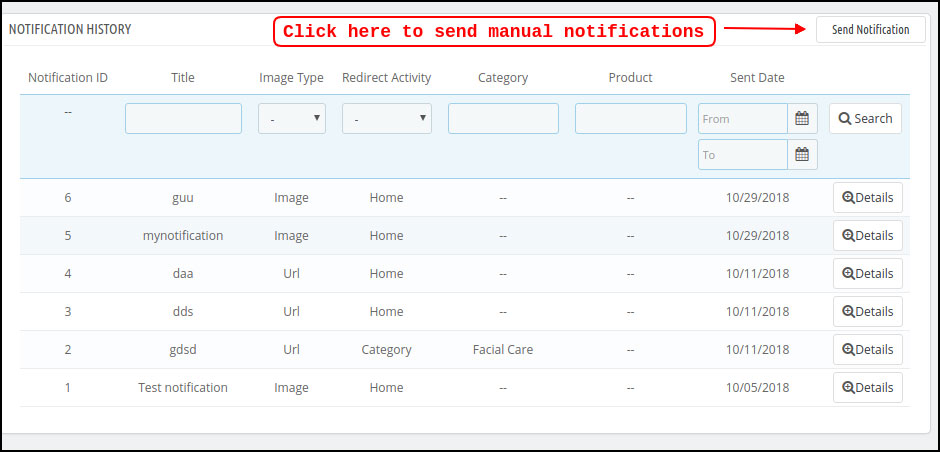
This settings tab contains the history of all push notifications sent to the PrestaShop Hyperlocal Marketplace Mobile App. The store admin can view the details of every sent notification.

Send Manual Notification:

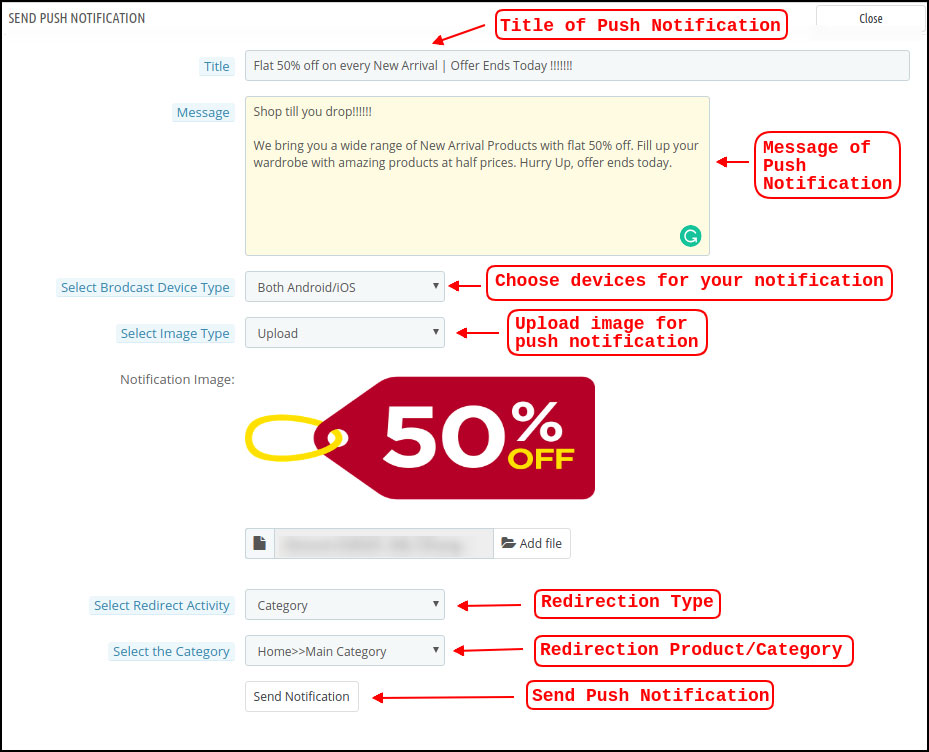
The store owner can craft and design push notification and sent it manually to app users. Configure the title, message, redirection link, image, etc. and send a push notification of choice:

a) Title: Enter the title of Push Notification that is to be manually sent to the app users.

b) Message: Enter the message of manual notification to be sent to the app users.

c) Select Device Type: Choose an Android or iOS device on which push notification is to be sent.

d) Image Type: Upload the push notification image as per the requirement. Image URLs can also be used instead of uploading images.

e) Select Redirect Activity: Set redirection of push notification on the app by choosing Home/Category/Product. Whatever redirection is set from the admin panel, app users will be redirected to the same screen.

f) Send Notification: Once configured, tap this button and send the push notification.

3.4 Payment Methods

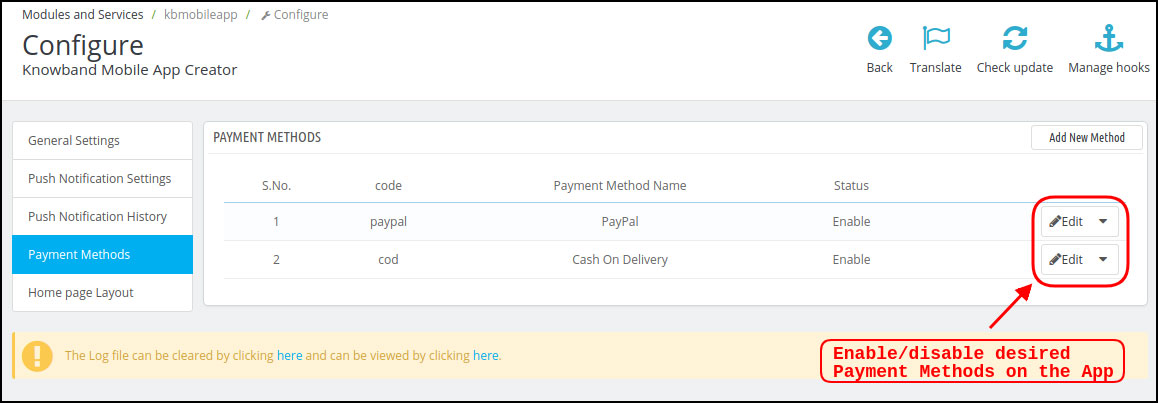
The PrestaShop Hyperlocal Marketplace Mobile App Creator supports all sorts of website payment methods. If you disable payment options (COD & PayPal) from the module, all website payments will be enabled on the Android and iOS apps.

3.5 Home Page Layout

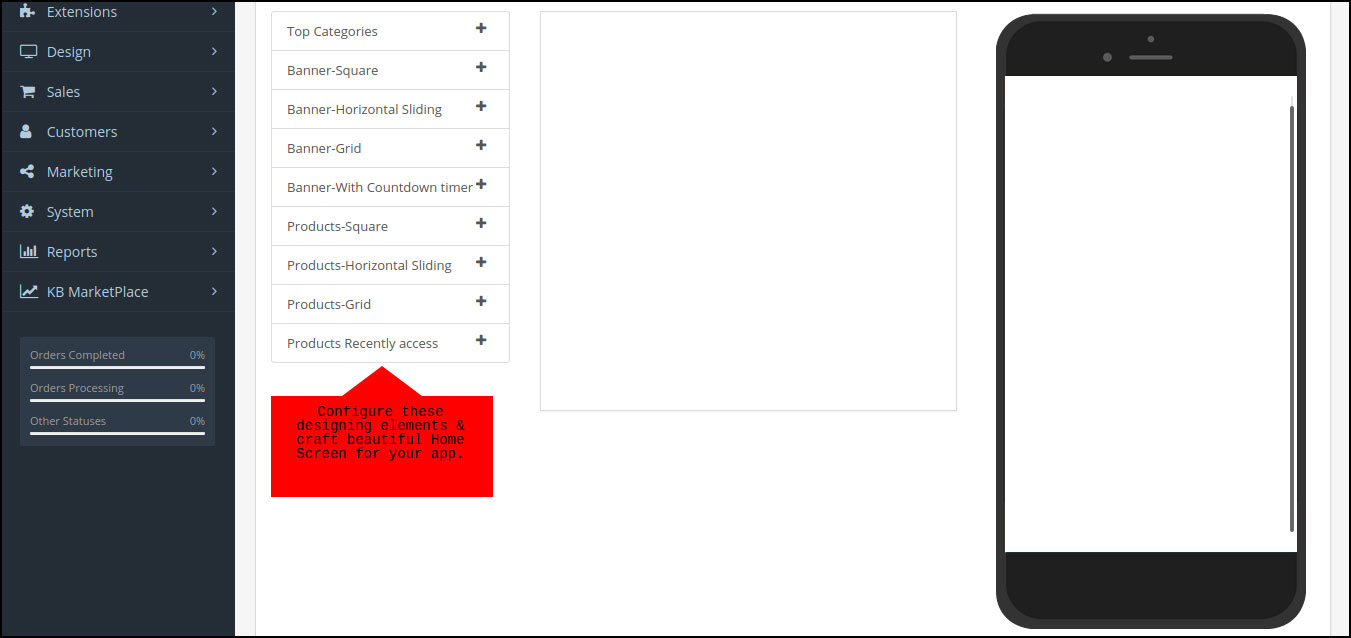
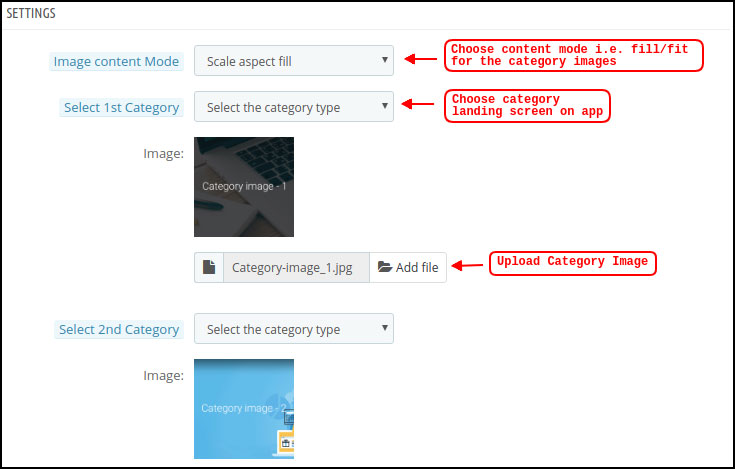
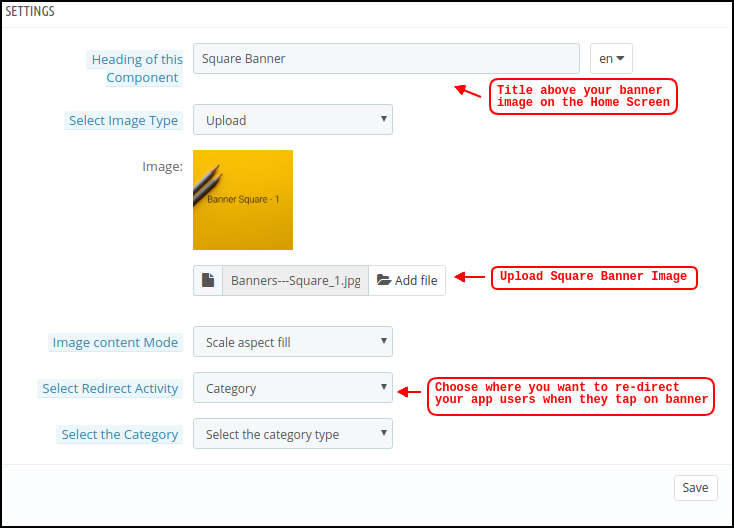
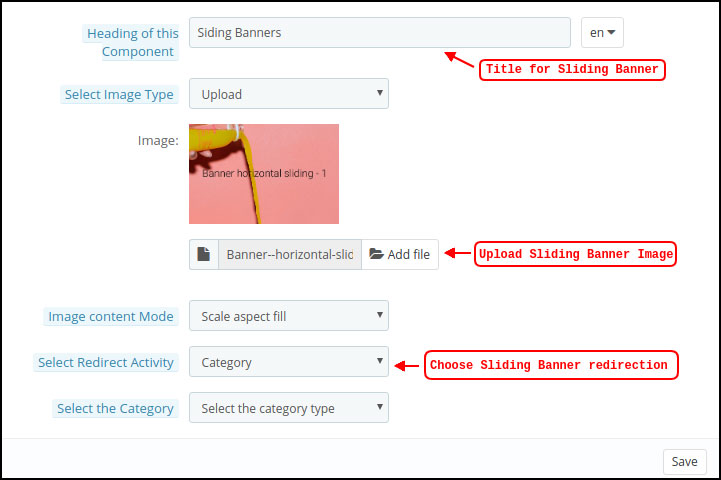
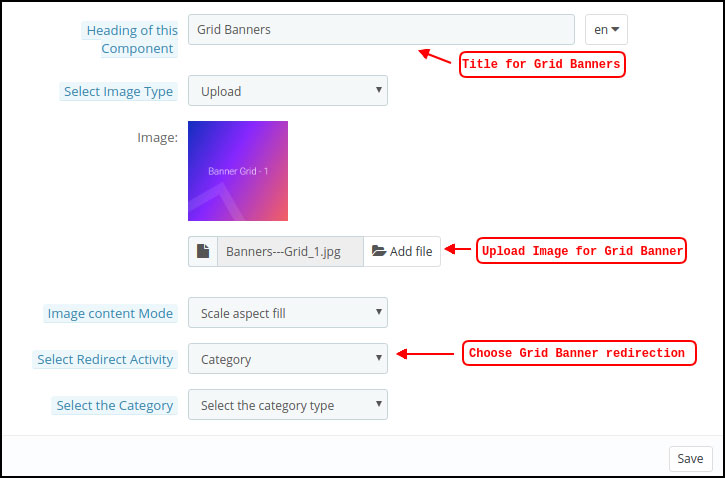
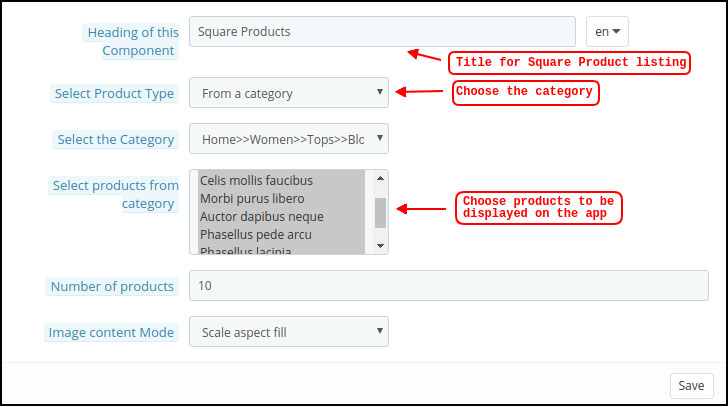
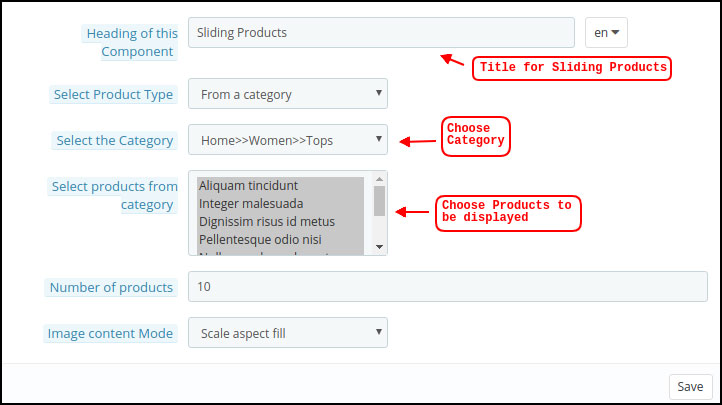
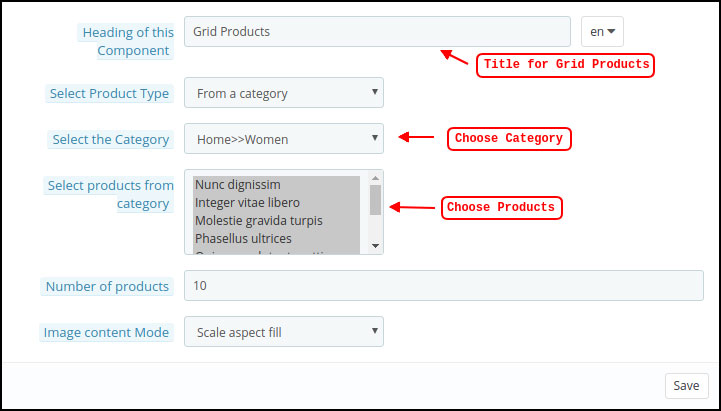
The PrestaShop Hyperlocal Marketplace Mobile App comes with a flexible home screen layout allowing store admin to use predefined elements and configure the look of the home screen. Multiple festivals, sale, promotional, etc. layouts can be created and saved in the admin panel and also used on the app as per the requirement.  Here is the step by step process to create their own layout:

  • Top categories
  • Square Banner
  • Horizontal Sliding Banner
  • Grid Banners
  • Countdown Banner
  • Grid Products
  • Horizontal Sliding Products
  • Recently Accessed Products

Top Categories:

Square Banner:

Horizontal Sliding Banner:

Grid Banners:

Countdown Timer Banner:

Square Products:

Horizontal Sliding Products

Grid Products:

3.6 Tab Bar Layout

Customize & showcase the bottom Tab Bar on Hyperlocal Mobile App (Android & iOS). This tab has the following options:

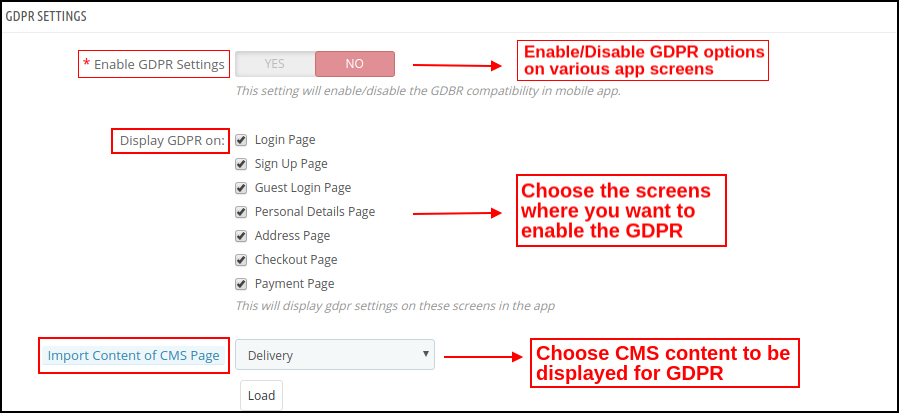
3.7 GDPR Compliance

The PrestaShop Hyperlocal Multivendor Mobile App comes with inbuilt GDPR compliance. The store admin can even GDPR settings to stop GDPR functionalities in mobile apps.


4.0 Hyperlocal Marketplace Mobile App Screens

4.1 Home Screen

The PrestaShop Hyperlocal Marketplace Mobile App home screen consists of editable banners, images, blocks, colors, fonts, etc. With DIY editor in the admin panel, the entire home screen design can be changed anytime even after the apps are live.

The colors can be chosen from the admin panel. The store logo can be added to the header of the app. The following elements can be used for designing the home screen:

  • Top Categories
  • Square Banners
  • Grid Banners
  • Horizontal Sliding Banners
  • Square Products
  • Grid Products
  • Horizontal Sliding Products

The customizable home screen of the PrestaShop Nearby Marketplace Mobile App can be transformed into general stores, food delivery, grocery delivery, medicines, or any local level marketplace business. No matter what you sell, the app can fit perfectly for all sorts of business domains.


4.2 Choose Location

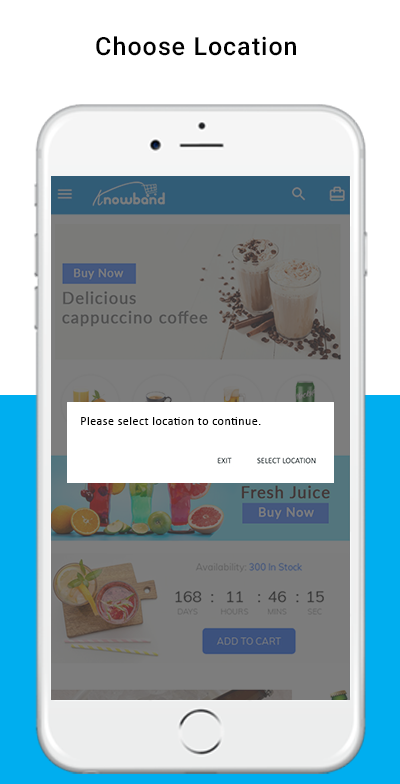
The Hyperlocal Mobile App for PrestaShop comes with the option to choose the location in the front end. The mobile app users can simply set the current location or enter the same manually.

  • Select Current Location
  • Enter Manual Location

Once the location is selected, the users can browse the products available in that location and place orders. Also, they can access nearby products at one screen from the navigation menu.

The mobile app user taps the Select location button, another screen opens with Google map and pointer. In case of choosing the current location, the pointer automatically selects the location and asks for confirmation.

Once the location is confirmed by the user of the PrestaShop Hyperlocal Marketplace Mobile App, the app will be redirected to the home screen. All the products under that location will be available for browsing and purchase.


4.3 Category Screen

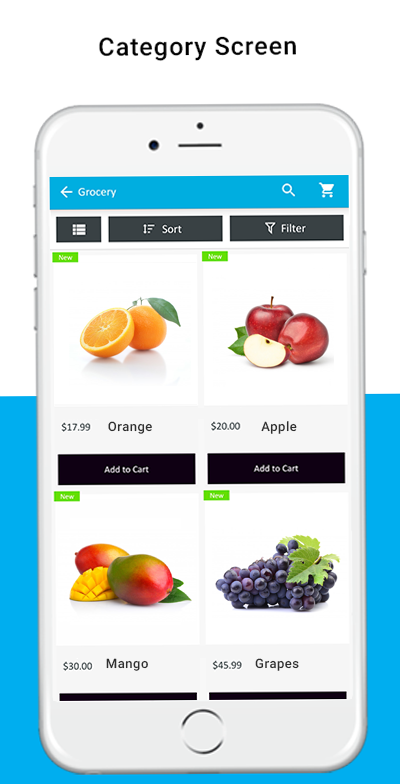
The Hyperlocal Multi-vendor Mobile App comes with an impressive design with “Add To Cart” and “+/- Quantity Stepper” for all product blocks. The users can simply browse the products with infinite scrolling functionality. No need to hassle between pages with regular pagination. Browse simply by navigating from top to bottom and products will be loaded gradually.

  • List/Grid View
  • Sort Option
  • Filter Option

With the sort option, the users get to narrow down the products based or available sorting options like – High to Low, Low to High, etc.

With the inbuilt filter option, the user gets to filter down the products based on the category, brand, price, etc. This layered navigation in PrestaShop Hyperlocal Marketplace Mobile App can be much fruitful in finding the right product for purchase.

A green color “New” badge will be stuck on the product blocks for all new products added in website inventory.


4.4 Product Screen


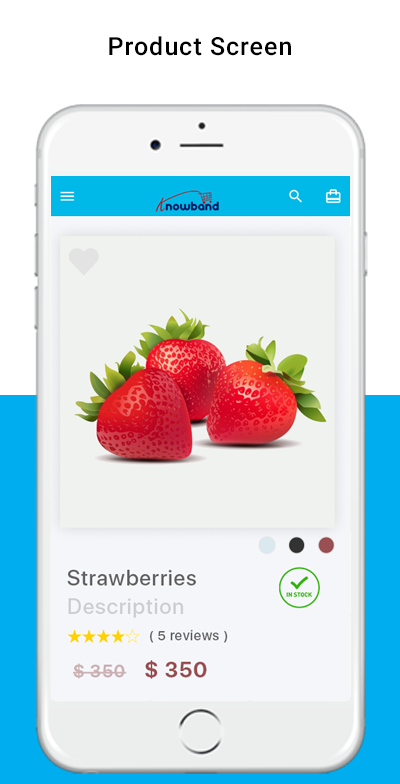
The product screen of the PrestaShop Hyperlocal Marketplace App is simple yet very appealing. Right from showcasing multiple product images to name and both short as well as the long description. The availability of the product is displayed with the “In Stock” and “Out Of Stock” label. This label will be automatically set on the Android and iOS apps based on inventory status.

  • Product Options
  • Wishlist Functionality
  • Short Description
  • Long Description
  • Quantity Stepper
  • Continue Shopping
  • Add To Cart button
  • Social Sharing of Products

The users can simply go to the product screen, choose the option, select quantity, and tap the Add To Cart button to add the product in the shopping bag. There is also an option to share products on various social media channels like Whatsapp, Facebook, Email, etc.

4.5 Checkout Screen

The Hyperlocal Multivendor Mobile Apps for PrestaShop comes with a one-page simplified checkout screen with all requiring information. The mobile shopper can view the complete order and product-related details on a single screen like –

  • Shipping Details
  • Billing Details
  • Order Summary
  • Shipping Methods
  • Order Comment
  • Payment Summary

This screen shows the selected shipping & billing details for the purchase. The user gets to edit the addresses if required and even add a new one. The total cost of the chosen product will be shown as per the shipping methods.

The app users get to view purchased product details in this section before making the final purchase. All available shipping methods are displayed under this section of the checkout screen. The users can choose the desired one from here.

This section displays the complete breakdown of the total payment details. The app users will be re-directed to the Payment screen after tapping the “Proceed To Payment” button.

4.6 My Account Screen

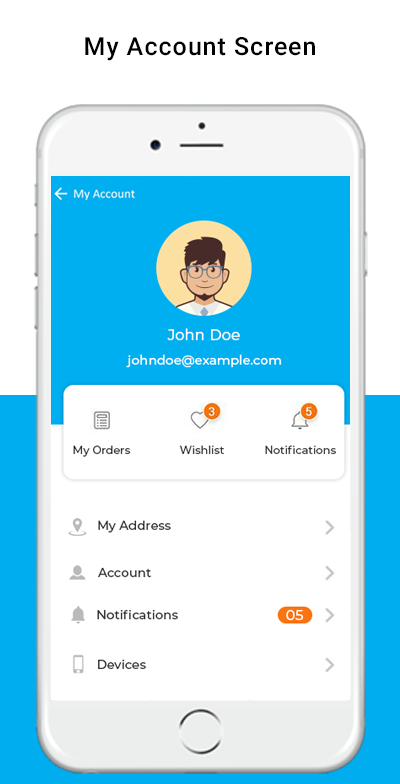
My account screen of the PrestaShop Hyperlocal Marketplace Mobile App allows app users to view the complete account details including a list of previous orders. My Account screen offers the following options:

  • Order Details
  • Personal Information
  • Shipping Addresses
  • Order Details
  • Reorder


4.7 Seller Screens

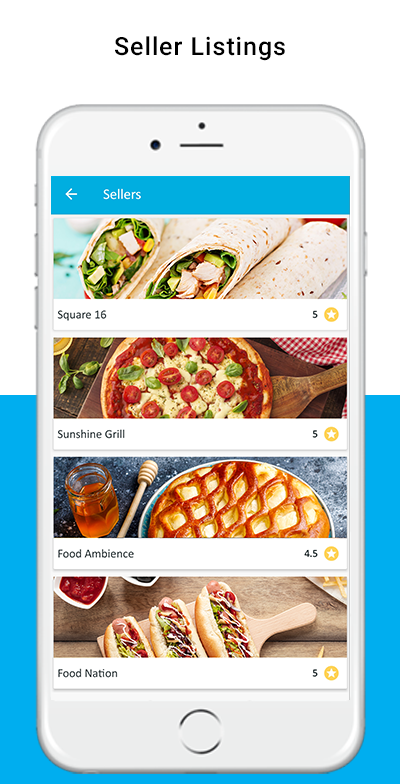
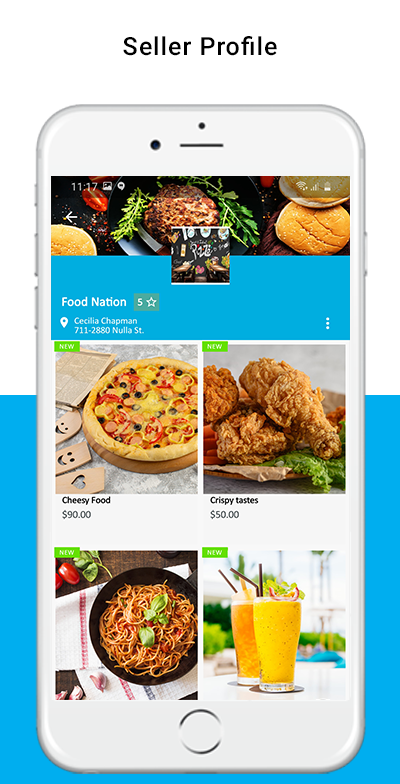
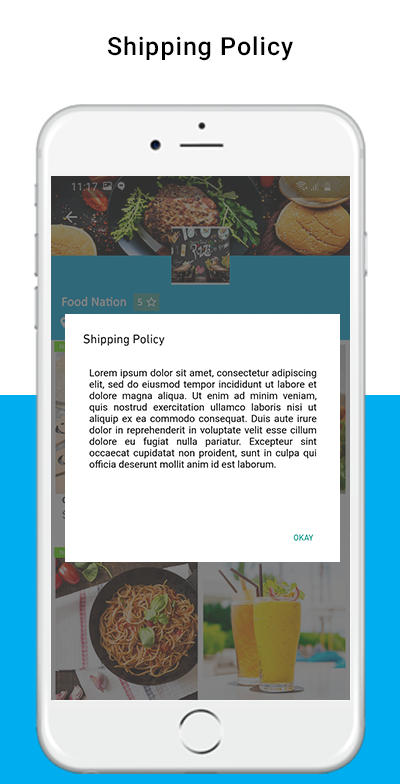
The seller panel on PrestaShop Hyperlocal Mobile App allows the users to access all available sellers on the marketplace. The listing shows all sellers on the single screen and users can simply make the choice. Once the seller is accessed, the user is redirected to the seller profile where all products under the seller are displayed. Even seller reviews, shipping policy, return policy is displayed for sellers on the app.