In the competitive world of eCommerce, growing your customer base is crucial for success. One effective way to achieve this is by leveraging the power of word-of-mouth marketing through affiliate and referral programs. The Affiliate and Referral program – PrestaShop Addons by Knowband is a powerful tool designed to help you achieve this goal.
Affiliate and referral programs are marketing strategies that reward individuals for promoting your products or services. Furthermore, the affiliates earn commissions for sales they generate, while referral programs reward existing customers for bringing in new customers. These programs can significantly increase your store’s visibility and credibility, as they are based on trusted recommendations from affiliates and referrers.
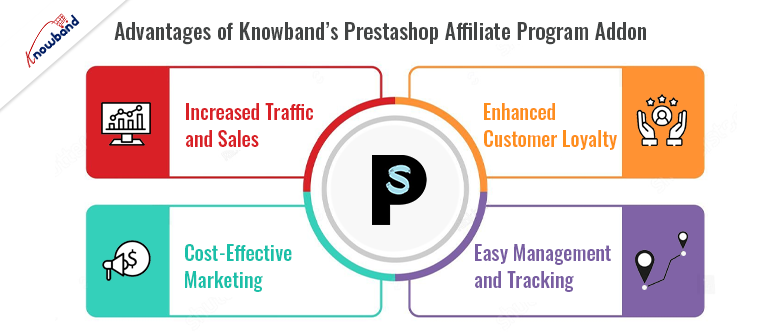
Advantages of Knowband’s Prestashop Affiliate Program Addon!
Increased Traffic and Sales:
The Prestashop Affiliate Program addon enables you to tap into a network of affiliates who will promote your store to their audience. This can lead to increased traffic and sales, as affiliates have a vested interest in driving conversions. Thus, by leveraging their reach, you can attract new customers who might not have found your store otherwise.
Cost-Effective Marketing:
One of the main advantages of affiliate and referral programs is that you only pay for actual results. Unlike traditional advertising methods, where you pay upfront regardless of the outcome, the PrestaShop affiliate module ensures you only pay for successful referrals or sales. Furthermore, this makes it a cost-effective marketing strategy, especially for small and medium-sized businesses.
Enhanced Customer Loyalty:
The Prestashop Referral Program addon not only helps you acquire new customers but also enhances the loyalty of your existing ones. When customers are rewarded for referring friends and family, they feel valued and appreciated. This positive reinforcement encourages repeat business and long-term loyalty.
Easy Management and Tracking:
Managing an affiliate or referral program can be complex, but the Prestashop Referrals plugin by Knowband simplifies the process. It provides a user-friendly interface for setting up and managing your program, tracking referrals, and processing rewards. This ensures you have complete control and transparency over your program’s performance.
Key Features of the Prestashop Affiliate and Referral Program Addon!
Customizable Commission Structure:
With the PrestaShop affiliate module, you can define a commission structure that suits your business needs. Whether you prefer a fixed commission per sale or a percentage-based model, this addon provides the flexibility to set it up according to your preferences. Moreover, you can also create different commission levels for various affiliates based on their performance.
Comprehensive Referral Tracking:
The Prestashop Referral Program addon includes robust tracking features that allow you to monitor the performance of your affiliates and referrers. Therefore, you can easily track clicks, conversions, and commissions earned, giving you valuable insights into which affiliates are driving the most traffic and sales.
Automated Payouts:
Processing payouts manually can be time-consuming and prone to errors. The Prestashop Referrals plugin automates the payout process, ensuring that your affiliates and referrers receive their rewards promptly and accurately. This not only saves you time but also builds trust and credibility with your partners.
How to Get Started with the Prestashop Affiliate and Referral Program Addon!
Install and Configure the Addon:
The first step is to install the Prestashop Affiliate Program addon from Knowband’s official site. Once installed, you can configure the settings to align with your business goals. This includes defining commission structures, setting up referral tracking, and customizing the reward system.
Recruit Affiliates and Promote Your Program:
Next, you’ll need to recruit affiliates to join your program. Provide potential affiliates with clear information about the benefits of joining your program and how they can earn commissions.
Monitor and Optimize:
Once your program is up and running, it’s essential to monitor its performance regularly. Use the analytics and reporting features of the Prestashop Referrals plugin to track key metrics and identify areas for improvement. Continuously optimize your program by adjusting commission rates, adding new marketing materials, and engaging with your affiliates.
Prestashop Affiliate and Referral Program Addon
Boost sales and expand your reach with our PrestaShop Affiliate and Referral Program! Easily manage affiliates and track referrals to grow your business effortlessly.
The Affiliate and Referral program – PrestaShop Addons is a powerful tool that can help you grow your customer base and increase sales. By leveraging the reach and influence of affiliates and referrers, you can drive more traffic to your store and build lasting customer relationships. With its customizable features, easy management, and comprehensive tracking capabilities, the Prestashop Affiliate and Referral program addon is a valuable addition to any eCommerce store. Start your journey towards increased growth and success by implementing this addon today.
A referral program, word-of-mouth marketing tactic used to motivate customers to advocate on behalf of your brand. Instead of writing online reviews or submitting customer feedback surveys, use referral programs as these programs will allow customers to share their brand experience with partners as well as friends.
The main agenda or purpose of a referral program is to attract new leads to your eCommerce business. However, you are not just bringing in anyone. Besides that, a referral program makes it easier for your marketing as well as the sales team to engage customers as these leads are good for your business. Along with that, these are familiar with your company as well as its reputation. The referral program is capable of increasing customer experience since they’ve been referred by someone they know. So when a reliable resource tells about your company, a trust factor is built leaving a good impact on your eCommerce business.
How to create a customer referral program?
Begin with customer referral templates
Templates are a tremendous assistance in the process, whether you’re a one-person customer referral machine or part of a multi-person referral team. Furthermore, referral templates customized to match your brand’s voice as well as tone. You can use these free client referral templates to create a bank of referral request emails, referral follow-up emails and even social copy regarding the business’s referral program.
Decide your goals
Before opting for a referral program, eCommerce store owners should consider what they intend to gain from this referral program. Do you want to include retention in the equation? Do you work in a field that demands a great deal of trust-building? Once you decide what your goals are, you can explicitly define them.
Research more and more
Having a good knowledge of the market will help you grow better and faster. Similarly, knowing how referrals are coming to your business can be helpful for your e-commerce business. Assessing where and how recommendations are arriving at your business — or if they’re going to your business at all — is an excellent place to start. This is where you should bring in marketing, sales management, and support — everyone who is responsible for creating customer relationships — to analyze how they’ve dealt with referrals in the past. This way you will get an idea of your current location.
Referred clients have a 16% higher lifetime value compared to non-referred customers. Therefore, doing the arithmetic is worth it to see how much money referrals could bring in and adjust your marketing budget appropriately.
Identify ‘Good Fit’ customer for company
Figure out your ideal clientele before urging customers to ask for references. Instead of just entering names to get the program’s reward, your existing customers will suggest leads who buy from your company.
Prominently explanations displayed across client referral programs. When you have a form for customers to fill out, for example, describe what a “good fit” customer is at the right in the start of the form. Attendees are reminded that you’re seeking specific people who require your product, not just a friend who might be interested in your company.
List your possible referral sources
We’ll refer to these people as advocates. Someone with whom you’re now linked or have previously been connected to. Hence, start by creating a list of them. Customers, prior customers, not yet closed leads, industry leaders, your vendors, and so on might all be on this list. This will provide you with a firm foundation, to begin with.
The functionality of Referral Program
In the referral program, visitors or customers recommend your items to friends or family members. In return you reward them with a referral bonus in case people suggested by the consumers purchase from your store. Further, a consumer has the option of sharing a product link or a coupon code.
Affiliate and Referral Marketing- are they different?
Affiliate and Referral Marketing do not have big differences. Both of the techniques help e-retailer to promote their brand as well as generate sales by providing incentives to affiliates; the process differs. Furthermore, one feature that makes Affiliate Marketing different from Referral Marketing is that Affiliate marketing focuses on rewarding your existing customers for referring your products to others. Whereas focusinging on rewarding your existing consumers for referring your products to others is what Referral Marketing is.
Knowband offers Affiliate and Referral Marketing modules for different eCommerce platforms. Hence you can install the module depending upon the platform you are using for your eCommerce business.
Did you know 81% of the marketers and 84% of the publishers leverage the power of affiliate marketing? (Source: Web Market Support) Also, according to Business Insider, 15% of the total digital media advertising revenue is attributed to Affiliate Marketing. Consumers trust referrals from people they know 92% of the time. Consumers who have been suggested by a friend are four times more likely to make a purchase.
People have a 37 percent greater retention rate when they are suggested by other customers. Leads from referrals convert at a 30% higher rate than leads from any other source. 65% of new business is generated through referrals. B2B enterprises that receive referrals have a 70% greater conversion rate.
Talking about the referral programs, a report by Nielsen says that 92% of the consumers trust referrals from people they know and 77% of the consumers are likely to buy a new product if they hear about it from their friends or families.
What is Affiliate Marketing?
When an online retailer pays some commission to its affiliate for promoting their products/brand and bringing traffic or sales through their affiliate link, the marketing is said to be affiliate marketing.
Affiliate programs have proved to be very effective for marketers as well as retailers. It helps e-retailers in customer acquisition and boosting sales. This can do wonders if marketed properly during the holiday season.
How do Affiliate Programs work?
Affiliates promote the link of your store products on their website, blog, or YouTube channel, etc. When the visitors/followers of the affiliate use that link to make a purchase on your store, you pay a small commission of the product amount to the affiliate for generating sales for you.
Why you should use Affiliate Marketing for your online business?
The affiliate and referral programs benefit your business in multiple ways. If you consider this during holiday season sales, there are chances that you end up getting huge conversions and a lot of new leads.
Boost sales
The main motive of any online business is to drive sales and to keep the sales graph always high. Affiliate Marketing ensures increased sales by driving more potential customers towards your website.
Enhance product visibility
Make your products reach a wider audience with Affiliate Marketing. If your affiliate gets a handsome amount of traffic on his website, the visibility of your product enhances. When more and more new visitors use the affiliate link to get some discount on your products, you capture more sales.
Increase Brand Awareness
Affiliates highlight your brand in front of a new audience. This creates brand awareness and brings more traffic to your store.
What is Referral Marketing?
Referral marketing or Referral Programs are considered amongst the most successful marketing tools. With this type of marketing, you encourage people to refer your products or services to their friends, family, associates, etc. in exchange for some rewards. Rewards can be gift vouchers, discounts on products or cash. It is also known as word-of-mouth marketing. You can promote your brand with discount vouchers during holiday season.
How do Referral Programs work?
In this type of marketing program, a visitor or customer shares your products to their people and when the people referred by the customers make a purchase from your store, you provide them some kind of referral reward. A customer can choose to share the product link or voucher code.
Why you should use Referral Marketing for your online business for Holiday Season Sale?
People trust referrals
When a customer recommends a product to his/her friends, a sense of trust develops among the referred persons. It creates more chances for sales than conventional advertising.
Improves customer acquisition and customer retention
The referred persons already get a positive response about your brand/products when they are being recommended by someone. This makes them loyal to your brand, increasing customer retention. When new visitors come to your store through referrals, you improve customer acquisition.
Increases user engagement
Referral Marketing can bring you high user engagement on your website. When your product gets circulated among people through referrals, the visits to your online shop increase significantly. You get more engagement, which could lead to increased sales.
Is there any difference between Affiliate and Referral Marketing?
There’s not much difference. For an e-retailer, both Affiliate Marketing and Referral Marketing are a way to promote their brand and get sales by offering some incentives to the affiliates, it is just the process that varies. The key difference between both is that Affiliate Marketing requires third-party websites to promote your business on their channel whereas Referral Marketing focuses on providing rewards to your existing customers for referring your products to others.
Both Affiliate and Referral Programs are effective at inflating sales and growing brand awareness. You can try out the Affiliate and Referral program module by Knowband if you run a store on Prestashop or Magento platform. This module incorporates the Affiliate and Referral program on your store and helps you manage both programs quite comfortably.
Referral marketing is one of the best tactic to drive more traffic to your online store. Now the eCommerce store owner can get more customers and improve the sales of the website with the help of affiliate partners. The Prestashop Affiliate and Referral program addon provide an option to promote your store without investing a lot of amount and time. Knowband offers Prestashop Affiliation Program by which you can allow your customers to register as an affiliate and refer a promotion code to their friends. The affiliate customers can earn the commission for referring the customers and purchases made by those customers. This is one of the ways to spread the word-of-mouth and boost the reach of your eCommerce site.
Affiliation program helps the store admin to generate more traffic of your online store which ultimately increases the chances of sales in the future. There are several ways of referrals like link sharing, referral code sharing, voucher sharing and mail sending.
1.1 Features of this Prestashop Affiliate and Referral program addon
The Prestashop Affiliate and Referral program addon allows the store admin to enable/disable automatic approval of affiliate customers.
The affiliate customer has various ways of sharing the links with their referrals.
Admin can set specific commission for different affiliates.
Prestashop Affiliate Program addon allows the admin to set the validity for the affiliates.
A separate dashboard is available in the front-end through which the affiliate customers can view their commission stats and also request for the pay-out.
The affiliate shares the website link with their referrals. It increases website traffic.
The admin can provide a commission to the affiliate customers for referral registration.
The affiliate customers can also get a commission for referral orders.
The affiliate customers can redeem the commission by generating a voucher or pay out request.
Affiliates have an option to share the vouchers with their referrals. This voucher can be used while checkout.
With this Prestashop Affiliate and Referral program addon, admin can also offer multiple commission functionality for the affiliate customers.
2.0 Installation Steps
The store admin will get the above files while purchasing this Prestashop Affiliate and Referral program addon:
1. The zipped file that consists the source code of this Prestashop Affiliate Program addon.
2. User Manual
In order to install this Prestashop Referral Program addon, the admin needs to follow these steps:
Unzip the zipped file which includes some files and folders.
After that, admin can copy the overall content of the folder and paste them into the “Modules” folder of the store’s directory. The admin can follow the path – Root Directory/modules/.
3. Now the store owner can install the Prestashop Referral Program addon. As an eCommerce store owner, you can find that in Store Admin -> Modules and Services.
Now you just need to click on “Install” button to install this Prestashop Affiliates module. A confirmation pop-up will be shown. Click on “Proceed with the installation” option. This step will install the Prestashop Affiliates module and show notification – “Module(s) installed successfully”.
3.0 Admin Interface
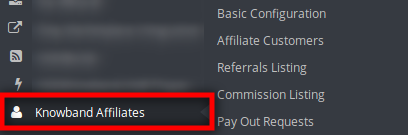
After successful installation, the store admin can configure this Prestashop Affiliate Program addon easily. There are several configuration options as shown below:
Basic Configuration
Affiliate Customers
Referrals Listing
Commission Listing
Pay Out Requests
3.1 Basic Configuration
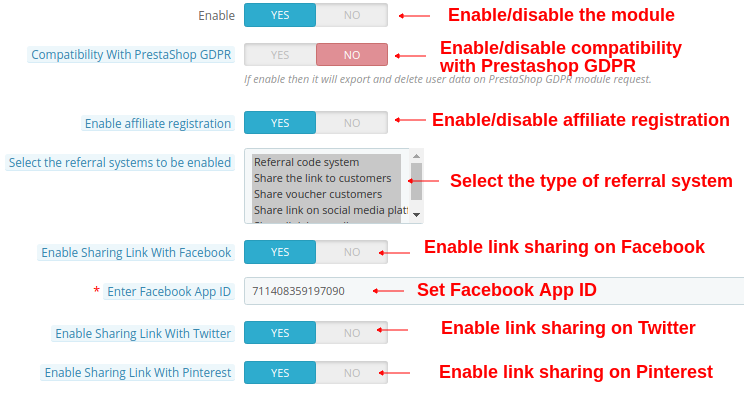
In the Basic Configuration sub-menu, the store admin can apply the settings to manage the affiliate system on the website front-end interface. The admin can configure the above options:
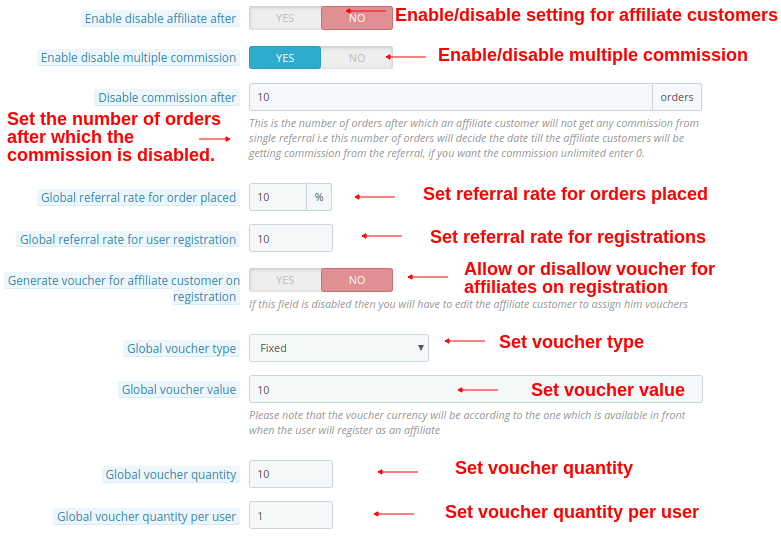
1. Enable: The store owner can activate or deactivate the Prestashop Affiliate Program addon just by toggling this button.
2. Compatibility with Prestashop GDPR: Admin can enable this option to export and delete user data on Prestashop GDPR module request.
3. Enable Affiliate registration: Enable this to activate or deactivate affiliate registration from the admin interface.
4. Select the referral System to be enabled: The e-merchant can choose the referral type like referral code system, Share the link to the customers, share voucher customers, Share link on social media platform, Share link by email.
5. Enable sharing link with Facebook: The store admin can activate or deactivate the option to share referral link on Facebook. Social sharing will be automatically enabled if the store admin enable this option.
6. Enable Facebook App ID: The store admin can enter the Facebook app id. The store admin can create the facebook app id by following the steps described in 3.1.1 section.
7. Enable Sharing Link With Twitter: The e-merchant can display link sharing option on twitter. The affiliate customers can share the site link to the referrals through twitter.
8. Enable Sharing Link With Pinterest: The link sharing on Pinterest option will be shown on the front-end.
9. Enable disable affiliateafter: The store admin can enable or disable this option as per the requirement. Admin can set the days after which the affiliate customer will not get any referrals.
10. Disable affiliate after: The module allows the admin to select the days after which the affiliate customer will not get referrals. If the admin disables the “Enable disable affiliate after” settings, then, this option will not be displayed.
11. Enable Disable multiple commission: This option allows admin to enable or disable multiple commission system for the affiliates.
12. Disable commission after: Admin can set the order limit after which the affiliates will not be offered commission value.
13. Global referral rate for order placed: The store admin can enter a common referral rate for all the affiliates. The global referral rate will be in percentage.
14. Global referral rate for user registration: The Prestashop Referral Program addon allows the store admin to set the basic referral rate for the user registration. The admin can set the fixed value as referral rate.
15. Generate voucher for affiliate customer on registration: The store admin can also generate a voucher and assign it to the customers if they register as an affiliate customer. The admin needs to edit the affiliate customer to assign him vouchers if this field is not active.
16. Global voucher type: Here, the store admin can select the voucher type fixed or percentage based. This voucher will be common for all the affiliate customers.
17. Global voucher value: The store admin can enter the value of global voucher.
18. Global voucher quantity: The store admin can enter the quantity of the vouchers which will be provided to all the affiliate customers for sharing with the referrals.
19. Global voucher quantity per user: The admin can enter the quantity of the vouchers which can be used by the customers at a time.
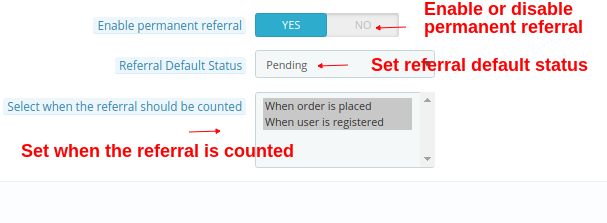
20. Enable permanent referral: Enable this option to allow permanent referral to the affiliate customers by enabling this option.
21. Referral Default Status: The store admin can set the referral default status as rejected, pending or accepted.
22. Select when the referral should be counted: The referral will be counted when user is registered or when order is places. The admin can also select both the options.
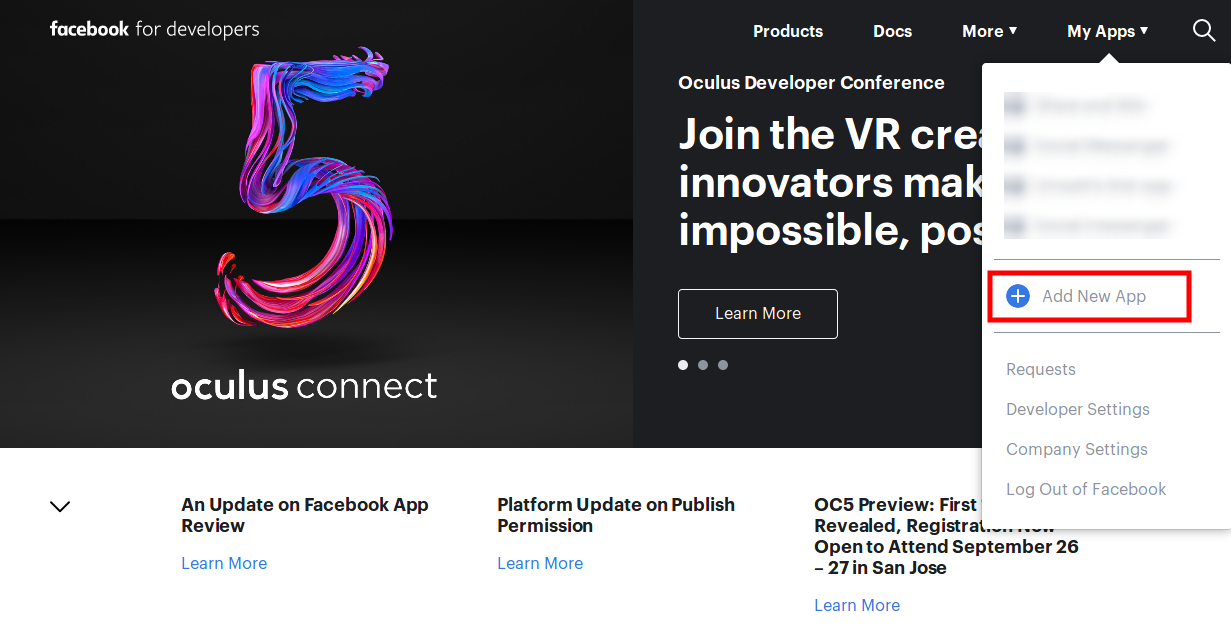
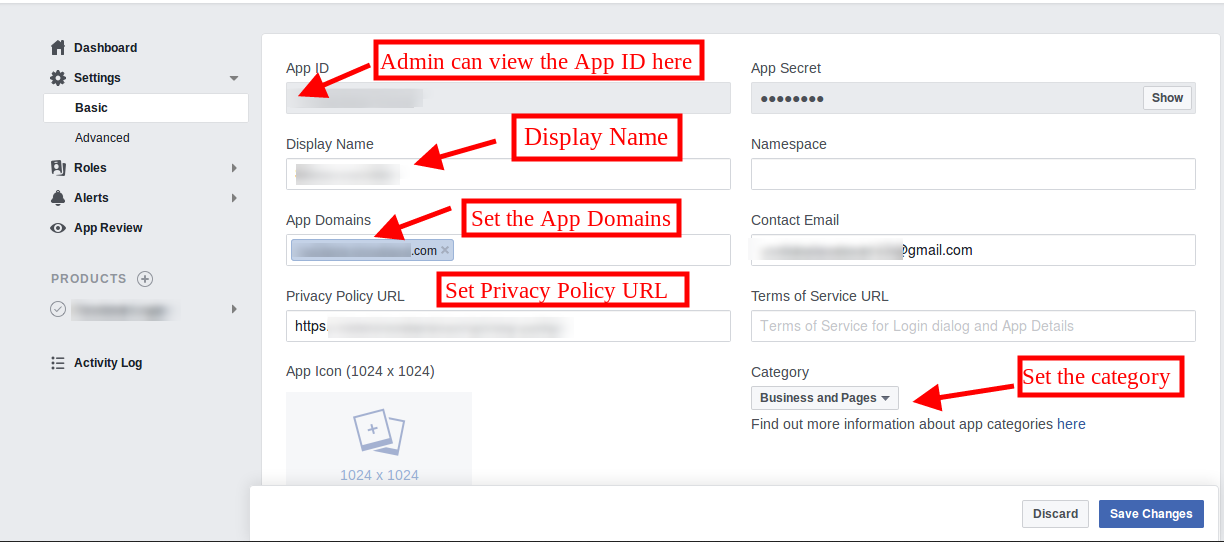
Go to the “MY APPS” option and click on the ”ADD NEW APP”.
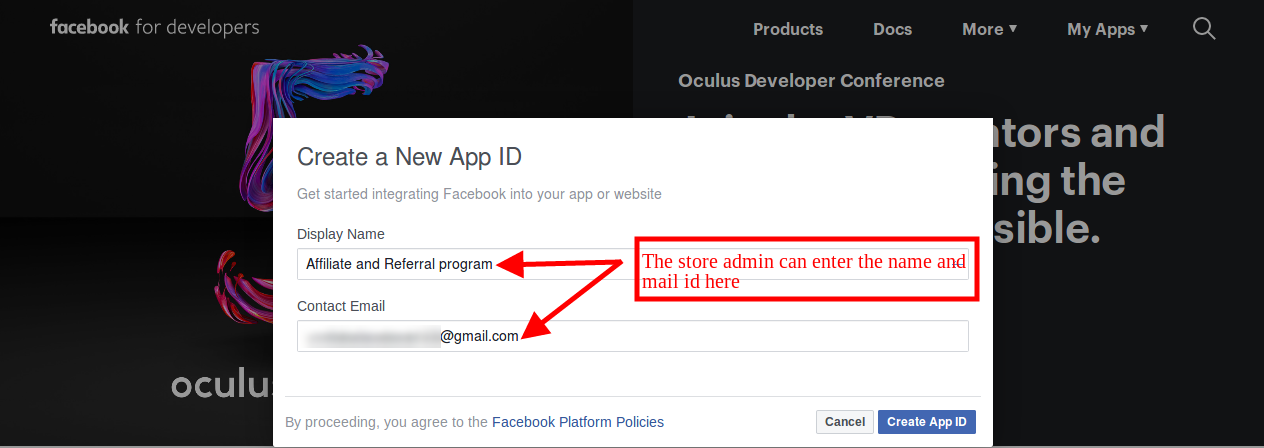
After that insert the “Display Name” and “contact email ID”. Click on the “Create App ID” button.
Go to the “Settings” and then select “Basic”. The admin can view the APP ID as shown below. The admin needs to insert app domains, category, Privacy policy URL here.
This way the admin can get the Facebook app id.
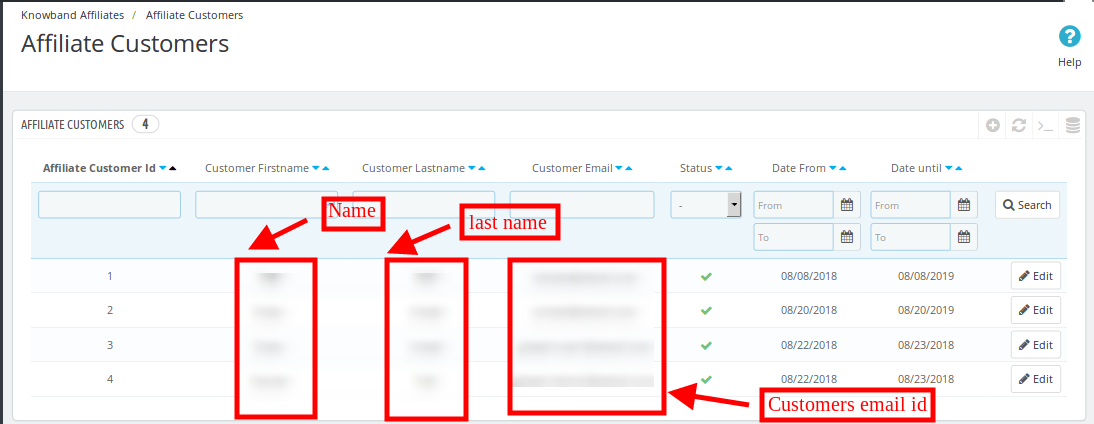
3.2 Affiliate Customers
The store admin can view a list of the affiliate customers in this section of the back-end interface.
3.2.1 How to Edit Affiliate Customers details?
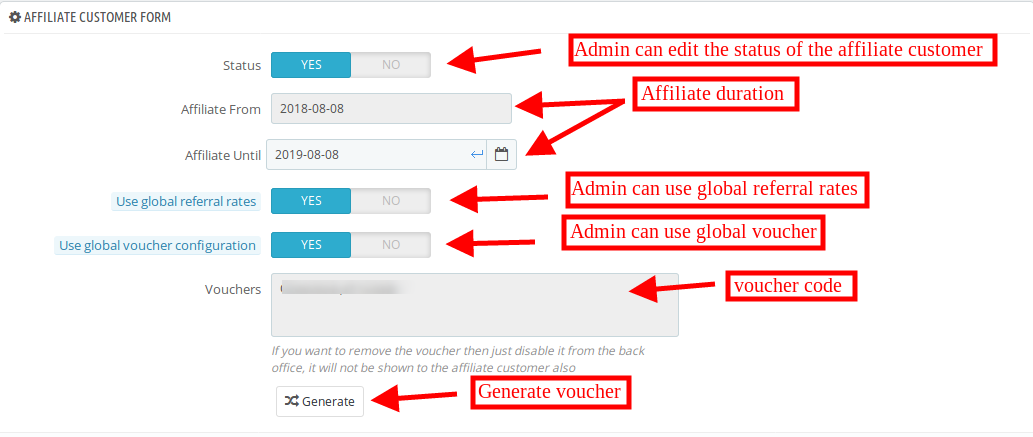
The store admin can apply the settings to edit the details related to each and every affiliate customer.
1. Status: The store admin can enable or disable the status of the affiliate customer from the admin interface.
2. Affiliate From: The admin can view the details when the customer registered as affiliates.
3. Affiliate Until: The admin can set the date till the customer will be affiliate.
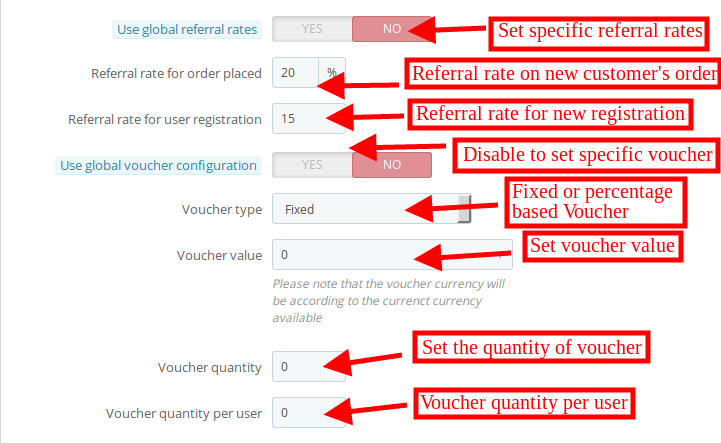
4. Use global referral rates: The store admin can use the global referral rate or set referral rate specifically for the different affiliates.
Referral rate for order placed: The admin can set the percentage based referral rate for order placement.
Referral rate for user registration: The admin can set the fixed amount of referral for user registration.
5. Use global voucher configuration: The store admin can use global voucher or configure the unique voucher for specific customer.
6. Voucher type: The admin can set percentage or fixed voucher type.
7. Voucher value: The store admin can set the voucher value from the admin interface.
8. Voucher quantity: The store owner can decide the number of the vouchers.
9. Voucher quantity per user: The admin can set the number of vouchers per users.
10. Vouchers: The admin can view the voucher code.
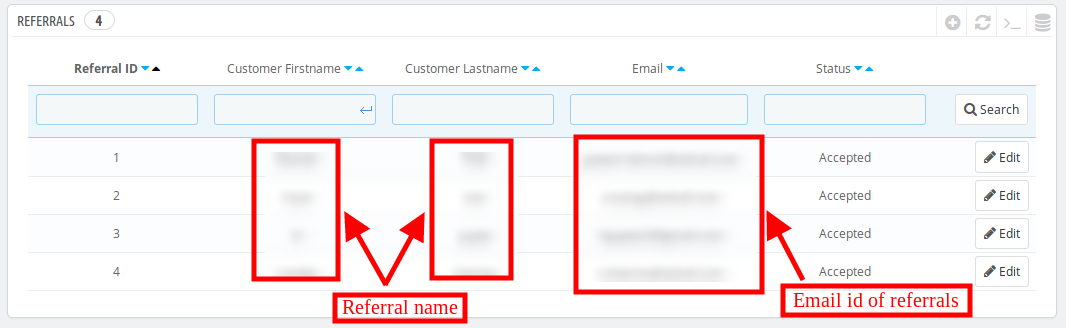
3.3 Referrals Listing
The store admin can view the referrals and their details from the admin interface. The list of the referrals will be shown as below mentioned image:
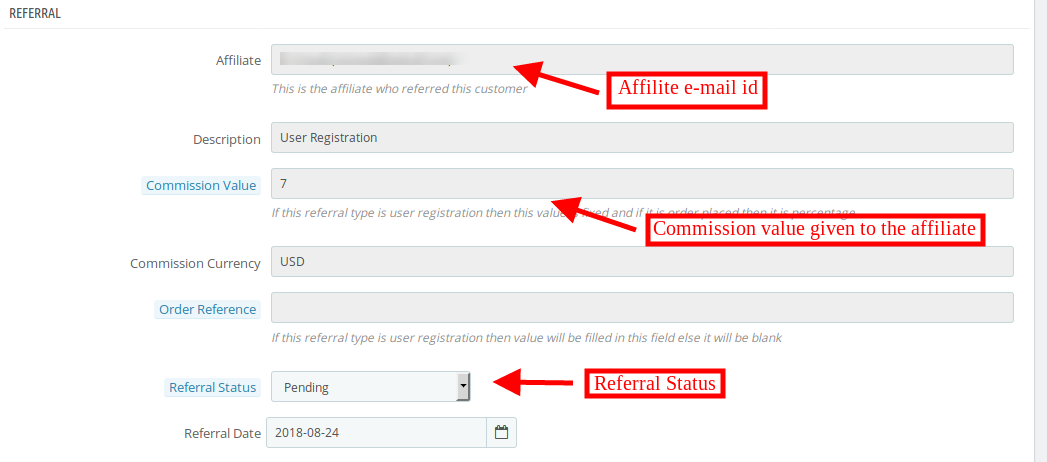
The store owner can also edit the affiliate’s status. The admin can view the above details:
1. Affiliate: The admin can view the affiliate email id from here.
2. Description: The store admin can view the activity performed by customer.
3. Commission value: The admin can view the commission value as per the configuration.
4. Commission currency: The currency type can be viewed from this section.
5. Order reference: If the new customer place any order then the order reference will be displayed here.
6. Referral status: The admin can set the status of the referral as accepted, rejected and pending.
7. Referral date: The store admin can edit the referral date from the admin interface.
3.4 Commission Listing
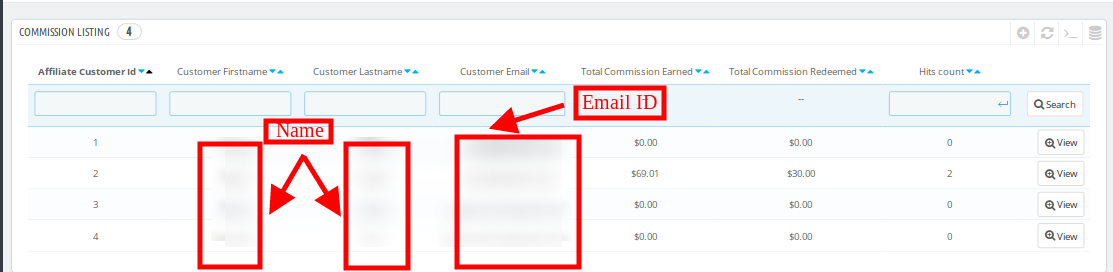
The store admin can view the commission details from the admin interface. The store admin can view the overall commission provided to every affiliate customer.
3.4.1 How to view the affiliate commission?
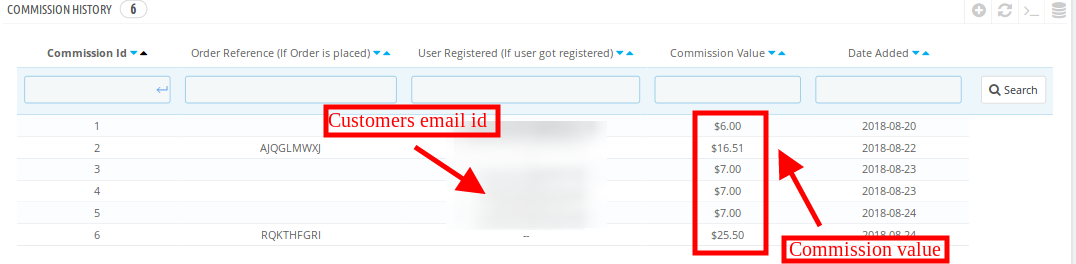
The Prestashop Affiliates module allows the eCommerce store admin to affiliates commission from the “commission listing”. The store owner can get details about the order reference, email id of the referrals, commission amount and the date on which the commission offered.
3.5 Pay Out Requests
The affiliates can redeem the commission just by clicking on the payouts option. The affiliates request to generate voucher or can send a payout request to the store admin.
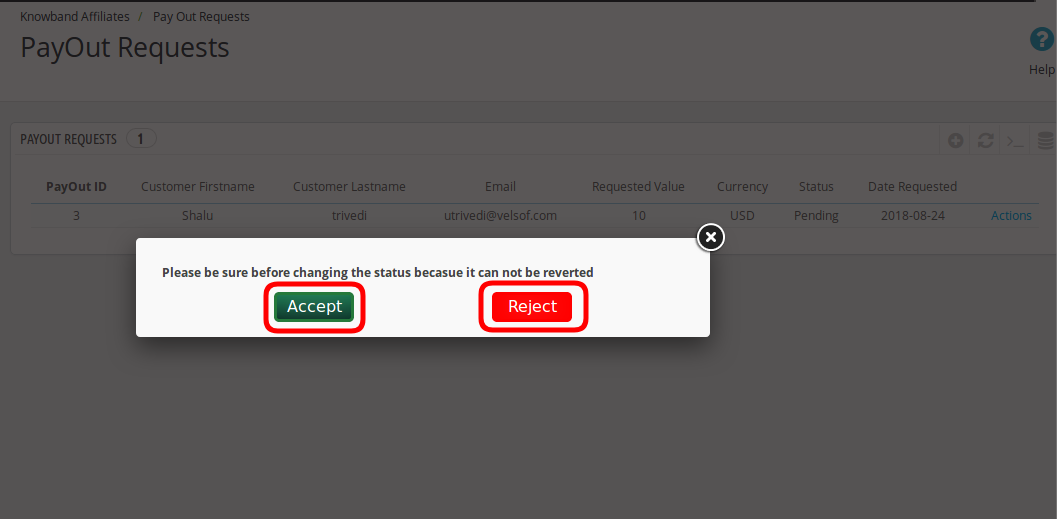
The store admin can view the payout request in the “Payout request” option and then accept or reject the request.
The store admin can click on the action option and accept or reject the payout request easily. Once the admin accept the payout request, then, the status of the request will be changed to “accepted” on the website front-end.
4.0 Front-end Interface
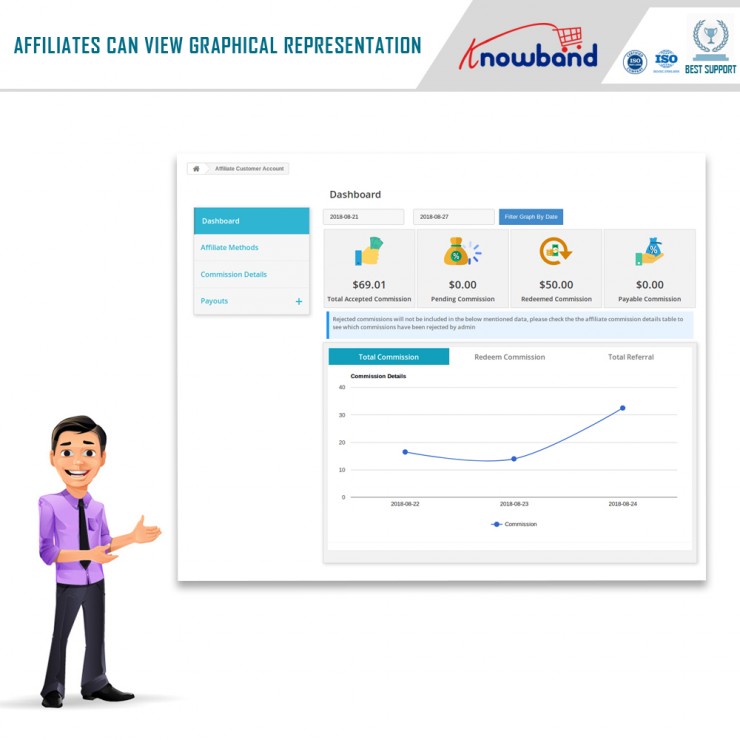
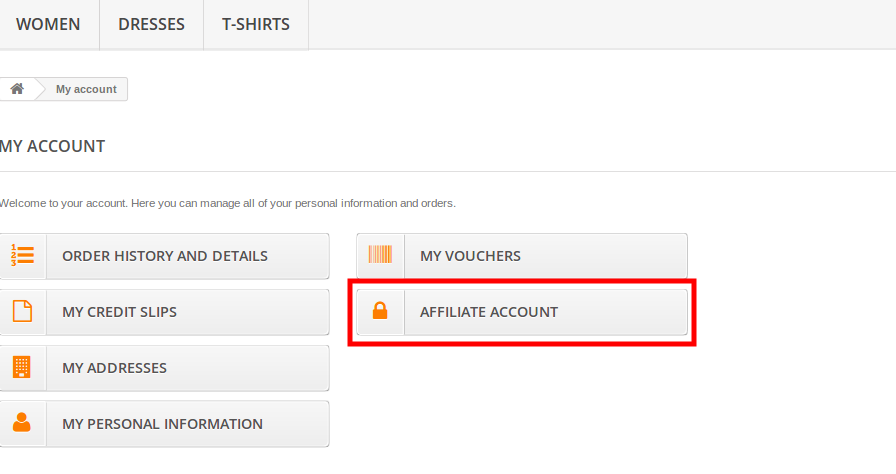
The online customers can view the affiliate registration option on the admin interface. Once they register as an affiliate customer, they can view their affiliate account as shown below:
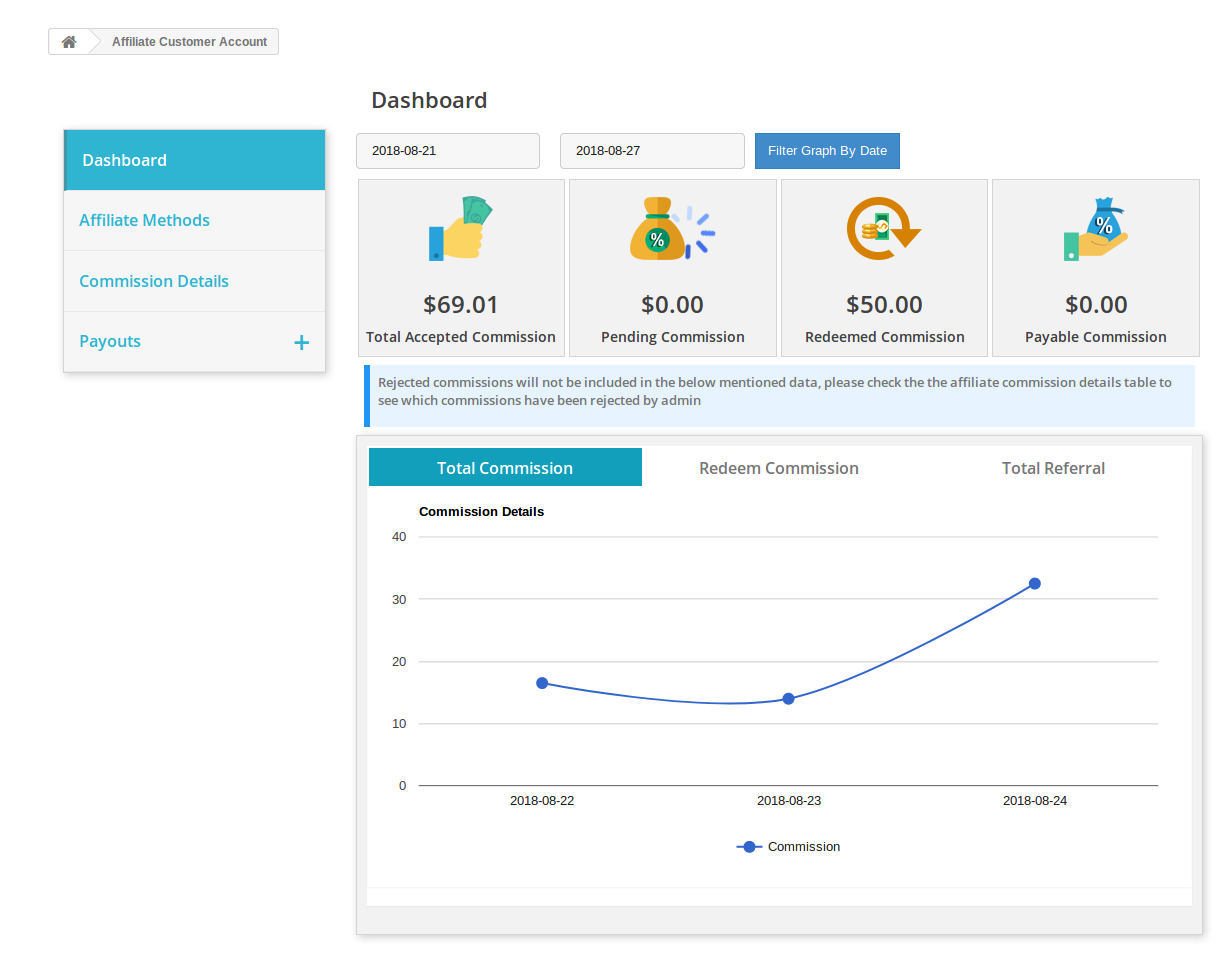
The affiliate customers can view the graphical representation of the total commission, redeem commission and total referral.
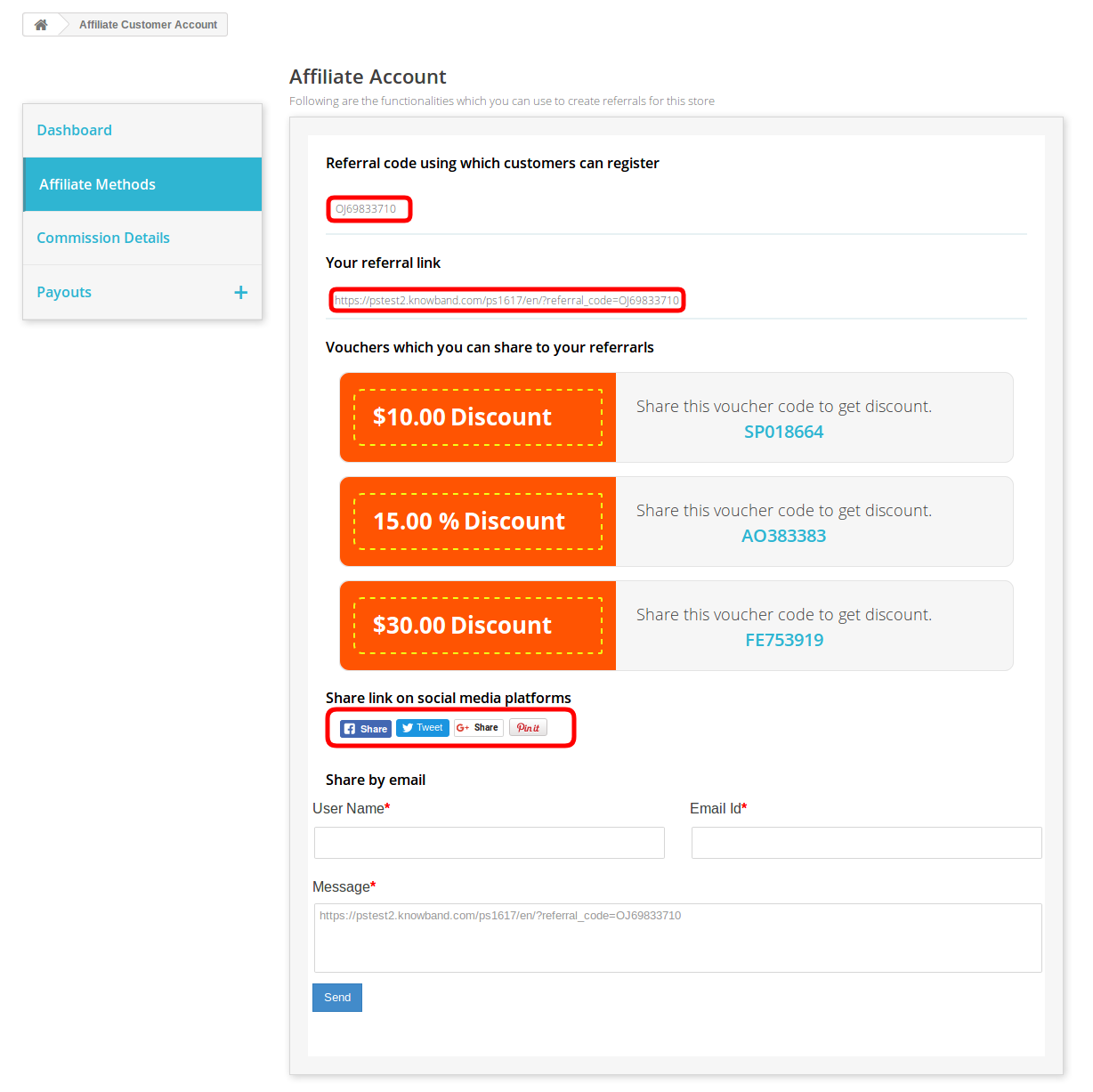
The affiliates can share referral code, share referral link, share vouchers, share link on social media platforms and share the store link via email.
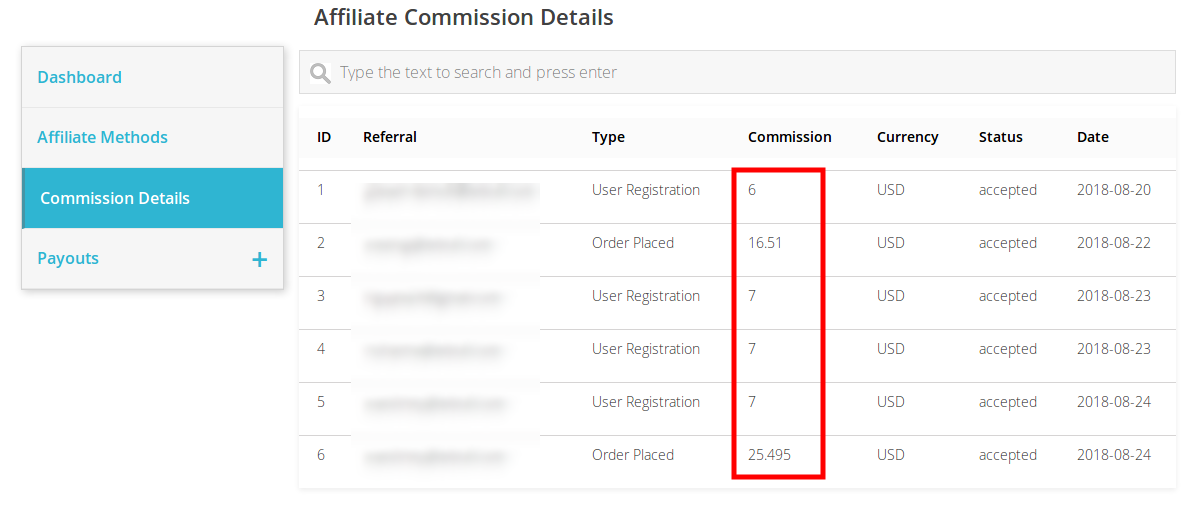
The affiliate customers can view the rewarded commission on referrals. They can also view the status of the commission.
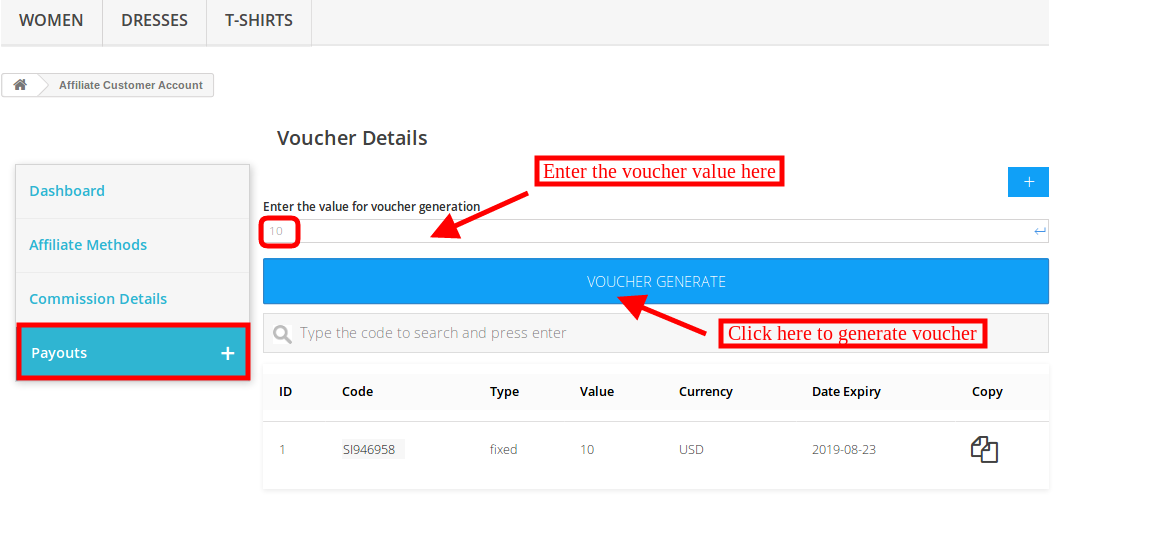
The affiliates can click on the payout option and after that click on the “+” for generating a voucher. The minimum value of the voucher is “10”. The affiliate can click on the “voucher generate” option for getting a voucher.
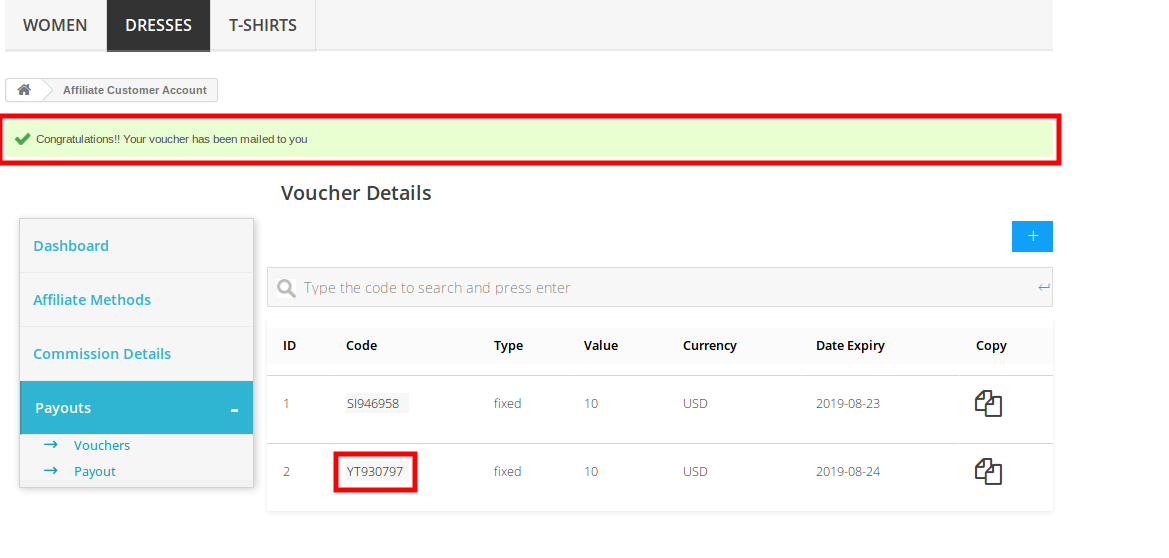
The affiliate can view the success message on the top of the website.
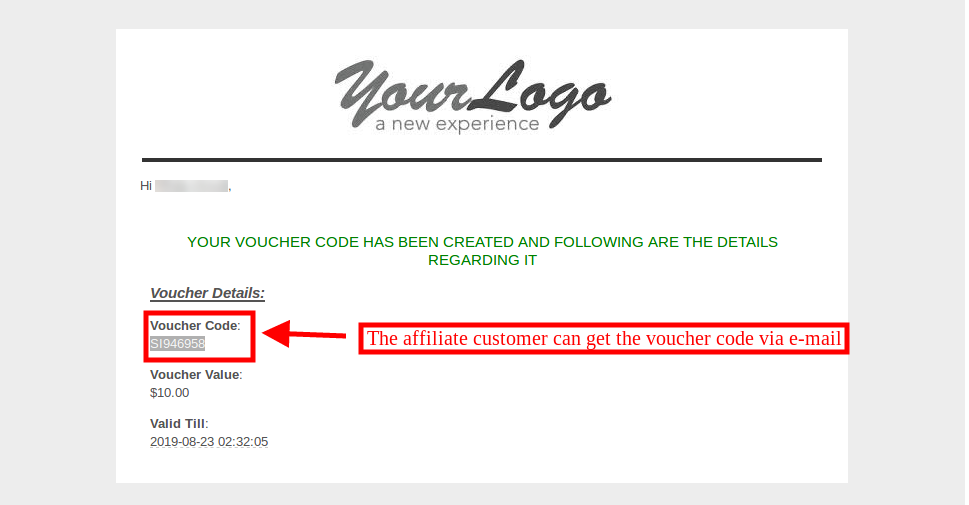
The affiliate customer can also get an email with the voucher code information as shown below:
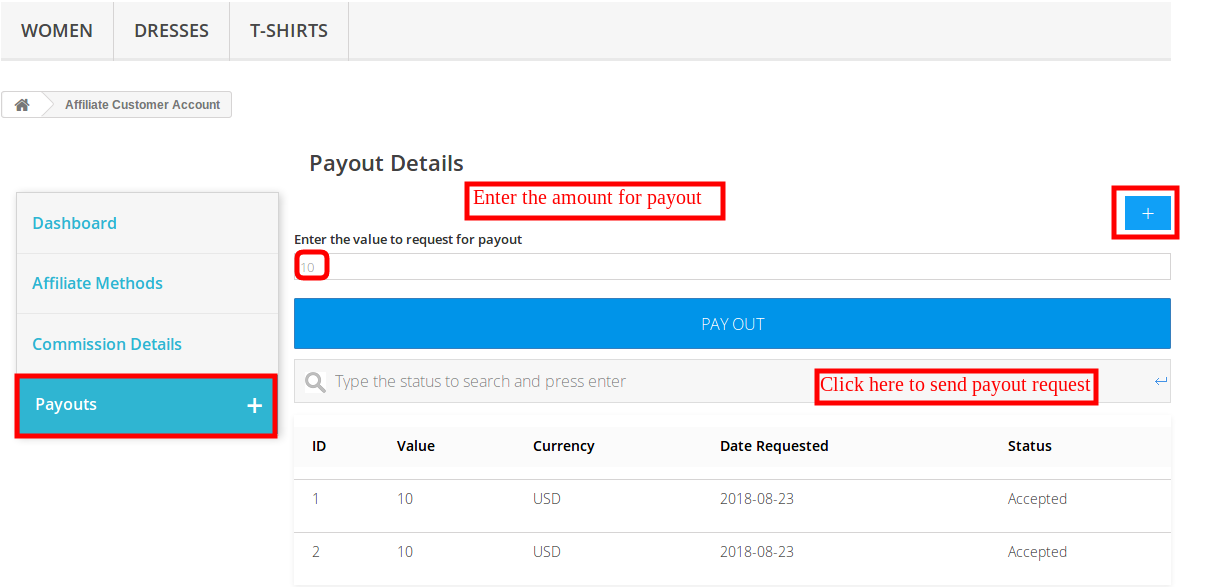
The affiliate can also send payout request from the front-end. For generating the payout request, the affiliates can click on the payout option and then click on “+”. Now enter the amount of payout and click on “payout” button.
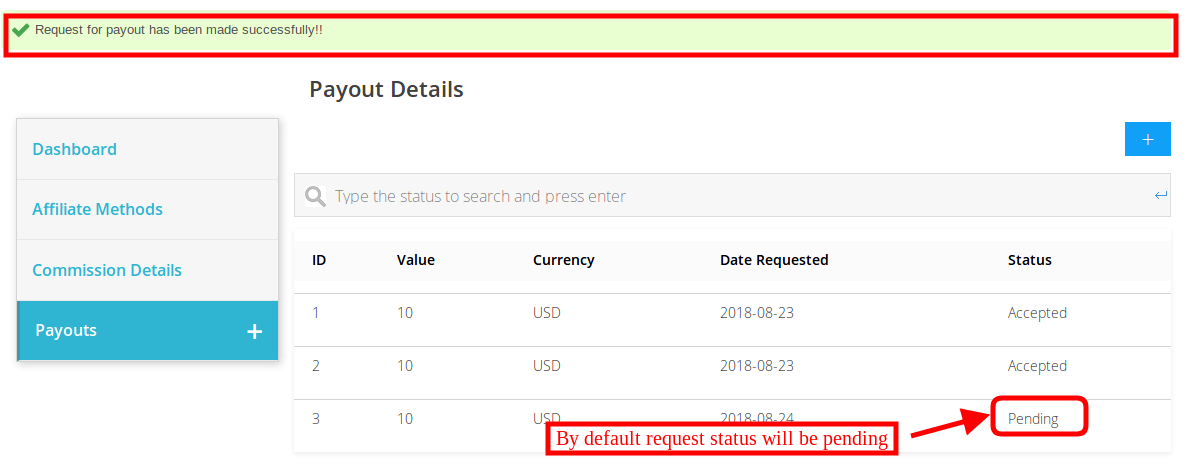
By default the request status will be “pending”.
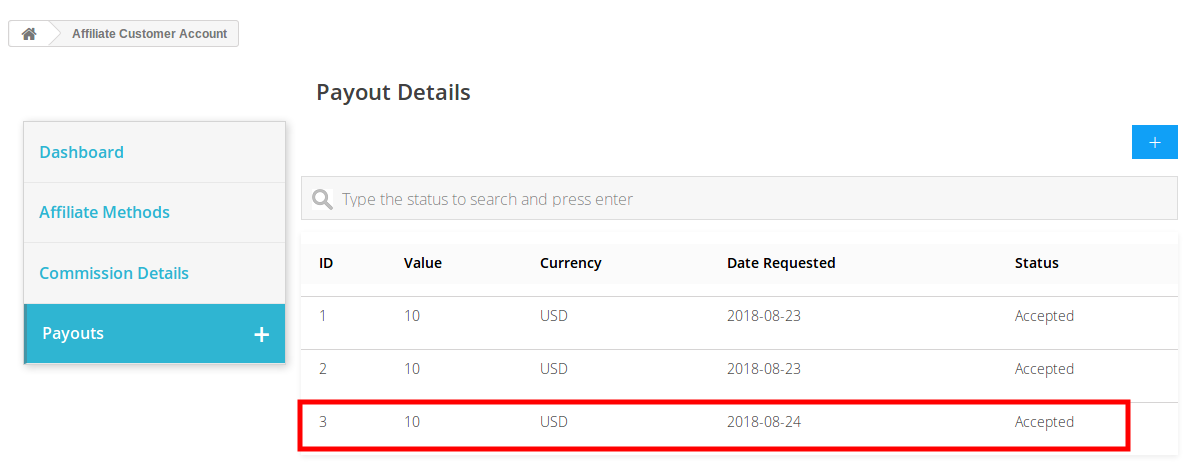
Once the store admin accept the payout request from the admin interface, the affiliate customers can view the status.
Need Help Getting Started? Watch Our Video!
We have created an easy-to-follow YouTube tutorial to help you understand and configure the PrestaShop Affiliate and Referral Program Module. The video shows you how to enable the module, customise referral settings, and monitor affiliate activities without any hassle.