Due to the COVID-19 pandemic, many retail businesses, primarily the grocery business owners, have marked their online presence to help customers get the grocery items without any hassle. Otherwise, there is a massive gathering of people at grocery stores which we strictly want to avoid in this particular time.
Hence, to ensure social distancing is maintained and consumers do not feel troubled to get essentials, retail businesses shifted their business on the online platform as well.
If you have just set your online grocery business or already have one on the OpenCart platform and looking for a module that could provide the in-store pickup facility to the customers, OpenCart Store Locator and Pickup module will fulfill your requirements.
OpenCart Store Locator | In-store Pickup
OpenCart Store Locator and In-store Pickup extension encourages the online pickup facility. It lets you add your business stores on your websites and helps customers pick up their items by selecting their nearby store.
Overview
1. Add multiple stores
2. Specify the store timings
3. Set time slots for pickup
4. Customers can choose the desired date and time-slot
5. Customers can check the nearby stores by setting distance filter
6. Set maximum days pickup period
7. Notify store about pickup orders via email
8. Embed Google Maps for easy navigation
Description
1. OpenCart Store Locator module lets you list multiple stores on your website. You can either add stores manually or through CSV upload. The stores are displayed to the customers on the checkout page.
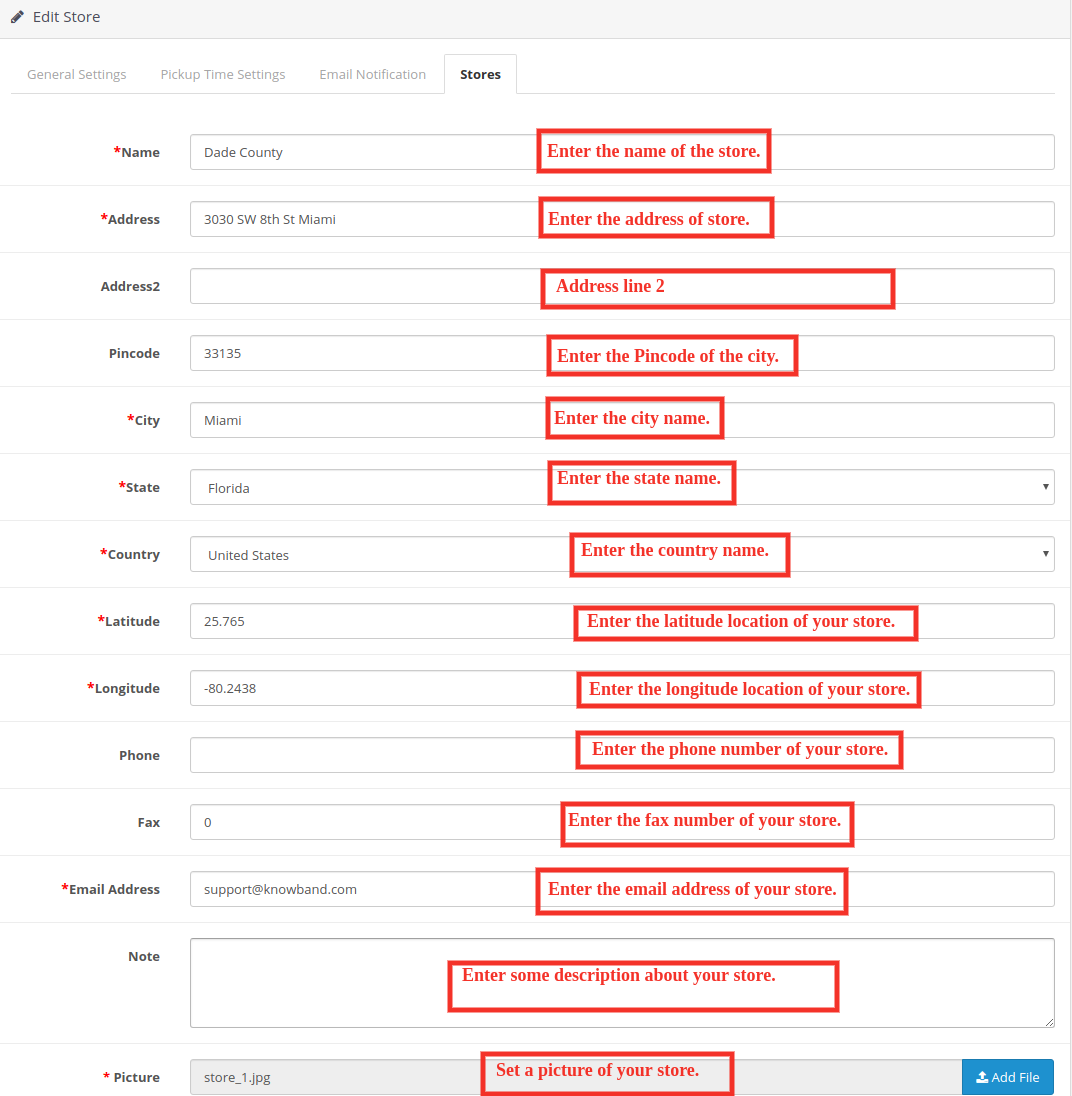
When adding a new store, you need to mention some mandatory details like store name, address, map coordinates (latitude and longitude), store email address and the store picture.
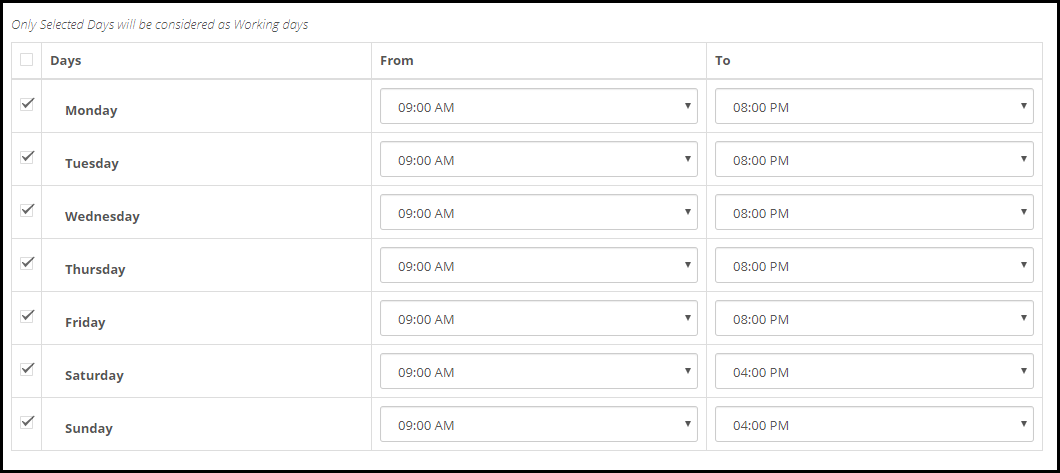
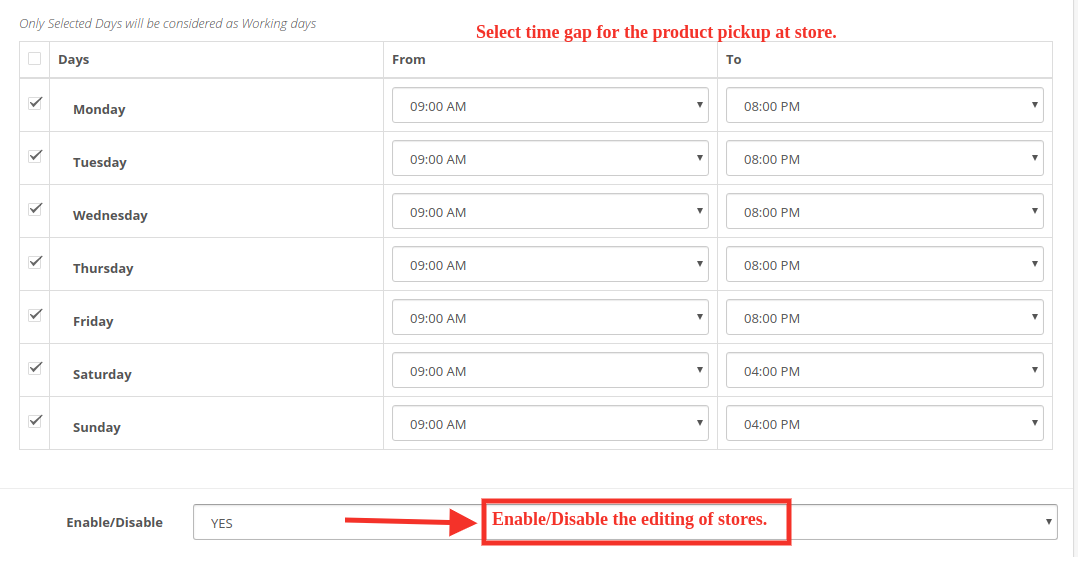
2. For a particular store, you can specify its working days and timings, for example, if a store remains closed on a specific day, that day can be disabled. For the rest of the days, the timings can be adjusted accordingly. It does not need to be same for every day.
3. The store timings can be split into multiple pick-up time slots. You can specify the gap (in hours) that should remain between two consecutive time slots. For example, if the store timing is 10 am to 8 pm and the gap defined is 2 hours, then the available time slots would be 10 am to 12 pm, 12 pm to 2 pm, and so on till 6 pm to 8 pm.
4. With OpenCart In-store Pickup extension, you can define the maximum days’ pickup period. Let’s say the period is set for a maximum 15 days, then a customer will have to choose the desired pickup date within 15 days from the date of order.
5. To let customers easily locate the store, you can embed Google maps by specifying its API key and then specify the location coordinates of a particular store. This ensures easy navigation to the store address.
6. The customers can look for the stores in their area by specifying their address or they can sort the store results by distance (in km) to locate their nearby stores.
7. You can also add a separate section of the store locator on the header.
8. OpenCart Store Locator and Pickup extension lets you notify the stores about the pickup orders via email. The email can be customized.
9. Customers can also add any important comments related to their order pickup.
The in-store pickup facility is probably the best idea currently considering that social distancing needs to be maintained strictly.
So, by incorporating the OpenCart Store Locator and Pickup extension on your website, you are not ensuring that social distancing is maintained but also saving a lot of time of you and your customers.
Considering other benefits, customers do not need to worry about the shipping or delivery cost and you make it easy for them to get the essentials at their desired time.
OpenCart Store Locator and Pickup extension by Knowband allows the store admin to show physical stores locations on the website front-end using Google map. With the OpenCart in-store pickup module, the store visitors can find the closest store that has the products of their choice. The admin can display a store locator on the website with some additional details like distance, contact number, name, and timing. They can check the nearest store and select the one from where they want to pick up the product.
This OpenCart store locator and pickup plugin offer a user-friendly interface and the admin can easily configure it without any help. The admin can select multiple stores that are to be shown in the store locator. The OpenCart store locator and pickup plugin allow the admin to set the minimum and the maximum number of days within which the product pickup will be initiated. The customers can easily check the nearest store and view the details also. They can pick up the product if they wish to. Thus they can get the product with greater and minimal time.
1.1 Striking Features of Store Locator Extension for OpenCart:
The OpenCart Store Locator Extension provides you with multiple features which are fully customizable and easy to configure from the back-end interface without requiring any coding knowledge. The various striking features of the OpenCart Store Locator Extension have been listed below:
The store owner can activate the store locator and pickup functionality just by a button toggle.
The e-merchant can set an image as a Google map marker and the zoom level of the map.
The OpenCart plugin allows the store admin to show contact numbers also.
The Customer can search the store by providing the distance in km or miles.
Customers can also search the store by entering their locations.
The store admin can add multiple stores and show them on the Google map. The admin can also select the default store.
OpenCart in-store pickup plugin allows the e-merchant to set the maximum pickup days.
The Opencart store locator and pickup module allow the store admin to show the store locator in the header menu.
The online store owner can set the date and time format.
The e-merchant can enable the settings to display the pick-up time slot.
The admin can set the minimum hours for which the customer has to wait for the pickup of the ordered product.
Store admin can enable e-mail notification settings. Enabling this setting will automatically send an e-mail to the store owner about the received order.
The OpenCart store locator and pickup module have a ready-made email template for sending an email notification to the pick-up stores about the order.
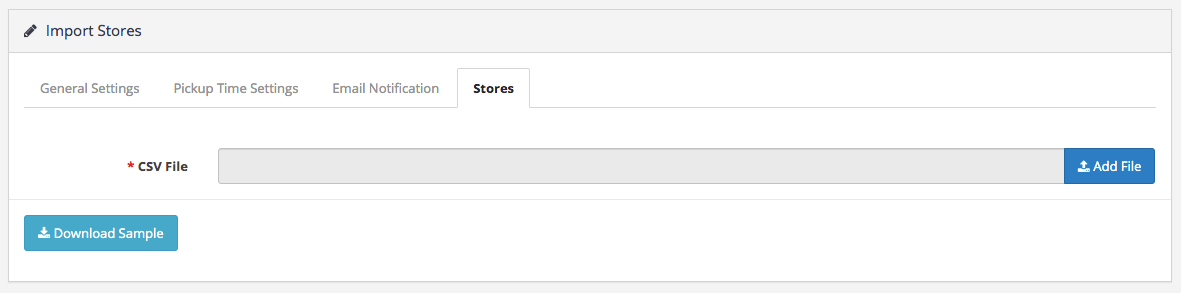
The OpenCart Google Maps Store Locator plugin allows the admin to upload store details in bulk using a CSV file. Store admin can also download a sample CSV file.
The store admin can also set store working days and hours at the time of listing.
The OpenCart store locator and pickup module are Multi-lingual compatible.
It is very easy to install, configure and activate this OpenCart store locator and pickup plugin.
The product will be delivered to the selected store. The customer can pick up the product from the store.
The address of delivery will be the selected store’s address.
1.2 Technology for Development
Language: PHP
Framework: OpenCart (2.0.x. to 3.0.x)
2.0 Installation Guide
To install this OpenCart Store Locator Module, please follow the following steps:
Purchase the OpenCart Store Locator Extension from the Knowband store. You’ll get the following files:
Zipped File containing the source code of the OpenCart Store Locator module.
User Manual of OpenCart Store Locator plugin.
Follow the steps below to install the OpenCart Store Locator Extension in the OpenCart store:
1. Unzip the zipped. You’ll get the folders as shown in the image below:
2. Upload all the files and folders of the zip file in the Root Directory of OpenCart setup via FTP manager.
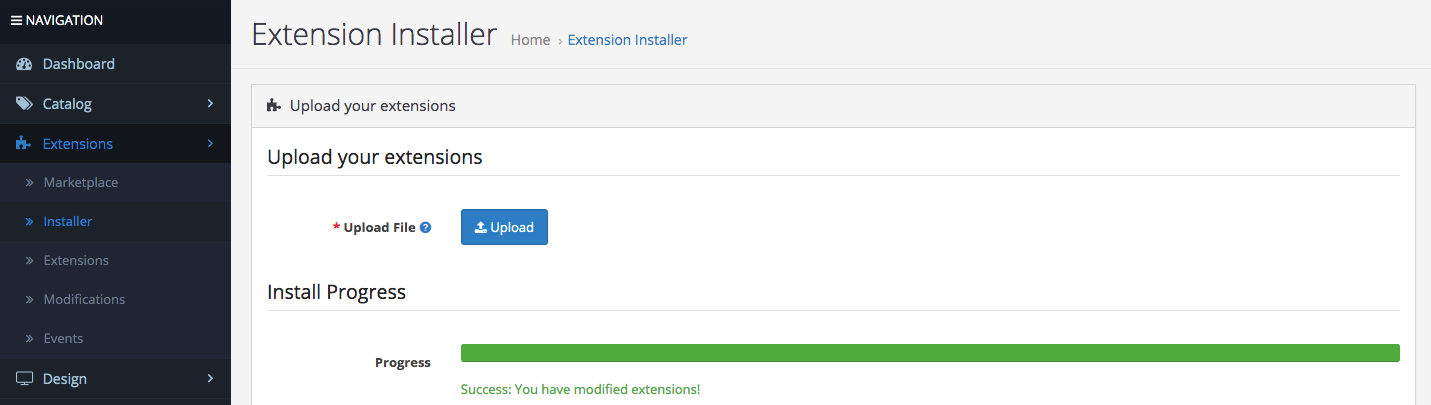
3. Install the OCMOD file from the Opencart Admin Side.
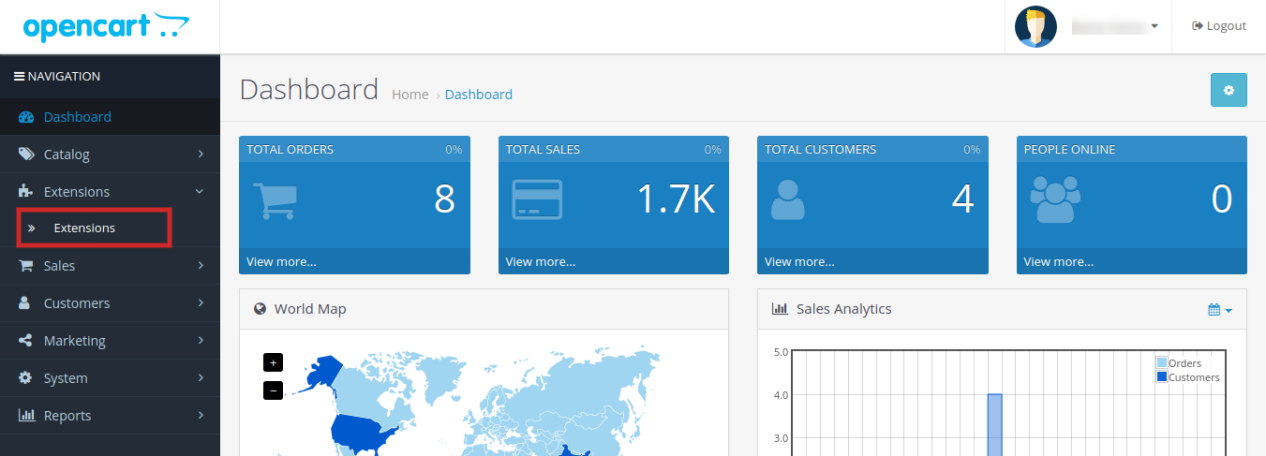
4. Refresh the OCMOD cache from the Extensions -> Modification.
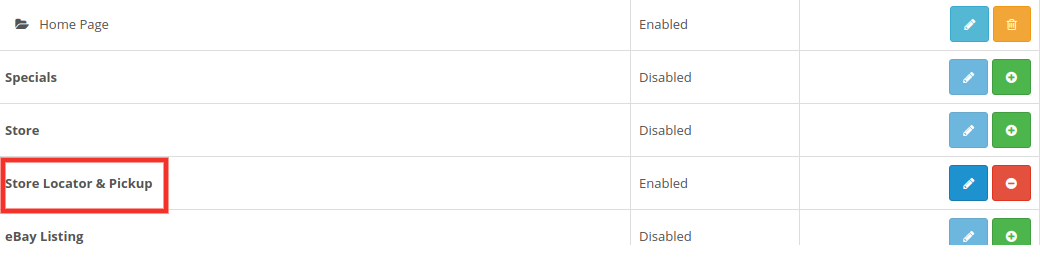
5. Login via FTP OR Control panel & make the folder i.e. image/kbstore_locator writable. Once done, Go to Extensions ->Extensions ->Modules & Install the module.
6. The OpenCart Store Locator module is now installed and is ready to use as shown in the image below:
3.0 Admin Interface of OpenCart Store Locator Extension
OpenCart Store Locator extension offers an easy customization option to the store admin. The various configuration options are discussed in detail below:
3.1 General Settings:
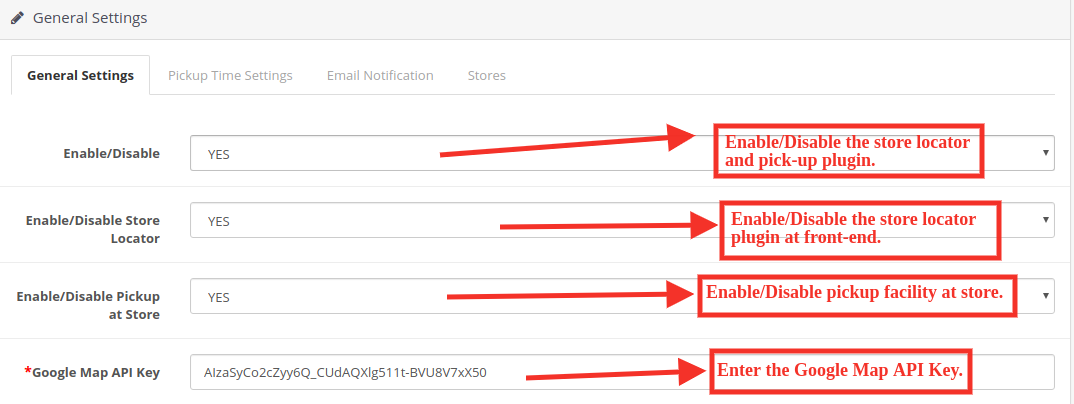
This General Settings page offer various configuration options as shown below:
Enable/Disable: The eCommerce store admin can activate or deactivate the store locator and pick-up plugin anytime just by toggling this button.
Enable/Disable Store Locator: The OpenCart Store Locator extension allows the admin to enable or disable the store locator in the front-end. By default, it will be enabled.
Enable/Disable the Pickup at Store: The admin can activate the pickup from the store just by toggling this button.
Google Map API Key: Enter the Google map API key in this section. A link is provided for generating an API key.
3.1.1 How to generate the Google Map API Key? General Settings:
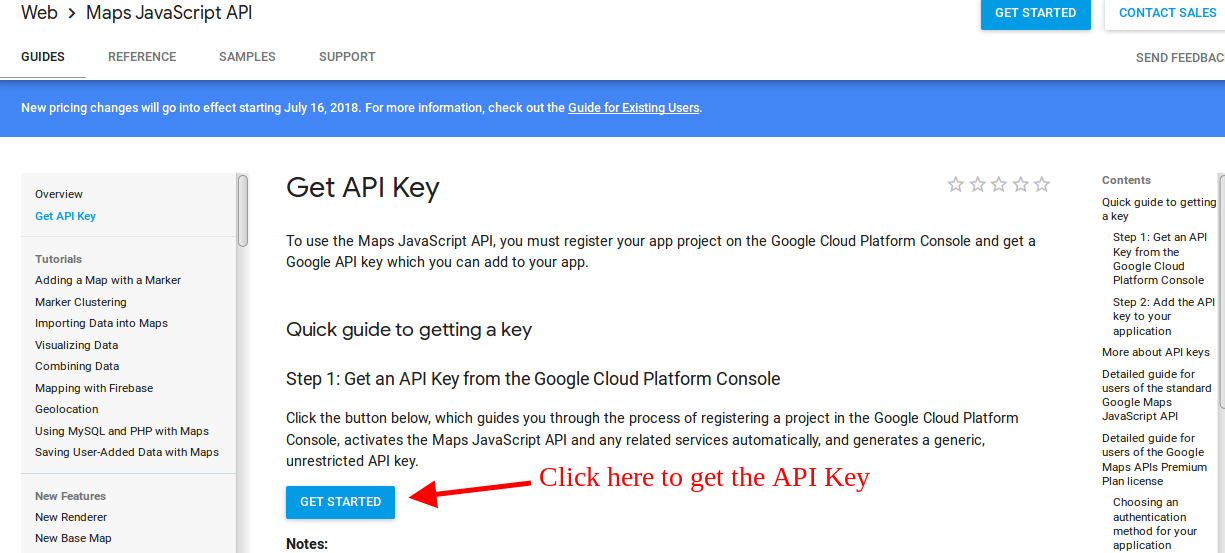
The eCommerce store admin can generate the Google API key by following these steps:
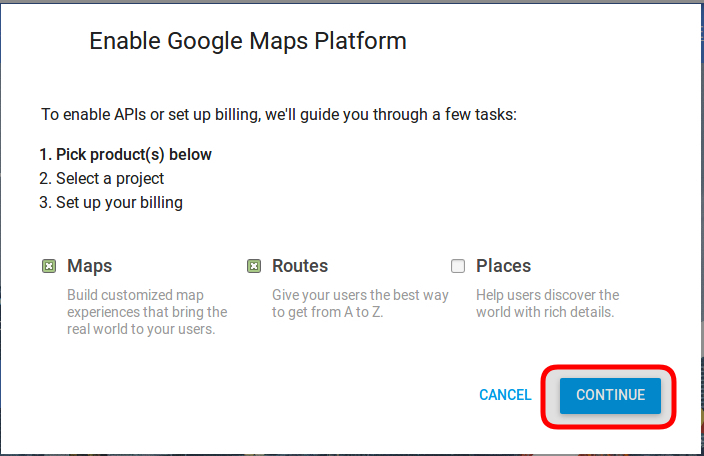
Click on the “Get Started” button: The admin can click on this button to get the Google map API key.
Pickup the products: When the admin will click the “Get Started” button this pop-up will be displayed.
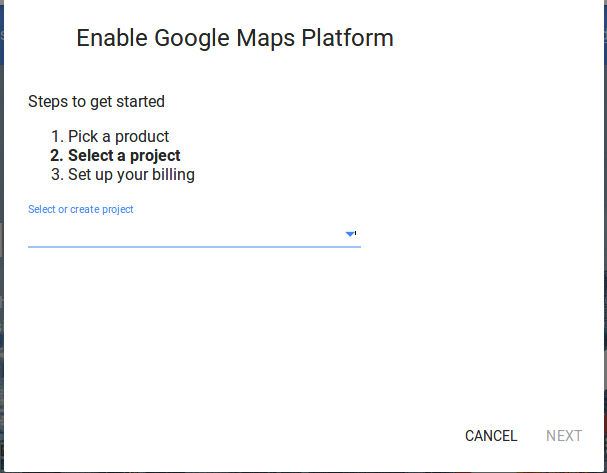
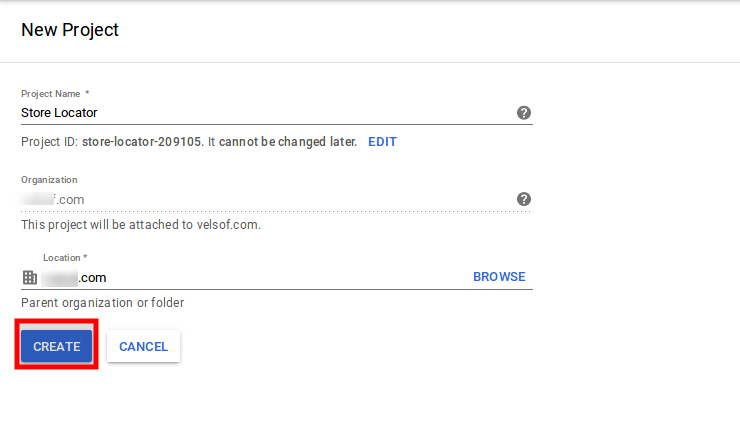
Project selection: The eCommerce store admin can select or create a project.
1. Select a project:
2. Create a new project:
Setup the billing: The eCommerce store admin can now set up the billing.
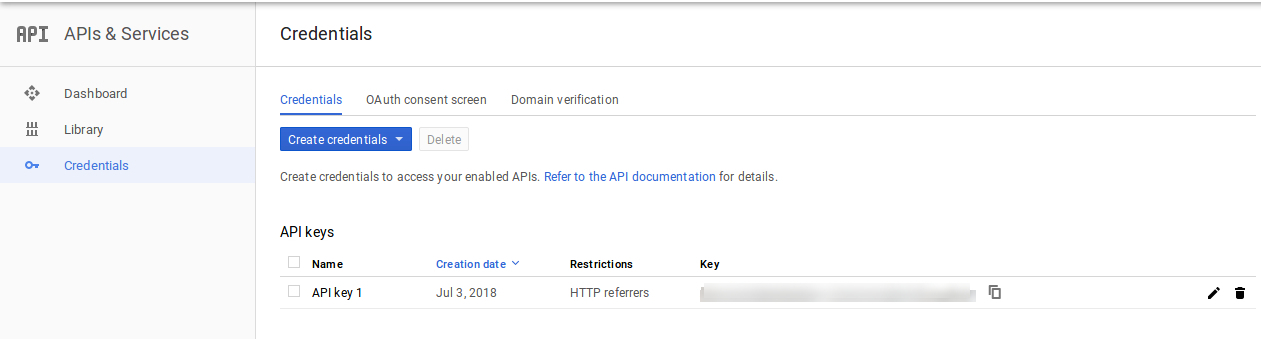
After billing the store admin can get their Google map API key.
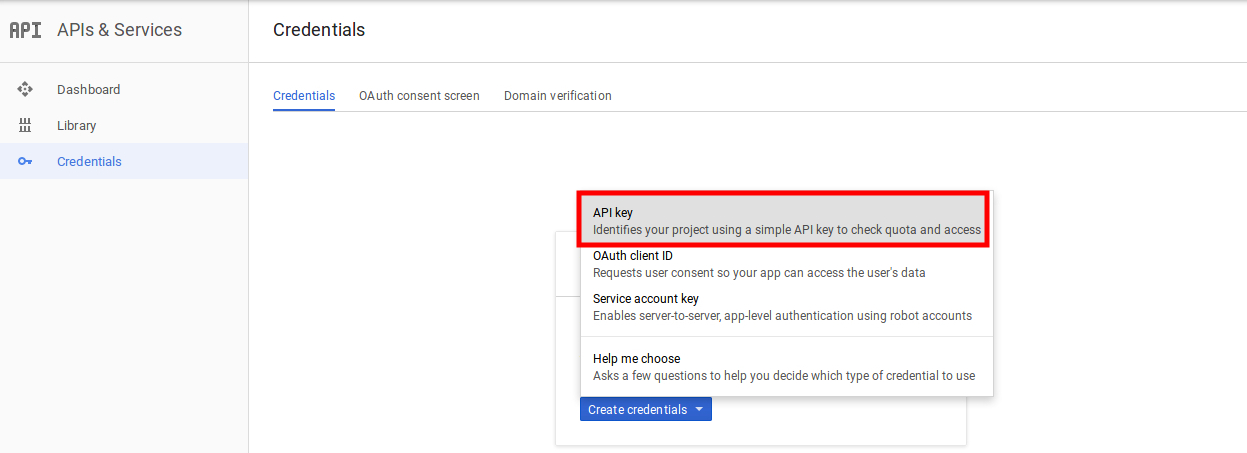
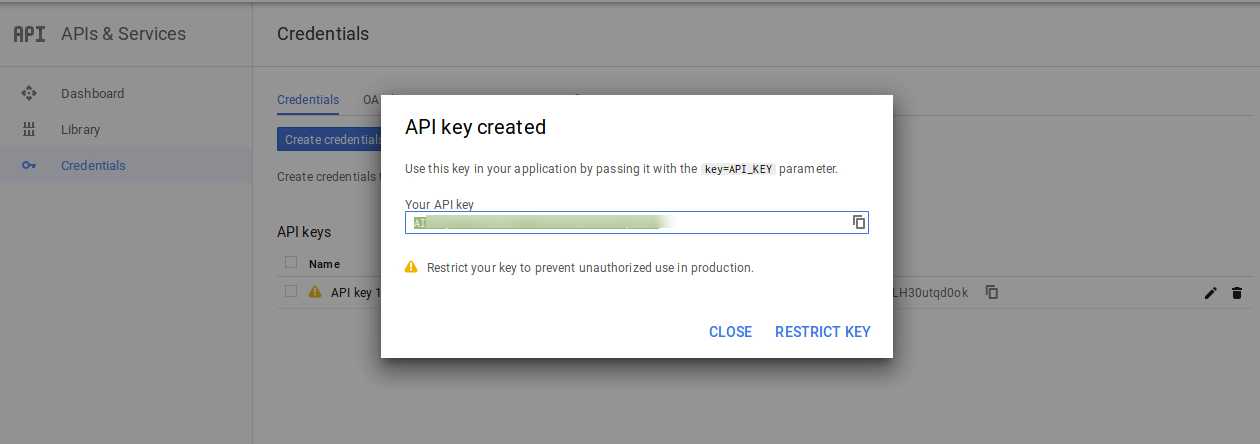
On the Credentials page, get an API key, store admin can select the API key option:
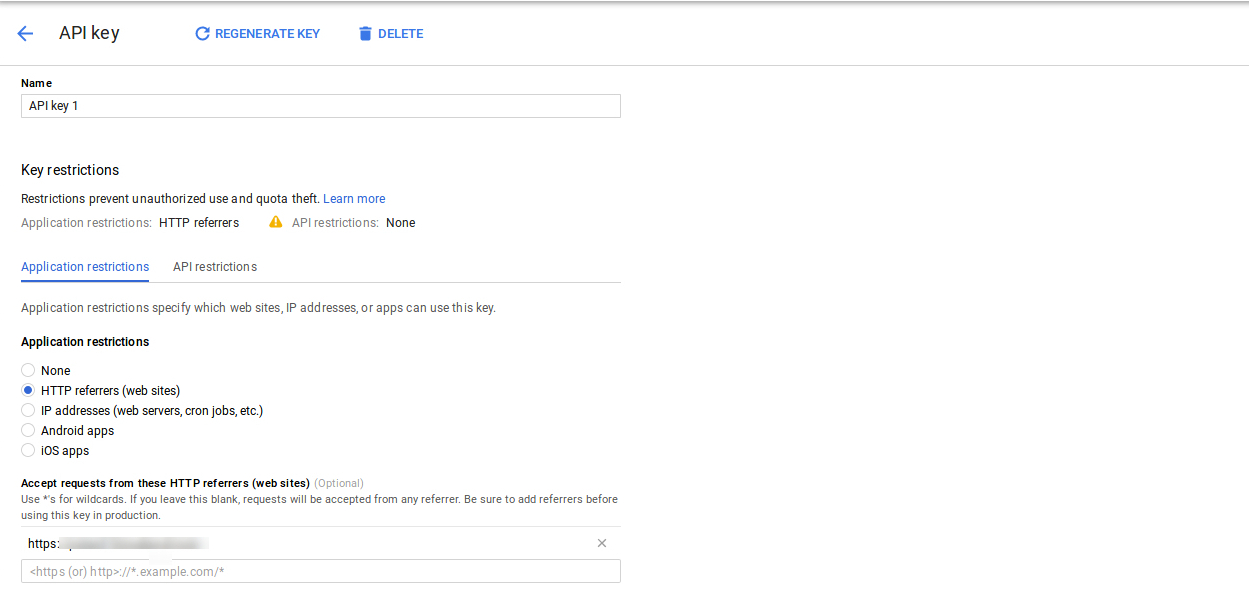
The admin can select the restrict key option from the dialog box to set a browser restriction on the API key.
In the Key restriction section, the store admin can select HTTP referrers (web sites), then follow the on-screen instructions to set referrers.
This way the admin can set the Google map API key.
Enable Libraries:
To use Google map API, You need to enable the following libraries in the Google Developer Project.
1. Maps Javascript API 2. Place API 3. Geolocation API
Steps to enable the libraries:
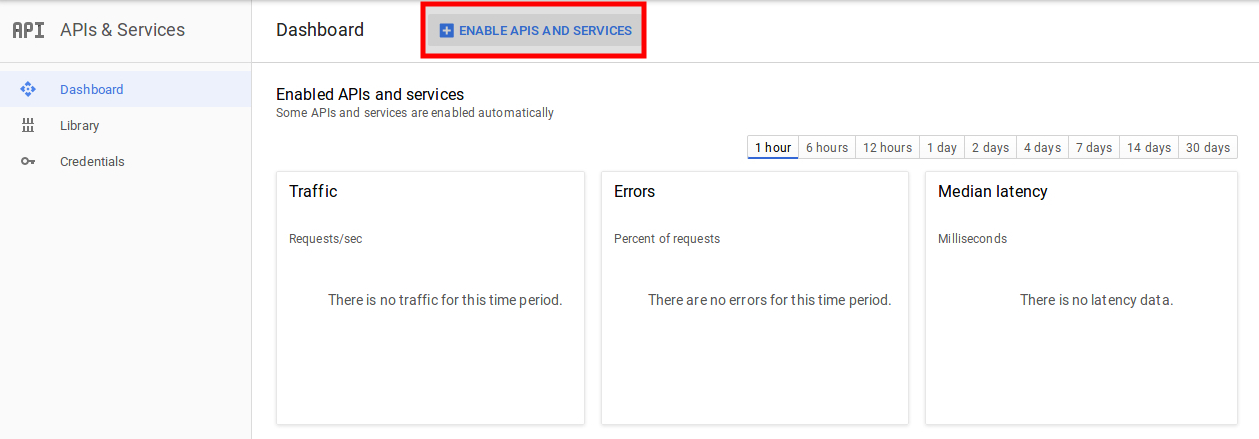
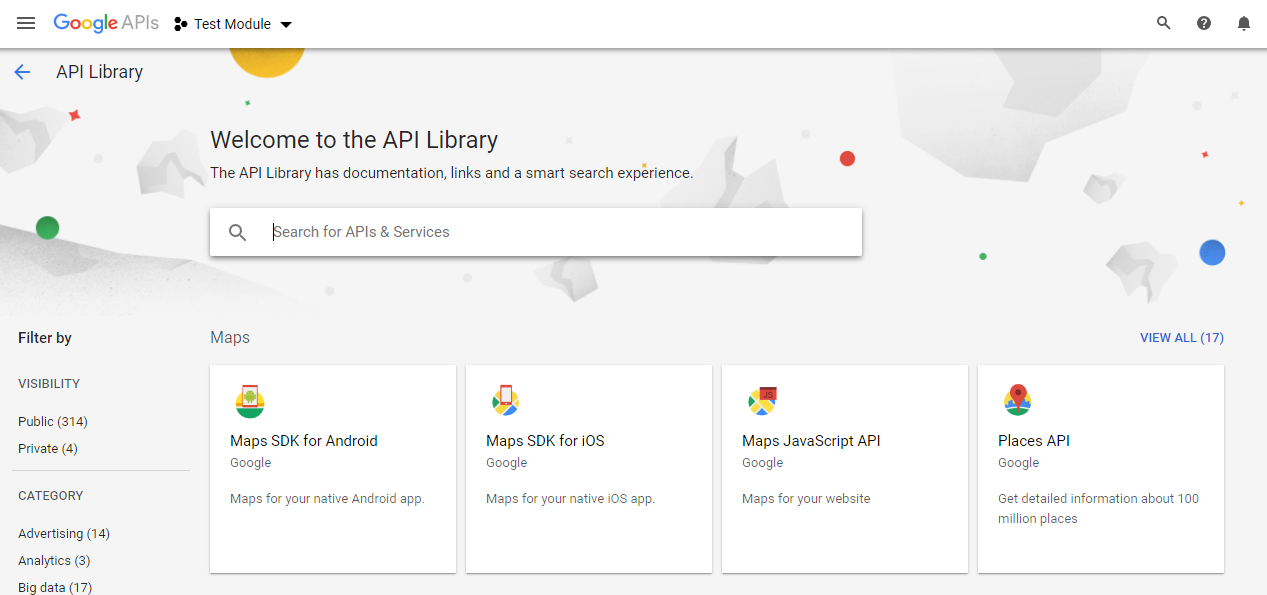
1. Click on the “Enable API & Services” button as shown in the image below:
2. After clicking on the “Enable API & Services” the following screen will appear:
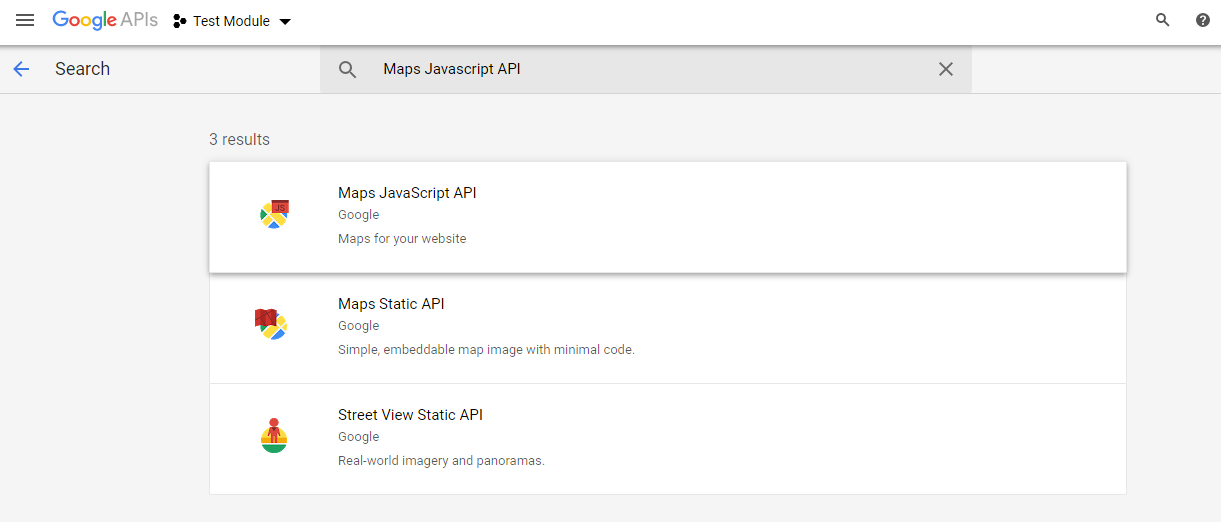
3. Search “Maps Javascript API” & Click on the “Maps Javascript API” from the suggested list.
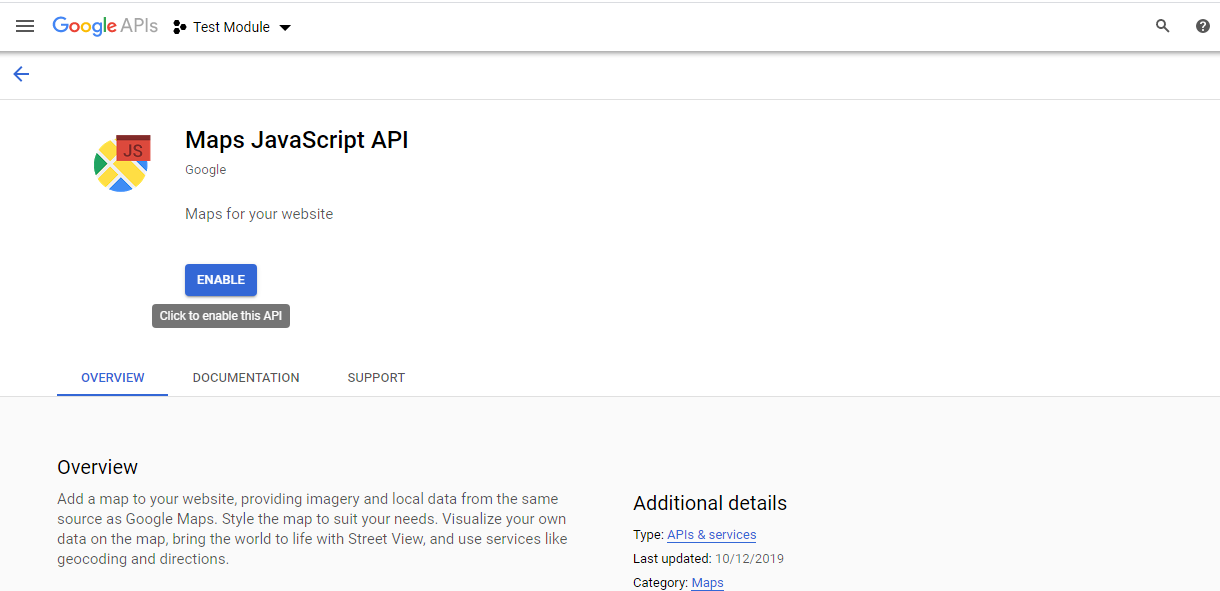
4. Click on the “Enable” button as shown in the below image:
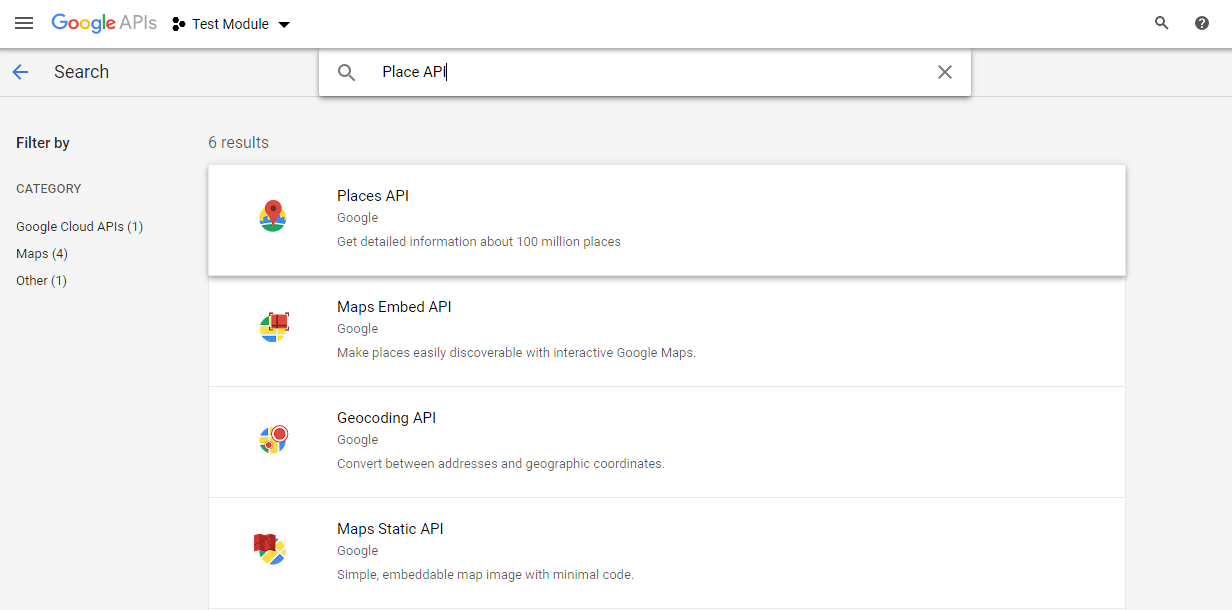
5. Repeat the same process to enable the Places API & Geo Location API.
Continued General Settings…
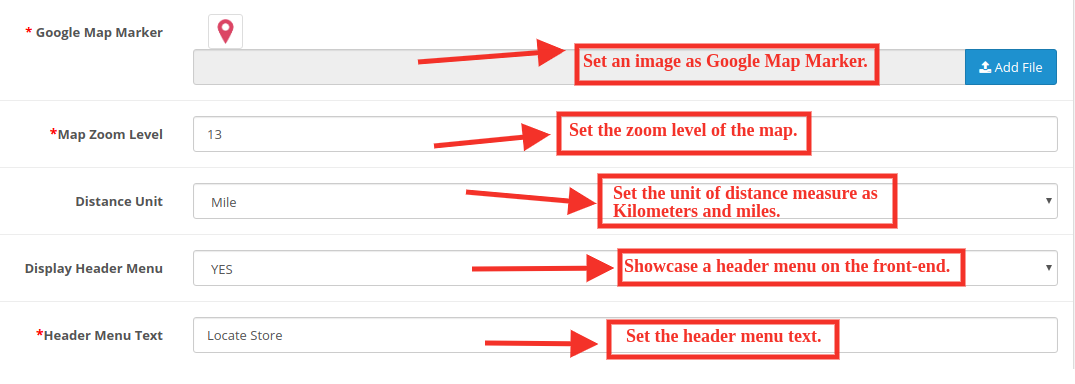
Google Map Marker: The OpenCart Google Map Store Locator plugin allows the admin to set an image as a Google map marker.
Map Zoom Level: The eCommerce store admin can set the zoom level of the map.
Distance Unit: The OpenCart Google Maps Store Locator plugin allows the admin to set the unit of distance measure as kilometers and miles.
Display header menu: The store admin can display the store locator in the header menu of the site.
Header Menu Text: The store admin can set the header menu text.
3.2 Pickup Time Settings
The various fields of this interface are discussed below:
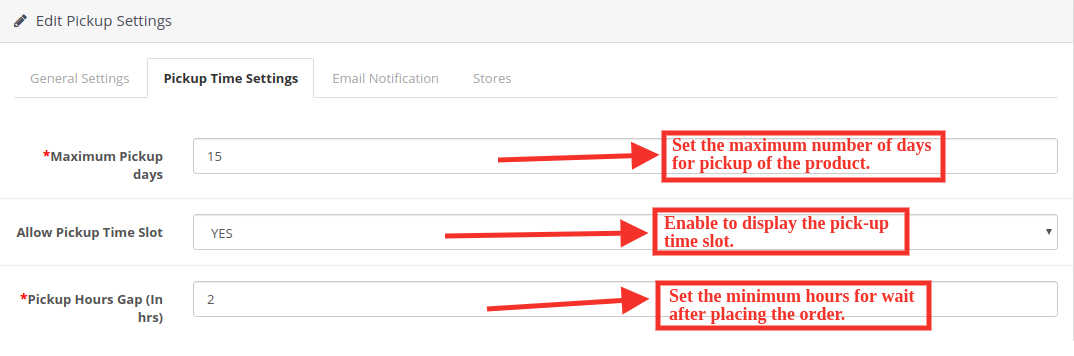
Maximum pickup days: In this option, the admin can set the Maximum days within which customer has to pick up their package from the store.
Allow Pickup Time Slot: Enable to display the pick-up time slot.
Pickup Hours Gap: The admin can set the minimum hours for wait after placing the order. This time will be the last time for which the customers need to wait after placing their order. After the provided time they can pick up their package.
3.3 Email Notification Settings:
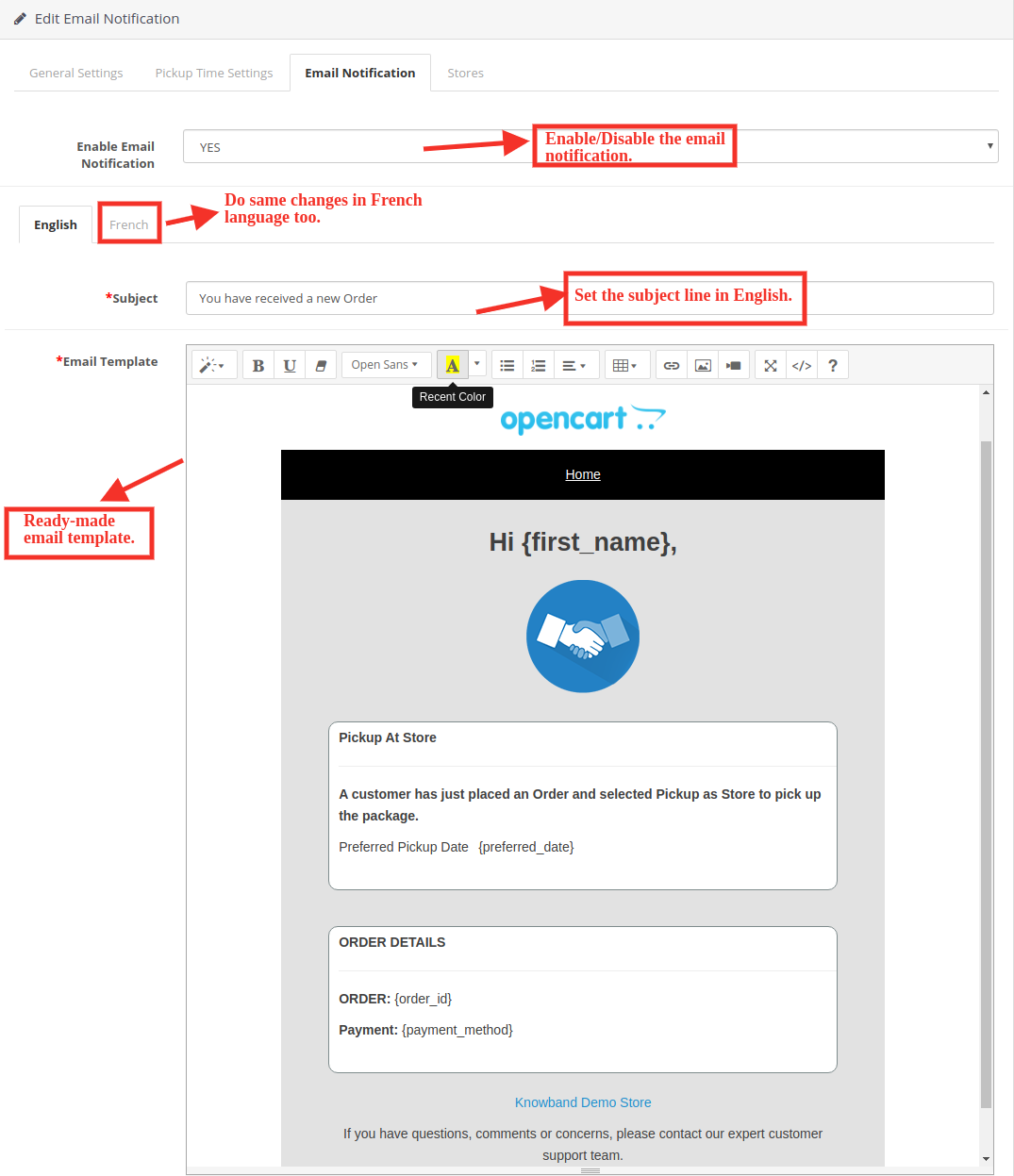
The store admin can send an email to notify the pickup store of the orders. Ready to send email templates to make this easy for the store admin to inform the pickup stores about the order.
Enable Email Notification: The eCommerce store admin can enable this option for sending e-mail notifications to notify the pick-up store about the order. The admin can set the subject line both in English and French language. Customizable email templates are available for sending the email to the stores. The ready-made email template automates the process.
Subject: The store admin can set the subject line of the email.
Email template: The store admin can also modify the email template if required.
3.4 Store Settings
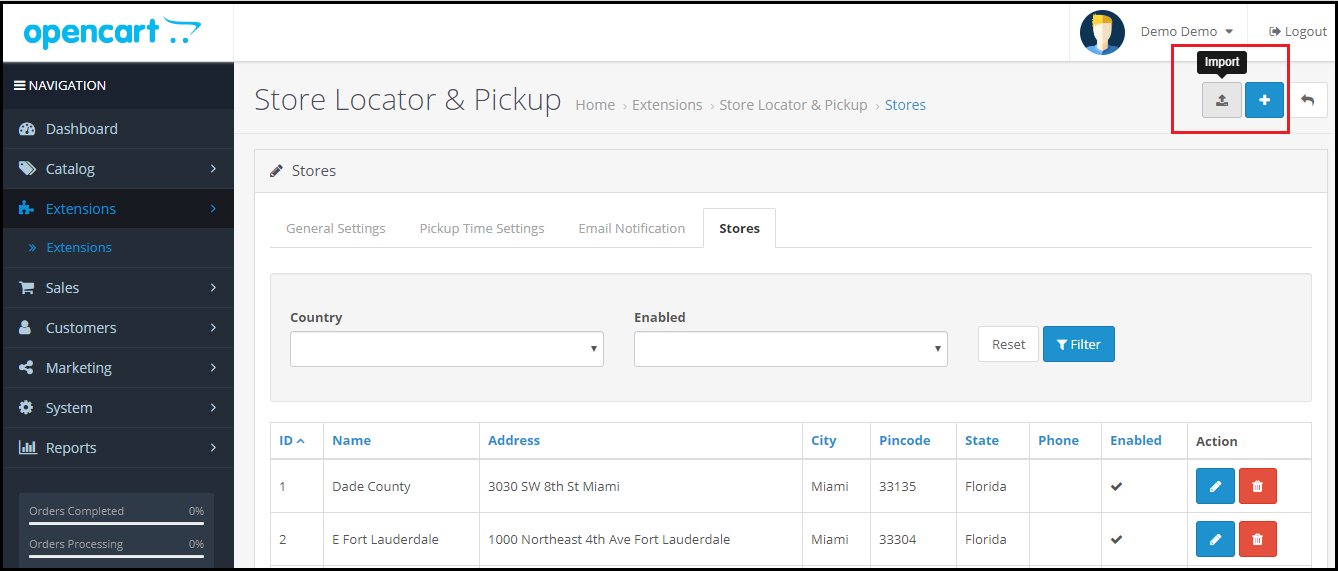
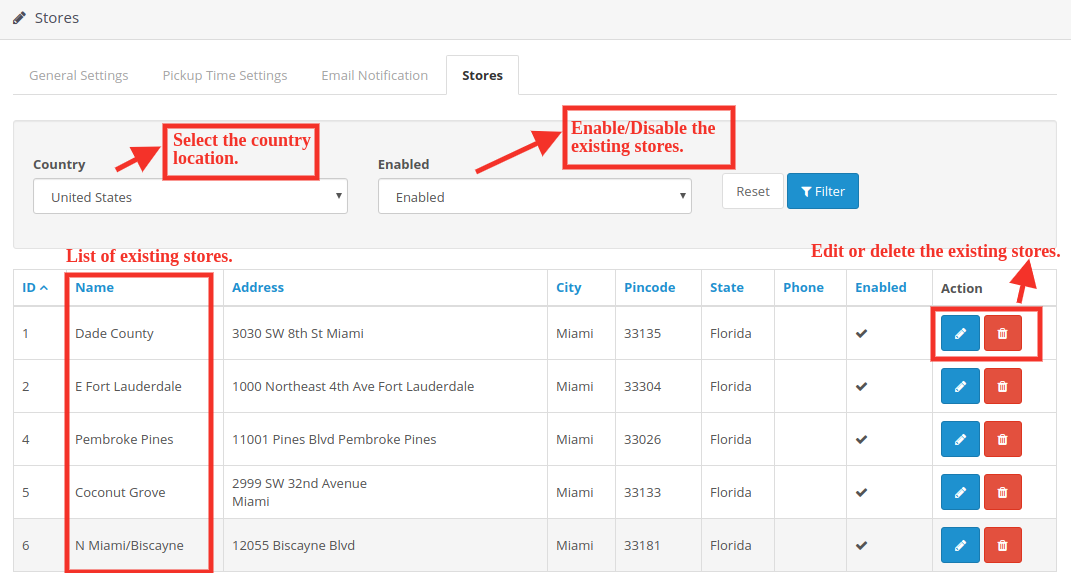
Under this tab, you will see the list of stores added by the admin. You can enable or disable existing stores.
The store admin can easily add a store from the admin panel. After clicking on the “add” button, a screen will be shown like below:
The store admin can easily add store name, full address of the store, and contact details also. The OpenCart pick-up module allows the admin to set the picture, status, and timing also.
The admin can easily insert the working days and hours of the store.
3.4.1 Import Store’s Contact:
By clicking on the “Import” button the store admin can upload store details in bulk. The store owner can download the sample file and insert all the details in this file. The admin can upload this file to import the store details.
4.0 Front End of the website:
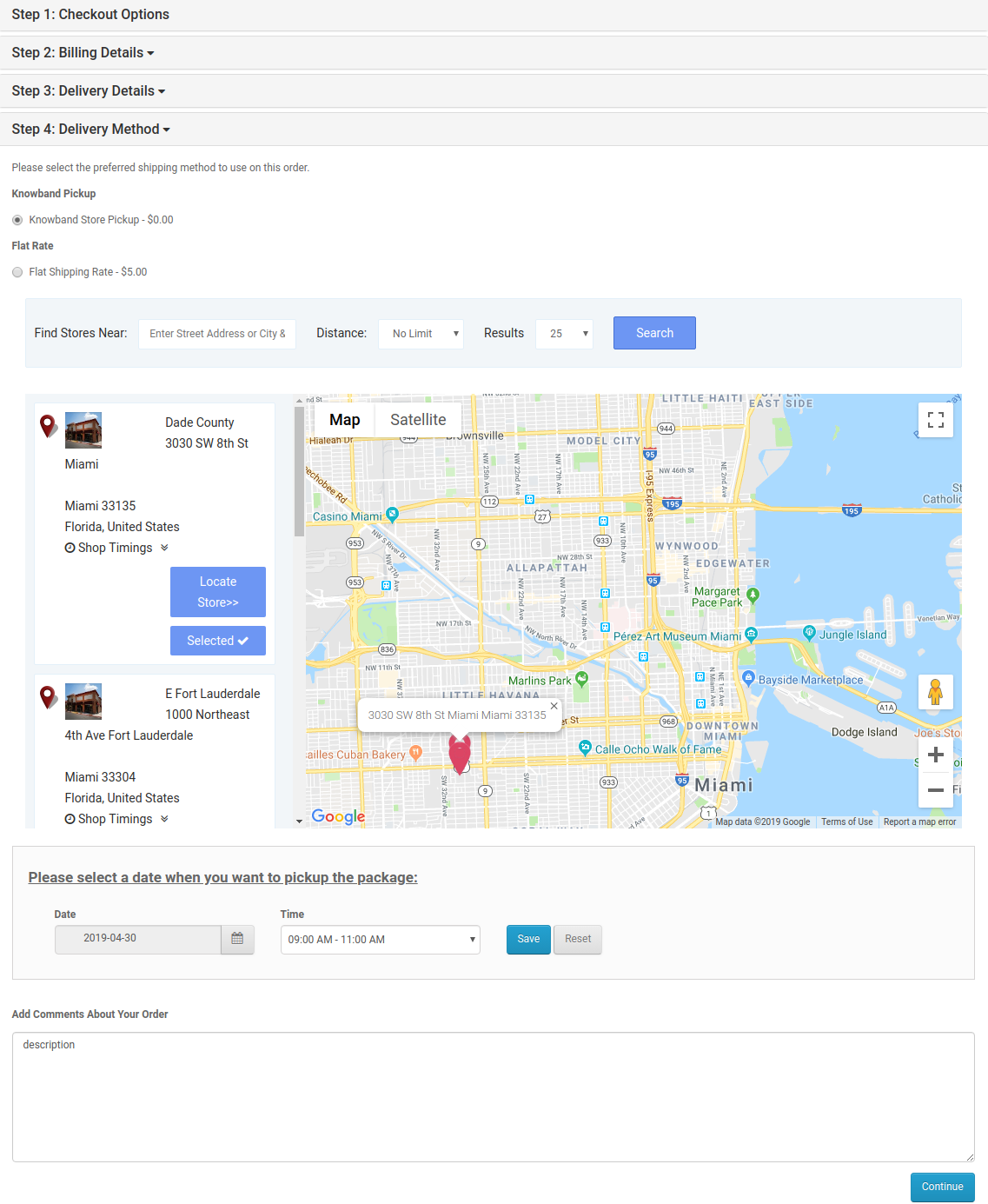
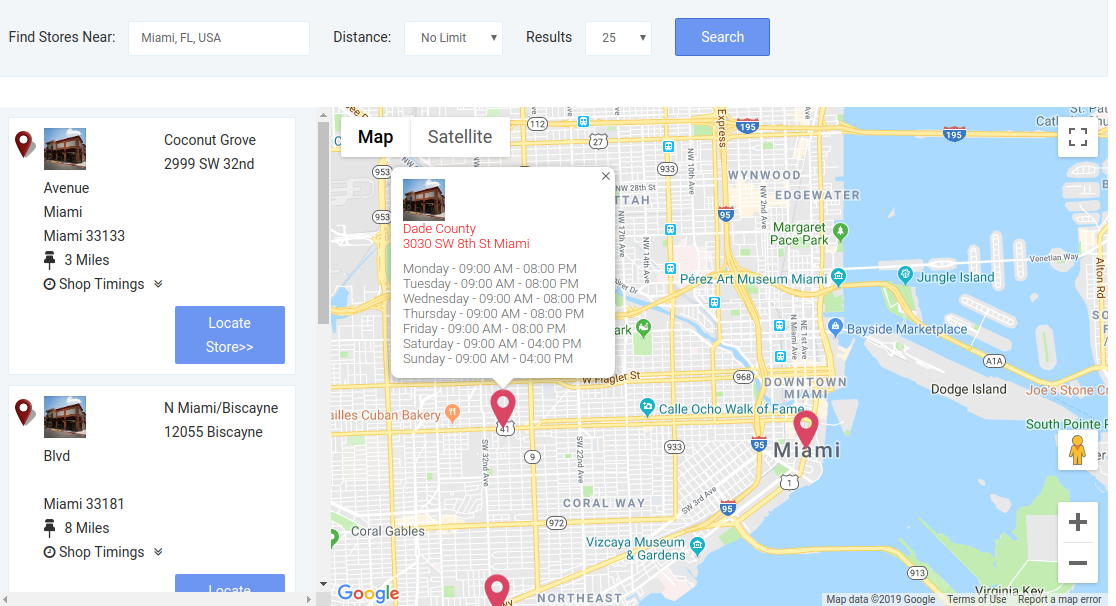
The customers can easily view the nearest store and pick up the product. They can view the contact details, name, distance, and timings also. The customers can get the product faster and without paying the shipping charges
1. They can select the Pickup option:
After clicking the Pickup at store option the customers can view the store locator.
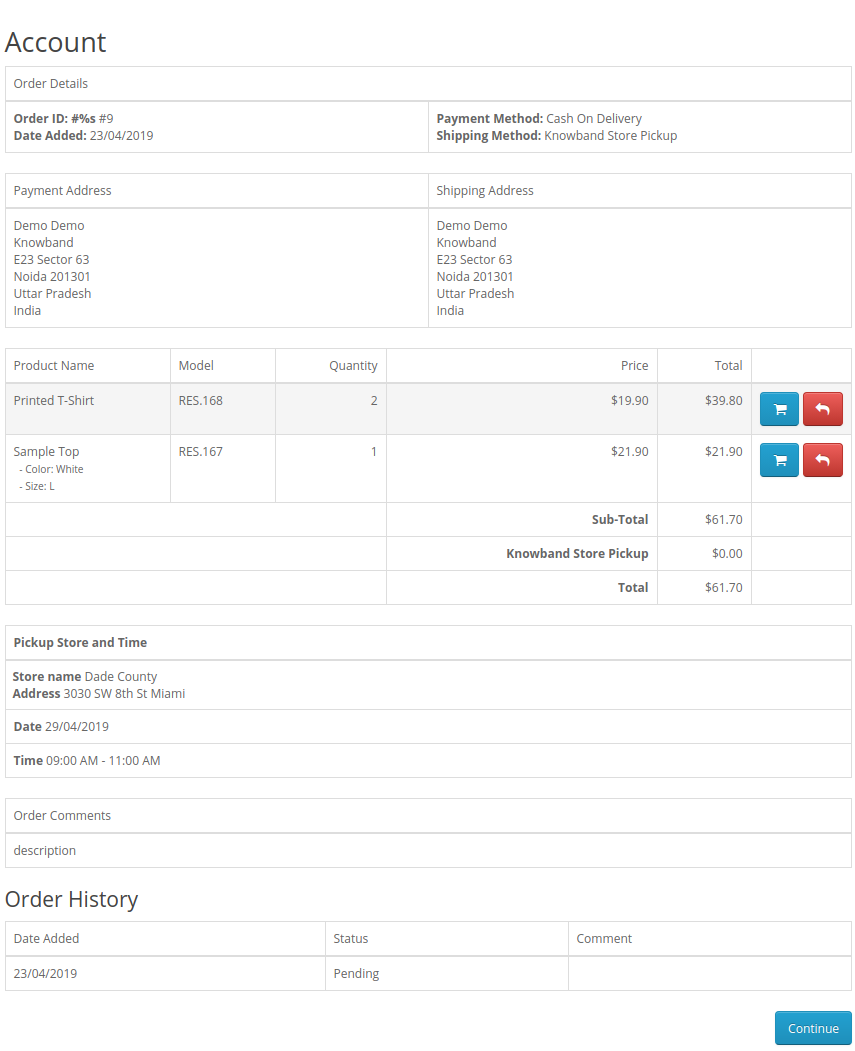
The customers can place their pickup orders easily. The customers can select the date and time to pick up the ordered product.
2. See the timings of the store for product pickup.
2. Order History of customers.
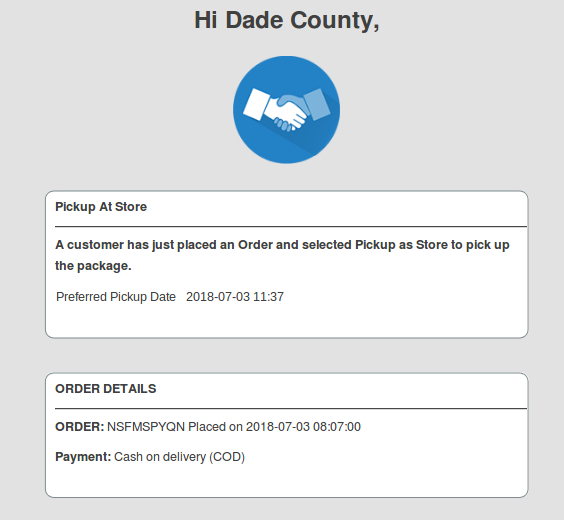
3. An email would be sent to the store owner stating the details of online purchase, date, and timings of the product pickup at the store by the customer.
This way, the online store admin can show multiple physical stores on the website using Google Maps. The Opencart Google Maps Store Locator extension makes the overall process very simple for the store admin. The Opencart store locator module is highly customizable and allows sharing maximum store details with the customers. Opencart Google Maps Store Locator extension also provides an option to set the pickup time, date, and delay from the admin interface. The online merchant can also send an email to the physical store end for notifying them about the in-store pickup order. Online users can easily pick up the ordered product from the selected stores.
Online users can easily place in-store pickup-based orders and grab the benefits of online deals and store discounts. Apart from that, they can place in-store pickup-based orders by which they can save delivery charges also. The Opencart store locator extension is highly effective and makes the overall process much easier.
Knowband is one of the most reputed names in the field of plugin development. We provide the best plugins for platforms like – Magento,Prestashop, OpenCart, and Shopify.