The OpenCart Review and Incentive Module offer a way for your customers to connect with you, as well as to promote sales on your eCommerce store. The product reviews Incentive extension allows you to add a customer review feature to all the products available in the store.
Simply informing consumers of the availability of a product or service is no longer adequate; customers are now willing to benefit from the first-hand experience. Hence, KnowBand developed the Review and Incentive Extension for all popular eCommerce platforms.
In addition, public transportation, hospitality, recruiting, retail, and health care have all gained insights from customer feedback in order to optimize their marketing strategies and develop their services.
A feedback system adds credibility and influences the buying decisions of the customers. Businesses that do not have feedback will lack the ability to develop their business.
The extension comes with the incentive system. Customers earn some points as a reward that they can redeem later. This motivates users to leave a review which helps other buyers when making a purchase decision.
With the aid of this OpenCart product review module, eCommerce store owners can now inspire their customers to leave their reviews of the different items. Get more feedback and ratings for your site to ensure new users. This also offers persuasive reasons for consumers to go back to your site, thereby improving user engagement and eventually converting.
Some of the functionalities with benefits are highlighted in this article. Give it a read and decide for yourself if it is thoughtful to add this module to your OpenCart store.
Functionalities of the OpenCart Review Module:
Not every store owner needs to be a coder hence the OpenCart Review and Incentive extension is designed in a way that everyone can configure and manage it with ease.
1. Allow users to give the product review:
You can enable the feature with a toggle button switch and decide incentives. Also, numbers can be set by the store administrator.
2. Email plays a crucial role
Emails are very effective ways to increase traffic on your website. The customer who drops a review will be given the reward via email. You can add catchy subject lines to it and email templates can be configured as needed.
3. Eliminate unwanted reviews:
The admin will set the moderation rules for the reviews. The reviews can be published either directly or after approval by the admin. It depends on the choice of the option.
By removing noise from unwanted and unjustified feedback, companies may be assured that only real, quality reviews are a current indicator of their online credibility.
4. Decide who will receive the incentives
Items or categories in which the admin wishes to be considered for reward and reminder can be chosen. This way you can categorize the customers and manage them carefully.
5. Keep an eye on Statistics:
This is the most beneficial feature of the OpenCart Review and IncentiveExtension. The data and report system of the module offers you detailed statistics based on different criteria that you can analyze.
Merchant Benefits of OpenCart Review and Incentive Module:
The ultimate goal of every merchant is to increase sales in their store. To achieve the targets, store owners try various tactics like running deals, offering coupons, following up the leads, and many more marketing strategies.
The OpenCart Review and Incentive Module is a complete package as it offers you several benefits.
1. Collects more feedback:
It provides a convenient way to attract more and more feedback from current customers.
2. Increases credibility:
Reviews and testimonials will help create much-needed credibility with new customers. At the same time, it leads to the buying decision of the tourists.
3. More customer retention:
OpenCart review and Incentive extension in exchange for the reward app offers a persuasive argument for consumers to return to the store.
4. Better conversion:
Offers and discounts can inspire them to shop in the store. So, you’re having a few fast conversions.
5. Enhances customer engagement
Customer spends more time on your store giving a review and reading others feedback, therefore, reviews and rating system increases customer engagement.
Recommended Read: How Gamification Increases Customer Engagement on Your eCommerce Store
Overall Impact of the reviews on your store
Reviews not only can influence customer decisions but also boost the reputation of a brand. Reviews have the power to create consumer trust and inspire people to engage with the brand. Customer interaction eventually contributes to increased results for companies.
customers win rewards and incentives that motivate the buyers
Positive reviews influence buying decisions and promote rational buying.
It creates better product understanding for new users hence become a buying motivation.
Conclusion:
People are talking, people are listening. Online review is potentially the most effective, mutually beneficial tool any company can employ and any user can support it. With everyone reading and making decisions based on feedback from other customers, how important do you think the review is to your business?
The KnowBand team specializes in increasing consumer activation to inspire current decision-making and long-term brand loyalty. If you are looking for any feature to add to your OpenCart store then you may find a module for that in our store or you can contact us at support@knowband.com.
Product reviews are an important way to know the perspective of the customers who have purchased the products at your store. But sometimes, it might get difficult to compel users to leave a review for their purchase or ask new visitors to rate the product. In order to incorporate a review and rating system on the store, Knowband has offered OpenCart review incentive module which motivates buyer and customers to write a review in exchange of appealing incentives. This OpenCart review reminder and incentive module reminds the user about reviewing their purchase on the store. Using OpenCart product review reminder module, you can easily create and schedule unlimited review reminder emails for asking bulk product reviews and rating from the customers. Only approved reviews are provided with the discount incentive which increase the number of returning customers on your eCommerce store.
1.1 Striking Features of OpenCart Review Reminder and Incentive Module
Product review and rating is all about building brand reputation in eCommerce markets. With OpenCart review incentive module, you can easily control the review content visibility on your website. Moreover, you don’t require to code anything for the implementation of this review and incentive system at your store. Everything is simple and can be managed from the backend without modifying any existing code.
Before that, let us take a quick outlook of the features offered by this OpenCart review reminder module.
1. Compel your visitors and customers to write a product review in exchange of incentive by incorporating OpenCart review manager plugin at your store.
2. Enable or disable the functionality of OpenCart product review reminder module using the toggle switch provided at back-office.
3. The incentive system of this OpenCart review incentive module can be separately enabled or disabled as per business needs.
4. You can moderate product reviews before making them live on the product pages. You can either accept the product reviews or reject them.
5. OpenCart review and rating manager allows you to ask product reviews from all customers or buyers only.
6. With OpenCart customer Ratings and Reviews system, you can offer a fixed or percentage type incentive value to your customers.
7. The review incentive amount can be set from the backend of this OpenCart review and rating manager plugin.
8. OpenCart review incentive module automatically sends an approval or rejection email to the customer depending upon the moderation result.
9. You will receive an alert notification email as any user will post a review on your website.
10. OpenCart review reminder and incentive module lets you configure the reminder email sent to the customer for asking reviews and when once after they have reviewed the product.
11. OpenCart product review reminder and incentive is mobile responsive and device compatible.
12. OpenCart review manager plugin supports multi-store and multi-lingual compatibility.
13. You can view the complete report for the product reviews, offered incentives and list of reviewed products from the back-office of this OpenCart review incentive module.
14. Create unlimited Smart review reminder and send them to buyers as soon as they complete their purchase from the store.
15. OpenCart review reminder extension allow excluding products and categories for which no reviews are required.
2.0 Installation Guide of OpenCart Product Review Reminder Module
Before starting the installation process, you have to buy the OpenCart review incentive extension from the Knowband store. Once purchased, you will receive the following files on your registered email.
Source code of OpenCart Review Incentive module in zipped file format.
User Manual of OpenCart review reminder and incentive plugin.
Now in order to install this OpenCart review reminder module on your online shop, follow the given steps:
1. Unzip the zip file. You will get the folders as shown in the image below.
2. Copy all the folders of the zip file in the Root Directory of OpenCart setup via FTP manager.
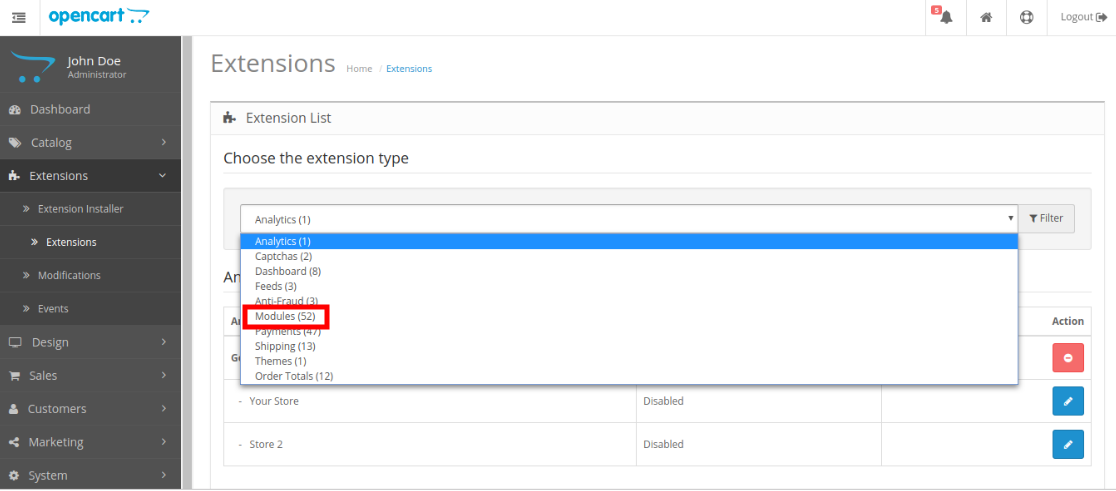
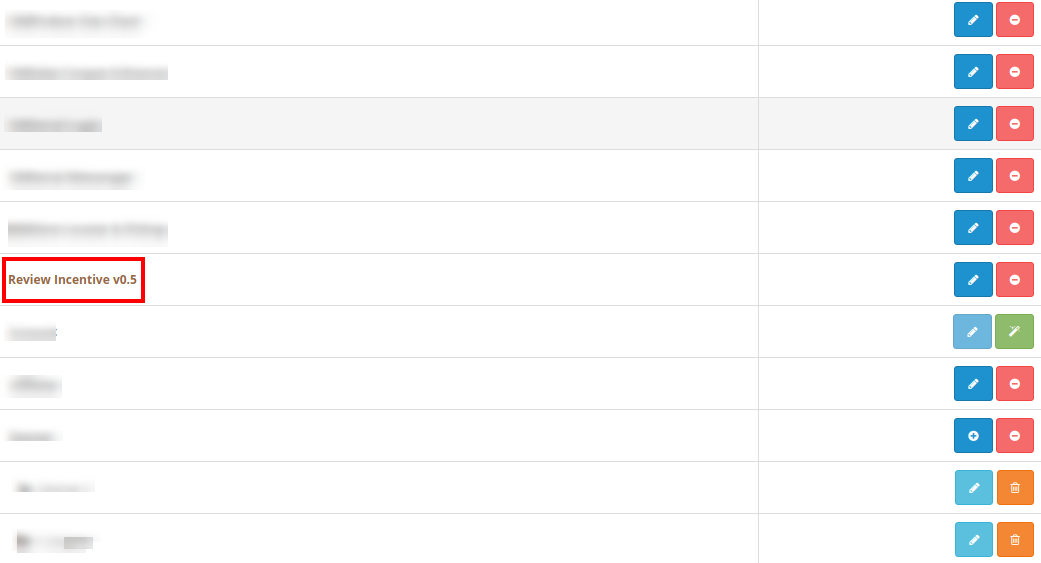
So, OpenCart review and incentive module is now successfully installed and is ready to use at your store. Go to the admin menu and click on the extensions. Choose the Extension Type as Modules. You will find a list of modules. Select the Review Incentive module.
3.0 Admin Interface of OpenCart Review Reminder and Incentive Module
Just after successful installation of OpenCart review and incentive modulee, you can create and schedule unlimited review reminder for the store customers. Navigate the settings in the given order: Admin Panel > Extensions > Modules > Review Incentive
The simple to understand admin interface of OpenCart review and rating manager plugin has been divided into two broad sections namely:
Each of these sections has been discussed in detail below.
3.1 General Settings
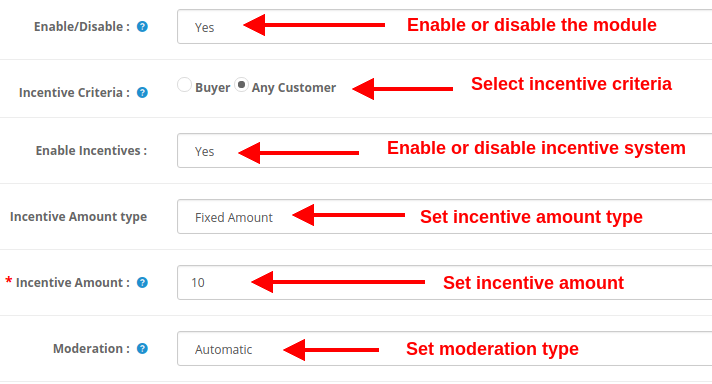
Under the general settings of OpenCart product review reminder and incentive plugin, you will get the following configuration options:
Enable/Disable: This option will enable or disable the complete functionality of OpenCart Review Option module.
Incentive Criteria: With this option, you can decide whether you want to offer incentive to all customers or buyers only.
Enable Incentives: The incentive system incorporated using OpenCart review incentive module can be enabled or disabled using this option.
Incentive Amount type: This option sets the incentive type as fixed or percentage.
Incentive Amount: This option will set the incentive amount or value which is offered to customer in exchange of product reviews.
Moderation: With the help of this option, you can evaluate the product reviews before making them live on product page. OpenCart Review Option module allows checking and modifying the review before posting it on the website.
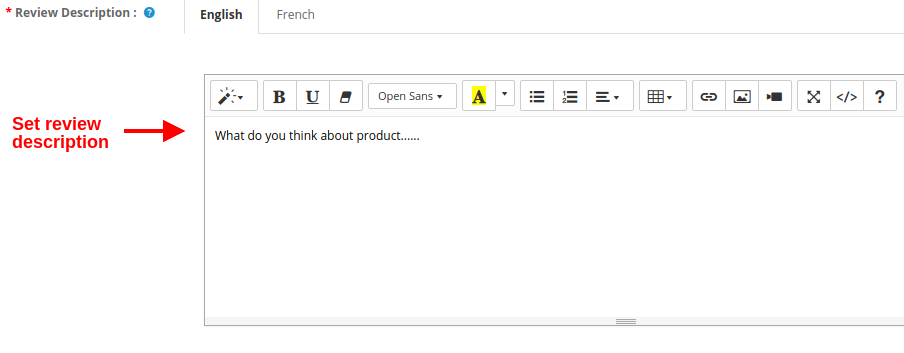
Review Description: This option will set the content or description which is shown in the left side of the Write Review page.
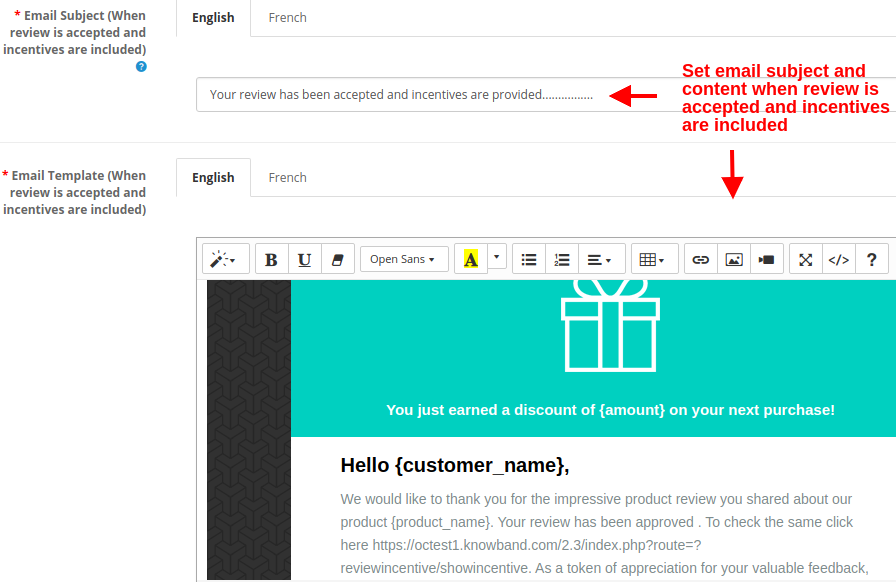
Email Subject (When review is accepted and incentives are included): This option will set the subject of the email sent to customers when their review is accepted and incentives are included.
Email Template (When review is accepted and incentives are included): This option will set the content of the email sent to customers when their review is accepted and incentives are included.
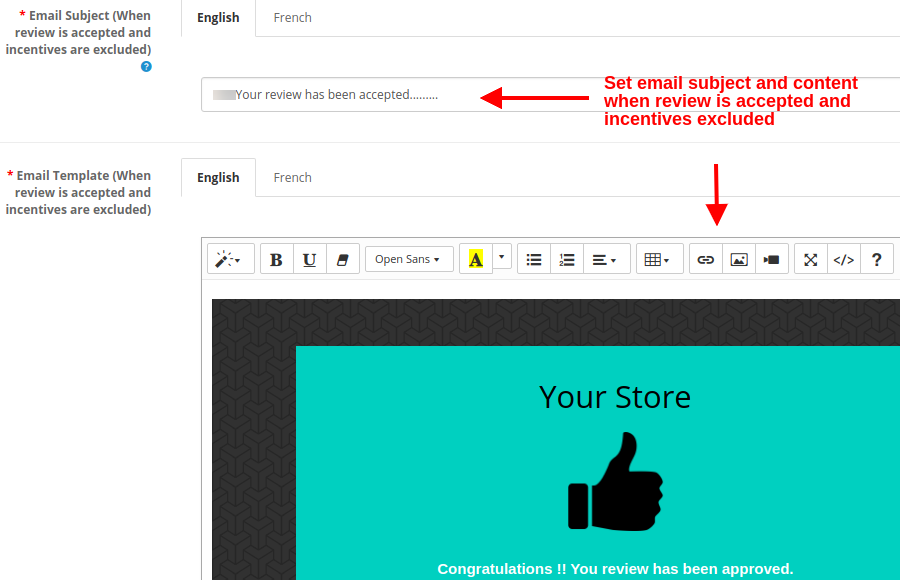
Email Subject (When review is accepted and incentives are excluded): This option will set the subject of the email sent to customers when their review is accepted but incentives are excluded.
Email Template (When review is accepted and incentives are excluded): This option will set the content of the email sent to customers when their review is accepted but incentives are excluded.
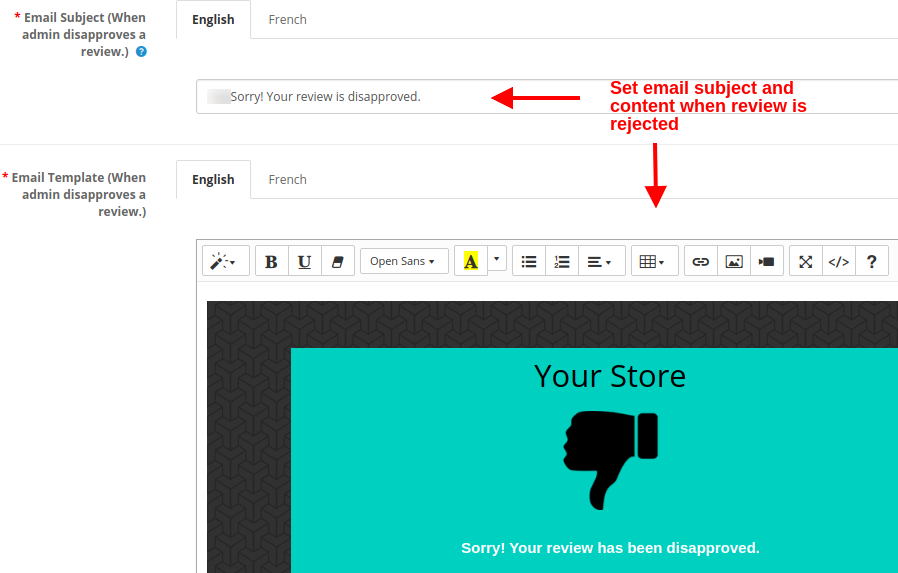
Email Subject (When admin disapproves a review): This option will set the subject of the email sent to customers when their review is rejected or disapproved.
Email Template (When admin disapproves a review): This option will set the content of the email sent to customers when their review is rejected or disapproved.
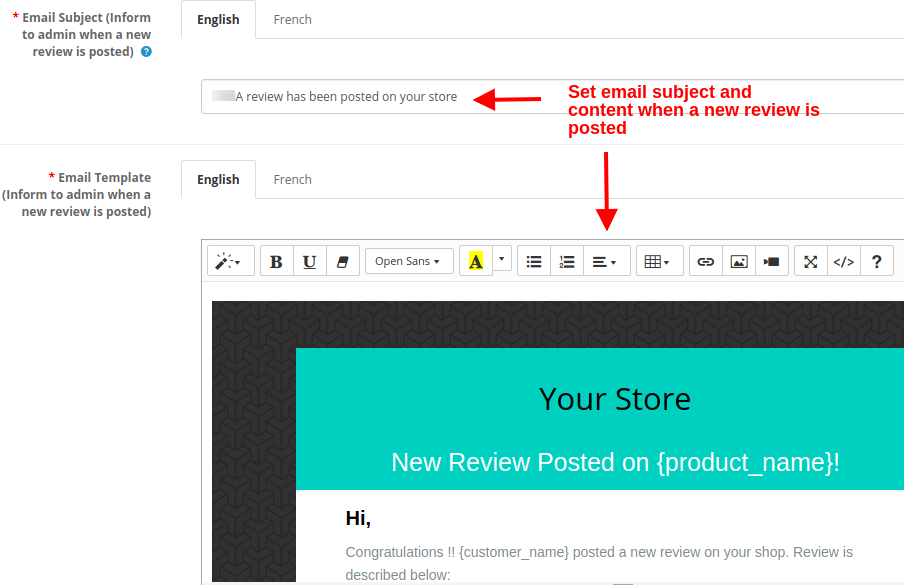
Email Subject (Inform to admin when a new review is posted): This option will set the subject of the email sent to store admin or owner when any new review is posted on the website.
Email Template (Inform to admin when a new review is posted): This option will set the content of the email sent to store admin or owner when any new review is posted on the website.
3.2 Reminder Settings
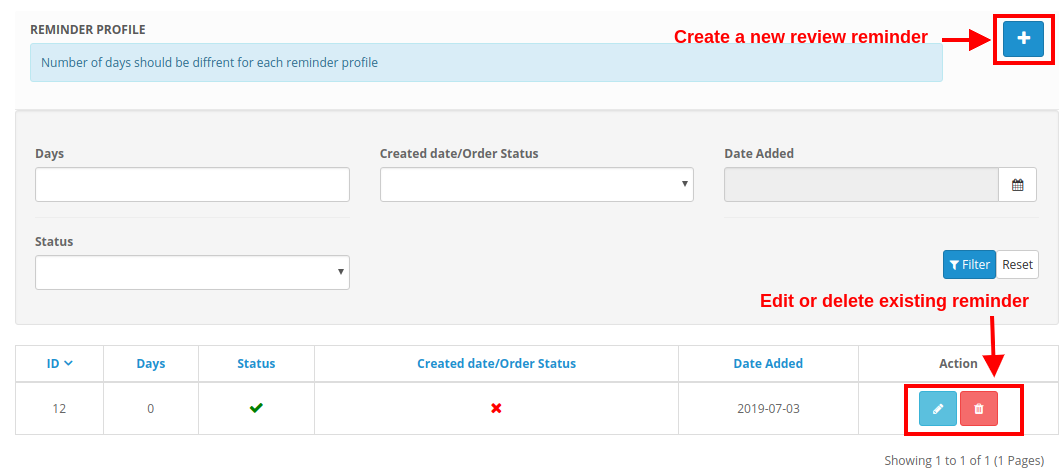
Under the reminder settings of OpenCart product review reminder module, you can create multiple review reminders for your eCommerce store with custom values. These reminders can be sent to different customers who have purchased items from the store. OpenCart review request plugin asks the buyers to review and rate their order on the store. The screenshot shown below gives a list of existing review reminders which can be modified or deleted as per store requirements. You can even create a new reminder and schedule it from this section.
3.2.1 How to create a new reminder
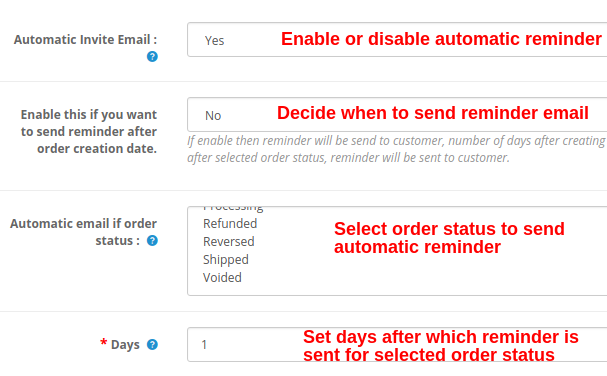
Automatic Invite Email: This option enables or disables the reminder or automatic email notification sent to buyers to review their purchase.
Enable this if you want to send reminder after order creation date: The value of this setting decides when to send the reminder email to the customer. If this is enabled, then reminder will be sent to the customer after the specified number of days (this is selected in the next field) from the date of order creation. If this is disabled, then number of days after selected order status, reminder will be sent to customer. Order status set from here will be checked.
Automatic email if order status: You have to set this option only if the above option is disabled. With this, you can set the order status after which the automatic email will be sent to the customer.
Days: This option will set the number of days after which the reminder email is sent to the customer.
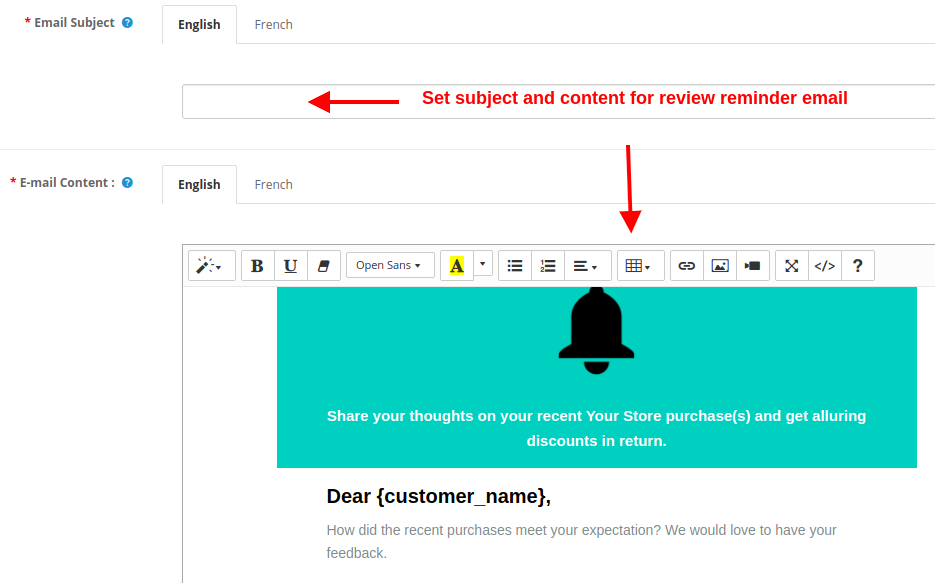
Email Subject: This option allows you to set a subject for the reminder email sent to the customers.
Email Content: This option sets the content for the reminder email which specifies the product they have purchased from the store and has to be reviewed, rated.
3.2.2 How to run cron to send automatic reminders
In order to send all the scheduled reminder emails all at once, you have to manually hit the cron command each time.
For this, you have to run the URL:
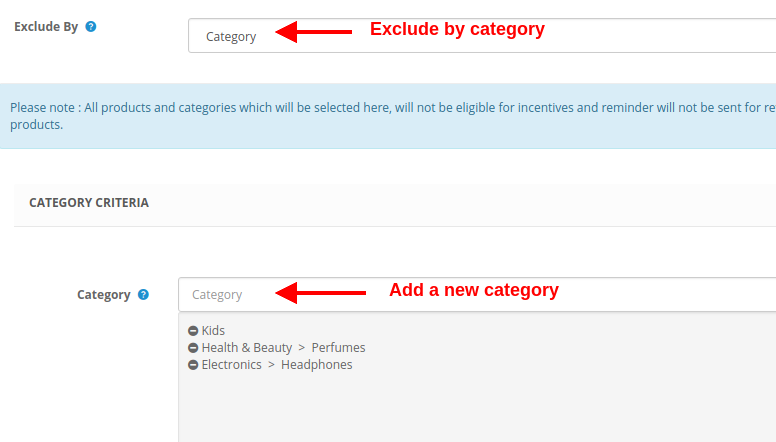
All the site products and categories for which you don’t want to get review & rating from the customer, you can exclude them from this section.
Excluding Products
Select the specific product to exclude, which can be further modified or deleted.
Excluding Categories
Select the specific category to exclude.
3.4 Reviews
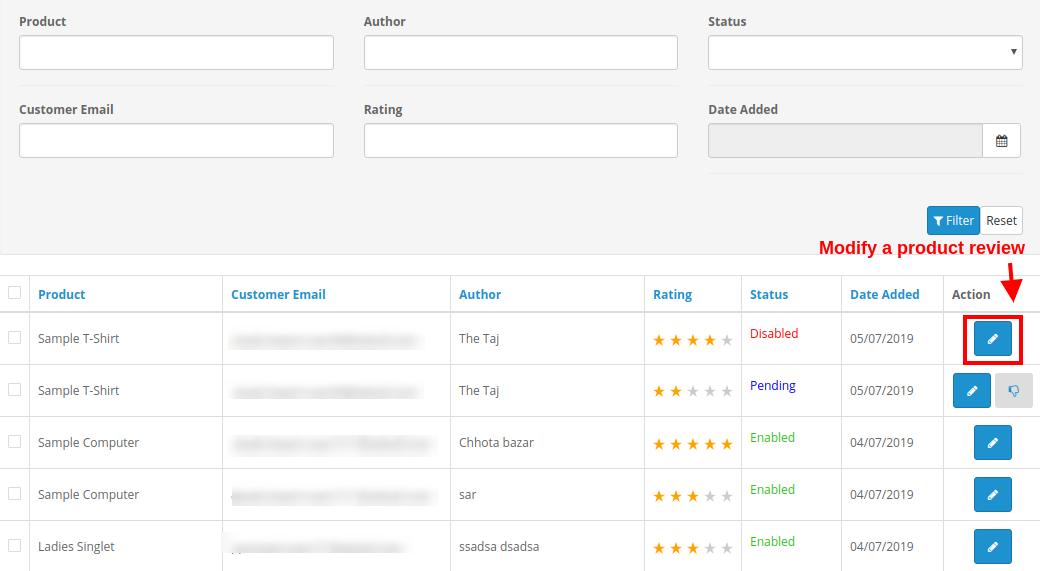
Under the Reviews tab of OpenCart review incentive module, you can check all the product reviews along with the details of associated customer. You can check filtered product reviews for a specific time interval. Each of the product review can be examined and then accepted/rejected from this section.
If the moderation for product reviews is set as automatic, all the product reviews are approved by default. Else, if moderation is set to manual, you can accept or reject the review.
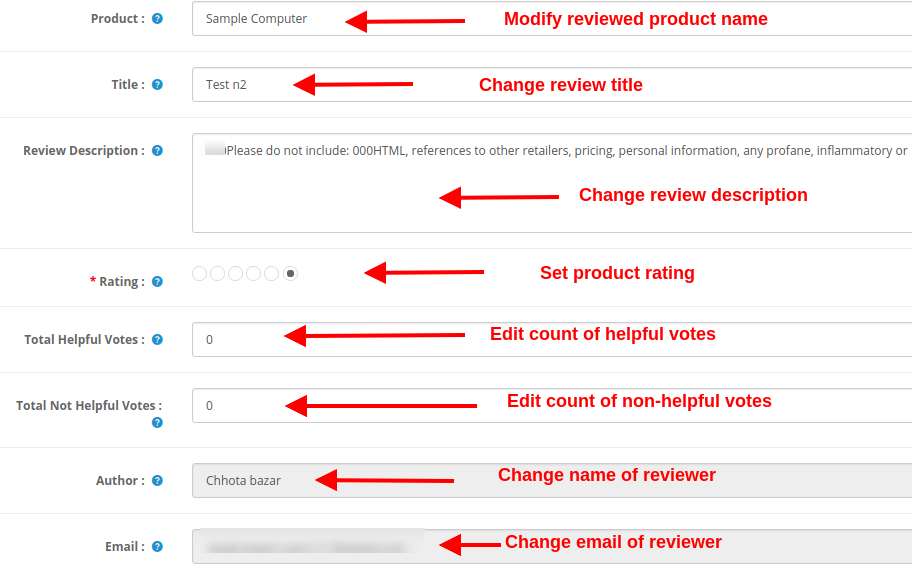
Additionally, you also get the option to modify the following details of a product review.
Product: This field shows the name of the reviewed product.
Title: This field shows the review title given by the customer/buyer.
Review Description: This field shows the description for the product as given by the customer.
Rating: This shows the product rating given by the customer on that particular product.
Total Helpful Votes: This is a count of readers who found that review useful or helpful.
Total Not Helpful Votes: This is a count of readers who don’t found that review useful or helpful.
Author: This field specifies the name of the product reviewer.
Email: This field specifies the email information of the reviewer.
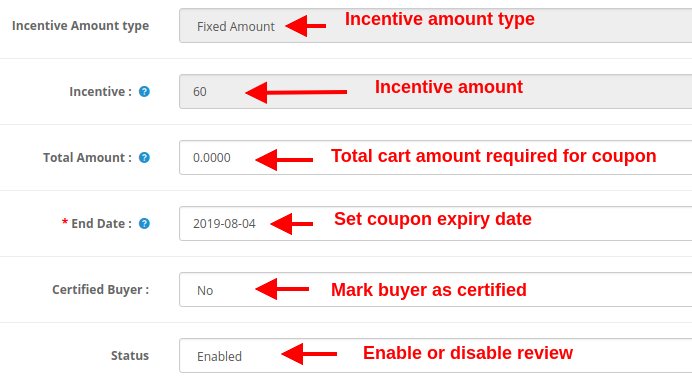
Incentive Amount Type: This field specifies the type of incentive amount if applicable.
Incentive: This field shows the inventive value or amount.
Total Amount: Using this option, you can set the cart amount which is required to apply the incentive code.
End Date: This field specifies the expiry date of the incentive coupon.
Certified Buyer: You can mark the customer as a certified buyer with the help of this option.
Status: This option simply enables or disables the particular product review on frontend.
3.5 Reports
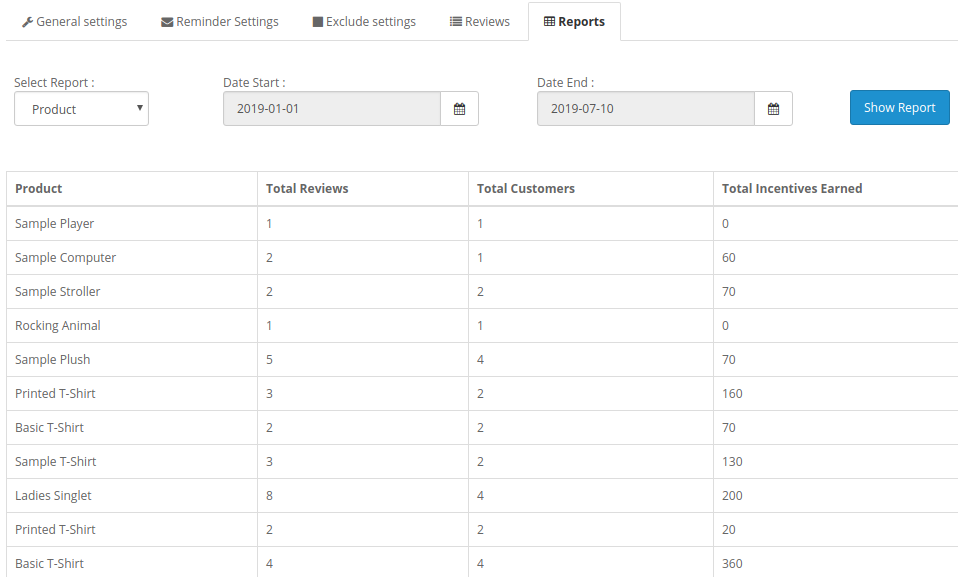
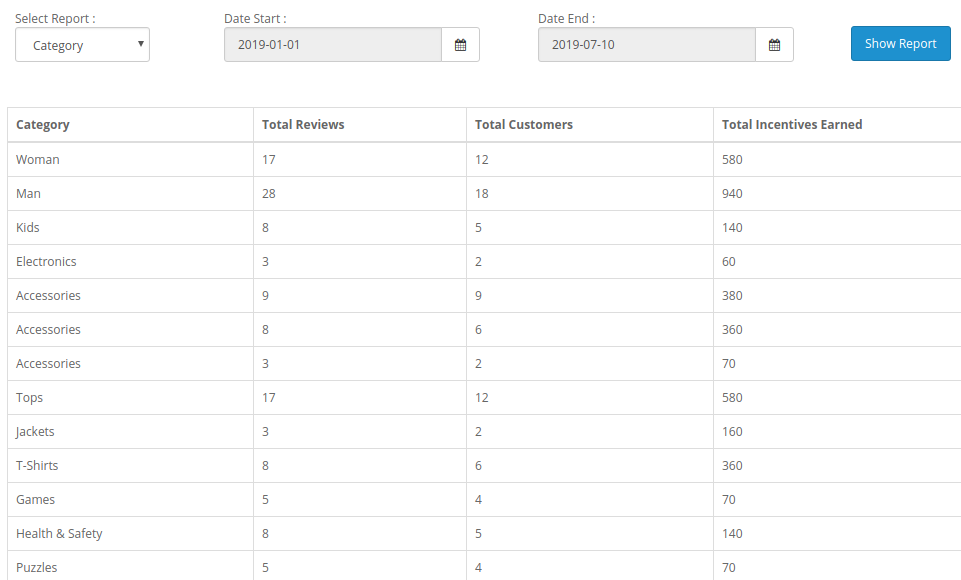
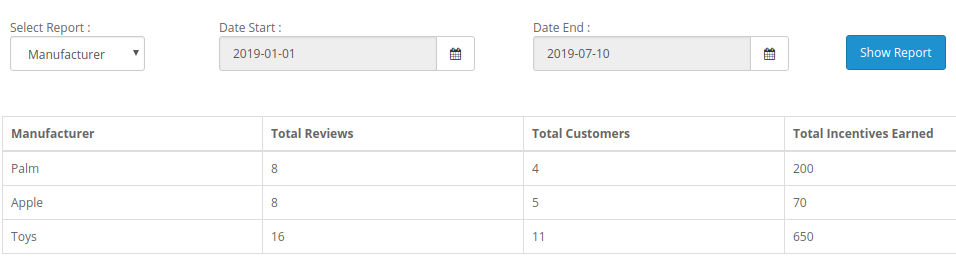
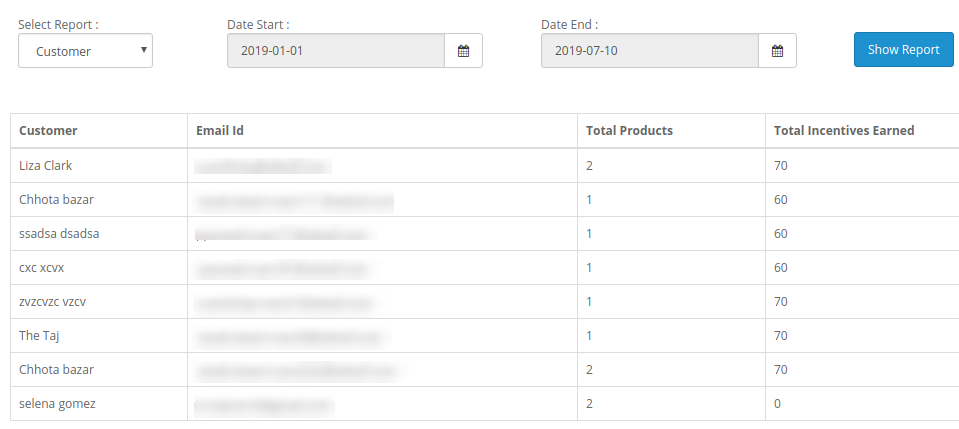
The report system of OpenCart review and incentive module offers you detailed statistics based on different criteria such as:
1. Reports based on Products
2. Reports based on Category
3. Reports based on Manufacturer
4. Reports based on Customers
These reports can be filtered for different time periods using the filter option present at the admin screen.
4.0 Front Interface of OpenCart Review Incentive Module
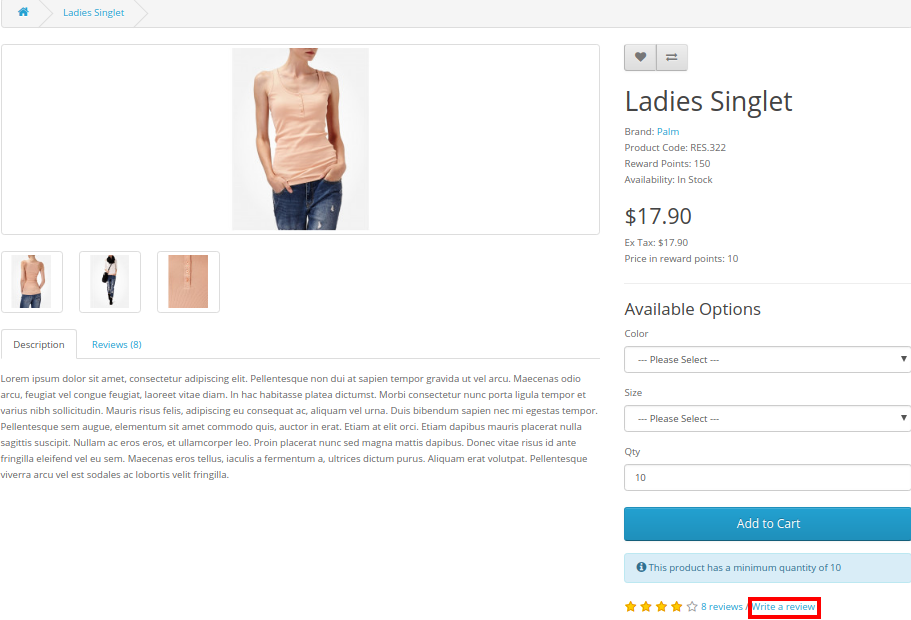
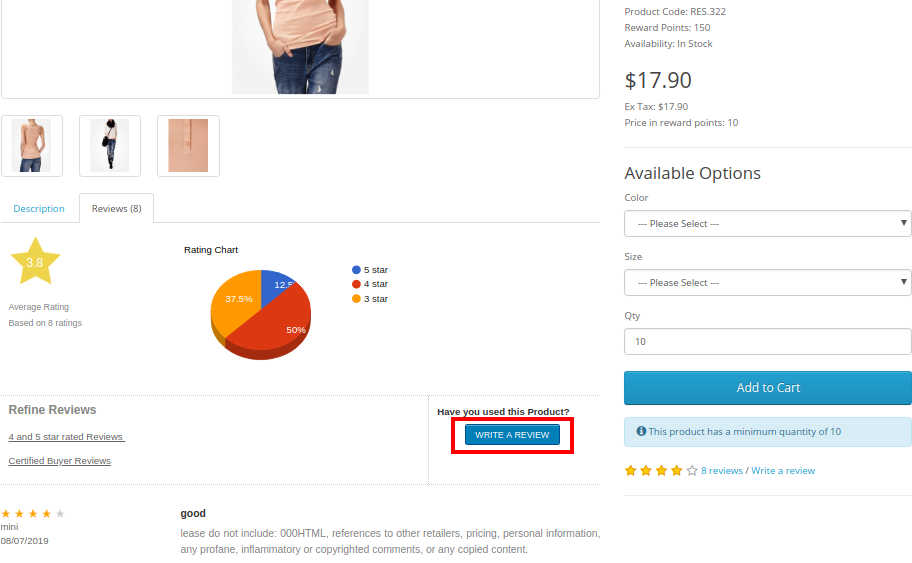
A) Link to “Write a Product Review block” on product page
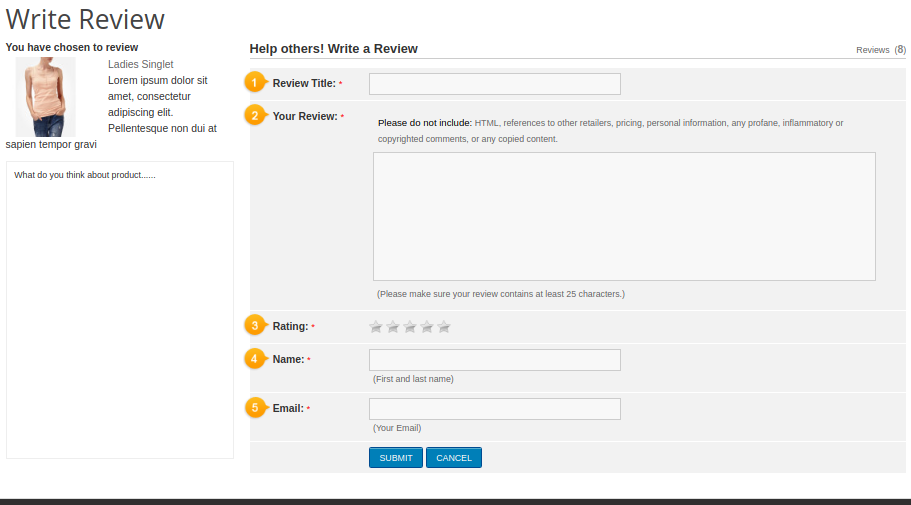
B) “Write a Review” block on front-end
C) Message after submitting a product review
This way, the OpenCart Product Review Reminder and Incentive module easily implements the functionality of reminding customers to write a product review. The online users can get incentives on writing product reviews. The online merchant can offer an incentive for all the customers or only buyers as per the requirements. OpenCart Product Review Reminder and Incentive module allows offering fixed or Percentage based incentive. The OpenCart Product Reviews module provides an option to check the reviews before posting it or post it automatically. Multiple email templates are available for sending email to the customers regarding review approval or disapproval. OpenCart Product Review Reminder and Incentive extension also provides an option to include an incentive or exclude incentive and send mail accordingly.
The store admin can configure the OpenCart Review extension for sending review reminder to the customers after order creation date or as per the order status. The OpenCart Review extension sends automatic review reminder emails to the customers, admin can customize the mail templates as per the requirements. Opencart Review Manager module is multi-lingual compatible and offers smooth functioning. OpenCart enhance Review extension implements the review incentive functionality without implementing any code changes. OpenCart Review Option extension allows excluding any product/category if he doesn’t want to implement the functionality for this particular product. Admin can view the list of all the reviews from the admin interface of this OpenCart Auto Review Option module and approve or disapprove it. OpenCart Product review plugin is mobile responsive and offers a hassle-free implementation. Admin can view the report for checking the total reviews and incentive details from the admin interface of OpenCart star rating extension.
Knowband is one of the most reputed names in the field of plugin development. We provide best plugins for platforms like – Magento,Prestashop, OpenCart and