Android 14 API Level 34: What Developers Need to Know and How to Prepare!

Google has mandated that all new apps and updates on the Google Play Store must target Android 14 (API Level 34) by August 31, 2024. This change aims to ensure apps leverage the latest features, security enhancements, and performance improvements of the newest Android version. Therefore, this article explores why this transition is essential, the key enhancements in API Level 34, and practical steps developers can take to prepare their apps for this update.

Why Target API Level 34?

Enhanced Security:

Security is a top priority with each new Android release. API Level 34 includes critical security updates that protect users from emerging vulnerabilities, ensuring that apps maintain the highest standards of data protection and integrity. Furthermore, with each new Android version, vulnerabilities are addressed and new security protocols are introduced that aim to enhance data encryption and secure communication features.

Improved Performance:

Android 14 offers substantial performance enhancements, such as better memory management and optimized battery usage. Apps targeting API Level 34 will benefit from these improvements, providing a smoother and more responsive user experience. Moreover, the improved memory management and battery optimization features help reduce battery drain and extend device battery life during app use.

Key Enhancements in API Level 34:

Enhanced Privacy Controls:

Android 14 introduces more granular privacy controls, offering better user management over app permissions. Now, the users can grant temporary permissions, which expire after a single use, minimizing unnecessary data access. Privacy indicators inform users when the microphone or camera is in use, adding an extra layer of transparency and control.

Advanced Graphics and UI Capabilities:

The new API introduces advanced graphics APIs that support higher refresh rates and improved rendering. This allows developers to create more visually appealing and responsive user interfaces. Furthermore, the support for higher refresh rates ensures smoother animations and interactions. At the same time, it also improves rendering APIs enhancing performance and visual quality for more engaging user interfaces.

Steps to Prepare for the Transition!

Update Your Development Environment:

Ensure you are using the latest version of Android Studio, which includes support for API Level 34. Update the SDK and build tools for Android 14 to access the newest features and improvements. Installing the latest version of Android Studio and updating SDK and tools is crucial for a smooth transition.

For the next step, you can check for deprecated APIs and replace them with their updated counterparts. Adjust your app’s permission requests to comply with new privacy controls, ensuring that your app requests only the necessary permissions. Identifying deprecated APIs and updating your app’s permissions are key steps to align with new privacy standards.

Optimize Performance:

Leverage the performance improvements in API Level 34 by optimizing your app’s code for better memory management and battery efficiency. Optimizing memory usage and improving battery efficiency is essential to provide a smooth user experience.

Furthermore, with the enhanced privacy controls, review and update your app’s privacy policy to reflect changes in data handling and permissions. Inform users about new privacy features and how your app respects their data. Ensuring transparency and updating your app’s privacy policy helps maintain user trust.

Build Your No-Code Android and iOS Apps with Knowband:

At Knowband, we specialize in providing no-code mobile app builders for leading eCommerce platforms Prestashop, Opencart, WooCommerce, Shopify, and Magento 2. Our no-code solutions empower you to create fully functional, customizable Android and iOS apps without any technical expertise.

With our mobile app builders, you can seamlessly integrate your online store, enhance user experience, and boost your sales. Our modules are user-friendly, allowing you to design, configure, and launch your app effortlessly.

Elevate your eCommerce business with Knowband’s innovative solutions and reach your customers on the go with stunning, feature-rich mobile apps. 

Knowband’s Mobile App Builder Modules

Get the mobile app created for your store in a few hours with the Knowband Mobile App Builder Modules for Prestashop, Opencart, WooCommerce, Shopify, and Magento 2 eCommerce platforms.

SHOP NOW

Conclusion!

Transitioning to API Level 34 is a critical step for developers to keep their apps relevant and competitive. By embracing the new features, security enhancements, and performance improvements in Android 14, developers can ensure their apps provide the best possible experience for users.

For the initial step, you can start preparing now by updating your development environment, reviewing code, and thoroughly testing your app. This proactive approach will not only ensure compliance but also enhance the overall user experience, making your app more competitive and appealing. 

Watch the video on Knowband’s Mobile App Builders:

How Easy Is It To Design Home-Page Of WooCommerce Mobile App?

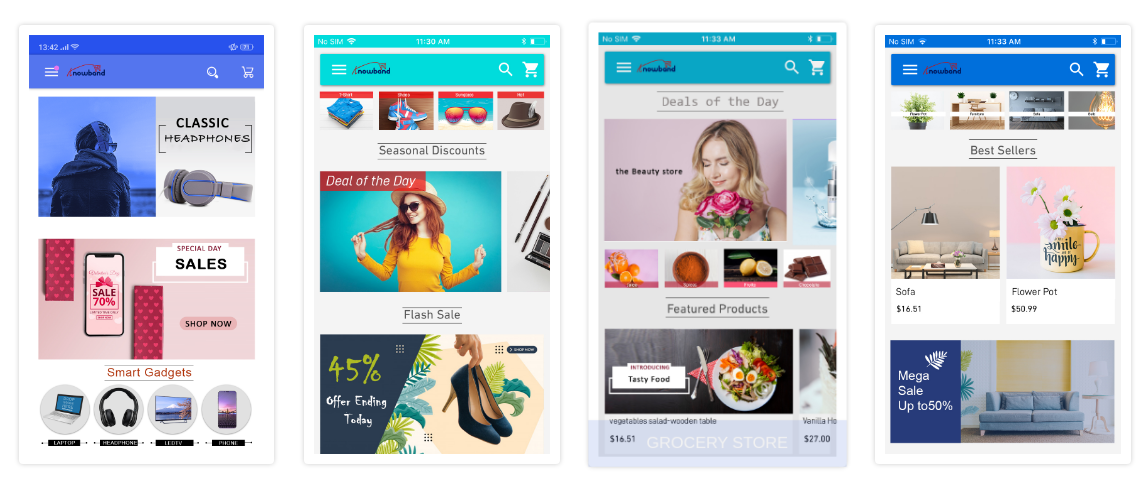
The usage of mobile devices has increased quite a lot in the past decade. That too, when we consider online shopping, everyone prefers to shop from the app on their smartphone. Hence, more businesses are willing to make extra efforts to be available on mobile platforms. For eCommerce businesses, having a mobile app with a dynamic & customizable home-page design helps them to keep their customers engaged in a profitable manner. Every time, a new offer/ new-arrival/ sale/ etc. is put up on the shopping app, making the customers aware of it can naturally boost their sales. The most organic way to do so is by optimizing the home-page design of the shopping app (apart from push notifications & other campaigns).

To make the home-page designing & re-editing easier for store owners, KnowBand has developed eCommerce Mobile App Builder extensions. It helps the eCommerce businesses with building their eCommerce Mobile Apps & also offers feature-rich backend & frontend to benefit the app users as well as the businesses. This tutorial write-up will elaborate on how to use the WooCommerce Mobile App Creator plugin to create, design & edit the dynamic home-page layouts of the Mobile Apps.

Once this WooCommerce Mobile App Builder plugin is installed on your WooCommerce website backend, you can easily customize the home-page of your app from the backend of this plugin.

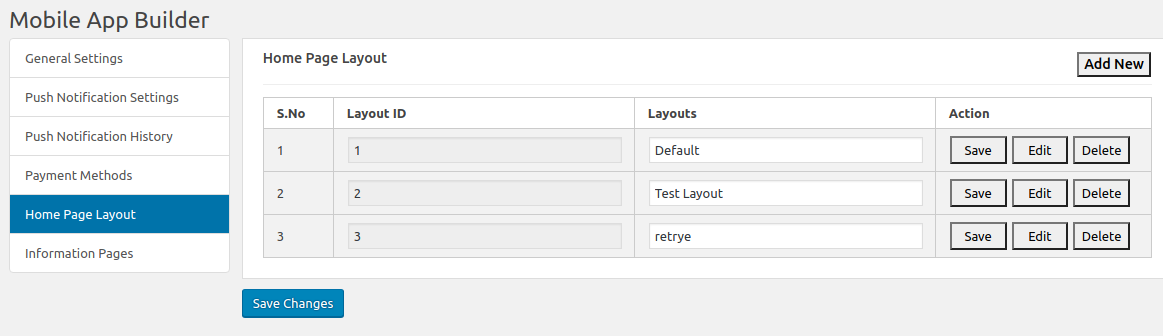
  • Select ‘Home-Page Layout’ from the side menu.
  • To create a new layout, click the ‘add new layout’ button. You can also re-edit the existing layouts. Also, you can pre-design multiple layouts & keep any one of the active (from the General settings on the side menu).

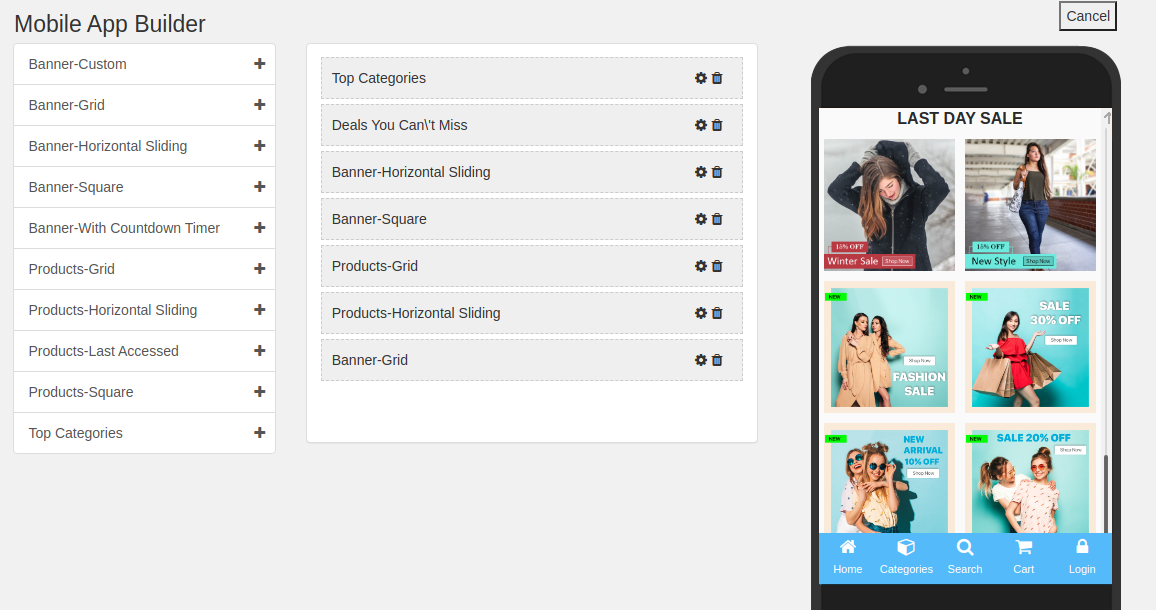
  • While designing or editing your app home-page layout, you can use a maximum of 20 components (from the complete list of different components shown in the side menu on the left). Hence, you can also use a single component multiple times in your layout
  • Upon adding these components, you can edit each one of them & organize them using the drag & drop feature.

All the edits that you make instantly reflect on the demo app screen as shown in the screenshot above.

Components To Design Your WooCommerce Home-Page Layout:

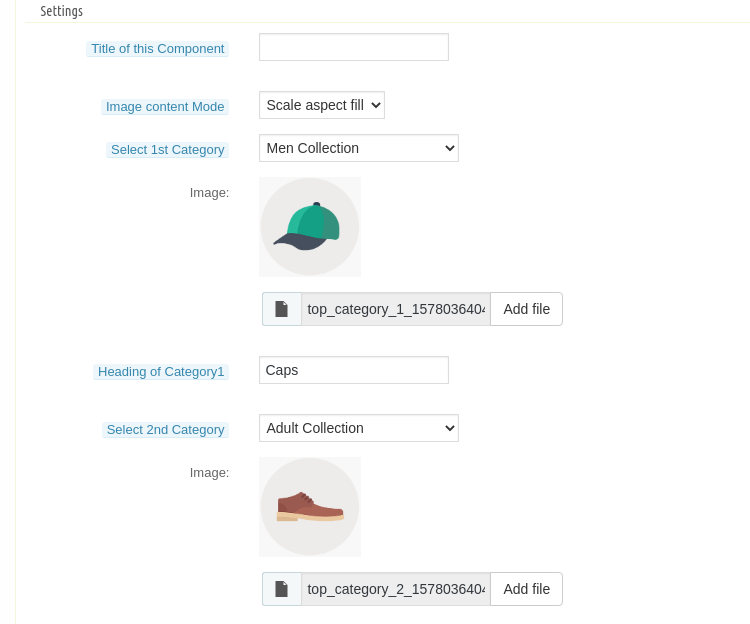
1. Top Categories:

In a slider form, you can display small image icons with landing page links to relevant categories on your app. You can add a total of 8 of such categories in a single ‘top category’ component.

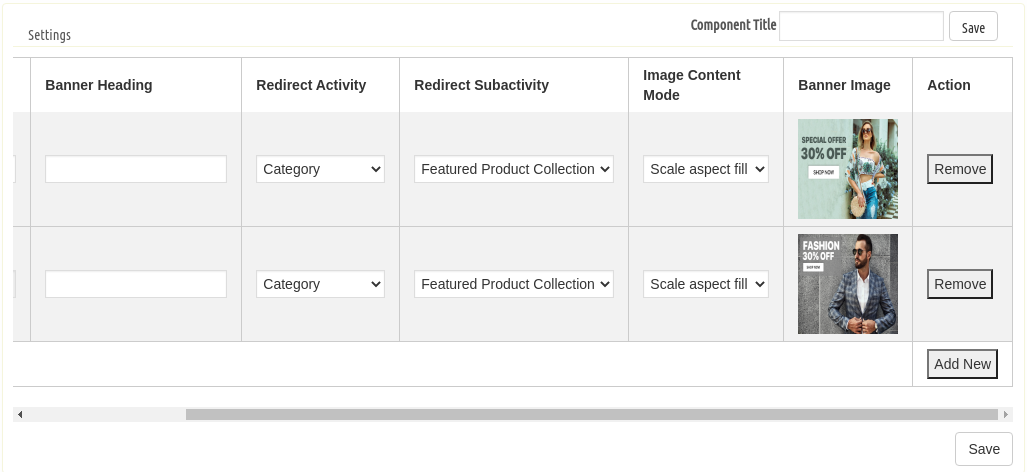
2. Square, Grid & Horizontal-Sliding Banners:

For all these 3 banner types, you can choose the landing page options among category pages, product pages, home-page & even any of the CMS pages. 

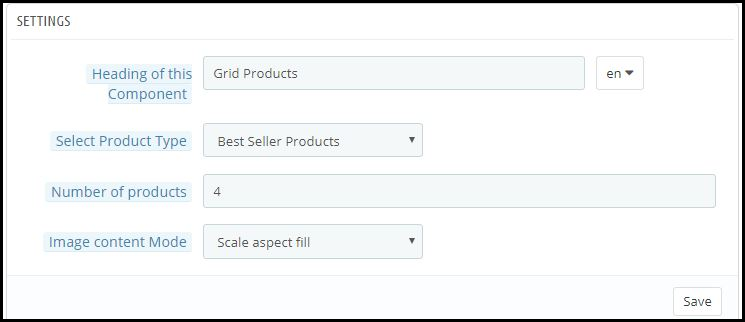
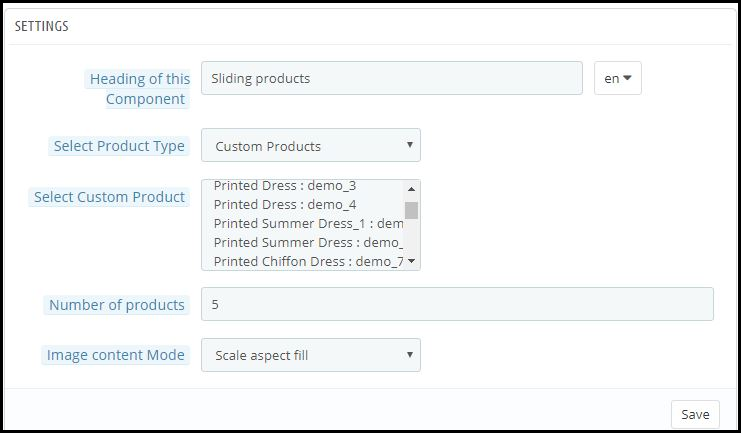
3. Square, Grid & Horizontal-Sliding Products:

With these 3 components, you can display singular products redirecting the app user straight to the specific product page. Because this WooCommerce Mobile App Builder plugin also lets you set featured product listings. You can choose among the following options to display the products:

  • Best Seller Products
  • New Arrivals
  • Featured Products
  • Special Products
  • Products from a category
  • Custom Products

4. Recently Accessed Products:

Including this component anywhere on the layout simply creates a horizontal slider for products displaying only the products that an app user has recently viewed. It is ideal to add this component only once in a home-page layout.

5. Countdown-Timer Banner:

The count-down-timer banner has an in-built countdown timer with all the necessary settings to make it your own. You can use it to inform your app users about an offer that is ending in a specified time. 

Apart from all the edits, you can make to design your WooCommerce App’s home-page, there is one more useful thing that’s present all the time on your app’s screen. It is the bottom tab bar navigation in shopping apps.

Wrap Up:

By now, you must have understood how user-friendly it is to create, design & edit the home-page layout of a WooCommerce Mobile app using the WooCommerce Mobile App Maker plugin by KnowBand.

From time-to-time, eCommerce apps do have to change their home-page layout to complement different offers, seasonal sales, new arrivals, etc. Hence, to make it feature-rich yet easy for the store owners, our experts at KnowBand have developed this WooCommerce Mobile App Maker plugin. You can even go through the demo of this plugin before you decide to purchase it.

Explore more on detail from below Video & drop us your message on support@knowband.com in case of any query:


[Version 2.0.2 Released] New Features Added To PrestaShop Mobile Apps

Having all the latest features in a mobile app is something that every business is concerned about these days. The same is the case with eCommerce businesses too. To cater to the app users in the best possible way, shopping apps must be laced with the latest features as they help improve the UI & UX of the app.

For PrestaShop, a popular open-source eCommerce platform, mobile applications have become more efficient now. With the addition of 3 new features described below, KnowBand Plugins have rejuvenated their PrestaShop Mobile App Builder module.

Simple Steps To Launch A PrestaShop Mobile App:

1. Purchase PrestaShop Mobile App Builder module.

2.  Fill the app pre-requisite form. (We need these details to create apps)

3. Review your final app before confirm to publishing it on the app stores.

Note: We only publish apps with your developer accounts (Google Play and Apple App store) without any extra charges at our end.

Quick Glance to New Feature Additions:

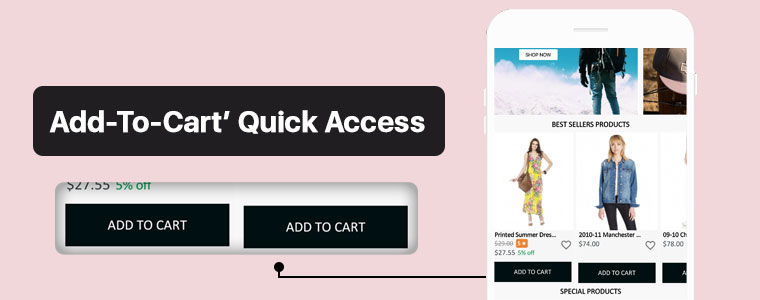
#1. ‘Add-To-Cart’ Quick Access:

This new feature adds the ‘Add-To-Cart’ button on the Category Page & also on the Home-Page wherever product blocks are used. This way, app users won’t have to open the individual product pages in order to add that product to their cart. App users can quickly add their choice of products from the category or home-page.

Now, the user can simply browse the app and keep on adding products into cart seamlessly.

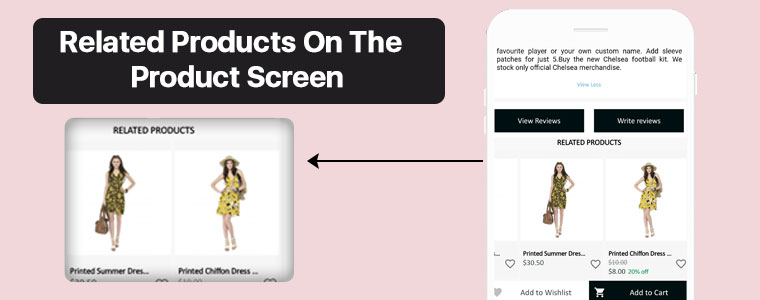
#2. Related Products On Product Screen:

On an eCommerce product page, one great way to motivate the customers’ to shop more is to show some products related to the main product on that page. To serve this purpose, now the PrestaShop Mobile App Builder is compatible with our Automatic Related Products module.

Now, it’s way simple to showcase related products on both website and apps and improve revenue through cross-selling.

#3.  Product Reviews and Ratings:

On the product page, app users can rate the products & write & submit their product reviews. Upon approval, they are displayed on the product page so that others can view it for reference. The PrestaShop Mobile App Builder is compatible with the default Product Comments Module.

Now, showcase user reviews & ratings for products on app and motivate new buyers for more purchases.

Compatibility With Other PrestaShop Modules:

1. Multi-vendor Marketplace Module:

With the use of this module, store owners can easily transition their single-vendor PrestaShop App to a multi-vendor PrestaShop App. Because the Mobile App Builder module is compatible with the Marketplace module (both by KnowBand Plugins), all of the processes are automatic. All you need to do is install the marketplace module on your PrestaShop website.

Having a marketplace allows the store owner to have multiple sellers on his/her store, each with a unique vendor panel. Store owners can sell their own products too on a marketplace & also make profits by taking commissions from the vendors.

–> Check out combo pack of (Multi-vendor Marketplace + Mobile App) below:

https://www.knowband.com/prestashop-advanced-marketplace-with-mobile-app

2. Booking & Rental Module:

This module by KnowBand allows eCommerce stores to have all the functionalities & layout of a booking or a rental app/ website. Now, this module is also compatible with the PrestaShop Mobile App Builder module by KnowBand.

–> Check out combo pack of (Booking and Rental + Mobile App) below:

https://www.knowband.com/prestashop-booking-and-rental-mobile-app

3. Image Search Module:

The Image Search module allows the app user to search for products of your e-store using any reference image that they either clicked with their phone camera or using any reference image from their phone’s gallery. You can also enable this feature automatically in your PrestaShop App by installing this module on your PrestaShop website.

–> Check out Image Search Module from below:

https://www.knowband.com/prestashop-image-search

4.‘Spin & Win’ Module:

Using this module, store owners can show a ‘spin & win’ discount wheel which the customers can spin to avail any one of the discounts mentioned on the pie wheel. Enable this feature on your PrestaShop App by installing this ‘Spin & Win’ module on your PrestaShop website & configure it & then simply set its toggle switch to ‘ON’ (from the App Builder module).

–> Check out Spin-win module from below link: 

https://www.knowband.com/prestashop-spin-and-win

5. Related Products Module:

This PrestaShop module, by KnowBand, displays a list of products related to the main product (on the product page). When an app user is shopping for a particular product, he/she will be able to see related products when they scroll down on that product page. Equip your PrestaShop Mobile App with this feature by simply installing the ‘Related Products’ module on your PrestaShop website.

–> Check out Related Products from below link: 

https://www.knowband.com/prestashop-automatic-related-product

Now that all the new features, compatible modules & installation steps are covered, let’s take a look at core features of the PrestaShop Mobile App Builder module & learn how it can benefit your business.

Core Features & Benefits Of The PrestaShop Mobile App Builder:

#1. Multi-Lingual & Multi-Currency Support:

This app maker module is great for businesses who are willing to launch a PrestaShop App that supports multiple languages & currencies. It can help with localization & even with expansion to multiple countries.

#2. DIY Home-Page Editor:

This feature allows the store admins to design their app’s homepage without having to code. All the tools provided in the DIY Homepage editor of this module are easy-to-use. Admins can add, rearrange & configure various components like sliders, banners, grids, recent product tab, count-down timer, etc. Admins can make multiple layouts & enable anyone of them at a time. This again saves them from designing at the last moment.

Regularly updated & re-designed homepage keeps the app users engaged & allows the business to display the most relevant & in-trend content on their homepage.

#3. Unlimited Push Notifications:

Your app users who have enabled push notifications on your app will be able to receive the notifications that you (admin) create & send from the backend of this PrestaShop Mobile App Builder module.
There is no limitation with this module because store admins can send an unlimited number of push notifications to their app users. Push notifications help to re-engage the app users & remind them about any abandoned cart items, order status, upcoming sale & its benefits & a lot more.

#4. Offline Mode Working:

The PrestaShop Mobile Apps are made to work in offline mode as well i.e. under slow internet or no internet connectivity. Online shoppers get to browse apps with pre-loaded screens without actually needing the internet.

#5. Admin Panel Control:

The mobile apps for PrestaShop can be fully controlled by the friendly admin panel. The store admin can make a few clicks and button toggles and make the app work as per the requirement. The flexibility and customizable options with this extension make it the most preferred choice for store owners.

Drop us an email at support@knowband.com or check all such amazing features in detail from:

https://www.knowband.com/prestashop-mobile-app-builder