Recent Changes in SendinBlue and Mailchimp APIs

“Your goal should be to own quality time in your customer’s inbox.” – Drew Davis 

Digital Marketing is a major pillar of increasing sales and it is evolving day by day. But being up to date with the changes in the marketing platforms is crucial. Brevo (formerly SendInBlue) and Mailchimp, two prominent players in this field, have recently made significant changes in their APIs. In this article, we will delve deeper into the key changes and improvements.


Mailchimp: –

The new version of API 3.0 has been released and version 2.0 has been shut off on June 1, 2023.

The new root URL for the API is 

https://<dc>.api.mailchimp.com/3.0/ 

where <dc> defines the data center.

You can easily find your data center at the end of the API key as the keys are in the form of key-dc.

Here, we have mentioned the major change in adding the subscriber to a list.

The method of adding members to a list has been changed.

The path has been changed from lists/subscribe

To lists/_listid_/members

 Where _listid_ is the list ID in which you want to add the subscriber.

Along with that, if you want to send some additional data for the subscriber after the request, then you can use the patch request. 

Patch Request is used for performing partial updates.

Use the below path for the patch request

lists/_listid_/members/_subscriber_hash_

Where _listid_ is the list ID in which you have added the subscriber.

And _subscriber_hash_ is the hash of the subscriber email.

Similarly, the method of fetching the lists has been changed. GET Method is used to fetch the lists. Earlier the path parameter used was lists/list This has been changed with the lists only

For more information regarding the Mailchimp API v3, please refer to the API Doc:-

https://mailchimp.com/developer/marketing/api/ 


Brevo (Formerly Sendinblue): –

Sendinblue was started as a Newsletter Service. But now they also deliver email, SMS, WhatsApp, chat. 

Earlier the root URL for the API was

https://api.sendinblue.com/v2.0 

which has now been changed to the 

https://api.brevo.com/v3 

which clearly shows the changes in the name of the API regarding Sendinblue renamed to Brevo along with the change in the API version.

For contacts, we use contacts also as a part of the root URL

https://api.brevo.com/v3/contacts/ 


To fetch all the lists from the Brevo, the GET method is used, earlier the function used was ‘list’ which has been changed to lists. 

We can pass the limit also with the request if we want to fetch limited lists.

In a similar way, we can add/update the subscribers in the lists.

To add/ update the subscribers, an earlier user/created user function was used which has now been replaced with the contacts.

Passing the subscriber’s email or mobile number with country code is mandatory.

Also, you can pass the first name and last name of the subscriber in the attributes.

If you want to update the subscribers in the same request, then pass update Enabled as true.

Also, we need to pass a list of IDs of the lists present at the Brevo in which we want to add the subscriber.

I hope I have the necessary information about the Brevo API key changes.

For more information regarding the Brevo API changes, please refer to the Doc of the API-

https://developers.brevo.com/reference/intro/my-requests 

 

What’s new with Mailchimp AI integration: An Insight

AI is the fastest-growing tech industry and recently, Mailchimp added some striking features and updates to make the customer journey smarter with some smart solutions. They quoted this press release with the tagline, ‘If you’ve got big goals, we’ve got big updates’. There are millions of businesses registered and customer data of billions are available on Mailchimp.

To build the smart solution Mailchimp used all the available data. The new update of Mailchimp AI Integration is incorporated with Stripe, a redesigned App, creative assistant which is entirely focused on personalization to enhance the customer journey. Let’s dig deep into it and find out what and how this newly updated Mailchimp can help the e-commerce industry.

App redesign:

Mailchimp development team have redesigned the application with all new developer experience with native client libraries and mobile SDKs. The Mailchimp APIs can manage audience data, send campaigns, activate event-based messages, and more. The global infrastructure of Mailchimp can be utilised to send fast, personalised transactional emails, high deliverability rates, and scalable analytics through API or SMTP.

Creative assistant:

Mailchimp used AI to give the best personalization experience to the customers. It creates assets for design automatically with pre-existing designs and alters them as per the command. Consider an image with a caption you have designed earlier and now you want to use that same content for other applications having different layout. With Mailchimp, you can make a new design in just a few clicks.

Visual automation builder:

The main focus of building this smart solution was to improvise the customer journey. It helps users with the next best advice for action by giving recommendations for improving campaign performance. It can grow business and uplift sales with personalizing product recommendations.

Users can send emails at any time with auto-trigger functionality. Mailchimp sends targeted campaigns to future leads. The new version suggests some catchy taglines and subject lines for email marketing. It includes real-time input on word count, count of characters, punctuation, and use of emoticons.

Building your online presence:

With Mailchimp, small businesses can make their online presence. Since the pandemic hit the economy, many queries were raised and this forced Mailchimp to create features with an AI-driven approach. They have incorporated domain purchase options for adding it to email marketing. Another tool that will be launched soon is a website builder tool that will not require any coding at all, mentioned in the Mailchimp latest release. Users can incorporate buy buttons and much more to bring their brick and mortar to the online platform.

New tools for personalizing marketing for e-commerce:

  • Mailchimp and e-commerce: Mailchimp have data of all the possible customers so they have built the solution which can be used for a growing audience if you connect your eCommerce store to Mailchimp.  It can predict purchase probability, by using previous purchase details in which customers are likely to be the most loyal and valued clients.
  • Mobile landing pages– Mobile app integration is another key tool that has been added to the Mailchimp AI update. Now users can add more new contacts or upload new from the address book.
  • Run Surveys with Popup forms- It has eye-catching survey popup forms to attract more visitors for gathering information that can be used for improving customer experience with personalized marketing.

Grow an audience with e-commerce integration- G-Suite Add-On with Google’s business software and technical email addresses.

Author’s Opinion

Mailchimp is the most powerful marketing platform founded back in 2001. It’s been two decades and it is still flourishing. These new solutions, software upgrades will allow many small businesses to work smart. E-commerce can take advantage of creative intelligence-backed tools, a visual automation builder with a redesigned app built to help companies expand alongside their ambitions. Let’s see what magic Mailchimp AI integration expel on e-commerce in upcoming years.

How to get MailChimp API key and setup an email list?

MailChimp is one of the most used email marketing software-as-a-service. Because of its free start up plan, it is the favorite email service for most of the marketers.

Like every other top email marketing software, MailChimp too provides different APIs for development and integration solutions. For example, the MailChimp API key can be used to integrate this service with any CMS or eCommerce platform through modules.

For example, the PrestaShop MailChimp integration module uses the API key to capture and sync the email data from a PrestaShop store to the MailChimp email list. There are several other solutions and modules that use the API for various types of integrations.

Steps to get MailChimp API key

Step 1: Visit https://www.mailchimp.com and create a user account, if not done already. After account creation, login to your account.

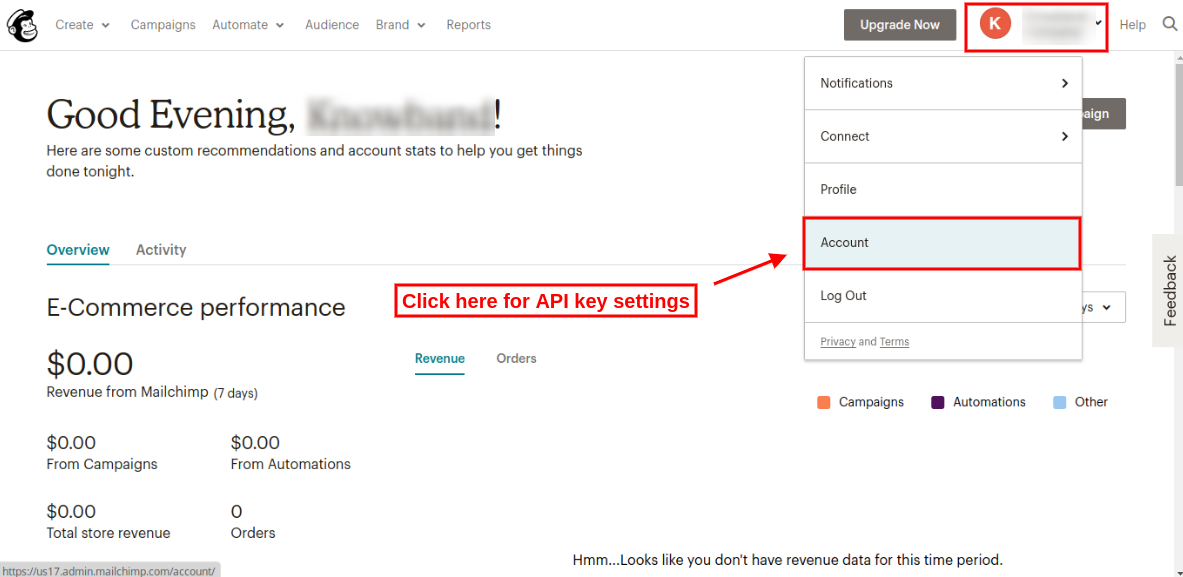
Step 2: On the Dashboard, click the button on the upper right corner of the dashboard. Drop down menu will open, click “Account” link in that menu as seen in the screen below.

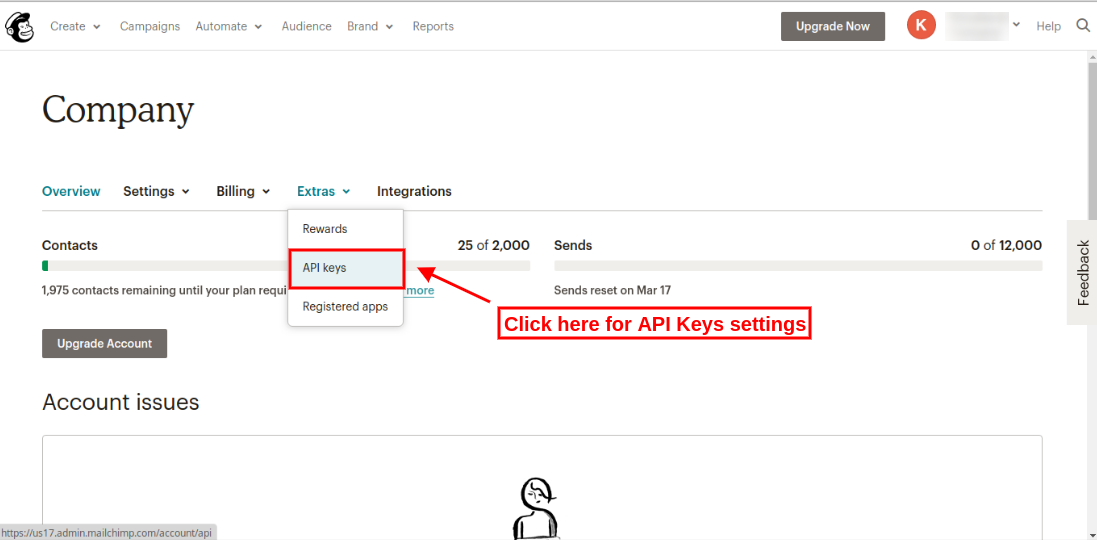
Step 3: On the Account settings page, some sub-menus will be visible. Click the “Extras” submenu to open the drop-down menu. Click “API keys” as shown in the screen below:

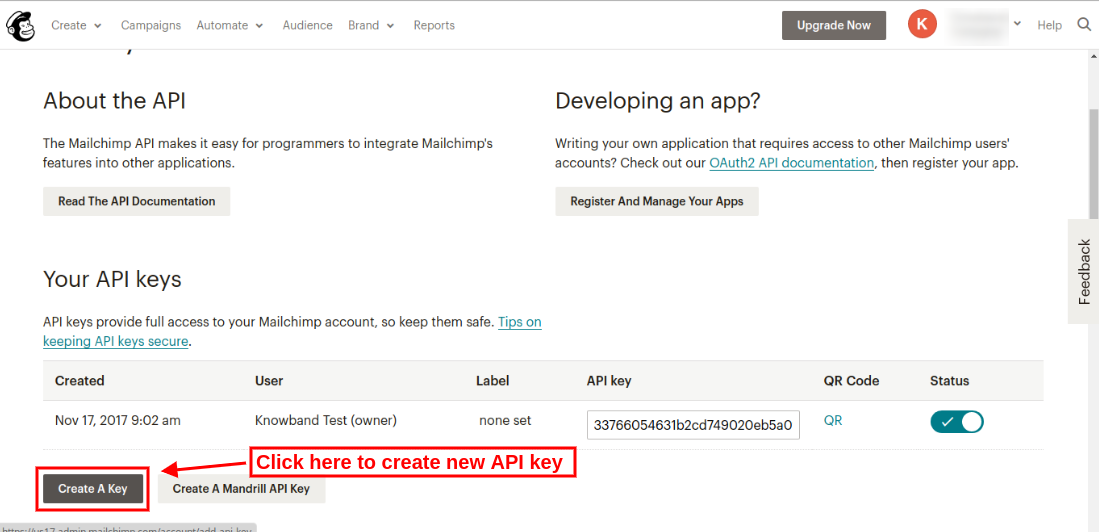
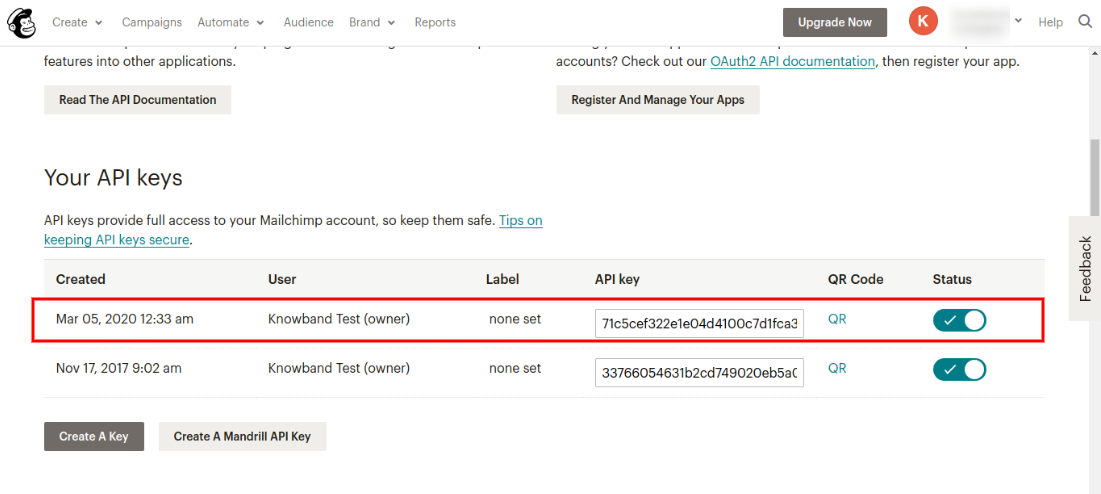
Step 4: On API keys page, click “Create a key” to generate an API key. After creation, a new API key will be added to your API keys list. The screen is given below:

After clicking on Create a Key button, the user can view the newly created API key as shown below:

To create MailChimp Audience 

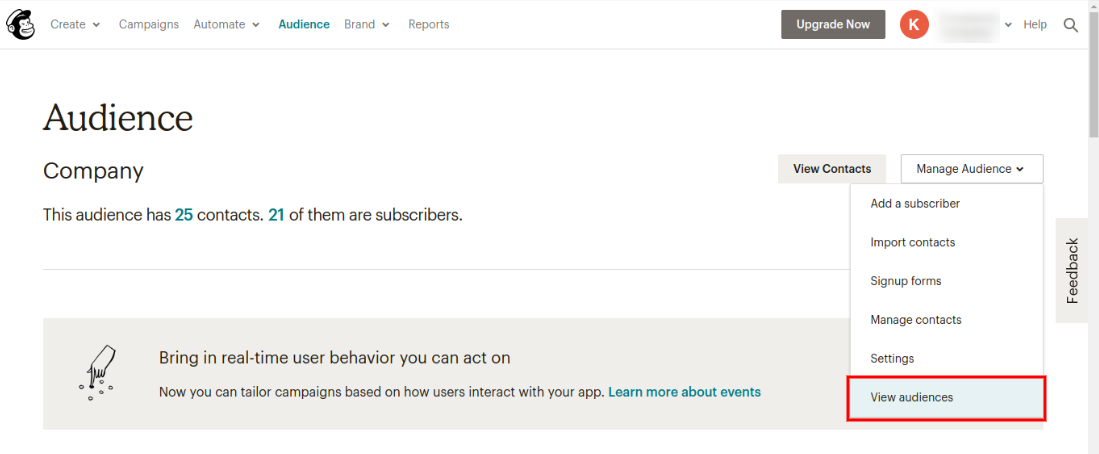
Step 5: Now to create an audience, click on the “Audience” tab in the upper menu. Admin will be redirected to a new page where he/she can view previously created audiences and also create a new audience. The screen is given below:

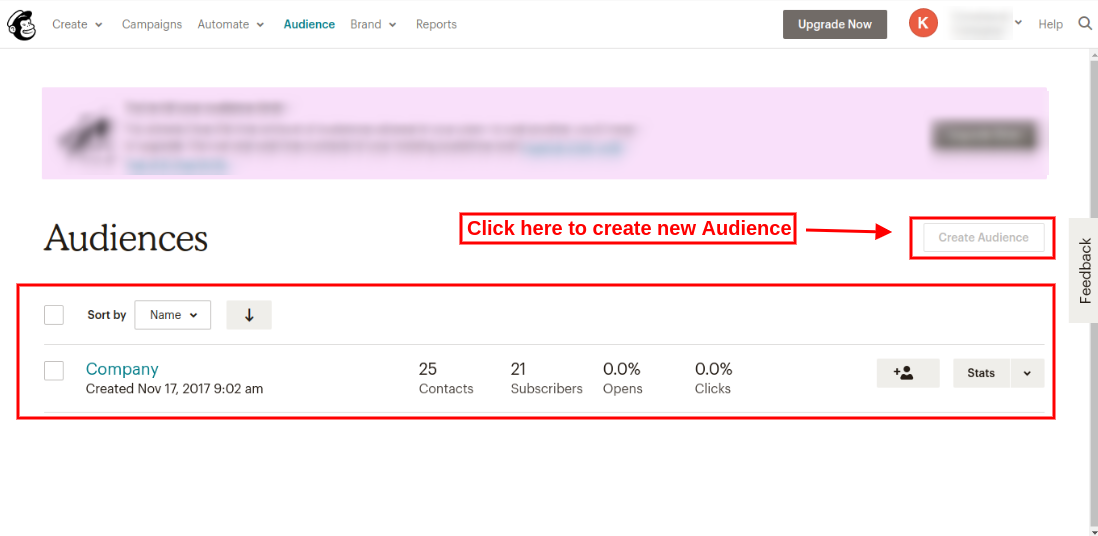
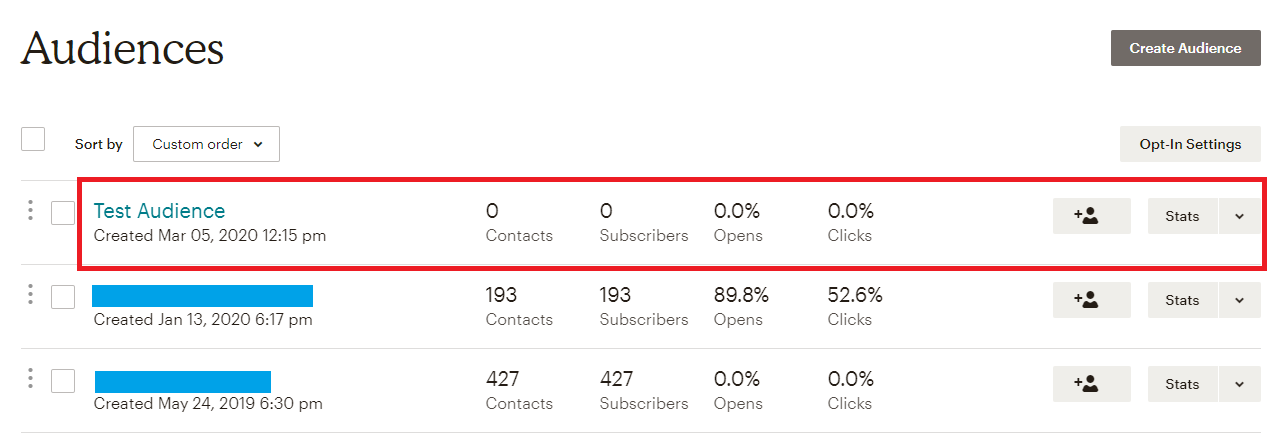
Step 6: On clicking “view audiences” option, admin can view previously created audiences as shown below:

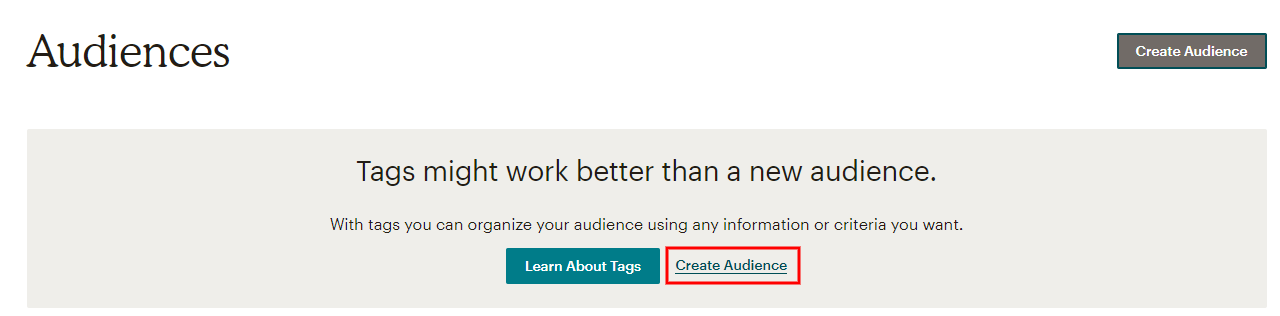
Admin needs to upgrade his/her account for adding more audiences. In the free account, admin can create a single audience only. Admin can upgrade account and then click on “Create Audience” option as shown below:

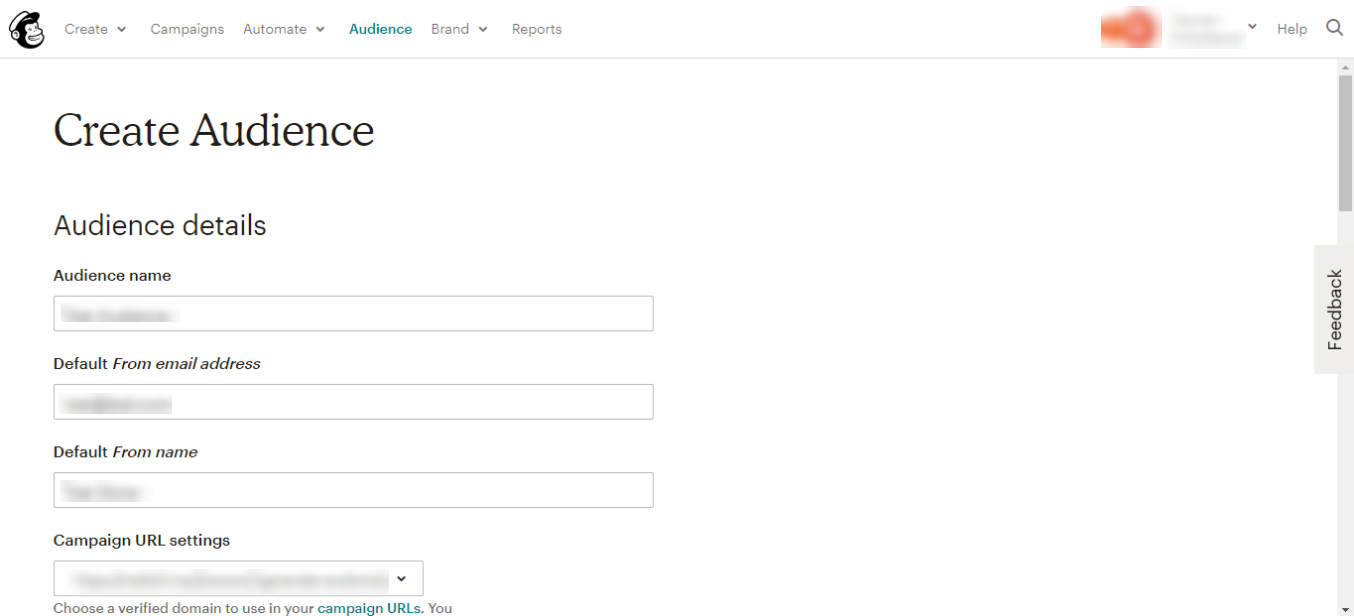
After clicking on “Create audience” option, admin needs to fill the required information:

After saving all the details, the admin needs to save it. This way, admin can create new audience ash shown below:

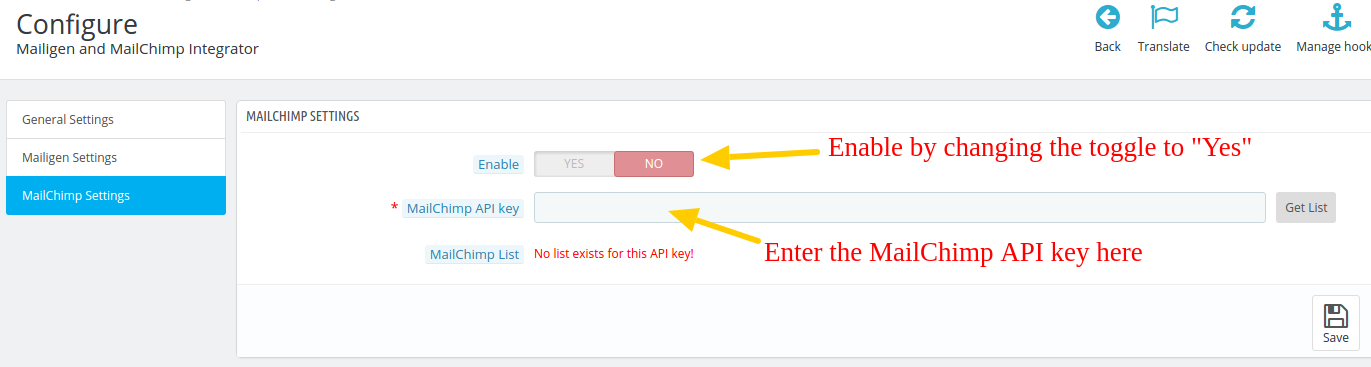
Knowband offers a Prestashop Mailigen and MailChimp Integrator module that integrates your MailChimp account with the Prestashop store. With the help of the Prestashop addon, the admin can automatically sync the details of the subscribers with the respective MailChimp and Mailigen account of the customers. You can configure the MailChimp API details on the following interface.


Here you need need to enter the MailChimp API Key that you have got in the step 4, and then enable the integration by switching the toggle to “Yes”.

Prestashop MailChimp Integration extension offers a smart sync that synchronizes the email IDs and related details of the website subscribers automatically. The email IDs are synced from the Checkout Page or from the Customer Registration Page.

Additionally, Prestashop MailChimp integrator addon developed by Knowband makes automates the entire process data synchronization and removes the tedious job of manual synchronization.

Liked This? You’ll Like These Too