The Best Ways to Improve Your App Ranking on the Google Play Store

Having a good number of downloads is one of the best feelings ever for every online business. The true problem is figuring out how to surpass the 3.4 million mark and get your mobile app at the top of the list. The term “ASO” stands for “App Store Optimization.”App Store Optimisation is the process of adding a boost to the rank of mobile apps by applying various strategies. Various factors help an app rank higher on the Google Play store. Here are some of the most important aspects of making the app rank higher.

According to solid Google statements, there are 3.4 million mobile apps available on the Google Play store. Without a doubt, the figure is massive and continues to rise. There is a vast variety of mobile apps available on the Google Play store. For example, you can find millions of games, eCommerce apps, fitness-related apps, banking apps, and much more. Setting your mobile apps anywhere near the top of the Google Play store search list is a difficult task due to the big amount.

Understand the Beat of Market Competition:

It is frequently asserted that to excel in competition, one must fully understand it. The same saying applies to the ASO process. The first important aspect for a successful mobile app to rank highly is to do some market research.

Take a look at the customer segment you are targeting and the keyword search on the Google Play store for the apps they are looking for.

Apart from that, there are a few aspects of market understanding that play an important role in the ASO, such as keywords that should be highlighted, customers’ behavior, how easy it is to use your mobile app, and all the keywords your competitors are using, and much more.

Pick the Perfect Application Name:

The second and most important aspect of improving the ASO factor is to start with an authentic application name. The number of searchers who visit the app page increases every time the name is associated with the company category. Furthermore, reports have clearly shown that 67% of users tend to download apps that have names that are related to their search terms.

Management of Application Ratings:
Ratings are the first thing that appears in front of users as soon as they enter your mobile app. Moreover, it is always an ideal idea to have ratings maintained over 4.

The reason for this is that users attempt to analyze mobile apps based on the ratings they have received.

In simple words, it is a must to offer users the opportunity to experience their best while using your mobile apps, and later convert that experience into positive ratings.

Translation Factor:
The one element that many developers overlook in addition to the app posting is the missing translation. For instance, it is always good to add the translated description along with the mobile apps.

The reason behind it is to attract the targeted user base by adding the required information in their favorite language on the Google Play store.

Additional Promotional Events:

Apart from the on-page ASO activities, other off-page activities add value to the customer traffic of mobile apps. For example, the developers can promote their Mobile Apps on their websites, social accounts, and other platforms.

Certainly, the promotional activities show an instant boost in the download number of mobile apps.

SEO Activities:
The ranking and download of mobile apps can be simply improved by enlisting the aid of SEO operations, despite what could seem like a difficult task. The developers can post their related content targeted to the search keyword based on their business, and the generated backlink can help the mobile app rank higher.

Here are a few of the tactics that various app developers most frequently employ to rank their mobile apps higher on the Google Play store. Furthermore, did you know that you can create your mobile apps without any coding or technical skills with the Knowband Mobile App Builder?
Knowband offers the No Code Mobile App Development solution for eCommerce mobile app creation. Furthermore, eCommerce shops merchants on OpenCart, PrestaShop, WooCommerce, and Magento 2 can take advantage of the Knowband Mobile App Builder. They can post their apps to Google Play and Apple App Stores within a week using the Mobile App Maker.

In the End

Mobile Apps are one of the most relevant aspects of any business or organization. Being at the top of the list not only improves the reputation of the brand but also benefits businesses. Furthermore, in this article, we have discussed some of the most useful strategies followed by the Most Successful Mobile Apps. Additionally, if you want to work with us to create your no-code mobile apps, you may contact us at support@knowband.com to have a thorough conversation.

Top-notch strategies to rule Mobile App Market in the year 2019

Mobile App Marketing is a way of introducing your Mobile Application to users through various platforms and techniques. The major aim behind marketing through the various app markets is to target the ideal audience for your mobile application. Moreover, the mobile app markets have seen immense growth in the past few years. This brings all the latest and upcoming trends come knocking at its door. For all the developers or freelancers who have an idea regarding the mobile app or already developed one should look forward to the marketing approach. As of today, the app industry has billions of running apps. This increases the possibility for your app to be lost if it failed to catch up with new advancements. Read on to find out the major ones in detail.

Importance of Mobile App Marketing!

This era is the era of mobile apps. This makes the mobile app marketing the need of the hour if you really want your app to establish its mark. The app markets let you introduce your Mobile Application among all the worldwide users and even encourage them to download the Mobile Application as well. Audience analysis is also the major factor behind the popularity of Mobile App Marketing. It is very important to understand the kind of audience you want to target for your app. For instance, If you’re planning to launch your gaming app, you would definitely go for the teenagers and children. You would not target the 40+ audience for your app.

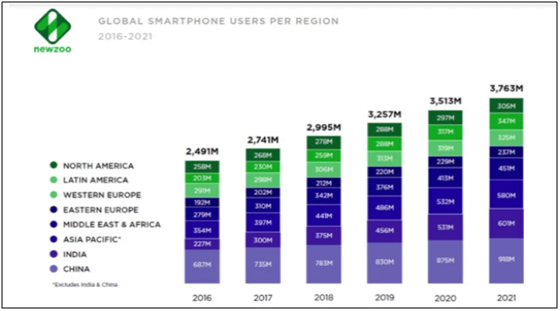
Moreover, the importance of mobile app marketing isn’t stopping anywhere soon. With the parallel growth in the mobile app market and mobile users, any milestone could be overpowered in the upcoming time. Following stats strengthen this thought of mine:

A report says that the total number of smartphones users will reach 3.8 Billion by the year 2021 and imagine where it could lead the mobile app markets then!

Upcoming Mobile App trends to look out for!

Mobile Apps have always been the highlight due to the latest technologies and advancements followed with them. The step by step growth in the mobile app industry also welcomes the new trends with open arms. Here, I have discussed some top picks for the year 2019:

1. App Store Optimization:

The optimization of App Stores is the first one to make up to the list. Many marketing experts are giving hints that this trend will take over in the coming year. Actually, App Store Optimization is a technique to analyze the apps in the app ocean and to display the most relevant and popular ones to the users.  We all are aware of the SEO for Google. App Store Optimization is quite similar to it where App Stores rank your application. The right keyword for your app is the key to perfect optimization of your app. It also depends on the reviews and downloads of your apps, Thus, if your App ranks well in the store, the number of downloads will tend to increase. This makes this trend a silver bullet for the growth of your app in multiple ways.

2. Social Media Advertisements:

No one can deny the power of social media. Social media platforms bring a sheer number of potential users to your app. This is an efficient way to advertise your app on social media and achieve maximum downloads from a single place.  Also, social media platforms provide various ranges of audiences including every age group and interest. Thus, social media advertising is an effective tactic to boost your app growth.

3. Spreading the word:

Spread the loud word for your app. The growth of your app depends on how you tell the users about it. Often, digital frauds happen in the market and the users get afraid to download your app. So, you must make sure that the right information is being spread among the audience. This technique may seem a bit common but it is the pillar behind gaining the user’s trust in your app.

4. User Targeting:

Audience analysis is the prime factor for your app growth. It is very important for you to know how and where you can target the users. We should understand that the interest of the audience before actually beginning its promotion.  Audience analysis is a very important tactic if you don’t want to let your efforts waste. Moreover, you can even target the users by their age-group, location, and multiple platforms.

How growth of mobile apps is readdressing eCommerce industry?

Welcome to the year 2019. Mobile Apps have already taken over the eCommerce world and is still growing. We all use mobile phones for every day-to-day work and most of all for product purchase. Taking your eCommerce store to the user’s pockets would definitely be the booster for sales and conversion.

Nowadays there are various automated solutions to take your online website to the mobile platform which comes with a configurable admin panel. The store owners can easily control the designing and functioning of the mobile app. KnowBand has brought various readymade modules to provide you featured eCommerce app in no time. All you need to do is to get the module for PrestaShop, OpenCart, Magento, Magento 2, WooCommerce, Shopify and share your requirements. That’s all for you! Now, you just sit back and relax instead of indulging in any sort of coding or technical skills.

Conclusion:

Now, this should be crystal clear that app marketing is a very critical component behind the success of your app. So, now in 2019 instead of just developing the app and hoping it to get successful, adopt the above-listed strategies and boost the number of downloads. All the mobile apps who made their mark in the past had a very strong marketing strategy behind them.

Find our other articles on Mobile App Marketing:

Top app marketing campaigns for our inspiration

10 years of growth of the mobile app market

Alternatives to publishing your Android app on Google Play Store

Whenever it comes to publishing Android app, Google Play Store is usually a go-to place. Being the biggest app distributor in the mobile app market for a long time, it is the most obvious choice for the app developers. “The green robot” is way ahead of other platforms, if we look at the number of Android devices. One reason behind its popularity is that Play store is pre-installed in all the Android devices. However, there are even other stores available which allows the users to sail through the ocean of apps and can give additional downloads for your Android app.

Why look for an alternative to Google Play Store?

Now, the question arises, are we limited to just Google Play Store for app distribution? I would suggest checking for the alternatives to Google Play Store. Various other App Stores allows publishing Android app for developers. They are not as big as Play Store, yet carry a huge customer base and can easily take your app to thousands of users every day.

Publishing Android app to multiple app stores increases your app’s visibility and ultimately enhances your revenue. Exploring your options isn’t a bad deal when the growth of your application is on the line. Find some more information on the alternatives available for Google Play Store mentioned-below.

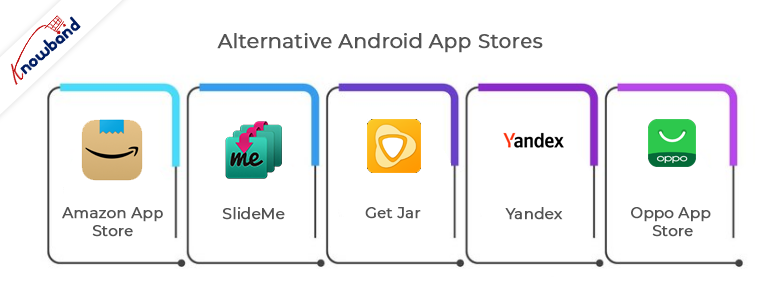
Alternative Android App Stores:

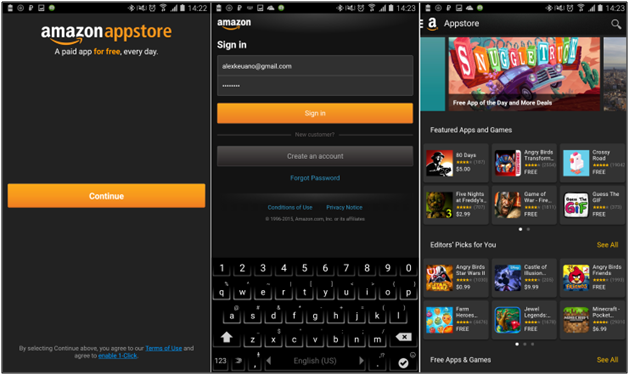
1. Amazon App Store:

Amazon app store is the most popular among all third-party platforms for sharing your Android application. Its progress can only be determined with the fact that from offering content to Kindle owners it has expanded itself to a well-flourished store.

Earlier, it became quite popular for a service ‘Free App of the Day’ in which it offers a free app to users for which they have to pay on the Google Play Store. Amazon even provided several paid titles free for publishing Android app.

Publishing Android app on the Amazon Store is pretty straightforward. For in-app purchases or paid apps, you can go to Amazon Underground Store. App submission is quite simple with the Amazon but your app has to clear an approval process. HTML 5 and web apps are also allowed in this store.

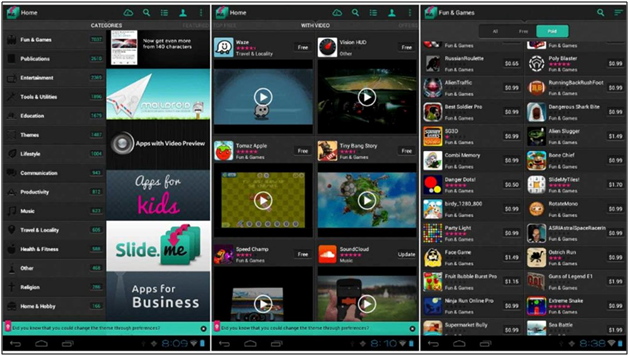
2. SlideMe

SlideMe is the oldest app store with all sort of free and paid Android apps. Its app store SAM (SlideMe App Market) got a better user interface than others. Users can simply categorize products and even look for community reviews and comments.

App publishing is quite simple with SlideMe. SlideMe takes 20% of the income of the publisher as a commission. It offers various payment modes like PayPal, which even Google Play doesn’t provide. It is even older than Google Play Store and thus connects with a huge section of android users. You should certainly give it a try.

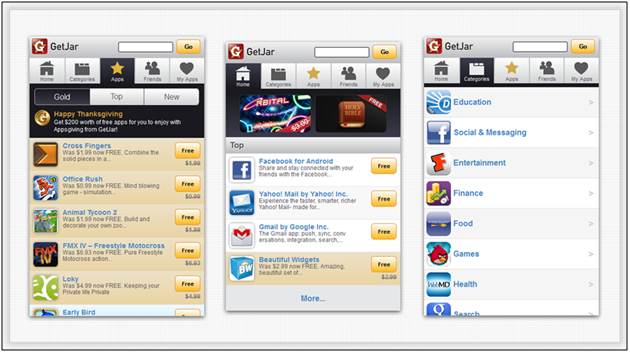
3. Get Jar

Get Jar is also one of the oldest app stores offering a wide range of apps in the Android Market. Its website and app share the same view, users can browse for the apps anywhere.

Publishing app on the Get Jar is free of cost. Developers can make an account and get full access of their application. Developers are even allowed to submit different versions of the same application and target different audience groups.

4. Yandex

Yandex, being one of the biggest search engines in Russia, provided its App Store. It is the most suitable option for the developers if they want to expose their app mainly in Russia. You just require to make a Yandex account to publish your app.

For app submission process, you just need to provide a relevant category that defines your application, target countries for your app and related images. Yandex regulators review your app before making it live on their store.

5. Oppo App Store

Chinese smartphone developer, Oppo has its own app market which recently took a leap and came to the 6th position in top 10 list of app stores. In 2015, it was out from the list. This App store has recently came ahead in the App market and made its impact by gathering huge customers.

Regarding app submission, it has few simple guidelines through which you can submit your app. Along with easy submission, your app will be among less number of apps and can mark its place along with future growth of store.

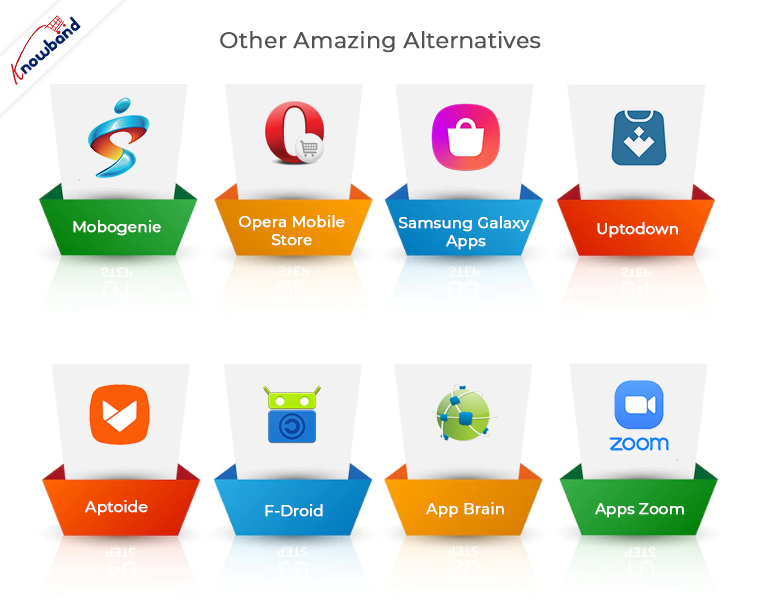
Other amazing alternatives:

6. Mobogenie

7. Opera Mobile Store

8. Samsung Galaxy Apps

9. Mobango

10. 1Mobile Market

11. Soc.io Mall

12. Apps zoom

13. App Brain

14. F-Droid

15. Aptoide

16. Uptodown

Conclusion

Creating an Android app requires a lot of efforts and its growth in the market directly depends on its distribution. Nowadays there are enough choices available for Android developers apart from the Google Play Store. They can even choose whether to target multiple stores or focus on just an independent one. Although the importance of publishing app on Google Play store is irreplaceable, yet these third-party app stores could bring you, potential users. Every app developer should try to grab the opportunities, they’re offering.

You can also find: How to share your iOS App without publishing on Apple App Store?

Knowband also provides a No Code Mobile App solution for major eCommerce platforms like Prestashop, Opencart, Magento 2 and Woocommerce. Know more:


Pre-Requisites to Publish App on the Google Play Store

Although there are various app markets available nowadays, Google Play Store is the most popular and the largest of all. Google play not only allows you to distribute your app to a wide range of users but also allows you to manage the advertisement and selling of the app. Are you planning to publish an app on the Google Play store? Here, we have discussed some requirements for a seamless app submission on Play Store.

1. Create a Developer Account

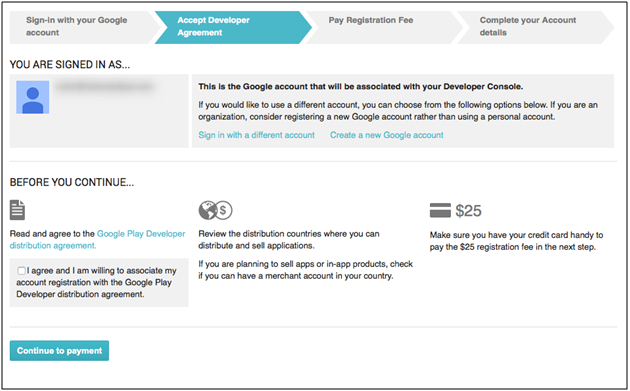
First of all, the user who is intending to go live with the Play Store needs to have a developer account to release the application. There is a one-time $25 payment required to open this account, which can only be done once. The user can follow the steps mentioned below to register as a developer using his/her Gmail account.

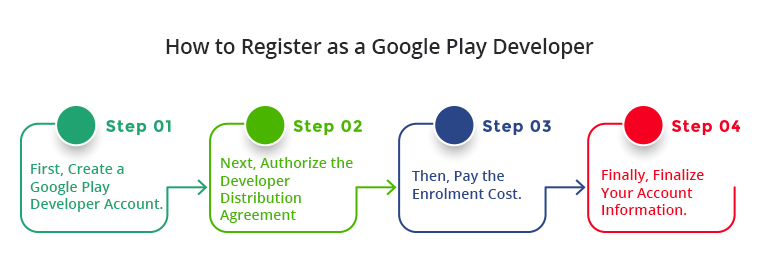
Steps to Create a Google Play Developer account

  1. First, create a Google Play Developer account.
  2. Next, authorize the Developer Distribution Agreement.
  3. Then, pay the enrolment cost.
  4. Finally, finalize your account information.

For Detailed Step-by-Step information, please visit the link

2. Pre-requisites for Publish App on the Google Play Store.

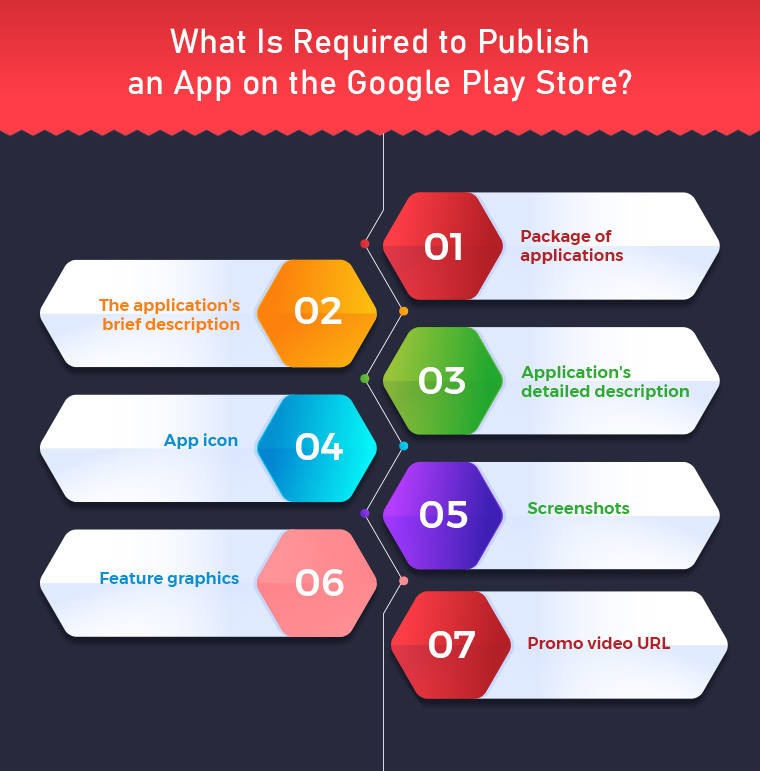
  1. Application Package:- apk file which is to be released on the Play Store.
  1. Short Description of the application: – The short description should not be more than 80 characters.
  1. Long Description of the application: – The long description should not be more than 4000 characters.
  1. App Icon:- Hi-resolution icon in png format. (512*512). Here, a few tips are discussed for making an effective app icon.
  1. Screenshots:- 8 different screenshots of the application with hints. The image should not be larger than (3480*3480) and must be in png format. Find an example here – https://play.google.com/store/apps/details?id=com.vel.barcodetosheet
  1. Feature Graphics: – Feature graphic of resolution 1024px(width) * 500px(height). A nice featured graphic usually attracts more users and get downloads for your app.
  1. Promo Video URL: – YouTube tutorial video showcasing the use of the application (if any). It should be 30 seconds to 2 minutes long.

 Recommended Read: How to publish your Android App on Google Play Store?

3. Releasing Application on Play Store

It’s time to publish the app in the store after getting everything prepared for submission of the app. The steps discussed below illustrate how you can distribute your app on the Play Store –

  • In the pop-up screen, enter the name of your application. Google allows 30 characters for the title of your Android application.
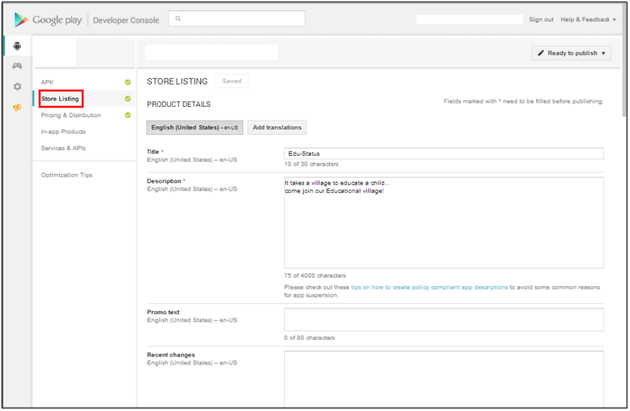
  • Now, you will be redirected to the Store Listing under the Store presence page, add the following details here:

  1. Short App Description
  2. Long App Description
  3. App Icon
  4. App Screenshots
  5. Featured graphics
  6. YouTube Video
  7. On the store listing page itself, you will be asked to select the Application type whether it is an App or a Game.
  8. Select the category of your App or Game to which it belongs.
  9. Enter the contact details and privacy policy URL for the app. The privacy policy is mandatory for app distribution.
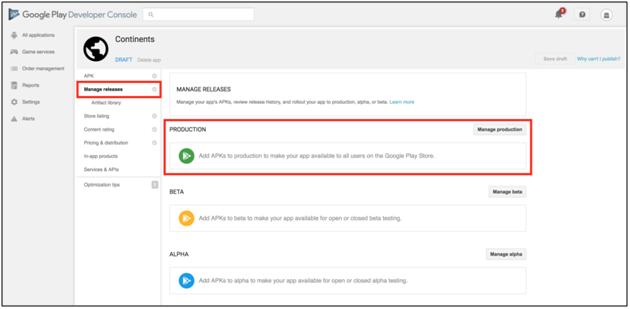
  10. Now click on the ‘Save Draft’ option and move to the ‘App Releases’ option under the ‘Release Management’ option.
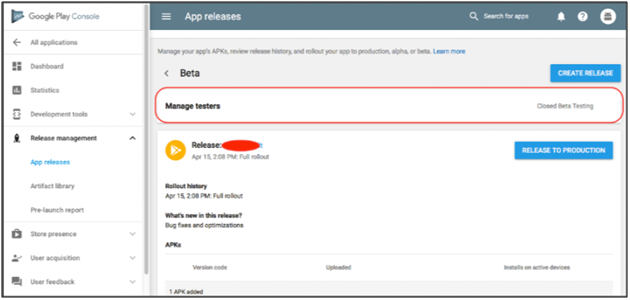
  • Select Create Release option in the production tab if you want to release your application to production. The application can also be released under beta and alpha testing before being moved to production.

  • Select the Application Package to be uploaded to Play Store.
  • Update the release notes for the application and click on Save Draft.
  • As we have now uploaded the application package (APK), you can now apply for submitting a Content Rating for the application.
  • Now open Store Presence and select Content Rating.

  • Fill in the questionnaire and you will receive a content rating based on the entered details.
  • Now, move back to the ‘App Releases’ tab

  • Under the Production track, select Manage
  • Click on the Review button at the bottom of the screen. You will be redirected to details of the application package and release note.
  • To release the application package on Play Store, select the option “Rollout to Production” to make the application available for release.

When Google has processed your request, you can download your application from the Play Store.

Recommended Read: What to do if Google Play Store rejects your App Submission?

Need An eCommerce Shopping App?

If you’re an eCommerce store owner and looking for native shopping apps for any of the following platforms:

PrestaShop Mobile App Builder

OpenCart Mobile App Builder

Magento 2 Mobile App Builder

WooCommerce Mobile App Builder

This readymade tool by Knowband will create and publish an app on the Google Play Store. The mobile app creator for iOS and Android securely connect your store with the mobile apps. The Android and iOS mobile apps automatically roll back any changes you make on the website. Therefore, flawlessly synchronised mobile apps manage the entire workload without the need for manual synchronisation. The plugin comes with 3 months of free support including a free cost app release.
Conclusion

These were some of the pre-requisites for the distribution of the app on the Google Play Store. You can also find detailed info about app publishing on Google Store. Once Google approves your app, your app will join the Play Store. However, Google frequently rejects apps for common reasons that are disregarded at the time of app submission. However, you can curb the reasons for rejection and republish it with ease. You can also create a perfect mobile app and publish the same, just keep above mentioned pre-requisites in your mind.

How to Publish your Android App on Google Play Store?

After spending a substantial amount of time developing an Android application, the next step is to publish your Android app on Google Play Store. Currently, there are more than 1 billion active users of Android. Publishing your app on the Google Play Store will make your reach prospective audience base at ease. If we look at the following statistics, the number of available applications in the Google Play Store from December 2009 to June 2024 is gradually increasing:

With such a huge no of apps available in the Play Store, publishing an android app would be quite beneficial for your business. If you are a newbie in the field of app development or this is your first-time publishing an Android App on Google Play Store, here are some useful tips on that:

Recommended Read: Pre-Requisites to Publish App on the Google Play Store

1. Create a developer account in Google Play Console

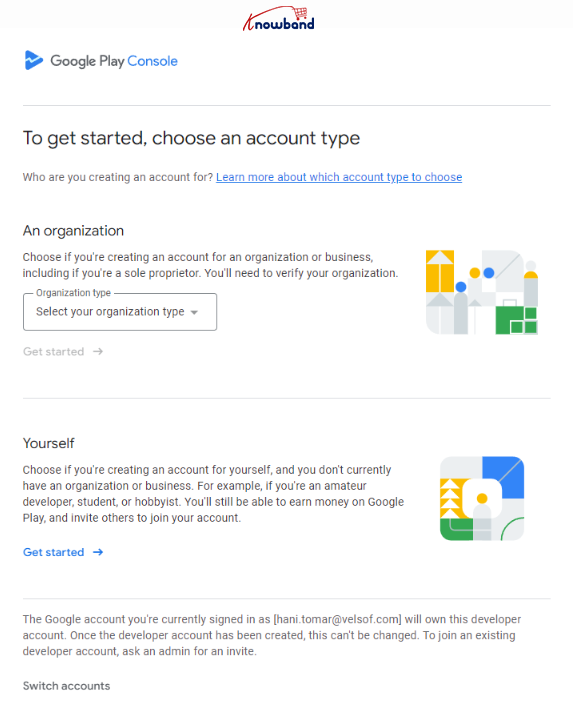
To begin with the app upload, the initial steps comes as creating a new developer account. Furthermore, there are 2 types of Google Play Console developer account: Individual and organizational.
Creating a new developer account starts with visiting the Google Play Developer Console sign-up page. You can only register a new Play Console developer account only if you have enabled 2-Factor authentication on your Gmail account.

Either you can select the option as an Individual registration, or if you are willing to register as a business, you can select the organization type from the dropdown list.

2. Submit the Details:

If you are registering into a new Play Console developer account, you are going to need a D-U-N-S number for your organization, A contact phone number and email address for Google Play users, A contact phone number and email address for Google, and a single time fee of $25 USD.

Once these details are submitted, you can get your Play Console Developer account approved within 3-5 business days.

3. Upload your app

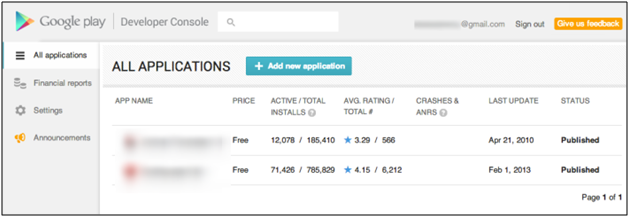
Upload your android app with Add new application option.

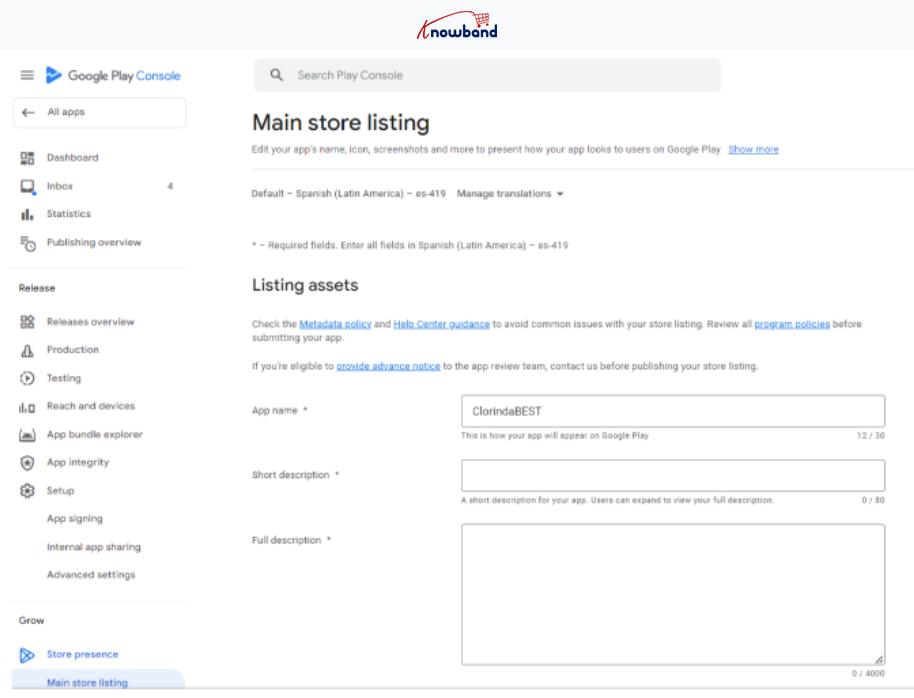
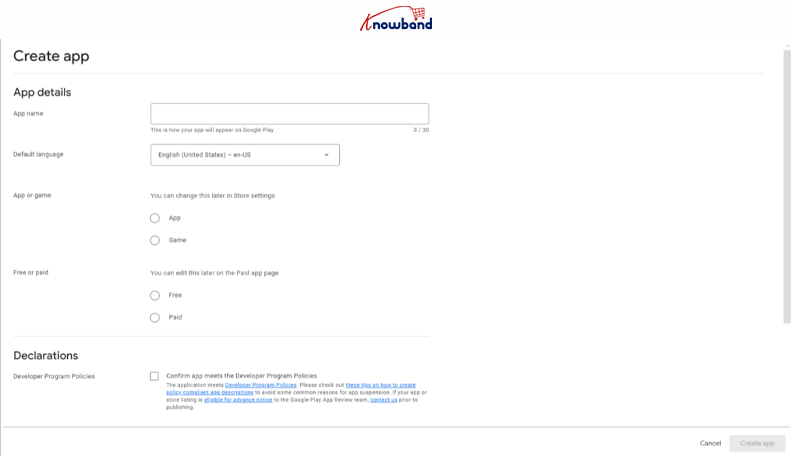
To submit a new app, click on the create app button shown in the above screenshot. Once done, you will have to fill in the basic details such as the App name, default language, selection between app and game, and the Play Console policy declarations.

Fill in the requested details and click on the create app button.

4. Set-up Your App:

Once the basic details are submitted, you will be redirected to the Play console account dashboard. For the next step, click on the dashboard tab visible in the side menu and visit the Set up your app section.
Here you will have to fill all the details that are mandatory to submit the app on the Play console. Start by one by one. Once you are done with the app content section, there comes the next step.

5. Enter Store listing details

Your app page plays a very vital role in attracting Android users. Keep its details compact and precise. After uploading the APK file, go to the store listing page and add the following details related to your application:

  • Full description ( up to 4000 characters)
  • Short description( up to 12 to 80 characters)
  • App snapshots
  • Promo video
  • YouTube video URL (optional).
  • Chromebook Screenshots (Optional).

You can also provide details such as contact, category, and more. These store listing details can be updated whenever required.

6. Add pricing and distribution details

Now come pricing and distribution details. Enter the price of your app with the following steps:

  • Select whether your app is free or paid.
  • Select the targeted countries.
  • Check the boxes stating that your app complies with the content guidelines.

Save the details and further move on to the next step.

There are a few extra options are available that might not be mandatory while publishing the app, but they surely prevent your app from getting negative feedback. Also, you can manually filter non-compatible devices. So, use these options to curb any negativities and stay at the top of your game.

Recommended Reads: Alternatives to publishing your Android app on Google Play Store

Looking for native shopping apps for any of the following platforms as an owner of an online store?

Building Mobile Apps with PrestaShop

Mobile App Builder for OpenCart

Build Mobile Apps for Magento 2

Building Mobile Apps with WooCommerce

A Google Play Store App will be created and published using this ready-made tool from Knowband. Your store and the mobile apps are safely connected through the mobile app developer for iOS and Android. Any modifications you make on the website are automatically undone by the Android and iOS mobile apps. So, without the need for manual synchronization, flawlessly synchronized mobile apps handle the full task. The plugin includes a free app release and three months of unrestricted support.

Note: These steps are applicable only in case you have a registered account as “Organization” on the Play Console. If you have registered as an Individual, you will have to meet the closed testing requirements for app submission.
Check out our other article about “Google makes closed testing mandatory for the personal accounts“.
Once the closed testing is done, you can submit your Android app on Play console by following the same steps as mentioned in the article above.

In Conclusion

A well-crafted Google App page is a key to your app’s success. With the above-discussed points, it is quite clear that publishing an Android App on Google Play Store is a simple process and just requires a few minutes. So, go ahead, publish your app, and reap out benefits of the Google Play Store.

If your app somehow got rejected by Google regulators, don’t worry, we got you covered. There might be a few reasons behind Google declining your app which are discussed here along with proper solutions.

Knowband’s Mobile App Builder

Get the mobile app created for your store in few hours with Knowband Mobile App Builder Module.

SHOP NOW

At Knowband we provide no-code mobile app builders for Prestashop, Opencart, WooCommerce, and Magento 2 eCommerce platforms. Our apps come with a ton of richly loaded features that can help your business to grab the attention of your customers. If you have any queries/suggestions regarding app submission on the Play Console, feel free to reach out to our support team at support@knowband.com.


You can also find out: How to Publish your iOS App on Apple App Store?