How to Automate the Coupon Discount for your OpenCart Store

Certainly, coupons are an enticing way to maximize volume and revenue. It can easily build your customer data and temporarily improve your conversion rates by integrating them into your marketing mix. Although there is no real substitute for offering quality goods and reasonable pricing, when the market heats up or customer expectation determines it, coupons do a great job supporting those efforts. To automate the coupon discounts on your OpenCart store, you can add ‘Sales Coupon Enhancer – OpenCart Extensions’ developed by KnowBand.

Coupons and discounts enhance sales by increasing conversions. Let’s explore the functionalities and learn how to use coupons to create discounts on the OpenCart store.

Discount Coupon Sales Enhancer – OpenCart Extensions

In creating coupon code, the sales coupon enhancer plugin offers admin all the options he ever wanted. It has several helpful features that are not available by default in OpenCart.

The OpenCart Sales Enhancer Extension makes it possible for the store administrator to create several coupons based on different categories. Through the OpenCart coupon code generator extension, store admin can generate coupons for a particular brand, client, payment method, shipping methods, etc.

This OpenCart Extension gives the administrator the ability to display all coupons produced without any trouble. The store administrator will set the coupon code rules and create random coupon codes through the OpenCart coupon code generator.

It allows setting conditions to apply to the coupon at the checkout page. One Page Checkout extension has a field for coupon code entry and the Coupon Code Enhancer is compatible with One Page Checkout.

Key features of OpenCart Sales Coupon Enhancer

Create Coupon Codes

You can create several coupon codes for customer groups, shipping methods, and payment methods using the OpenCart promotional vouchers. For instance, choose XYZ bank payment and avail a 10% discount’

Set Coupon Code Validity Rules

The number of rules to validate the coupon code can be applied through the OpenCart coupon generator will be defined by the store manager.

Generate random coupons with OpenCart coupon code generator

The OpenCart coupon code generator extension has a choice for generating random coupon codes, or you can enter your own code as well. Like for Christmas, the coupon code be SANTA25′

Create Code for Categories and Brands

The OpenCart sales coupon enhancer gives you the option of creating coupon codes specifically for a brand, category, consumer, shipping method, payment method, etc.

Compatibility

The OpenCart coupon code generator extension is compatible with Multi-Store. The default coupon code scheme does not interfere with the OpenCart coupon code generator extension.

Detailed Data Reports

OpenCart coupon generator gives you various reports to give you a glance over the coupon used orders and who did not use coupon codes while placing the orders.

 The difference in the default coupon creation and coupon creation from the module:


Some benefits of offering Coupon Code discounts:

It has a fantastic interface that helps clients to quickly access and understands where code can be applied.

Easy to create coupon codes: Generate coupon codes for every occasion and event. Like on a particular product, category, shipping method, specific payment gateway, etc.

Apply rules: Apply rules based on products, cart quantity, type, etc., and configure your coupons with the OpenCart coupon code generator extension accordingly.

Fully customizable: The extension of the OpenCart coupon code generator can be completely modified from the backend.

Increase sales: 96% of consumers use coupons when making an order, which will increase the web store’s sales.

Display Reports: You can easily view reports and statistics of the total coupons generated and the number of coupons discounted. With the support of OpenCart coupon code generator extension graphs, you can also view the orders that used coupon codes and which did not use them.

Wrap-up: The coupon code extension can be easily applied to any of the OpenCart stores and is compatible with the journal theme. The coupon code generator extension is super easy to install and configure. Adding coupon codes The OpenCart coupon generator gives you free support and free updates for the future. KnowBand provides free installation of the OpenCart coupon generator.

Recommended Reads:

OpenCart Facebook Share and Win Extension – User Manual

1.0 Introduction

OpenCart Facebook Share and Win Discount Extension by KnowBand allows the store admin to display the product sharing button on the product pages of the website. It is a modern way of promoting products through social media without any advanced investments. It is the most fruitful way in order to attract more customers towards your product and eCommerce store too.

The OpenCart extension offers an easy and hassle-free product promotion and for the store admin. Admin has a nice opportunity to encourage their online customers to promote the products by offering them some amazing discounts and offers. The coupon code generated after product promotion could be accessed by admin to check whether the coupon is been applied by the customer or not.

1.1 Striking Features of Facebook Share and Win Discount Extension for OpenCart

The OpenCart Facebook Share and Win Discount Extension provides you multiple features which are fully customizable and easy to configure from the back-end interface without requiring any coding knowledge. The various striking features of the OpenCart Facebook Share and Win Discount Extension have been listed below:

  • The OpenCart Product share and win module allows admin to show product sharing option on the website pages.
  • The online users can click on the product sharing button so as to share the particular product on Facebook wall.
  • Store admin can offer fixed or percentage-based discount coupon to the customers for sharing the product on Facebook with the help of OpenCart Share and Win Extension.
  • The OpenCart Share and Win plugin offer admin to set the discount validity from the admin interface and get the discount extension.
  • Admin can enter the custom CSS and JS codes for the advance look and feel management via OpenCart product sharing plugin.
  • Admin has the authority to check the information about product sharing and discount coupon generation.
  • The OpenCart Facebook Share and Win Discount Module allows admin to set the Facebook app ID for incorporating Facebook.
  • Admin can easily install, configure and activate the OpenCart product sharing extension.

1.2 Technology for Development

Language: PHP
Frame Work: OpenCart

2.0 Installation Guide

To install this Opencart share and win Module, please follow the following steps:

Purchase the OpenCart share and win an Extension from the Knowband store. You’ll get the following files:

  • Zipped File containing the source code of the OpenCart share and win Extension.
  • User Manual of OpenCart share and win plugin.

Follow the steps below in order to install the OpenCart share and win Extension in OpenCart store:

1.Unzip the zipped. You’ll get the folders as shown in the image below:

2.Copy all the files and folders of the zip file in the Root Directory of OpenCart setup via FTP manager.

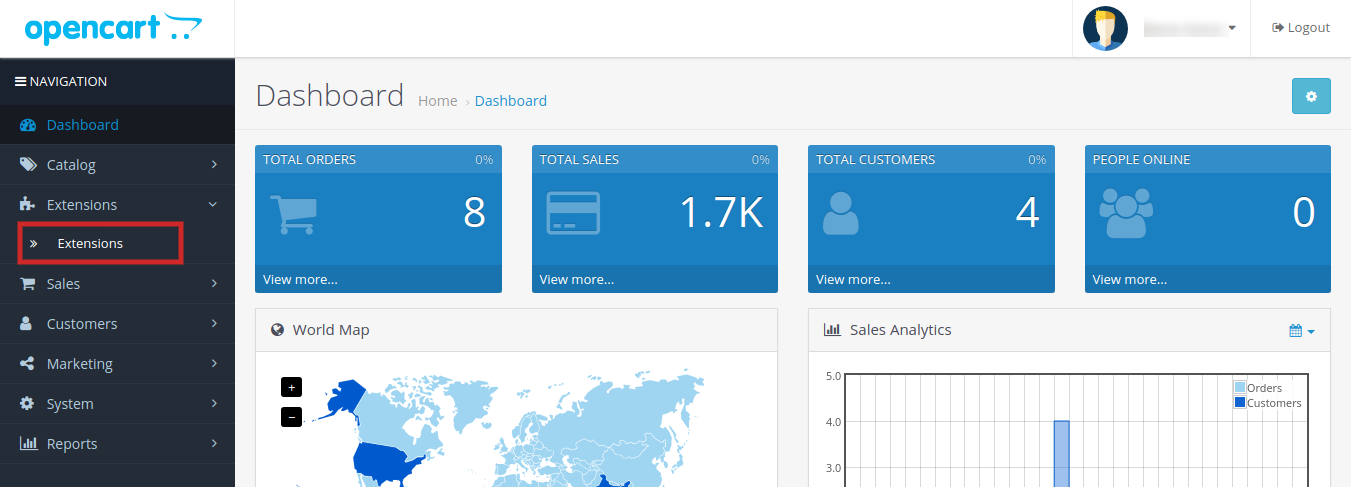
3.The OpenCart share on Facebook wall plugin is now installed and is ready to use. Go to Admin -> Main Menu -> Extensions as shown in the image below:

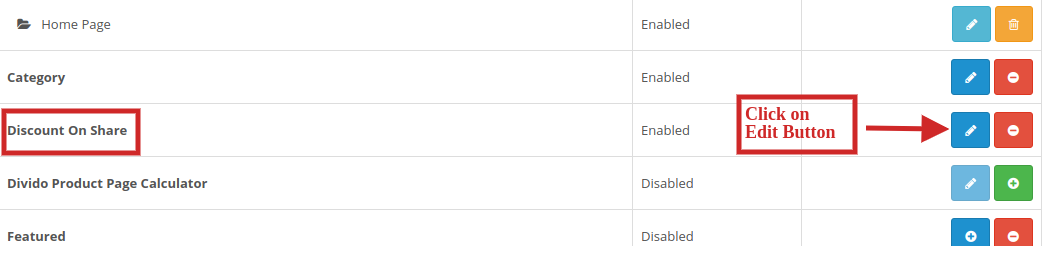
4.Select Share and Win from the list of the modules and click on the Edit button as shown in the image below:

3.0 Admin Interface of OpenCart Share and Win Discount Extension

OpenCart Facebook Share and Win Discount module offers easy customization option to the store admin. The various configuration options are discussed in detail below:

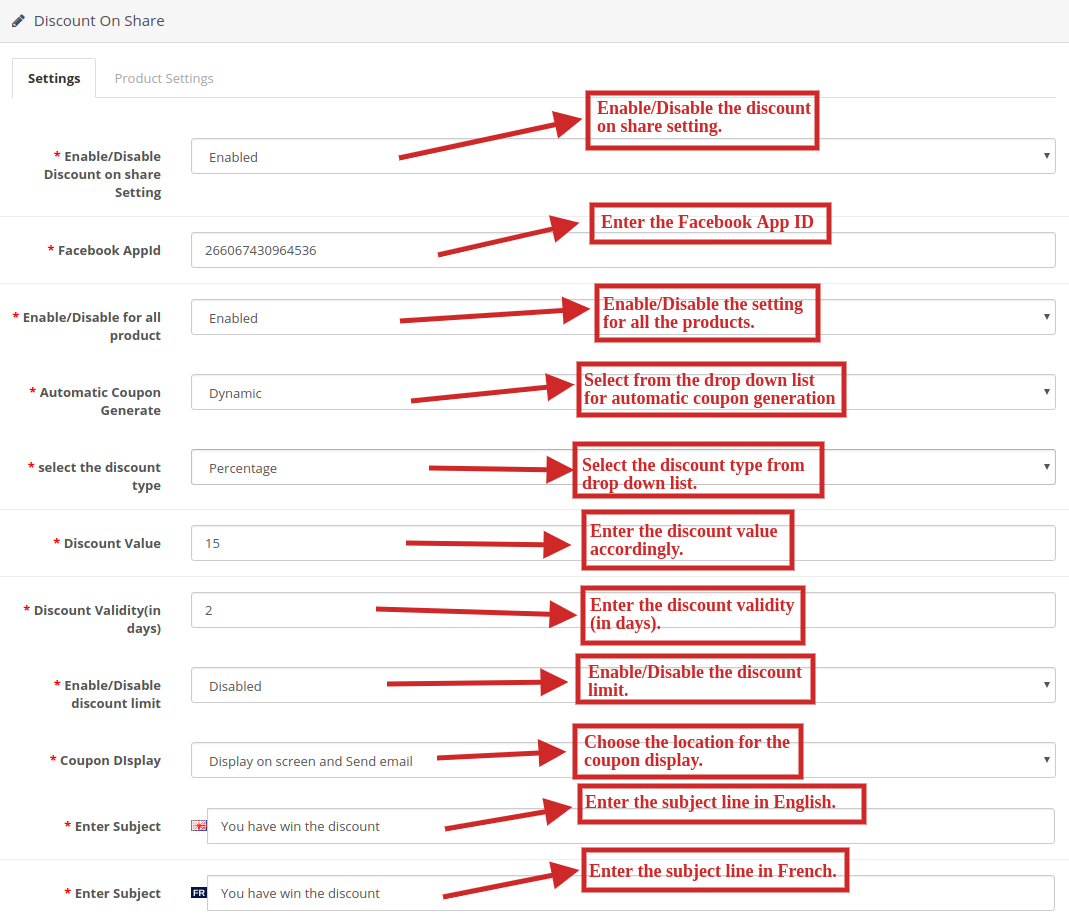
3.1 Settings

Following are the settings listed under this tab:

  • Enable/Disable Discount on share Setting: Select ‘Enable’ from the drop-down list in order to enable the OpenCart Facebook Share and Win Discount module.
  • Facebook App Id: Enter the Facebook app ID in order to incorporate Facebook profile to the eCommerce website. For generating Facebook APP Id please visit section 3.1.1.
  • Enable/Disable for all product: Select ‘Enable’ from the drop-down list in order to enable the share and wining for all the products in product listings.
  • Automatic Coupon Generate: Select either ‘fixed’ or ‘dynamic’ for the automatic generation of coupons from the drop down list.
  • Select the discount type: Select either ‘fixed’ or ‘percentage’ based discount type from the drop down list.
  • Discount Value: Enter the discount value you wish to give to your customers.
  • Discount Validity(in days): Enter the discount validity(in days) accordingly.
  • Enable/Disable discount limit: Select ‘Enable’ or ‘Disable’ from the drop down list to enable or disable the discount limit.
  • Coupon Display: Select an option from the Drop down menu for coupon display location. You can either display it on screen, send on email or both.

10. Enter Subject: Enter the subject line to be sent to the customers in English and French language.

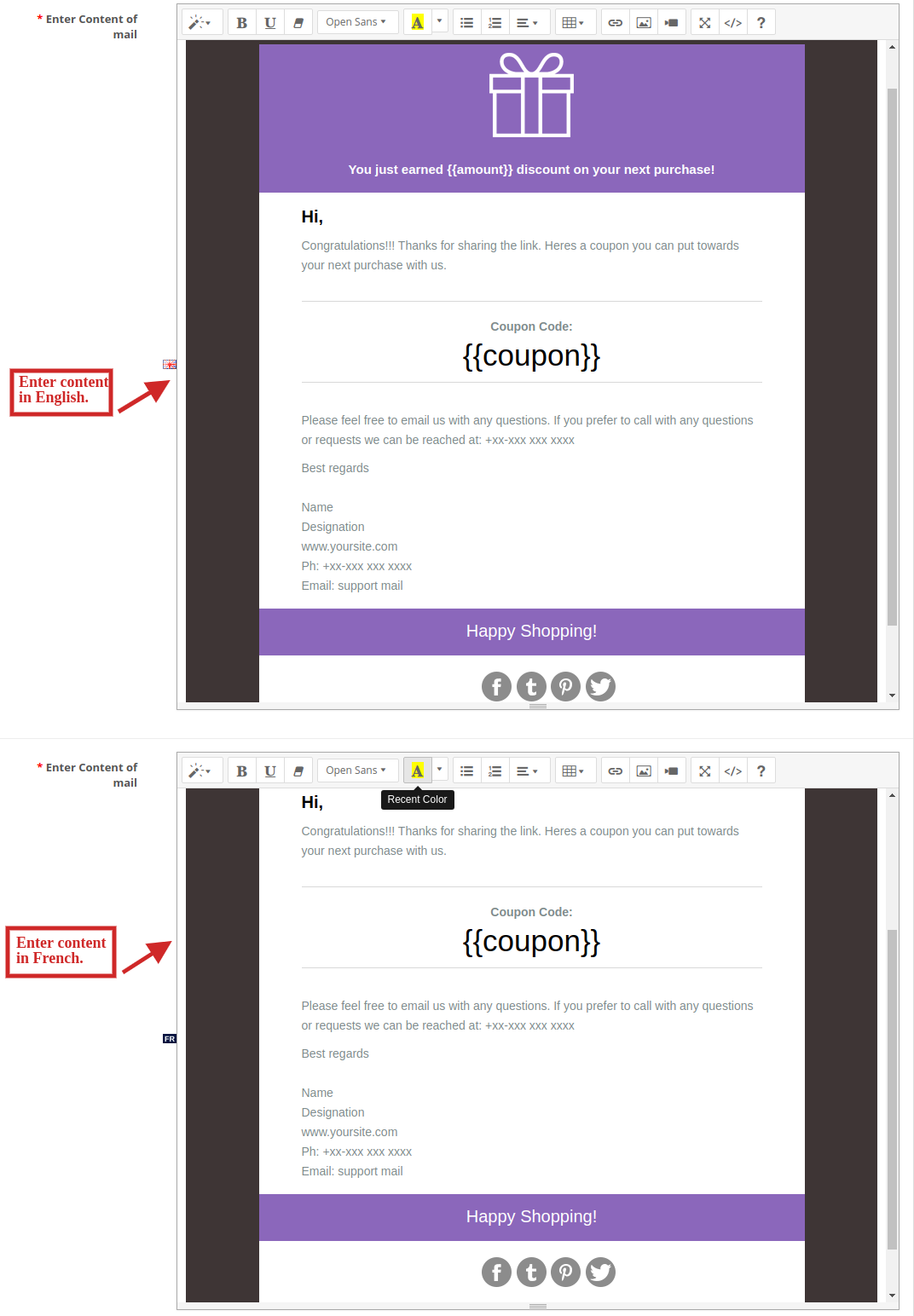
11. Enter Content of mail: Enter the content of mail to be sent to the customers in English and French language.

3.1.1 Steps for generating Facebook app ID

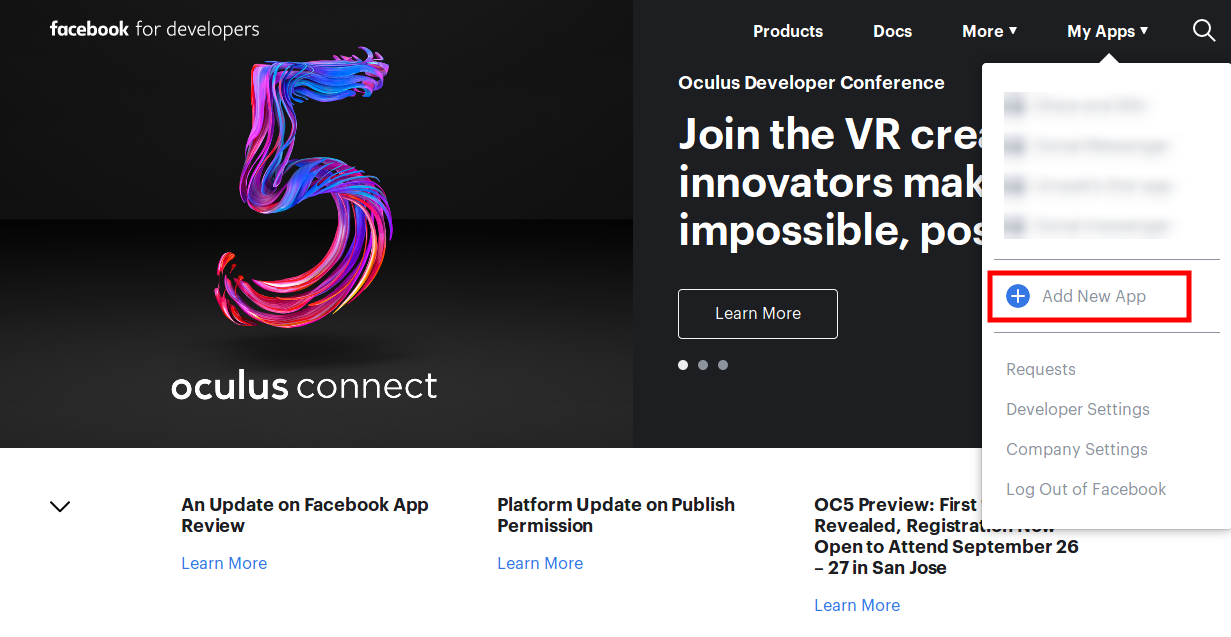
  • Now go to the “MY APPS” and click on ”ADD NEW APP” option.

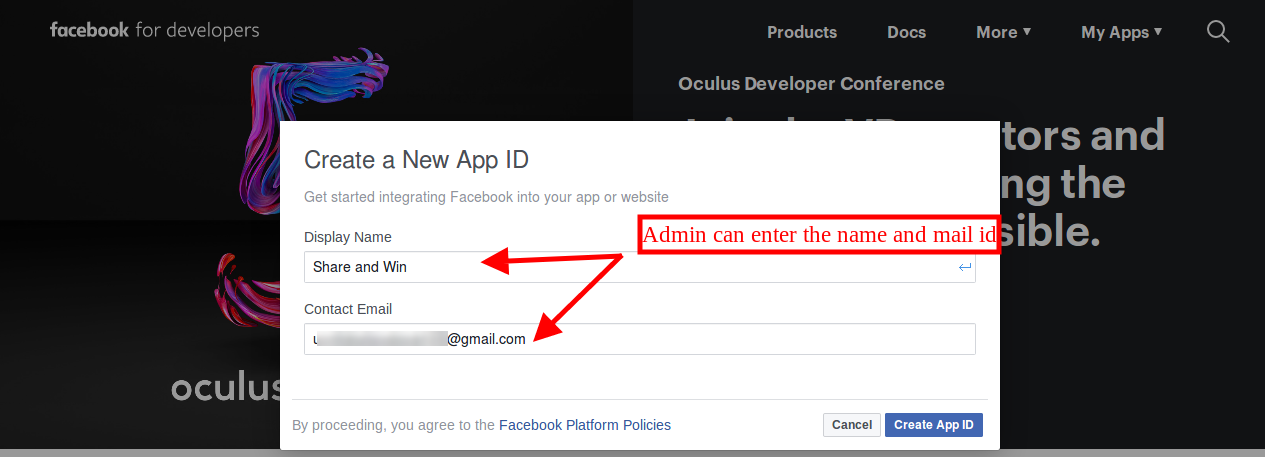
  • Here, enter “Display Name” and “contact email ID”. After that, click on the “Create App ID” button.

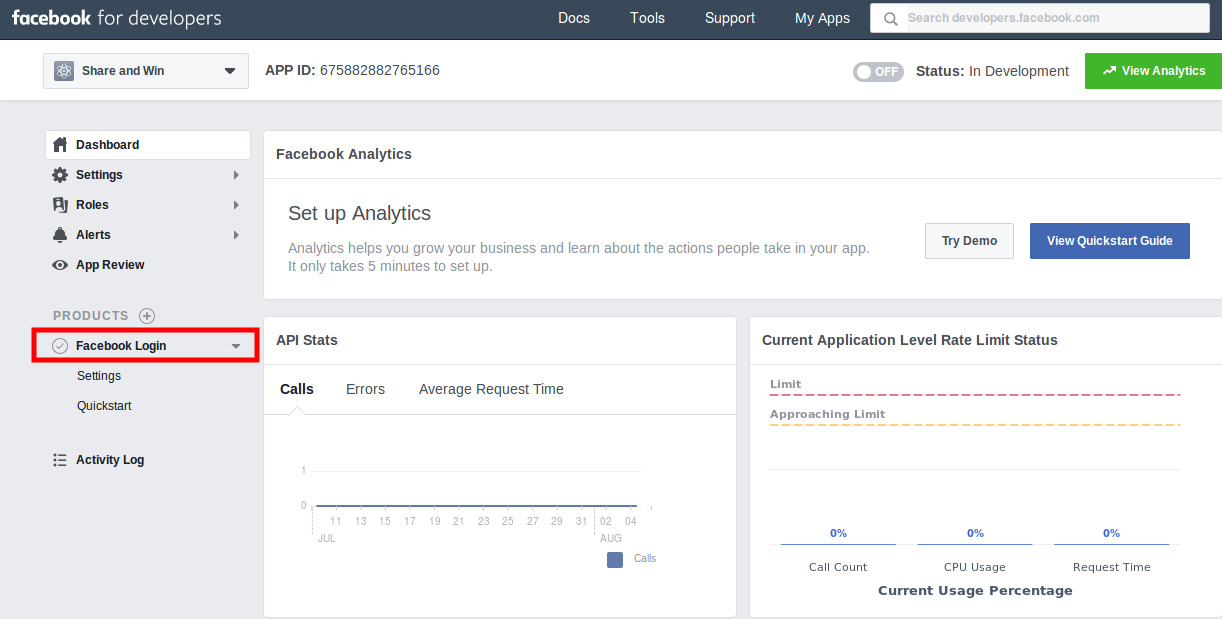
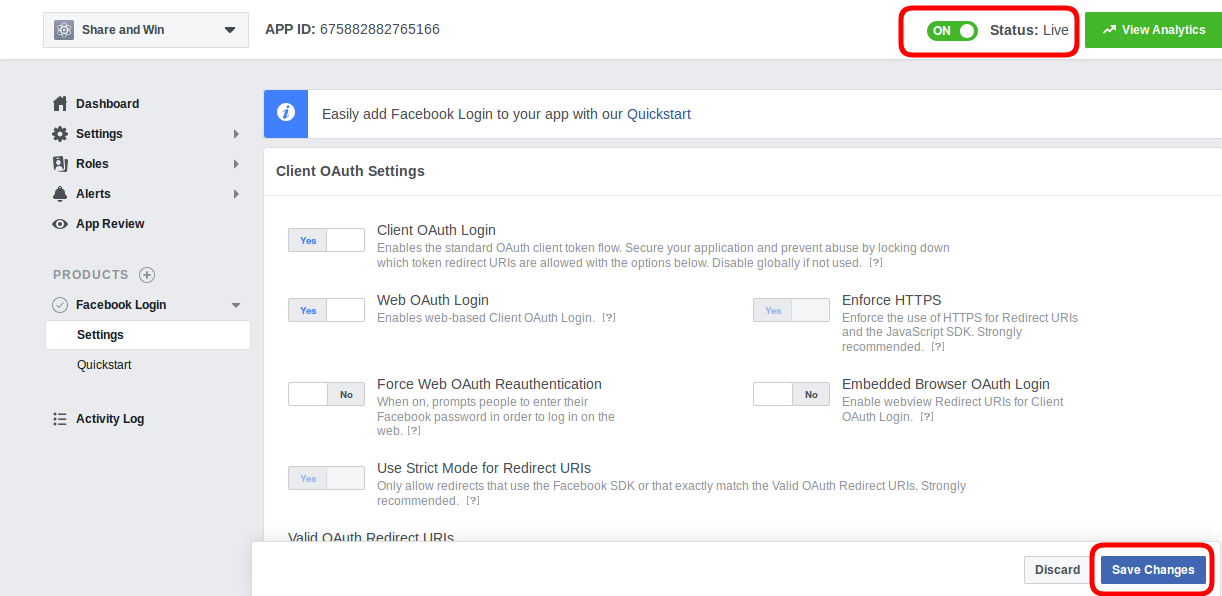
  • Now, go to the “Settings” and select “Basic” option. Here, you can view the APP ID as shown below. Enter app domains, category, Privacy policy URL here.

  • After that click on “Products” option and click on Facebook login “set Up” option. After clicking this “set up” you will view setup as shown below:

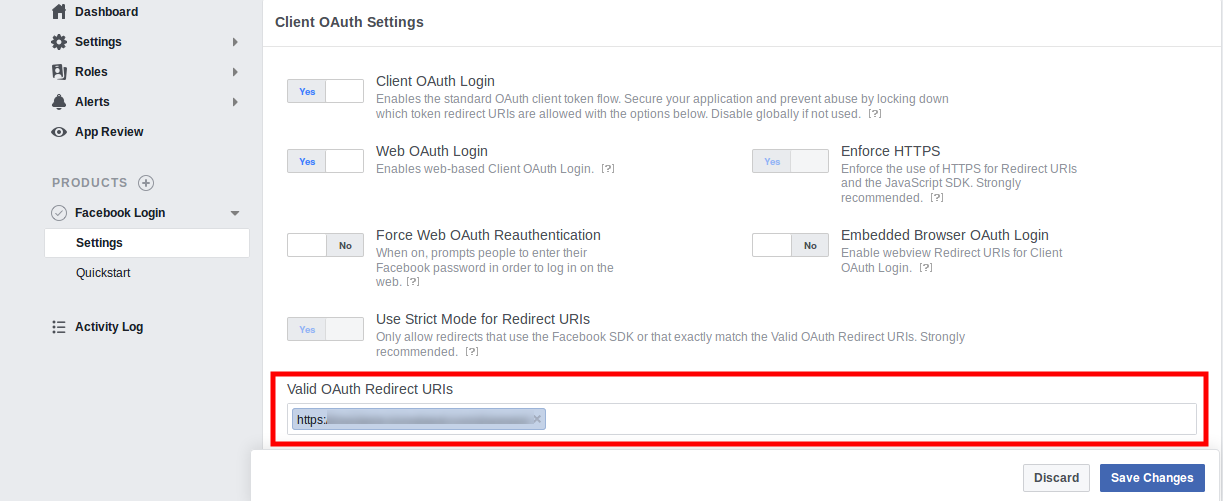
  • After that go to settings section and enter Valid oAuth Redirect URL’s and enable the status.

  • After saving all changes you can implement this Facebook app id.

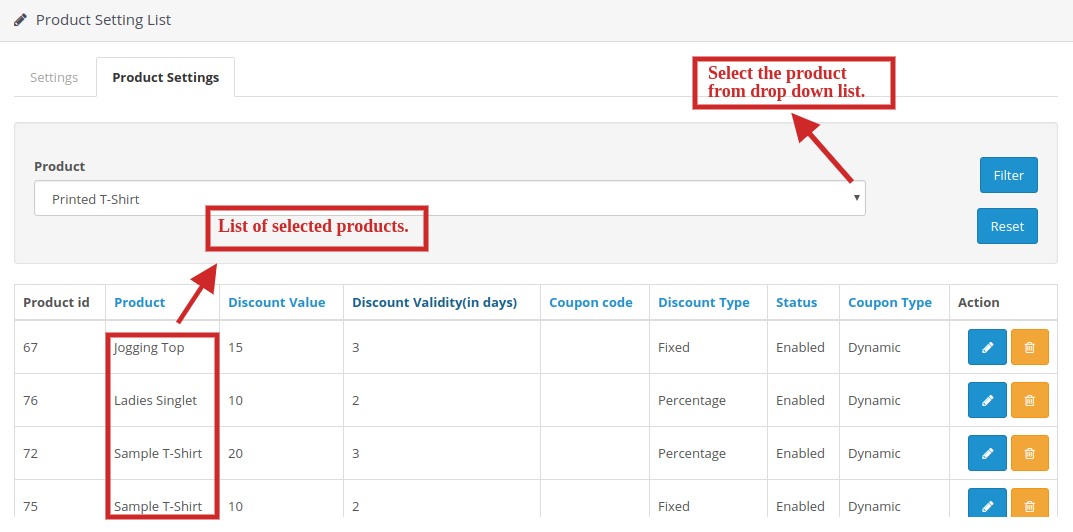
3.2 Product Settings

Facebook share option extension OpenCart allows the store admin to set discount on products separately.

  • The seller can choose the products from the drop-down list accordingly on which discount has to be given.
  • Sellers can also set the discount value, discount validity(in days), discount type and the coupon type too.
  • Sellers can also enable or disable the discount offer on the selected products too.
  • The selected products for discount offer could be seen in the table containing all the details.

3.3 Edit Product Settings Tab

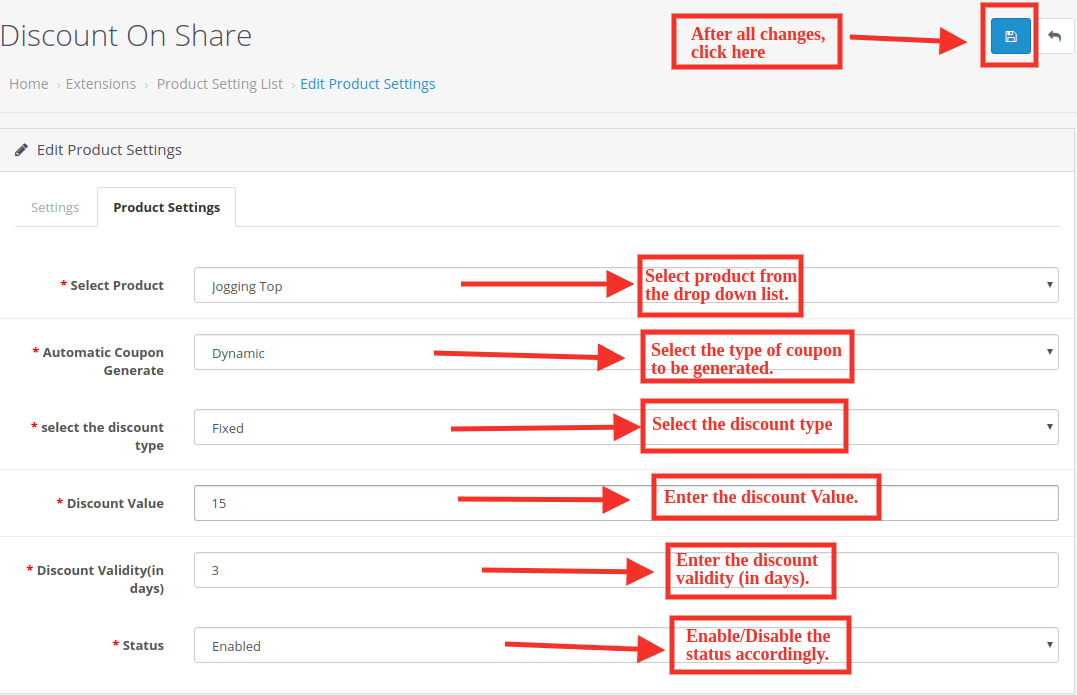
After clicking on the Edit button, you will be directed to “Edit Product Settings”. Here you can edit the product settings of the products you have already listed.

Following are the settings under this tab:

  • Select Product: Select the product from the drop down list.
  • Automatic Coupon Generate: Select the type of coupon to be generated.
  • Select the discount type: Select the discount type you want to provide to your customers.
  • Discount Value: Enter the discount value.
  • Discount Validity(in days): Enter the number of days you want to keep your discount valid.
  • Status: Enable/Disable the status accordingly.

4.0 Front End of the OpenCart Infinite Scroll Module

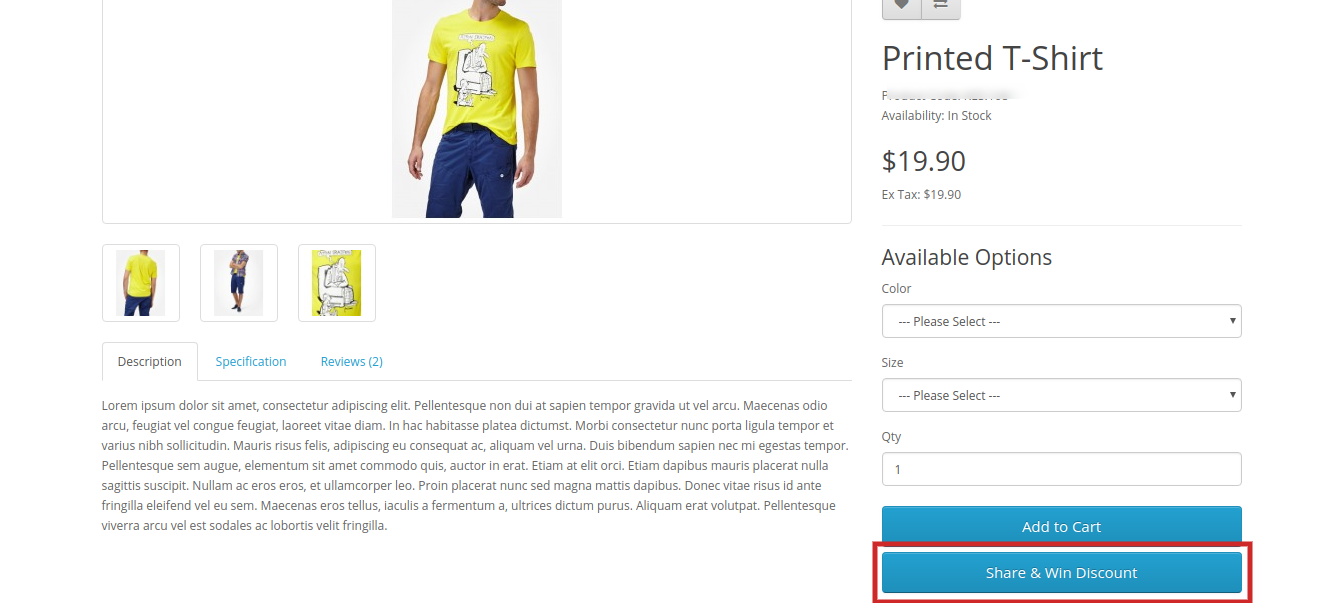
When this OpenCart Facebook Share and Win Discount Module is enabled from the back-end then a button will start appearing in the front-end of the shop on every product page. On which a text ‘Share & Win discount‘ will be written and on clicking on this button the customer can share the product and if he/she shares the product, then a discount code will be shown to that customer which will be applied to that customer only.

  1. Share and Win Discount Tab on the product page:

2. Share the product on Facebook and get a discount:

This way the online store merchant can use OpenCart Facebook Share and Win Discount Extension for increasing product popularity and conversion rate also. The eCommerce store merchant can set the Facebook app id for integrating it with the store. Online customers can share the products on their Facebook wall in order to get a discount coupon. The OpenCart Product share and win module is multi-lingual compatible and offers smooth functioning. The Share and get the discount extension for OpenCart is mobile compatible. The store admin can also send an email along with the coupon code. OpenCart Facebook Share and Win Discount Extension makes product promotions easy and hassle-free for the store admin.

Knowband is one of the most reputed names in the field of plugin development. We provide best plugins for platforms like – Magento, Prestashop,  OpenCart and  Shopify.

Facebook share option extension OpenCart Module Link

OpneCart share on Facebook wall plugin Admin Demo

OpenCart Product sharing extension Front-Demo

OpnCart Facebook Share and Win Discount Extension Youtube Video

Share for win OpenCart moudle Marketplace Link

For more support and information, feel free to contact us via email at support@knowband.com anytime.