10 years of growth of Mobile App Market

Mobile applications have been a part of smartphones for over a decade. Mobile App Market is the fastest growing segment in the mobile industry. There were a few app developers who were aware of the potential opportunity that app development had in the mobile industry. However, now the scenario has totally changed. With the ever-growing popularity of mobile apps, various OS providers and device vendors have even launched their own application stores.

The growing advent of mobile devices, along with apps is perhaps the biggest technical phenomena in the recent times. Smartphone with featured apps has now become the remote control for our lives and can easily boost our small business.


Integrate Your PrestaShop Store with AI Chat Support

Boost engagement and conversions with instant AI replies, multilingual support, and real-time order updates.


PrestaShop AI ChatBot Module


SHOP NOW

Evolution of smartphones: Over the last decade
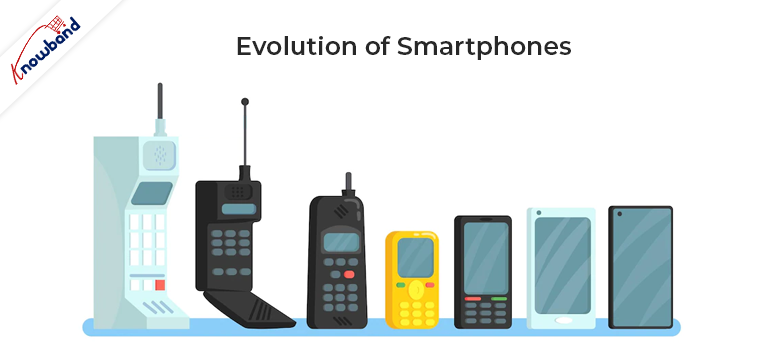
Now, It is kind of impossible to imagine our life without smartphones. Many software and hardware companies have worked off over the decade to narrow down all the features in small devices. The wondrous journey of smartphone evolution has been from the old BlackBerry to the current behemoth (iPhone X).

The smartphone makers try to make the phone as small as possible while having the biggest display of that size. From the flat small display to the curved big screens is the long road, mobile phones have came over the last ten years. This trend isn’t stopping soon as this field will always be in the state of innovation.

Growth of Mobile App Market: An overview

The app industry has seen an immense growth in the past ten years and even has no end in sight. Following figures itself says how big is this industry:

  • In the year 2012, mobile app’s financial state was around $53B and it grew up to $63.7B by the year 2016.
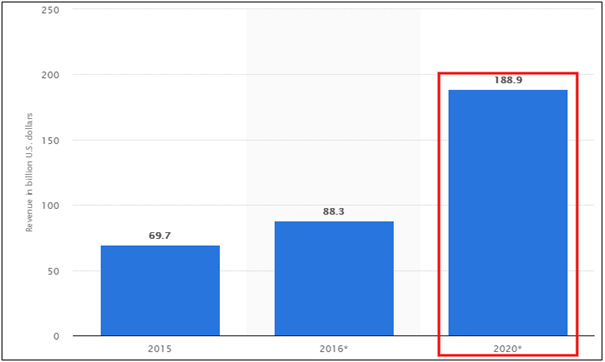
  • Various researcher even predict that mobile app economy will touch $188.9B worldwide by the year 2020
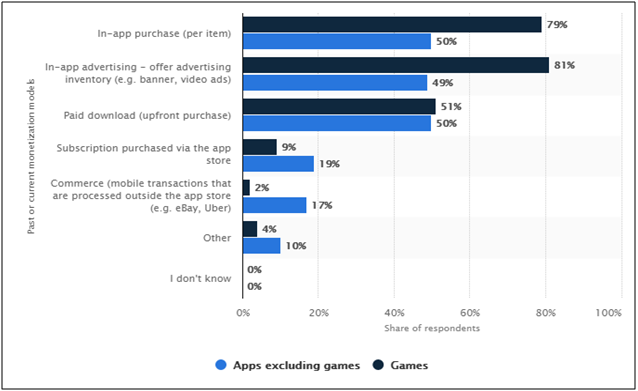
In-app ads, purchases, and other monetization models have come up immensely with the app market. According to a Forbes report, a huge rise is seen in the usage of monetization models by the app developers. Last year, In 2017, 49% of the app developers went for in-app advertising (for non-gaming apps) and 79 % chosen in-app purchases of items for gaming apps.
This growth is mainly due to a high potential of mobile applications which is acquired in various steps. Let’s see how mobile apps have managed to grab such a high place in the current economy in a short span of time.

1. Growth of smartphone users:

With the rise of the affordable smartphone, reduced data prices and short replacement cycles, the smartphone industry has seen rapid adoption for the past few years. The following report depicts how smartphone users have grown from 1.57B in 2014 to 2.53B in 2018 and it is expected that this data will cross the mark of 3 billion by the year 2021.
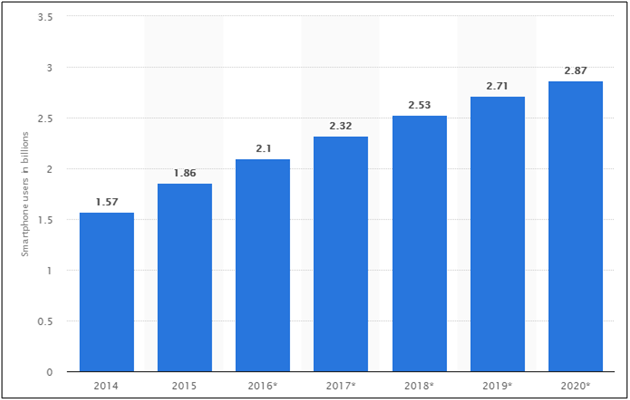
It is obvious that this graph is showing a continuous increment. Everyone nowadays wants to have a smartphone for them. Also, the one which comes up with latest market technologies and trends are being preferred more.

2. Growth of Android and iOS platforms:

Android and iOS are two giant app platforms which build their high place in the past few years. When it comes to the mobile operating system, these two players have got no replacement. In the battle between them, both offer similar kind of features apart from one major difference of being an Open and Closed source.

As per Gartner’s study, in the year 2016, no one can deny that Android and iOS are ruling the business:

  • Android has the biggest market share by being sold 87.8% of total business, whereas iOS also grabbed 11.5% on their side.
  • Rest other platforms showed feeble presence in the market with 1% or 2%.
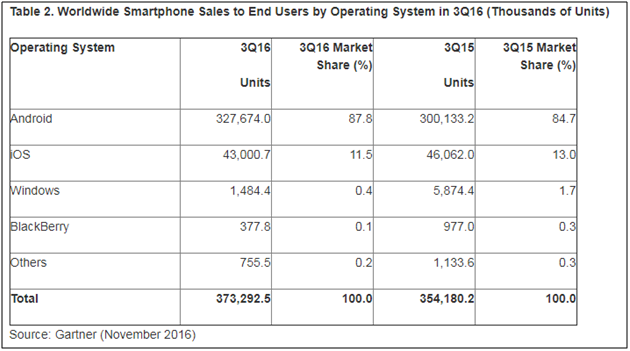
Also, with constant growth, Android and iOS have removed their competitors in the process. Microsoft’s Windows phone has lately seen a big setback in the year 2014 when their sale rate falls to just 2.5%. It clearly shows the challenge of existence before Microsoft in the mobile app market.

Apple’s App Store and Google’s Play Store have always been the most popular app stores. Now, they are at a place in mobile app market, that it seems impossible for any other competitor to catch up with them. The major reason behind their success is having a variety of applications and developers. Forbes shared a report illustrating the growth scope of app developers.  At the Worldwide Developer Conference, Apple talked about 1.25 million apps in the App Store and it paid $5 billion to developers last year. The average mobile app developer revenue is shown in the table below:
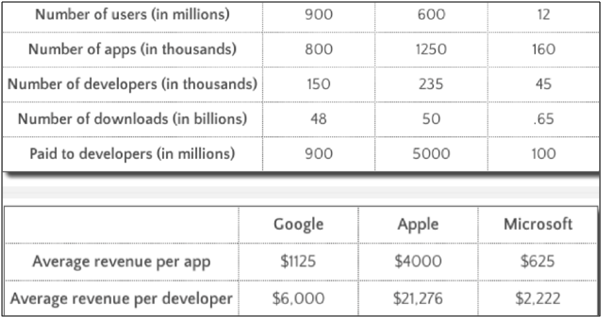
This data shows that why developers focus on making an app for every simple task, not only it makes our life easy but also provides them with a huge money-making option.

3. Growth in mobile app usage:

Mobile has now overpowered the position of the desktop by making it secondary touch point for the digital users. With the increase in the number of digital users, the mobile apps now grab 65% share of digital media time.

If we categorize the digital time on the basis of usage, these results follows:
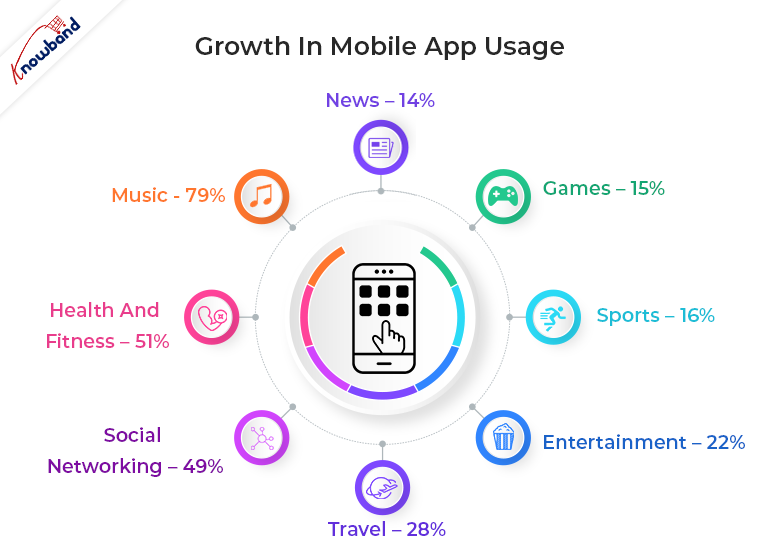
  1. Music – 79%
  2. Health and fitness – 51%
  3. Social networking – 49%
  4. Travel – 28%
  5. Entertainment – 22%
  6. Sports – 16%
  7. Games – 15%
  8. News – 14%

The percentage of mobile apps that were only used once shrunk to 20% in 2015 after improving from 22% in 2014. The percentage of app usage increased by 39% in 2016. Mobile devices entice us to spend a maximum of our time on them and we seem to be doing so. The smartphone is ascendant, and every section of our society is preferring them to keep everything at their fingertips.

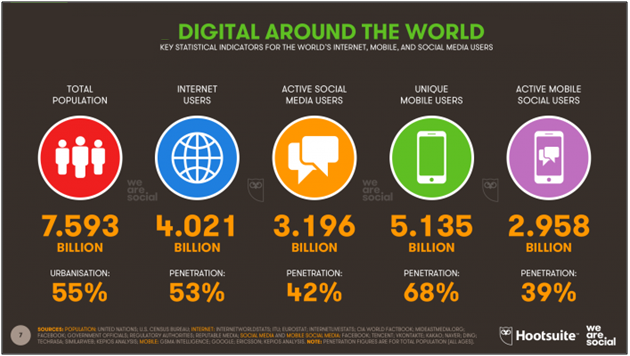
The new 2018 Global Digital Suite of reports reveals the following data related to increased internet and smartphone usage:

  • The number of internet users worldwide in 2018 is 4.021 billion, up 7 percent year-on-year.
  • The number of social media users worldwide in 2018 is 3.196 billion, up 13 percent year-on-year.
  • The number of mobile phone users in 2018 is 5.135 billion, up 4 percent year-on-year.
 

More time spent on mobile applications is directly proportional to their development rate. Such high data of time spent on mobile apps shows that there is no end to mobile app usage in the upcoming years. It will only see the rise.

4. Growth in mobile app downloads:

Worldwide smartphone users downloaded 60% more apps in 2017 as compared in 2015. Simplifying this data means that nearly two apps were downloaded every month per human being on the planet. Lately, in September 2016, India has also seen a rapid growth in app download with unlimited 4G access by Reliance Jio.

Gartner shared a report on how mobile app downloads have increased in the past years and this data is gradually increasing:
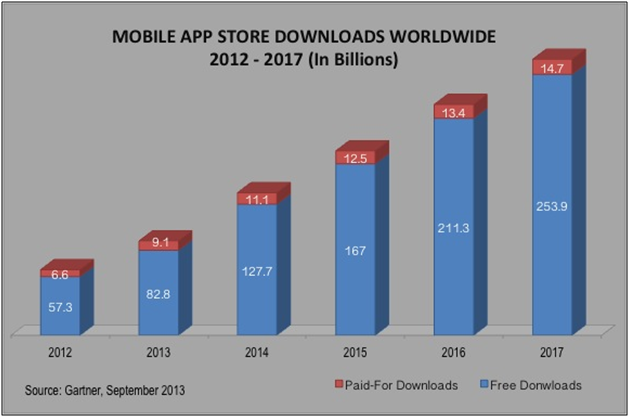
This data is of worldwide mobile app downloads and the graph is just getting higher and higher. By the end of this year hopefully, it would cross  the mark of 300 billion.

Current technology trends and their future scope:

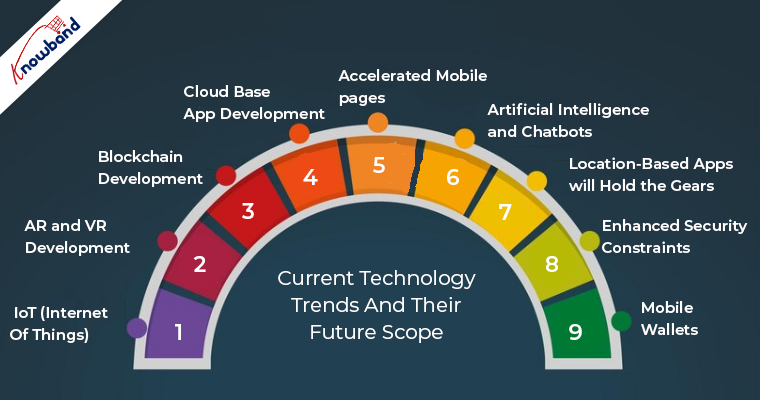
The current trend and technological advancements have changed a lot from what it used to be a few years back. Mobile apps are developed enough to resolve some major past issues like real-time management. Now, the apps target on better and focused objective. Here, are the few tech trends which hold a major spot in the reasons behind the evolution of the mobile app industry and still got a lot of room of growth:
1. IoT (Internet Of Things)

Mobile is getting out of pockets and becoming wearable. IoT has taken the networking field used in apps to a whole new level. From creating apps for devices to building apps for watches, gears is what IoT has changed around us. With IoT concept in the mobile apps, the virtual and real world came very close.

eCommerce market is witnessing a steady growth with the easy affordability of internet services and best class apps. The global retail e-commerce sales were 1.86 trillion US dollars in 2016 and are expected to reach 4.48 trillion US dollars by 2021.

2. AR and VR development

AR(Augmented Reality) and VR(Virtual Reality) will soon become the major factors of mobile app development. The latest example regarding this tech is Pokémon Go which proved that it’s time for cross-screen reality interactions. Gartner even predicted that by 2020, millions of users will use Augmented Reality. Apart from just games, soon the marketing and eCommerce apps will also experience a glimpse of this technology.

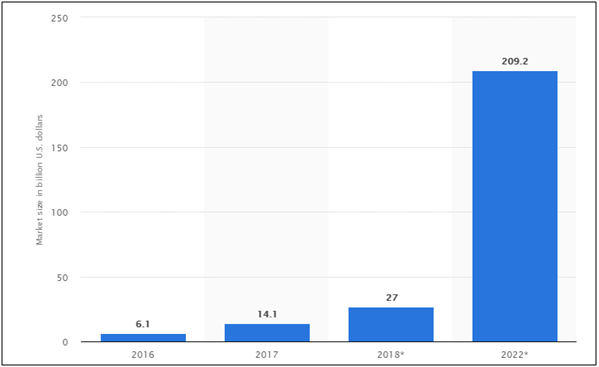
According to global AR/VR market size, It is expected to reach up to $209.2B by the year 2022. According to TechCrunch, “The mobile AR could become the primary driver of a $108 billion VR/AR market by 2021 with AR taking the lion’s share of $83 billion and VR $25 billion”.
3. Blockchain development

Blockchain technology has flourished themselves in the app market in just a few years. Right from automobiles to artificial industry, pick any of them, blockchain development is found in action. As per an IBM report, blockchain adoption is on the rise in app market.

4. Cloud base app development

Cloud base apps have grown themselves in the market over the past few years. The major advantage they have is they reduce the space occupied by the apps in the phones.

It was found out in 2014 that cloud base apps have gained more traffic than regular apps and this trend seem to be growing further. With higher traffic and reduced space size, these apps are surely a boon for eCommerce market.

5. Accelerated mobile pages

Accelerated Mobile Pages (AMP) is one such technology of Google, which aims at making the user experience better. It has brought a huge change in the way of presenting website content to the mobile users. AMP reduces the load time of web pages. AMP pages even have a high chance of ranking on Google’s SERP.  Being launched in 2016, revolutionized the app industry and aims at doing so in future.

Recently, in a report, it was confirmed that over 25 million website domains have published more than 4 million AMP’s by the year 2017.

AMP integrated apps provide you benefits of staying ahead of your competitors in the eCommerce market. With quick loading, you can sell, advertise, market your products more forcefully than the crowd.

6. Artificial Intelligence and Chatbots:

Smart prediction isn’t a row to how nowadays. With the latest AI and machine learning technologies, you can easily know what is best for your business even now when huge chunks of data is available.

AI start-up funding has been massively increased in the past years. Chat bots have been exploded in the eCommerce market. Following stats strengthen these facts:

  • As per the IDC report, by the next year, 75% of eCommerce merchants will take the help of these smart assistants to increase productivity.
  • Gartner also predicted that by the year 2020, around 85% of customer service interaction will be handled by Chatbots.

7. Location-based apps will hold the gears

The location-based services s expected to hold the gears of the mCommerce industry in the future. Even in the eCommerce industry, the location-based searches are on the rise and is expected to grow even further in the future. Moreover, 69% of Google searches include a specific location. Geo-social services are already attracting the attention of the app users. Thus, in case you are looking to standout in the crowd, then, delving into this aspect is a must.

8. Enhanced Security Constraints

The biometric security options are becoming the next big thing as per the data security aspect is concerned. The prominence of this feature has increased ever since Apple introduced Touch ID feature, the pressure of adding an extra layer of security to prevent data breach has increased. Features like biometric security, fingerprint authentication and others can simply boost the credibility of your app. In fact, this is not just a matter of offering additional features to the customers, but also the basic requirement of the current scenario.

9. Mobile Wallets

Mobile payment services have risen to gain fame and fortune in recent years. Apple Pay, Google Wallet, Alipay, Paytm, PayPal, are some of the examples that speak for their success. In the year 2017, global mobile payments exceeded $700 billion marks and there’s nothing stopping this. It is bound to grow in the future as well. It won’t be wrong to state that the sky is the limit for this particular industry.

The future of Mobile Apps in a nut-shell

With millions of mobile apps listed in at the various app stores, people might say that the industry is saturated. However, if you take a closer look at the stats, you’ll know that there is still a lot of room to grow. The gross revenue of mobile apps worldwide in the year 2015 was 96.7 billion US dollar. This figure showed a skyrocket increment in the following year and reached an amount of 88.3 billion US dollar. If you think that this is the limit, then, watch out for the future predictions. As per Statista, this figure is expected to reach 188.9 billion US dollar.

In Conclusion

Well, the last ten years have shown us the evolution of new technologies in the app industry. In my opinion, making our day-to-day life fast and easy is the major reason of empowering market. A huge amount of tech trends have been arrived in the mobile apps and yet more are to come. Mobile apps have also the reason behind growth in E-Commerce industry. Users can engage through mobile apps, which makes the communication easy and develops a bond of trust and loyalty. Mobile apps are easily accessible and contain all the required info required while product purchase.

For this, you need to create a perfect mobile app which brings your business at user’s fingertips. Apart from app development, publishing your app on the stores is also a great deal. You can find a detailed info of app distribution on Google Play and app distribution on Apple Store.

We at Knowband also offer No Code Mobile App solution for all the major CMS platforms like Prestashop, Opencart, Magento 2 and Woocommerce. Know more:


Often the store regulators even reject your app while approval process. If your application faces any such issue, find the ways to resolve them:

What to do if your Android app gets declined by Google Play Store?

What to do if your iOS app gets rejected by Apple App Store?  

Without batting an eye, Apple says it has paid two third of its Irish tax bill

The tech giant, Apple on 1st August 2018, revealed in a regulatory filing that they have paid two-third of the $15.1B which as per EU Entrust regulator, it owes to Ireland in the back taxes.

The whole story:

European Commission alleged Apple of an illegal tax deal with the Irish tax authorities in the year 2016. Apple was fined $15.1B for receiving favorable tax rates from Ireland with the hopes that it brings more business to the country.

As of June 30, 2018, 4.5 billion Euros of the total amount were funded in the escrow. Apple owes a total of 13 billion Euros plus an extra 1 billion Euros in interest. Apple has paid more than half of the imposed fine, yet this lawsuit will extend for a few more years. Funds will be kept in the escrow account while this case works their way through the court.

Why was Apple fined?

In August 2016, the European Commission ordered Ireland to claw back $15B from Apple in a landmark ruling. The commission found out that iPhone maker Apple has benefited itself from the Irish tax rulings. Apple was alleged for saving huge sums of tax over a few years. It was found that not only the tax ruling was generous but also violated competitor laws.

Looks like EU’s huge tax bill hasn’t hurt Apple’s money-making machine a bit. $15 billion is no big deal when you’re worth $1 trillion. EU commissioner quoted that lawsuit will be dropped as the Apple pays the whole amount. Lately, Google has also been fined by EU over Android Abuse, read here.

Article Source: https://www.firstpost.com/tech/news-analysis/apple-says-it-has-paid-two-thirds-of-the-15-1-billion-irish-tax-bill-4882571.html

Prestashop Social Messenger Addon- User Manual

1.0 Introduction

Prestashop eCommerce store owner can now stay in touch with their store visitors via messenger with the help of Prestashop social messenger addon by Knowband. The admin can resolve the customer’s issues in real time by using this Prestashop messenger live chat module. The customers can contact the store owner with the help of live chat options and the admin can easily resolve any confusion or issue at the same time. This Prestashop Facebook messenger integration module incorporates the Facebook messenger on the online store in just a few simple steps.

This Prestashop messenger chat module for Prestashop store is highly customizable and offers smooth as well as flawless working. The admin can incorporate this functionality in the front-end with the help of Facebook page id and app id. Moreover, he can easily manage the messenger from the back-end of the Prestashop social messenger addon. The admin can provide online customer support without even changing a single line of the base code of their site. The Messenger live chat module allows the admin to set the look and feel of the social messenger icon.

1.1 Admin benefits of Prestashop social messenger addon

  1. The Prestashop live chat support addon is very easy to implement and offers hassle-free working. Once it is installed and enabled, the Prestashop addon incorporates a social messenger in the front-end. With this, the store visitors get an option to chat with the support team of the site via their messenger account.
  2. The Prestashop social live chat support plugin is highly customizable.
  3. The Prestashop Facebook messenger integration extension can be activated from the admin interface.
  4. For integrating the Facebook messenger on the eCommerce store, the admin is required to obtain the FB app ID and page ID.
  5. The e-merchant can manage the look and feel of the messenger icon. A color picker tool is provided for selecting the icon color.
  6. The admin can offer live chat support to the online store customers.
  7. The admin can boost the sales and conversions on the website by providing the best solution to the customers.
  8. By showing live chat support, the admin can build a relationship with the customers.
  9. This kind of live chat support makes a good impression of the store.

1.2 Admin features

  1. The admin can install, configure and use the live chat support addon easily without any complex process.
  2. Admin can show the live chat messenger in the front-end without changing any code from the back-end.
  3. This Facebook messenger and live chat addon offer smooth and flawless implementation.
  4. The Prestashop Facebook messenger integration extension is fully customizable.
  5. The online store owner can set the color of the social messenger icon from the color picker tool.
  6. The Facebook messenger and live chat addon allow the admin to select the pages on which he wants to display the messenger.
  7. The admin can offer the support icon and greeting message immediately or after some time.
  8. The Prestashop live chat support addon has a mobile responsive layout.
  9. Prestashop Facebook messenger integration addon offers multi-store compatibility.
  10. The messenger multilingual live chat support module offers multi-lingual support.
  11. Messenger live chat module is SSL compatible.
  12. Prestashop messenger chat module for Prestashop store is compatible with all the Prestashop themes.
  13. User-friendly interface.
  14. The store admin can set specific messages for the customers which are logged-in to Facebook and which are logged-out to the Facebook.

2.0 Installation Steps for Prestashop social messenger addon

Once the store admin purchases the Prestashop social messenger addon from the Knowband store, he will get below-mentioned files:

1. The zipped file consists the source code of the Prestashop social live chat support plugin.

2. User Manual

The online store owner can follow the provided steps to install the Messenger multilingual live chat support addon.

  • First of all the admin needs to unzip the zipped file. This file includes a few files and folders.
  • Copy the all the folder and paste them into the “Modules” folder of the store’s directory. The admin can follow the path – Root Directory/modules/.

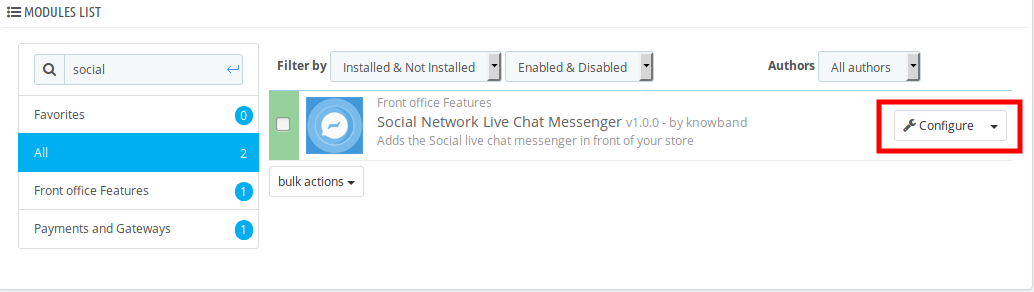
3. Now the store owner can install the messenger multilingual live chat support addon. As an eCommerce store owner, the admin can find that in Store Admin -> Modules and Services. It would be shown as below –

Now the admin can click on the “Install” button to install this module easily. A confirmation pop-up will be shown. Click on “Proceed with the installation” option. This step will install the Prestashop Social Messenger Addon and show notification – “Module(s) installed successfully”.

3.0 User manual

The admin can get various configuration options with Prestashop Social Messenger Addon. The admin can apply the settings according to the requirements.

1. Enable/Disable: It is very easy to activate or deactivate this Messenger multilingual live chat support addon. The admin can deactivate this Messenger live chat module just by a button click.

2. Facebook APP ID: Enter the Facebook app id here. The admin can generate the Facebook app id by following few simple steps.

3.1 Steps to generate Facebook app ID

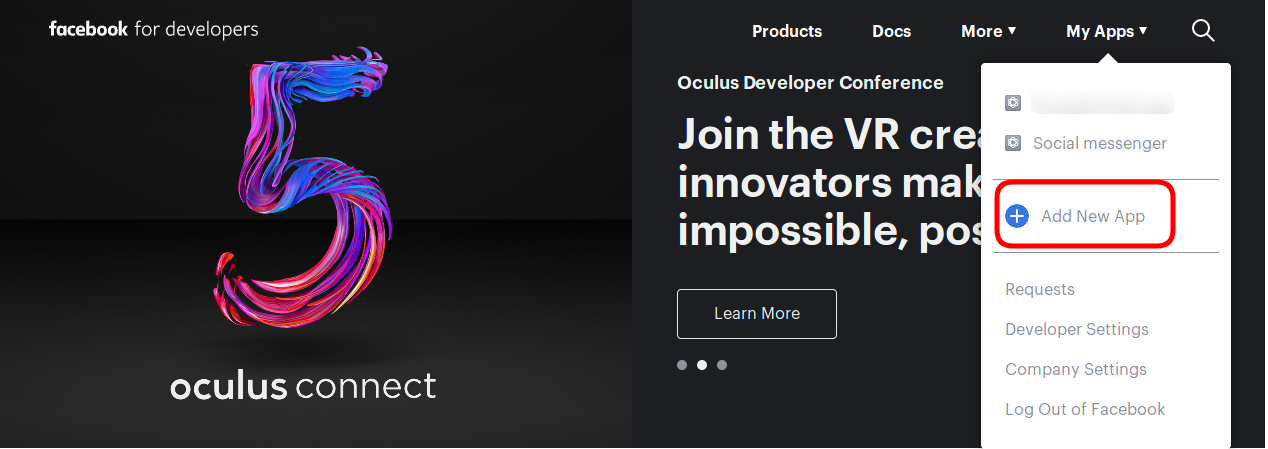
  • Log-in into your Facebook account and go to the link mentioned below: https://developers.Facebook.com/
  • Go to the “MY APPS” option and click on the ”ADD NEW APP”.

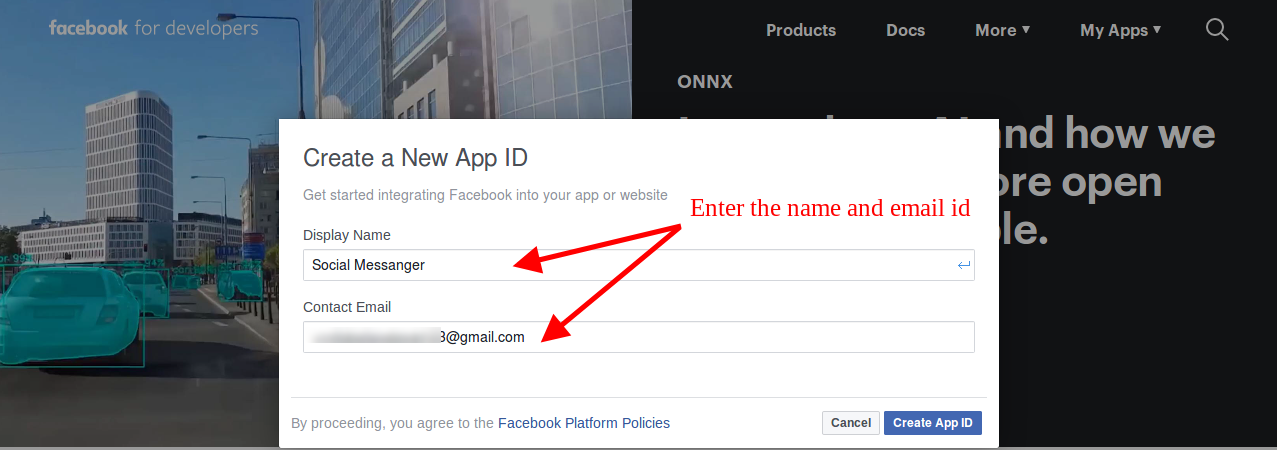
  • After that, the store owner needs to insert the “Display Name” and “contact email ID”. Click on the “Create APP ID” button.

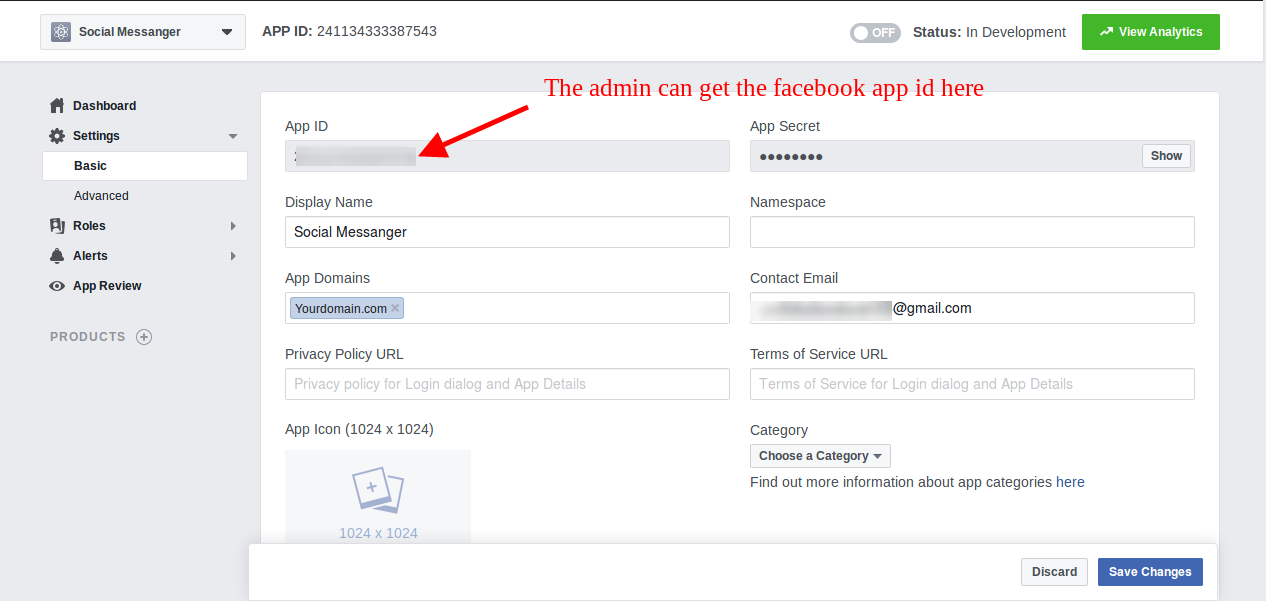
  • Once the APP ID created, the admin can view the app id. Go to the “Settings” and then select “Basic”. Here you can view the APP ID as shown below.

  • Admin can insert the App Domain. After that click on the “save changes” option.

3. Theme Color: The store owner can set the look and feel of the messenger icon by selecting its color according to the store’s theme.

4. Page ID: Enter the Page ID here. The admin can insert the Page ID of the particular page from which he wants to handle the live chat.

3.2 Steps to generate Facebook page ID

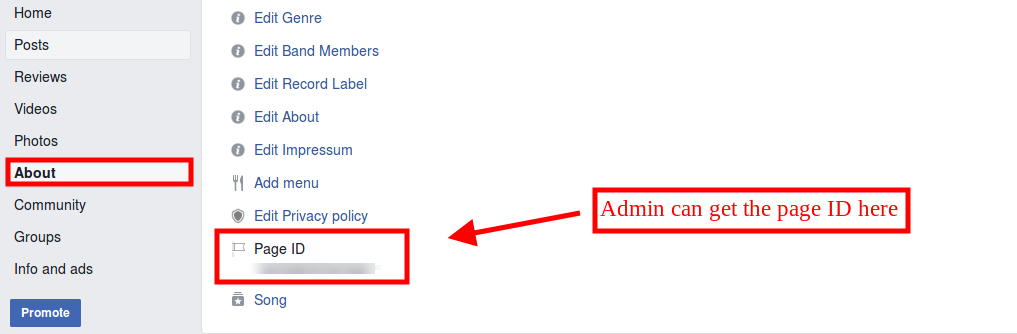
  • Open the Facebook page and go to about page. At the bottom of the ”About” page, the admin can view the page id.

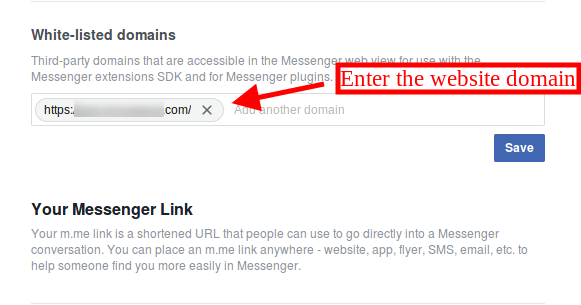
  • Go to the Settings option and then select the “messenger platform” option. Here you can enter the domain in the “White-listed domains” option.

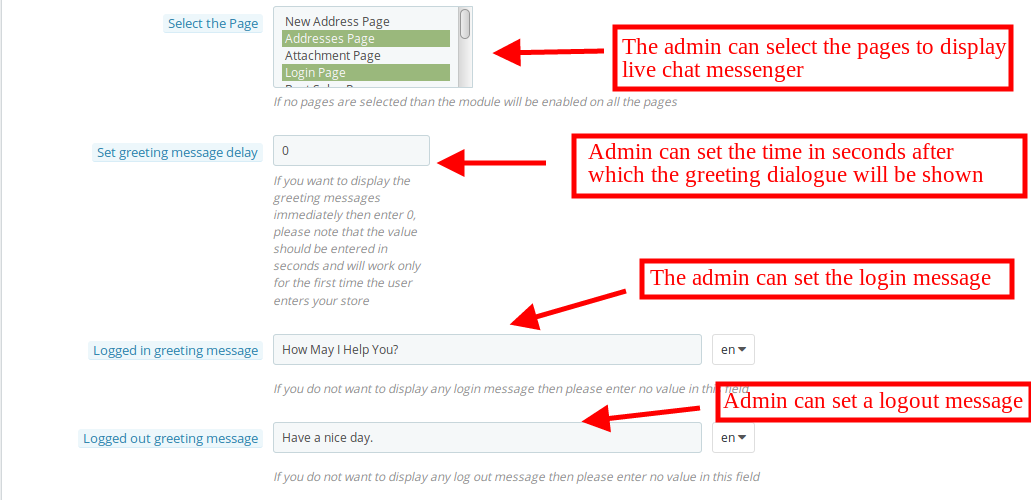
5. Select the Page: The Prestashop messenger chat module for Prestashop store provides this configuration option to select the pages on which the admin wants to show the chat messenger. If the admin doesn’t select any page, then the module will be activated for all the pages.

6. Set Greeting Message Delay: The admin can set the time in seconds after which he wants to display the first message on the website for the customers. If the customer will set this time as “0” seconds” then the customers can get the greeting message without any delay.

7. Logged-in Greeting Message: The store owner can show a specific message to the customers which are already logged-in to Facebook. The admin can leave this option empty if he doesn’t want to display any message.

8. Logged-out Greeting Message: The store owner can display a message to the customers who are not logged-in their Facebook account. The admin can leave this option empty if he doesn’t want to display any message.

4.0 Front-end interface

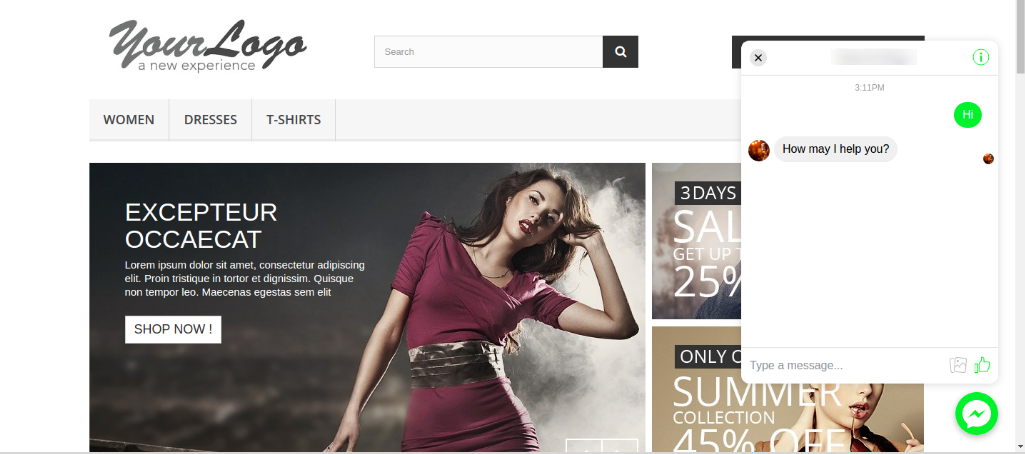
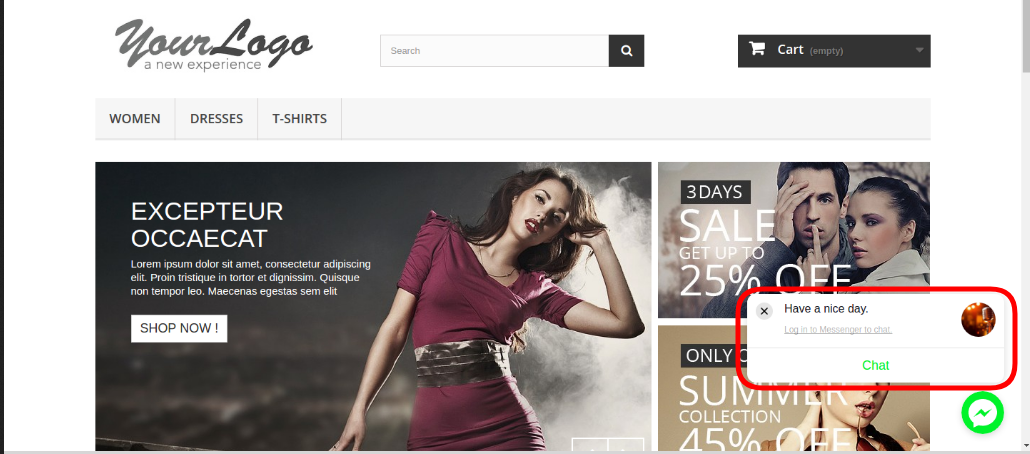
Once the admin has incorporated Prestashop Social Messenger Addon on their store, the customers can view the live chat option on the store’s front-end as shown below:

The store admin can reply the customers and offer them better support on the website.

Prestashop Social Messenger Addon- Manual de usuario

1.0 Introducción

El propietario de la tienda de comercio electrónico de Prestashop ahora puede mantenerse en contacto con los visitantes de su tienda a través de Messenger con la ayuda de Prestashop social messenger addon de Knowband. El administrador puede resolver los problemas del cliente en tiempo real mediante el uso de este módulo de chat en vivo Prestashop messenger. Los clientes pueden contactar al propietario de la tienda con la ayuda de las opciones de chat en vivo y el administrador puede resolver fácilmente cualquier confusión o problema al mismo tiempo. Este módulo de integración de mensajería de Facebook de Prestashop incorpora el mensajero de Facebook en la tienda en línea en solo unos sencillos pasos.

Este módulo de mensajería instantánea de Prestashop para la tienda de Prestashop es altamente personalizable y ofrece un funcionamiento fluido e impecable. El administrador puede incorporar esta funcionalidad en el front-end con la ayuda de la identificación de la página de Facebook y la identificación de la aplicación. Además, puede administrar fácilmente el messenger desde el back-end del complemento social Messenger de Prestashop. El administrador puede proporcionar soporte al cliente en línea sin siquiera cambiar una sola línea del código base de su sitio. El módulo de chat en vivo de Messenger permite al administrador establecer la apariencia del icono de mensajería social.

Beneficios de 1.1 Admin

  1. El complemento de soporte de chat en vivo de Prestashop es muy fácil de implementar y ofrece un funcionamiento sin problemas. Una vez que está instalado y habilitado, el complemento Prestashop incorpora un mensajero social en el front-end. Con esto, los visitantes de la tienda tienen la opción de chatear con el equipo de soporte del sitio a través de su cuenta de mensajería.
  2. El complemento de soporte de chat social en vivo de Prestashop es altamente personalizable.
  3. La extensión de integración de mensajería de Facebook de Prestashop se puede activar desde la interfaz de administración.
  4. Para integrar el Messenger de Facebook en la tienda de comercio electrónico, el administrador debe obtener la ID de la aplicación FB y la ID de la página.
  5. El comerciante electrónico puede gestionar la apariencia del icono de mensajería. Se proporciona una herramienta de selección de color para seleccionar el color del icono.
  6. El administrador puede ofrecer soporte de chat en vivo a los clientes de la tienda en línea.
  7. El administrador puede aumentar las ventas y las conversiones en el sitio web proporcionando la mejor solución para los clientes.
  8. Al mostrar soporte de chat en vivo, el administrador puede construir una relación con los clientes.
  9. Este tipo de soporte de chat en vivo hace una buena impresión de la tienda.

Funciones de 1.2 Admin

  1. El administrador puede instalar, configurar y usar el complemento de soporte de chat en vivo fácilmente sin ningún proceso complejo.
  2. El administrador puede mostrar el chat messenger en vivo en el front-end sin cambiar ningún código del back-end.
  3. Este complemento de Facebook messenger y chat en vivo ofrece una implementación fluida y sin errores.
  4. La extensión de integración de mensajería de Facebook Prestashop es totalmente personalizable.
  5. El propietario de la tienda en línea puede establecer el color del ícono del mensajero social desde la herramienta de selección de color.
  6. El complemento Facebook messenger y chat en vivo le permite al administrador seleccionar las páginas en las que quiere mostrar el mensaje.
  7. El administrador puede ofrecer el ícono de soporte y el mensaje de saludo inmediatamente o después de un tiempo.
  8. El complemento de soporte de chat en vivo de Prestashop tiene un diseño receptivo móvil.
  9. El complemento de integración de mensajería de Facebook de Prestashop ofrece compatibilidad con múltiples tiendas.
  10. El módulo de soporte de chat en vivo multilingüe de messenger ofrece soporte multilingüe.
  11. El módulo de chat en vivo de Messenger es compatible con SSL.
  12. El módulo de chat de Prestashop Messenger para la tienda de Prestashop es compatible con todos los temas de Prestashop.
  13. Interfaz amigable.
  14. El administrador de la tienda puede establecer mensajes específicos para los clientes que han iniciado sesión en Facebook y que están desconectados en Facebook.

Pasos de instalación de 2.0

Una vez que el administrador de la tienda compre el complemento de mensajería social Prestashop de la tienda Knowband, obtendrá los archivos mencionados a continuación:

1. El archivo comprimido consiste en el código fuente del complemento de soporte de chat social en vivo de Prestashop.

2. Manual de usuario

El propietario de la tienda en línea puede seguir los pasos provistos para instalar el complemento de soporte de chat en vivo multilingüe de Messenger.

  • Antes que nada, el administrador necesita descomprimir el archivo comprimido. Este archivo incluye algunos archivos y carpetas.
  • Copia toda la carpeta y pégalas en el "módulos"carpeta del directorio de la tienda. El administrador puede seguir el camino

3. Ahora el dueño de la tienda puede instalar Administrador de tienda -> Módulos y servicios. Se mostraría como a continuación

Ahora el administrador puede hacer clic en "Instalar"para instalar este módulo fácilmente. Se mostrará una ventana emergente de confirmación. Haga clic en"Proceda con la instalación"opción. Este paso instalará el módulo de soporte de chat en vivo y mostrará la notificación Módulo (s) instalado (s) con éxito“.

3.0 Manual de usuario

El administrador puede obtener varias opciones de configuración. El administrador puede aplicar la configuración de acuerdo con los requisitos.

1. Habilitar deshabilitar: Es muy fácil activar o desactivar este complemento de soporte de chat en vivo multilingüe de Messenger. El administrador puede desactivar este módulo de chat en vivo de Messenger simplemente presionando un botón.

2. ID de la aplicación de Facebook: Ingrese el ID de la aplicación de Facebook aquí. El administrador puede generar el ID de la aplicación de Facebook siguiendo unos simples pasos.

3.1 Pasos para generar la ID de la aplicación de Facebook

  • Inicie sesión en su cuenta de Facebook y vaya al enlace mencionado a continuación: https://developers.Facebook.com/
  • Ve a la "MIS APLICACIONES"opción y haga clic en"AGREGAR UNA NUE“.

  • Después de eso, el dueño de la tienda necesita insertar el "Nombre que se ve en la pagina"Y"ID de correo electrónico de contacto". Clickea en el "Crear ID de la aplicación"Botón.

  • Una vez creada la ID de la aplicación, el administrador puede ver la identificación de la aplicación. Ve a la "Ajustes"y luego selecciona"Basic". Aquí puede ver la ID de la aplicación como se muestra a continuación.

  • El administrador puede insertar el dominio de la aplicación. Después de eso, haga clic en "guardar cambios" opción.

3. Color del tema: El propietario de la tienda puede establecer la apariencia del icono del mensajero seleccionando su color de acuerdo con el tema de la tienda.

4. ID de la página: Ingrese la ID de la página aquí. El administrador puede insertar el ID de página de la página particular desde la que quiere manejar el chat en vivo.

3.2 Pasos para generar la identificación de la página de Facebook

  • Abra la página de Facebook y vaya a la página sobre. En la parte inferior de la página "Acerca de", el administrador puede ver la identificación de la página.

  • Vaya a la opción Configuración y luego seleccione la opción "plataforma de mensajería". Aquí puede ingresar el dominio en la opción "Dominios listados en blanco".

5. Seleccione la página: El módulo de chat de Prestashop para la tienda de Prestashop proporciona esta opción de configuración para seleccionar las páginas en las que el administrador desea mostrar el chat messenger. Si el administrador no selecciona ninguna página, entonces el módulo se activará para todas las páginas.

6. Establecer el retraso del mensaje de saludo: El administrador puede establecer el tiempo en segundos después del cual desea mostrar el primer mensaje en el sitio web para los clientes. Si el cliente configurará esta vez como "0" segundos ", los clientes podrán recibir el mensaje de bienvenida sin demora.

7. Mensaje de saludo iniciado: El propietario de la tienda puede mostrar un mensaje específico a los clientes que ya han iniciado sesión en Facebook. El administrador puede dejar esta opción en blanco si no desea mostrar ningún mensaje.

8. Mensaje de saludo desconectado: El propietario de la tienda puede mostrar un mensaje a los clientes que no han iniciado sesión en su cuenta de Facebook. El administrador puede dejar esta opción en blanco si no desea mostrar ningún mensaje.

Interfaz de usuario 4.0

Los clientes pueden ver la opción de chat en vivo en el front-end de la tienda como se muestra a continuación:

El administrador de la tienda puede responder a los clientes y ofrecerles un mejor soporte en el sitio web.

Prestashop Social Messenger Addon – Manuel de l'utilisateur

1.0 Présentation

Le propriétaire du magasin Prestashop eCommerce peut désormais rester en contact avec les visiteurs de son magasin via Messenger avec l’aide de l’addon de messagerie sociale Prestashop de Knowband. L'administrateur peut résoudre les problèmes du client en temps réel en utilisant ce module de chat en direct Prestashop messenger. Les clients peuvent contacter le propriétaire du magasin à l’aide d’options de chat en direct et l’administrateur peut facilement résoudre toute confusion ou problème en même temps. Ce module d'intégration de messagerie Facebook Prestashop incorpore le messager Facebook sur la boutique en ligne en quelques étapes simples.

Ce module de messagerie instantanée Prestashop pour le magasin Prestashop est hautement personnalisable et offre un fonctionnement fluide et sans faille. L'administrateur peut intégrer cette fonctionnalité dans le front-end à l'aide de l'ID de page Facebook et de l'ID d'application. De plus, il peut facilement gérer le messager du back-end de l'addon de messagerie sociale Prestashop. L'administrateur peut fournir un support client en ligne sans même changer une seule ligne du code de base de leur site. Le module de messagerie instantanée Messenger permet à l'administrateur de définir l'apparence de l'icône de messagerie sociale.

Avantages de 1.1 Admin

  1. L'addon de support de chat en direct Prestashop est très facile à implémenter et offre un travail sans tracas. Une fois installé et activé, l’addon Prestashop intègre un messager social dans le front-end. Grâce à cela, les visiteurs du magasin ont la possibilité de discuter avec l'équipe d'assistance du site via leur compte de messagerie.
  2. Le plug-in de support social en ligne Prestashop est hautement personnalisable.
  3. L'extension d'intégration de messagerie Facebook Prestashop peut être activée depuis l'interface d'administration.
  4. Pour intégrer le messager Facebook sur le magasin de commerce électronique, l'administrateur doit obtenir l'identifiant de l'application FB et l'identifiant de la page.
  5. L'e-commerçant peut gérer l'apparence de l'icône de messagerie. Un outil de sélection de couleur est fourni pour sélectionner la couleur de l'icône.
  6. L'administrateur peut proposer une assistance par chat en direct aux clients de la boutique en ligne.
  7. L'administrateur peut augmenter les ventes et les conversions sur le site Web en fournissant la meilleure solution aux clients.
  8. En montrant le support du chat en direct, l'administrateur peut établir une relation avec les clients.
  9. Ce type d'assistance par chat en direct fait bonne impression sur le magasin.

Fonctions d'administration 1.2

  1. L'administrateur peut installer, configurer et utiliser facilement l'addon au chat en direct sans aucun processus complexe.
  2. L'administrateur peut afficher la messagerie instantanée en direct sans modifier le code du serveur principal.
  3. Cette extension de messagerie et de chat en direct sur Facebook offre une mise en œuvre fluide et sans faille.
  4. L'extension d'intégration de messageries Prestashop Facebook est entièrement personnalisable.
  5. Le propriétaire de la boutique en ligne peut définir la couleur de l'icône de messagerie sociale à partir de l'outil de sélection de couleur.
  6. Le messager de Facebook et l'addon au chat en direct permettent à l'administrateur de sélectionner les pages sur lesquelles il souhaite afficher le messager.
  7. L'administrateur peut proposer l'icône de support et le message d'accueil immédiatement ou après un certain temps.
  8. L'addon de support de chat en direct Prestashop a une mise en page mobile.
  9. L'addon d'intégration de messagerie Facebook Prestashop offre une compatibilité multi-magasins.
  10. Le module de support multilingue du chat en direct messenger offre un support multilingue.
  11. Le module de chat en direct de Messenger est compatible SSL.
  12. Le module de messagerie instantanée Prestashop pour la boutique Prestashop est compatible avec tous les thèmes Prestashop.
  13. Interface conviviale.
  14. L'administrateur du magasin peut définir des messages spécifiques pour les clients connectés à Facebook et connectés à Facebook.

Étapes d'installation de 2.0

Une fois que l'administrateur du magasin aura acheté l'ajout de messagerie sociale Prestashop à partir du magasin Knowband, il recevra les fichiers mentionnés ci-dessous:

1. Le fichier compressé est le code source du plug-in de support social Live Prestashop.

2. Manuel utilisateur

Le propriétaire de la boutique en ligne peut suivre les étapes fournies pour installer l’addon de support multilingue du chat en direct.

  • Tout d'abord, l'administrateur doit décompresser le fichier compressé. Ce fichier comprend quelques fichiers et dossiers.
  • Copiez le tout le dossier et collez-le dans le "Modules"dossier du répertoire du magasin. L'administrateur peut suivre le chemin

3. Le propriétaire du magasin peut maintenant installer le Store Admin -> Modules et services. Il serait montré comme ci-dessous

Maintenant, l'administrateur peut cliquer sur le "installer"bouton pour installer ce module facilement. Une fenêtre de confirmation apparaîtra. Cliquez sur"Continuez avec l'installation"option. Cette étape va installer le module de support de chat en direct et afficher la notification Module (s) installé avec succès“.

3.0 Mode d'emploi

L'administrateur peut obtenir diverses options de configuration. L'administrateur peut appliquer les paramètres en fonction des besoins.

1. Activer désactiver: Il est très facile d’activer ou de désactiver cet addon Messenger multilingue. L'administrateur peut désactiver ce module Messenger chat en cliquant simplement sur un bouton.

2. Identifiant Facebook APP: Entrez l'identifiant de l'application Facebook ici. L'administrateur peut générer l'identifiant de l'application Facebook en suivant quelques étapes simples.

3.1 Étapes pour générer l'identifiant de l'application Facebook

  • Connectez-vous à votre compte Facebook et accédez au lien mentionné ci-dessous: https://developers.Facebook.com/
  • Allez à la "MES APPLICATIONS"option et cliquez sur le"AJOUTEZ UNE NOUVELLE APP“.

  • Après cela, le propriétaire du magasin doit insérer le "Nom d’affichage" et "ID de contact". Clique sur le "Créer un identifiant APP" bouton.

  • Une fois l'ID APP créé, l'administrateur peut afficher l'identifiant de l'application. Allez à la "Réglages"puis sélectionnez"de base". Ici, vous pouvez voir l’ID de l’application comme indiqué ci-dessous.

  • L'administrateur peut insérer le domaine d'application. Après cela, cliquez sur le "Sauvegarder les modifications"option.

3. Couleur du thème: Le propriétaire du magasin peut définir l'apparence de l'icône de la messagerie en sélectionnant sa couleur en fonction du thème du magasin.

4. ID de la page: Entrez l'identifiant de la page ici. L'administrateur peut insérer l'identifiant de la page particulière à partir de laquelle il souhaite gérer le chat en direct.

3.2 Étapes pour générer un identifiant de page Facebook

  • Ouvrez la page Facebook et accédez à la page à propos. En bas de la page "À propos de", l'administrateur peut afficher l'identifiant de la page.

  • Accédez à l'option Paramètres, puis sélectionnez l'option "plate-forme de messagerie". Ici, vous pouvez entrer le domaine dans l'option "Domaines blancs".

5. Sélectionnez la page: Le module de messagerie instantanée Prestashop pour la boutique Prestashop fournit cette option de configuration pour sélectionner les pages sur lesquelles l'administrateur souhaite afficher le messager de discussion. Si l'administrateur ne sélectionne aucune page, le module sera activé pour toutes les pages.

6. Définir le délai de message d'accueil: L'administrateur peut définir le délai en secondes après lequel il souhaite afficher le premier message sur le site Web pour les clients. Si le client définit cette heure comme "0" secondes, les clients peuvent recevoir le message de bienvenue sans délai.

7. Message de bienvenue connecté: Le propriétaire du magasin peut afficher un message spécifique aux clients déjà connectés à Facebook. L'administrateur peut laisser cette option vide s'il ne veut afficher aucun message.

8. Message de bienvenue déconnecté: Le propriétaire du magasin peut afficher un message aux clients qui ne sont pas connectés sur leur compte Facebook. L'administrateur peut laisser cette option vide s'il ne veut afficher aucun message.

Interface frontale 4.0

Les clients peuvent voir l'option de chat en direct sur le front-end du magasin, comme indiqué ci-dessous:

L'administrateur du magasin peut répondre aux clients et leur offrir un meilleur support sur le site.

Prestashop Social Messenger Addon – Benutzerhandbuch

1.0 Einführung

Prestashop eCommerce Store-Inhaber können jetzt mit Hilfe von Prestashop Social Messenger Addon von Knowband über Messenger mit ihren Ladenbesuchern in Kontakt bleiben. Der Administrator kann die Probleme des Kunden in Echtzeit mithilfe dieses Prestashop Messenger-Live-Chat-Moduls lösen. Die Kunden können sich mit Hilfe von Live-Chat-Optionen an den Ladenbesitzer wenden, und der Administrator kann problemlos alle Unklarheiten oder Probleme gleichzeitig lösen. Dieses Facebook-Messenger-Integrationsmodul von Prestashop integriert den Facebook-Messenger im Online-Shop in nur wenigen Schritten.

Dieses Prestashop Messenger Chat-Modul für Prestashop Store ist sehr anpassbar und bietet ein reibungsloses und fehlerfreies Arbeiten. Der Administrator kann diese Funktionalität mithilfe der Facebook-Seiten-ID und App-ID in das Front-End integrieren. Außerdem kann er den Messenger aus dem Backend des Prestashop Social Messenger Addon einfach verwalten. Der Administrator kann Online-Kundensupport bereitstellen, ohne auch nur eine einzige Zeile des Basiscodes seiner Site zu ändern. Das Messenger-Live-Chat-Modul ermöglicht es dem Administrator, das Erscheinungsbild des Social Messenger-Symbols festzulegen.

1.1 Admin Vorteile

  1. Das Prestashop Live Chat Support Addon ist sehr einfach zu implementieren und bietet problemloses Arbeiten. Sobald es installiert und aktiviert ist, enthält das Prestashop Addon einen sozialen Messenger im Frontend. Damit erhalten die Shop-Besucher die Möglichkeit, über ihr Messenger-Konto mit dem Support-Team der Site zu chatten.
  2. Das Prestashop Social-Live-Chat-Support-Plugin ist in hohem Maße anpassbar.
  3. Die Prestashop Facebook Messenger Integration Extension kann über die Admin-Oberfläche aktiviert werden.
  4. Um den Facebook Messenger in den eCommerce Store zu integrieren, benötigt der Admin die FB App ID und die Seiten ID.
  5. Der E-Merchant kann das Erscheinungsbild des Messenger-Icons verwalten. Ein Farbauswahlwerkzeug wird zum Auswählen der Symbolfarbe bereitgestellt.
  6. Der Administrator kann den Online-Shop-Kunden Live-Chat-Support anbieten.
  7. Der Administrator kann den Umsatz und die Conversions auf der Website steigern, indem er den Kunden die beste Lösung bietet.
  8. Durch die Live-Chat-Unterstützung kann der Administrator eine Beziehung zu den Kunden aufbauen.
  9. Diese Art von Live-Chat-Unterstützung macht einen guten Eindruck von dem Laden.

1.2 Admin Funktionen

  1. Der Admin kann das Live-Chat-Support-Addon einfach und ohne aufwändigen Prozess installieren, konfigurieren und nutzen.
  2. Der Administrator kann den Live-Chat-Messenger im Front-End anzeigen, ohne Code vom Back-End zu ändern.
  3. Dieser Facebook Messenger und Live Chat Addon bieten eine reibungslose und fehlerfreie Implementierung.
  4. Die Prestashop Facebook Messenger Integration Erweiterung ist vollständig anpassbar.
  5. Der Eigentümer des Onlineshops kann die Farbe des Social Messenger-Symbols über das Farbauswahl-Tool festlegen.
  6. Der Facebook-Messenger und das Live-Chat-Addon erlauben es dem Administrator, die Seiten auszuwählen, auf denen er den Messenger anzeigen möchte.
  7. Der Administrator kann das Unterstützungssymbol und die Begrüßungsnachricht sofort oder nach einiger Zeit anbieten.
  8. Das Prestashop Live-Chat-Support-Addon hat ein mobiles Responsive-Layout.
  9. Prestashop Facebook Messenger Integration Addon bietet Multi-Store-Kompatibilität.
  10. Das Messenger mehrsprachige Live-Chat-Support-Modul bietet mehrsprachige Unterstützung.
  11. Das Messenger-Live-Chat-Modul ist SSL-kompatibel.
  12. Prestashop Messenger Chat-Modul für Prestashop Store ist kompatibel mit allen Prestashop Themen.
  13. Benutzerfreundliches Bedienfeld.
  14. Der Store-Admin kann bestimmte Nachrichten für die Kunden festlegen, die bei Facebook eingeloggt sind und bei Facebook ausgeloggt sind.

2.0 Installationsschritte

Sobald der Ladenadministrator das Prestashop Social Messenger Addon aus dem Knowband Store kauft, erhält er die unten genannten Dateien:

1. Die gezippte Datei besteht aus dem Quellcode des Prestashop Social Live Chat Support Plugins.

2. Benutzerhandbuch

Der Eigentümer des Online-Shops kann die bereitgestellten Schritte befolgen, um das mehrsprachige Live-Chat-Support-Addon von Messenger zu installieren.

  • Zuerst muss der Administrator die gezippte Datei entpacken. Diese Datei enthält einige Dateien und Ordner.
  • Kopiere den gesamten Ordner und füge ihn in den "Module"Ordner des Geschäftsverzeichnisses. Der Administrator kann dem Pfad folgen

3. Jetzt kann der Ladenbesitzer das installieren Store Admin -> Module und Dienste. Es würde wie folgt gezeigt werden

Jetzt kann der Administrator auf den "installieren", um dieses Modul einfach zu installieren. Ein Bestätigungs-Pop-up wird angezeigt. Klicken Sie auf"Fahren Sie mit der Installation fort"option. Dieser Schritt wird das Live-Chat-Support-Modul installieren und Benachrichtigung anzeigen Module wurden erfolgreich installiert“.

3.0 Benutzerhandbuch

Der Administrator kann verschiedene Konfigurationsoptionen erhalten. Der Administrator kann die Einstellungen entsprechend den Anforderungen anwenden.

1. Aktivieren deaktivieren: Es ist sehr einfach dieses Messenger mehrsprachige Live Chat Support Addon zu aktivieren oder zu deaktivieren. Der Administrator kann dieses Messenger-Live-Chat-Modul einfach per Knopfdruck deaktivieren.

2. Facebook APP-ID: Geben Sie hier die Facebook-App-ID ein. Der Administrator kann die Facebook App-ID generieren, indem er einige einfache Schritte ausführt.

3.1 Schritte zum Generieren der Facebook App ID

  • Loggen Sie sich in Ihren Facebook-Account ein und gehen Sie zu dem unten genannten Link: https://developers.Facebook.com/
  • Gehe zum "MEINE APPLIKATIONEN"Option und klicken Sie auf"NEUE APP HINZUFÜGEN“.

  • Danach muss der Ladenbesitzer den "Display Name" und "Kontakt E-Mail-ID". Klicken Sie auf "Erstellen Sie eine APP-ID" Taste.

  • Sobald die APP-ID erstellt wurde, kann der Administrator die App-ID anzeigen. Gehe zum "Einstellungen"und dann auswählen"Basic". Hier können Sie die APP ID wie unten gezeigt sehen.

  • Der Administrator kann die App Domain einfügen. Danach klicken Sie auf "Änderungen speichern" Möglichkeit.

3. Thema Farbe: Der Geschäftsinhaber kann das Erscheinungsbild des Messenger-Symbols festlegen, indem er die Farbe entsprechend dem Thema des Geschäfts auswählt.

4. Seiten-ID: Geben Sie die Seiten-ID hier ein. Der Administrator kann die Seiten-ID der bestimmten Seite einfügen, von der er den Live-Chat bearbeiten möchte.

3.2 Schritte zum Generieren der Facebook-Seiten-ID

  • Öffne die Facebook-Seite und gehe auf die Seite. Unten auf der "Über" -Seite kann der Administrator die Seiten-ID anzeigen.

  • Gehen Sie zur Option Einstellungen und wählen Sie dann die Option "Messenger-Plattform". Hier können Sie die Domain in der Option "White-listed Domains" eintragen.

5. Wählen Sie die Seite: Das Prestashop-Messenger-Chatmodul für den Prestashop-Store bietet diese Konfigurationsoption, um die Seiten auszuwählen, auf denen der Administrator den Chat-Messenger anzeigen möchte. Wenn der Administrator keine Seite auswählt, wird das Modul für alle Seiten aktiviert.

6. Verzögerung der Begrüßungsnachricht einstellen: Der Admin kann die Zeit in Sekunden festlegen, nach der er die erste Nachricht auf der Website für die Kunden anzeigen möchte. Wenn der Kunde diese Zeit als "0" Sekunden setzt, können die Kunden die Begrüßung ohne Verzögerung erhalten.

7. Angemeldete Begrüßung: Der Store-Inhaber kann den Kunden, die bereits bei Facebook angemeldet sind, eine bestimmte Nachricht anzeigen. Der Administrator kann diese Option leer lassen, wenn er keine Nachricht anzeigen möchte.

8. Abgemeldete Grußnachricht: Der Geschäftsinhaber kann den Kunden, die nicht in seinem Facebook-Konto eingeloggt sind, eine Nachricht anzeigen. Der Administrator kann diese Option leer lassen, wenn er keine Nachricht anzeigen möchte.

4.0 Front-End-Schnittstelle

Die Kunden können die Live-Chat-Option im Frontend des Shops wie folgt anzeigen:

Der Store-Administrator kann den Kunden antworten und ihnen besseren Support auf der Website anbieten.

Prestashop Social Messenger Addon – instrukcja obsługi

1.0 Wprowadzenie

Właściciel sklepu eCommerce Prestashop może teraz pozostać w kontakcie ze swoimi odwiedzającymi sklep za pośrednictwem komunikatora przy pomocy dodatku społecznościowego Prestashop firmy Knowband. Administrator może rozwiązać problemy klienta w czasie rzeczywistym za pomocą tego modułu czatu na żywo Prestashop Messenger. Klienci mogą skontaktować się z właścicielem sklepu za pomocą opcji czatu na żywo, a administrator może łatwo rozwiązać wszelkie zamieszanie lub problem w tym samym czasie. Ten moduł integracji Facebook messenger Prestashop zawiera Facebook messenger w sklepie internetowym w kilku prostych krokach.

Ten moduł komunikatora czat Prestashop dla sklepu Prestashop jest wysoce konfigurowalny i oferuje płynną i bezbłędną pracę. Administrator może włączyć tę funkcję w interfejsie użytkownika za pomocą identyfikatora strony na Facebooku i identyfikatora aplikacji. Co więcej, może on łatwo zarządzać komunikatorem z zaplecza dodatku społecznościowego Prestashop. Administrator może zapewnić obsługę klienta online bez zmieniania nawet jednej linii kodu bazowego swojej witryny. Moduł czatu na czacie programu Messenger pozwala administratorowi ustawić wygląd ikony komunikatora społecznościowego.

Korzyści 1.1 dla administratora

  1. Dodatek do obsługi czatu na żywo Prestashop jest bardzo łatwy w implementacji i oferuje bezproblemową pracę. Po zainstalowaniu i włączeniu dodatek Prestashop zawiera komunikator społecznościowy w interfejsie użytkownika. Dzięki temu odwiedzający sklep mają możliwość czatowania z zespołem wsparcia strony za pośrednictwem swojego konta komunikatora.
  2. Wtyczka do społecznościowego czatu na żywo Prestashop jest wysoce konfigurowalna.
  3. Rozszerzenie integracji Prestashop Facebook messenger można aktywować z poziomu interfejsu administratora.
  4. Do integracji komunikatora Facebook w sklepie eCommerce administrator musi uzyskać identyfikator aplikacji i identyfikator strony FB.
  5. E-kupiec może zarządzać wyglądem ikony komunikatora. Do wyboru koloru ikony służy narzędzie wyboru koloru.
  6. Administrator może oferować obsługę czatów na żywo klientom sklepu internetowego.
  7. Administrator może zwiększyć sprzedaż i liczbę konwersji na stronie internetowej, zapewniając najlepsze rozwiązanie dla klientów.
  8. Po wyświetleniu wsparcia dla czatu na żywo administrator może zbudować relację z klientami.
  9. Tego rodzaju obsługa czatów na żywo sprawia dobre wrażenie na sklepie.

Funkcje administratora 1.2

  1. Administrator może łatwo instalować, konfigurować i wykorzystywać dodatki do obsługi czatu na żywo bez skomplikowanego procesu.
  2. Administrator może wyświetlać komunikator na żywo w interfejsie użytkownika bez zmiany kodu z zaplecza.
  3. Ten Facebook Messenger i dodatek do czatu na żywo oferują płynną i bezbłędną implementację.
  4. Rozszerzenie integracji Prestashop Facebook messenger jest w pełni konfigurowalne.
  5. Właściciel sklepu internetowego może ustawić kolor ikony komunikatora społecznościowego za pomocą narzędzia wyboru koloru.
  6. Facebook messenger i addon na czacie na żywo pozwalają administratorowi wybrać strony, na których chce wyświetlić komunikator.
  7. Administrator może zaoferować ikonę pomocy technicznej i powitanie natychmiast lub po pewnym czasie.
  8. Dodatek do obsługi czatu na żywo Prestashop ma mobilny układ responsywny.
  9. Prestashop Facebook messenger integration addon oferuje kompatybilność z wieloma sklepami.
  10. Wielojęzyczny moduł wsparcia dla czatu na wiele języków oferuje wsparcie wielojęzyczne.
  11. Moduł czatu na żywo jest zgodny z protokołem SSL.
  12. Moduł komunikatora czatu Prestashop dla sklepu Prestashop jest kompatybilny ze wszystkimi tematami Prestashop.
  13. Przyjazny dla użytkownika interfejs.
  14. Administrator sklepu może ustawić określone wiadomości dla klientów, którzy są zalogowani na Facebooku i którzy są wylogowani na Facebooku.

Etapy instalacji 2.0

Gdy administrator sklepu wykupi dodatek społecznościowy Prestashop ze sklepu Knowband, dostanie poniżej wymienione pliki:

1. Spakowany plik składa się z kodu źródłowego wtyczki wsparcia społecznościowego Live Prestashop.

2. Instrukcja obsługi

Właściciel sklepu internetowego może postępować zgodnie z podanymi instrukcjami, aby zainstalować wielojęzyczny dodatek do wsparcia czatu na żywo.

  • Przede wszystkim administrator musi rozpakować spakowany plik. Ten plik zawiera kilka plików i folderów.
  • Skopiuj cały folder i wklej go do "Moduły"folder katalogu sklepu. Administrator może podążać ścieżką

3. Teraz właściciel sklepu może zainstalować Store Admin -> Moduły i usługi. Zostanie to pokazane poniżej

Teraz administrator może kliknąć "zainstalować"przycisk do łatwego zainstalowania tego modułu." Pop-up z potwierdzeniem pojawi się.Kontynuuj instalację"W tym kroku zostanie zainstalowany moduł obsługi czatu na żywo i wyświetlone powiadomienie Moduły zainstalowane pomyślnie“.

3.0 Instrukcja obsługi

Administrator może uzyskać różne opcje konfiguracji. Administrator może zastosować ustawienia zgodnie z wymaganiami.

1. Włącz / wyłącz: Bardzo łatwo jest aktywować lub dezaktywować ten wielojęzyczny dodatek do wsparcia czatu na czacie. Administrator może dezaktywować moduł czatu na żywo za pomocą kliknięcia przycisku.

2. Identyfikator aplikacji Facebook: Wprowadź tutaj identyfikator aplikacji na Facebooku. Administrator może wygenerować identyfikator aplikacji Facebook, wykonując kilka prostych czynności.

3.1 Kroki w celu wygenerowania identyfikatora aplikacji Facebook

  • Zaloguj się na swoje konto na Facebooku i przejdź do linku podanego poniżej: https://developers.Facebook.com/
  • Idź do "MOJE APLIKACJE"opcję i kliknij"DODAJ NOWY APP“.

  • Następnie właściciel sklepu musi wstawić "Wyświetlana nazwa"I"kontaktowy identyfikator e-mail". Kliknij na "Utwórz identyfikator aplikacjiPrzycisk ".

  • Po utworzeniu identyfikatora aplikacji administrator może wyświetlić identyfikator aplikacji. Idź do "Ustawienia", a następnie wybierz"Podstawowy"Tutaj możesz zobaczyć identyfikator aplikacji, jak pokazano poniżej.

  • Administrator może wstawić domenę aplikacji. Po tym kliknij na "Zapisz zmiany" opcja.

3. Kolor motywu: Właściciel sklepu może ustawić wygląd ikony komunikatora, wybierając jej kolor zgodnie z motywem sklepu.

4. Identyfikator strony: Wprowadź tutaj identyfikator strony. Administrator może wstawić identyfikator strony konkretnej strony, z której chce obsługiwać czat na żywo.

3.2 Kroki prowadzące do wygenerowania identyfikatora strony na Facebooku

  • Otwórz stronę na Facebooku i przejdź do strony o stronie. U dołu strony "Informacje" administrator może wyświetlić identyfikator strony.

  • Przejdź do opcji Ustawienia, a następnie wybierz opcję "messenger platform". Tutaj możesz wpisać domenę w opcji "Domeny z białej listy".

5. Wybierz stronę: Moduł komunikatora czatu Prestashop dla sklepu Prestashop zapewnia tę opcję konfiguracji, aby wybrać strony, na których administrator chce pokazać komunikator. Jeśli administrator nie wybierze żadnej strony, moduł zostanie aktywowany dla wszystkich stron.

6. Ustaw opóźnienie wiadomości powitania: Administrator może ustawić czas w sekundach, po którym chce wyświetlić pierwszą wiadomość na stronie dla klientów. Jeśli klient ustawi ten czas na "0" sekundę, wówczas klienci mogą otrzymać powitanie bez żadnych opóźnień.

7. Zalogowany komunikat powitalny: Właściciel sklepu może pokazać konkretną wiadomość klientom, którzy są już zalogowani na Facebooku. Administrator może pozostawić tę opcję pustą, jeśli nie chce wyświetlać żadnej wiadomości.

8. Wylogowany komunikat powitalny: Właściciel sklepu może wyświetlić wiadomość klientom, którzy nie są zalogowani na swoim koncie na Facebooku. Administrator może pozostawić tę opcję pustą, jeśli nie chce wyświetlać żadnej wiadomości.

Interfejs 4.0 Front-end

Klienci mogą wyświetlać opcję czatu na żywo na stronie frontowej sklepu, jak pokazano poniżej:

Administrator sklepu może odpowiedzieć klientom i zaoferować im lepsze wsparcie na stronie internetowej.

Prestashop Social Messenger Addon – Manual do Utilizador

1.0 Introdução

O dono da loja Prestashop eCommerce agora pode ficar em contato com os visitantes de sua loja via messenger com a ajuda do addon do mensageiro social Prestashop da Knowband. O administrador pode resolver os problemas do cliente em tempo real usando este módulo de bate-papo ao vivo do Prestashop messenger. Os clientes podem entrar em contato com o proprietário da loja com a ajuda das opções de bate-papo ao vivo, e o administrador pode resolver facilmente qualquer confusão ou problema ao mesmo tempo. Este módulo de integração do mensageiro Prestashop Facebook incorpora o mensageiro do Facebook na loja online em apenas alguns passos simples.

Este módulo de chat mensageiro Prestashop para a loja Prestashop é altamente personalizável e oferece um trabalho suave e sem falhas. O administrador pode incorporar essa funcionalidade no front-end com a ajuda do id da página do Facebook e do ID do aplicativo. Além disso, ele pode gerenciar facilmente o mensageiro do back-end do addon do mensageiro social Prestashop. O administrador pode fornecer suporte on-line ao cliente sem alterar uma única linha do código de base do site. O módulo de bate-papo ao vivo do Messenger permite que o administrador defina a aparência do ícone do mensageiro social.

Benefícios do administrador do 1.1

  1. O addon de suporte a bate-papo ao vivo Prestashop é muito fácil de implementar e oferece um trabalho sem complicações. Uma vez instalado e ativado, o addon Prestashop incorpora um mensageiro social no front-end. Com isso, os visitantes da loja têm a opção de conversar com a equipe de suporte do site por meio da conta do messenger.
  2. O plug-in de suporte ao chat social ao vivo do Prestashop é altamente personalizável.
  3. A extensão de integração do messenger do Prestashop no Facebook pode ser ativada a partir da interface de administração.
  4. Para integrar o mensageiro do Facebook na loja de comércio eletrônico, é necessário que o administrador obtenha o ID de aplicativo do FB e o ID da página.
  5. O e-comerciante pode gerenciar a aparência do ícone do messenger. Uma ferramenta selecionadora de cores é fornecida para selecionar a cor do ícone.
  6. O administrador pode oferecer suporte ao chat ao vivo para os clientes da loja online.
  7. O administrador pode impulsionar as vendas e conversões no site, fornecendo a melhor solução para os clientes.
  8. Ao mostrar suporte ao bate-papo ao vivo, o administrador pode criar um relacionamento com os clientes.
  9. Esse tipo de suporte ao bate-papo ao vivo faz uma boa impressão da loja.

Recursos do 1.2 Admin

  1. O administrador pode instalar, configurar e usar o addon de suporte ao chat ao vivo sem nenhum processo complexo.
  2. O administrador pode mostrar o mensageiro de bate-papo ao vivo no front-end sem alterar nenhum código do back-end.
  3. Este mensageiro do Facebook e addon de chat ao vivo oferecem uma implementação suave e sem falhas.
  4. A extensão de integração do messenger do Prestashop no Facebook é totalmente personalizável.
  5. O proprietário da loja on-line pode definir a cor do ícone do mensageiro social na ferramenta de seleção de cores.
  6. O mensageiro do Facebook e o addon do bate-papo ao vivo permitem que o administrador selecione as páginas nas quais ele deseja exibir o mensageiro.
  7. O administrador pode oferecer o ícone de suporte e a mensagem de saudação imediatamente ou depois de algum tempo.
  8. O addon de suporte a bate-papo ao vivo do Prestashop tem um layout responsivo para dispositivos móveis.
  9. Integração Prestashop Facebook messenger addon oferece compatibilidade multi-store.
  10. O módulo de suporte de chat ao vivo multilingue mensageiro oferece suporte multi-lingual.
  11. O módulo de bate-papo ao vivo do Messenger é compatível com SSL.
  12. Módulo de bate-papo do mensageiro Prestashop para loja Prestashop é compatível com todos os temas Prestashop.
  13. Interface amigável.
  14. O administrador da loja pode definir mensagens específicas para os clientes que estão conectados ao Facebook e que estão desconectados do Facebook.

Etapas de instalação do 2.0

Assim que o administrador da loja comprar o addon do mensageiro social Prestashop da loja Knowband, ele obterá os arquivos abaixo mencionados:

1. O arquivo compactado consiste no código-fonte do plug-in de suporte ao chat social ao vivo do Prestashop.

2. Manual do usuário

O proprietário da loja on-line pode seguir as etapas fornecidas para instalar o addon de suporte ao bate-papo multilíngue do Messenger.

  • Primeiro de tudo, o administrador precisa descompactar o arquivo zipado. Este arquivo inclui alguns arquivos e pastas.
  • Copie toda a pasta e cole-as no "Módulos"pasta do diretório da loja. O administrador pode seguir o caminho

3. Agora o dono da loja pode instalar o Administrador de Loja -> Módulos e Serviços. Seria mostrado como abaixo

Agora o administrador pode clicar no botão "Instalar"botão para instalar este módulo facilmente. Um pop-up de confirmação será mostrado. Clique em"Continue com a instalação"opção. Esta etapa instalará o módulo de suporte ao bate-papo ao vivo e mostrará a notificação Módulo (s) instalado (s) com sucesso“.

3.0 Manual do usuário

O administrador pode obter várias opções de configuração. O administrador pode aplicar as configurações de acordo com os requisitos.

1. Habilitar desabilitar: É muito fácil ativar ou desativar este addon de suporte ao chat multilíngue do Messenger. O administrador pode desativar este módulo de bate-papo ao vivo do Messenger apenas com um clique no botão.

2. ID do aplicativo do Facebook: Digite o ID do aplicativo do Facebook aqui. O administrador pode gerar o ID do aplicativo do Facebook seguindo algumas etapas simples.

3.1 Etapas para gerar o ID do aplicativo do Facebook

  • Faça o login em sua conta do Facebook e vá até o link mencionado abaixo: https://developers.Facebook.com/
  • Vou ao "MEUS APLICATIVOS"opção e clique no botão"Adicionar novo aplicativo“.

  • Depois disso, o dono da loja precisa inserir o "Nome visível"E"ID do email de contacto". Clique no "Crie o ID da APP"Botão.

  • Depois que o ID da APP for criado, o administrador poderá visualizar o ID do aplicativo. Vou ao "Configurações"e depois selecione"básico". Aqui você pode ver o ID da APP conforme mostrado abaixo.

  • Admin pode inserir o domínio do aplicativo. Depois disso, clique no botão "salvar as alterações"opção.

3. Cor do tema: O dono da loja pode definir a aparência do ícone do messenger, selecionando sua cor de acordo com o tema da loja.

4. ID da página: Digite o ID da página aqui. O administrador pode inserir o ID da Página específica da qual ele deseja lidar com o bate-papo ao vivo.

3.2 Etapas para gerar o ID da página do Facebook

  • Abra a página do Facebook e vá para a página. Na parte inferior da página "Sobre", o administrador pode ver o ID da página.

  • Vá para a opção Configurações e selecione a opção "plataforma do messenger". Aqui você pode inserir o domínio na opção "Domínios listados na lista branca".

5. Selecione a página: O módulo de bate-papo do mensageiro Prestashop para a loja Prestashop fornece essa opção de configuração para selecionar as páginas nas quais o administrador deseja mostrar o mensageiro de bate-papo. Se o administrador não selecionar nenhuma página, o módulo será ativado para todas as páginas.

6. Definir o atraso da mensagem de saudação: O administrador pode definir o tempo em segundos após o qual ele deseja exibir a primeira mensagem no site para os clientes. Se o cliente definir esse tempo como "0" segundos ", os clientes poderão receber a mensagem de saudação sem demora.

7. Mensagem de saudação conectada: O dono da loja pode mostrar uma mensagem específica para os clientes que já estão logados no Facebook. O administrador pode deixar esta opção vazia se ele não quiser exibir nenhuma mensagem.

8. Mensagem de saudação desconectada: O dono da loja pode exibir uma mensagem para os clientes que não estão logados em sua conta do Facebook. O administrador pode deixar esta opção vazia se ele não quiser exibir nenhuma mensagem.

Interface 4.0 Front-end

Os clientes podem visualizar a opção de chat ao vivo no front-end da loja, conforme mostrado abaixo:

O administrador da loja pode responder aos clientes e oferecer-lhes melhor suporte no site.