Olivia ist eCommerce-Technikberaterin bei Knowband und unterstützt Händler dabei, das Beste aus Plattformen wie PrestaShop, Shopify, Magento, WooCommerce und OpenCart herauszuholen. Ihre Beiträge reichen von der Plugin-Einrichtung über die Shop-Anpassung bis hin zu Performance und Fehlerbehebung – immer mit dem Ziel, Shopbetreibern praktisches, direkt umsetzbares technisches Wissen zu vermitteln.
Bei Knowband sind wir Experten der eCommerce-Branche mit Schwerpunkt auf der Entwicklung von Plugins. Mit langjähriger Erfahrung bieten wir die besten Plugins für Plattformen wie Magento, PrestaShop, OpenCart und Shopify. Zudem entwickeln und passen wir Module individuell für Websites und Onlineshops an. Unser Team bleibt stets auf dem neuesten Stand der Branchentrends und liefert innovative Lösungen zur Verbesserung der Funktionalität von eCommerce-Websites. Mit einem kundenorientierten Ansatz ist Knowband ein vertrauenswürdiger Partner für eCommerce-Plugin-Lösungen.
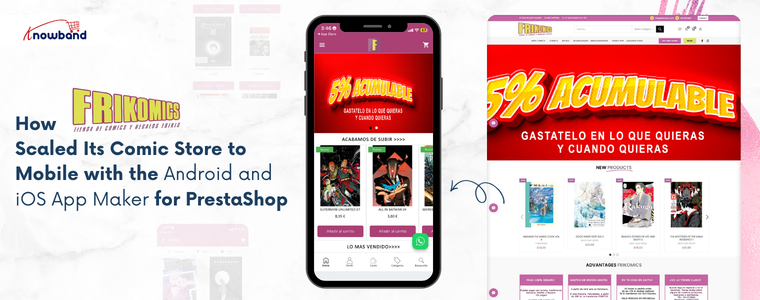
Frikomics is a comic brand built for readers who are serious about their hobby. The store stocks comics, graphic novels, and fan merchandise for readers of all ages. Over the years, the brand earned real loyalty from its community by focusing on what matters most: good products and a reliable shopping experience. But as the catalogue grew, so did the traffic coming in from mobile devices. The Frikomics team noticed that most customers are browsing on their phones. However, a browser-based mobile experience was not giving them what a dedicated app could. Frikomics saw the gap clearly and decided it was time to act and that’s where the Android and iOS App Maker for PrestaShop by Knowband came in.
Why a Mobile App Became the Next Step
Comics thrive on discovery. Customers browse often, shortlist titles, and return when something new drops. Therefore, re-engagement methods like push notifications and wishlist functionality are not just extra features; they are central to how the business grows.
Without a dedicated app, Frikomics struggled to connect with its customers between visits. Furthermore, the browser checkout on mobile added friction right where the buying decision was most fragile. As a result, the team recognised that a proper mobile app was the next necessary step.
The challenge was doing it without a long and costly development process.
Choosing the Android and iOS App Maker for PrestaShop
To solve this, Frikomics partnered with Knowband and integrated the Android and iOS App Maker for PrestaShop.The PrestaShop Android and iOS Mobile App Creator Module connected directly with the existing store and pulled in all products, categories, inventory levels, and payment methods automatically. Hence, nothing needed to be rebuilt or duplicated. Additionally, the addon delivered a Flutter-based mobile app solution covering both Android and iOS, so one decision handled both platforms at once.
🤖 AI-Powered
Automate Store Conversations with a Prestashop AI Chatbot using OpenAI
Answer customer questions 24/7, reduce cart abandonment, and free up your support team, all with one smart AI Chatbot for Prestashop.
Furthermore, the PrestaShop Android App Builder Module managed branding, home screen layout design, and final app delivery. Frikomics shared their specifications, and the app was ready within the standard turnaround window.
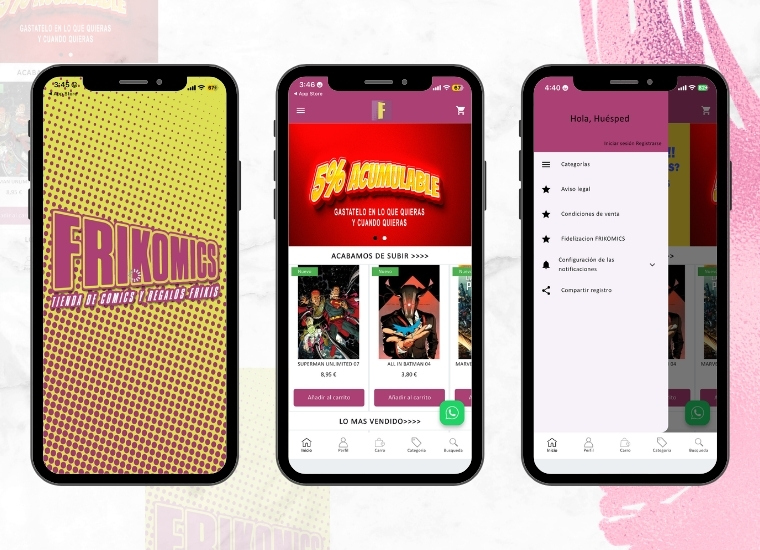
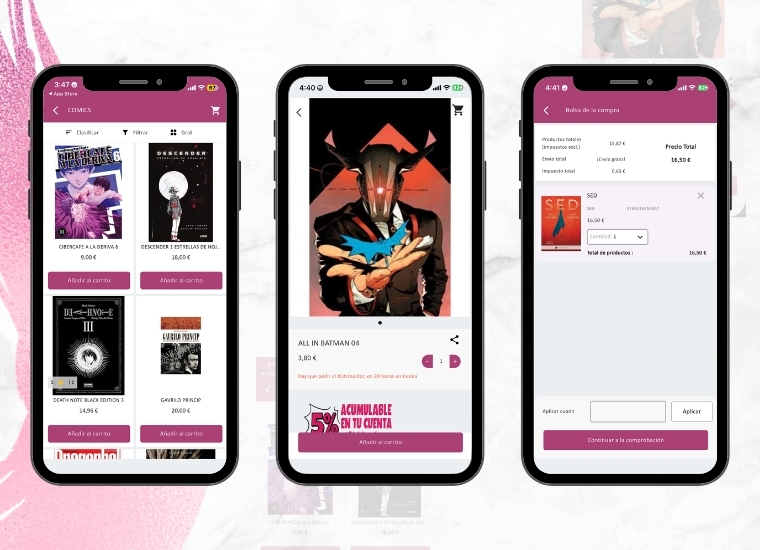
Once live, Knowband’s PrestaShop Android and iOS Mobile App Creator Addon gave Frikomics a branded presence on the Google Play Store and the Apple App Store. Customers could browse the comic catalogue in list or grid view, save titles to a wishlist, and complete purchases through a checkout screen built specifically for mobile use.
Moreover, the PrestaShop Mobile App Creator Module brought push notifications into the marketing mix for the very first time. The team could now send direct alerts to customers’ phones, keeping them informed about new releases, current deals, and reminders of abandoned carts. This change replaced the need to rely on email open rates with a more immediate way of communicating.
Social login through Google, PayPal, and Facebook reduced sign-up steps for new users. Additionally, OTP-based phone number login gave returning customers a faster way back into their accounts.
The addon also handled multi-language and multi-currency support, opening the store to a broader audience without extra configuration. The PrestaShop eCommerce Mobile App kept product data and inventory synced between the website and the app at all times. Since everything updated automatically, the team did not have to manually adjust stock levels or recheck listings across two separate systems.
Results After Implementing the Mobile App
After the app went live, Frikomics noticed real changes in how customers interacted with the store:
Mobile browsing became faster and more comfortable, and customers spent more time in the app.
Push notifications brought back readers who had not visited in a while, especially around new comic releases.
The touch-optimised checkout reduced the drop-off that typically happens on mobile.
Day-to-day operational tasks took noticeably less time, thanks to automatic syncing.
As a result, the team had more room to focus on what the brand is actually built around, sourcing great comics and staying connected with the community.
Frikomics came in with a clear problem: customers were on mobile, but the store was not truly built for it. After choosing the Android and iOS App Maker for PrestaShop by Knowband, that gap closed quickly. The brand now has a proper mobile presence, branded, functional, and built to grow alongside the business.
The PrestaShop Mobile App Creator by Knowband provided Frikomics with direct access to its audience, a reach that email marketing couldn’t quite match. Frikomics has since broadened its mobile presence, regularly utilising push notifications to keep its community informed about new releases.
This demonstrates that establishing a mobile presence doesn’t require a complete redesign. With the right solution, a PrestaShop store can cultivate a robust mobile presence efficiently and without added complications.
Regardless of whether you’re operating a small shop or have a vast inventory, Knowband’s PrestaShop eCommerce Mobile App Module presents a straightforward and dependable route to mobile expansion, designed to integrate seamlessly with your existing store operations.
Cart abandonment is one of the biggest revenue losses in eCommerce; the global average is around 70%, which means roughly 7 out of every 10 shoppers leave without buying. For PrestaShop store owners, the good news is that not all abandoned carts are lost sales. With the right trusted recovery module, you can now recover the abandoned cart modules.
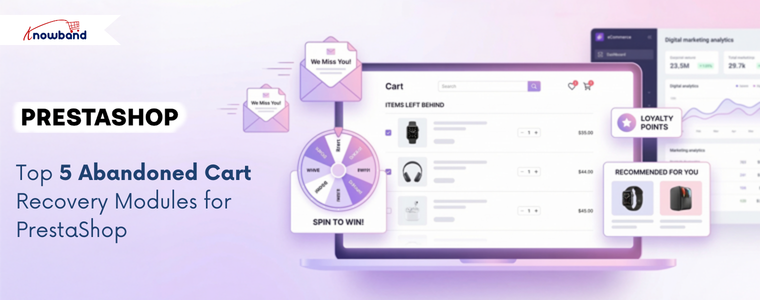
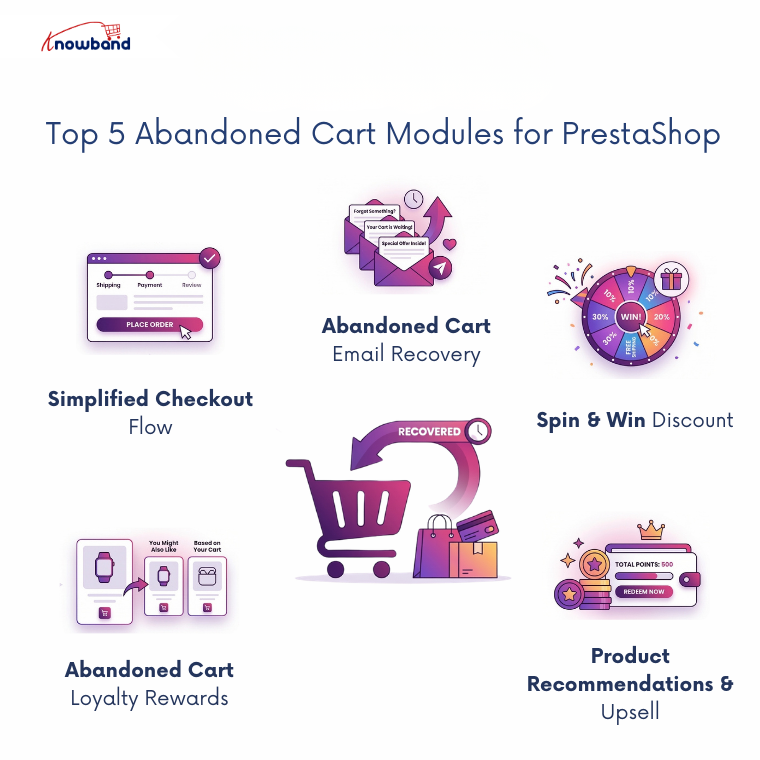
Whether you’re looking to prevent abandonment before it happens, recover it with well-timed emails, gamify the experience, reward loyalty, or personalise recovery with smart product recommendations, there are some popular prestashop abandoned cart recovery modules
This approach is preventive. Before you try to recover abandoned carts, it’s worth asking why people are abandoning in the first place. One of the most searched-for reasons is a long or confusing checkout process, and that’s exactly what One Page Supercheckout addresses.
This Prestashop One Page Checkout Addon compresses the entire PrestaShop checkout address, delivery, and payment into a single, streamlined page. Now, no more clicking through three or four steps, no more losing sales.. Everything a customer needs to complete a purchase is visible at once.
This module is the recovery approach. When someone leaves a cart behind, the most proven recovery method is still a well-timed email reminder, and Knowband’s Abandoned Cart Email Follow-Up module handles this specifically for all the stores with any catalogues.
The Prestashop Abandoned Cart Module automatically identifies carts that haven’t converted after a set time period and triggers a sequence of reminder emails to bring customers back. You can configure timing, customise email templates, include cart contents in the email, and optionally add a discount coupon to create urgency.
Automate Store Conversations with a Prestashop AI Chatbot using OpenAI
Answer customer questions 24/7, reduce cart abandonment, and free up your support team, all with one smart AI Chatbot for Prestashop.
This is gamified as well as a preventive approach: Most customers who abandon a cart don’t need a reminder; they need a reason to come back. The Prestashop Spin & Win module gives them one while making the experience memorable.
When a visitor shows exit intent (moving their cursor toward the browser close button, or after a set time on a page), a pop-up appears with a spinning wheel offering various discount prizes, percentage off, free shipping, a fixed coupon, or even “better luck next time” outcomes. To spin, the visitor typically needs to enter their email, which can be used further in email marketing tools like klaviyo, mailcimp and sendinblu etc..
This is basically as reward based recovery module. There’s a meaningful distinction between recovering a cart with a discount and recovering it with a reward. Discounts trigger customers to wait for deals and make a purchase. Loyalty points, on the other hand, build long-term behaviour and encourage repeat purchases.
The Prestashop Loyalty Points Module works by notifying customers that if they complete their pending purchase, they’ll earn bonus loyalty points on top of their standard order points. Furthermore, these points can be redeemed on future orders, creating a two-sided incentive: complete this cart now, and save money on the next one.
This is one of the most proven and trusted modules to double the revenue. A standard abandoned cart email says: “You left something behind.” A smart one says, “You left something behind and here are three things other customers loved that go with it.”
Prestashop Product Recommendation Module that integrates with cart recovery emails add a personalization layer that standard reminder tools lack. Instead of just showing the abandoned items, the email also surfaces related products, frequently-bought-together items, or category bestsellers, giving the shopper more reasons to return and more options to buy.
Final Thought
Cart abandonment isn’t a single problem with a single fix. Some customers leave because the checkout is too complicated. Others need a reminder after some hours. Also, some respond to a fun spin-the-wheel moment; others are motivated by points they can redeem next time. And a well-placed product recommendation in the right email can turn a recovery into an upsell.
The prestashop stores that recover the most revenue aren’t relying on one module, but they’re using a layered strategy with Knowband. Hence, start with whichever approach addresses your biggest drop-off point, then build from there.
Running an online store in 2026 means you aren’t just competing on price; you’re competing on how quickly and accurately you can answer a customer’s question. If a customer has to wait two hours for an email reply about stock levels, they’re already gone.
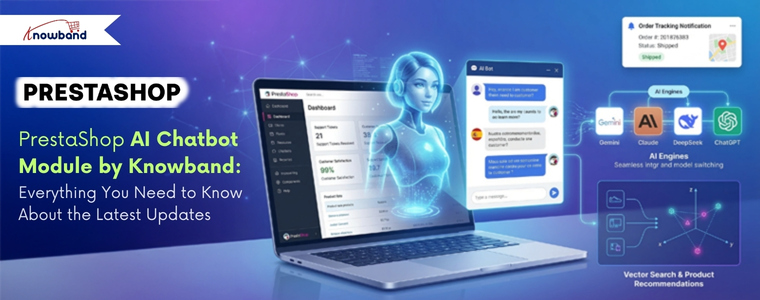
Knowband’s latest update to the PrestaShop AI Chatbot Module changes the game by moving beyond simple “if/then” logic. It’s no longer just a chat box, but it’s a high-level Live AI assistant that understands the customer’s intent. Here is a look at the major upgrades and how they actually impact your day-to-day operations.
The Big Update in Prestashop AI Chatbot Addon
Gemini, Claude, and DeepSeek Integration
Recently, the Prestashop AI Chatbot Module supported only OpenAI’s ChatGPT. That’s changed. The PrestaShop Live AI ChatBot Module now supports integration with Google’s Gemini, Anthropic’s Claude, and DeepSeek, giving store owners real choices when it comes to which AI engine powers their chatbot.
Better Control and Security
An AI chatbot is only useful if it’s secure and manageable. Knowband has introduced several security and management features for the admin side:
IP-Based User Blocking: Every store deals with bots or “problem” users who spam chat systems. Now, you can now block specific IP addresses to ensure your AI resources are reserved for genuine customers.
Chat Availability Scheduling: Sometimes, you only want the AI Chatbot to be active during specific hours. Therefore, you can now set a custom schedule for when the chatbot appears on the front end.
Detailed Chat Logs: The Prestashop AI Chatbot module now stores full interaction histories with users. By reviewing these, you can see exactly where customers are getting confused and refine your product descriptions or AI prompts accordingly.
🤖 Also on OpenCart?
Automate Store Conversations with an OpenCart AI Chatbot using OpenAI
Answer customer questions 24/7, reduce cart abandonment, and free up your support team, all with one smart AI Chatbot for OpenCart.
The PrestaShop ChatGPT AI Bot doesn’t just talk; it does the heavy lifting of a sales assistant by recommending the products.
1. Vector Search (Qdrant Integration)
This AI Chatbot typically searches for exact keywords. If a customer types “ocean colored shirt” but your product is named “Navy Blue Tee,” a standard search might fail. With Vector Search integration, the chatbot understands the context and intent, showing the customer exactly what they mean, not just what they typed.
2. Live Store Data Retrieval
The Chatbot pulls real-time data directly from your PrestaShop catalogue. It can instantly answer the information of the catalogues available in your catalogue
3. Order Tracking Made Easy
One of the most common support tickets is “Where is my order?” This eCommerce AI Chatbot handles this automatically. Moreover, customers can simply provide their queries about the recent order ID, and the chatbot fetches the real-time status and tracking info without you ever lifting a finger.
4. Fully Customizable Interface
The chatbot’s visual appearance, like background colour, chat box styling, button design, icons, can all be adjusted to match your store’s branding. This is the kind of detail that makes the PrestaShop AI ChatBot Module feel like a native part of your store rather than a third-party widget.
5. Multi-Language and Multi-Currency Support
The Prestashop AI-Powered module detects the language and currency settings of your store automatically and responds accordingly. For stores selling across multiple regions, this removes the need to maintain separate chatbot instances for different markets. It just works, in the language and currency your customers expect.
The Conclusion
The PrestaShop AI Chatbot Addon by Knowband has evolved with new advanced features. With support for multiple AI engines, detailed chat logs, IP-based controls, and scheduling on top of already having the vector search, automatic live AI Chatbot, multilingual currency and language support, it’s become a genuinely capable customer engagement tool.
The key question for any store owner is always: Will this reduce workload while maintaining (or improving) the customer experience? Based on what this module now offers, the answer is a credible yes, provided you’re willing to take a few hours to configure it properly at the start.
If your store is growing and your support inbox is starting to feel like it’s running the show, this is an AI Chatbot Module that can be game changer.
In today’s internet-driven world, users expect websites to load instantly. Customers want pages to load quickly when they visit your OpenCart website. Customers may become irritated, and your business may lose revenue if your product pages take too long to load, especially on mobile devices where internet rates may be slower.
Large or numerous graphics are frequently the primary cause of slow page loading. Product photos might be big files, but they are an essential component of any e-commerce website. Lazy loading can help with it.
The Performance Challenge in eCommerce Sites
Moment’s eCommerce spots are veritably visual. A standard order runner can have
20-50 pictures of the product
Banners
Thumbnails and icons
Sections on related products
The browser will need to load each image before the page is completely interactive if all of these are loaded at once. This leads to:
First Contentful Paint (FCP) at a slower pace
Increased Interactive Time
Poor performance on mobile devices
A higher server load
Increased rates of bounce
The user experience will be significantly impacted by this, particularly on slower networks.
What Is Lazy Loading?
The technique known as “lazy loading” delays the loading of images (or other content) until they are truly required, which is typically when a user is ready to view them by scrolling into view. Lazy loading waits until the user is ready to view the image before loading it, as opposed to loading all the images at once.
Lazy loading has the following advantages:
Bandwidth conservation
Better performance on mobile devices
Improved SEO and essential web elements
Quick loading of the first page
When many of the images may load simultaneously on product pages, lazy loading is especially helpful.
Why Lazy Loading Matters
Imagine looking through an item catalogue. Even if the product images are far below the fold, your browser will try to load them all at once when using traditional loading. Only the images that are in or near the viewable portion of the screen will load initially when using lazy loading. The remaining images will gradually load as the viewer scrolls.
Both your clients and search engines like Google, which like websites that load quickly, will benefit from a quicker and more seamless experience.
Real-World Example: Category Page Without Lazy Loading
Consider this example:
24 products on a category page, Each thumbnail = 150 KB, Total image weight = 3.6 MB
Before even loading banners, CSS, and JavaScript, the browser has to download close to 4 MB of images.
Now consider that the visitor only scrolled halfway through the page. Half the images were never viewed – but downloaded anyway. Therefore, this is wasted bandwidth and 0This is where lazy loading comes in.
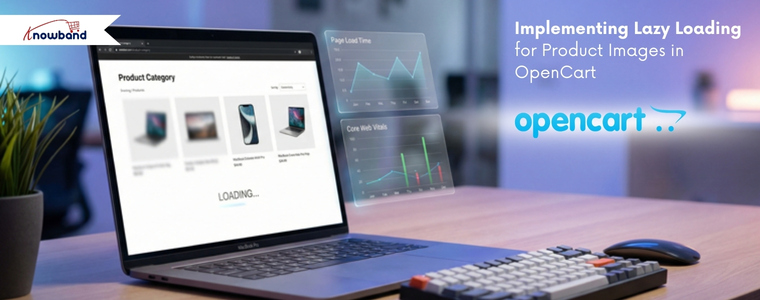
Lazy Loading and Core Web Vitals
Web Vitals. The following are directly impacted by large images:
Paint with the Largest Content (LCP)
Shift in Cumulative Layout (CLS)
Next Paint Interaction (INP)
Correctly loading images slowly will enhance performance metrics, particularly on product and category listing pages.
Still, there’s one important thing to keep in mind
Images above the pack, like the primary product image on a product detail runner, should n’t be lazy loaded.
When to Apply Lazy Loading?
Lazy loading is best suited for:
Product listing pages
Category pages
Blog listing pages
Manufacturer pages
Upsell sections
It might not be the best fit for:
Hero banners above the fold
Main product image on the product page
Critical branding visuals
How to Implement Lazy Loading in OpenCart
Method 1: Lazy loading in native browsers
Modern browsers use the loading=”lazy” property to provide built-in lazy loading
const observer = new IntersectionObserver((entries, observer) => {
entries.forEach(entry => {
if (entry.isIntersecting) {
const img = entry.target;
img.src = img.dataset.src;
observer.unobserve(img);
}
});
});
images.forEach(img => observer.observe(img));
This method gives full control over loading behaviour.
Important: AJAX-Based Product Filtering
When products are loaded dynamically via AJAX:
Native loading=”lazy” works automatically.
However, ifyou are using lazysizes, Intersection Observer then You must re-trigger lazy loading after AJAX content loads.
Example:
document.addEventListener('ajaxComplete', function() { lazySizes.autoSizer.checkElems();});Otherwise, newly injected images may not load correctly.
The Best Methods for Lazy Loading in OpenCart
✔ Avoid loading the images above the fold.
✔ Make sure your images are the right size; avoid using thumbnails that are too big.
✔ Always use PageSpeed Insights to test; optimiseoptimize images to WebP format.
✔ Always test with PageSpeed Insights
✔ After making changes to the template, clear the OpenCart cache.
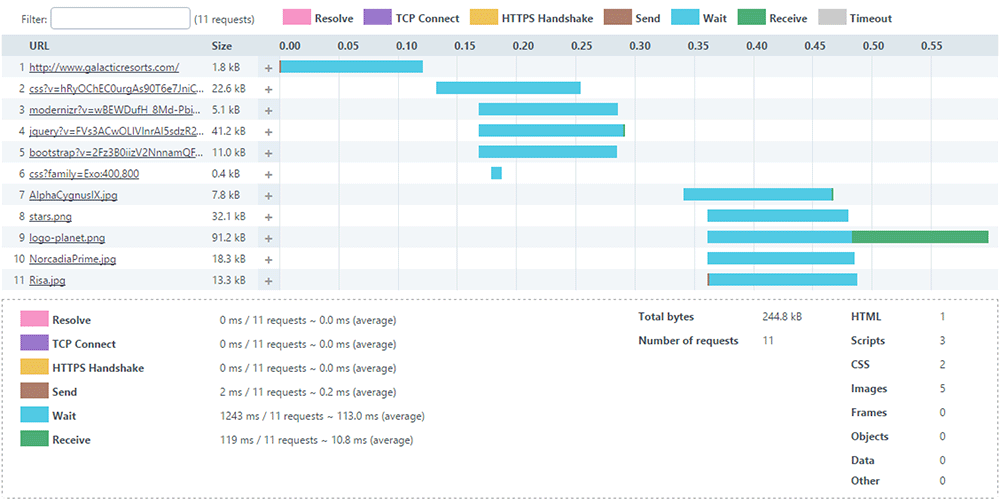
Measuring Performance Before and After Implementation
To evaluate the impact of lazy loading, follow these steps:
Before Implementation
Test your category page and record the following metrics:
Page size
Page load time
Core Web Vitals scores
After Implementation
Run the same tests again and compare the results. You should observe:
Reduced initial load time
Lower Total Blocking Time (TBT)
Improved Lighthouse performance score
The implementation options outlined in this guide, from native HTML attributes to lazysizes and the Intersection Observer API, offer solutions for every level of technical complexity. Whether you are maintaining a small boutique store or managing a high-traffic multi-category catalogue, there is an approach that fits your needs. Start with Method 1 for instant results, and build up to more advanced methods as your requirements grow.
Performance optimisation is not a one-time task as it is an ongoing commitment. Pair lazy loading with image compression, WebP conversion, and proper caching to unlock the full potential of your OpenCart store’s speed.
About Knowband
Knowband is a trusted eCommerce plugin and extension provider with years of experience helping online merchants build faster, smarter, and more feature-rich stores. Whether you run your store on PrestaShop, OpenCart, Shopify, WooCommerce, Magento, or any other major platform, Knowband offers a wide range of ready-to-use plugins and extensions that help you enhance functionality, improve performance, and deliver a better shopping experience, without needing to build from scratch.
Beyond plugins, Knowband also offers comprehensive website development and mobile app development services. Whether you need a fully custom eCommerce storefront built from the ground up, a tailored mobile shopping app for iOS and Android, or a bespoke integration with your existing systems, Knowband’s team of developers has the expertise to bring your vision to life.
If you are looking to optimize further your OpenCart store, or any other eCommerce platform, explore Knowband’s plugin marketplace or get in touch with our team to discuss a custom solution tailored to your business goals.
Contact us at support@knowband.com for custom plugin development, website development, and mobile app development services.
Getting consistent, purchase-ready traffic to your store is hard. You can spend weeks fine-tuning your social ads or pouring money into influencer campaigns, and still not see the returns you were hoping for.
For stores built on PrestaShop or OpenCart, tapping into Google Shopping isn’t always easy. Introducing the PrestaShop Google Shopping Module and OpenCart Google Shopping Extension are built specifically to handle that connection, and from what merchants report, they do it well.
Not all website visitors are the same. Someone casually browsing is very different from someone who typed “buy waterproof hiking boots size 11” into Google. That second person is ready to buy, they just need to decide where.
Google Shopping puts your products in front of people like that. They’ve already made up their mind about what they want. Now they’re comparing prices and checking availability. That’s why Google Shopping tends to convert better than most other paid advertising options.
And because your product image, price, and store name show up before anyone even clicks, you’re only attracting people who are genuinely interested. For PrestaShop and OpenCart store owners who want to use their ad budget wisely, this kind of targeted traffic really helps.
🛍️ Also on PrestaShop?
Sync Smarter, Sell Faster: PrestaShop Google Shopping Integration Module by Knowband
Automatically sync your product catalog with Google Merchant Center, track performance with UTM parameters, and reach millions of high-intent shoppers.
The Knowband PrestaShop Google Shopping Module and the Knowband OpenCart Google Shopping Plugin were both developed to solve the same core problem: listing your product catalogue into Google Merchant Centre cleanly, accurately, and without constant manual work. And that problem is bigger than it sounds.
Feed management, when done manually, is a genuine headache. As the Prices change, Stock runs out, New variants get added it gets very difficult to synchronise all the changes to Google merchant. If your feed doesn’t reflect those changes quickly, you end up with disapproved products from Google, confused shoppers clicking on listings that are out of stock, and in worse cases, policy violations that can affect your entire Merchant Centre account.
Knowband’s Prestashop Google Shopping Integration Module solution handles all of that automatically, syncing price and inventory in real time, mapping categories correctly, and generating feeds that meet Google’s requirements without you having to manage it by hand.
Google Merchant Centre Integration: This Google Shopping Integrations connect your store to Google Merchant Centre through a straightforward setup process. Since no technical knowledge or coding is required, your product data syncs reliably.
Product Feed Generation: You can also generate a Google Shopping product feed in XML or CSV format. Furthermore, you can choose between real-time or scheduled updates, so your listings stay current while reducing manual work.
Category & Attribute Mapping Store admins can also map your store categories to Google Product Categories and match product attributes like GTIN, MPN, brand, availability, and condition. As a result, your products get approved faster and listed more accurately.
Multi-Country & Multi-Language Support You can set up separate feeds for different countries, languages, and currencies. Furthermore, this way, you can reach international audiences and run Google Shopping Ads across multiple markets with ease.
Start Selling on Etsy from Your Prestashop Store
Now selling on Etsy is easy with Knowband’s Prestashop Etsy Marketplace Module.
Cron-Based Synchronisation Using this Knowband Prestashop Google Shopping Module, schedule automatic feed updates via cron jobs to keep pricing, stock levels, and product details consistently accurate. Furthermore, this helps avoid disapproval caused by outdated information.
Product Filtering Store admins can also choose which products appear in your feed by filtering on category, price range, stock status, or specific product IDs. That way, only the right products get submitted to Google Shopping.
Final Thoughts
Google Shopping isn’t a magic solution, but it’s one of the more reliable growth channels available to eCommerce stores today, especially for merchants on PrestaShop and OpenCart who want to drive direct traffic without being tied to marketplace fees. The Knowband PrestaShop Google Shopping Module and Knowband OpenCart Google Shopping Plugin take care of the technical side of that equation: feed generation, real-time syncing, category mapping, and Merchant Centre compatibility.
From there, it’s about building on that foundation, optimising your product data, testing campaign structures, and paying attention to what the numbers are telling you. Done consistently, it’s the kind of channel that compounds. And for stores that are serious about growing on their own terms, that’s exactly what you want.
The OpenCart LLMs TXT Generator Plugin is a powerful extension designed to generate an llms.txt file for your store. This file contains well-structured information about the store catalogue, including products, categories, and CMS pages, making it easier for AI platforms to understand and access your content.
Today, customers increasingly rely on AI-powered platforms such as ChatGPT, Gemini, DeepSeek, Perplexity, and Claude to search for products and get recommendations. As AI-driven searches continue to grow, having your products recommended by these platforms can significantly improve your store’s visibility and reach.
To address this, Knowband has developed the OpenCart LLMs TXT Generator Plugin, which enables AI platforms to discover, understand, and recommend your products more effectively.
The llms.txt file generated by the Knowband OpenCart LLMs TXT Generator allows AI crawlers and AI answer engines to access store content in an organised and structured format. By placing this file on your server, your store becomes compatible with modern AI search engines and AI product recommendation models such as ChatGPT, DeepSeek, Gemini, Perplexity, and Claude.
Using this AI product recommendation extension for OpenCart improves AI product discovery, supports accurate AI-generated answers, and ensures that your store content is correctly identified and referenced when users search for product- or store-related information on AI-driven platforms.
This OpenCart extension supports access for multiple advanced AI crawler bots used by modern AI answer engines and generative AI search platforms, including:
DeepSeekBot
GPTBot
Anthropic AI
PerplexityBot
Google-Extended
Supporting these AI bots ensures compatibility with AI product discovery and ChatGPT product recommendations.
AI Crawler Access Control
The Knowband OpenCart LLMs TXT Generator Extension allows administrators to control which AI crawlers can access store content via the llms.txt file.
Customisation of llms.txt File
The OpenCart LLMs TXT Generator Add-on by Knowband allows store admins to add additional content to the llms.txt file. Customisation options are available for:
Store descriptions
Product llms.txt entries
Category product llms.txt entries
CMS page llms.txt entries and more
Access Control for Content Pages
This feature allows admins to choose which content pages—such as product pages, category pages, and CMS pages—should be included in the llms.txt file.
This ensures AI engines generate accurate responses and access only the selected content.
Product Recommendation Compatibility
The OpenCart LLMs TXT Generator Add-on is built to support evolving AI search and AI product recommendation systems. By generating a structured llms.txt file with clear instructions, your store content remains aligned with next-generation AI answer engines like ChatGPT and other recommendation platforms.
Content Filtering
The Knowband OpenCart LLMs TXT File Generator allows store admins to filter and select specific products, categories, and CMS pages for inclusion in the llms.txt file.
This provides complete control over what data is made available for AI product discovery, AI crawler indexing, and generative AI search.
Step 1: Purchase and download the Knowband OpenCart LLMs TXT Generator Extension. After purchase, you will receive the file kbllmstxtgenerator.zip.
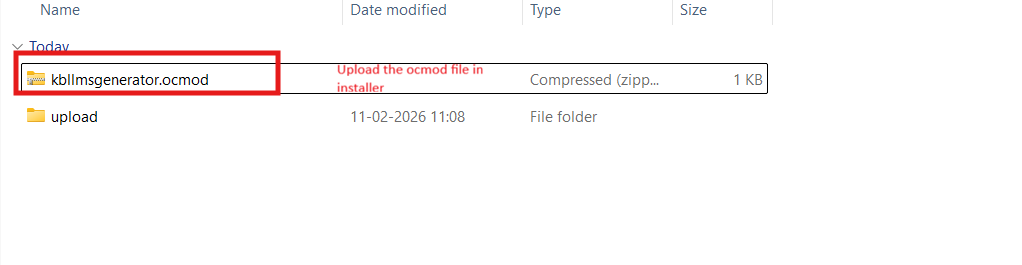
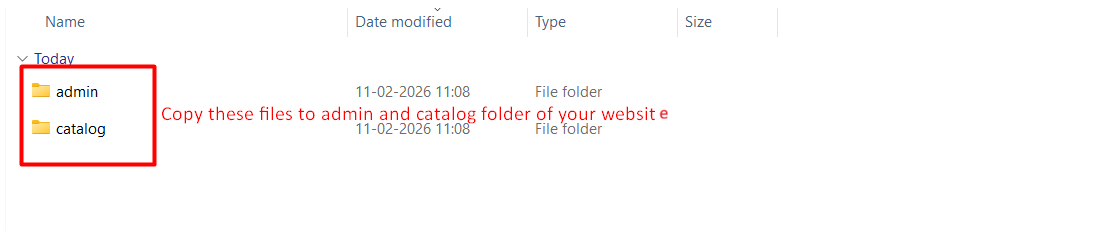
Step 2: Unzip the downloaded file. Inside, you will find the admin, catalog, and ocmod folders.
Step 3: Upload the admin and catalog folders to your OpenCart root directory via FTP or cPanel. Then upload the OCMOD file from the ocmod folder through Admin → Extensions → Installer, and refresh modifications.
Step 4: Go to Extensions → Extensions, install the extension, click Edit/Configure, and complete the setup.
3.0.0 Backend/Admin Panel of Opencart Product Recommendation by ChatGPT Extension
3.1 General Settings
Enable/Disable Extension: This option in the llms.txt file generator for AI is used to enable or disable the functionality of the Opencart LLMs.txt Generator Extension.
Store Name: Store admins enter their store name in this field. This Opencart LLMs.TXT Generator Extension also supports the languages that are added in the store.
Store Description: This field is used to add the store description to the llms.txt file generated by the Extension. Furthermore, it helps to describe the store and its catalogue based on the provided content.
Product Batch Size: This field in the Opencart LLMs txt File Generator Addon allows you to define how many products are processed per batch during cron execution. By default, 30 products are processed in one batch.
Category Batch Size: This field of category batch size allows the cron to process a specified number of categories per batch.
CMS Batch Size: This field allows the cron to process CMS pages per batch. By default, 5 CMS pages are processed in one batch during cron execution in the Extension.
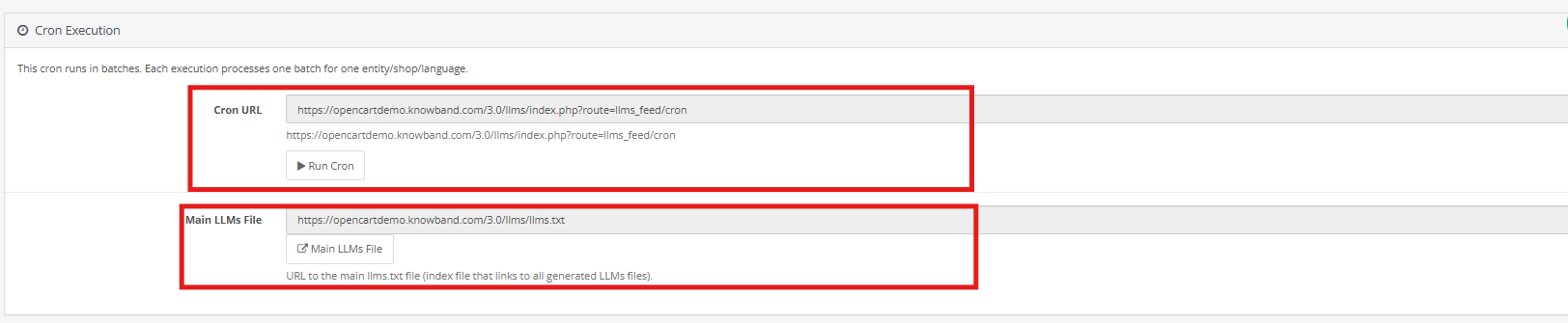
Cron Execution (Batch Processing): This cron job in the Opencart LLMs TXT generator runs in batches. Each execution processes one batch only, for products, categories and CMS pages. After updating settings like general settings, content filtering and customisation of files, running the cron is necessary to reflect any changes.
3.2 Crawlers Setting
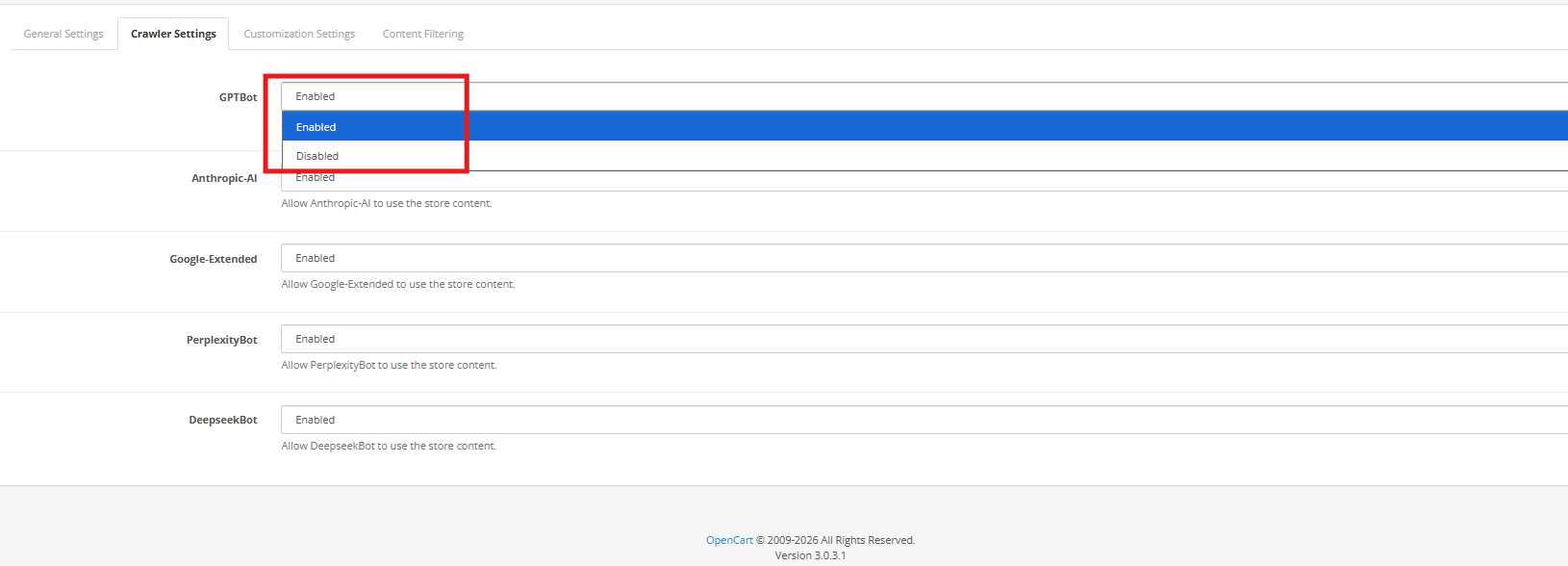
This crawler setting in Opencart LLMS TXT Generator allows the store owners to manage the AI model’s bots like GPTbot, Google Extended Gemini Bot, DeepSeek and many more
GPTBot: AI Crawler of OpenAI ChatGPT, collects the data to train the ChatGPT AI Models. You can allow or disallow this using the
DeepseekBot: AI crawler bot of deepseek which gathers public web data of the store to train and refine DeepSeek’s large language models
Google-Extended: This Google’s AI-specific crawler (separate from Googlebot) allows the collection of content specifically for training Google’s AI models (like Gemini),
PerplexityBot: This web crawler of perplexity AI is used to fetch up-to-date web content to generate cited answers and summaries
Anthropic-AI: This web crawler of Anthropic is used to collect public web data to train and improve Claude AI models. You can enable or disallow all the AI Crawler bots.
3.3 Content Filtering
The Content Filtering functionality enables store administrators to decide exactly which store data is included in the generated llms.txt file. This gives you full control over the information shared with AI crawlers and answer engines, ensuring that only meaningful and approved content is exposed while private or irrelevant data remains excluded.
1. Shop Context
The Shop Context setting is designed for OpenCart installations with multiple stores. It allows administrators to select a specific store and generate a dedicated llms.txt file for that shop. Each store can have its own configuration, ensuring accurate and store-specific content generation.
2. Product Details
The Product Details filter determines which products appear in the llms.txt file. Store owners may include all products or restrict the selection based on business needs. Options include adding only active products, featured items, or manually selected products, while excluding others from being shared.
3. Category Details
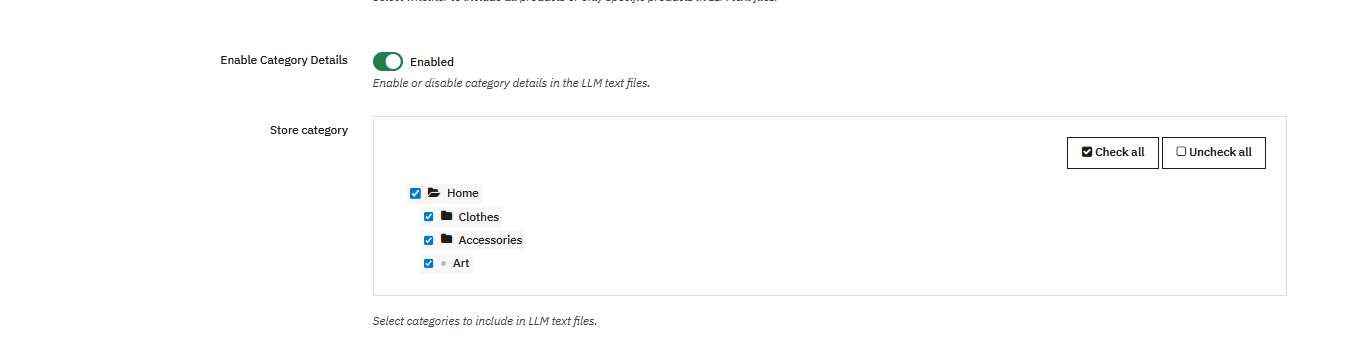
The Category Details filter helps manage category-level content. Administrators can choose which categories should be included, allowing inactive or unnecessary categories to be excluded. This keeps the file well-structured and focused on relevant store data.
4. CMS Pages
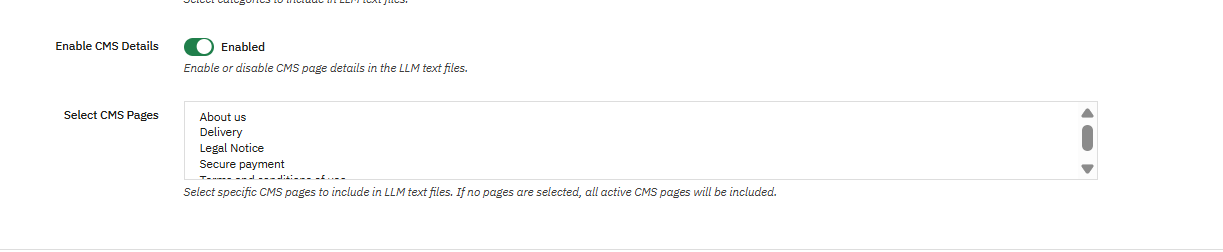
The CMS Pages filtering option allows you to control which CMS pages are included in the CMS llms.txt file. This is useful for preventing internal, draft, or temporary pages from being shared, while still making essential pages such as policies and informational content available to AI platforms.
3.4 Customization
The Customization features of the OpenCart LLMs.txt Generator allow store owners to add additional context to the generated llms.txt files. These options help enhance product, category, and CMS information with helpful notes, improving how AI crawlers interpret your store content.
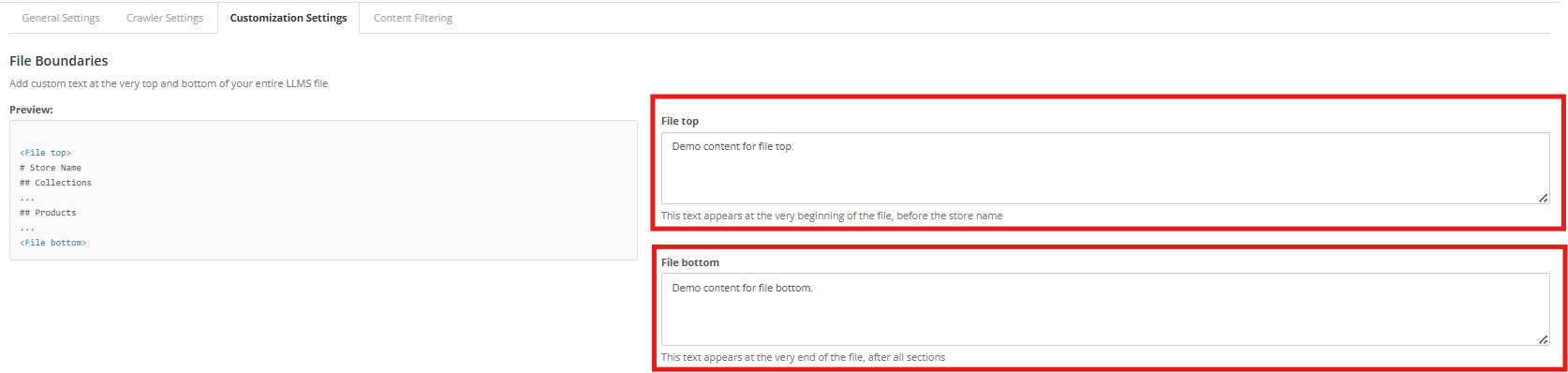
1. File Boundaries Customisation
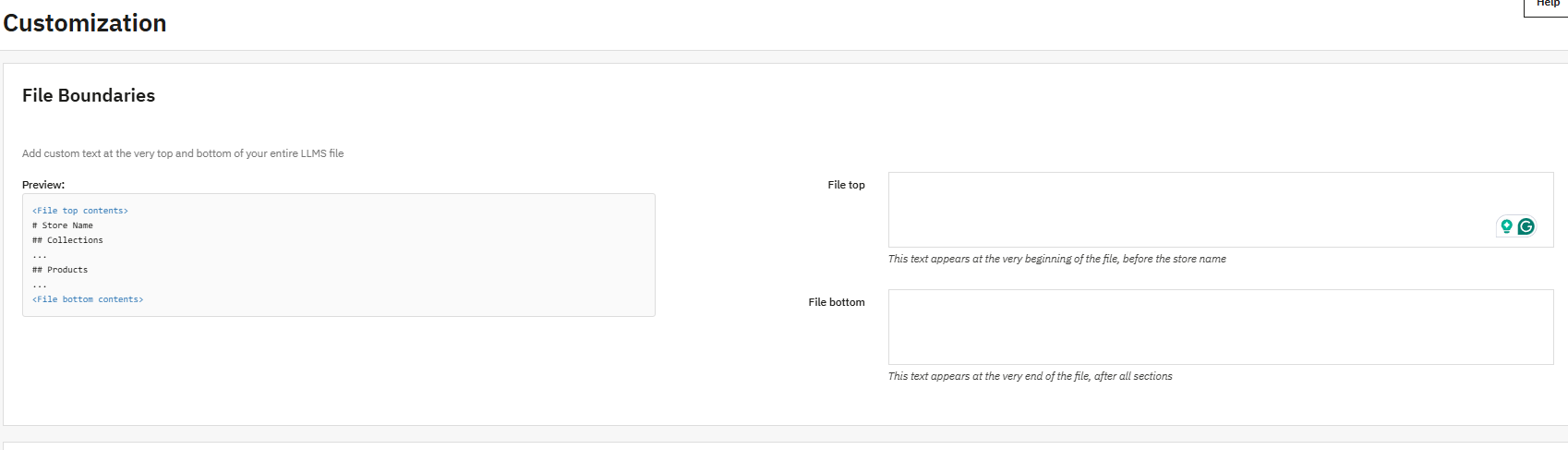
The File Boundaries option allows you to insert custom text at the beginning and end of the llms.txt file. This can be used to add general instructions, notes, or explanations without altering the core store data, helping crawlers understand the file structure more clearly.
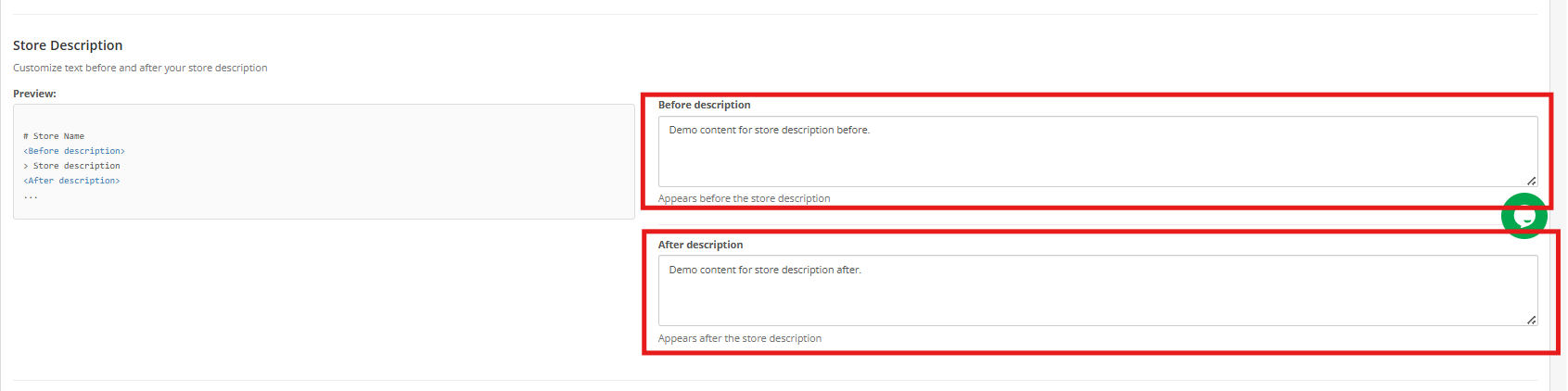
2. Store Description
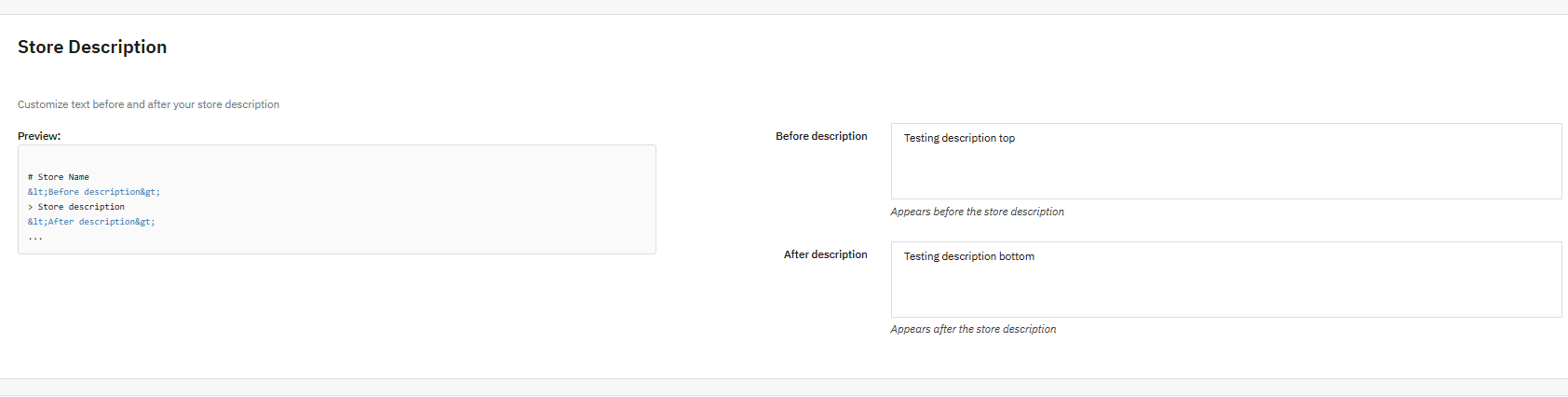
The Store Description customisation lets you add content before and after the store description section in the llms.txt file. This helps define your store’s purpose, key offerings, or any special instructions, making it easier for AI-driven platforms to generate accurate responses related to your business.
3. Category Section Customisation
With Category Section Customisation, store owners can add explanatory text before and after the categories section. This is useful for clarifying category organization, naming patterns, or relationships, allowing crawlers to interpret category data more accurately.
4. Product Section Customisation
The Product Section Customisation feature allows you to include additional notes before and after the product details section. These notes can provide general product-related guidelines or context without modifying the actual product information, improving AI understanding and recommendations.
5. CMS Pages Section Customisation
The CMS Pages Section Customisation option enables administrators to add contextual notes around the CMS pages section. Since CMS pages often contain key information such as policies, FAQs, and shipping details, this added context helps AI systems better interpret non-product content.
Pro Tip: Maintain strong SEO practices across your product, category, and CMS pages to improve visibility on AI-powered search platforms. As AI technology advances, your store should evolve with it—use this extension to ensure AI models can accurately understand and recommend your business.
The rapid rise of AI-powered platforms has completely transformed how users search for information online. Today, customers no longer rely only on traditional search engines. Instead, they first ask questions on AI platforms like ChatGPT, Gemini, Claude, DeepSeek, and Perplexity, even for the smallest queries.
Now imagine this: What if these AI platforms start recommending your PrestaShop products directly to your customers? Knowband has recently introduced a PrestaShop LLMs TXT Generator , which has become a must-have plugin for modern eCommerce stores.
How does this PrestaShop LLMs TXT File Generator work?
The PrestaShop LLMs TXT Generator is a useful module that creates an llms.txt file for your online shop. This structured file organises information about your products, categories, and content pages in a format that large language models can easily read and understand.
The llms.txt file works as a bridge between your store and popular AI crawlers. Furthermore, it helps AI answer engines and generative search platforms understand, access, and reference your store content accurately.
By placing the llms.txt file on your server, your store becomes compatible with modern AI search models and AI-driven product recommendation engines, ensuring better visibility across next-generation platforms.
🤖 Another AI Tool Worth Knowing
The New PrestaShop AI Chatbot Module: Simple Chat Support That Helps Customers Instantly
While LLM.txt helps AI systems understand your store, the PrestaShop AI Chatbot Module helps your customers get instant answers in real time, product search, order tracking, multilingual support, and more, powered by GPT-4o, DeepSeek, Gemini, and Claude.
AI answer engines don’t crawl websites the same way traditional search bots do. They require structured, filtered, and permission-based content access to generate reliable responses.
The Knowband PrestaShop LLMs TXT Generator ensures that AI crawlers can:
Access store data in an organised manner
Identify the correct products and pages
Generate accurate AI-powered recommendations
As a result, your products can be referenced when users ask AI tools questions related to your offerings, boosting AI product discovery and brand visibility.
Creating the file comes first. Second, ensure that your robots.txt doesn’t disallow crawlers like GPTBot, PerplexityBot, Google-Extended or Anthropic-AI, and that yourstore.com/llms.txt provides a page rather than a 404 error. Third, analyze three important product pages in plain text, specifications contained in the tabs of JavaScript could remain invisible to AI crawlers. And lastly, find out products that don’t have any meta description and image, and also ensure that policy pages can be viewed without opening an accordion. In case there are any gaps, then the PrestaShop LLMs TXT File will help you create and update the file. ( Updated September 28, 2027)
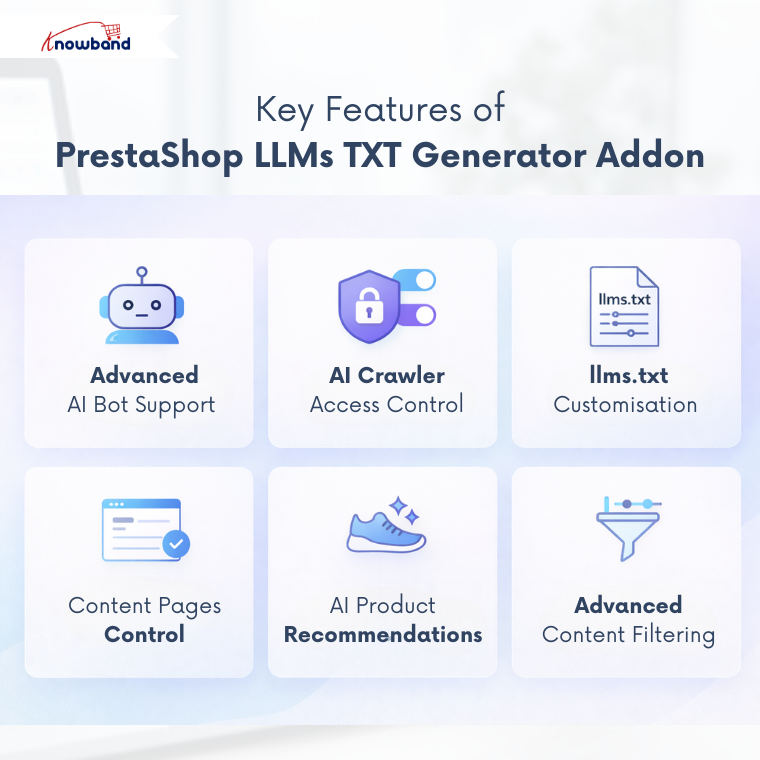
The module supports access for multiple advanced AI crawler bots used by modern AI platforms and answer engines.
This Prestashop AI Recommendation Module supports bots, including:
GPTBot
DeepSeekBot
Anthropic AI
PerplexityBot
Google-Extended
This diversity of integration of the Prestashop product recommendation module ensures your store content is ready for ChatGPT product recommendations, AI-driven search results, and future AI models.
2. AI Crawler Access Control
Not every AI crawler should access your entire store. The Knowband module provides full control over AI bot permissions.
This will help the admins to allow or restrict specific AI crawlers and protect sensitive or irrelevant content
3. Customisation of llms.txt Files
The PrestaShop LLMs TXT Generator by Knowband offers extensive customisation options.
Admins can add or modify the store descriptions, product llms.txt content, and category-based llms.txt files and CMS page llms.txt files
Furthermore, this flexibility allows merchants to provide context-rich data to AI engines, improving the quality of AI-generated responses.
4. Access Control for Content Pages
With this module, store owners can select which pages should be included in the llms.txt file. Moreover, you can control access for all product pages, category pages and CMS pages
This ensures that AI engines only reference approved content, preventing misinformation and maintaining brand accuracy
5. Product Recommendation Compatibility
The AI recommendation addon is designed to support evolving AI search technologies and AI-based product recommendations. Moreover, by generating a structured llms.txt file with custom instructions, your store content remains synchronised with platforms like ChatGPT, Gemini, Claude and Perplexity
This helps the AI tools recommend your products more accurately to potential customers.
6. Advanced Content Filtering
The PrestaShop LLMs TXT File Generator allows admins to filter and select specific content.
You can choose the specific products or selected categories as well as CMS pages Furthermore, this ensures full control over what data is available for AI crawler indexing, AI search visibility, and AI-driven recommendations.
Final Thoughts
The PrestaShop LLMs TXT Generator Module is not just another AI tool, as it’s a future-ready solution for stores. As AI platforms continue to evolve how users discover products, having a proper structured llms.txt file ensures your store stays relevant, visible, and competitive.
By enabling accurate AI platform access, improving product discovery, and supporting next-generation AI models, this amazing module helps your PrestaShop store tap into the new phase of AI-driven search and recommendations.
If you want your products to be found not just on search engines, but also through AI conversations, this addon is an essential investment.
The PrestaShop LLMs TXT Generator is a must-have plugin designed to generate the llms.txt file for your store. This file contains structured information related to the store catalogue, including products, categories, and CMS pages.
Nowadays, you see customers first ask the query on AI platforms like ChatGPT, Gemini, and many more. People have become dependent on the AI even for the smallest things. So what if ChatGPT starts recommending your products to customers? Is it amazing, right? Therefore, Knowband has designed this Prestashop LLMs TXT Generator, which helps the AI platforms to recommend your products.
The generated llms.txt file from the Knowband Prestashop llms.txt generators helps AI crawlers and AI answer engines to access store content in an organised manner. By placing this llms.txt file on the server, the store expands with modern AI search and product recommendation AI Models such as ChatGPT, DeepSeek, Gemini, Perplexity, and Claude.
Using this AI product recommendation module for PrestaShop helps improve AI product discovery, supports accurate AI-generated responses, and ensures that store content can be correctly identified and referenced when users search for product- or store-related information on AI-driven search platforms.
This PrestaShop module supports access for multiple advanced AI crawler bots used by modern AI answer engines and generative AI search platforms.
These supported bots include:
DeepSeekBot
GPTBot
Anthropic AI
PerplexityBot
Google-Extended
Supporting these AI bots helps ensure compatibility with AI product discovery and ChatGPT product recommendations to customers.
AI Crawler Access Control
The Knowband PrestaShop LLMs TXT Generator module allows administrators to manage which AI crawlers can access store content through the llms.txt file.
Customisation options are available in PrestaShop LLMs TXT file generator Addon for store descriptions, products llms.txt files, category product llms.txt files, CMS llms.txt files and many more.
Access Control for Content Pages
This Knowband PrestaShop LLMs TXT Generator for AI search engines allows admins to select which content pages should be included in the llms.txt file, such as product pages, category pages and CMS pages.
This feature in LLMs TXT Generator for prestashop ensures that AI engines answer accurately and do not disclose any other content except the selected one.
Product Recommendations Compatibility
The PrestaShop LLMs TXT Generator Addon is designed to develop evolving AI search and AI product recommendations of the ecommerce stores. By creating a structured llms.txt file with additional content and instructions, your content remains synchronised with next-generation AI answer engines like ChatGPT and recommendation platforms.
Content Filtering
The Knowband PrestaShop LLMs TXT File Generator for products allows store admins to filter and select specific products, categories, and CMS pages in the llms.txt file.
This content filtering feature provides full control over which data you can allow to access for Prestashop AI product discovery, AI crawler indexing, and generative AI search by ChatGPT.
Step 1: Purchase and download the Knowband Prestashop LLMs TXT Generator Module.
After the completion of the purchase, you’ll receive the kbllmstxtgenerator.zip file.
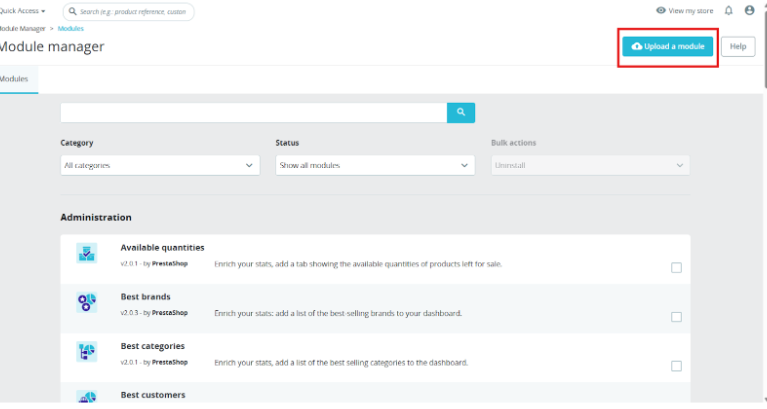
Step 2: Click on Module on your prestashop back office left menu, go to module manager, then you will see the click option. Click on the Upload.
Step 3: Upload and Install the Module. After the complete installation, you have to click on the configuration, and then you will be directed to the configuration page.
Step 4: Now you are ready to configure the LLMs.TXT module.
3.0.0 Backend/Admin Panel of Prestashop Product Recommendation by ChatGPT Module
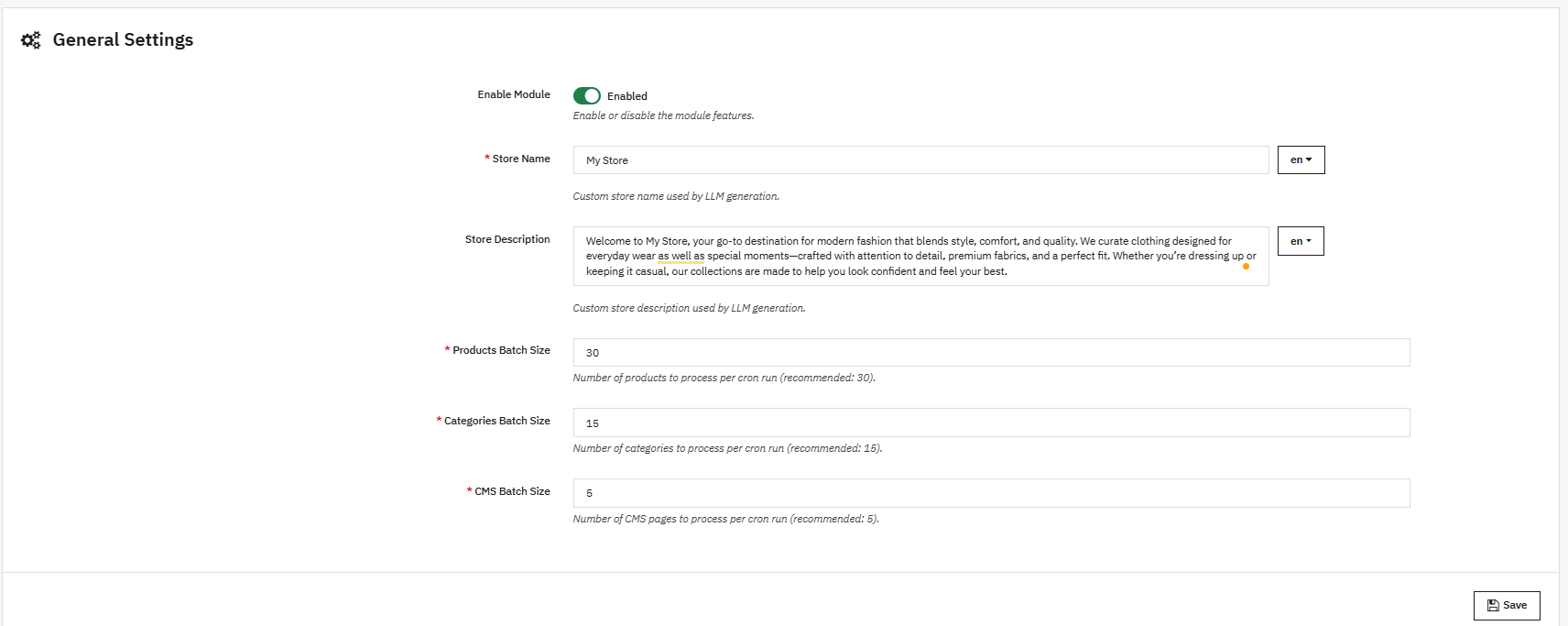
3.1 General Settings
Enable/Disable Module: This option in the llms.txt file generator for AI is used to enable or disable the functionality of the PrestaShop LLMs.txt Generator module.
Store Name: Store admins enter their store name in this field. This Prestashop LLMs.TXT Generator module also supports the languages that are added in the store.
Store Description: This field is used to add the store description to the llms.txt file generated by the module. Furthermore, it helps to describe the store and its catalogue based on the provided content.
Product Batch Size: This field in the Prestashop LLMs txt File Generator Addon allows you to define how many products are processed per batch during cron execution. By default, 30 products are processed in one batch.
Category Batch Size: This field of category batch size allows the cron to process a specified number of categories per batch.
CMS Batch Size: This field allows the cron to process CMS pages per batch. By default, 5 CMS pages are processed in one batch during cron execution in the module.
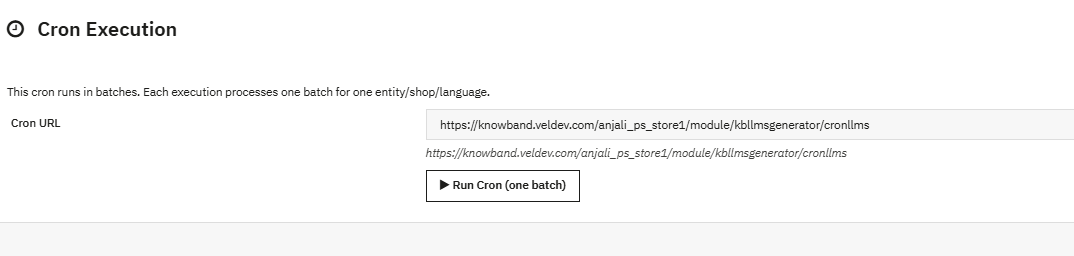
Cron Execution (Batch Processing): This cron job in Prestashop LLMs TXT generator runs in batches. Each execution processes one batch only, for products, categories and CMS pages. After updating settings like general settings, content filtering and customisation of files, running the cron is necessary to reflect any changes.
3.2 Crawlers Setting
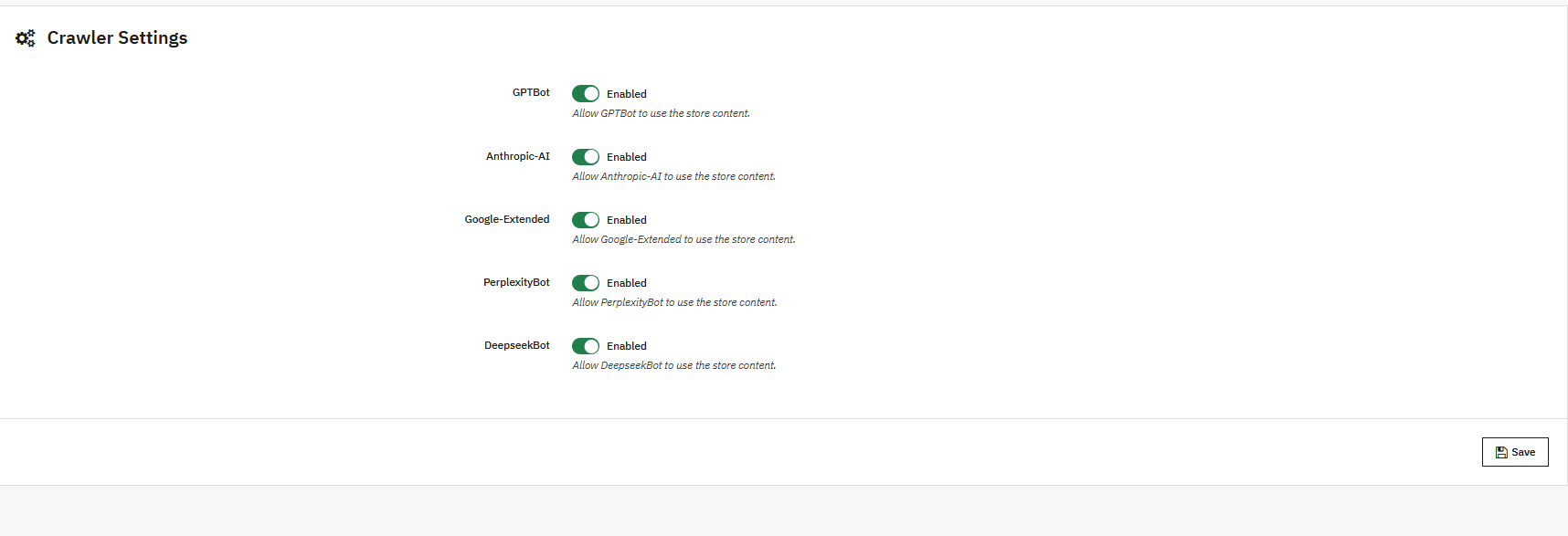
This crawler setting in Prestashop LLMS TXT Generator allows the store owners to manage the AI model’s bots like GPTbot, Google Extended Gemini Bot, DeepSeek and many more
GPTBot: AI Crawler of OpenAI ChatGPT, collects the data to train the ChatGPT AI Models. You can allow or disallow this using the
DeepseekBot: AI crawler bot of deepseek which gathers public web data of the store to train and refine DeepSeek’s large language models
Google-Extended: This Google’s AI-specific crawler (separate from Googlebot) allows the collection of content specifically for training Google’s AI models (like Gemini),
PerplexityBot: This web crawler of perplexity AI is used to fetch up-to-date web content to generate cited answers and summaries
Anthropic-AI: Lastly, this web crawler of Anthropic is used to collect public web data to train and improve Claude AI models. You can enable or disallow all the AI Crawler bots.
The Content Filtering feature allows store admins to control which store content is included in the generated llms.txt file. Furthermore, this helps ensure that only relevant and intended information is processed and shared, while unnecessary or sensitive content can not be exposed.
1. Shop Context
This option in the Prestashop LLM.txt Generator allows you to select the specific shop when you have multiple stores.
If your prestashop store includes multiple shops, you can generate the llms.txt file for a single shop or apply the settings individually to each shop. LLMs TXT files will be generated for each store separately.
2. Product Details
The Product Details content filtering option allows you to control which products are included.
Moreover, store owners can select all products or select specific products for the llms.txt files for the product.
If you want to limit the llms.txt file to featured products, active products, or selected products, while excluding extra items
3. Category Details
The Category content filtering options allow you to manage category-level items.
This furthermore helps maintain a clean and organised structure by including only relevant categories and excluding the inactive ones.
4. CMS Pages
The CMS Pages option allows you to control which CMS content should be included in cms llms.txt file. Furthermore, you can select the pages depending on your needs to avoid the exposure of other CMS pages.
Hence, this feature of Prestashop LLMs.TXT Generator is useful for excluding internal or temporary CMS pages of your store while keeping essential store information available.
4.0 Customisation of Prestashop llms.txt Generator Addon
Customization
The customisation options in the PrestaShop LLMs TXT Generator allow you to add additional content in the llms.txt files. These options help the store add category, product, and CMS data with internal notes or information so it can be clearly understood by crawler bots.
4.0.1 File Boundaries Customisations
The File Boundaries feature allows you to add custom text at specific locations, like top and bottom, in the llms.txt file. Moreover, this makes it possible to include additional notes or instructions without modifying core store data. This gives a clear idea to the bots to understand the structure of the file.
These fields are commonly used to add general instructions or notes that should be read first or last by crawlers and answer engines.
4.0.2 Store Description
Short description customisation in LLMs TXT Generator for PrestaShop allows you to customise text that shows before and after the store description in the llms.txt file.
By adding contextual information around the store description, merchants can clearly define the store’s descriptions, main catalogue, or special instructions. Furthermore, this helps generative search platforms and search engines to better understand the store when generating responses for customers.
4.0.3 Category Section Customisation
Additionally, store owners can add extra content or text before and after the categories section of the llms.txt file.
Furthermore, this is useful for explaining category structure, naming conventions, or relationships between categories. Also, clear category context improves product discovery and helps crawlers correctly interpret category-level data when indexing your PrestaShop store.
4.0.4 Product Section Customisation
The product section customisation of files allows you to insert text before and after the product details sections.
Furthermore, this can be used to add product-related content or guidelines without changing the actual product information. These additional notes allow the AI models to understand the content easily and improve the recommendations.
4.0.5 CMS Pages Section Customisation
CMS Pages section customization the store owners to add additional notes before and after the CMS Pages section in the llms.txt file.
CMS pages often contain important information such as store policies, shipping details, and FAQs. Furthermore, adding contextual text around this section helps crawlers and answer engines better understand non-product content and supports overall search engine optimisation.
Finally, as AI is evolving, your store should too. Install it on your store, and let AI models recommend to you.
Pro Tip: Keep the SEO of your product pages, category pages, and CMS pages strong to maximise visibility and performance across AI-driven search platforms.
5.0.0 Complete Tutorial of PrestaShop LLMs.txt Generator by Knowband
This complete tutorial of the PrestaShop LLMs.txt Generator module by Knowband covers all major functionalities, including general settings, cron setup, LLMs.txt file generation for catalog pages, content filtering, and file customisation. If you face any issue, kindly contact at support@knowband.com or via knowband tickets.
Valentine’s Day can be incredibly profitable for online retailers. Shoppers are actively looking for gifts, hunting for exclusive deals, and checking timings and offers to find something special. Butyour all the store owners are doing the same thing. If your promotions don’t immediately catch someone’s eye, they’ll click over to the next store without a second thought.
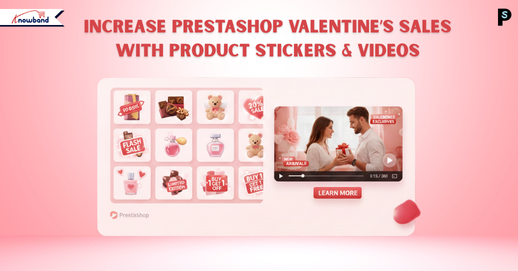
Now you can make your products impossible to ignore. We have highlighted perfect Valentine’s Day marketing for PrestaShop. This PrestaShop Product Sticker & Label Module paired with a PrestaShop Video Manager Module can completely change how people interact with your store. These modules capture attention right away, speed up purchasing decisions, and convert more window shoppers into actual buyers. If you want to know how to boost Valentine’s Day sales in PrestaShop, then this article is for you.
Visual Elements Win Every Time During Valentine’s Shopping
Nowadays, nobody’s reading detailed product descriptions during a Valentine’s sale. People are scrolling fast, scanning images, and making instant judgments about what’s worth clicking on. Valentine’s customers move even quicker because they’re buying with their hearts and usually dealing with a tight deadline.
This is exactly why visual shortcuts matter so much. When someone sees a sticker saying “Valentine Special” or “Perfect Gift,” they instantly understand the product fits what they need.
Product videos push this even further. The Knowband PrestaShop Video Manager Module allows you to display videos through floating widgets or carousel formats. Videos show products in real life. Customers see how something actually looks, moves, and functions. Furthermore, this kills any doubts, especially when buying gifts where nobody wants to risk picking something disappointing.
A PrestaShop Product Sticker & Label Module isn’t just decorative, but it actively changes buying behaviour in specific ways.
First off, it makes Valentine’s items immediately obvious. Labels reading “Gift for Your Loved One” or “Valentine Exclusive” tie products to the holiday instantly, without customers having to think about it.
Second, these PrestaShop product labels build urgency. Time-based labels like “Ends February 14” or “Last Chance” pressure people to buy right now instead of “maybe tomorrow” (which usually means never). When shoppers think they might lose out, they move faster.
And finally, trust labels like “Best Seller” or “Customer Favourite” reassure shoppers, which is huge for gift purchases. Moreover, this Prestashop Product Stickers for Valentines allows you to include or exclude products as per your needs.
Opencart Product Sticker & Label Extension
Increase the Visibility of Products on Your Store with Knowband
The PrestaShop Video Manager Module solves a massive problem in online retail, helping customers really understand what they’re getting. The best approach for this is video marketing for e-commerce. Videos show products in ways static images never could.
When someone watches a video of jewellery sparkling in different light, or sees how a gift package looks when unwrapped, it creates a real emotional response. Videos tap directly into that by making shopping feel more valuable and personal.
The floating widget and carousel of Prestashop Video Manager options keep videos without getting in the way. Shoppers can watch product demos right on category pages or product pages, even on the home pages. Furthermore, these strategies improve the user experience of PrestaShop.
Prestashop Video Manager With Product Stickers Module
Both modules include automation features that are lifesavers during these peak sales and promotional periods. The PrestaShop Product Sticker & Label Module allowsyou build unlimited stickers and apply them using automatic rules, things like price thresholds, stock quantities, specific product categories, or particular dates.
The PrestaShop Video Manager Module works similarly for video management across your whole catalogue. Using this PrestaShop video module, you upload videos one time, assign them to products or categories, and control exactly where and how they appear using the widgets throughout your site.
Opencart VideoMate: Your Store’s Favourite Video Manager
Increase the Visibility of Products on Your Store with Knowband
So if you want to boost conversions ecommerce store, then keep sticker messages brief and clear. Don’t pile multiple labels on every product; it creates visual chaos and confuses shoppers. Furthermore, make certain stickers are legible and aren’t covering crucial product features.
With videos, shorter is better as customers want quick demos, not full-length documentaries. Focus on highlighting the product’s key benefits and showing how it delivers value or creates an emotional moment.
Wrapping It Up
Valentine’s shoppers need to spot great deals instantly, or they’re gone. Using a PrestaShop Product Sticker & Label Module alongside the PrestaShop Video Manager Module arms you with the visual punch needed to grab attention, establish trust, and turn more visitors into paying customers. You’re not rebuilding your entire website; you’re simply making your strongest offers visible exactly where they shop.
If you’re serious about maximising Valentine’s traffic this year, these prestashop plugins are some of the smartest investments you can make for your PrestaShop store.
Choosing the right platform is one of the most important decisions when you are starting an online store. With so many options available, it can become tiring to decide which platform best fits your business needs. If you are looking best platform to start an online store, then you are at right place. Each platform offers different benefits and flaws in terms of usability, scalability, cost, and features. We at Knowband already manage these stores as we provide the service for these platforms. This will help you in choosing the right platform for your store.
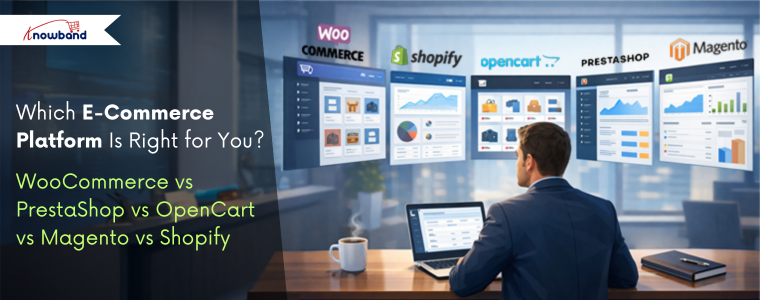
This article provides a practical comparison of five popular e-commerce platforms, WooCommerce, PrestaShop, OpenCart, Magento, and Shopify, based on key factors such as ease of use, performance, customisation, scalability, and overall cost. You will also learn the e-commerce platform pros and cons.
Additionally, understanding these helps your business select open source ecommerce platforms that aligns with your business goals.
Key Factors to Consider When Choosing an E-Commerce Platform
Before comparing platforms, as a store owner, you need to understand the core factors that will play a crucial role.:
Ease of Use: If you are technical or non-technical, you first need it to be simple to set up and manage products, your entire catalogue and orders.
Customisation & Flexibility: Platform should have the ability to modify design and functionality according to your business needs.
Performance & Speed: Additionally, there is a major factor that is how well the platform handles traffic and large catalogues
Scalability: Also, scalability is the factor your platform can grow with the business
Cost: Cost is one of the most important factors as it should be affordable not too expensive.
WooCommerce is one of the most used e-commerce platforms and works as a plugin for WordPress. Furthermore, its popularity makes it unique due to its simplicity and flexibility, especially for businesses already familiar with WordPress.
Key Feature of the WooCommerce
Easy to use, especially for WordPress users
Massive plugins
Strong SEO capabilities
Highly recommended for content-driven stores and blogs
Limitations of WooCommerce
Performance can be reduced with large catalogues without optimization
Requires paid plugins for advanced features like wishlist
Heavily dependent on hosting quality
Knowband recommends it as the best e-commerce platform for small businesses, medium-sized businesses, bloggers, and entrepreneurs looking for an easy way into online selling.
PrestaShop: Feature-Rich and International-Friendly
PrestaShop is an open-source platform designed specifically for e-commerce. This is the best e-commerce platform for startups. Moreover, it is particularly popular in Europe and offers strong built-in functionality. Furthermore, unlike wordpress it offers the basic functionalities, wishlist, abandoned cart, designs and many more.
Key Highlights of Prestashop
Support for multiple currencies and languages
Support many advanced taxes and shipping options
Strong back-office dashboard
Handles large catalogues efficiently
Limitations of the Prestashop
Requires moderate technical knowledge
Paid modules can increase costs
Smaller extension marketplace than WooCommerce
We recommend it to international sellers and businesses that need advanced e-commerce features without heavy reliance on plugins.
Prestashop Plugins
Explore all the plugins that will make your prestashop store more professional
OpenCart is known for its simplicity and speed. Additionally, it provides essential e-commerce features without unnecessary complexity. This OpenCart platform also supports built-in tools for coupons, discounts, and special prices like prestashop
Strengths of the Opencart
Lightweight and fast
Simple admin interface
Built-in multi-store functionality
Low hosting requirements
Drawback of the Opencart Platform
Smaller extension ecosystem
Limited advanced features
Smaller community compared to competitors
Knowband recommends it to small businesses with straightforward needs and limited budgets that prioritize performance.
Opencart Extension
Give the advanced features to your Opencart store Using Popular Extensions
Magento is what the big players use when they need a serious, robust, enterprise-grade solution. Here, Big player refers to the major enterprises and retailers that have a large volume of products through their stores. This Magento Platform is best ecommerce platform for large businesses.
Key Highlights of Magento:
Magento scales to handle millions of products and transactions
Inventory and customer management tools
Customisation is easy in Magento
Built to handle large product catalogues
The Downsides of Magento are:
Learning Magento is a bit difficult for store owners
Professional developers are required
Hosting and keeping it running will cost you high money
Magento Plugins
Let Knowband Manage Your Magento Plugins, while you only work on selling.
Shopify takes a totally different approach than other platforms. They handles everything for you unlike others. It’s fully hosted, which means they deal with the technical things while you focus on selling
Key Features of the Shopify
You can easily have a store there
Shopify handles the hosting, security, and performance. The store owner only focuses on selling.
Customer support is highly active
A variety of plugins on the app store when you need extra features
Perfect for dropshipping or selling across multiple channels (social media, in-person, etc.)
The Downsides:
Monthly fees that add up over time
Transaction fees on certain plans (unless you use Shopify Payments)
Less control over the backend compared to platforms you host yourself
Shopify Custom Development
Let Knowband handle your Shopify store seamlessly, so you can concentrate on scaling your store and brand. Contact Us Now
Pricing Plans of all the Platforms: WooCommerce, Prestashop, Opencart, Magento and Shopify
Platform
Initial Cost
Hosting Cost
Theme & Extension Cost
Development & Maintenance
Overall Cost Suitability
WooCommerce
Free (WordPress plugin)
$5–$30/month (shared to managed hosting)
Free to $200+ (plugins & themes)
Low to medium, increases with customization
Best for small to medium businesses
PrestaShop
Free (open-source)
$10–$40/month
$50–$500 (modules & themes)
Medium, often requires developer support
Suitable for growing businesses
OpenCart
Free (open-source)
$5–$25/month
$20–$300 (extensions & themes)
Low to medium, limited for complex needs
Ideal for small businesses
Magento Open Source
Free (software only)
$50–$200+/month (cloud or dedicated hosting)
$100–$1,000+ (extensions & themes)
High due to complexity
Best for large or fast-growing stores
Magento Commerce (Adobe)
Paid license
Included or enterprise-level hosting
Often custom-built
Very high (enterprise development)
Enterprise-level businesses
Shopify
Monthly subscription
Included
$0–$350 (themes) + paid apps
Low, fully managed platform
Best for beginners & fast launches
The conclusion is that there’s no magic “best platform” that works for everyone. It really comes down to what you need for your specific situation.
WooCommerce is fine when you want flexibility, and you’re already comfortable with WordPress. PrestaShop has built-in features that international sellers actually need. OpenCart keeps things simple and fast. Magento gives enterprise-level businesses the scalability they require. And Shopify just makes everything easy if you want a managed solution.
Your decision should come down factors about cost, your technical skill and your business size. Moreover, you can also switch platforms eventually as your business evolves.
About Knowband
Knowband is a sub-company of Velocity Software Solutions Pvt. Ltd., a leading technology company specialising in e-commerce development and digital solutions. Knowband provides a wide range of ready-to-use plugins, extensions, and custom development services for popular eCommerce platforms like prestashop, WooCommerce, Opencart, Shopify and Magento.
With a strong focus on innovation and performance, Knowband helps online businesses enhance functionality, improve user experience, and increase conversions.