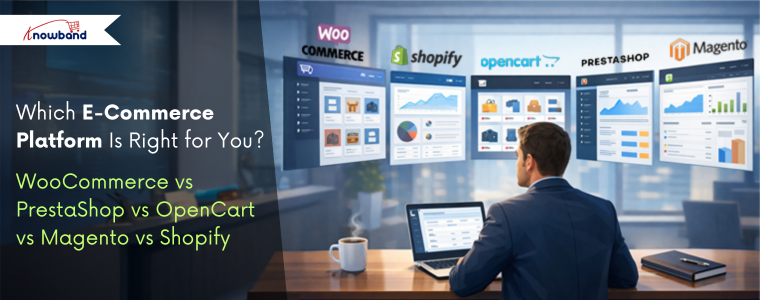
WooCommerce vs PrestaShop vs OpenCart vs Magento vs Shopify

Choosing the right platform is one of the most important decisions when you are starting an online store. With so many options available, it can become tiring to decide which platform best fits your business needs.  If you are looking best platform to start an online store, then you are at right place. Each platform offers different benefits and flaws in terms of usability, scalability, cost, and features. We at Knowband already manage these stores as we provide the service for these platforms. This will help you in choosing the right platform for your store.

This article provides a practical comparison of five popular e-commerce platforms, WooCommerce, PrestaShop, OpenCart, Magento, and Shopify, based on key factors such as ease of use, performance, customisation, scalability, and overall cost. You will also learn the e-commerce platform pros and cons. 

Additionally, understanding these helps your business select open source ecommerce platforms that aligns with your business goals.

Key Factors to Consider When Choosing an E-Commerce Platform

Before comparing platforms, as a store owner, you need to understand the core factors that will play a crucial role.:

  • Ease of Use: If you are technical or non-technical, you first need it to be simple to set up and manage products, your entire catalogue and orders.
  • Customisation & Flexibility: Platform should have the ability to modify design and functionality according to your business needs.
  • Performance & Speed: Additionally, there is a major factor that is how well the platform handles traffic and large catalogues
  • Scalability: Also, scalability is the factor your platform can grow with the business
  • Cost: Cost is one of the most important factors as it should be affordable not too expensive.

WooCommerce: Ideal for WordPress-Based Stores

WooCommerce is one of the most used e-commerce platforms and works as a plugin for WordPress. Furthermore, its popularity makes it unique due to its simplicity and flexibility, especially for businesses already familiar with WordPress.

Key Feature  of the WooCommerce

  • Easy to use, especially for WordPress users
  • Massive plugins 
  • Strong SEO capabilities
  • Highly recommended for content-driven stores and blogs

Limitations of WooCommerce

  • Performance can be reduced with large catalogues without optimization
  • Requires paid plugins for advanced features like wishlist 
  • Heavily dependent on hosting quality

Knowband recommends it as the best e-commerce platform for small businesses, medium-sized businesses, bloggers, and entrepreneurs looking for an easy way into online selling.

PrestaShop: Feature-Rich and International-Friendly

PrestaShop is an open-source platform designed specifically for e-commerce. This is the best e-commerce platform for startups. Moreover, it is particularly popular in Europe and offers strong built-in functionality. Furthermore, unlike wordpress it offers the basic functionalities, wishlist, abandoned cart, designs and many more.

Key Highlights of Prestashop

  • Support for multiple currencies and languages
  • Support many advanced taxes and shipping options
  • Strong back-office dashboard
  • Handles large catalogues efficiently

Limitations of the Prestashop

  • Requires moderate technical knowledge
  • Paid modules can increase costs
  • Smaller extension marketplace than WooCommerce

We recommend it to international sellers and businesses that need advanced e-commerce features without heavy reliance on plugins.

Prestashop Plugins

Explore all the plugins that will make your prestashop store more professional


Install Now

OpenCart: Lightweight and Performance-Focused

OpenCart is known for its simplicity and speed.  Additionally, it provides essential e-commerce features without unnecessary complexity. This OpenCart platform also supports built-in tools for coupons, discounts, and special prices like prestashop

Strengths of the Opencart

  • Lightweight and fast
  • Simple admin interface
  • Built-in multi-store functionality
  • Low hosting requirements

Drawback of the Opencart Platform

  • Smaller extension ecosystem
  • Limited advanced features
  • Smaller community compared to competitors

Knowband recommends it to small businesses with straightforward needs and limited budgets that prioritize performance.
Opencart Extension

Give the advanced features to your Opencart store Using Popular Extensions


Install Now

Magento: Enterprise-Level Power

Magento is what the big players use when they need a serious, robust, enterprise-grade solution. Here, Big player refers to the major enterprises and retailers that have a large volume of products through their stores. This Magento Platform is best ecommerce platform for large businesses.

Key Highlights of Magento:

  • Magento scales to handle millions of products and transactions
  • Inventory and customer management tools 
  • Customisation is easy in Magento
  • Built to handle large product catalogues 

The Downsides of Magento are:

  • Learning Magento is a bit difficult for store owners
  • Professional developers are required
  • Hosting and keeping it running will cost you high money

Magento Plugins

Let Knowband Manage Your Magento Plugins, while you only work on selling.


Contact Us Now

Shopify: Everything is handled by them

Shopify takes a totally different approach than other platforms. They handles everything for you unlike others. It’s fully hosted, which means they deal with the technical things while you focus on selling

Key Features of the Shopify

  • You can easily have a store there
  • Shopify handles the hosting, security, and performance. The store owner only focuses on selling.
  • Customer support is highly active
  • A variety of plugins on the app store when you need extra features
  • Perfect for dropshipping or selling across multiple channels (social media, in-person, etc.)

The Downsides:

  • Monthly fees that add up over time
  • Transaction fees on certain plans (unless you use Shopify Payments)
  • Less control over the backend compared to platforms you host yourself

Shopify Custom Development

Let Knowband handle your Shopify store seamlessly, so you can concentrate on scaling your store and brand.
Contact Us Now

Pricing Plans of all the Platforms: WooCommerce, Prestashop, Opencart, Magento and Shopify

Platform Initial Cost Hosting Cost Theme & Extension Cost Development & Maintenance Overall Cost Suitability
WooCommerce Free (WordPress plugin) $5–$30/month (shared to managed hosting) Free to $200+ (plugins & themes) Low to medium, increases with customization Best for small to medium businesses
PrestaShop Free (open-source) $10–$40/month $50–$500 (modules & themes) Medium, often requires developer support Suitable for growing businesses
OpenCart Free (open-source) $5–$25/month $20–$300 (extensions & themes) Low to medium, limited for complex needs Ideal for small businesses
Magento Open Source Free (software only) $50–$200+/month (cloud or dedicated hosting) $100–$1,000+ (extensions & themes) High due to complexity Best for large or fast-growing stores
Magento Commerce (Adobe) Paid license Included or enterprise-level hosting Often custom-built Very high (enterprise development) Enterprise-level businesses
Shopify Monthly subscription Included $0–$350 (themes) + paid apps Low, fully managed platform Best for beginners & fast launches


The conclusion is that there’s no magic “best platform” that works for everyone. It really comes down to what you need for your specific situation.

WooCommerce is fine when you want flexibility, and you’re already comfortable with WordPress. PrestaShop has built-in features that international sellers actually need. OpenCart keeps things simple and fast. Magento gives enterprise-level businesses the scalability they require. And Shopify just makes everything easy if you want a managed solution.

Your decision should come down factors about cost, your technical skill and your business size. Moreover, you can also switch platforms eventually as your business evolves. 

About Knowband

Knowband is a sub-company of Velocity Software Solutions Pvt. Ltd., a leading technology company specialising in e-commerce development and digital solutions. Knowband provides a wide range of ready-to-use plugins, extensions, and custom development services for popular eCommerce platforms like prestashop, WooCommerce, Opencart, Shopify and Magento.

With a strong focus on innovation and performance, Knowband helps online businesses enhance functionality, improve user experience, and increase conversions.

New Year 2026: Unlock the Key to eCommerce Store Growth Using the Knowband Plugins

As we step into the New Year 2026, the team at Knowband extends warm greetings to all online store owners, e-commerce professionals, and enthusiasts. A new year brings with it a sense of renewal and fresh opportunities, making it the perfect moment to reflect on achievements, learn from challenges, and set meaningful goals for the months ahead. The world of online commerce is constantly evolving, with customer expectations, technology, and shopping habits changing faster than ever. For online store owners, staying informed and adaptable is key to sustaining growth and maintaining a competitive edge.In this blog, we aim to provide insights into the key e-commerce trends of 2026 and share practical tips that online stores can implement to stay ahead. These strategies are designed to help businesses not only meet but exceed customer expectations, streamline operations, and prepare for a productive year ahead.

Below are some thoughtful success tips that online stores can consider as they plan for growth and sustainability in 2026.

Improve User Experience for Better Engagement

First of all, a smooth user experience plays a major role in online success. When customers easily browse products and complete their purchases, they are more likely to stay in the store. Complicated checkout processes often lead to frustration and lost sales. One Page Checkout simplify the checkout process by reducing steps and making it faster. As a result, customers enjoy a better shopping experience and store owners see improved conversions.

Reduce Cart Abandonment with Smart Strategies

Along with a better user experience, reducing cart abandonment should be a top priority. Many customers leave their carts without completing purchases due to distractions or doubts. Knowband’s Abandoned Cart Reminder plugins help recover these lost sales by sending timely emails or notifications. Furthermore, these reminders encourage customers to return and complete their orders, which helps increase revenue without extra marketing effort.

Build Customer Trust with Social Proof

In addition to convenience, trust is an important factor in online shopping. Customers often rely on reviews, ratings, and easy login options before making a purchase. Knowband plugins that support social login and customer feedback help build trust and confidence. Moreover, when customers see positive reviews and can log in quickly, they feel more comfortable completing their purchases.

Focus on Mobile Shopping Growth

At the same time, mobile shopping continues to grow rapidly. More customers prefer using smartphones to shop online, which makes mobile optimisation essential. We at Knowband help store owners to create Android and iOS apps easily. These apps also supports the all high level features that are necessary, helping businesses stay connected with customers and promote offers effectively.

Want to launch your mobile app?

Discover the Mobile App Builder and get your app live in just one week!
Build, customise, and launch your mobile store effortlessly

Integrate Today!

Personalise the Customer Experience

Moreover, personalisation helps stores stand out in a competitive market. Customers appreciate personalised offers and messages that match their interests. Knowband plugins enable store owners to deliver targeted promotions and relevant content based on customer behaviour. This not only improves customer satisfaction but also encourages repeat purchases.

Data-Driven Decision Making

Data will continue to guide e-commerce strategies in 2026. Store owners will rely on insights from customer behaviour, sales patterns, and performance metrics to improve their stores.

Using data to understand what works and what doesn’t will help businesses make smarter decisions and adapt quickly to changes.

Strengthen Customer Retention Strategies

Finally, retaining existing customers is key to long-term success. Loyal customers are more likely to return and make repeat purchases. Knowband plugins support better post-purchase communication and ongoing engagement, helping businesses build long-lasting relationships with their customers.

We at Knowband

To support online stores in achieving their goals in 2026, we offer a wide variety of plugins for popular platforms, including PrestaShop, OpenCart, Shopify, WooCommerce, and Magento, helping merchants add advanced features, streamline operations, and adapt to the evolving e-commerce landscape with ease.

Additionally,  we also provide custom development tailored to the unique needs of each business. Our team of experienced developers and e-commerce experts works closely with store owners to understand their challenges and implement effective strategies that enhance performance and user experience. 

Conclusion

To sum up, success in the New Year 2026 will depend on providing a smooth and enjoyable shopping experience, adopting smart strategies, and focusing on customer satisfaction. By paying attention to trends, optimizing operations, and continuously improving the store experience, online businesses can set themselves up for steady growth throughout the year. For expert guidance or support, feel free to reach out to us at support@knowband.com. Wishing everyone a prosperous New Year 2026!

Gear Up for 2026 with the Next-Gen Knowband AI Content Generator Plugin

 The Knowband AI Content Generator and Translator is a next-generation plugin built to empower e-commerce merchants with smart, automated AI content creation and translations. Designed with cutting-edge AI capabilities,  this content generator integrates seamlessly with Claude AI, ChatGPT AI, DeepSeek AI, and Gemini AI to deliver exceptional content quality across your entire online store.

Whether you need SEO-optimised product descriptions, engaging titles, category content, or precisely translated product details, this advanced AI Module ensures accuracy, creativity, and efficiency, making it an essential need for every PrestaShop merchant in 2026 and beyond.

It is interesting that this AI Content Generator and Translator is available for Prestashop, Opencart & WooCommerce. So no matter which platform you are using but this can be a perfect plugin for your module’s wardrobe.

Key Features of Prestashop AI Content Generator & Translator 

The Prestashop AI Content Generator & Translator stands out for its highly automated, powerful features.

AI-Powered Content Creation

By leveraging industry-leading AI engines, the PrestaShop Content Generator Addon creates high-quality, SEO-friendly content for catalogues. These catalogues include the products, categories as well as CMS pages.

Furthermore, the module generates the product descriptions, meta titles, meta descriptions and translates all the generated content as well as existing content, including product titles.

This ensures that every piece of content your store publishes maintains authenticity, structure, and SEO relevance, while significantly reducing manual writing time.

Advanced Multilingual Translation

If your store has more than one language, even 10 or 20.  The Opencart AI Content Generator can now translate the content into all languages.

Moreover, you get to choose the language in which you want to translate the content.

Popular & Powerful AI Engines Combination

With seamless support for Claude, DeepSeek, Gemini, and ChatGPT AI  models, it exhibits variety to select. Additionally, Store owners just need the APIs for each AI Model to enable the functionality of the WooCommerce AI Content Generator & Translator Plugin.

The Knowband Opencart AI Seo Powered Extension allows store owners to generate high-quality content almost instantly, boosting productivity and ensuring every product detail is clear to customers clearly and effectively. 

Backed by smooth API integration with Claude AI API, Gemini AI API, DeepSeek API, and ChatGPT API, merchants enjoy an uninterrupted and hassle-free workflow.

Selection of Engines within an AI Model

Apart from these 4 AI Engines, we also give the option to select their sub-engines, in which merchants can choose from a collection of AI engines, including:

  1. ChatGPT (GPT-3.5, GPT-4.0)
  2. DeepSeek (Chat, Reasoner)
  3. Claude (Haiku 3, Haiku 3.5, Sonnet 3.5 Old, Sonnet 3.5 New)
  4. Gemini (1.5 Pro, 1.5 Flash, Flash-8B, 2.0 Flash, 2.0 Flash Lite Preview)

Bulk Content Generation Support

We have recently released the new update, which includes the CSV File content Generation, in which you can generate & translate the content for bulk. You just need to add the product ID and map the 1 and 0 to the prompt column in your CSV File. You can read our documentation of the AI Content Generator & Translator for more details.

Looking for an AI Assistant for your store? Then wait,

Meet the PrestaShop AI ChatBot Module, your store’s new 24/7 sales assistant!

This powerful chatbot instantly answers customer questions, guides shoppers to the right products, and increases conversions without any effort.

Integrate Today!

Individual Content Generation

The Opencart AI Content Generation & Translator Extension now allows you to generate the content for an individual product or category, or any cms page.

prompts on individual pages. So it can be a game-changer for the store owners who have unique products and want to generate content for individual.

What’s more is that Knowband also provide additional prompt options in the individual pages, in which store owners can add an extra or additional prompt for a product.

Customizable Prompts

We provide the separated prompt for each option, like Generate Product Description, Translate Category Meta titles and many more. So knowband provides a separate prompt for each option for Products, category and CMS Pages, which can be easily edited by the store owners.

Conclusion

The Knowband PrestaShop AI Content Generator and Translator Addon is more than just an add-on; it’s a powerful AI companion for modern eCommerce stores. 

The Artificial Content Generator provides multi-model AI support, seamless translation, bulk automation, and SEO-optimised content generation. Therefore, Knowband delivers a comprehensive AI strategy that boosts productivity, global reach, and overall store performance.

Whether you’re preparing for the demands of 2026 or aiming to scale your operations today, this AI-powered module equips your PrestaShop store with all the tools needed to stand out in a competitive digital marketplace.

Must Read

The New PrestaShop AI Chatbot Addon: Simple, Fast, and Smarter Customer Support for Every Store

Discover how the startup OrderFast launched its full-featured mobile app in only one week with the WooCommerce Mobile App Builder


Google Play Policy & API Updates Effective August 31, 2025: What Developers Need to Know

Google Play has announced a comprehensive set of policies and API updates that will come into effect on August 31, 2025. Importantly, these changes are part of Google’s continuous efforts to strengthen user security, improve app quality, and ensure consistency across its ecosystem.

For developers and businesses with apps on the Play Store, these updates are not optional. Furthermore, failing to comply with the new requirements could result in apps being removed from the Play Store, preventing new users from discovering them and limiting access for existing users.

In this article, we are providing a comprehensive breakdown of the new policies, their technical implications, and how developers can prepare.

Target API Level Requirements

First and foremost, one of the most critical changes in this update revolves around target API levels.

New Apps & Updates: Starting August 31, 2025, all new apps and app updates submitted to the Play Store must target Android 15 (API level 35) or higher. Additionally, this ensures that apps leverage the latest security features and performance optimizations provided by the Android operating system.

Existing Apps: Meanwhile, apps already published on the Play Store will need to target at least Android 14 (API level 34) to remain visible to users with newer devices. Consequently, apps that fail to meet this requirement may remain installed for existing users but will no longer be available for download by new users.

Extension Option: Fortunately, Google is offering a short grace period. Developers can request an extension until November 1, 2025, through the Play Console. However, this should be treated as a backup option rather than a primary strategy.

Why this policy matters to your mobile app

Essentially, apps targeting outdated API levels miss out on the latest security patches, privacy controls, and performance improvements. Therefore, this requirement ensures that all active apps remain compatible with modern devices and meet user expectations.

Play Billing Library

In addition to API requirements, another key change relates to in-app purchases and subscriptions.

All new apps and app updates must now use Play Billing Library version 7 or newer. Notably, this is a significant update as it impacts how developers handle in-app purchases (IAPs), subscriptions, refunds, and payment flows.

Moreover, Google emphasises this requirement to improve transaction security, provide a consistent purchase experience, and reduce fraudulent activities.

Similar to the API level requirement, developers may request an extension until November 1, 2025, to migrate to the new library.

SDK & Development Tools

To ensure a smooth transition, Google strongly recommends developers use the latest Android SDK and associated development tools.

Specifically, the SDK Upgrade Assistant in Android Studio helps developers identify outdated dependencies, upgrade API levels, and resolve compatibility issues.

As a result, this reduces manual effort, minimises migration errors, and ensures that apps take advantage of new frameworks, improved APIs, and enhanced security controls.

Ultimately, staying updated with the Android SDK isn’t just about compliance; it’s about future-proofing your app. Apps built on outdated SDKs may struggle with compatibility on new devices, leading to crashes and poor reviews.

Scoped Storage & File Access

Meanwhile, Google introduced Scoped Storage in Android 11, and by 2025, it will become an enforced standard.

Moving forward, apps will no longer have broad access to external storage. Instead, they must:

  • Store files in app-specific directories
  • Use the MediaStore API for media files
  • Leverage the Storage Access Framework (SAF) when users need to select specific files

Impact on developers: Consequently, apps that still rely on legacy storage permissions may face rejection or functionality issues on Android 15. Therefore, migrating to Scoped Storage ensures smoother performance, stronger security, and better user trust.

Deprecated APIs

Furthermore, Google has clarified that apps relying on deprecated or outdated APIs may face rejection during Play Store review.

Essentially, deprecated APIs are those that are no longer recommended because newer, more secure alternatives exist.

As a result, continuing to use them increases the risk of crashes, security vulnerabilities, and poor performance on modern devices.

News and Magazines Apps

If your app falls under the News and Magazines category, there’s an extra requirement you can’t afford to miss.

Specifically, developers must submit a special declaration in the Play Console.

Notably, the deadline for this was August 27, 2025, slightly earlier than the general policy update.

Ultimately, this declaration ensures that apps categorised as news sources meet standards for credibility, transparency, and responsible content distribution.

How Knowband Can Help

If your store is built on PrestaShop, OpenCart, WooCommerce, or Magento 2, Knowband has you covered.

Our Mobile App Builder Module is already fully compatible with Google’s latest policy changes.

Here’s what we offer:

  • Hassle-free update process for your eCommerce app without interrupting your business operations
  • Guaranteed compliance with the new target API level requirement and all other Google Play policies
  • End-to-end support from our expert team for smooth migration, testing, and deployment
  • Proven track record of helping thousands of merchants successfully launch and maintain Google Play-compliant apps

With Knowband, you can focus on growing your business while we handle the technical compliance and optimisation for your mobile app.

Final Thoughts

In conclusion, the August 31, 2025, Google Play deadline is approaching fast, and for Android developers and eCommerce store owners, it’s a milestone that cannot be ignored. Unfortunately, missing these updates could result in app removal, loss of visibility, reduced downloads, and disruption of your business operations.

However, by acting early and adopting the right strategies, you can ensure your app stays compliant, secure, and optimised for the latest Android ecosystem.

With Knowband’s Mobile App Builder, you get a hassle-free, future-proof solution designed for PrestaShop, OpenCart, WooCommerce, and Magento 2 stores. From guaranteed Google Play compliance to delivering a seamless shopping experience for your customers, Knowband helps you stay ahead of deadlines and competition.

Don’t wait until the last minute, upgrade your store app with Knowband today and keep your business growing without interruptions!

Explore:

Step-by-Step Guide to Launch Your eCommerce Mobile App with Knowband

Today, most people shop on their phones, so making the buying experience easy and smooth is a must. With mobile commerce on the trend, having your own app can give your brand a competitive edge.

That’s where Knowband’s Mobile App Builder comes in. Whether you’re using PrestaShop, Magento, OpenCart, or WooCommerce, Knowband makes it incredibly easy to turn your online store into a sleek mobile app with no coding required.

If you’re thinking about launching your e-commerce app, here’s a step-by-step guide to walk you through the entire process.

Step 1: Choose the Right App Builder for Your Platform

First things first, go to Knowband.com and select the Prestashop Mobile App Builder module that matches your store’s platform. Whether you’re running on PrestaShop, Magento 2, OpenCart or WooCommerce, there’s a version tailored just for you.

Once you’ve purchased the module, you will receive a downloadable ZIP file along with setup instructions.

Step 2: Install the Module on Your Website

Next up, it’s time to install the module on your site, and the good news is that it’s a pretty straightforward process. 

Depending on the platform you’re using, the steps may vary slightly. If you’re using PrestaShop, you can easily upload the module right from the admin panel. 

For Magento 2 users, installation is typically done using Composer or via FTP, whichever you’re more comfortable with. 

If your store is built on OpenCart or WooCommerce, the installation is even easier; it just takes a few clicks within the extensions or plugin section of your admin dashboard.

Once the Opencart Mobile App Builder Extension is successfully installed using FTP, you’ll see the Mobile App Builder panel show up right in your backend.

 Moreover, store owners can start set to begin customising their app’s design and functionality.

Step 3: Customise the App Design and Features

Knowband gives the full control to the store owner to customise the app based on the store’s needs.

Using the Mobile App Builder module, you can easily set up banners, sliders, featured product sections, countdown timers, and more. Furthermore, you’ll also be able to tweak the theme colours, fonts, and layout, so your app matches your brand perfectly.

Everything is highly customizable, and you don’t need to write a single line of code.

Step 4: Provide App Branding Details

Once your app layout is ready and you’re happy with the design, the next step is to provide your branding details so Knowband can begin building your mobile app. Moreover, this information helps ensure that your app looks and feels exactly like your brand, consistent, professional, and personalised.

Here’s what you’ll need to share:

  • App name
  • Logo and app icon
  • Splash screen image
  • Primary theme colour
  • Your store URL
  • Firebase keys (used for enabling push notifications)
  • Developer account access ( Android & iOS)

If that list feels a bit overwhelming, don’t worry, Knowband has you covered. We provide clear, step-by-step documentation and friendly support for the WooCommerce Mobile App Builder Plugin to walk you through each requirement. Whether you’re a first-time app creator or just need a little guidance, our team is always ready to help.

Step 5: App Compilation and Delivery

After you’ve submitted all the required information, our team takes over.

We compile your mobile app for both Android and iOS and typically deliver the test builds within 4-5 working days. You’ll receive APK (for Android) and IPA (for iOS) files, which you can test on real devices before going live.

Moreover, this is a good way to review the app thoroughly and ensure everything works just as expected.

Step 6: Test Your App Thoroughly

Before launching, it’s important to test your app across multiple devices and platforms. Try out the login process, navigation, product browsing, checkout, payment gateways, push notifications, and anything else that matters to your user experience.

If you notice any issues or have last-minute customisation requests, our support team is responsive and ready to assist.

Step 7: Publish to App Stores

You can upload the APK file to your Google Play Developer Account and submit the iOS version through your Apple Developer Account using App Store Connect. If you’re unsure how to do this, Knowband guide you through the process or even handles it for you.

Step 8: Promote and Optimise Your App

Promote your mobile app on your website with banners or pop-ups, share download links on social media, and offer exclusive app-only deals to encourage downloads. Moreover, you can also use push notifications to keep users engaged and bring them back to your store regularly.

Don’t forget to monitor reviews, track analytics, and gather feedback so you can continuously improve the experience.

Final Thoughts

Launching a mobile app for your e-commerce store doesn’t have to be expensive or complicated. With Knowband’s Magento 2 Mobile App Builder Plugin, you can go from idea to live app in just a few days and provide your customers with the modern, mobile-first experience they expect.

Whether your store is on PrestaShop, OpenCart, Magento 2, or WooCommerce, we have the perfect solution to create your own mobile app based on your website or store theme. Visit opencartmobileshop.com to get started.

So why wait? Now is the perfect time to take your store mobile.

Get started today and let your store go mobile with KnowBand

AI for E-Commerce: Generate and Translate Content in a Click with Knowband

Writing and maintaining optimised content for an e-commerce store often demands significant time and effort. The AI Content Generator and Translator Module from Knowband offers a powerful solution to simplify this process.

This all-in-one module brings together the strengths of ChatGPT, Claude AI, and Gemini AI, enabling store owners to easily create and translate content with minimal effort.

Whether you’re adding new products, updating meta details, or targeting a multilingual audience, this module streamlines everything in just a few clicks. Moreover, the plugin is available for all major platforms like prestashop, opencart, Magento 2, & woocommerce.

Let’s explore how this all-in-one solution transforms content management for your online store.

Key Features of the Knowband’s PrestaShop AI Content Generator and Translator

1. Multi-AI Engine Support

The PrestaShop AI Content Generator Module smoothly connects with leading AI engines such as ChatGPT (GPT-3.5 and GPT-4), Claude AI (Haiku and Sonnet models), and Gemini AI (including 1.5 Flash, 2.0 Flash, and Pro versions).

As a result, you gain the flexibility to choose the engine and model that best aligns with your specific needs, whether you’re looking for creative flair, factual accuracy, or ultra-fast content generation.

2. Complete Content Generation

The PrestaShop AI Content Generator Module quickly creates important content for online stores, like product descriptions, meta titles, meta descriptions, and category text. Moreover, all content is well-structured, SEO-friendly, and crafted in a tone that resonates with online customers, ensuring both clarity and conversion potential.

3. Bulk Content Management

If you are managing a large store? Then no worries. The Opencart AI Bulk Content Generator Extension enables store owners to create or translate large volumes of content efficiently in a single operation. Furthermore, this saves hours of manual effort and helps you scale faster.

4. SEO Optimisation Built-In

From keyword-rich meta titles to optimised product descriptions, the WooCommerce AI Content Generator and Translator Addon ensures that your content ranks well on search engines.

5. Accurate Multilingual Translations

Most importantly, with Knowband’s Magento 2 ChatGPT AI Content Translator Plugin, store owners can effortlessly translate content into multiple languages while maintaining both accuracy and proper formatting. Moreover, this includes everything from product and category titles to descriptions, as well as meta information like titles and descriptions, ensuring your store speaks clearly and effectively to a global audience.

6. Predefined AI Prompts

The powerful & advanced AI Content Generator Module includes 14 built-in prompts for both content generation and translation. Additionally, the store owner can customise the prompt according to the way they like.

Moreover, these prompts make it easy to execute tasks based on your specific needs and desired content style or description, eliminating the need to write instructions manually.

7. User-Friendly Admin Interface

Even with complex advanced technology, the Prestashop Content Translator & Generator Addon is designed for simplicity. Moreover, store admins can operate everything from an intuitive dashboard—no coding or technical knowledge needed.

8. Activity Logs for Full Transparency

Each action performed using the WooCommerce AI Content Generator Plugin is automatically logged for tracking and transparency.

Moreover, you can review timestamps, prompt types, and content changes to keep track of all updates made via AI.

Top Benefits of Using Knowband’s AI Content Generator and Translator Module

Boosts Productivity and Focus

First and foremost, by automating repetitive content tasks, store owners and teams can redirect their time and energy toward strategic areas like marketing, customer engagement, and business development, instead of spending hours writing and translating content manually.

Ensures Brand Consistency Across Markets

In addition, the AI-generated and translated content maintains a consistent tone, style, and message across all product listings and languages. This helps your brand appear reliable, professional, and trustworthy, regardless of the target audience or region.

Reduces Dependency on Third Parties

Moreover, with AI handling both content creation and translation, there’s less need to hire external writers or translators. This not only reduces costs but also gives you greater control over output quality and turnaround time.

Accelerates Global Expansion

As a result, the built-in multilingual capabilities allow your store to easily reach and engage international customers, enabling faster entry into new markets without the usual complexities of manual localisation.

Supports Scalability

Finally, whether you’re managing 50 or 5,000 products, the module is built to handle bulk operations seamlessly. In other words, as your store grows, the module scales with you, keeping your content strategy efficient and future-proof.

Conclusion

The AI Content Generator and Translator Plugin is a must-have for any store looking to scale efficiently while maintaining high-quality content. Whether you’re managing SEO, translating for global reach, or launching new products, this single module handles it all with ease.

Whether you’re launching new products, managing hundreds of listings, or expanding into international markets, this all-in-one AI-powered addon simplifies everything. Moreover, it integrates the strengths of ChatGPT, Claude, and Gemini, giving you unmatched flexibility and control.

As a result, you save valuable time, reduce operational costs, and enhance your store’s SEO performance. In addition, accurate multilingual translations enable you to connect with a global audience while maintaining quality and brand tone.

So, why wait?
Install the Knowband AI plugins today—and let your store speak every language, brilliantly.

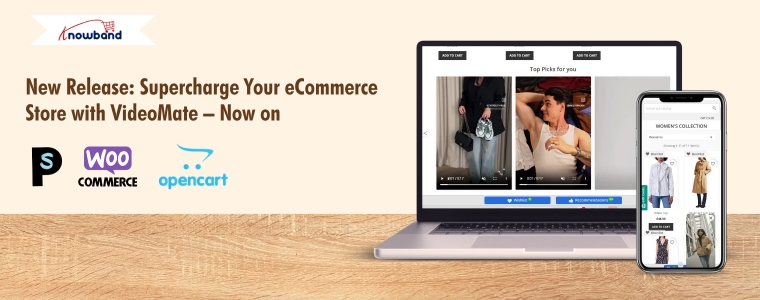
New Release: Supercharge Your eCommerce Store with VideoMate – Now on PrestaShop, WooCommerce & OpenCart

In today’s competitive eCommerce space, standing out requires more than just great products. It demands immersive, informative, and visually engaging shopping experiences. While product images serve as a basic necessity, they often fail to deliver the full picture. This is where video content becomes a game-changer—and why merchants across platforms are turning to modern video solutions to enhance the aesthetic appeal of their stores and connect with today’s visual-first customers.

Recognizing this growing demand, Knowband has launched the much-anticipated VideoMate Addon. Now available for PrestaShop, WooCommerce, and OpenCart, VideoMate is an all-in-one eCommerce video solution designed to bring your store to life with high-impact video marketing. Whether you want to display how-to guides, showcase product reviews, tell your brand story, or integrate short-form content from social platforms, this robust e-commerce video module simplifies it all.

Why Your Store Needs Video

To begin with, modern customers prefer to see products in action. The video gives them the next best thing to a hands-on experience, offering clarity, confidence, and connection that static visuals can’t match.

Studies show that customers are more likely to convert after watching a product video. That’s because video:

  • Provides better product understanding
  • Reduces hesitation and return rates
  • Builds trust through authenticity
  • Enhances emotional engagement
  • Increases time-on-site and improves SEO

Clearly, integrating video isn’t just a creative enhancement—it’s a conversion strategy.

How Video Content Influences Buyer Behavior

More specifically, video content speaks directly to the way online customers consume information. A PrestaShop Video Manager Module, for instance, lets customers see a product’s features, texture, and use cases. Similarly, a well-placed OpenCart product video extension builds credibility with visual proof, making it easier for customers to say “yes.”

Through a Prestashop Video Manager addon, you can share your brand’s mission, showcase behind-the-scenes content, or present video testimonials that make your store feel more human. In addition, short-form content such as downloaded Instagram Reels or Twitter videos can be uploaded using the PrestaShop Instagram Reels Addon or the OpenCart Twitter video plugin—further extending your reach and consistency across channels.

How Knowband’s VideoManager Addon for Prestashop, Opencart & WooCommerce Helps Your Store Stand Out

Fortunately, VideoMate takes the complexity out of video marketing. Whether you’re running PrestaShop, WooCommerce, or OpenCart, this addon allows you to upload, place, and manage videos across your store with ease. As a result, you can enhance product pages, boost homepage engagement, and even feature time-sensitive offers with floating widgets—all without technical skills.

By supporting formats such as a PrestaShop homepage video module, a PrestaShop video carousel module, and a floating video widget for both OpenCart and PrestaShop, VideoMate offers unmatched flexibility.

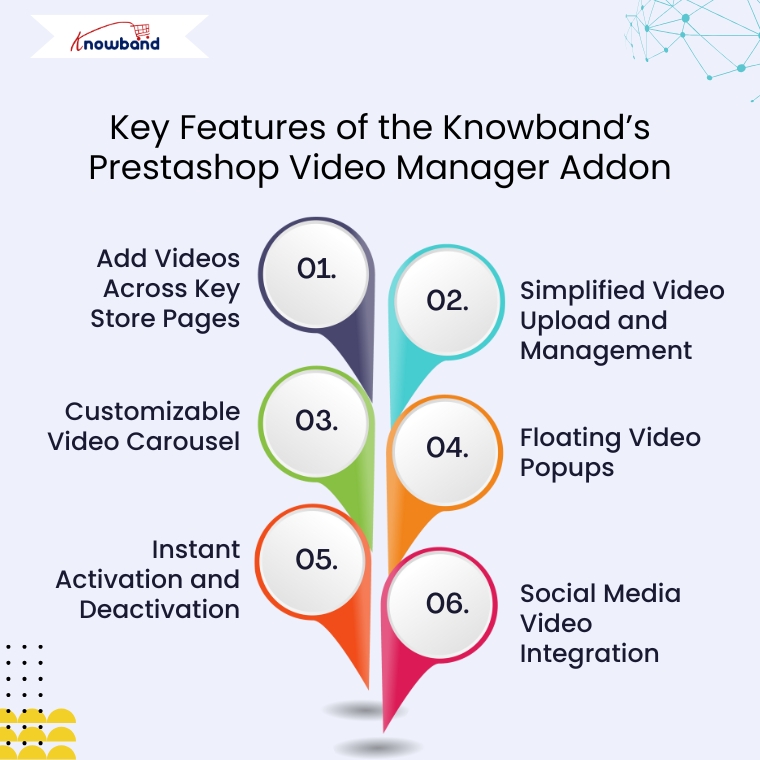
Key Features of the Knowband’s Prestashop Video Manager Addon

Add Videos Across Key Store Pages

First and foremost, VideoMate enables video placement on all crucial store pages. This includes product pages, category pages, homepages, best-seller sections, and even new arrivals. With options like the PrestaShop homepage video module and the OpenCart category video plugin, you can deliver compelling content exactly where it matters most.

Simplified Video Upload and Management

Next, the built-in video uploader for OpenCart video manager extension makes adding videos incredibly simple. Upload directly from your local system, assign content to specific pages, and edit or remove videos anytime—no coding required. This level of ease turns your store into a flexible video-powered selling machine.

Customizable Video Carousel

To further boost interactivity, the PrestaShop video carousel module and its OpenCart equivalent let you create scrollable, auto-playing video sections. Add custom headings, adjust transition timing, and control how many videos are displayed. This not only modernizes your store’s design but also improves customer engagement.

Floating Video Popups

For time-sensitive promotions or feature highlights, the floating video widget module for PrestaShop and OpenCart floating video extension provide an elegant solution. These popups can be positioned left or right, and are designed to attract attention without disrupting the browsing flow.

Instant Activation and Deactivation

For ultimate control, you can enable or disable videos directly from the admin panel. Whether you’re running seasonal campaigns, testing performance, or updating content, you have real-time flexibility without needing developer support.

Social Media Video Integration

Lastly, the PrestaShop social media video addon and OpenCart video plugin support embedded content from platforms like Instagram and Twitter. This means you can repurpose engaging short-form content—such as reels, product clips, or influencer shoutouts—right into your store. It’s a powerful way to unify your eCommerce and social marketing efforts.

Conclusion

In conclusion, integrating video into your online store is no longer just an enhancement—it’s a necessity. The VideoMate Addon equips merchants on PrestaShop, OpenCart, and WooCommerce with the trending features needed to transform static shopping experiences into engaging, video-rich journeys that build trust and boost sales.

With support for everything from product videos and video carousels to floating widgets and Instagram Reels, this addon combines ease of use with powerful functionality. Whether you’re telling your brand story, showcasing reviews, or launching new collections, VideoMate Plugin for WooCommerce helps you connect with customers in the most compelling way possible.

Explore the full potential of videos with the eCommerce Video Manager Addon because a product seen in videos is a product one step closer to being sold.

Maximise Your WooCommerce Store’s Potential with Knowband’s Advanced Analytics Solution

Building an eCommerce business demands more than attractive products and competitive prices. Furthermore, successful online retailers understand that data-driven decisions separate profitable stores from struggling ones. However, implementing comprehensive analytics can seem overwhelming for many store owners. Therefore, choosing the right solution becomes critical for long-term success. Moreover, Knowband has developed a powerful WooCommerce gtag Integrator solution that transforms complex analytics into simple, actionable insights. Additionally, this comprehensive plugin eliminates technical barriers while providing enterprise-level tracking capabilities. Consequently, store owners can focus on growing their business rather than wrestling with complicated code.

Revolutionary Features of Knowband’s Analytics Integration

Seamless Tag Management Implementation

First and foremost, Knowband’s WooCommerce Google Tag Manager Plugin revolutionizes how you handle analytics tracking. Subsequently, this unified WooCommerce GTM Plugin centralizes all your marketing tags in one intuitive dashboard. Furthermore, the Google Tag Manager for WooCommerce integration eliminates the need for manual code modifications.

Additionally, even non-technical users can implement sophisticated tracking systems effortlessly. Therefore, small business owners gain access to the same analytics capabilities used by major eCommerce brands.

Comprehensive Marketing Integration Capabilities

Similarly, the WooCommerce Google Marketing Integration feature connects your store seamlessly with major marketing platforms. Consequently, you can track campaign performance across multiple channels with unprecedented accuracy. Furthermore, the WooCommerce Google Marketing Integration Plugin provides detailed attribution data for every marketing dollar spent.

Additionally, this integration reveals which marketing channels generate the highest-quality customers. Therefore, you can optimize your advertising budget for maximum return on investment.

Advanced Event Tracking System

Meanwhile, the Custom Event Tracking WooCommerce Plugin functionality monitors every crucial customer interaction automatically. For instance, it captures product views, cart additions, and purchase completions in real-time. Moreover, the GTM WooCommerce Plugin provides granular insights into customer behavior patterns throughout the shopping journey.

Furthermore, the WooCommerce Google Event Tracker Plugin helps identify conversion bottlenecks before they impact your revenue. As a result, you can optimize your store’s performance based on actual customer data.

Next-Generation WooCommerce Google Analytics Implementation

Complete Google Analytics Integration

Furthermore, the WooCommerce Google Analytics Integration component delivers comprehensive data collection across your entire store. Subsequently, the WooCommerce Google Analytics Integration Extension ensures accurate tracking on every page and interaction. Additionally, the WooCommerce Google Analytics Integration Plugin handles complex eCommerce scenarios automatically.

Therefore, you receive detailed insights into customer demographics, shopping preferences, and behavioral patterns. Moreover, this data enables informed decisions about inventory management, pricing strategies, and marketing campaigns.

Advanced GA4 Implementation

In addition, the WooCommerce GA4 Integration brings cutting-edge analytics capabilities to your store. Similarly, the WooCommerce GA4 Integration Plugin provides enhanced tracking features unavailable in previous versions. Furthermore, the WooCommerce GA4 Integration Extension ensures your analytics remain future-proof as platforms evolve.

Consequently, you benefit from improved data accuracy, enhanced privacy controls, and machine learning insights. Additionally, GA4’s predictive capabilities help forecast customer behavior and business trends.

Enhanced Gtag Integration Features

Moreover, the WooCommerce gtag Integrator streamlines your tracking implementation without compromising site performance. Subsequently, the WooCommerce gtag Integration Plugin maintains optimal loading speeds while collecting comprehensive data. Furthermore, the WooCommerce gtag Integrator offers flexible configuration options for diverse business needs.

Therefore, you can maintain excellent user experience while gathering valuable analytics insights.

Comprehensive eCommerce Tracking Capabilities

Detailed Event Monitoring System

Additionally, WooCommerce GA4 eCommerce Events provide precise transaction tracking and revenue attribution. For instance, you can monitor purchase patterns, product performance, and customer lifetime value accurately. Furthermore, these events help identify your most profitable products and customer segments.

Granular Control Over Tracking Events

Furthermore, Knowband’s solution offers complete control over specific tracking events. Consequently, you can enable or disable monitoring based on your unique business requirements:

Customer Journey Tracking: Monitor page views to understand navigation patterns, while category views reveal popular product sections. Additionally, product detail tracking shows which items generate the most interest.

Purchase Behavior Analysis: Moreover, add-to-cart events provide purchase intent data, while cart removal tracking identifies potential obstacles. Similarly, checkout progression monitoring helps optimize your conversion funnel.

Customer Engagement Insights: Meanwhile, login and registration tracking reveals customer loyalty patterns. Similarly, discount code usage monitoring evaluates promotional campaign effectiveness.

Advanced Analytics Features: Additionally, internal search tracking captures valuable keyword data, while UTM parameter collection ensures accurate campaign attribution across all marketing channels.

Comprehensive Measurement Solutions

Furthermore, the WooCommerce gtag Integrator provides advanced analytics specifically designed for online retailers. Subsequently, you can track sophisticated metrics including customer acquisition costs, repeat purchase rates, and seasonal trends. Therefore, strategic business decisions become data-driven rather than assumption-based.

Key Benefits for WooCommerce Store Owners

Simplified Implementation Process

Most importantly, this comprehensive solution eliminates technical complexity from advanced analytics implementation. Instead of hiring expensive developers, you can deploy enterprise-level tracking yourself. Therefore, businesses of all sizes can access professional-grade analytics capabilities.

Enhanced Decision-Making Capabilities

Moreover, accurate data collection transforms how you make business decisions. As a result, you can optimize marketing campaigns, improve product offerings, and enhance customer experiences based on real performance data rather than guesswork.

Improved Marketing ROI

Additionally, comprehensive tracking identifies your most profitable marketing channels and campaigns. Hence, you can focus resources on strategies that generate the highest returns while eliminating wasteful spending on underperforming initiatives.

Simple Setup and Configuration

User-Friendly Installation Process

First, this WooCommerce gtag Integrator features straightforward installation procedures with step-by-step guidance. Additionally, intuitive configuration wizards walk you through the entire setup process. Therefore, you can start collecting valuable analytics data within minutes of installation.

Moreover, the WooCommerce No-Code Google Tag Manager Integration provides beginner-friendly instructions requiring zero technical knowledge. Furthermore, store administrators can easily access Google Tag Manager and Google Analytics consoles to retrieve necessary integration credentials.

Ongoing Support and Optimization

Moreover, regular monitoring ensures your tracking remains accurate and comprehensive. Furthermore, continuous optimization helps identify new opportunities for improvement and growth.

Conclusion

In conclusion, implementing comprehensive analytics integration is essential for modern WooCommerce store success. Therefore, investing in the right tracking solution provides long-term benefits that far exceed initial implementation costs. Moreover, the combination of simplified setup and powerful insights makes this solution invaluable for serious retailers.

Additionally, with features including automated event tracking, advanced eCommerce measurement, and seamless platform integration, this plugin addresses every aspect of store analytics. Furthermore, it provides the solid foundation necessary for data-driven growth strategies that deliver sustainable results.

Finally, whether you’re launching a new venture or scaling an existing store, comprehensive analytics integration remains crucial for understanding your customers and maximizing your eCommerce potential.

Now Live: Knowband’s AI Content Generation Plugin for WooCommerce!

Running an online store means creating lots of content. However, writing product descriptions, meta titles, and page content takes time. Fortunately, the Knowband’s WooCommerce AI Content Generator Plugin offers a simple solution. This powerful Plugin helps store owners create quality content quickly and easily.

What Is the AI Content Generator for WooCommerce?

The AI Content Generator for WooCommerce is a smart plugin that writes content for you. Instead of spending hours writing product descriptions, this Plugin does the work in minutes. Moreover, it uses advanced AI technology to create professional content that sounds natural and engaging.

Furthermore, the WooCommerce AI Generator Plugin supports multiple AI engines. This means you can choose from different AI models like ChatGPT, Claude, Gemini, and DeepSeek. As a result, you get content that fits your store’s unique style and needs.

Key Features Of WooCommerce AI Content Generator

The WooCommerce AI Content Creation Extension comes with many helpful features. First, it creates content for products, categories, and CMS pages automatically. Additionally, it generates SEO-friendly titles and descriptions that help your store rank better in search results.

Another great feature is bulk processing. The WooCommerce AI Bulk Content Generator can handle hundreds of products at once. Therefore, even large stores can update their content quickly without manual work.

The plugin also tracks all changes with detailed logs. This way, you can see what content was created and when. Consequently, managing your store’s content becomes much easier.

Multiple AI Engines for Better Results

What makes this Plugin special is its variety of AI options. The WooCommerce AI Content Generator uses Claude AI, Gemini and ChatGPT for natural-sounding content that works best for your products.

Perfect for All Types of Content

The AI Product Description Generator WooCommerce creates compelling product descriptions that sell. These descriptions highlight key features and benefits while using the right keywords. This helps in making your product highlighting to customers.

Not only products pages, the AI CMS Page Content Generator WooCommerce also genrates the content for categories as well as CMS Pages like Privacy Policy, etc. For instance, it can write About Us pages, FAQ sections, and shipping policies. Furthermore, this means your entire website can have professional content without extra effort.

Boost Your SEO Rankings

Search engine optimization (SEO) is important for the success of any online store. It helps your products appear higher in search engine results like Google, making it easier for customers to find you. The SEO Meta Title Generator in the WooCommerce AI plugin helps by creating product meta descriptions and title that include the right keywords.

These titles are not only made to rank well on search engines but are also easy for people to read and understand. This means your products are more likely to be seen, clicked on, and purchased by potential customers.

All-in-One Content Solution

The Multi-engine AI Content Generator for CMS and Products by Knowband combines everything you need in one plugin. Rather than using separate Plugins for different content types, this solution handles everything together. Moreover, this helps in time management and SEO rankings.

The plugin also supports multiple languages, which helps you reach global customers. Furthermore, it follows SEO best practices automatically, so you don’t need to be an expert to get good results.

Simple Setup and Easy Use

Setting up the plugin is straightforward, even for beginners. Once installed, you simply choose your preferred AI engine and start generating content. The user-friendly interface makes the process smooth and hassle-free.

Additionally, the bulk content generation feature allows you to create product content at scale by simply uploading a CSV file with product details. Once uploaded, the AI automatically generates titles, descriptions, and other relevant content for all listed items in one go.

This functionality is especially valuable for WooCommerce stores managing large inventories, saving hours of manual work and ensuring consistent, high-quality content across the catalog.

Benefits of WooCommerce AI Content Generator to the E-Merchants

Time-Saving: Automates content creation, freeing up countless hours for you to focus on other business tasks.

Consistent Quality: Delivers high-quality, professional content across all your product pages.

SEO-Friendly: Generates content optimized for current SEO best practices, helping improve your store’s search engine rankings.

Increased Visibility: Better rankings mean more organic traffic, helping customers find your store without relying on paid ads.

Cost-Effective: Reduces the need for hiring copywriters, cutting down on operational expenses..

Get Started Today

The WooCommerce AI content generation Plugin by Knowband make running an online store much easier. Whether you need product descriptions, meta tags, or page content, AI can help you create everything quickly and professionally.

With multiple AI engines, bulk processing, and SEO optimization built-in, these Plugins provide everything needed for successful content creation. Start using AI content generation today and transform how you manage your online store.

WooCommerce AI Content Generator Plugin– User Manual

The WooCommerce AI Content Generator Plugin is a powerful plugin designed to help WooCommerce store owners effortlessly create high-quality product content. By integrating the advanced capabilities of Claude AI, ChatGPT API, Gemini API, and DeepSeek, the plugin enables the generation of SEO-optimized product, category and CMS page descriptions, meta titles, and meta descriptions, all while maintaining a natural and authentic brand voice.

Moreover, the AI Content Generator for WooCommerce also functions as a robust, AI-powered plugin for seamless content creation across multiple languages. As a result, your store can connect with global customers and expand its reach without compromising quality or consistency.

Furthermore, Knowband’s WooCommerce AI Generator Plugin offers a variety of AI Models for content generation. Store owners can select from ChatGPT options like GPT-3.5 and GPT-4.0; Claude models such as Haiku 3, Haiku 3.5, Sonnet 3.5 (Old), and Sonnet 3.5 (New); along with Gemini variants, including Gemini 1.5 Pro, 1.5 Flash, 1.5 Flash-8b, 2.0 Flash, and 2.0 Flash – Lite Preview. In addition, DeepSeek offers both chat and coder reasoner models.

With support for bulk content generation, the plugin dramatically reduces the time and effort required for manual writing. Whether you’re creating content from scratch or updating existing product information, the WooCommerce AI Content Generator ensures accuracy, consistency, and speed.

Additionally, the WooCommerce SEO AI Content Generator plugin supports content generation for category pages and CMS pages, including About Us, FAQs, Shipping Policy, and more. This means you can create a fully optimized, content-rich WooCommerce store without needing to write manually. Whether launching a new store or updating an existing one, users can apply AI assistance to all key areas of their website.

1.0 Key Features of the WooCommerce AI Content Creation Extension

AI-Powered Content Generation
The WooCommerce Claude AI Content Generator Extension automatically creates high-quality product and category descriptions, meta titles, meta descriptions, and CMS page content by leveraging advanced AI technologies—including ChatGPT, Claude, Gemini, and DeepSeek. This ensures your entire store’s content is professional, engaging, and SEO-optimized.

Enhanced SEO Performance
All generated content follows best SEO practices, thereby improving your store’s search engine rankings and boosting visibility through strategic keyword placement and well-structured metadata.

Flexible AI Model Selection
The AI Content Generator for WooCommerce offers a wide variety of AI models for content creation. Store owners can choose from ChatGPT options like GPT-3.5 and GPT-4.0; Claude models including Haiku 3, Haiku 3.5, Sonnet 3.5 (Old), and Sonnet 3.5 (New); Gemini variants such as Gemini 1.5 Pro, 1.5 Flash, 1.5 Flash-8b, 2.0 Flash, and 2.0 Flash – Lite Preview; as well as DeepSeek Chat and Coder Reasoner.

User-Friendly Interface
Designed for ease of use, the extension provides an intuitive interface that allows store owners, regardless of technical experience, to generate professional, high-quality content quickly and effortlessly.

Bulk Processing Capabilities

Ideal for stores with large product catalogues, the WooCommerce DeepSeek AI Content Generator enables bulk content generation for multiple products simultaneously—saving both time and effort. 

Additionally, it supports bulk CSV import, allowing users to upload files and select specific entries for AI-generated content creation or updating, which offers flexible and efficient content management.

Comprehensive Activity Tracking
The plugin keeps a detailed log of all actions taken, including timestamps and summaries of changes. As a result, store owners benefit from transparency and easy tracking of content updates and modifications.

2.0 Benefits of WooCommerce AI Content Generator Plugin for E-Merchants

Time Savings
AI Product Description Generator WooCommerce quickly generates high-quality content in minutes, reducing manual writing efforts and freeing you to focus on your core business.

Improved SEO Performance
Create AI-optimized product content that follows SEO best practices to boost search engine rankings and organic traffic.

Superior Content Quality
Generate professional, engaging, and brand-consistent product descriptions that enhance your store’s credibility.

Cost Efficiency
Save on copywriting expenses by automating content creation with advanced AI technology.

Competitive Edge
Stay ahead by providing better, faster, and more accurate product information than your competitors.

Enhanced Customer Experience
Deliver clear, detailed content that helps customers make informed decisions and increases conversions.

Performance Monitoring
Track all AI-generated content changes with an activity log to review and improve your content strategy over time.

3.0. Installation Steps of the AI CMS Page Content Generator WooCommerce

Follow these simple steps to install the WooCommerce AI Content Generator Plugin on your WooCommerce site:

Step 1: Purchase the Plugin
Buy the WooCommerce AI Content Generator plugin from the Knowband store. After purchase, you will receive a zipped file containing the plugin’s source code.

Step 2: Access the WordPress Dashboard
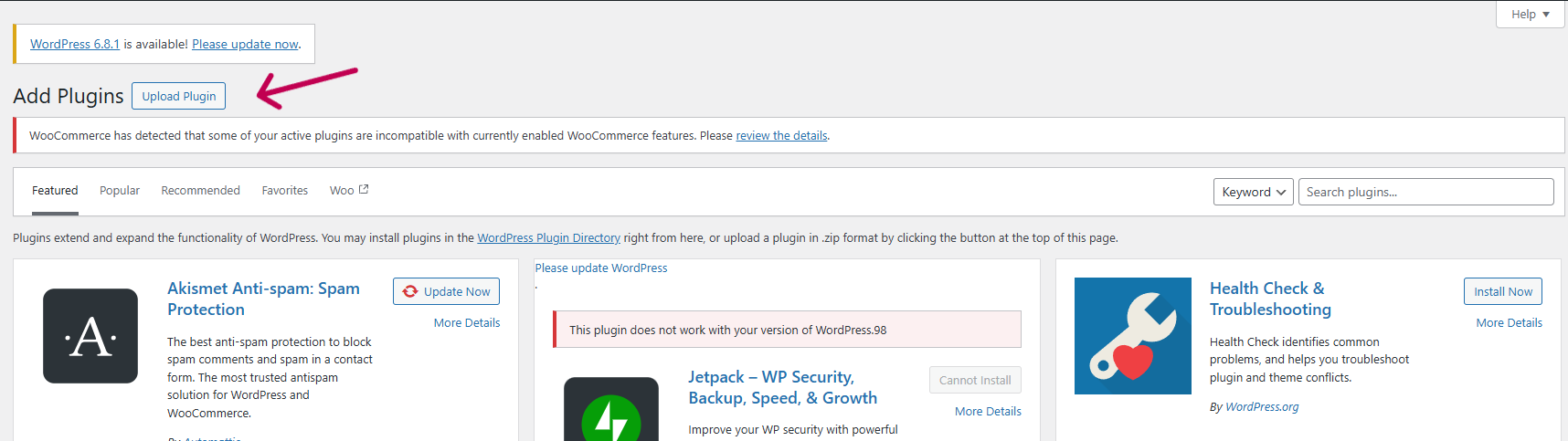
Access your WordPress admin dashboard, then navigate to Plugins → Add New.

Step 3: Upload the Plugin
On the “Add Plugins” page, click the Upload Plugin button.

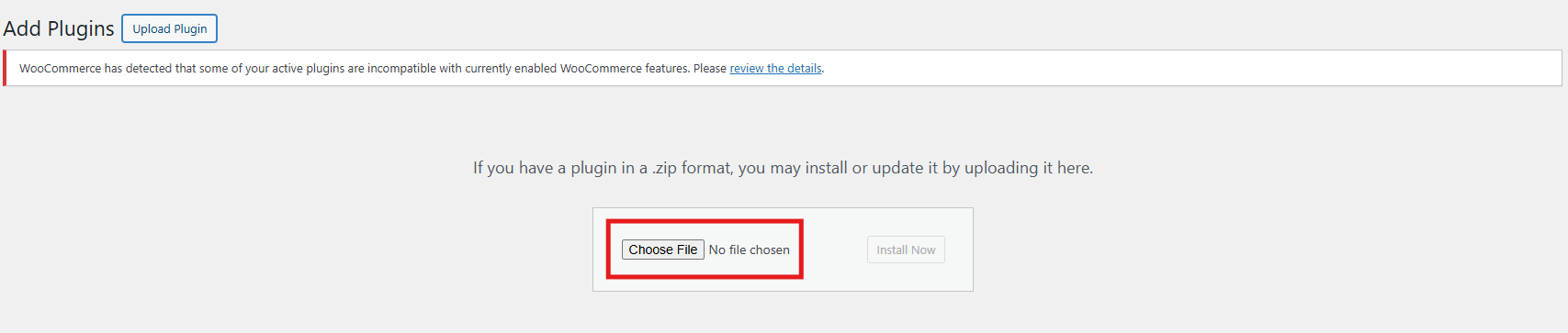
Step 4: Upload the File
Click Choose File, select the zipped plugin file you downloaded, and upload it.

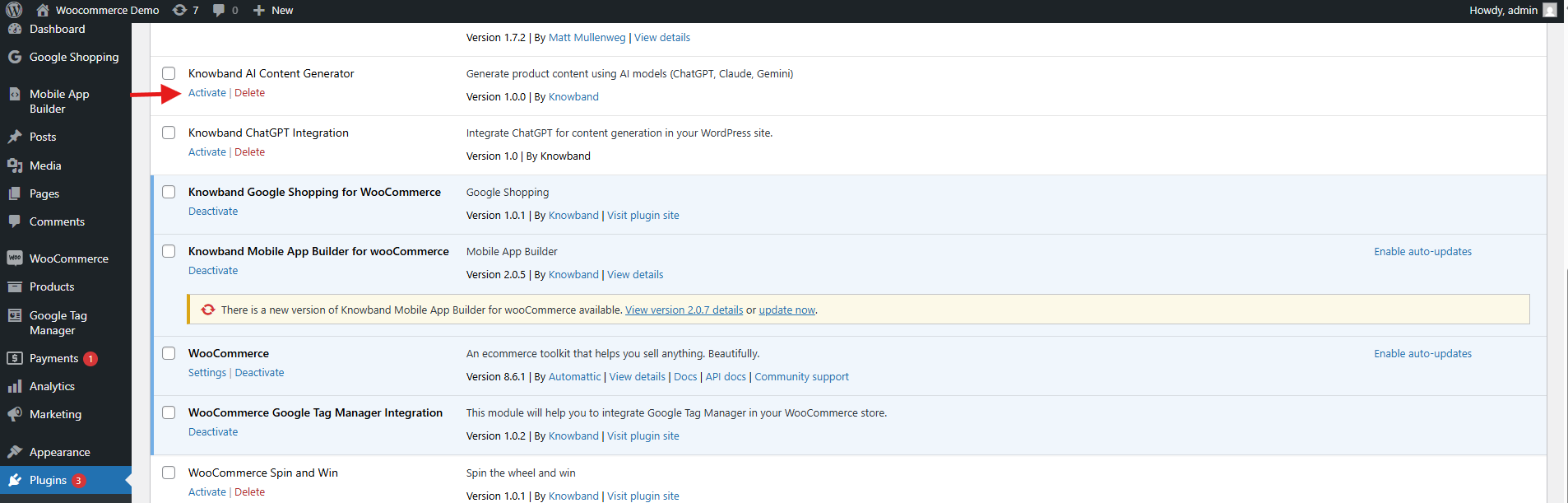
After the upload completes, click Activate Plugin. 

4.0 API Key Generation

Steps to Generate Anthropic Claude API

  1. Visit Anthropic’s website, and click “Start Building”.
  2. Sign up for an account, and go to your Dashboard.
  3. Click on the Create key.

4. Copy the key and make sure to copy it.

Steps to Generate Gemini API for AI Content Generator for WooCommerce

  1. Visit the Google AI Studio website.
  2. Create your API Keys by clicking ”Get API Key”.

3. Copy the Key for the Plugin.

Steps to Generate ChatGPT API Key for WooCommerce AI Content Generator 

  1. Go to OpenAI’s website and sign in.
  2. Create your API Key by clicking Create API Key.

3. Make sure to copy the key immediately and store it safely.

DeepSeek API Content Generation Steps

Follow these steps to generate content using the DeepSeek API within the WooCommerce AI Content Generator plugin:

Step 1: Get Your DeepSeek API Key

  1. Register or log in to your DeepSeek account at their official website.
  2. Navigate to the API section and create or copy your unique API key.

3. Copy the API key to enable the functionality of DeepSeek AI Engine in WooCommerce AI Content Generator Plugin

4. Copy the DeepSeek API key for the OpenCart AI Content Generator Extension

4.0.0 Admin Interface of Knowband’s WooCommerce AI Content Generator Plugin

4.0.1 General Settings of WooCommerce Claude AI Content Generator

The WooCommerce Bulk AI Content Generator Extension allows store admins to customize AI settings and efficiently handle large-scale content generation tasks.

Configuration Options:

  • Enable/Disable- Enable or disable the module as per your need.
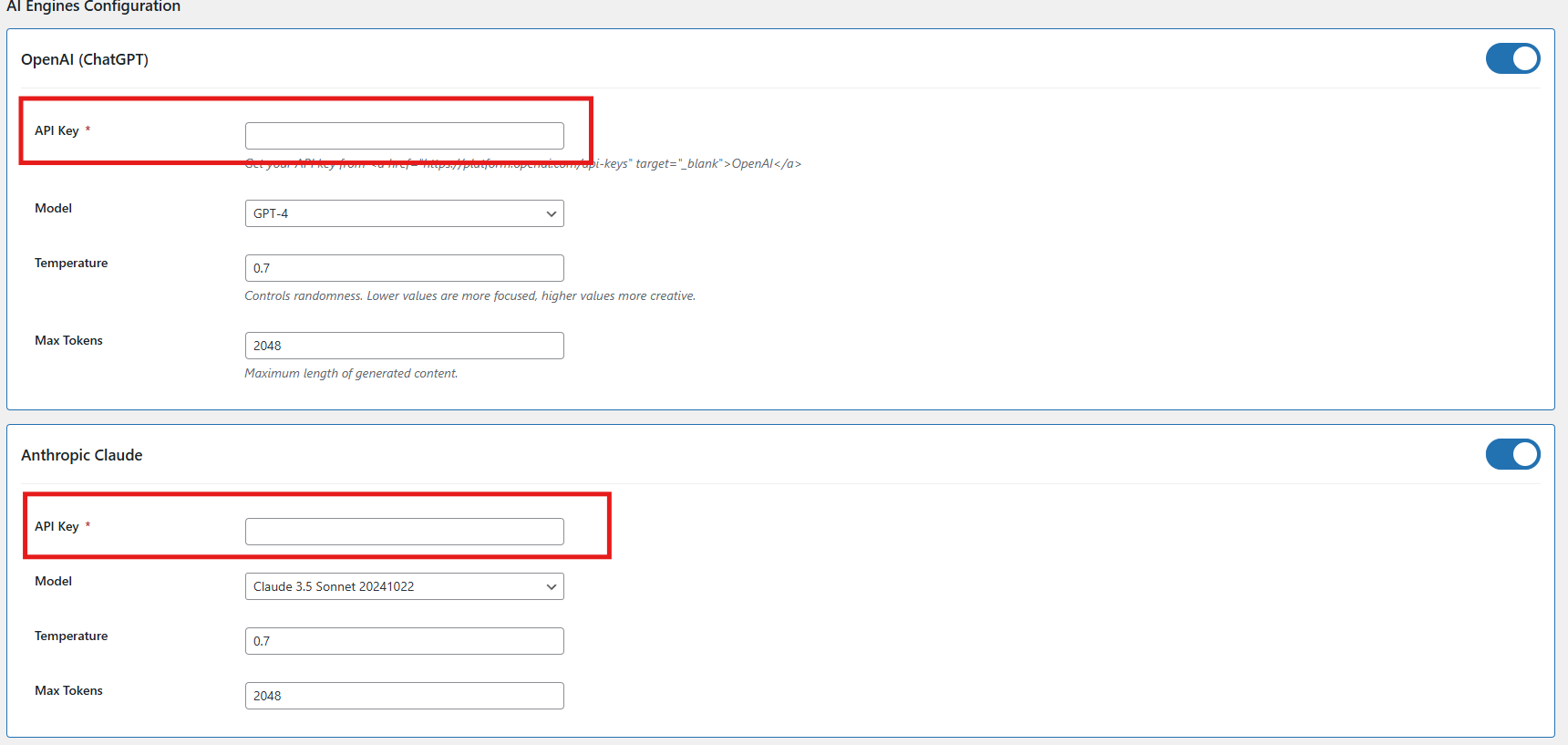
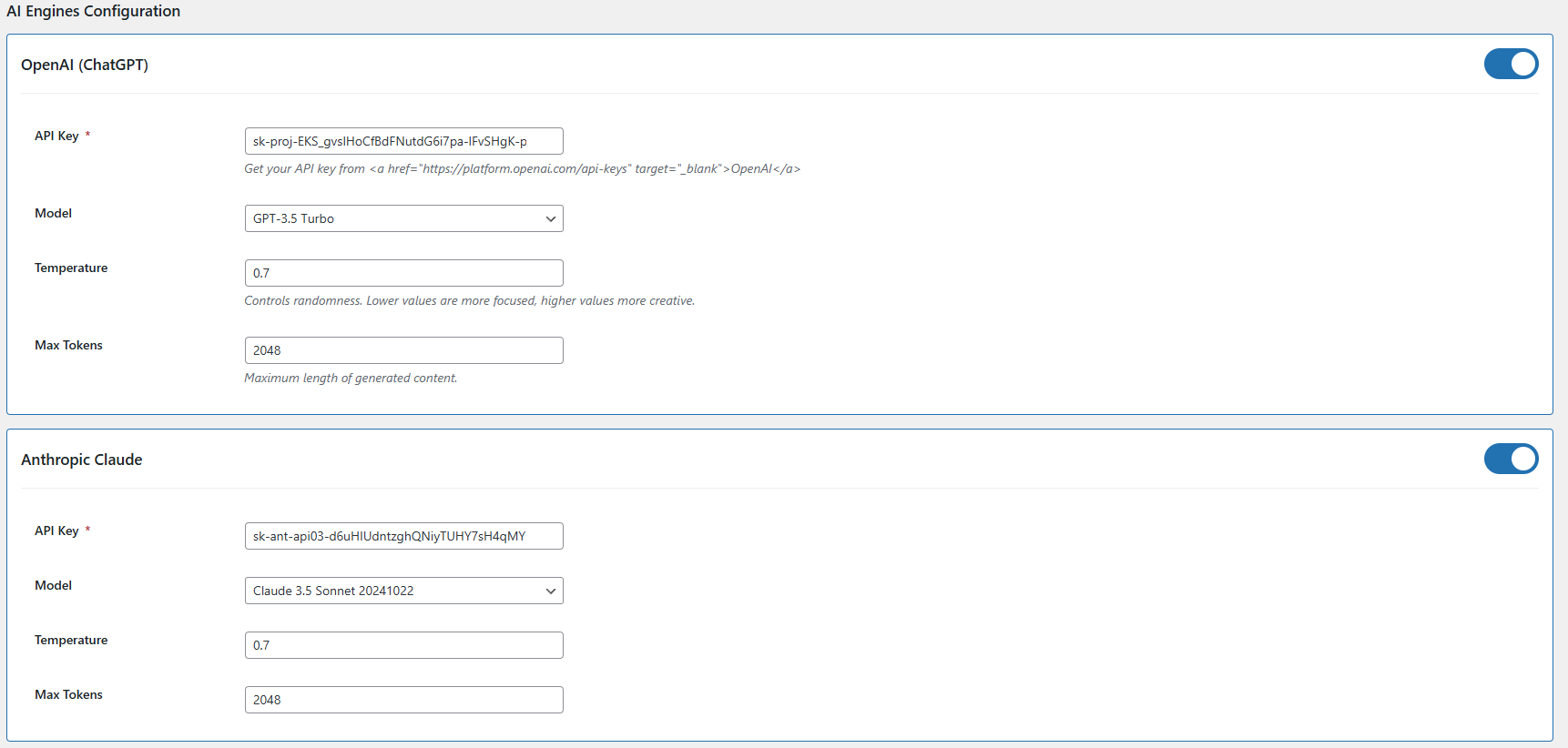
  • API Key Configuration – Add API keys for all supported AI models, including Claude, ChatGPT, Gemini, and DeepSeek, to ensure seamless integration and functionality.
  • Claude Engine Toggle – Quickly enable or disable the Claude AI engine with a single click based on your content generation needs.
  • API Key for Claude – Enter the necessary API key to activate Claude AI’s features for content generation and language.
  • Claude Model Selection – Select from a range of Claude AI models, such as Haiku 3, Haiku 3.5, Sonnet 3.5 and Sonnet 3.5, to power your content creation tasks.
  • Token- Add the token limit for the content generator default 2048, you can add up to 32000 as a token limit which will apply to all AI models
  • Enable/Disable ChatGPT – Turn the ChatGPT AI engine on or off to control its role in generating content for your store.
  • API Key for ChatGPT – Enter your ChatGPT API key to activate content generation capabilities.
  • Select ChatGPT Model – Choose between ChatGPT 3.5 and ChatGPT 4.0 for generating high-quality, SEO-friendly content.
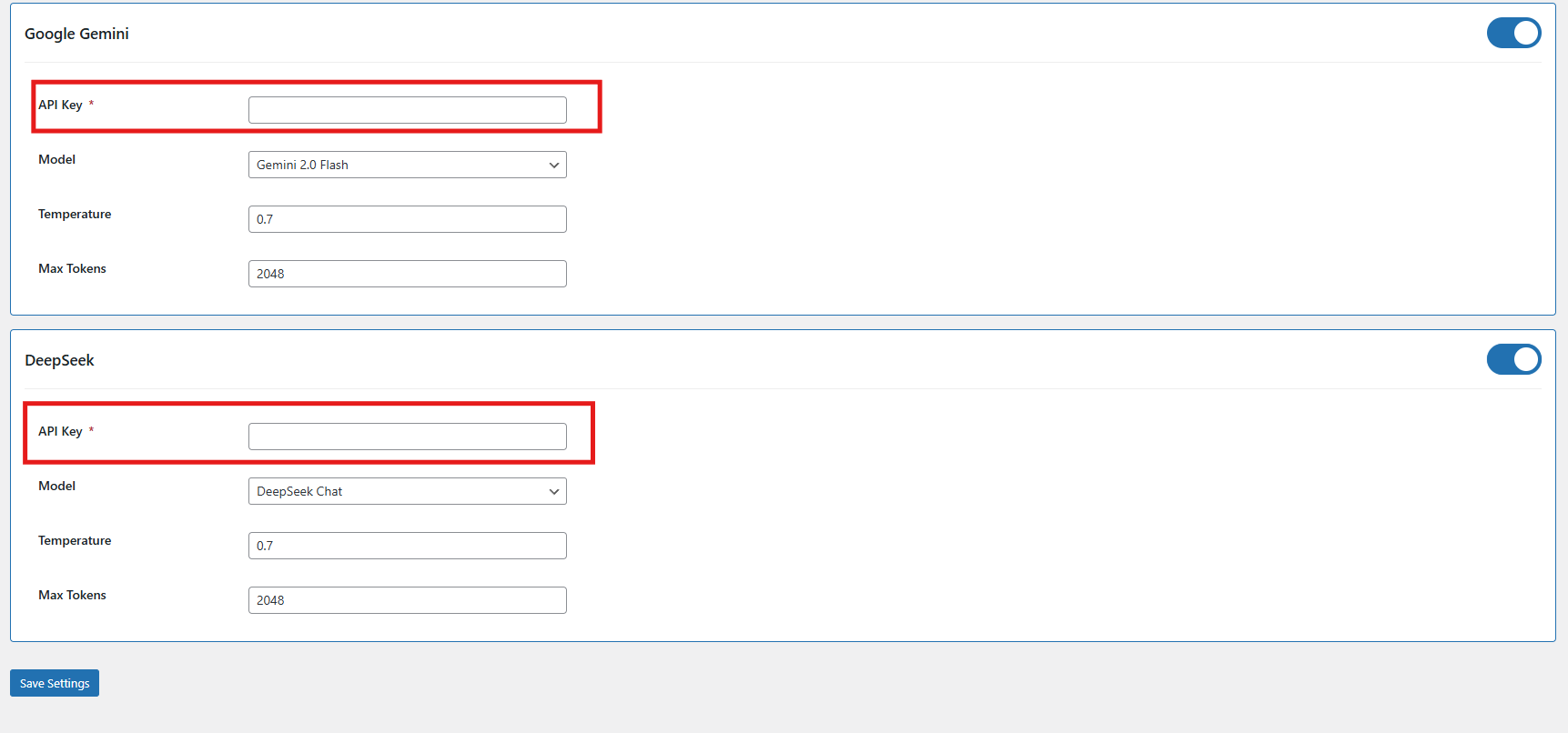
  • Enable/Disable Gemini AI – Easily activate or deactivate the Gemini AI engine to manage content creation workflows.
  • API Key for Gemini – Provide your Gemini API key to enable its integration with the content generator.
  • Select Gemini Model – Choose from Gemini models like 1.5 Pro, 1.5 Flash, 1.5 Flash-8b, 2.0 Flash, or 2.0 Flash–Lite Preview based on your performance and output needs.
  • DeepSeek Model – Enable the DeepSeek engine by selecting the preferred mode for content generation.
  • Select DeepSeek Model Type – Choose between the Chat or Coder model based on the type of content you need to generate.
  • Temperature Setting – Adjust the creativity level of AI-generated content (range: 0.0 to 1.0). Lower values offer more consistency, while higher values produce more creative outputs.

4.0.2 Content Generation Prompts for WooCommerce Gemini AI Content Generator Plugin

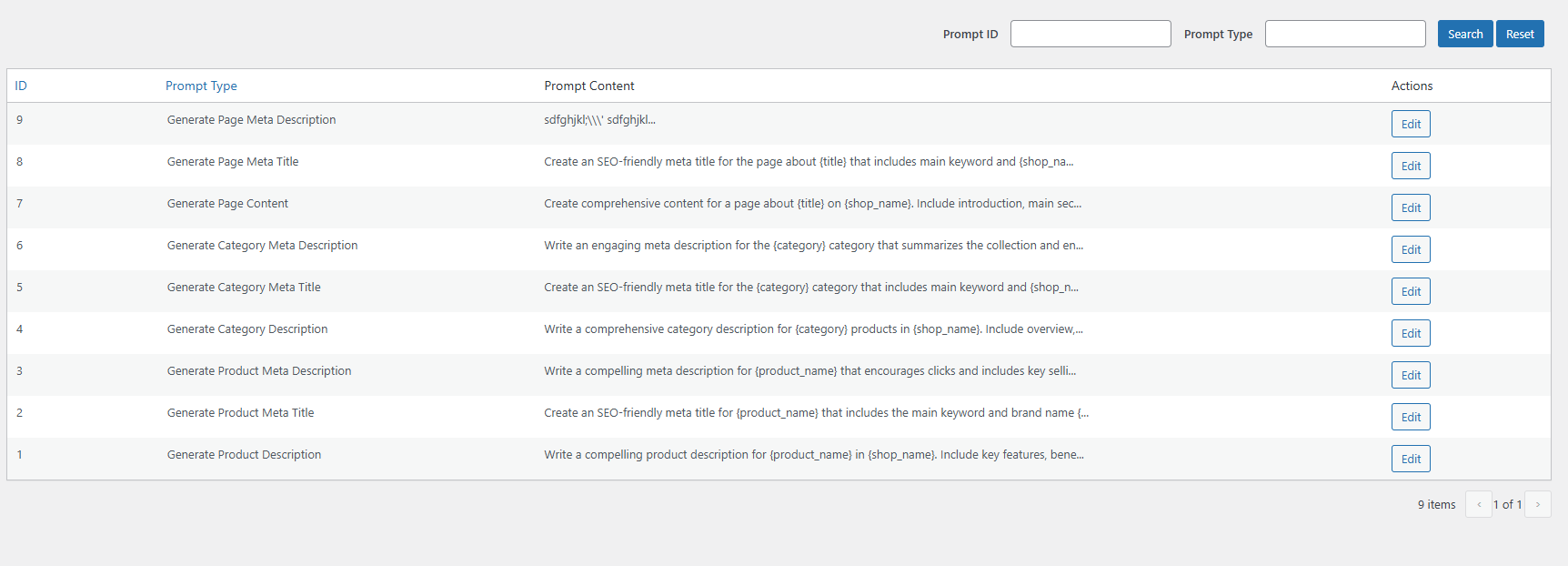
The Knowband WooCommerce Gemini AI Content Generator plugin offers ready-to-use AI prompts tailored specifically for e-commerce content creation.

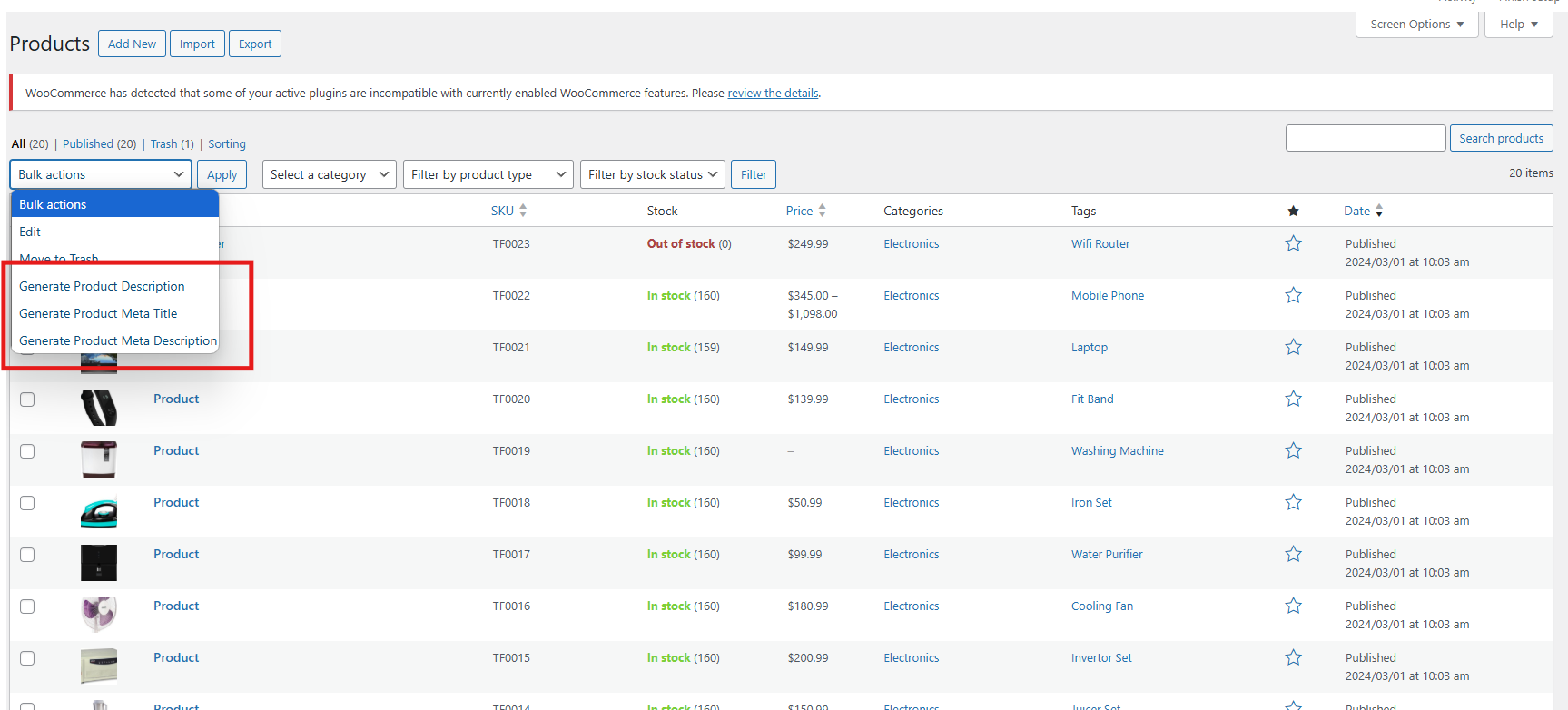
Product Content Generation Prompts

  • Generate Product Description- Creates SEO-optimized and well-structured product descriptions that emphasize key features and benefits.
  • Generate Product Meta Title- Generates concise, keyword-rich meta titles under 60 characters to improve search visibility.
  • Generate Product Meta Description-  Crafts engaging meta descriptions within 140 characters designed to attract clicks.

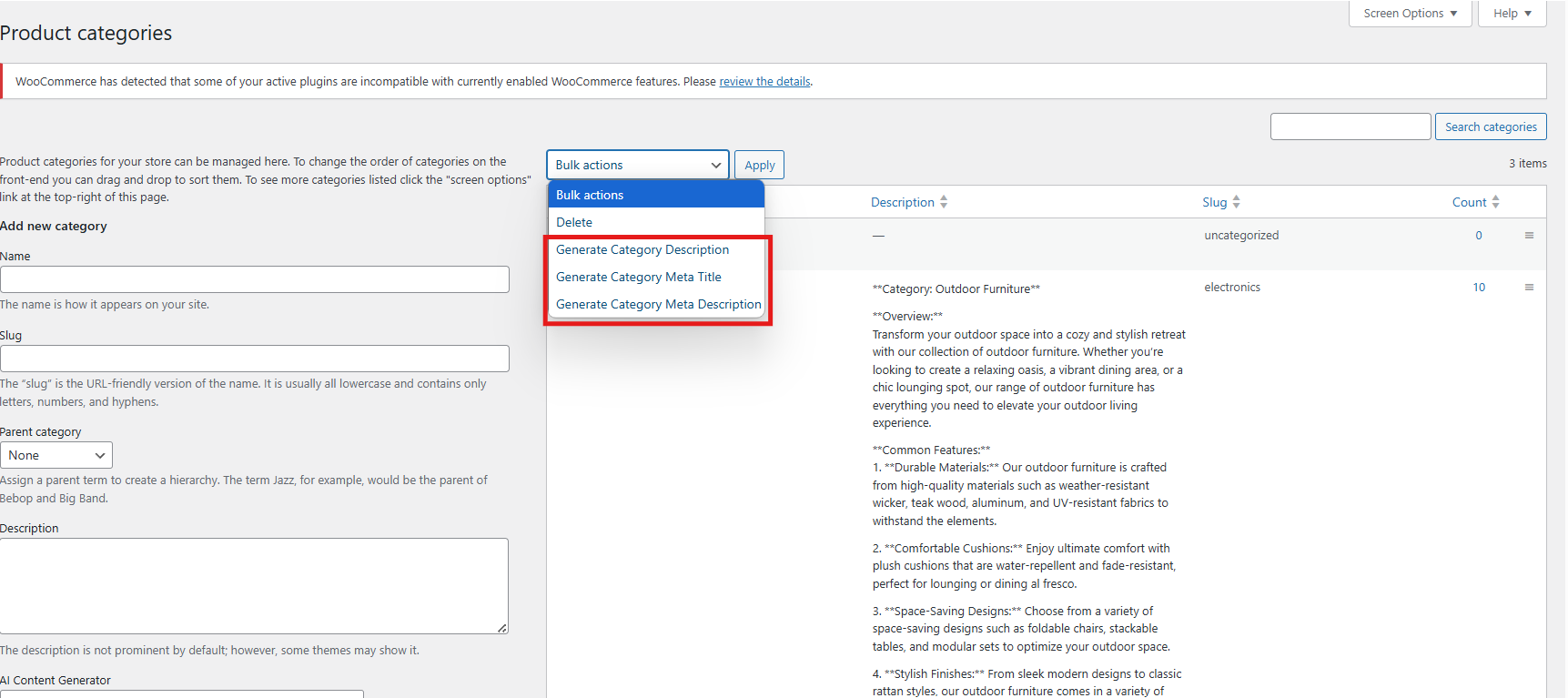
Category Content Generation:

  • Generate Category Description- Develop detailed category content with proper HTML formatting for better presentation.
  • Generate Category Meta Title- Produces keyword-focused category titles under 60 characters to boost SEO.
  • Generate Category Meta Description-  Creates clear and concise category descriptions within 140 characters for search engines.

Page Content Generator for Multi-engine AI Content Generator for CMS and Products

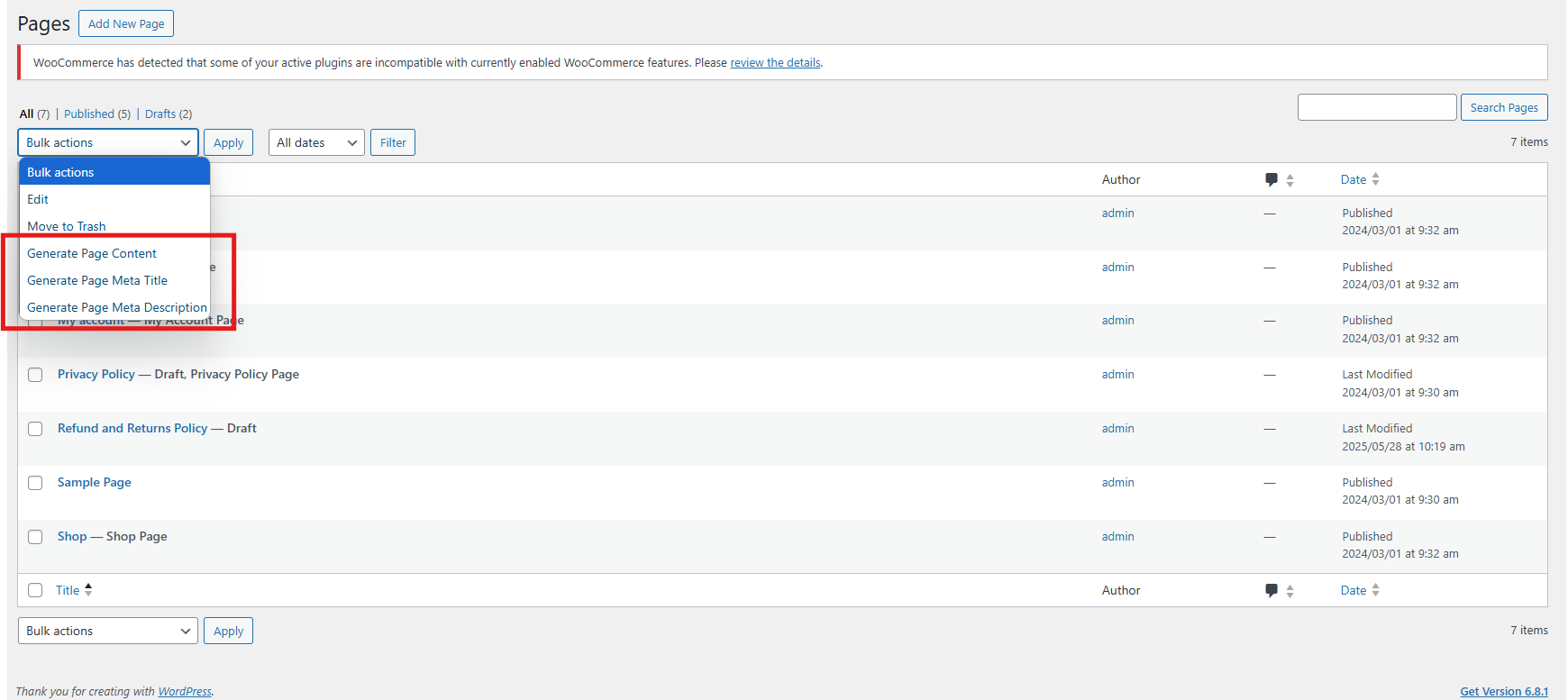
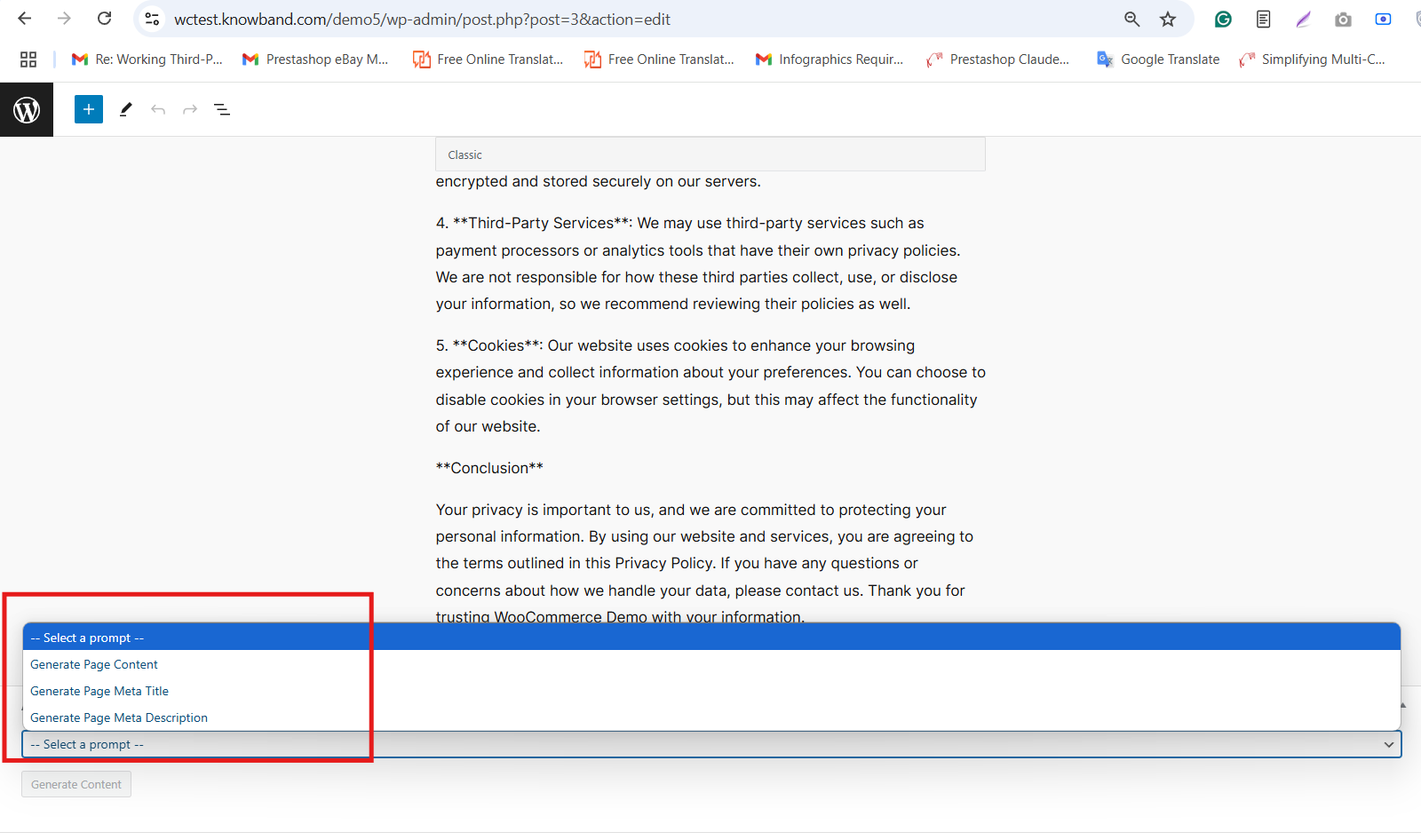
  • Generate Page Meta Description: Create an SEO-friendly meta description that summarizes the CMS page content clearly and effectively.
  • Generate Page Meta Title: Generate a concise meta title including main keywords and your store’s name for better search ranking.
  • Generate Page Content: Produce well-structured, engaging content for CMS pages to inform and attract your visitors.

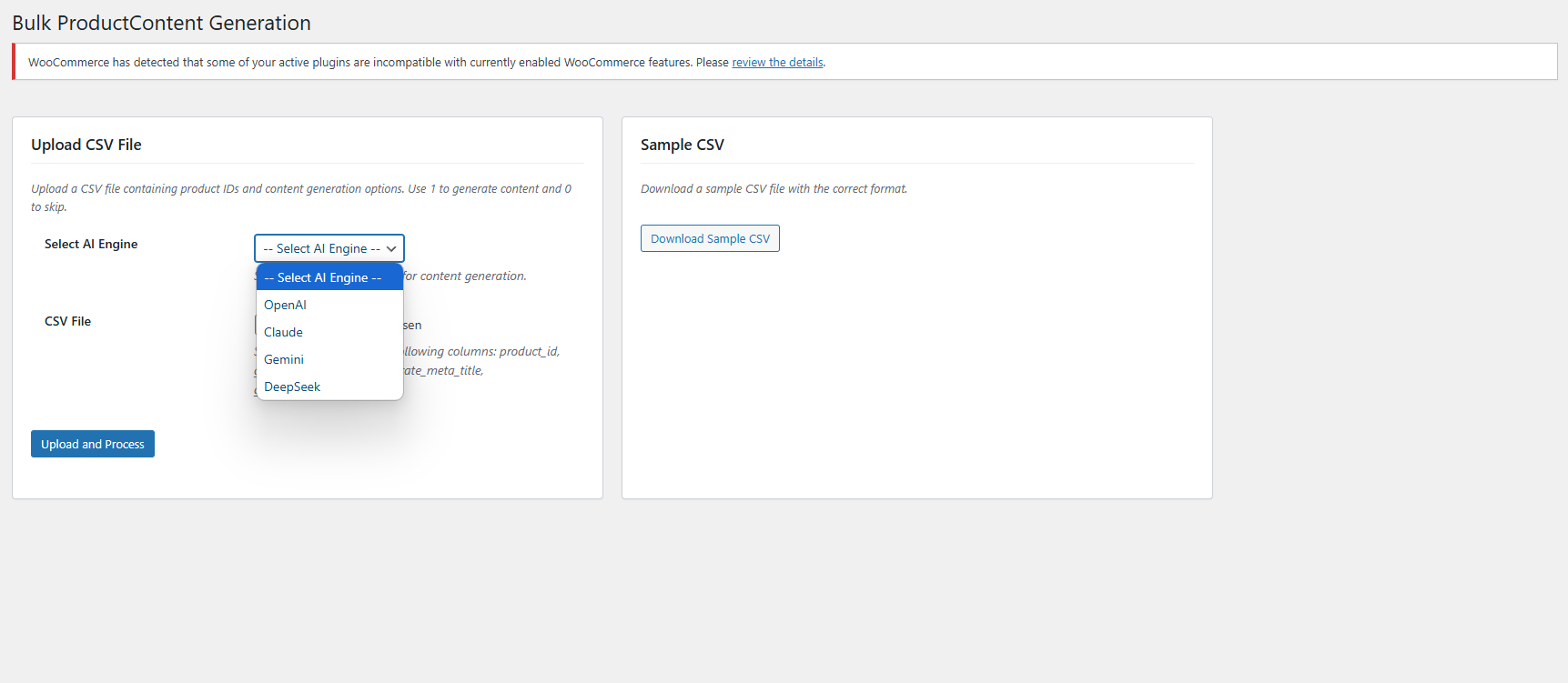
5.0. Bulk Product Content Generation

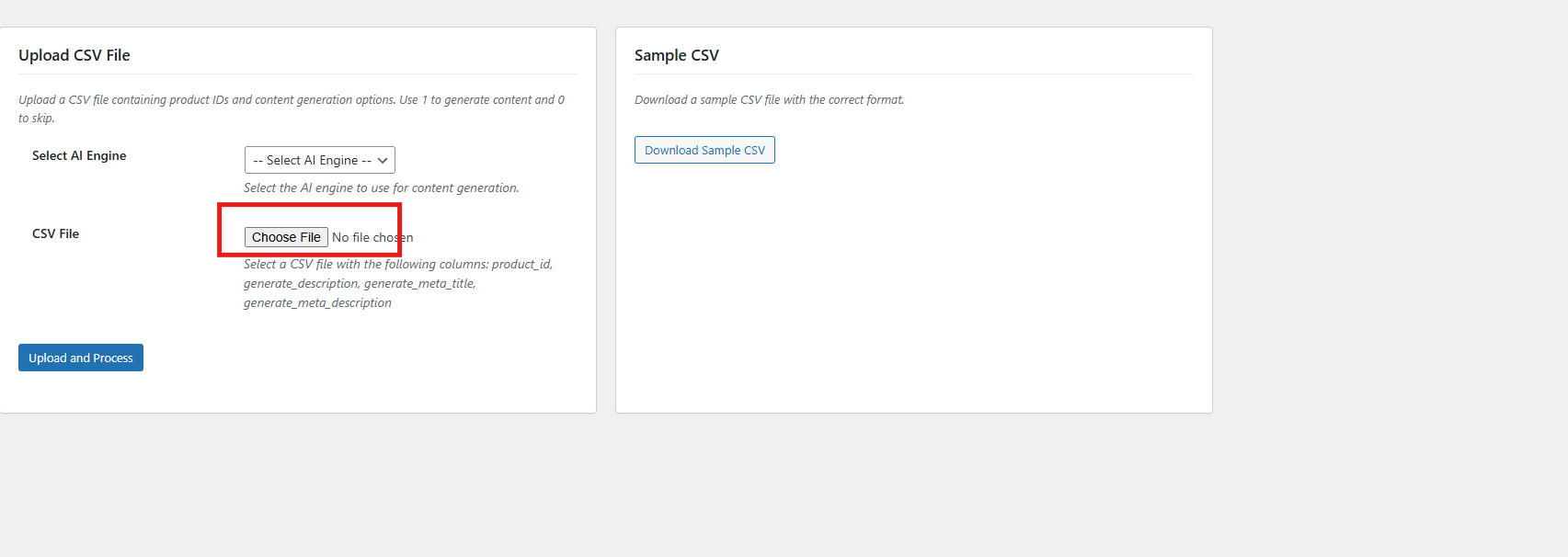
The SEO Meta Content Generator WooCommerce exhibit the feature that allows you to generate product content for multiple products at once by uploading a CSV file. This saves time and effort when managing large product catalogues.

Steps To Generate Bulk Product Content

1. Upload CSV File

Upload the CSV file by clicking Choose File and selecting your file.

2. Select AI Engine
Choose your preferred AI engine from the dropdown menu.

3. Upload and Process
After selecting your file and AI engine, click the Upload and Process button to start generating content for the products listed in your CSV. The plugin will process the file and create the requested content accordingly.

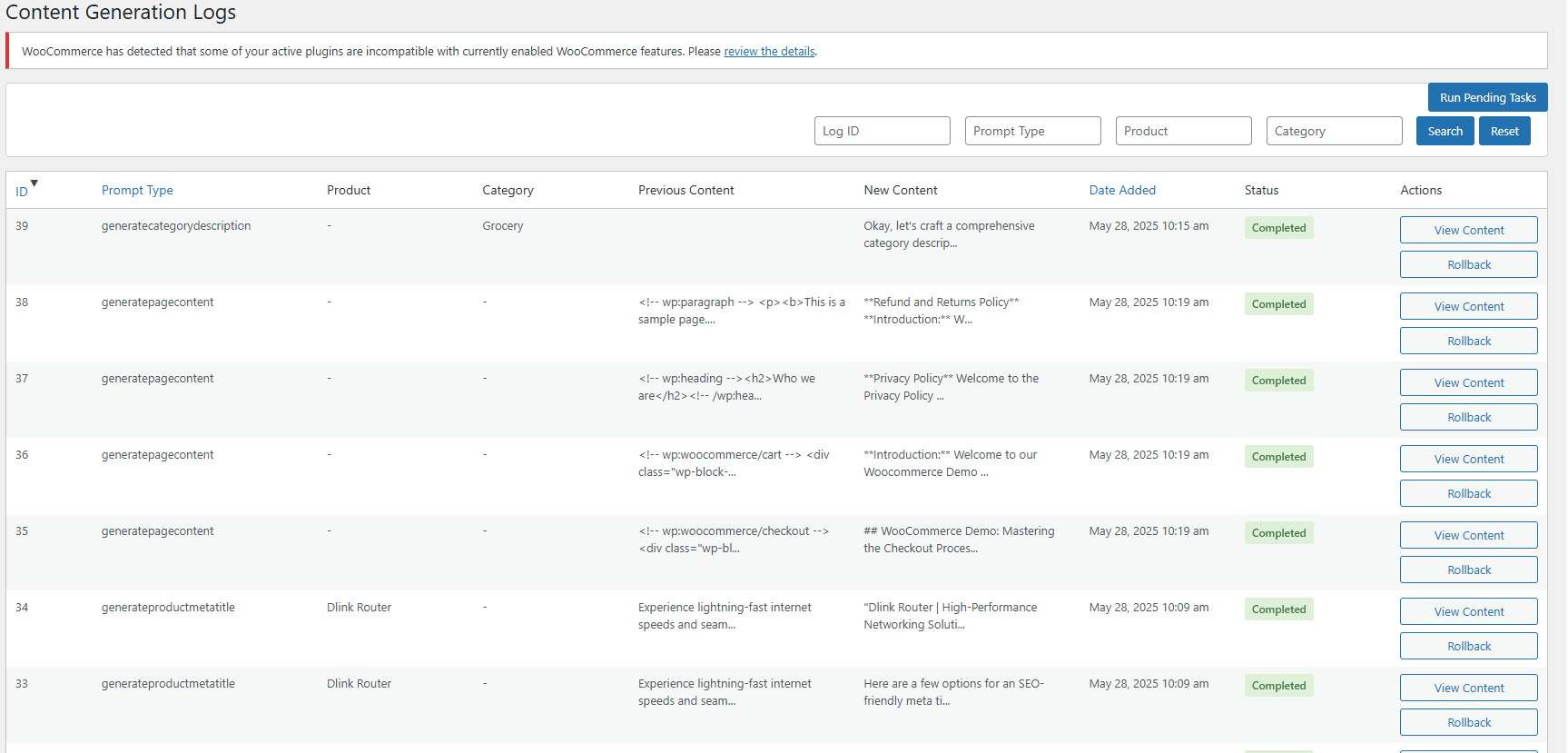
6.0. Task Logs In WooCommerce AI Content Extension

The WooCommerce AI Content Generator Plugin keeps a detailed log of all AI-generated content. This log includes information such as the type of prompt used, language, product or category involved, timestamp, status, previous content, and the newly generated content. Moreover, this helps you track changes, review past updates, and monitor the evolution of your content.

6.0 Steps to Execute the Prompts in AI Meta Description Generator for Woocommerce

Use the WooCommerce AI Content Generator plugin to create content easily for products, categories, and CMS pages such as descriptions, meta titles, and meta descriptions.

Follow these steps to execute the prompts–

Step 1: Navigate to Products, Categories, or CMS Pages in your WordPress admin panel.

Step 2: Select the specific items or pages you want to generate content for. You can work on individual items or select multiple for bulk processing.

Step 3: Click the Bulk Actions dropdown menu (for bulk) or use individual action buttons (for single items).
Step 4: Choose the AI operation you want to perform options include generating descriptions, meta titles, and meta descriptions.

Step 5: Select the AI engine you want to use for the content creation tasks.

Step 6: Review the AI-generated content carefully and approve it before publishing to ensure accuracy and brand consistency.

If you have any questions, need further assistance, or want to provide feedback about the WooCommerce AI Content Generator, please don’t hesitate to reach out to our support team. We’re here to help you make the most of the plugin and ensure a smooth content generation experience.
Contact us anytime at: support@knowband.com