

Getting Started with Knowband’s VideoMate for WooCommerce: Complete User Manual
Explore KnowBand’s WooCommerce Video Manager Plugin User Guide. Learn how to install, configure, and use the video manager extension

Elevate your online store with the WooCommerce VideoMate Plugin—a powerful, all-in-one solution designed to seamlessly integrate eye-catching video content throughout your e-commerce experience. Whether you want to enhance product pages, create immersive landing sections, or boost buyer engagement, this Video Manager for WooCommerce helps you tell your brand story in the most captivating way. From increasing dwell time to converting views into sales, it’s the ultimate plugin for visual-driven growth.
You can easily showcase promotional clips, product tutorials, reviews, or user-generated content. Add videos to any part of your site—homepages, product listings, or category pages—without compromising your theme or layout. The plugin’s intuitive interface gives you full control over video placement and presentation, helping you align visuals perfectly with your branding strategy.
Moreover, this WooCommerce Video Manager plugin supports popular formats like Instagram reels, YouTube shorts, and TikTok clips, making it simple to upload downloaded trending social media video content that resonates with today’s shoppers. With built-in upload validation, your files are checked for compatibility and size before processing, ensuring smoother performance and a hassle-free experience. Best of all, everything is managed directly from your WordPress dashboard—no coding is needed.
In short, whether you’re running product launches, educational campaigns, or testimonial-driven marketing, the WooCommerce product video Manager extension makes it easy to turn video content into a sales-driving force. Fully responsive and customizable, it’s the perfect tool to craft a visually rich shopping journey that not only grabs attention but keeps customers coming back. Let your videos do the talking and elevate your brand with one smart plugin.
1.0 Transform Your Store with Dynamic, Customizable Video Features
Transform Your WooCommerce Store with Dynamic Video Content: Start by energising your storefront with the WooCommerce VideoMate Plugin—a powerful video manager for integrating engaging, conversion-ready video content. Moreover, this all-in-one WooCommerce video plugin helps present products, share brand stories, and drive sales with ease.
Streamlined Video Uploads and Management: Upload and organize reels, clips, and video assets directly from your WordPress dashboard. The built-in video uploader WooCommerce Plugin offers simple, drag-and-drop management with no technical skills required.
Strategic Placement Across Store Pages: Map videos to specific product pages, categories or home pages. Whether using the WooCommerce product video Extension, you can tailor content placement for maximum visibility.
Responsive, Interactive Displays: After that, showcase content using the WooCommerce video carousel Extension or the sleek WooCommerce floating video widget Plugin. These responsive elements make it easy to highlight tutorials, promos, or featured products in an engaging layout.
Full Customisation and Mobile Optimisation: Moreover, customise autoplay, headers, video counts, and layout styles to match your store’s branding. The entire WooCommerce VideoMate Extension is mobile-optimised and built to deliver a smooth, consistent experience on all devices.
Make Your Homepage Work Harder: In addition, grab attention from the start with the WooCommerce homepage video Extension. Use it to introduce your brand, showcase promos, and product reviews or tell your story right on your storefront’s first impression.
Bring in Social Proof with Ease: Further, integrate trending formats like reels and shorts using the WooCommerce Instagram Video Manager Plugin or embed content from platforms like TikTok and Twitter. Boost credibility with real-time customer engagement without redirecting visitors offsite.
Centralised Admin Control: Lastly, streamline your workflow with one unified dashboard. Whether you’re adjusting a single clip or managing a full library, the WooCommerce Video Manager Plugin simplifies your video strategy
2.0 Installation Guide for WooCommerce VideoMate Plugin
Step 1: Download the Plugin
After purchase completion, download the wcvideomate.zip file, which contains the complete video manager plugin for WooCommerce.
Step 2: Upload via WordPress Plugin Installer

Click on “Upload Plugin” and select the wcvideomate.zip file from your device.
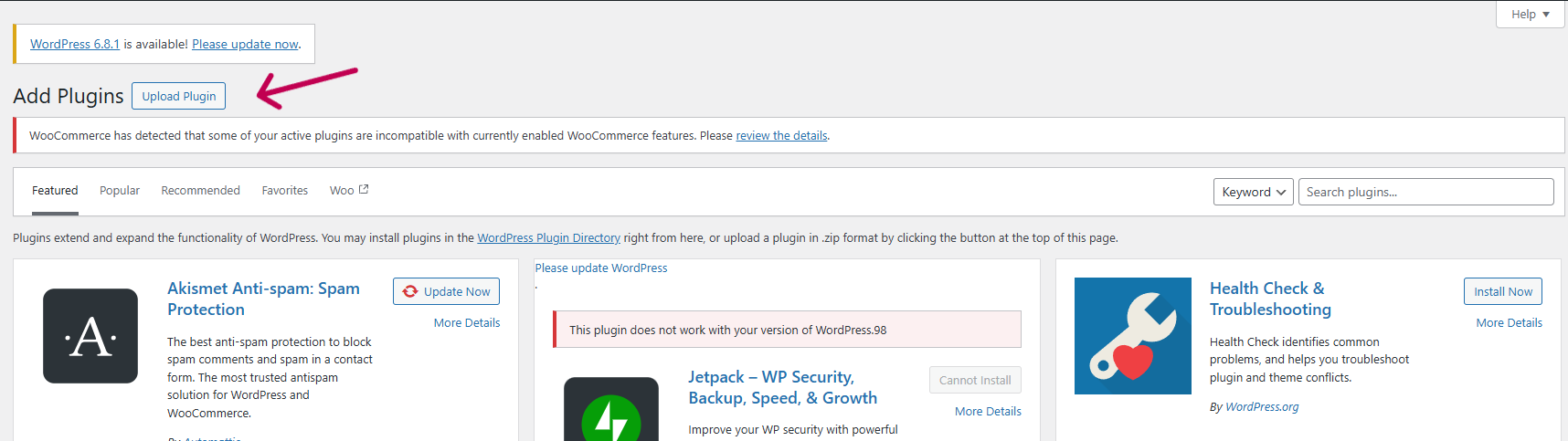
Upload the zipped file and click “Install Now” to begin the installation process.

After the installation is complete, click “Activate Plugin” to start using it on your WooCommerce store.
Step 3: Access the Plugin
Navigate to WooCommerce > VideoMate in your WordPress admin dashboard to begin configuration.
3.0 Backend Setup Guide for WooCommerce Video Manager Plugin
3.1 General Settings
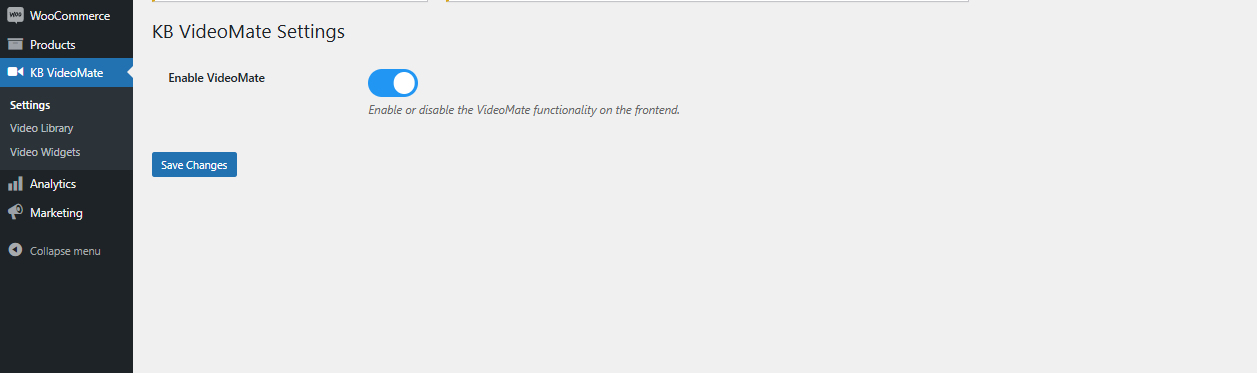
Enable/Disable Plugin: Easily turn the WooCommerce video plugin on or off with a single toggle—no complicated setup needed.
3.2 Video Library Management
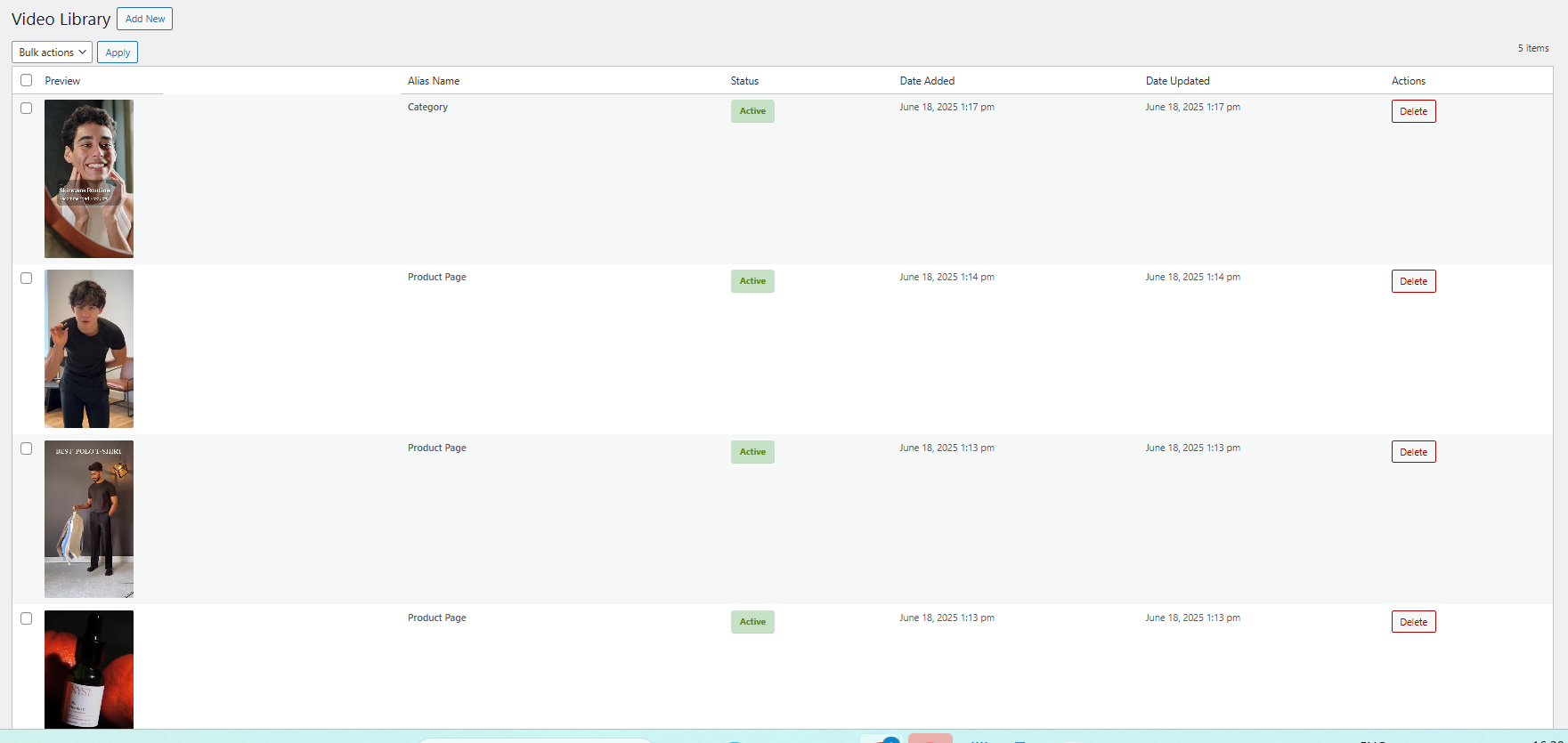
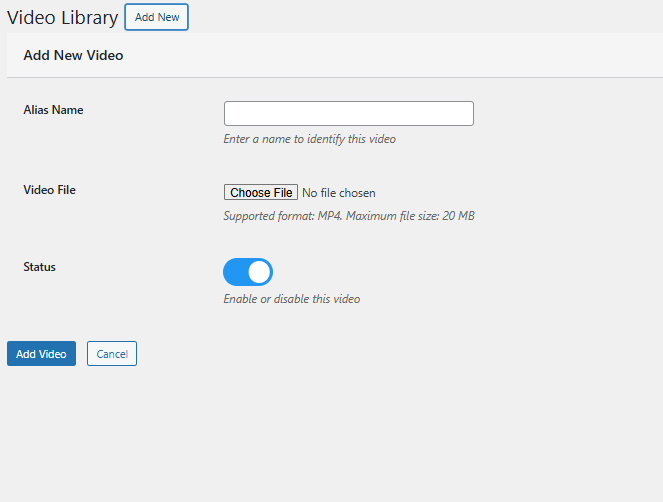
Add New Video: Upload files and assign descriptive names. Furthermore, store administrators can preview videos before configuring widgets using the WooCommerce Video Integration Plugin.
Alias Name: Add the alias name corresponding to the video for identification.
Status Management: Effortlessly enable or disable any video, reel, or clip within the Video Library using the edit option.
Upload: Seamlessly upload saved Instagram or TikTok reels and clips to showcase them on your store using the Social Media Video Plugin for WooCommerce.
Content Removal: Delete any videos you no longer require with a single click—quick and efficient.
3.3 Video Widget Configuration

Widget Title: Set a custom title for your video widget to align with your store’s theme and engage your visitors effectively.
For example, use titles like “Customer Favourites”, “Product Showcases”, or “Tutorial Videos” to guide your customers and create a more personalised experience.
Create a New Widget:
Easily configure a new video widget to showcase content on product pages, category listings, or the homepage.
Select Page Type:
Choose where the widget will appear—whether on the homepage, specific product pages, or category sections.
Map to Products or Categories:
Assign your videos or clips to selected products or categories for targeted and relevant video placement.
Widget Type: Select either a carousel or a floating video widget, depending on your store’s layout, customer browsing habits, or visual design preferences.
Carousel Display: Create engaging multi-video sliders effortlessly with the WooCommerce Video Manager Extension. Use the video carousel feature to showcase several videos in a sleek, scrollable layout. Simply choose the clips you want to feature—ideal for promoting products, highlighting offers, or sharing brand stories in a single interactive view.
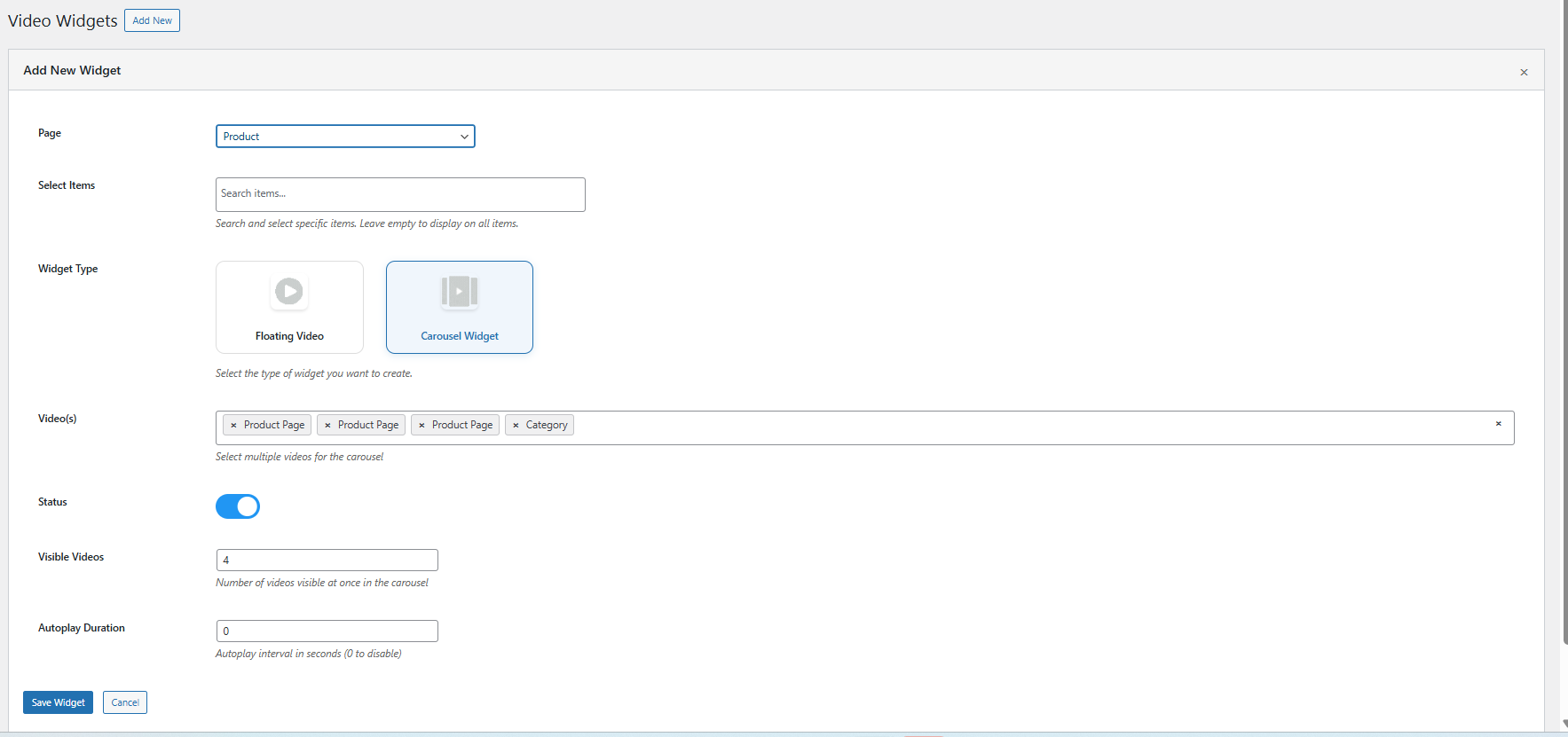
Floating: Add a floating widgets for video via the WooCommerce floating video widget extension.

Autoplay Configuration: Adjust how long each video plays automatically by setting a specific timer value in seconds for every widget. This feature ensures videos begin automatically after a specified delay, helping to capture attention without user interaction.
Display Positioning: Customize the exact placement of your floating video to align perfectly with your store’s layout and visual design.
Maximum Video Limit: Limit the video count in the carousel to keep your storefront organized and visually appealing.
Widget Visibility Control: Effortlessly enable or disable individual widgets with a simple toggle. This flexibility is ideal for seasonal campaigns, limited-time offers, or experimenting with different layouts
4.0 Benefits of Using WooCommerce VideoMate Plugin
Keep Customer Hooked with Engaging Videos
To begin with, using video through the WooCommerce product video Extension or product video WooCommerce Extension encourages shoppers to stay longer, explore deeper, and make better-informed buying decisions. As a result, it enhances user experience and reduces bounce rates significantly.
Turn Views into Sales with Video Conversions
Additionally, the WooCommerce VideoMate Plugin is a powerful solution for implementing effective video marketing on WooCommerce stores. By demonstrating product value through in-store video content, you can create emotional connections, build trust, and ultimately drive higher conversion rates.
Place Videos Where They Convert Best
In addition, with the WooCommerce Video Manager Plugin, you can position content exactly where it matters most. Whether it’s on your homepage, product pages or in collections via the WooCommerce video Plugin, your videos remain both strategic and impactful. Plus, display content elegantly using the WooCommerce video carousel Extension for an engaging visual layout.
Plug in Social Proof with TikTok & Reels
Furthermore, enhance your storefront with dynamic, real-time video content using the WooCommerce VideoMate Extension. Easily upload trending TikTok videos and embed clips using the Instagram video on WooCommerce Plugin. Moreover, this is perfect for influencer campaigns, customer testimonials, and user-generated content.
Manage Videos with Ease—No Code Needed
With the intuitive design of the WooCommerce Video Manager Plugin, you can add videos to WooCommerce Plugin-based stores without touching a single line of code. With plugins like the video uploader WooCommerce Plugin by KnowBand, managing your media becomes quick, centralized, and seamless
5.0 Support & Assistance
If you face any issues during installation or while using the plugin, feel free to reach out to our support team:
Email: [email protected]
Helpdesk: knowband.com/helpdesk
We’re happy to assist you with configuration, troubleshooting, or any feature-related queries regarding your WooCommerce video integration plugin.