

Three Recovery Emails Recover 37% More Carts Than One: Building the Right PrestaShop Abandoned Cart Sequence
Recover lost sales with the PrestaShop Abandoned Cart Module. Send automated email reminders, follow-ups, and recovery offers to bring customers back and complete purchases.
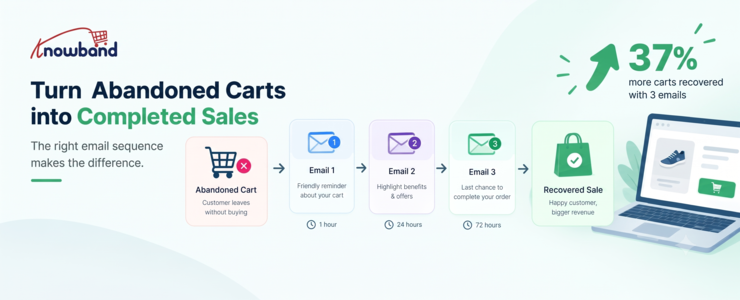
A shopper adds three products, reaches the cart, and disappears. In relation to a PrestaShop store, an abandoned checkout may be indicative of potential sales that were close but never closed.
The case for a structured PrestaShop Abandoned Cart Module is straightforward: don’t treat every abandoned cart as a lost customer. A reported 2026 benchmark from Marketing LTB says sending three recovery emails recovers 37% more carts than sending one. That number should not be viewed as an absolute number for all stores, but it provides an interesting point: one reminder does not have to damage recoverable demand.
In the case of abandoned cart recovery of a PrestaShop store, what is recommended is to develop a process where each reminder has a distinct goal. The first is a reminder, the second is overcoming hesitation, and the last message offers a reason to buy. A dedicated PrestaShop cart recovery addon makes it practical to run that sequence automatically.
Why one abandoned-cart email often isn’t enough
A cart abandonment is not always a checkout issue. Shoppers compare prices, check shipping costs, save products for future reference, or get distracted.
According to Baymard’s most recent research, the average cart abandonment rate is 70.19%. Its research also makes an important distinction: some abandonment comes from normal shopping behavior, while other cases result from preventable checkout friction.
That distinction changes how recovery emails should be written.
Someone who bailed because of a delivery fee appearing out of nowhere requires a different sort of message than someone who just closed their browser while trying to complete the transaction. Using the same type of heavily discounted message for both customers will waste your margins and create an overly promotional brand image.
A proper message flow provides multiple chances for the visitor to come back within the context of the situation.
The three-email sequence worth testing first
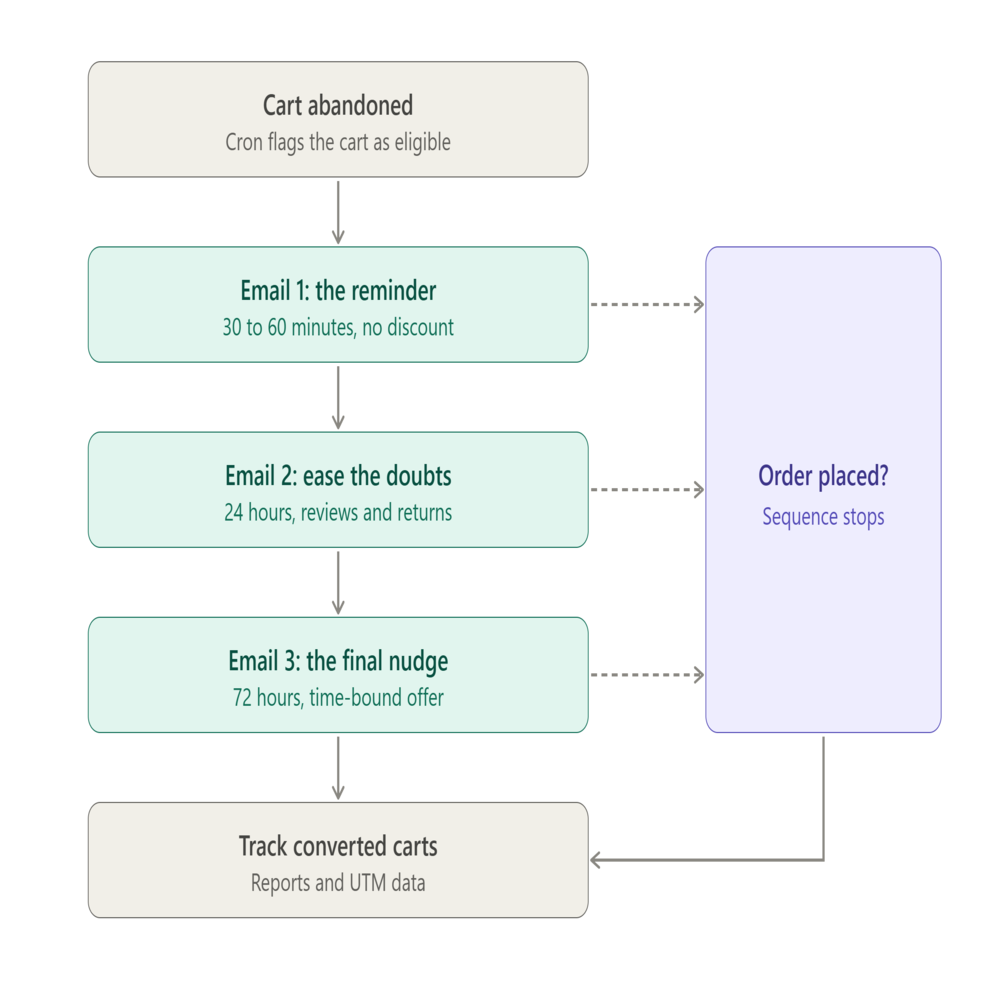
A useful starting point is a three-message flow spread across roughly three days. The Omnisend recommendations suggest sending the first email between 30 and 60 minutes after abandonment, with follow-up messages sent at 24 and 72 hours. These times will need to be tested according to your specific audience and purchasing process.
Email 1: Recover the interrupted shopping session
Send the first recovery email while the customer’s original shopping intent is still fresh.
Keep the message simple. Show the abandoned products, retain recognizable product names and pricing, and make the route back to checkout obvious. Don’t automatically assume that the customer needs some kind of discount.
A fashion retailer can send something like “Your cart is still waiting” as the subject line with the actual abandoned items included in the message. The call to action can simply return the shopper to the cart.
The objective here isn’t to overcome every possible objection. It’s to reconnect the shopper with a purchase they may have intended to complete.
Email 2: Address the reason they hesitated
The second message has more room to answer doubts.
Product reviews, shipping information, return terms, product benefits, or a reminder of what makes the item useful can all work here. If a shopper was comparing alternatives, this email gives you an opportunity to reinforce value without immediately cutting the price.
This is also where store-specific knowledge matters. A merchant selling expensive furniture may need to reinforce delivery and return information, while a cosmetics store might focus on product benefits or reviews.
Don’t judge this email purely by its open rate. The useful question is whether the message produces additional cart visits and completed orders from people who ignored the first touch.
Email 3: Give the final nudge
The third message can contain a call-to-action in the form of an offer when it makes sense economically.
This can be a one-time use discount code, free shipping, or another kind of time-bound incentive for your customers. Make sure that the offer is clearly defined, especially around minimum cart value and validity.
The point isn’t to discount every abandoned order. If customers learn that leaving a cart automatically produces a larger discount, your recovery strategy can start influencing behavior in the wrong direction.
The sequence should also stop when the shopper purchases. Sending another abandoned-cart message after an order is placed creates a poor customer experience and makes the automation look careless.
How a PrestaShop Abandoned Cart Module supports the sequence
The practical challenge is not writing three emails. It is making sure that the store knows when the cart qualifies, which reminder should be sent, whether or not the user has converted, and whether or not automation was applied. A proper PrestaShop Abandoned Cart Module setup with a configured PrestaShop Abandoned Cart Reminder schedule is what makes this possible without manual intervention.
Knowband’s PrestaShop Abandoned Cart Module offers automated and manual follow-ups via email, reminder delay configuration, discounted and non-discounted templates, guest and registered customers monitoring, and abandonment vs. conversion cart reports. As of now, the product page indicates support for PrestaShop 9.x.
The included documentation verifies that the module utilizes serial reminders with discounted and non-discounted reminder types. Reminders can be set up with their own delays, whereas discounting can consist of a discount type, minimum cart value, coupons, a valid period, and free shipping.
That gives merchants enough control to build a sequence rather than repeatedly sending the same message.
For example:
- Reminder 1 can use a non-discount email.
- Reminder 2 can reinforce product value without an offer.
- Reminder 3 can use a discount template with a defined expiry.
The module includes 20 ready-made email templates, split between discounted and non-discounted templates, while administrators can create and customize additional templates.
Timing depends on the store, not just the benchmark
A 30-minute or one-hour first email is a sensible test, not a law.
Omnisend’s 2026 research recommends a first abandoned-cart message around 30 to 60 minutes, followed by additional messages around 24 and 72 hours. It also recommends considering the customer’s local sending window because an email triggered late at night may perform differently from one delivered during active shopping hours.
A store selling inexpensive, frequently purchased products may recover quickly. A business selling high-ticket equipment could need more time because customers may research specifications, compare prices, or discuss the purchase before returning.
Watch the cart abandonment rate alongside recovery performance. A high abandonment figure doesn’t automatically mean the recovery flow is broken, particularly if your products naturally involve comparison shopping.
The better test is incremental performance: how many carts return after each message, how much revenue comes from recovered orders, and whether discounts are actually necessary.
Don’t make discounts the entire strategy
Discounting is easy to implement and difficult to undo.
If the first email always includes 15% off, customers have little reason to complete the purchase immediately. Some may start to view abandonment as part of the buying process.
A better sequence lets the customer return at full price before introducing an incentive. If the final reminder includes a coupon code, give it a clear purpose and a defined validity period.
The Knowband documentation supports both percentage and fixed discounts, minimum cart values, coupon validity periods, and free-shipping options for serial reminders.
That makes it possible to protect margins more carefully. For example, a store could reserve a discount for carts above a certain value rather than attaching an offer to every abandoned cart.
The technical layer matters more than the email copy
Even excellent email copy cannot recover a cart if the automation doesn’t execute.
The module’s workflow depends on cron processes that update abandoned carts and send reminder emails. The supplied manual explains that the cart-update and reminder-email crons run hourly, with the timing determining which carts enter each processing window.
That means developers and store managers should test the automation before judging campaign performance.
The module provides test mode and a cron log, allowing administrators to verify behavior and check whether scheduled processes have executed successfully.
Several implementation issues can prevent an apparently eligible cart from receiving an email. The documentation specifically mentions missing email addresses for guest shoppers, minimum cart-value conditions, reminder delays that have not yet been reached, carts with a zero value, and incorrectly configured cron jobs.
For a developer, this is an important troubleshooting checklist. Don’t rewrite the email template when the real problem is that the reminder job never ran.
Track recovered carts, not just email engagement
An open rate can tell you whether the subject line attracted attention. It doesn’t tell you whether the email generated a sale.
According to Omnisend’s abandoned-cart benchmark report for 2025, the open rate was 35.75%, click-through-to-send rate was 3.84%, conversion rate was 1.51%, and click-through-to-conversion rate was 39.46% among its users. This data provides useful information; however, different factors will affect results at your store.
The Knowband module also provides tracking for abandoned and converted carts and analytics comparing the two. Its documentation defines a converted cart as one where the customer places the order after receiving a reminder email.
That distinction matters.
Suppose Email 1 generates plenty of clicks but few purchases. The problem might be checkout friction rather than email copy. If Email 3 produces most of the recovered revenue but requires aggressive discounts, you may need to test a stronger value proposition earlier in the sequence.
Use UTM parameters as another layer of measurement. The module supports adding UTM parameters to its links so email performance can be tracked in Google Analytics.
Don’t forget shoppers who return to the site
Email doesn’t have to carry the entire recovery strategy.
A returning customer can also encounter a popup reminder showing the products they previously left in the cart. The module supports configurable popup templates and reminder delays, including discounted and non-discounted versions.
The module also supports a push notification channel for browser-based cart reminders. Administrators can configure and monitor web browser reminders separately from email.
Those options make sense when email alone doesn’t reach the customer at the right moment. They shouldn’t become an excuse to send every shopper every possible message. The goal is a coordinated recovery experience, not maximum message volume.
Build the flow around real abandonment reasons
A useful recovery strategy starts with the reasons customers leave.
Baymard’s findings indicate that there is abandonment due to checkout issues, and then there are cases of people abandoning their carts who are merely browsing and have no intention of purchasing.
That suggests a practical decision framework:
- If the shopper was distracted: use a direct reminder.
- If the shopper may have doubts: reinforce product value, reviews, shipping, or returns.
- If price appears to be the barrier: test an incentive late in the sequence.
- If the checkout itself causes abandonment: fix the checkout rather than relying on more emails.
This final statement should not be overlooked since recovery automation must serve to prevent lost revenue, but should not take the place of actually addressing any problems with payments, checkout forms that are difficult to understand, missing shipping details, or lack of mobile usability.
Where the PrestaShop Email Follow Up Module fits
For merchants who want this sequence without building the automation logic from scratch, the PrestaShop Email Follow Up Module provides the operational pieces needed to manage serial reminders, templates, automated sending, and cart conversion tracking.
The documentation also confirms support for GDPR-related customer-data deletion requests, test mode, guest and registered customer tracking, and analytics.
One implementation detail deserves attention: guest recovery depends on having an email address available. A store can have a large number of anonymous abandoned carts, but those carts cannot receive an email reminder without an identifiable email address.
That is why checkout design and recovery automation should be treated as connected systems.
A practical setup for a PrestaShop store
A sensible first version doesn’t need a dozen rules.
Start by defining when the cart becomes abandoned. Then create three reminders with different purposes rather than three versions of the same email. Each PrestaShop Abandoned Cart Reminder should earn its place by serving a different customer need.
The PrestaShop Cart Abandoned Addon supports configurable reminder delays and both discounted and non-discounted serial reminders, so merchants can build that progression directly in the module.
Before activating the flow, test the complete path:
- Add a product to a test cart.
- Confirm the cart becomes eligible after the configured abandonment delay.
- Check that the first reminder is triggered.
- Verify that subsequent reminders respect their delays.
- Place an order and confirm that the customer is treated as converted.
- Review the cron log if any step fails.
- Check UTM data in analytics.
- Test the emails on mobile devices.
This catches technical problems before real customers enter the sequence.
What the 37% figure should actually mean for a merchant
The reported 37% improvement should not become a target that every PrestaShop store is expected to hit.
Marketing LTB reports that three recovery emails recover 37% more carts than one, while other research points to strong performance from automated, behaviour-triggered messages more broadly.
The more useful lesson is that sequence design creates additional opportunities to recover customers who weren’t ready to buy after the first reminder.
Measure your own baseline. Compare one email against three, track recovered orders rather than just clicks, and examine the revenue generated after discounts. If the third message adds conversions without creating excessive discount dependency or complaints, it has earned its place.
Conclusion: Build a recovery sequence, then improve it
An effective PrestaShop Abandoned Cart Module strategy does not rely on sending as many messages as possible. It requires reaching out to the customer at just the right time, and giving a message relevant to why he might have abandoned his cart.
Here are three good emails to get you started. The reported 37% improvement from three recovery emails is a useful benchmark to investigate, not a promise to reproduce.
From there, the real work is measurement. Check converted carts, test timing, monitor discount usage, verify cron execution, and fix checkout friction that recovery emails can’t solve.
For stores that want to put this approach into practice, the PrestaShop Cart Abandoned Addon provides the serial reminders, email templates, automated sending, tracking, analytics, and related recovery tools needed to build and test the workflow. Also available on the Prestashop Addons.
- Best PrestaShop SEO Module: 10 Must-Have Features to Improve Rankings
- How to Create an SEO-Friendly Blog in PrestaShop: A Practical Guide to Content, SEO & AI Search
- PrestaShop 9.2 Ask AI vs AI Admin Assistant: Which Is Better for Store Management?
- Integrating a Custom Payment Gateway in PrestaShop: Technical Requirements, API Flow, and Real-World OPC Challenges
- Knowband Launches AI-Powered PrestaShop Blog Manager to Simplify Content, SEO, and Engagement