Skip to content

Knowband Blog | Ecommerce Modules

Magento, Prestashop, Opencart, Shopify

Tag: quick login popup

10 Useful but Underrated PrestaShop Modules to look out for

10 Useful but Underrated PrestaShop Modules to look out for

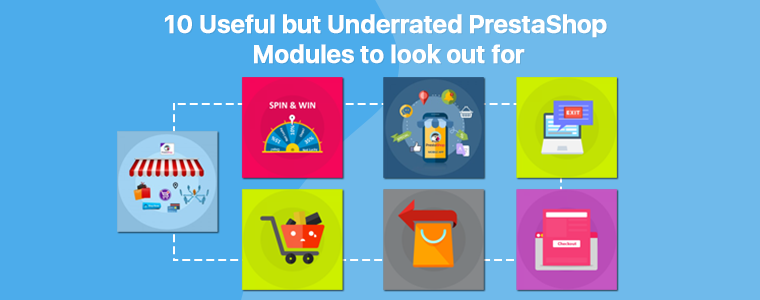
We often talk about modules like Mobile App Builder, Multi-vendor Marketplace, One Page Checkout, Abandoned Cart, Return Manager, Spin and Win, Exit Popup, and there are some more modules that are always in demand of our merchants.

But sometimes, when we go through PrestaShop forum, we stumble across many questions where merchants put forward their requirements which we can be fulfilled by the modules which aren’t popular or which they are not aware of.

In this write-up, I will be covering those useful but highly underrated modules that can be fruitful for the PrestaShop merchants.

1. Preferred Delivery Time

We get queries where merchants want such a module through which their customers can get the product delivered on the desired date. PrestaShop Preferred Delivery Time module is the one you need.

With the help of this module, you can allow customers to pick a desired date and time slot for their order delivery. So, if they want to gift someone something on a specific date or want to receive the order for themselves at a specific date and time, this module will help them do so.

From the back-end, you can adjust the time-slots, specify the non-delivery days and also allow customers to update the delivery date and time even after placing the order.

2. Advanced One Page Checkout

If you do not want your customers to go through multiple steps/pages before they complete their checkout, PrestaShop Advanced One Page Checkout is the module you should consider.

It makes your checkout process static which means shoppers do not need to load multiple pages. A responsive checkout popup is added to your website and customers can switch between fields without the URL getting changed.

You should definitely give it a try once.

3. Quick Login Popup

PrestaShop Quick Login Popup enhances the login/sign-up experience of your site visitors. When a visitor lands on your website, he/she does not need to go to the registration page separately in order to log in or create their account.

Clicking on the “Sign in” button will open a registration popup without the URL getting changed. The popup can also be closed immediately; users do not need to hit the back button. You can customize the popup display and also highlight your deals or specify the benefits indicating why a visitor should register on your website.

4. Store Locator and Pickup

PrestaShop Store Locator and Pickup module encourages the in-store pickup facility and allows your customers to self-pickup the items from your stores at a specific date and time slot. They can search the nearby stores and choose accordingly. Due to COVID-19 pandemic, many merchants have initiated the pick-up facility on their website.

From the back-end, you can add your stores, adjust the pick-up timings, notify stores via email as soon as a customer places the order and perform various other tasks.

5. Additional Order Forms/Field Manager

With the help of PrestaShop Additional Order Forms module, you can add additional fields on the checkout page without making any code changes. You can add a text field allowing customers to add a note related to the order, place a checkbox, and many other custom fields.

6. Custom Registration Fields

PrestaShop Custom Registration Fields module lets you customize or add additional fields to your registration page. You can enable validation on custom fields to display an error if the input is wrong and perform many other customizations.

7. Birthday Coupon

One of the best ways to call your customers back to your store to shop is by offering them a coupon code and there cannot be a better day to call them than their birthday.

With PrestaShop Birthday Coupon module, you can make your customers’ birthday special by providing them with an exclusive coupon code to shop. This not only helps you retain that customer but also improves customer loyalty.

Various customizations can be made from the back-end.

8. Page Maker

PrestaShop Page Maker module allows website owners to create and customize N number of web pages on their site without making any changes in the code file. You can display multiple blocks like Best Sellers, New Arrivals, Featured Products on the same page. It provides an SEO-friendly URL to the newly created web pages.

9. Advance Product Attribute

With the help of PrestaShop Advance Product Attribute module, website owners can add additional fields on the product page. You can place a checkbox option, comment box, warranty option and much more.

This allows you to improve the purchase experience of shoppers and also makes your product page user-friendly.

10. Login as Customer

PrestaShop Login as Customer module allows store admins to log in to the customer’s account without requiring a password to get insights if a customer reports any kind of problem. This helps you resolve customer issues in a matter of moment.

For any queries or assistance regarding the modules, kindly contact us at support@knowband.com
Posted on June 25, 2020June 25, 2020Author Manish BarthwalCategories PrestashopTags Additional Order Forms/Field Manager, Advance Product Attribute, Advanced One Page Checkout, Birthday coupon, Custom Registration Fields, Login As Customer, Page Maker, Preferred Delivery Time, quick login popup, store locator and pickup, Underrated PrestaShop Modules

Prestashop Quick Login Popup – User Manual

Introduction of Prestashop Quick Login Popup Addon:

Reduce the login time of your customers by integrating Prestashop Quick Login Popup Addon by Knowband on your Prestashop store. The addon offers the customers two ways to login, i.e.

  • Facebook Account
  • Google Plus Account

The customer will not need to go through the signup process of that particular website. They can now login with just one click.

Features:

  • It is very easy to install and configure this Prestashop login popup with facebook and google addon.
  • The store owner can activate or deactivate the Prestashop google login popup anytime.
  • This Prestashop facebook login popup allows the customers to log-in quickly via Facebook or Google.
  • The store owner can offer Facebook and Google Plus login feature on the eCommerce store.
  • The admin can display or hide Facebook and Google login button anytime.
  • The store owner can display the banner.
  • The Prestashop addon allows the store owner to change the popup background image.
  • The admin can set the size of social login buttons. It can be large or small.
  • The Prestashop advance login popup is SSL Compatible.
  • The Prestashop login popup multi-store compatible.
  • The Prestashop advance login popup is compatible with all the Prestashop themes.

Steps For Installation of Prestashop Quick Login Popup Addon:

To install this advance login popup addon, please follow the following steps:

1. Add zipped file with the source code of the Prestashop addon in the Modules folder of your system.

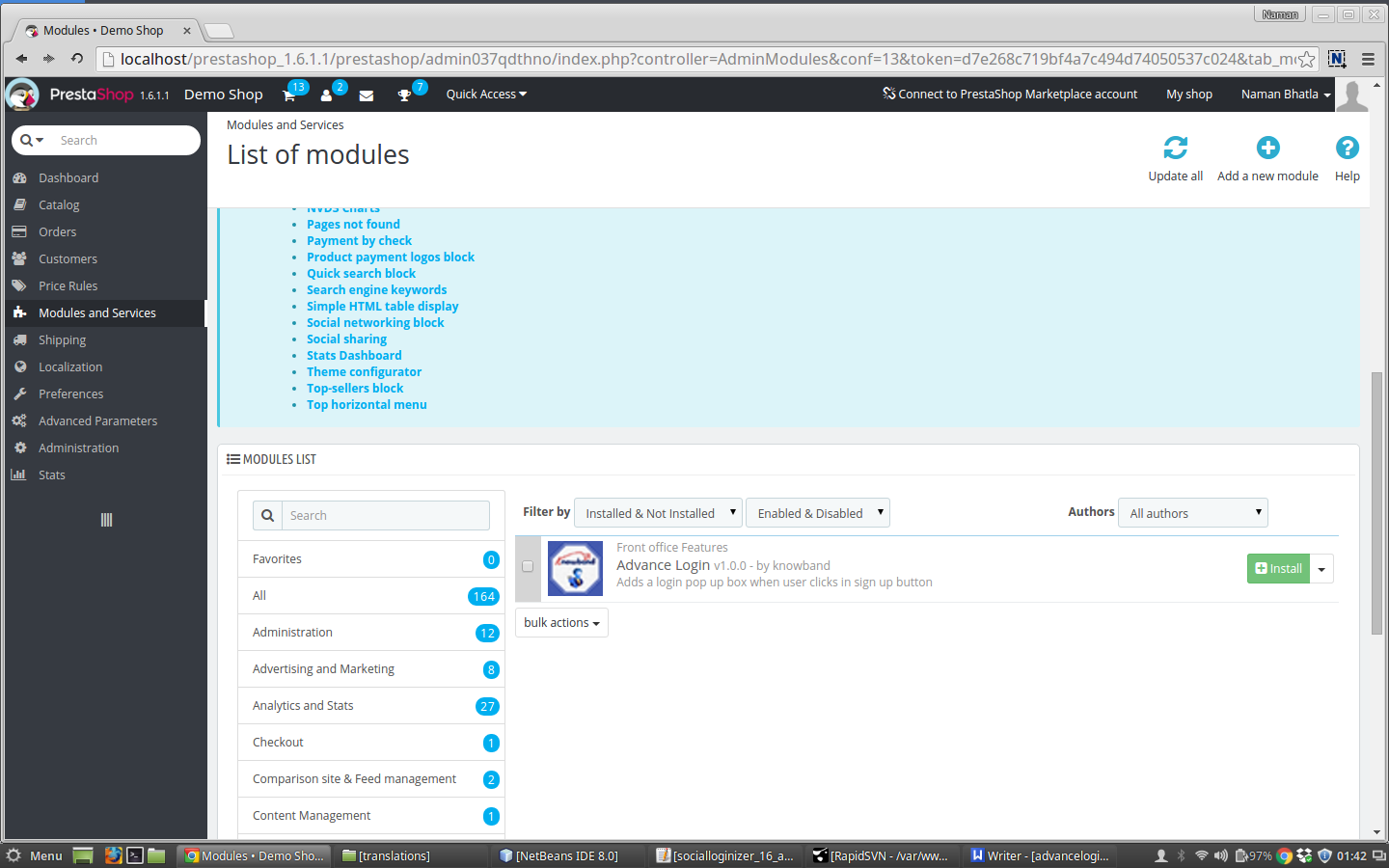
2. After adding this addon folder, the system will list the addon on module page under front office feature category as given below:

3. Click on install button in order to install the Prestashop login popup plugin.

Admin Interface:

When you click on ‘Configure’ option of this social login popup plugin, you’ll see following setting options:

1. General Settings

2. Facebook Settings

3. Google Plus Settings

General Settings:

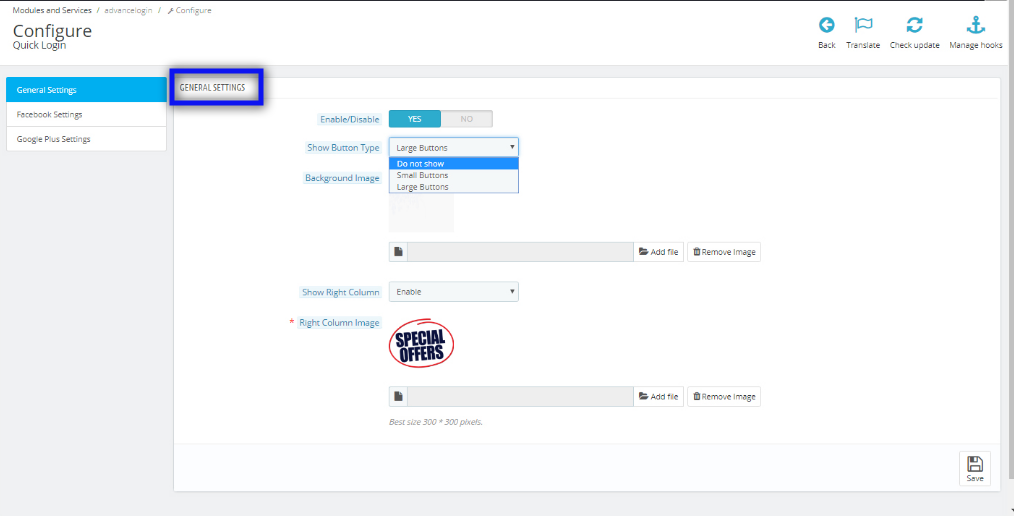
After clicking on configure link of Prestashop advance login popup addon, General settings tab will open.

Fields listed will be filled with some default values.

GENERAL SETTINGS TAB DETAILS:

  • Enable/Disable: This field of Prestashop quick login addon offers the admin to enable/disable the addon. The admin needs to set this option to ‘YES’ to work the module.
  • Show Button Type: This field has three options in which the admin has to select the type of buttons he wants to show on the pop up box (Facebook and Google buttons) it may be large or small buttons. If the admin does not want to show the buttons then also he has an option.
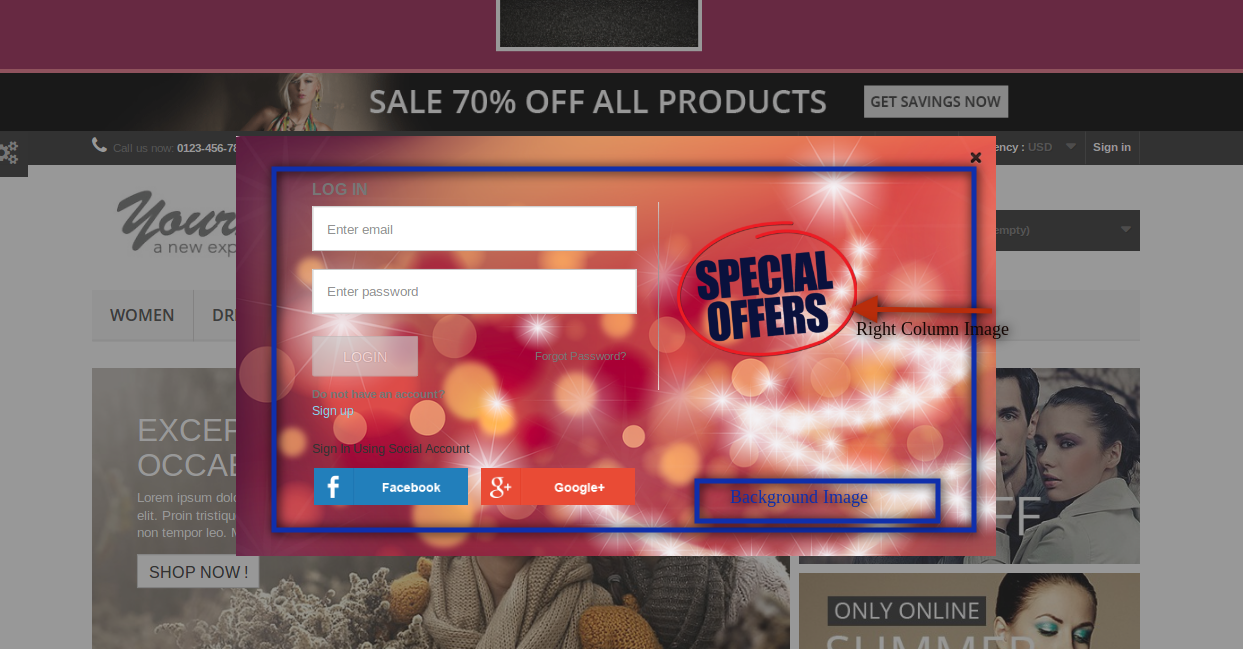
  • Background Image: In this field of Prestashop advance login popup, the user can decide and upload the background image on the pop up box. The image to be entered should be transparent.
  • Right Column: This is also an image upload option. The image uploaded in this option will be added on the right side of the pop up box.

Facebook Settings:

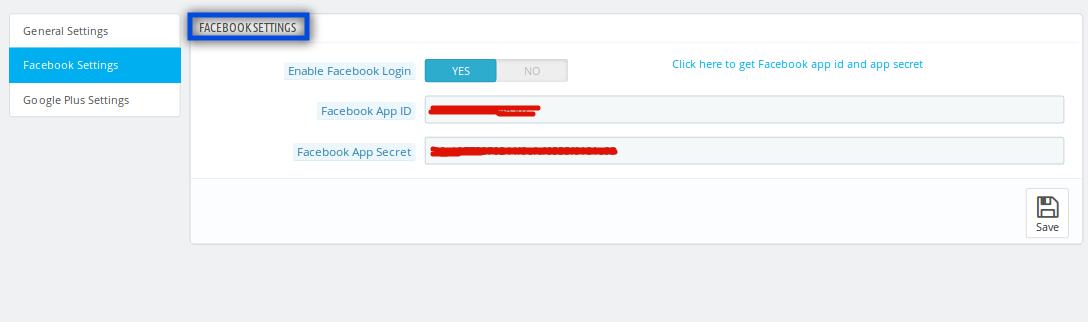
After clicking on the Facebook settings tab the below screen will appear.

FACEBOOK SETTINGS TAB DETAILS:

  • Enable Facebook Log in: This is an enable/disable button for the Facebook log in.
  • Facebook App ID: Here the admin has to enter the Facebook app ID of his.
  • Facebook App Secret: In this field of social login popup the admin has to add the Facebook App Secret.

Google Plus Settings:

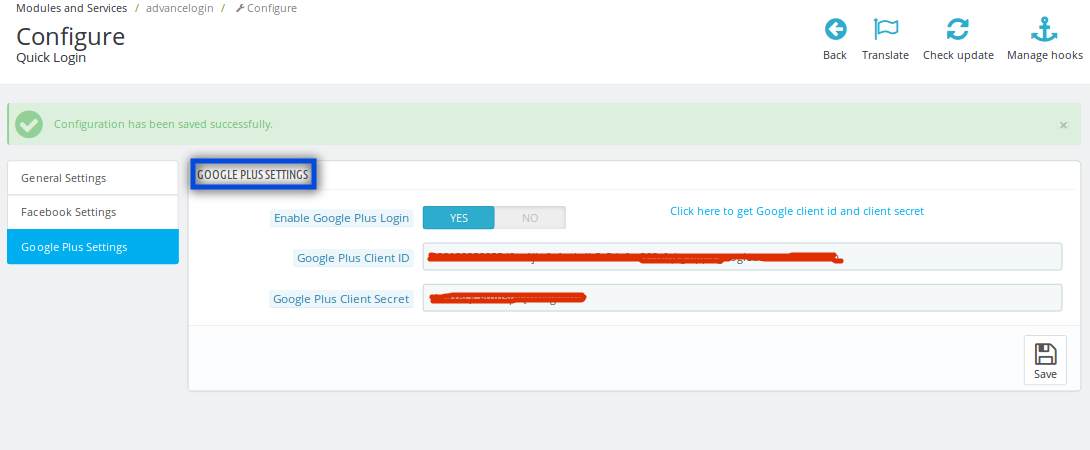
After clicking on the Facebook settings tab the below screen appears.

GOOGLE PLUS SETTINGS TAB DETAILS:

  • Enable Google Log in: This is an enable/disable button for the login through Google Plus.
  • Google Plus Client ID: In this field of Prestashop quick login addon, the admin has to enter his Google plus client ID.
  • Google Plus Client Secret: Here, the admin has to add the Google Plus client secret.

Front End Interface:

After enabling the social login popup addon, the pop up box starts appearing on the page as soon as the user clicks on the login/sign up button.
The Prestashop module at the front-end appears as follows:

Recommendations:

Refresh home page of your store every time you enable/disable plugin. If the plugin is not working after installation then please check permissions on modules folder. The folder should be writable. Please make the folder permission to 755.

We hope that we have covered all the concerns regarding the installation and product guide of this Prestashop Addon. You should also check our blog on How you can increase the brand value of Prestashop Store.

For more Prestashop Addons please visit Knowband.

Knowband Prestashop Quick Login popup Module Link.
Prestashop facebook login popup addon admin demo link.
Knowband Prestashop google login popup front demo link.
Knowband Prestashop social login popup addon store link.
YouTube Video Link of this Login Popup with Facebook and Google.

Please contact us at support@knowband.com for any query or custom change request as per your business requirement.
Posted on March 5, 2016August 2, 2018Author Joe ParkerCategories Prestashop User Manual, User ManualTags prestashop plugins, prestashop quick login, quick login popup, social login popup1 Comment on Prestashop Quick Login Popup – User Manual
Proudly powered by WordPress
Please wait...

Newsletter Subscription

Subscribe With Us and Get Latest Updates
SUBSCRIBE
Exit mobile version