How Are You Preparing Your PrestaShop Store for AI Search (ChatGPT, Gemini & Perplexity)?

A growing share of shoppers are now asking ChatGPT, Gemini, or Perplexity a product question instead of using Google search. Similarweb’s tracking of AI referral traffic shows ChatGPT’s share of worldwide generative AI web traffic has actually fallen from around 76% to about 53% over the past year, not because demand for ChatGPT is reducing, but because people are shifting to Gemini and Claude as well. For store owners, the PrestaShop llms.txt generator module is one practical response to this shift, but it only makes sense once you understand what the shift actually involves. This kind of preparation is no longer a future problem to plan around eventually. It’s already happening, and most stores are not set up for it.

This article explains what “AI search ready” means for a PrestaShop store and explores how tools such as a PrestaShop llms.txt generator addon can support a broader AI search optimization strategy.

1.0 Why a PrestaShop LLMs.txt Generator Module Alone Is Not Enough for AI Search

Google’s crawler indexes a page and ranks it against millions of others. An AI answer engine works differently. When someone asks ChatGPT for a product recommendation, the model either accesses previously learned data or retrieves content live through an integrated search tool or, increasingly, both. Then, instead of just providing a list of links, it concatenates an answer.

That shift matters for a store’s visibility in two separate ways. First, whether AI crawlers can access and correctly parse your product, category, and policy pages at all. Second, whether the underlying information in those pages is structured sufficiently for a model to be able to get accurate information, such as price, stock status, shipping terms, etc., and not guess or hallucinate them.

Research data from Similarweb is also showing something interesting: the proportion of answers linking back to sources from citation presence has increased from nearly 1.6% in mid-2025 to approximately 6.8% in May 2026. Still a minority, but rising, it’s climbing, and it means being citable is starting to have a measurable payoff.

ChatGPT, Gemini, and PerplexityBot: all three platforms behave differently. ChatGPT increasingly blends its training knowledge with live retrieval through GPTBot and connected search tools, and its homepage referral behavior shifted sharply after a May 2026 product update. Gemini leans on Google-Extended, a crawler separate from standard Googlebot, and on Google’s existing search index, so a page that already ranks well organically has a head start there. Perplexity is built around live web retrieval and generates answers using information gathered from current online sources. This makes crawler access and clear, up-to-date page content especially important.

An llms.txt file gives AI systems a clear, organized summary of what your site contains, so they can find and reference the right products and pages faster than by crawling everything from scratch. What it can’t do is solve issues with the underlying content: it won’t get a bot past a robots.txt block, and it can’t correct a product page with outdated pricing or a return policy buried in a PDF. Think of it as the index that makes your store easier to reference, not a replacement for having accurate, accessible pages underneath it. PrestaShop LLMs.txt Generator Module is a useful part of the setup, but it cannot replace accurate, accessible, and well-structured content on your store.

2.0 What “AI Crawler Access” Actually Means for Your Store

AI platforms run their own bots, separate from Googlebot, to gather content. GPTBot collects data for OpenAI’s models. PerplexityBot fetches current web content to generate cited answers. Google-Extended is a distinct crawler from regular Googlebot, used specifically for training and grounding Gemini. Anthropic-AI serves the same function for Claude.

None of these bots are automatically blocked, but none are automatically welcomed either. A store’s robots.txt file controls which of these crawlers are allowed in, and a surprising number of PrestaShop stores have robots.txt rules left over from years of accumulated tweaks that nobody has reviewed since. If GPTBot or PerplexityBot is disallowed somewhere in that file, ChatGPT and Perplexity simply cannot see your catalog, no matter how good your product pages are.

This is where a dedicated PrestaShop AI crawler indexing module saves time. Rather than manually editing robots.txt and cross-referencing crawler documentation every time a new AI platform launches a bot, a module built for this purpose manages crawler permissions as a configurable setting, with no manual file edits required. Most stores that skip this step do so because they didn’t find it important enough to address this. But it is. A good PrestaShop AI crawler indexing module is the difference between your catalog being visible to ChatGPT and Perplexity or invisible.

3.0 Understanding the Role of llms.txt in AI Search 

lms.txt is a proposed file format, introduced by Answer.AI’s Jeremy Howard in 2024, that is located at a site’s root and gives AI systems a curated, Markdown summary of a site’s most important content. The idea borrows from robots.txt and sitemap.xml but serves a different purpose: instead of controlling crawl permissions or listing every URL, it hands a model a short, human-written index of what the site actually contains.

It is very important to know about the current state of the evidence. Independent analysis of AI crawler traffic, including a review of over 500 million bot requests by the analytics firm Limy, found that the share of requests actually adopting a site’s /llms.txt file was negligible compared to traffic from GPTBot, PerplexityBot, and similar crawlers hitting normal pages. To put it in simple terms, most AI crawlers today are still reading your regular HTML content far more than they’re reading your llms.txt file. That doesn’t mean llms.txt is useless, but it does mean nobody should treat it as a guaranteed ranking lever inside ChatGPT or Gemini.

What a good PrestaShop AI answer engine optimization addon is more reliably good for is structure and control. A well-built llms.txt file gives you a single place to define which products, categories, and CMS pages you want AI systems to reference, and to add short editorial context around them, things like which categories are seasonal, which CMS pages contain your actual return policy versus a placeholder. That’s a real, useful function even if it isn’t yet the ranking signal some vendors imply it is.

4.0 The Foundation of AI Search: Accurate and Structured Product Data

If an AI model is going to accurately describe a product, recommend a size, or state a price, that information needs to be unambiguous on the page itself. This is where most of the real work sits, and it overlaps heavily with practices PrestaShop developers already know from technical SEO.

A few specifics worth checking on a PrestaShop store:

  • Correct and up-to-date product schema (Product, Offer, AggregateRating if relevant) correctly filled out and updated, as a product with outdated structured data will confidently claim the wrong price.
  • Clear, simple language on CMS pages for shipping, returns, and sizing (not within a PDF or an image), as AI systems are much more likely to interpret text than scanned documents.
  • Product and category descriptions that state the facts instead of being totally marketing-oriented, because a summary you write about your page for a shopper must know what to say, not just how to say it.
  • Canonical URLs kept clean so an AI crawler doesn’t index three duplicate versions of the same product under different filter parameters.

None of this is something new. It’s the same discipline that has always mattered for good ecommerce SEO, just now read by a different kind of visitor.

5.0 Why AI Search Optimization Matters for Your Store Today 

The ecommerce-specific numbers back up the urgency, even if they’re still early and moving fast. As reported by eMarketer via retail-focused data from Adobe Digital Insights, AI-referred traffic converted 42% better than non-AI traffic as of March 2026, a significant turnaround from just a year prior, when it was found to convert worse than average traffic. AI-referred visitors, meanwhile, spent more time on the site and made more money per visit than an average shopper, provided by the same data.

That’s not proof that any single tactic guarantees results. It is evidence that the shoppers arriving through AI platforms right now tend to be further along in their decision, and that being visible and accurately represented to those platforms carries real commercial weight, not just novelty value.

6.0 A Practical AI Search Readiness Checklist for PrestaShop Stores
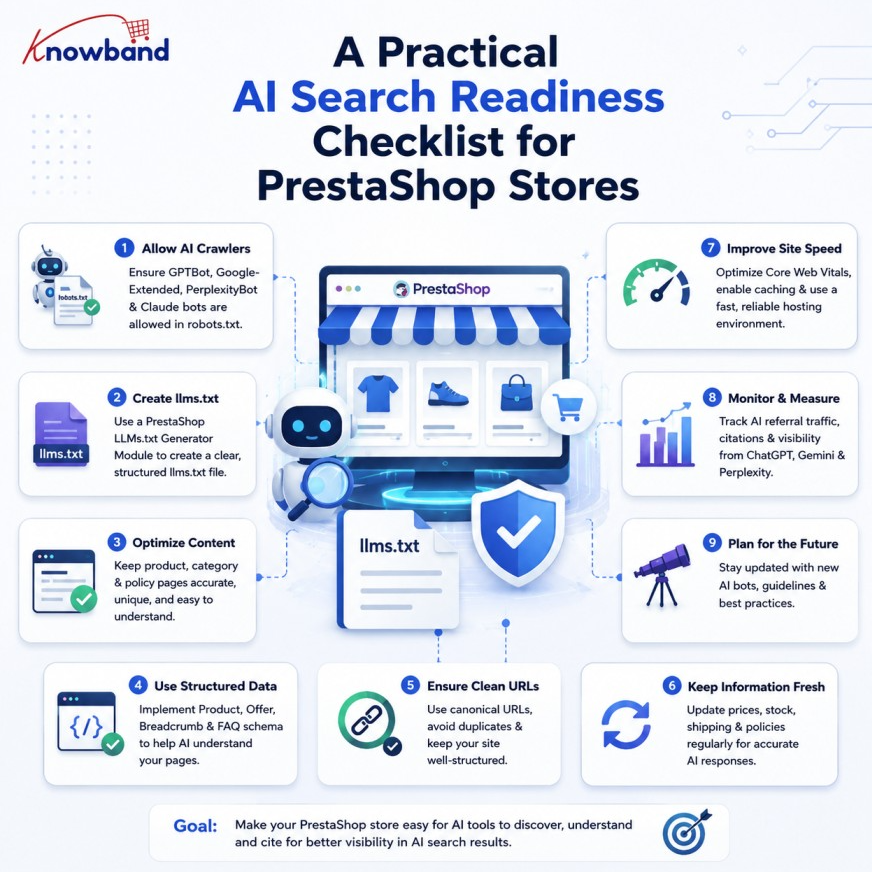
Instead of following every new trend in AI search, retailers can focus on a few practical steps to prepare their stores:

  1. Check robots.txt and ensure that GPTBot, PerplexityBot, Google-Extended, and Anthropic-AI are not being accidentally blocked.
  2. Check product pages for accurate and up-to-date schema, especially price and availability.
  3. Rewrite key CMS pages (shipping, returns, sizing) in plain text rather than images or PDFs.
  4. Publish an llms.txt file using a PrestaShop llms.txt file generator addon that points to your actual catalog structure and policy pages, understanding it as a structure and control tool rather than a guaranteed visibility boost.
  5. Recheck this list quarterly, since crawler behavior and AI platform capabilities are still changing fast.

That fourth step is where a dedicated tool saves real time. Knowband’s PrestaShop LLMs.txt Generator Module will automatically generate and update this file from the store’s data, allowing the administration to choose which AI crawlers (GPTBot, PerplexityBot, Anthropic-AI, Google-Extended, DeepSeekBot, etc) are referenced, filter which products, categories, and CMS pages are included, and add custom context around each section without having to hand-edit a Markdown file every time the store’s data changes. It handles the mechanical part of step four, so the actual product and content work in steps two and three get the attention they need.

PrestaShop AI Search Optimization: Key Takeaways and Next Steps

A PrestaShop llms.txt generator module is a small part of a broader setup. Preparing a store for AI search starts with the fundamentals: allowing AI crawlers to access your site, maintaining accurate structured data, and providing clear, easy-to-read product and policy information. An llms.txt file can complement these efforts by giving AI systems a structured overview of your store. As AI search continues to evolve, keeping these core elements accurate and up to date will remain essential.

If maintaining an accurate llms.txt file manually isn’t practical for your catalog size, the PrestaShop AI answer engine optimization addon is worth a look as a way to keep your llms.txt file up to date without adding it to your team’s manual workload.

👉Explore the Module with Our Video Guide

If you have questions or need assistance with your website performance or migration, our experts are here to help. Contact the Knowband team at support@knowband.com today for reliable ecommerce plugins tailored to your eCommerce needs.

How to Speed Up Your PrestaShop Store in 2025: The Ultimate Core Web Vitals Guide

Nobody enjoys waiting for a slow website. Your customers will press the back button within seconds. Also, Google now uses speed to rank websites. As a result, you lose both customers and search engine rankings if your PrestaShop store is slow. But don’t worry, this guide will help you fix that issue quickly.

What Are Core Web Vitals? (It’s Actually Simple)

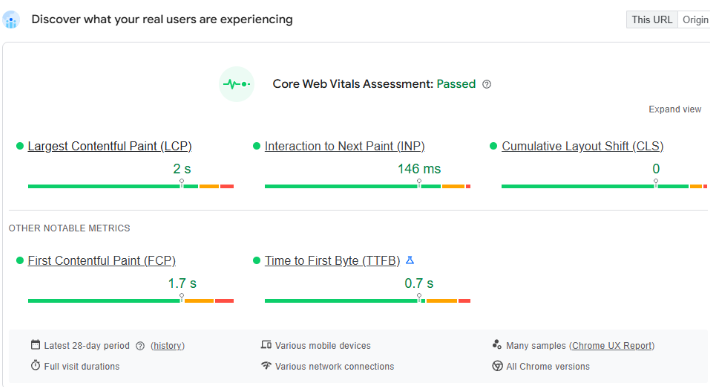
Consider Core Web Vitals to be the Google report card for your website. They gauge the below most crucial elements for your site’s visitors:

  • Largest Contentful Paint (LCP): This measures how long your biggest page element takes to load. Aim to keep it under 2.5 seconds. First impressions matter, so a slow-loading page makes visitors think your site is broken.
  • Interaction to Next Paint (INP): This checks how fast your site responds to clicks. Keep it under 200 milliseconds. When people click buttons, they expect an instant response. Otherwise, they get frustrated and leave.
  • Cumulative Layout Shift (CLS): An annoying page jump is measured by Cumulative Layout Shift (CLS). You know when you are about to click something and the page shifts? Keep this under 0.1. Nobody likes accidental clicks during checkout.

Time to First Byte (TTFB): This measures how quickly a request is processed by your server. A decent TTFB is less than 200 ms. When TTFB is slow, users have to wait longer for anything to load at all.

If you fix these, you’ll see more sales. Your customers will be happier, and Google will rank you higher.

Your PrestaShop Speed Plan

Ready to transform your slow store? Here’s your action plan.

1. Fix Those Huge Images

Large images are a primary killer of store speed. Here is what works:

  • First, convert images to WebP format. This cuts file sizes by 30% without losing quality.
  • Then, set up lazy loading. This loads images only when customers scroll to them. As a result, pages load faster upfront. Customers see content immediately instead of blank screens.

2. Leverage a Content Delivery Network (CDN)

A global network of servers is called a CDN. A CDN pulls content from the nearest server when a customer comes into your store. Especially for a worldwide audience, this lowers latency and expedites the delivery of content. Services like Cloudflare offer great CDN solutions that are easy to integrate with PrestaShop.

3. Tame Your Code: CSS and JavaScript Optimization

PrestaShop relies on CSS and JavaScript files. Over time, these files can become large, which can block rendering and delay content loading.

  • Minify and Combine: Minifying CSS and JavaScript removes unnecessary characters, reducing file size. There are fewer HTTP requests when several files are combined into one. PrestaShop has a built-in feature for this called “CCC.” You should definitely enable it.
  • Defer Non-Essential Scripts: To improve your INP score, defer non-critical scripts. This means loading these files after the main content appears. Consequently, users can interact with your page much faster.

4. Use Smart Caching

Caching is like your store’s memory. Instead of rebuilding pages for every visit, your server remembers and reuses content. To speed things up, set up server caching using tools like Redis or Memcached. These store database results in memory, giving repeat visitors lightning-fast responses.

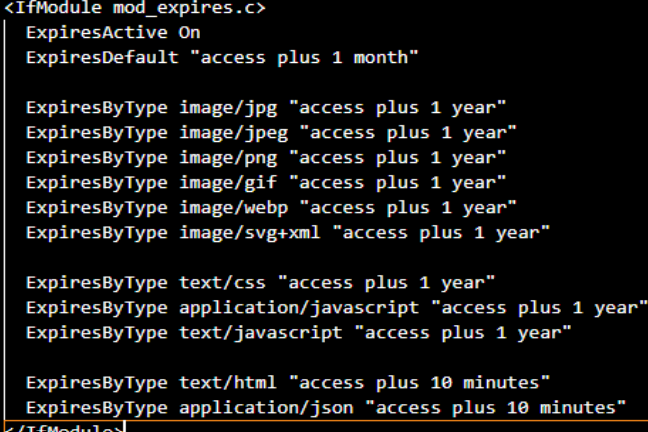
You should also configure browser caching. This tells visitors’ browsers to remember your static files, like images and stylesheets, so they don’t have to download them again in the future. visits. You can set a long cache time for these files via the .htaccess file if you’re using an Apache web server.

5. Regular Audits

Regular audits help identify unnecessary or outdated entries that only consume space and slow down queries. For example, tables like ps_log, ps_connections, ps_connections_page, and ps_guest often grow very large. They store logs, statistics, and visitor data that are rarely used. Similarly, abandoned carts in ps_cart, expired vouchers in ps_cart_rule, and old email records in ps_mail can be removed safely after a certain period.

Tools to Track Progress

You must evaluate your present performance before optimising. You can examine your PrestaShop store’s Core Web Vitals with the aid of a number of effective tools.

  • Google PageSpeed Insights: This is the most authoritative tool for measuring CWV. Just enter your URL to get detailed reports for both desktop and mobile performance.
  • Google Search Console: This free application keeps track of your CWV continuously.
  • GTmetrix: GTmetrix offers detailed performance analysis with visual tools. Using Lighthouse, it generates scores for your pages and offers actionable recommendations on how to optimise.
  • Lighthouse: A Google open-source tool that analyses your website’s performance, accessibility, SEO, and best practices. You can use Chrome DevTools or the CLI to run it, and it provides you with scores for every category along with actionable insights.

At Knowband, we guide store owners with best practices to maintain a clean and optimised PrestaShop database. By following systematic audit routines and learning which tables can be safely cleaned, merchants can avoid unnecessary bloat, reduce query load times, and improve overall store performance.

PrestaShop 9: A New Chapter with Symfony

PrestaShop 9 marks a major advancement for the platform. This is not just an ordinary update; it is a significant effort from the community to build a modern, reliable core. The entire system now runs on the Symfony framework. This transition was a careful plan that took years. The switch to Symfony is critical. It makes the platform faster, more secure, and more adaptable for everyone. Ultimately, PrestaShop 9 is a total overhaul. Its design makes it ready for the future and competitive in today’s e-commerce landscape.

The Symfony Switch: A Closer Look

The most significant change in PrestaShop 9 is that the entire administration area now operates on Symfony 6.4 LTS. Before, the PrestaShop team used a mix of old code and Symfony. This was complicated for developers and often caused bugs. But with this new version, the team rebuilt every single admin page. They built them to fully use Symfony and Twig templating.

As a result, developers can now work with a single, consistent framework. This consistency simplifies creating new modules and makes fixing issues much easier. The platform can also use Symfony’s strong security features. It benefits from the support of a large developer community.

In addition, this change allowed the project to remove a lot of outdated code. For example, the team has permanently removed features like the old XML API and the confusing product form. In their place is a cleaner system that is simpler to maintain. The platform also now supports newer versions of PHP (8.1–8.4). This is a huge benefit. These new PHP versions bring significant performance boosts and better error handling.

They also include Just-In-Time (JIT) compilation. This can make your store run much faster. In summary, the move to Symfony is all about making the platform more dependable, more powerful, and easier to expand.

New Features for Store Owners

While the biggest changes are “under the hood,” the admin panel itself offers a much better user experience. The interface has a more modern look, and all pages now feel consistent. You won’t see that frustrating mix of old and new interfaces anymore. This consistency makes managing your store a lot smoother and reduces the time you need to train new staff members.

For developers, one of the best new tools is the Admin API. This new API provides a modern way for other systems to communicate with your store. It’s built on a framework called API Platform, which makes connecting with things like your inventory system, customer management software, or a mobile app simple. For example, it’s now very easy to automatically update prices or sync your stock with your warehouse management system.

You could even create a custom mobile app for your store. Then you can have it pull all product and order data directly from this API. In fact, this new API is what makes headless commerce a reality. It lets you use PrestaShop for its back-end. Meanwhile, you can create a totally custom front-end with modern frameworks like React or Vue.js.

Why This Is Great for Everyone

These technical updates provide real benefits for both store owners and developers. For store owners, the platform is much faster. The updated code and PHP compatibility mean your pages will load quickly. Quick loading is crucial for keeping customers happy and getting more sales. Also, PrestaShop 9 now supports new image formats like WebP and AVIF. These images are much smaller. This speeds up your site even more without reducing quality. A faster site can also improve your Core Web Vitals score. That score is a key factor for good SEO.

The SEO features have also been refined. The platform creates cleaner, shorter URLs by default. This makes it easier for search engines to understand your site. For developers, the benefits are huge. The full Symfony architecture gives them a consistent, well-documented environment.

This makes building modules and themes easier and more enjoyable. With the new Admin API, they can build better, more powerful integrations. They can also meet today’s demanding business needs. All in all, PrestaShop 9 is a massive improvement. It’s a modern, future-proof platform.

Need trustworthy PrestaShop plugins or expert help with migration and compatibility? Our team delivers seamless solutions tailored to your store’s version—whether you’re on 1.6, 1.7, 8, or moving to 9. We handle the technical complexity, so you can focus on growing your business with confidence.

Prestashop SEO Wizard Addon – User Manual

1.0 Introduction

With the help of Prestashop SEO Wizard Addon the Prestashop store admin can enhance the visibility of the eCommerce site in a hassle free way. The Knowband Prestashop SEO Wizard module simplifies the most time-consuming works of SEO by automating the entire process. The Prestashop Merchant can now create the sitemaps or the XML files for the web pages as well as interlink URL of targeted pages with the anchor text at a button click. The site mapping can be done in multiple languages.

Searching the keywords in the contents of the site and then manually adding the links was quite a task earlier, but not anymore. The Prestashop SEO Wizard Module makes the entire process automated. It searches for the keyword in the long or short description in the front-end and adds the links automatically. Even the meta tags for the web pages can be added from the admin interface. You can optimize the product, category, manufacturer or even the CMS pages in a few simple steps. Become an SEO expert and let your web store rank higher in the SERP of the various search engines.

1.1 Project Objectives

Prestashop SEO expert addon offers a number of optimization options. Some of them are listed below:

1. The Prestashop SEO module allows the admin to create the XML file of the various web pages at a button click. Easing out the task of sitemap creation, the website can now rank be fetched by Google in minimal time.

2. The Prestashop SEO Wizard Addon searches for the specified keywords from the content of the website and attaches relevant links to it in minimal time.

3. The priority of the web pages, as well as the frequency of web crawling, can be set as well.

4. The store admin can include the nofollow or dofollow as per their wish. At the same time, the option to open the links in new tab can be incorporated without making any code changes.

1.2 Benefits of the Merchant

  • With the help of this Prestashop SEO Wizard Extension, the Prestashop store admin can create the XML sitemap of the PrestaShop as per desires.
  • The Store admin has access to set the priority if the web pages as per need.
  • This Prestashop SEO Expert addon allows the admin to set the frequency of the crawling as his/her requirement.
  • The Merchant can enable/disable the image option in the sitemap.xml file of the product pages.
  • The Prestashop SEO Expert Addon allows the e-merchant to enable/disable the sitemap at any time.
  • The Prestashop SEO addon gives the option to the store admin to add the link on the targeted keywords of the entire site as their need. It saves a lot of time to the admin.
  • The Admin can already add interlink on the targeted keywords edit or delete as per desires.
  • This Prestashop SEO Wizard addon enables the admin to keyword for the interlinking is searched in the short or long description of the products.
  • With the help of this Prestashop SEO Wizard module, the store admin to add the follow or no follow a link and it also allows the admin to open the link in new tab.
  • This Prestashop SEO expert module allows the store merchant to optimize the meta tags, meta title, meta description of the products, manufacturer, and categories page.
  • The Admin can optimize the products, categories, CMS, Manufacturers, product meta tag, update category meta tag and update manufacturers meta tags of the website incorporated in the front-end of the website from the Optimization Setting tab.
  • The entire interlinking is done from the back-end of the Prestashop XML file creation module.
  • The Prestashop SEO Expert extension allows the admin to restore the initial data via the group.
  • This Prestashop automated site interlinking Module in multilingual support.
  • This Prestashop SEO Wizard extension compatible with multiple stores.
  • Prestashop Sitemap generator Module for SEO helps the merchant to improve the visibility of the website.

2.0 Installation

After purchasing the Prestashop SEO Wizard Module, you’ll get following files as listed below:

1. kbseowizard.zip (contains source code of the module)

2. User Manual

Follow the steps mentioned below to install the extension:

  • Unzip the kbseowizard.zip file. It would contain files and folders as shown in the image below –
  • Copy all the files and folders from the extracted folder and paste them into “Modules” directory of your store. Follow the path – Root Directory/modules/.

3. The Prestashop SEO addon can be installed on your store now. You can find that in Store Admin -> Modules and Services. It would be shown as below –

You may even search for the module in the admin modules listwith the following details –

Keyword – SEO Wizards

Category – Front office

Filter By – Installed & Not Installed / Enabled & Disabled

4. Click on “Install” button to install the Prestashop SEO Wizard extesnion. It would show a pop-up for your confirmation. Click on “Proceed with the installation” option. This step will install the Prestashop module and show notification – “Module(s) installed successfully”.

3.0 Admin Interface

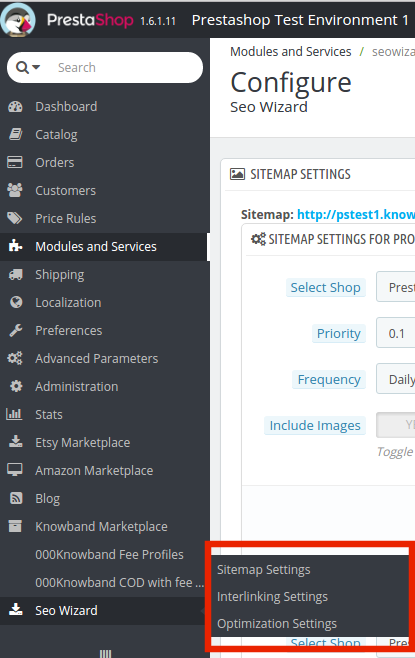
This Prestashop module allows the e-merchants to enhance the various SEO aspects of the site. Right from the sitemaps to the interlinking everything can be done in one link. This is the most time consuming and tedious task for the e-marketers. The Prestashop SEO wizard addon makes it simple and a matter of moments. You can find the Prestashop SEO expert extension in the main menu of the admin interface.

It basically offers four optimization options. They are listed below:

  • SiteMap Setting
  • Interlinking Setting
  • Optimization Setting
  • Meta Tag Settings

3.1 How is the Site Map created?

The site map of the web pages makes it easier for Google to find your sites. The creation of .XML file involved a lot of steps, but it can now be done at a button click.

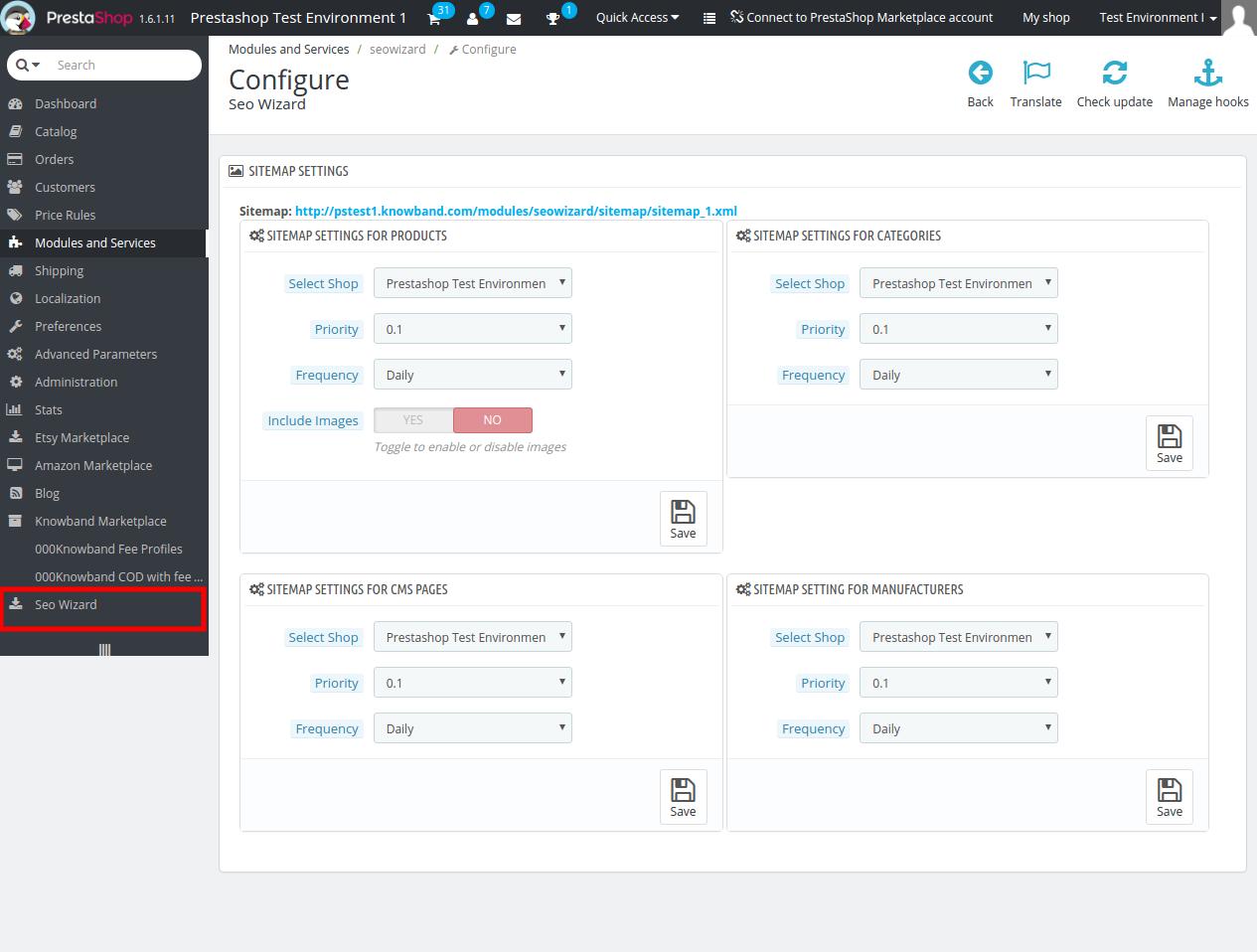
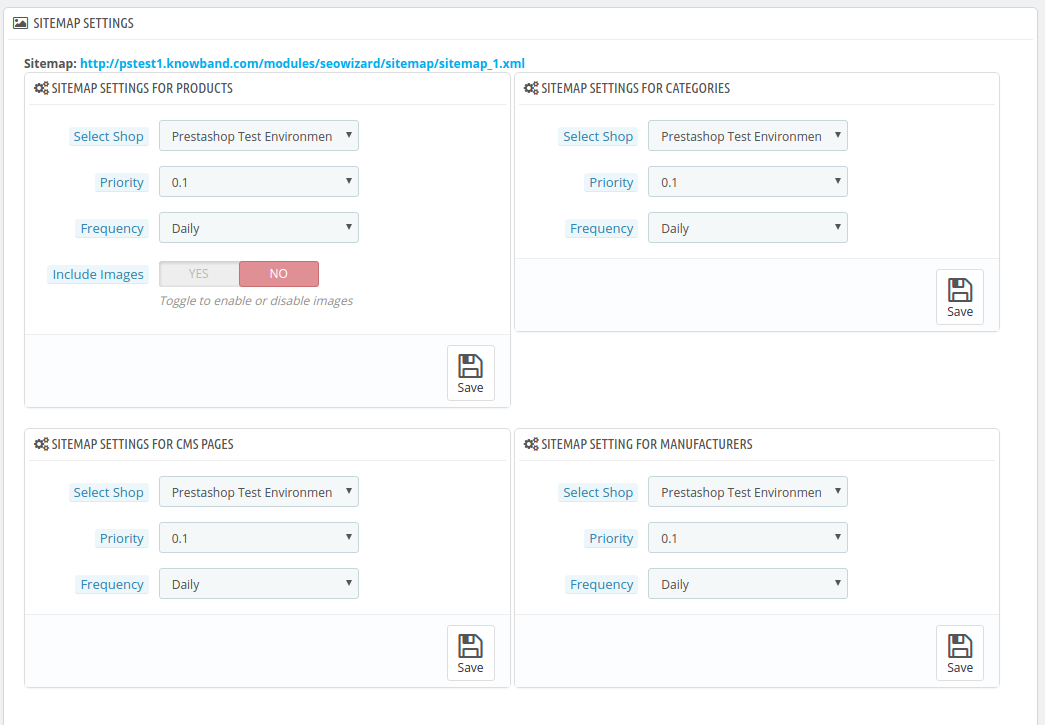
The Prestashop SEO addon allows the admin to create the sitemap or the .xml file for four different web page types. They are:

  • For Products
  • For Categories
  • For CMS Pages
  • For Manufacturers

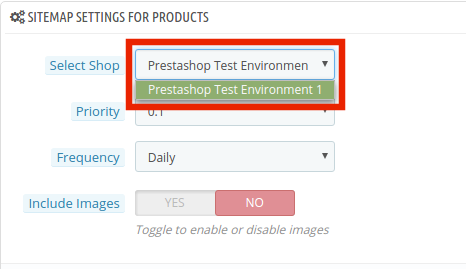
The Prestashop SEO Expert Extesnion is multi-store compatible. The admin can Select Shop from the dropdown menu in which they are looking to include the optimization option.

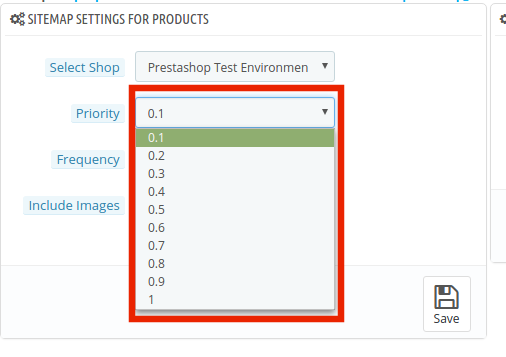
In addition, the admin can set the priority of each web page type as per the need. All he needs to do is to select the priority rank.

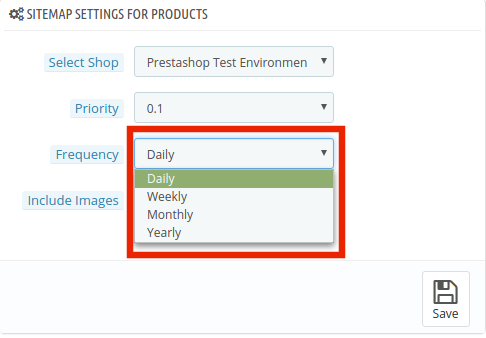
The frequency in which you want Google to crawl the web page can be selected. The crawling frequency can be set on Daily, Weekly, Monthly and Yearly basis.

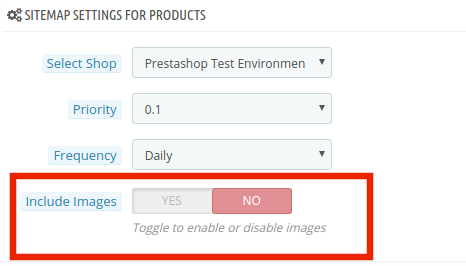
In addition, the admin can include the sitemapping of the product images just by a button click.

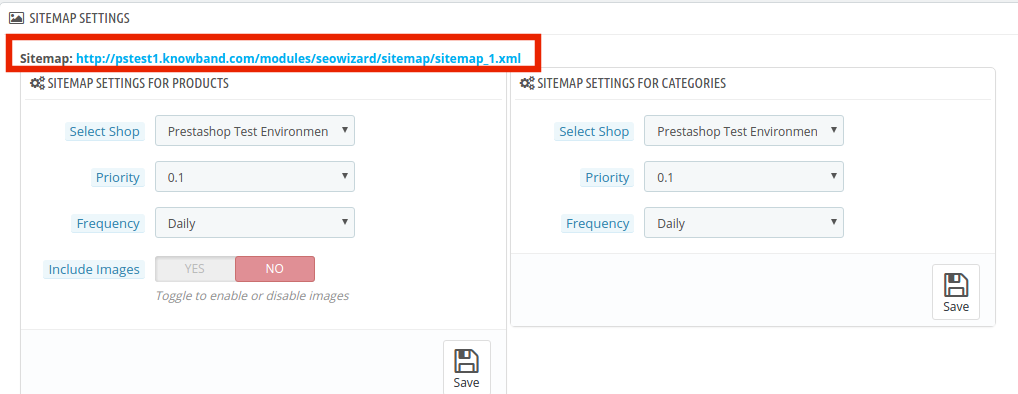
Make the changes and click on ‘save’. The .xml file will be created automatically. The link of thesame can be viewed at the top as shown in the image.

This Pretashop SEO wizard addon shown the xml file is obtained in the usual format.

The same process is followed in all the four web page types.

3.2 How is the Interlinking done on the site?

3.2.1 How is the new links created?

The Prestashop SEO Wizard extesnion allows the admin to add links to the keywords mentioned in the website in one go. Once the keyword and the link are mentioned in the back-end, the Pretsahop addon fetches for the word in the short description of the product pages and other web pages. The keywords are then converted to the anchor tag and specified links are attached to it.

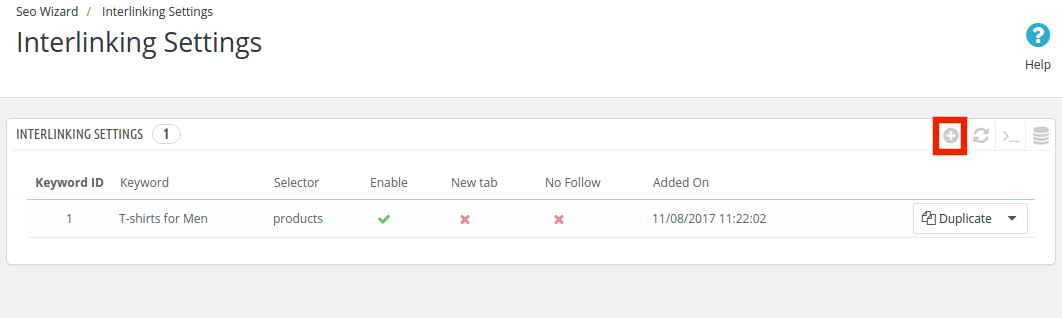
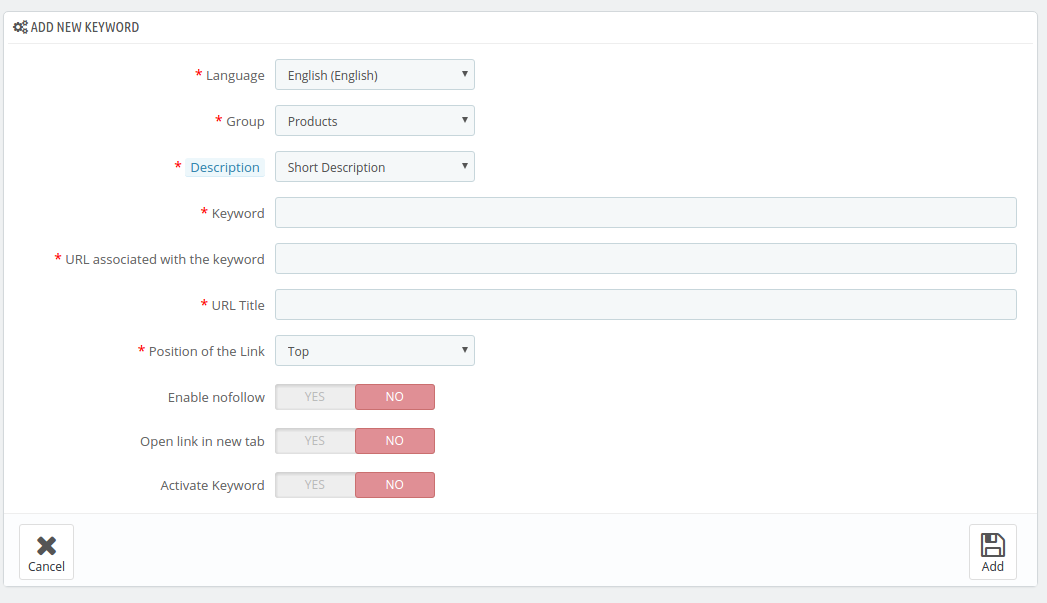
In order to do the interlinking, go the ‘Interlinking Setting’ of the Prestashop SEO expert module. It shows the list of the already created links and keywords. In order to create new once, click on the ‘+’ in the top right section.

Enter the information required in the admin interface.

  1. Language: The Prestashop SEO Wizard module offers multi-lingual support and the changes can be done in various languages.
  2. Group: The group or type of web page, that is, Product, Manufacturer, CMS pages or Categories, can be selected from here. The interlinking will then be done in those pages only.
  3. Description: This field is only for the product pages. The merchant can either select the ‘Short’, ‘Long’ or ‘Short and Long’ description. The keyword entered will then be searched in the selected descriptions and interlinking will be done in the same.
  4. Keyword: Enter the keyword that you want to use as an anchor text.
  5. URL: The URL that is to be linked with the keyword is mentioned in this section.
  6. The position of the Link: The position of the link, that is, Top or Bottom can be selected here.
  7. Enable Nofollow: The link can be used as a nofollow or a dofollow link as per the requirement of the user. In case you want to keep it as a nofollow link, switch the button on.
  8. Open in New Tab: By enabling this feature, you can make sure that the links will open in the new tab instead of the same tab.
  9. Activate Keyword: The keywords can be activated by toggling the button here.

3.2.2 How are the links keywords edited or deleted?

The keywords and the related information can be edited by clicking on ‘Edit’ button as shown below. The admin interface even offers the options to delete the existing ones.

3.3 How are the changes incorporated in the website?

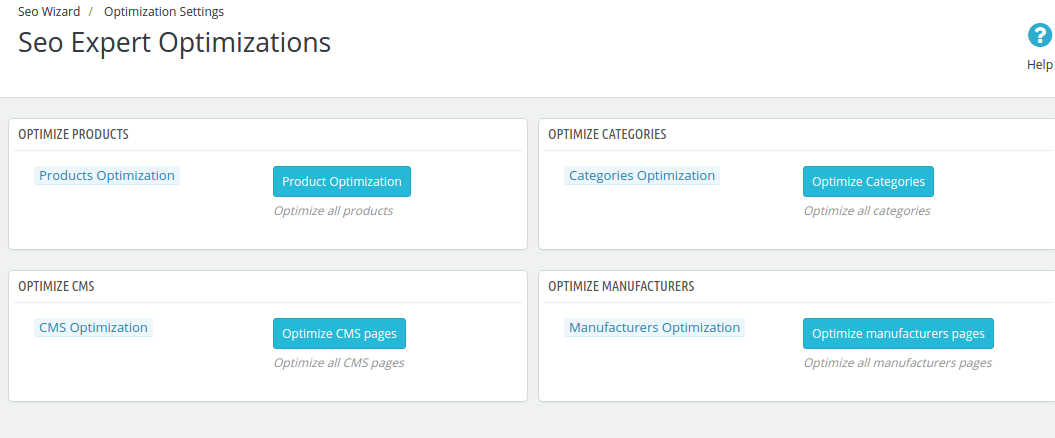
The entire interlinking done in the backend can be incorporated in the front-end of the website from the Optimization Setting tab.

The changes can be implemented on the front-end of the website by clicking on the ‘Optimize’ button. This option is available for all the different page type of group. Each page type can be optimized separately.

3.4 How to add Meta Tags in the Web Pages?

This Prestashop SEO Wizard addon simplifies the most time-consuming task of the e-marketers. The meta tags, that is, the meta titles, descriptions and keywords can be added for the product pages, category pages as well as for the manufactures.

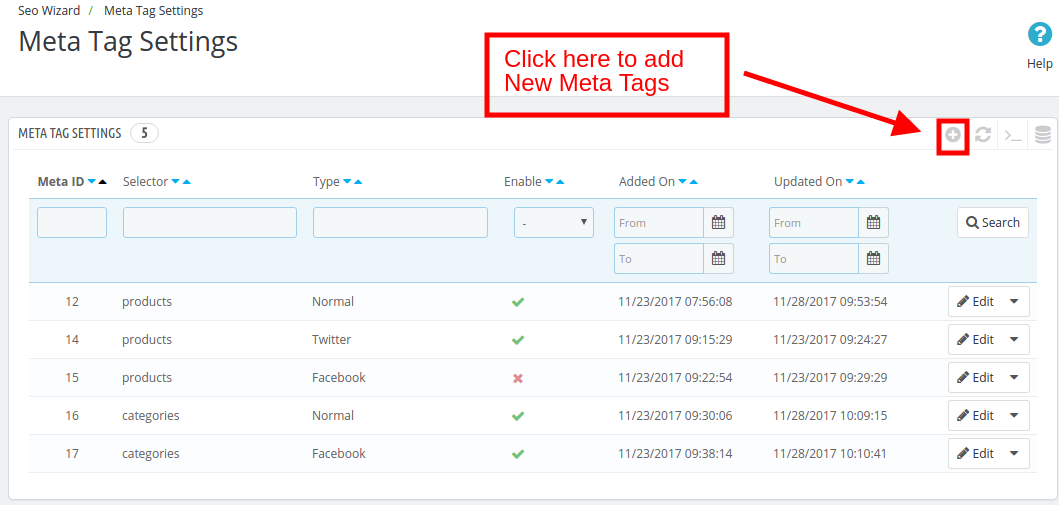
The list of the tags already created can be viewed in the ‘Meta Tag Setting’ tab. In order to create the new one, click on the ‘+’ sign in the top right corner of the admin interface.

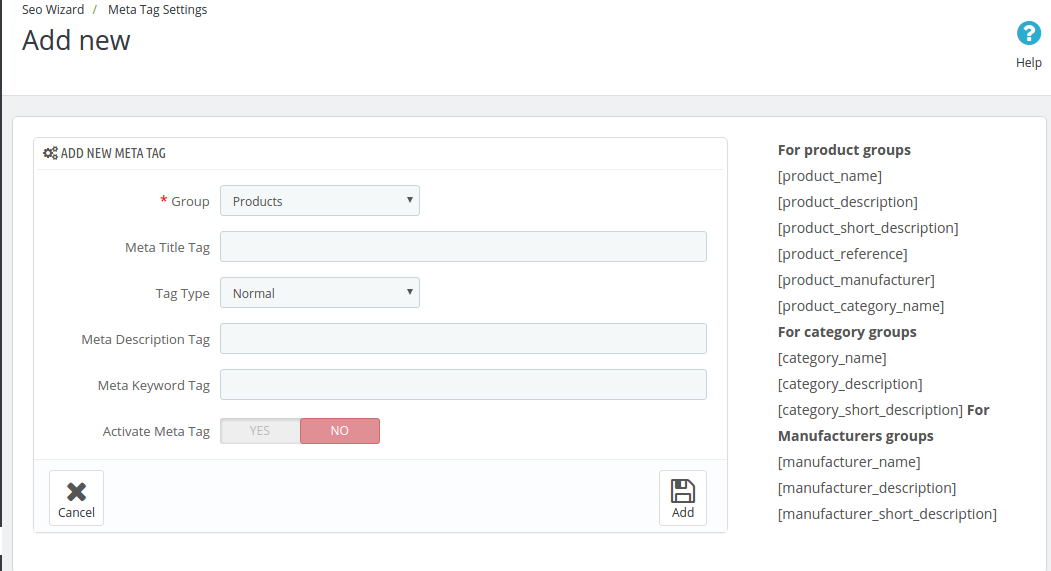
The meta tags can be, then, entered by filling up the required information fields.

Group: Select the group type in which you want to add the tags. You can choose from the Products, Categories or Manufacturer.
Meta Title Tag: Enter the meta title for the web page here.
Tag Type: The tag type can be Normal, Facebook or Twitter. The admin can select any from the drop-down menu.
Meta Description Tag: The short meta descriptions of the web page can be entered here.
Meta Keywords Tag: The keyword relevant to the web pages can be entered here. You can enter the main keywords, it’s variants as well as the long-tail keywords here.
Activate Meta Tag: The meta tags can be enabled/disabled by toggling the button.

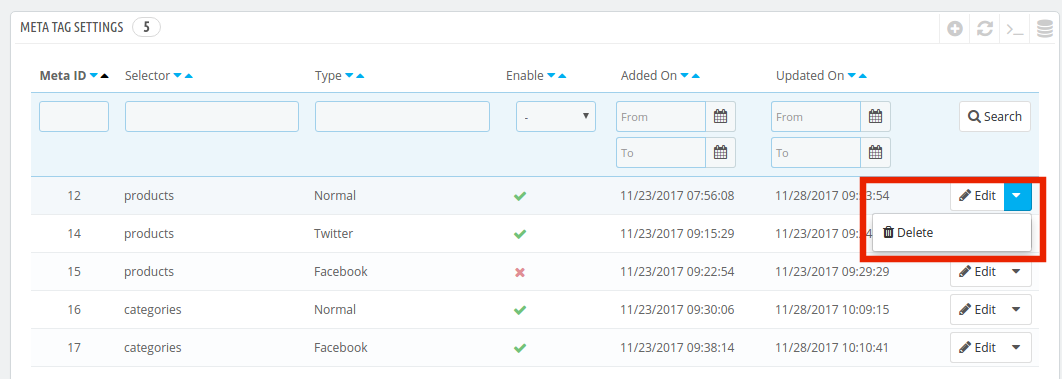
The created tags can be edited or deleted as shown below:

Now you can try Prestashop SEO Wizard module for on your Prestashop website. KnowBand Prestashop SEO Addon helps you engage more customer to your store & increase the customer base. The Prestashop XML file creation Extension allows the admin to manage SEO of the website easily without any hassle. The online seller can easily manage the interlinking, XML file creation and meta tags generation without any lengthy and time taking process.

The Prestashop Merchant can now create the sitemaps or the XML files for the web pages as well as interlink URL of targeted pages with the anchor text (read more about it here – Linkio.com) at a button click. The site mapping can be done in multiple languages.

For more Prestashop Addons please visit Knowband.

For more details about this SEO wizard module:

Prestashop SEO Expert Module link.
Prestashop SEO Expert Module Admin Demo link.
Prestashop XML file creation Extension Front Demo link.
Prestashop Sitemap generator Module for SEO User manual.
Knowband Prestashop SEO Wizard Addon store link.

Please contact us at support@knowband.com for any query or custom change request as per your business requirement.