What settings are there in the Configuration tab of Prestashop Gift Card Manager?

Nowadays. it can get hectic for people to choose gifts for their friends and family. What they could appreciate and what they’ll give as gifts from their finish to other people, is something that irritates the provider. Consequently, they began giving gift cards instead of actual gifts. This is when e-gift cards come into the image.

What is a Digital Gift Card or eGift Card?

A computerized card is an electronic gift card that includes an extraordinary code that can be benefited from an internet-based store (of which the gift card has a place) to purchase something of the very esteem as that of the gift card.

For instance, on the off chance that it is an Amazon gift card worth 1000 rupees, the provider can gift it to any individual who emails the code to the beneficiary. Consequently, the beneficiary can add a result of a similar worth ($100) to the truck and enter the code while on the checkout page to shop the item.

The Prestashop gift card manager by Knowband is a stunning tool for your eCommerce business. In fact, there are several settings where you can configure the plugin without any hassle. In this blog, we will take a look at the various settings under the Configure Tab of the Prestashop send gift card addon.
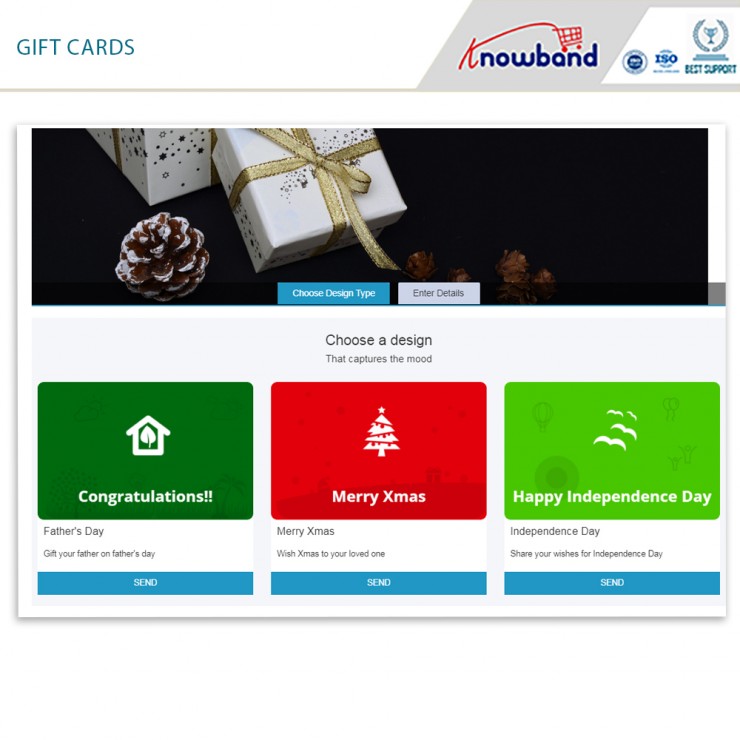
Configure Tab settings of the Prestashop Gift Card Manager

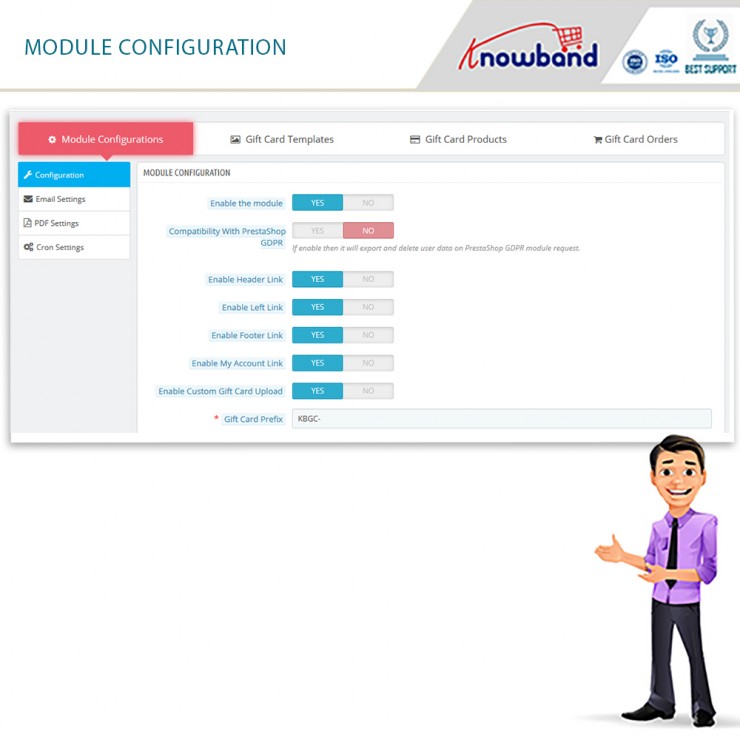
  • Enable the Module

The main functionality is where you enable or disable the whole existence of the Prestashop gift card addon on the front end of the website.

  • Compatibility with Prestashop GDPR

Once you enable this function, then it will export and delete user data on the PrestaShop GDPR module request.

  • Enable Header Link

With this functionality, the admin can enable the module’s function on the header of the website.
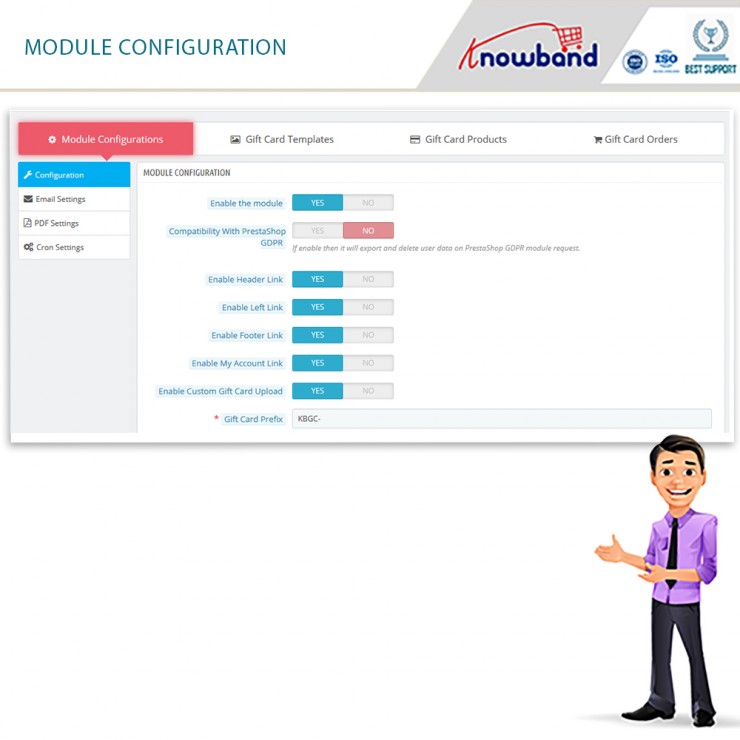
  • Enable Left Link

With this functionality, the admin can enable the module’s function on the left sidebar of the website.

  • Enable Footer Link

With this functionality, the admin can enable the module’s function on the footer of the website.

Note: Our Module adds a Gift Card Link in the footer if the footer contains the displayMyAccountBlock Hook. Also, if the Theme editor is present in the store then Admin can add a gift card link in the footer using the theme editor.

  • Enable My Account Link

With this functionality, the admin can enable the module’s function on the My Account page of the website.

  • Enable Custom Gift Card Upload

Do you wish to allow your customers to make custom gift cards? You can allow them to use this functionality.

  • Gift Card Prefix

This option enables the store owner to input the prefix for the gift voucher code through the module.

  • Gift Card Code Order Status

This setting of the Prestashop gift card module allows the admin to update the order status when the gift card will be marked delivered and the gift card code will generate.

  • Minimum Gift Card Delivery Gap

Under this tab of the Prestashop gift voucher module, the admin can set the delivery gap. Further, between the order placement and delivery of the gift card.

  • Email Setting

Under this setting of the Prestashop gift card manager, the admin can easily select the language of the email settings. Furthermore, the options include English, French, Italian, and Spanish.

Once the admin selects and saves the language, more settings unfold further. The segregated settings include the following:

  • Recipient Email Subject

This email template will be sent to the recipient of the Gift Card. In fact, this contains the subject of the email.

  • Recipient Email Content

In this option of Prestashop Gift Card Manager, the admin can add the content or the body of the email for the receiver of the gift card.

  • Sender Email Subject

This email template will be sent to the sender of the Gift Card. In fact, this contains the subject of the email.

  • Sender Email Content

In this option of Prestashop Gift Card Addon, the admin can add the content or the body of the email for the sender of the gift card.
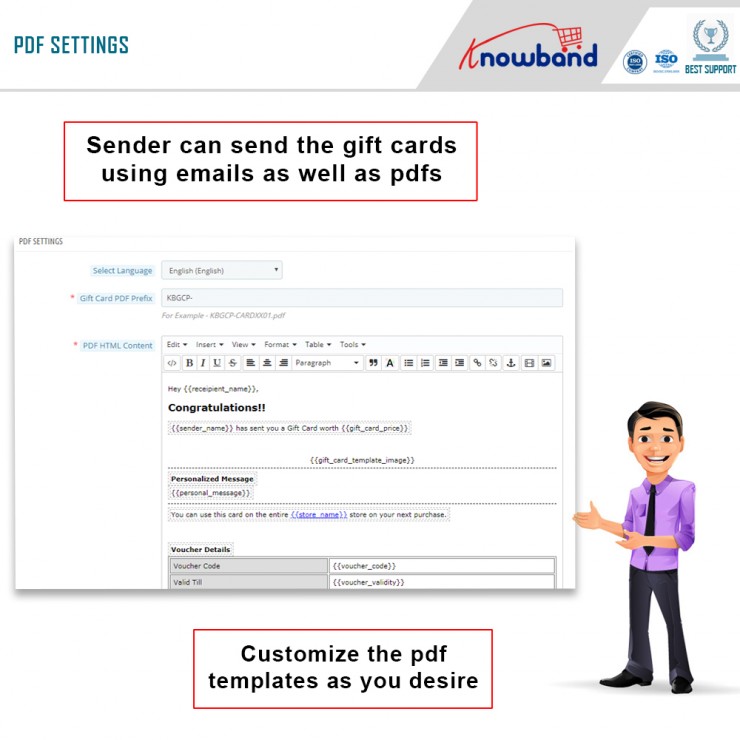
  • PDF Setting

Under this setting of the Prestashop gift card module, the admin can easily select the language of the PDF settings. Furthermore, the options include English, French, Italian, and Spanish.

Once the admin selects and saves the language, more settings unfold further. The segregated settings include the following:

  • Gift Card PDF Prefix

In this option, the admin should enter the prefix of the PDF file. Furthermore, that will generate gift cards.

  • PDF HTML Content

NOTE: Keywords like {{sample}} will replace by dynamic content at the time of execution. Please do not remove these types of words. Otherwise, proper information will not be displayed. You can only change the position of these keywords in the HTML.

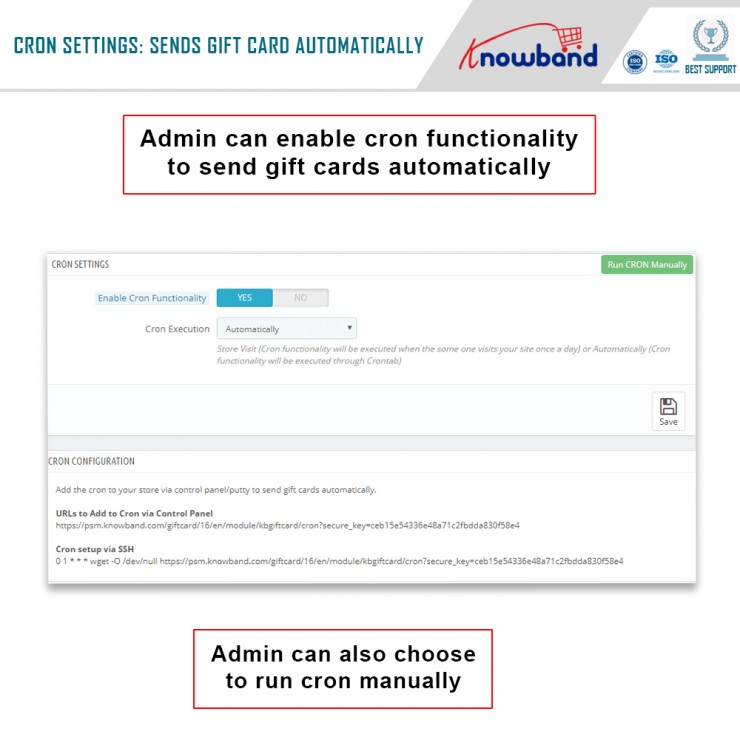
  • CRON Setting

Under this setting of the Prestashop send gift card addon, the following options are available:

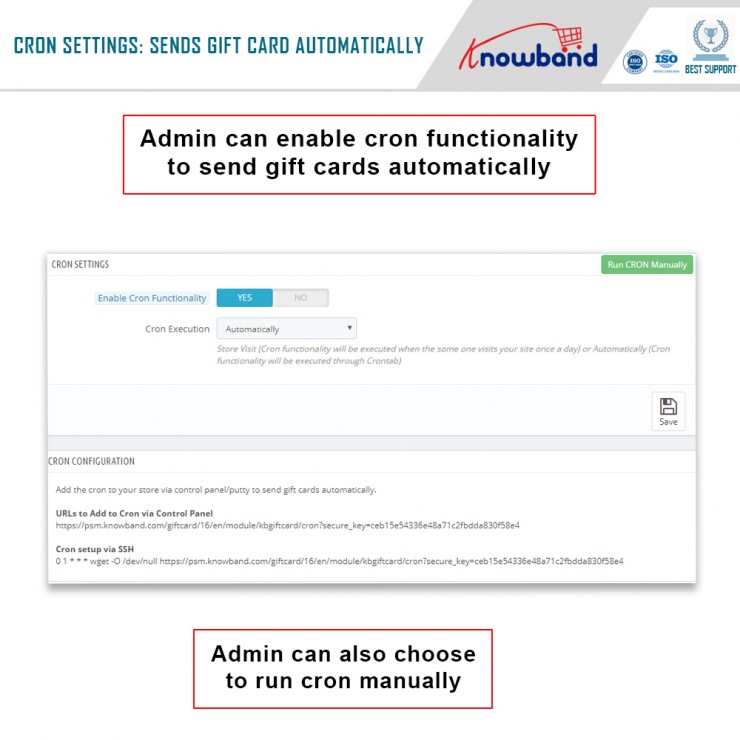
  • Enable CRON functionality

With this setting, the admin can enable or disable the cron functionality. Moreover, send gift cards automatically.

  • Cron Execution

With this setting, the store owner can run CRON automatically or set it to Store Visit.

Note: Store Visit (Cron functionality will execute when someone visits your site once a day) or Automatically (Cron functionality will execute through Crontab).

In the End

Thus, this is what the main settings of the Prestashop Gift Card Manager look like. Furthermore, there are other settings like Gift Card Templates, Gift Card Orders, and Gift Card Products. Would you like to invest in the Prestashop plugin by Knowband? In case you have any doubts or queries, please let us know at support@knowband.com.

Check Video here:


Know it all about the Prestashop Gift Card Addon here

Knowband’s Prestashop gift card Addon is a practical and excellent option for marketers. In reality, it only facilitates the sale of gift cards on your website. Additionally, boost your company’s sales and profits. You can easily allow your consumers to buy digital gift cards, thanks to their growing popularity. Furthermore, send them to the recipients at the specified time.

We’ll look at the features of the Prestashop gift card in this blog. Furthermore, as you conclude the article, you will have a better knowledge of the plugin.

Knowband’s Prestashop gift card Addon incredible features

  • It’s easy to get started

The Prestashop gift card manager is a straightforward module. It’s simple to integrate into your eCommerce business. To complete the installation, the shop administrator does not need any specific skills. The user manual and customer support are available to assist you if you get stuck.

  • Set the top and lower limits

A gift card’s standard amount and greatest limit are set by the shop administrator. Customers may now use the Prestashop module to buy a gift card up to a specified value.

  • ‘N’ number of gift cards can be made

The Prestashop send gift card addon allows the business administrator to create an unlimited number of gift cards. Also, with the Prestashop plugin, the store administrator may produce as many gift cards as he likes.

  • Choosing the intervals between deliveries

In the Prestashop gift card Addon’s interface, you may set the number of days between Gift Card delivery.

  • The PDF format is available

The gift card will repair to us the new form using a simple yet thorough pdf.

  • A unique prefix code appears on gift certificates

The Prestashop gift module may be used by the business administrator. Further, to apply a custom prefix password to the gift certificate.

  • You can use the module to update the status of your orders

The admin may update the order status for Gift Card orders using the Prestashop gift voucher module. Furthermore, only once the order status has been updated to the mentioned condition will the gift card be provided to the designated recipient.

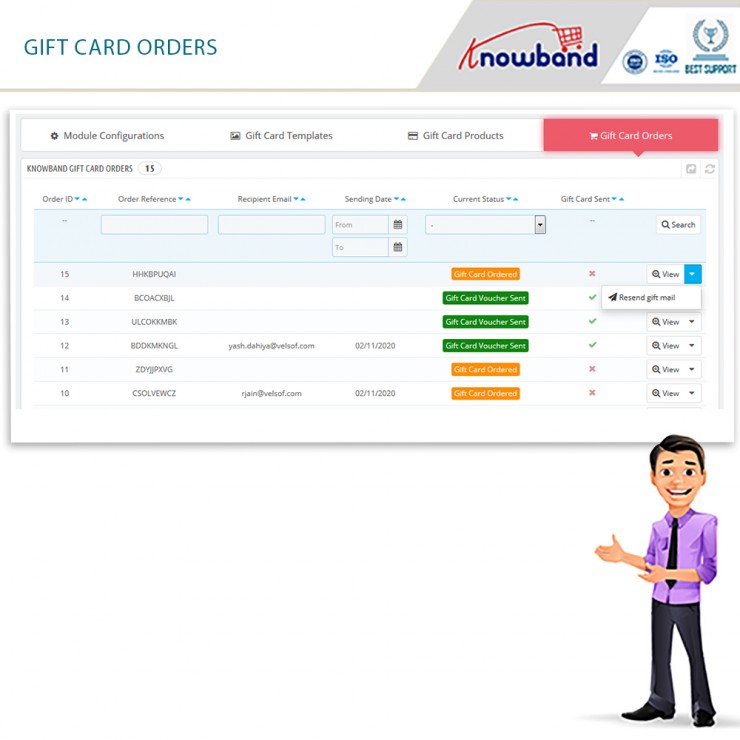
  • Purchases of gift cards can be trackable

From the backend, the store administrator has access to order information, status, delivery date, and other order data.

  • Users must submit specific information to gift the gift card

A consumer must enter the value of the gift card as well as the sender and receiver’s names for it to be sent to the intended recipient. Furthermore, while purchasing a gift card for a recipient, the latter’s email address is required.

  • Important keywords should be included

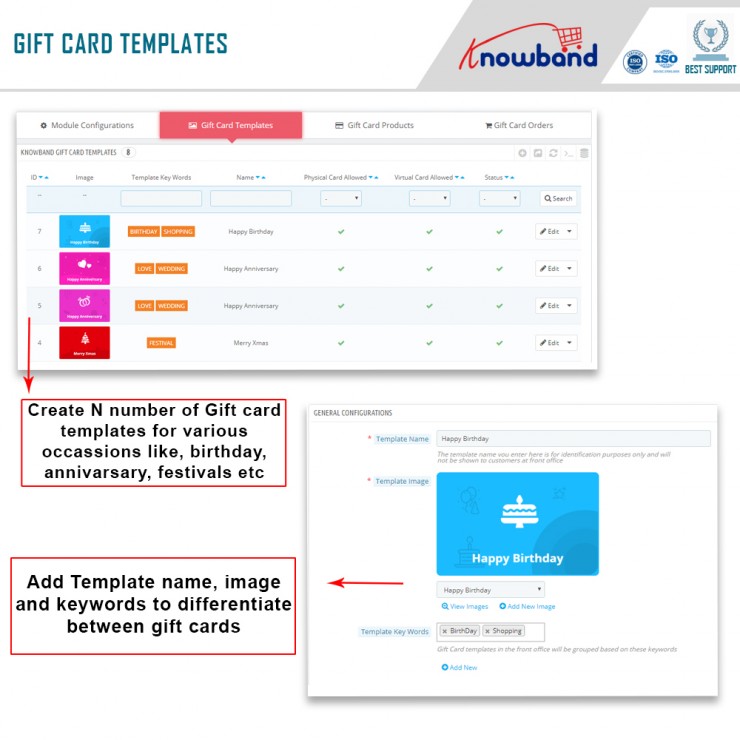
They map to any categorization by putting relevant keywords in the design of the Prestashop gift voucher module. Like, Valentine’s Day, Anniversaries, Birthdays, and Holidays (Christmas, New Year’s, Halloween, Thanksgiving, and so on) are just a few examples.


  • Gift cards may now have pictures added to them

Another new feature in Knowband’s Prestashop gift card module is the ability for customers to attach photos to gift cards.

  • Partial use of gift voucher is available

Customers may use a portion of their gift certificates using Knowband’s Prestashop addon. Also, by sending an email, the administrator can create a new gift card item with a number and an expiration date.

  • Multiple languages are supported

Prestashop gift card Addon is multilingual. Further, customers will now be able to discover gift vouchers in their native language. In reality, depending on the location, the language for interactions and email layouts may be customized.

  • Access to several different retailers

The Prestashop module works with a broad selection of retailers.

  • A gift card symbol is available in a variety of places

When using the Prestashop gift card module, you may position the gift card button anywhere on the website where you think buyers would see it. For example, a site’s header, footer, or left sidebar.

  • The user interface

The way a user interacts with the features determines whether a business succeeds or fails. Customers may also utilize Prestashop’s mobile-friendly and user-friendly interface to explore, pick, and purchase digital gift cards from your store.

  • Customization

    The Prestashop Gift module offers a feature that allows the business owner to send a customized picture to the front end from the backend. Customers may use this to make a photo-based personalized gift card.

  • Email templates are customizable

To make things easier for the business owner/admin, the Prestashop Gift Card Addon includes customizable email templates. When a client puts an order or the status of an existing purchase changes, the administrator simply selects a design from the options and sends it to them.

  • Working with cron is a plus

Customers have the option of choosing when their physical and digital gift cards will be delivered (via mail).

  • Include a catchy title as well as a personal message

The administrator can now add a title and a representation to the Gift Card layout. Also. this revised version of the Prestashop plugin allows you to send gift cards. In addition, the title, representation, and images will all be visible to the customer.

  • Buying stock

The Prestashop Gift module now has a lot of new features. Additionally, it allows the administrator to keep track of all gift cards in one place. You may also order gift cards using the Gift Card Orders website.

In the End

The Prestashop gift card addon by Knowband is a functional option that brings in new customers, sales, and more revenues. In fact, it helps you engage customers as well. If you want to grow your eCommerce business, this is one of the best options. What are your thoughts on the Prestashop addon? Would you want to invest in the plugin as well? Do let us know your thoughts and queries at support@knowband.com.

What are different ways of reducing Post-Holiday Returns?

It is very essential to reduce post-holiday returns. Industry, sales channel, product type, and how to return data are collected and counted all affecting return rates. Further, the younger customers are driving the trend according to the reports. The reason is, they see internet purchases as rentals. Moreover, returns might rapidly undo your holiday success if you don’t account for them and discover:

  1. Sales are lower than expected
  2. Converted fewer clients than the originally
  3. Compared to sales cost and profit margins, sales cost is higher and profit margins are lower.

Therefore, in this blog, we will be discussing ways of reducing holiday returns and automating the returns process. However, before that, we will understand why it’s important to reduce the returns?

Why it’s important to reduce the returns?

The first step is to analyze why do people are returning products as this will give you valuable insights and even make you understand the real problem. Furthermore, it is to everyone’s best advantage to reduce the number of returns you receive. 

You might not be aware but lesser returns can save a lot of money on replacement items, shipping, as well as other factors. Moreover, it provides a better as well as efficient customer experience which is again good for eCommerce business. As a result, trust is created between your business and potential buyers.  

Henceforth, keeping the rate of return lower can result in better business. 

What are the ways of reducing returns?

  • Begin with quality control

The first way that helps in reducing post-holiday returns is “Begining with quality control”. Furthermore, 23% of returns happen as companies ship an incorrect item. Mis-ship happens usually when businesses grow.

Being a small retailer, you can wrap as well as send every order. It would be great if you double-check the order before shipping. When you adopt a hands-on approach, it’s easy to ensure that shipments are proper. Whereas larger businesses can opt for automation that can help you in resolving the issues. Furthermore, the Inventory management software includes a warehouse management feature that helps in reducing the number of returns your receive. 

  • High-Quality Photos

High-quality photos can even help in reducing post-holiday returns. Furthermore, such photos help customers understand the product better. Make sure you take pictures from different angles to make customers understand each feature of the product. 

In case you are not good at photography, feel free to hire a professional photographer. Money spent on getting good pictures will pay for itself with a reduced return rate. 

  • Better Product Descriptions

Writing better product descriptions can help customers understand the product well. Speaking about better product descriptions, make sure you include everything about the product. For example, if you have been selling furniture, make sure your product descriptions consist of measurement of the product, color, and material. This way customers can decide better and this will create transparency which is liked by customers a lot. 

  • Represent Sizing Correctly

Products that do not fit are one of the most common reasons for returns in the apparel industry. Because online buyers can’t try on garments before buying them, it’s understandable that products be returned because they don’t fit.

With the assistance of resources like size software and sizing charts, you may limit the number of returns you receive due to sizing concerns.

Knowband Modules assist in reducing post-holiday returns

Knowband, known as an eCommerce solution provider and module development company. Furthermore, Knowband has earned a reputation for offering efficient development services and post-sales support. Moreover, it offers a boost to your business by offering best-in-class plugins for different eCommerce platforms such as Magento, Prestashop, OpenCart, Shopify, and others. 

Knowband even offers some great modules for reducing post-holiday returns as well as reading the specifications of these modules helps in reducing the chances of return.

Module 1: Product size chart

The product size chart module helps in reducing post-holiday returns. Knowband offers this module for different eCommerce platforms such as:

Prestashop Addons

Magento 2 ® Extensions

Magento ® Extensions

Opencart Extension

Module 2: Product Video

The product video module is highly beneficial for eCommerce businesses. This helps customers to understand the product better. As a result, the return chances get reduced. Knowband even offers the module for different eCommerce platforms:

Magento 2 ® Extensions

Magento ® Extensions

OpenCart Extensions

Prestashop Addons

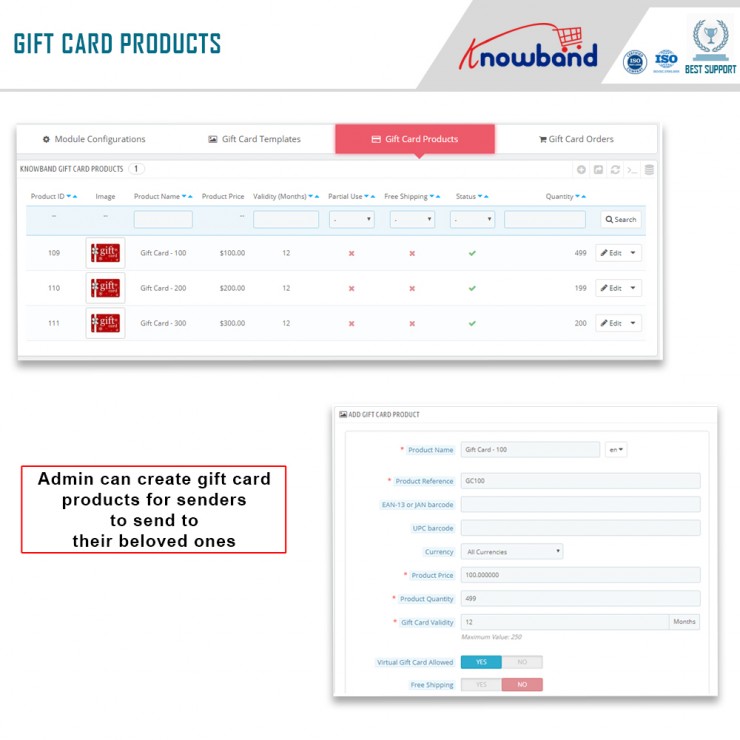
Module 3: Gift Card

Digital Gift Cards are a blessing for eCommerce stores. These enable customers to purchase accordingly from the specific store. Gift cards even provide freedom to permit them to purchase what they need. Furthermore, this offers the satisfaction of having gifted well.

PrestaShop Addons

Opencart Extensions

Magento 2 ® Extensions

Magento ® Extensions

Module 4: Product Review

Product review also helps customers make decisions better and feel more confident. Furthermore, the more reviews you have, the more confident a customer is that they’re making the right choice. Reviews can also assist a store’s internet visibility.

Product Review Reminder And Incentives – Prestashop Addons

Review Reminder And Incentives – Magento 2 ® Extensions

Review Reminder And Incentives – Magento ® Extensions

Final Note

Analyzing as well as testing your approach to returns and ways of measuring up to your peers is a great way of generating a return on your post-holiday returns. Along with that, another way of generating a return on post-holiday returns is by utilizing these modules.

In case you face trouble, feel free to write us at support@knowband.com