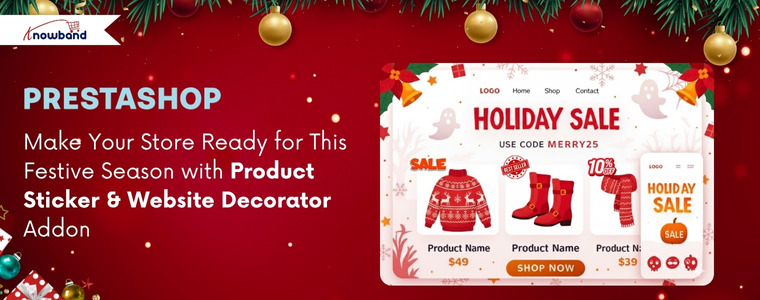
Make Your Store Ready for This Festive Season with Product Sticker & Website Decorator Addon

As the holiday season and special occasions like Thanksgiving, Christmas approach, online store owners have a golden opportunity to grab customer attention and boost engagement through visually appealing website decoration like Christmas themes, New Year’s themes, etc. Just as physical stores decorate their stores for Christmas or Valentine’s Day, your digital store should reflect the festive spirit. As this strategy isn’t just about aesthetics, it’s a smart UI optimisation technique that makes your website feel dynamic, relevant, and occasion-ready, ultimately driving customer focus and a positive shopping experience.

How the Themed Website Decoration Effects

Website decoration transforms a standard user interface into an immersive shopping environment. By setting themes according to occasions like Christmas, New Year’s, or Valentine’s Day, you create a seasonal vibe that encourages customers to browse and buy. Moreover, visual effects increase dwell time and make the shopping experience more memorable. For PrestaShop store owners, the Knowband PrestaShop Website Decoration Effects module offers a comprehensive solution to implement these stunning visual changes effortlessly.

How The Sticker Helps in Enhancing the Store’s Look

Adding the stickers on your product can increase the emergency of purchasing the product. Just suppose if you have applied a sticker as a Christmas sale only, then people will know that this product is only available for the Christmas festive.

Therefore, Knowband has introduced this Prestashop Product Sticker & Label Module only for this festive season.

Key Features of the Advanced PrestaShop Website Decoration Effects Addon

The module provides a rich set of features, giving the store admin granular control over the decorative elements and their display.

          1. Predefined Diverse Visual Effects: The module already offers the visual effect templates like snow effects, which contain two sub-templates. Let’s go through these templates 

  • Snow Effect 1 (Traditional Flakes): The Prestashop Christmas Decoration Module allows the store owners to customise the colour, maximum flake size, number of flakes and speed range.
  • Snow Effect 2 (Shape Flurry): In this template, instead of standard snowflakes, store admins can display custom characters or shapes like hearts for Valentine’s Day or other thematic elements. Not only that, but you can also customise the height, frequency, speed, size, wind drift, and rotation of these falling elements.

    2. Flexibility of Displaying Decorative Elements
    : Additionally, the Prestashop Website Decorator plugin offers four pre-defined headers and eight footer elements, with the crucial option to add new, customised elements. Additionally, random elements are perfect for light decorations, allowing for both static or moving effects, and complete control over their position.3. Smart Display & Timing Control. This feature allows you to fully customise when, where, and how seasonal or festive effects appear on your store. You can theme decorations for any occasion, choose specific pages for display, schedule start/end times, control how often visitors see the effects, and manage mobile visibility, all ensuring a visually engaging yet smooth shopping experience.4. Driving Sales with Discount Strips: The Prestashop Website Decorator Module, beyond pure decoration, the module integrates a sales strategy by offering a discount coupon strip.
Add Festive Stickers This Season to Boost Your Store’s Sales

Boost sales with festive stickers like Thanksgiving, Christmas, New Year & more! Give your store a festive vibe.


Try Now

Key Features of the PrestaShop Product Sticker & Label Module

  1. Easy Sticker & Label Creation: Using the Knowband Prestashop Product Sticker Module, you can create attractive product stickers such as New, Sale, Hot, Featured, Limited Stock, and more without any coding skills.
  2. Pre-Designed & Customizable Templates: Knowband’s Prestashop Sale Stickers & Label already includes predefined stickers. Furthermore, store owners can easily choose from ready-made sticker designs or upload their own images to match their store’s branding.
  3. Automatic Sticker Assignment: Most interestingly, store owners can set rules to automatically apply stickers to products based on conditions like price, stock, new arrivals, discounts, categories, and more.
  1. Manual Assignment Option: If you want to add stickers to specific products manually, then do not worry. The Knowband’s Prestashop Product Sticker Addon allow the store owners to assign stickers to any product page whenever needed for special promotions.
  2. Multiple Sticker Positions: Lastly, store owners can display stickers in various positions on product images, top-left, top-right, bottom-left, bottom-right, or custom coordinates, depending on your requirements.

Conclusion

By leveraging the PrestaShop Website Decoration Effects module along with the Prestashop Product Sticker & Label Add-on by Knowband, store owners can effortlessly enhance both the visual appeal and promotional impact of their site. Festive decorations create a captivating themed experience, while smart product stickers highlight key offers, new arrivals, and special deals, together boosting customer engagement, improving product visibility, and ultimately driving more sales.

For more information about features, benefits, and setup, visit https://www.prestamarketplace.com and explore how you can turn your Prestashop store into a professional store with Knowband Plugins.


Explore our latest blogs:

The New PrestaShop AI Chatbot Addon: Simple, Fast, and Smarter Customer Support for Every Store
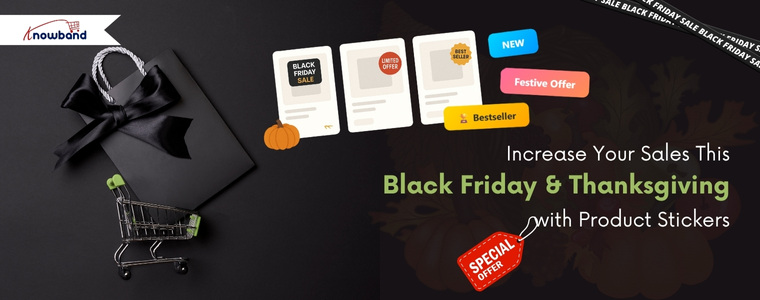
Increase Your Sales This Black Friday & Thanksgiving with Product Stickers

This festive season, make your store the top-selling store in your category. Running an online store requires strategies that grab attention and boost conversions. Consequently, Knowband’s PrestaShop Product Sticker Module allows you to showcase special offers, bestsellers, and new arrivals effectively. Furthermore, its intuitive interface and versatile options make it an essential plugin for any eCommerce strategy. So, whether you are on prestashop or opencart, we have got you covered.

Why Product Stickers Are Important in Online Stores

Stickers and labels attract customers and motivate them to make a purchase. A sticker on a product signals that it’s on sale, discounted, or part of a special seasonal promotion. To help store owners increase sales this festive season, Knowband has introduced the Prestashop Product Sticker & Label Module. This module allows store owners to add different types of stickers to products, whether it’s for Black Friday, Thanksgiving, or Christmas sales.

Key Features of Knowband’s PrestaShop Product Sticker Module

You can set the product sticker module up easily, design custom stickers, automate scheduled campaigns, and be creatively in charge.

Quick & Easy Setup

No coding skills are required! After purchasing the module from Knowband, store owners can install it and configure their products in just a few minutes. Even beginners will find it easy to use.

Customizable Stickers

You can adjust stickers to perfectly suit your promotions or brand identity. Whether you want to modify colors, text, or style, the module allows full customisation of predefined stickers.

Strategic Placement

Place stickers where they get the most attention—product pages, category listings, or homepage banners. This ensures your promotional messages reach customers at the most impactful touchpoints during their shopping journey.

Scheduled Promotions

Plan ahead by scheduling stickers to appear and disappear automatically. This feature makes holiday promotions stress-free, allowing you to set up your entire campaign in advance while the module handles the rest.

Advanced Control

Modify sticker size, position, and transparency, or add custom stickers that match your brand’s visual style. Moreover, this Prestashop Product Sticker Module gives you complete creative freedom to design stickers that resonate with your target audience.

Targeted Application

Apply stickers to specific products or entire categories, ensuring relevance and preventing clutter while maintaining a professional appearance.

Benefits of Using This Powerful Module

You can get attention, increase conversions and brand consistency with the Product Sticker Module.

Boost Product Visibility

Make important products stand out with attention-grabbing labels. Featured items will receive significantly more views and engagement from potential customers.

Increase Conversions

Urgency-driven labels like “Only a Few Left” encourage faster purchasing decisions. This creates a sense of urgency that motivates customers to buy immediately rather than postponing their purchase.

Save Time

During the festive season, you can schedule stickers in advance, freeing up time to focus on other aspects of your business, such as inventory management and customer service. Automation also reduces the risk of human error when updating promotional displays.

Maintain Brand Consistency

Full control over design and placement ensures that stickers always align with your store’s look and feel, keeping your brand identity strong and recognizable across all customer touchpoints.

Maximize Impact

Display stickers on high-visibility pages to attract maximum attention. This increases exposure for your most important products and promotions while guiding customers toward high-value purchases.

Conclusion

Knowband’s PrestaShop Product Sticker Module is a smart solution for store owners who want to highlight offers, boost sales, and improve the customer experience. With its ease of use, flexible customisation, and automation features, it’s a valuable addition to any online store.

Make your products stand out and drive more sales this holiday season. Try Knowband’s Product Sticker Module for PrestaShop today and watch your conversions soar during Black Friday and Thanksgiving. Investing in this powerful plugin will help you maximise revenue during the year’s most profitable shopping period.

Fashion Plano’s Success Story: Leveraging Knowband’s Modules for Growth

In today’s highly competitive e-commerce World, having a strong digital presence is essential for success. Fashion Plano, an emerging online fashion store, aims to provide a seamless and engaging shopping experience for fashion enthusiasts. However, as the store expanded, it faced challenges in product labelling, promotional strategies, and content creation. To overcome these obstacles, Fashion Plano turned to Knowband, a leading provider of PrestaShop eCommerce solutions. By integrating the Knowband PrestaShop Product Stickers &  Label Module and PrestaShop ChatGPT Content Generator Module, Fashion Plano was able to enhance its product visibility, automate content generation, and improve user engagement.

This case study explores how Knowband’s innovative solutions helped Fashion Plano streamline its operations, improve product presentation, and enhance engagement through the PrestaShop Product Sticker  & Label Module and PrestaShop ChatGPT Content Generator Module.

About Fashion Plano

Fashion Plano, established in 2023, started as a small online fashion store with a vision to offer trendy and high-quality clothing to style-conscious customers. Headquartered in London, United Kingdom the company aims to bring the latest fashion trends to customers worldwide through a seamless shopping experience.

Fashion Plano is an online fashion store that offers trendy and high-quality clothing and accessories. The store focuses on providing stylish options for fashion lovers. Since its establishment in 2023, Fashion Plano has rapidly expanded, attracting a growing customer base. However, as the store evolved, it faced several challenges, including:

  • Limited customization options for product labels.
  • Difficulty in creating engaging and SEO-friendly product descriptions.
  • The need to improve product visibility and enhance customer engagement.

Key Features Implemented with Knowband’s Solutions

Enhanced Product Labeling with Knowband’s PrestaShop Product Sticker & Label Module

Product presentation plays a crucial role in driving customer interest. However, the default PrestaShop system automatically assigned a “New” label to products, limiting Fashion Plano’s control over product promotions.

With Knowband’s PrestaShop Product Sticker & Label Module, Fashion Plano was able to:

  •  Remove the default “New” label from products
  • Add custom promotional stickers like “New Arrivals,” “Weekend Sales,” and “Best Seller.”
  • Increase product visibility by strategically placing eye-catching labels.

This customization helped highlight key products, making it easier for customers to identify trending and exclusive items, ultimately boosting conversions.

👉Explore the Module with Our Video Guide

AI-Powered Content Generation with Knowband PrestaShop ChatGPT  Content Generator Module

A major challenge for any eCommerce business is creating compelling product descriptions that are both engaging and SEO-friendly. Writing a well-optimized product description manually can be time-consuming. Fashion Plano leveraged Knowband’s ChatGPT Content Generator Module to:

  • Generate high-quality product descriptions in seconds.
  • Maintain consistent and appealing content across all product pages.
  • Optimize product information for better search engine ranking.

By automating content creation, Fashion Plano saved valuable time while ensuring that its product pages remained informative and attractive to potential buyers.

Expanding International Reach with AI-Powered Translation

Reaching a global audience requires content that resonates with international customers. Manually translating product descriptions and promotional content was a time-intensive challenge for Fashion Plano.

By utilizing the ChatGPT Translator Module, the store was able to:

  • Translate product descriptions and promotional materials efficiently into multiple languages.
  • Maintain accurate and culturally relevant translations to enhance customer trust.
  • Expand its customer base, resulting in a 35% increase in international customers.

Explore Our Solutions

No Coding Skills Required

Knowband Solutions

The Impact of Knowband’s Solutions on Fashion Plano

With Knowband’s PrestaShop Product Sticker Module and PrestaShop ChatGPT  Content Translator Module, Fashion Plano achieved significant improvements in in-store performance and customer engagement:

Better Product Visibility: Custom labels enhance product appeal, leading to increased conversions.
Faster and More Effective Content Creation: AI-powered descriptions improve efficiency and consistency.
Improved Customer Experience: Enhanced product presentation made it easier for shoppers to navigate and make purchase decisions.

Furthermore, these enhancements allowed Fashion Plano to stand out in the competitive fashion industry while providing an engaging and seamless shopping experience for its customers.

  • Enhanced Product Visibility: Custom labels helped showcase key products effectively, leading to a 22% increase in conversion rates.
  • Increased Efficiency in Content Creation: AI-generated descriptions maintained consistency and quality while reducing manual workload, improving content production speed by 70%.
  • Improved Customer Experience: A visually appealing and well-structured website made it easier for customers to navigate and make purchase decisions, leading to a 40% increase in customer retention.
  • Stronger Global Reach: AI-powered translations enabled the store to attract and engage international shoppers, increasing global sales by 35%.
  • Higher Overall Revenue: With improved engagement and automation, Fashion Plano saw a 30% boost in total sales within six month

Conclusion

Knowband’s innovative solutions played a pivotal role in Fashion Plano’s growth and success. By implementing Knowband’s PrestaShop product sticker & Label and PrestaShop AI-powered content generation/ translation Module, the store was able to optimize product presentation, enhance engagement, and improve operational efficiency.

For any eCommerce business looking to optimize its PrestaShop store, Fashion Plano highly recommends Knowband’s PrestaShop Modules as essential modules for automation, customization, and international expansion.

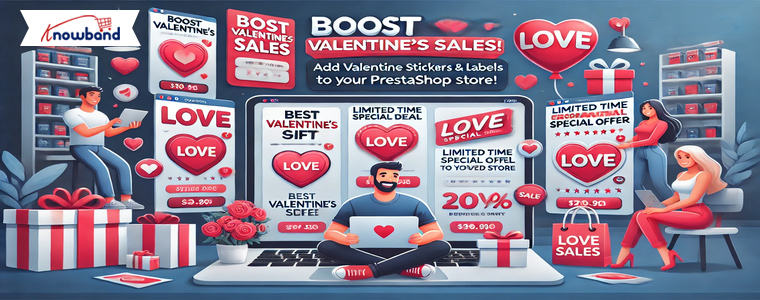
Boost Valentine’s Sales: Add Love-Themed Stickers and Labels to Your Prestashop Store

Valentine’s Day is a special occasion when shoppers look for romantic gifts and special deals. Thus, it becomes crucial to make your store ready for the Valentine’s season sales to make the most out of out.

As an eCommerce store owner, you must grab their attention and encourage them to buy. One of the easiest and most effective ways to do this is by using love-themed product stickers and labels on your Prestashop store.

With the Prestashop Product Sticker Module by Knowband, you can highlight discounts, promotions, and best-selling items in an eye-catching way. Furthermore, this helps in improving product visibility and boosting conversions.

Why Use Stickers and Labels for Valentine’s Day Sales?

Adding Valentine’s Day-themed stickers and labels to your store can make a big difference in customer engagement.
Here’s why the eye-catching stickers work:

  • Grab Customer Attention – Eye-catching stickers help products stand out and increase the chances of your products being noticed.
  • Highlight Special Offers – With the Prestashop Product Sticker and Label Addon, the store admin can promote discounts, bundle deals, and limited-time offers with attractive labels.
  • Create Urgency – Prestashop retailers can also use stickers like “Limited Offer,” “Valentine’s Special,” or “Only a Few Left” to encourage quick purchases.
  • Enhance Store Aesthetics – Love-themed stickers make your store look festive and appealing and create a better shopping experience for your customers.

How the Prestashop Product Sticker Module Can Help:

The Prestashop sticker module is a powerful tool that allows store owners to add custom labels and stickers to their products. Furthermore, it provides an easy way to promote Valentine’s Day offers and grab shoppers’ attention.

Key Features of the Prestashop Sticker and Label Module!

  • Customizable Stickers & Labels – Add Valentine ’s-themed stickers like hearts, discount tags, and best-seller labels.
  • Automated Sticker Placement – The module applies stickers automatically to selected products based on the rules configurations added from the module backend.
  • Multiple Sticker Positions – Place labels on different parts of the product image.
  • Schedule Stickers in Advance – The admin can set a prior start and end date for Valentine’s promotions.
  • User-Friendly Interface – Easy to install and manage without technical knowledge.

Ideas to Use the Prestashop Sticker and Label Plugin for Valentine’s Day!

1. Highlight Discounts & Special Offers:

Shoppers love discounts, especially during special occasions. Thus, the Prestashop admins can use the Prestashop product label plugin to add stickers like:

  • “Valentine’s Day Sale – 20% Off”
  • “Buy 1 Get 1 Free – Limited Time”
  • “Special Gift for Your Loved One”

These labels instantly attract attention and drive sales.

2. Showcase Best-Selling and Trending Products:

Valentine’s shoppers often look for popular gift options. Use the Prestashop Sticker Extension to add badges like:

  • “Best Seller”
  • “Most Loved Product”
  • “Valentine’s Top Pick”

Moreover, using this kind of product visuals on the product images builds trust and helps customers make quicker purchase decisions.

3. Create Urgency with Countdown Stickers:

Fear of missing out (FOMO) is a great sales strategy. Therefore, the Prestashop product badge plugin lets you create urgency with labels such as:

  • “Only a Few Left!”
  • “Limited Stock Available”
  • “Offer Ends Soon”

Shoppers are more likely to buy when they feel an offer is time-sensitive.

4. Add Festive Elements with Custom Stickers:

Make your store visually appealing by adding love-themed stickers with the Prestashop sticker maker module. Some ideas include:

  • Heart-shaped stickers
  • Valentine’s Day gift tags
  • “Gift Wrapped with Love” labels

These elements enhance the shopping experience and create a romantic theme in your store.

Integrate Product Stickers on Opencart

No Coding Skills Required

SHOP NOW

How to Install and Use the Prestashop Product Label and Stickers Module?

Install the Module – Download and install the Prestashop product label and sticker module from Knowband.

Customize Stickers – Choose from pre-designed Valentine’s Day stickers or upload your own.

Set Display Rules – The module provides options to apply the product stickers based on categories, discounts, or stock availability.

Schedule Stickers – Set start and end dates for automatic removal after Valentine’s Day.

Save and Apply – Once settings are done, apply stickers to your product images instantly.

Benefits of Using the Prestashop Label and Badge Module:

Increases Product Visibility – Helps customers find special deals quickly.

Boosts Conversions – Attracts more clicks and encourages purchases.

Enhances Store Appearance – Makes the store festive and engaging.

Saves Time – Automates sticker placement and scheduling.

Conclusion!

Adding Valentine’s Day-themed product labels and stickers to your Prestashop store is a simple yet powerful way to boost sales. Therefore, with the Prestashop Product Sticker Addon, you can highlight offers, create urgency, and enhance the overall shopping experience.

Don’t miss out on increased conversions this Valentine’s Day! Install the Prestashop product label addon today and make your store visually appealing and sales-ready.


5 Must-Have Prestashop Addons to Boost Engagement and Sales this Holiday Season

The holiday season not only brings a tremendous opportunity to attract new customers and boost sales but also brings increased competition. Therefore, with online shoppers looking for festive, engaging, and seamless experiences, having the right tools in your Prestashop store is essential. Here are five must-have Prestashop Addons by Knowband that can help you create an inviting shopping environment, enhance engagement, and encourage more purchases this holiday season.

1. Prestashop Website Decoration Effect Addon:

Setting a festive ambiance is a simple yet effective way to draw customers in and enhance their shopping experience. The Prestashop Website Decoration Effect Addon lets you add holiday-themed decorations and animations to your website, such as falling snowflakes, twinkling lights, or festive icons. Furthermore, these small touches immediately communicate the holiday spirit, giving your store a warm and inviting feel.

Moreover, the customization options in the website decoration addon for Prestashop allow you to control where these effects appear, their frequency, and how they integrate with your brand’s look and feel. Thus, by creating a visually appealing holiday atmosphere, this Addon encourages customers to stay longer and browse more, increasing the chances they’ll make a purchase.

2. Prestashop Spin and Win Pop-Up Module:

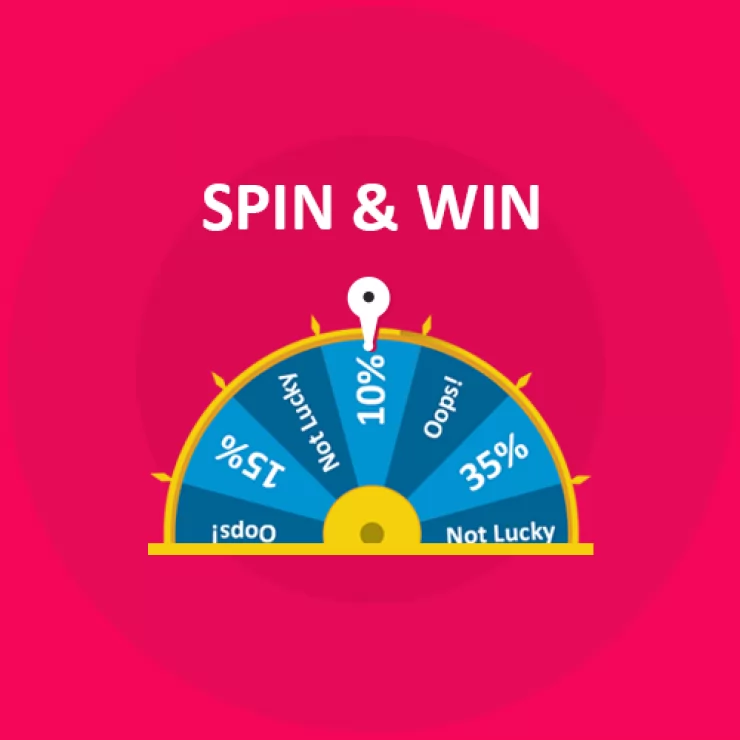
The Second Recommendation: The Prestashop Spin and Win Pop-Up Module is a gamified feature that offers an interactive and exciting experience for visitors. Instead of a traditional discount pop-up, this module presents a spinning wheel where customers have the chance to win a variety of rewards, such as discounts, free shipping, or special offers. Furthermore, the act of spinning the wheel adds an element of fun to the shopping journey, helping to capture visitors’ attention and engage them right from the start.

Additionally, Knowband’s Spin and Win module for Prestashop asks customers to enter their email addresses before spinning, which helps build your mailing list for future promotions.

Boost Customer Engagement with Spin and Win Gamified Pop-Up

Use Code: DEAL20 for Extra 20% OFF

SHOP NOW

On the other hand, the sense of excitement created by the possibility of winning a prize can increase conversions as customers are more inclined to complete their purchase to use their reward. Therefore, by incorporating an engaging feature like this, you not only entertain visitors but also encourage them to shop with enthusiasm.

3. Prestashop Product Sticker and Label Addon:

Highlighting specific products or promotions can make a significant difference during the holiday season when customers are often looking for the best deals. The Prestashop Product Sticker and Label Addon allows you to add customizable stickers and labels to your products, such as “Best Seller,” “Holiday Special,” or “Limited Time Offer.” Furthermore, these visual markers help shoppers identify key items and holiday deals quickly, making it easier for them to navigate through your store.

Thus, with the Prestashop Product Sticker Addon, you can customize the design, colors, and placement of the labels to match your store’s holiday theme, ensuring they complement your brand rather than cluttering the page. Moreover, the labels not only make products stand out but also guide customers toward important items and offers, creating a smoother and more effective shopping experience.

Moreover, this can speed up decision-making and lead to quicker purchases, which is beneficial for both customers and store owners during the busy holiday season.

👉Explore the Module with Our Video Guide


4. Prestashop Gift Card Manager Addon:

Gift cards are an increasingly popular gift option, especially during the holidays, as they allow recipients the flexibility to choose their own gifts. The Prestashop Gift Card Manager Addon makes it easy for you to offer digital gift cards, a convenient and thoughtful solution for holiday shoppers. With this Addon, customers can purchase gift cards directly from your store and send them digitally to friends or family members. This is particularly useful for last-minute shoppers who may need a quick gift option that can be delivered instantly.

Furthermore, Knowband’s Prestashop Gift Card Addon also allows for customizations, so you can brand your gift cards with holiday-themed designs that match your store’s aesthetic.

Digital gift cards not only provide a convenient gift option but also encourage future spending, as recipients are likely to spend beyond the card’s value. By offering gift cards, you can cater to holiday shoppers’ needs while also driving additional revenue for your store.

5. Prestashop Gift the Product Addon:

The Prestashop Gift the Product Addon simplifies the process of gifting products, allowing customers to purchase items and send them directly to friends or family with just a few clicks. This feature is perfect for holiday shoppers who want to give a personal gift without going through a complicated checkout process. With this Addon, customers can add recipient details, select a personalized message, and choose gift packaging options if available, creating a seamless gifting experience that adds a personal touch.

Creating a Cohesive Holiday Shopping Experience with These Addons!

Using these five Addons in combination can transform your Prestashop store into a one-stop holiday shopping destination that customers will love. By setting a festive mood with decorations, adding interactive elements like Spin and Win, guiding shoppers with product labels, and offering convenient gifting options, you create a seamless and joyful shopping experience. Furthermore, each Addon plays a unique role in improving the shopping journey, whether it’s enhancing the visual appeal of your store, engaging customers with fun incentives, or simplifying the gifting process. 


Prestashop Product Sticker & Label Addon – User Manual

1.0 Introduction:
Modern customers have a limited attention span. Meaning that when they visit an eCommerce website, the administrator has a limited time to provide them with relevant information and enticing offers. The reason behind the same is various types of information are crucial for customers to determine if a product meets their requirements.

Considering the same, we have developed the PrestaShop Product Label addon specifically for PrestaShop eCommerce merchants. The Prestashop product sticker and label module enables administrators to add dynamic stickers to their storefronts. Additionally, administrators have the flexibility to upload their stickers, customize their dimensions, and choose their desired position on the website pages.

Moreover, if you aim to inform your customers about sales, promotions, delivery times, and other important details. Knowband’s Prestashop Product badge addon for PrestaShop is the perfect solution for all your promotional business needs. This extension provides a wide range of useful features and ensures peace of mind. Let’s explore some of the key highlights offered by the PrestaShop product sticker plugin.

2.0. Major Highlighted Features Offered by Knowband’s Product Badge Addon:

The PrestaShop product sticker plugin is empowered by tons of incredible features. Not only the plugin is configurable from the back end but also provides high-quality pre-loaded stickers.

We have tried to cover up some of the most sounding features of the PrestaShop product sticker module.

  1. The admins can boost their revenue by showing the offer discounts on products.
  2. The PrestaShop store admins can choose the pages where they want to show the product stickers. For example, the store administrators can choose the options from the product page, product listing page, search page, home page, and much more.
  3. The PrestaShop admins can choose to include or exclude specific products for the sticker appearance.
  4. With the help of the PrestaShop Product Sticker module, the store admins can include the PrestaShop store categories where they want to show the responsive stickers.
  5. Along with pre-available stickers, the admins can also upload the stickers of their own will in the module and make them appear within no time on the shopfront.
  6. The PrestaShop Product Label plugin allows showing the stickers based on the products’ available stock conditions.
  7. Create as many labels as you want within clicks.
  8. The PrestaShop store admins can manage the sticker positions on the product images right from the module backend.
  9. The admins can schedule the start and end dates for particular stickers.
  10. The admins can choose between all products, specific products, and special categories for the sticker appearance.
  11. The admins can also select the rules of products like best seller products or can set minimum or maximum prices of products or new products for the sticker appearance.

3.0 Installation Guide for Prestashop Product Sticker and Label Addon:

Once you purchase the addon, follow the below steps:

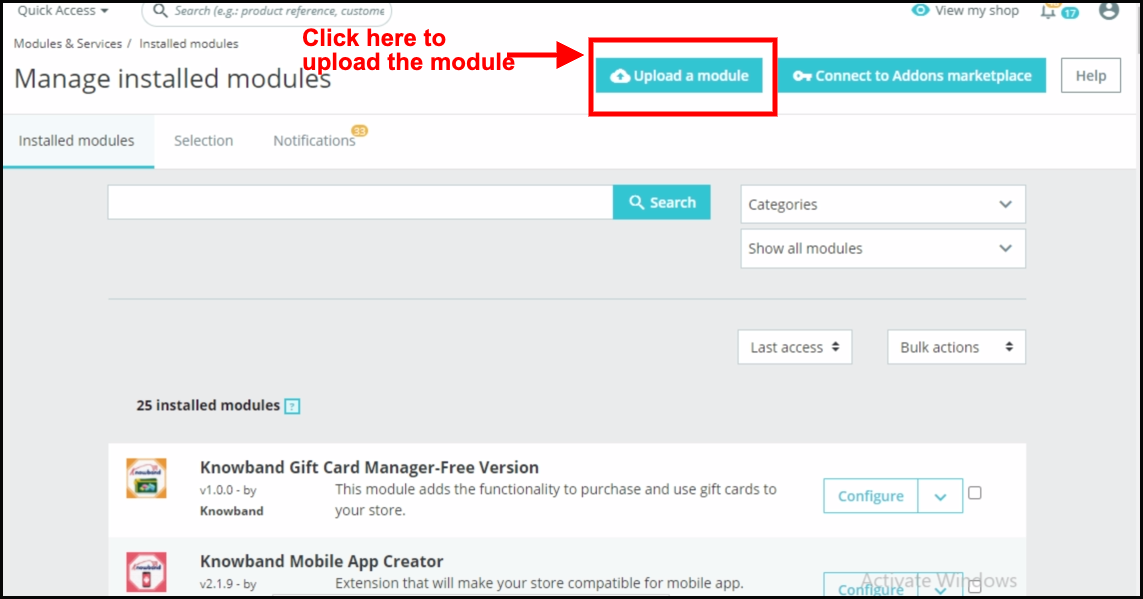
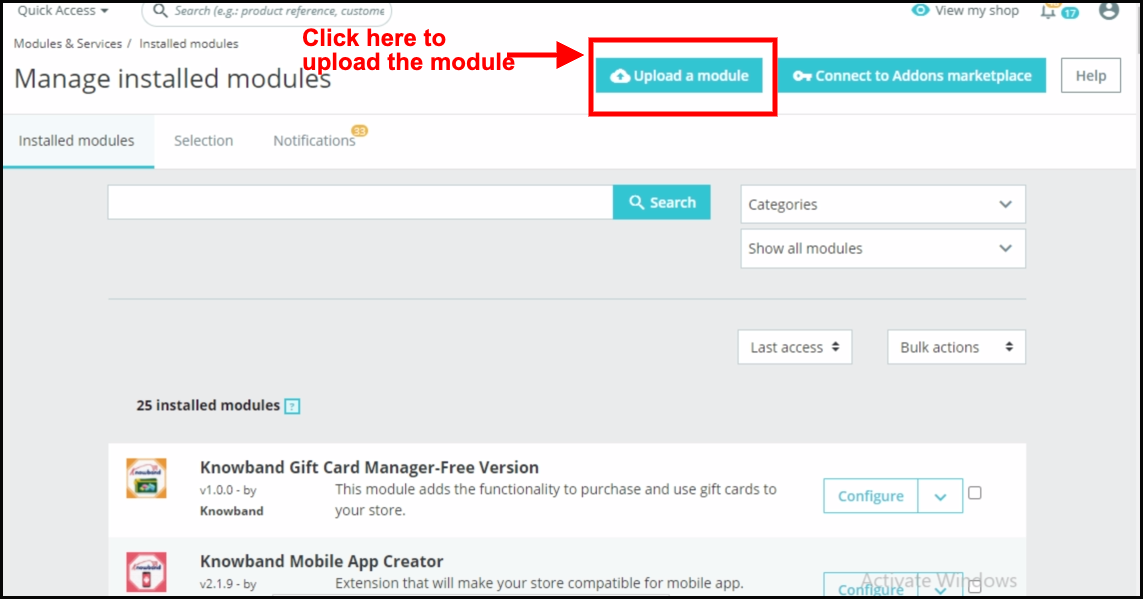
  1. Go to the Store Admin -> Modules and Services.

  1. Click on “Upload a module”. You can drag or drop the file or can simply select the file from the system.


Once the file is completely uploaded, a notification of “Module(s) installed successfully” will display.

4.0. Admin Interface: Prestashop Product Badge Module!

The Prestashop product badge addon comes with an easy-to-configure admin panel. Using the same the Prestashop store administrator can simply configure the sticker settings and can further manage the Product stickers for the shopfront. 

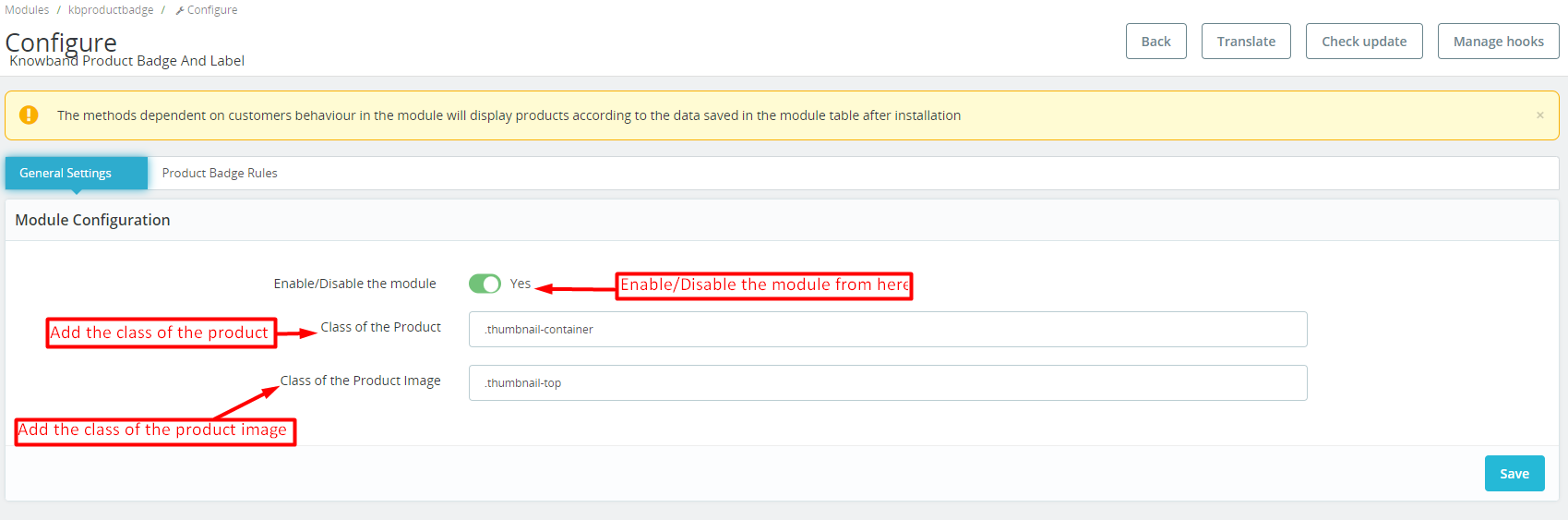
  • 4.1. General Setting:


In the following tab, the admin can manage the plugin’s general settings.

Enable/Disable: You can use the following button for enabling/disabling the module. 

Class of Product:

The admins can add the class of their store products on store front in this particular text box. 

Class of Product Image:
The particular text field is provided for the admins to enter the class of the store’s product image on storefront.

4.2. Product Badge Rules:

In the following tab, the store admin can manage basic setting operations for the product badges.
we have provided the options for adding new, editing, or deleting all the stickers. Moreover, the Prestashop store admins can find the list of all the stickers in the following tab.

Add Sticker Rule:
By clicking on the following button, the store admins can create new sticker rules. 

Edit Sticker: If you have already created and configured a sticker rule and now want to change the sticker settings, you can modify the same from here.

4.2.1. Product Badge Rules: General Rule Setting:

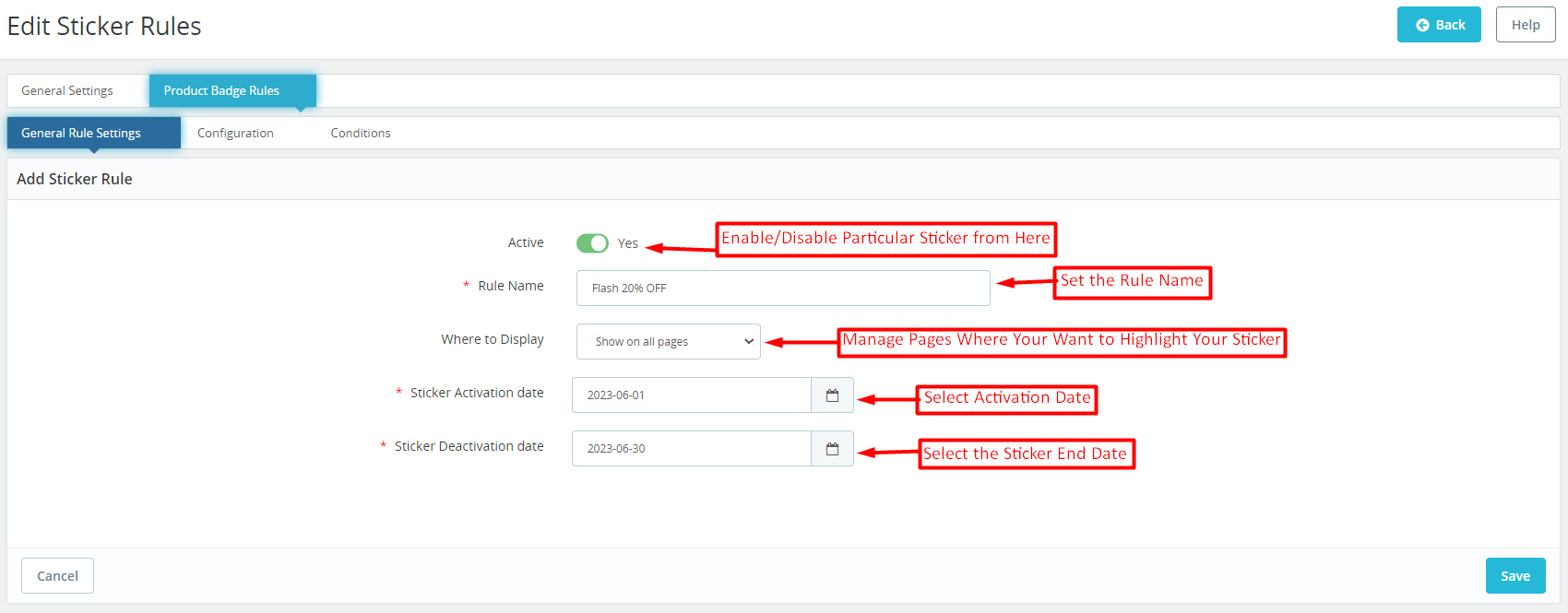
Prestashop Product sticker and Label addon provide a separate tab for managing the general sticker rules. In case the admin wants to modify the general configurations of the sticker, he can modify the same from here. 

Active: With the help of this button, the store admins can enable/disable a particular product sticker. 

Rule Name: You can add the sticker name from here at your convenience. 

Where to Display: The Prestashop store retailers can manage the pages where they want to display the stickers. For example, we have provided the options for showing stickers on all pages and the admins can even select the specific pages where they want to show the product badges. 

Sticker Activation Date: Choose the starting date of product stickers from here. 

Sticker Deactivation Date: The Prestashop admin can select the end date for a particular sticker from here.

4.2.2. Product Badge Rule: Configurations:

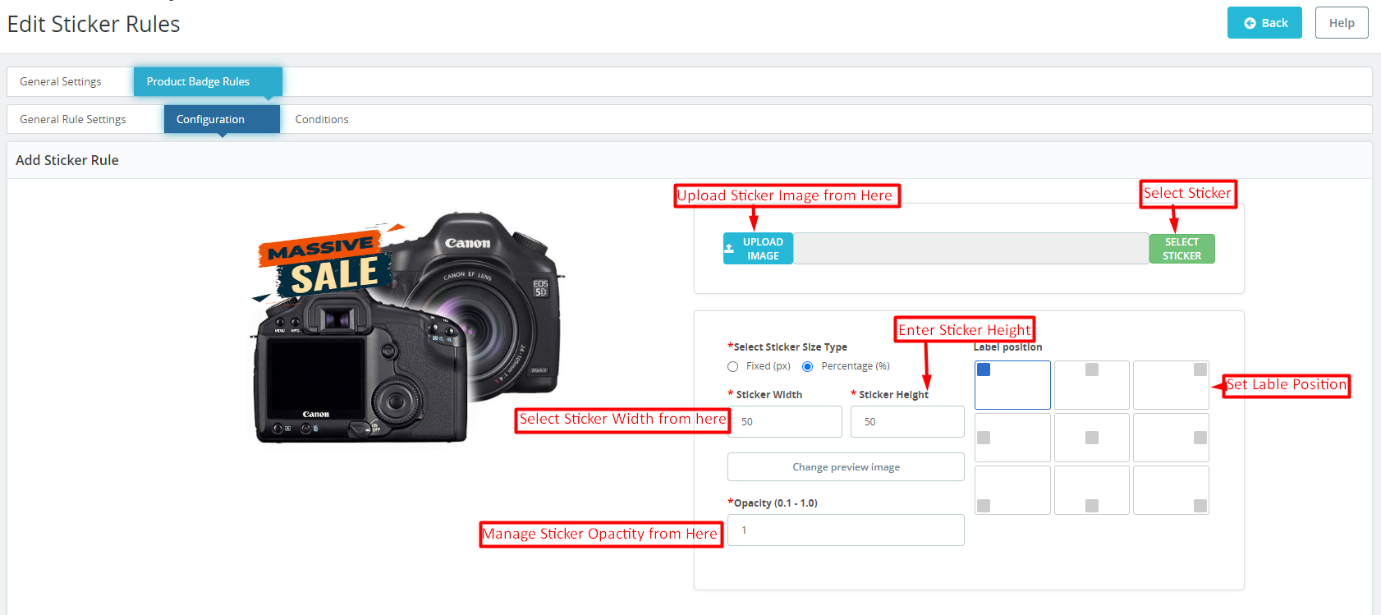
The sticker configuration tab offered by Knowband Prestashop Product Sticker and Label Addon simplifies the sticker look and feel management.
The following tab allows the eCommerce store admins to choose from 20+ pre-loaded stickers and the admins can also add new stickers at their convenience. 

Sticker Upload:

If you wish to upload a new sticker from your system, simply use the “Upload Sticker” button.

Sticker Size Type Selection:

We provide two options in the button below. If you prefer to set the sticker size using fixed dimensions (in pixels), click on the corresponding radio button.

Alternatively, if you want to configure the sticker size based on a percentage, we have also provided an option for the same. 

Sticker Height and Width:

Using the button below, you can adjust the height and width of your product label. You can also preview the sticker’s appearance in real-time as you change its size. For percentage, the maximum height and width should be 100%.

Change Preview Image:

Administrators can select a new preview image to visualize how the product labels will look on their product images using the button.

Opacity:

You can adjust the opacity of the sticker using the following option.

4.2.3. Product badge Rules: Conditions:

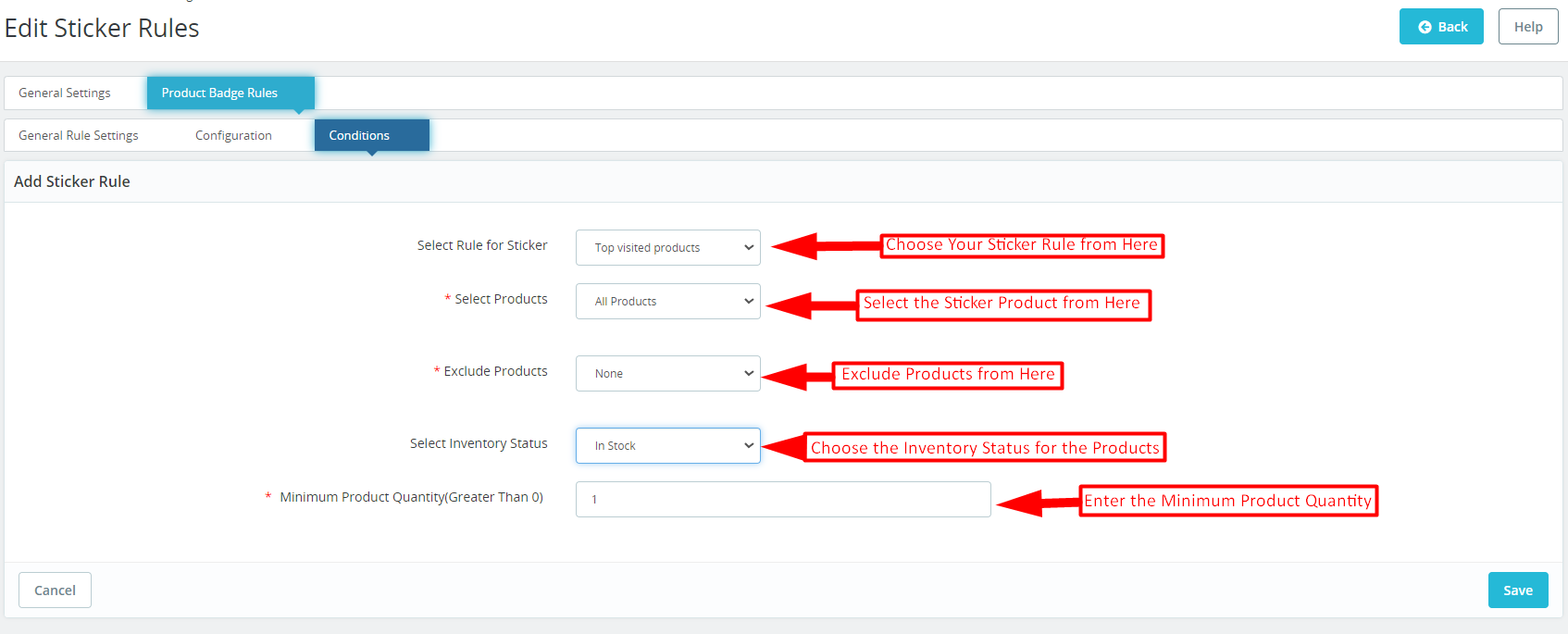
In the sticker conditions tab offered by Knowband Prestashop product sticker and label module. The store admins can set different conditions for the product badges.

Select Rule for Stickers: You can select your sticker rule from various options provided here. We have added rules for showing stickers based on top visited products, on-sale products, best-seller products, and new products, and even the admins can add stickers based on the price value.

Select Products: As a Prestashop store admin, you can select products from here (on which you want to display the stickers). You can select the option as all products in case you do not want to exclude any specific product or category.
Furthermore, you can also enter specific products and specific categories for a sticker appearance. 

Exclude Products: In the following tab, the admins can exclude specific products for the product badges. 

Select Inventory Status:

From here, you can select if you want to show the stickers for the in-stock or out-of-stock products only.

Minimum Product Quantity:
If you are looking for showing product labels based on the product quantity in your store, you can add the specific value in the following field. 

5.0. Prestashop Product Sticker and Label Addon: Front End:

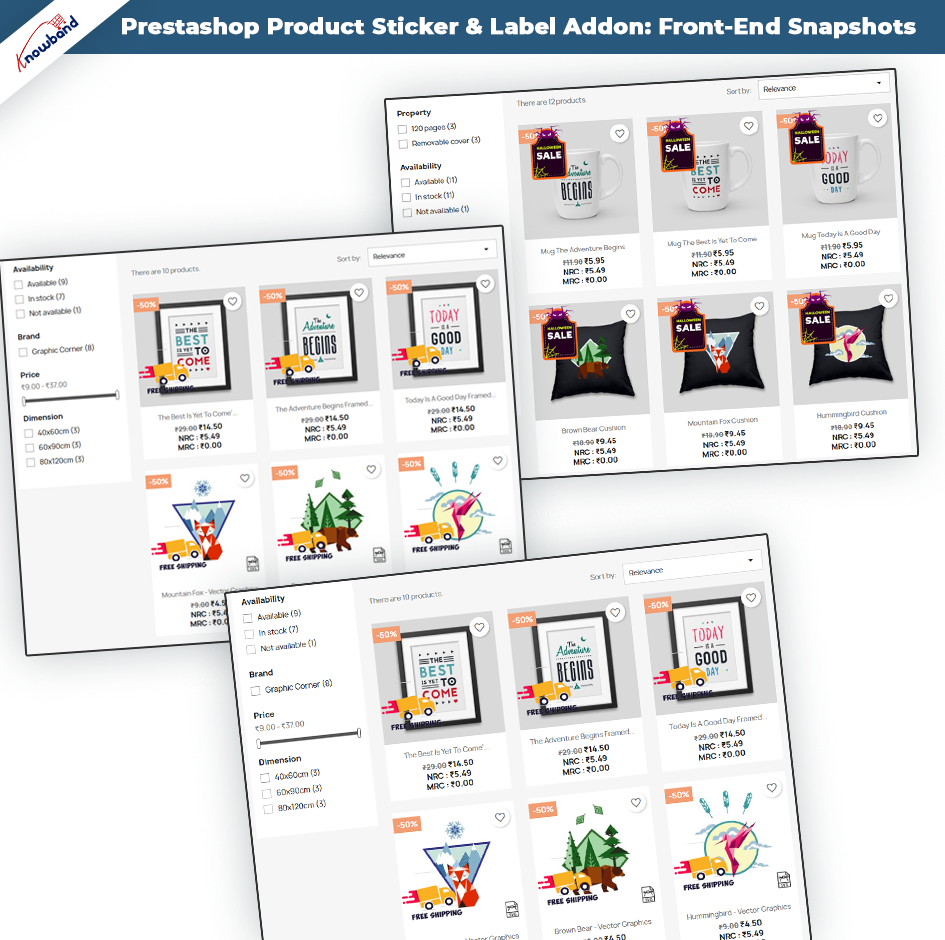
After making the changes as per convenience and saving the data from the module back-end. Prestashop store administrators can immediately assess the impact of their modifications. Prestashop Product Sticker module empowers administrators to effortlessly showcase a stunning array of high-quality stickers on their shopfronts. These visually appealing stickers serve as eye-catching elements that captivate the attention of customers. Which further helps in enhancing the overall aesthetics and professionalism of the online store.


The samples above exemplify the seamless integration and impressive front-end displays. The following examples showcase the versatility and creativity that administrators can harness to create compelling product showcases and leave a lasting impression on their customers.


Note: – Only one sticker can be displayed at once on the product image. 

The stickers will be shown based on the most recent date of creation of the sticker rule. This means that the sticker rule that was created most recently will determine which stickers are displayed first.

For a quicker understanding, please refer to the demo tutorial.