Want to know about the Prestashop One Page Checkout? Click here

One Page Checkout’s value is well known among eCommerce retailers. Furthermore, every eCommerce merchant recognizes the necessity for the same for their business. It’s also one of the few options they have for lowering their shop’s bounce rate and cart abandonment rate. Customers who wish to complete their transactions fast will appreciate Knowband’s Prestashop One Page Checkout.

The One Page Checkout Prestashop allows you to customize your checkout screen. The plugin helps the admin ramp up the checkout process by simplifying the checkout page.

The aspects of the Prestashop One Page Checkout that make it popular:

Checkout as visitors

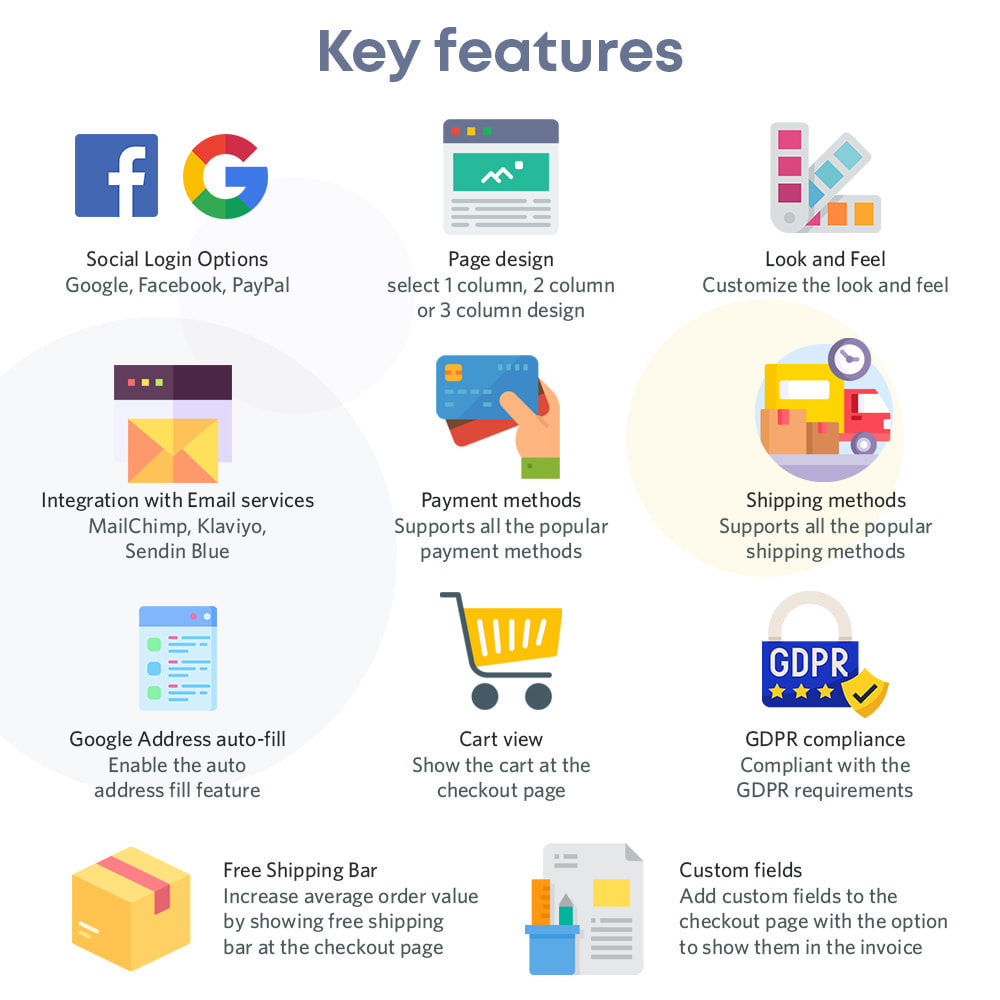
Without registering with the site, new customers may use the guest checkout tools to complete their purchases. Furthermore, this is a good strategy for providing clients with a faster manner to purchase. In truth, they do not require to register on the site.

Use social media to login

Clients will surely find it smoother to log in or register using the third component, social login. On the eCommerce site, buyers may simply log in or create an account. Clients can also complete their transactions without creating an account by just buying the items in their basket. Using a social login option such as Google or Facebook.

Several popular payments are available

The Prestashop One Page Supercheckout can meet the demands of your consumers, whether they wish to pay using PayPal or another method. Further, the consumer will not exit the store without completing the transaction.

There are multiple shipping resources accessible

Prestashop One Step Checkout Addon features multiple delivery methods. Only a few examples are Ulozenka Delivery, Zasielkovn Delivery, LP Express 24 Delivery, and others.

With Inline Validation, you can identify errors right away

Assume that clients make a mistake on the checkout page when entering their information. Furthermore, the Prestashop One Step Checkout Addon still gives users the choice to change it.

Elements in the checkout process are customizable

Any eCommerce company administrator can drag and drop portions of the checkout page up and down relying on the necessity for anything similar. The administrator may do the same thing using the One Step Checkout Prestashop Module’s backend.

Changes to the number of products available

Customers may swiftly modify the number of goods on the checkout page using this functionality of Responsive one page checkout Prestashop. Changing the number of goods on the product page boosts performance.

Filling out Google’s form for auto-address

When a consumer starts typing his address, Google Auto-address fill pops up with address possibilities. It gains distinct traits and yields major outcomes. When you select the recommended address, the zip code and city section appear.

The checkout page comes in three alternative designs

The Prestashop responsive one step checkout addon from Knowband offers three design options. Furthermore, the business administrator may quickly choose the one that best complements the eCommerce site’s theme.

There are integrations with MailChimp, SendinBlue, and Klaviyo

When customers use the Prestashop One Page Checkout, you can quickly import their information into MailChimp, SendinBlue, or Klaviyo.

GDPR adherence

The Prestashop addon complies with GDPR rules.

Checkouts Stats

The Prestashop One Page Checkout now contains a very handy tool that allows store owners to track a variety of data. At the checkout, conversion rates, such as the proportion of aborted checkouts, missed revenue, and so on. The representations indicated above may be viewed for a certain day, week, month, or year by the company owner.

Front Demo.

Admin Demo.

Conclusion

Prestashop One Page Checkout by Knowband is an excellent option for improving sales and profits. The module also enhances the customer’s purchase experience. It’s a win-win situation for both administrators and clients because there are so many solutions available. Please email us at support@knowband.com if you have any issues with the Prestashop One Page Checkout.

👉Explore the Module with Our Video Guide

KnowBand’s One Page Checkout made it simple: CEP Sport website flourishing in Denmark

One Page Checkout is a smart way to put all the fields into a single page and present it to the customer in a sleek and clear format. It is like a box designed to keep your accessories separately but together. A Denmark-based company, CEP Sport added the One Page Checkout Module to their website and they have configured it in a well-designed manner.

The layout customization is quite simple and the addition of the progress bar keeps the user engaged. This article describes how beautifully you can create the Checkout page with One Page Checkout Module and implement the same on your eCommerce website like CEP Sport just did on their website.

What is CEP Sport?

CEPsport.net is a distributor of the German brand CEP and is operated by SportSupport ApS. CEP has the best sportswear on the market in terms of design, feature, and compression. They are even athletes who enjoy being able to move. It is well-supported by the most cutting-edge sports products in the market.

Implementation of One Page Checkout module in CEP Sport Website

From product page to checkout page, every eCommerce website design requires the best UI and UX. It is important to optimize the landing page but more needful to have a checkout page that does not add up to cart abandonment. CEP Sport has chosen KnowBand’s One Page Checkout module for their checkout page and we are glad that they trusted our module for the best Checkout Page Solution.

One Page Checkout has several features that make it best among the other available choices.

-> Visit CEP Sports Store and have a look at their Checkout Page Design by yourself: Click Here

It has a 3-Column Layout with a custom layout design

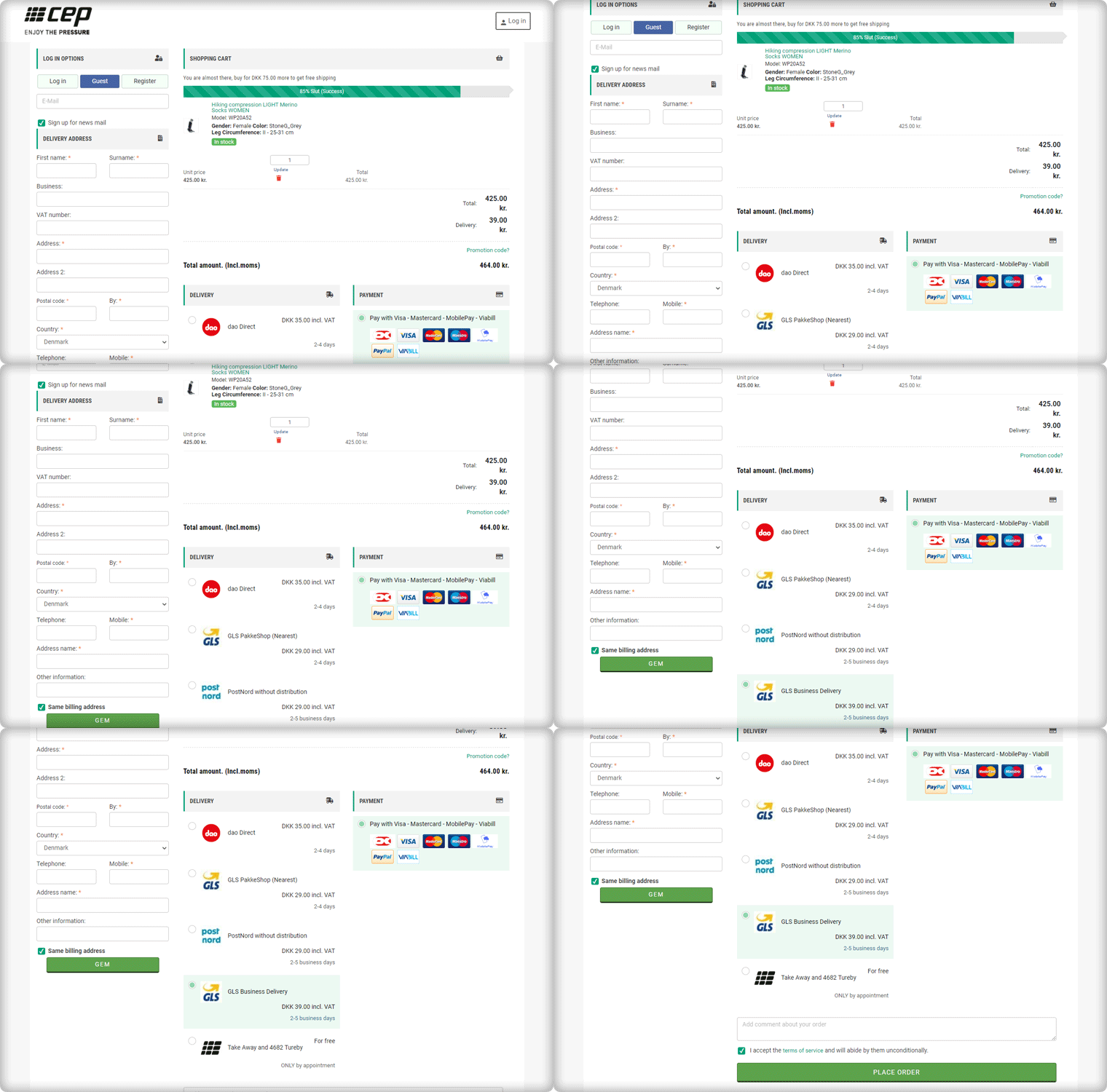
The Checkout page of CEP Sport has a 3-column layout design and the module provides customization features for the layout.

How layout can be customized? It allows you to choose a layout design (1-column, 2-column, 3-column). And, you can shuffle the fields and reposition them with drag and drop functionality.

In the picture below, you can see that the checkout page is customized and CEP Sport has designed it according to their requirement.

Shopping Cart CTA

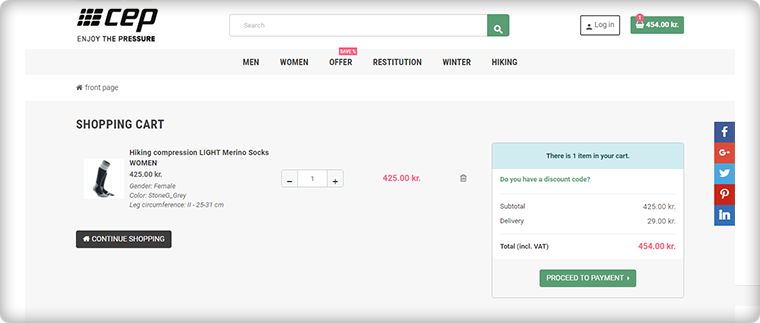
To reach the checkout page, it is important to have clear CTA (Call-to-action) buttons. The website is incorporated with proper CTAs.

Customers can proceed to the checkout page by clicking on the button ‘Proceed to Payment’ and it will redirect them to One Page Checkout.

Login, Guest Checkout, New Registration

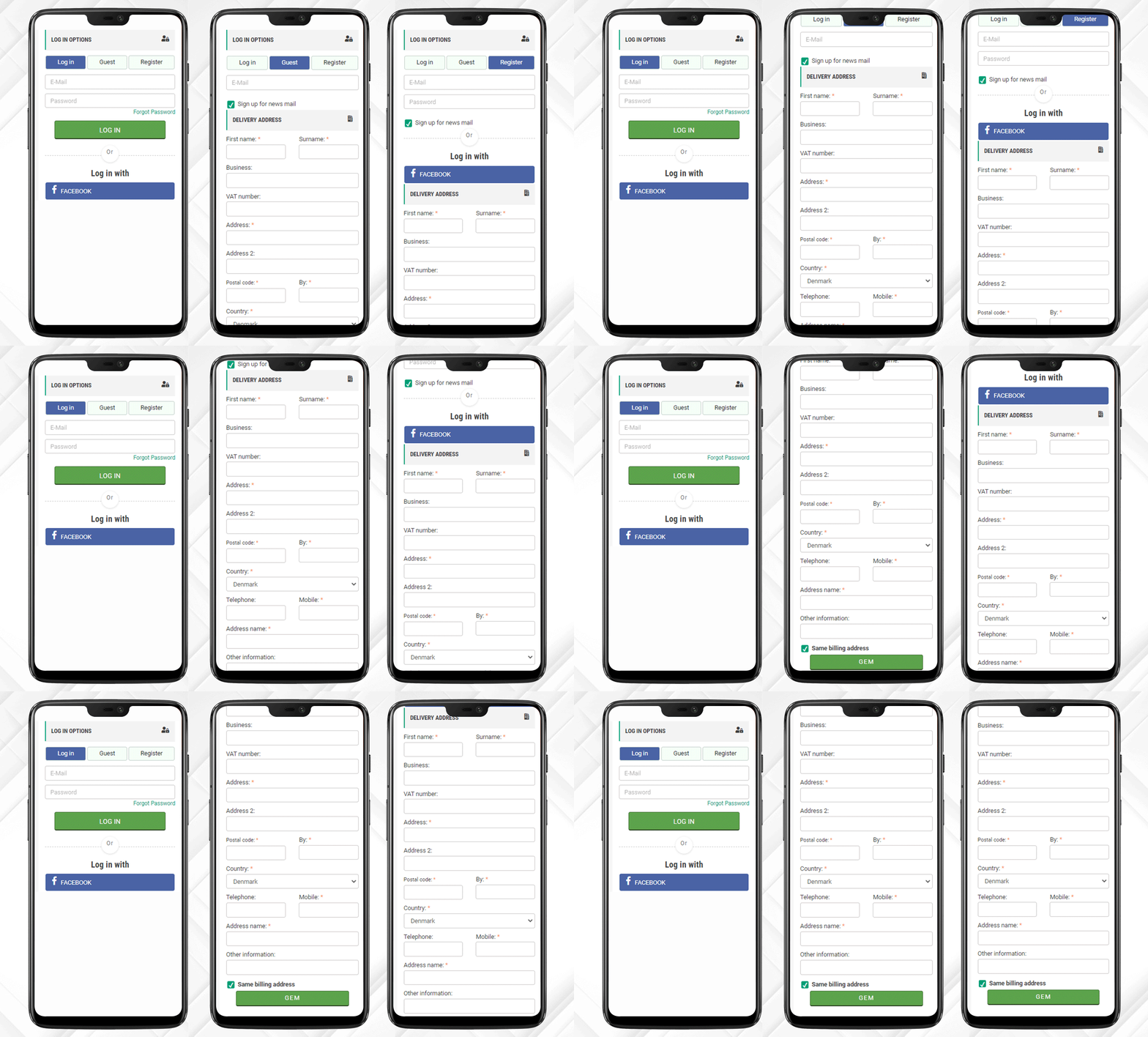
Once, the customer reached the checkout page he/she has to register himself and if he is in rush then Guest Checkout is also available.

One Page Checkout has three options:

  1. Log-in via email
  2. Guest Checkout
  3. Register as a New User

Log-in and Register with Social Media Account

Registration with a Social Media account like Facebook is quite handy and one does not have to remember the password for every eCommerce site. If a customer is registering via Facebook then he only has to provide the delivery address.

And, Checkout Process is sorted!

After registration, login can be done by entering the E-Mail Address and Password or a user can log-in by Facebook account.

Just one click and you are done!

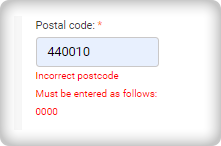
I am Mandatory* and You just filled in the wrong details

The mandatory fields can be highlighted with the Asterisk mark (*). Also, it immediately indicated the errors made by a user during the form filling process, called inline validation.

Delivery and Payment Methods

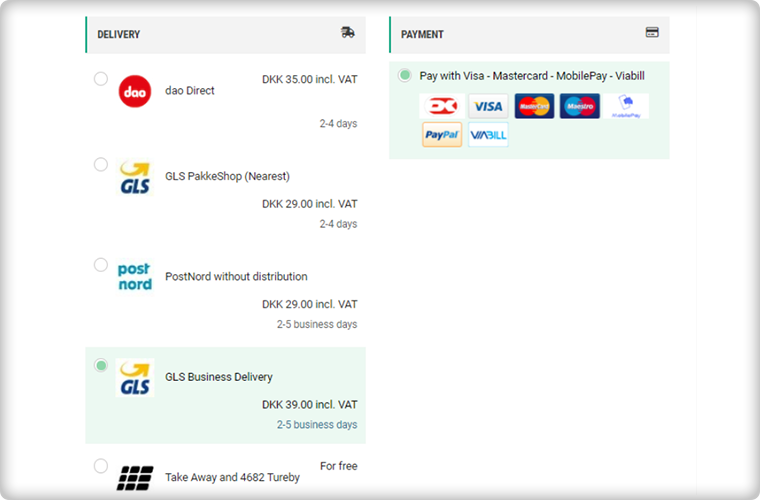
The Single Page Checkout of the CEP Sport website has several shipping choices and Payment Gateways. Along with every shipping method, extra charges (if applicable) are displayed. It is also possible to specify a particular payment gateway with a specific shipping method.

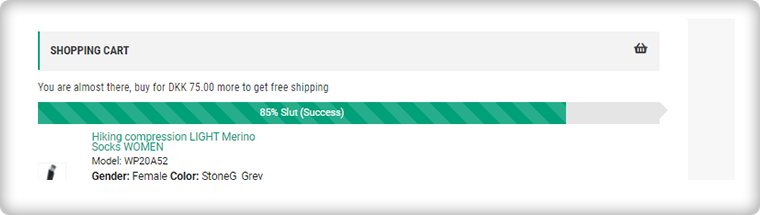
Progress Bar shows the user’s success

This helps the customer to measure the registration progress. If you think this is not necessary then you should know that a human brain works better if it knows how much work is left.

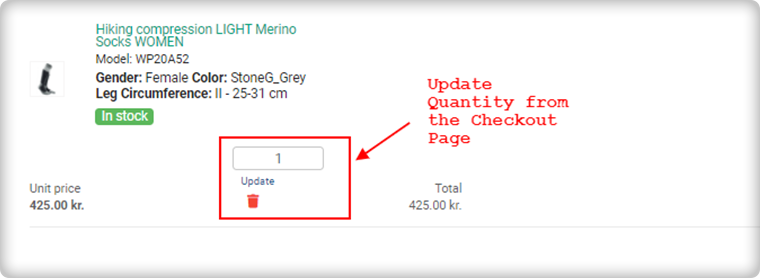
Update product quantity on Checkout Page

Another feature that makes it the client’s choice is the quantity update option. One Page Checkout allows customers to update the product quantity on the checkout page itself.

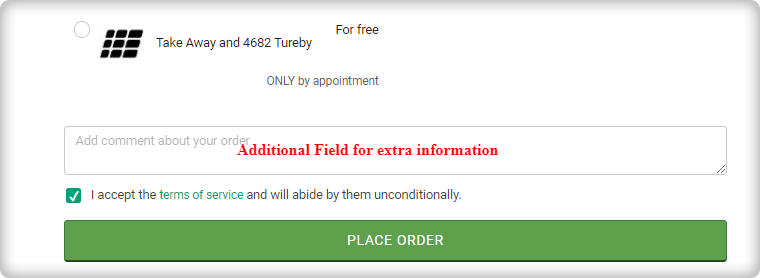
Add an extra field to collect more information

If a customer wants to add any comment about the order then he has an additional field for the same. Admin can add custom fields in the checkout page to collect information from the customer that can be used during email marketing for personalized email.

Since all the information is added correctly by the customer or the guest visitor.

Now, he/she can place the order!

Why do you need One Page Checkout in your online store?

We have had a successful tour of the CEP Sport website’s One Page Checkout. Now, it is time to understand the value of a single page checkout over the default multiple Page checkout available on eCommerce platforms. The One Page Checkout appears to be simpler because it displays all the fields on a single page before the form filling process. Guest checkout and social media login options are proven methods that increase registrations on the online store. It has a statistics analysis tab that shows the conversion rate and bounce rate of the checkout page. Several features make the One Page Checkout Module the client’s first choice for the checkout page.

The detailed article on Multiple-Page Checkout vs. One Page Checkout can explain this in a better way.

Admin Demo of One Page Checkout

Front End Demo of One Page Supercheckout

User Manual 

Support

KnowBand team is always available to help you with eCommerce solutions. We have 100+ modules available for eCommerce platforms like OpenCart, PrestaShop, Magento, WooCommerce, and Shopify. Visit KnowBand Store to explore more.

Get in touch at support@knowband.com and discuss your website requirements with our experts.

[Version 6.0.9 Released] New Features Added to PrestaShop One Page SuperCheckout Addon

PrestaShop One Page SuperCheckout is known as one of the best PrestaShop addons which simplify and fastens the checkout process of your eCommerce store and helps you improve the conversion rate of your business. With the Prestashop Fast Checkout addon, you can eliminate the risk of cart abandonment on the checkout page and can get more successful orders on your store in comparison to the multi-page checkout. Since the users don’t have to go to multiple pages to fill in the checkout details, the addon makes it easy and convenient for your online customers to easily and quickly complete the checkout and place their orders.

Knowband’s PrestaShop One Page Supercheckout addon is one of the best-selling addon with around 8000+ downloads on the Knowband store and 9000+ downloads on the PrestaShop Addon store. The addon has over 500+ 5* reviews on both the stores. Recently, there are some new features have been added to the addon in the new v6.0.9 version. In this article, we will be discussing all these newly added features in the module in brief.

Newly Added Features to the PrestaShop One Page SuperCheckout addon:

1. Select Methods to Display Total Price of the Product: 

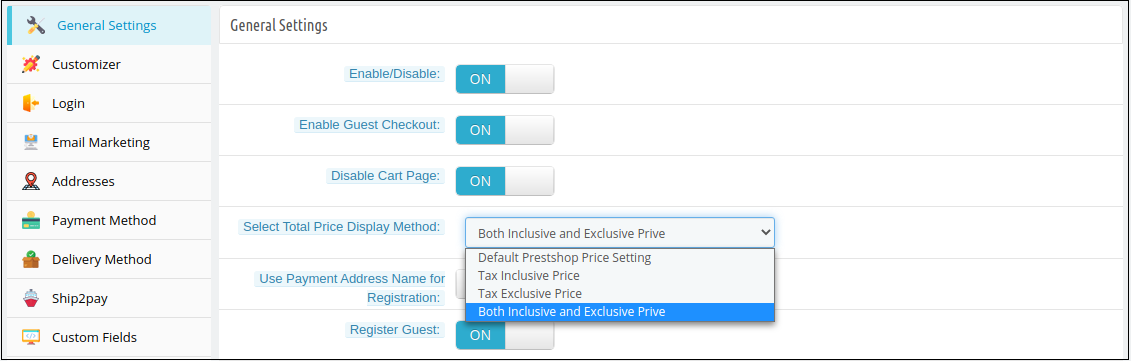
In the latest version of the PrestaShop Quick Checkout addon, the e-merchant can now choose to display the total price of the product in various ways. The store owner can choose to display the PrestaShop default price, the total price of the product inclusive tax or exclusive tax, or both i.e., inclusive and exclusive tax. The store owner can select these display options from the ‘Select Total Price Display Method’ section in the General Settings tab in the back office.

Whichever method is selected by the store owner, will be displayed in the Shopping Cart section on the checkout page.

2. Show Custom Field in the Invoice: 

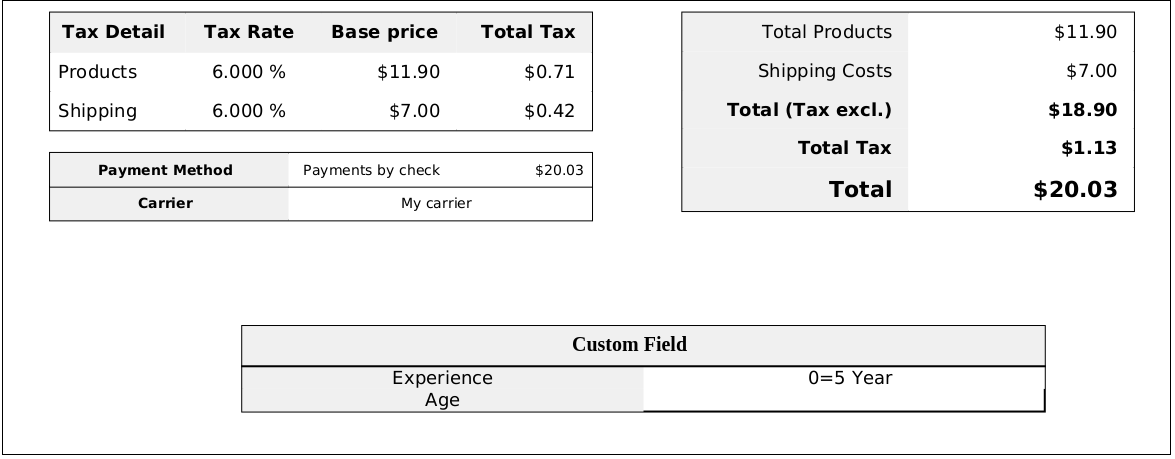
With this feature, the store owner can enable displaying the information filled in the custom field on the invoice of the placed order. The store owner can enable or disable this ‘Display Custom Field in Invoice’ feature from any or all the custom fields in the back office of the PrestaShop Simplified Checkout addon. The customers can view the custom field details in the received invoice of the placed order.

3. Compatibility with PrestaShop v1.7.7.1: 

PrestaShop recently released its latest version PS v1.7.7.1 with some new features and fixes. With the latest update in the PrestaShop One Step Checkout Addon, we have made the addon fully compatible with the latest PrestaShop version v1.7.7.1.

4. Compatibility with Zasielkovna and gmparcellocker modules: 

The module is now completely compatible with the gmparcellocker and Zasielkovna modules.

5. Fixed Compatibility Issue with Mollie Payment Method: 

In the newly released version of the module, all the issues with the compatibility of the module with the Mollie Payment Method have been fixed.

Other Important Features of the PrestaShop Responsive One Step Checkout addon:

1. Social Login feature: 

The addon allows the online shoppers to easily and quickly sign-in with popular social media accounts like Google, Facebook, and Paypal. Login with social accounts not only reduces the manual efforts of the online buyers but also saves them from creating a new account to place their orders.

2. Guest Checkout functionality: 

As many online shoppers don’t like to get registered and share details on a new unknown eCommerce website, this Guest checkout feature in the PrestaShop One Page SuperCheckout helps them place their online orders without registering themselves on the website. The online users can place their orders as guest customers or can also create a new account or sign-in to their existing accounts right from the checkout page without any hassle.

3. Integration with MailChimp, SendinBlue, and Klaviyo: 

The Prestashop One Page Checkout offers integration with popular email service providers such as MailChimp, Klaviyo, and SendinBlue. After the integration of these accounts with the module, the collected database of the online users will automatically be synced to these accounts.

4. Easy Look and Feel Checkout Page Customizations: 

The e-merchant can easily customize the look and feel of the checkout page including change the color of text, button background, button border, etc.

5. Manage Checkout Fields: 

The store owner can easily manage the fields of the page from the back office of the Prestashop One Page SuperCheckout. From showing or hiding the fields or making the fields mandatory or optional, the store admin can do everything easily from the admin interface. He can also re-arrange the steps with drag and drop functionality.

Upgrade to the Latest Version of the addon:

PrestaShop One Page SuperCheckout

User Manual

Admin Demo

Front Demo

You can also download the addon from the official PrestaShop Addon store.