5 Must-Have Prestashop Addons to Boost Engagement and Sales this Holiday Season

The holiday season not only brings a tremendous opportunity to attract new customers and boost sales but also brings increased competition. Therefore, with online shoppers looking for festive, engaging, and seamless experiences, having the right tools in your Prestashop store is essential. Here are five must-have Prestashop Addons by Knowband that can help you create an inviting shopping environment, enhance engagement, and encourage more purchases this holiday season.

1. Prestashop Website Decoration Effect Addon:

Setting a festive ambiance is a simple yet effective way to draw customers in and enhance their shopping experience. The Prestashop Website Decoration Effect Addon lets you add holiday-themed decorations and animations to your website, such as falling snowflakes, twinkling lights, or festive icons. Furthermore, these small touches immediately communicate the holiday spirit, giving your store a warm and inviting feel.

Moreover, the customization options in the website decoration addon for Prestashop allow you to control where these effects appear, their frequency, and how they integrate with your brand’s look and feel. Thus, by creating a visually appealing holiday atmosphere, this Addon encourages customers to stay longer and browse more, increasing the chances they’ll make a purchase.

2. Prestashop Spin and Win Pop-Up Module:

The Second Recommendation: The Prestashop Spin and Win Pop-Up Module is a gamified feature that offers an interactive and exciting experience for visitors. Instead of a traditional discount pop-up, this module presents a spinning wheel where customers have the chance to win a variety of rewards, such as discounts, free shipping, or special offers. Furthermore, the act of spinning the wheel adds an element of fun to the shopping journey, helping to capture visitors’ attention and engage them right from the start.

Additionally, Knowband’s Spin and Win module for Prestashop asks customers to enter their email addresses before spinning, which helps build your mailing list for future promotions.
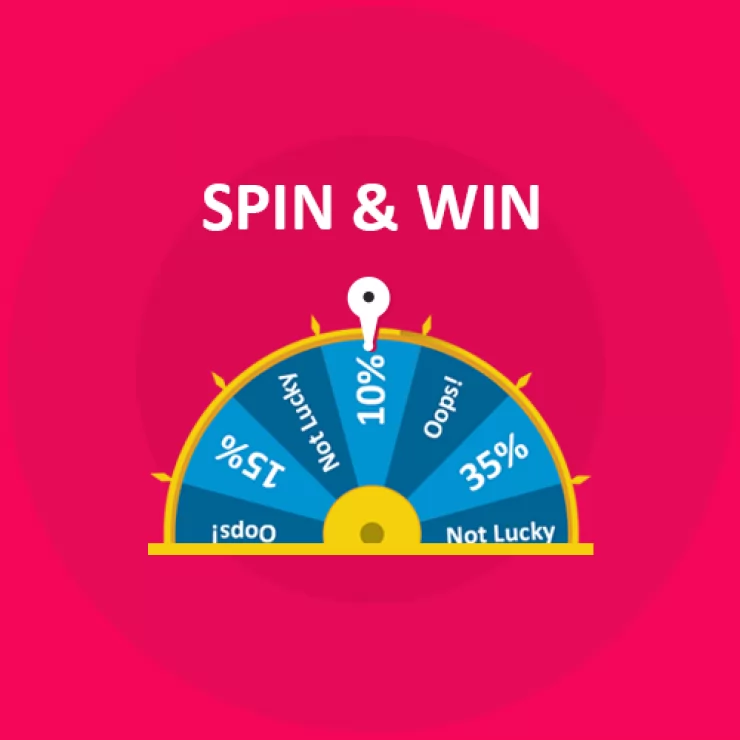
Boost Customer Engagement with Spin and Win Gamified Pop-Up

Use Code: DEAL20 for Extra 20% OFF

SHOP NOW

On the other hand, the sense of excitement created by the possibility of winning a prize can increase conversions as customers are more inclined to complete their purchase to use their reward. Therefore, by incorporating an engaging feature like this, you not only entertain visitors but also encourage them to shop with enthusiasm.

3. Prestashop Product Sticker and Label Addon:

Highlighting specific products or promotions can make a significant difference during the holiday season when customers are often looking for the best deals. The Prestashop Product Sticker and Label Addon allows you to add customizable stickers and labels to your products, such as “Best Seller,” “Holiday Special,” or “Limited Time Offer.” Furthermore, these visual markers help shoppers identify key items and holiday deals quickly, making it easier for them to navigate through your store.

Thus, with the Prestashop Product Sticker Addon, you can customize the design, colors, and placement of the labels to match your store’s holiday theme, ensuring they complement your brand rather than cluttering the page. Moreover, the labels not only make products stand out but also guide customers toward important items and offers, creating a smoother and more effective shopping experience.

Moreover, this can speed up decision-making and lead to quicker purchases, which is beneficial for both customers and store owners during the busy holiday season.

👉Explore the Module with Our Video Guide


4. Prestashop Gift Card Manager Addon:

Gift cards are an increasingly popular gift option, especially during the holidays, as they allow recipients the flexibility to choose their own gifts. The Prestashop Gift Card Manager Addon makes it easy for you to offer digital gift cards, a convenient and thoughtful solution for holiday shoppers. With this Addon, customers can purchase gift cards directly from your store and send them digitally to friends or family members. This is particularly useful for last-minute shoppers who may need a quick gift option that can be delivered instantly.

Furthermore, Knowband’s Prestashop Gift Card Addon also allows for customizations, so you can brand your gift cards with holiday-themed designs that match your store’s aesthetic.

Digital gift cards not only provide a convenient gift option but also encourage future spending, as recipients are likely to spend beyond the card’s value. By offering gift cards, you can cater to holiday shoppers’ needs while also driving additional revenue for your store.

5. Prestashop Gift the Product Addon:

The Prestashop Gift the Product Addon simplifies the process of gifting products, allowing customers to purchase items and send them directly to friends or family with just a few clicks. This feature is perfect for holiday shoppers who want to give a personal gift without going through a complicated checkout process. With this Addon, customers can add recipient details, select a personalized message, and choose gift packaging options if available, creating a seamless gifting experience that adds a personal touch.

Creating a Cohesive Holiday Shopping Experience with These Addons!

Using these five Addons in combination can transform your Prestashop store into a one-stop holiday shopping destination that customers will love. By setting a festive mood with decorations, adding interactive elements like Spin and Win, guiding shoppers with product labels, and offering convenient gifting options, you create a seamless and joyful shopping experience. Furthermore, each Addon plays a unique role in improving the shopping journey, whether it’s enhancing the visual appeal of your store, engaging customers with fun incentives, or simplifying the gifting process. 


Prestashop Gift The Product Addon – User Manual

Introduction of Prestashop Gift The Product Addon

The Prestashop Gift The Product addon by Knowband gives the benefits to both, the customer and the consumer. This module will absolutely help the merchant to increase the sales of the store and on the other hand, it will surely get the customers benefited by offering them products for free. This Prestashop extension will be the best option for a merchant to get the customers to his stores.

Objectives:

With the help of this Prestashop free gift addon by Knowband, the website owners can get the following things:

  • Increase in the customer’s engagement.
  • Reduction of the risk of cart abandonment.
  • Increase in the sale of the store.
  • Customer will be rewarded with freebies.
  • Prestashop gift product encourages the customer to buy things more often.

This Prestashop freebie addon will be one of the best options for the merchant to get the customers to his store.

Installation:

To install this Prestashop freebie addon, please follow the following steps:

1. Add addon folder under modules folder of your system.

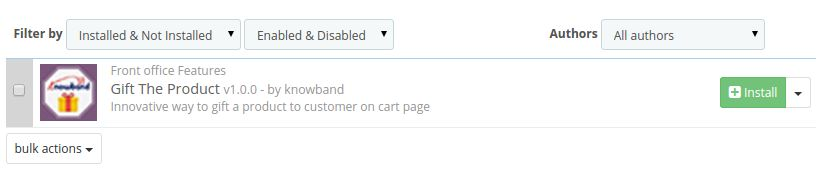
2. After adding this addon folder, system will list the addon on module page under front office feature category as given below:

3. Click install to install Prestashop Addon.

Administration Module:

In admin module, you’ll see following options to configure this Prestashop promotion gift module:

1. General Settings

2. Price Rules

Each section is described in details below:

General Settings:

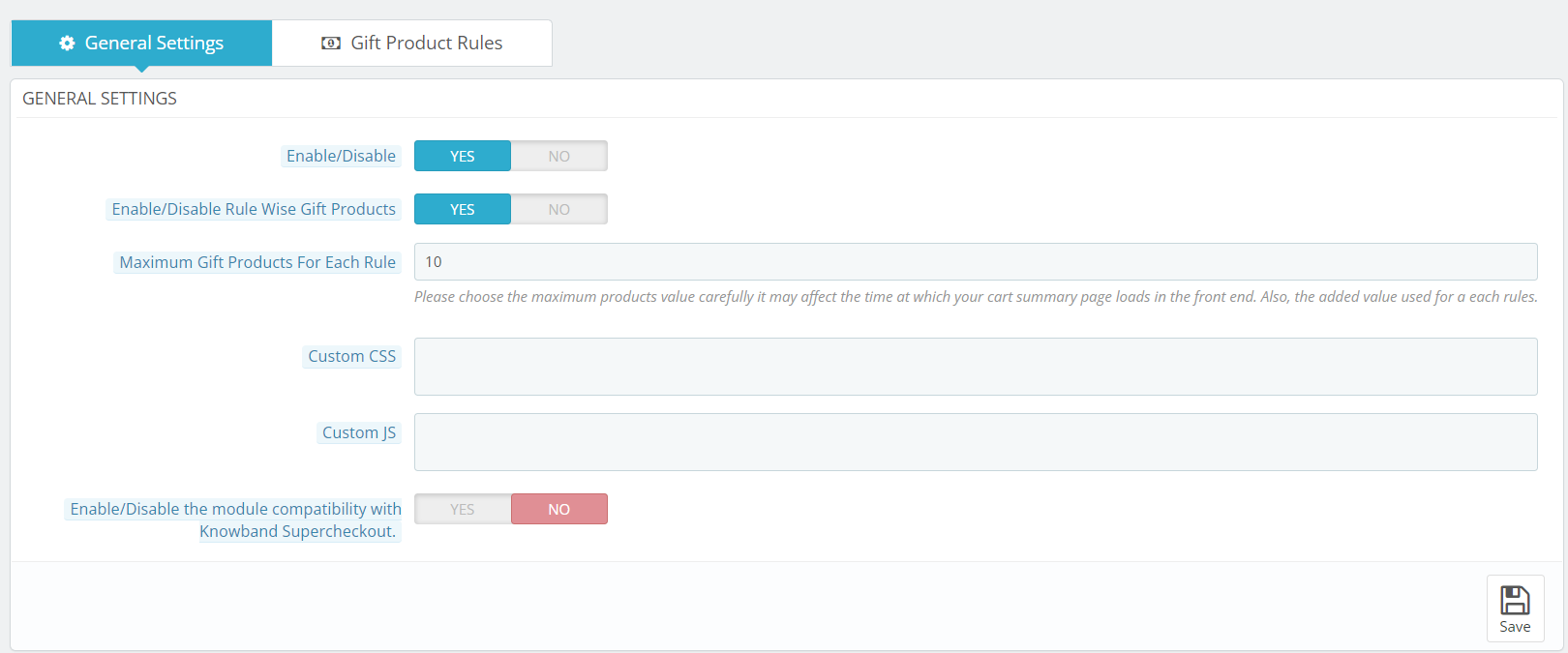
This section of Prestashop gift the product addon will have the following options to configure this Prestashop gift module:

1. Enable/Disable: This option has a toggle button with two specific values, i.e. YES and NO. This Prestashop reward gift addon will only work if this is set to YES. If you select NO, then none of the features will work. By default, this option is set to NO. You’ll need to select YES.

2. Enable/Disable Rule Wise Gift Products: This field is provided so that admin can set the restriction on the number of gift products displayed on the front for selection.

3. Maximum Gift Products For Each Rule: If this field is enabled then customer can chose more than 1 gift product according to the specified rules.

4. Custom CSS and JS: These fields have been given to the admin so that he can change the look and feel of the front end of the Prestashop free gift addon.

5. Enable/Disable the module compatibility with Knowband Supercheckout: This option has a toggle button with two specific values, i.e. YES and NO. This Prestashop reward gift addon will work with Knowband One Page checkout if this is set to YES. If you select NO, then it will not work with One page checkout module. 

Price Rules:

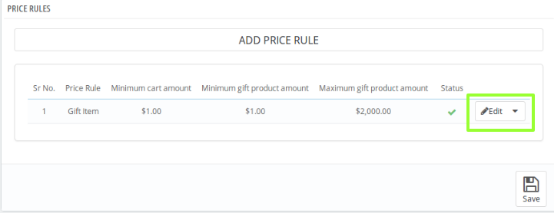
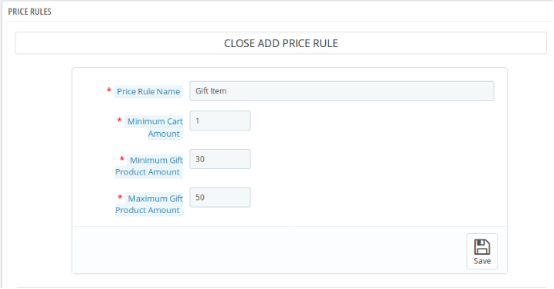
In this section of Prestashop gift module, the admin will have to make the following price rules that will decide the gift product.

1. Price Rule Name: Here, you need to enter the name of the price rule that you want to be saved.

2. Minimum Cart Amount: Now, the admin will have to set the minimum cart amount to decide the Prestashop gift product.

3. Minimum Gift Product Amount: In this field of Prestashop freebie addon by Knowband, the admin will have to enter the minimum product amount of the gift products.

4. Maximum Gift Product Amount: Lastly, the admin will have to enter the maximum product amount of the gift products.

The Gift products which will be in between the entered price range will be shown to the customer in the front end.

This is how the Price Rule section looks like:

On clicking the edit button, a form will appear Where you’ll have to make the desired changes. This is how the Price Rule form looks like:

Front End Module

Once the Knowband Prestashop product purchase reward addon is enabled, a block will appear just below the cart summary on the front end saying “CONGRATULATIONS!! YOU ARE ELIGIBLE TO GET ONE OF THESE GIFTS”. This block will include the gift products according to the price rules which have been decided by the admin in the back-end of Prestashop gift the product addon.

We hope that we have covered all the concerns regarding the installation and product guide of this Prestashop Discount and Promotion Addon.

Prestashop gift the product addon Link: https://www.knowband.com/prestashop-gift-the-product

Admin Demo for Prestashop gift the product addon: https://ps.knowband.com/demo3/16/admin1/index.php?controller=AdminLogin&token=ffa17b0c72ff8c0ab7cf3e344c5ae4fc&redirect=AdminModules&demo_lang=en

Front Demo for Prestashop gift the product addon: https://ps.knowband.com/demo3/16/en/login

Watch Video Tutorial of Prestashop free gift addon:

Tutorial: Watch the YouTube Video Guide

To help you set up and use the Knowband PrestaShop Gift The Product Module, we have prepared a comprehensive YouTube tutorial video. This video demonstrates step-by-step how to install, configure, and manage gift rules to enhance your store’s promotional campaigns.

In This Tutorial Video, You Will Learn:

  • How to install and activate the Gift The Product module in your PrestaShop store

  • How to create gift rules based on cart value, product purchase, categories, or customer groups

  • How to display gifts on product pages and cart pages

  • How to manage multiple gift offers and set priority levels

Watch the tutorial here:


If you are a store owner and looking for an appealing option that can attract the customers to the store, then Prestashop freebie addon is the best solution for offering free gift products to your customers on completing the final checkout of the product.
Gifting can make anybody happy and if you don’t believe then you can simply buy Prestashop gift the product addon and experience better results for your Prestashop store.

For any questions, assistance, or custom modifications related to the Gift The Product module, contact our support team:
support@knowband.com